
Workday Integration Platform: Sync HR & Finance Across All Enterprise Systems
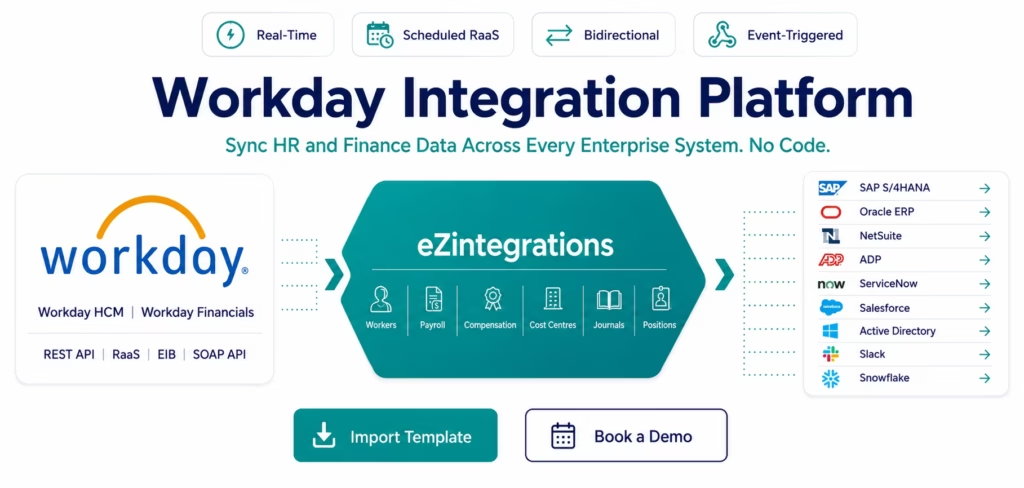
May 16, 2026To integrate Workday with your enterprise systems using eZintegrations: connect your Workday tenant using the Workday REST API connector (OAuth 2.0 with a registered API client in Workday) or the Workday Report as a Service (RaaS) connector for custom report outputs, configure your trigger (a new hire event via Workday webhook, a scheduled pull from a Workday custom report, or an EIB import trigger), select the Workday data objects you need (Workers, Positions, Payroll, Compensation, Organisations, Cost Centres, Journals), map fields to your destination system (SAP, Oracle, NetSuite, ADP, ServiceNow, Salesforce, or any enterprise app), and activate. Most Workday integrations go live in under 30 minutes using a pre-built Automation Hub template.
TL:DR
Workday is your system of record for human capital and financial management. Your employees, their positions, their compensation, their cost Centre allocations, and their payroll data live in Workday. The challenge: every other enterprise system needs that data too.
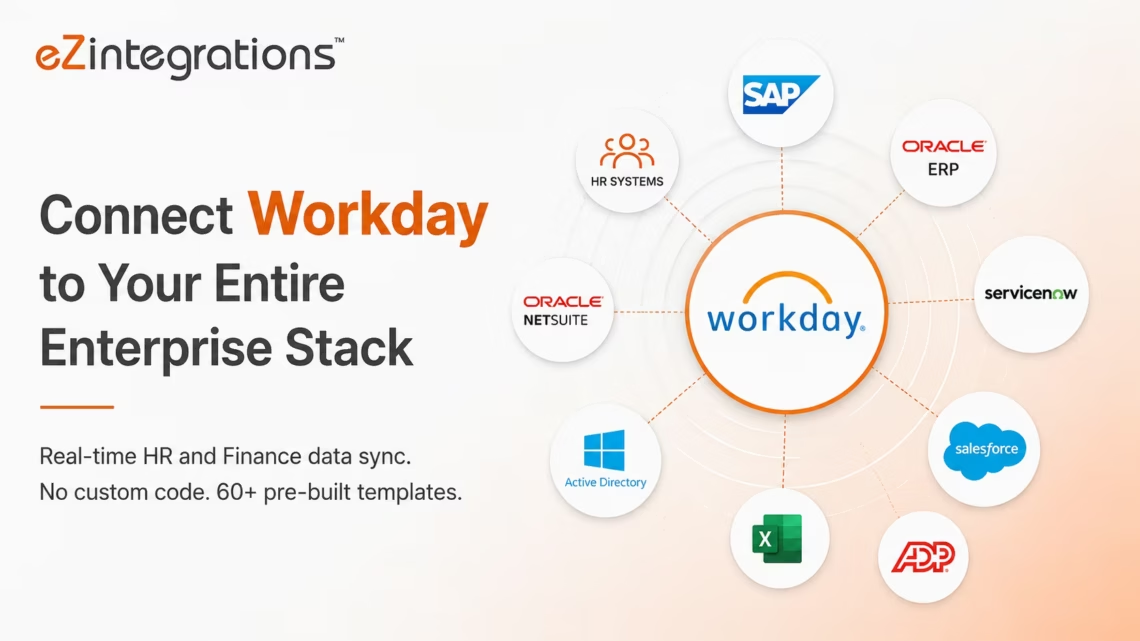
eZintegrations connects Workday to your entire enterprise stack: SAP, Oracle ERP, NetSuite, ADP, ServiceNow, Salesforce, Active Directory, and 1,000+ more. Pre-built templates. Native Workday REST API and RaaS connector. Real-time and scheduled sync. No custom integration code to write or maintain.
Import a Workday Integration Template from the Automation Hub and go live in minutes. Or book a free demo Workday integration session and we will configure your specific HR or Finance workflow in the demo.
Workday Sits at the Centre of HR and Finance: But Not IT
Workday manages your people and your finances better than any other enterprise platform. But Workday data does not stay in Workday.
A new employee in Workday needs an Active Directory account, a ServiceNow onboarding task, a Salesforce user record, and an ERP cost centre allocation. A position change in Workday needs to update the employee’s access rights, the organisational hierarchy in your CRM, and the cost centre assignments in your financial system. A payroll run in Workday needs to post journal entries to your general ledger in SAP, Oracle, or NetSuite.
When Workday is not integrated, your HR team exports spreadsheets and your IT team re-enters data. Every hour of delay between a Workday event and the downstream system update is an operational risk: a terminated employee who still has active system access, a new hire who cannot log in on day one, a payroll journal that has not posted and is distorting your month-end close.
eZintegrations eliminates every one of those gaps with pre-built automation templates that trigger the moment a Workday event occurs.
What You Can Do
Employee Lifecycle: Hire, Change, Terminate
Every change to an employee record in Workday triggers a cascade of updates across enterprise systems. eZintegrations automates the entire lifecycle.
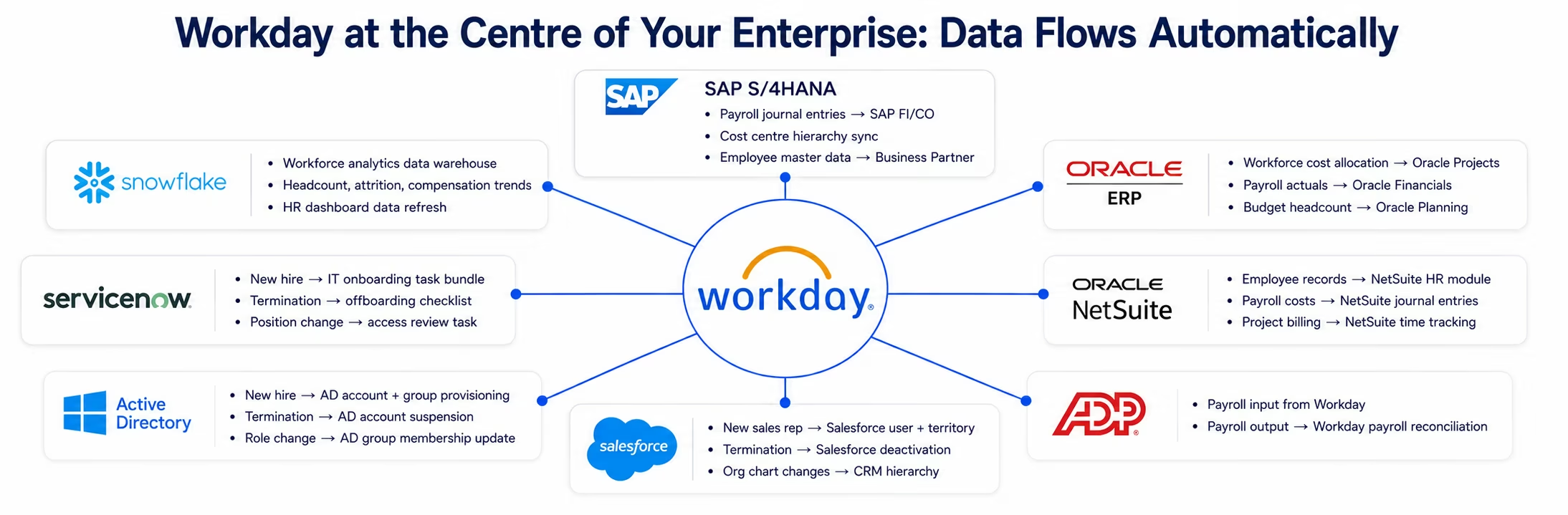
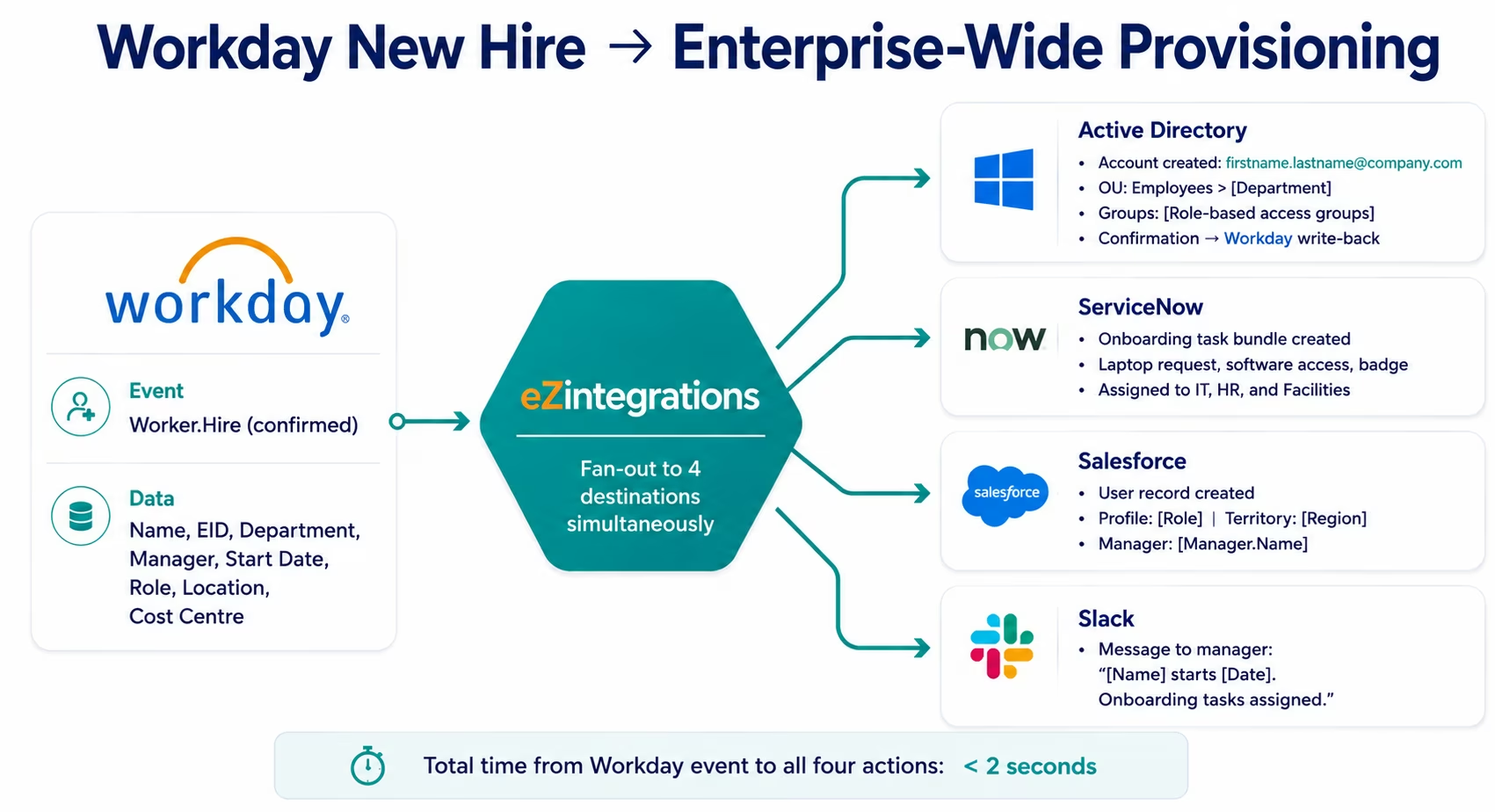
New hire provisioning: When Workday creates a new worker record (hire event confirmed), eZintegrations triggers simultaneously: Active Directory account creation with the correct OU placement and group memberships, a ServiceNow onboarding task bundle (laptop, software access, badge, parking), a Salesforce user record creation with the correct role and territory, and a notification to the manager in Slack. The employee arrives on day one with everything ready: without any IT team manual intervention.
Position and role changes: When a Workday position change is approved (promotion, transfer, role change), eZintegrations updates the employee’s Active Directory group memberships (removing old role access, adding new role access), updates the Salesforce user’s profile and territory, adjusts the ServiceNow user’s permissions, and triggers a review task for any privileged system access that needs re-evaluation.
Termination and offboarding: When a Workday termination event fires, eZintegrations triggers the full offboarding sequence: suspend the Active Directory account (immediate), create a ServiceNow offboarding task with hardware return checklist, deactivate the Salesforce user (transfer their open opportunities), revoke application access across connected systems, and flag the employee’s CMDB asset records for return processing.
Payroll and Financial Data Integration
Workday Payroll generates payroll runs that need to post as journal entries in your general ledger (SAP, Oracle, NetSuite). Workday Financials manages budgets and cost allocations that need to stay in sync with your ERP’s cost centre hierarchy.
Payroll journal posting: After each Workday payroll run, eZintegrations extracts the payroll accounting lines via Workday RaaS (Report as a Service), transforms them to the journal entry format required by your ERP, and posts them to SAP FI, Oracle General Ledger, or NetSuite using the financial connector. Employee cost centre allocations, benefit deductions, tax withholdings, and employer contributions are mapped to the correct GL accounts.
Cost centre hierarchy sync: When new cost centres or organisational units are created in Workday, eZintegrations syncs the hierarchy to your ERP cost centre structure. The Workday organisation hierarchy flows to SAP Controlling (CO) cost centres, Oracle Cost Centres, or NetSuite Departments: maintaining the alignment between your HR org structure and your financial reporting structure.
Budget and headcount sync: Workday Adaptive Planning (or Workday Planning) headcount plans sync to Oracle EPM, SAP Analytics Cloud, or Anaplan for consolidated financial planning. Approved headcount changes in Workday trigger budget line updates in the planning system.
Talent and Recruitment Integration
Workday Recruiting manages the candidate pipeline from job requisition through offer acceptance. eZintegrations connects Workday Recruiting events to your CRM, your background check platform, and your onboarding system.
Offer accepted to onboarding: when a candidate accepts an offer in Workday Recruiting, eZintegrations triggers the pre-boarding workflow: creates the new worker record shell in Workday HCM (ready for the start date), sends welcome communications, initiates the background check with your provider, and notifies the IT team to begin access planning before day one.
Position requisition to CRM: for customer-facing roles (sales, customer success, account management), when a new position is opened in Workday, eZintegrations creates the corresponding open territory or coverage gap record in Salesforce, so the sales operations team can plan territory coverage in real time.
HR Analytics and Reporting
Workday’s reporting data should feed your analytics stack without manual exports. eZintegrations schedules automated pulls from Workday RaaS (custom reports), extracts the structured data, and loads it to Snowflake, BigQuery, or any data warehouse for workforce analytics.
Headcount trends, attrition rates, compensation benchmarking, diversity metrics, time-to-fill, and cost-per-hire all flow from Workday custom reports to your analytics warehouse on your configured schedule. Your HR analytics team works from live data without waiting for a Workday admin to run a report export.
How It Works
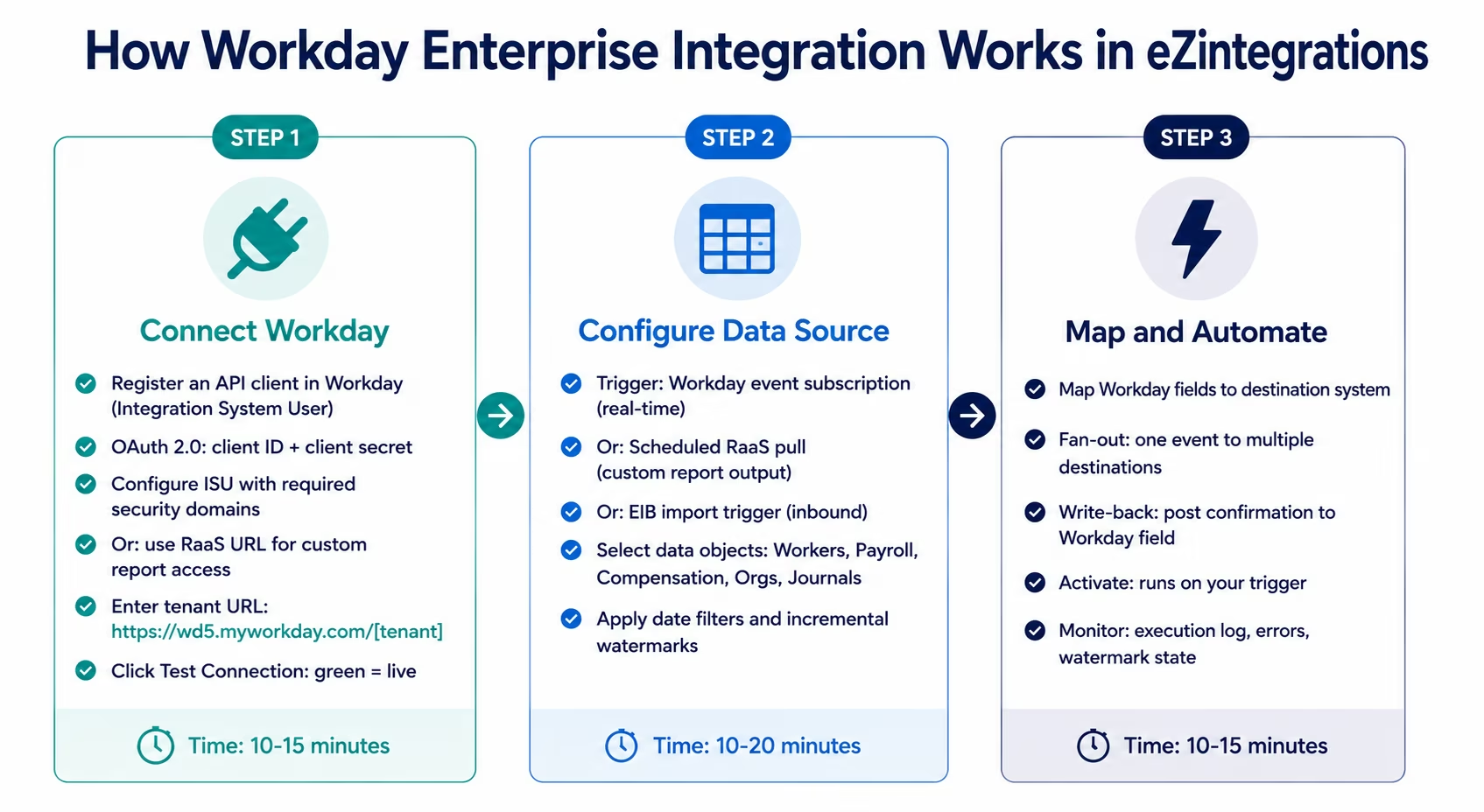
Three steps from Workday credentials to live enterprise integration.
Step 1: Connect Your Workday Tenant
OAuth 2.0 with Integration System User (recommended):
In Workday:
- Create an Integration System User (ISU) with the minimum security domains required for your integration scope.
- Create an API Client (in Workday: Menu → API Clients → Register API Client). Copy the Client ID.
- Create and download the Client Secret.
- In eZintegrations, enter your Workday tenant URL, Client ID, and Client Secret.
Your tenant URL follows the format: https://wd5.myworkday.com/[your-tenant]
RaaS (Report as a Service) access:
For Workday custom report data, configure a custom report in Workday with a RaaS URL. The URL exposes the report output as JSON or XML. In eZintegrations, configure the RaaS connector with the report URL and Workday ISU credentials. The platform schedules pulls from the report on your configured interval.
Click Test Connection. eZintegrations calls the Workday API workers endpoint with a small result set to confirm authentication. A green status confirms your credentials and tenant URL are valid.
Step 2: Configure Your Data Source and Trigger
Workday event subscriptions (real-time): Workday supports outbound integration events via Workday Studio or the Integration Hub. Configure a Workday Business Process to send an outbound call to your eZintegrations webhook URL when a specific event occurs (Worker: Hire, Worker: Terminate, Position Change, Compensation Change, Payroll Complete). eZintegrations receives the event payload in real time and begins processing within 500 milliseconds.
Scheduled RaaS pull (near-real-time): Configure a Workday custom report that returns the data you need (worker records with effective date filter, payroll accounting lines, compensation data). eZintegrations calls the RaaS URL on your configured schedule (hourly, every 4 hours, daily), extracts the JSON or XML output, and processes the records. The platform manages the effective date watermark: each run uses the maximum effective date from the previous run as the filter for the next.
EIB (Enterprise Interface Builder) inbound: For writing data back to Workday (updating custom fields, loading external data into Workday objects), configure a Workday EIB Integration with your data template. eZintegrations generates the correctly formatted EIB input file and triggers the EIB import via the Workday REST API.See the Workday Community EIB documentation for detailed configuration guidance.
Workday data objects supported: Worker, Position, Job Profile, Organisation, Supervisory Organisation, Cost Centre, Pay Group, Payroll Run, Payroll Result, Compensation Plan, Benefit Plan, Time Off, Absence, Performance Review, Job Application, Candidate, Business Process Event.
Step 3: Map Fields and Automate
Preview the Workday data fields extracted from your configured data source and map them to your destination system using the visual field mapper.
Workday-specific field handling:
- Reference IDs: Workday uses Reference IDs for positions, organization’s, workers, and other objects. eZintegrations resolves these to their descriptive values (position title, org name, worker name) or passes the Reference ID to destination systems that use it for their own Workday lookups.
- Effective dating: Workday data is effective-dated. eZintegrations extracts the current effective version of each record unless you specifically need historical data.
- Compensation currency: Workday stores compensation in the worker’s local currency. Configure currency conversion or pass the currency code to the destination system for native handling.
- Custom fields: Workday custom fields (Extended Enterprise Fields) are accessible via the REST API and mappable to destination system fields.
Configure fan-out routing for events that trigger multiple downstream actions (new hire triggers Active Directory, ServiceNow, and Salesforce simultaneously). Configure write-back for integrations
that should post a confirmation or external ID back to the originating Workday record.
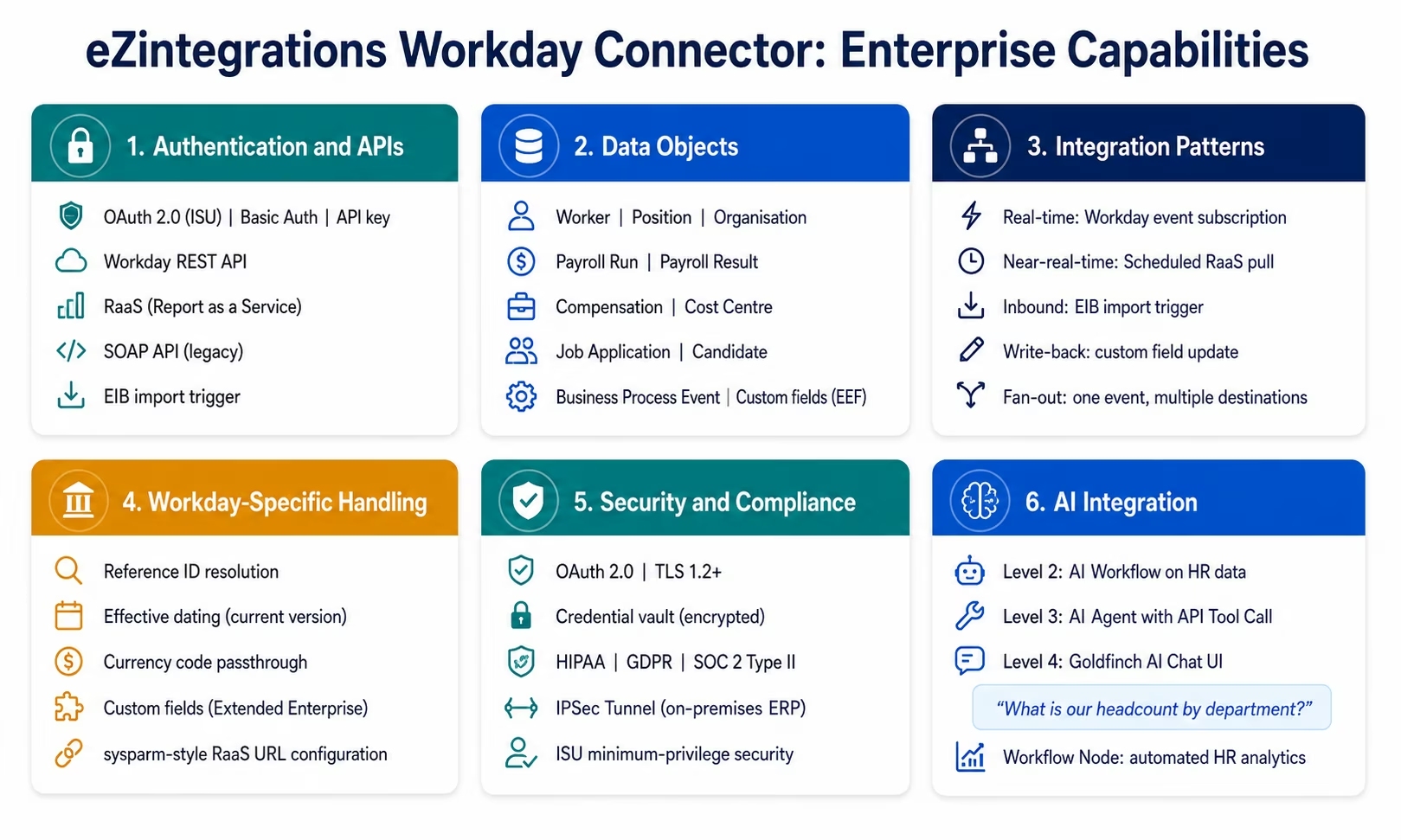
Workday Connector Capabilities
| Capability | eZintegrations Workday Integration |
|---|---|
| Authentication | OAuth 2.0 with Integration System User (ISU), Basic Auth for RaaS, API key |
| API types | Workday REST API, RaaS (Report as a Service), SOAP API (legacy), EIB import trigger |
| Trigger types | Workday outbound integration event (real-time), scheduled RaaS pull, EIB trigger, upstream workflow |
| Data objects | Worker, Position, Organisation, Payroll Run, Payroll Result, Compensation, Cost Centre, Job Application, Candidate, Performance Review, Time Off, Absence, Business Process Event |
| Custom reports | RaaS URL access for any Workday custom report: JSON or XML output |
| EIB inbound | Generate EIB-formatted input files and trigger Workday EIB import via REST API |
| Custom fields | Extended Enterprise Fields (EEF) accessible and mappable |
| Reference ID resolution | Worker, Position, Organisation, and Cost Centre Reference IDs resolved to descriptive values |
| Effective dating | Current effective version extraction; historical version access configurable |
| Write-back | Post confirmation, external ID, or status back to Workday custom fields |
| Fan-out routing | One Workday event to multiple destinations simultaneously |
| Bidirectional sync | Workday as source and destination in same or related workflows |
| Destination systems | SAP S/4HANA, Oracle ERP, NetSuite, ADP, ServiceNow, Salesforce, Active Directory, Slack, Snowflake, BigQuery, and 1,000+ via API Catalog |
| Incremental pull | Effective date watermark for RaaS pulls: platform-managed |
| Error handling | Row-level error logging, automatic retry, dead letter queue |
| Security | OAuth 2.0, TLS 1.2+, credential vault, HIPAA, GDPR, SOC 2 Type II |
| On-premises | IPSec Tunnel for on-premises ERP destinations (SAP ECC, Oracle EBS) |
| AI integration | Workday events as Level 3 AI Agent triggers; Goldfinch AI Chat UI for HR analytics; API Tool Call for agent data retrieval |
| Templates | 60+ Automation Hub templates covering Workday HCM, Workday Financials, and Workday Recruiting integrations |
Why eZintegrations for Workday Integration
Handles Every Workday Integration Pattern
Workday exposes data through four different mechanisms: the REST API (for worker and HR data), RaaS (for custom report outputs), SOAP API (for legacy integrations), and EIB (for inbound data loading). Most integration tools support one or two of these. eZintegrations supports all four in the same platform, letting you use the right mechanism for each use case without switching tools.
RaaS is particularly powerful for Workday data extraction because it lets your Workday admin define exactly which fields are needed and in what format, without requiring the integration platform to navigate Workday’s complex API structure. The RaaS URL becomes a stable, well-defined interface between Workday and the integration platform.
Real-Time Employee Events, Not Overnight Batch
Traditional Workday integrations run overnight. A new hire confirmed in Workday on Tuesday afternoon has their Active Directory account created on Wednesday morning. A terminated employee’s account is not suspended until the next morning’s batch.
eZintegrations processes Workday events in real time via Workday outbound integration subscriptions. The hire event fires, and within 500 milliseconds, eZintegrations begins creating the Active Directory account, the ServiceNow ticket, and the Salesforce user. The terminated employee’s account is suspended within seconds of the Workday termination event, not 18 hours later.
Payroll Journal Posting Without Custom ETL
The payroll-to-ERP GL posting workflow is one of the most common and most painful manual processes in finance operations. Workday payroll generates hundreds of accounting lines per payroll run. Posting those lines to SAP FI, Oracle GL, or NetSuite typically requires a custom ETL programmer or a spreadsheet intermediary.
eZintegrations replaces both. The Workday RaaS pull extracts the payroll accounting lines. The transformation step maps payroll fields (pay component, cost centre, amount) to GL fields (G/L account, cost centre, posting period, document type). The SAP, Oracle, or NetSuite connector posts the journal entries. The entire flow runs automatically after each payroll run completes: no ETL code to maintain, no spreadsheet to populate.
Bidirectional HR Data Flows
Workday needs to receive data from external systems as well as provide it. ADP payroll results need to reconcile back to Workday. Background check statuses need to update the Workday candidate record. External training completion records need to post to Workday’s learning history.
eZintegrations handles bidirectional Workday flows in the same platform: Workday as source (REST API or RaaS pull), Workday as destination (REST API write or EIB import), and combined source-and-destination workflows where Workday data is enriched by an external system and posted back.
All Four Automation Levels for HR and Finance
Level 1 (iPaaS Workflows): rule-based HR automation. New hire event in Workday triggers Active Directory provisioning, ServiceNow task, and Salesforce user creation. Payroll run complete triggers GL journal posting to SAP.
Level 2 (AI Workflows): AI-enhanced HR operations. When a Workday termination event fires, the AI Workflow classifies the termination type (voluntary, involuntary, retirement) and routes the offboarding workflow differently for each. Document Intelligence extracts structured data from offer letters and posts to the Workday candidate record.
Level 3 (AI Agents): autonomous HR process handling. The HR Exception Agent receives a flagged compensation anomaly from a Workday report, retrieves the employee’s compensation history via API Tool Call, compares to the band for the role and level, searches the HR policy knowledge base for relevant guidance, and produces a structured recommendation for the HR business partner.
Level 4 (Goldfinch AI): natural language HR and Finance analytics. The CHRO asks the Chat UI: “What is our voluntary attrition rate for the sales organisation this quarter versus last quarter?” Goldfinch AI queries Workday via the Workflow Node, aggregates the data, and returns the answer with a supporting chart. The CFO asks: “Which payroll cost centres are over budget this month?” The same mechanism returns live data from Workday Financials without a report request.
Import a Workday Integration Template
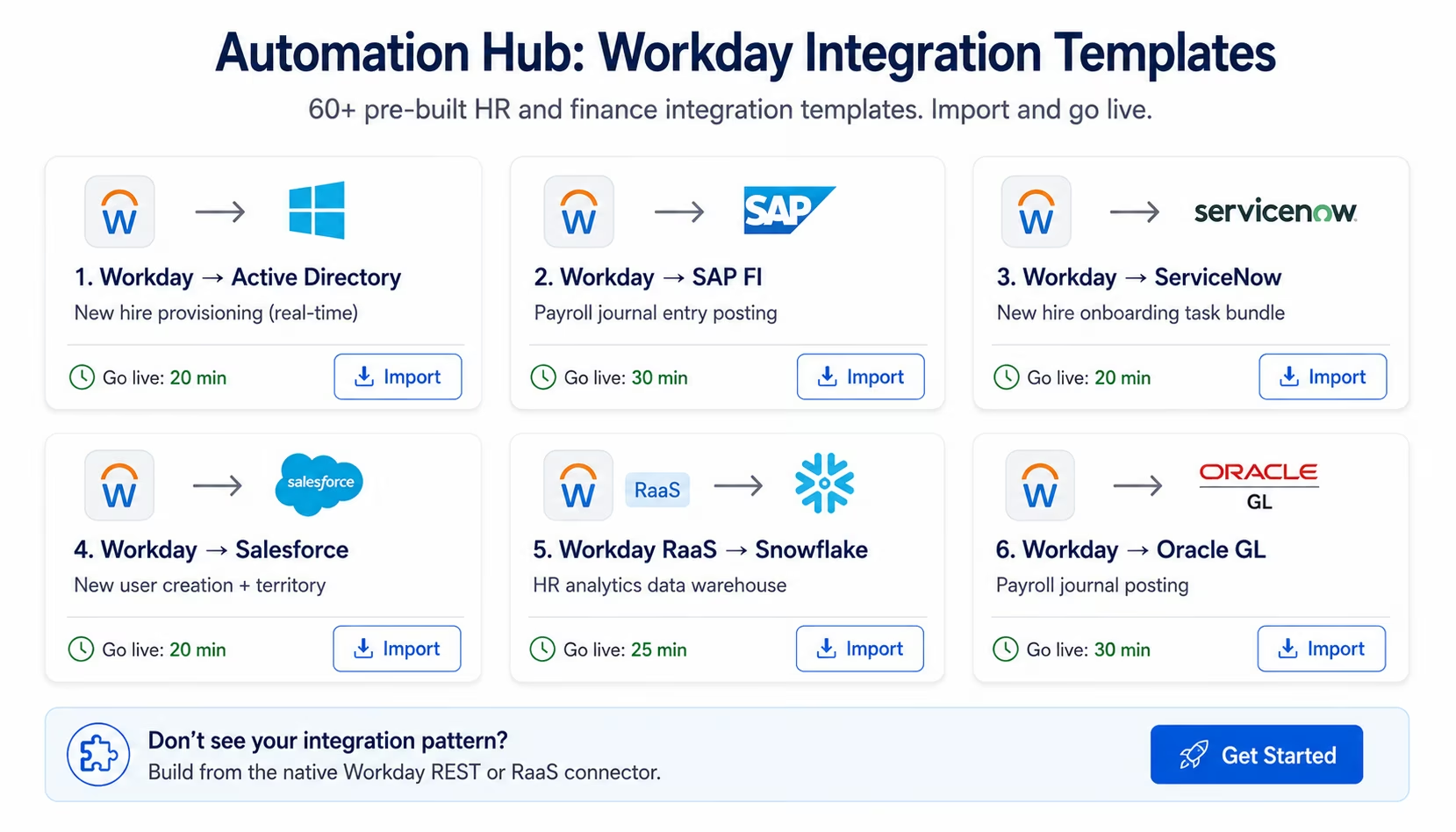
The Automation Hub contains 60+ pre-built Workday integration templates covering every major Workday HCM, Workday Financials, and Workday Recruiting integration pattern.
Popular Workday integration templates:
- Workday new hire to Active Directory provisioning (real-time, event-triggered)
- Workday termination to Active Directory suspension + application offboarding
- Workday new hire to ServiceNow onboarding task bundle
- Workday position change to Active Directory group update + Salesforce profile
- Workday payroll to SAP FI journal entry posting
- Workday payroll to Oracle General Ledger journal posting
- Workday payroll to NetSuite journal entry
- Workday cost centre sync to SAP CO
- Workday worker data to Snowflake HR analytics warehouse (scheduled RaaS)
- Workday new hire to Salesforce user creation with territory
- ADP payroll results to Workday payroll reconciliation
- Workday candidate offer accepted to pre-boarding workflow
Browse all Workday templates in the Automation Hub
Import the template for your integration pattern, enter your Workday tenant URL, ISU credentials, and destination system credentials, adjust field mappings for your Workday configuration, and activate. Most Workday templates go live in under 30 minutes.
FAQs
1. How do I integrate Workday with eZintegrations?
In Workday, create an Integration System User (ISU) with the minimum security domains for your integration scope, and register an API Client to get your OAuth 2.0 Client ID and Secret. In eZintegrations, enter your Workday tenant URL, Client ID, and Client Secret, and click Test Connection. Select your trigger: a Workday outbound event subscription for real-time processing, or a scheduled RaaS pull for near-real-time data extraction from custom reports. Select your data objects, map fields to your destination system, and activate.
2. Does eZintegrations support Workday enterprise integration?
Yes, eZintegrations provides a native Workday connector supporting the Workday REST API, RaaS, SOAP API, and EIB inbound import. Supported objects include Worker, Position, Organisation, Payroll Run, Compensation, Candidate, Performance Review, Time Off, and Business Process Events.
3. How long does Workday integration take in eZintegrations?
Using an Automation Hub template: 20-35 minutes including Workday ISU and API client setup. Building a custom integration with the Workday REST API connector: 60-90 minutes for a single data object and destination.
4. Is there a free Workday integration template?
Yes, The Automation Hub contains 60+ pre-built Workday integration templates included in all eZintegrations subscription tiers at no additional charge.
5. How does eZintegrations handle Workday RaaS?
Workday RaaS allows admins to create custom reports and expose them via JSON or XML URLs. eZintegrations calls the URL on your configured schedule, parses the output, and processes the records automatically.
Your Workday Data, Finally Connected
Workday is only fully valuable when its HR and financial data flows automatically to the systems that depend on it. Your ERP needs the payroll journals. Your IT systems need the hire and terminate events. Your CRM needs the sales headcount. Your analytics platform needs the workforce data.
eZintegrations delivers 60+ pre-built Workday integration templates, native REST API and RaaS connectivity, real-time event processing, EIB inbound support, payroll journal posting without custom ETL, and all four automation levels: from rule-based provisioning to Goldfinch AI natural language HR analytics.
Import a Workday integration template from the Automation Hub and have your first HR workflow live today.
Book a free demo and we will configure your specific Workday workflow in the demo.

