
AI Workflow Automation for Startups: Enterprise-Grade Pipelines Without Enterprise Overhead
May 16, 2026AI workflow automation for startups embeds intelligent AI nodes: Document Intelligence, LLM Classification, Data Analysis, Semantic Matching: directly inside your integration pipelines, so your data flows do more than move data: they read documents, classify text, detect anomalies, and route intelligently without manual review. eZintegrations delivers Level 2 AI Workflows for startups with pre-built templates that go live in days: classify support tickets by urgency before they reach the queue, extract contract terms from PDFs automatically, detect churn signals from product usage data in real time, and route leads intelligently based on firmographic and behavioural signals.
TL;DR:
- The integration workflows you built in Row 95 move data reliably. AI workflows move data intelligently. The difference: an AI workflow does not just transfer a support ticket from Intercom to Jira: it reads the ticket, classifies it by urgency and type, enriches it with the customer’s health score from the CRM, and routes it to the right team with a pre-assessed priority label.
- Four AI capabilities are available as native workflow nodes in eZintegrations: Document Intelligence (reads PDFs, contracts, invoices, forms), LLM Classification (categorises text by any criteria you define), Data Analysis (detects anomalies in data streams), and Semantic Matching (identifies similar records across different naming conventions).
- These are not bolt-on AI features. They run natively within eZintegrations: no OpenAI API key to manage, no data leaving your integration infrastructure to an external LLM provider.
- Five startup AI workflow patterns in this guide: intelligent support ticket routing, contract intelligence, churn signal detection, intelligent lead scoring, and document-driven onboarding.
- Add AI to your existing integration pipeline in hours. No data science team. No ML infrastructure. No enterprise budget.
What AI Workflows Are (and What Makes Them Different from Regular Automation)
If you already have the basic integration plumbing in place: Stripe events updating HubSpot, product events flowing from Mixpanel to your CRM, churn events cascading automatically: you have Level 1 automation. It moves data reliably. What it does not do is understand that data.
Here is the practical difference:
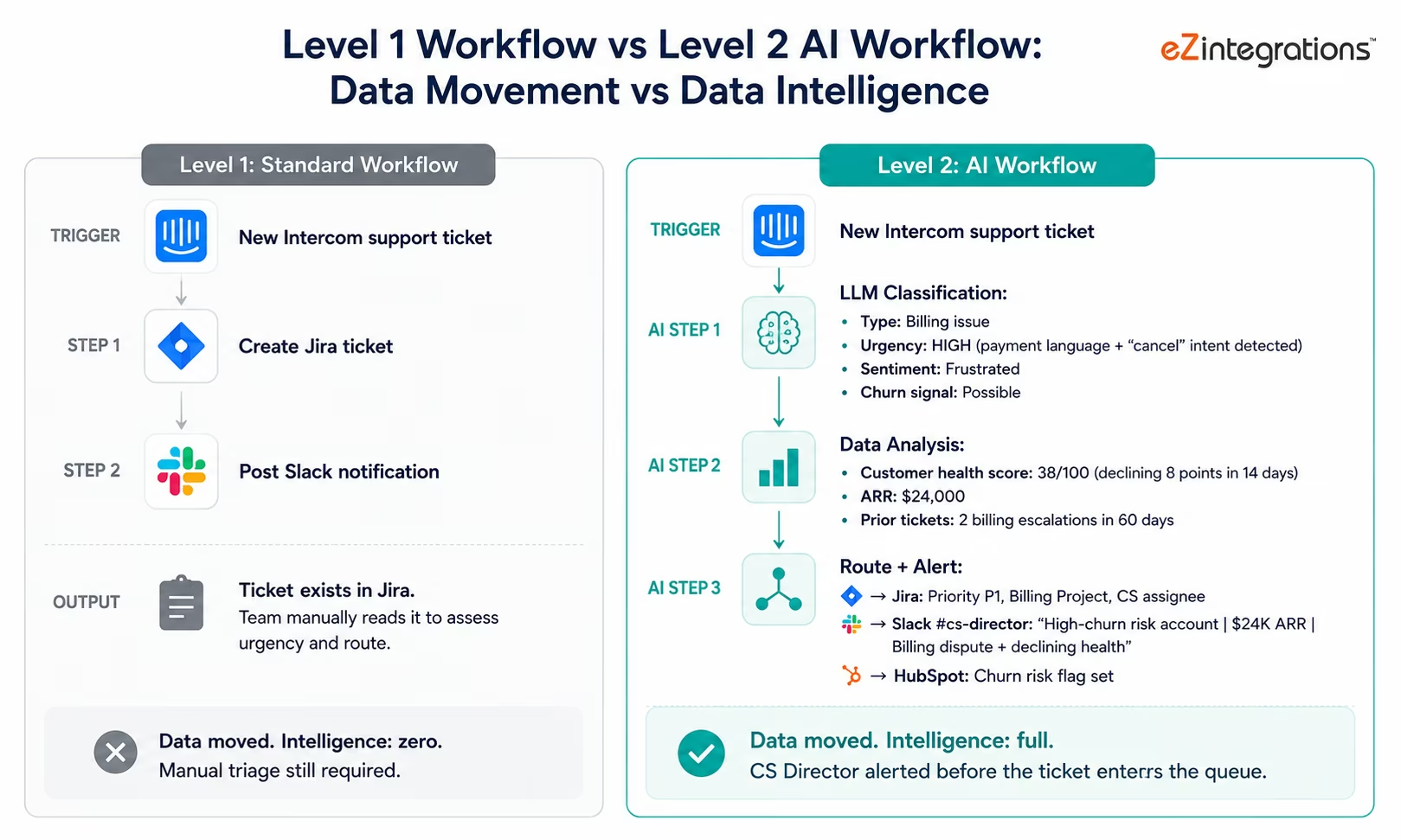
Level 1 workflow (data movement): a new support ticket arrives in Intercom → the workflow creates a corresponding Jira ticket and posts a Slack notification to the support channel. The data moved. Nobody made any judgment about the ticket.
Level 2 AI workflow (data intelligence): a new support ticket arrives in Intercom → LLM Classification reads the ticket text and classifies it: type (billing issue, product bug, feature request, churn signal), urgency (critical, high, medium, low), and sentiment (frustrated, neutral, positive). Data Analysis checks whether the customer’s health score has been declining over the last two weeks. The workflow then routes the ticket to the correct Jira project, with the urgency label pre-set, with the customer’s health score and subscription tier attached, and with a Slack alert to the CS Director if the combination of ticket type “billing” + declining health score crosses the configured churn risk threshold.
The ticket still moved. But now it arrived at the right destination with the right priority, with context assembled, and with the high-risk cases escalated automatically: without anyone reading the ticket first.
This is the AI layer in a workflow: not replacing the data movement, but making it intelligent.
Traditional workflow automation focuses on moving data between systems using predefined rules, while AI workflows add intelligence layers that can classify, analyse, and route information dynamically.
McKinsey research shows that startups deploying AI workflow automation in their support, sales, and finance pipelines reduce manual triage and routing time by 60-80%Additional AI automation implementation research and operational insights are available from McKinsey QuantumBlack Insights. and improve routing accuracy by 35-45% compared to rule-based routing alone. Gartner projects that by 2027, over 70% of growth-stage SaaS companies will use AI workflow nodes as standard components in their integration architecture.Broader enterprise automation and AI workflow platform trends are tracked by Gartner IT Research.
The Four AI Nodes Every Startup Should Know
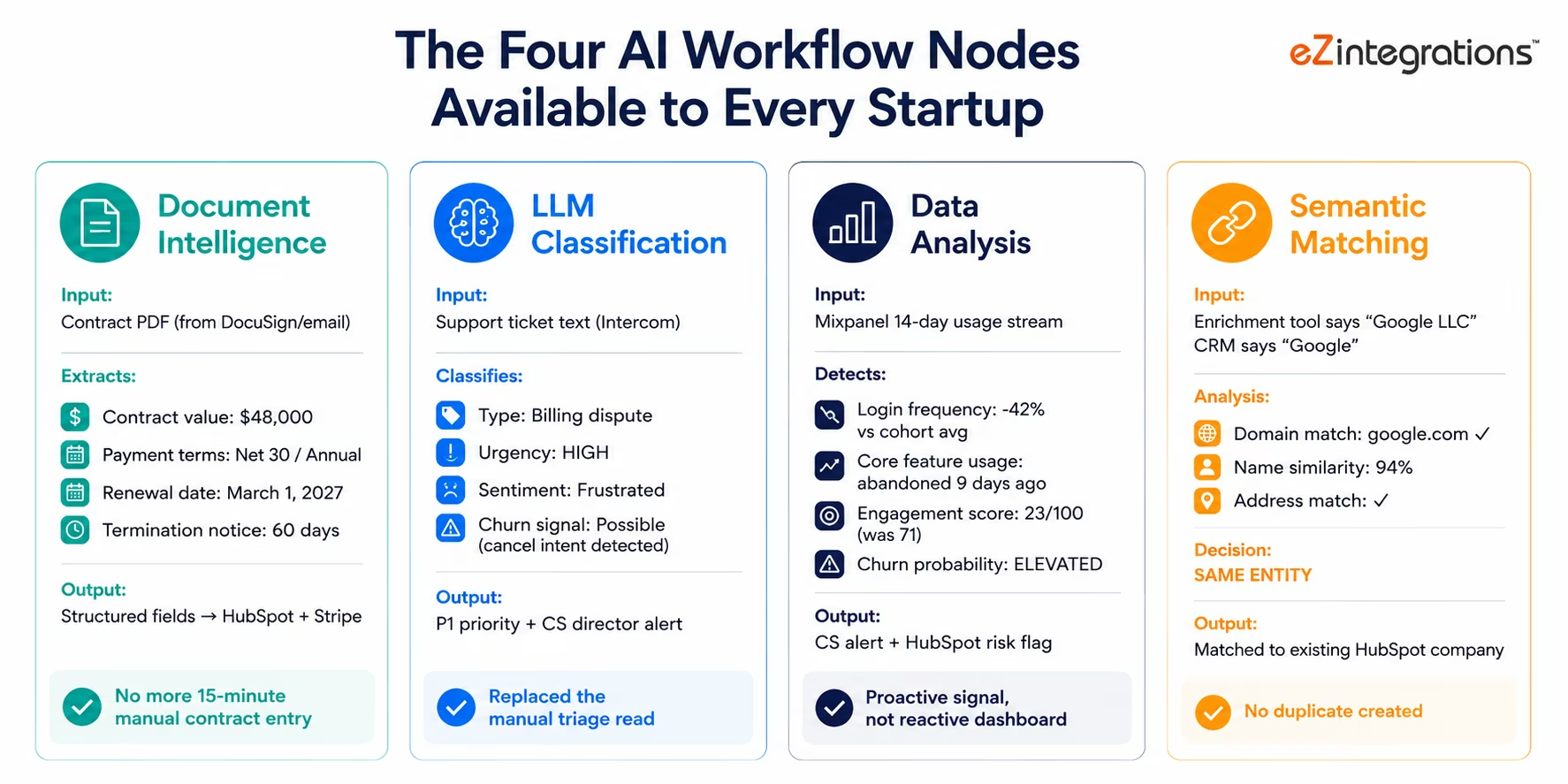
eZintegrations delivers four AI capabilities as native workflow nodes. You add them to existing workflows: or build new workflows around them: without any ML infrastructure, data science team, or external API management.
Node 1: Document Intelligence
What it does: reads structured and unstructured documents (PDFs, Word docs, scanned images, email attachments) and extracts specified fields as structured data.
Startup applications:
- Read customer contracts and extract deal terms (contract value, payment terms, renewal date, termination clause) automatically
- Process vendor invoices and extract line items for accounting sync
- Read application or intake forms and extract structured data for CRM creation
- Process signed NDAs and extract effective date and party names for contract tracking
Why startups care: the moment you start closing $20K+ deals, contracts arrive as PDFs. Manually extracting the terms into your CRM and billing system costs 15-20 minutes per deal. Document Intelligence makes this instant.
Node 2: LLM Classification
What it does: reads any text: emails, support tickets, form submissions, Slack messages, product feedback: and categorises it according to criteria you define.
Startup applications:
- Classify support tickets by type (billing, bug, feature request), urgency, and churn risk signal
- Categorise inbound sales inquiry emails by intent (pricing question, demo request, enterprise inquiry, spam)
- Tag product feedback by feature area, sentiment, and priority signal
- Classify job applications by qualification level based on resume text
- Route incoming Typeform responses to the right team based on response content
Why startups care: every startup has unstructured text arriving in multiple channels. The moment your inbound volume exceeds what a human can manually triage without lag, classification becomes a bottleneck. LLM Classification replaces the manual read-and-tag step.
Node 3: Data Analysis
What it does: performs statistical analysis on data within or alongside a workflow: detecting anomalies, calculating trends, and generating structured findings that trigger downstream routing decisions.
Startup applications:
- Detect statistically significant churn signals in product usage data (declining login frequency, feature abandonment, below-average engagement versus cohort peers)
- Identify revenue anomalies in Stripe data (sudden MRR drop, unexpected refund spike, subscription discount pattern)
- Calculate lead quality scores from multiple signals (firmographic, behavioural, engagement)
- Detect data quality issues in incoming data feeds (missing fields, out-of-range values, duplicate records)
Why startups care: most startup analytics is reactive: you look at dashboards after the week ends. Data Analysis embedded in a workflow makes it proactive: anomalies are detected and routed as they occur, not at the next scheduled dashboard review.
Node 4: Semantic Matching
What it does: identifies when two pieces of text refer to the same entity even when expressed differently: matching company names, product names, person names, or any entity across different systems with different naming conventions.
Startup applications:
- Match incoming leads to existing CRM accounts (HubSpot, Salesforce, Pipedrive) when the company name is formatted differently (“Google LLC” in an enrichment tool versus “Google” in HubSpot)
- Deduplicate customer records across CRM and billing systems
- Match support tickets to known product issues when described differently by different customers
- Map product feedback to existing feature requests across different terminology
Why startups care: as soon as your startup has multiple data sources describing the same entities (a sales tool, a CRM, a billing system, a product analytics platform), the same company appears with different name formats. Semantic Matching prevents duplicates and enables unified customer records without manual deduplication.
Before vs After: AI Workflow Transformation for Startups
| Process | Before AI Workflows | After AI Workflows |
|---|---|---|
| Support ticket routing | Manually read and tag each ticket for priority and team (5-10 min/ticket × volume) | LLM classifies type, urgency, churn signal on arrival: auto-routed with pre-set priority |
| Contract terms entry | Manually extract terms from PDF and enter into CRM and billing system (15-20 min/contract) | Document Intelligence extracts all fields from signed contract: CRM and Stripe updated automatically |
| Churn signal detection | Weekly review of Mixpanel dashboard, reactive discovery | Data Analysis monitors product usage continuously, routes churn alert on statistical signal |
| Inbound lead triage | SDR manually reads inquiry emails, decides qualification level and routing (5-10 min each) | LLM classifies intent, firmographic match, and urgency: routes to correct sequence before SDR opens email |
| Customer deduplication | Periodic CRM audit finds duplicates across sales tools and billing systems | Semantic Matching detects duplicate on record creation, routes deduplication brief immediately |
| Product feedback routing | PMs manually read feedback submissions, tag by feature area (30-60 min/week batch) | LLM categorises each submission by feature area, sentiment, and priority signal: delivered tagged to PM inbox |
| Invoice data entry | Finance team manually enters vendor invoice line items into QuickBooks (10-15 min/invoice) | Document Intelligence reads invoice PDF, extracts line items, creates QuickBooks entries automatically |
| Sales email qualification | SDR reads every inbound email from contact forms and classifies (5-10 min each) | LLM classifies intent and company match: high-intent emails flagged before SDR queue fills |
| Account health score update | Weekly manual composite score update (CS manager pulls data from 3 sources) | Data Analysis runs continuously, composite score updated in HubSpot in real time |
| Renewal risk identification | End-of-quarter renewal list review | Data Analysis detects 90/60/30-day renewal risk signals continuously, routes to CS proactively |
Why Startups Should Not Build This in-House
The “build vs buy” question is one of the most important resource allocation decisions a startup makes. For AI workflow infrastructure, the answer is almost always buy: here is the honest reasoning:
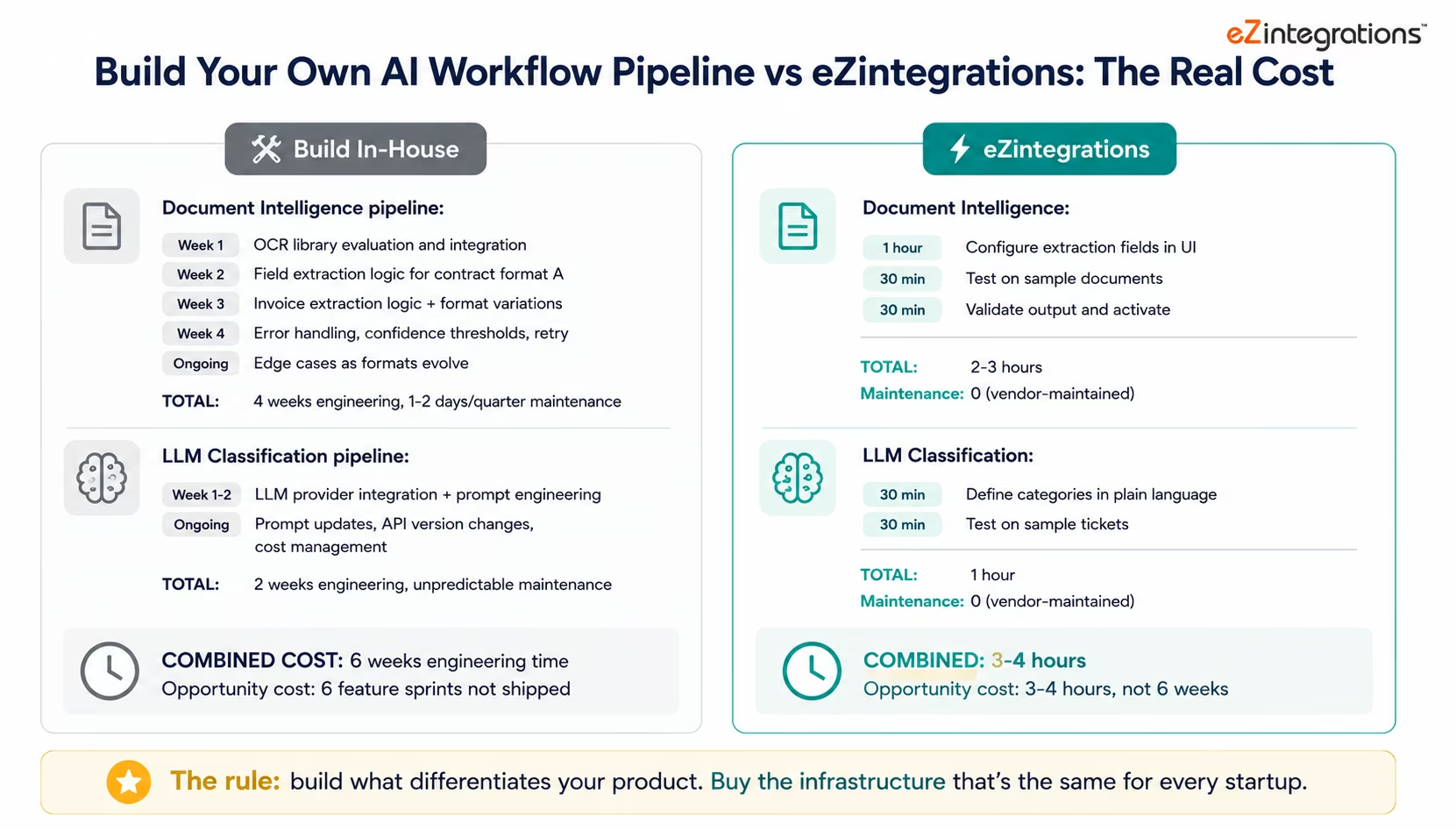
Building a Document Intelligence pipeline in-house:
You need to: choose and integrate an OCR library (Tesseract, AWS Textract, Azure Form Recognizer), build the field extraction logic for each document type (contracts, invoices, forms: each needs separate extraction rules), handle document format variations (different contract templates, different invoice layouts), build the error handling and retry logic, build the confidence threshold system (what confidence level triggers manual review?), and maintain the extraction accuracy as document formats evolve.
Time: 2-4 weeks of engineering time for the initial build. Ongoing: 1-2 days per quarter for maintenance and edge case handling.
eZintegrations’ Document Intelligence node: configure the fields to extract, specify the document type, activate. 2-3 hours. No ongoing maintenance.
Building an LLM Classification pipeline in-house:
You need to: choose an LLM provider (OpenAI, Anthropic, Cohere), manage API keys and rate limits, write the prompts for each classification task, handle prompt versioning when you need to update the classification criteria, build the output parsing (LLMs return text, your workflow needs structured data), handle API failures and fallbacks, and manage the cost of running classification at scale.
Time: 1-2 weeks of engineering time. Ongoing: unpredictable maintenance as LLM APIs evolve and your classification criteria change.
eZintegrations’ LLM Classification node: define the categories and criteria in plain language. The prompt engineering, API management, output parsing, and failover are handled by the platform. 30-60 minutes to configure.
The engineering opportunity cost:
At a 40-person startup, engineering time spent on internal tooling infrastructure is engineering time not spent on your product. Every week an engineer spends building a classification pipeline is a week not spent on a feature that generates revenue or reduces churn.
The rule: build the things that differentiate your product. Buy the infrastructure that is the same for every startup. LLM Classification is the same for your startup as it is for every other B2B SaaS company in your category. There is no competitive advantage in having built your own.
This approach aligns closely with startup scaling guidance from Y Combinator, which recommends focusing engineering resources on core product differentiation instead of rebuilding operational infrastructure internally.
AI Workflow 1: Intelligent Support Ticket Routing
For B2B SaaS startups, support tickets are both a cost centre and a churn signal. The manual triage process: reading each ticket, classifying it, deciding the urgency, routing to the right team: consumes CS team bandwidth that should be spent on actual customer conversations.
The problem scales with growth: at 50 customers, manual triage is manageable. At 300 customers, it is a hiring problem. At 1,000 customers, it is a structural failure.
The Intelligent Support Ticket Routing Workflow:
When a new ticket arrives in Intercom (or Zendesk, Freshdesk):
-
LLM Classification reads the ticket text and classifies:
- Type: billing dispute, product bug, feature request, onboarding question, general inquiry, possible churn signal
- Urgency: critical (platform down or data loss), high (core feature broken, payment issue), medium (non-blocking issue), low (feature request, general question)
- Sentiment: frustrated, neutral, satisfied
- Intent signals: “cancel” language, competitor mention, escalation language, renewal concern
-
Data Analysis retrieves context from connected systems:
- Customer health score from HubSpot (declining? stable?)
- Subscription tier and ARR from Stripe
- Number of open or recent tickets from Intercom
- Days until renewal from HubSpot
-
Routing logic (based on AI classification + context):
- Critical + any tier → immediate Slack alert to on-call engineer and CS Director, P0 Jira ticket
- Billing dispute + health score declining + ARR > $X → CS Director alert + churn risk flag in HubSpot
- Feature request → tagged and routed to PM’s Jira backlog with sentiment and priority score
- Onboarding question → auto-response with relevant help documentation triggered
- Standard P1/P2 → assigned to appropriate CS team member based on account ownership
The CS team’s morning queue arrives pre-sorted, pre-labelled, and with the high-risk cases already surfaced. Manual triage time: near zero. Routing accuracy: consistently higher than human triage under pressure.
AI Workflow 2: Contract Intelligence Pipeline
Once your startup starts closing deals above $15-20K ACV, contracts become a significant operational overhead. A signed contract PDF typically contains: deal value, billing frequency, payment terms, start date, renewal date, termination notice requirements, and sometimes custom terms that affect how you configure the account in your billing system.
Manually reading, extracting, and entering this data into your CRM and billing system takes 15-20 minutes per contract. At 20 deals per month, that is 5-6 hours of manual data entry per month: typically done by an AE or operations person who has more valuable things to do.
The Contract Intelligence Workflow:
When a signed contract arrives (from DocuSign webhook, email attachment, or a shared folder):
-
Document Intelligence reads the contract document (PDF, Word doc, or DocuSign envelope), extracting:
- Contract value (total contract value and ACV)
- Billing frequency (monthly, quarterly, annual)
- Payment terms (Net 30, upfront, etc.)
- Contract start date and end date
- Renewal date and auto-renewal terms
- Termination notice period
- Any custom terms flagged for review (unusual indemnification, liability caps)
-
Routing logic based on extracted data:
- Standard terms → Stripe subscription created automatically, HubSpot deal updated with all contract fields, customer success onboarding triggered
- Custom or non-standard terms → routed to legal or operations for review before subscription creation, with the extracted terms highlighted
- Missing fields → routed to the AE with a structured checklist of what needs to be filled in manually
-
Downstream actions:
- HubSpot deal: contract value, renewal date, payment terms, and contract document link all written automatically
- Stripe subscription: created with the correct billing frequency and start date
- Calendar reminder: renewal date added to the CS manager’s calendar 90/60/30 days in advance
- Slack notification: deal summary posted to the #new-deals channel with contract highlights
Contract processing time: 15-20 minutes manual → under 2 minutes automated (including any exceptions routed for review).
AI Workflow 3: Churn Signal Detection
Churn is the existential metric for subscription startups. The problem is that most churn is detectable days or weeks before the cancellation event: product usage data contains the signals: but the detection is only as good as the monitoring.
Most startups monitor churn reactively: the customer cancels, and then you investigate why. The AI workflow approach is proactive: the signals that precede cancellation are detected as they emerge and routed to the right person before the customer makes a decision.
The Churn Signal Detection Workflow:
The Data Analysis node continuously monitors product usage data (from Mixpanel, Amplitude, or your product’s internal analytics events):
Statistical signals monitored:
- Login frequency: X% decline versus the account’s own 30-day rolling baseline
- Core feature usage: abandonment of features the account uses for primary value delivery
- Engagement breadth: reduction in the number of distinct features used per week
- Cohort comparison: usage score below the percentile threshold for accounts at the same subscription age and tier
When any account crosses the configured churn signal threshold:
-
Data Analysis calculates the composite churn risk score, the specific contributing signals, and the rate of decline (accelerating vs stable).
-
API Tool Call (HubSpot): retrieves the account’s CS owner, renewal date, ARR, and recent CS interaction history.
-
API Tool Call (Intercom): retrieves the account’s recent support ticket history: is the declining usage correlated with a recent support issue?
-
LLM Classification (optional, if email or ticket text is available): checks whether any recent communications contain cancellation intent language.
-
The CS manager receives a structured Slack alert:
- Account name and ARR
- Specific signals triggering the alert (e.g., “login frequency -48% over 14 days, core export feature unused for 8 days”)
- Days until renewal
- Recent support context if applicable
- Suggested first action (check-in call, in-app prompt, executive outreach)
The CS manager calls the account with full context. Previously: the account cancelled and then the CS manager investigates why.
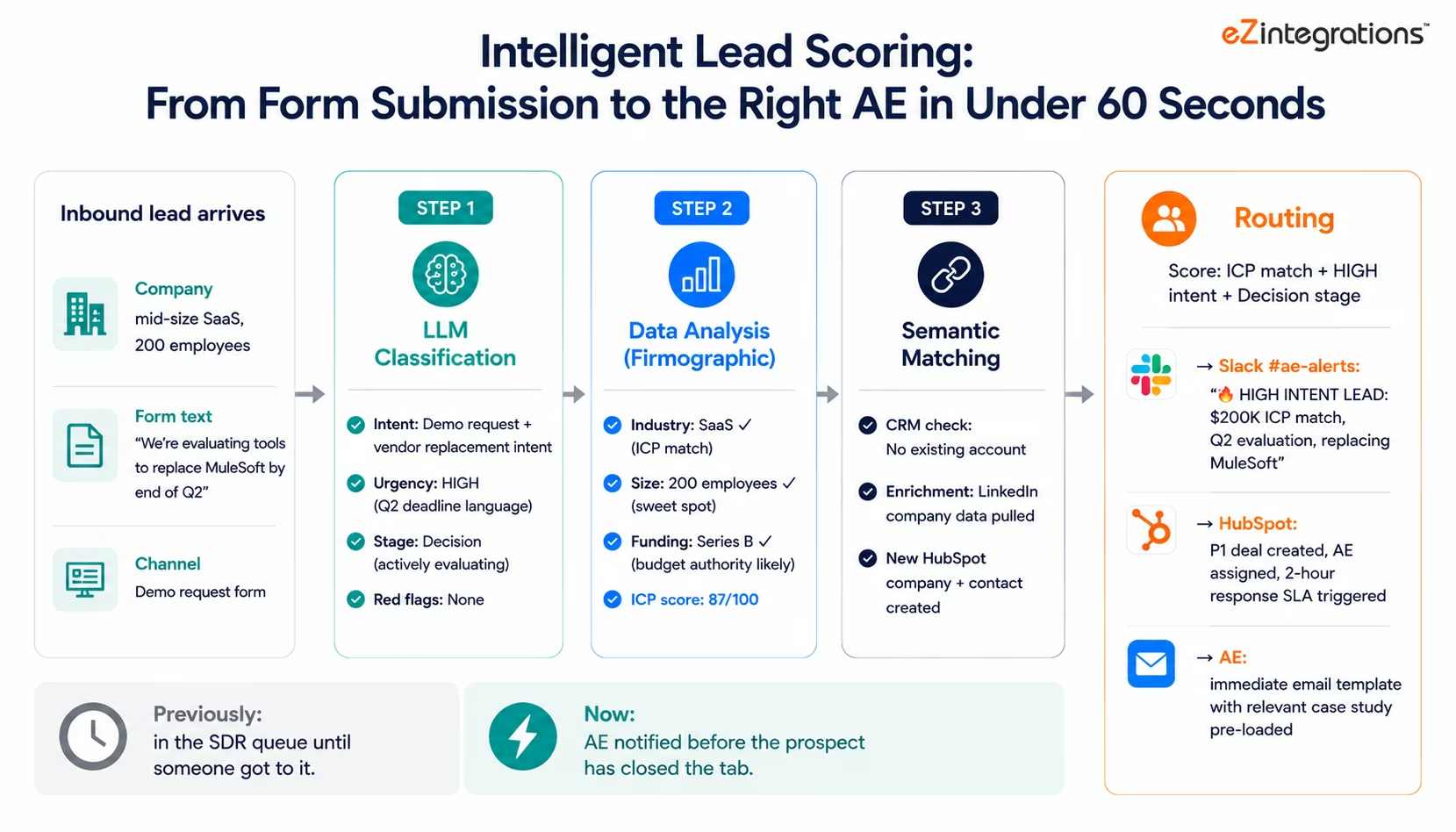
AI Workflow 4: Intelligent Lead Scoring and Routing
Inbound sales at a startup is a volume management problem. Most inbound leads are not a strong fit. The few that are need rapid response. Manual qualification: reading each inquiry, researching the company, deciding routing: takes 5-10 minutes per lead and creates the lag that costs qualified leads to competitors.
The Intelligent Lead Scoring and Routing Workflow:
When a new lead arrives (from your website form, content download, trial signup, or inbound email):
-
LLM Classification reads the inquiry text (or form submission text) and classifies:
- Intent: pricing question, demo request, general information, technical question, enterprise inquiry
- Urgency signals: “evaluating now,” “need to decide this week,” “replacing current vendor”
- Buying stage: awareness, consideration, decision
- Red flags: student/researcher signals, wrong geography, product category mismatch
-
Data Analysis retrieves and scores firmographic signals:
- Company size and funding stage (from enrichment tools)
- Industry match against your ICP
- Technology stack match (if detectable from the domain or enrichment data)
- Engagement history (prior website visits, content downloads, product usage if applicable)
-
Semantic Matching checks whether this lead matches an existing CRM account: preventing duplicate records and surfacing prior sales history context.
-
Routing logic (based on combined score):
- ICP match + high intent + enterprise signals → immediate Slack alert to AE team, P1 HubSpot deal created, SLA-tracked response
- ICP match + low urgency → standard SDR sequence triggered, contact enriched in HubSpot
- Non-ICP → nurture sequence, no SDR time allocated
- Red flag signals → flagged for review before any sequence or SLA commitment
Response time for high-intent, ICP-match leads: immediate Slack notification to the right AE, with all context assembled. Previously: the lead sat in a queue until an SDR got to it.
AI Workflow 5: Document-Driven Onboarding
Many startups require customers to submit documents as part of onboarding: completed intake forms, business registration documents, signed agreements, configuration questionnaires. Processing these documents manually: reading, extracting the configuration information, entering it into the system, routing any issues: is a significant onboarding bottleneck.
The Document-Driven Onboarding Workflow:
When a new customer submits their onboarding documents (via email, DocuSign, or an onboarding portal):
-
Document Intelligence reads the submitted documents, extracting: the configuration parameters for your product (the data that determines how their account gets set up), the contact information for the technical implementation team, any special requirements or custom configurations flagged in the form, and the desired go-live date.
-
LLM Classification reviews the extracted data for completeness and validity: are all required fields present? Are any extracted values outside expected ranges? Are there any unusual requirements that need human review?
-
Routing based on completeness assessment:
- Complete, standard configuration → automated account provisioning triggered, welcome email sent with login details, onboarding sequence launched in Customer.io
- Incomplete → structured checklist sent back to the customer via email, specifying exactly which fields are missing
- Non-standard or complex configuration → routed to the implementation team with the extracted data pre-populated in the setup ticket, flagged items highlighted
Onboarding that previously required a team member to read, extract, and process each submission takes 2-3 hours manually per complex onboarding. With the Document Intelligence workflow: standard onboardings complete automatically; non-standard ones arrive at the implementation team pre-processed, with the standard fields already extracted.
Building on the Foundation: From AI Workflows to Agents
AI workflows (Level 2) are the intelligence layer within your integration pipelines. When you need to go further: autonomous investigation of complex business exceptions: Level 3 AI Agents are the next step, available on the same platform.
The upgrade path is additive:
Your Intercom support ticket routing AI workflow (Level 2) routes and classifies tickets automatically. When a ticket is classified as a potential churn risk, a Level 3 AI Agent fires: it retrieves usage data from Mixpanel, billing history from Stripe, support history from Intercom, and engagement data from your email platform: assembles all of this into a pre-researched account brief: and delivers it to the CS manager. The manager makes one informed call with full context.
Your churn signal detection AI workflow (Level 2) detects declining usage and routes a Slack alert. A Level 3 AI Agent adds depth: it investigates whether the decline correlates with a recent product change, a competitor mention in recent emails, or a support issue that was resolved poorly.
Level 4 Goldfinch AI gives your leadership team live natural language access to all of it. Your CEO asks: “Which accounts are most at risk of churning in the next 30 days and what are the specific signals for each?” Goldfinch AI queries the health score data, the churn signal workflow findings, the billing data, and the support history: and returns a ranked at-risk account list in under 60 seconds.
You start with Level 2 AI Workflows. You add Level 3 and 4 as your data complexity and team scale demand them. Same platform throughout : including Level 4 Goldfinch AI, which gives your CEO a natural language Chat UI for live business queries: ‘Which accounts are most at risk of churning in the next 30 days?’ answered from live data in under 60 seconds, no analyst required.
Key Outcomes and Results
Startups deploying AI workflows across support routing, contract intelligence, churn detection, and lead scoring report measurable improvements within 2-4 weeks:
Support Operations:
- Manual triage time per ticket: 5-10 minutes → near-zero (AI pre-classifies on arrival)
- Routing accuracy: improved 35-45% versus manual classification under pressure
- High-churn-risk ticket escalation time: detected during batch review → real-time detection on ticket arrival
- CS Director awareness of at-risk tickets: end-of-day review → immediate Slack alert
Contract Processing:
- Contract data entry per deal: 15-20 minutes → under 2 minutes (AI extraction)
- Renewal date tracking: manual calendar entry → automated HubSpot field + calendar reminder
- Custom terms identification: manual legal read → AI flag on non-standard terms
Churn Detection:
- Proactive churn signal detection: weekly Mixpanel review → continuous monitoring
- CS response to declining accounts: post-cancellation investigation → pre-cancellation intervention
- Days of advance warning before churn: 0 (discovered at cancellation) → 14-30 days (statistical signal)
Lead Scoring:
- High-intent lead response time: next SDR available → immediate AE alert
- SDR time on low-fit lead triage: 5-10 minutes/lead → near-zero (AI routes away automatically)
- ICP match accuracy: manual judgment → consistent AI-scored criteria
How to Get Started
Step 1: Pick your highest-volume unclassified data stream
Where in your startup does the most unstructured data arrive that someone currently reads and manually routes? For most startups: support tickets, inbound leads, product feedback, or contract documents. Pick the one with the highest volume and the most consistent manual handling time.
Step 2: Define your classification criteria
For LLM Classification: write out the categories you want in plain language. “Classify support tickets as: Billing Dispute, Product Bug, Feature Request, Onboarding Question, Churn Signal, Other. For urgency: Critical (platform down or data loss), High (core feature broken, payment issue), Medium, Low.” The more specific your criteria, the more accurate the classification.
For Document Intelligence: list the fields you want extracted. “From this contract, extract: Total Contract Value, Billing Frequency, Start Date, Renewal Date, Payment Terms, Termination Notice Period.”
Step 3: Import the AI workflow template from the Automation Hub
Visit the Automation Hub and filter by Startup AI Workflows. Import the template matching your use case (support routing, contract intelligence, churn detection, lead scoring). The template pre-configures the AI node, the connection to your source system (Intercom, DocuSign, Mixpanel, HubSpot), and the downstream routing logic.
Step 4: Test on a sample of real data
Run the AI workflow against 20-30 real examples from your last month’s data. Review the classifications and extractions. Adjust the criteria or thresholds based on any misclassifications. Most startups get to 85-90% accuracy on the first configuration. Refining to 95%+ takes one additional round of criteria adjustment.
Step 5: Activate and monitor
Activate the workflow. Monitor the classification outputs for the first week via the eZintegrations execution dashboard. Tune any remaining edge cases. Within two weeks, the workflow should be running reliably enough to remove manual triage from the process entirely.
Import a startup AI workflow template from the Automation Hub and have your first AI workflow live this week.
FAQs
1. What is AI workflow automation for startups?
AI workflow automation embeds intelligent AI nodes including Document Intelligence, LLM Classification, Data Analysis, and Semantic Matching inside integration pipelines so workflows can classify support tickets, extract contract terms, detect churn-risk anomalies, and match leads automatically. This is Level 2 in eZintegrations four-level automation architecture and runs natively within the platform without requiring separate AI infrastructure or ML teams.
2. How long does it take to set up an AI workflow for a startup?
Most startup AI workflow templates go live in 2-6 hours. LLM Classification workflows usually take 1-2 hours, Document Intelligence workflows take 2-4 hours, and churn detection workflows take 3-5 hours including testing and configuration. All without writing code.
3. Does eZintegrations use my data to train AI models?
No. All AI inference runs within eZintegrations infrastructure. Customer data including support tickets, contracts, and usage information is not used to train models, not shared with external AI providers, and not exposed to other customers. eZintegrations is SOC 2 Type II certified and supports GDPR compliance for EU customer data.
4. How accurate is the LLM Classification and what happens when it misclassifies?
Most startups achieve 85-90 percent accuracy initially and 93-97 percent after refining classification criteria. Confidence thresholds can route uncertain classifications to a human review queue while high-confidence classifications are processed automatically. Misclassified items remain reviewable and correction history can improve future classification performance.
5. Can I add AI workflows to my existing eZintegrations integrations?
Yes. AI nodes can be inserted into existing workflows without rebuilding them. Existing integrations such as Stripe-to-HubSpot can be enhanced with LLM Classification, Data Analysis, or Document Intelligence capabilities by adding AI nodes into the current workflow structure.
6. What is the difference between AI workflows and AI agents for startups?
AI workflows follow a predefined sequence such as trigger, classification, and routing. AI agents receive a goal and decide what information to gather and which systems to query before producing a result. Workflows are best for consistent high-volume automation while AI agents are designed for complex investigation and decision-making tasks.
Conclusion: Your Startup Stack Can Be Smarter Than It Currently Is
The data flowing through your startup stack right now contains signals you are not acting on: the support ticket with cancel-intent language that nobody flagged, the product usage drop that started 12 days ago and nobody noticed, the high-intent lead that is still sitting in the SDR queue.
Adding AI to your integration pipelines does not require a data science hire, an ML infrastructure budget, or a 6-week engineering sprint. It requires defining what you want the AI to do: in plain language: and configuring the node in an existing or new workflow template.
The support ticket routing workflow that routes high-churn-risk tickets to the CS Director before they enter the queue: 1-2 hours to configure. The contract intelligence pipeline that processes a DocuSign completion and populates your CRM and billing system without manual entry: 2-4 hours. The churn detection workflow that gives your CS team 14-30 days of advance warning instead of post-cancellation surprise: 3-5 hours.
Enterprise-grade AI intelligence. Startup-friendly timeline. Same platform that scales from your first Stripe-to-HubSpot workflow to Level 4 Goldfinch AI executive intelligence when you need it.
Import a startup AI workflow template from the Automation Hub and have your first AI workflow live this week.
Book a demo and bring your highest-volume manual routing problem. We will show you what AI-powered looks like for your specific stack.

