
AI Workflow Automation for Manufacturing: ERP, MES & Shop Floor
May 18, 2026AI workflow automation for manufacturing connects ERP systems (SAP S/4HANA, Oracle, Infor), MES platforms (Siemens Opcenter, Rockwell FactoryTalk, Dassault DELMIA), and shop floor systems (PLCs, SCADA, IoT sensors, quality systems) with intelligent data pipelines that eliminate manual entry, reduce production delays, and process quality and production documents automatically. eZintegrations delivers Level 2 AI Workflows and Level 3 AI Agents for manufacturing across production order management, quality deviation handling, maintenance work order processing, supplier document intelligence, and shop floor exception management: with pre-built templates that go live in days.
TL;DR
- Manufacturing operations generate more exception-heavy data than almost any other industry: production order exceptions, quality deviations, maintenance work orders, supplier non-conformances, and engineering change orders all require human attention that AI workflows can reduce by 60-80%.
- The gap between ERP, MES, and shop floor systems is where most of this manual work lives. A quality deviation recorded by the MES takes 45 minutes to translate into a corrective action request in the ERP. A production order exception that the MES flags at 2 AM waits until the shift manager arrives at 6 AM.
- eZintegrations’ Level 2 AI Workflows and Level 3 AI Agents close this gap. Document Intelligence reads engineering drawings, quality reports, and maintenance work orders. LLM Classification categorises deviation types and urgency. Data Analysis detects production anomalies. AI Agents investigate complex exceptions across MES, ERP, and supplier systems autonomously.
- Level 4 Goldfinch AI gives plant managers and operations VPs natural language access to live production, quality, and maintenance data.
- All four automation levels: Level 1 iPaaS, Level 2 AI Workflows, Level 3 AI Agents, Level 4 Goldfinch AI: run on the same eZintegrations platform with pre-built manufacturing templates.
The Problem: The ERP-MES-Shop Floor Data Gap
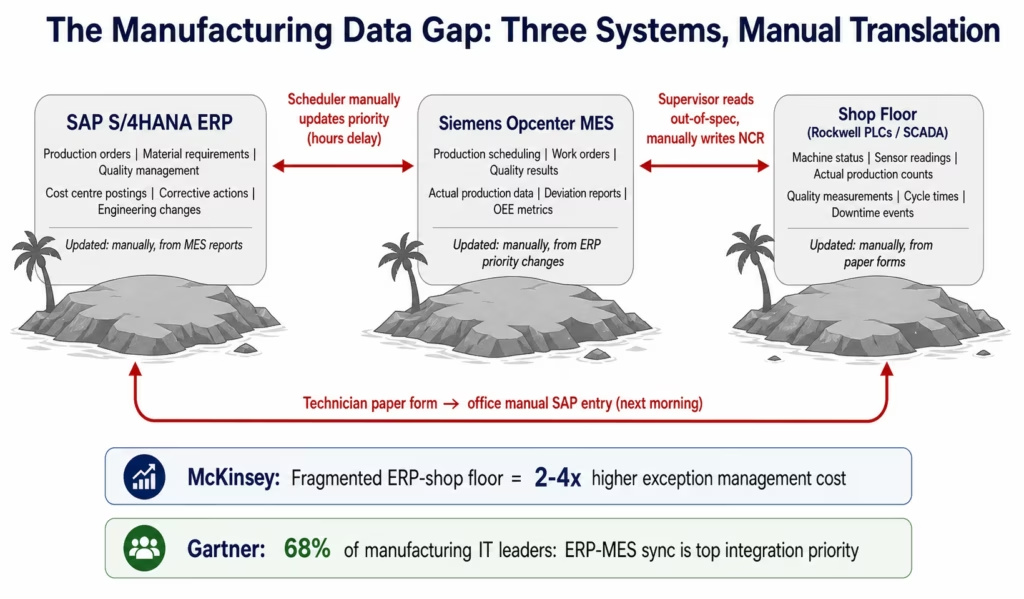
Marcus is the production manager at a mid-size automotive components manufacturer. His operation runs SAP S/4HANA for ERP, Siemens Opcenter MES for production execution, and a mix of Rockwell Automation PLCs and SCADA systems on the shop floor. In theory, these systems should form a connected digital thread from customer order to finished part.
In practice, they are three separate information islands.
When a quality inspector records an out-of-specification measurement in Opcenter at 2 AM, that deviation sits in the MES quality module until the quality engineer arrives at 7 AM, reads the deviation report, manually opens a corrective action request in SAP QM, and starts the investigation. Five hours of unchecked deviation. Three systems involved. One manual translation step.
When a production order in SAP changes priority due to a customer expedite request, the production scheduler has to manually update the Opcenter work queue. The shop floor team is still working to the old sequence until the scheduler gets around to it: sometimes hours later.
When a maintenance technician completes a work order in the CMMS, the parts consumed need to be posted against the cost centre in SAP. The technician fills out a paper form. Someone in the maintenance office enters it into SAP the next morning. Inventory accuracy is off by a day. The cost variance appears in the monthly close.
These are not technology failures. They are integration failures. The data exists in each system. The problem is the lack of automated, intelligent data flow connecting them.
According to McKinsey, manufacturers with fragmented system landscapes between ERP and shop floor spend 2-4x more on production exception management than those with integrated operations. Gartner research shows that 68% of manufacturing IT leaders identify ERP-to-MES data synchronisation as their highest-priority integration challenge. The ISA-95 standard framework for manufacturing operations management exists precisely because this problem has been recognised as systemic since the 1990s: but most manufacturers are still closing the gap with manual processes.
AI workflows change this. Not by replacing the MES or the ERP, but by connecting them intelligently: reading the data each system produces, classifying and routing it automatically, and triggering the right action in the right system without a human manually translating between them, aligning with McKinsey & Company smart factory and Industry 4.0 AI applications.
Before vs After: AI Workflow Transformation in Manufacturing
| Process | Before AI Workflows | After AI Workflows |
|---|---|---|
| Quality deviation routing | Inspector records in MES, quality engineer manually creates NCR in SAP (45 min, 5-hr lag) | MES deviation event triggers AI workflow: classified by severity, NCR auto-created in SAP QM, routed to engineer |
| Production order priority change | Scheduler manually updates MES work queue (1-4 hr lag) | SAP production order change event triggers MES schedule update in real time |
| Maintenance parts consumption posting | Technician paper form, office manual SAP entry (next day) | CMMS work order completion triggers automatic SAP material consumption posting |
| Engineering change order routing | ECO received as PDF, manually reviewed, manually entered in MES and ERP (3-5 hr per ECO) | Document Intelligence reads ECO, extracts affected parts/BOMs, routes to affected systems automatically |
| Supplier non-conformance | Quality team manually reads incoming non-conformance reports, creates NCRs, notifies production (60+ min) | Document Intelligence reads supplier NCR in any format, extracts details, creates SAP QM notification, alerts production |
| OEE anomaly response | Shift supervisor reviews OEE dashboard each hour, manually investigates drops | AI Watcher detects OEE drop below threshold, retrieves root cause data, routes structured investigation brief |
| Production scrap recording | Operator fills paper form, quality lead enters into SAP and MES separately (15-20 min delay) | Shop floor IoT/PLC event triggers simultaneous SAP goods movement and MES quality record |
| Work order completion sync | MES work order close triggers manual SAP production confirmation (batch, nightly) | MES work order completion triggers real-time SAP production order confirmation with actual quantities |
| Incoming inspection results | QC technician enters inspection results in quality system, emails buyer if failed | Inspection results auto-posted to SAP QM, failed results trigger Level 3 AI Agent for supplier disposition |
| Shift handover report | Shift manager compiles handover manually from 3-4 systems (30-45 min) | AI Agent queries MES, ERP, and maintenance system, compiles structured shift report in 3 minutes |
The Four AI Automation Levels for Manufacturing
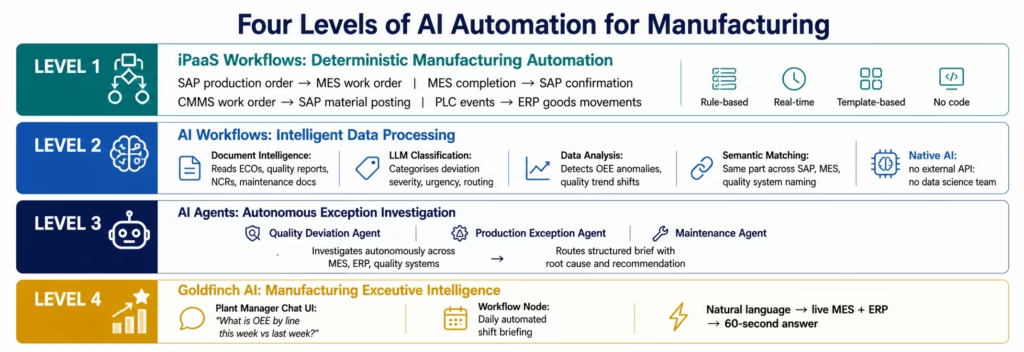
eZintegrations applies AI to manufacturing data flows at all four levels:
Level 1 (iPaaS Workflows): deterministic, rule-based manufacturing data flows. Production order from SAP triggers work order creation in MES. MES work order completion triggers SAP production confirmation. CMMS work order completion triggers SAP material consumption posting. These are high-volume, consistent data flows that run automatically every time the trigger fires. Fast, reliable, template-based.
Level 2 (AI Workflows): AI nodes embedded in manufacturing data pipelines. Document Intelligence reads engineering change orders, quality reports, supplier non-conformance documents, and maintenance reports in variable formats and extracts structured data for the ERP and MES. LLM Classification categorises deviation severity, urgency, and routing destination. Data Analysis detects statistical anomalies in production quality data and OEE trends. Semantic Matching identifies the same part across different system naming conventions. No data science team required: AI nodes are visual workflow configuration.
Level 3 (AI Agents): goal-directed autonomous investigation for complex manufacturing exceptions. The Quality Deviation Investigation Agent receives a critical deviation, retrieves the process history from the MES, checks the inspection data, searches the quality knowledge base for similar deviations and their root causes, and routes a structured CAPA brief to the quality engineer. The Production Exception Agent investigates why a work order is behind schedule, retrieves the machine status, checks material availability, and routes a structured resolution brief to the production planner.
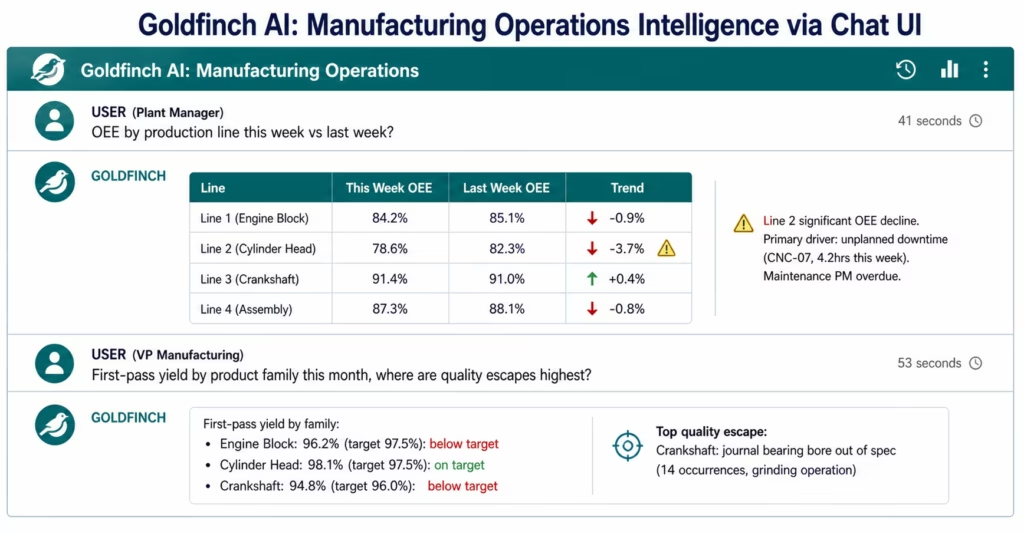
Level 4 (Goldfinch AI): multi-agent orchestration and executive intelligence. The plant manager asks the Chat UI: “What is our OEE by production line this week versus last week, and which lines are trending down?” Goldfinch AI queries the MES and production data via the Workflow Node and returns a formatted answer in under 60 seconds. The Workflow Node runs the daily shift briefing automatically.
AI Workflow 1: Production Order Exception Management
Production planning is a deterministic process in theory: SAP generates a production order, the MES schedules the work order, the shop floor executes. In practice, exceptions break the deterministic model constantly: material shortages, machine breakdowns, quality holds, capacity constraints, and customer priority changes.
Each exception requires a human to notice it, investigate it, and route the appropriate response. At high-volume manufacturing plants, the daily exception list has 20-40 items. Working through it manually consumes 2-4 hours of production planning time every morning.
The Production Order AI Workflow in eZintegrations:
The AI workflow monitors three exception trigger types:
Material shortage exception: when the MES flags a work order as blocked due to material unavailability, the workflow triggers. API Tool Call retrieves the material availability in the WMS and in-transit PO pipeline from the ERP. Data Analysis calculates whether the material will be available before the work order’s required completion date. If available in time: the MES work order wait is updated with the expected material date. If not available in time: a structured shortage brief routes to the production planner and procurement team simultaneously, with the work order, the missing material, the current inventory position, the in-transit POs, and the impact on the customer order’s delivery date.
Schedule priority exception: when a customer expedite request changes a production order’s priority in SAP, the MES work queue must be updated. The workflow detects the SAP production order priority change, maps it to the corresponding MES work order, and updates the MES schedule sequence in real time. The production planner and shift supervisor receive a notification with the changed work order, the new priority, and the downstream impact on other scheduled work orders.
Quality hold exception: when the MES flags a batch as held pending quality review, the workflow routes the hold notification to the quality team with the batch details, the measured values that triggered the hold, and the specification limits: pre-assembled so the quality engineer can begin the disposition decision immediately rather than looking up the context.
Each exception type routes a structured brief rather than a raw system event. The production planner receives an actionable package, not a notification to investigate.
AI Workflow 2: Quality Deviation Intelligence
Quality management generates some of the most document-intensive, exception-heavy work in manufacturing. Incoming inspection failures, in-process deviations, first article inspection results, supplier non-conformances, and customer complaints all require reading documents, extracting data, classifying severity, and routing to the appropriate corrective action process.
The Quality Deviation AI Workflow:
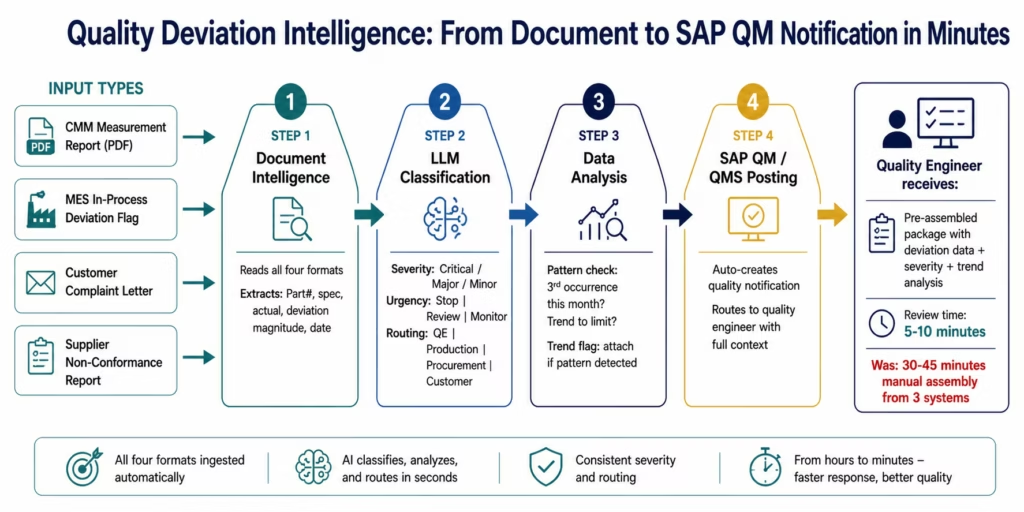
When a quality deviation event is recorded (in the MES quality module, a standalone QMS, a coordinate measuring machine, or a manual inspection entry), the workflow processes it through four AI layers before routing:
1. Document Intelligence (for document-based deviations): Quality deviations often arrive as attached documents: a CMM measurement report, a first article inspection form, a customer complaint letter, a lab analysis report. Document Intelligence reads the document regardless of format: structured PDF, scanned form, structured measurement export: and extracts: the part number, the specification, the measured value, the deviation magnitude, the measurement date, and the inspector or lab.
2. LLM Classification (severity and routing): The AI classifies the deviation: severity level (critical, major, minor based on the deviation magnitude versus the specification tolerance), urgency (immediate stop required, review required, monitor), and routing destination (quality engineer for CAPA, production manager for work-in-process hold, procurement for supplier feedback if material-related, customer notification if it affects shipped parts).
3. Data Analysis (trend detection): Before routing the individual deviation, Data Analysis checks whether this deviation is isolated or part of a pattern. Is this the third occurrence of the same deviation on this part number this month? Is the measured value trending toward the specification limit across the last 20 samples? Pattern deviations route with a trend flag attached: the quality engineer sees not just the single deviation but the statistical context.
4. SAP QM / QMS Integration: The structured deviation data (part number, specification, actual, deviation, severity, trend flag) is automatically posted to SAP QM as a quality notification, or to the standalone QMS as a new non-conformance record: eliminating the manual translation step that currently takes 30-45 minutes.
The quality engineer’s experience changes: instead of reading a raw deviation flag and spending 30-45 minutes assembling the data from three systems to understand what happened, the engineer receives a pre-assembled quality notification with the deviation data, the severity classification, the trend analysis, and a suggested CAPA template based on similar past deviations. Review and initiation time: 5-10 minutes.
AI Workflow 3: Maintenance Work Order Processing
Maintenance is a high-frequency source of ERP-shop floor data translation work. Every work order completed requires: the actual hours worked to be posted to the cost centre in the ERP, the materials consumed to be posted as inventory withdrawals, the equipment downtime to be recorded for OEE calculation, and the completion status to be updated in both the CMMS and the ERP plant maintenance module.
Manual processing of maintenance work orders at a 500-person manufacturing facility typically generates 40-80 work order completions per day. At 10-15 minutes each for manual ERP posting, that is 7-20 hours per day of data entry work.
The Maintenance Work Order AI Workflow:
When a technician closes a work order in the CMMS (SAP PM, IBM Maximo, IFS, or any CMMS with an API or database connection):
- API Tool Call (CMMS): retrieves the completed work order: equipment ID, work order number, failure code, actual hours by craft, materials consumed (part numbers and quantities), completion timestamp, and any technician notes.
- Document Intelligence (for unstructured notes): if the technician has written free-text notes describing the failure cause, root cause, or corrective action, Document Intelligence extracts the structured fields: failure mode, root cause category, corrective action taken, and any recommendations for preventive maintenance schedule adjustment.
- Integration Workflow as Tool: triggers three simultaneous downstream actions:
- SAP PM work order confirmation (actual hours posted to cost centre)
- SAP MM material consumption posting (WM or IM movement for consumed parts)
- OEE system downtime record creation (equipment ID, downtime duration, failure code, root cause)
- If the failure code and root cause combination matches a known repetitive failure pattern (checked via Knowledge Base Vector Search against the maintenance history knowledge base), a flag routes to the reliability engineer: “This is the third occurrence of this failure mode on this equipment in 90 days. Recommend PM schedule review.”
The maintenance team’s daily ERP data entry obligation drops from 7-20 hours to near-zero. Cost centre accuracy improves because postings happen the same day as the work completion, not the next morning.
AI Workflow 4: Engineering Change Order Automation
Engineering change orders (ECOs) are some of the most disruptive documents in manufacturing operations. An ECO changes a product’s design, BOM, or process routing: which means every downstream system that uses that BOM or routing (ERP, MES, quality system, shop floor travellers, packaging specifications) needs to be updated.
In most manufacturing operations, ECO processing is a manual cascade: the engineering team releases the ECO as a PDF, an engineer manually updates the SAP BOM, a planner manually updates the MES routing, the quality team manually updates the inspection plan, and someone updates the shop floor traveller template. Each step requires reading the ECO document, understanding which changes apply to which system, and making the updates: typically taking 3-6 hours per ECO.
The ECO AI Workflow:
When an ECO is released (as a PDF, as a PLM system notification, or via an engineering change management system webhook):
- Document Intelligence reads the ECO document, extracting: the affected part numbers, the description of each change, the effective date, the revision level, the disposition of existing inventory (use-up, sort and rework, scrap), and the impact classification (design change, process change, material substitution, documentation only).
- LLM Classification categorises the change type for each affected part and identifies which systems require update: BOM change (SAP), routing change (SAP and MES), inspection plan change (SAP QM), shop floor traveller change (MES document management), packaging specification change (ERP or packaging system).
- Data Analysis retrieves current inventory levels and open production orders for affected part numbers: identifying whether the effective date creates a split-lot situation (existing inventory produced under the old revision, new inventory to be produced under the new revision), and whether any in-progress work orders need to be evaluated for the disposition instruction.
- The workflow routes structured update packages to each affected system, or routes a pre-assembled ECO implementation brief to the relevant team members with the specific updates required in each system: replacing the manual document-reading step.
For standard, low-complexity ECOs (documentation updates, tolerance adjustments with no BOM or routing impact): the workflow can auto-implement the updates directly. For complex ECOs with BOM, routing, and quality plan changes: the workflow routes the pre-extracted, pre-classified update package to the team members who execute the changes, reducing their effort from 3-6 hours (reading and understanding the ECO) to 30-60 minutes (reviewing the pre-classified update list and approving the changes).
AI Workflow 5: Supplier Non-Conformance Management
When a manufacturing operation receives a supplier non-conformance: a delivered component that fails incoming inspection, a supplier-initiated notice of a process change, or a field failure traced back to a supplier part: the response requires: creating a quality notification in the ERP, notifying the supplier, reviewing the affected inventory and open POs, deciding on disposition (use-as-is, rework, return, scrap), and initiating a corrective action with the supplier.
Supplier non-conformances typically take 60-90 minutes of quality team time to initiate the full response chain. At a facility with 300 active suppliers and 10-20 incoming inspection failures per week, this is 10-30 hours per week of quality team administrative work.
The Supplier NCR AI Workflow:
When a supplier non-conformance is identified (incoming inspection failure in the quality system, supplier-submitted NCR form, or customer return traced to a supplier component):
- Document Intelligence reads the non-conformance record or document, extracting: supplier name, affected part number, quantity affected, specific non-conformance description (what is wrong), and any supplier-provided root cause or corrective action.
- API Tool Call (ERP) retrieves: the affected material’s current inventory (how much is in stock?), open purchase orders for this part (how much more is coming?), open production orders that will consume this material (which production plans are at risk?), and the supplier’s quality history (previous NCRs, corrective action status).
- LLM Classification classifies the severity and urgency: does this require an immediate production hold (yes, if safety-critical or if open production orders are affected), a supplier communication (always), or an engineering review (if the non-conformance involves a specification interpretation question)?
- The workflow auto-creates the SAP QM quality notification, drafts the supplier communication (for human review before sending), and routes a structured disposition recommendation to the quality team: the NCR details, the inventory exposure, the production schedule impact, and the recommended disposition based on the non-conformance severity and the supplier’s quality history.
The quality team reviews in 10-15 minutes instead of assembling the same information manually in 60-90 minutes.
Level 3 AI Agents for Complex Manufacturing Exceptions
Level 2 AI Workflows handle the processing layer: reading, classifying, and routing manufacturing data through intelligent pipelines. Level 3 AI Agents handle the investigation layer: complex exceptions that require assembling information from multiple systems and reasoning toward a resolution recommendation.
Production Exception Investigation Agent:
When a production order falls behind schedule in the MES (actual progress below planned progress beyond a configurable threshold), the Production Exception Agent investigates:
- API Tool Call (MES): retrieves the current status of all work orders for the production order: which operations are complete, which are in progress, and which are blocked.
- API Tool Call (ERP material): checks material availability for the operations that are blocked or not yet started.
- API Tool Call (machine/equipment): retrieves current machine status for the work centres involved: are any machines in downtime?
- API Tool Call (ERP sales order): retrieves the customer commitment for this production order: what is the promised delivery date and what is the current gap?
- Data Analysis: calculates whether the delay can be recovered within the existing schedule (by adjusting work centre allocation or working overtime), or whether the customer commitment is at risk.
The production planner receives a structured exception brief: which operations are blocked, the root cause of each blockage (material, machine, capacity), the current schedule gap versus customer commitment, and the recommended action (expedite materials, reassign to alternate work centre, communicate risk to customer service).
Quality Deviation CAPA Agent:
When a quality deviation is escalated to formal CAPA (Corrective Action and Preventive Action) due to severity or recurrence, the CAPA Agent assembles the full investigation context:
- Knowledge Base Vector Search: searches the quality knowledge base for similar deviations on this part or process in the past 24 months: what were the root causes? What corrective actions were effective?
- Document Intelligence: reads any available process control documentation, inspection plans, and process capability studies for the affected operation.
- API Tool Call (MES process data): retrieves the process parameter history for the affected batch: temperatures, pressures, cycle times, operator ID, machine ID.
- Data Analysis: identifies whether the deviation correlates with specific process parameter values or specific machine/operator combinations.
The quality engineer receives a structured CAPA initiation package: the deviation history, the statistical analysis of process parameters, the similar past deviations and their resolutions, and a suggested root cause hypothesis for the engineer to confirm or reject. CAPA initiation time: from 3-4 hours of manual investigation to 30-45 minutes of reviewing a pre-assembled brief.
Level 4: Goldfinch AI for Manufacturing Operations Intelligence
Goldfinch AI provides manufacturing operations leaders with natural language access to live production, quality, and maintenance intelligence: without waiting for shift reports, daily reviews, or analyst-prepared dashboards.
Plant Manager: 7 AM: “What is our OEE by production line this week versus last week, and which lines are trending down?”
Goldfinch AI queries the MES OEE data via the Workflow Node, retrieves week-over-week comparison, identifies lines with statistically significant OEE decline, and returns a formatted breakdown with trend flags: in under 60 seconds. Previously: the morning shift report arrived on the plant manager’s desk at 8 AM, assembled by a shift supervisor from three different system exports.
VP of Manufacturing: “What is our first-pass yield by product family this month, and where are we seeing the most quality escapes?”
Goldfinch AI queries the MES quality data and SAP QM data, calculates first-pass yield by product family, identifies the processes with the highest defect rates, and returns a ranked quality performance summary in under 60 seconds.
Maintenance Manager: “Which of our critical equipment has had the most unplanned downtime this month, and is any of it past its preventive maintenance due date?”
Goldfinch AI queries the CMMS and OEE system, identifies equipment by unplanned downtime hours, retrieves PM schedule status for critical equipment, and returns a maintenance priority list with the equipment that is both high downtime and past its PM date highlighted.
Workflow Node: automated daily shift briefing: Every shift end, the Goldfinch AI Workflow Node coordinator dispatches parallel agents: one for production performance (OEE, output vs plan, open exceptions), one for quality (deviations, holds, NCRs), and one for maintenance (open work orders, equipment downtime). The coordinator synthesises findings and delivers a structured shift handover brief to the incoming shift manager: eliminating the 30-45 minute manual shift report preparation.
Key Outcomes and Results
Manufacturing organisations deploying AI workflows across production exception management, quality deviation intelligence, maintenance work order processing, and ECO automation report measurable improvements within 60-90 days:
Production Operations: – Morning exception queue resolution: 2-4 hours → 30-45 minutes (AI pre-investigation) – Production order priority change to MES update: 1-4 hours (manual) → real-time (under 60 seconds) – Material shortage detection to production planner notification: hours (discovered at work start) → minutes (AI workflow detects at schedule time) – Shift handover report preparation: 30-45 minutes (manual) → 3 minutes (AI Agent)
Quality Management: – Quality deviation routing time: 30-45 minutes manual → 5-10 minutes (AI-classified + pre-assembled) – SAP QM notification creation: manual 30-45 minutes → automatic on deviation event – Supplier NCR initiation time: 60-90 minutes → 10-15 minutes (AI pre-assembled disposition package) – First-pass yield visibility: shift-end report → real-time monitoring via Goldfinch AI Chat UI – CAPA initiation time: 3-4 hours → 30-45 minutes (AI-assembled investigation context)
Maintenance Operations: – Daily CMMS-to-SAP data entry: 7-20 hours/day (manual) → near-zero (automated posting) – Repetitive failure identification: periodic review → automatic flagging on third occurrence – PM schedule compliance visibility: monthly maintenance review → real-time via Chat UI – Cost centre accuracy: 24-hour lag → same-day posting
Engineering: – ECO processing time: 3-6 hours per ECO (manual) → 30-60 minutes review (AI pre-classified) – Affected system identification: manual review → automatic extraction by Document Intelligence – Inventory disposition assessment: manual lookup → automatic retrieval and presentation
How to Get Started
Step 1: Map your highest-labour manual translation points
Identify where your team spends the most time manually moving data between ERP, MES, and shop floor systems. The morning exception review, the daily CMMS-to-SAP posting, the quality deviation routing, the ECO processing cascade: each of these is a candidate for AI workflow automation. Quantify the hours per week your team spends on each.
Step 2: Build your knowledge bases
AI workflows for manufacturing are most effective when they can search relevant domain knowledge. Before deploying the quality deviation workflow: load your quality specification library and the relevant AIAG/IATF standard references into the quality knowledge base. Before deploying the CAPA agent: load past CAPA records categorised by deviation type and root cause. Before deploying the maintenance agent: load equipment criticality ratings and PM schedule requirements.
Step 3: Import the manufacturing AI workflow template from the Automation Hub
Visit the Automation Hub and filter by Manufacturing AI Workflows. Import the template for your target use case. Configure your MES connection (Siemens Opcenter, Rockwell FactoryTalk, or your MES’s REST API or database connector), your ERP connection (SAP S/4HANA OData V4, Oracle ERP REST, or Infor REST), and your quality system connection.
Step 4: Configure AI thresholds and routing rules
Set the deviation severity thresholds for your quality classification workflow. Configure the production order exception thresholds (how far behind schedule before the AI agent investigates?). Set the routing destinations for each exception class. Configure the confidence threshold for auto-posting versus human review for maintenance work order postings.
Step 5: Validate with representative sample data
Run each AI workflow against a sample of real cases from the past 30 days. Compare AI classifications and routing decisions against what your team actually did for those cases. Adjust thresholds and routing rules based on the comparison before full production activation.
Import a manufacturing AI workflow template from the Automation Hub and start automating your highest-labour manufacturing data process this week.
FAQs
1. How does AI workflow automation work in manufacturing?
Manufacturing AI workflows embed AI nodes (Document Intelligence, LLM Classification, Data Analysis, Semantic Matching) directly inside data pipeline workflows connecting ERP, MES, and shop floor systems. When a quality deviation is recorded in the MES, Document Intelligence reads any attached measurement documents, LLM Classification assigns severity and routing, Data Analysis checks for trend patterns, and the workflow automatically creates the SAP QM notification and routes a pre-assembled deviation brief to the quality engineer. These AI nodes run natively within eZintegrations: no external AI API, no data science team required to deploy or maintain them.
2. How long does it take to set up a manufacturing AI workflow?
Standard Automation Hub manufacturing AI workflow templates go live in 7-14 days. This includes: MES API connection configuration (2-3 days for standard MES REST APIs), ERP connection configuration: SAP OData V4 or Oracle REST (2-3 days), quality knowledge base build (3-5 days for standard quality workflows), AI threshold calibration against sample data (2-3 days), and parallel validation before full activation (2-3 days). A full manufacturing AI workflow programme covering production exceptions, quality deviations, maintenance work orders, and ECOs: 8-14 weeks.
3. Does eZintegrations work with Siemens Opcenter, Rockwell FactoryTalk, and other MES systems?
Yes, eZintegrations connects to MES systems via REST API (Siemens Opcenter API, Rockwell FactoryTalk Analytics REST API), OPC-UA for direct PLC and SCADA data (via OPC-UA connector), database connector (for MES systems with database interfaces), and message queue connectors (for MES systems using message-based integration). For on-premises MES deployments, eZintegrations connects via IPSec Tunnel: no MES ports exposed to the public internet. The specific connector configuration depends on your MES vendor and version; the eZintegrations team provides connector configuration support for all major MES platforms during onboarding.
4. Does eZintegrations work with SAP for manufacturing integration?
Yes, eZintegrations has deep native SAP integration for manufacturing: SAP S/4HANA OData V4 with automatic CSRF token management for write operations (production order confirmations, goods movements, quality notifications), SAP PM (Plant Maintenance) for work order management, SAP QM (Quality Management) for quality notifications and inspection lots, SAP PP (Production Planning) for production order management, and SAP MM (Materials Management) for inventory movements and PO management. For on-premises SAP deployments, the IPSec Tunnel connects eZintegrations to your SAP landscape without requiring public internet exposure of SAP ports. SAP ECC with BAPI/RFC is also supported via the SAP connector.
5. What is the difference between Level 2 AI Workflows and Level 3 AI Agents for manufacturing?
Level 2 AI Workflows handle high-volume, consistent manufacturing data inputs with AI at specific processing steps: a quality deviation is recorded, Document Intelligence extracts it, LLM Classification categorises it, the workflow routes it to the correct team. The sequence is predetermined; the AI executes specific jobs at specific points. Level 3 AI Agents handle complex manufacturing exceptions requiring adaptive investigation: the Production Exception Agent receives a behind-schedule production order and decides which systems to query in what order based on what it finds (material shortage, machine downtime, capacity constraint), adapting the investigation as it discovers the root cause. Workflows are best for high-volume consistent inputs; agents are best for complex exception cases requiring multi-system reasoning.
6. Can eZintegrations process unstructured manufacturing documents like ECOs and quality reports?
Yes, Document Intelligence is a native Level 2 AI Workflow node that reads unstructured manufacturing documents in PDF, scanned image, and structured document formats: engineering change orders (extracting affected part numbers, change descriptions, effective dates, and disposition instructions), quality reports (extracting measurement values, specification limits, and deviation descriptions), maintenance work orders (extracting failure codes, root causes, and materials consumed), supplier non-conformance reports (extracting supplier details, affected parts, and non-conformance descriptions), and first article inspection reports (extracting measurement results and compliance determinations). This extraction runs natively within eZintegrations: no external document AI API, no data leaving the platform.
Conclusion: Manufacturing Intelligence Flows at the Speed of Production
Marcus’s three-information-island problem is not unique. It is the structural condition of most enterprise manufacturing operations: systems that do not talk to each other, data that moves manually between them, and exceptions that wait for human attention instead of being automatically investigated and routed.
AI workflows for manufacturing do not eliminate the need for quality engineers, production planners, or maintenance technicians. They eliminate the administrative translation work that currently consumes a significant fraction of those professionals’ time: reading deviation reports and manually creating SAP notifications, posting work order completions to SAP one by one, reading ECOs and manually identifying which systems need updating, assembling shift handover reports from three different system exports.
The quality engineer should spend her time on root cause analysis and corrective action design: not on manually entering deviation data into SAP. The production planner should spend his time on production strategy: not on manually updating MES work queues. The maintenance technician should spend her time on equipment reliability: not on filling out paper forms that someone else will enter into SAP tomorrow morning.
eZintegrations is SOC 2 Type II certified for enterprise manufacturing data security. For medical device, pharmaceutical, and life sciences manufacturers where manufacturing process data and quality records intersect with regulatory requirements (21 CFR Part 11, EU GMP Annex 11), HIPAA-compliant integration with a signed BAA is available for workflows touching patient or clinical data.
eZintegrations delivers all four automation levels for manufacturing on the same platform: Level 1 iPaaS workflows for deterministic ERP-MES-shop floor data flows, Level 2 AI Workflows for intelligent document processing and exception classification, Level 3 AI Agents for complex exception investigation, and Level 4 Goldfinch AI for plant manager and operations VP intelligence via Chat UI. Pre-built manufacturing templates go live in days.
Import a manufacturing AI workflow template from the Automation Hub and start automating your highest-labour manufacturing data process this week.
Book a free demo and bring your ERP, MES, and shop floor integration requirements. We will map your manufacturing stack to Automation Hub templates and show you what AI workflow automation looks like for your specific production environment.

