
NetSuite Invoice Automation: 3-Way Match Without SuiteScript
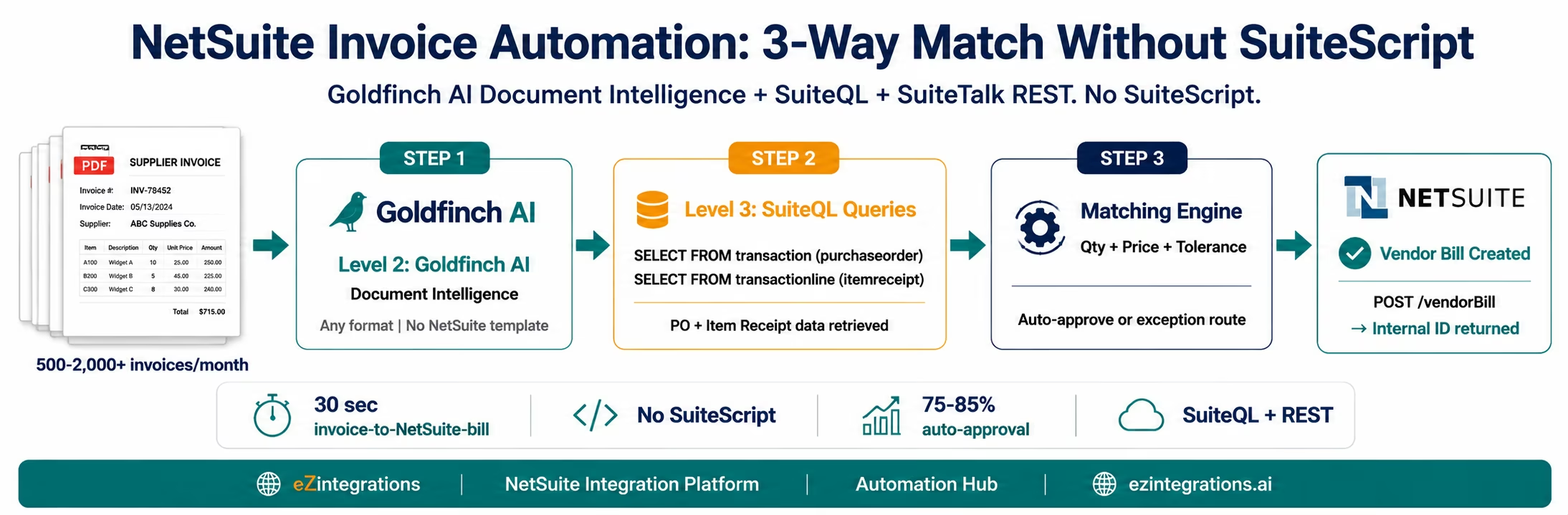
May 19, 2026To automate 3-way invoice matching in NetSuite without SuiteScript, eZintegrations uses Goldfinch AI Document Intelligence to extract invoice data from any supplier PDF, queries NetSuite for the matching Purchase Order and Item Receipt using SuiteQL
-- Purchase Order
SELECT *
FROM transaction
WHERE recordtype = 'purchaseorder'
  AND tranid = '{PO_NUMBER}';

-- Item Receipt Lines linked to PO
SELECT *
FROM transactionline
WHERE transaction IN (
  SELECT id
  FROM transaction
  WHERE recordtype = 'itemreceipt'
    AND createdfrom = {PO_ID}
);
, applies a configurable tolerance-based matching engine, and creates a NetSuite Vendor Bill via the SuiteTalk REST API (POST /services/rest/record/v1/vendorBill) linked to the PO and Item Receipt. The entire cycle runs without any SuiteScript, without any custom NetSuite development, and processes a standard invoice in under 30 seconds.
TL;DR
NetSuite has native 3-way matching: the 3 Way Match Vendor Bill Approval Workflow checks vendor bills against POs and Item Receipts once they are in the system. What it does not have: AI-powered extraction from supplier PDF emails, automated PO and Item Receipt retrieval before bill creation, or configurable pre-matching that catches exceptions before the bill enters NetSuite. – eZintegrations fills this gap using Goldfinch AI Document Intelligence (Level 2) for invoice extraction, Level 3 AI Agents using SuiteQL to query NetSuite PO and Item Receipt data, and SuiteTalk REST API to create Vendor Bills linked to the correct PO and receipt. – NetSuite key terminology: invoices from suppliers become Vendor Bills. Goods received notes are Item Receipts. The procure-to-pay chain is: Purchase Order → Item Receipt → Vendor Bill → Payment. – SuiteQL is the primary NetSuite query method. The SuiteQL endpoint (POST /services/rest/query/v1/suiteql) handles both PO and Item Receipt retrieval with SQL-92 syntax. – No SuiteScript. No custom NetSuite development. Go live from the Automation Hub NetSuite AP Invoice Processing template in 5-7 hours.
How NetSuite AP Actually Works (and Where the Manual Work Hides)
Your NetSuite accounts payable team works in the Transactions menu. Enter Bills. They open the form, select the vendor, link to a purchase order, and the system pre-populates the bill lines from the PO. If Advanced Receiving is enabled, they link to the Item Receipt instead. NetSuite does the rest: it checks quantities, compares prices, flags variances, and routes the vendor bill through the 3 Way Match Vendor Bill Approval Workflow.
The matching logic inside NetSuite is sound. The problem is what happens before the AP clerk opens the Enter Bills form.
Your AP inbox has 180 vendor invoices from last night’s email batch. Each one is a PDF. Each one has to be opened, read, the PO number noted, the bill form opened, the vendor selected, the PO linked, and the quantities and prices verified against what the PDF says. That is 8-12 minutes per invoice. At 180 invoices, your AP team spends 24-36 hours on data entry before NetSuite’s matching engine even gets to run.
eZintegrations automates the work before NetSuite and the final step into NetSuite, using SuiteQL and the SuiteTalk REST API. No SuiteScript. No custom development.
What NetSuite Provides for 3-Way Matching
NetSuite’s native 3-way matching is built into its procure-to-pay transaction chain. Understanding what it covers and where it starts is essential for designing the automation layer above it.
NetSuite’s procure-to-pay chain: Purchase Order → Item Receipt (Advanced Receiving) → Vendor Bill → Payment
Native NetSuite 3-way matching capability:
When a Vendor Bill is linked to a Purchase Order (via the bill’s Created From field), NetSuite compares the bill against the PO. When Advanced Receiving is enabled and an Item Receipt exists for the PO, NetSuite compares the bill quantity against the Item Receipt quantity, not just the PO quantity. This is the “Match Bill to Receipt” behaviour controlled by the item-level checkbox on each Item record.
The 3 Way Match Vendor Bill Approval Workflow (a SuiteApp included in the NetSuite Approvals Workflow bundle) automates the approval routing: bills within tolerance are auto-approved, bills with quantity or price variances above the configured tolerance are routed to the supervisor for review.
What NetSuite’s native 3-way matching requires from your AP team:
The AP clerk must: receive the supplier invoice by email, open the PDF, identify the PO number, navigate to NetSuite Transactions > Enter Bills, select the vendor, link to the PO or Item Receipt, verify that the quantities and prices on the bill match the PDF, and save. NetSuite then runs its matching workflow.
The matching is automated inside NetSuite. The data entry before the bill is created is entirely manual.
The configuration prerequisite most teams get wrong:
3-way matching in NetSuite requires Advanced Receiving to be enabled (Setup > Company > Enable Features > Transactions tab). Without this, Item Receipts are not created as separate transactions, and there is no receipt document to include in the 3-way match. Many NetSuite installations run with 2-way matching by default (PO vs Bill only) without realising that the Match Bill to Receipt checkbox at the item level is unchecked.
eZintegrations works with whatever matching mode your NetSuite is configured for: 2-way (PO + Bill) or 3-way (PO + Item Receipt + Bill).
The Manual Extraction Gap That NetSuite Cannot Fill
NetSuite does not read supplier PDF invoices. It does not extract vendor names, invoice numbers, PO references, or line-item quantities from an email attachment. That extraction work is entirely manual.
The gap has three specific failure modes in NetSuite AP environments.
Failure Mode 1: Manual vendor bill entry is the primary bottleneck. Your AP team opens each supplier invoice PDF, reads the data, and enters it into NetSuite’s Enter Bills screen. At 180 invoices per month and 10 minutes per invoice, this consumes 30 hours of AP clerk time per month before a single NetSuite workflow has fired.
Failure Mode 2: Linking bills to the wrong PO. When a supplier does not reference the PO number on their invoice (common with smaller suppliers), your AP clerk must search NetSuite for the matching PO by vendor, date, or amount. Manual searching increases the risk of linking the bill to the wrong PO, triggering a false match approval for an incorrect amount.
Failure Mode 3: Item Receipt timing mismatches. Your AP clerk enters the vendor bill in NetSuite but the Item Receipt for the referenced PO has not been posted yet (goods in transit). NetSuite places the bill in a hold state (the Match Bill to Receipt validation fails). The AP clerk must monitor the bill, check periodically whether the Item Receipt has been posted in NetSuite Receiving, and either link the bill to the receipt when it appears or release it for partial payment. This manual monitoring cycle is a common source of aged AP holds in NetSuite.
How eZintegrations Automates NetSuite Invoice Matching
eZintegrations adds the extraction and pre-matching layer that NetSuite is missing, using NetSuite’s own SuiteQL and SuiteTalk REST APIs for all data access and Vendor Bill creation.
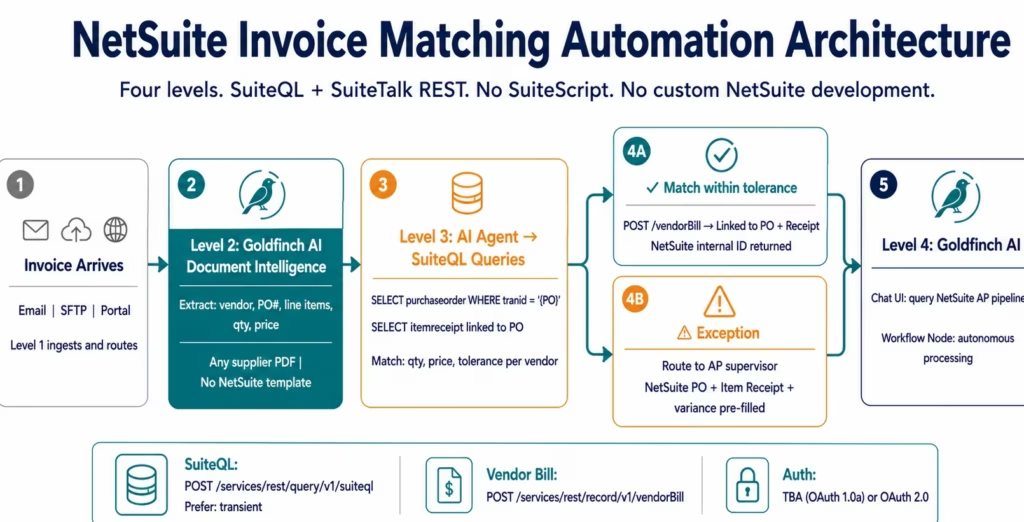
Level 1 (iPaaS Workflows): Receives invoice email attachments from Gmail or Outlook, routes SFTP-based invoice files, calls NetSuite SuiteQL for PO and Item Receipt data, and creates Vendor Bills via the SuiteTalk REST API. Level 1 is the connectivity layer.
Level 2 (AI Workflows, Goldfinch AI Document Intelligence): Extracts all invoice fields from any supplier PDF format without NetSuite-specific templates. Handles the full range: digital PDFs, scanned invoices, multi-page documents, multi-language invoices. Key fields extracted for NetSuite: vendor name, NetSuite PO number (the tranid field in NetSuite), invoice number, line items (description, quantity, unit price), total amount, payment terms, and currency.
Level 3 (AI Agents, SuiteQL and SuiteTalk REST calls): The matching agent queries NetSuite using SuiteQL for PO and Item Receipt data. Compares extracted invoice data against NetSuite PO lines and Item Receipt quantities at line-item level. Auto-creates the NetSuite Vendor Bill for matched invoices. Routes exceptions with pre-populated NetSuite context.
Level 4 (Goldfinch AI): Orchestrates the full workflow as a Workflow Node (autonomous processing) and as Chat UI (AP manager queries NetSuite AP pipeline status in natural language).
The NetSuite API Layer: SuiteQL and SuiteTalk REST Calls
This section gives the exact API calls eZintegrations makes to NetSuite for 3-way matching. Your NetSuite administrator or integration team can verify these against your account configuration.
Authentication
All NetSuite API calls use Token-Based Authentication (TBA, OAuth 1.0a) or OAuth 2.0 (for SuiteCloud Plus accounts). For TBA: create a NetSuite Integration Record (Setup > Integration > Manage Integrations > New), generate Consumer Key and Consumer Secret, and create an Access Token for the integration user. These four credentials (Consumer Key, Consumer Secret, Token ID, Token Secret) are stored in the eZintegrations credential vault.
Purchase Order Retrieval via SuiteQL
SuiteQL is the primary NetSuite query method. The PO query uses the transaction and transactionline tables:
PO Header Query
POST https://{accountId}.suitetalk.api.netsuite.com/services/rest/query/v1/suiteql?limit=1&offset=0

Header:
Prefer: transient

Body:
{
  "q": "
    SELECT t.id,
           t.tranid,
           t.entity,
           t.trandate,
           t.currency,
           t.status
    FROM transaction t
    WHERE t.recordtype = 'purchaseorder'
      AND t.tranid = 'PO-2026-2089'
  "
}


PO Line Items Query (using PO internal ID)

Body:
{
  "q": "
    SELECT tl.id,
           tl.item,
           tl.description,
           tl.quantity,
           tl.rate,
           tl.amount,
           tl.units
    FROM transactionline tl
    WHERE tl.transaction = {PO_INTERNAL_ID}
      AND tl.mainline = 'F'
  "
}
The tranid field is the NetSuite PO number as visible to users (e.g. PO-2026-2089). The id field is NetSuite’s internal numeric identifier used for subsequent queries. mainline = 'F' filters out the header line and returns only item lines.
Item Receipt Retrieval via SuiteQL
Item Receipts in NetSuite are stored in the transaction table with recordtype = 'itemreceipt'. The link to the PO is via the createdfrom field:
PO Header Query
POST https://{accountId}.suitetalk.api.netsuite.com/services/rest/query/v1/suiteql?limit=1&offset=0

Header:
Prefer: transient

Body:
{
  "q": "SELECT t.id,
               t.tranid,
               t.entity,
               t.trandate,
               t.currency,
               t.status
        FROM transaction t
        WHERE t.recordtype = 'purchaseorder'
          AND t.tranid = 'PO-2026-2089'"
}


PO Line Items Query (using PO internal ID)

Body:
{
  "q": "SELECT tl.id,
               tl.item,
               tl.description,
               tl.quantity,
               tl.rate,
               tl.amount,
               tl.units
        FROM transactionline tl
        WHERE tl.transaction = {PO_INTERNAL_ID}
          AND tl.mainline = 'F'"
}
The quantityreceived field gives the quantity confirmed received for each line. This is the critical number for 3-way matching: it may differ from the quantity on the PO if there was a partial delivery.
Vendor Bill Creation via SuiteTalk REST
Once the invoice is matched, the Vendor Bill is created via the SuiteTalk REST record API:
POST https://{accountId}.suitetalk.api.netsuite.com/services/rest/record/v1/vendorBill

Content-Type: application/json

{
  "entity": {
    "id": "{VENDOR_INTERNAL_ID}"
  },
  "trandate": "2026-03-18",
  "duedate": "2026-04-17",
  "memo": "INV-2026-04721",
  "createdfrom": {
    "id": "{PO_INTERNAL_ID}",
    "type": "purchaseOrder"
  },
  "item": {
    "items": [
      {
        "item": {
          "id": "{ITEM_INTERNAL_ID_1}"
        },
        "quantity": 100,
        "rate": 42.50,
        "amount": 4250.00,
        "orderline": 1
      }
    ]
  }
}
The createdfrom field links the Vendor Bill to the PO, which triggers NetSuite’s native 3-way matching workflow automatically. The orderline field links each bill line to the specific PO line. NetSuite returns the internal ID of the created Vendor Bill, and the 3 Way Match Vendor Bill Approval Workflow fires if it is configured.
For Item Receipt-linked bills (when you want to bill against the received quantity rather than the ordered quantity):
{
  "createdfrom": {
    "id": "{ITEM_RECEIPT_INTERNAL_ID}",
    "type": "itemReceipt"
  }
}
This creates the bill from the Item Receipt rather than directly from the PO, capping the billable quantity at the received quantity and enabling full 3-way match behaviour in NetSuite.
Duplicate Vendor Bill Check via SuiteQL
Before creating any Vendor Bill, the agent checks for duplicates:
Body:
{
  "q": "SELECT t.id,
               t.tranid
        FROM transaction t
        WHERE t.recordtype = 'vendorbill'
          AND t.entity = {VENDOR_INTERNAL_ID}
          AND t.memo = 'INV-2026-04721'
          AND t.trandate >= '2026-01-01'"
}
If a result is returned, the invoice is flagged as a potential duplicate and routed to the AP supervisor rather than creating a second Vendor Bill.
Before vs After: Manual NetSuite AP vs Automated
| Process Step | Manual NetSuite AP | Automated with eZintegrations |
|---|---|---|
| Invoice receipt | AP clerk monitors email inbox | Level 1 email connector receives all PDF attachments automatically |
| NetSuite bill entry | AP clerk reads PDF, navigates Enter Bills, keys all fields | Level 2 Goldfinch AI extracts all fields, no NetSuite screen navigation |
| PO lookup | AP clerk searches NetSuite for PO by vendor/date/amount | Level 3 SuiteQL: WHERE tranid = ‘{PO_NUMBER}’ returns in 1 sec |
| Item Receipt check | AP clerk navigates to Receive Items or checks Receiving | Level 3 SuiteQL: WHERE createdfrom = {PO_ID} returns Item Receipt |
| Matching | AP clerk compares PDF to NetSuite PO and receipt data | Matching engine: line-item comparison, configurable tolerance per vendor |
| Vendor bill creation | AP clerk saves bill in Enter Bills (triggers NetSuite workflow) | POST /vendorBill with createdfrom PO/receipt, NetSuite workflow fires |
| Duplicate check | Manual spot-check or none | SuiteQL: checks memo (invoice number) + vendor combination |
| Item Receipt timing mismatch | AP clerk monitors held bill, follows up with receiving | Watcher polls NetSuite for new itemreceipt records, auto-resumes match |
| Exception routing | AP clerk navigates multiple NetSuite screens to investigate | Exception report: extracted invoice + NetSuite PO + receipt data pre-filled |
| AP manager visibility | NetSuite reports, saved searches, manual navigation | Goldfinch AI Chat UI: natural language query of NetSuite AP pipeline |
| SuiteScript required | Some teams write SuiteScript for matching automation | Zero SuiteScript required at any step |
| Custom NetSuite development | Often required for PDF extraction integrations | Not required: eZintegrations API catalog handles SuiteQL and REST |
Step-by-Step: From Email Invoice to NetSuite Vendor Bill
Here is the complete automated 3-way matching cycle for a NetSuite invoice.
Step 1: Invoice email arrives. Level 1 routes to extraction. A supplier sends a 2-page PDF invoice at 8:47 AM. The eZintegrations email connector detects the attachment and passes it to Level 2. Time: 2-3 seconds.
Step 2: Goldfinch AI Document Intelligence extracts all fields. Extracted: vendor: “Hartland Building Materials”, invoiceNumber: “INV-2026-04721”, poReference: “PO-2026-2089”, 14 line items with descriptions, quantities, unit prices. totalAmount: 37565.00. currency: USD. paymentTerms: Net 30. All fields above 0.92 confidence. Time: 8-10 seconds.
Step 3: SuiteQL retrieves the NetSuite Purchase Order.
POST /services/rest/query/v1/suiteql
Header: Prefer: transient
Body: {
  "q": "SELECT t.id, t.tranid, t.entity, t.status FROM transaction t WHERE t.recordtype = 'purchaseorder' AND t.tranid = 'PO-2026-2089'"
}

Response:
id: 4521,
tranid: 'PO-2026-2089',
entity: 847,
status: 'Open'

# PO internal ID 4521 retrieved for Item Receipt lookup.
# Execution time: ~1 second
Step 4: SuiteQL retrieves PO line items.
Body: { "q": " SELECT tl.id, tl.item, tl.description, tl.quantity, tl.rate FROM transactionline tl WHERE tl.transaction = 4521 AND tl.mainline = 'F' " } Response: 14 line items with quantities and agreed rates. Time: 1 second.
Step 5: SuiteQL retrieves the Item Receipt for this PO.
Body: { "q": " SELECT t.id, t.tranid, t.trandate FROM transaction t WHERE t.recordtype = 'itemreceipt' AND t.createdfrom = 4521 " } Response: id: 7834 tranid: 'IR-2026-01182' trandate: '2026-03-15' Item Receipt exists. Item Receipt internal ID 7834 retrieved. Line items queried: Body: { "q": " SELECT tl.item, tl.quantityreceived, tl.rate FROM transactionline tl WHERE tl.transaction = 7834 AND tl.mainline = 'F' " } Response: All 14 line items received. quantityreceived matches PO quantity for all lines. Time: 1-2 seconds.
Step 6: Matching engine comparison.
14 invoice line items compared against PO rates and Item Receipt quantities: – All 14 quantities: invoice quantity matches Item Receipt quantityreceived (exact) – All 14 prices: invoice unit price within 1.1% of PO rate (within configured 3% tolerance) – Invoice total ($37,565.00) vs PO total ($37,800.00): -0.62%, within tolerance – Duplicate check: no existing Vendor Bill with memo INV-2026-04721 for vendor 847 in 2026 – Match result: approved. Time: under 1 second.
Step 7: SuiteTalk REST creates the NetSuite Vendor Bill.
POST /services/rest/record/v1/vendorBill
{
  "entity": { "id": "847" },
  "trandate": "2026-03-18",
  "memo": "INV-2026-04721",
  "createdfrom": { "id": "7834", "type": "itemReceipt" },
  "item": {
    "items": [
      { "item": { "id": "{item_id}" }, "quantity": 100, "rate": 42.50, "orderline": 1 },
      ... 13 more lines ...
    ]
  }
}
NetSuite response: Vendor Bill internal ID 12847 created. NetSuite’s 3 Way Match Vendor Bill Approval Workflow fires automatically: it validates the bill against the PO and Item Receipt. All lines within tolerance: bill auto-approved by the NetSuite workflow. Payment scheduled for April 17 (Net 30). Time: 2-3 seconds.
Total elapsed time: 17-22 seconds. Human involvement: zero.
Item Receipt timing mismatch scenario: Same invoice, but the SuiteQL query for Item Receipt linked to PO 4521 returns empty (goods not yet received). The matching agent holds the invoice. A Watcher is activated, polling NetSuite SuiteQL at 30-60 minute intervals:
Body: {“q”: “SELECT t.id FROM transaction t WHERE t.recordtype = ‘itemreceipt’ AND t.createdfrom = 4521”}
When the warehouse team posts the Item Receipt in NetSuite Receiving, the next Watcher poll detects id: 7834 in the response and automatically resumes the matching workflow. The Vendor Bill is created from the Item Receipt without any AP clerk involvement.
Key Outcomes and Results
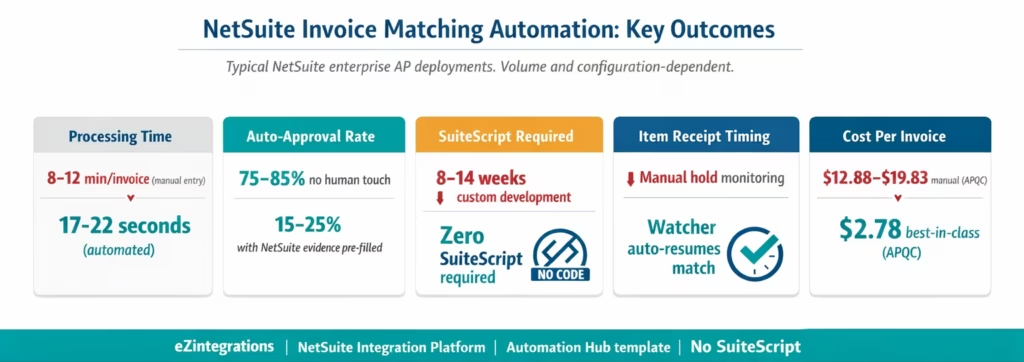
Processing time: 17-22 seconds from invoice PDF arrival to NetSuite Vendor Bill creation for auto-matched invoices. Compared to 8-12 minutes of manual NetSuite entry per invoice. At 1,500 invoices per month: 150-200 hours of AP team time recovered per month.
Auto-approval rate: 75-85% of invoices are processed without any AP team involvement in the extraction, matching, or NetSuite entry steps. The 15-25% of exceptions are routed with NetSuite PO, Item Receipt, and variance detail pre-populated, reducing investigation from 15-20 minutes to 3-5 minutes.
SuiteScript development eliminated: Teams that planned custom SuiteScript for invoice extraction and AP matching typically estimate 8-14 weeks of SuiteScript developer time for comparable scope. eZintegrations achieves the same result using SuiteQL and the SuiteTalk REST API from the no-code canvas, in 5-7 hours of configuration.
NetSuite upgrade stability: All eZintegrations queries use the published SuiteQL and SuiteTalk REST interfaces. NetSuite’s API backward compatibility means these queries are not broken by NetSuite version updates. Custom SuiteScripts can break on NetSuite version updates, SuiteScript API deprecations, or changes to custom records: SuiteQL queries are significantly more stable.
Item Receipt timing mismatch handling: For teams where 15-25% of invoices arrive before the Item Receipt is posted in NetSuite Receiving, the Watcher-based automatic resumption eliminates the manual hold queue monitoring, saving 3-6 minutes per invoice per hold cycle.
Cost per invoice: Best-in-class automated AP teams achieve $2.78 per invoice versus $12.88-$19.83 for manual processing (APQC 2025). For a NetSuite team processing 1,500 invoices per month, annual saving: $182,520-$306,720.
How to Get Started
Step 1: Create a NetSuite Integration Record and Access Token
In your NetSuite account, navigate to Setup > Integration > Manage Integrations > New. Create an Integration Record for eZintegrations. Note the Consumer Key and Consumer Secret (displayed only once). Then navigate to Setup > Users/Roles > Access Tokens > New. Select the Integration Record you created, assign the integration user, and generate the Token ID and Token Secret. These four credentials are stored in the eZintegrations credential vault.
Required NetSuite role permissions for the integration user: – Transactions > Vendor Bills (Full: View, Create, Edit) – Transactions > Purchase Orders (View) – Transactions > Item Receipts (View) – Reports > SuiteAnalytics Workbook (for SuiteQL access) – Setup > REST Web Services (to use the REST API)
Step 2: Import the NetSuite AP Invoice Processing Template
Go to the Automation Hub and import the NetSuite AP Invoice Processing template. It includes Goldfinch AI Document Intelligence, the SuiteQL queries for PO and Item Receipt retrieval, the matching engine, the POST /vendorBill REST call with PO and receipt linking, the duplicate check SuiteQL query, and the Watcher for Item Receipt timing mismatches.
Step 3: Add NetSuite Credentials and Email Ingestion
Add your TBA credentials (Consumer Key, Consumer Secret, Token ID, Token Secret, and NetSuite Account ID) to the eZintegrations credential vault. Add your email system credentials (Gmail API or Microsoft Graph) for invoice PDF ingestion. The NetSuite Account ID is the numeric identifier in your NetSuite instance URL (e.g. 1234567 from 1234567.suitetalk.api.netsuite.com). Average credential setup: 15-20 minutes.
Step 4: Configure Matching Tolerances and Exception Routing
Set price variance tolerance per vendor category (e.g. 3% or $500, whichever is lower). Set quantity variance tolerance (exact match or allow partial delivery). Configure the AP supervisor or NetSuite approver for exception routing. Set the Watcher schedule for Item Receipt timing mismatch handling (30-60 minute polling interval).
Step 5: Dev Test with Real NetSuite PO Numbers and Promote
In the Dev environment, test with representative sample invoices using real NetSuite PO numbers. Confirm SuiteQL queries return correct PO and Item Receipt data. Confirm POST /vendorBill creates a valid NetSuite Vendor Bill linked to the correct PO/receipt. Confirm NetSuite’s 3 Way Match Vendor Bill Approval Workflow fires. Test the timing mismatch Watcher. Promote to production when validated.
Total configuration time: 5-7 hours from template import to NetSuite production go-live.
FAQs
1. How does 3 way matching automation work with NetSuite in eZintegrations
eZintegrations automates the full NetSuite invoice matching cycle without SuiteScript. Goldfinch AI Document Intelligence extracts invoice data from supplier PDFs while AI agents query NetSuite using SuiteQL for purchase order and item receipt data. A matching engine compares invoice lines against PO rates and receipt quantities. Matched invoices create Vendor Bills via SuiteTalk REST with linkage to the Item Receipt triggering NetSuite’s native 3 way match approval workflow.
2. How long does it take to set up automated NetSuite invoice matching
Setup typically takes 5 to 7 hours including NetSuite integration record and token creation credential vault configuration email ingestion setup tolerance configuration and testing with real transaction data. No SuiteScript or custom development is required.
3. Does eZintegrations work with NetSuite without SuiteScript
Yes, eZintegrations uses NetSuite’s published APIs including SuiteQL for data retrieval and SuiteTalk REST for Vendor Bill creation. No SuiteScript development RESTlets or customisation are required ensuring a fully supported and maintainable integration approach.
4. What is the difference between SuiteQL and SuiteTalk REST in invoice matching
SuiteQL is used for reading data from NetSuite including querying purchase orders line items and item receipts using SQL based queries. SuiteTalk REST is used for writing data such as creating Vendor Bills. The combination enables efficient data retrieval and reliable transaction posting without custom scripting.
5. What happens if the Item Receipt is not posted when the invoice arrives
If no item receipt is found the invoice is placed in a pending queue instead of creating a Vendor Bill. A Watcher monitors NetSuite via SuiteQL and when the item receipt is posted the workflow resumes automatically creating the Vendor Bill without manual intervention eliminating timing mismatch issues.
Automate NetSuite Invoice Matching Without Writing a Line of SuiteScript
NetSuite’s 3 Way Match Vendor Bill Approval Workflow is a well-built control. It validates vendor bills against POs and Item Receipts once they are in the system. The manual work that remains is in the steps before: reading 8-15 minutes of PDF invoices, entering them in NetSuite’s Enter Bills screen, linking to POs, and monitoring the held bills queue for Item Receipt timing mismatches.
eZintegrations automates all of that using SuiteQL for intelligent NetSuite data retrieval and the SuiteTalk REST API for Vendor Bill creation. Goldfinch AI Document Intelligence handles any supplier PDF format without templates. The matching engine runs before the bill enters NetSuite, catching exceptions before they generate NetSuite holds. The Watcher handles Item Receipt timing mismatches automatically.
No SuiteScript. No custom NetSuite development. The NetSuite AP Invoice Processing template in the Automation Hub covers the complete workflow.
Import the Automation NetSuite AP Invoice Processing Template from the Automation Hub and go live in 5-7 hours. Or book a free demo with your NetSuite account details and invoice volume. We will walk through the SuiteQL configuration and API setup for your environment in the session.
For the complete 3-way matching technical context, see What Is 3-Way Matching in Accounts Payable. For the broader NetSuite API reference, see the NetSuite integration platform guide.

