
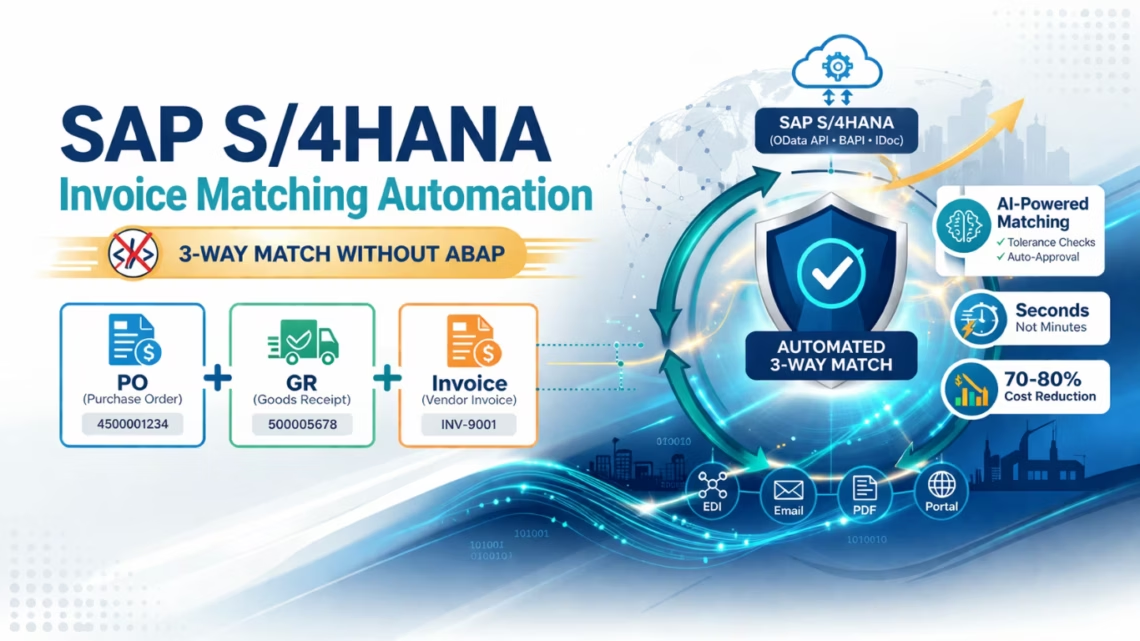
SAP S/4HANA Invoice Matching Automation: 3-Way Match Without ABAP
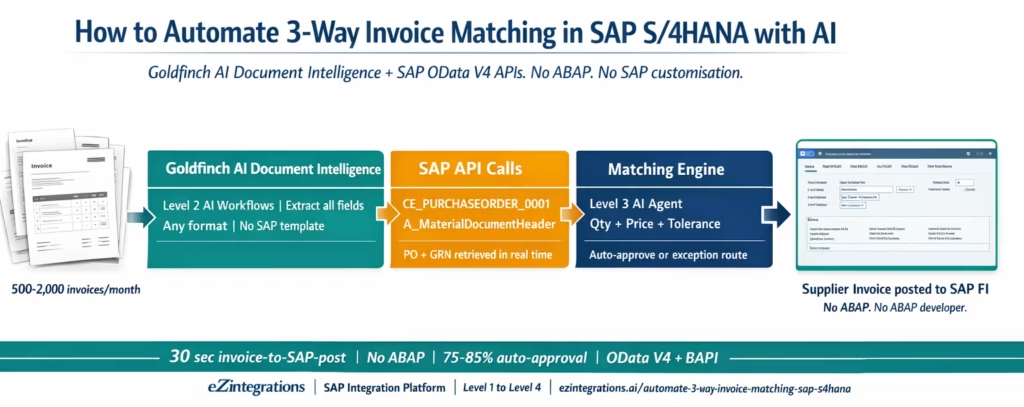
May 19, 2026To automate 3-way invoice matching in SAP S/4HANA without custom ABAP, eZintegrations uses Goldfinch AI Document Intelligence to extract invoice data from any PDF format, then calls the SAP S/4HANA OData V4 API (CE_PURCHASEORDER_0001 for PO data, A_MaterialDocumentHeader for GRN data) or BAPI calls for SAP ECC on-premises to retrieve the matching documents, applies the configurable tolerance matching engine, and posts approved invoices to SAP FI via the API_SUPPLIERINVOICE_PROCESS_SRV OData service. The entire cycle runs without custom ABAP code, without SAP customisation, and processes a standard SAP invoice from PDF extraction to FI posting in under 30 seconds.
TL;DR
- SAP S/4HANA’s native AP module handles invoice verification (MIRO transaction and its successor apps) but does not automate the full cycle: invoice capture from email, AI extraction from any PDF format, tolerance-based pre-matching, and exception routing with pre-populated context.
- eZintegrations fills this gap by sitting between invoice arrival and the SAP FI posting step: Goldfinch AI Document Intelligence (Level 2) extracts invoices, Level 3 AI Agents call SAP OData V4 APIs for PO and GRN data, apply the matching rules, and post approved invoices to SAP FI.
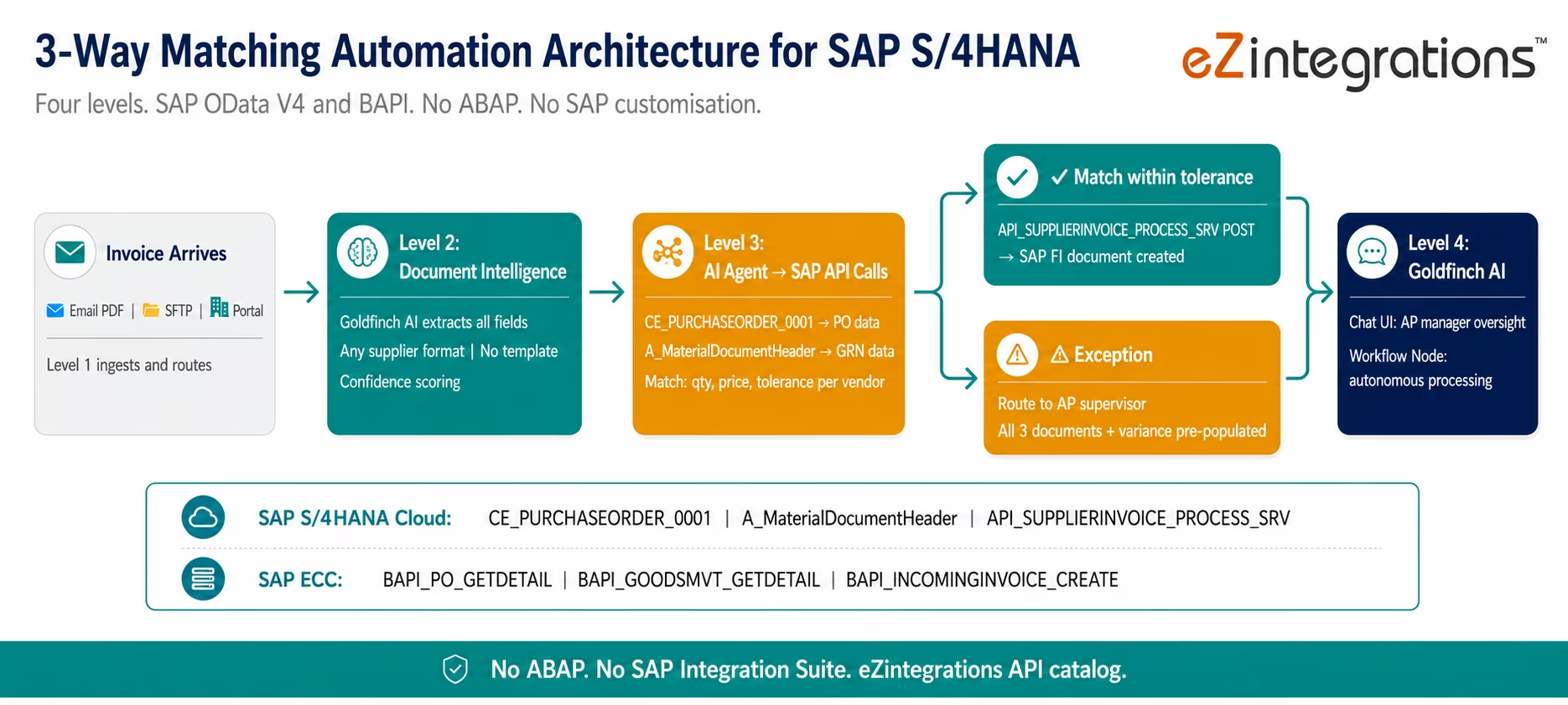
- SAP S/4HANA Cloud: OData V4 API (CE_PURCHASEORDER_0001 for PO, A_MaterialDocumentHeader for GRN, API_SUPPLIERINVOICE_PROCESS_SRV for invoice posting). SAP ECC on-premises: BAPI_PO_GETDETAIL, BAPI_GOODSMVT_GETDETAIL, BAPI_INCOMINGINVOICE_CREATE via secure outbound agent.
- No ABAP development. No SAP customisation. No SAP Integration Suite licence required.
- Go live from the Automation Hub SAP AP Invoice Processing template in 6-8 hours.
Why SAP’s Native AP Tools Are Not Enough
Your SAP S/4HANA system has a Manage Supplier Invoices app. It has the MIRO transaction for invoice verification against purchase orders. It has the Accounts Payable Accounting module. These are mature, well-built tools.
They do not solve the problem your AP team is dealing with on Monday morning.
The problem is the 200-400 PDF invoices that arrived over the weekend from suppliers in 15 countries, in 8 different formats, some with PO references and some without, some scanned from paper and some digital, some in English and some in German or French. Before any of them can reach the SAP Manage Supplier Invoices app, someone has to read them, extract the data, key it into SAP, and find the matching PO and goods receipt. That work is entirely manual. SAP does not do it.
By the time an AP clerk has entered invoice data into SAP and the system can verify it against the PO, the invoice is already 20-45 minutes old and the queue is backing up.
The answer is not to replace SAP. It is to add the layer that SAP is missing: AI-powered invoice capture and extraction before the SAP entry step, and automated PO and GRN retrieval from SAP so the matching decision happens in seconds rather than minutes.
What SAP S/4HANA Actually Provides for Invoice Matching
Understanding where SAP’s native capability stops is important before designing the automation layer. SAP S/4HANA provides solid invoice verification tools from the moment an invoice is in the system. The gap is everything before that moment.
What SAP S/4HANA provides natively:
The Manage Supplier Invoices Fiori app (and its predecessor, transaction MIRO for SAP ECC) allows AP clerks to enter or upload supplier invoices and verify them against existing purchase orders. SAP performs the accounting verification logic: it checks whether the invoice matches the PO price and quantity within configured tolerance levels (LIV: Logistics Invoice Verification tolerance configuration in transaction OMR6). Invoices within tolerance are posted automatically. Invoices outside tolerance are blocked for payment (a payment block is set on the SAP invoice document) and appear in the exception report (MRBR in SAP ECC, the Manage Blocked Invoices app in S/4HANA).
SAP’s Evaluated Receipt Settlement (ERS) allows SAP to generate and post invoices automatically for GRN-based transactions without a supplier invoice, for suppliers configured for ERS. This eliminates the invoice receipt step entirely for those suppliers.
SAP Invoice Management (VIM) via OpenText or SAP’s own Document Management helps with invoice capture and workflow routing within the SAP ecosystem.
Where SAP’s native tools stop:
SAP assumes invoices arrive in the system as structured data: manually keyed by an AP clerk in Manage Supplier Invoices, uploaded as an IDoc or EDI transaction from the supplier’s system, or entered via a Supplier Self-Service portal. What SAP does not handle is unstructured invoice extraction: reading a PDF email attachment, extracting all fields including multi-row line items, and creating the invoice document in SAP automatically from any supplier’s format.
SAP also does not provide: configurable pre-match automation across all invoice channels, intelligent exception routing with pre-populated evidence to the AP supervisor, Watcher-based GRN timing mismatch handling, or a natural language oversight interface for the AP manager. These are the gaps that eZintegrations fills.
What Is Missing and Where Manual Work Re-enters the Process
When AP teams audit why their SAP AP automation is not working as expected, the answer is almost always one of four failure points.
Failure Point 1: The invoice extraction gap. Your AP clerk opens Outlook. There are 47 invoice attachments from overnight. They open each PDF, read the data, navigate to SAP Manage Supplier Invoices, and key the fields. SAP then does the matching. The matching itself takes 2 seconds in SAP. The manual extraction and keying takes 8-12 minutes per invoice. The bottleneck is not SAP. It is the step before SAP.
Failure Point 2: Format variability across suppliers. Your 200 suppliers send invoices in 200 different formats. Some use the SAP Supplier Portal and submit structured data. Most send PDF email attachments. 30-40 of them send scanned paper invoices. Your AP team must manually handle every format that is not structured EDI or a portal submission.
Failure Point 3: Timing mismatches where GRN is pending. An invoice arrives in SAP for PO-2026-2089. The AP clerk enters it in Manage Supplier Invoices. SAP tells them there is no goods receipt for this PO yet. The invoice is parked (not posted). The AP clerk puts it on a tracking list, follows up with the warehouse team, waits for the GRN to be posted in SAP (MIGO transaction), then returns to the parked invoice and re-processes. This manual follow-up cycle for timing mismatches consumes a disproportionate amount of AP team time.
Failure Point 4: Exception investigation without context. SAP blocks an invoice for payment because the unit price is 3.2% above the PO agreed price. The AP clerk receives a notification from SAP. They open the blocked invoice in Manage Blocked Invoices (MRBR), see the variance flag, open the PO in ME23N, compare the PO price to the invoice price manually, then decide whether to release the block or contact the supplier. All of this requires navigating multiple SAP transactions, cross-referencing documents that SAP does not pre-populate together, and applying business judgement that is not supported by SAP’s blocking notification.
eZintegrations addresses all four failure points by adding the intelligence layer before and around the SAP entry step.
How eZintegrations Automates 3-Way Matching in SAP
eZintegrations does not replace the SAP AP module. It adds the extraction, matching, and exception management layer that sits between invoice arrival and SAP FI posting.
The four-level architecture applied to SAP:
Level 1 (iPaaS Workflows): Receives invoice email attachments, routes files from SFTP or supplier portals, calls SAP OData V4 APIs for PO and GRN data, and posts approved invoices to SAP FI via the supplier invoice API. Level 1 is the structured connectivity layer.
Level 2 (AI Workflows, Goldfinch AI Document Intelligence): Extracts all invoice fields from any PDF format without vendor-specific templates. No SAP template configuration required per supplier. All 200 of your suppliers’ invoice formats handled from day one. Extracts: vendor name, SAP vendor code (if present on invoice), invoice number, invoice date, SAP PO reference number, all line items (description, quantity, unit of measure, unit price, line total), taxes, total amount, currency, payment terms.
Level 3 (AI Agents, SAP API calls): The matching agent calls SAP OData V4 APIs in real time: CE_PURCHASEORDER_0001 for PO header and item data, A_MaterialDocumentHeader for GRN data linked to the PO. The agent compares invoice line items against SAP PO items and GRN items at line-item level with configurable tolerance. Auto-approved invoices are submitted to SAP FI via API_SUPPLIERINVOICE_PROCESS_SRV. Exception invoices are routed to the AP supervisor with all three documents pre-populated.
Level 4 (Goldfinch AI): Orchestrates the full workflow as a Workflow Node (autonomous processing) and as Chat UI (AP manager queries the pipeline in natural language without navigating SAP transactions).
The SAP API Layer: OData V4 and BAPI Endpoints Used
This section gives the exact API calls eZintegrations makes to SAP for 3-way matching. Your SAP Basis or integration team can verify these against your system configuration.
SAP official SAP Help Portal documentation for SAP S/4HANA Cloud Purchase Order OData V4 APIs.
SAP S/4HANA Cloud (Public Cloud and Private Cloud, OData V4)
PO Retrieval:
BAPI_PO_GETDETAIL(
  PURCHASEORDER        = '4500002089'
  ITEMS                = 'X'
  ITEM_SCHEDULE_LINES  = 'X'
)
Returns: PO header (vendor, PO date, purchasing org, company code) and expanded line items (material number, ordered quantity, agreed price per unit, unit of measure). This is the same data SAP uses internally for invoice verification.
For SAP S/4HANA on-premises OData V2 (also available):
GET /sap/opu/odata/sap/API_PURCHASEORDER_PROCESS_SRV/A_PurchaseOrder('{PO_NUMBER}')
  ?$expand=to_PurchaseOrderItem
GRN Retrieval: A_MaterialDocumentHeader (OData V2, broadly available)
GET /sap/opu/odata/sap/API_MATERIAL_DOCUMENT_SRV/A_MaterialDocumentHeader
  ?$filter=ReferenceDocument eq '{PO_NUMBER}'
    and GoodsMovementType eq '101'
  &$expand=to_MaterialDocumentItem
Movement type 101 is the SAP goods movement type for “Goods Receipt for Purchase Order” (the GR/GI key in MIGO). This returns all goods receipt documents posted against the PO, with item-level quantities, material numbers, posting date, and storage location.
Supplier Invoice Posting: API_SUPPLIERINVOICE_PROCESS_SRV (OData V2)
POST /sap/opu/odata/sap/API_SUPPLIERINVOICE_PROCESS_SRV/A_SupplierInvoice

{
  "CompanyCode": "1000",
  "DocumentDate": "2026-03-18",
  "PostingDate": "2026-03-18",
  "SupplierInvoiceIDByInvcgParty": "INV-2026-04721",
  "InvoicingParty": "0000100042",
  "DocumentCurrency": "USD",
  "InvoiceGrossAmount": "37565.00",
  "PaymentTerms": "ZB30",
  "to_SuplrInvcItemPurOrdRef": { ... 14 line items ... }
}
This creates a posted SAP supplier invoice linked to the PO, triggering SAP’s own logistics invoice verification logic. The SAP document number returned from this call is stored in the eZintegrations audit record for the invoice.
SAP ECC On-Premises (BAPI Calls via Secure Outbound Agent)
For organisations running SAP ECC, the same matching logic uses BAPI calls via the eZintegrations secure outbound agent:
PO Retrieval:
BAPI_PO_GETDETAIL(
  PURCHASEORDER        = '4500002089'
  ITEMS                = 'X'
  ITEM_SCHEDULE_LINES  = 'X'
)
Returns: PO header data, item details including ordered quantity and net price, and delivery schedule lines.
GRN Retrieval:
BAPI_GOODSMVT_GETDETAIL(
  GOODSMVT_CODE    = '101'   " GR for PO
  GOODSMVT_HEADER  = {PO_NUMBER as reference}
)
Invoice Posting (MIRO equivalent):
BAPI_INCOMINGINVOICE_CREATE(
  HEADERDATA = {
    invoice_ind   : 'X'          " Invoice (not credit memo)
    doc_date      : '20260318'
    pstng_date    : '20260318'
    comp_code     : '1000'
    currency      : 'USD'
    gross_amount  : '37565.00'
    vendor        : '0000100042'
  }
  ITEMDATA = [
    {
      po_number    : '4500002089'
      po_item      : '00010'
      ref_doc      : '{GRN_NUMBER}'   " Reference to goods receipt
      quantity     : '100'
      po_unit      : 'EA'
      item_amount  : '4250.00'
    }
  ]
)
Returns INVOICEDOCNUMBER (the SAP FI document number) on successful posting.
Authentication for all SAP calls: OAuth 2.0 with SAP BTP Communication Arrangement for S/4HANA Cloud. Basic Auth with Communication User for S/4HANA on-premises. BAPI calls via SAP JCo connectivity with Token-Based Authentication for SAP ECC. All credentials stored in the eZintegrations credential vault.
Before vs After: Manual SAP AP vs Automated with eZintegrations
| Process Step | Manual SAP AP Process | Automated with eZintegrations |
|---|---|---|
| Invoice receipt | AP clerk monitors email, downloads attachments | Level 1 email connector receives all attachments automatically |
| SAP data entry | AP clerk keys fields into SAP Manage Supplier Invoices | Level 2 Goldfinch AI extracts all fields, no SAP keying |
| PO lookup | AP clerk navigates ME23N, searches by PO number | Level 3 agent: CE_PURCHASEORDER_0001 API call returns PO in 1–2 sec |
| GRN check | AP clerk checks MIGO documents or MB51 report | Level 3 agent: A_MaterialDocumentHeader API call returns all GR docs |
| Matching | AP clerk compares PDF against SAP PO/GRN on screen | Matching engine: line-item comparison with configurable tolerance per vendor |
| Timing mismatch (no GRN) | Invoice parked, manual follow-up with warehouse, manual reprocessing | Watcher monitors SAP for GRN (movement type 101), auto-resumes matching |
| SAP posting | AP clerk posts via Manage Supplier Invoices | API_SUPPLIERINVOICE_PROCESS_SRV POST creates SAP FI document |
| Exception investigation | AP clerk opens MRBR, ME23N, cross-references manually | Pre-populated exception with invoice + SAP PO + GRN + variance |
| AP manager visibility | SAP reports (MIR6, MRBR) require manual generation | Goldfinch AI Chat UI with natural language SAP AP pipeline queries |
| ABAP required | Varies (custom extraction/workflow often needed) | Zero ABAP required at any step |
| SAP template per vendor | Required for structured electronic submission | Not required: Document Intelligence handles any format |
Step-by-Step: From Email Invoice to SAP FI Posting Without ABAP
Here is the exact sequence for a SAP S/4HANA Cloud environment. SAP ECC follows the same logic with BAPI calls instead of OData.
Step 1: Invoice email arrives. Level 1 routes to extraction queue. Supplier sends PDF invoice to your AP email inbox (monitored by the eZintegrations email connector via Gmail API or Microsoft Graph). The connector detects the PDF attachment, classifies it as an invoice, and passes it to the Level 2 Document Intelligence processing queue. Time: 2-3 seconds.
Step 2: Goldfinch AI Document Intelligence extracts all fields. The Level 2 AI processes the PDF. All header and line-item fields extracted into structured JSON. Key field: PurchaseOrder: “4500002089” extracted from the PO reference on the invoice. Time: 5-12 seconds depending on document complexity.
Step 3: Level 3 AI Agent calls SAP CE_PURCHASEORDER_0001. Using the extracted PO number 4500002089, the agent makes an OData V4 GET call to the SAP S/4HANA tenant:
GET /sap/opu/odata4/sap/api_purchaseorder_2/srvd_a2x/sap/purchaseorder/0001/PurchaseOrder
?$filter=PurchaseOrder eq '4500002089'
&$expand=_PurchaseOrderItem
Step 4: Level 3 AI Agent calls A_MaterialDocumentHeader for GRN. Using the same PO number, the agent retrieves goods receipt documents:
GET /sap/opu/odata/sap/API_MATERIAL_DOCUMENT_SRV/A_MaterialDocumentHeader
?$filter=ReferenceDocument eq '4500002089' and GoodsMovementType eq '101'
&$expand=to_MaterialDocumentItem
Step 5: Matching engine compares all three documents. Line-item comparison: 14 line items compared: invoice quantity vs GRN quantity (all 14 match exactly) . Invoice unit prices vs SAP PO net price (all within 1.2% of PO, within configured 3% tolerance) . Invoice total ($37,565.00) vs PO approved value ($37,800.00): -$235.00 variance, 0.62%, within tolerance . Duplicate check: INV-2026-04721 from vendor 0000100042 not in SAP for this fiscal year – Match result: approved within tolerance. Time: under 1 second.
Step 6: API_SUPPLIERINVOICE_PROCESS_SRV POST to SAP FI. The Level 1 workflow posts the approved invoice to SAP:
POST /sap/opu/odata/sap/API_SUPPLIERINVOICE_PROCESS_SRV/A_SupplierInvoice

{
  "CompanyCode": "1000",
  "DocumentDate": "2026-03-18",
  "PostingDate": "2026-03-18",
  "SupplierInvoiceIDByInvcgParty": "INV-2026-04721",
  "InvoicingParty": "0000100042",
  "DocumentCurrency": "USD",
  "InvoiceGrossAmount": "37565.00",
  "PaymentTerms": "ZB30",
  "to_SuplrInvcItemPurOrdRef": { ... 14 line items ... }
}
Total elapsed time: 14-22 seconds. Human involvement: zero.
GRN timing mismatch scenario: Same invoice arrives, but GRN is not yet posted in SAP (delivery expected tomorrow). The A_MaterialDocumentHeader call returns no results for PO-4500002089. The Level 3 agent holds the invoice in the pending queue. A Watcher monitors SAP daily for new goods receipt documents (movement type 101) for PO-4500002089. When the warehouse team posts the GRN in SAP MIGO the next day, the Watcher detects the new A_MaterialDocumentHeader record, resumes the matching workflow, and processes the invoice through Steps 5-6 automatically. No AP clerk needed to remember to re-check the parked invoice.
Key Outcomes and Results
Enterprise SAP AP teams deploying eZintegrations for 3-way matching automation typically achieve the following:
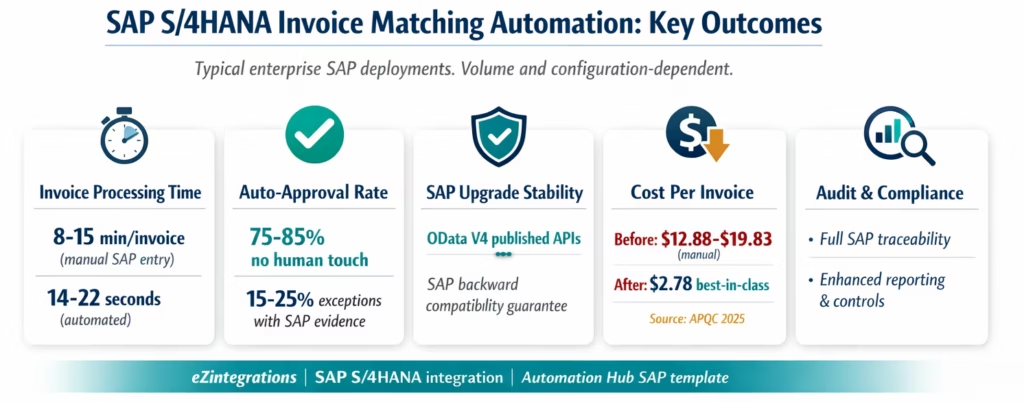
Processing time: 14-22 seconds from invoice PDF arrival to SAP FI posting for auto-matched invoices. Compared to 8-15 minutes manual SAP entry per invoice (navigation across Manage Supplier Invoices, ME23N, and MB51).
Auto-approval rate: 75-85% of invoices processed without any human touch on the SAP entry, matching, or posting steps. The 15-25% of invoices that require human review reach the AP supervisor with the SAP PO data, GRN data, and variance detail pre-populated, reducing exception investigation from 15-20 minutes to 3-5 minutes.
ABAP development eliminated: Organisations that were planning custom ABAP development to automate invoice extraction and SAP AP workflow integration typically estimate 8-16 weeks of ABAP developer time for a comparable scope. eZintegrations achieves the same result without ABAP using the OData V4 API and BAPI catalog, configured via the no-code canvas in 6-8 hours.
SAP upgrade stability: All eZintegrations integrations call published SAP OData V4 and V2 APIs, not custom SAP tables or unofficial interfaces. SAP commits to backward compatibility for published OData APIs. When SAP releases a new S/4HANA update, the eZintegrations integration is not affected.
Timing mismatch elimination: For SAP deployments where 15-25% of invoices arrive before the GRN is posted, Watcher-based automatic match resumption eliminates the manual parked invoice follow-up task, saving 3-6 minutes per invoice per hold cycle.
Cost per invoice: Best-in-class automated SAP AP teams achieve $2.78 per invoice versus $12.88-$19.83 for manual processing (APQC 2025). For a team processing 2,000 SAP invoices per month, the annual saving is $243,360-$408,120.
APQC 2025 accounts payable automation benchmark analysis referenced via Parseur AP invoice processing benchmarks.
How to Get Started
Step 1: Confirm SAP API Access and Authentication Method
For SAP S/4HANA Cloud: log into the SAP Fiori launchpad and go to the Communication Systems app. Create a Communication System and Communication User for the eZintegrations integration. Assign the following Communication Scenarios: SAP_COM_0006 (Supplier Invoice Integration) and SAP_COM_0008 (Purchasing). This grants API access to CE_PURCHASEORDER_0001, A_MaterialDocumentHeader, and API_SUPPLIERINVOICE_PROCESS_SRV. Note the Communication User credentials.
For SAP S/4HANA on-premises or SAP ECC: create a technical user with the required authorisations for the OData services or BAPI calls listed above. For SAP ECC, install the eZintegrations secure outbound agent in your network. The agent establishes an outbound HTTPS connection to the eZintegrations cloud; no inbound firewall rules required.
Step 2: Import the SAP AP Invoice Processing Template from the Automation Hub
Go to the Automation Hub and import the SAP AP Invoice Processing template. It includes the Goldfinch AI Document Intelligence extraction, the SAP OData V4 API calls for PO and GRN retrieval (CE_PURCHASEORDER_0001 and A_MaterialDocumentHeader pre-configured), the matching engine, the API_SUPPLIERINVOICE_PROCESS_SRV posting call, the Watcher for GRN timing mismatches, and the exception routing flow.
Step 3: Add SAP Credentials and Email Ingestion
Add your SAP Communication User credentials (hostname, client ID, username, password) to the eZintegrations credential vault. Add your email system credentials (Gmail API or Microsoft Graph). The Level 1 workflow will route invoice attachments to Document Intelligence automatically.
Step 4: Configure Tolerance Thresholds and Exception Routing
Set price variance tolerance per vendor category (e.g. 3% for standard suppliers, 1% for high-value capital goods). Set quantity variance tolerance. Configure the AP supervisor or SAP workflow approver for exceptions. Set the escalation SLA (e.g. unresolved exceptions escalate to finance controller after 48 hours).
Step 5: Dev Test with Real SAP Invoices and Promote
In the Dev environment, run test invoices against your actual SAP system. Confirm that the OData V4 API calls return correct PO and GRN data for your test PO numbers. Confirm the matching engine comparison is correct. Confirm the API_SUPPLIERINVOICE_PROCESS_SRV POST creates a valid SAP FI document. Run a timing mismatch test (submit an invoice with a PO that has no GRN yet, confirm Watcher detects the GRN when posted). Promote to production when validated.
Total configuration time: 6-8 hours from template import to production SAP go-live.
For the SAP S/4HANA integration platform context, see the SAP integration platform enterprise guide.
FAQs
1. How does 3 way matching automation work with SAP S 4HANA in eZintegrations
eZintegrations adds an AI driven extraction and matching layer before SAP entry. Goldfinch AI Document Intelligence extracts invoice data from PDFs without templates while AI agents retrieve purchase order and goods receipt data from SAP using OData APIs. A matching engine compares invoice PO and GRN at line item level with configurable tolerance. Matched invoices are posted to SAP FI and exceptions are routed to AP teams with full SAP context.
2. How long does it take to set up automated invoice matching with SAP S 4HANA
Setup typically takes 6 to 8 hours including SAP communication setup credential configuration email ingestion tolerance setup and testing with live SAP data. No ABAP development SAP customisation or additional integration middleware is required.
3. Does eZintegrations work with SAP S 4HANA Cloud and SAP ECC on premises
Yes, SAP S 4HANA Cloud uses OData V4 APIs through SAP BTP communication arrangements while SAP ECC and on premises S 4HANA use OData V2 APIs and BAPI calls via a secure outbound agent. The same eZintegrations template supports both with different credential configurations.
4. Does this require SAP Integration Suite or SAP BTP
No, eZintegrations connects directly to SAP APIs as a client without requiring SAP Integration Suite. This avoids additional licensing costs and specialised resources while using standard SAP published APIs for integration.
5. How are tolerance checks handled in 3 way matching automation
eZintegrations applies a pre SAP tolerance check at the matching stage configurable by vendor category ensuring exceptions are identified before SAP entry. SAP LIV tolerance configuration still applies within SAP creating a dual layer validation approach that prevents blocked invoices and improves exception handling.
Automate Your SAP S/4HANA AP Process Without Writing a Line of ABAP
The manual SAP AP process is not a SAP problem. It is an extraction and orchestration problem. SAP verifies invoices correctly once they are in the system. The work before that step, reading PDFs, keying data, navigating to ME23N, checking MIGO documents, all of that is what consumes 8-15 minutes per invoice and produces the AP backlog your team is managing every week.
eZintegrations adds the intelligence layer on top of SAP’s published APIs: Goldfinch AI Document Intelligence for extraction from any format, CE_PURCHASEORDER_0001 and A_MaterialDocumentHeader for SAP data retrieval, a configurable matching engine for autonomous decision-making, and API_SUPPLIERINVOICE_PROCESS_SRV for SAP FI posting. All of it uses SAP’s published OData V4 and V2 APIs. None of it requires ABAP. None of it requires SAP Integration Suite.
Import the SAP AP Invoice Processing Template from the Automation Hub and start your first automated SAP invoice match today. Or book a free demo with your SAP landscape details (S/4HANA Cloud or on-premises, ECC version if applicable, invoice volume and format mix). We will map the API configuration and identify the highest-impact starting point for your SAP AP team in the session.
For the complete 3-way matching technical context, see What Is 3-Way Matching in Accounts Payable and the enterprise AP automation guide.

