
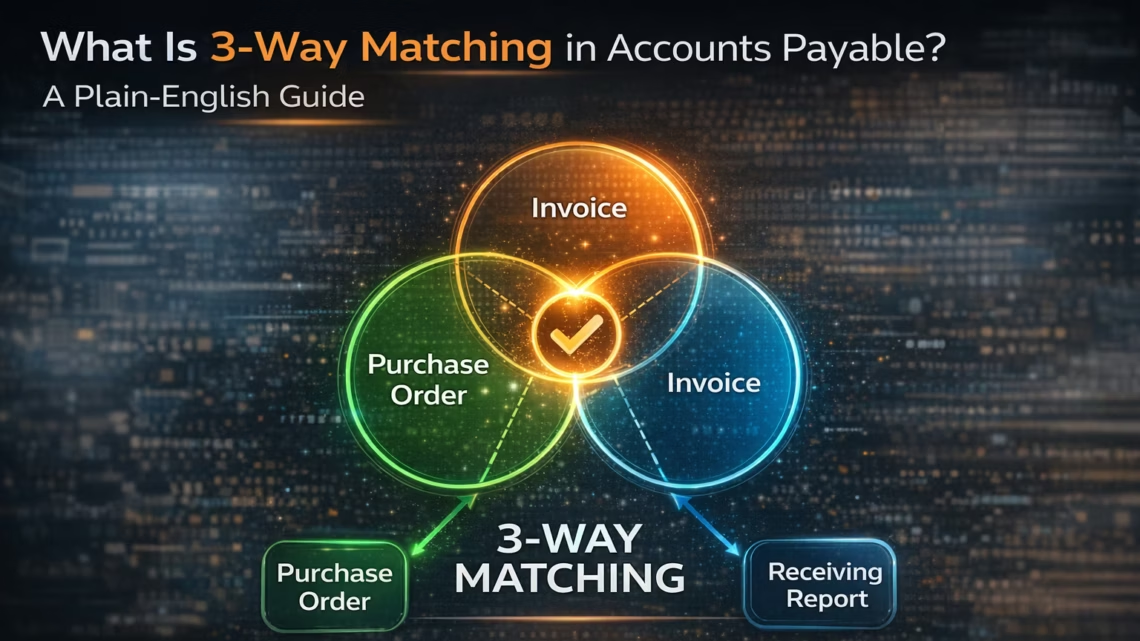
What Is 3-Way Matching in Accounts Payable? A Plain-English Guide
March 26, 20263-way matching in accounts payable is the process of verifying that three documents agree before paying a supplier invoice: the purchase order (PO) that authorised the purchase, the goods received note (GRN) that confirms delivery, and the supplier invoice requesting payment. If all three match within your tolerance thresholds, the invoice is approved and payment is released. If any document shows a discrepancy, the invoice is held and routed for investigation. eZintegrations automates 3-way matching using the platform’s 4-level architecture: Level 2 AI Workflows (Goldfinch AI Document Intelligence) extract invoice data, Level 3 AI Agents run the matching logic and approve or escalate each invoice, and Level 4 Goldfinch AI can be deployed as Chat UI for AP manager oversight or as a Workflow Node for fully autonomous processing, reducing manual processing time by 75-85%.
TL;DR
3-way matching means verifying your purchase order, goods received note (GRN), and supplier invoice against each other before approving payment. – It prevents overpayments, duplicate payments, and fraudulent invoices from reaching your ERP. Manual 3-way matching accounts for 22% of AP analyst effort across all AP tasks. eZintegrations automates 3-way matching using the platform’s 4-level automation architecture: Level 2 AI Workflows (Goldfinch AI Document Intelligence) extract invoice data, Level 3 AI Agents apply the matching rules and make approve or escalate decisions, and Level 4 Goldfinch AI orchestrates the overall process, deploying as Chat UI for AP manager oversight or as a Workflow Node for fully autonomous processing. The AP Invoice Processing AI Agent template imports in one click and deploys in 4-6 hours.
What Is 3-Way Matching?
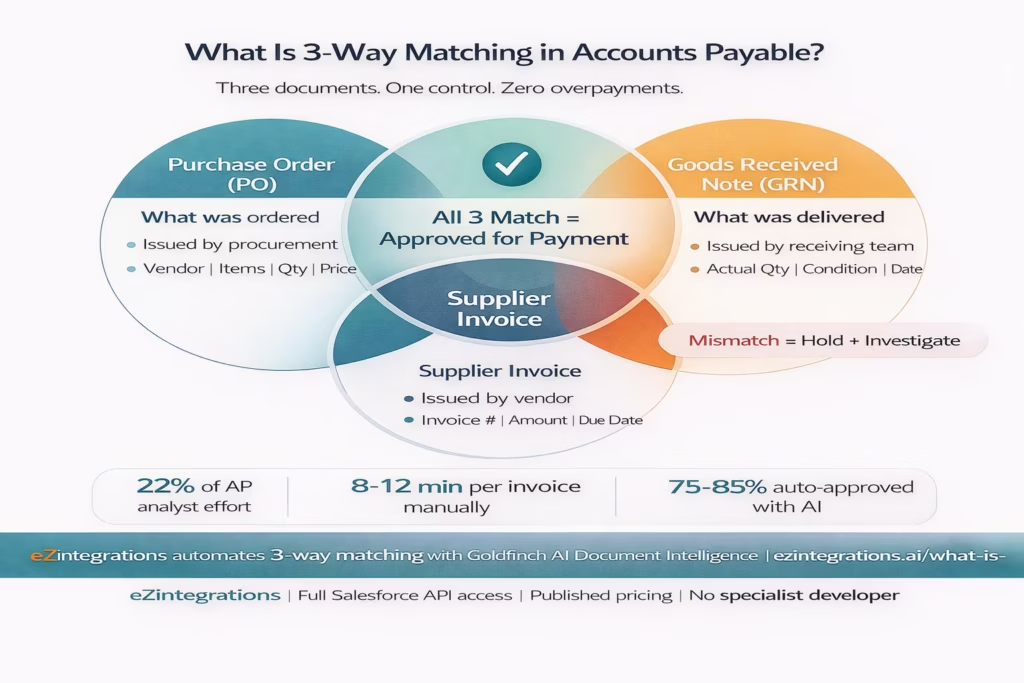
3-way matching is an accounts payable control that verifies three documents agree before your organisation pays a supplier: the purchase order, the goods received note, and the supplier invoice.
The logic is straightforward. Your procurement team issued a PO authorising a specific purchase. Your receiving team confirmed delivery with a GRN. Your supplier sent an invoice for payment. Before releasing funds, your AP team checks all three documents for consistency: same vendor, same items, same quantities, same price. If they align within your tolerance threshold, the invoice is approved. If they do not, the invoice is held pending investigation.
Simple in theory. Time-consuming in practice. Especially at volume.
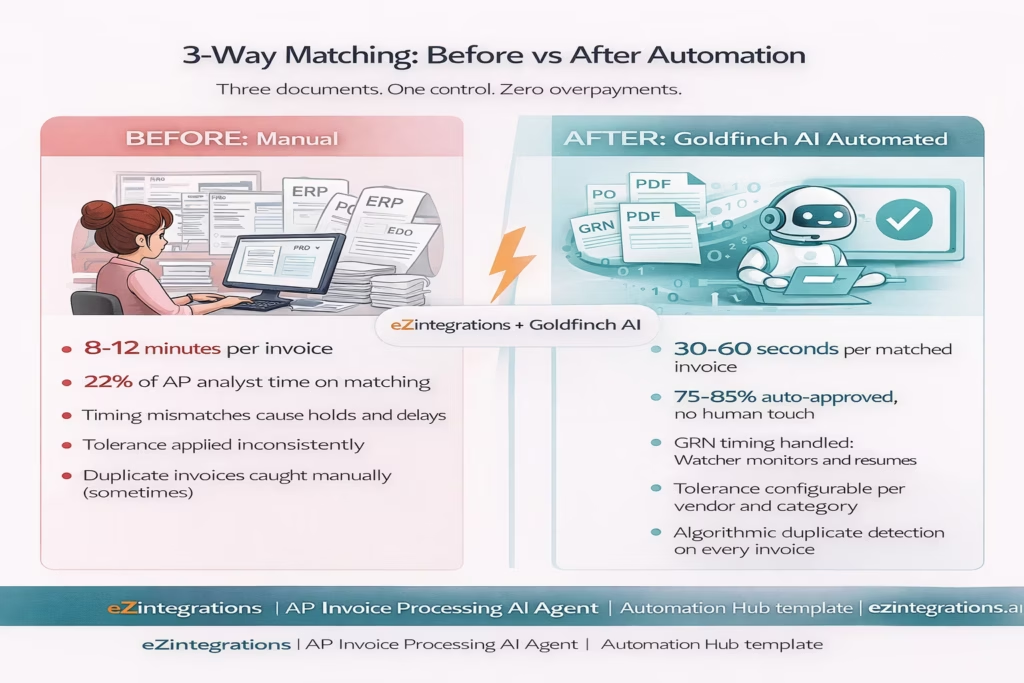
Research shows invoice matching against PO and GRN data accounts for 22% of AP analyst effort across all AP tasks, making it one of the most resource-intensive processes in the accounts payable function.
The Three Documents: PO, GRN, and Invoice Explained
Understanding 3-way matching starts with knowing exactly what each document contains and who is responsible for it.
The Purchase Order (PO)
Your procurement team issues the PO. It authorises the purchase and serves as a legal contract between your organisation and the supplier. A PO contains: the supplier name and address, a unique PO number, a list of items or services ordered, the quantity for each line item, the agreed unit price, the total PO value, the expected delivery date, and the approved cost centre or budget code.
The PO is your organisation’s commitment. It defines what should be received and what should be paid.
The Goods Received Note (GRN)
Your receiving team (warehouse, logistics, or facilities) creates the GRN when delivery arrives. Also called a goods receipt, receiving report, or delivery confirmation, the GRN captures: the PO number it relates to, the items actually received, the quantity actually delivered (which may differ from what was ordered if there was a partial delivery), the delivery date, and any notes about damaged or rejected items.
The GRN is your organisation’s confirmation. It defines what was actually received. Not what was ordered. What arrived.
The Supplier Invoice
Your supplier sends the invoice requesting payment. The invoice contains: a unique invoice number, the PO number it references (if the supplier uses PO-based invoicing), a line-item breakdown of goods or services billed, quantities billed, unit prices, subtotals, applicable taxes, the total amount due, payment terms, and the supplier’s bank details.
The invoice is the vendor’s payment request. The 3-way match checks whether that request matches your PO commitment and your GRN confirmation.
How the 3-Way Matching Process Works, Step by Step
A complete 3-way match follows this sequence from procurement to payment:
Step 1: Procurement issues the PO. Your purchasing team approves the requisition and generates a formal PO in the ERP system. The PO is sent to the supplier. A copy is retained in the ERP.
Step 2: Supplier delivers. Receiving team creates the GRN. When goods arrive or services are completed, the receiving team inspects the delivery, counts quantities, checks for damage, and logs the receipt in the ERP or inventory system as a GRN. Any partial delivery or damaged goods are noted.
Step 3: Supplier submits the invoice. The supplier sends an invoice via email, supplier portal, or EDI. The invoice arrives at AP for processing.
Step 4: AP team retrieves all three documents. The AP clerk pulls the invoice, locates the corresponding PO in the ERP (matched by PO number on the invoice), and retrieves the related GRN (matched by PO number or delivery reference).
Step 5: AP team compares all three documents line by line. The comparison checks: Does the invoice vendor match the PO vendor? Does the invoice PO number match an open PO? Do invoice quantities match GRN quantities received? Do invoice unit prices match PO agreed prices? Does the invoice total match PO value within tolerance?
Step 6: Matched invoices are approved. Exceptions are investigated. Invoices that match across all dimensions (within configurable tolerance, typically 3-10% or a flat amount) are approved and posted to the ERP AP module. Invoices with discrepancies are placed on hold and routed to the AP supervisor or procurement team for investigation.
Step 7: Payment is released. Approved invoices are scheduled for payment per the supplier’s payment terms (Net 30, Net 60, or otherwise). Payment is released on the due date via bank transfer, cheque, or payment platform.
2-Way vs 3-Way vs 4-Way Matching: Which Should You Use?
Most enterprise AP teams run 3-way matching as the standard. Here is how the three variants compare:
2-Way Matching (PO + Invoice only) Compares the purchase order against the supplier invoice. Does not verify what was actually received. Faster to process. Less control. Appropriate for low-risk, low-value purchases, service-based invoices where delivery is not quantifiable, or trusted high-volume suppliers with clean track records. Risk: you may pay for goods not yet received, or not received at all.
3-Way Matching (PO + GRN + Invoice) Adds the goods received note to the comparison. Confirms delivery before payment. This is the standard for most enterprise procurement and manufacturing environments. Catches quantity mismatches between what was ordered, what arrived, and what was billed. Appropriate for physical goods, high-value purchases, and any situation where partial deliveries are possible.
4-Way Matching (PO + GRN + Invoice + Inspection Report) Adds a quality inspection confirmation. Required in highly regulated industries: pharmaceuticals, food manufacturing, aerospace, and defence. The inspection report confirms that delivered goods met quality standards before the GRN and invoice are matched. Adds a quality gate that 3-way matching does not have.
Most enterprise organisations run 3-way matching as default and apply 2-way matching as an exception for specific vendor categories or purchase types.
Where Manual 3-Way Matching Breaks Down
The 3-way match is a sound control. The manual process that implements it is not.
Your AP team member opens the invoice. They look up the PO number. They navigate to the ERP to pull the PO details. They find the related GRN, which may be in a different system, or not yet created because the receiving team is behind. They compare quantities and prices across three documents, some of which are PDFs that cannot be directly compared to database records. They note a quantity variance of three units. They email the purchasing manager. They wait.
Now multiply this by 500 invoices per month. Or 2,000.
The common failure points in manual 3-way matching are:
Timing mismatches: The invoice arrives before the GRN is created. The AP team holds the invoice, creates a reminder, and follows up with the receiving team. The invoice ages. The supplier chases payment. Your AP team chases the GRN. Days pass.
Format inconsistency: Supplier invoices arrive in dozens of formats. Some reference the PO number. Some do not. Some have line items. Some have a single lump sum. Some are in local currency, some in USD. Your AP team must manually interpret each format before beginning the match.
Partial deliveries: The GRN confirms receipt of 80 of the 100 units ordered. The invoice is for all 100. Your AP team must hold the invoice, determine whether to approve for the 80 received and dispute the 20 not received, or wait for the balance. Each scenario requires a different manual action.
Line-item complexity: A PO with 25 line items matched against an invoice with 25 line items requires 25 individual price and quantity comparisons. At volume, line-item mismatches are missed. The result is overpayment.
Tolerance handling: Your policy says invoices within 5% of the PO value can be auto-approved. But applying that rule manually across hundreds of invoices every week introduces inconsistency: some clerks apply it strictly, others loosely.
Duplicate invoices: The same invoice submitted twice with a different invoice number or date. Manual checking catches some. Not all.
Every one of these failure points represents either a financial risk (overpayment, fraud, duplicate payment) or a process cost (hours of investigation, supplier relationship strain, delayed month-end close).
Before vs After: Manual vs Automated 3-Way Matching
| Dimension | Manual 3 Way Matching | Automated with eZintegrations |
|---|---|---|
| Invoice data extraction | AP clerk reads PDF and keys data manually | Goldfinch AI Document Intelligence extracts all fields automatically |
| PO retrieval | Clerk navigates ERP and searches by PO number | API Tool Call retrieves purchase order instantly from ERP |
| GRN retrieval | Clerk checks WMS or receiving logs manually | API Tool Call retrieves goods received note from ERP or WMS |
| Matching logic | Visual comparison prone to line item errors | Rule based engine compares all fields simultaneously |
| Tolerance application | Clerk judgement inconsistent across cases | Configurable tolerance per vendor and category |
| Timing mismatch handling | Invoice held email sent follow up manual | Watcher monitors goods receipt creation and resumes matching automatically |
| Partial delivery | Manual hold and approval for partial amount | Agent splits invoice approves received quantity and holds balance |
| Exception routing | Email to supervisor untracked | Automatically routed to approver with full evidence attached |
| Duplicate detection | Manual spot check | Algorithmic duplicate invoice number and amount validation |
| Audit trail | Spreadsheet notes and email threads | Structured log per invoice including retrieval comparison and decision details |
| Processing time | 8 to 12 minutes per invoice | 30 to 60 seconds for auto matched invoices |
| Auto approval rate | 0 percent every invoice handled manually | 75 to 85 percent auto approved within tolerance |
| Exception rate | All invoices require human touch | 15 to 25 percent require human review |
How eZintegrations Automates 3-Way Matching with Goldfinch AI
eZintegrations automates every step of the 3-way match across the platform’s 4-level automation architecture. Level 1 (iPaaS Workflows) handles the routing and connectivity: receiving email attachments, calling ERP APIs, posting to the AP module. Level 2 (AI Workflows) handles unstructured data: Goldfinch AI Document Intelligence extracts invoice fields from any PDF format. Level 3 (AI Agents) handles autonomous decision-making: the matching agent compares PO, GRN, and invoice data, applies tolerance rules, and decides approve or escalate without human initiation. Level 4 (Goldfinch AI) orchestrates the process and can be deployed as Chat UI for AP manager oversight or as a Workflow Node embedded in the integration workflow. Here is what each component does:
Goldfinch AI Document Intelligence extracts structured data from supplier invoices in any format: PDF, scanned image, email attachment, XML, or EDI. It reads the invoice header (vendor name, invoice number, invoice date, PO reference, total amount, currency, payment terms) and line items (item description, quantity, unit price, line total) without requiring a pre-defined template per vendor. A new supplier’s invoice in a format you have never seen before is extracted correctly on the first attempt.
API Tool Call retrieves the matching PO and GRN from your ERP in real time. The PO is retrieved by PO number (from the invoice) using your ERP’s procurement API: SAP OData V4, Oracle Fusion Cloud Procurement REST, NetSuite SuiteQL, or any ERP in the API catalog. The GRN is retrieved by the same PO number from the ERP’s goods receipt or from your WMS. Both retrievals happen simultaneously.
Matching Engine compares all three documents at the line-item level using configurable rules: quantity match (invoice quantity vs GRN quantity received), price match (invoice unit price vs PO unit price, within configurable tolerance), total value match (invoice total vs PO approved value, within tolerance), vendor match (invoice vendor vs PO vendor, using vendor master lookup), and duplicate check (invoice number not already processed for this vendor).
Watcher Tools monitor the ERP for GRN creation when an invoice arrives without a matching GRN (timing mismatch). When the GRN is created, the Watcher resumes the match workflow automatically, without a human chasing the receiving team.
Integration Workflow as Tool posts auto-approved invoices to the ERP AP module: SAP FI, Oracle Payables, NetSuite AP, or any ERP with a payment posting API. The posting includes all invoice fields, the PO reference, the GRN reference, and the matching audit record.
Every action is logged: what was extracted, what was retrieved, what was compared, what the match result was, what was posted or escalated. Complete audit trail per invoice, per line item.
Step-by-Step: The Automated 3-Way Match Workflow
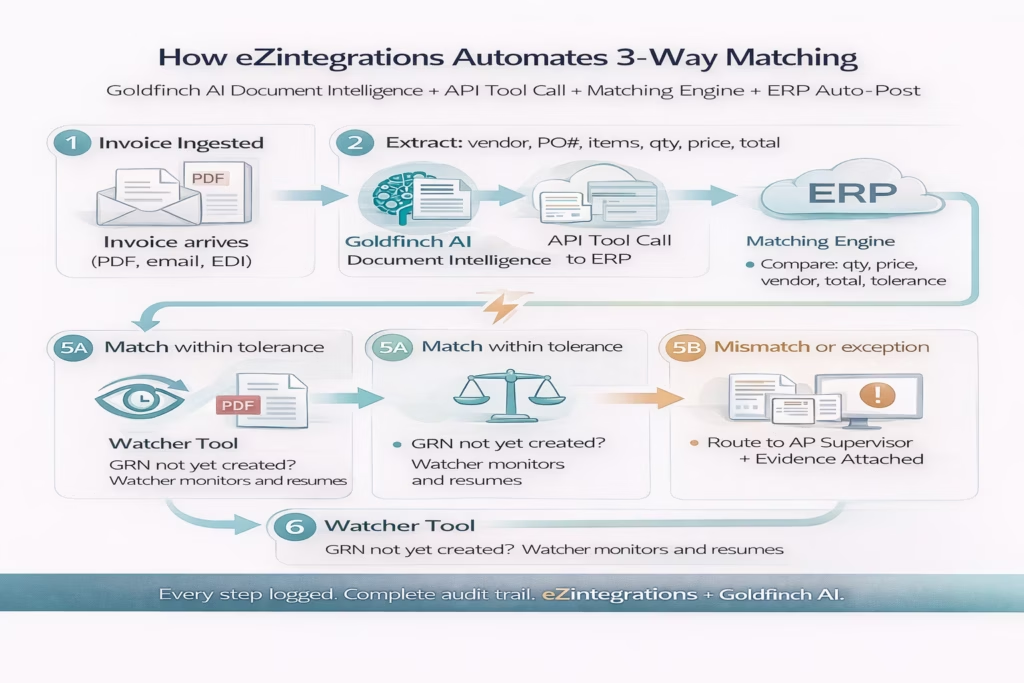
Here is exactly what happens from the moment a supplier invoice arrives to the moment payment is posted or an exception is escalated.
Step 1: Invoice arrives and is ingested. A supplier sends a PDF invoice via email. The eZintegrations email connector receives the attachment and routes it to the Goldfinch AI Document Intelligence tool. Time: seconds.
Step 2: Document Intelligence extracts all invoice fields. Goldfinch AI reads the invoice PDF and extracts: vendor name (“Acme Industrial Supplies”), invoice number (“INV-2026-0847”), invoice date (“March 14, 2026”), PO reference number (“PO-2026-1204”), three line items with descriptions, quantities, unit prices, and subtotals, tax amount, total (“$12,478.50”), currency (“USD”), and payment terms (“Net 30”). All fields extracted into structured JSON. No template. No vendor configuration. Time: 5-10 seconds.
Step 3: API Tool Call retrieves the PO from the ERP. The workflow calls the ERP procurement API using PO-2026-1204. The API returns the PO: vendor (“Acme Industrial Supplies”), three line items matching the invoice descriptions, approved quantities (100 units, 200 units, 50 units), agreed unit prices ($42.50, $28.00, $65.00), total PO value (“$12,500.00”), and approval status (“Approved”). Time: 1-2 seconds.
Step 4: API Tool Call retrieves the GRN from the ERP or WMS. The workflow queries the ERP’s goods receipts for PO-2026-1204. GRN-2026-0612 is returned: three line items received (100 units, 200 units, 50 units), all matching ordered quantities, received date (“March 12, 2026”), received by (“Warehouse Team, Site B”), no damage notes. Time: 1-2 seconds.
Step 5: Matching engine compares all three documents. The engine compares: – Vendor: Invoice (“Acme Industrial Supplies”) vs PO (“Acme Industrial Supplies”). Match. – Line item 1: Invoice qty vs GRN qty vs PO qty. Match. Invoice price ($42.50) vs PO price ($42.50). Match. – Line item 2: All quantities match. All prices match. – Line item 3: All quantities match. All prices match. – Invoice total ($12,478.50) vs PO value ($12,500.00). Variance: -$21.50 (-0.17%). Within 3% tolerance threshold. Pass. – Duplicate check: INV-2026-0847 from Acme Industrial Supplies not previously processed. Pass.
Result: All checks passed within tolerance. Auto-approval triggered.
Step 6: Auto-approved invoice is posted to the ERP AP module. Integration Workflow as Tool calls the ERP AP API to create the invoice record: vendor, invoice number, line items, amounts, PO reference, GRN reference, posting date, payment due date (April 13, 2026 per Net 30 terms), cost centre coding from the PO. The invoice is created in the ERP with status “Approved, Awaiting Payment.” Time: 2-3 seconds.
Step 7: Audit record is created. Every field extracted, every API call made, every comparison result, the match decision and confidence score, and the ERP posting reference are logged to the audit record for this invoice. Time: less than 1 second.
Total time from invoice arrival to ERP posting: approximately 30-60 seconds. Human involvement: zero.
What happens with an exception? Suppose line item 2 shows 200 units on the invoice but the GRN records only 175 received (partial delivery). The matching engine flags a quantity mismatch on line item 2. The invoice is not auto-posted. Instead, the AP supervisor receives a notification: the invoice details, the GRN confirmation of 175 units received, the 25-unit shortfall, and a suggested action: approve for 175 units at the agreed price and dispute the balance with the supplier. The supervisor clicks Approve for partial or Request supplier credit note. The workflow executes the selected action.
Key Outcomes and Results
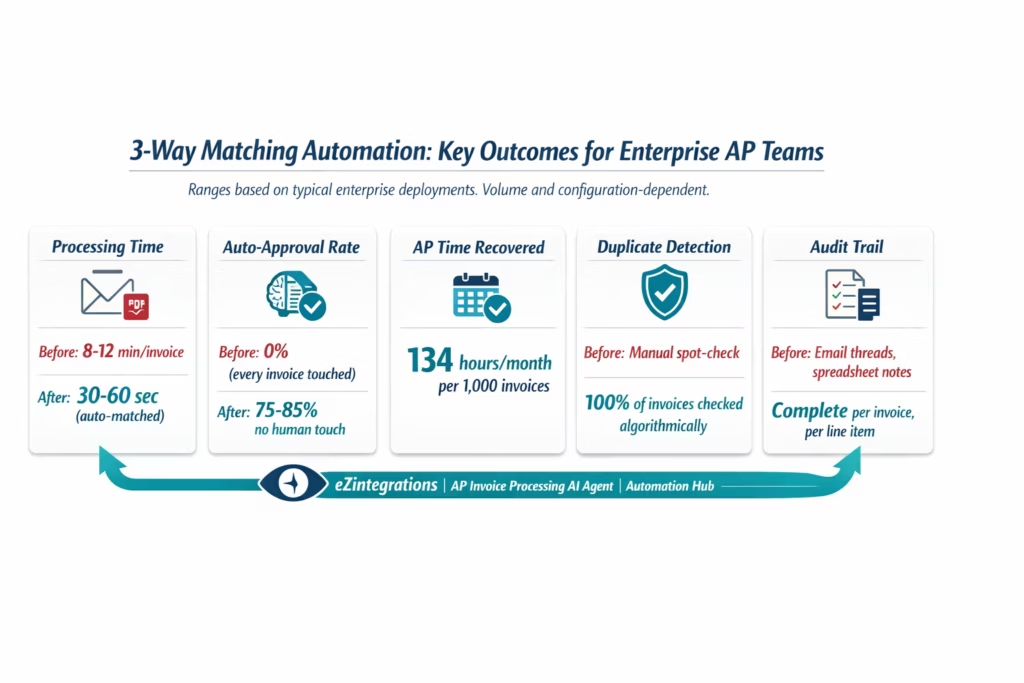
Enterprise teams deploying the eZintegrations 3-way matching automation template achieve the following outcomes. These ranges reflect typical enterprise deployments and depend on invoice volume, ERP system, and configuration specifics.
Processing time per invoice: Reduced from 8-12 minutes (manual) to 30-60 seconds for auto-matched invoices. Exception invoices that require human review receive a pre-populated summary that reduces investigation time from 15-30 minutes to 3-5 minutes.
Auto-approval rate: 75-85% of invoices are approved without human touch within the first 90 days of deployment. This rate improves over time as tolerance thresholds are tuned and supplier behaviour normalises.
Matching accuracy: Algorithmic line-item comparison catches quantity and price mismatches that manual review misses at volume. Duplicate invoice detection catches submissions that manual spot-checks do not.
AP analyst time recovered: For a team processing 1,000 invoices per month, manual matching at 10 minutes per invoice consumes approximately 167 hours per month. Automated matching with an 80% auto-approval rate reduces that to approximately 33 hours per month (the 20% exception invoices at 3-5 minutes each). That is 134 hours per month recovered per 1,000 invoices.
Supplier payment timing: Automated approvals eliminate the invoice-hold delays that push payment past due dates. On-time payment rates improve and early payment discount capture becomes feasible.
Month-end close: AP automation eliminates the manual invoice backlog that slows month-end close. All invoices are matched and posted or queued for exception resolution by the time close begins.
Audit readiness: Every invoice has a complete structured audit record: documents retrieved, fields extracted, comparison results, decision made, ERP posting reference. Audit preparation time is reduced significantly because the evidence is already compiled per invoice.
How to Get Started
Step 1: Import the AP Invoice Processing Template from the Automation Hub
Go to the Automation Hub and search for “AP Invoice Processing” or “3-Way Matching.” Import the template. It loads into the eZintegrations canvas with the Goldfinch AI Document Intelligence extraction, API Tool Call steps for PO and GRN retrieval, the matching engine configuration panel, and the exception routing logic pre-built.
Step 2: Connect Your ERP and Email Systems
Add credentials for your ERP in the eZintegrations credential vault: SAP (OData V4 or BAPI), Oracle Fusion Cloud (OAuth 2.0), NetSuite (TBA or OAuth 2.0), or any ERP in the API catalog. Add your email system credentials (Gmail API or Microsoft Graph) for invoice attachment ingestion. Average connection setup: 15-20 minutes per system.
Step 3: Configure the Matching Rules and Tolerance Thresholds
In the matching engine configuration panel, set your tolerance thresholds: price variance tolerance (e.g. 3% or $500, whichever is lower), quantity variance tolerance (e.g. 0 units for exact match, or allow partial delivery with partial approval), and the handling rule for timing mismatches (hold and wait for GRN, or route to supervisor with GRN pending status).
Step 4: Configure Exception Routing
Set the AP supervisor or approver who receives exception invoices. Configure the exception notification channel (email, Slack, or Microsoft Teams). Set the escalation SLA: if an exception is not resolved within 48 hours, escalate to the finance controller.
Step 5: Run Dev Tests and Promote to Production
Test the workflow in the eZintegrations Dev environment using representative sample invoices, including at least one matched invoice and one exception invoice. Confirm that the Document Intelligence extraction is accurate, the PO and GRN retrieval returns the correct records, the matching decision is correct, and the exception routing delivers to the right person. Promote to production when validated.
Total time from template import to production: 4-6 hours.
FAQs
Automate Your 3-Way Matching Process Today
3-way matching is a necessary control. Manual 3-way matching is an unnecessary cost. The process itself, comparing a PO, a GRN, and an invoice for consistency before releasing payment, is logical and sound. The way most AP teams implement it, with clerks pulling documents from multiple systems, comparing PDFs against ERP data line by line, and routing exceptions via email, is neither efficient nor scalable.
eZintegrations replaces the manual process with the platform’s 4-level architecture applied to 3-way matching: Level 2 AI Workflows (Goldfinch AI Document Intelligence) extract invoice fields from any format, Level 3 AI Agents run the matching logic and make approve or escalate decisions autonomously, Level 4 Goldfinch AI orchestrates the process and deploys as Workflow Node for volume processing and as Chat UI for AP manager oversight. The 15-25% of invoices that genuinely require human judgement, partial deliveries, pricing disputes, new vendor profiles, get a pre-populated exception summary that reduces investigation time from 15-30 minutes to 3-5 minutes.
The AP Invoice Processing template in the Automation Hub is the starting point. Import it, connect your ERP and email systems, configure your tolerance thresholds, run Dev tests, and go live in 4-6 hours.
For the ERP integration context, see the ERP integration platform page.
Import the AP Invoice Processing Template from the Automation Hub and start your first automated 3-way match today. Or book a free demo to see how the matching engine configuration works for your specific ERP and invoice volume.

