
NetSuite Integration Platform: Connect NetSuite to Your Entire Stack
April 7, 2026To integrate NetSuite with any enterprise system using eZintegrations: add your NetSuite account credentials (OAuth 2.0 Client Credentials or Token-Based Authentication) to the eZintegrations credential vault, and access NetSuite data through three methods in the API catalog: SuiteQL queries (the primary method, using SQL-92 syntax with limit and offset pagination and date-based WHERE filters for incremental sync), SuiteTalk REST record operations (CRUD on any NetSuite record type), or SuiteTalk SOAP (for legacy integrations or record types requiring SOAP). Import an Automation Hub template, configure your SuiteQL query with your record filters and schedule, map fields to your destination system, and go live in days. No SuiteScript. No custom RESTlet deployment. No NetSuite developer required.
TL ; DR
Your NetSuite account holds financial data, order records, customer accounts, inventory positions, vendor bills, and revenue figures that your entire business depends on. The question your team is trying to answer is not whether eZintegrations supports NetSuite. It is whether it can access NetSuite the right way: with SuiteQL queries that filter by date range, paginate through large result sets, and join across record types, without deploying custom SuiteScript RESTlets or writing manual API wrapper code.
The answer is yes. Here is exactly how it works.
Connect NetSuite to Any Enterprise System Today
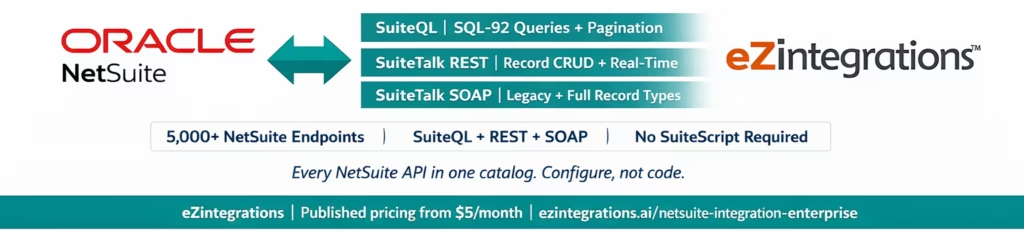
Access NetSuite through SuiteQL, SuiteTalk REST, and SuiteTalk SOAP from a single no-code canvas. SQL-92 queries on any NetSuite record. No SuiteScript. No custom RESTlet. No NetSuite developer required.
The eZintegrations API catalog covers the full NetSuite API surface: SuiteQL queries for analytics and complex data extraction, SuiteTalk REST for real-time record CRUD operations, SuiteTalk SOAP for legacy or SOAP-preferred environments, and RESTlet endpoints for custom NetSuite logic your team has already deployed. Import a pre-built Automation Hub template, configure your SuiteQL query with your filters and pagination parameters, and go live.
Published pricing from $5/month per automation. No SuiteScript developer required. No per-connector fee.
Import the NetSuite Integration Template from the Automation Hub | Book a Free Demo
What You Can Do with NetSuite Integration
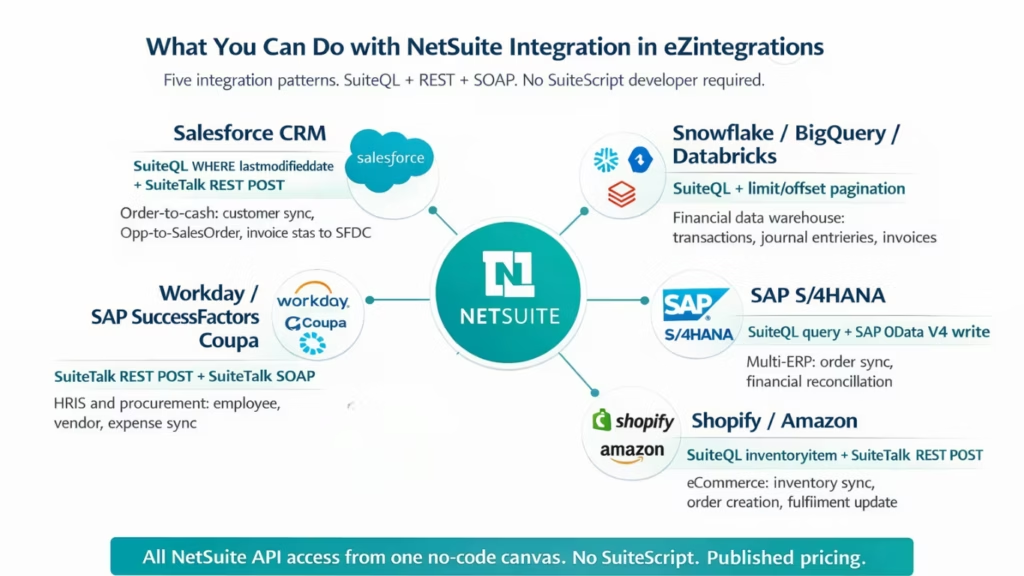
eZintegrations connects your NetSuite account to every enterprise system in your stack through three API methods in the catalog. These are the five integration patterns your finance, operations, and IT teams run most frequently.
NetSuite to Salesforce: Bidirectional Order-to-Cash and Customer Sync Customer records created in Salesforce sync to NetSuite Customers via a SuiteQL insert or SuiteTalk REST POST. Salesforce Opportunities won trigger NetSuite Sales Order creation. NetSuite Invoice status, payment terms, and credit limit update Salesforce Account fields on a configurable schedule via SuiteQL queries with date-range filters
WHERE lastmodifieddate >= '2026-03-01'
The write-back loop: SAP order fulfilment in NetSuite Item Fulfilment updates the Salesforce Opportunity stage. Bidirectional. Real-time for event triggers, scheduled for bulk sync.
NetSuite to Data Warehouse: Extract Financial Data to Snowflake, BigQuery, or Databricks SuiteQL is the primary method for large-scale NetSuite data extraction. A SuiteQL query with
SELECT id, trandate, recordtype, amount, entity
FROM transaction
WHERE lastmodifieddate >= BUILTIN.RELATIVE_RANGES('YESTERDAY', 'START')
ORDER BY id
The API catalog handles the pagination loop: increment offset by limit on each call until totalResults is reached. Your daily NetSuite financial, order, and inventory data lands in Snowflake or BigQuery without custom extraction scripts or SuiteScript scheduled jobs.
NetSuite to SAP: Order Management and Financial Reconciliation NetSuite Sales Orders sync to SAP S/4HANA via a bidirectional workflow: SuiteQL queries NetSuite for new or updated sales orders, the data is transformed and pushed to SAP via the A_SalesOrder OData V4 API. Financial postings in SAP FI are reconciled against NetSuite journal entries via SuiteQL queries on the journalentry and transaction tables. Eliminates manual reconciliation between NetSuite and SAP in multi-ERP enterprise environments.
NetSuite to eCommerce: Shopify and Amazon Inventory and Order Sync NetSuite inventory positions for each item update Shopify product variant stock levels via SuiteQL queries on the inventoryitem and inventorynumber tables, with lastmodifieddate filters for incremental sync. Shopify confirmed orders create NetSuite Sales Orders via SuiteTalk REST POST. NetSuite Item Fulfilment events update Shopify fulfilment status in real time. Eliminates manual stock level management and order entry between your NetSuite ERP and your commerce platforms.
NetSuite to HRIS and Procurement: Employee and Vendor Lifecycle Sync New employee records in Workday or SAP SuccessFactors create NetSuite Employee records via SuiteTalk REST POST with role and subsidiary mapping. NetSuite Vendor records sync to your procurement platform (SAP Ariba, Coupa, Jaggaer) for vendor master consistency. Expense reports in Concur create NetSuite Expense Reports via the SuiteTalk SOAP API for finance teams that prefer SOAP-based workflow for expense processing.
How NetSuite Integration Works in eZintegrations
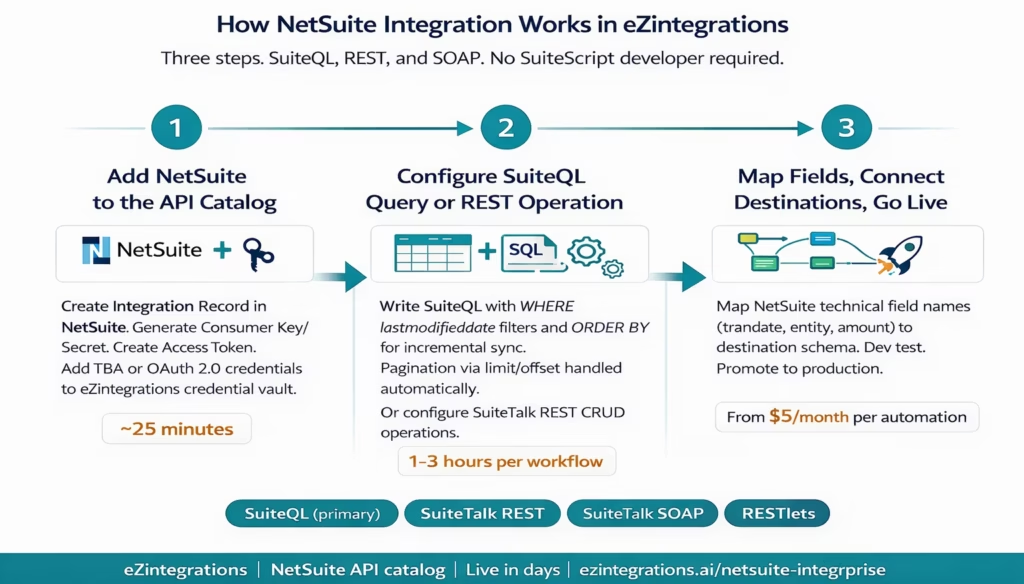
Step 1: Add NetSuite to the API Catalog
Create an Integration Record in your NetSuite account (Setup > Integrations > Manage Integrations > New). Generate your Consumer Key and Consumer Secret. Create an Access Token for your integration user. Add these Token-Based Authentication (TBA) credentials to the eZintegrations credential vault, or configure OAuth 2.0 Client Credentials if your NetSuite account supports it (available for SuiteCloud Plus accounts).
The NetSuite account ID, Consumer Key, Consumer Secret, Token ID, and Token Secret are entered once in the credential vault. Every NetSuite integration that follows uses these credentials without re-entering them.
Authentication setup time: approximately 20-30 minutes including NetSuite Integration Record creation and access token generation.
Step 2: Configure Your SuiteQL Query or REST Operation
For SuiteQL (primary method for data extraction and complex queries):
Configure a SuiteQL query in the no-code canvas. The eZintegrations API catalog calls the NetSuite SuiteQL endpoint:
POST https://{accountId}.suitetalk.api.netsuite.com/services/rest/query/v1/suiteql?limit=1000&offset=0

Header:
Prefer: transient

Body:
{
  "q": "SELECT id, trandate, recordtype, entity, amount, currency, lastmodifieddate
        FROM transaction
        WHERE lastmodifieddate >= '2026-03-17'
        ORDER BY id"
}
You write the SuiteQL query directly in the canvas using SQL-92 syntax. Time-based incremental parameters:
WHERE lastmodifieddate >= :lastSyncDate
for delta extraction. Pagination: the API catalog increments offset by limit on each call and continues until totalResults is reached. Complex queries: JOIN across tables (transaction JOIN transactionline, customer JOIN address), GROUP BY for aggregated reports, WHERE IN for multi-record-type queries
WHERE recordtype IN ('invoice', 'vendorbill', 'salesorder')
For SuiteTalk REST (record CRUD operations):
Configure REST record operations for individual record creation, retrieval, or update. The REST endpoint:
POST  https://{accountId}.suitetalk.api.netsuite.com/services/rest/record/v1/salesOrder

GET   https://{accountId}.suitetalk.api.netsuite.com/services/rest/record/v1/customer/{id}

PATCH https://{accountId}.suitetalk.api.netsuite.com/services/rest/record/v1/customer/{id}
Pagination via offset query parameter for list operations. The REST API returns up to 1,000 records per page.
For SuiteTalk SOAP (legacy or feature-complete operations):
The SOAP API supports all NetSuite record types and operations, including some that are not yet fully available in the REST API. Configure SOAP operations in the canvas using the SuiteTalk WSDL. Useful for organisations with existing SOAP-based integration infrastructure or specific record types that require SOAP operations.
Step 3: Map Fields, Connect Destination Systems, and Go Live
Add your destination system credentials: Salesforce Connected App, Snowflake connection string, SAP S/4HANA OData endpoint, or any other system. Map NetSuite field names (technical names like trandate, entity, tranid, amount) to destination schema fields in the visual transformation canvas. Run test transactions in the Dev environment. Confirm SuiteQL query returns expected records, pagination cycles correctly, and destination write-backs execute. Promote to production.
NetSuite API Catalog Capabilities in eZintegrations
eZintegrations does not provide a locked “NetSuite connector” with a fixed list of supported record types. The API catalog gives you access to the full NetSuite API surface across all three query methods. Here is what that means in practice.
| Capability | Details |
|---|---|
| SuiteQL (primary query method) | SQL-92 syntax query language via POST to the NetSuite SuiteQL REST endpoint. Query any NetSuite table: transaction, transactionline, customer, vendor, item, employee, account, period, subsidiary, location, and all custom record types accessible via SuiteQL. Supports JOINs, GROUP BY, ORDER BY, WHERE with date, numeric, and string conditions. Returns up to 100,000 results per query. |
| SuiteQL pagination | limit and offset query parameters for paginating large result sets. limit: maximum records per page (up to 1,000 for most operations). offset: starting record position. The API catalog increments offset automatically until totalResults is reached, without manual pagination code. |
| SuiteQL date and incremental parameters | Time-based WHERE clauses for incremental sync:
WHERE lastmodifieddate >= '2026-03-17'
WHERE trandate BETWEEN '2026-01-01' AND '2026-03-31'
WHERE lastmodifieddate >= BUILTIN.RELATIVE_RANGES('YESTERDAY', 'START')
. WHERE amount > 1000 WHERE quantity < 0 String filters: WHERE recordtype IN ('invoice', 'vendorbill', 'salesorder')
|
| SuiteQL JOIN and aggregation | Multi-table JOINs:
FROM transaction t
JOIN transactionline tl ON t.id = tl.transaction
Aggregation: SELECT entity, SUM(amount) FROM transaction GROUP BY entity. Concatenation and calculated fields: `SELECT firstname ‘ ‘ lastname AS fullname FROM employee`. |
| SuiteTalk REST record operations | CRUD on all NetSuite record types supported by the REST API: GET (retrieve by ID or list), POST (create), PATCH (update), DELETE (delete). All standard and custom record types. Pagination via offset parameter. Supports expandSubResources for related record inclusion. Up to 1,000 records per page. |
| SuiteTalk SOAP | Full SuiteTalk SOAP web services access: add, get, update, upsert, delete, search, getList operations. Supports all record types including those not yet fully available in REST. Useful for bulk operations via the SOAP addList and updateList operations. Token-Based Authentication and standard SOAP header authentication. |
| RESTlets (custom endpoints) | Calls to RESTlet endpoints your NetSuite team has deployed (custom server-side SuiteScript logic). RESTlet URLs accessible from the API catalog with TBA authentication. Returns up to 5,000 records per call depending on your RESTlet implementation. |
| Authentication | Token-Based Authentication (TBA): OAuth 1.0a with Consumer Key, Consumer Secret, Token ID, and Token Secret. OAuth 2.0 Client Credentials: for SuiteCloud Plus accounts with machine-to-machine authorization. All credentials stored in the eZintegrations credential vault, encrypted at rest and in transit. |
| Multi-subsidiary support | SuiteQL queries can filter by subsidiary field. REST operations target the specific NetSuite account. Multi-subsidiary NetSuite deployments use the same credential configuration targeting the parent account, with subsidiary filters applied in the SuiteQL WHERE clause. |
| Custom records and custom fields | Custom record types accessible via SuiteQL using their internal ID names. Custom fields accessible as columns in SuiteQL queries and as fields in SuiteTalk REST record payloads. No configuration required for custom record support beyond knowing the internal ID names. |
| Saved searches via SuiteQL | NetSuite Saved Searches can be replicated in SuiteQL for integration purposes. eZintegrations builds SuiteQL queries equivalent to your existing Saved Search criteria, providing a migration path from Saved Search-based integrations to API-based integrations. |
| Error handling and rate limits | Configurable retry logic for NetSuite API errors. NetSuite rate limit awareness: per-account and per-minute limits managed by the API catalog. Automatic retry on 429 (Too Many Requests) responses with configurable backoff. Dead-letter queuing for failed records. |
| Field mapping and transformation | No-code field mapping from NetSuite technical field names (tranid, entity, trandate, amount, subsidiary) to destination system schema. Date format conversion (NetSuite uses ISO 8601), currency handling, conditional field logic. |
| Bidirectional integration | Both inbound (NetSuite as source, extracting data via SuiteQL or REST GET) and outbound (NetSuite as destination, creating or updating records via REST POST/PATCH or SOAP add/update) in the same workflow. |

Why eZintegrations for NetSuite Enterprise Integration
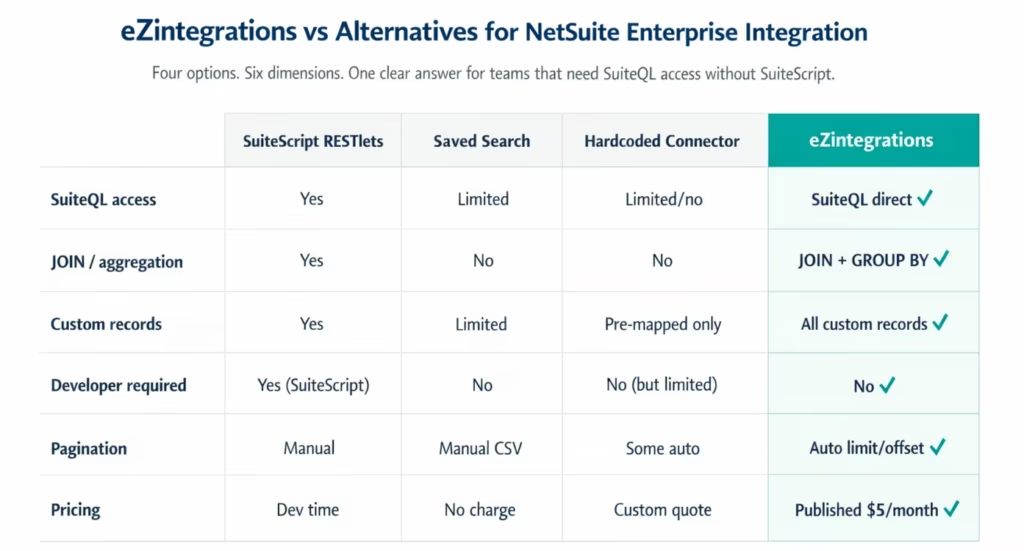
The Problem with Traditional NetSuite Integration Approaches
Custom SuiteScript RESTlets give you flexibility and performance (up to 5,000 records per call, custom business logic), but they require SuiteScript expertise to write, deploy, and maintain. Every RESTlet lives inside your NetSuite account: if the SuiteScript developer who wrote it leaves, the integration logic is locked in a file cabinet in your NetSuite File Cabinet. Updates to the RESTlet require another SuiteScript development cycle.
Saved Search-based integrations are how many NetSuite implementations extract data today. A Saved Search runs on a schedule and its results are polled by an external system. Saved Searches are powerful for operational reporting, but they are not designed for integration: they cannot easily be parameterised for incremental sync, they are limited in the join complexity they support, and their CSV output requires parsing before use in integration pipelines.
Hardcoded connector platforms (many popular iPaaS tools) provide a “NetSuite connector” with a pre-mapped list of supported record types and operations. When you need SuiteQL for complex financial data queries, access to a custom record type not in the connector’s supported list, or a SOAP operation for a record type that has not reached REST parity, you hit the connector’s ceiling. The workaround is either a SuiteScript RESTlet (reintroducing the developer dependency) or a support ticket to the iPaaS vendor.
What Makes eZintegrations Different for NetSuite Integration
SuiteQL as the primary query method, configured from the canvas. SuiteQL is the most powerful way to extract data from NetSuite: SQL-92 syntax, JOIN support, GROUP BY aggregation, complex WHERE clauses, date-based incremental parameters, and up to 100,000 records per query. In eZintegrations, you write the SuiteQL query directly in the no-code canvas. No SuiteScript. No RESTlet deployment. No Saved Search export. Your finance team’s data extraction requirements become a SQL query configured in the canvas.
Automatic pagination for large NetSuite datasets. SuiteQL returns a maximum of 100,000 results per query at an offset limit. For a transaction table with millions of records, you extract in batches using ORDER BY id and a WHERE id > :lastId cursor pattern, or using date-range partitioned queries. The API catalog manages the pagination loop. Your team writes the SuiteQL query. The platform handles the rest.
REST and SOAP in the same catalog. Some NetSuite record types and operations are better supported in SOAP. Some teams have existing SOAP-based integrations. eZintegrations supports both in the same platform, so you do not need two separate tools for REST-based new integrations and SOAP-based legacy integrations.
No SuiteScript developer required.
SELECT id, trandate, amount FROM transaction WHERE lastmodifieddate >= '2026-03-17'
requires basic SQL knowledge, not SuiteScript certification. The credential vault setup requires basic NetSuite admin access, not a SuiteScript consultant.
Published pricing at ezintegrations pricing. NetSuite integration tools commonly charge per connection, per workflow execution, or require custom quotes. eZintegrations pricing starts at $5/month per automation at annual billing and is visible before any sales conversation.
Import the NetSuite Integration Template
The eZintegrations Automation Hub contains pre-built templates for the most common NetSuite enterprise integration patterns:
NetSuite to Salesforce: Invoice Status and Payment Terms Sync SuiteQL query on transaction WHERE recordtype = 'invoice' and lastmodifieddate >= :lastSyncDate. Maps NetSuite invoice fields (tranid, amount, duedate, status, entity) to Salesforce Account and Opportunity fields. Configurable schedule. Bidirectional: Salesforce Opportunity Closed Won creates NetSuite Sales Order via SuiteTalk REST POST.
NetSuite to Snowflake: Daily Incremental Transaction Extract
SELECT id, trandate, recordtype, entity, amount, currency, subsidiary, lastmodifieddate
FROM transaction
WHERE lastmodifieddate >= :lastSyncDate
ORDER BY id;
Incremental load to Snowflake target table. Configurable schedule.
Shopify to NetSuite: Order-to-Sales Order Creation Shopify order confirmation event triggers SuiteTalk REST POST to create a NetSuite Sales Order. Maps Shopify order fields to NetSuite salesOrder record fields including subsidiary, location, and item line mappings. NetSuite Item Fulfilment updates Shopify fulfilment status.
NetSuite Customer Sync to Salesforce Account SuiteQL query on customer table with lastmodifieddate incremental filter. Bidirectional: new Salesforce Accounts create NetSuite Customer records via SuiteTalk REST POST. Deduplication via external ID field on both systems.
NetSuite Journal Entry Extract to Data Warehouse
SELECT je.id, je.trandate, je.postingperiod, jel.account, jel.debit, jel.credit, jel.memo
FROM journalentry je
JOIN journalentryline jel ON je.id = jel.journalentry
WHERE je.postingperiod = :targetPeriod
ORDER BY je.id;
Loads to Snowflake, BigQuery, or Databricks for financial close reporting.
Import any of these templates in one click. Configure NetSuite TBA credentials and SuiteQL queries. Go live in days.
Import NetSuite Templates from the Automation Hub
Frequently Asked Questions
1. How do I integrate NetSuite with eZintegrations
Create an Integration Record in NetSuite under Setup Integrations Manage Integrations New. Generate the Consumer Key and Consumer Secret and create an Access Token for your integration role. Add these Token Based Authentication credentials to the eZintegrations credential vault. Import the Automation Hub template for your use case configure your SuiteQL query with a WHERE lastmodifieddate greater than or equal to lastSyncDate incremental filter and apply limit and offset pagination parameters map fields to your destination system and run Dev test transactions. Standard templates go live in 1 to 3 business days.
2. Does eZintegrations support NetSuite
Yes, eZintegrations provides full NetSuite API catalog access across all integration methods including SuiteQL for complex queries and data extraction SuiteTalk REST for CRUD operations on standard and custom record types SuiteTalk SOAP for legacy integrations and RESTlet calls to custom endpoints. All NetSuite record types including custom records and custom fields are accessible with no hardcoded supported record limitation.
3. How long does NetSuite integration take with eZintegrations
NetSuite Integration Record creation and Token Based Authentication setup takes approximately 20 to 30 minutes. Standard integration templates such as NetSuite to Salesforce NetSuite to Snowflake and Shopify to NetSuite go from template import to production in 1 to 3 business days including Dev test transactions. Custom NetSuite integrations using specific SuiteQL queries typically take 1 to 3 days compared to 4 to 8 weeks for traditional SuiteScript based integration builds.
4. Is there a free NetSuite integration template
The Automation Hub template library is included in every eZintegrations subscription. There is no separate template fee and no premium NetSuite template tier. Subscriptions start at 5 dollars per month per automation at annual billing giving full access to all NetSuite integration templates.
5. What is SuiteQL and why is it the best way to query NetSuite data
SuiteQL is NetSuite SQL 92 style query language for accessing data through REST. It supports JOINs GROUP BY aggregation complex WHERE clauses and returns up to 100000 results per query with limit and offset pagination. It is more flexible than SuiteTalk REST more performant than SOAP for analytics queries and does not require custom SuiteScript deployment making it the recommended method for data extraction and reporting integrations.
6. Does eZintegrations support NetSuite custom records and custom fields
Yes, Custom record types are accessible via SuiteQL using their internal ID names such as customrecord your record name. Custom fields appear as columns in SuiteQL queries and fields in SuiteTalk REST payloads using internal IDs like custbody your field. No additional configuration is required beyond knowing the internal IDs from your NetSuite customization documentation.
Connect NetSuite to Your Entire Stack Today
Your NetSuite account is the source of truth for your financial data, order history, vendor relationships, and inventory positions. The teams that depend on that data, in Salesforce, in Snowflake, in SAP, in Shopify, deserve to work with current, accurate figures rather than manual exports and stale CSV files.
eZintegrations provides full NetSuite API catalog access: SuiteQL for complex queries with date-range incremental sync and automatic pagination, SuiteTalk REST for real-time record CRUD operations, SuiteTalk SOAP for legacy and feature-complete operations, and RESTlet calls for custom NetSuite logic. All configured from a no-code canvas. No SuiteScript. Published pricing.
Import a NetSuite Integration Template from the Automation Hub and start your first integration today. Or book a free demo with your NetSuite account details and target integration requirements. We will map the SuiteQL query structure and identify your starting template in the session.

