
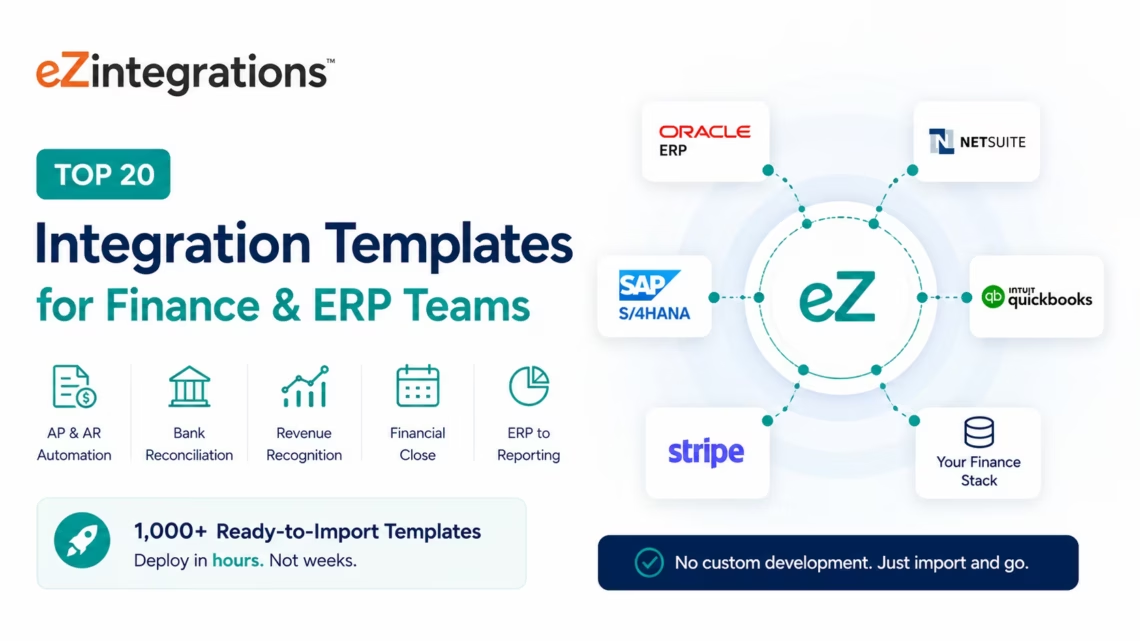
Top 20 Integration Templates for Finance & ERP Teams
May 19, 2026 Enterprise finance and ERP teams use integration templates to automate accounts payable, accounts receivable, bank reconciliation, revenue recognition, financial close, and ERP-to-reporting data flows between NetSuite, SAP S/4HANA, Oracle ERP, QuickBooks, Stripe, and their full finance stack: without custom development. eZintegrations’ Automation Hub provides 1,000+ ready-to-import templates covering every major finance and ERP integration pattern, deployable in hours rather than weeks.
TL;DR:
- Finance and ERP teams carry more manual reconciliation work than any other function in the enterprise. Month-end close, AP processing, AR matching, bank reconciliation, and financial reporting all depend on data flowing accurately between systems that were never designed to talk to each other.
- These 20 Automation Hub templates solve the most common and most costly integration patterns across the enterprise finance stack: from real-time billing-to-ERP sync to AI-powered three-way invoice matching to automated financial close data pipelines.
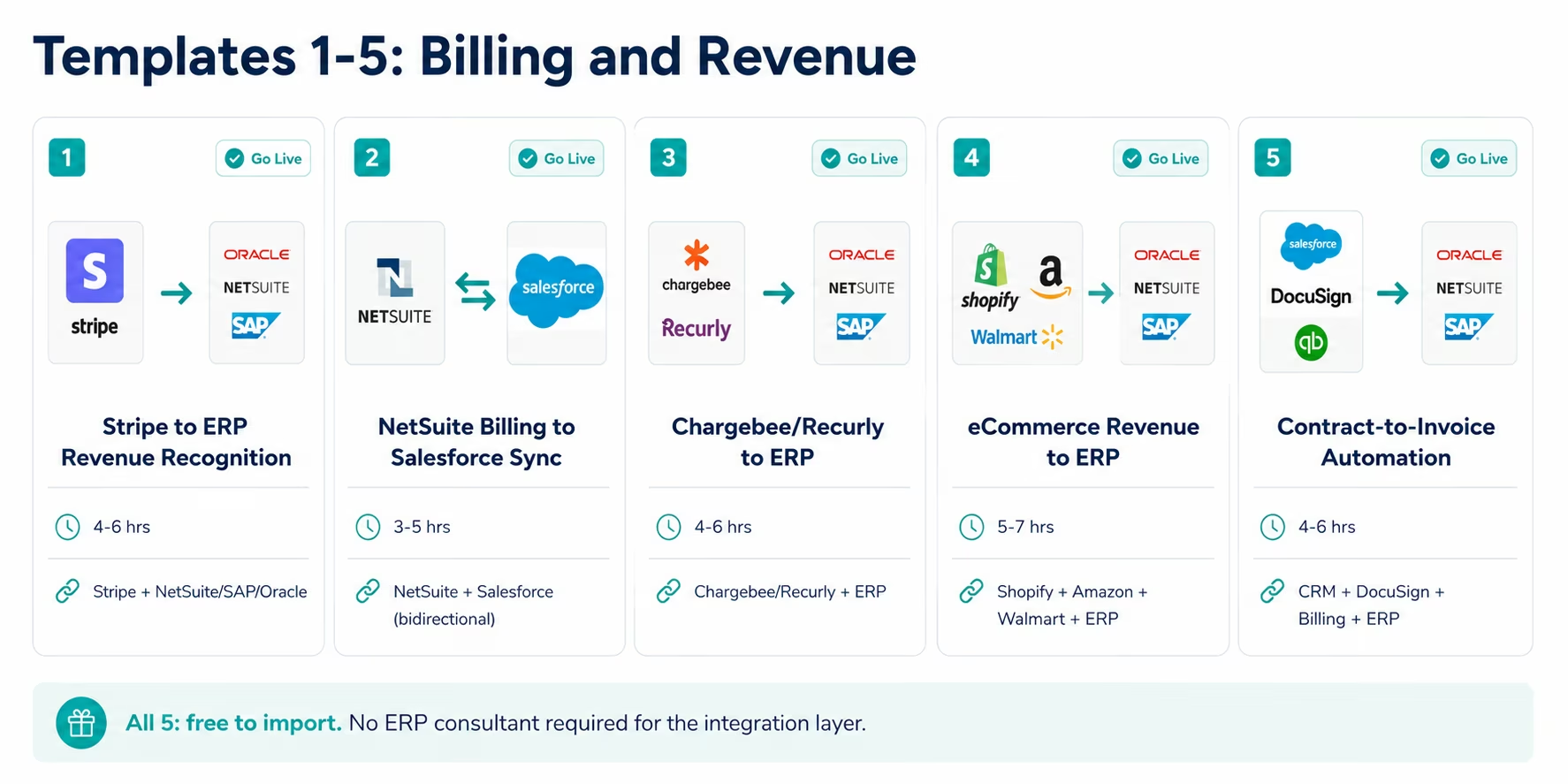
- Every template is free to import. Most go live in hours, not weeks. No custom code. No ERP consultant required for the integration layer.
- Templates are organised into five categories: Billing and Revenue (Templates 1-5), Accounts Payable and Procurement (Templates 6-10), Financial Reporting and Close (Templates 11-14), Treasury and Banking (Templates 15-17), and AI-Powered Finance Intelligence (Templates 18-20).
- CTA: Explore all templates in the Automation Hub and eliminate your most painful manual reconciliation process today.
Why Enterprise Finance and ERP Teams Need Integration Templates
Your AP team received 340 vendor invoices this month. Each one arrived as a PDF email attachment. Each one needs to be matched against the corresponding purchase order in SAP. Each one needs the line items entered into the ERP. Each one needs to be routed to the appropriate approver. And each one needs to post to the correct cost centre and GL account once approved.
Your team is doing all of this manually. An experienced AP clerk processes 50-70 invoices per day. At 340 invoices, that is 5-7 person-days of data entry and routing per month: before anyone has reviewed a single payment for accuracy, fraud signals, or early payment discount eligibility.
Meanwhile, your month-end close requires pulling actuals from the ERP, reconciling them against the bank statement, adjusting for accruals that have not posted yet, and producing the P&L, balance sheet, and cash flow statement with enough time for the CFO to review before the board package is due. This process takes 8-15 business days at most enterprise organisations. The industry benchmark for high-performing finance organisations is 5 days.
The gap between 8-15 days and 5 days is not a headcount gap. It is a data pipeline gap. The data exists across your billing system, your bank, your ERP systems, and your financial planning tool. The manual work is moving it between them.
According to McKinsey, finance functions that have automated their core data pipelines close 35-45% faster than those relying on manual processes: and their finance teams spend 50-60% more time on analysis and decision support rather than data gathering. Gartner projects that by 2027, 70% of enterprise finance functions will use AI-augmented automation for at least 50% of their transaction processing.
Integration templates are the fastest path from manual to automated. Instead of scoping and building custom ERP integrations, you import a pre-built template that already knows SAP’s OData V4 API structure, NetSuite’s SuiteQL query format, Oracle’s REST endpoint patterns, and Stripe’s webhook event model. Configure credentials, review field mapping, test, and activate.
Most of the 20 templates below go live in 2-8 hours. None require custom code.
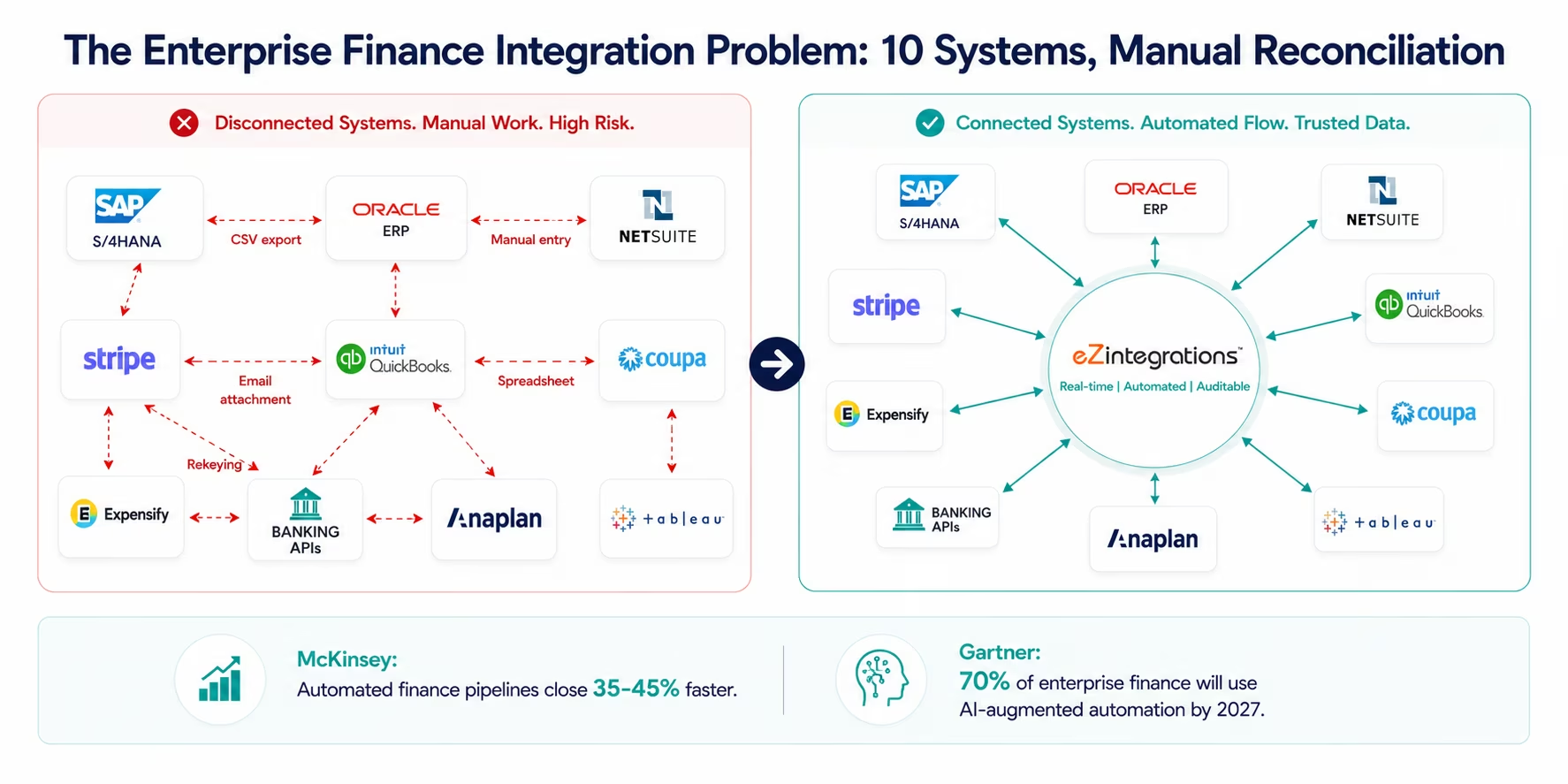
Before vs After: Integration-Powered Finance Operations
| Process | Before Integration Templates | After Integration Templates |
|---|---|---|
| Invoice to ERP posting | AP clerk manually enters PDF invoice line items into SAP or NetSuite (15-20 min/invoice) | Document Intelligence reads invoice PDF, extracts line items, posts to ERP automatically |
| Billing-to-revenue recognition | Finance manually posts Stripe revenue events to ERP on a weekly batch | Stripe subscription events trigger real-time ERP revenue recognition entries |
| Bank reconciliation | Controller manually imports bank statement CSV, matches against ERP transactions (half-day/month) | Bank statement transactions match automatically against ERP entries daily |
| Purchase order matching | AP team manually matches invoices to POs in the ERP (three-way match: PO, GR, invoice) | Automated three-way match: PO, goods receipt, and vendor invoice matched automatically |
| Expense sync | Finance imports monthly expense report CSV from Expensify or Concur manually | Approved expense reports post to ERP cost centres automatically |
| Month-end close | Controller manually assembles close package from 5-7 data sources (8-15 days) | Automated data pipeline assembles close data daily: close cycle reduced |
| Intercompany reconciliation | Shared services manually reconciles intercompany transactions across entities | Intercompany transactions posted and reconciled automatically across ERP entities |
| FX revaluation | Treasury manually runs FX revaluation for open items at period end | Automated FX revaluation runs on schedule with current rate feeds |
| Financial reporting | Finance analyst pulls actuals from ERP into Excel, reformats for CFO deck | ERP actuals sync to reporting tool automatically: CFO deck always current |
| Vendor master updates | Procurement emails vendor master changes to finance for manual ERP entry | Supplier portal changes trigger automatic ERP vendor master updates |
Billing and Revenue Templates (1-5)
Template 1: Stripe Subscription Events to ERP Revenue Recognition
What it does: When a Stripe subscription event fires: new subscription, upgrade, downgrade, cancellation, or renewal: this template immediately creates the corresponding revenue recognition entry in your ERP (NetSuite, SAP S/4HANA, or Oracle ERP). For ASC 606 and IFRS 15 compliance, the template calculates the performance obligation allocation across the contract period and creates the deferred revenue and recognised revenue journal entries at the correct amounts.
The problem it solves: SaaS and subscription businesses face a structural finance challenge: billing happens in Stripe, but revenue recognition must follow the contract term in the ERP. The manual process: exporting Stripe subscription data, calculating the recognition schedule, entering the journal entries: is time-consuming, error-prone, and creates a reconciliation burden at every month-end. This template eliminates the manual step entirely.
Systems connected: Stripe (subscription event webhook) → NetSuite, SAP S/4HANA, or Oracle ERP (journal entry creation with revenue recognition schedule)
Go-live time: 4-6 hours
Who needs it: SaaS and subscription businesses that bill through Stripe and maintain ASC 606 or IFRS 15 revenue recognition in an ERP.
Import Template 1: Stripe to ERP Revenue Recognition
Template 2: NetSuite Billing to Salesforce Opportunity Sync
What it does: Maintains a real-time sync between NetSuite customer invoices and Salesforce opportunities and accounts. When a NetSuite invoice is created, posted, or paid, the corresponding Salesforce opportunity and account record is updated with the invoice status, invoice amount, and payment date. When a Salesforce opportunity moves to Closed Won, the NetSuite customer record is created or updated and the billing cycle is initiated without manual data entry from sales to finance.
The problem it solves: Finance teams spend significant time at month-end reconciling what the sales team says is closed versus what has actually been billed and recognised in NetSuite. Sales reps report revenue as “closed” in Salesforce the day the deal is signed. Finance does not see the invoice in NetSuite until it is manually entered days later. This template closes the gap.
Systems connected: NetSuite (invoice object) ↔ Salesforce (opportunity, account objects: bidirectional)
Go-live time: 3-5 hours
Who needs it: Organisations running both NetSuite for finance and Salesforce for sales, where the billing-to-CRM data gap causes month-end reconciliation overhead.
Import Template 2: NetSuite Billing to Salesforce Sync
Template 3: Chargebee or Recurly Billing to ERP Sync
What it does: For subscription businesses using Chargebee or Recurly as their billing platform, this template provides the same revenue recognition and billing event sync as Template 1 (Stripe), connecting Chargebee or Recurly webhook events to journal entry creation in NetSuite, SAP, QuickBooks, or Oracle ERP. Covers: subscription creation, trial conversion, plan changes, add-ons, discounts, refunds, and churn events: each mapped to the correct ERP posting.
The problem it solves: Chargebee and Recurly are the billing platforms of choice for many mid-market and enterprise subscription businesses. Their revenue data needs to flow into the ERP with the same accuracy and speed as Stripe: and the manual export-import process has the same failure modes.
Systems connected: Chargebee or Recurly (subscription and invoice webhook events) → NetSuite, SAP, Oracle ERP, or QuickBooks (journal entries and AR records)
Go-live time: 4-6 hours
Who needs it: Subscription businesses using Chargebee or Recurly whose billing-to-ERP sync is currently a weekly or monthly manual process.
Import Template 3: Chargebee/Recurly to ERP Sync
Template 4: E-commerce Order Revenue to ERP (Shopify, Amazon, Walmart)
What it does: Aggregates order and revenue data from eCommerce channels: Shopify, Amazon Seller Central, Walmart Marketplace: and posts the consolidated revenue entries to the ERP (NetSuite, SAP, or Oracle). For each order: revenue is posted to the correct GL account by product category, sales channel, and geography. Returns and refunds post the corresponding revenue reversal. The template handles the tax liability postings separately from revenue, routing sales tax to the correct liability accounts.
The problem it solves: Retailers and consumer brands selling across multiple eCommerce channels face a complex revenue posting challenge: thousands of daily orders across multiple platforms, each with different revenue recognition timing, tax treatment, and GL mapping. Manual posting is impossible at volume; batch exports introduce reconciliation risk.
Systems connected: Shopify + Amazon SP-API + Walmart Seller API → NetSuite, SAP S/4HANA, or Oracle ERP (revenue and tax postings)
Go-live time: 5-7 hours (longer for complex GL mapping across multiple product categories)
Who needs it: Retailers and consumer brands selling on multiple eCommerce channels who need consolidated revenue in the ERP without daily manual posting.
Import Template 4: eCommerce Revenue to ERP
Template 5: Contract-to-Invoice Automation (CRM to Billing)
What it does: When a CRM deal is marked Closed Won and a contract is signed (via DocuSign or PandaDoc), this template: extracts the contract terms (deal value, billing frequency, start date, payment terms) using Document Intelligence, creates the customer record in the billing system (Stripe, Chargebee, or NetSuite AR), initiates the first invoice, and creates the corresponding AR record in the ERP. Eliminates the manual handoff from Sales to Finance that currently delays first invoice delivery by 2-5 business days.
The problem it solves: The time between a deal closing and the first invoice being delivered is a hidden cash flow cost for most B2B organisations. A $100,000 deal that takes 5 extra days to invoice represents $1,370 of float cost at a 10% cost of capital. Across a full book of business, contract-to-invoice delays are a material working capital issue.
Systems connected: Salesforce or HubSpot (Closed Won trigger) + DocuSign/PandaDoc (signed contract webhook) → Document Intelligence (term extraction) → Stripe, Chargebee, or NetSuite AR (customer and invoice creation)
Go-live time: 4-6 hours
Who needs it: B2B organisations where the contract-to-first-invoice delay is more than 2 business days due to manual finance entry.
Import Template 5: Contract-to-Invoice Automation
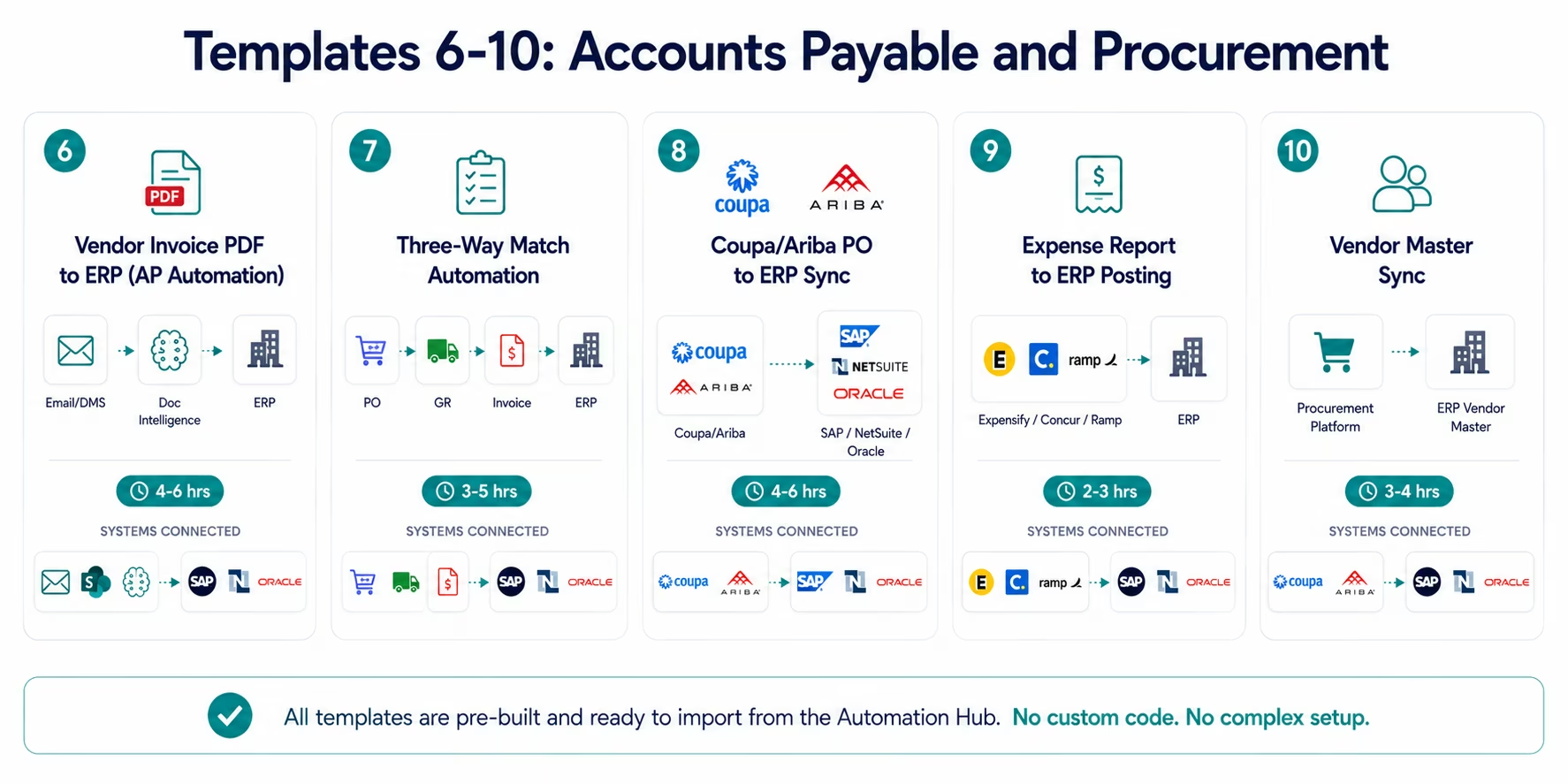
Accounts Payable and Procurement Templates (6-10)
Template 6: Vendor Invoice PDF to ERP Posting (AP Automation)
What it does: When a vendor invoice arrives as a PDF email attachment (or is uploaded to a designated inbox or document management folder), Document Intelligence reads the invoice and extracts: vendor name, vendor ID, invoice number, invoice date, due date, line items (description, quantity, unit price, total), tax amounts, and total payable. The extracted data is matched against the corresponding purchase order in the ERP and posted as an AP liability entry pending approval. The approver receives a structured review notification with the original invoice attached and the extracted data pre-populated for review.
This is the automation that replaces the AP clerk’s manual data entry for every vendor invoice.
The problem it solves: Manual AP data entry is the single highest-volume manual process in most finance teams. At $5-15 per invoice in processing cost (staff time, error correction, and late payment penalties), an organisation processing 500 invoices per month carries $30,000-$90,000 per year in preventable AP processing cost. Document Intelligence processing cost: near zero.
Systems connected: Email inbox or document management system (invoice arrival trigger) → Document Intelligence (PDF extraction) → SAP S/4HANA, NetSuite, Oracle ERP, or QuickBooks (AP entry creation + approver notification)
Go-live time: 4-6 hours (includes Document Intelligence configuration for your specific invoice formats)
Who needs it: Any enterprise finance team processing 100+ vendor invoices per month manually.
Import Template 6: Vendor Invoice to ERP AP Automation
Template 7: Three-Way Match Automation (PO, Goods Receipt, Invoice)
What it does: Automates the three-way match process for AP: when a vendor invoice is received (from Template 6 above or another source), the template automatically retrieves the corresponding purchase order from the ERP and the goods receipt record, compares the quantities and amounts across all three documents, and determines the match result: full match (auto-approve for payment), partial match (variance within configured tolerance: flag for soft approval), or exception (variance outside tolerance: route to full AP review with the specific discrepancy highlighted).
The problem it solves: Three-way match is the financial control that prevents paying for goods not ordered, not received, or billed at the wrong price. Done manually, it is one of the most time-consuming AP processes: and one of the most commonly skipped when teams are under pressure. This template makes it systematic on every invoice.
Systems connected: ERP (purchase order and goods receipt records) + invoice data (from Template 6 or direct input) → ERP (AP posting with match result) + approver notification (for exceptions)
Go-live time: 3-5 hours (assumes vendor invoice data is already structured; longer if Document Intelligence setup is included)
Who needs it: Enterprise AP teams running three-way match manually, or organisations where three-way match is not consistently applied due to process volume.
Import Template 7: Three-Way Match Automation
Template 8: Coupa or Ariba Purchase Order to ERP Sync
What it does: When a purchase order is approved in Coupa or Ariba (the procurement platform), this template creates the corresponding purchase order record in the ERP (SAP S/4HANA, NetSuite, or Oracle) automatically: without requiring anyone to re-enter the PO data from the procurement system into the finance system. When the PO is amended (scope change, quantity change, price change), the amendment propagates to the ERP automatically. When the PO is closed in procurement, it is closed in the ERP.
The problem it solves: Procurement and finance systems are frequently separate: Coupa or Ariba as the procurement platform, SAP or NetSuite as the ERP. Without this integration, POs live in procurement only, and finance has no visibility into committed spend until invoices arrive. The integration provides real-time committed spend visibility in the ERP.
Systems connected: Coupa or Ariba (PO approval and amendment webhook) → SAP S/4HANA, NetSuite, or Oracle ERP (PO creation, amendment, closure)
Go-live time: 4-6 hours
Who needs it: Enterprise organisations with Coupa or Ariba as the procurement platform and a separate ERP for financial accounting, where committed spend visibility in the ERP is delayed or manual.
Import Template 8: Coupa/Ariba PO to ERP Sync
Template 9: Expense Report to ERP Cost Centre Posting
What it does: When an expense report is approved in Expensify, Concur, or Ramp, this template posts the expense line items to the correct cost centres in the ERP (SAP, NetSuite, QuickBooks, or Oracle). Each expense line is mapped to the appropriate GL account and cost centre based on the expense category and the submitting employee’s department assignment. The ERP journal entry is created with the approval timestamp, the employee ID, and the expense report reference number: creating a complete audit trail without manual data entry.
The problem it solves: The month-end expense sync is one of the most reliable sources of late-close data for most finance teams. Expense reports approved in the last week of the month may not be posted to the ERP until the following week if the import is manual or batch. This template makes expense posting real-time: expense approved in Expensify at 3 PM posts to NetSuite by 3:01 PM.
Systems connected: Expensify, Concur, or Ramp (approval event webhook) → SAP S/4HANA, NetSuite, Oracle ERP, or QuickBooks (cost centre journal entry)
Go-live time: 2-3 hours
Who needs it: Enterprise finance teams where the expense-to-ERP posting is a monthly batch import, causing late-close accrual headaches.
Import Template 9: Expense Report to ERP Cost Centre Posting
Template 10: Vendor Master Sync Between Procurement and ERP
What it does: Maintains real-time synchronisation between your supplier information management system (Coupa, Ariba, or a supplier portal) and your ERP vendor master. When a new vendor is approved in the procurement platform (including W-9 or W-8 verification, bank account details, and terms), the vendor record is created in the ERP automatically. When vendor banking details, payment terms, or tax information are updated in the procurement platform, the ERP vendor master is updated automatically. Eliminates the manual process of re-entering supplier information across two systems.
The problem it solves: Dual-entry of vendor master data between procurement and finance systems is both time-consuming and a fraud risk: manual entry processes create opportunities for unauthorised vendor record changes or payment detail fraud. This template ensures vendor master data comes from a single validated source (the procurement platform) and propagates to the ERP automatically under the same approval controls.
Systems connected: Coupa, Ariba, or supplier portal (vendor approval and update webhook) → SAP S/4HANA, NetSuite, Oracle ERP, or QuickBooks (vendor master create/update)
Go-live time: 3-4 hours
Who needs it: Enterprise finance teams with separate procurement and ERP systems where vendor master maintenance is a dual-entry process or a segregated-duties compliance concern.
Import Template 10: Vendor Master Sync Procurement to ERP
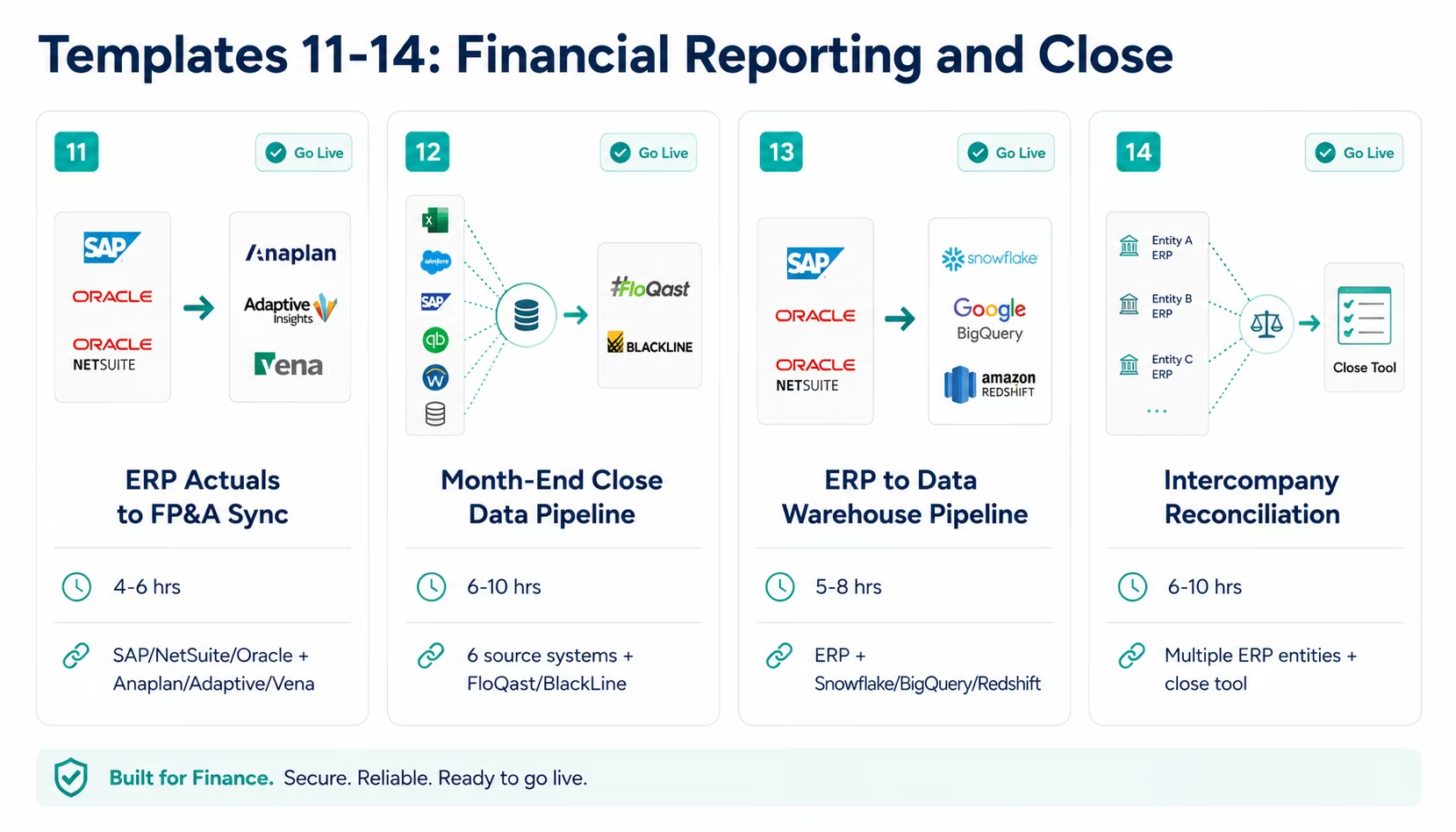
Financial Reporting and Close Templates (11-14)
Template 11: ERP Actuals to Financial Planning Tool Sync
What it does: Maintains a continuous sync between ERP actuals (SAP, NetSuite, or Oracle) and your financial planning and analysis (FP&A) tool (Anaplan, Adaptive Planning, or Vena). At each close period: daily, weekly, or monthly as configured: the template pulls the GL actuals from the ERP and loads them into the planning tool as the “actuals” column. The variance analysis between budget, forecast, and actuals is immediately available in the FP&A tool without a manual export-import cycle.
The problem it solves: FP&A teams at most enterprise organisations wait for finance to provide the “actuals close” before they can run variance analysis. The manual export from the ERP and import into the planning tool adds 1-2 days to the close cycle. During the month, the FP&A tool’s actuals column is always behind. This template keeps actuals current at whatever frequency your ERP supports.
Systems connected: SAP S/4HANA, NetSuite, or Oracle ERP (GL actuals, triggered by period close or scheduled) → Anaplan, Adaptive Planning, or Vena (actuals load)
Go-live time: 4-6 hours
Who needs it: Enterprise FP&A teams whose variance analysis depends on actuals that are delivered manually from the ERP team at close.
Import Template 11: ERP Actuals to FP&A Tool Sync
Template 12: Automated Month-End Close Data Pipeline
What it does: Orchestrates the data collection phase of the month-end close by pulling data from all contributing systems on a configured schedule: AP aging from the ERP, AR aging from the billing system, bank statement from the banking API, payroll accruals from the payroll system, expense accruals from the expense platform, and intercompany balances from multiple ERP entities. All data is loaded into the close management tool (FloQast, BlackLine, or a structured Snowflake schema) as the starting point for the close checklist. The template also generates the first-draft accrual entry schedule based on prior-period actuals and the current period’s run rate.
The problem it solves: The first two days of month-end close at most organisations are spent gathering data: not reconciling or analysing it. Accountants spend hours pulling bank statements, AP aging reports, and expense accrual data from multiple systems. This template automates the data gathering so the close team starts with a complete data set on day one.
Systems connected: SAP, NetSuite, or Oracle ERP + banking API + payroll system + expense platform + billing system → FloQast, BlackLine, or Snowflake (close data schema)
Go-live time: 6-10 hours (longer for complex multi-entity or multi-currency environments)
Who needs it: Enterprise finance teams whose month-end close takes more than 7 business days, where data gathering is a material part of the cycle time.
Import Template 12: Automated Month-End Close Data Pipeline
Template 13: ERP to Data Warehouse Financial Reporting Pipeline
What it does: Maintains an always-current replica of the ERP’s financial data in your data warehouse (Snowflake, BigQuery, or Redshift), enabling BI-grade financial reporting without running reports directly against the ERP. Incrementally syncs GL entries, AP aging, AR aging, balance sheet positions, and P&L actuals from the ERP on a configurable schedule (hourly or daily). Includes schema versioning: when the ERP chart of accounts changes, the data warehouse schema updates automatically.
The problem it solves: Running financial reports directly against the ERP database is an operational risk: it competes with transaction processing for system resources, often requires DBA involvement to build custom queries, and cannot be shared with BI teams who lack ERP access. This template separates the reporting layer from the transactional layer.
Systems connected: SAP S/4HANA, NetSuite, or Oracle ERP (all financial objects, incremental sync) → Snowflake, BigQuery, or Redshift (financial reporting schema)
Go-live time: 5-8 hours
Who needs it: Enterprise finance and BI teams who want CFO-level financial dashboards in Tableau or Power BI without granting direct ERP database access to the BI team.
Import Template 13: ERP to Data Warehouse Financial Pipeline
Template 14: Intercompany Reconciliation Automation
What it does: For multi-entity enterprises running consolidations, this template automates the intercompany elimination process: identifies intercompany transactions across ERP entities, matches the payable in entity A against the receivable in entity B, posts the eliminating entries, and flags any unmatched intercompany balances for manual review. Runs on the configured schedule (daily during close periods, weekly otherwise) and produces a reconciliation report showing matched, pending, and exception items.
The problem it solves: Intercompany reconciliation is one of the longest tasks in the consolidated financial close. Finance teams at multi-entity organisations spend 2-5 days reconciling intercompany balances manually: a process that is almost entirely deterministic (find the matching transaction, post the elimination) but requires querying multiple ERP instances or schemas simultaneously.
Systems connected: Multiple ERP entities (SAP, NetSuite, or Oracle: same or different instances) → automated matching and elimination entry creation → reconciliation report (Snowflake, Excel, or close management tool)
Go-live time: 6-10 hours (for 2-5 entities; longer for larger entity structures)
Who needs it: Multi-entity enterprises whose intercompany reconciliation is a material part of the consolidation close cycle.
Import Template 14: Intercompany Reconciliation Automation
Treasury and Banking Templates (15-17)
Template 15: Bank Statement to ERP Reconciliation
What it does: Connects directly to your bank’s API (or imports structured bank statement files: MT940, CAMT.053, BAI2) and automatically matches bank statement transactions against open items in the ERP (SAP, NetSuite, or Oracle). For each bank transaction: auto-matches against the corresponding ERP receipt or payment where the amount, date, and reference match exactly. Routes partial or ambiguous matches to the bank reconciliation queue with the candidate ERP matches highlighted. Auto-posts the reconciled entries, reducing the manual reconciliation effort to reviewing and approving the exceptions.
The problem it solves: Bank reconciliation consumes significant controller and accounting staff time at every month-end. For high-transaction-volume businesses, daily reconciliation is theoretically best practice but practically impossible manually. This template makes daily reconciliation feasible by handling the automated matching and only presenting the exceptions for human review.
Systems connected: Banking API (direct feed for supported banks) or bank statement file (MT940/CAMT.053/BAI2) → SAP S/4HANA, NetSuite, or Oracle ERP (auto-match and reconciliation posting)
Go-live time: 4-6 hours
Who needs it: Enterprise finance teams whose bank reconciliation is a monthly manual exercise consuming 4+ hours of accounting staff time.
Import Template 15: Bank Statement to ERP Reconciliation
Template 16: Treasury Cash Position Consolidation
What it does: Aggregates real-time cash positions from multiple bank accounts (across multiple banks and currencies) via banking APIs and consolidates them into a unified treasury dashboard in your TMS (Treasury Management System), ERP, or financial planning tool. Updates the consolidated cash position on a configurable frequency (real-time for critical treasury functions, hourly for planning purposes). Includes FX conversion at current rates for multi-currency consolidation.
The problem it solves: Treasurers at multi-bank, multi-currency enterprises spend hours each morning manually logging into each bank portal to retrieve balances and positions. By the time the consolidated position is assembled, it is already partially stale. This template provides a real-time consolidated cash position without manual bank portal access.
Systems connected: Multiple banking APIs (Bank of America, JPMorgan, HSBC, Barclays, and regional bank APIs) → TMS, SAP Treasury, NetSuite, or Anaplan (cash position consolidation)
Go-live time: 5-8 hours (longer for banks requiring file-based feeds rather than API connections)
Who needs it: Enterprise treasury teams managing cash across 5+ bank accounts or 3+ currencies where the daily cash position consolidation is a manual exercise.
Import Template 16: Treasury Cash Position Consolidation
Template 17: Payment Instruction to Banking API (Payment Automation)
What it does: When approved payment runs are completed in the ERP (SAP, NetSuite, or Oracle AP), this template submits the payment instructions directly to the banking API: generating ACH, wire, or SEPA payment files and submitting them to the bank without requiring manual bank portal access. Includes dual-approval controls: payments above a configured threshold require a second approver’s confirmation before the API submission is made. Payment confirmations from the bank are automatically matched back to the ERP to close the open items.
The problem it solves: The final step in most AP cycles is manual: exporting a payment file from the ERP, logging into the bank portal, uploading the file, and confirming the batch. This manual step is both time-consuming and a security risk: it requires banking portal credentials on the user’s machine and creates an opportunity for payment fraud in the handoff. This template eliminates the manual step.
Systems connected: SAP S/4HANA, NetSuite, or Oracle ERP (payment run approval) → Banking API (ACH/wire/SEPA payment submission with dual-approval gate) → ERP (payment confirmation and item clearance)
Go-live time: 5-8 hours (includes dual-approval configuration and banking API credential setup)
Who needs it: Enterprise AP teams where payment file submission is manual and where the banking portal login represents a segregation of duties or security concern.
Import Template 17: Payment Instruction to Banking API
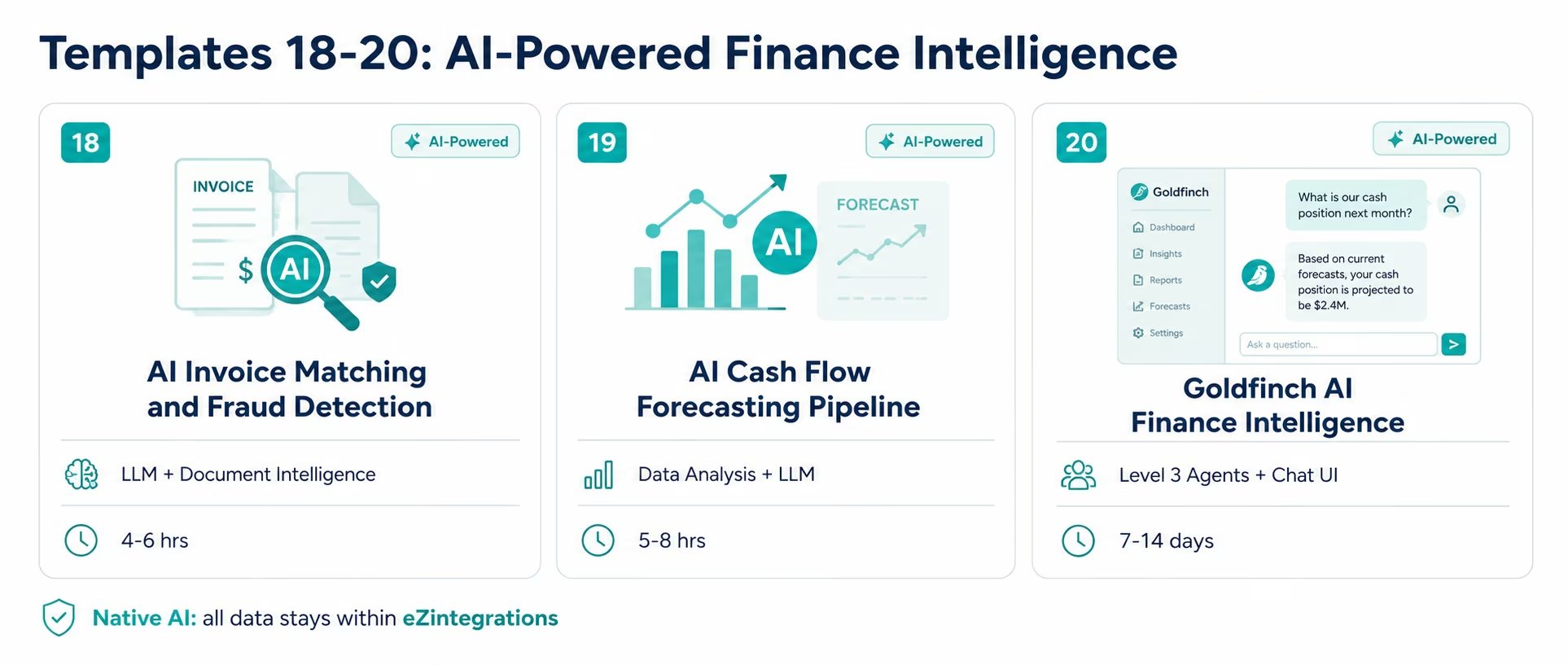
AI-Powered Finance Intelligence Templates (18-20)
These three templates represent the Level 2 AI Workflow and Level 3 AI Agent capabilities of eZintegrations: moving beyond data movement to data intelligence in finance operations.
Template 18: AI Invoice Matching and Fraud Detection
What it does: Extends the AP automation from Template 6 with two AI intelligence layers.
AI matching layer: When Document Intelligence extracts a vendor invoice and the three-way match (Template 7) returns a partial match or exception, the LLM Classification node evaluates the context: is this a rounding discrepancy, a price change that should have been flagged in procurement, a duplicate invoice, or an amount that is outside the vendor’s normal billing pattern? Each exception is classified with a specific exception type and a recommended resolution action, rather than being routed to a generic “AP review queue.”
AI fraud detection layer: For each vendor invoice, Data Analysis compares the invoice against the vendor’s historical billing patterns: amount distribution (is this invoice amount statistically normal?), billing frequency (is this invoice arriving earlier than the vendor’s typical billing cycle?), bank account consistency (has the vendor’s payment account changed since the last invoice?), and duplicate detection (does this invoice number or amount match any recent invoice from this vendor?). Invoices with elevated fraud signals are routed to the AP director with the specific signals highlighted: before payment is approved.
Systems connected: Email/DMS (invoice input) → Document Intelligence (extraction) + LLM Classification (exception typing) + Data Analysis (fraud signals) → ERP (AP entry) + AP director alert (for flagged items)
Go-live time: 4-6 hours (including fraud signal threshold calibration)
Who needs it: Enterprise AP teams processing high invoice volumes where manual fraud detection is inconsistent and exception routing is generic rather than specific.
Import Template 18: AI Invoice Matching and Fraud Detection
Template 19: AI Cash Flow Forecasting Pipeline
What it does: Builds an AI-powered cash flow forecasting pipeline that combines four data sources: AR aging data from the ERP (what receivables are expected to collect and when), AP aging and scheduled payments (what payables are committed and when), bank account current balances (starting cash position), and historical payment pattern analysis (what is the actual collection rate by customer segment at each aging bucket: not the invoice due date, but when customers actually pay).
The Data Analysis node applies the historical payment pattern model to the current AR aging to produce a probability-weighted cash collection forecast by week for the next 13 weeks. The LLM Classification node adds narrative context: “Collections in week 3 are projected below normal because 4 large accounts are 15-30 days past due and historically resolve in the 30-45 day bucket.”
The forecast updates automatically as AR, AP, and bank data change: giving the CFO and treasurer a continuously current 13-week cash flow forecast rather than a weekly manually assembled one.
Systems connected: ERP (AR aging, AP scheduled payments) + banking API (current balances) + historical payment data → Data Analysis (probability-weighted collection model) + LLM Classification (narrative) → CFO dashboard, TMS, or Anaplan (forecast delivery)
Go-live time: 5-8 hours (including historical payment pattern training data configuration)
Who needs it: Enterprise CFOs and treasurers whose 13-week cash flow forecast is assembled manually from AR aging reports, AP schedules, and banking data: and is therefore always at least one week stale.
Import Template 19: AI Cash Flow Forecasting Pipeline
Template 20: Goldfinch AI Finance Intelligence Programme
What it does: Goldfinch AI is eZintegrations’ Level 4 multi-agent coordination platform. The Finance Intelligence Programme deploys four parallel monitoring agents across your finance and ERP stack:
- AP Intelligence Agent: monitors the AP aging for invoices approaching due dates, flags early payment discount opportunities (2/10 net 30 terms where the discount exceeds the cost of capital), and identifies duplicate payment risks.
- AR Intelligence Agent: monitors AR aging for collection risk: accounts moving into the 31-60 day bucket, customers with patterns suggesting payment delays, and the impact of current AR aging on the 13-week cash forecast.
- Close Compliance Agent: monitors the close checklist progress, flags overdue reconciliation items, and delivers a daily close status brief to the Controller.
- Financial Anomaly Agent: continuously monitors GL postings for statistical anomalies: amounts significantly outside the normal distribution for a GL account, journal entries posted outside normal business hours, unusual reversals, or entries that violate the normal debit/credit pattern for an account type.
The Goldfinch AI Chat UI gives finance leadership natural language access to live financial data. The CFO asks: “What is our current cash runway at the current burn rate, and what are the top three AR risks affecting the next 30-day forecast?” Goldfinch AI queries the relevant agents and returns a structured answer in under 60 seconds.
Systems connected: SAP, NetSuite, or Oracle ERP + banking API + AR aging + AP aging + close management tool: all connected through the Goldfinch AI coordinator layer.
Deployment time: 7-14 days (including Level 1-3 foundation setup if not already in place)
Who needs it: Enterprise CFOs and Controllers who want live natural language access to financial health data without waiting for analyst reports or ERP queries.
Explore Goldfinch AI Finance Intelligence
How to Get Started
Getting your first finance or ERP integration template live is typically a same-day exercise for standard integration patterns.
Step 1: Identify your highest-cost manual reconciliation process
Review the 20 templates above. Find the one that describes the manual process your team performs most frequently with the highest per-transaction or per-month cost. For most enterprise finance teams, the highest-impact starting points are: Template 6 (vendor invoice PDF to ERP: if processing 100+ invoices/month manually), Template 1 (Stripe to ERP revenue recognition: if billing-to-ERP posting is weekly or monthly), or Template 12 (month-end close data pipeline: if data gathering is consuming the first 2-3 days of close).
Step 2: Browse the Automation Hub
Visit the Automation Hub and search for your target template by name or by the ERP system you want to connect. Each template page shows the systems connected, the field mappings, the go-live time estimate, and the configuration checklist.
Step 3: Configure your ERP credentials
ERP credentials are the most important configuration step. For SAP S/4HANA: OAuth 2.0 client credentials for the OData V4 services your template uses (FI-AP, FI-AR, FI-GL modules). For NetSuite: token-based authentication (TBA) with the appropriate role permissions. For Oracle ERP Cloud: OAuth 2.0 with the correct REST API scope. For QuickBooks: OAuth 2.0 via Intuit’s developer portal. Most credential configurations take 30-60 minutes per system.
Step 4: Configure Document Intelligence for your invoice formats
If you are deploying Template 6 or Template 18 (AP automation with Document Intelligence), configure the extraction fields for your common vendor invoice formats. Specify the fields to extract (vendor name, invoice number, date, line items, totals) and upload 5-10 sample invoices for calibration. Document Intelligence achieves 90-95% extraction accuracy on most standard invoice formats; complex or highly variable formats may require one calibration round.
Step 5: Test with real transactions and activate
Run the template against 5-10 real transactions from your ERP or billing system. Verify the postings are correct in each connected system. Review exception handling: confirm that edge cases (partial matches, missing data, duplicate detection) route correctly. Activate. The eZintegrations execution dashboard provides full audit trail visibility for every transaction processed.
Explore all 20 templates in the Automation Hub and eliminate your highest-cost manual finance process today.
FAQs
1. How does eZintegrations work for enterprise finance and ERP teams?
eZintegrations connects enterprise finance and ERP systems including SAP S/4HANA, NetSuite, Oracle ERP, QuickBooks, Stripe, Chargebee, Coupa, Ariba, Expensify, Concur, Anaplan, Snowflake, and banking APIs using pre-built integration templates from the Automation Hub. Templates support finance workflows such as revenue recognition, AP automation, procurement matching, ERP-to-data warehouse sync, and AI-powered fraud detection with most deployments going live in 2-8 hours.
2. How long does it take to set up an enterprise ERP integration template?
Billing-to-ERP templates generally take 3-7 hours. AP and procurement templates take 2-6 hours depending on invoice complexity. Financial reporting and close automation templates typically require 4-10 hours while treasury and banking integrations take 4-8 hours. AI-powered templates require 4-8 hours and Goldfinch AI Finance Intelligence deployments take 7-14 days.
3. Does eZintegrations work with SAP S/4HANA, NetSuite, and Oracle ERP?
Yes, eZintegrations provides native integration support for SAP S/4HANA through OData V4 APIs, NetSuite through SuiteQL and token-based authentication, and Oracle ERP Cloud through REST APIs with OAuth 2.0. The platform also supports QuickBooks Online and QuickBooks Enterprise integration and can securely connect to on-premises ERP environments through IPSec Tunnel connectivity.
4. Can eZintegrations automate SAP accounts payable without custom ABAP development?
Yes, eZintegrations AP automation templates use SAP standard APIs including BAPI_ACC_DOCUMENT_POST for SAP ECC and Supplier Invoice OData V4 services for SAP S/4HANA. Document Intelligence extracts invoice data from PDFs while the SAP connector handles posting and three-way matching without requiring custom ABAP development.
5. What AI capabilities do the finance and ERP templates include?
Templates 18-20 include Document Intelligence for invoice extraction, LLM Classification for exception and fraud detection, Data Analysis for cash collection modelling, and Goldfinch AI Finance Intelligence with AP, AR, close compliance, and anomaly monitoring agents. All AI inference runs within eZintegrations SOC 2 Type II certified infrastructure without sending data to external AI providers.
6. Can I automate the month-end financial close with eZintegrations templates?
Yes, eZintegrations provides templates for automated month-end close data gathering, ERP actuals to FP&A synchronisation, and intercompany reconciliation automation. These workflows pull AP, AR, payroll, bank, accrual, and intercompany data from source systems into close management platforms such as FloQast or BlackLine to reduce close-cycle delays.
Conclusion: Stop Reconciling What Should Be Automated
The AP clerk who manually enters 340 invoices per month. The controller who spends two days gathering data before close can start. The treasurer who logs into seven bank portals each morning. These are not job descriptions: they are integration failures. The data exists. The systems exist. The integration that makes the data flow automatically does not.
The 20 templates in this guide cover the most common and most costly integration gaps in enterprise finance and ERP stacks: from the foundational billing-to-ERP sync to the AI-powered cash flow forecasting programme and the Goldfinch AI Finance Intelligence Chat UI that gives your CFO live financial data in 60 seconds.
Every template is free to import from the Automation Hub. Most go live in hours, not weeks. None require ABAP development, Oracle customisation, or NetSuite SuiteScripting. The ERP integration layer should not require an ERP consultant.
Start with the template that eliminates your team’s highest-cost manual reconciliation. Get it live this week. Then the next one.
Explore all 20 templates in the Automation Hub and connect your enterprise finance stack today.
Book a free demo of ERP integration and bring your specific ERP environment. We will show you which templates apply to your exact system combination and walk through the SAP, NetSuite, or Oracle credential configuration for your first integration.

