
AI Agents for Manufacturing: Autonomous Production Inventory & Quality Workflows
May 19, 2026AI agents for manufacturing are autonomous, multi-step reasoning systems aligned with Intelligent agent principles that handle complex production, inventory, and quality exceptions end-to-end: retrieving data from ERP and MES systems, reading quality documents, querying maintenance history, applying engineering knowledge, and routing pre-assembled resolution recommendations to the right human for final decision. eZintegrations deploys manufacturing AI agents with 9 native enterprise tools, configurable confidence thresholds, and human-in-the-loop gates: autonomously investigating production schedule exceptions, quality deviation root causes, inventory replenishment anomalies, maintenance reliability patterns, and supplier quality risks across your full manufacturing stack.
TL;DR
- Manufacturing operations run on exception management, consistent with McKinsey & Company analysis of AI agents in manufacturing operations. The most valuable work your production planners, quality engineers, and maintenance managers do is not running standard processes: it is investigating why something went wrong, assembling the data from multiple systems, and routing a resolution to the right person. That investigation and assembly is precisely what AI agents do faster, more consistently, and at larger scale.
- eZintegrations’ Level 3 AI Agents deploy 9 native enterprise tools to autonomously investigate manufacturing exceptions: production schedule deviations, quality non-conformances, maintenance reliability patterns, inventory replenishment anomalies, and supplier quality failures.
- Five manufacturing AI agents in this guide: the Production Schedule Exception Agent, the Quality CAPA Investigation Agent, the Maintenance Reliability Agent, the Inventory Replenishment Agent, and the Supplier Quality Risk Agent.
- Level 4 Goldfinch AI coordinates these agents into a continuous manufacturing operations intelligence network: giving plant managers and operations VPs natural language access to live production, quality, and maintenance data via Chat UI.
- Deployment: 10-15 days per agent using Automation Hub templates, including knowledge base configuration, MES and ERP connection validation, and confidence threshold calibration.
What Manufacturing AI Agents Actually Do (and the Line Between Agent and Workflow)
The distinction between AI workflows and AI agents determines which manufacturing problems each tool solves best, reflecting Gartner perspectives on AI agent adoption in manufacturing: and deploying the wrong tool for the wrong problem is the most common mistake in manufacturing AI programmes.
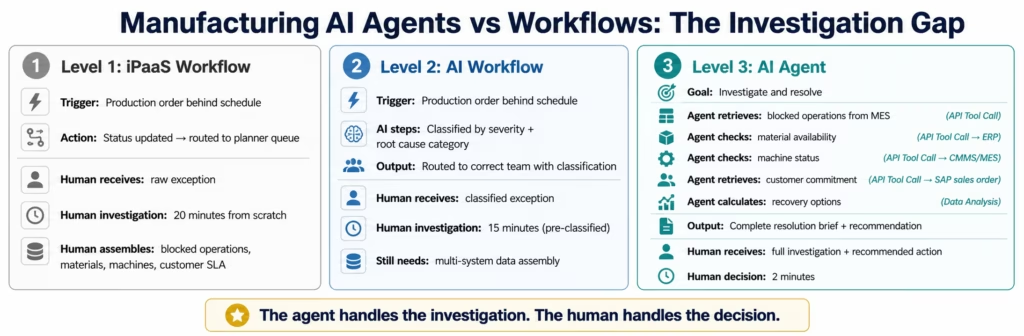
A Level 1 iPaaS workflow does a predetermined thing when a trigger fires. A production order is released in SAP: the MES work order is created. A maintenance work order is completed: the SAP PM confirmation is posted. Deterministic, reliable, high-volume.
A Level 2 AI Workflow adds intelligence at specific predetermined steps. A quality deviation is recorded: Document Intelligence reads the measurement document, LLM Classification assigns severity and routing, the workflow creates the SAP QM notification automatically. The AI executes specific jobs at specific points in a fixed sequence.
A Level 3 AI Agent receives a goal. “Investigate why this production order is behind schedule and determine the optimal resolution path.” The agent then decides which systems to query, in what order, based on what it finds: adapting its investigation as it discovers the root cause.
The manufacturing difference is substantial:
Level 2 workflow: production order falls behind → exception classified and routed to production planner. The planner still investigates for 20 minutes.
Level 3 AI agent: production order falls behind → agent retrieves all blocked operations from MES, checks material availability for each blocked operation, checks machine status for each affected work centre, retrieves the customer commitment from the sales order, calculates whether the gap can be recovered, and delivers a complete resolution brief to the production planner. The planner reviews in 2 minutes and decides.
That 18-minute gap between “exception routed” and “investigation complete” is what agents eliminate. Not faster routing: complete autonomous investigation before the human sees the exception.
Before vs After: The AI Agent Transformation in Manufacturing
| Process | Before AI Workflows | After AI Workflows |
|---|---|---|
| Quality deviation routing | Inspector records in MES, quality engineer manually creates NCR in SAP (45 min, 5-hr lag) | MES deviation event triggers AI workflow: classified by severity, NCR auto-created in SAP QM, routed to engineer |
| Production order priority change | Scheduler manually updates MES work queue (1-4 hr lag) | SAP production order change event triggers MES schedule update in real time |
| Maintenance parts consumption posting | Technician paper form, office manual SAP entry (next day) | CMMS work order completion triggers automatic SAP material consumption posting |
| Engineering change order routing | ECO received as PDF, manually reviewed, manually entered in MES and ERP (3-5 hr per ECO) | Document Intelligence reads ECO, extracts affected parts/BOMs, routes to affected systems automatically |
| Supplier non-conformance | Quality team manually reads incoming non-conformance reports, creates NCRs, notifies production (60+ min) | Document Intelligence reads supplier NCR in any format, extracts details, creates SAP QM notification, alerts production |
| OEE anomaly response | Shift supervisor reviews OEE dashboard each hour, manually investigates drops | AI Watcher detects OEE drop below threshold, retrieves root cause data, routes structured investigation brief |
| Production scrap recording | Operator fills paper form, quality lead enters into SAP and MES separately (15-20 min delay) | Shop floor IoT/PLC event triggers simultaneous SAP goods movement and MES quality record |
| Work order completion sync | MES work order close triggers manual SAP production confirmation (batch, nightly) | MES work order completion triggers real-time SAP production order confirmation with actual quantities |
| Incoming inspection results | QC technician enters inspection results in quality system, emails buyer if failed | Inspection results auto-posted to SAP QM, failed results trigger Level 3 AI Agent for supplier disposition |
| Shift handover report | Shift manager compiles handover manually from 3-4 systems (30-45 min) | AI Agent queries MES, ERP, and maintenance system, compiles structured shift report in 3 minutes |
The 9 Native Tools Manufacturing AI Agents Use
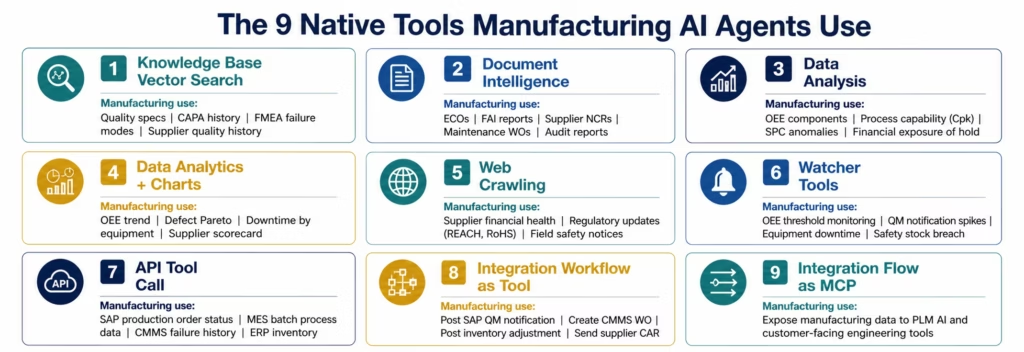
eZintegrations’ Level 3 AI Agents operate through 9 native enterprise tools. Each tool has specific manufacturing applications that make the agent’s investigation comprehensive rather than superficial.
1. Knowledge Base Vector Search Searches knowledge bases using semantic similarity. In manufacturing: the quality specification knowledge base (drawing tolerances, material specifications, inspection criteria), the CAPA history knowledge base (past non-conformances categorised by root cause and corrective action), the maintenance failure mode knowledge base (FMEA data, common failure modes by equipment type), and the supplier quality history knowledge base (supplier scorecards, past NCRs, audit findings).
2. Document Intelligence Reads unstructured manufacturing documents. In manufacturing: engineering change orders (extracting affected part numbers, change descriptions, effective dates), first article inspection reports (measurement results, specification limits, compliance determination), supplier non-conformance reports (defect description, quantity affected, supplier root cause), maintenance work orders (failure description, root cause, corrective action), quality audit reports (findings, major vs minor non-conformances), and customer complaint letters (complaint description, affected part, quantity, usage environment).
3. Data Analysis Performs structured calculations. In manufacturing: calculating OEE component contributions (availability, performance, quality), computing process capability (Cpk, Ppk) from measurement data, identifying statistical anomalies in SPC control charts, calculating the financial impact of a quality hold (value of affected inventory, cost of potential scrap versus rework), and determining whether a production schedule gap can be recovered within the constraint of available capacity.
4. Data Analytics with Charts/Graphs/Dashboards Generates visual summaries. In manufacturing: OEE trend by production line, defect Pareto by failure mode, downtime by equipment and failure type, supplier quality scorecard by incoming inspection results, and production output versus plan.
5. Web Crawling Retrieves content from web sources. In manufacturing: checking supplier financial health and operational news (for supplier risk assessment), retrieving regulatory updates affecting materials or processes (REACH, RoHS, FDA for medical device or pharma), checking for recall or field safety notifications from material suppliers, and monitoring industry standards updates.
6. Watcher Tools Monitors systems and triggers on specified conditions. In manufacturing: monitoring MES for OEE drops below threshold on specific production lines, monitoring SAP QM for quality notification count spikes, monitoring CMMS for equipment downtime hours exceeding planned maintenance windows, monitoring inventory levels for safety stock breaches, and monitoring supplier delivery performance for emerging on-time delivery decline patterns.
7. API Tool Call Calls configured API connectors. In manufacturing: the SAP OData V4 API call that retrieves the production order’s operation list and current status, the MES REST API call that retrieves the actual process parameter history for a production batch, the CMMS API call that retrieves equipment failure history for the past 90 days, the quality system API call that retrieves the measurement results for the current inspection lot, and the ERP material management API call that retrieves inventory positions and open purchase orders.
8. Integration Workflow as Tool Runs a Level 1 workflow as an agent tool. In manufacturing: the agent triggers the “post SAP QM quality notification” workflow, the “create CMMS work order” workflow, the “post SAP inventory adjustment” workflow, or the “send supplier corrective action request” workflow as part of its investigation and action sequence.
9. Integration Flow as MCP Exposes manufacturing integration capabilities to external AI systems via Model Context Protocol. In manufacturing: allows your engineering PLM system or customer-facing AI tools to call eZintegrations’ manufacturing data query capabilities as part of their own reasoning.
Manufacturing AI Agent 1: Production Schedule Exception Agent
Every manufacturing plant starts each day with production exceptions. Work orders behind schedule. Operations blocked on material. Machines in unplanned downtime. Customer expedite requests changing priorities. The production planner’s first 2 hours are often consumed by investigating these exceptions manually across the MES, ERP, and maintenance systems.
The Production Schedule Exception Agent eliminates the manual investigation step. Every exception is pre-investigated before the production planner sees it.
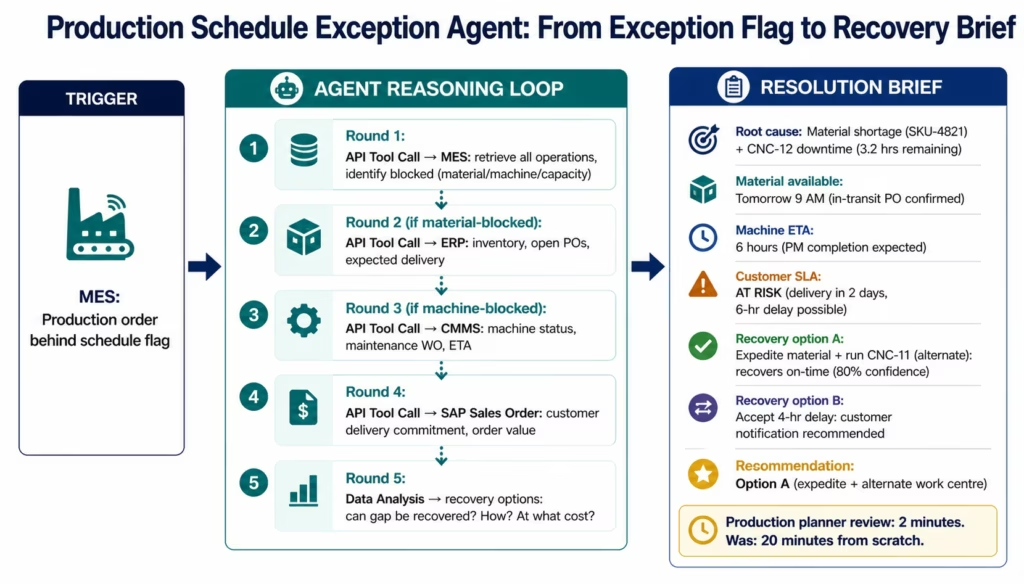
Agent goal: “Investigate why this production order is behind schedule, identify the root cause, assess the customer impact, and determine the optimal recovery path.”
Agent investigation sequence (adaptive: the agent decides based on findings):
The agent starts by calling the MES API (API Tool Call) to retrieve the production order’s complete operation list: which operations are complete, which are in progress, which are not started, and which are explicitly blocked. The blocked status code (if present) narrows the investigation.
For material-blocked operations: API Tool Call to ERP material management retrieves the material’s current inventory position, open purchase orders with confirmed delivery dates, and open production orders for the material (if it is a manufactured component). Data Analysis calculates whether the material will be available before the work order’s required completion date.
For machine-blocked operations: API Tool Call to the CMMS or MES machine status retrieves the current status of the affected work centres: planned downtime, unplanned downtime, available but loaded. If a machine is in unplanned downtime, the agent queries the CMMS for the associated maintenance work order and its estimated completion time.
For capacity-blocked operations: the agent retrieves the work centre’s current queue from the MES and calculates the queue clearance time given current throughput rates.
API Tool Call to the ERP sales order retrieves the customer’s promised delivery date and order value: establishing the financial and relationship impact of the delay.
Data Analysis synthesises: can the production order recover within its committed delivery date given the current blockages and their expected resolution timelines? If yes: what specific actions (material expedite, alternate work centre, overtime) achieve recovery? If no: what is the extent of the delay and which customer deliveries are affected?
The production planner receives a structured exception brief:
- Root cause of each blocked operation (material, machine, capacity)
- Expected resolution timeline for each blockage
- Customer delivery impact (on-track, at-risk, confirmed late)
- Recovery options with estimated effort and probability
- Recommended action with confidence score
Decision time: 2 minutes from a complete information package versus 20 minutes of investigation from scratch.
Manufacturing AI Agent 2: Quality CAPA Investigation Agent
Corrective and Preventive Action (CAPA) is the quality management process where manufacturing operations invest the most human expertise. A quality engineer initiating a CAPA for a recurring defect needs to assemble: the full deviation history for this characteristic, the process parameter data for the affected batches, the equipment and operator records for the affected production period, the inspection history from the quality system, and the FMEA for the process: then conduct a root cause analysis across all this data.
In most manufacturing operations, assembling this context takes 3-4 hours before the actual root cause analysis begins. The Quality CAPA Investigation Agent handles the context assembly.
Agent goal: “Investigate this quality deviation for CAPA initiation. Assemble the relevant process history, identify the likely root causes based on available data, and prepare a CAPA initiation brief for the quality engineer.”
Agent investigation sequence:
- API Tool Call (MES quality module): retrieves the deviation history for this part number and characteristic: all occurrences in the past 24 months, the measured values, the production dates, the equipment IDs, and the operator IDs.
- API Tool Call (MES process data): retrieves the process parameter history for the batches where the deviation occurred: temperatures, pressures, speeds, cycle times, tooling records, and any process alarms generated during the affected production windows.
- API Tool Call (SAP QM): retrieves the formal quality notification history, the usage decision records (whether previous occurrences were accepted, reworked, or scrapped), and the existing CAPA records for this part number.
- Knowledge Base Vector Search (CAPA history): searches the CAPA history knowledge base for similar deviations on this part or process family: what root causes were identified? What corrective actions were effective?
- Knowledge Base Vector Search (FMEA/process knowledge): retrieves the FMEA for the affected process, identifying which failure modes are associated with this type of deviation and which process parameters are the likely influencing factors.
- Document Intelligence: reads any available process control plans and inspection plans for the affected operation, extracting the key process parameters and their control limits.
- Data Analysis: runs the correlation analysis: does the deviation frequency correlate with specific process parameter ranges, specific equipment, specific operators, specific material lots, or specific time periods? This statistical layer is where the root cause hypothesis is generated.
The quality engineer receives a structured CAPA initiation brief:
- Full deviation history with occurrence timeline
- Process parameter correlation analysis (which parameters were outside normal range during affected batches)
- Equipment and operator pattern analysis
- Similar past CAPA records and their resolutions
- Suggested root cause hypotheses ranked by statistical correlation strength
- Suggested CAPA template based on root cause hypothesis
The quality engineer’s role shifts from assembling this context (3-4 hours) to reviewing the AI-assembled brief and applying engineering judgment (30-45 minutes). The engineering expertise is applied to root cause confirmation and CAPA design: not to data collection.
Manufacturing AI Agent 3: Maintenance Reliability Agent
Reactive maintenance: fixing equipment after it fails: is measurably more expensive than preventive maintenance. The challenge is knowing which equipment to maintain proactively and when. Most maintenance programmes have good intentions around predictive maintenance but execute reactively because the data analysis to identify emerging failure patterns requires more time than the maintenance team has.
The Maintenance Reliability Agent continuously monitors equipment performance and failure patterns to surface reliability risks before they become unplanned downtime events.
Trigger conditions the Watcher Tool monitors:
- Third occurrence of the same failure mode on the same equipment within 90 days
- Equipment whose unplanned downtime hours in the trailing 30 days exceed the configured threshold
- Equipment approaching a PM interval milestone without an active PM work order
- Process parameters (temperature, vibration, pressure: from IoT sensors or OPC-UA) trending outside their normal operating range
When a reliability trigger fires:
- API Tool Call (CMMS): retrieves the equipment’s complete maintenance history for the past 24 months: every work order, every failure code, every corrective action taken, every PM completion record, and the actual intervals between PM completions.
- Data Analysis: identifies patterns in the failure history: is the mean time between failures (MTBF) shortening? Is a specific failure mode recurring on a shorter cycle? Is the failure concentrated in specific operating conditions (shift, production rate, ambient temperature)?
- Knowledge Base Vector Search (failure mode knowledge base): retrieves the FMEA data for the equipment and the known failure modes for this equipment type: what does engineering knowledge suggest are the root causes for this failure mode, and what are the recommended preventive maintenance actions?
- API Tool Call (MES production schedule): retrieves the production schedule for the next 30 days for the work centres this equipment serves: what is the production impact of taking this equipment down for PM now versus waiting?
- Data Analysis (second): calculates the probability of unplanned failure in the next 30 days given the current MTBF trend, and compares the production impact of a planned PM downtime versus the expected production impact of an unplanned failure (typically 3-5x longer than planned downtime for the same maintenance task).
The reliability engineer or maintenance manager receives a structured reliability brief: – Equipment identification and reliability risk level – Failure pattern summary (MTBF trend, failure mode recurrence) – FMEA root cause hypotheses for the current failure pattern – Production schedule impact of planned PM now vs probability of unplanned failure in next 30 days – Recommended action: PM now, PM scheduling window, or increased monitoring
The brief converts a data pattern that would have been invisible until the next monthly downtime report into a proactive recommendation that arrives within 48 hours of the third failure occurrence.
Manufacturing AI Agent 4: Inventory Replenishment Agent
Manufacturing inventory management has the same replenishment exception challenge as distribution: parameters that become stale as demand and lead times change: but with an additional dimension: bill of materials (BOM) dependency. When a finished goods demand changes, it cascades through multiple levels of components and raw materials. When a component’s supplier lead time increases, it affects not just that component’s safety stock but every finished goods item that uses it.
The Inventory Replenishment Agent handles manufacturing-specific replenishment exceptions across both direct materials (components and raw materials used in production) and indirect materials (MRO supplies for maintenance).
For direct materials: BOM-aware replenishment:
When the Watcher Tool identifies a direct material whose inventory position is approaching the safety stock threshold:
- API Tool Call (ERP BOM): retrieves which finished goods items use this material, the quantity per assembly (BOM explosion for one level), and the open production orders for each finished goods item: establishing how much of this material is committed to active production.
- API Tool Call (ERP demand): retrieves the demand forecast for each finished goods item that uses this material, projected out 13 weeks, to calculate the forward coverage of the current inventory position.
- API Tool Call (ERP purchasing): retrieves the supplier’s current lead time for this material (from the purchasing info record), the open POs and their confirmed delivery dates, and the minimum order quantity.
- Data Analysis: calculates the net projected inventory position week by week: current stock minus committed production minus forecasted demand plus expected PO receipts. Identifies when the projected position will breach safety stock and whether the breach will happen before the next PO delivery.
- Knowledge Base Vector Search (supplier knowledge): checks the supplier’s recent delivery performance history: has this supplier been delivering late? Has the actual lead time been longer than the purchasing info record lead time?
The inventory analyst receives a structured brief with the projected stockout date, the recommended PO quantity and timing, and a flag if the supplier’s actual recent lead time suggests the replenishment calculation should use a different lead time than the ERP’s purchasing info record.
For MRO materials: maintenance-driven replenishment:
When a maintenance work order consumes the last unit of a spare part, the Replenishment Agent retrieves the equipment’s maintenance history to calculate the expected consumption rate for that spare part, checks whether the current reorder point is consistent with the maintenance consumption pattern, and routes a replenishment brief if immediate reorder is warranted.
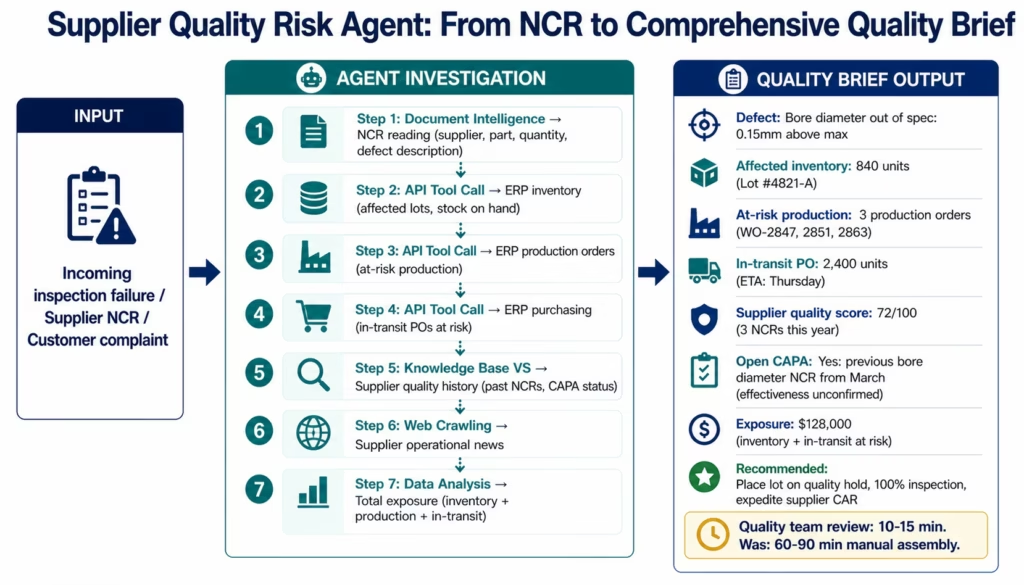
Manufacturing AI Agent 5: Supplier Quality Risk Agent
Supplier quality failures have immediate manufacturing impact: production holds for incoming inspection failures, customer complaint exposure if a quality issue escapes to a customer, and supply continuity risk if the corrective action requires time to implement. The Supplier Quality Risk Agent monitors supplier quality signals continuously and investigates supplier quality events comprehensively before the quality team begins their manual process.
When a supplier quality event is detected (incoming inspection failure, supplier-initiated NCR, or customer complaint traced to a supplier component):
- Document Intelligence: reads the incoming inspection failure record or the supplier-submitted NCR document, extracting: the supplier, the affected part number, the quantity affected, the specific non-conformance description, and any supplier-provided root cause or corrective action.
- API Tool Call (ERP inventory): retrieves the current inventory of the affected material: how much is in stock, what lots are present, and whether any production orders are consuming this material from the affected lot.
- API Tool Call (ERP production orders): retrieves open production orders for finished goods items that use this material: which production plans are at risk if the material is placed on hold?
- API Tool Call (ERP purchasing): retrieves the open purchase orders for this material from this supplier: how much more of this material is in transit or on order?
- Knowledge Base Vector Search (supplier quality history): retrieves the supplier’s quality history: previous NCRs on this part, corrective action records and their effectiveness, the supplier’s current quality score, and any open corrective action requests.
- Web Crawling: checks for any news about the supplier’s operational status that might indicate systemic issues.
- Data Analysis: calculates the total exposure: affected inventory value, production schedule impact, and the at-risk in-transit purchase order value.
The quality team receives a structured supplier quality brief: – Non-conformance description and severity – Affected inventory quantity and lot identification – Production orders at risk if material is placed on quality hold – In-transit PO quantity at risk – Supplier quality history context – Draft corrective action request letter (for human review before sending) – Recommended disposition (use-as-is with deviation, 100% inspection, rework, return, scrap)
What previously took 60-90 minutes of quality team time to initiate takes 10-15 minutes of reviewing an AI-assembled brief.
Level 4: Goldfinch AI for Manufacturing Operations Intelligence
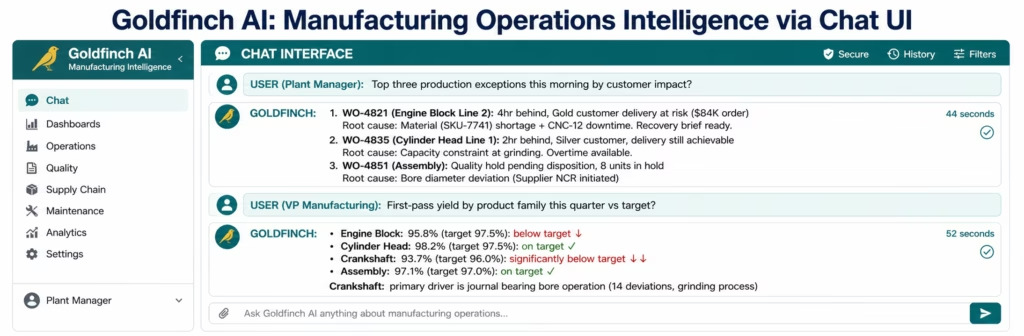
Individual AI agents handle individual exception types. Goldfinch AI coordinates multiple agents simultaneously and gives manufacturing operations leaders natural language access to live production intelligence.
Plant Manager: 7 AM daily: “What are our top three production exceptions this morning by customer impact?”
Goldfinch AI’s coordinator queries the production exception queue via the Workflow Node, retrieves customer order priorities and commitment dates for affected production orders, ranks by financial and relationship impact, and delivers a structured morning brief in under 60 seconds. The plant manager makes three decisions in the time it previously took to read through the raw exception report.
VP of Manufacturing: weekly: “What is our first-pass yield trend by product family this quarter and where are we below target?”
Goldfinch AI queries the MES quality data and SAP QM data, calculates first-pass yield by product family, compares against target, identifies the specific operations and failure modes driving below-target performance, and returns a ranked quality performance summary in under 60 seconds.
Quality Manager: “How many open supplier CARs do we have by supplier, and which are past their target completion date?”
Goldfinch AI queries the supplier quality system and SAP QM, retrieves open corrective action requests with their target and actual completion dates, and returns a ranked list of overdue CARs with the financial exposure for each affected supplier.
Maintenance Manager: “Which of our critical production lines has had the most unplanned downtime this month, and is the root cause documented?”
Goldfinch AI queries the CMMS and OEE system, identifies equipment by unplanned downtime hours, retrieves the documented root causes from maintenance work orders, and returns a prioritised maintenance attention list.
Workflow Node: automated daily shift brief: Every shift end, the Goldfinch AI Workflow Node coordinator dispatches parallel agents: one for production performance (OEE, output vs plan, top exceptions), one for quality (deviations, holds, supplier NCRs), and one for maintenance (critical equipment status, open work orders). The coordinator synthesises findings and delivers a structured shift handover brief to the incoming shift manager: eliminating the 30-45 minute manual shift report preparation.
CAPA and Quality System Governance for Manufacturing AI
Manufacturing AI agents operating on quality data require specific governance considerations: particularly in regulated manufacturing environments (IATF 16949 automotive, ISO 9001, 21 CFR Part 820 medical device, AS9100 aerospace).
Human-in-the-loop gates for quality decisions:
Every eZintegrations manufacturing AI agent includes configurable human-in-the-loop gates. For quality workflows specifically:
- The CAPA Investigation Agent assembles the investigation context and suggests root cause hypotheses: the quality engineer confirms the root cause and designs the corrective action. The agent prepares; the engineer decides.
- The Supplier Quality Risk Agent drafts the corrective action request letter: the quality manager reviews and sends. The agent drafts; the human authorises.
- The Inventory Replenishment Agent identifies a potential quality-hold material disposition: the quality team makes the disposition decision. The agent presents the options; the team chooses.
No manufacturing AI agent in eZintegrations takes final quality disposition actions autonomously. Quality decisions in regulated manufacturing environments require human authorisation, and the HITL gate enforces this at the workflow configuration level.
Audit trail for regulated manufacturing:
Every agent action generates an immutable log entry: the agent, the data sources accessed, the API calls made, the data retrieved, the analysis performed, and the output produced. For CAPA investigations, this audit trail documents the data inputs to the root cause hypothesis: satisfying the records and traceability requirements of IATF 16949 Section 10.2.3.
For medical device manufacturing under 21 CFR Part 820 (Quality System Regulation) and EU MDR, the agent’s investigation brief and the quality engineer’s disposition decision are both logged with timestamps, providing the CAPA record traceability that FDA inspectors and Notified Bodies require.
SOC 2 Type II and data security:
eZintegrations is SOC 2 Type II certified. All agent processing runs within eZintegrations’ infrastructure: manufacturing process data, quality measurement records, and supplier information are not sent to external AI providers. For pharmaceutical and medical device manufacturers where manufacturing data may intersect with HIPAA-covered information (patient-matched device manufacturing), the HIPAA-compliant integration with signed BAA is available.
Key Outcomes and Results
Manufacturing organisations deploying AI agents across production exceptions, quality CAPA, maintenance reliability, inventory replenishment, and supplier quality report measurable improvements within 60-90 days:
Production Operations: – Production exception investigation: 20 minutes → 2 minutes (AI pre-investigation brief) – Daily exception queue clearance: 2-4 hours → 30-45 minutes – Schedule recovery rate: improved by 15-25% through faster exception identification and recovery planning – Customer delivery at-risk detection: end-of-day review → same-hour exception detection
Quality Management: – CAPA initiation context assembly: 3-4 hours → 30-45 minutes (AI-assembled brief) – Supplier NCR initiation: 60-90 minutes → 10-15 minutes – First article inspection disposition time: 45-60 minutes → 15-20 minutes – Customer complaint root cause tracing: half-day or more → 30-60 minutes – Quality hold financial exposure visibility: manual calculation → automatic on NCR detection
Maintenance Operations: – Repetitive failure pattern detection: monthly downtime report → third-occurrence flag within 48 hours – Reliability brief for PM recommendation: monthly review → automatic on condition trigger – Unplanned downtime reduction: 15-30% improvement through earlier pattern detection and proactive PM
Inventory Management: – Replenishment exception investigation: 15-20 minutes per item → 3 minutes (AI-assembled brief) – Stockout risk detection: safety stock breach → projected breach with lead time consideration – BOM-aware replenishment: manual BOM lookup → automatic BOM explosion and cascading assessment
Executive Intelligence: – Plant manager morning exception review: 2 hours (raw queues) → 10 minutes (ranked AI briefs) – First-pass yield visibility: weekly report → real-time via Goldfinch AI Chat UI – Maintenance priority list: monthly downtime review → continuous agent monitoring
How to Get Started
Step 1: Choose your highest-volume manufacturing exception type
Count the exceptions your production planning, quality, and maintenance teams handle daily and weekly. Multiply by the current investigation time per exception. The exception type with the most accumulated investigation time per week is your first manufacturing AI agent deployment. For most manufacturers, production schedule exceptions or supplier quality events have the highest combined volume and investigation time.
Step 2: Build your manufacturing knowledge bases
Manufacturing AI agents are most effective with domain-specific knowledge they can search. Before deploying the CAPA Investigation Agent: load your CAPA history database (past NCRs categorised by part, process, root cause, and corrective action effectiveness) into the CAPA knowledge base. Before deploying the Maintenance Reliability Agent: load your FMEA library and equipment failure mode data. Before deploying the Supplier Quality Agent: load supplier quality scorecards and past NCR history. The Automation Hub templates include knowledge base structures: you populate them with your manufacturing organisation’s specific data.
Step 3: Import the manufacturing AI agent template from the Automation Hub
Visit the Automation Hub and import the manufacturing AI agent template for your target exception type. Configure your MES connection (Siemens Opcenter, Rockwell FactoryTalk, or your MES REST API), your ERP connection (SAP S/4HANA OData V4, Oracle ERP, or Infor), your CMMS connection (SAP PM, IBM Maximo, IFS, or other), and your quality system connection.
Step 4: Calibrate confidence thresholds for manufacturing context
Manufacturing exception decisions often have significant financial or safety implications: the confidence threshold for auto-routing versus human review should reflect this. For safety-critical quality exceptions: set a higher confidence threshold that routes more cases to human review. For production scheduling exceptions: a lower threshold may be appropriate for standard recovery scenarios. Run the agent against a sample of real exceptions from the past month and calibrate thresholds based on the comparison with what your team actually did.
Step 5: Activate with parallel-run validation
Run the AI agent alongside the existing manual exception process for two weeks. Engineers and planners compare their manual investigation outcomes against the agent’s pre-investigation briefs for the same exceptions. Track the match rate between agent recommendations and actual decisions. Adjust knowledge base content or thresholds based on discrepancies before full activation.
Import a manufacturing AI agent template from the Automation Hub and have your first manufacturing AI agent live within two weeks.
FAQs
1. How do AI agents work in manufacturing operations?
Manufacturing AI agents receive a specific exception goal (investigate this production schedule deviation, initiate a CAPA for this quality deviation, assess this supplier quality failure) and use enterprise tools to complete the investigation autonomously: querying the MES and ERP via API Tool Call, reading quality documents with Document Intelligence, searching CAPA history and FMEA knowledge bases via Knowledge Base Vector Search, calculating process capability and financial exposure via Data Analysis, and monitoring systems for emerging patterns via Watcher Tools. Unlike rule-based workflows that follow predetermined steps, agents adapt their investigation based on what they find. The output is always a structured brief that a human engineer or manager reviews and approves before any action is taken. All processing runs within eZintegrations' SOC 2 Type II certified infrastructure.
2. How long does it take to set up a manufacturing AI agent?
Standard Automation Hub manufacturing AI agent templates go live in 10-15 days from template import to production activation. This includes: MES and ERP API connection configuration (2-3 days), CMMS connection (1-2 days), quality knowledge base build with CAPA history and specification data (3-5 days), confidence threshold calibration against sample exceptions (2-3 days), and dual-run validation before full activation (2-3 days). A full manufacturing AI agent programme (production exceptions + quality CAPA + maintenance reliability + supplier quality): 8-14 weeks.
3. Does eZintegrations work with SAP, Siemens Opcenter, and other manufacturing systems for AI agents?
Yes, AI agent API Tool Call is pre-configured for SAP S/4HANA (OData V4 with automatic CSRF token management: production orders via PP, quality notifications via QM, plant maintenance via PM, inventory via MM), Siemens Opcenter (REST API for work orders, quality results, process parameters), Rockwell FactoryTalk Analytics (REST API), IBM Maximo and SAP PM for CMMS integration, and major quality management systems. For on-premises manufacturing systems, eZintegrations connects via IPSec Tunnel without requiring internet-exposed manufacturing system ports. The Watcher Tool is pre-configured with the standard exception codes and threshold patterns for major MES and ERP systems.
4. Are manufacturing AI agents appropriate for regulated manufacturing environments like automotive IATF, medical device, or aerospace?
Yes, with appropriate governance configuration. For IATF 16949 automotive: the CAPA Investigation Agent's investigation context and the quality engineer's disposition decision are both logged with timestamps, satisfying IATF 16949 Section 10.2.3 CAPA record requirements. For medical device (21 CFR Part 820 / EU MDR): the agent's brief and the human reviewer's decision create the traceable CAPA record required by FDA and Notified Body auditors. For aerospace AS9100: the knowledge base configuration includes AS9100 Section 10.2 CAPA requirements and the agent's structured brief satisfies the objective evidence requirements for corrective action investigation. In all regulated environments, the human-in-the-loop gate ensures no autonomous quality disposition action is taken without authorised human review.
5. What is the difference between manufacturing AI workflows and manufacturing AI agents?
AI Workflows (Level 2) handle high-volume consistent manufacturing data inputs with AI at specific predetermined steps: a quality deviation is recorded in the MES, Document Intelligence extracts it, LLM Classification assigns severity and routing, and SAP QM notification is created. The sequence is fixed; the AI executes specific processing tasks. AI Agents (Level 3) handle complex manufacturing exceptions requiring adaptive investigation: the Production Exception Agent receives a behind-schedule production order and decides which systems to query in what order based on what it finds such as material shortage, machine downtime, or capacity constraint. The investigation adapts based on findings. Workflows are suited for consistent processing; agents are suited for complex exception handling.
6. Can manufacturing AI agents support predictive maintenance programmes?
Yes, The Maintenance Reliability Agent uses the Watcher Tool to monitor equipment performance continuously: tracking MTBF trends, failure mode recurrence patterns, and process parameter drift via OPC-UA or IoT sensor integration. When a reliability risk is detected (third occurrence of a failure mode, MTBF shortening below threshold, process parameter trending outside normal range), the agent retrieves the equipment's maintenance history, runs failure pattern analysis using Data Analysis, retrieves FMEA data, and routes a structured reliability brief to the maintenance or reliability engineer with recommended preventive maintenance actions and production impact analysis. This bridges the gap between data availability and engineering action in predictive maintenance programmes.
Conclusion: Manufacturing Operations That Investigate Less, Decide More
The production planner who spends 20 minutes investigating a production exception before making a 2-minute decision. The quality engineer who spends 3 hours assembling CAPA context before spending 45 minutes on root cause analysis. The maintenance technician whose pattern of repetitive failures is visible in the monthly downtime report: three weeks after the third occurrence.
Manufacturing AI agents change this ratio, aligning with McKinsey & Company smart factory and autonomous operations research. Not by replacing the production planner’s judgment about recovery options. Not by replacing the quality engineer’s expertise in root cause analysis. Not by replacing the reliability engineer’s knowledge of failure modes. By eliminating the data assembly that precedes each decision.
The production planner still chooses the recovery path. The AI investigates the blockages, materials, machines, and customer commitments in advance. The quality engineer still confirms the root cause and designs the corrective action. The AI assembles the deviation history, process parameters, and FMEA context in advance. The reliability engineer still decides the PM schedule. The AI identifies the pattern and calculates the expected unplanned failure risk in advance.
eZintegrations deploys five manufacturing AI agents: Production Schedule Exception, Quality CAPA Investigation, Maintenance Reliability, Inventory Replenishment, and Supplier Quality Risk: with SOC 2 Type II certified infrastructure, configurable human-in-the-loop gates for regulated manufacturing environments, immutable audit trails for CAPA traceability, and pre-built connector configurations for SAP, Siemens Opcenter, Rockwell, Maximo, and your full manufacturing stack.
Import a manufacturing AI agent template from the Automation Hub and have your first manufacturing AI agent live within two weeks.
Book a free demo and bring your highest-volume manufacturing exception type. We will show you what an AI agent investigation looks like for your specific MES, ERP, and quality system environment.

