
Build vs Buy: The Integration Platform Decision Every Enterprise IT Leader Gets Wrong
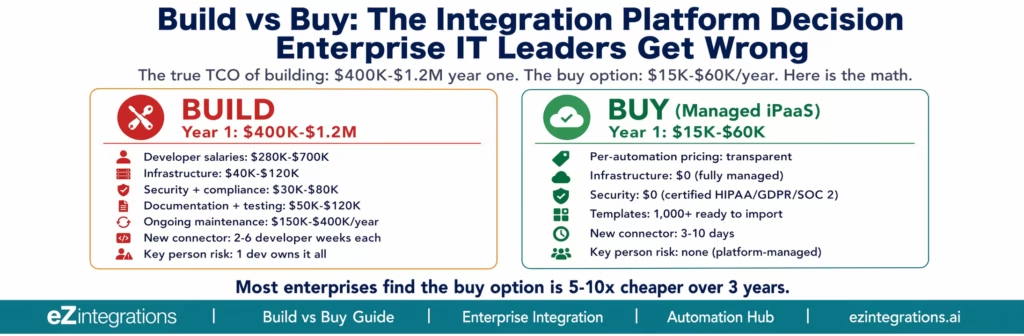
May 17, 2026Building a custom enterprise integration platform typically costs $400,000-$1,200,000 in year one (developer salaries, infrastructure, security, testing, and documentation) and $150,000-$400,000 per year to maintain. A managed iPaaS platform typically costs $15,000–$60,000 per year, aligning with enterprise integration platform benchmarks highlighted in Gartner research for the same integration coverage. The break-even point for building rarely arrives: as integration requirements grow, maintenance costs compound while business teams wait months for new connectors. Most enterprise IT leaders who run the full TCO calculation find the build option is 5-10x more expensive over a three-year period.
TL;DR:
- Building a custom integration platform looks cheaper on a spreadsheet when you price it as “developer time.” It is not cheaper when you include: infrastructure, security, testing, documentation, ongoing maintenance, the salary replacement cost when the developer who built it leaves, and the opportunity cost of those developers not building your product.
- The “build” option also has a hidden scaling problem: every new system your business adds requires another connector. Every connector requires another developer sprint. The platform you built for 10 integrations in year one costs twice as much to run with 25 integrations in year three.
- This guide provides the complete TCO (total cost of ownership) calculation for both build and buy, a worked example for a 500-person mid-market company, and the objection-handling you need for every internal stakeholder: the CFO (“too expensive”), the CTO (“we can build it”), the IT director (“it’ll take too long”), and the operations manager (“I need it to connect to our specific ERP”).
- The conclusion: building is the right answer for a small number of very specific situations. For most enterprise IT teams, the buy decision is financially correct, operationally faster, and lower risk. The calculation shows why.
- eZintegrations is the platform we recommend evaluating: Level 1 (iPaaS Workflows), Level 2 (AI Workflows), Level 3 (AI Agents), Level 4 (Goldfinch AI multi-agent with Chat UI and Workflow Node), with transparent per-automation pricing and 1,000+ Automation Hub templates.
Why the Build Argument Feels Compelling (and Why It Is Usually Wrong)
The build argument has a simple logic: we have developers, we know our systems, and a custom solution will fit our exact requirements. Why pay a vendor for something we can build ourselves?
This reasoning is correct for software that is core to your competitive advantage. If you are building a customer-facing product that differentiates your business, building makes sense. Integration middleware is not that. It is infrastructure, reflecting a broader enterprise shift toward platform-based digital operations rather than custom-built internal tooling, as observed by McKinsey & Company. You do not build your email server. You do not build your payroll system. The question is why you would build your integration layer.
The reason the build argument persists is that the true cost is invisible at the time of the decision. The developer sprint to build a Salesforce-to-NetSuite connector looks like 4 weeks of work. It is not. It is 4 weeks of initial build, then ongoing maintenance for every Salesforce API version change, every NetSuite release that modifies the endpoint behaviour, every security patch to the underlying infrastructure, every incident when the connector breaks at 2 AM, and the 2-3 weeks of rebuilding when the developer who wrote it leaves the company.
The True Cost of Building: Full TCO Breakdown
The build cost has seven components. Most build proposals include only two: developer time and infrastructure. The other five are where the decision goes wrong.
Component 1: Initial Development Labour
A basic enterprise integration platform connecting 10-15 systems requires:
- Integration architect: 3-6 months at $150-200/hour (loaded)
- 2-3 backend developers: 4-8 months each at $120-160/hour (loaded)
- QA engineer: 2-3 months at $90-120/hour (loaded)
- DevOps engineer: 2-3 months at $110-140/hour (loaded)
Estimated cost: $280,000-$700,000
This assumes the team has done enterprise integration work before. Teams building their first integration platform consistently underestimate by 40-60% because they do not account for the complexity of ERP API authentication (SAP CSRF tokens, NetSuite TBA, Oracle OAuth assertion), retry logic, pagination handling, error classification, and dead letter queue management.
Component 2: Infrastructure
A production-grade integration platform requires:
- Application servers (minimum 2 for high availability): $1,500-$4,000/month on AWS
- Message queue infrastructure (RabbitMQ, SQS): $500-$2,000/month
- Database (PostgreSQL or equivalent for execution logs): $400-$1,500/month
- Load balancer, SSL, CDN: $300-$800/month
- Monitoring (Datadog, New Relic): $500-$2,000/month
- Backup and disaster recovery: $200-$800/month
Estimated annual infrastructure: $35,400-$133,200
Component 3: Security and Compliance
Enterprise integration platforms handle data moving between your ERP, CRM, HR, and finance systems. This data includes personally identifiable information, financial records, and protected health information. Security requirements include:
- Penetration testing: $15,000-$40,000 per engagement, annually
- SOC 2 Type II audit for the custom platform: $30,000-$80,000
- Encryption implementation and key management: $10,000-$30,000 (development cost)
- HIPAA compliance review (if applicable): $15,000-$50,000
- GDPR compliance documentation: $10,000-$30,000
Estimated annual security and compliance: $30,000-$80,000
Component 4: Documentation and Testing
Integration platforms require documentation that goes beyond code comments:
- System design documentation: 2-4 weeks of architect time
- API reference documentation for each connector
- Runbooks for every failure scenario
- Disaster recovery procedures
- Onboarding documentation for new developers
Most build teams skip documentation under time pressure. When the original developer leaves, this becomes a $50,000-$150,000 remediation project.
Estimated documentation cost: $20,000-$60,000 initial, $10,000-$30,000 annually
Component 5: Ongoing Maintenance
Enterprise APIs change. Salesforce releases three major API versions per year. SAP S/4HANA releases quarterly updates. NetSuite pushes biannual releases that modify endpoint behaviour. Each API change that breaks a connector requires developer intervention.
Industry data consistently shows that maintaining existing integrations consumes 60-80% of integration development capacity. If you have three developers working on your custom platform, two of them are maintaining what already exists, not building new integrations.
Estimated annual maintenance labour: $150,000-$400,000 (3-5 FTE months/year for 15-20 connectors)
Component 6: Key Person Risk
In most custom integration platforms, one to two developers hold the majority of institutional knowledge. When they leave (average software developer tenure: 2.8 years), the organisation faces:
- Recruiting replacement: $25,000-$60,000 in recruiting fees
- Onboarding and productivity ramp: 3-6 months at partial capacity
- Risk of undocumented connectors breaking during the transition
Estimated key person departure cost: $75,000-$200,000 per event
Component 7: Opportunity Cost
Every developer hour spent on integration maintenance is an hour not spent on your product. For a SaaS company, this is particularly acute: integration infrastructure competes with product roadmap for the same engineering resources.
At $150/hour loaded cost, 5 FTE months of maintenance per year = 1,000 hours = $150,000 in diverted engineering capacity.
Total Build TCO
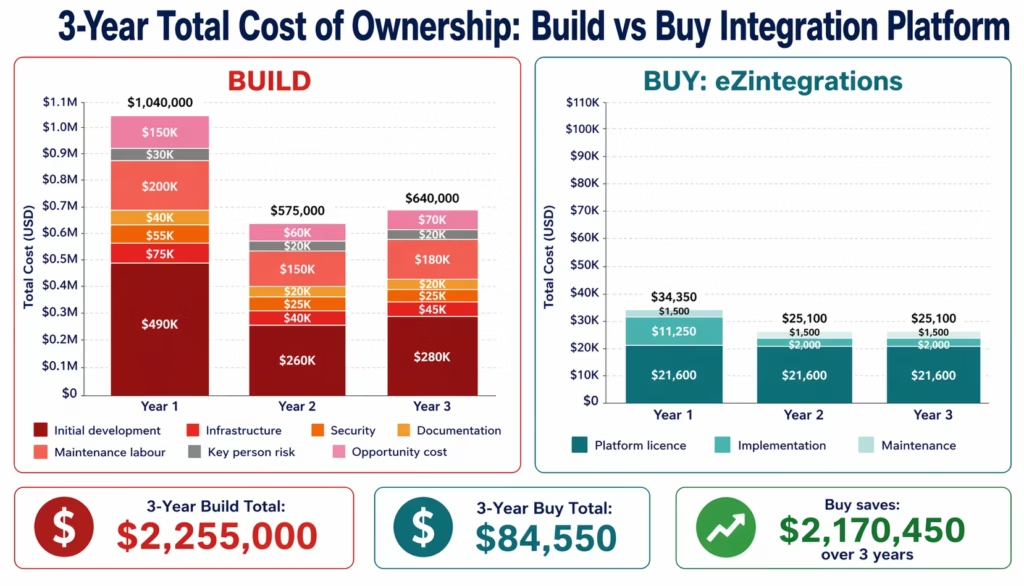
| Cost Component | Year 1 | Year 2 | Year 3 | 3-Year Total |
|---|---|---|---|---|
| Initial development | $490,000 | $0 | $0 | $490,000 |
| Infrastructure | $75,000 | $80,000 | $85,000 | $240,000 |
| Security and compliance | $55,000 | $55,000 | $60,000 | $170,000 |
| Documentation | $40,000 | $15,000 | $15,000 | $70,000 |
| Maintenance labour | $200,000 | $220,000 | $250,000 | $670,000 |
| Key person risk (amortised) | $30,000 | $40,000 | $50,000 | $120,000 |
| Opportunity cost | $150,000 | $165,000 | $180,000 | $495,000 |
| Total | $1,040,000 | $575,000 | $640,000 | $2,255,000 |
Note: this table uses mid-range estimates for a 500-person mid-market company with 15-20 active integrations. The year 1 figure reflects the initial build. Years 2-3 reflect ongoing maintenance and growth.
The True Cost of Buying: What You Actually Pay
A managed iPaaS platform cost has four components, all of which are smaller and more predictable than the build equivalent.
Platform Licence
eZintegrations pricing is per-automation annually:
- $90/month per standard enterprise workflow (Level 1 and Level 2)
- $120/month per AI Agent workflow (Level 3)
- $150/month per Goldfinch AI multi-agent workflow (Level 4)
For a 500-person company with 20 active integrations: 20 × $90 × 12 = $21,600/year.
No platform fee. No connector fee. No connection counting. Pricing does not escalate as your integration footprint grows unless you add automations.
Implementation Labour (Internal)
Configuration using Automation Hub templates: 2-4 hours per standard workflow, 1-2 days per ERP-connected workflow. For 20 workflows:
- Simple workflows: 10 × 3 hours = 30 hours × $75/hr = $2,250
- ERP workflows: 10 × 1.5 days = 15 days × $600/day = $9,000
- Total implementation: ~$11,250
This is configurable by operations managers and IT analysts, not senior developers.
Annual Maintenance
Platform updates are automatic. No infrastructure to manage. No connector maintenance when Salesforce releases a new API version: the platform handles it. Estimated annual maintenance for the operations team: 5-10% of initial implementation time.
Annual maintenance: $1,000-$2,000
Compliance and Security
HIPAA, GDPR, and SOC 2 Type II certification covers the full platform stack. No separate audit cost. No separate security implementation. Compliance documentation is provided by the vendor.
Compliance cost: $0 (included in platform)
Total Buy TCO
| Cost Component | Year 1 | Year 2 | Year 3 | 3-Year Total |
|---|---|---|---|---|
| Platform licence | $21,600 | $21,600 | $21,600 | $64,800 |
| Implementation (internal) | $11,250 | $2,000 | $2,000 | $15,250 |
| Maintenance | $1,500 | $1,500 | $1,500 | $4,500 |
| Compliance/security | $0 | $0 | $0 | $0 |
| Total | $34,350 | $25,100 | $25,100 | $84,550 |
Worked Example: Meridian Manufacturing, 500 Employees
Meridian Manufacturing is a $95M annual revenue manufacturer running SAP S/4HANA, Salesforce, NetSuite (for a recent acquisition), Shopify B2B, and three 3PL partners. They need 18 active integrations connecting these systems.
The Build Proposal
Meridian’s CTO proposed building an internal integration layer using their 4-person backend team. The internal proposal estimated:
- 6 months of development across 2 developers
- AWS infrastructure at approximately $3,000/month
- Total year 1 cost: $290,000
What the proposal missed:
The two developers assigned to the project had never worked with SAP S/4HANA’s OData V4 APIs or Salesforce’s Bulk API for large-dataset operations. The SAP connector alone took 14 weeks instead of 4 (CSRF token management, Communication Arrangement configuration, OData entity navigation). By month 8, 3 of 18 planned integrations were in production, 2 were in testing, and 13 had not been started.
The remaining 13 integrations were pushed to year 2. The operations team continued manual processes (AP clerks copying invoice data, order management team manually routing Amazon orders to the 3PL, finance team reconciling accounts between SAP and NetSuite by hand) for an additional 12 months.
Actual year 1 build cost:
- Developer time: $380,000 (2 developers × 12 months, fully loaded)
- Infrastructure: $42,000 ($3,500/month)
- Security review: $45,000 (penetration test + SOC 2 consultation)
- Total: $467,000 for 5 of 18 integrations
Year 1 manual process cost (for the 13 unfinished integrations):
- AP invoice processing (1,200/month): $8,400/month in clerk time
- Order routing (manual): $4,200/month
- AR reconciliation: $3,800/month
- 3PL tracking updates: $2,900/month
- Total: $19,300/month × 12 months = $231,600
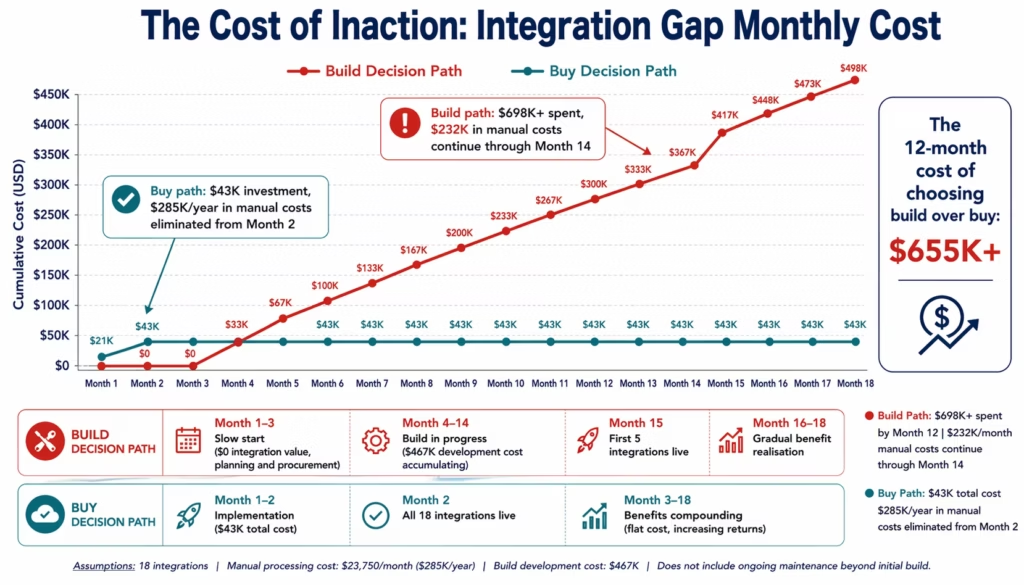
Meridian’s actual year 1 total: $698,600
The Buy Alternative
If Meridian had deployed eZintegrations with Automation Hub templates at the start of year 1:
- Platform (18 automations × $90 × 12): $19,440
- Implementation (18 workflows, mix of template and ERP-connected): $24,000
- All 18 integrations live within 8 weeks
Buy year 1 total: $43,440
Year 1 difference: $698,600 (build actual) vs $43,440 (buy) = $655,160 savings
The manual process costs ($231,600) would also have been avoided from week 8 onward (10.5 months): $201,900 in additional savings.
Total year 1 advantage of buying: $857,060
The Cost of Inaction: What Waiting Costs You
The build vs buy decision is not just about comparing platform costs. It is about what the integration gap costs your business while the decision is being debated.
Every month your AP team manually processes invoices, every month your order management team manually routes eCommerce orders, and every month your finance team reconciles data by hand is a month of quantifiable cost.
For Meridian Manufacturing’s profile (18 integrations needed, manual processes running):
Monthly cost of the integration gap:
| Manual Process | Hours/Month | FTE Cost/Hour | Monthly Cost |
|---|---|---|---|
| Invoice processing (1,200 invoices) | 195 hrs | $42 | $8,190 |
| Order routing (800 orders) | 98 hrs | $48 | $4,704 |
| Inventory reconciliation | 62 hrs | $55 | $3,410 |
| 3PL tracking updates | 45 hrs | $52 | $2,340 |
| Finance reconciliation | 75 hrs | $68 | $5,100 |
| Total monthly | $23,744 |
Annual cost of inaction: $23,744 × 12 = $284,928
For each month the build vs buy decision is delayed:
- 1 month delay: $23,744 additional cost
- 3 month delay: $71,232 additional cost
- 6 month delay: $142,464 additional cost
- 12 month delay: $284,928 additional cost
The cost of inaction frames the decision differently. It is not “should we spend $34,350 on an iPaaS platform?” It is “should we spend $34,350 to avoid $284,928 in annual manual process costs?” Framed that way, the payback period is approximately 6 weeks.
Before vs After: Build vs Buy Financial Comparison
| Dimension | Build Custom Platform | Buy Managed iPaaS (eZintegrations) |
|---|---|---|
| Year 1 total cost | $467,000-$1,040,000 | $34,350-$60,000 |
| Year 2-3 annual cost | $575,000-$640,000 | $25,000-$30,000 |
| 3-year TCO | $1,600,000-$2,255,000 | $84,550-$120,000 (Consistent with Total Economic Impact analyses of integration platforms published by Forrester.) |
| Time to first integration live | 8-20 weeks | 3-10 days |
| Time to all integrations live | 12-24 months | 4-8 weeks |
| Cost of adding one new integration | $15,000-$40,000 (dev sprint) | $1,080/year (one automation) |
| Manual process costs during build | $200,000-$400,000 (while waiting) | $0 (live in weeks) |
| Developer team impact | 2-5 FTE diverted from product | 0 (configured by ops team) |
| ERP connector maintenance | Manual, breaks on API updates | Automatic, platform-managed |
| Security and compliance | Must build and certify | HIPAA, GDPR, SOC 2 included |
| Key person risk | High (1-2 developers hold all knowledge) | None |
| AI Workflow capability | Not available (separate build required) | Level 2 AI Workflows, native |
| AI Agent capability | Not available (separate build required) | Level 3 + L4 Goldfinch AI, native |
| Scalability cost | Increases linearly with integrations | Per-automation pricing, predictable |
Objection: “We Can Build It Ourselves With Our Dev Team”
This is the most common objection and the most expensive one to act on. Let us work through the actual numbers.
The argument goes: “We have three backend developers. Building a Salesforce-to-SAP connector will take 4 weeks. That is $30,000 in developer time. Why pay $21,600/year for a platform?”
The problem with that calculation:
The 4-week estimate typically covers the happy path. It does not include:
Error handling. Enterprise integrations fail regularly: API rate limits, network timeouts, authentication token expiry, payload validation errors, downstream system unavailability. Building thorough error handling, retry logic, dead letter queues, and alerting adds 3-5 weeks per connector.
Maintenance. Salesforce releases three major API versions per year. The GraphQL API for Shopify changes regularly. SAP’s OData V4 endpoints change with quarterly releases. Each change that breaks a connector requires developer intervention. At 2 hours of maintenance per connector per month, 15 connectors = 30 hours/month = 360 hours/year = $54,000/year in maintenance at a $150/hr loaded rate.
Knowledge transfer. The developer who built the connector will leave. Average software developer tenure is 2.8 years. When they leave, the undocumented, idiosyncratic connector they built becomes a liability. Re-learning and re-documenting an undocumented connector takes 2-4 weeks per connector.
Infrastructure. The connector needs to run somewhere reliably: compute, database, message queue, monitoring. For a production-grade setup: $3,500-$8,000/month. That is $42,000-$96,000/year.
The full cost of your “4-week connector”: $120,000-$200,000 over 3 years.
The comparison is not “4 weeks vs $21,600/year.” It is “$120,000-$200,000 over 3 years vs $3,240 over 3 years” for that single connector.
And this cost multiplies with every connector you add. The tenth connector you build costs just as much to maintain as the first. The tenth connector on a managed iPaaS costs $90/month, the same as the first.
Objection: “The Upfront Platform Cost Is Too High”
The upfront cost objection disappears when you calculate the payback period correctly.
The correct payback calculation for an iPaaS platform:
The question is not “can we afford $21,600/year?” The question is “how long does it take for the manual process savings to pay back the platform cost?”
For Meridian Manufacturing:
- Platform cost year 1 (including implementation): $43,440
- Monthly manual process savings: $23,744
- Payback period: $43,440 / $23,744 = 1.83 months
The platform pays for itself in under 2 months. After that, the savings are $23,744 per month of net benefit.
Annual net benefit: ($23,744 × 12) – $21,600 = $263,328.
For the CFO presentation:
| Metric | Value |
|---|---|
| Total year 1 investment | $43,440 |
| Annual operational savings | $284,928 |
| Net annual benefit (year 1) | $241,488 |
| Payback period | 1.8 months |
| 3-year net benefit | $812,234 |
| 3-year ROI | 1,769% |
This is not unusual for workflow automation investments. The complete ROI framework shows that most enterprise automation deployments deliver payback within 1-4 months and 200-400% year-one ROI.
Objection: “We Tried a Platform Before and It Failed”
This objection is worth taking seriously because it is often valid. Previous iPaaS implementations fail for identifiable reasons, and understanding those reasons helps structure the current evaluation differently.
The most common reasons previous iPaaS implementations fail:
Wrong platform for the use case. Enterprise-grade ERP integration (SAP, Oracle, NetSuite, Dynamics 365) requires native connectors, not HTTP Request node workarounds. Platforms chosen for general automation (Zapier, n8n) break when SAP’s auth configuration changes because the CSRF token management is manual. The solution is choosing a platform with native OData V4 connectors.
Developer-dependent platforms deployed without developers. MuleSoft and similar platforms require DataWeave expertise. When the implementation partner leaves, the in-house team cannot maintain it. The solution is choosing a platform where operations managers can configure and maintain workflows without developer involvement.
Over-scoped initial implementation. A 12-month “digital transformation” iPaaS programme that tries to automate 50 processes simultaneously fails under its own weight. The solution is starting with 3-5 high-ROI processes (AP automation, approval workflows, order routing) and expanding from there. Most teams go live in 3-10 days per workflow with Automation Hub templates.
Pricing model created runaway costs. Connection-based pricing (Boomi, Celigo) that escalated as the integration footprint grew led to budget overruns that caused programme cancellation. The solution is choosing a platform with transparent per-automation pricing that does not count connections.
What to do differently this time:
Start with the ROI calculator. Identify the 3 highest-value use cases. Confirm go-live timeline (days, not months). Evaluate the pricing model before committing. Run a parallel proof-of-concept before full deployment.
Objection: “We Need Something Custom for Our Specific ERP”
The “our ERP is special” objection comes in several forms: “we have customised NetSuite fields,” “we use SAP with a non-standard Communication Arrangement,” “we have an on-premises ERP that cannot be reached from the cloud.”
Each of these is a real technical consideration. None of them requires building a custom platform.
Custom NetSuite fields and SuiteScript: eZintegrations connects to NetSuite via SuiteTalk REST, SuiteQL, and three API modes. Custom fields in NetSuite are accessible via the standard API. SuiteScript triggers can be exposed as webhooks.
Non-standard SAP Communication Arrangements: The SAP OData V4 connector works with any Communication Arrangement that exposes the relevant APIs. Most enterprise SAP configurations are non-standard in minor ways (custom API paths, specific OAuth scopes) that are handled within the connector configuration, not by building a new connector.
On-premises ERP: eZintegrations connects to on-premises systems via IPSec Tunnel from the cloud platform. No VPN configuration required on the customer side beyond the IPSec endpoint. SAP ECC, Oracle ERP, JDE, and Dynamics 365 on-premises are all supported.
The honest answer: if your ERP has a fully private, undocumented API with no external access and no standard authentication protocols, building a custom connector may be necessary for that specific system. This is rare. For the 99% of enterprise ERP configurations, a managed iPaaS with native connectors is the correct technical choice.
What to Include in Your Business Case
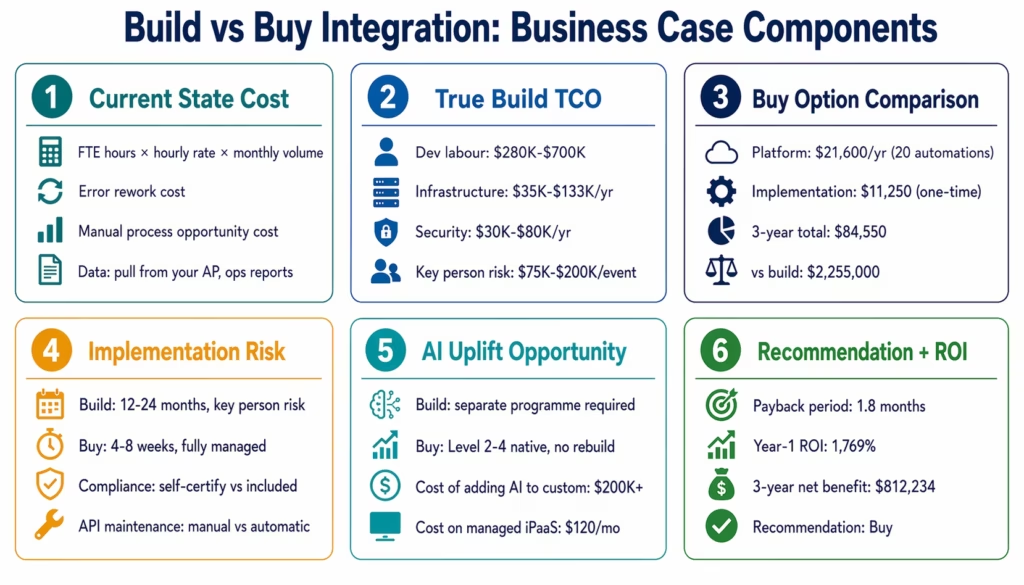
A build vs buy business case for executive approval needs six components, following structured enterprise technology decision frameworks outlined by Deloitte:
1. The current state cost. How much does your team spend today on manual processes that integration would automate? Use the cost of inaction calculation above. Pull actual data: FTE hours per month, hourly rates, error rates, rework costs.
2. The true build TCO. Use the seven-component framework above. Do not let the “4-week estimate” from the development team stand without adding infrastructure, security, maintenance, key person risk, and opportunity cost. Most CIOs and CTOs who have been through a custom integration project will recognise the full cost immediately.
3. The buy option comparison. Use the buy TCO table above. Show the three-year comparison. Calculate the payback period using the monthly manual process savings.
4. The implementation risk profile. Build: 12-24 months to full deployment, key person risk, API maintenance burden, no compliance certification. Buy: 4-8 weeks to full deployment, fully managed, HIPAA/GDPR/SOC 2 certified.
5. The AI uplift opportunity. A custom-built integration layer cannot add AI Workflow steps, AI Agents, or multi-agent agentic AI without a separate build programme. A managed platform with all four automation levels allows the same integration to be upgraded to AI document extraction, autonomous exception handling, and natural language process analytics without additional infrastructure.
6. The recommendation. Be direct: based on the three-year TCO comparison and the payback period calculation, the buy option delivers $812,000 in net benefit over three years at 1,769% ROI. The build option delivers no positive ROI in the analysis period.
How to Get Started
Step 1: Calculate Your Current Manual Process Cost
Pull your AP, operations, and HR reports for the last 90 days. Count the hours spent on processes that integration would automate: invoice processing, order entry, employee provisioning, approval routing, data reconciliation. Multiply by your fully loaded FTE cost. This is your baseline.
Use the interactive ROI calculator to generate the full five-category business case in 10 minutes.
Step 2: Run the Build TCO Calculation
Take the seven-component framework from this guide and apply your actual numbers: your developer fully loaded cost, your AWS or Azure infrastructure run rates, your compliance requirements. Add key person risk if one or two developers currently own your integration infrastructure.
Step 3: Request an Integration Assessment Demo
Book a free demo with your list of required integrations. The eZintegrations team will: map each integration to the closest Automation Hub template, confirm which require ERP-specific connector configuration, estimate go-live timelines per workflow, and produce a side-by-side cost comparison against your build estimate.
Most teams find that a 30-minute demo produces a better business case than weeks of internal build estimation, because the template library and go-live timelines are concrete rather than theoretical.
Step 4: Run a Proof-of-Concept
Before committing to either build or buy, run a POC for your highest-priority integration. On the buy side: how long does it take to configure the Automation Hub template for your specific ERP and source system? On the build side: how long does the first connector actually take, fully production-ready with error handling and monitoring?
The POC almost always reveals that the buy timeline (3-10 days) versus the build timeline (8-20 weeks for a single connector) makes the decision for you.
FAQs
Frame the business case in three numbers the CFO already cares about: payback period (how many months until the investment pays back), net annual benefit (annual manual process savings minus platform cost), and three-year ROI (net benefit over three years divided by total investment). For a 500-person company with 18-20 integration use cases, these numbers are typically: payback 1-4 months, net annual benefit $200,000-$400,000, three-year ROI 1,500-3,000%. The key is using actual manual process hours from your operations reports rather than estimates, because actual numbers are harder for a CFO to challenge than benchmarks.
Most enterprise teams achieve payback within 1-4 months from go-live. The reason is that the platform cost is primarily a recurring SaaS expense (not a capital expenditure) while the manual process savings start immediately at go-live. For a 500-person company processing 1,200 invoices/month manually, the first month of AP automation savings alone typically exceeds the first month of platform cost. The full workflow automation ROI guide at ezintegrations.ai/workflow-automation-roi-enterprise-ipaas has the complete five-category calculation with benchmark data by process type.
Integration automation saves in five categories: labour hours recovered (40-55% of total ROI), error cost elimination (20-30%), cycle time value such as early payment discount capture (15-25%), compliance risk reduction (5-15%), and revenue impact from SLA compliance (5-20%). For accounts payable automation at 1,200 invoices/month: $100,000-$150,000 in year-one net ROI is typical. For purchase order automation at 400 POs/month: $80,000-$140,000 is typical. For employee onboarding at 10 hires/month: $50,000-$90,000 is typical.
Yes, in three specific situations: your ERP has a fully proprietary, undocumented API with no external access methods (rare); you need real-time sub-100ms latency integration that managed platforms cannot achieve (rare, and typically only relevant for financial trading systems); or your integration pattern is so unique that no commercial connector exists and no reasonable HTTP configuration can reach the target API. In practice, fewer than 5% of enterprise integration requirements fall into these categories. For the other 95%, a managed iPaaS is the correct technical and financial choice.
This is a valid vendor risk consideration for any SaaS platform. The practical management: eZintegrations uses standard APIs for all connectors (SAP OData V4, NetSuite SuiteTalk REST, Salesforce REST). The integration logic you configure is portable to other iPaaS platforms that support the same APIs. If eZintegrations were to change pricing significantly, the migration to a comparable iPaaS platform is weeks, not months, because the connector architecture is industry-standard. This is meaningfully different from a custom build, where the integration logic is bespoke and non-portable.1. How do I justify iPaaS to my CFO?
2. What is the typical ROI timeline for integration automation?
3. How much does integration automation actually save?
4. Is building a custom integration platform ever the right answer?
5. What happens to the integration if eZintegrations changes pricing or the company closes?
The Decision Is Simpler Than It Looks
The build vs buy debate in enterprise integration is not a technology question. It is a financial question. The math in this guide shows that the buy option delivers:
- 5-10x lower cost over three years
- 10-20x faster time to first integration live
- Zero compliance certification overhead
- Zero key person risk
- Zero infrastructure maintenance
- AI Workflow and AI Agent capabilities included without a separate build programme
The build option makes sense when your integration requirement is so unique that no commercial connector can reach it. For the vast majority of enterprise environments, SAP, NetSuite, Oracle, Dynamics 365, Salesforce, Shopify, and the 5,000+ other systems in the eZintegrations connector library are covered natively.
The question to ask before starting a custom build: “Is this integration so unique that no managed platform can handle it?” If the answer is yes, build. If the answer is no (and it usually is), buy.
Book a free demo. Bring your integration list and your build estimate. We will show you which Automation Hub templates match your requirements, what the go-live timeline looks like, and what the side-by-side cost comparison shows against your internal build proposal.

