
5 Signs Your Enterprise Integration Platform Is Holding You Back
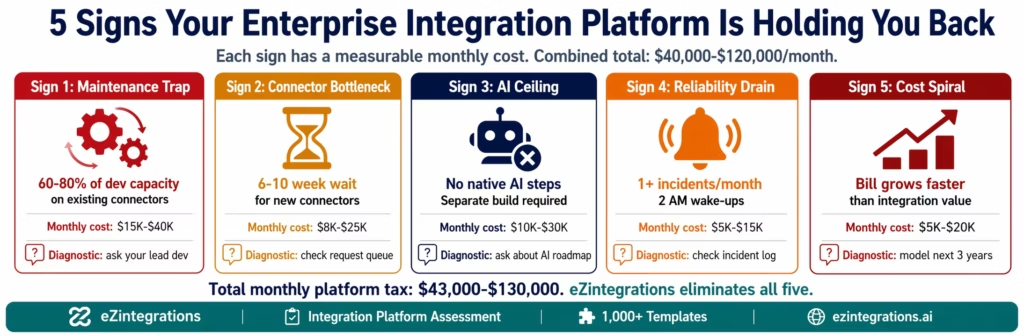
May 17, 2026The five signs your enterprise integration platform is holding you back are: your developers spend more time maintaining integrations than building new ones (the maintenance trap), business teams wait weeks for new connectors while competitors ship in days (the bottleneck signal), your platform cannot add AI Workflow steps or AI Agents without a separate build programme (the AI ceiling), integration incidents wake people up at 2 AM more than once a month (the reliability drain), and your pricing model escalates unpredictably every time your tech stack grows (the cost spiral). Each sign has a quantifiable monthly cost. The combined cost for a mid-market enterprise typically runs $40,000-$120,000 per month.
TL;DR:
- Enterprise integration platforms fail in predictable ways, despite increasing enterprise reliance on integration platforms highlighted in Gartner research. The failure is not usually a sudden crash. It is a slow accumulation of friction: developers spending 60-80% of their time on maintenance, business teams waiting 6-10 weeks for a new connector, AI initiatives blocked because the platform cannot support them, incidents consuming IT at 2 AM, and renewal bills that grow faster than your business justifies.
- Each of these signs has a measurable monthly cost. Most IT directors and operations leaders accept them as the cost of doing business. They are not. They are symptoms of a platform that has hit its ceiling.
- This guide quantifies the cost of each sign, shows the diagnostic question to ask your team to confirm whether you have the problem, and explains what a platform that does not have these symptoms looks like in practice.
- eZintegrations delivers all four automation levels: Level 1 (iPaaS Workflows), Level 2 (AI Workflows), Level 3 (AI Agents with 9 native tools), and Level 4 (Goldfinch AI with Chat UI and Workflow Node): in a fully managed platform where none of these five signs apply.
Why Integration Platform Problems Are Hard to See
Integration platform problems are invisible in the same way that a slow leak in a pipe is invisible, accumulating over time as Technical debt across systems: the damage accumulates quietly, shows up in different places (developer morale, incident logs, delayed projects, growing bills), and rarely appears on a single report that triggers action.
The IT director sees the maintenance hours but attributes them to growing complexity. The COO sees the delayed connector requests but attributes them to IT backlog. The CFO sees the escalating platform bill but attributes it to business growth. Nobody looks at all five symptoms together and says: “This is the platform, not us.”
This guide does that. Each sign below has a diagnostic question, a cost calculation, and a benchmark: what the same situation looks like on a platform designed for the way enterprise automation works in 2026.
Sign 1: Your Developers Spend More Time Maintaining Than Building
The diagnostic question: Ask your integration lead: what percentage of your team’s time last quarter went to maintaining existing integrations versus building new ones?
If the answer is more than 50%, you have this problem. If the answer is 60-80%, you have it badly.
Why this happens:
Enterprise APIs change, and maintaining compatibility across evolving systems contributes to growing platform-level technical debt and maintenance overhead, a pattern widely observed in enterprise modernisation efforts by McKinsey & Company. Salesforce releases three major API versions per year. SAP S/4HANA releases quarterly updates that can modify OData endpoint behaviour. NetSuite is biannual. Shopify updates its GraphQL schema regularly. Every API change that breaks a connector requires a developer to diagnose, fix, test, and deploy the fix.
In platforms that rely on HTTP Request nodes to connect to ERP systems (rather than native connectors), each SAP or NetSuite API change may require updating the CSRF token handling, the OAuth scope configuration, or the error parsing logic in multiple workflows. This is not a one-time fix. It is a recurring maintenance event for every API update cycle.
Industry benchmark: teams maintaining 15+ integrations on non-native-connector platforms consistently report 60-80% of integration developer capacity consumed by maintenance. Two of every three developer days are not building new integrations. They are keeping existing ones alive.
The monthly cost:
For a team with two integration developers at $155,000 each fully loaded annually:
- Monthly developer cost: $25,833 total
- 70% on maintenance: $18,083/month consumed by keeping existing integrations running
- New integration capacity: $7,750/month (less than one developer’s productive output)
Your business is paying two full-time senior developer salaries to get less than one developer’s output in new integration value. The rest is platform tax.
What it looks like without this problem:
On a fully managed platform with native ERP connectors, API version updates are handled by the platform vendor, not by your team. When Salesforce releases a new API version, the platform connector updates automatically. Your team’s time is available for building new workflows, configuring new use cases, and expanding automation coverage. No maintenance sprint. No 2 AM diagnosis call when an SAP CSRF token configuration changes.
On eZintegrations: the native SAP OData V4 connector, NetSuite SuiteQL connector, Salesforce REST connector, and all others are maintained by the platform team. Your integration developers configure new workflows. Maintenance of existing connections is zero marginal effort.
Monthly maintenance cost benchmark:
| Platform Type | Developer Maintenance % | Monthly Dev Cost Consumed | New Build Capacity |
|---|---|---|---|
| Custom-built / HTTP nodes | 60-80% | $15,000-$40,000 | Minimal |
| Legacy iPaaS (connection-based) | 40-60% | $10,000-$25,000 | Limited |
| Native-connector managed platform | 5-15% | $1,300-$4,000 | 85-95% of capacity |
Sign 2: Business Teams Wait Weeks for New Connectors
The diagnostic question: When did your operations team last request a new integration, and how long did it take to go live?
If the answer is 6-10 weeks or more for a standard SaaS-to-ERP integration, you have this problem.
Why this happens:
In developer-dependent integration platforms, every new connector goes through the same cycle: requirements gathering, API research, development sprint, testing, UAT, deployment. For a first-time connection to a system your team has not worked with before (a new 3PL API, a new eCommerce platform, a new HRIS), this cycle consistently runs 6-12 weeks.
Meanwhile, the business team is running the process manually: AP clerks copying invoice data, operations managers downloading CSV reports and importing them by hand, sales coordinators manually updating CRM records from ERP reports. Every week the connector is in the development queue is a week of measurable manual cost continuing.
The second problem is queue prioritisation. When IT has three senior developers and 15 connector requests in the queue, some requests wait 3-6 months. The business teams that wait learn to work around the integration instead of through it: spreadsheets proliferate, shadow IT grows, and the business stops requesting integrations because they expect the wait.
The monthly cost:
A connector request that takes 8 weeks to go live, serving a process that currently costs $8,400/month in manual labour:
- 8 weeks of manual cost: $16,800 in avoidable expense during the development queue
- Developer time for the build: 6 weeks × $155/hour loaded × 35 hours/week = $32,550
- Total cost of the 8-week wait: $49,350 for one connector
Multiply by the number of queued connector requests your team has. For most mid-market enterprises with 4-6 pending integration requests: $150,000-$300,000 in combined development cost and ongoing manual process cost in the queue at any given time.
What it looks like without this problem:
On a platform with 1,000+ Automation Hub templates and native ERP connectors, a new integration goes live in 3-10 days. Not because the connector was rushed: because the connector was pre-built, production-validated, and ready to configure. Operations managers import the template, connect their credentials, configure their business rules, and run a parallel test. No development sprint required.
For the AP team requesting an invoice automation connector: the Automation Hub AP template for their specific ERP (SAP, NetSuite, Oracle, Dynamics 365) is available immediately. Go-live: 6-8 days. Manual process cost eliminated from day 8.
Sign 3: Your Platform Cannot Support AI Workflows or AI Agents
The diagnostic question: Can your current integration platform add an AI document extraction step natively, without calling an external API or building a separate pipeline? Can it run an autonomous AI Agent that researches an invoice exception, retrieves context from your ERP, and routes a structured recommendation for human approval?
If the answer to either is “no” or “we’d have to build that separately,” you have hit the AI ceiling.
Why this happens:
Most enterprise integration platforms were designed before production-grade AI workflow automation existed. They connect systems, transform data, and route events: all valuable, all necessary. What they do not have is the architectural layer for AI reasoning steps within workflows.
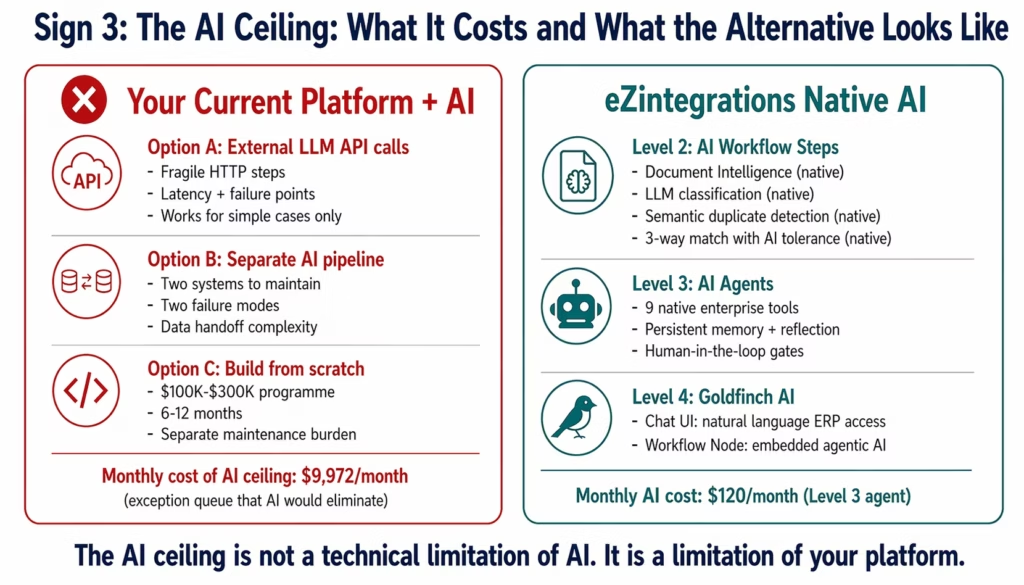
Adding AI to these platforms requires one of three approaches, all of which add cost and complexity:
External API calls to LLM services. The workflow calls OpenAI or Anthropic via HTTP, passes the document, receives a response, parses the response, and continues. This works for simple cases but fails for document intelligence across 200+ vendor invoice templates, semantic matching, or multi-step AI reasoning chains. Every AI step is a fragile HTTP call that adds latency and failure risk.
Parallel AI pipeline. A separate AI system (Python scripts, a document AI service, a custom LLM pipeline) runs alongside the integration platform. Data flows from the integration to the AI pipeline and back. Two systems to maintain, two sets of credentials, two failure modes.
A separate build programme. Building Document Intelligence, AI Agent orchestration, and multi-agent workflows from scratch. This is a $100,000-$300,000+ development programme with its own maintenance burden.
The monthly cost of the AI ceiling:
Every month your platform cannot natively support AI Workflows, your exception queue continues at full cost. For a finance team processing 1,500 invoices/month with a 15% exception rate:
- 225 exceptions/month × 38 minutes × $72/hour = $10,260/month in exception handling
- AI Workflows (Level 2) reduces this to 2%: 30 exceptions × 8 min × $72/hr = $288/month
- Monthly value of the AI ceiling: $9,972/month not being captured
- Annual: $119,664/year in exception handling costs that a native AI Workflow platform would eliminate
Additionally: every month your AI automation roadmap is delayed because the platform cannot support it is a month of competitive disadvantage against enterprises that have already deployed AI Workflow automation.
What it looks like without this problem:
On eZintegrations, AI steps are native workflow nodes. Document Intelligence is a step you add to an existing AP workflow: it reads the invoice PDF regardless of vendor template, extracts structured fields, runs 3-way match validation with contextual tolerance, and routes exceptions with a structured context package. No external API call. No separate pipeline. No build programme.
Level 3 AI Agents handle exception resolution autonomously: the agent retrieves the PO, the goods receipt, and the vendor history from your ERP, drafts a vendor query if needed, and routes an AI-packaged recommendation for one-click human approval. Level 4 Goldfinch AI adds multi-agent coordination with Chat UI (“which invoices are we at risk of missing the discount window on?”) and Workflow Node for embedding analytical intelligence into Level 1 processes.
All four levels are available from day one. The AI ceiling does not exist.
Sign 4: Integration Incidents Happen More Than Once a Month
The diagnostic question: Open your IT incident log. How many integration-related incidents in the last 90 days required after-hours developer intervention? How many were caused by an external API change you did not anticipate?
If the answer is more than three incidents in 90 days, you have this problem.
Why this happens:
Most enterprise integration platforms are built on one of two fragile architectures:
Point-to-point custom connectors. Each connector is bespoke code. When the upstream API changes, the connector breaks. When the authentication token expires without automatic renewal, the connector breaks. When the target system has a maintenance window, the connector fails without graceful handling and leaves records in an indeterminate state.
HTTP Request nodes in a visual builder. The platform provides a visual workflow tool, but ERP connections use generic HTTP steps. These steps do not have native error parsing for SAP-specific error codes, NetSuite error schemas, or Oracle fault responses. When a connection fails, the error message is a raw HTTP response that requires a developer to decode and diagnose.
In both cases, the result is the same: someone gets paged at 2 AM when the invoice sync stops, the order queue backs up, or the employee provisioning workflow fails silently.
The monthly cost:
Each integration incident costs:
- Developer diagnosis and fix time: 4-12 hours at $150/hour loaded = $600-$1,800
- Business impact during outage: order delays, AP holds, HR provisioning failures
- After-hours impact: developer morale, burnout contribution, retention risk
For a team with 3 incidents/month at 8 hours average resolution:
- Direct cost: 3 × 8 × $150 = $3,600/month in incident resolution
- Business impact (AP holds, order delays): $2,000-$8,000/month depending on severity
- Retention risk contribution: harder to quantify, but significant
Beyond the direct cost: integration incidents create a reliability reputation that makes business teams hesitant to request new automations. If the AP team knows their invoice sync breaks monthly, they build manual fallback processes “just in case.” Those fallbacks persist even after the incident is resolved, meaning the automation never fully replaces the manual process.
What it looks like without this problem:
Fully managed platforms absorb the infrastructure layer that causes most incidents. There is no custom connector code that breaks when an upstream API changes: the platform connector updates automatically. There is no authentication token expiry that takes down a workflow: the platform handles OAuth refresh, CSRF token renewal, and session management internally. When an incident does occur, automatic retry logic with exponential backoff handles transient failures. Error classification identifies whether the failure is recoverable (retry), requires attention (alert), or is a data issue (route to exception handling).
On eZintegrations, the Automation Hub templates include built-in error handling, retry logic, and alerting configured for each connector type. Integration incidents from API changes are the platform team’s responsibility, not yours.
Sign 5: Your Platform Bill Grows Faster Than Your Business Justifies
The diagnostic question: Compare your integration platform bill from 18 months ago to today. Did it grow proportionally to your revenue growth, or faster?
If the bill grew faster than revenue, you have this problem.
Why this happens:
Most enterprise integration platforms use pricing models that scale with usage in ways that are difficult to predict:
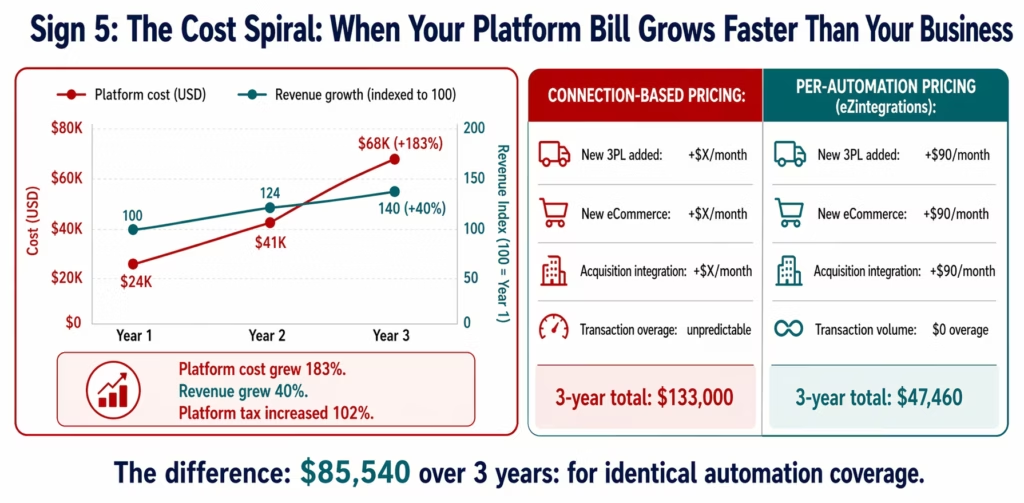
Connection-based pricing (Boomi, older Celigo models). Each new application you connect adds a connection charge. Growing your tech stack: adding a new eCommerce platform, connecting a new 3PL partner, onboarding an acquired company’s systems: means adding connection charges at the next renewal. The bill grows with every strategic IT decision.
Flow and endpoint pricing. The number of active integrations and connected endpoints determines the bill. Expanding automation coverage (which is exactly what a healthy business should do) directly increases the platform cost.
Transaction volume overages. Platforms with volume-based tiers charge overage fees when transaction volume spikes: at exactly the moment your business is growing, which is exactly when you can least afford unexpected cost increases.
Professional services dependency. Platforms that require certified implementation partners for anything beyond template deployments add $15,000-$50,000 in professional services cost for each expansion project. This is not in the licence cost, but it is in the total cost of operating the platform.
The monthly cost:
For a company that started at $24,000/year in platform costs and is now at $68,000/year after 3 years while revenue grew 40%:
- Platform cost growth: 183%
- Revenue growth: 40%
- Platform cost/revenue ratio: increased 102% in 3 years
This ratio matters because it means the platform is consuming an increasing share of the operational budget for the same (or marginally more) automation coverage.
What it looks like without this problem:
Transparent per-automation pricing with no connection counting, no flow caps, and no transaction overages means your platform bill grows only when you deliberately add new automations. Adding a new 3PL partner does not trigger a connection charge. Increasing transaction volume does not trigger an overage. The bill is predictable because the pricing model is additive and explicit.
eZintegrations pricing: $90/month per standard enterprise automation, $120/month per Level 3 AI Agent automation, $150/month per Level 4 Goldfinch AI automation. If you add 5 new automations, your bill increases by exactly $450/month. No surprises at renewal.
The Combined Monthly Cost of All Five Signs
Each sign has an individual cost. Together, they represent what your current platform costs your business beyond the licence fee.
| Sign | What You Pay Monthly | Benchmark Cost |
|---|---|---|
| Sign 1: Maintenance trap | Developer capacity consumed by keeping connectors alive | $15,000-$40,000 |
| Sign 2: Connector bottleneck | Manual process cost during development queue + dev time | $8,000-$25,000 |
| Sign 3: AI ceiling | Exception queue cost that AI Workflows would eliminate | $8,000-$25,000 |
| Sign 4: Reliability drain | Incident resolution + business impact + retention contribution | $5,000-$15,000 |
| Sign 5: Cost spiral | Platform bill above what transparent per-automation pricing would cost | $3,000-$15,000 |
| Total platform tax | $39,000-$120,000/month (consistent with Total Economic Impact analyses of integration platforms published by Forrester) |
Most IT directors reading these numbers have experienced all five signs. The question they ask is: “How much of this is unavoidable: the inherent cost of enterprise integration: and how much is platform-specific?”
The answer: Signs 1-4 are almost entirely platform-specific. A fully managed platform with native connectors, Automation Hub templates, and built-in error handling eliminates them structurally. Sign 5 is pricing model-specific: per-automation transparent pricing eliminates the cost spiral by design.
The combined platform tax for a typical mid-market enterprise: $40,000-$120,000 per month. Against a managed platform cost of $10,000-$30,000 per year. The decision is not “can we afford to switch?” It is “can we afford not to?”
The Cost of Inaction: How Platform Debt Compounds
Platform debt works like financial debt: the longer you carry it, the more it costs, reinforcing the need for structured platform modernisation strategies outlined by Deloitte. Three compounding factors make the platform tax grow every year.
Factor 1: Tech stack growth. The average enterprise adds 8-12 new SaaS applications per year. Each new application is a potential new connector request. In a developer-bottleneck platform, each new application adds to the maintenance burden and the connector queue. The platform tax from Signs 1 and 2 grows with every new application.
Factor 2: AI adoption pressure. Competitive pressure to deploy AI workflow automation is increasing. Every month you cannot deploy AI Workflows and AI Agents because your platform does not support them (Sign 3) is a month of widening competitive gap. The cost of the AI ceiling compounds as competitors who have integrated AI automation pull ahead on exception rates, processing speed, and customer response time.
Factor 3: Regulatory complexity. New compliance requirements (expanding GDPR enforcement, sector-specific regulations, SOX changes) add new documentation and audit requirements to integration workflows. Platforms that require manual documentation of every integration event (rather than native audit logs) add compliance overhead that grows with regulation.
The 3-year cost of inaction for a $75M mid-market enterprise with all five signs:
| Year | Monthly Platform Tax | Cumulative Cost |
|---|---|---|
| Year 1 | $65,000 | $780,000 |
| Year 2 | $72,000 (10% growth) | $1,644,000 |
| Year 3 | $79,000 (10% growth) | $2,592,000 |
The platform that costs $24,000/year is generating $780,000/year in hidden costs. The managed platform alternative that eliminates those costs: approximately $30,000/year.
Before vs After: Constrained Platform vs eZintegrations
| Dimension | Current Constrained Platform | eZintegrations |
|---|---|---|
| Developer maintenance % | 60-80% of capacity | 5-15% (platform handles API updates) |
| New connector go-live | 6-12 weeks | 3-10 days (Automation Hub template) |
| AI Workflow capability | External API or separate build | Level 2 native: Document Intelligence, LLM classification |
| AI Agent capability | Build programme required | Level 3 native: 9 tools, memory, reflection loops |
| Multi-agent analytics | Not available | Level 4 Goldfinch AI: Chat UI + Workflow Node |
| Monthly incidents | 3-5 (API breaks, auth failures) | Managed: auto-retry, native error handling |
| ERP connector maintenance | Manual (every API update cycle) | Automatic (platform team manages) |
| Pricing model | Connection/flow-based, escalates | Per-automation, transparent, no overages |
| On-premises ERP | VPN/custom bridge | IPSec Tunnel, included |
| Compliance | Self-certify (SOC 2, HIPAA) | HIPAA, GDPR, SOC 2 Type II included |
| Monthly platform tax | $39,000-$120,000 | $0 (eliminated structurally) |
| Annual platform licence | $24,000-$80,000 | $10,800-$30,000 |
| Net annual financial impact | Negative: pays $24K-$80K + $468K-$1.44M hidden | Positive: pays $10K-$30K, eliminates $468K-$1.44M hidden |
Objection: “Switching Platforms Is Too Disruptive”
This objection is valid for badly managed migrations. It is not valid for structured ones.
The migration risk is real: downtime during cutover, incomplete connector parity, business team retraining. These risks are manageable with the right approach, and they are significantly smaller than the ongoing cost of staying on a platform with all five signs.
The migration approach that works:
Start with one high-ROI workflow on the new platform while keeping the old platform running. The AP invoice workflow on eZintegrations goes live in 6-8 days. Run it in parallel with the existing platform for two weeks. Verify output parity. Then cut over. The old platform remains as a safety net during the parallel run, and the new platform proves itself before any old workflow is decommissioned.
This is not a big-bang migration. It is a use case by use case transition, each one proven before the next one starts. For a typical mid-market enterprise with 15-20 active integrations: the full migration takes 8-12 weeks, with business teams experiencing zero downtime because each cutover is preceded by a parallel validation period.
The disruption risk of migration: 8-12 weeks of parallel running effort. The disruption risk of staying: $39,000-$120,000/month in ongoing platform tax, with the AI ceiling blocking your automation roadmap indefinitely.
Objection: “We’ve Invested Too Much to Change Now”
Sunk cost logic is the most common reason enterprises stay on platforms that are holding them back. The investment already made does not determine the correct decision going forward. The correct frame is: “What does the next three years cost on the current platform versus the alternative?”
Three-year cost on current constrained platform:
- Platform licence: $72,000-$240,000
- Platform tax (hidden costs, 5 signs): $1,404,000-$4,320,000
- Total: $1,476,000-$4,560,000
Three-year cost on eZintegrations:
- Platform licence: $32,400-$90,000
- Platform tax: $0 (eliminated)
- Migration cost (one-time): $15,000-$35,000
- Total: $47,400-$125,000
The money already spent is gone regardless of which platform you use next year. The decision is about the next three years. On that basis, migration pays for itself in the first month of elimination of platform tax.
Objection: “Our Current Platform Works Fine for What We Have”
This objection is true and also beside the point. The question is not whether the current platform works for today’s integrations. It is whether it works for what your business needs in 2026 and 2027.
Three things are about to be true for your business that your current platform may not support:
AI Workflow automation. Your competitors are deploying Document Intelligence for AP, AI-assisted procurement matching, and autonomous exception handling. If your platform requires a separate build programme to add AI steps, your AI adoption timeline is 12-18 months behind competitors who have native AI Workflow capability.
Expanding tech stack. You will add 8-12 new SaaS applications this year. Each new application is a new connector request. If connector requests already take 6-10 weeks, the backlog grows faster than it can be cleared.
Regulatory requirements. New compliance documentation requirements for AI decisions, expanding data protection regulations, and sector-specific automation rules are coming. Platforms with native audit trails and compliance-certified data handling (HIPAA, GDPR, SOC 2 Type II) absorb these requirements. Platforms where compliance is self-managed add each new requirement as a separate project.
“Works fine for what we have” is the starting line, not the finish line.
Objection: “We’ll Fix It When We Migrate to a New ERP”
The ERP migration deferral adds the same cost as the integration business case deferral. ERP migrations average 2-3x their original timeline, and a new ERP still requires all the non-ERP integrations: Salesforce, Workday, 3PL partners, eCommerce platforms, marketing systems.
More importantly: if your current integration platform has the five signs above, the ERP migration will be harder on it, not easier. Migrating ERP data while running on a platform with a 6-10 week connector lead time and 60-80% developer capacity consumed by maintenance means the ERP migration team is competing for the same constrained developer resources that are currently keeping the existing connectors alive.
The correct sequence: fix the integration platform now, so that the ERP migration has a capable, fast, low-maintenance integration layer to work with. Not after.
What to Include in Your Platform Replacement Business Case
A business case for replacing your current integration platform needs five components:
1. The five-sign cost audit. Document the monthly cost of each sign using the calculation frameworks above. Use your actual data: pull the developer timesheets, the IT incident log, the platform bill for the last 36 months, and the connector request queue length. Total the five categories. This is your current platform tax.
2. The platform alternative cost. Use the ROI calculator to generate the eZintegrations cost for your specific integration requirements. Include migration cost as a one-time item in year 1. Show the 3-year TCO comparison.
3. The migration plan. Show that migration is not a big-bang event. Identify the top 3 workflows to migrate first (highest ROI, fastest go-live with Automation Hub templates). Show the parallel running approach. Quantify the migration risk as manageable weeks of effort, not months of disruption.
4. The AI roadmap unlocked. Show what becomes possible once the platform ceiling is removed: Level 2 AI Workflows for AP and procurement, Level 3 AI Agents for exception handling, Level 4 Goldfinch AI for operational analytics. Connect these to specific initiatives already on your digital roadmap.
5. The cost of delay. Monthly platform tax × months of delay = cost of inaction. For a $65,000/month platform tax, every month of delay costs more than a full year of the replacement platform licence.
See the full enterprise automation business case guide for the complete seven-component framework and the financial model template.
How to Get Started
Step 1: Run the Five-Sign Audit
For each sign, ask the diagnostic question and pull the relevant data: developer timesheet allocation (Sign 1), connector request queue log (Sign 2), AI capability assessment with your integration lead (Sign 3), IT incident log (Sign 4), platform bill history (Sign 5). Document the monthly cost for each sign using the calculation frameworks above.
Step 2: Run the ROI Calculator
Take your five-sign audit total and your integration requirements list to the interactive ROI calculator. The calculator generates the specific eZintegrations cost for your integration profile and the 3-year TCO comparison.
Step 3: Identify Your Top Three Migration Workflows
The highest-ROI starting points are typically: AP invoice automation (eliminates the largest component of Sign 3: the exception queue), a high-frequency ERP-to-SaaS sync (demonstrates Sign 2 resolution: 6-day go-live versus 8-week build), and an employee provisioning workflow (demonstrates Sign 4 resolution: automated offboarding eliminates access control incidents).
Step 4: Book a Platform Assessment
Book a free demo. Bring your five-sign audit, your connector request queue, and your top three use cases. The eZintegrations team will confirm Automation Hub template availability, provide go-live timeline estimates, and produce a side-by-side cost comparison against your current platform: including the platform tax that does not appear on your licence invoice.
FAQs
The financial case for platform replacement follows the same structure as any integration investment: current state cost (the five-sign platform tax, typically $39,000-$120,000/month), replacement investment (transparent per-automation pricing plus one-time migration), and payback period (platform tax eliminated in month 1 of migration, versus months of platform licence cost). For a typical mid-market enterprise, the monthly platform tax exceeds the annual replacement platform cost. Payback is measured in weeks, not months. The enterprise automation business case guide provides the full seven-component framework and financial model template for this conversation.
Faster than most IT leaders expect. The platform tax (Signs 1-5) stops accumulating from the moment the first workflows migrate to the replacement platform. A parallel-running migration approach means the first workflows move in 3-10 days (using Automation Hub templates), with the platform tax for those specific integrations eliminated immediately. Full migration for a typical 15-20 integration estate takes 8-12 weeks, with the full $39,000-$120,000/month platform tax eliminated at completion. Payback on the total migration cost: typically 1-3 months after full migration.
The five-sign framework yields $39,000-$120,000/month for a typical mid-market enterprise. The components: developer maintenance capacity consumed ($15,000-$40,000), connector bottleneck manual process cost ($8,000-$25,000), AI ceiling exception queue cost ($8,000-$25,000), reliability drain incident cost ($5,000-$15,000), and pricing model overage ($3,000-$15,000). These costs do not appear on a single report: they are distributed across payroll, IT tickets, and finance, which is why most enterprises underestimate the true cost of their current platform.
Yes: and the ERP migration is a reason to replace sooner, not later. Your current integration platform will be under maximum stress during an ERP migration: connector requests spike, developer capacity is consumed, and any incident during the migration period has elevated business impact. A fast, low-maintenance integration platform with native ERP connectors and 1,000+ Automation Hub templates makes the ERP migration faster and safer. The correct sequence: platform first, ERP migration second. Not the other way around.
Ask your integration lead three questions: Can we add a Document Intelligence step to our AP invoice workflow natively, without calling an external AI API? Can we run an AI Agent that autonomously retrieves ERP context and makes a routing recommendation without writing custom code? Can we deploy a multi-agent coordinator-worker architecture for a complex exception handling process? If any answer is no or we'd need to build that, you have the AI ceiling. The monthly cost: calculate your current exception rate on your highest-volume process, multiply by resolution time and analyst cost, then calculate what the rate would be at 2% with AI (the typical post-AI rate). The difference is your monthly AI ceiling cost.1. How do I justify replacing an integration platform to my CFO?
2. What is the typical ROI timeline for replacing an enterprise integration platform?
3. How much does staying on a failing integration platform actually cost?
4. Is it worth replacing an integration platform if we are planning an ERP migration?
5. How do I know if Sign 3 (the AI ceiling) applies to my current platform?
The Platform Is Holding You Back. The Signs Are Clear. The Cost Is Quantifiable.
Every enterprise with a constrained integration platform has at least two of these five signs. Most have all five, to varying degrees. The maintenance trap and the connector bottleneck are the most visible. The AI ceiling and the cost spiral are the most strategically damaging.
The aggregate monthly cost: $39,000-$120,000: is not an estimate of potential savings. It is a description of what your business is already spending, distributed across developer payroll, manual process costs, IT incident resolution, and platform bill escalation. The replacement platform does not generate this cost.
The diagnostic is straightforward. The cost calculation is specific. The migration path is proven. The next step is a 30-minute platform assessment where you bring your five-sign audit and your connector queue, and walk away with a specific side-by-side cost comparison.
Book a free demo. The eZintegrations team will evaluate all five signs against your current environment, confirm which Automation Hub templates cover your connector backlog, and show you what the first three workflows look like live in under 10 minutes.

