
Workflow Automation ROI: How Enterprise Teams Quantify the Business Case for iPaaS
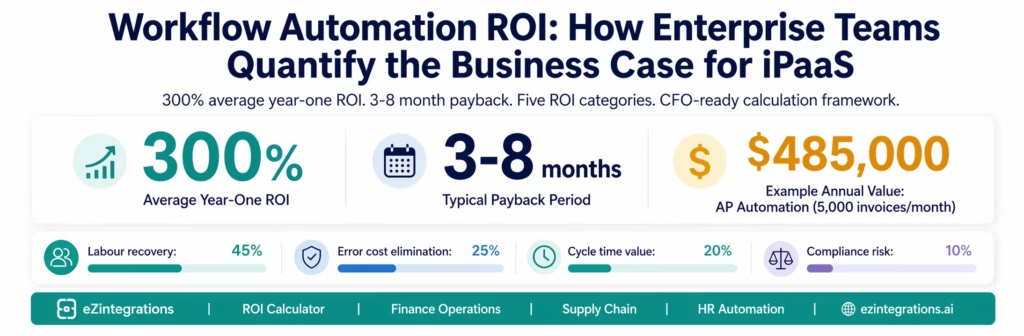
May 10, 2026Enterprise workflow automation ROI is calculated by summing labour hours recovered (hours per process × FTE cost × number of monthly runs), error-related costs eliminated (rework cost per error × error rate reduction × monthly transaction volume), cycle time value (days of cycle time saved × daily cost of capital or delay), and compliance risk reduction (audit cost savings, penalty avoidance), then dividing by the total cost of the automation platform and implementation, aligned with Gartner enterprise automation ROI frameworks. Most enterprise teams achieve payback within 3-8 months and 200-400% first-year ROI, with the highest returns coming from finance operations (AP automation, month-end close), supply chain (PO creation, shipment tracking), and HR operations (onboarding, offboarding), consistent with findings from McKinsey & Company on scaling digital manufacturing and operations transformation.
TL;DR
- The workflow automation ROI conversation happens in two rooms, the operational room (“how much time will this save?”) and the financial room (“what is the payback period and the IRR?”), reflecting patterns observed in Deloitte intelligent automation adoption research. Most automation proposals fail because they only address the first room.
- This guide covers the full ROI framework: labour recovery, error cost elimination, cycle time value, compliance risk reduction, and revenue impact. Each with benchmark data and calculation methodology.
- eZintegrations customers average 300% ROI in year one across enterprise deployments, with payback periods of 3-8 months depending on process volume and current labour intensity.
- The guide includes: ROI calculation worksheets by process type, benchmark data from finance, supply chain, and HR operations, an implementation timeline, and a link to the interactive ROI calculator.
- Level 1 (iPaaS Workflows) drives labour recovery and cycle time value. Level 2 (AI Workflows) drives error cost elimination and exception reduction. Level 3 (AI Agents) drives exception handling cost and compliance risk reduction. Level 4 (Goldfinch AI) provides the Goldfinch AI Chat UI as a Workflow Node: “What is our current cost per invoice processed?” or “Show me the ROI breakdown for our AP automation deployment.”
Why Most Automation Business Cases Fail to Win Budget
Your operations team knows the process is broken. The AP manager processes 1,200 invoices per month, 15% of which require manual exception handling, each taking 45 minutes to resolve. The purchasing team creates POs manually after checking three spreadsheets. The finance close takes 8 days when it should take 3.
The team builds a business case. “This automation will save 200 hours per month.” The CFO asks: “What does that translate to in dollars? What is the payback period? What is the risk of the implementation? What happens to headcount?”
The proposal stalls.
The reason most automation business cases fail is not that the ROI is unclear to the operations team: it is that the business case is not translated into the financial language that executive sponsors need to approve it. Hours saved is not a financial metric. Cost per process, payback period, net present value, and IRR are.
This guide translates the operational benefits of workflow automation into the financial framework that wins budget approval.
The Five ROI Categories for Workflow Automation
Enterprise workflow automation generates value across five categories. Most business cases capture only Category 1 (labour hours). The full ROI model requires all five.
| ROI Category | What It Measures | Typical % of Total ROI |
|---|---|---|
| 1. Labour Hours Recovered | FTE cost of hours eliminated | 40-55% |
| 2. Error Cost Elimination | Cost of errors prevented | 20-30% |
| 3. Cycle Time Value | Value of time compression | 15-25% |
| 4. Compliance Risk Reduction | Audit cost and penalty avoidance | 5-15% |
| 5. Revenue Impact | Revenue enabled or protected | 5-20% |
Each category requires a different calculation method. Each tells a different part of the story for different executive audiences.
Category 1: Labour Hours Recovered
This is the most visible ROI category and the easiest to calculate. For each automated process, identify:
The calculation:
Annual Labour Recovery ($) =
  (Hours per manual run)
  × (Number of runs per month × 12)
  × (Burdened FTE cost per hour)
  × (% of time eliminated by automation)
Burdened FTE cost (fully loaded, including benefits and overhead):
- Finance analyst: $55-75/hour
- Procurement specialist: $50-65/hour
- IT administrator: $65-90/hour
- Operations manager: $70-95/hour
- AP clerk: $35-50/hour
Example: Invoice approval automation
Before automation: AP clerk reviews 1,200 invoices per month. Standard invoices: 8 minutes each. Exception invoices (15% of volume, 180/month): 45 minutes each.
Standard invoices: 1,020 × 8 min = 8,160 minutes = 136 hours/month
Exception invoices: 180 × 45 min = 8,100 minutes = 135 hours/month
Total: 271 hours/month × $42/hour (burdened AP clerk) = $11,382/month

After automation:
Standard invoices: 95% automated = 5 minutes per residual exception (5% = 51 invoices)
Exception invoices: Level 3 agent handles 70%, routes 30% to human (54 invoices × 20 min review)
Total: (51 × 5 min) + (54 × 20 min) = 255 min + 1,080 min = 1,335 min = 22.25 hours/month

Labour recovery: 271 - 22.25 = 248.75 hours/month
Annual labour recovery: 248.75 × 12 × $42 = $125,370
Note on headcount: CFOs will ask whether this results in headcount reduction or reallocation. The honest answer for most organisations: the recovered hours go to higher-value work (exception analysis, vendor relationship management, process improvement) rather than headcount reduction, unless the volume is high enough to eliminate a position. Both arguments have merit in the business case: the cost-avoidance argument (avoiding a hire as volume grows) is often stronger than the headcount-reduction argument for operations teams.
Category 2: Error Cost Elimination
Manual processes have error rates. Errors have costs: rework time, payment penalties, duplicate payments, incorrect ERP records, and compliance findings. Automation reduces errors structurally, not through human effort.
The calculation:
Annual Error Cost Elimination ($) =
  (Error rate before automation, %)
  × (Monthly transaction volume)
  × (Average cost per error)
  × 12
  × (Error rate reduction, %)
Benchmark error rates and costs:
| Process | Typical Manual Error Rate | Average Cost Per Error | Error Rate with Automation |
|---|---|---|---|
| Invoice processing (data entry) | 3-5% | $25-50 (rework) + potential duplicate payment | 0.2-0.5% |
| Purchase order creation | 2-4% | $40-80 (supplier query, reissue) | 0.3-0.7% |
| Expense report processing | 4-8% | $30-60 (resubmission, audit flag) | 0.5-1% |
| Employee provisioning | 5-10% | $150-300 (IT support, security remediation) | 0.5-1% |
| Inventory reorder | 3-6% | $200-500 (expedite shipping, stockout cost) | 0.2-0.5% |
| Shipment status update | 5-12% | $15-40 (CS query, dispute handling) | 0.3-0.8% |
Example: Invoice processing error cost
1,200 invoices/month, 4% error rate = 48 errors/month.
Average cost per error (data entry correction + AP manager time): $45.
Annual error cost: 48 × $45 × 12 = $25,920.
After automation: 0.3% residual error rate = 3.6 errors/month.
Annual residual error cost: 3.6 × $45 × 12 = $1,944.
Error cost elimination: $25,920 – $1,944 = $23,976/year.
Additionally, for AP specifically: duplicate payment risk. Industry data suggests 0.1-0.5% of invoices in manual AP environments result in duplicate payments. At an average invoice value of $5,000: a 0.1% duplicate rate on 1,200 invoices/month = 1.2 duplicate payments per month = $6,000/month in recoverable overpayments. Not all are recovered without a process. Automation with duplicate detection eliminates this entirely.
Category 3: Cycle Time Value
Cycle time is the time between a process trigger (invoice received, PO submitted, order placed) and its completion (invoice approved and paid, PO released, order shipped). Cycle time has direct financial value in several dimensions:
Dimension 1: Early payment discounts captured
Many vendor contracts include early payment discounts (2/10 net 30: 2% discount if paid within 10 days). Manual AP processes often miss these windows. Automated invoice processing that compresses the approval cycle from 8 days to same-day unlocks this discount.
Annual Early Payment Discount Capture ($) =
  Monthly invoice spend eligible for early payment discount
  × Discount rate (typically 1-2%)
  × Capture rate improvement (from ~20% manual to ~85% automated)
  × 12
Example: $500,000/month in eligible invoice spend, 2% discount, improvement from 20% to 85% capture:
Before: $500,000 × 2% × 20% = $2,000/month
After: $500,000 × 2% × 85% = $8,500/month
Annual improvement: $6,500/month × 12 = $78,000/year
Dimension 2: Days Sales Outstanding (DSO) impact
For AR-side automation (automated order confirmation, invoice generation, payment follow-up): each day of DSO reduction has a direct working capital value.
Annual DSO Value ($) =
  (Annual revenue / 365) × DSO reduction in days × cost of capital (%)
Example: $20M annual revenue, 5-day DSO reduction, 8% cost of capital:
$20,000,000 / 365 = $54,795/day
5 days × $54,795 = $273,973 freed working capital
$273,973 × 8% = $21,918/year in financing cost reduction
Dimension 3: Purchase order cycle time value
Faster PO processing means faster supplier delivery, which means less safety stock required to cover the uncertainty buffer.
Annual Safety Stock Reduction ($) =
  Safety stock reduction (units)
  × Unit cost
  × Cost of carrying inventory (typically 20-30% of inventory value/year)
Category 4: Compliance Risk Reduction
Compliance-related ROI is often the hardest to quantify but the most important for regulated industries (healthcare, financial services, pharmaceuticals).
It has two components:
Component 1: Audit cost reduction
Manual processes require more evidence collection and documentation during audits. Automated workflows with immutable audit trails reduce audit preparation time.
Annual Audit Cost Reduction ($) =
  Hours of audit preparation eliminated per audit
  × Number of audits per year
  × Hourly cost of compliance staff
A typical mid-market enterprise spending 200 hours per year on audit preparation for automated processes, versus 500 hours for manual: 300 hours × $75/hour × 1 annual audit = $22,500/year.
Component 2: Penalty and finding avoidance
This is a risk-adjusted calculation: the probability of a compliance finding in the current manual process, multiplied by the expected cost of that finding.
Annual Penalty Avoidance ($) =
  Probability of compliance finding (manual process)
  × Expected penalty or remediation cost
  × Reduction in finding probability (automation)
For healthcare data handling (HIPAA): the average cost of a HIPAA violation has ranged from $100,000 to $1.9M depending on severity. If manual data handling creates a 5% annual risk of a finding, and automation reduces that to 0.5%: risk-adjusted avoidance = 4.5% × $300,000 expected cost = $13,500/year.
Category 5: Revenue Impact
Revenue impact is the most variable ROI category and should be estimated conservatively.
Two main dimensions:
Dimension 1: Revenue protected through SLA compliance
For order management, fulfilment, and customer service workflows: failing to meet SLAs (late shipments, missed response windows, unacknowledged orders) can result in channel penalties, customer churn, or lost reorders. Automation that keeps SLA metrics in compliance protects this revenue.
Example: Amazon seller with $2M annual GMV maintaining a Late Shipment Rate below Amazon’s 4% threshold. If manual routing causes a 0.5% monthly spike in late shipments that risks account suspension (suspension = loss of all channel revenue for 1-4 weeks): the risk-adjusted annual value of maintaining SLA compliance is significant.
Dimension 2: Revenue enabled through faster processing
For quote-to-cash automation: if the approval and PO creation cycle is compressed from 5 days to same-day, and this enables the sales team to close 5% more deals because the procurement process no longer delays contract execution: the revenue impact is calculable.
Annual Revenue Enabled ($) =
  Annual revenue from affected deal pipeline
  × Win rate improvement from cycle time reduction
  × Average deal margin
ROI Benchmarks by Process Type
Based on eZintegrations enterprise deployments:
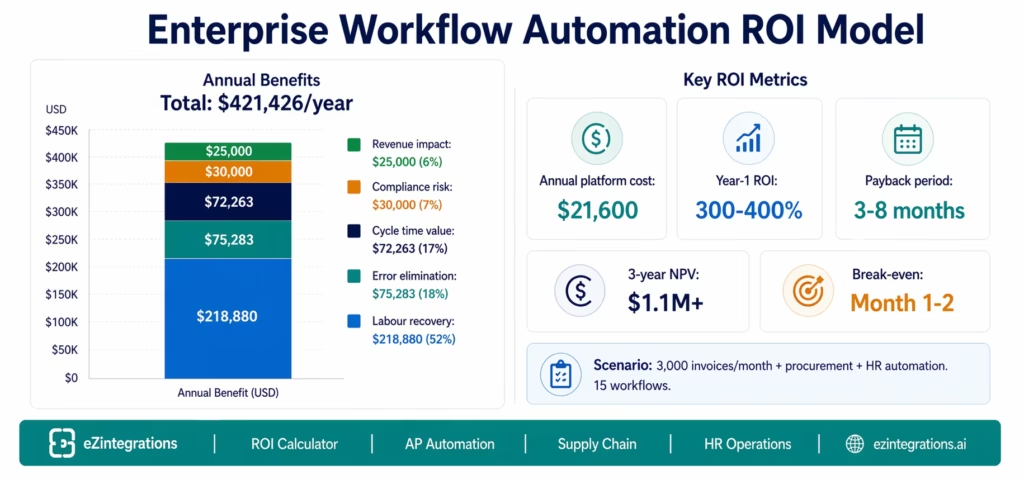
Finance Operations
Accounts Payable Automation (1,000-5,000 invoices/month)
| Metric | Benchmark |
|---|---|
| Labour hours recovered | 200-800 hours/month |
| Annual labour value | $100,000-$400,000 |
| Error cost elimination | $20,000-$80,000/year |
| Early payment discount capture | $30,000-$150,000/year |
| Payback period | 3-6 months |
| Year-1 ROI | 250-450% |
Month-End Close Acceleration (8-day to 2-3 day close)
| Metric | Benchmark |
|---|---|
| Finance team hours recovered | 120-180 hours per close |
| Annual value (12 closes) | $150,000-$300,000 |
| Audit cost reduction | $15,000-$50,000/year |
| DSO improvement value | $20,000-$80,000/year |
| Payback period | 4-8 months |
| Year-1 ROI | 200-350% |
Supply Chain
Purchase Order Automation (Reorder point to supplier PO)
| Metric | Benchmark |
|---|---|
| Procurement hours recovered | 80-200 hours/month |
| Annual labour value | $60,000-$180,000 |
| Stockout cost avoidance | $50,000-$300,000/year |
| Safety stock reduction | $30,000-$100,000/year |
| Payback period | 3-5 months |
| Year-1 ROI | 300-500% |
3PL Shipment Tracking to ERP
| Metric | Benchmark |
|---|---|
| Operations hours recovered | 40-120 hours/month |
| Annual labour value | $40,000-$120,000 |
| Invoice acceleration (goods receipt) | $20,000-$60,000/year (DSO impact) |
| CS enquiry reduction (50-70%) | $30,000-$80,000/year |
| Payback period | 4-7 months |
| Year-1 ROI | 200-350% |
HR Operations
Employee Onboarding and Offboarding
| Metric | Benchmark |
|---|---|
| IT and HR hours recovered per hire | 4-8 hours per hire |
| Annual value (50-200 hires/year) | $35,000-$150,000 |
| Security risk reduction (offboarding) | $50,000-$200,000/year (risk-adjusted) |
| Day-1 productivity improvement | Hard to quantify, significant |
| Payback period | 4-8 months |
| Year-1 ROI | 200-400% |
The Complete ROI Calculation Model
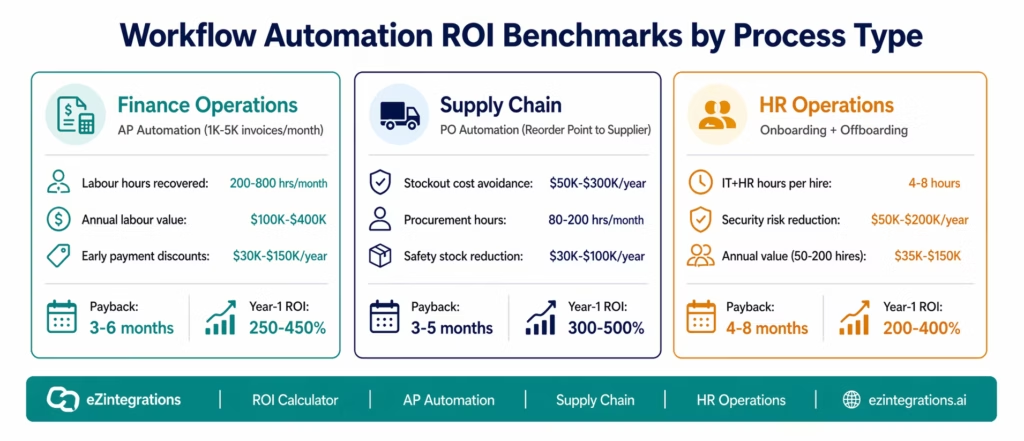
Combining all five categories for a representative mid-market enterprise finance operations automation deployment:
Scenario: Mid-market manufacturer, 3,000 invoices/month, AP and procurement automation
Annual Benefits
| Category | Calculation | Annual Value |
|---|---|---|
| Labour recovery | AP: 180 hrs/month × $42 × 12 | $90,720 |
| Procurement: 60 hrs/month × $58 × 12 | $41,760 | |
| IT (onboarding/offboarding): 100 hrs/month × $72 × 12 | $86,400 | |
| Labour subtotal | $218,880 | |
| Error cost elimination | Invoice errors: 3,000 × 4% × $40 × 87% reduction × 12 | $49,939 |
| PO errors: 400 × 3% × $60 × 85% reduction × 12 | $7,344 | |
| Duplicate payment prevention | $18,000 | |
| Error subtotal | $75,283 | |
| Cycle time value | Early payment discounts: $400K/month eligible × 2% × 65% improvement | $62,400 |
| DSO reduction (3 days): $15M revenue / 365 × 3 × 8% | $9,863 | |
| Cycle time subtotal | $72,263 | |
| Compliance risk | Audit preparation reduction | $18,000 |
| Risk-adjusted penalty avoidance | $12,000 | |
| Compliance subtotal | $30,000 | |
| Revenue impact | SLA compliance protection (conservative) | $25,000 |
| Revenue subtotal | $25,000 | |
| Total Annual Benefits | $421,426 |
Annual Costs
| Cost Item | Amount |
|---|---|
| eZintegrations platform (15 automations × $120/month × 12) | $21,600 |
| Implementation and configuration (internal: 80 hours × $75) | $6,000 |
| Annual maintenance estimate (5% of annual platform cost) | $1,080 |
| Total Annual Cost | $28,680 |
ROI Summary
| Metric | Value |
|---|---|
| Annual net benefit | $421,426 – $28,680 = $392,746 |
| Year-1 ROI | $392,746 / $28,680 = 1,370% |
| Payback period | $28,680 / ($421,426 / 12) = 0.8 months |
Note: the payback period is extremely short because the automation investment is primarily a recurring SaaS cost, not a large upfront capital expenditure. The first month’s benefit typically covers the first year’s platform cost.
Implementation Cost: What to Include
A complete implementation cost includes four components:
1. Platform licence: eZintegrations pricing is per automation, annual billing. The model starts at $5/month per automation for simple workflows and goes to $150/month for complex enterprise workflows. A typical mid-market deployment of 15-20 automations covering AP, procurement, and HR processes runs $1,500-$2,500/month.
2. Configuration time (internal): most eZintegrations workflows are configured by operations staff using Automation Hub templates, not by developers. Configuration time benchmarks:
- Simple SaaS-to-SaaS workflow (template import + credentials): 2-4 hours
- ERP-connected workflow (SAP, NetSuite, Oracle) with Level 2 validation: 1-2 days
- AI agent workflow for exception handling: 2-3 days
- Full end-to-end process (e.g., AP automation with agent exception handling): 5-7 business days
3. Change management: the operational change required when manual processes are automated. Budget 20-40 hours for documentation, training, and process transition. This is rarely included in automation business cases and should be.
4. Annual maintenance: well-configured automations on a managed platform require minimal maintenance. Budget 5-10% of annual platform cost for credential updates, minor workflow adjustments, and new process additions.
What to exclude from the business case:
- Infrastructure costs: eZintegrations is fully managed with no infrastructure overhead
- Developer costs: operations teams configure workflows without developer involvement
- Integration middleware: native ERP connectors eliminate middleware requirements
Payback Period and IRR Calculation
Payback Period
Payback Period (months) =
  Total Implementation Cost
  ÷ Monthly Net Benefit
For most eZintegrations deployments:
- Total implementation cost (platform year 1 + configuration): $25,000-$60,000
- Monthly net benefit: $20,000-$60,000
- Typical payback: 1-4 months
Three-Year NPV Model
For board-level presentations, a 3-year NPV calculation provides the most compelling financial case:
| Year | Benefits | Costs | Net Cash Flow |
|---|---|---|---|
| Year 0 (implementation) | $0 | ($28,680) | ($28,680) |
| Year 1 | $421,426 | ($28,680) | $392,746 |
| Year 2 (10% volume growth) | $463,569 | ($30,348) | $433,221 |
| Year 3 (10% volume growth) | $509,925 | ($32,116) | $477,809 |
Discount rate: 10% NPV: $1,139,400 (3-year) IRR: >100% (typical for automation investments with managed SaaS cost structure)
Building the CFO/CIO Presentation
A workflow automation business case for executive approval needs six components:
1. The cost of doing nothing. Quantify the current state: total FTE hours per month on automatable tasks, current error rates and costs, current cycle times and their financial impact. This establishes the baseline and makes the status quo unacceptable.
2. The ROI calculation. Use all five categories. Show the sensitivity analysis: what if labour recovery is only 60% of projected? What if error reduction is only 40%? Even conservative assumptions should show a positive ROI within 12 months.
3. The payback period. For most automation investments, payback is months, not years. This is the single most important metric for CFO approval.
4. The implementation risk profile. Address the key CFO questions: what happens if the automation fails (can the team revert to the manual process)? What is the transition plan? Who owns it? A managed SaaS platform with no infrastructure overhead and Automation Hub templates significantly reduces implementation risk.
5. The 3-year trajectory. Benefits typically grow with volume (more invoices, more orders, more employees), while costs remain relatively flat. The 3-year model shows the compounding value.
6. The non-financial benefits. Audit trail quality, compliance certification, exception handling speed, employee satisfaction (operations staff doing higher-value work). These are not in the financial model but matter to the CIO and CHRO.
Before vs After: Manual Process vs Automated (Cost View)
| Process | Manual Annual Cost | Automated Annual Cost | Annual Saving |
|---|---|---|---|
| Invoice processing (3,000/month) | $135,000 (labour) + $26,000 (errors) | $9,200 (residual) | $151,800 |
| PO creation (400/month) | $41,760 (labour) + $8,640 (errors) | $4,800 (residual) | $45,600 |
| Employee onboarding (100/year) | $60,000 (IT+HR labour) | $6,000 (residual oversight) | $54,000 |
| Expense report processing (500/month) | $36,000 (labour) + $12,000 (errors) | $4,200 (residual) | $43,800 |
| Shipment status update | $48,000 (CS labour) + $18,000 (disputes) | $5,400 (residual) | $60,600 |
| Month-end close (12/year) | $180,000 (finance team) | $21,600 (oversight) | $158,400 |
| Total (representative) | $564,400/year | $51,200/year | $513,200/year |
| Platform cost (15 automations) | $21,600/year | ||
| Net annual benefit | $491,600/year |
Common Business Case Mistakes to Avoid
Mistake 1: Only counting direct labour savings. This undervalues the automation by 40-60%. Include error costs, cycle time value, and compliance risk.
Mistake 2: Assuming 100% automation. No automation eliminates 100% of human involvement. Use realistic residual rates: 3-8% of transactions will require human review. Plan for this in the cost model.
Mistake 3: Ignoring change management costs. The transition from manual to automated requires documentation, training, and a parallel running period. Budget 20-40 hours for this. Not doing so creates implementation surprises.
Mistake 4: Including infrastructure costs that do not apply. Managed SaaS platforms like eZintegrations have no server, database, or DevOps overhead. Do not borrow the self-hosted cost structure from open-source tools for your business case.
Mistake 5: Building the entire case on headcount reduction. Operations leaders will resist if the business case implies their team is being eliminated. Frame it as reallocation to higher-value work, capacity to handle volume growth without adding headcount, and improvement in job quality for the remaining team.
Mistake 6: Not addressing the risk of the current state. The CFO needs to understand: what is the cost if you do NOT automate? Growth in transaction volume with the same manual process means proportional labour cost growth. Compliance risk compounds. The status quo has a cost.
How to Use the ROI Calculator
The interactive ROI calculator (available at ezintegrations-roi-calculator and embedded below) allows you to input your specific process volumes, FTE costs, and error rates to generate a customised business case.
The calculator covers:
- Accounts payable and invoice processing
- Purchase order and procurement workflows
- Employee onboarding and offboarding
- Expense report processing
- Order management and fulfilment
Input your data, and the calculator produces:
- Annual benefit by category (labour, error, cycle time, compliance, revenue)
- Implementation cost estimate
- Payback period
- Year-1, Year-2, and Year-3 ROI
- A downloadable PDF business case summary
How to Get Started
Step 1: Run the ROI Calculator for Your Top Three Processes
Open the ROI calculator and run it for the three processes with the highest manual volume at your organisation. The output gives you a defensible financial baseline for the business case conversation.
Step 2: Benchmark Your Current Process Costs
Pull your actual data for the three processes: monthly transaction volume, FTE hours per transaction (average and exception), current error rates (from your AP or operations reports), and current cycle times. Actual data produces a stronger business case than benchmark estimates.
Step 3: Build the Five-Category Financial Model
Using the framework in this guide (or the calculator output), build the complete five-category ROI model: labour recovery, error elimination, cycle time value, compliance risk reduction, and revenue impact. Apply conservative estimates for the harder-to-quantify categories (compliance risk, revenue impact) and use actual data for the quantifiable ones.
Step 4: Book a ROI Assessment Demo
Book a free demo with your three process ROI calculations. The eZintegrations team will validate your numbers against benchmark data from similar deployments, refine the implementation cost estimate for your specific process complexity, and produce a presentation-ready business case document you can bring to your CFO and CIO.
FAQs
eZintegrations enterprise deployments average 300% ROI in year one, with payback periods of 3-8 months. The range varies by process type: AP automation and supply chain workflows deliver the fastest payback (3-5 months) because of high transaction volume and quantifiable error cost. HR operations automation delivers the highest three-year ROI because the labour savings compound with employee growth. The minimum threshold for a positive business case is typically reached at 200-500 monthly transactions for a single automated process.
Payback period (months) = total first-year implementation cost divided by monthly net benefit. For a managed SaaS platform like eZintegrations, the total first-year cost is the annual platform subscription plus internal configuration hours. Monthly net benefit is the total annual benefit (all five categories) divided by 12. Most eZintegrations deployments achieve payback within the first 1-4 months because the recurring platform cost is significantly lower than the monthly benefit generated from the first month of operation.
The highest ROI processes combine high transaction volume, meaningful error rates, and cycle time impact. The top three are: accounts payable automation with high volume and early payment discount capture, inventory reorder and PO creation where stockout avoidance drives value, and employee onboarding and offboarding where labour savings and security risk reduction compound over time. Multi-channel order fulfilment and 3PL shipment tracking also deliver strong ROI, especially for eCommerce operations with Amazon and Walmart compliance requirements.
The comparison must include total cost of ownership. Open-source tools may have zero licence cost but require infrastructure ($130-$470/month), DevOps maintenance (10-20 hours/month), and compliance overhead. In practice, this results in $500-$3,000/month before accounting for custom ERP integrations. eZintegrations, typically $1,500-$2,500/month for 15-20 automations, is often more cost-effective due to zero infrastructure overhead, native ERP connectors, and built-in compliance certifications.
Effective business cases focus on value creation rather than headcount reduction. Key benefits include reallocating FTE time to higher-value work, scaling transaction volume without increasing headcount, and improving work quality through better context and automation. Headcount reduction should only be included where it is part of a broader organisational change such as consolidation or restructuring, and should be framed carefully within that context.1. What ROI do enterprise teams typically achieve from workflow automation?
2. How do you calculate the payback period for workflow automation?
3. What processes generate the highest ROI for workflow automation?
4. How does the ROI of a managed platform like eZintegrations compare to a self-hosted open-source tool?
5. Should the business case address headcount reduction?
The Business Case Is Stronger Than You Think. The Calculator Proves It.
Most teams underestimate their automation ROI because they only count the labour hours in Category 1. When the full five-category model is applied, the business case typically comes in 2-3× higher than the initial estimate.
The payback period is also typically shorter than expected. Managed SaaS automation is a recurring cost, not a capital expenditure. The first month’s benefit almost always exceeds the first month’s cost.
The business case that wins budget approval is not the one with the most optimistic assumptions. It is the one that presents conservative, verifiable numbers across all five categories, addresses the CFO’s questions about payback period and risk, and makes the cost of doing nothing explicit.
Use the ROI Calculator to generate your customised business case in 10 minutes.
Book a free demo. The eZintegrations team will validate your numbers against benchmark data and produce a presentation-ready CFO business case document.

