
AI Workflow Automation ROI: How Enterprise Teams Calculate and Justify Investment
May 14, 2026AI workflow automation ROI is calculated across five categories: exception elimination (the cost of manually resolving AI-detectable exceptions), document processing savings (time eliminated by AI extraction across unstructured formats), error cost reduction (AI validation catching what rule-based checks miss), cycle time compression (early payment discounts, DSO reduction from faster processing), and decision quality improvement (AI-assessed context reducing incorrect approvals). For a mid-market finance operations team processing 1,500 invoices per month, AI workflow automation typically delivers $180,000-$320,000 in annual net benefit, with payback within 60-90 days of go-live.
TL;DR:
- Most enterprise teams have already automated their straightforward integrations: if this event happens, do this action. The next layer of value is AI workflow automation, aligning with enterprise trends toward AI-enhanced business process automation delivering measurable business value, as highlighted in Gartner research.
- AI workflow automation ROI is real and measurable. The mistake most teams make is trying to measure it the same way they measure traditional workflow automation. The ROI categories are different: AI saves on exception handling, document processing, error classification, and decision support, not just on manual data entry.
- This guide provides the complete ROI framework for AI workflow automation, a worked example for a finance operations team processing 1,500 invoices per month, and objection handling for every internal stakeholder.
- eZintegrations Level 2 (AI Workflows) delivers AI document intelligence, LLM-based classification, and semantic validation as native workflow steps. Level 3 (AI Agents) handles autonomous multi-step exception resolution. Level 4 (Goldfinch AI) provides natural language analytics via Chat UI and Workflow Node.
- CTA: use the interactive ROI calculator to generate your specific AI workflow business case in 10 minutes.
Why AI Workflow ROI Is Different from Traditional Automation ROI
Traditional workflow automation ROI is simple: count the hours eliminated, multiply by FTE cost. A rule-based workflow that automatically creates a purchase order when stock hits reorder point saves the 22 minutes a procurement specialist would have spent doing it manually. The ROI is linear, predictable, and easy to calculate.
AI workflow automation ROI is harder to calculate because its value comes from exception elimination and decision augmentation rather than linear task replacement, reflecting broader enterprise productivity gains from AI adoption observed by McKinsey & Company.
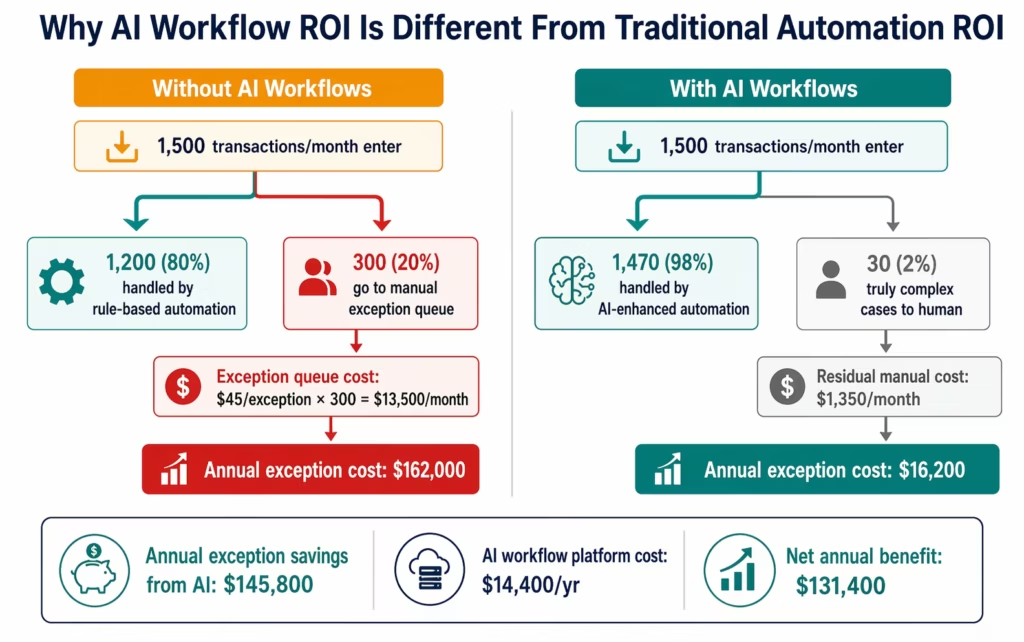
In every enterprise, rule-based automation handles the predictable majority of transactions. The remaining 10-25% go to a manual exception queue because the rule cannot handle them: the invoice does not match the standard template, the expense description is ambiguous, the vendor name is spelled differently from the system record, the contract amount is within tolerance but the line items do not match.
This exception queue is expensive. Each exception requires a skilled employee (AP analyst, procurement manager, compliance officer) to spend 20-45 minutes gathering context, making a judgment, and documenting the decision. At $65-$95 per hour for those roles, the exception queue often costs 3-5 times more per transaction than the standard transactions that automation handles.
AI workflow automation eliminates the exception queue. Not by applying faster rules: by applying reasoning. An AI step can read the invoice PDF regardless of vendor template, compare the extracted amounts against the PO with contextual tolerance assessment, check the vendor’s history for similar pattern changes, and produce a structured recommendation: approve, query, or escalate. The human reviews the recommendation, not the raw exception.
This is why the ROI framework for AI workflows requires different measurement categories.
The Five ROI Categories for AI Workflow Automation
AI workflow automation generates value across five categories that are structurally different from traditional automation savings.
| ROI Category | What AI Enables | Typical % of Total AI ROI |
|---|---|---|
| 1. Exception Elimination | AI handles the 15-25% of transactions rules cannot | 35-50% |
| 2. Document Processing | AI extracts from unstructured formats rules cannot parse | 20-30% |
| 3. Error Cost Reduction | AI catches contextual errors rules miss | 15-25% |
| 4. Cycle Time Compression | AI-accelerated processing unlocks early payment discounts and DSO reduction | 10-20% |
| 5. Decision Quality | AI context reduces incorrect approvals and compliance exposure | 5-15% |
Category 1: Exception Elimination
The most significant AI workflow ROI category. In any enterprise process running rule-based automation, there is an exception rate: the percentage of transactions the rules cannot handle and must route to manual review.
Typical exception rates (before AI):
| Process | Manual Exception Rate | Average Resolution Time | Monthly Cost (500-person company) |
|---|---|---|---|
| Invoice processing | 12-20% | 35-50 min/exception | $8,400-$18,000 |
| Purchase order matching | 8-15% | 25-40 min/exception | $3,600-$9,000 |
| Expense report review | 18-28% | 20-35 min/exception | $5,400-$12,600 |
| Contract term extraction | N/A (fully manual) | 45-90 min/document | $9,000-$27,000 |
| Vendor data validation | 10-18% | 20-30 min/exception | $2,400-$6,000 |
What AI does to exception rates:
Level 2 AI Workflows (Document Intelligence, LLM classification, semantic matching) typically reduce exception rates from 12-20% down to 1-3%. The 2-5% that remain are genuinely complex cases requiring human judgment (contract disputes, compliance escalations, fraud indicators) rather than just “the vendor name is slightly different.”
The exception elimination calculation:
Annual Exception Savings ($) =
  (Exception rate before AI - Exception rate with AI)
  × Monthly transaction volume
  × Average resolution time (hours)
  × Skilled employee hourly rate
  × 12 months
For 1,000 invoices/month, 15% exception rate before, 2% after, 40-minute resolution at $72/hour:
(15% - 2%) × 1,000 × (40/60 hrs) × $72 × 12
= 13% × 1,000 × 0.667 hrs × $72 × 12
= 130 exceptions/month × 0.667 hrs × $72 × 12
= $75,253 annual exception elimination savings
Category 2: Document Processing Savings
Rule-based automation can process structured data: if the invoice PDF has field X in position Y with format Z, extract it. Reality: vendor invoices arrive in 150-300 different templates. Each unique template requires a configuration mapping session. Unmapped templates go to manual processing or the exception queue.
AI Document Intelligence handles unstructured extraction: it reads the document the way a human does, identifies the invoice number, vendor name, line items, and amounts regardless of where they appear on the page or how they are labelled.
What this saves:
Template mapping elimination: Instead of spending 2-4 hours mapping each new vendor template (multiplied by new vendor onboarding volume), AI handles new templates automatically.
Manual data entry elimination for unmapped documents: Every invoice that falls outside your template library currently requires full manual data entry: typically 8-15 minutes per invoice.
The document processing calculation:
Annual Document Processing Savings ($) =
  (% of documents currently requiring manual entry)
  × Monthly document volume
  × Manual processing time (hours)
  × Data entry FTE cost/hour
  × 12 months
For 1,500 invoices/month, 30% currently requiring manual data entry due to unmapped templates, 10-minute average entry time at $42/hour:
30% × 1,500 × (10/60 hrs) × $42 × 12
= 450 documents/month × 0.167 hrs × $42 × 12
= $37,951 annual document processing savings
Additional: template mapping savings for new vendors. At 5 new vendor templates per month, 3 hours each, $75/hour IT analyst: $16,200/year eliminated.
Category 3: Error Cost Reduction
Rule-based validation catches structural errors: wrong format, missing field, value outside threshold. It does not catch contextual errors: errors that are structurally valid but factually wrong.
Examples of contextual errors only AI catches:
- Invoice line item descriptions that do not match the PO scope (the vendor invoices for consulting services not covered by the contract)
- Duplicate invoice with same vendor, different invoice number but same date and amount (vendor resubmission)
- Expense claim for a hotel room at above-policy rate, submitted as “conference accommodation” to bypass the rate check
- PO quantity that is a round number multiple of the actual order (typo of 1,000 instead of 100)
These errors pass rule-based validation because the format is correct. They cost money because they result in incorrect payments, incorrect ERP records, and audit findings.
The error cost reduction calculation:
Annual Error Cost Reduction ($) =
  Contextual error rate (%)
  × Monthly transaction volume
  × Average cost per contextual error
  × AI detection rate improvement (%)
  × 12 months
Contextual error rates in enterprise finance processes: 1.5-3.5% of transactions. Average cost per contextual error (incorrect payment, audit finding, rework): $200-$600. AI detection improvement over rule-based: 70-90% of contextual errors caught.
For 1,500 invoices/month, 2% contextual error rate, $350 average error cost, 80% AI detection improvement:
2% × 1,500 × $350 × 80% × 12
= 30 errors/month × $350 × 80% × 12
= $100,800 annual contextual error prevention
Category 4: Cycle Time Compression
AI-accelerated processing reduces the time from transaction receipt to completion. This has financial value in two specific forms: early payment discount capture and DSO (Days Sales Outstanding) reduction.
Early payment discount capture:
Many vendor contracts include early payment terms (2/10 net 30: 2% discount if paid within 10 days). Manual exception handling extends the approval cycle beyond the discount window. AI that reduces the exception rate from 15% to 2% means 98% of invoices complete the approval cycle within the discount window rather than 80%.
Annual Early Payment Discount Capture Improvement ($) =
  Monthly eligible invoice spend
  × Average discount rate
  × (Automated capture rate - Manual capture rate)
  × 12 months
For $300,000/month in eligible invoice spend, 1.5% average discount rate, improvement from 65% to 88% capture:
$300,000 × 1.5% × (88% - 65%) × 12
= $4,500/month potential × 23% improvement
= $1,035/month additional capture
= $12,420/year
DSO reduction from faster invoicing:
For AI that accelerates the order-to-invoice cycle (automatically generating invoices from confirmed shipments rather than waiting for manual invoice generation): each day of DSO reduction has working capital value.
Annual DSO Value ($) =
  Annual revenue / 365
  × DSO days reduced
  × Cost of capital (%)
For $50M annual revenue, 2 days DSO reduction, 8% cost of capital:
$50,000,000 / 365 × 2 days × 8%
= $136,986 × 8%
= $10,959/year in financing cost reduction
Category 5: Decision Quality Improvement
The hardest AI workflow ROI category to quantify, but often significant in regulated industries.
AI-enhanced decision support improves the quality of human decisions by providing structured context before the decision is made. An AP manager reviewing an exception gets: the full invoice, the matching PO, the vendor history, the contract scope, the current budget status, and an AI recommendation. They make a better decision in less time.
Measurable outcomes from better decision quality:
Incorrect approval reduction: In manual exception handling, an approver reviewing a 40-item exception queue at 4:55 PM on a Friday approves differently than when reviewing 5 AI-packaged exceptions with full context. Incorrect approvals in AP (approving invoices for services not received, quantities not matching GR) typically cost $500-$2,000 per incident in rework, vendor disputes, and audit exposure.
Compliance finding reduction: AI that classifies each transaction against applicable compliance rules and flags non-compliant patterns for escalation reduces the probability of audit findings. Each audit finding typically costs $5,000-$50,000 in remediation.
Fraud detection: AI that identifies unusual patterns (vendor submitting invoices with sequential numbers in non-sequential dates, expense amounts that cluster just below approval thresholds) catches fraud that rule-based validation misses.
For risk-adjusted calculations: apply the probability of the event (incorrect approval rate, compliance finding rate, fraud incident rate) multiplied by the expected cost, then the AI reduction percentage.
Worked Example: Apex Financial Services, 800 Employees
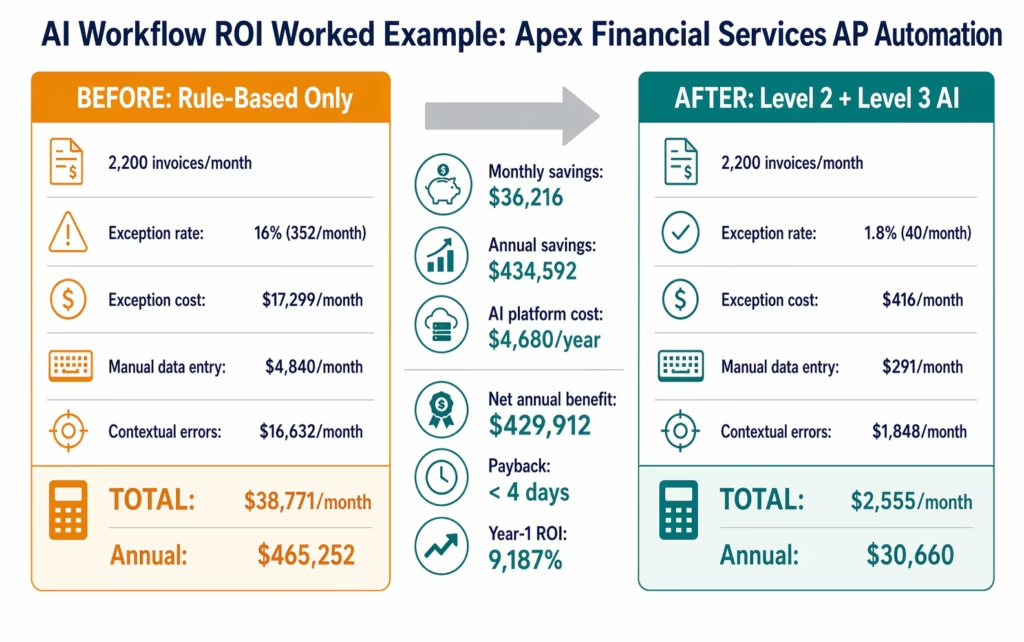
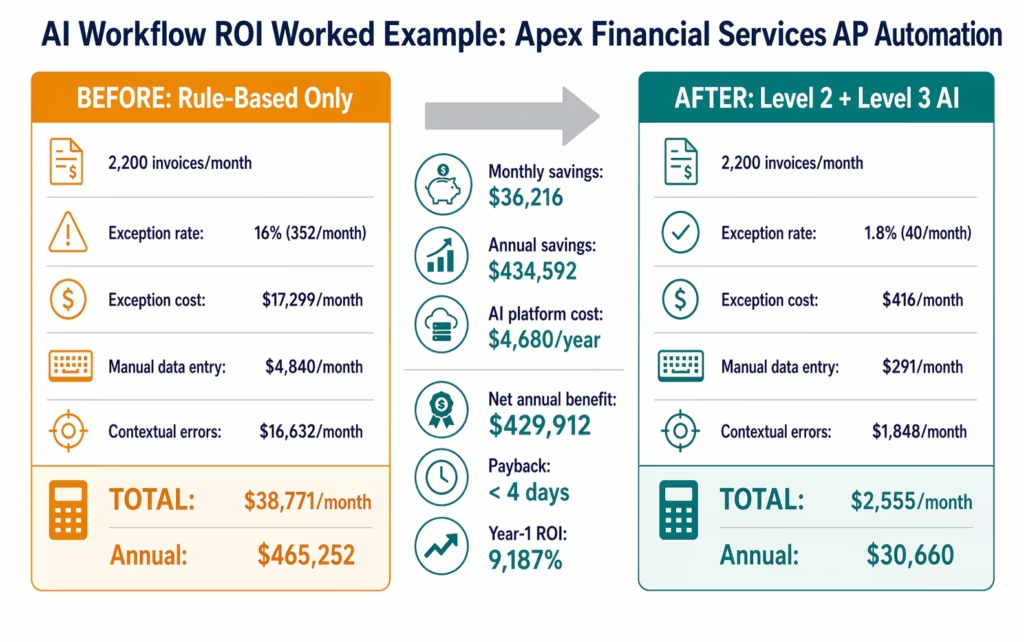
Apex Financial Services is an $180M revenue financial services firm running SAP S/4HANA, with 2,200 invoices/month in accounts payable and 450 expense reports per month.
Current state (rule-based automation only, no AI):
Level 1 iPaaS workflows handle standard invoice receipt, PO creation, and ERP posting. The exception queue for AP runs at 16%: 352 exceptions per month requiring manual review at an average of 38 minutes each by a team of three AP analysts at $78/hour fully loaded.
Monthly exception handling cost: 352 × (38/60) × $78 = $17,299/month
Additionally, 25% of invoices arrive in non-standard vendor templates (550/month): these require manual data entry at 12 minutes each, handled by an AP clerk at $44/hour.
Monthly manual data entry cost: 550 × (12/60) × $44 = $4,840/month
Contextual error rate: 1.8% of invoices result in incorrect payment or ERP record requiring correction: 39.6 errors/month at $420 average correction cost.
Monthly contextual error cost: 39.6 × $420 = $16,632/month
Total monthly cost of rule-based-only automation: $38,771/month
After AI workflow automation (Level 2 + Level 3):
Level 2 (AI Workflows): Document Intelligence reduces manual data entry for non-standard templates from 25% to 1.5% (97 invoices per month versus 550). AI validation reduces exception rate from 16% to 1.8% (40 exceptions per month versus 352). Contextual error detection improves: error rate drops from 1.8% to 0.2%.
Level 3 (AI Agents): The 40 remaining genuine exceptions are handled by an AI agent that retrieves the PO, goods receipt, and vendor history, packages the context, and routes a structured recommendation to the AP manager for one-click approval (average review time: 8 minutes versus 38 minutes).
Monthly residual costs after AI:
Manual data entry: 1.5% × 2,200 × (12/60) × $44 = $291/month Exception handling: 40 × (8/60) × $78 = $416/month (structured review, not raw exception) Contextual errors: 0.2% × 2,200 × $420 = $1,848/month
Total monthly cost with AI workflows: $2,555/month
Monthly savings: $38,771 – $2,555 = $36,216 Annual savings: $434,592
AI Workflow Platform Cost:
Level 2 AI Workflow steps for AP processing: included in standard automation ($90/month per automation). Three AP automations: $270/month, $3,240/year.
Level 3 AI Agent for exception handling: $120/month per automation. One exception agent automation: $1,440/year.
Total AI platform cost: $4,680/year
Net annual benefit: $434,592 – $4,680 = $429,912 (consistent with Total Economic Impact analyses of AI-enhanced automation platforms published by Forrester.)
Payback period: $4,680 / ($434,592 / 12) = 0.13 months (under 4 days)
Year-1 ROI: $429,912 / $4,680 = 9,187%
Note: this ROI is high because the AI steps are priced as incremental additions to existing Level 1 workflows, not as a separate AI platform purchase. If you are buying the integration platform for the first time and adding AI Workflows, use the combined ROI calculation from the workflow automation ROI framework.
The Cost of Inaction: What Rule-Based-Only Automation Misses
Every enterprise team that has deployed rule-based automation has an exception queue. Most accept it as unavoidable. The AI workflow ROI calculation starts with quantifying exactly how much that queue costs.
The cost of inaction for AI workflow automation has three components:
1. The ongoing exception queue cost.
If your AP team processes 1,500 invoices/month with a 14% exception rate: 210 exceptions/month at 35 minutes each at $72/hour = $8,820/month = $105,840/year. This cost compounds as transaction volume grows. If your business grows 20% this year, your exception queue grows 20%.
2. The contextual errors that rule-based automation cannot catch.
Every month you run rule-based-only automation, the contextual errors it misses continue to cost money. At a 2% contextual error rate on 1,500 invoices at $350 per error: $10,500/month = $126,000/year in incorrect payments, rework, and audit exposure.
3. The early payment discounts missed during exception resolution.
While an invoice sits in the exception queue for 5-8 days waiting for manual review, the early payment discount window closes. If 30% of your invoice spend has 1.5% early payment terms and your capture rate is 60% versus the 88% achievable with AI: the monthly discount shortfall is calculable. On $400,000/month in eligible spend: $2,240/month = $26,880/year in uncaptured discounts.
For Apex Financial’s profile:
| Inaction Cost Component | Monthly | Annual |
|---|---|---|
| Exception queue handling | $17,299 | $207,588 |
| Contextual error costs | $16,632 | $199,584 |
| Uncaptured early payment discounts | $1,800 | $21,600 |
| Total cost of inaction | $35,731 | $428,772 |
Each month the AI workflow decision is delayed costs $35,731. A 6-month delay costs $214,386.
Before vs After: Rule-Based Only vs AI-Enhanced Workflows
| Dimension | Rule-Based Automation Only | AI-Enhanced Workflows (Level 1 + 2 + 3) |
|---|---|---|
| Exception rate | 12-20% of transactions | 1-3% of transactions |
| Exception resolution time | 30-50 min per exception (manual) | 5-10 min per exception (AI-packaged, human review) |
| Document template coverage | Only pre-mapped templates | Any format (AI extraction) |
| Vendor template mapping | 2-4 hrs per new vendor | 0 hours (AI handles automatically) |
| Contextual error detection | Structural errors only | Structural + contextual errors |
| Duplicate detection | Exact match on invoice number | Semantic matching (catches format variations) |
| Early payment discount capture | 55-70% of eligible invoices | 80-90% of eligible invoices |
| Exception decision quality | Approver reviews raw exception | Approver reviews AI-researched package |
| New process adaptation | Rule update required per change | AI adapts to content variation |
| Compliance classification | Manual or rule-based flags | AI classification against policy |
| Processing speed | Fast for standard, slow for exceptions | Fast for both |
| Monthly cost per 1,500 invoices | $35,000-$45,000 | $2,000-$5,000 |
Objection: “AI Workflows Are Expensive to Implement”
AI workflow steps in eZintegrations are priced as additions to existing Level 1 automations. The incremental cost is the platform cost differential between a standard automation ($90/month) and an AI workflow automation (also $90/month for Level 2 steps included in standard tier).
For Level 3 AI Agents: $120/month per automation. A single AP exception agent at $120/month, processing 150-300 exceptions per month that previously cost $45-$90 each to resolve manually, delivers ROI within the first week of operation.
Implementation time for adding AI steps to an existing workflow:
- Adding Document Intelligence to an existing invoice workflow: 2-4 hours
- Configuring LLM classification step with threshold and routing: 1-2 hours
- Setting up a Level 3 exception agent with context retrieval: 2-3 days
Total implementation cost for an AI-enhanced AP workflow: $3,000-$8,000 in analyst time.
Compare to the alternative: the AP team manually resolving the exception queue costs $8,000-$18,000 per month. The implementation cost is recovered in weeks.
Objection: “We Already Have Automation, We Don’t Need AI”
If your team already has rule-based automation, the question is: what is your exception rate?
If your exception rate is 0-2%: your process has very low variability. AI workflow adds minimal value for this specific workflow. Focus on other processes with higher exception rates.
If your exception rate is 5-25%: this is the AI workflow opportunity zone. The exception queue is costing you $5,000-$30,000 per month (depending on volume and resolution time), and AI can eliminate 80-90% of it without any change to the human process for the genuinely complex cases.
Most enterprise teams find that 30-40% of their current Level 1 workflows have exception rates above 8%. These are the AI workflow upgrade targets. The other 60-70% can stay as rule-based automation.
The two-minute test: pull your exception queue volume for the last 30 days from your current automation platform. Divide by total transactions. If that number is above 5%, you have a quantifiable AI workflow ROI opportunity.
Objection: “AI Makes Mistakes, We Can’t Trust It With Real Decisions”
This objection conflates two different things: AI making the final decision, and AI preparing the information for a human decision.
eZintegrations Level 2 AI Workflow steps do not make final decisions. They produce structured outputs that the next step in the workflow acts on. The confidence score, the extracted fields, the classification result, and the reasoning are all logged. A human reviews the AI output for exceptions, not the raw document.
The accuracy question has a practical answer: compare AI accuracy to human accuracy on the same task.
Human accuracy on invoice data entry: 95-97% (3-5% error rate, documented in AP industry research). AI Document Intelligence accuracy on invoice extraction: 97-99% for trained document types, with confidence scoring that routes low-confidence extractions for human review.
AI accuracy on expense policy classification: 95-98% on well-defined policies. Human consistency on the same task: typically 80-90% (humans apply policy inconsistently, especially for edge cases).
For the cases where AI confidence is below threshold, the workflow routes to human review. The human reviews those cases. The AI handles the rest. This is not “trusting AI with real decisions.” It is using AI to reduce the decision volume to the cases that genuinely need human judgment.
The appropriate governance for AI workflow steps: set confidence thresholds, log all AI decisions with reasoning, route all below-threshold cases to human review, and run a monthly review of AI decisions to tune thresholds. This is a 2-4 hour monthly exercise for most teams.
Objection: “We Don’t Have the Data or Prompts to Make AI Work”
AI workflow automation in eZintegrations does not require training your own models, preparing datasets, or writing prompts from scratch.
Level 2 AI Workflow steps use:
- Pre-trained Document Intelligence models for invoice, contract, and expense document types (works from day one on most document formats)
- Configurable prompt templates for LLM classification that you adapt to your specific policy (2-4 hour configuration session)
- Semantic matching that compares against your existing ERP data (no separate training required)
The Automation Hub includes AI workflow templates pre-configured for the most common use cases: AP invoice processing, expense report policy validation, contract term extraction, and purchase order matching. Most teams adapt these templates to their specific rules in 2-4 hours.
The only configuration required is: your policy rules (what the AI should classify as compliant or non-compliant), your confidence threshold (how certain must the AI be before taking action without human review), and your ERP connection credentials (so the AI can retrieve context from your live system). eZintegrations is HIPAA, GDPR, and SOC 2 Type II certified: all AI workflow steps run within the same compliance boundary as your existing Level 1 automations.
You do not need a data science team. You do not need labelled training datasets. You do not need custom prompt engineering beyond configuring your business rules into the provided templates.
What to Include in Your AI Workflow Business Case
A business case for AI workflow automation needs five components, following structured enterprise AI investment evaluation frameworks outlined by Deloitte:
1. The current exception queue cost. Pull the last 90 days of exception handling data from your AP, procurement, or HR system. Count exceptions, resolution time per exception, and the FTE cost of the people resolving them. This is your baseline Category 1 ROI.
2. The document processing baseline. Identify what percentage of your incoming documents require manual processing because they fall outside your current automation coverage (non-standard templates, new vendors, document format variations). Multiply by volume, time, and FTE cost.
3. The error rate and cost. Pull your error and correction data for the last 90 days. How many transactions required rework, generated incorrect ERP records, or produced audit findings? What was the average cost to resolve each? Apply the AI detection improvement rate (70-90% for contextual errors).
4. The cycle time opportunity. Identify your eligible invoice spend with early payment terms. Calculate current capture rate versus achievable rate with AI-accelerated processing. Add DSO impact if your outbound invoicing process has latency.
5. The AI platform cost and payback period. Level 2 AI steps are included in standard automations. Level 3 exception agents are $120/month per automation. Calculate: total AI incremental platform cost divided by monthly savings equals payback period. For most teams, this is under 30 days.
Present these five components with your actual 90-day data. The numbers will be more persuasive than benchmarks because they are specific to your organisation and hard to challenge.
How to Get Started
Step 1: Run the AI Workflow ROI Calculator
Open the interactive ROI calculator and select the AP Invoice Processing or Expense Reports process type. Input your monthly transaction volume, current exception rate (if known), and FTE cost. The calculator returns a specific annual benefit estimate for your data.
If you do not know your current exception rate: pull 30 days of your AP team’s email or ticketing system for invoice-related queries. The volume of “can you check this invoice” messages is a proxy for your exception queue.
Step 2: Identify Your Top Three AI Workflow Opportunities
The highest-value AI workflow upgrades are in processes with: high transaction volume (hundreds per month), high exception rates (above 8%), high FTE cost for exception resolution (AP analysts, procurement managers, compliance officers), and a document processing component (PDFs, emails, unstructured data).
For most mid-market enterprises, the top three are: AP invoice processing, expense report policy validation, and vendor data onboarding.
Step 3: Import an AI Workflow Template
Go to the Automation Hub and browse Level 2 and Level 3 templates. The AP Invoice AI workflow template includes: Document Intelligence step, 3-way match validation with AI tolerance, exception classification, and Level 3 agent exception handling. Configure your policy rules and ERP credentials: 2-4 hours for a standard deployment.
Step 4: Book an AI Workflow Assessment
Book a free assessment with your current process volumes and exception data. The eZintegrations team will calculate your specific AI workflow ROI, identify which of your existing Level 1 automations have the highest AI uplift opportunity, and walk through the configuration for your highest-priority use case.
FAQs
The most compelling AI workflow business case uses three numbers your CFO already understands: monthly exception queue cost (pull 90 days of data from your AP or HR system), payback period (typically under 30 days for AI workflow additions to existing automations), and annual net benefit. For a finance operations team processing 1,500 invoices/month with a 14% exception rate, the monthly exception cost typically runs $7,000-$15,000. AI workflow automation that reduces this to 2% brings the monthly cost to $900-$2,000. The platform cost difference is $120-$240/month. The case presents itself.
Faster than traditional automation ROI. Because AI workflow steps are added to existing Level 1 workflows (rather than building a new platform), they go live in days rather than weeks. The savings start at go-live because exception resolution costs are eliminated immediately, not gradually. For most deployments: payback within 2-4 weeks, with full annual benefit realised within the first quarter.
The savings depend heavily on your current exception rate and transaction volume. The five-category framework gives ranges: exception elimination typically contributes $80,000-$180,000/year for a 1,500 invoice/month AP team with a 14% exception rate. Document processing savings add $30,000-$60,000/year. Error cost reduction adds $50,000-$120,000/year. Total for a mid-market finance operations team: $180,000-$320,000 in annual net benefit is typical. The ROI calculator generates a specific estimate for your process volumes.
Yes, structurally different. Traditional automation ROI measures manual execution time eliminated: the rule fires, the human step is removed, the saving is the time no longer spent. AI workflow ROI primarily measures exception handling eliminated: the 15-25% of transactions that rules cannot process are handled by AI reasoning instead of manual review. The per-transaction savings for exception handling ($45-$90 per exception at analyst rates) are 5-10x higher than the per-transaction savings for routine manual processing ($3-$8 for standard data entry). This is why AI workflow ROI is often higher in absolute terms than the original automation ROI, even though AI touches fewer transactions.
No. eZintegrations Level 2 AI Workflow steps use pre-trained Document Intelligence models that work from day one on standard business document types (invoices, expense reports, contracts, purchase orders). The only configuration required is: your business rules (what counts as a policy exception), your confidence threshold (how certain the AI must be before acting without human review), and your ERP connection (so the AI can retrieve context). Most teams configure this in 2-4 hours using Automation Hub templates. No data science resources required. 1. How do I justify AI workflow automation to my CFO?
2. What is the typical ROI timeline for AI workflow automation?
3. How much does AI workflow automation save?
4. Is AI workflow automation different from traditional automation ROI?
5. Do I need to train AI models to get AI workflow ROI?
The Exception Queue Is the Problem. AI Is the Answer.
Every enterprise team that has deployed rule-based automation has built a two-tier process: the standard majority that automation handles, and the exception minority that humans handle. The exception minority is expensive because it requires skilled employee time, not clerk time.
AI workflow automation eliminates the exception minority by applying reasoning rather than rules. The financial case is compelling not because AI is cheaper to run than humans, but because AI can handle in seconds what takes a human 35 minutes, and the volume of those exceptions is large enough that the annual saving is significant.
The worked example in this guide shows $429,912 in annual net benefit for a finance team processing 2,200 invoices per month. The ROI calculator at eZintegrations-ROI-Calculator generates your specific number in 10 minutes.
Use the ROI Calculator to build your AI workflow business case.
Book a free demo to see which of your existing workflows have the highest AI uplift opportunity.

