
Database Integration Platform: Connect SQL, NoSQL & Cloud Databases Without Code
May 15, 2026To integrate any database with eZintegrations: select your database type from the connector library (MySQL, PostgreSQL, Oracle DB, Microsoft SQL Server, MongoDB, Snowflake, BigQuery, Redshift, Azure SQL, DynamoDB, or any JDBC or ODBC-compatible database), enter your connection credentials (host, port, database name, username, password or IAM role), write or select a query (SELECT, INSERT, UPDATE, DELETE, stored procedure), configure pagination for large result sets, and connect to your destination application (SAP, Salesforce, HubSpot, any REST API, or another database). Most database integrations go live in under 30 minutes. Pre-built templates are available in the Automation Hub for the most common database-to-application and database-to-database pipelines.
TL:DR
- Connect SQL, NoSQL, cloud, and on-premises databases to ERP, CRM, data warehouses, APIs, and AI workflows without custom ETL code or dedicated data engineering teams.
- eZintegrations supports MySQL, PostgreSQL, Oracle DB, SQL Server, MongoDB, Snowflake, BigQuery, Redshift, Databricks, and 1,000+ enterprise application integrations through a single managed platform.
- Built-in incremental sync, watermark-based data pulls, row-level error handling, bulk operations, and IPSec Tunnel connectivity simplify enterprise-scale database integration and reduce maintenance overhead.
- Database queries can directly power Level 2 AI Workflows, Level 3 AI Agents, and Level 4 Goldfinch AI for natural language access to operational business data.
- Pre-built Automation Hub templates allow most database integrations to go live in under 30 minutes, with pricing based on workflows instead of data volume or rows processed.
Connect any database to any enterprise application, cloud service, or AI workflow. No custom ETL code. No data engineering team required. No maintenance when your database schema changes.
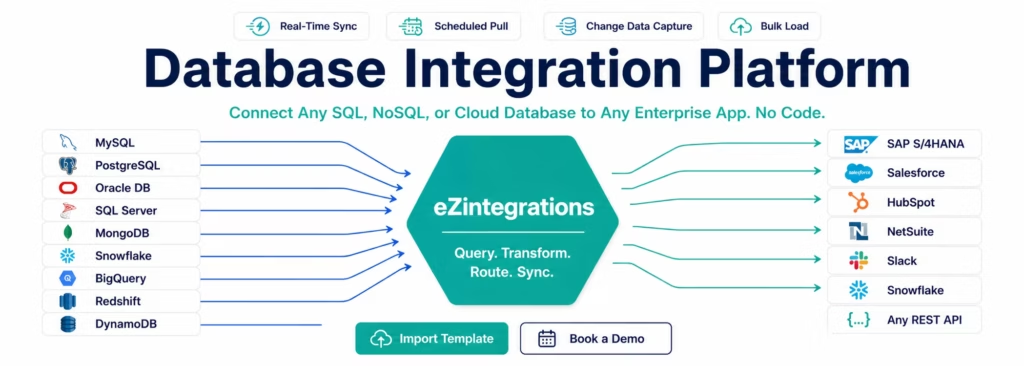
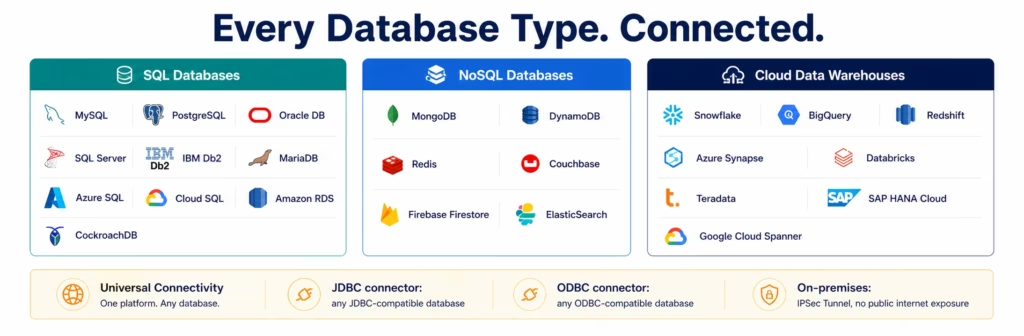
eZintegrations connects every major SQL database (MySQL, PostgreSQL, Oracle DB, Microsoft SQL Server, IBM Db2), NoSQL database (MongoDB, DynamoDB, Cassandra, Redis), and cloud data warehouse (Snowflake, BigQuery, Redshift, Azure Synapse, Databricks) to your full enterprise application stack: SAP, Salesforce, HubSpot, NetSuite, Oracle ERP, and 1,000+ more in the API Catalog.
Import a Database Integration Template from the Automation Hub and go live in minutes. Or book a free database integration session and we will connect your first database in the demo.
Every Database Type. One Platform.
eZintegrations connects every database type your enterprise runs on, without requiring ETL code, custom connectors, or a data engineering team to maintain them.
SQL databases: MySQL, PostgreSQL, Oracle Database, Microsoft SQL Server, IBM Db2, MariaDB, Azure SQL, Google Cloud SQL, Amazon RDS, CockroachDB.
NoSQL databases: MongoDB, Amazon DynamoDB, Apache Cassandra, Redis, Couchbase, Firebase Realtime Database, Google Firestore.
Cloud data warehouses: Snowflake, Google BigQuery, Amazon Redshift, Azure Synapse Analytics, Databricks, Google Cloud Spanner, Teradata.
On-premises databases: any JDBC or ODBC-compatible database accessible via IPSec Tunnel from eZintegrations cloud to your network. SAP HANA, IBM Db2, Oracle DB, SQL Server, PostgreSQL: all accessible on-premises without exposing your database to the public internet.
Every database connection in eZintegrations supports:
- SELECT queries with WHERE clauses, JOINs, and aggregations
- INSERT, UPDATE, DELETE, and UPSERT operations
- Stored procedure execution
- Parameterised queries (no SQL injection risk)
- Incremental data pull using timestamp or row ID watermarks
- Bulk load for high-volume data transfer
What You Can Do
Database to ERP Integration
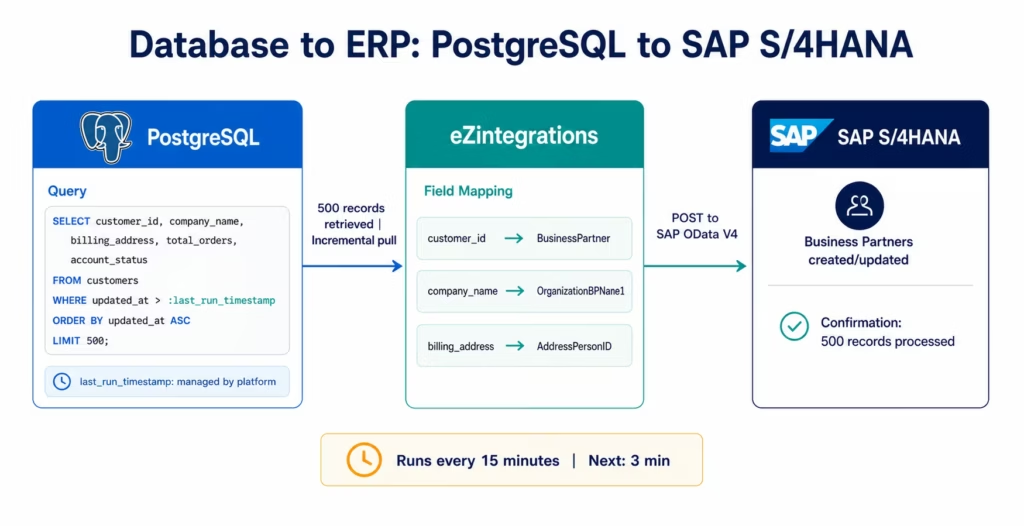
Pull records from your operational database and post them to your ERP (SAP, Oracle, NetSuite, Dynamics 365) in real time or on a schedule. Create sales orders in SAP from customer records in your MySQL database. Sync product catalogue data from PostgreSQL to NetSuite. Push expense records from your internal database to Oracle ERP Cloud for financial reporting.
The integration runs the SQL query, retrieves the result set, maps fields to the ERP’s API format, and posts to the ERP connector. Incremental pulls use a timestamp watermark (only records modified since the last run) so you are not re-processing your entire database on every execution.
Database to CRM and Marketing
Enrich your CRM with data from your operational database. Push customer purchase history from MySQL or PostgreSQL to Salesforce contact records. Update HubSpot deal stages based on order status changes in your database. Sync product usage data from your application database to Salesforce for customer success scoring. Trigger HubSpot email sequences when a database record indicates a renewal approaching.
The query runs on your schedule (or on a webhook trigger if your database supports change events), extracts the relevant records, and the CRM connector updates or creates the corresponding records in Salesforce or HubSpot with field-level mapping.
Database to Data Warehouse (ETL/ELT)
Move data from your operational databases to your cloud data warehouse on a schedule or in real time. Pull from MySQL or PostgreSQL and load into Snowflake. Extract from MongoDB and push to BigQuery. Consolidate data from multiple operational databases into a single Redshift schema for analytics.
Incremental load mode uses your choice of watermark: a timestamp column (updated_at), an auto-increment row ID, or a CDC (change data capture) flag. Only new or modified records are transferred on each run, keeping warehouse costs low and transfer windows short.
Bulk load mode transfers full table snapshots for initial load or periodic full refreshes. Configurable batch sizes prevent memory issues and respect data warehouse ingestion rate limits.
Database to Database Sync
Sync data between databases: MySQL to PostgreSQL, Oracle DB to SQL Server, on-premises database to cloud database, production database to analytics replica. Configure bidirectional sync with conflict resolution (last-write-wins, source-priority, or field-level merge) or one-way replication for read replicas and disaster recovery.
Primary-to-replica sync keeps your read-heavy analytics database current without impacting production write performance. Cross-cloud database migration: move data from an on-premises Oracle DB to a cloud-native PostgreSQL instance incrementally, validating record counts and checksums at each step.
AI-Ready Data Pipelines
Every database integration in eZintegrations feeds directly into Level 2 AI Workflows, Level 3 AI Agents, and Level 4 Goldfinch AI. Query your database, pass the result set to a Document Intelligence step for classification, route to an AI Agent for analysis, or expose live database query results to the Goldfinch AI Chat UI for natural language operational queries.
Your CFO asks the Goldfinch AI Chat UI: “Which customers have outstanding invoices over 60 days?” The question becomes a parameterised SELECT query against your accounts receivable database, the result set is formatted, and the answer is returned in natural language with a supporting data table: all without accessing a BI tool or waiting for a report to run.
How It Works
Three steps from database credentials to live enterprise integration.
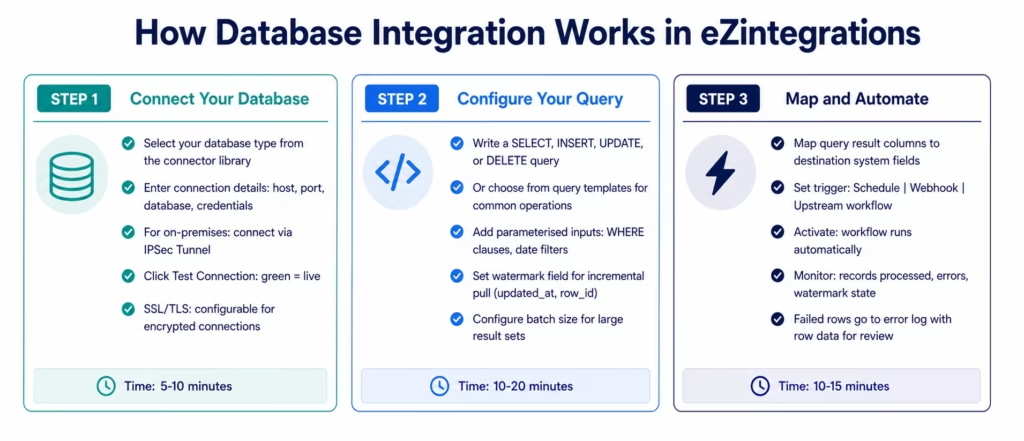
Step 1: Connect Your Database
Select your database type from the connector library. Enter your connection details:
- Host and port: database server hostname or IP address, port number
- Database name: the specific database or schema to connect to
- Authentication: username/password, SSL certificate, AWS IAM role (for RDS and Aurora), Google service account (for BigQuery and Cloud SQL), Azure managed identity (for Azure SQL and Synapse)
- SSL/TLS: configure SSL mode (require, verify-ca, verify-full) for encrypted database connections
For on-premises databases: eZintegrations connects via IPSec Tunnel from the platform to your corporate network. No database ports need to be exposed to the public internet. Your database team configures the IPSec endpoint on your firewall (one-time, 2-4 hours) and the platform connects through the tunnel for all subsequent queries.
Click Test Connection. A green status confirms the platform can reach your database and authenticate successfully.
Step 2: Configure Your Query
Write your SQL query (for SQL databases) or configure your collection and filter (for MongoDB and other NoSQL databases) directly in the query editor.
For SELECT queries (data extraction):
POST /services/rest/record/v1/vendorBill
{
  "entity": { "id": "847" },
  "trandate": "2026-03-18",
  "memo": "INV-2026-04721",
  "createdfrom": { "id": "7834", "type": "itemReceipt" },
  "item": {
    "items": [
      { "item": { "id": "{item_id}" }, "quantity": 100, "rate": 42.50, "orderline": 1 },
      ... 13 more lines ...
    ]
  }
}
The :last_watermark parameter is automatically managed by the platform: it stores the maximum updated_at value from the previous run and uses it as the starting point for the next run. This is incremental data pull: only records modified since the last execution are retrieved.
For INSERT/UPDATE/UPSERT operations:
When the destination is your database and the source is an enterprise application, configure the write operation: the platform receives data from the upstream step and constructs the INSERT or UPDATE query using parameterised values from the payload.
For MongoDB queries:
{
  "collection": "customers",
  "filter": { "updatedAt": { "$gt": ":last_watermark" } },
  "projection": { "customerId": 1, "email": 1, "plan": 1, "mrr": 1 },
  "sort": { "updatedAt": 1 },
  "limit": 500
}
The same watermark management applies to NoSQL collections.
Step 3: Map and Automate
After running the query and previewing the result set, map output columns to your destination system fields using the visual field mapper. For database-to-ERP integrations: map the column names from your SQL result to the ERP API’s field names. For database-to-database: map source column names to destination column names (handling any schema differences).
Set your trigger and activate. The execution log shows every run: records retrieved, records processed, records failed (with the row data for each failure), current watermark value, and total execution time.
Database Connector Capabilities
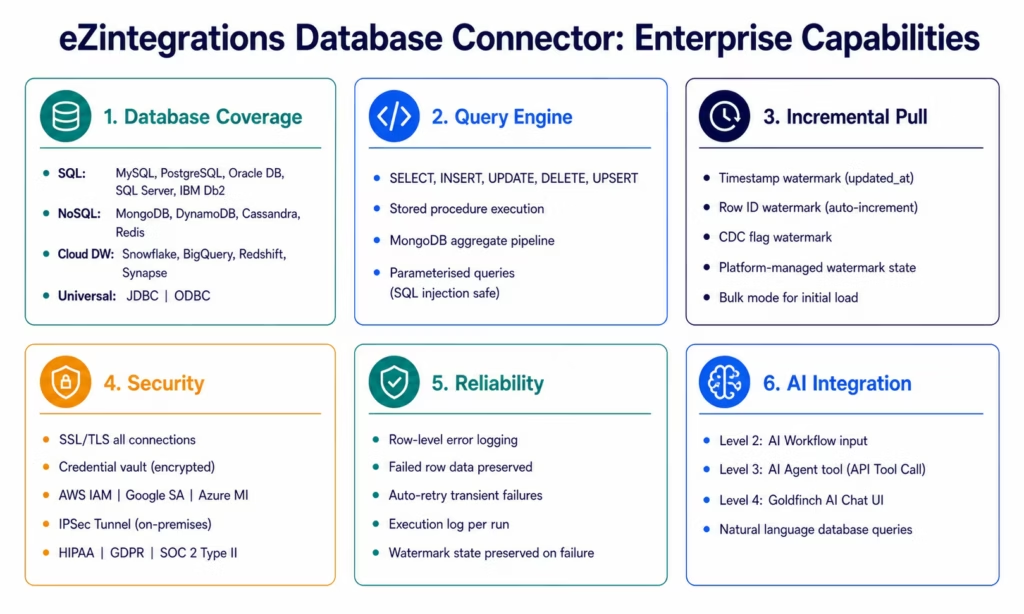
| Capability | eZintegrations Database Integration |
|---|---|
| SQL databases | MySQL, PostgreSQL, Oracle DB, SQL Server, IBM Db2, MariaDB, Azure SQL, Amazon RDS, CockroachDB, Google Cloud SQL |
| NoSQL databases | MongoDB, DynamoDB, Cassandra, Redis, Couchbase, Firebase, Firestore |
| Cloud data warehouses | Snowflake, BigQuery, Redshift, Azure Synapse, Databricks, Teradata |
| Universal connectivity | JDBC connector (any JDBC-compatible database), ODBC connector |
| Query types | SELECT, INSERT, UPDATE, DELETE, UPSERT, stored procedure execution |
| Parameterised queries | Named parameters (:param), prevents SQL injection, supports complex WHERE clauses |
| Incremental pull | Timestamp watermark (updated_at), row ID watermark, CDC flag watermark: platform-managed |
| Bulk operations | Configurable batch size (100-100,000 rows), parallel batch execution |
| Pagination | Offset-based, cursor-based, watermark-based for large result sets |
| Write operations | INSERT, UPSERT (insert or update on conflict), UPDATE WHERE, DELETE WHERE |
| MongoDB operations | find, insertOne, insertMany, updateOne, updateMany, deleteOne, aggregate pipeline |
| Authentication | Username/password, SSL certificate, AWS IAM, Google service account, Azure managed identity |
| Encryption | SSL/TLS for all connections (configurable mode: require, verify-ca, verify-full) |
| On-premises | IPSec Tunnel: no public internet exposure required |
| Error handling | Row-level error logging, failed row data preserved, automatic retry for transient failures |
| Scheduling | Cron-based (every minute to monthly), webhook-triggered, upstream workflow |
| Security | Credential vault (encrypted at rest), HIPAA, GDPR, SOC 2 Type II |
| AI integration | Query results as Level 2 AI Workflow input, Level 3 AI Agent tool (API Tool Call), Level 4 Goldfinch AI Chat UI and Workflow Node |
| Templates | Automation Hub templates for MySQL, PostgreSQL, MongoDB, Snowflake, BigQuery, Redshift, and 50+ common database-to-app pipelines |
Why eZintegrations for Database Integration
No ETL Code to Write or Maintain
Traditional database integration requires writing and maintaining ETL pipelines: Python scripts, Apache Airflow DAGs, custom JDBC connectors, or vendor-specific data pipeline tools. Every schema change in your database potentially breaks the pipeline. Every new data destination requires a new pipeline build.
eZintegrations replaces the ETL code layer with a configured workflow. Schema changes that add new columns do not break existing integrations (unused columns are ignored). Adding a new destination for the same data is a new workflow that reuses the existing database connection. No code to maintain, no pipeline to redeploy.
Incremental Pull Built For Every Schedule
Re-reading your entire database on every run wastes database resources, wastes transfer capacity, and inflates your data warehouse compute costs. eZintegrations uses watermark-based incremental pull by default: only records created or modified since the last successful run are retrieved.
The platform manages the watermark state automatically. If a run fails midway, the watermark is not advanced: the next run re-processes from the last successful watermark position. No data loss, no duplicate processing.
Row-Level Error Handling
Batch ETL tools fail entire batches when one record is invalid. eZintegrations processes records individually within a batch and logs failures at the row level. A single record with a NULL value in a required field does not stop the 499 other records in the batch from processing. The failed row’s data is preserved in the error log for investigation and reprocessing.
Live Database Queries in Natural Language
Level 4 Goldfinch AI’s Chat UI turns database queries into natural language conversations. Your CFO asks: “What is our accounts receivable aging by customer segment this week?” Goldfinch AI constructs a parameterised SELECT query against your AR database, retrieves the result set, and returns the answer in natural language with a supporting table. Your COO asks: “Which product lines had inventory below safety stock yesterday?” The same mechanism: natural language in, parameterised database query, formatted answer out.
The database connector is the data access layer. Goldfinch AI is the natural language interface on top of it. Together they give business users direct access to operational data without BI tools, SQL knowledge, or report requests.
Pricing That Does Not Penalise Data Volume
ETL tools and data pipeline platforms often charge by data volume: rows transferred, API calls made, or GB processed. Your costs grow as your data grows.
eZintegrations charges per automation workflow, not per row or per GB. A workflow that pulls 1,000 rows per run costs the same as one that pulls 1,000,000 rows per run. Your integration cost does not scale with your data volume. See the transparent per-automation pricing.
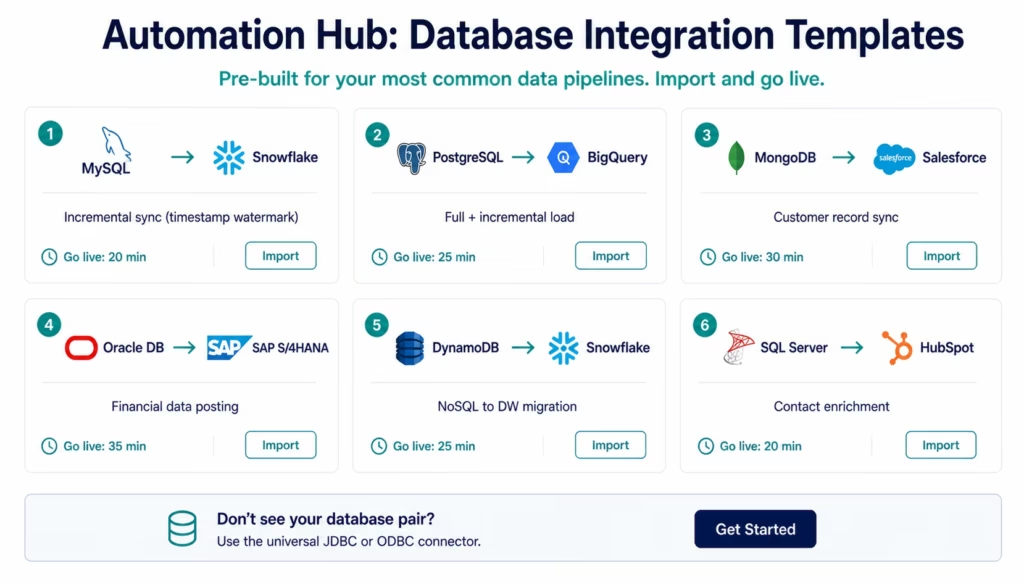
Import a Database Integration Template
The Automation Hub contains pre-built database integration templates for the most common database-to-application and database-to-warehouse pipelines. Each template includes the database query, field mapping, watermark configuration, and destination routing: ready to customise with your connection details.
Popular database integration templates:
- MySQL to Snowflake: incremental data sync with timestamp watermark
- PostgreSQL to BigQuery: full table export and incremental load
- MongoDB to Salesforce: customer record sync with field transformation
- Oracle DB to SAP S/4HANA: financial data posting
- SQL Server to HubSpot: contact enrichment from CRM database
- Salesforce to PostgreSQL: CRM data backup and analytics replica
- MySQL to Redshift: operational data to analytics warehouse
- BigQuery to Salesforce: analytics segment enrichment to CRM
- DynamoDB to Snowflake: NoSQL to data warehouse migration
- PostgreSQL to Slack: database alert on threshold breach
Browse all database templates in the Automation Hub
Import the template for your database and destination. Enter your connection credentials and adjust the query for your schema. Activate. Most database templates are live in under 30 minutes.
FAQs
1. How do I integrate a database with eZintegrations?
Select your database type from the connector library (MySQL, PostgreSQL, Oracle DB, SQL Server, MongoDB, Snowflake, BigQuery, Redshift, or 30+ others). Enter your connection credentials: host, port, database name, and authentication (username/password, SSL certificate, AWS IAM role, or cloud provider service account). Click Test Connection. Write your SQL query or MongoDB filter in the query editor, using parameterised inputs for dynamic values. Map the query result columns to your destination system fields. Set your trigger (schedule or webhook) and activate. Total setup time: 20-40 minutes for standard databases with an Automation Hub template, 40-60 minutes for custom queries and schema.
2. Does eZintegrations support my specific database?
eZintegrations natively supports MySQL, PostgreSQL, Oracle Database, Microsoft SQL Server, IBM Db2, MariaDB, MongoDB, DynamoDB, Cassandra, Redis, Couchbase, Snowflake, BigQuery, Amazon Redshift, Azure Synapse, Databricks, and Teradata. For any database not in the native connector list, the universal JDBC connector connects to any JDBC-compatible database (SAP HANA, Informix, progress databases, and more) and the ODBC connector connects to any ODBC data source. For on-premises databases behind a corporate firewall, the IPSec Tunnel provides access without exposing your database to the public internet.
3. How long does database integration take in eZintegrations?
Using an Automation Hub template (MySQL to Snowflake, PostgreSQL to BigQuery, MongoDB to Salesforce, and 50+ others): 20-30 minutes total from template import to live production. Building a custom integration from a native connector: 30-60 minutes for a single-table SELECT-to-destination integration. Complex multi-table queries with JOIN, aggregation, and schema transformation: 60-120 minutes depending on complexity.
4. Is there a free database integration template?
Yes, The Automation Hub contains pre-built database integration templates for MySQL, PostgreSQL, MongoDB, Snowflake, BigQuery, Redshift, Oracle DB, SQL Server, and more. All templates are included in every eZintegrations subscription tier at no additional charge. Browse and import at ezintegration.ai/automation-hub. Each template includes pre-configured queries, watermark management, field mapping, and error handling.
5. How does eZintegrations handle incremental data sync for large databases?
Incremental sync uses a watermark column that you specify in your query. The most common pattern is a timestamp column (updated_at, modified_date, last_modified): the platform stores the maximum value from the previous successful run and uses it as the :last_watermark parameter in the next query. Only records modified after the watermark are retrieved. The platform manages the watermark state automatically: if a run fails, the watermark is not advanced, so the next run retries from the last successful position. For databases without a reliable timestamp column, row ID watermarks or CDC flags are also supported.
6. How does eZintegrations connect to on-premises databases?
On-premises databases are connected via IPSec Tunnel from the eZintegrations cloud to your corporate network. Your database team configures the IPSec endpoint on your firewall (one-time, 2-4 hours). From that point, eZintegrations can reach any database accessible on your network without requiring a public-facing database port. No VPN client software. No agent to install and maintain on your database server. The tunnel handles all traffic encryption. Supported on-premises databases include Oracle DB, SQL Server, PostgreSQL, MySQL, IBM Db2, SAP HANA, and any JDBC or ODBC-compatible database on your network.
7. Can database queries be used by AI Agents and Goldfinch AI?
Yes, Database connectors are available as tools for Level 3 AI Agents via the API Tool Call tool. When an AI agent needs to look up an order status, retrieve a customer record, or query historical transaction data, it calls the configured database connector directly. The same connection credentials and parameterised query patterns apply. Level 4 Goldfinch AI makes database query results available through the Chat UI: business users ask questions in natural language, Goldfinch constructs the appropriate database query, retrieves the result set, and returns a formatted answer. The Workflow Node embeds database query capability inside Level 1 automation processes.
8. How does eZintegrations handle database write errors?
Write errors are handled at the row level. When a batch of records is being inserted into a destination database and some records fail (constraint violation, NULL in a required column, duplicate key), those failed records are logged to the error queue with the full row data and the error message. The successful records are committed. The error queue is visible in the workflow dashboard. Failed rows can be corrected and manually reprocessed or automatically retried after a configurable delay. The workflow does not stop on row-level failures.
Every Database in Your Stack, Connected
Whether you are syncing operational data to a cloud warehouse, enriching your CRM from an application database, feeding AI workflows with real-time database queries, or migrating data between database systems, eZintegrations handles every database connection, query, transformation, and delivery: without a line of ETL code.
SQL, NoSQL, cloud warehouses, on-premises databases: one platform. One monitoring dashboard. One governance model.
Import a database integration template from the Automation Hub and have your first database pipeline live today.
Book a free session and we will connect your specific database and destination in the demo.

