
Top 20 Integration Templates for Enterprise Sales & Marketing Teams
May 14, 2026Enterprise sales and marketing teams use integration templates to automate CRM sync, lead routing, campaign attribution, reporting, and customer lifecycle workflows between Salesforce, HubSpot, Marketo, Google Ads, LinkedIn, and their full stack: without custom development. eZintegrations’ Automation Hub provides 1,000+ ready-to-import templates covering every major sales and marketing integration pattern, deployable in hours rather than weeks.
TL;DR:
- Enterprise sales and marketing teams run on 15-30 disconnected tools.Data silos between your CRM systems, MAP, ad platforms, and analytics… mean leads fall through gaps, attribution is wrong, and reporting takes days to prepare instead of minutes to read.
- These 20 Automation Hub templates solve the most common and most costly integration patterns across the enterprise sales and marketing stack: from real-time CRM sync to AI-powered lead scoring to multi-touch campaign attribution.
- Every template is free to import. Most go live in hours, not weeks. No custom development required.
- The templates are organised into five categories: CRM and Lead Management (Templates 1-5), Marketing Automation and Campaign Operations (Templates 6-10), Reporting and Analytics (Templates 11-14), Customer Lifecycle and Retention (Templates 15-17), and AI-Powered Sales and Marketing Intelligence (Templates 18-20).
- CTA: Explore all templates in the Automation Hub and import the ones your team needs today.
Why Enterprise Sales and Marketing Teams Need Integration Templates
Your SDR just received a lead. That lead filled out a demo form on your website, was enriched by Clearbit, should have been scored by your MAP, routed to the right rep in Salesforce based on territory rules, triggered an onboarding sequence in Marketo, and had the source campaign attributed for ROI reporting.
What actually happened: the lead arrived in HubSpot. Someone manually qualified it. Someone else manually created a Salesforce opportunity. The campaign attribution was lost because the UTM parameters did not survive the form-to-CRM handoff. The lead score in Marketo does not match the Salesforce record. And on Friday, someone on the marketing ops team spent 3 hours pulling the weekly pipeline report from four different systems.
This is not a technology failure. Your tools are all capable. It is an integration failure: each tool does its job, but none of them talk to each other automatically.
According to Salesforce’s State of Sales report, sales reps spend only 28% of their time actually selling: the rest goes to manual data entry, tool switching, and administrative tasks that integrated workflows would eliminate. McKinsey research shows that B2B organisations with fully integrated sales and marketing stacks generate 20-30% more revenue per dollar of sales and marketing spend than those with fragmented tool landscapes.
Integration templates are the fastest path from fragmented to connected.Research from Gartner marketing technology research consistently highlights that enterprise organisations now operate increasingly complex martech stacks, making integration and workflow orchestration critical for operational efficiency and revenue visibility. Instead of scoping, building, and testing custom integrations, you import a pre-built template that already knows what Salesforce expects from HubSpot, what Marketo needs from Google Ads, and what your BI tool requires from your CRM. Configure your credentials, review the field mapping, test, and activate.
Most of the 20 templates below go live in 2-6 hours. None require custom code.
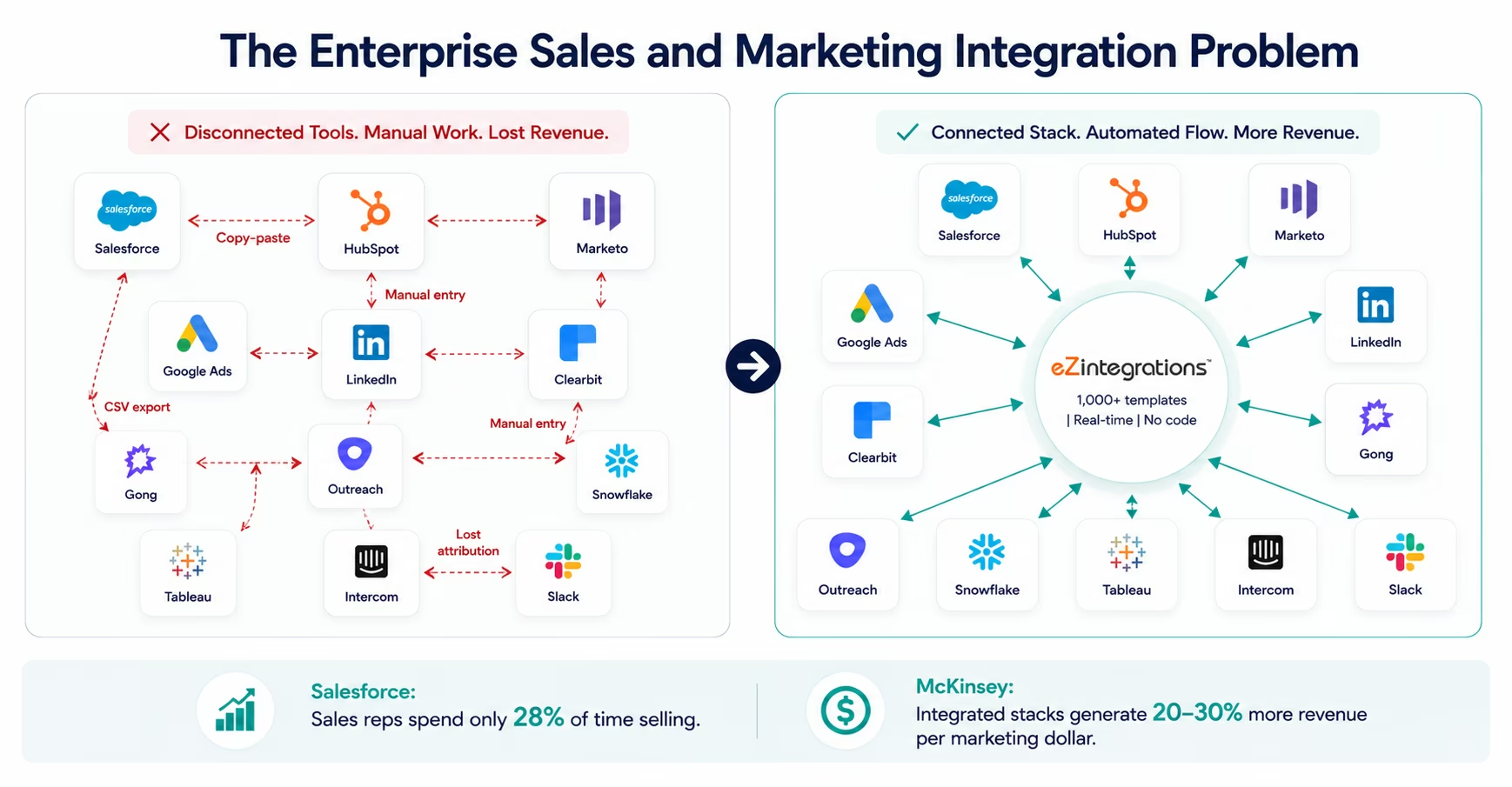
Before vs After: Integration-Powered Revenue Operations
| Process | Before Integration Templates | After Integration Templates |
|---|---|---|
| Lead routing | SDR manually assigns leads based on territory rules (15-20 min/lead batch) | Rules-based routing fires automatically on lead creation: lead in Salesforce queue in under 60 seconds |
| CRM-to-MAP sync | Marketing ops manually exports leads from Salesforce to Marketo weekly | Real-time bidirectional sync: every Salesforce update reflects in Marketo within 60 seconds |
| Lead scoring | Manual scoring updates on a weekly cycle: scores are always stale | Product events, engagement signals, and firmographics update lead score in real time |
| Campaign attribution | UTM parameters lost in form-to-CRM handoff; attribution guessed or missing | Attribution data captured at form submission, preserved through every CRM handoff |
| Pipeline reporting | Marketing analyst spends 3-4 hours pulling weekly pipeline from 4 systems | Automated pipeline report assembled from connected systems, delivered on schedule |
| Ad audience sync | Marketing manually exports CRM segments to Google Ads and LinkedIn weekly | CRM segment changes trigger real-time audience update to all ad platforms |
| Opportunity-to-close | Sales creates opportunities manually after marketing qualification | Deal created automatically in CRM when lead reaches MQL threshold |
| Win/loss attribution | Closed deals not automatically fed back to campaign attribution | Win/loss events update campaign attribution in real time: full-funnel ROI visible |
| Intent data routing | Intent signals from Bombora/G2 reviewed manually, routed inconsistently | Intent signals trigger automatic rep alert in Slack with account context |
| Renewal alerts | CS manually tracks renewal dates in spreadsheet | CRM renewal date triggers 90/60/30-day automated CS alert sequence |
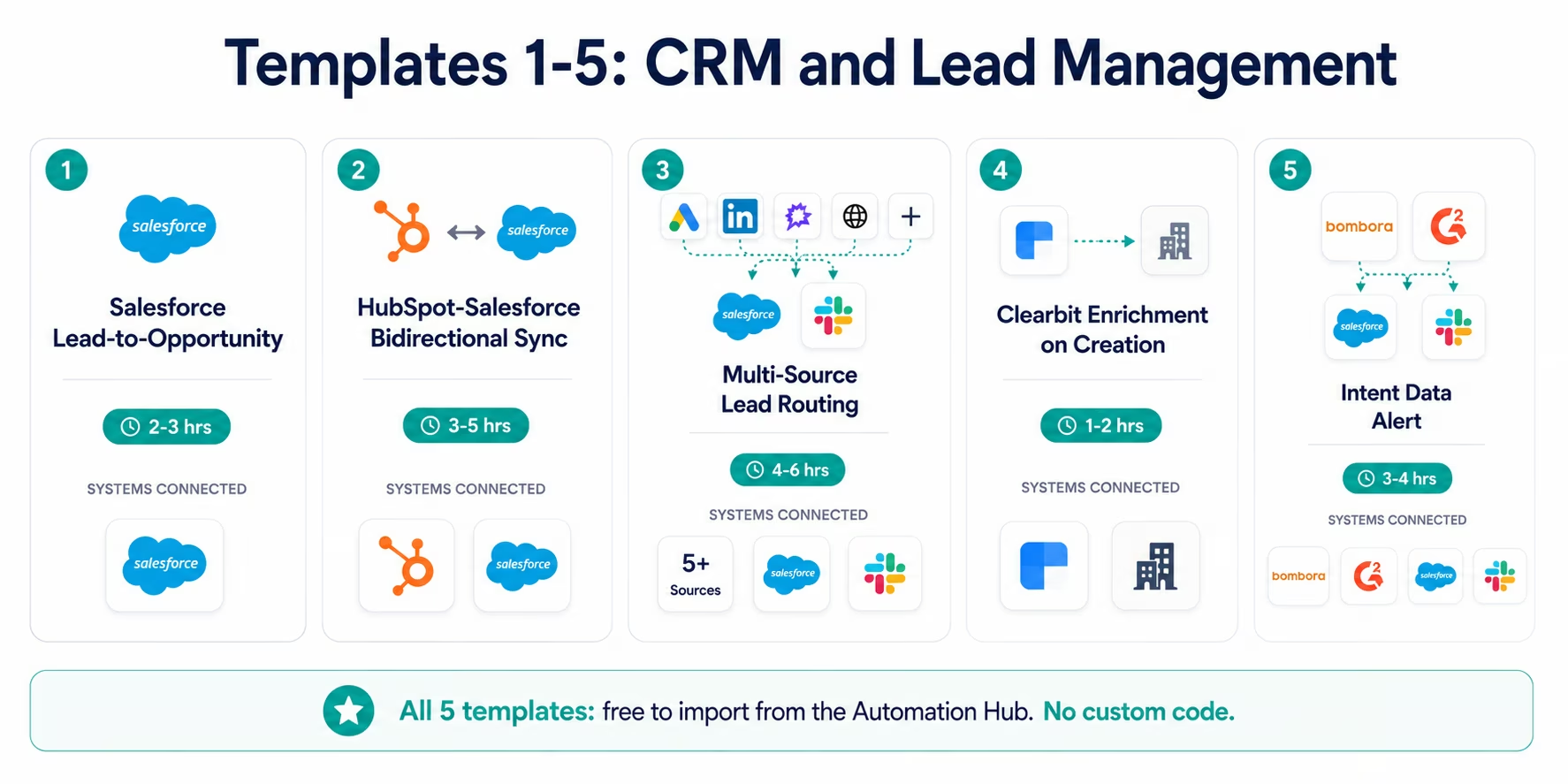
CRM and Lead Management Templates (1-5)
Template 1: Salesforce Lead-to-Opportunity Automation
What it does: When a Salesforce Lead reaches a configured lead score threshold or is manually converted, this template automatically creates a Salesforce Opportunity with the correct account association, stage, close date (calculated from average sales cycle), and rep assignment based on your territory routing rules.
The problem it solves: Reps manually converting leads to opportunities is one of the most common sources of data quality failures in Salesforce. Fields get skipped. Account associations are wrong. Stage is set to “Prospecting” when the lead is already in active evaluation. The template enforces data quality at creation.
Systems connected: Salesforce CRM (lead object → opportunity object, account matching logic)
Go-live time: 2-3 hours
Who needs it: Enterprise RevOps teams with dedicated Salesforce admins managing complex territory structures and account hierarchies.
Import Template 1: Salesforce Lead-to-Opportunity Automation
Template 2: HubSpot to Salesforce Bidirectional Sync
What it does: Maintains a real-time bidirectional sync between HubSpot contacts/companies and Salesforce leads/contacts/accounts. Changes in either system: field updates, stage changes, owner reassignment: propagate to the other system within 60 seconds. Includes duplicate detection and conflict resolution logic (configurable: Salesforce wins, HubSpot wins, or most-recent-update wins).
The problem it solves: Marketing runs on HubSpot. Sales runs on Salesforce. Without a real-time sync, you have two systems of record that diverge within hours of each other. Reps call on contacts with outdated marketing context. Marketing nurtures contacts who are already in active sales conversations.
Systems connected: HubSpot CRM (contacts, companies, deals) ↔ Salesforce (leads, contacts, accounts, opportunities)
Go-live time: 3-5 hours (including field mapping review and conflict resolution configuration)
Who needs it: Any enterprise organisation running both HubSpot and Salesforce as part of a hybrid marketing-sales stack.
Import Template 2: HubSpot-Salesforce Bidirectional Sync
Template 3: Multi-Source Lead Routing Engine
What it does: Aggregates leads from multiple sources: website forms, ad platform conversions, content downloads, webinar registrations, intent data platforms: into a single routing engine. Each lead is evaluated against your routing rules (territory, account size, industry, product interest, lead score) and assigned to the correct Salesforce queue or owner, with a Slack notification to the assigned rep including lead context.
The problem it solves: Enterprise organisations with multiple lead sources often end up with leads in different systems being routed with different rules: or no rules at all. This template centralises routing logic so every lead, regardless of source, goes through the same qualification and assignment process.
Systems connected: Website forms (Typeform, Formstack, native), LinkedIn Lead Gen, Google Ads Lead Extensions, Salesforce (destination), Slack (rep notification)
Go-live time: 4-6 hours (longer for complex territory rule configuration)
Who needs it: Enterprise marketing ops teams managing five or more lead sources with territory-based routing requirements.
Import Template 3: Multi-Source Lead Routing Engine
Template 4: Clearbit Enrichment on CRM Record Creation
What it does: When a new lead or contact is created in Salesforce or HubSpot (from any source), this template immediately calls the Clearbit Enrichment API and populates firmographic fields: company name, industry, employee count, revenue range, technology stack, and social profiles. If Clearbit does not return data for a record, the template logs the failure and routes the record to a manual enrichment queue.
The problem it solves: Unenriched records are the lead scoring team’s nightmare: you cannot score a lead without knowing their company size and industry. This template ensures every new record is enriched within 60 seconds of creation, before any routing or scoring logic runs.
Systems connected: Salesforce or HubSpot (lead/contact creation trigger) → Clearbit Enrichment API → Salesforce or HubSpot (field update)
Go-live time: 1-2 hours
Who needs it: Enterprise marketing ops teams with firmographic-based ICP scoring or territory routing that depends on company data being present at lead creation.
Import Template 4: Clearbit Enrichment on CRM Record Creation
Template 5: Intent Data Alert and CRM Update
What it does: Monitors intent signals from Bombora, G2, or TechTarget (via their webhook or API feeds) for accounts matching your ICP. When an account shows intent signal above the configured threshold for your target topics, the template: updates the Salesforce account record with the intent data, creates or updates the account’s lead score in HubSpot, alerts the account’s owner via Slack with a pre-assembled account context brief (recent intent topics, company firmographics, any existing deal history), and optionally enrolls the account in a targeted outreach sequence in Outreach or Salesloft.
The problem it solves: Intent data is only valuable if it reaches the rep at the right time with enough context to act on it. Without automation, intent signals sit in a separate platform that reps rarely check, or land in a weekly intent report that is already stale.
Systems connected: Bombora/G2/TechTarget (webhook) → Salesforce (account update) → HubSpot (score update) → Slack (rep alert) → Outreach/Salesloft (sequence enrollment)
Go-live time: 3-4 hours
Who needs it: Enterprise ABM teams with intent data subscriptions that are not currently flowing to rep workflows.
Import Template 5: Intent Data Alert and CRM Update
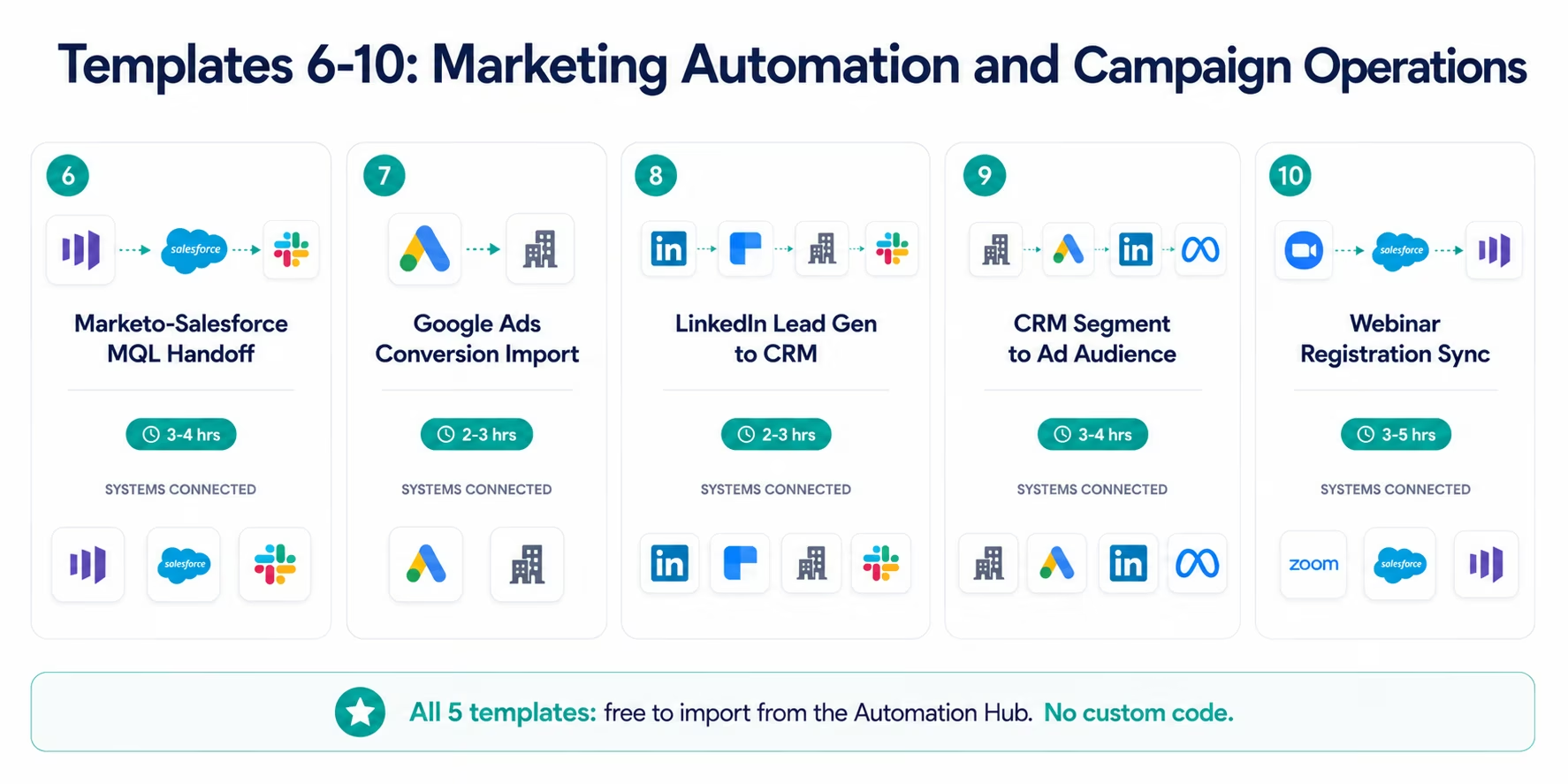
Marketing Automation and Campaign Operations Templates (6-10)
Template 6: Marketo to Salesforce MQL Handoff
What it does: When a Marketo lead reaches the MQL threshold (configurable lead score + demographic fit criteria), this template handles the full marketing-to-sales handoff: syncs the Marketo record to Salesforce as a qualified lead, appends the lead’s full engagement history (emails opened, content downloaded, webinars attended, pages visited), assigns to the correct sales queue based on territory rules, sends a Slack notification to the assigned rep, and creates a follow-up task in Salesforce with the configured SLA due date.
The problem it solves: The MQL-to-SQL handoff is where the most leads fall through. A lead qualifies in Marketo and no one in sales knows about it until the next sync cycle. This template makes the handoff immediate, complete, and documented.
Systems connected: Marketo (lead score threshold trigger) → Salesforce (qualified lead creation) → Slack (rep notification) → Salesforce (task creation)
Go-live time: 3-4 hours
Who needs it: Enterprise organisations with Marketo as MAP and Salesforce as CRM, where the MQL handoff is a manual or batch process.
Import Template 6: Marketo-Salesforce MQL Handoff
Template 7: Google Ads Conversion Import to CRM
What it does: Imports Google Ads conversion events (form fills, calls, purchases) into your CRM with the full UTM parameter set preserved: campaign, ad group, keyword, device, and match type. Matches the conversion to an existing CRM record by email or phone where possible (for closed-loop attribution). Creates a new CRM record where no match exists, with the Google Ads source data pre-populated.
The problem it solves: Google Ads conversion data and CRM data live in separate silos for most enterprise marketing teams. Attribution is reconstructed from UTM parameters that often do not survive the form-to-CRM journey. This template creates a direct bridge: every Google Ads conversion event has a corresponding CRM record with the attribution data intact.
Systems connected: Google Ads (conversion webhook) → CRM (Salesforce or HubSpot, record match or create)
Go-live time: 2-3 hours
Who needs it: Performance marketing teams that need closed-loop attribution between Google Ads spend and CRM pipeline.
Import Template 7: Google Ads Conversion Import
Template 8: LinkedIn Lead Gen Form to CRM
What it does: When a LinkedIn Lead Gen Form is submitted, this template fires immediately (via LinkedIn’s Marketing API webhook), enriches the record with firmographic data from Clearbit, creates or updates the CRM record (with duplicate detection), applies the appropriate lead source and campaign attribution, scores the lead, and routes it based on your territory rules: all within 2-3 minutes of the LinkedIn form submission.
The problem it solves: LinkedIn Lead Gen Form submissions often land in a LinkedIn Campaign Manager export that someone downloads weekly. The lead is 3-7 days old before it reaches a rep. This template makes LinkedIn leads as fast as website leads.
Systems connected: LinkedIn Marketing API (Lead Gen Form webhook) → Clearbit (enrichment) → Salesforce or HubSpot (record creation/update) → Slack (rep notification if above threshold)
Go-live time: 2-3 hours
Who needs it: B2B marketing teams running LinkedIn Lead Gen campaigns where lead follow-up speed matters for conversion.
Import Template 8: LinkedIn Lead Gen to CRM
Template 9: CRM Segment to Ad Platform Audience Sync
What it does: Maintains real-time synchronisation between CRM segments (HubSpot lists or Salesforce reports) and ad platform audiences on Google Ads, LinkedIn, and Meta Ads. When a contact enters or exits a CRM segment: based on lead score, lifecycle stage, company attribute, or any custom property: the ad platform audience is updated automatically. Supports both inclusion audiences (suppression of active customers from acquisition campaigns) and exclusion audiences (remarketing to engaged prospects).
The problem it solves: Enterprise marketing teams manually export CRM segments to ad platforms, often weekly. By the time the audience is uploaded, 20-30% of the contacts have already changed status. You are retargeting closed customers and missing hot prospects because the export is stale.
Systems connected: HubSpot or Salesforce (segment/list membership change) → Google Ads (customer match), LinkedIn (matched audiences), Meta Ads (custom audiences)
Go-live time: 3-4 hours
Who needs it: Enterprise digital marketing teams running retargeting and suppression campaigns who want audiences that reflect live CRM data.
Import Template 9: CRM Segment to Ad Platform Audience Sync
Template 10: Webinar Registration and Attendance Sync
What it does: Syncs webinar registration and attendance data from Zoom Webinars, ON24, or Goldcast to your CRM and MAP. For each registrant: creates or updates the CRM record, applies the webinar source as a campaign touch, updates the MAP lead score based on registration and attendance (attended = higher score than registered-but-no-showed). Post-webinar: sends the on-demand recording to attendees via your MAP, sends a personalised follow-up sequence to no-shows, and creates Salesforce tasks for reps assigned to accounts where senior attendees participated.
The problem it solves: Webinar data is one of the most underutilised intent signals in enterprise marketing. Registrant and attendance data often lives in the webinar platform and is never fully synced to the CRM or MAP. This template captures the full signal.
Systems connected: Zoom Webinars/ON24/Goldcast → Salesforce (contact update, campaign touch) → Marketo/HubSpot (score update, sequence enrollment)
Go-live time: 3-5 hours
Who needs it: Enterprise marketing teams running regular webinars as a demand generation channel who want webinar intent signals flowing into their sales rep workflows.
Import Template 10: Webinar Registration and Attendance Sync
Reporting and Analytics Templates (11-14)
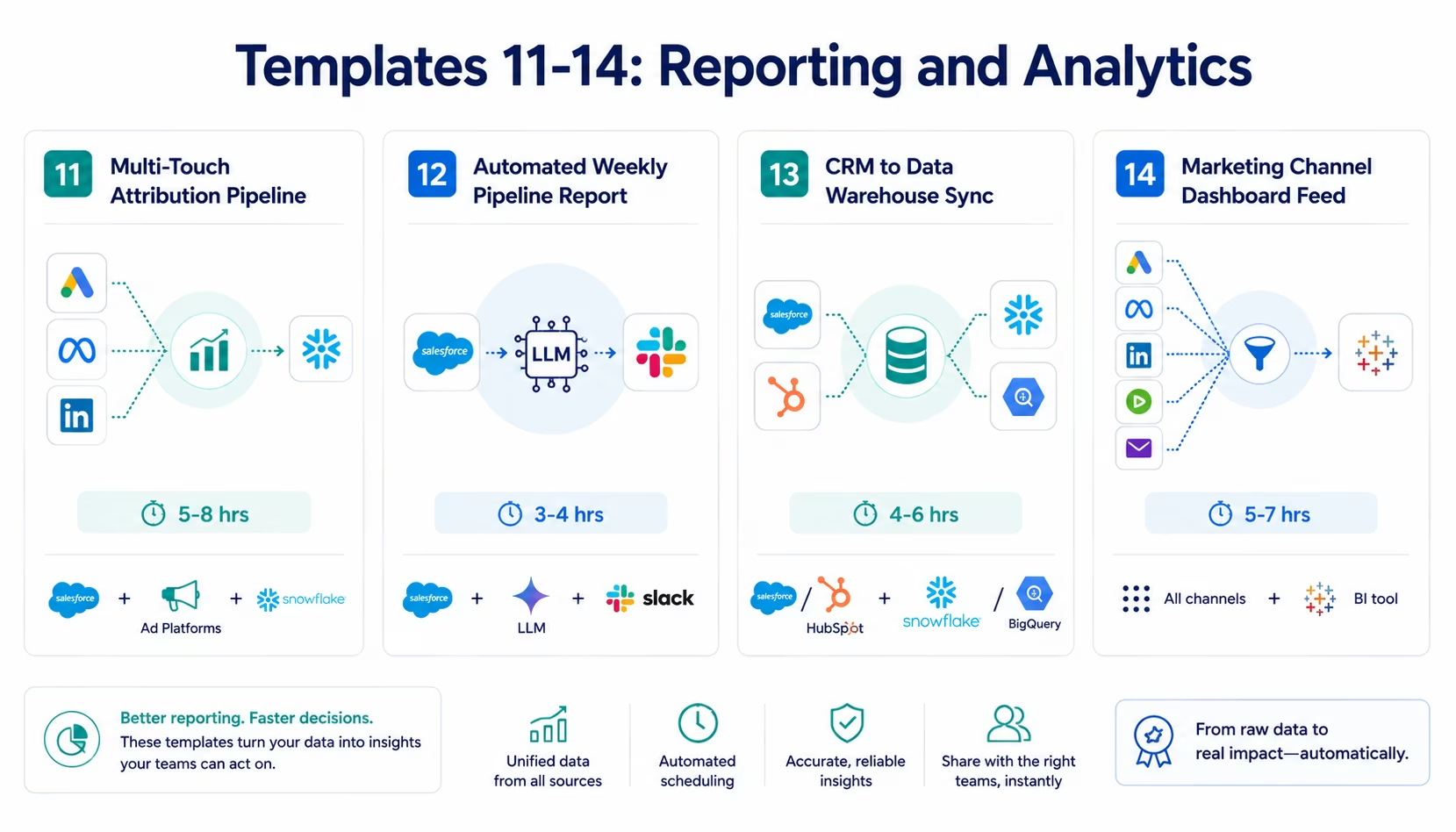
Template 11: Multi-Touch Attribution Pipeline
What it does: Builds a complete multi-touch attribution data pipeline from your marketing channels (Google Ads, LinkedIn, email, organic, events) through your CRM to your BI tool (Snowflake, BigQuery, Looker, Tableau). Captures first touch, last touch, and linear attribution models as configurable options. For every Salesforce opportunity, traces the contributing marketing touches back to their source channels and populates a dedicated attribution table in your data warehouse: updated on every opportunity stage change.
The problem it solves: Most enterprise marketing teams report on last-touch attribution because it is the only attribution model that is easy to implement without a dedicated attribution tool. This template gives you full multi-touch attribution data in your existing data warehouse, where your BI team can apply any attribution model to the complete touchpoint history.
Systems connected: Salesforce (opportunity and campaign member data) → Google Ads, LinkedIn, Marketo (touchpoint history) → Snowflake or BigQuery (attribution table)
Go-live time: 5-8 hours (longer for complex CRM data models)
Who needs it: Enterprise marketing ops and revenue operations teams who need multi-touch attribution data in their BI environment for C-level reporting.
Import Template 11: Multi-Touch Attribution Pipeline
Template 12: Automated Weekly Pipeline Report
What it does: Every Monday morning (or on your configured schedule), this template assembles a structured pipeline report from connected systems: new pipeline created (from Salesforce new opportunities), pipeline by stage (Salesforce opportunity stage distribution), win rate by rep and by segment (Salesforce closed-won/closed-lost analysis), marketing-sourced pipeline percentage (from campaign attribution data), and week-over-week change. Delivers the formatted report to your configured Slack channel or email distribution list, with a summary narrative generated by the LLM Classification node.
The problem it solves: The Monday morning pipeline review should start from a complete, current picture: not from a 90-minute analyst exercise the Sunday night before. This template makes that picture automatic.
Systems connected: Salesforce (opportunities, rep performance, stage data) → LLM Classification (narrative summary) → Slack and/or Email
Go-live time: 3-4 hours
Who needs it: Revenue leaders who want their Monday pipeline review to start from a pre-assembled, AI-summarised brief rather than a manual reporting exercise.
Import Template 12: Automated Weekly Pipeline Report
Template 13: CRM to Data Warehouse Incremental Sync
What it does: Maintains an always-current replica of your CRM data (Salesforce or HubSpot objects: contacts, accounts, opportunities, activities, campaigns) in your data warehouse (Snowflake, BigQuery, or Redshift). Uses incremental sync: only records modified since the last sync run are transferred: so the replica is current within minutes rather than requiring a nightly full export. Includes schema versioning: when CRM fields are added or modified, the data warehouse schema updates automatically.
The problem it solves: Most enterprise BI environments run on nightly CRM data exports. Your Tableau dashboards are always showing yesterday’s data. Sales-marketing alignment meetings in the afternoon are reviewing this morning’s CRM snapshot. This template makes the data warehouse always current.
Systems connected: Salesforce or HubSpot (all objects, incremental change detection) → Snowflake, BigQuery, or Redshift (incremental load with schema versioning)
Go-live time: 4-6 hours
Who needs it: Enterprise data teams and revenue operations teams who want near-real-time CRM data in their data warehouse without a nightly batch dependency.
Import Template 13: CRM to Data Warehouse Incremental Sync
Template 14: Marketing Channel Performance Dashboard Feed
What it does: Aggregates performance data from all marketing channels: Google Ads (impressions, clicks, conversions, spend), LinkedIn (impressions, engagement, lead gen conversions, spend), email (sends, opens, clicks, conversions from Marketo or HubSpot), organic (Google Search Console performance data), and events (webinar registrations and attendance): into a single performance data feed in your BI tool or Google Data Studio / Looker Studio dashboard. Updated daily.
The problem it solves: Building a unified marketing performance dashboard typically requires a separate data pipeline tool or a manual weekly export exercise. This template builds and maintains the data pipeline that feeds the dashboard.
Systems connected: Google Ads, LinkedIn Marketing API, Marketo/HubSpot (email performance), Google Search Console → Snowflake, BigQuery, or Google Looker Studio
Go-live time: 5-7 hours
Who needs it: Marketing operations and growth teams who need a unified view of channel performance without paying for a separate marketing analytics platform.
Import Template 14: Marketing Channel Performance Dashboard Feed
Customer Lifecycle and Retention Templates (15-17)
Template 15: Customer Health Score and Renewal Alert
What it does: Calculates a composite customer health score by combining product usage data (from your product analytics platform or internal API), support ticket history (from Zendesk or Intercom), billing status (from Stripe or Salesforce), and engagement data (from your MAP or email platform). Writes the composite score to the Salesforce account record. The Watcher Tool monitors for accounts whose health score drops below the configured threshold and triggers: a Slack alert to the account’s CS owner, a HubSpot/Salesforce task creation with the specific contributing factors, and an optional automated check-in email via Marketo or Customer.io.
The problem it solves: Without automated health scoring, CS teams manage accounts reactively: discovering churn risk when the customer contacts them, not 30-60 days before the renewal conversation. This template surfaces the risk before it becomes a cancellation.
Systems connected: Product analytics/internal API + Zendesk/Intercom + Stripe/Salesforce + MAP → Salesforce (health score field) → Slack + Salesforce task + email platform
Go-live time: 5-8 hours (longer for complex product data integration)
Who needs it: Enterprise CS and revenue operations teams managing renewal-heavy businesses where churn prediction data is siloed across product, support, and billing systems.
Import Template 15: Customer Health Score and Renewal Alert
Template 16: Post-Purchase Nurture Sequence Trigger
What it does: When a Salesforce opportunity is marked Closed Won (or when a Stripe subscription is created, for product-led businesses), this template triggers the appropriate post-purchase onboarding and nurture sequence in your MAP (Marketo, HubSpot, or Customer.io). The sequence is selected based on the product purchased, the customer segment, and the deal size: routing enterprise customers to a high-touch onboarding sequence and SMB customers to a self-serve onboarding track. Also creates the Salesforce kickoff tasks for the CS team and sends a Slack notification to the account’s CS owner.
The problem it solves: New customer onboarding often starts late because the transition from sales to CS is manual. The Closed Won notification sits in a Slack channel. Someone creates the CS handoff task two days later. The customer’s first week post-purchase has no programmatic engagement from the company. This template makes onboarding start within minutes of the deal closing.
Systems connected: Salesforce (Closed Won trigger) or Stripe (subscription created) → Marketo/HubSpot/Customer.io (sequence enrollment) → Salesforce (kickoff tasks) → Slack (CS owner notification)
Go-live time: 3-4 hours
Who needs it: Enterprise sales and CS teams where the sales-to-CS handoff is a manual process causing onboarding delays.
Import Template 16: Post-Purchase Nurture Sequence Trigger
Template 17: Renewal and Expansion Opportunity Automation
What it does: Monitors Salesforce contract end dates and product usage data simultaneously. At 90, 60, and 30 days before contract end, the template creates a Salesforce renewal opportunity (if one does not exist), routes it to the appropriate CS or renewal team based on account size, and creates a structured renewal preparation task with the account’s health score, usage summary, and expansion signals. Separately: when a customer’s product usage crosses an expansion threshold (configurable by product), the template creates an expansion opportunity in Salesforce and alerts the CS owner with the usage context.
The problem it solves: Renewals and expansion opportunities are often discovered reactively, either the customer asks about renewal, or the CS team notices during a quarterly review. Both scenarios are too late for proactive expansion positioning. This template creates the renewal opportunity automatically and puts the expansion signal in front of the right person at the right time.
Systems connected: Salesforce (contract end date monitoring) + product analytics (expansion threshold monitoring) → Salesforce (renewal/expansion opportunity creation) → Slack (CS owner alert)
Go-live time: 4-6 hours
Who needs it: Enterprise CS and revenue operations teams managing subscription renewals and expansion motions where both are currently reactive rather than proactive.
Import Template 17: Renewal and Expansion Opportunity Automation
AI-Powered Sales and Marketing Intelligence Templates (18-20)
These three templates represent the Level 2 AI Workflow and Level 3 AI Agent capabilities of eZintegrations: going beyond data movement to data intelligence.
 Template 18: AI-Powered Lead Scoring
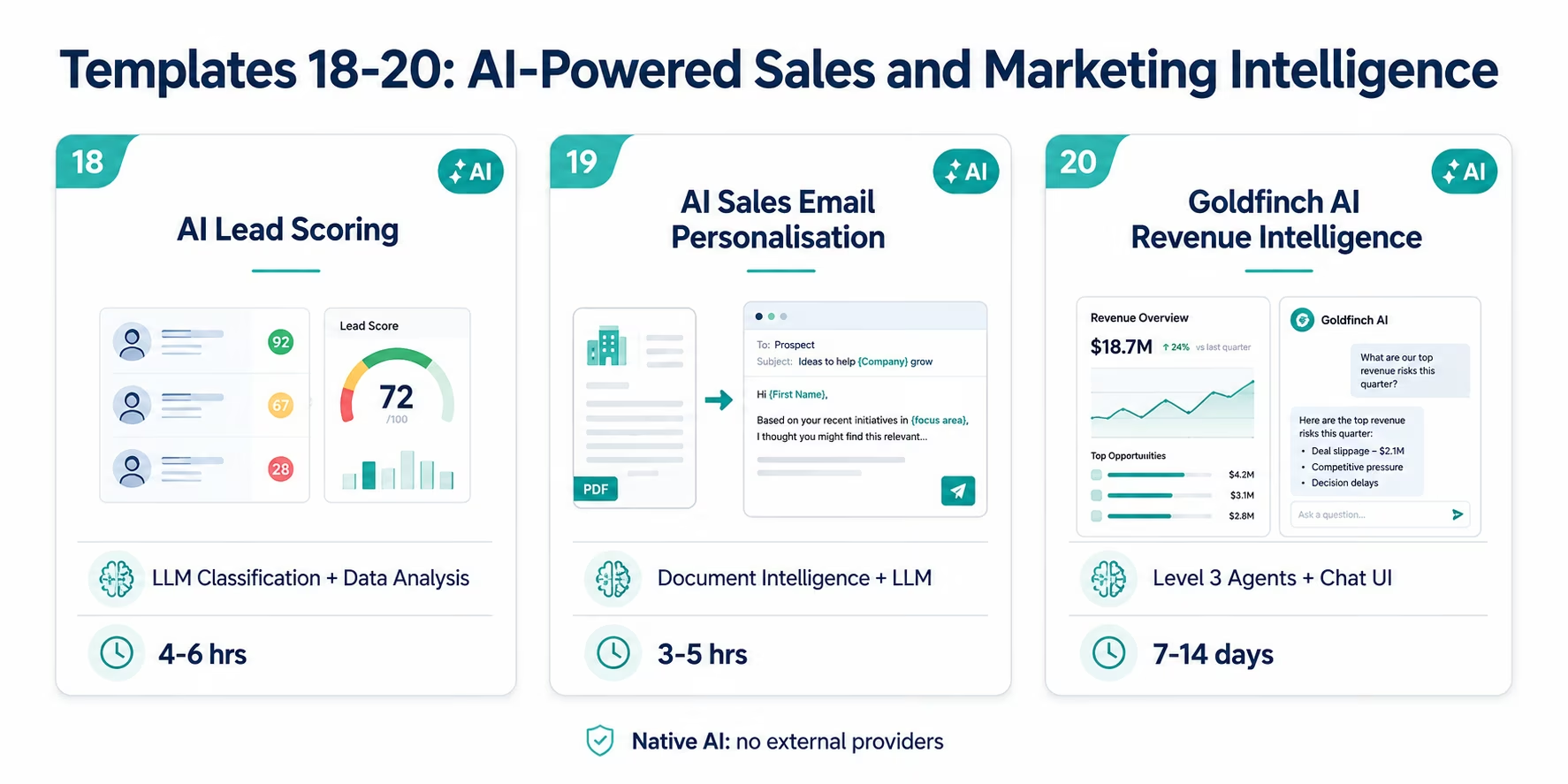
What it does: Replaces rule-based lead scoring with an AI-powered scoring model that combines three inputs: firmographic fit (company size, industry, technology stack: from Clearbit enrichment), behavioural engagement signals (email opens, content downloads, page visits, webinar attendance: from your MAP), and intent data (Bombora or G2 signals, where available). The LLM Classification node reads the combined signal profile and assigns a composite score on a 0-100 scale, with a written score rationale (“This account shows strong ICP fit and high engagement with pricing and product content, suggesting active evaluation”).
The score and rationale are written to the Salesforce lead/contact record and the HubSpot contact record in real time: updated whenever any input signal changes.
Why AI over rules: Rule-based scoring breaks when buyer behaviour changes. The firmographic weights you set last year may not reflect what your current best customers actually looked like before they converted. The LLM Classification node evaluates the full signal profile holistically, similar to how an experienced SDR would assess a lead, without the need to maintain and update a scoring rule matrix.
Systems connected: Clearbit + MAP (Marketo/HubSpot) + Bombora/G2 → LLM Classification node → Salesforce and HubSpot (score field + rationale field)
Go-live time: 4-6 hours
Who needs it: Enterprise marketing ops teams whose current lead scoring model has poor predictive accuracy, or whose scoring rules have not been updated in more than 6 months.
Import Template 18: AI Lead Scoring
Template 19: AI Sales Email Personalisation Pipeline
What it does: When an SDR or AE is about to send an outbound email to a prospect, this template enriches the email with personalised context assembled by the AI pipeline, Document Intelligence reads the prospect company’s recent press releases, job postings, and annual report excerpts (retrieved via web crawling) to extract business priorities and pain points. LLM Classification categorises the prospect’s buying stage based on their engagement history in the CRM. The assembled context: recent company news, inferred pain points, engagement stage: is delivered to the rep’s Outreach or Salesloft cadence as personalisation tokens.
Reps write one email template. The AI assembles the personalisation data for each recipient.
The problem it solves: Personalisation at scale is the hardest unsolved problem in outbound sales. Reps either send generic emails (high volume, low conversion) or spend 15-20 minutes researching each prospect (low volume, higher conversion). This template delivers the research to the rep automatically so they can send personalised emails at volume.
Systems connected: Outreach or Salesloft (recipient list) → Web Crawling (prospect company news) + Document Intelligence → LLM Classification (engagement stage) → Outreach/Salesloft (personalisation token delivery)
Go-live time: 3-5 hours
Who needs it: Enterprise outbound sales teams running high-volume outbound programmes where personalisation is the conversion bottleneck.
Import Template 19: AI Sales Email Personalisation Pipeline
Template 20: Goldfinch AI Revenue Intelligence Programme
What it does: Goldfinch AI is eZintegrations’ Level 4 multi-agent coordination platform. The Revenue Intelligence Programme deploys four parallel monitoring agents across your sales and marketing stack:
- Pipeline Intelligence Agent: monitors Salesforce for stalled deals, at-risk opportunities, and pipeline coverage gaps: delivering a structured weekly pipeline brief to the Head of Sales.
- Marketing Performance Agent: monitors campaign performance across Google Ads, LinkedIn, and email: identifying underperforming campaigns and surfacing budget reallocation recommendations.
- Account Health Agent: monitors customer health signals across product usage, support, and billing: alerting CS leadership to at-risk renewals.
- Revenue Attribution Agent: correlates marketing touches with closed-won opportunities: building the week-over-week attribution intelligence picture for the CMO.
The Goldfinch AI Chat UI gives revenue leadership natural language access to live sales and marketing data. The CRO asks: “Which pipeline opportunities are most at risk this week and what are the specific signals?” Goldfinch AI queries the relevant agents and returns a structured answer in under 60 seconds.
Systems connected: Salesforce + HubSpot + Google Ads + LinkedIn + Marketo + product analytics: all connected through the Goldfinch AI coordinator layer.
Deployment time: 7-14 days (including Level 1-3 foundation setup if not already in place)
Who needs it: Enterprise revenue leadership teams who want live natural language access to their full sales and marketing intelligence without waiting for analyst reports.
Explore Goldfinch AI Revenue Intelligence
How to Get Started
Getting your first sales or marketing integration template live is a same-day exercise for most teams.
Step 1: Identify your highest-impact integration gap
Review the 20 templates above. Find the one that describes the manual process your team performs most frequently. For most enterprise sales and marketing teams, the highest-impact starting points are: the HubSpot-Salesforce bidirectional sync (if both systems are in use), the MQL handoff template (if marketing-to-sales handoff is manual), or the CRM-to-data-warehouse sync (if reporting depends on nightly exports).
Step 2: Browse the Automation Hub
Visit the Automation Hub and search for your target template by name or by the systems you want to connect. Each template page shows: the systems connected, the specific fields mapped, the go-live time estimate, and the configuration steps.
Step 3: Configure your credentials
Each template requires API credentials for the connected systems. For Salesforce: connected app OAuth credentials. For HubSpot: private app access token. For Google Ads: Google Ads API developer token and OAuth client. For Marketo: REST API credentials. Most credential configurations take 15-30 minutes per system.
Step 4: Review and customise the field mapping
Every template pre-maps standard fields. Review the mapping and add any custom fields specific to your CRM or MAP setup. The visual field mapper handles transformations (format conversion, concatenation, lookup table mapping) without code.
Step 5: Test and activate
Run the template against a test record or your staging environment. Verify the output in each connected system. Activate. The eZintegrations execution dashboard shows every run, every record processed, and every error: so you can monitor the template’s performance from day one.
Explore all 20 templates in the Automation Hub and import the ones your team needs today. Most enterprise sales and marketing templates go live in 2-6 hours.
FAQs
1. How does eZintegrations work for enterprise sales and marketing teams?
eZintegrations connects enterprise sales and marketing tools including Salesforce, HubSpot, Marketo, Google Ads, LinkedIn, Clearbit, Outreach, Salesloft, Snowflake, Tableau, and 50+ others using pre-built integration templates from the Automation Hub. Templates handle lead routing, CRM sync, attribution pipelines, and AI-powered scoring with most deployments going live in 2-6 hours.
2. How long does it take to set up an enterprise sales or marketing integration?
Simple two-system syncs usually take 1-3 hours. CRM integrations with routing logic take 3-6 hours. Marketing automation templates take 3-5 hours. Reporting and analytics pipelines take 4-8 hours. AI-powered templates take 4-6 hours, while Goldfinch AI Revenue Intelligence deployments typically require 7-14 days.
3. Does eZintegrations work with Salesforce and HubSpot for enterprise marketing?
Yes. eZintegrations supports deep native integrations with Salesforce and HubSpot including Salesforce REST API, Bulk API, SOQL queries, Platform Events, and HubSpot APIs for contacts, companies, deals, activities, sequences, and workflow triggers. The bidirectional HubSpot-Salesforce sync template supports real-time synchronisation with configurable conflict resolution.
4. Can I connect my enterprise CRM to Google Ads and LinkedIn for audience management?
Yes. Template 9 supports bidirectional audience management between CRM systems and Google Ads Customer Match, LinkedIn Matched Audiences, and Meta Custom Audiences. CRM audience changes update advertising audiences automatically in real time without CSV exports.
5. What AI capabilities do the sales and marketing templates include?
Templates 18-20 include native AI capabilities such as LLM Classification, Document Intelligence, Web Crawling, and Goldfinch AI Revenue Intelligence with natural language Chat UI. AI workflows support lead scoring, prospect research, outbound personalisation, and executive revenue intelligence while running entirely within eZintegrations infrastructure.
6. Is there a free tier or trial for the enterprise templates?
eZintegrations does not provide a free tier. Enterprise templates start at 90 dollars per month per automation. All Automation Hub templates are included within the subscription with no additional per-template pricing. Enterprise teams can request a demo to review templates and deployment workflows for their specific stack.
Conclusion: Stop Building What You Can Import
Every hour your marketing ops team spends on a manual CSV export, a weekly list sync to Google Ads, or an overnight CRM-to-data-warehouse batch is an hour not spent on strategy, analysis, or campaign optimisation.
The 20 templates in this guide cover the most common and most costly integration gaps in enterprise sales and marketing stacks: from the foundational CRM sync to the AI-powered revenue intelligence programme. Each one is free to import from the Automation Hub, takes hours rather than weeks to deploy, and scales with your business without requiring custom code or a dedicated integration engineer.
Start with the template that solves your team’s highest-friction manual process. Get it live this week. Then import the next one.
Explore all 20 templates in the Automation Hub and connect your enterprise sales and marketing stack today.
Book a free demo and bring your specific stack. We will show you which templates apply to your exact tool combination and walk through the configuration for your first integration.

