
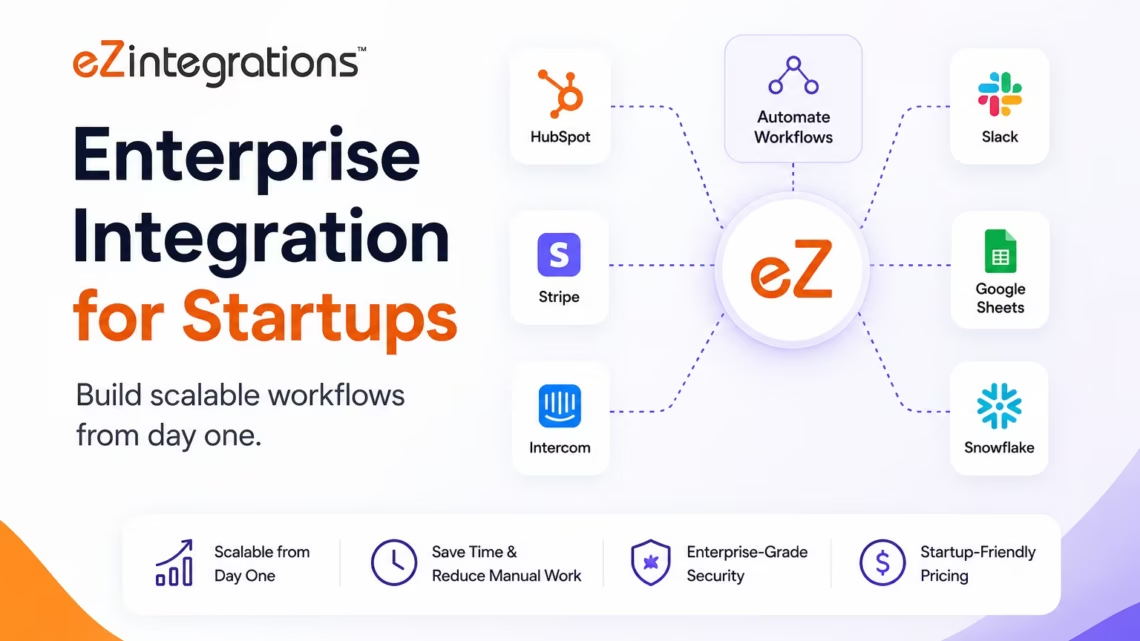
Enterprise Integration for Startups: Build Scalable Workflows From Day One
May 14, 2026An integration platform for startups connects the SaaS tools your team uses: CRM, billing, marketing, support, analytics, product: with automated data pipelines that eliminate manual data entry, prevent integration debt, and scale with your growth without requiring a dedicated engineering team to maintain them. eZintegrations gives startups enterprise-grade workflow automation from day one: pre-built templates for Stripe, HubSpot, Salesforce, Slack, Notion, Intercom, Segment, and 50+ startup stack tools: going live in hours, not weeks.
TL;DR:
- Most startups build integration debt without realising it. Every manual process, every CSV export, every Slack notification that triggers a copy-paste into another tool is integration debt accruing interest. When you hit Series A and suddenly have 5x the transaction volume, that debt comes due all at once.
- The tools that got you to seed: a Zapier zap here, a spreadsheet there: do not scale to enterprise. The tools enterprises use: MuleSoft, Boomi: cost $250,000+/year and require integration specialists to run them.
- eZintegrations sits in the middle: enterprise-grade workflow automation at startup pricing, starting at $90/month. Pre-built templates for every common startup integration pattern. No custom code. No vendor lock-in. AI workflows built in from the start.
- Start simple (Stripe → HubSpot deal updates), grow to complex (multi-system revenue operations, AI-powered lead scoring pipelines, Goldfinch AI multi-agent intelligence). The platform scales with you.
- CTA: Import a startup integration template from the Automation Hub and go live today.
The Integration Debt Problem Most Startups Don’t See Coming
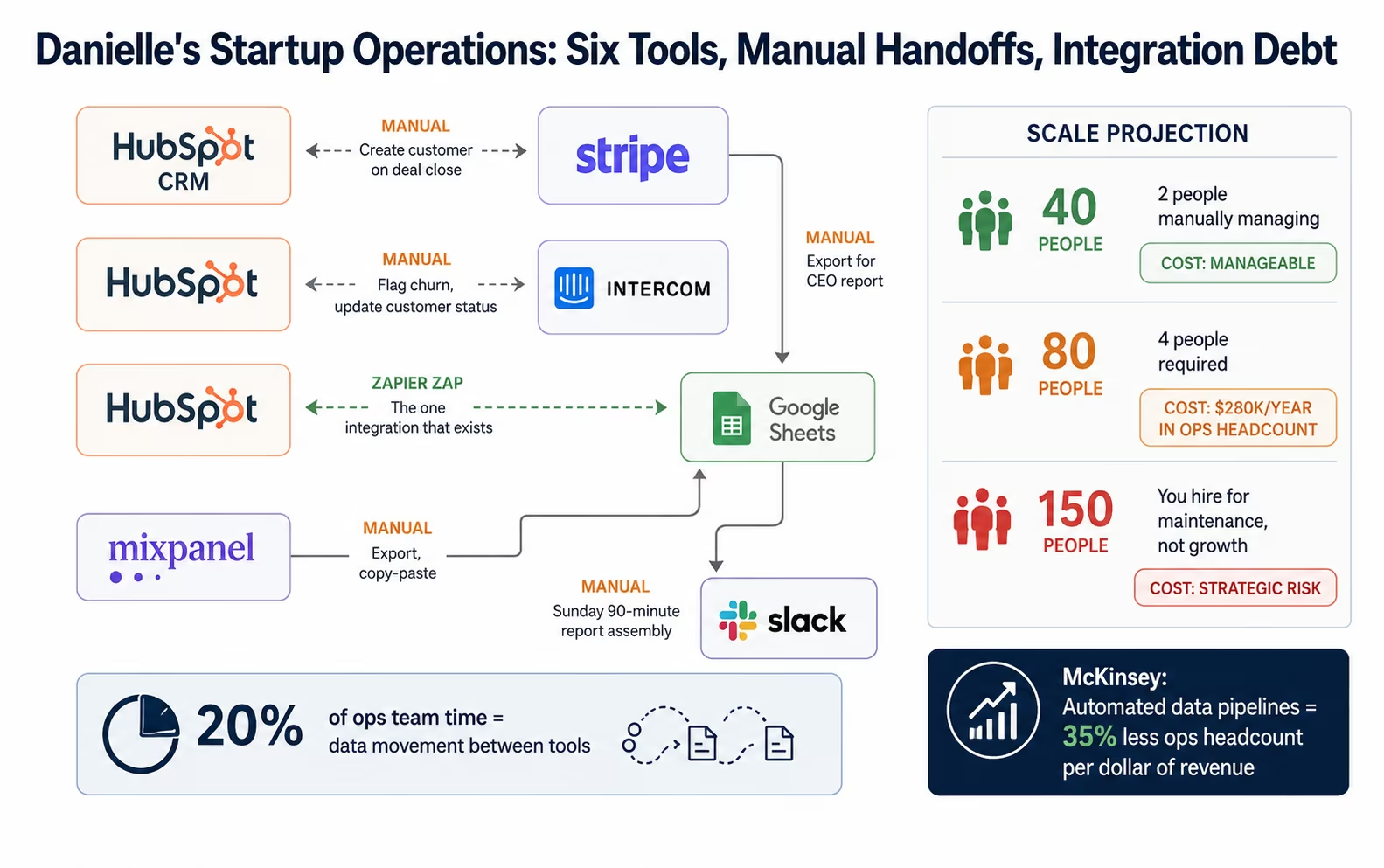
Danielle is the Head of Operations at a 40-person B2B SaaS company at Series A. Her stack: HubSpot for CRM, Stripe for billing, Intercom for support, Mixpanel for product analytics, Notion for internal documentation, Slack for communication, and Google Sheets for the reporting her CEO wants every Monday.
She has exactly one integration: a Zapier zap that pushes new HubSpot contacts to a Slack channel. Everything else is manual. When a deal closes in HubSpot, someone manually creates the Stripe customer. When a trial converts to paid, someone manually updates the HubSpot deal stage. When churn happens, someone manually flags the account in Intercom and removes them from the marketing email list. The Monday report is a 90-minute copy-paste exercise every Sunday evening.
Danielle’s team is talented and smart. But 20% of their time disappears into data movement between tools that should be talking to each other automatically.
This is integration debt. It does not feel expensive when you are at 40 people because the data volumes are low and the workarounds are manageable. It starts to hurt at 80 people. It becomes a hiring problem at 150 people: you are adding headcount not to drive growth but to maintain manual processes that should be automated. And it becomes a systems crisis at 300 people, when the Volume of transactions exceeds what any number of humans can reconcile manually.
The solution is not “hire more operations people.” It is building integrations that scale from the start.This mirrors scaling guidance from Y Combinator, which recommends that startups automate operational bottlenecks early so engineering and operations teams can stay focused on product growth instead of repetitive internal processes.
McKinsey research on high-growth SaaS companies shows that startups with automated data pipelines between their core systems (CRM, billing, product, support) spend 35% less on operations headcount per dollar of revenue than those relying on manual processes, at the same growth stage. The compounding effect: every manual process you replace with an automated workflow is a process that does not need to be scaled with headcount when you grow 3x.
The Startup Integration Stack: What Needs to Connect
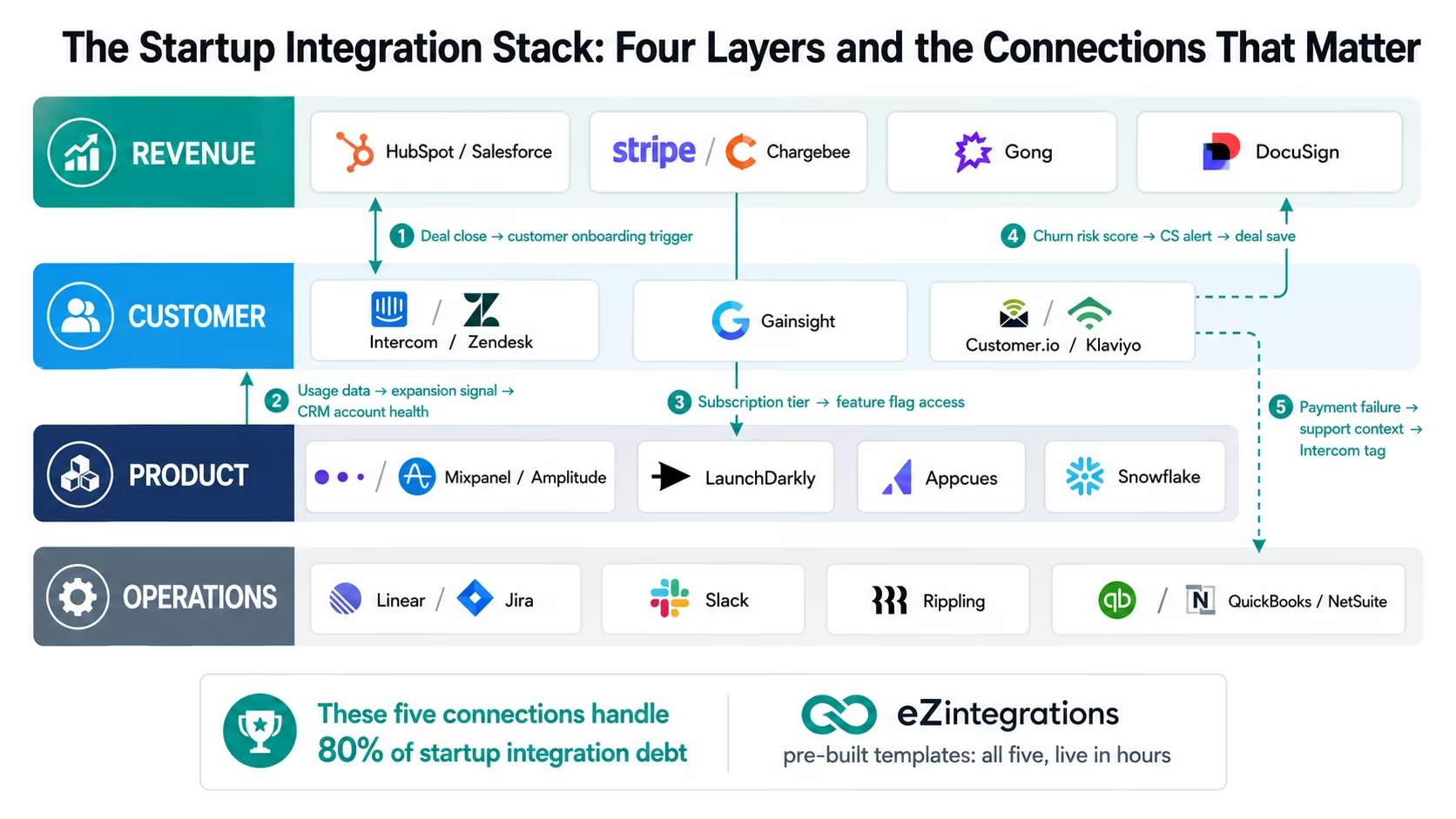
Before mapping workflows, it helps to understand the full integration landscape for a typical growth-stage startup. Most SaaS companies at Series A-B are running 15-25 SaaS tools. The connections between these tools are where most integration debt accumulates.
Revenue Layer:
- CRM: HubSpot, Salesforce, Pipedrive
- Billing: Stripe, Chargebee, Recurly, Paddle
- Revenue intelligence: Gong, Chorus, Clari
- Contract management: DocuSign, PandaDoc
Customer Layer:
- Support: Intercom, Zendesk, Freshdesk
- Customer success: Gainsight, ChurnZero, Vitally
- Customer communications: Klaviyo, Customer.io, Braze
Product Layer:
- Product analytics: Mixpanel, Amplitude, Heap
- Feature flags: LaunchDarkly, Flagsmith
- Product-led growth: Appcues, Pendo, Chameleon
- Data warehouse: Snowflake, BigQuery, Redshift
Operations Layer:
- Project management: Linear, Jira, Asana, Notion
- Internal comms: Slack, Teams
- HR/HRIS: Rippling, Gusto, Workday
- Finance: QuickBooks, Xero, NetSuite
Marketing Layer:
- Marketing automation: HubSpot Marketing, Marketo, Pardot
- SEO/content: Semrush, Ahrefs
- Ad platforms: Google Ads, Meta Ads, LinkedIn Ads
- Attribution: Rockerbox, Northbeam, Triple Whale
The connections that matter most: and accumulate the most integration debt when left manual: are between the revenue layer, customer layer, and product layer. Specifically: the real-time flow of deal status, subscription events, usage data, and health scores across CRM, billing, product analytics, and customer success tools.
Before vs After: Workflow Automation for Startups
| Process | Before Automation | After Automation |
|---|---|---|
| Deal close → billing | AE manually creates Stripe customer and subscription (15-20 min) | HubSpot deal stage → Stripe customer + subscription created automatically |
| Trial → paid conversion | Manual deal stage update in CRM (2-3 min × 50 conversions/month = 2.5 hrs) | Stripe subscription event → HubSpot deal stage updated automatically |
| Churn event | Manual: Intercom tag, marketing list removal, CS flag, CRM update (20-30 min) | Stripe cancellation → all downstream systems updated simultaneously |
| Product usage → CRM health score | Weekly manual export from Mixpanel, paste into HubSpot (2-3 hrs/week) | Real-time product events → HubSpot contact score updated continuously |
| New user onboarding trigger | Someone checks new signups daily, manually sends to onboarding sequence | Stripe/product event → Customer.io or Klaviyo onboarding sequence triggered automatically |
| Support ticket context | CS rep manually checks Stripe for subscription status before every ticket | Intercom automatically shows Stripe subscription tier and billing status in ticket sidebar |
| CEO Monday report | 90 minutes Sunday evening assembling from 4-5 sources | Automated report assembled from connected systems, delivered Saturday night |
| Failed payment → dunning | Manual email sent by finance team when they notice the failed charge | Stripe webhook → automated dunning sequence triggered immediately |
| Expansion revenue trigger | CS manually reviews usage data quarterly to identify upsell candidates | Usage threshold reached → CS alert in Slack with expansion brief |
| New hire tool provisioning | IT manually creates accounts across 8-12 tools (1-2 hours per hire) | HRIS new hire event → all tool accounts created automatically |
The Four Integration Maturity Levels for Startups
eZintegrations serves startups at every stage: from the first automated workflow to enterprise-grade AI operations intelligence. The platform is designed so you do not need to migrate as you grow: the same platform that handles your first Stripe-to-HubSpot sync handles your Level 4 Goldfinch AI multi-agent revenue intelligence at Series C.
Level 1 (iPaaS: Start Here): point-to-point workflow automation between your SaaS tools.
→ Stripe event fires
→ HubSpot deal updates. HubSpot deal closes
→ Stripe subscription created. Intercom ticket opened
→ Slack alert sent.
These are the 15-25 minutes of manual work that happen dozens of times per day. Template-based, live in hours, $90/month.
Level 2 (AI Workflows): intelligence embedded in your data pipelines. Document Intelligence reads contracts and extracts deal terms. LLM Classification categorises support tickets by type and urgency. Data Analysis detects usage anomalies that predict churn risk. These AI nodes run within your existing integration pipelines: the same Stripe-to-HubSpot workflow gains the ability to classify the subscription as expansion or contraction based on the seat count change.
Level 3 (AI Agents): autonomous investigation of complex business exceptions. The Revenue Intelligence Agent investigates why an account is at churn risk: retrieves usage data from Mixpanel, support ticket history from Intercom, billing history from Stripe, and engagement data from the email platform: and routes a pre-assembled account health brief to the customer success manager. Not a notification that something is wrong: a complete pre-researched brief so the CS manager can act rather than investigate.
Level 4 (Goldfinch AI): executive intelligence via natural language Chat UI. The CEO asks: “What is our net revenue retention this month by cohort, and which cohorts are at risk?” Goldfinch AI queries the billing, product, and CRM data and returns a formatted answer in under 60 seconds. No BI tool. No analyst request. Live data, instant answer.
Core Integration Workflows Every Startup Needs
The Minimum Viable Integration Stack
Before configuring complex AI workflows, get the five foundational integrations right. These are the connections that prevent the most manual work per hour of setup time:
1. Billing events → CRM: every Stripe subscription event (created, upgraded, downgraded, cancelled, payment failed, payment recovered) updates the corresponding contact and company record in HubSpot automatically. Your CRM is always current.
2. CRM deal close → billing: when a HubSpot deal moves to Closed Won, the Stripe customer and subscription are created automatically. The AE never manually enters billing data.
3. Product activation → marketing: when a user completes a key activation event in your product (as defined in Mixpanel or Amplitude), their Customer.io or Klaviyo record is updated and the appropriate lifecycle sequence is triggered. Onboarding is automatic.
4. Billing events → support context: Intercom’s sidebar shows Stripe subscription status, billing tier, and payment history for every support ticket: without the CS rep manually checking Stripe.
5. Any event → Slack alert: configurable Slack notifications for business-critical events: new paid subscription, churn event, payment failure, expansion event. Your team knows what is happening without checking dashboards.
Get these five right and you eliminate 80% of Danielle’s manual data entry problem.
Workflow 1: Revenue Operations Automation
Revenue operations is where integration debt is most expensive. Every minute an AE spends manually entering billing data is a minute not spent on selling. Every time a customer’s subscription status is wrong in the CRM is a customer experience failure waiting to happen.
The Complete Revenue Ops Integration Workflow:
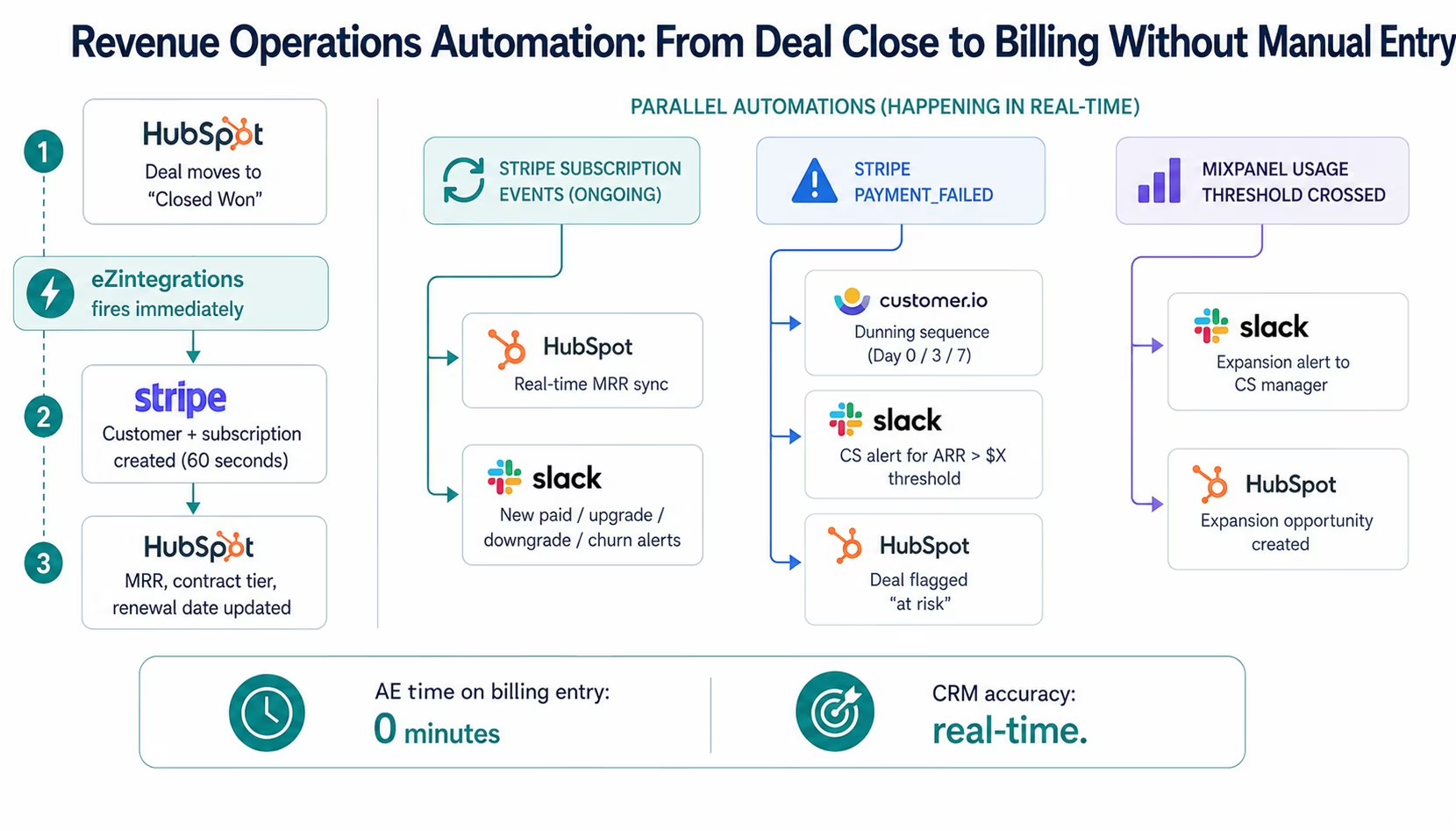
Deal close → billing (under 60 seconds): When a HubSpot deal moves to “Closed Won,” the workflow fires. It retrieves the deal data (company name, primary contact, contract value, billing frequency, product SKU) and creates the Stripe customer and subscription. If DocuSign or PandaDoc is in the stack, the workflow waits for contract signature confirmation before creating the billing record. The AE never touches Stripe.
Subscription change → CRM sync (real-time): Every Stripe subscription event fires a webhook to eZintegrations. Subscription created, upgraded, downgraded, or cancelled: the HubSpot company record is updated with the current MRR, the contract tier, the next renewal date, and the subscription status. Your CRM is always a live representation of your revenue position, not a representation of whatever someone entered two weeks ago.
Payment failure → multi-channel dunning (immediate): Stripe fires a webhook on failed payment. The workflow immediately triggers: an automated email sequence via Customer.io (day 0, day 3, day 7 dunning), a CS alert in Slack for accounts above the configured ARR threshold, a HubSpot deal “at risk” flag, and an Intercom note on the account. Nothing falls through because nobody noticed the failed payment notification email.
Expansion detection → CS alert: When Mixpanel usage data shows an account crossing a configured usage threshold (seat count, feature usage, API calls), the workflow fires an expansion alert to the account’s CS manager in Slack with the usage data, the account’s current subscription tier, and a suggested expansion offer. No quarterly CSV review required.
Workflow 2: Customer Success Automation
Customer success at a startup is often under-resourced relative to the data it needs to act on. A CS team of three managing 200 accounts cannot manually track usage signals across all accounts in Mixpanel, billing health in Stripe, and engagement signals in the email platform. They drown in dashboards instead of talking to customers.
The Customer Success Intelligence Workflow:
Real-time health score in CRM: The workflow continuously pulls data from three sources and writes a composite health score to HubSpot:
- Product usage score (from Mixpanel or Amplitude): login frequency, feature adoption breadth, core action completion rate
- Billing health score (from Stripe): payment history, subscription stability, days since last upgrade
- Engagement score (from Customer.io or Klaviyo): email open rate, in-app communication response, support ticket rate
Every HubSpot contact and company record has a live health score that updates continuously, not quarterly.
Churn risk alert (immediate): The Watcher Tool monitors the composite health score. When any account’s health score drops below the configured threshold, a structured CS alert fires to the assigned CSM’s Slack: the account name, the specific factors driving the health decline, the ARR at risk, and a one-click link to the HubSpot account.
Churn event cascade: When a Stripe cancellation event fires, the workflow simultaneously:
- Removes the customer from all active marketing sequences in Customer.io
- Adds them to a win-back sequence (if configured)
- Creates a HubSpot deal “churned” record with the churn date and reason
- Updates their Intercom profile status
- Creates a Slack notification for the CX and CS teams
- Triggers the HRIS offboarding workflow if appropriate (for internal tools access)
All of this happens in under 30 seconds. Previously: multiple manual steps spread across multiple people’s to-do lists, completed over 2-3 days.
Workflow 3: Product-Led Growth Data Pipeline
For PLG startups, product data is the most important signal in the business: and it lives in Mixpanel or Amplitude, not in the CRM where your GTM team works. The PLG data pipeline bridges this gap.
Trial signup → activation sequence: New trial signup in the product → eZintegrations receives the event → checks if the user already exists in HubSpot (deduplication) → creates or updates the HubSpot contact → triggers the appropriate onboarding sequence in Customer.io based on signup source (organic, paid, referral, sales-assisted).
Activation milestone → CRM enrichment: As users progress through activation milestones in the product (first import, first integration, first team member invited: whatever your activation metrics are), each milestone event updates the HubSpot contact score. The CRM always shows where every trial user is in their activation journey: without anyone manually checking product dashboards.
PQL (Product Qualified Lead) trigger: When a trial user meets your PQL criteria (configured threshold of activation events, usage frequency, or a specific high-intent action), the workflow fires: a HubSpot deal is created automatically, the user is added to a sales-assisted sequence, and a Slack notification goes to the SDR team with the user’s activation summary. Your sales team reaches out to the most qualified trials immediately: not from a weekly export.
Expansion event → upsell trigger: When a free or lower-tier customer crosses the usage threshold that predicts upgrade readiness, the workflow triggers: a HubSpot expansion deal is created, the CSM receives a Slack alert with the account’s usage summary, and a targeted upgrade sequence launches in Customer.io. Upsell is systematic rather than opportunistic.
Workflow 4: Finance and Billing Automation
Finance operations at a startup are often the last area to get automated: until month-end close becomes a bottleneck. The finance automation workflow eliminates the manual reconciliation that consumes 2-3 days every month-end.
Stripe → accounting sync (real-time): Every Stripe payment, refund, and subscription event syncs to QuickBooks or Xero in real time: revenue recognition, invoice creation, and payment recording happen automatically. Month-end close no longer requires reconciling Stripe exports against the accounting system.
Invoice delivery automation: For B2B customers on annual contracts, the workflow generates and delivers invoices automatically on the configured schedule: pulling the contract terms from HubSpot, generating the invoice in QuickBooks or NetSuite, and delivering it via email without the finance team manually processing each invoice.
Expense sync: Expense claims approved in the expense management system (Expensify, Ramp) post to QuickBooks or Xero automatically: no month-end expense import exercise.
Payroll → accounting: Approved payroll runs in Gusto or Rippling create journal entries in QuickBooks or Xero automatically. The finance team reviews, not enters.
Workflow 5: Team Operations and Internal Tooling
Operations automation is often the last category startups address: and the one with the most compounding benefit. Every new hire is a recurring integration cost if the provisioning is manual. Every team process that involves moving data between Notion, Linear, Slack, and Google Workspace is integration debt.
New hire provisioning: When a new hire record is created in Rippling or Gusto as “active,” the workflow fires: creates Google Workspace account, creates Slack account, adds to the appropriate Slack channels, creates accounts in the startup’s core SaaS tools (HubSpot, Jira, Notion, Intercom, etc.), and sends the new hire a Slack welcome message with their tool access summary. A process that took IT 1-2 hours per hire is fully automated.
Automated CEO report: Rather than Danielle’s 90-minute Sunday ritual, the workflow assembles the weekly metrics report automatically: pulls MRR, new MRR, churned MRR, and expansion MRR from Stripe; pull new trials, activations, and PQL count from the product analytics platform; pulls support ticket volume and CSAT from Intercom; and delivers the formatted report to the CEO’s Slack every Sunday at 7 PM.
Linear ticket → Slack context: When a bug is reported in Linear and tagged as customer-impacting, the workflow automatically retrieves the list of affected customers from Intercom (based on the feature flag or product area), posts a customer impact summary to the eng-alerts Slack channel, and creates a HubSpot note on each affected account. Customer-impacting incidents have automatic stakeholder notification.
The AI Upgrade Path: From Workflows to Agents
The workflows above are Level 1 iPaaS: deterministic, reliable, and enough to solve Danielle’s 20% time problem. But eZintegrations is not a ceiling. When your startup needs more intelligence than a workflow provides, the AI layers are built in.
Level 2 AI Workflows: add intelligence to existing pipelines: The Stripe-to-HubSpot sync already runs. Now add LLM Classification that analyses the support ticket text and categorises it by churn risk signal (product issue, competitor mention, budget conversation, usage frustration): routing high-risk tickets to the CS director in Slack before they become churn events. No new integration required: an AI node added to an existing workflow.
Level 3 AI Agents: investigate complex business exceptions: Your health score workflow fires a churn risk alert on Account X. Instead of a raw notification, the Revenue Intelligence Agent fires: retrieves Mixpanel usage data, Stripe billing history, Intercom support history, and HubSpot engagement data. Delivers a pre-assembled account brief to the CSM: what changed, what is at risk, what worked in similar accounts. The CSM makes one informed call instead of 20 minutes of dashboard review.
Level 4 Goldfinch AI: executive intelligence via Chat UI: Your CEO asks: “What is our Net Revenue Retention this month by cohort, and which cohorts are showing expansion versus contraction?”
Goldfinch AI queries the billing and CRM data, calculates NRR by cohort, identifies the cohorts with the highest expansion rates (candidates for GTM focus), and the cohorts with the highest contraction rates (candidates for CS intervention). Structured answer in 60 seconds.
No BI tool. No analyst. No waiting for the weekly review.
Why Zapier and Make Are Not Enough (and When to Upgrade)
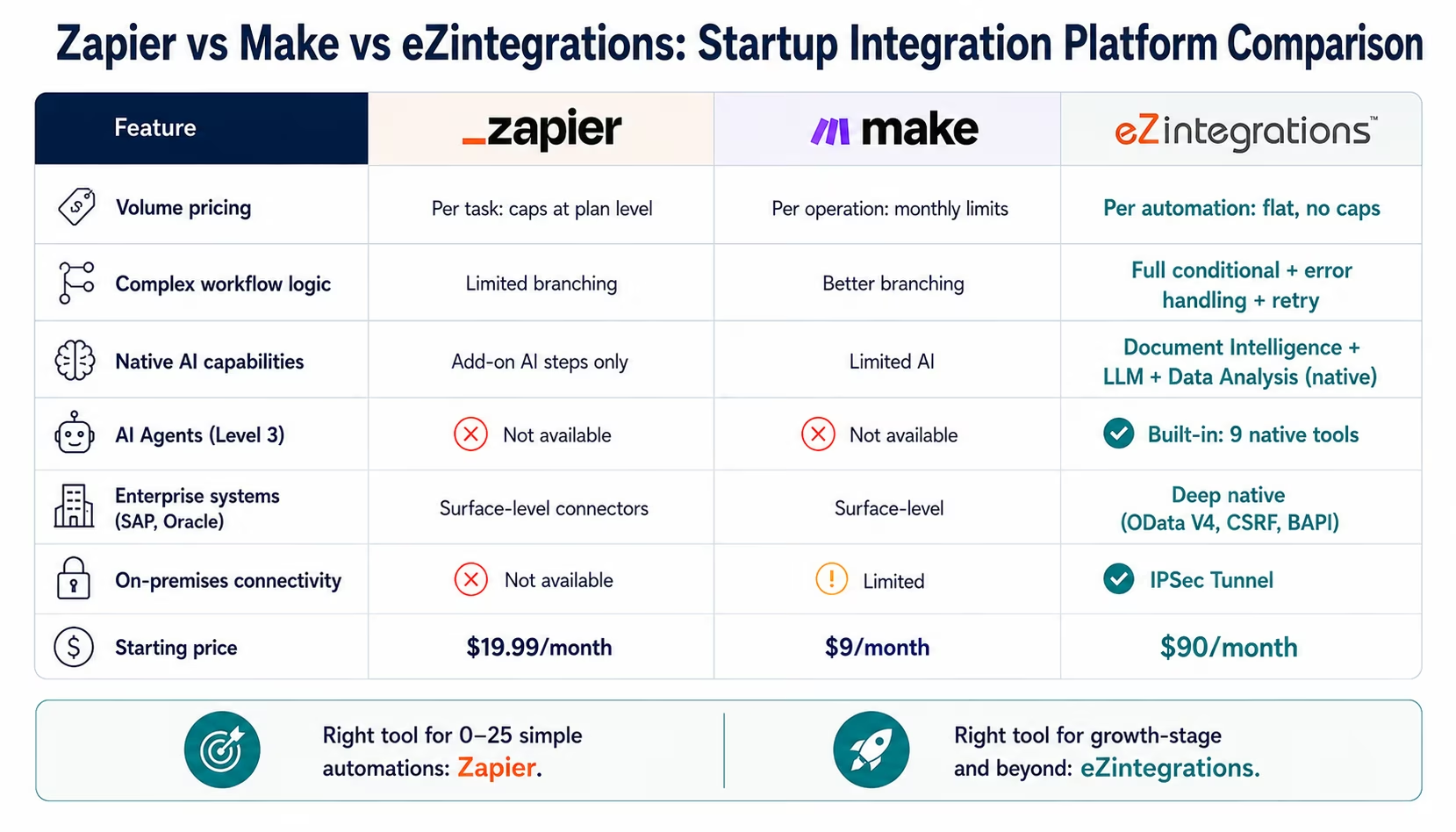
Zapier and Make are excellent tools for specific use cases. For simple, low-volume point-to-point automations: a Slack notification when a form is submitted, a Google Sheet row created when a HubSpot contact is added: they work well and have a low learning curve.
The limitations become visible when your startup grows:
Volume: Zapier’s standard plans cap task volumes that fast-growing startups hit quickly. At 25,000 tasks/month, you are looking at the Zapier Teams plan at $103.50/month: and the volume limit is still a ceiling, not a foundation.
Complex logic: multi-step workflows with conditional branching, error handling, retry logic, and rollback capability are difficult to build reliably in Zapier or Make. Enterprise-grade reliability requires enterprise-grade workflow configuration.
AI capabilities: Zapier has added AI features, but they are append-on AI nodes rather than native AI infrastructure. Document Intelligence, LLM Classification, Data Analysis, and the Level 3-4 agent architecture are not available on Zapier at any price point.
Enterprise systems: when your startup reaches the scale where you need to connect to SAP, Oracle, or Salesforce with deep native integration (not surface-level API calls), Zapier’s connector library does not provide the required depth. eZintegrations’ SAP OData V4 connector with automatic CSRF token management is not something Zapier offers.
The right time to upgrade:
- You are spending more time maintaining Zaps than building new ones
- You need conditional workflow logic that Zapier cannot express cleanly
- You are hitting task volume limits and the next tier’s pricing is hard to justify
- You need AI workflow capabilities (classification, document reading, anomaly detection)
- You are preparing for a raise or enterprise deals where data pipeline reliability matters
When you upgrade from Zapier to eZintegrations, your Zapier workflow patterns largely translate: the logic you have already built informs the template configuration in eZintegrations. The migration is not a rebuild from scratch.
Key Outcomes and Results
Startups deploying eZintegrations across revenue operations, customer success, product-led growth, and finance report measurable improvements within the first 30 days:
Revenue Operations:
- AE time on manual billing entry: 15-20 min × deal volume → 0 minutes
- CRM accuracy: days behind → real-time (Stripe events update HubSpot in under 60 seconds)
- Payment failure response time: discovered when noticed → immediate automated dunning
- Expansion signal to CS alert: quarterly export → real-time threshold trigger
Customer Success:
- Health score freshness: weekly manual update → continuous real-time
- Churn event response: multi-step manual process over 2-3 days → automated cascade in 30 seconds
- CS team dashboard time: 2-3 hours/week → minimal (live CRM data eliminates manual pulls)
- Expansion identification: quarterly review → continuous usage monitoring
Operations:
- New hire provisioning: 1-2 hours IT effort → automated in under 5 minutes
- Weekly CEO report: 90-minute Sunday assembly → automated Saturday evening delivery
- Manual reconciliation tasks eliminated: varies by team, typically 15-20% of total ops capacity
- Integration maintenance overhead: growing with each new Zap → stable (vendor-maintained connectors)
Finance:
- Month-end close time: reduced by 50-70% for Stripe-to-accounting reconciliation
- Invoice delivery: manual monthly process → automated on contract schedule
- Expense reconciliation: month-end batch → real-time sync
How to Get Started
Starting with eZintegrations at a startup is intentionally simple. You do not need an integration specialist or a dedicated implementation project.
Step 1: Identify your highest-friction manual process
Ask Danielle’s question: “What manual data task consumes the most time per week across my team?” For most startups, it is one of: manual billing data entry from CRM to Stripe, manual CRM updates from billing events, manual customer health tracking, or the weekly ops report assembly. Start there.
Step 2: Find the template in the Automation Hub
Visit the Automation Hub and search for your specific system pair. “HubSpot to Stripe” returns the deal-close billing creation template. “Stripe to HubSpot” returns the subscription sync template. “Mixpanel to HubSpot” returns the product-to-CRM health score template. Import the template.
Step 3: Configure your credentials (10-15 minutes)
Enter the API credentials for each connected system. HubSpot: private app access token from HubSpot settings. Stripe: restricted API key scoped to the required events. Mixpanel: service account credentials. eZintegrations handles OAuth refresh and API key rotation: you set credentials once.
Step 4: Review the field mapping (15-20 minutes)
The template pre-maps standard fields. Review the mapping and adjust for any custom properties in your specific CRM or billing setup. No code: visual drag-and-drop mapper.
Step 5: Test and activate
Run the workflow against your staging environment or a test event. Verify the output. Activate. The workflow runs automatically from that point: no maintenance required when either system updates, because eZintegrations maintains the connectors.
Import a startup integration template from the Automation Hub and go live today. Most startup integration templates take 1-3 hours from import to activation.
FAQs
1. What is an integration platform for startups and why does it matter?
An integration platform connects the SaaS tools your startup uses including CRM, billing, product analytics, support, marketing, and internal operations with automated data pipelines that eliminate manual data movement. At growth stage, manual workflows become operational debt and reduce data quality. An integration platform replaces manual touchpoints with automated workflows that run in real time without maintenance overhead.
2. How is eZintegrations different from Zapier for startups?
Zapier is suited for simple low-volume automations. eZintegrations is designed for startups needing enterprise-grade reliability, AI workflow capabilities, and deep integrations with systems like Salesforce, SAP, or Oracle. It supports advanced conditional logic, AI capabilities, and flat per-automation pricing without per-task fees.
3. What startup tools does eZintegrations integrate with?
eZintegrations provides connectors for HubSpot, Salesforce, Stripe, Chargebee, Recurly, Intercom, Zendesk, Mixpanel, Amplitude, Customer.io, Klaviyo, Slack, Linear, Jira, Asana, Notion, QuickBooks, Xero, NetSuite, Rippling, Gusto, Google Workspace, and 50+ more platforms.
4. How long does it take to set up a startup integration?
Most startup integration templates go live in 1-3 hours including template import, API credential setup, field mapping review, staging tests, and activation. Complex CRM customisations or billing logic may require additional setup time.
5. Does eZintegrations scale as our startup grows?
Yes, eZintegrations scales from startup to enterprise on the same platform. Integrations configured at seed stage continue operating at higher transaction volumes without migration. Additional enterprise integrations and AI capabilities can be added as the company grows.
6. What does no integration debt mean in practice?
No, integration debt means workflows use vendor-maintained connectors, configurable workflow logic, and observable data flows with execution logging and error tracking. This eliminates fragile one-off scripts and manual processes that become expensive to maintain over time.
Conclusion: Build the Integration Foundation That Scales
Danielle’s 90-minute Sunday report is a symptom. The disease is integration debt: the accumulation of manual processes that seem tolerable at 40 people but compound toward operational crisis at 150.
The good news: integration debt is entirely preventable. Building the automated data pipelines between your CRM, billing, product, and support tools today costs 1-3 hours per workflow. Rebuilding them later, while also triaging the operational consequences of their absence, costs far more: in time, in headcount, and in the customer experience failures that happen when data is stale, missing, or entered wrong.
eZintegrations is SOC 2 Type II certified. For startups handling EU customer data, GDPR compliance applies to all customer data processed through eZintegrations workflows. For startups in healthcare or with HIPAA-covered data, a signed BAA is available.
eZintegrations gives startups the integration foundation that scales from Series A to IPO: Level 1 iPaaS workflows for deterministic data movement, Level 2 AI Workflows for intelligent data processing, Level 3 AI Agents for autonomous exception investigation, and Level 4 Goldfinch AI for executive intelligence via Chat UI. Enterprise-grade. Startup pricing. Live in hours.
Start with your highest-friction manual process. Fix it today. Then fix the next one. Build the foundation while it is still affordable to build: before the volume makes every manual process a four-alarm fire.
Import a startup integration template from the Automation Hub and go live today.
Book a demo and bring your current Danielle problem. We will map your stack to templates and show you what automated looks like for your specific tools.

