
UPS Supply Chain Integration with SAP and NetSuite: Automate Fulfilment for Beauty Brands
April 14, 2026To integrate UPS Supply Chain Solutions (UPS SCS) with SAP S/4HANA or NetSuite for a beauty brand, eZintegrations authenticates to the UPS SCS REST API at developer.ups.com and scsapps.ups.com/scs/catalog using OAuth 2.0 (Client ID and Client Secret → POST https://onlinetools.ups.com/security/v1/oauth/token), creates warehouse fulfilment orders in UPS SCS when ERP sales orders are confirmed, receives UPS SCS shipment events via REST webhooks (triggering SAP goods issue with movement type 601 or NetSuite item fulfilment creation), syncs UPS SCS warehouse inventory to SAP API_MATERIAL_STOCK_SRV or NetSuite inventoryAdjustment, and generates Walmart EDI 856 ASN or Amazon SP-API shipment confirmation from the UPS SCS shipment data within 15 minutes of carrier scan. Both EDI and REST API connectivity modes are supported for UPS SCS clients, with the REST API being the primary modern interface.
TL;DR
- UPS Supply Chain Solutions (UPS SCS) is a major 3PL operating across North America with warehousing, distribution, DTC fulfilment, and international freight forwarding. Their primary integration interface is the REST API at
developer.ups.comand the SCS-specific API portal atscsapps.ups.com/scs/catalog, both using OAuth 2.0. - UPS SCS API capabilities: warehouse order creation, ASN (advance shipping notice) generation, inventory querying within warehouses, shipment order status checking, and real-time tracking via
GET /api/track/v1/details/{trackingNumber}. - For beauty brands, the five critical integration flows: ERP sales orders to UPS SCS fulfilment orders, UPS SCS shipment confirmation to ERP goods issue and retailer notifications (Walmart EDI 856, Amazon SP-API), UPS SCS warehouse inventory sync to ERP, inbound goods receipt from UPS SCS to ERP purchase order, and UPS SCS activity billing to ERP AP.
- ERP targets: SAP S/4HANA (OData V4 APIs) and NetSuite (SuiteTalk REST). Oracle Fusion Cloud also supported.
- “No custom code” positioning: eZintegrations connects directly to the UPS SCS REST API using standard OAuth 2.0, no middleware deployment on UPS servers, no SAP ABAP custom development.
- Automation Hub template covers all five flows. 3-5 business days per UPS SCS facility.
Why UPS SCS-ERP Integration Is a REST API Problem, Not an EDI Problem
Your beauty brand selected UPS Supply Chain Solutions for DTC parcel fulfilment from their Louisville, KY hub, and for Walmart retail distribution from their Mesquite, TX facility. Solid choice: UPS SCS brings carrier network integration, real-time tracking, and strong retail compliance capabilities.
Now the question: how does your SAP S/4HANA or NetSuite talk to UPS SCS?
Unlike Kenco (which primarily uses EDI 940/945), UPS SCS’s modern integration interface is their REST API: the UPS Developer Portal (developer.ups.com) and the SCS-specific Warehouse API portal (scsapps.ups.com/scs/catalog). Both use OAuth 2.0 for authentication and return JSON responses over HTTPS. No ANSI X12 EDI documents to parse, no AS2 endpoints to configure, no VAN mailbox to monitor.
This is actually the good news. REST APIs are faster to configure, easier to debug, and more consistent than EDI. When a UPS SCS shipment occurs, the shipment event is available via REST webhook or REST polling immediately. When you need to check inventory at the UPS SCS warehouse, a single GET request returns the current counts in JSON.
The challenge is not the UPS SCS API. The challenge is the translation layer: converting UPS SCS’s JSON order and inventory data into SAP OData V4 calls (API_SALES_ORDER_SRV, API_GOODSMVT_SRV) or NetSuite SuiteTalk REST records (itemFulfillment, inventoryAdjustment, itemReceipt). This translation, along with the SKU-to-UPS item code mapping and the downstream retailer notification triggers, is what eZintegrations provides without custom code on either the UPS SCS or ERP side.
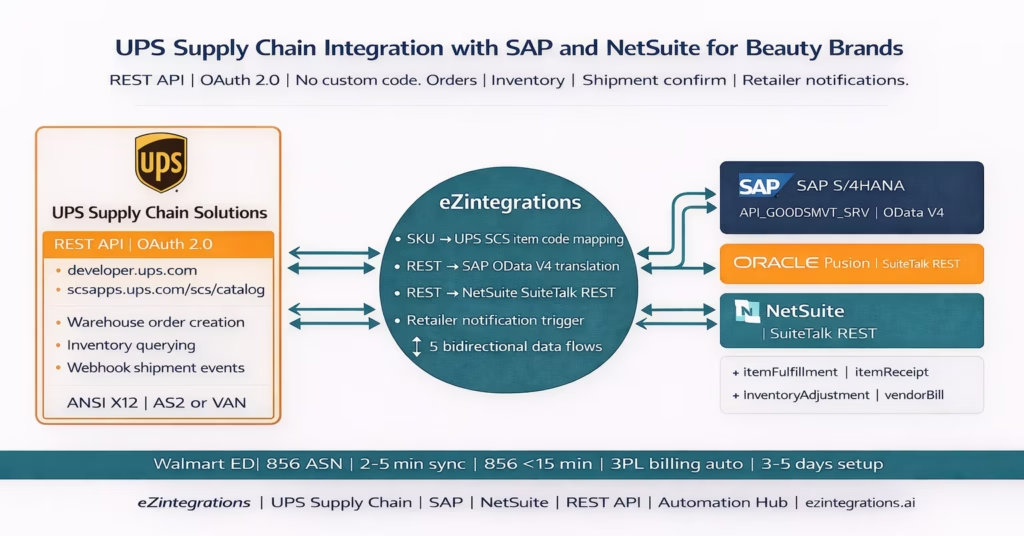
UPS SCS API Architecture: What You Are Connecting To
Authentication
UPS SCS uses OAuth 2.0 Client Credentials across all API endpoints. A single authentication call covers both the parcel/shipping APIs and the SCS warehouse management APIs.
POST https://onlinetools.ups.com/security/v1/oauth/token
Content-Type: application/x-www-form-urlencoded
Authorization: Basic {base64(ClientId:ClientSecret)}

grant_type=client_credentials
Response:
{
  "token_type": "Bearer",
  "issued_at": "1706611200",
  "expires_in": "14399",
  "access_token": "eyJhbGci..."
}
Tokens expire every 4 hours. eZintegrations handles token refresh automatically before expiry.
UPS SCS Warehouse API Endpoints (scsapps.ups.com)
The SCS-specific warehouse management API at scsapps.ups.com/scs/catalog provides:
Warehouse order creation:
POST https://scsapps.ups.com/scs/api/v1/orders
Authorization: Bearer {access_token}
Content-Type: application/json

{
  "customerOrderNumber": "{ERP_order_reference}",
  "warehouseCode": "{UPS_SCS_facility_code}",
  "shipToAddress": {
    ...
  },
  "orderLines": [
    {
      "itemNumber": "{UPS_SCS_item_code}",
      "quantity": 480
    }
  ],
  "requestedShipDate": "2026-01-30",
  "serviceLevel": "UPS_GROUND"
}
Inventory query:
GET https://scsapps.ups.com/scs/api/v1/inventory
  ?warehouseCode={facility_code}
  &itemNumber={UPS_SCS_item_code}

Authorization: Bearer {access_token}
Response includes: availableQuantity, onHandQuantity, allocatedQuantity, lotNumber, expiryDate.
Shipment status:
GET https://scsapps.ups.com/scs/api/v1/shipments/{shipmentId}
Authorization: Bearer {access_token}
Returns: shipment status, tracking number, actual shipped quantities, ship date, carton data.
Webhook registration (push events): UPS SCS supports webhook registration for shipment events: when an order ships, UPS SCS POSTs the shipment data to your registered webhook URL. This is the preferred trigger for the ERP goods issue and retailer notification flows.
UPS Tracking API (developer.ups.com)
For real-time tracking status, eZintegrations calls the standard UPS Tracking API:
GET https://onlinetools.ups.com/api/track/v1/details/{trackingNumber}
  ?locale=en_US

Authorization: Bearer {access_token}
Returns: current status, activity history, estimated delivery date, proof of delivery. The ERP shipment record is updated with milestone data as it arrives (carrier picked up, in transit, out for delivery, delivered).
The Five Data Flows: UPS SCS and Your ERP
- Level 1 (iPaaS Workflows) handles all REST API calls (both UPS SCS warehouse API and ERP API), SKU-to-UPS-item code translation, and retailer notification triggers.
- Level 2 (AI Workflows) validates shipment quantities against order quantities, detects discrepancies, and validates 856 carton data before transmission.
- Level 3 (AI Agents) monitors UPS SCS inventory levels against reorder thresholds, detects near-expiry lots at the UPS SCS facility, and flags anomalous shipping events.
- Level 4 (Goldfinch AI) orchestrates the complete UPS SCS-ERP cycle as a Workflow Node and provides the Goldfinch AI Chat UI for ops and finance teams: “What UPS SCS orders are in transit today?”, “Which beauty SKUs are below safety stock at the Louisville facility?”, or “Show me this month’s UPS SCS activity charges by GL account.”
Flow 1: ERP Sales Order to UPS SCS Warehouse Fulfilment Order
When a sales order is confirmed in SAP or NetSuite, a fulfilment request must go to UPS SCS immediately.
SAP trigger: When SAP creates an outbound delivery from a sales order (API_OUTBDLVRY_SRV), Level 1 extracts the delivery data and calls the UPS SCS warehouse order API.
NetSuite trigger: When a NetSuite sales order is approved with UPS SCS as the fulfilment location, Level 1 calls the UPS SCS warehouse order API.
SKU-to-UPS item code mapping: Your ERP uses SAP Material Numbers or NetSuite item IDs. UPS SCS uses their own internal item codes (assigned during the onboarding and item master setup with UPS SCS). The mapping table (ERP SKU → UPS SCS item code) is maintained as a reference dataset in eZintegrations and applied to every fulfilment order automatically.
Channel-specific routing: If your brand uses UPS SCS for both DTC (parcel) and retail (Walmart, Target), the service level in the warehouse order API call determines the fulfilment workflow at UPS SCS:
- Walmart/retail:
serviceLevel: "RETAIL_DISTRIBUTION"→ UPS SCS picks and packs in master cartons, generates GS1-128 SSCC-18 pallet labels - DTC/Amazon FBM:
serviceLevel: "DTC_PARCEL"→ UPS SCS picks and ships in branded poly-mailer or box
Flow 2: UPS SCS Shipment Confirmation to ERP and Retailers
When UPS SCS ships an order (carrier scan), the shipment event triggers the most time-critical actions in the integration.
UPS SCS webhook payload (on ship event):
{
  "eventType": "SHIPMENT_CREATED",
  "customerOrderNumber": "SO-2026-WM-4882",
  "shipmentId": "UPS-SCS-SHP-20260130-001",
  "trackingNumber": "1Z9W4872XXXX",
  "carrierCode": "UPSN",
  "serviceLevel": "UPS_GROUND",
  "shipDate": "2026-01-30",
  "orderLines": [
    {
      "itemNumber": "UPS-LGLOSS-04",
      "shippedQuantity": 480
    },
    {
      "itemNumber": "UPS-LGLOSS-07",
      "shippedQuantity": 355
    }
  ],
  "cartons": [
    {
      "sscc": "00845678901234567891",
      "trackingNumber": "...",
      "items": [
        ...
      ]
    }
  ]
}
Three simultaneous actions from shipment webhook:
Action 1: SAP Goods Issue
POST https://{sap-instance}/sap/opu/odata/sap/API_OUTBDLVRY_SRV/
  A_OutbDelivery('{delivery_number}')/com.sap.API_OUTBDLVRY_SRV.PostGoodsIssue
Authorization: Bearer {sap_token}
Movement type 601. SAP Plant for UPS SCS (e.g., UPSLOU for Louisville) decremented.
Or NetSuite Item Fulfilment:
POST /services/rest/record/v1/itemFulfillment
Content-Type: application/json

{
  "createdFrom": {
    "id": "{sales_order_id}",
    "type": "salesOrder"
  },
  "shipStatus": {
    "id": "C"
  },
  "trackingNumbers": [
    {
      "trackingNumber": "1Z9W4872XXXX"
    }
  ],
  "item": {
    "items": [
      {
        "itemIsFulfilled": true,
        "quantity": 480,
        "orderLine": 1
      },
      {
        "itemIsFulfilled": true,
        "quantity": 355,
        "orderLine": 2
      }
    ]
  }
}
Action 2: Walmart EDI 856 ASN If the shipment is destined for a Walmart DC, the UPS SCS shipment event data (SSCC labels, carton quantities, tracking) is used to generate the Walmart EDI 856 ASN. Pre-validated against the ordered quantities. Transmitted via AS2 within 15 minutes of UPS SCS carrier scan.
Action 3: Amazon SP-API Shipment Confirmation For Amazon FBM orders:
POST https://sellingpartnerapi-na.amazon.com/orders/v0/orders/{orderId}/shipment
Content-Type: application/json

{
  "carrierCode": "UPS",
  "trackingNumber": "1Z9W4872XXXX",
  "shipDate": "2026-01-30T14:30:00Z"
}
Quantity discrepancy handling: If the UPS SCS webhook shows a different shipped quantity than the ERP order (short ship), Level 2 flags the discrepancy, posts the ERP goods issue for the actual shipped quantity, generates the Walmart 856 for the actual quantity (not the ordered quantity), and routes an alert to the ops team.
Flow 3: UPS SCS Inventory Sync to SAP and NetSuite
eZintegrations polls UPS SCS inventory every 30-60 minutes and triggers an immediate sync after every shipment or receipt event.
UPS SCS inventory query:
GET https://scsapps.ups.com/scs/api/v1/inventory
  ?warehouseCode=UPSLOU
  &page=1
  &pageSize=100

Authorization: Bearer {access_token}
Response maps to ERP:
SAP update:
POST /sap/opu/odata/sap/API_GOODSMVT_SRV/A_GoodsMovement
Content-Type: application/json

{
  "GoodsMovementCode": "01",
  "items": [
    {
      "Material": "LGLOSS-04",
      "Plant": "UPSLOU",
      "StorageLocation": "UPS1",
      "Batch": "{lotNumber}",
      "Quantity": "{availableQuantity}",
      "MovementType": "561"
    }
  ]
}
NetSuite update:
POST /services/rest/record/v1/inventoryAdjustment
Content-Type: application/json

{
  "account": {
    "id": "{inventory_adjustment_account}"
  },
  "subsidiary": {
    "id": "{subsidiary_id}"
  },
  "item": {
    "items": [
      {
        "item": {
          "id": "{netsuite_item_id}"
        },
        "location": {
          "id": "{ups_scs_location_id}"
        },
        "adjustQtyBy": "{delta_from_last_sync}"
      }
    ]
  }
}
Flow 4: Inbound Goods Receipt from UPS SCS to ERP
When your contract manufacturer or production facility ships new stock to UPS SCS, you submit an ASN to UPS SCS via the warehouse API:
POST https://scsapps.ups.com/scs/api/v1/inbound/asn
Content-Type: application/json

{
  "asnReference": "{ERP_PO_number}",
  "expectedArrivalDate": "2026-02-10",
  "lines": [
    {
      "itemNumber": "UPS-LGLOSS-04",
      "quantity": 2400,
      "lotNumber": "LOT-2026-FEB-01",
      "expiryDate": "2028-02-28"
    }
  ]
}
When UPS SCS receives and processes the inbound goods, the goods receipt event fires (via webhook or polling GET /scs/api/v1/inbound/receipts). eZintegrations posts the ERP goods receipt:
SAP:
POST /API_GOODSMVT_SRV/A_GoodsMovement
Content-Type: application/json

{
  "MovementType": "101",
  "Material": "LGLOSS-04",
  "Plant": "UPSLOU",
  "PurchaseOrder": "4500029182"
}
POST /services/rest/record/v1/itemReceipt
Content-Type: application/json

{
  "createdFrom": {
    "id": "{po_id}",
    "type": "purchaseOrder"
  },
  "item": {
    "items": [
      {
        "item": { "id": "{item_id}" },
        "quantity": "{received_quantity}",
        "location": { "id": "{location_id}" }
      }
    ]
  }
}
Flow 5: UPS SCS Activity Billing Reconciliation
UPS SCS charges for fulfilment services monthly. eZintegrations retrieves the billing data via the UPS SCS billing API or SFTP billing file and maps each charge type to the ERP GL account:
| UPS SCS Charge Type | ERP GL Account | Description |
|---|---|---|
| Pick and Pack | 695000 | 3PL Fulfilment – Pick/Pack |
| Storage | 696010 | 3PL Warehouse Storage |
| Inbound Receiving | 695010 | 3PL Inbound Processing |
| Returns Processing | 695020 | 3PL Returns |
| Value-Add (kitting, FBA prep) | 695030 | 3PL Value-Add Services |
| Parcel carrier charges | 695050 | 3PL Parcel Shipping |
The ERP AP bill is created automatically:
- SAP:
API_SUPPLIERINVOICE_PROCESS_SRVvendor invoice with UPS SCS as vendor. - NetSuite:
POST /services/rest/record/v1/vendorBillwith UPS SCS vendor ID.
Beauty and CPG-Specific UPS SCS Requirements
Lot and Expiry Tracking
UPS SCS WMS tracks inventory at the lot level. The inventory query response includes lotNumber and expiryDate per item where configured. For beauty brands:
- Amazon FBA replenishment requests only include lots with 90+ days remaining (eZintegrations enforces this in the fulfilment order for FBA-destined shipments).
- Walmart shipments respect the category-specific minimum shelf life (configured per item).
- Level 3 monitors lot expiry data from UPS SCS inventory queries and fires near-expiry alerts at configurable thresholds.
- Lot data from inbound goods receipt posts to SAP batch records (
CHARGlot number,MHDexpiry date) or NetSuitelotNumberandexpirationDatefields.
UPS Carrier Integration Advantage
Because UPS SCS is part of the broader UPS network, the tracking API (GET /api/track/v1/details/{trackingNumber}) provides richer milestone data than third-party 3PLs: carrier scan events, hub scan events, estimated delivery windows, proof of delivery, and driver release photos. This tracking data can be pushed directly to the ERP shipment record and to customer-facing order status pages without additional carrier integration work.
DTC vs Retail Fulfilment from the Same Facility
If UPS SCS handles both DTC parcel and Walmart/Target retail from the same facility, the integration uses the order type flag to distinguish fulfilment workflows:
serviceLevel: "DTC_PARCEL"orders: parcel dimensions, DTC packaging, individual address per order.serviceLevel: "RETAIL_DISTRIBUTION"orders: master carton quantities, GS1-128 SSCC pallet labels, DC ship-to address.
Both order types flow from the same ERP sales order creation event, routed by Level 1 logic based on the order source (Amazon FBM, Walmart 850 EDI, DTC Shopify, wholesale portal).
Amazon FBA Prep at UPS SCS
For beauty brands using UPS SCS as an FBA prep facility, the warehouse order API includes FBA-specific prep instructions:
- FNSKU label specification per ASIN.
- Poly-bag requirement per Amazon beauty category rules.
- FC destination from the SP-API FBA inbound shipment plan.
When UPS SCS ships to the Amazon FC, the SP-API inbound shipment plan is updated and the ERP goods movement posts from the UPS SCS plant to the AMZFC virtual plant (SAP) or Amazon FC location (NetSuite).
Before vs After: Manual UPS SCS-ERP vs Automated
| Process Step | Manual UPS SCS-ERP | Automated with eZintegrations |
|---|---|---|
| Fulfilment order to UPS SCS | Portal entry or emailed spreadsheet | ERP order → POST /scs/api/v1/orders in seconds |
| SKU-to-UPS item code | Manual lookup spreadsheet | Reference dataset auto-applied to every order |
| UPS SCS shipment webhook | Manual portal checks or email dependency | Webhook registered and processed instantly on event |
| SAP goods issue after shipment | Manual MIGO or VA02 entry | SAP API_OUTBDLVRY_SRV PostGoodsIssue triggered on webhook |
| NetSuite item fulfilment | Manual fulfilment update | SuiteTalk REST POST /itemFulfillment triggered automatically |
| Walmart EDI 856 ASN timing | Manual process risks missing 30-minute SLA | Auto-generated from webhook and transmitted within 15 minutes |
| Amazon shipment confirmation | Manual portal entry or delayed script | SP-API POST /orders/{id}/shipment triggered automatically |
| Shipment quantity discrepancy | Discovered late during invoicing or disputes | Level 2 detects immediately and uses actual shipped quantities |
| UPS tracking in ERP | Manual tracking checks and ERP updates | Tracking API milestones pushed automatically to ERP |
| Inventory sync | Daily portal download and manual entry | REST GET /inventory every 30–60 minutes → ERP sync |
| Lot and expiry data | Often not captured | Lot data synced to SAP batch or NetSuite lot records |
| Near-expiry alerting | Reactive or missed entirely | Level 3 monitoring triggers alerts at defined thresholds |
| Inbound ASN to UPS SCS | Manual portal entry or emailed PO | REST POST /inbound/asn generated from ERP PO |
| ERP goods receipt after inbound | Manual and often delayed | Webhook or polling triggers automatic ERP goods receipt |
| UPS SCS billing reconciliation | Manual GL coding (2–3 hours per month) | Billing parsed and ERP AP bill auto-created per GL mapping |
Step-by-Step: A Walmart Retail Order Through UPS SCS to SAP and Walmart 856
Here is the complete automated cycle for a Walmart Valentine’s Day PO fulfilled from UPS Supply Chain Solutions Mesquite, TX.
Setup: Lumière Cosmetics uses SAP S/4HANA. UPS SCS Mesquite handles all Walmart retail fulfilment. UPS SCS item code for Rose Gloss: UPS-LGLOSS-04-ROSE. SAP Plant for Mesquite: UPSMQ. Walmart EDI is managed by eZintegrations for 856 generation.
January 22, 9:14 AM: Walmart EDI 850 arrives. eZintegrations receives Walmart PO 4500882411. SAP sales order SO-2026-WM-4882 created automatically (per the Walmart-SAP integration flow). Delivery document 802900029441 created.
January 22, 9:14 AM: UPS SCS warehouse order created. Level 1 maps SAP materials to UPS SCS item codes:
POST https://scsapps.ups.com/scs/api/v1/orders
Content-Type: application/json

{
  "customerOrderNumber": "SO-2026-WM-4882",
  "warehouseCode": "UPSMQ",
  "shipToAddress": {
    "name": "Walmart DC 6094",
    "city": "Kansas City",
    "state": "MO"
  },
  "orderLines": [
    {
      "itemNumber": "UPS-LGLOSS-04-ROSE",
      "quantity": 480
    },
    {
      "itemNumber": "UPS-LGLOSS-07-BERRY",
      "quantity": 360
    }
  ],
  "requestedShipDate": "2026-01-30",
  "serviceLevel": "RETAIL_DISTRIBUTION"
}
UPS SCS returns order confirmation UPS-SCS-ORD-20260122-001.
January 22, 9:30 AM: Inventory check. Level 3 queries UPS SCS inventory: GET /inventory?warehouseCode=UPSMQ&itemNumber=UPS-LGLOSS-07-BERRY. Response: availableQuantity: 341. Ordered: 360. Short by 19 units. Level 2 flags discrepancy: alert sent to ops team. UPS SCS order updated to acknowledge 341 units of Berry Gloss.
January 30, 2:14 PM: UPS SCS ships. UPS SCS picks and packs. UPS carrier scans at 2:14 PM. UPS SCS webhook fires at 2:15 PM.
January 30, 2:15 PM: Three simultaneous actions triggered.
Action 1: SAP goods issue.
POST /API_OUTBDLVRY_SRV/A_OutbDelivery
  ('802900029441')/PostGoodsIssue

Authorization: Bearer {sap_btp_token}
SAP Plant UPSMQ inventory decremented. Material document 4900005128 created. Movement type 601.
Action 2: Walmart EDI 856 generated. 856 built from UPS SCS webhook payload: 38 cartons, SSCC-18 per carton from UPS SCS manifest. Berry Gloss: 341 units (actual, not 360 ordered). Pre-transmission validation: carton totals match webhook payload. 856 transmitted at 2:26 PM. Time from UPS SCS carrier scan to 856 transmission: 12 minutes.
Action 3: UPS tracking API connected. Tracking number 1Z9W4872XXXX registered in SAP shipment record. Level 1 polls GET /api/track/v1/details/1Z9W4872XXXX every 6 hours. Milestone events (carrier picked up, hub scan, out for delivery, delivered) posted to SAP delivery status.
February 28: UPS SCS monthly billing. UPS SCS billing API returns February activity:
- Pick/Pack: 821 units × 0.52=426.92 → SAP GL 695000
- Storage: 12,400 cubic feet × 0.008/day×28days=2,777.60 → GL 696010
- Inbound: 96 cartons × 0.40=38.40 → GL 695010
SAP vendor invoice created via API_SUPPLIERINVOICE_PROCESS_SRV for $3,242.92. 30 seconds. Manual process: 2-3 hours.
Key Outcomes and Results
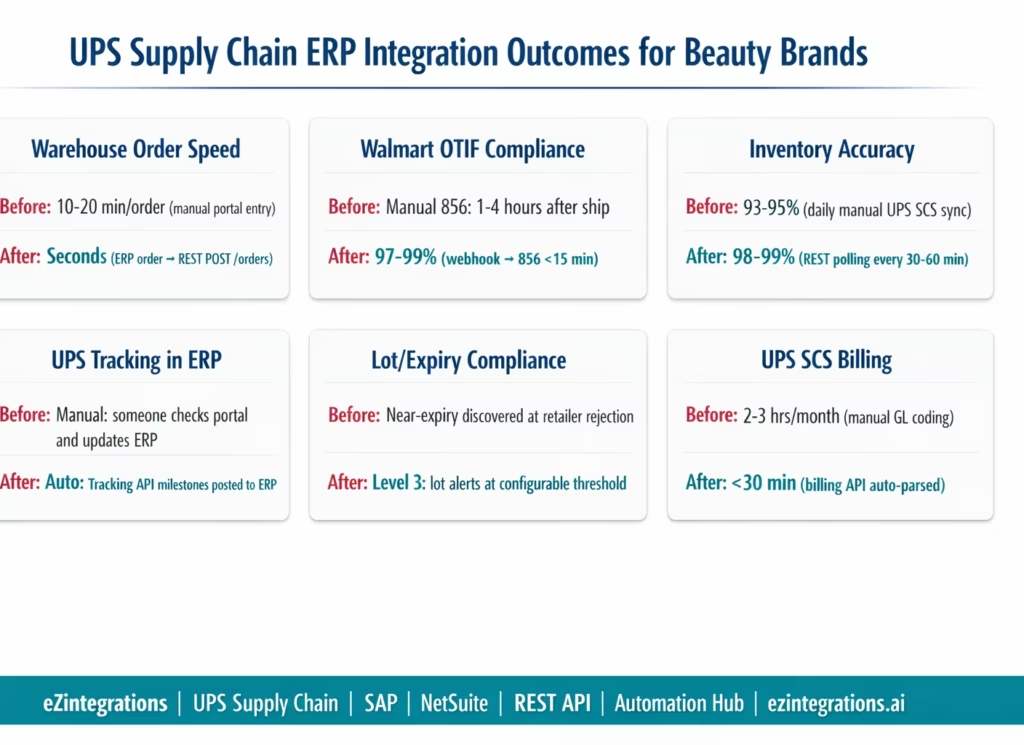
Order transmission speed: warehouse fulfilment order transmitted to UPS SCS within seconds of SAP delivery or NetSuite sales order creation. Manual portal entry takes 10-20 minutes per order. At 40 orders per day, this recovers 7-14 hours of daily ops work.
Walmart OTIF compliance: Walmart EDI 856 ASN transmitted within 15 minutes of UPS SCS carrier scan. Manual process takes 1-4 hours. OTIF compliance: 97-99% within one quarter of automated operation.
Inventory accuracy: UPS SCS available inventory synced to SAP or NetSuite every 30-60 minutes via REST API polling. Versus daily or weekly in manual processes. Inventory accuracy from 93-95% (daily manual) to 98-99% (continuous sync).
Tracking milestone visibility: UPS tracking API milestones (hub scans, out for delivery, delivered) posted to ERP shipment records automatically. Manual processes require someone to check the UPS tracking portal and update the ERP.
Lot and expiry compliance: near-expiry lot alerts prevent Amazon FBA rejection (90-day rule) and Walmart DC rejection (category minimums). Lot data from UPS SCS inbound receipts populates SAP batch records and NetSuite lot fields automatically.
UPS SCS billing reconciliation: monthly billing reconciled and ERP AP bill created in under 30 minutes (automated) versus 2-3 hours (manual GL coding).
How to Get Started
Step 1: Set Up UPS SCS API Access
Register at developer.ups.com with your UPS account credentials. Create an application and request access to the UPS SCS Warehouse API (scsapps.ups.com/scs/catalog) in addition to the standard shipping and tracking APIs. You will receive a Client ID and Client Secret. Contact your UPS SCS account manager to confirm your facility codes (warehouseCode values) and request the UPS SCS item code catalog for your SKUs stored at UPS SCS facilities. Build the ERP SKU to UPS SCS item code cross-reference table: 1-3 hours for 50-100 beauty items.
Step 2: Import the UPS Supply Chain ERP Integration Template
Go to the Automation Hub and import the UPS Supply Chain Solutions ERP Integration template for your ERP (SAP S/4HANA or NetSuite). The template includes: REST OAuth 2.0 token management (automatic refresh), warehouse order creation from ERP orders, UPS SCS shipment webhook handler with three-action trigger (ERP goods issue, Walmart EDI 856, Amazon SP-API), inventory sync with lot/expiry extraction, inbound ASN submission and goods receipt posting, UPS tracking API milestone updates to ERP, near-expiry lot monitoring, and UPS SCS activity billing reconciliation.
Step 3: Configure Credentials, Item Mapping, and ERP Connection
Add UPS SCS Client ID and Client Secret to the eZintegrations credential vault. Add ERP credentials (SAP BTP Communication Arrangement or NetSuite TBA). Upload the ERP SKU to UPS SCS item code mapping table. Register the eZintegrations webhook endpoint URL in the UPS SCS API portal (for shipment event push notifications). Map UPS SCS billing charge types to ERP GL accounts. Configure lot/expiry rules per channel (Amazon FBA 90 days, Walmart buyer-confirmed minimum, DTC 60 days). Set UPS SCS facility codes per ERP plant or warehouse location.
Step 4: Validate the Shipment Webhook Chain First
Before testing all five flows, validate the core shipment webhook trigger. Use a test order in the UPS SCS sandbox environment. Confirm: webhook fires on ship event, ERP goods issue posts correctly (SAP movement type 601 or NetSuite item fulfilment), Walmart 856 is generated with correct quantities and carton data, Amazon SP-API confirmation is called correctly. Run this test 3-5 times with different order configurations (full ship, partial ship, DTC vs retail). Then test inventory sync, inbound receipt, and billing reconciliation. Allow 3-5 business days for full test coverage.
Total configuration time: 3-5 business days from template import to live UPS SCS-ERP integration.
FAQs
eZintegrations connects to the UPS Supply Chain Solutions REST API using OAuth 2.0 authentication. Warehouse fulfilment orders are created from ERP sales orders using POST /scs/api/v1/orders. When UPS SCS ships, a webhook event triggers ERP updates: SAP goods issue via API_OUTBDLVRY_SRV or NetSuite item fulfilment via SuiteTalk REST. At the same time, Walmart EDI 856 ASN is generated within 15 minutes and Amazon shipments are confirmed via SP API. Inventory is synchronised every 30 to 60 minutes and inbound receipt events post goods receipt in the ERP. UPS SCS billing is automatically reconciled into ERP accounts payable. No custom code is required on either the UPS or ERP side.
Typical setup time is three to five business days from template import to go live. This includes UPS API access and item catalogue setup, SKU to UPS item code mapping, credential and webhook configuration, and full end to end testing of shipment, inventory, and billing flows. UPS account manager response time for API access is the main dependency.
Yes, eZintegrations supports both the UPS SCS REST API and ANSI X12 EDI connectivity. The REST API is the primary and recommended interface for modern integrations while EDI can be used for specific transaction requirements. Both methods feed into the same downstream ERP workflows for shipment posting inventory updates and billing reconciliation.
The system compares shipment quantities received via UPS SCS webhook against the original ERP sales order. If a short shipment is detected the ERP posts goods issue only for the shipped quantity and the Walmart ASN reflects actual shipped quantities preventing OTIF violations. The remaining quantity stays open in the ERP for backorder or cancellation and an alert is sent to the operations team with full discrepancy details.
The UPS SCS warehouseCode identifies a specific UPS facility such as UPSLOU or UPSMQ. In SAP each warehouseCode maps to a dedicated plant representing that facility while in NetSuite it maps to a location record. This ensures inventory at each UPS SCS facility is tracked separately from other warehouses and 3PLs within the ERP. 1. How does UPS Supply Chain Solutions integrate with SAP S/4HANA or NetSuite using eZintegrations
2. How long does it take to set up UPS Supply Chain ERP integration
3. Does eZintegrations support both UPS SCS REST API and EDI
4. How are partial shipments handled in UPS SCS integration
5. What is the UPS SCS warehouse code and how does it map to ERP locations
UPS SCS Speaks REST. Your SAP or NetSuite Speaks REST. eZintegrations Translates Between Them.
UPS Supply Chain Solutions and your ERP are both modern REST API systems. The connectivity challenge is not the protocol. It is the data model translation: UPS SCS item codes are not SAP Material Numbers. UPS SCS order confirmations are not ERP sales order documents. UPS SCS shipment webhooks are not SAP goods issue transactions.
eZintegrations handles the translation: UPS SCS REST API to SAP OData V4, or UPS SCS REST API to NetSuite SuiteTalk REST. Warehouse orders out, shipment confirmations in, inventory sync, inbound receipts, billing reconciliation. Five flows, two ERP targets, one platform, no custom code on either side.
Import the UPS Supply Chain ERP Integration Template from the Automation Hub. Or book a free demo with your UPS SCS account details, ERP type, and primary fulfilment use case (DTC, retail, or both). We will confirm your warehouseCode values and walk through the item code mapping in the session.
For the broader 3PL integration context, see the 3PL integration guide for beauty brands. For comparison with EDI-based 3PL integration, see the Kenco 3PL ERP integration guide.

