

Kenco 3PL ERP Integration for Beauty and CPG Brands: Automate ASN, Inventory, and 3PL Billing
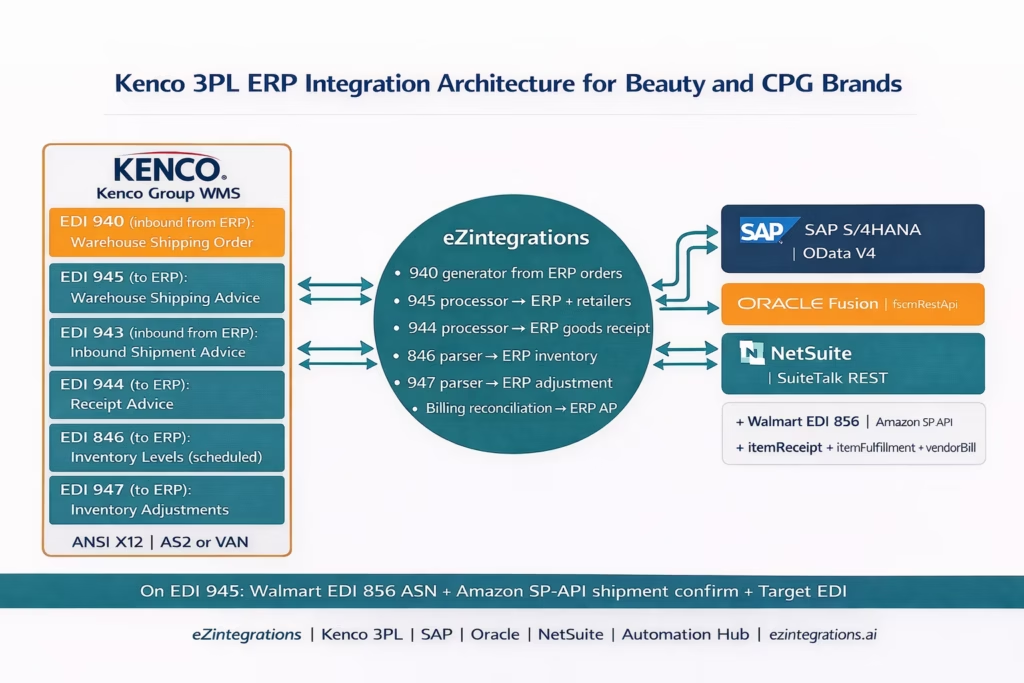
April 14, 2026To integrate Kenco 3PL with SAP, Oracle, or NetSuite for a beauty or CPG brand, eZintegrations sends an EDI 940 Warehouse Shipping Order from the ERP to Kenco when a sales order is confirmed, receives the EDI 945 Warehouse Shipping Advice from Kenco when the order ships (triggering the ERP goods issue, Walmart EDI 856 ASN, and Amazon SP-API shipment confirmation), receives the EDI 944 Warehouse Stock Transfer Receipt Advice when Kenco confirms inbound goods receipt (posting the ERP purchase order goods receipt), and receives the EDI 846 Inventory Inquiry/Advice from Kenco on a scheduled cycle to sync Kenco warehouse inventory to the ERP’s available stock. For brands using Kenco’s REST API (available at newer facilities), the same six data flows run via HTTPS rather than EDI. Both connectivity methods are supported within the same eZintegrations template.
TL;DR
- Kenco Group is one of North America’s largest 3PLs: 141 distribution facilities, 43 million square feet, operations in 33 US states. Their integration interface for brand clients is primarily EDI (ANSI X12 900-series warehouse documents) with REST API available at newer facilities.
- The six Kenco EDI documents that define the 3PL-ERP data flow: EDI 940 (your ERP sends fulfilment order to Kenco), EDI 945 (Kenco confirms shipment to you), EDI 944 (Kenco confirms goods receipt), EDI 846 (Kenco sends inventory levels), EDI 943 (you notify Kenco of inbound shipment), and EDI 947 (Kenco reports inventory adjustments). EDI 997 is the functional acknowledgment for all documents.
- The critical chain: your ERP creates a sales order → EDI 940 to Kenco → Kenco ships → EDI 945 back to you → your ERP goods issue → Walmart EDI 856 or Amazon SP-API shipment confirmation. The 945 is the trigger document for everything downstream.
- ERP targets: SAP S/4HANA (OData V4, movement types 101/601), Oracle Fusion Cloud (fscmRestApi receiving/shipping), NetSuite (SuiteTalk REST itemReceipt/itemFulfillment).
- Automation Hub template covers all 900-series Kenco EDI flows plus ERP posting and retailer notification. 3-5 business days per Kenco facility.
Why Kenco 3PL ERP Integration Runs on EDI
You chose Kenco Group for good reasons. Their 141 distribution centres cover the US from Chattanooga to Atlanta to Los Angeles. They handle Walmart retail fulfilment, Amazon FBA prep, DTC parcel, and the specialty climate-controlled storage your serums and sunscreens need. Reckitt trusted them for over 20 years.
The integration question is: how does your SAP S/4HANA, Oracle Fusion, or NetSuite talk to Kenco’s warehouse management system?
The answer, for most Kenco clients, is EDI: ANSI X12 900-series warehouse documents exchanged over AS2 or VAN (Value-Added Network). When a sales order is confirmed in your ERP, your system sends Kenco an EDI 940. When Kenco ships, they send you back an EDI 945. When a new production lot arrives at the Kenco warehouse, they send you an EDI 944 confirming receipt. Every week, Kenco sends you an EDI 846 with current available inventory.
These seven documents are the data pipeline between your ERP and Kenco’s WMS. When they are automated, your ops team knows what Kenco shipped, what Kenco has in stock, and what Kenco received without opening the Kenco portal, without sending emails, and without downloading reports. When they are not automated, your ops team spends 3-5 hours per day bridging the gap.
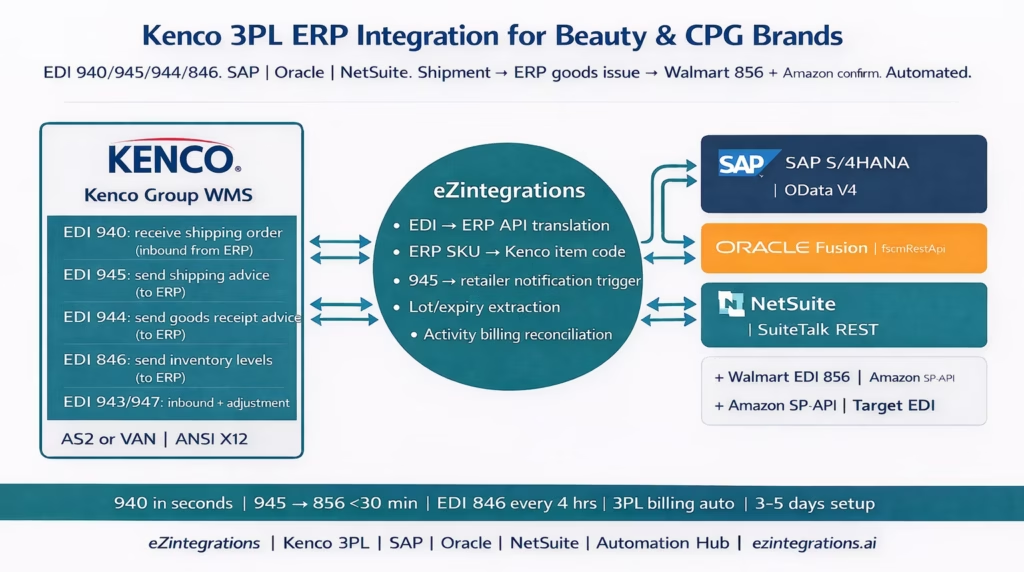
The Seven Kenco EDI Documents and What They Do
Unlike e-commerce platforms that use REST APIs, Kenco’s primary integration interface for enterprise brand clients is ANSI X12 EDI. Understanding what each document does is the foundation for designing the integration.
EDI 940: Warehouse Shipping Order
Direction: Your ERP → Kenco WMS
Purpose: Instructs Kenco to ship goods from their warehouse to a specified destination.
When sent: When a sales order is confirmed in your ERP and the fulfilment should come from Kenco.
Key data: Destination address (Walmart DC, Amazon FC, DTC customer), items and quantities (using Kenco item codes), required ship date, carrier instructions, service level.
Kenco action: Kenco receives the 940, creates a pick list in their WMS, and begins picking the order.
EDI 945: Warehouse Shipping Advice
Direction: Kenco WMS → Your ERP
Purpose: Confirms that Kenco has shipped the order. This is the most critical document in the Kenco integration.
When sent: When Kenco’s carrier scans the outbound shipment.
Key data: Your original order number (cross-referencing the 940), actual shipped quantities (which may differ from the 940 if Kenco had a shortage), carrier SCAC code, tracking number, ship date, carton count, SSCC-18 labels.
Your action on receipt: Post ERP goods issue. Generate Walmart EDI 856 ASN. Confirm Amazon SP-API shipment. The 945 is the single trigger for all downstream retailer notifications.
EDI 943: Warehouse Stock Transfer Shipment Advice
Direction: Your ERP → Kenco WMS
Purpose: Advises Kenco that inbound goods are en route to their warehouse (from your contract manufacturer, from another Kenco facility, or from a production run).
When sent: When your supplier ships goods to Kenco, before the goods arrive.
Key data: Purchase order number, items and quantities, expected arrival date, carrier, lot numbers and expiry dates (for beauty products).
EDI 944: Warehouse Stock Transfer Receipt Advice
Direction: Kenco WMS → Your ERP
Purpose: Confirms that Kenco has received the inbound goods. The 944 is the trigger for posting a goods receipt in your ERP.
When sent: When Kenco processes the inbound receipt in their WMS.
Key data: Your original PO number (cross-referencing the 943), received quantities, lot numbers, expiry dates, any damaged or short-received items, date of receipt.
Your action on receipt: Post ERP purchase order goods receipt. Update lot/expiry records. Update available inventory.
EDI 846: Inventory Inquiry/Advice
Direction: Kenco WMS → Your ERP (also used by you → Walmart)
Purpose: Reports current available inventory at the Kenco warehouse per item.
When sent: On a scheduled cycle (typically every 4-8 hours) and optionally triggered by inventory-affecting events.
Key data: Item codes, available quantities, on-hold quantities, lot-level detail (for beauty products).
Your action on receipt: Update ERP available inventory for the Kenco warehouse location. Feed into Walmart EDI 846 generation.
EDI 947: Warehouse Inventory Adjustment Advice
Direction: Kenco WMS → Your ERP
Purpose: Reports inventory adjustments made by Kenco (cycle counts, damage write-offs, found inventory, lot splits).
When sent: When Kenco makes any inventory adjustment in their WMS outside of normal receipt/shipment flows.
Key data: Item codes, adjustment quantities (positive or negative), reason codes (damage, overage, cycle count, etc.), lot numbers if applicable.
Your action on receipt: Post ERP inventory adjustment. Reconcile against expected inventory.
EDI 997: Functional Acknowledgment
Direction: Both ways
Purpose: Confirms receipt of any EDI document. Required for every 940, 945, 943, 944, 846, and 947 transmitted.
When sent: Within seconds of receiving any EDI document.
Key note: If Kenco does not receive a 997 for a 940 you sent, they will follow up. If you do not receive a 997 for a 945 you expected, the shipment confirmation may not have arrived.
The Critical 940-to-945 Shipment Chain
The most important EDI flow to understand is the 940-to-945 chain. Everything downstream (ERP goods issue, Walmart EDI 856 ASN, Amazon SP-API confirmation) depends on the 945 arriving correctly and being processed automatically.
The problem when this chain is manual:
-
Your ERP creates a sales order. Your ops team logs into the Kenco portal and manually enters the order details. Or emails a spreadsheet. Either way: 15-30 minutes per order, per day.
-
Kenco ships. Kenco’s team generates a shipment confirmation in their WMS, which produces the 945 EDI document. The 945 arrives at your AS2 endpoint or VAN mailbox. Your EDI team checks the mailbox (maybe twice a day) and downloads the 945.
-
Your ops team reads the 945, finds the tracking number, and manually posts the SAP goods issue (MIGO), or updates the NetSuite item fulfilment, or posts the Oracle shipping transaction.
-
With the goods issue in the ERP, someone generates the Walmart EDI 856 ASN. Walmart’s 30-minute window has now passed. OTIF chargeback incoming.
-
For Amazon FBM orders, someone manually calls the SP-API
POST /orders/{id}/shipmentwith the tracking number, or enters it in Seller Central. Another 15-20 minutes.
The automated chain:
ERP sales order created → EDI 940 auto-generated and transmitted to Kenco (seconds) → Kenco ships → EDI 945 received by eZintegrations → ERP goods issue posted (2-3 seconds) → Walmart EDI 856 ASN generated and transmitted (within 15 minutes of carrier scan) → Amazon SP-API shipment confirmation posted (within minutes of carrier scan).
End-to-end, from Kenco carrier scan to Walmart 856 transmitted: under 15 minutes. Manual process: 2-24 hours.
The Six Data Flows: Kenco to Your ERP
Level 1 (iPaaS Workflows) handles all EDI document exchange and ERP API calls. Level 2 (AI Workflows) validates 945 quantities against 940 ordered quantities, detects discrepancies, and validates 944 received quantities against 943 advance notices. Level 3 (AI Agents) monitors inventory levels from EDI 846 data against reorder thresholds, detects lot expiry approaching channel minimums, and identifies anomalous EDI 947 adjustments. Level 4 (Goldfinch AI) orchestrates the full Kenco-ERP cycle as a Workflow Node and provides the Goldfinch AI Chat UI for ops and finance teams: “What Kenco orders are awaiting 945 confirmation today?”, “Show all EDI 946 inventory adjustments this week by item”, or “Which Kenco items are below reorder threshold?”
Flow 1: EDI 940 Warehouse Shipping Order (ERP to Kenco)
When a sales order is confirmed in your ERP and the fulfilment location is Kenco, eZintegrations generates an EDI 940 and transmits it to Kenco via AS2 or VAN.
Key ERP triggers:
- SAP: outbound delivery created from sales order (
API_OUTBDLVRY_SRVdelivery event) - Oracle: shipment request confirmed in Oracle Shipping
- NetSuite: sales order approved with Kenco fulfilment location
ERP SKU to Kenco Item Code: As with all 3PL integrations, your ERP uses internal item codes (SAP Material Number, Oracle Item Number, NetSuite item ID) while Kenco uses their own internal item codes. A cross-reference mapping is required. The 940 must contain Kenco item codes, not your ERP codes.
EDI 940 key segments:
W05*N*{KencoOrderNumber}**{YourOrderReference}~   (shipping order identification)
N1*ST*{Destination name}~                        (ship-to)
N3*{Address}~
N4*{City}*{State}*{Zip}*US~
G62*10*{RequiredShipDate}~                       (ship date)
W66*PP*{CarrierSCAC}*{ServiceLevel}~             (carrier instructions)
LX*1~
W01*{Qty}*CA*{UPC}**EN*{KencoItemCode}~          (line items: cartons, each)
EDI 997 returned by Kenco within seconds confirms receipt.
Flow 2: EDI 945 Warehouse Shipping Advice (Kenco to ERP and Retailers)
When Kenco ships, the EDI 945 arrives at your AS2 endpoint or VAN mailbox. This is the single most important document in the Kenco integration. eZintegrations processes it immediately.
EDI 945 key segments parsed:
W06*{KencoShipmentNumber}*{YourOriginalOrderNumber}*{ShipDate}~
B4**{TrackingNumber}*{CarrierSCAC}~
W27*{TransportMethod}*{CarrierSCAC}~
LX*1~
W12*{ShipQty}*CA*{KencoItemCode}~   (actual shipped quantities)
On 945 receipt, eZintegrations takes three simultaneous actions:
Action 1: ERP Goods Issue
- SAP:
API_OUTBDLVRY_SRVPostGoodsIssuefor the delivery linked to the original sales order. Movement type 601. - Oracle:
PUT /logistics/shippingExecutions/shipConfirmRequestsconfirms the shipment. - NetSuite:
POST /services/rest/record/v1/itemFulfillmentwithshipStatus: Cand the tracking number from the 945.
Action 2: Walmart EDI 856 ASN If this shipment is destined for a Walmart DC, the Kenco 945 SSCC and carton data is used to generate the Walmart EDI 856 ASN. Pre-validation: carton totals from 945 vs ordered quantities from 940. Transmitted within 15 minutes of Kenco carrier scan.
Action 3: Amazon SP-API Shipment Confirmation If this shipment is destined for a DTC customer who ordered on Amazon FBM:
POST https://sellingpartnerapi-na.amazon.com/orders/v0/orders/{orderId}/shipment
Content-Type: application/json

{
  "carrierCode": "{from 945 W27 segment}",
  "trackingNumber": "{from 945 B4 segment}",
  "shipDate": "{from 945 W06 segment}"
}
Quantity discrepancy handling: If the 945 shows a different shipped quantity than the 940 ordered quantity (a short shipment), Level 2 flags the discrepancy:
- ERP goods issue posts for the actual 945 shipped quantity.
- Walmart 856 reflects the actual shipped quantity (not the ordered quantity, avoiding OTIF in-full violation).
- The ERP sales order is updated: the short-shipped line remains open for backorder or cancellation.
Flow 3: EDI 943 and EDI 944 (Inbound Goods to Kenco)
When new production or replenishment stock is inbound to Kenco:
EDI 943 (you → Kenco): Generated when your supplier confirms shipment to Kenco. Advises Kenco of the inbound: items, quantities, lot numbers, expiry dates, expected arrival date. This allows Kenco’s WMS to prepare a receiving plan.
EDI 944 (Kenco → you): Kenco’s confirmation that the goods have been received into their WMS. Contains: your original PO number, received quantities per item, lot numbers, expiry dates, and any discrepancy notes (damage, quantity shorts, unexpected items).
On 944 receipt, eZintegrations posts the ERP goods receipt:
- SAP:
API_GOODSMVT_SRVmovement type 101 linked to the SAP purchase order. - Oracle:
POST /receiving/deliveries/actions/receiveon the Oracle receiving header. - NetSuite:
POST /services/rest/record/v1/itemReceiptwithcreatedFromthe purchase order.
Lot and expiry data from the 944 is posted to ERP batch records at the same time.
Flow 4: EDI 846 Inventory Sync
Kenco transmits EDI 846 inventory data on a scheduled cycle (every 4-8 hours). eZintegrations parses the 846 and updates the ERP’s available inventory for the Kenco warehouse location.
EDI 846 key segments:
BIA*00*{Date}*{Time}*{ReferenceID}~
LIN*1**UP*{UPC}*EN*{KencoItemCode}~
QTY*1*{AvailableQuantity}~
QTY*21*{OnHoldQuantity}~
DTM*011*{AsOfDate}~
The QTY*1 (available) and QTY*21 (on-hold) quantities map to the ERP’s unrestricted and quality-hold stock at the Kenco location.
Near-expiry monitoring from 846: If the 846 includes lot-level detail (Kenco can transmit lot data in the 846), Level 3 checks each lot’s expiry date against channel thresholds: Amazon FBA (90 days), Walmart (category minimum), DTC (60 days). Near-expiry lots are flagged automatically.
Walmart 846 feed: The same Kenco 846 data, after updating the ERP, feeds the Walmart EDI 846 inventory update. Walmart sees the Kenco available quantity for each UPC, keeping Walmart’s replenishment algorithm current.
Flow 5: EDI 947 Inventory Adjustment Reconciliation
Kenco sends EDI 947 when they make inventory adjustments in their WMS. Reasons: cycle count corrections, damage write-offs, found inventory, lot splits for beauty products.
EDI 947 key segments:
W4*{AdjustmentDate}*{KencoFacilityCode}~
LX*1~
W21*{AdjustmentQty}*EA*{KencoItemCode}**{UPC}~    (positive = found, negative = loss)
W19*DA~                                          (reason code: DA = damage)
On 947 receipt, eZintegrations posts an ERP inventory adjustment:
- SAP:
API_GOODSMVT_SRVmovement type 551 (scrapping) for write-offs or 301 (transfer between storage types) for cycle count corrections. - Oracle: inventory adjustment transaction via
POST /inventoryTransactions. - NetSuite:
POST /inventoryAdjustmentwith the 947 adjustment quantity and reason.
Significant negative adjustments (write-offs above a configurable threshold) are flagged to the ops team with the Kenco reason code for investigation.
Flow 6: Kenco 3PL Activity Billing Reconciliation
Kenco charges for warehouse services: storage (per pallet per period), pick and pack (per unit or per order), inbound receiving (per carton), returns processing, value-add services (kitting, FBA prep, relabelling). These appear on a monthly Kenco invoice.
eZintegrations reconciles the Kenco invoice (received as a structured file or EDI 810) against expected charges and maps each line to the ERP GL accounts:
| Kenco Charge Type | ERP GL Account | Description |
|---|---|---|
| Pick and Pack | 695000 | 3PL Fulfilment – Pick/Pack |
| Storage | 696010 | 3PL Warehouse Storage |
| Inbound Receiving | 695010 | 3PL Inbound Processing |
| Returns Processing | 695020 | 3PL Returns |
| Kitting / Value-Add | 695030 | 3PL Value-Add Services |
| FBA Prep | 695040 | 3PL FBA Preparation |
| Transportation (parcel) | 695050 | 3PL Parcel Shipping |
The ERP AP bill is created automatically from the Kenco invoice file:
- SAP: vendor invoice via
API_SUPPLIERINVOICE_PROCESS_SRVor journal entry viaAPI_JOURNALENTRY_SRV. - Oracle:
POST /payables/invoiceswith the Kenco vendor ID. - NetSuite:
POST /services/rest/record/v1/vendorBill.
Beauty and CPG-Specific Kenco Integration Requirements
Lot and Expiry Date Handling
For beauty brands, lot tracking at Kenco is essential. The EDI 943 should include lot numbers and expiry dates when sending inbound notifications to Kenco. The EDI 944 should return received lot numbers and expiry dates. The EDI 846 should include lot-level inventory where Kenco supports it.
These lot records populate:
- SAP batch management (field
CHARGfor lot number,MHDfor expiry) - Oracle inventory lot attributes (
LOT_NUMBER,EXPIRATION_DATE) - NetSuite inventory
lotNumberandexpirationDatefields
The FEFO allocation logic runs against these lot records when generating the EDI 940: the oldest eligible lot (closest to expiry but meeting channel minimum) is specified in the 940 so Kenco picks the correct lot.
Amazon FBA Prep at Kenco
Kenco offers Amazon FBA prep as a value-add service: FNSKU labelling, poly-bagging, and master carton packing per Amazon’s requirements. For FBA prep orders, the EDI 940 includes special instructions in the W66 or G62 segments, or via a separate service agreement with Kenco.
When Kenco completes FBA prep and ships to the Amazon FC, the EDI 945 triggers:
- SP-API
POST /inbound/vnd/shipmentsto create or update the FBA inbound shipment plan. - ERP goods movement from the 3PL location to the Amazon FC virtual plant (SAP AMZFC, NetSuite Amazon FC location).
Kitting and Display-Ready Cases
Kenco can assemble promotional gift sets, PDQ display trays, and display-ready cases. For kitting orders, the EDI 940 is sent to Kenco as a work order (using a Kenco-specific order type flag). Components are consumed from Kenco’s inventory. The finished kit is shipped under the assembled item’s Kenco item code. The EDI 945 for a kitting order triggers:
- ERP production order closure (SAP PP, Oracle Manufacturing, NetSuite assembly item).
- Component item inventory reduction at Kenco.
- Finished kit inventory creation at Kenco.
Returns Disposition at Kenco
Returns from DTC and retail channels arrive at Kenco for disposition. Kenco’s WMS assigns a disposition code per returned unit:
- Resaleable: unit is restocked to available inventory. EDI 847 (Warehouse Activity Advice) or EDI 944 for returns receives this data.
- Hold: unit needs quality inspection. ERP inventory moves to quality-hold location.
- Destroy: unit is written off. EDI 947 inventory adjustment with damage reason code.
Before vs After: Manual Kenco-ERP vs Automated
| Process Step | Manual Kenco-ERP | Automated with eZintegrations |
|---|---|---|
| Fulfilment order to Kenco | Portal entry or email spreadsheet (15–30 min per order) | EDI 940 generated from ERP order in seconds |
| ERP SKU to Kenco item code | Manual lookup or spreadsheet | Reference dataset auto-applied to every 940 |
| EDI 997 acknowledgment monitoring | Manual VAN mailbox checks | Automatic receipt and logging of 997 |
| Kenco shipment confirmation | VAN mailbox checked 1–2 times daily | EDI 945 processed instantly on receipt |
| ERP goods issue after 945 | Manual entry (15–30 min in SAP/NetSuite/Oracle) | Auto-posted within 2–3 seconds of 945 |
| Walmart EDI 856 ASN timing | Manual after 945 often misses 30-min SLA | Auto-generated from 945 and transmitted within 15 minutes |
| Amazon shipment confirmation | Manual entry or delayed API call | SP-API confirmation triggered automatically within minutes |
| 945 quantity discrepancy detection | Detected late during invoicing | Level 2 validation compares 945 vs 940 on every shipment |
| Inbound notification to Kenco | Manual portal entry or emailed PO | EDI 943 generated automatically from ERP PO |
| ERP goods receipt after 944 | Manual receiving entry | Auto-posted on EDI 944 receipt |
| Lot and expiry data capture | Often missing or incomplete | Captured from 944 and written to ERP batch records |
| Inventory sync from Kenco | Daily 846 download and manual update | EDI 846 processed every 4–8 hours and synced to ERP |
| Inventory adjustment from 947 | Monthly reconciliation via reports | EDI 947 processed instantly with ERP adjustment posting |
| Walmart 846 feed | Manual inventory update to Walmart | Auto: Kenco 846 data drives Walmart 846 transmission |
| Kenco billing reconciliation | Manual invoice coding (2–3 hrs/month) | Invoice parsed and ERP AP bill created per GL mapping |
| FEFO allocation | Manual lot selection in 940 | Level 3 automatically selects nearest-expiry eligible lot |
Step-by-Step: A Walmart Order from ERP to Kenco to Delivered
Here is the complete automated cycle for a Walmart Valentine’s Day promotional order fulfilled from Kenco Group’s Atlanta facility.
Setup: Lumière Cosmetics uses NetSuite. Kenco Atlanta handles all Walmart retail fulfilment. Kenco item code for Rose Gloss (NetSuite item ID 4821): KEN-LGLOSS-04-ROSE. EDI connection via AS2.
January 22, 9:14 AM: Walmart EDI 850 arrives. eZintegrations receives Walmart PO 4500882411. NetSuite sales order SO-2026-WM-4882 created automatically (per the Walmart-NetSuite integration flow). Fulfilment location: Kenco Atlanta.
January 22, 9:14 AM: EDI 940 transmitted to Kenco. Level 1 generates EDI 940 for SO-2026-WM-4882:
W05*N*KAT-940-0092**SO-2026-WM-4882~
N1*ST*Walmart DC 6094 Kansas City MO~
N3*4200 Distribution Pkwy~
N4*Kansas City*MO*64161*US~
G62*10*20260130~
W66*PP*UPSG*GROUND~
LX*1~
W01*20*CA*847654321001**EN*KEN-LGLOSS-04-ROSE~
LX*2~
W01*15*CA*847654321002**EN*KEN-LGLOSS-07-BERRY~
Kenco returns EDI 997 at 9:14 AM confirming receipt.
January 30, 2:14 PM: Kenco ships. Kenco picks 480 units Rose Gloss (20 cartons × 24 units), 355 units Berry Gloss (15 cartons × 24 units, minus 5 units not available). Carrier UPS Freight scans the shipment at 2:14 PM. Kenco’s WMS generates EDI 945.
January 30, 2:16 PM: EDI 945 received by eZintegrations.
W06*KAT-945-0092*SO-2026-WM-4882*20260130~
B4**1Z9W4872XXXX~
W27*M*UPSG~
LX*1~
W12*20*CA*KEN-LGLOSS-04-ROSE~    (480 units shipped: 20 cases full)
LX*2~
W12*14*CA*KEN-LGLOSS-07-BERRY~   (336 units: 14 full cases; note: short 19 units)
Level 2 detects discrepancy: Line 2 ordered 355 units (from 940), Kenco shipped 336. Flag raised: “Berry Gloss shortage: 19 units short.” NetSuite item fulfilment updated to reflect 336 units shipped.
January 30, 2:16 PM: Three simultaneous actions from 945.
Action 1: NetSuite item fulfilment posted.
POST /services/rest/record/v1/itemFulfillment
Content-Type: application/json

{
  "createdFrom": {
    "id": "{SO_id}",
    "type": "salesOrder"
  },
  "shipStatus": {
    "id": "C"
  },
  "trackingNumbers": [
    {
      "trackingNumber": "1Z9W4872XXXX"
    }
  ],
  "item": {
    "items": [
      {
        "itemIsFulfilled": true,
        "quantity": 480,
        "orderLine": 1
      },
      {
        "itemIsFulfilled": true,
        "quantity": 336,
        "orderLine": 2
      }
    ]
  }
}
NetSuite item fulfilment IF-2026-WM-0441 created. Time: 2 seconds.
Action 2: Walmart EDI 856 ASN generated. 856 built from 945 shipment data: 34 total cartons, SSCC-18 per carton from Kenco manifest. Pre-transmission validation: 945 carton totals match 856 line totals. 856 transmitted at 2:28 PM (12 minutes after 945 receipt, well within Walmart’s 30-minute requirement).
Action 3: EDI 997 returned to Kenco for the 945. Acknowledges receipt of Kenco’s 945. Kenco’s system confirms the loop is closed.
EDI 810 transmitted to Walmart. NetSuite creates invoice from item fulfilment IF-2026-WM-0441. EDI 810 generated with Berry Gloss quantity of 336 (not 355, matching actual shipment). Price validated against 850. 810 transmitted January 30 end of day.
February 28: Kenco monthly invoice. Kenco sends activity file. eZintegrations parses:
- Pick/Pack: 816 units × 0.52=424.32 → NetSuite GL 695000
- Storage: 240 pallets × 0.55/day×28days=3,696.00 → GL 696010
- Inbound receiving: 62 cartons × 0.40=24.80 → GL 695010
NetSuite vendor bill VB-2026-KEN-0228 created for $4,145.12. Time: 30 seconds. Manual process: 2-3 hours.
Key Outcomes and Results
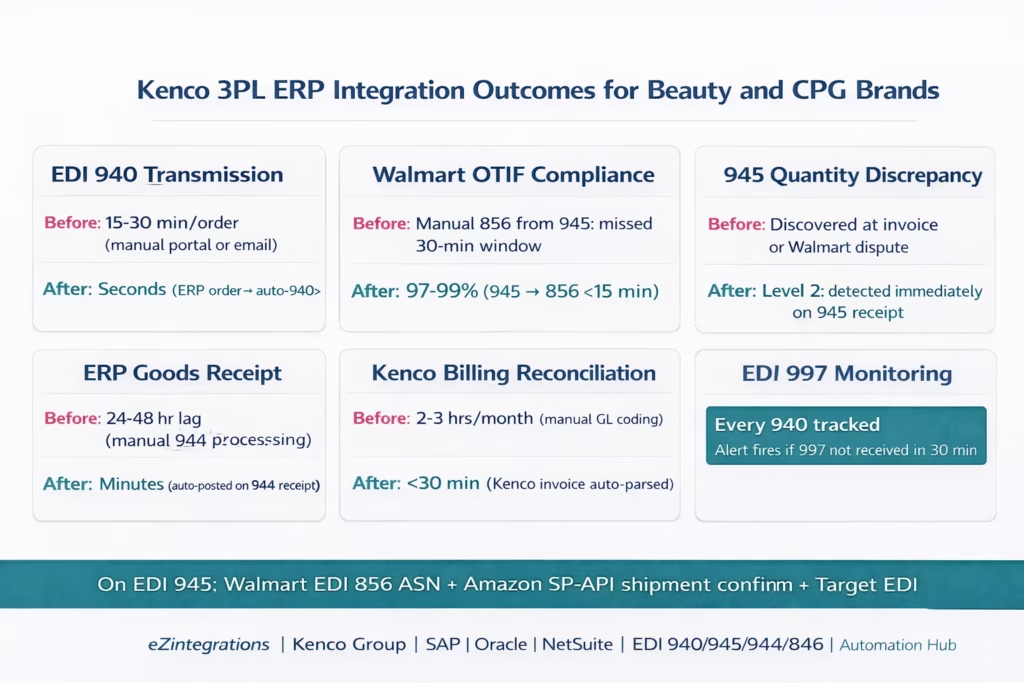
Order transmission speed: EDI 940 transmitted to Kenco within seconds of ERP sales order confirmation. Versus 15-30 minutes for manual portal entry per order. At 30 orders per day, this recovers 7-15 hours of daily ops work.
Walmart OTIF compliance: the 945-to-856 automation (856 transmitted within 15 minutes of Kenco carrier scan) eliminates the most common cause of Walmart OTIF chargebacks for Kenco clients: late ASN due to manual 945 processing. Beauty brands report reaching 97-99% OTIF within one full quarter.
Goods receipt accuracy: the 944-to-ERP goods receipt posting ensures every Kenco inbound receipt is in the ERP within minutes of Kenco processing it. With lot and expiry data captured from the 944. Manual processes typically have a 24-48 hour lag between Kenco receipt and ERP posting.
945 quantity discrepancy detection: Level 2 catches every 945 that ships less than the 940 ordered quantity. The flag fires immediately, giving ops teams hours (not days) to notify Walmart of the short shipment and prevent the in-full OTIF violation that occurs when the 856 shows a quantity the ERP and Walmart do not agree on.
3PL billing reconciliation: from 2-3 hours per monthly Kenco invoice to under 30 minutes. The Kenco activity file is parsed and GL-coded automatically. The AP team reviews exceptions, not the entire invoice.
EDI 997 monitoring: automated 997 tracking ensures every 940 transmitted to Kenco has been acknowledged. If a 997 is not received within 30 minutes of a 940 transmission, an alert fires. This catches EDI connectivity failures before they become missed orders.
How to Get Started
Step 1: Request Kenco EDI Specifications and Item Codes
Contact your Kenco account manager and request the EDI specifications package for your facility: the 940/945/943/944/846/947/997 transaction set layouts in ANSI X12 format, the Kenco facility’s AS2 endpoint (or VAN mailbox ID), and the Kenco item code catalog for all of your SKUs stored at Kenco. Also confirm whether your Kenco facility offers a REST API alternative to EDI (available at some facilities).
Build the ERP SKU to Kenco item code cross-reference table: your internal SKU codes on one side, Kenco item codes on the other. For a beauty brand with 50-80 SKUs at Kenco, this table has 50-80 rows. Allow 1-2 hours to build this from the Kenco item code catalog.
Step 2: Import the Kenco 3PL ERP Integration Template
Go to the Automation Hub and import the Kenco Group 3PL ERP Integration template for your ERP (SAP S/4HANA, Oracle Fusion Cloud, or NetSuite). The template includes: EDI 940 generation and AS2/VAN transmission from ERP orders, EDI 945 processing with three-action trigger (ERP goods issue, Walmart 856 generation, Amazon SP-API confirmation), EDI 943 generation from ERP purchase orders, EDI 944 processing with ERP goods receipt posting and lot/expiry capture, EDI 846 parsing with ERP inventory update and Walmart 846 feed, EDI 947 processing with ERP inventory adjustment, EDI 997 acknowledgment monitoring, and Kenco billing reconciliation with ERP AP bill creation.
Step 3: Configure EDI Connectivity and ERP Credentials
Add your Kenco AS2 credentials (your AS2 endpoint, Kenco’s AS2 endpoint, SSL certificate) or VAN mailbox credentials to the eZintegrations credential vault. Add your ERP credentials (SAP BTP OAuth, Oracle OAuth, or NetSuite TBA). Upload the ERP SKU to Kenco item code mapping table. Configure lot/expiry rules per channel (Amazon FBA 90 days, Walmart minimum, DTC 60 days). Map Kenco billing charge types to ERP GL accounts. Set the EDI 997 monitoring threshold (default: alert if no 997 received within 30 minutes of a 940 transmission).
Step 4: Test the 940-to-945 Chain First
Before testing all six flows, validate the core 940-to-945 chain in a test environment. Send a test EDI 940 to Kenco’s test AS2 endpoint. Confirm Kenco returns a 997. Simulate a 945 response from Kenco’s test environment. Confirm: ERP goods issue posts correctly, Walmart 856 is generated with correct quantities and SSCC data, Amazon SP-API call is formed correctly. This core chain validation takes 1-2 days. Then test 943/944 inbound receipt, 846 inventory sync, and 947 adjustment handling. Allow 3-5 business days total for full testing across all six flows.
Total configuration time: 3-5 business days from template import to live Kenco-ERP integration.
FAQs
eZintegrations connects Kenco 3PL to ERP systems using EDI or REST APIs. When an ERP sales order is confirmed, an EDI 940 Warehouse Shipping Order is sent to Kenco. When Kenco ships and sends an EDI 945 Warehouse Shipping Advice, the system posts goods issue in the ERP, triggers Walmart EDI 856 ASN within 15 minutes, and confirms Amazon shipments via SP-API. EDI 944 receipts update ERP goods receipts, EDI 846 synchronises inventory, and EDI 947 posts inventory adjustments. Kenco billing data is automatically mapped to ERP accounts payable with GL account allocation.
Typical setup time is three to five business days per Kenco facility. This includes EDI specification setup and AS2 configuration, SKU to Kenco item mapping, credential configuration, and end-to-end testing of EDI flows such as 940 to 945. New implementations requiring Kenco EDI certification may take an additional two to four weeks.
Yes, the integration supports both ANSI X12 EDI transactions including 940 945 943 944 846 947 and 997 over AS2 or VAN as well as REST API connectivity for newer Kenco facilities. Regardless of the connectivity method the ERP workflows for shipment posting inventory updates and billing reconciliation remain identical.
EDI 945 is the Warehouse Shipping Advice sent by Kenco when an order is shipped. It contains shipped quantities tracking details carrier information and carton data. This document triggers ERP goods issue Walmart EDI 856 ASN generation and Amazon shipment confirmation. Walmart requires the ASN within 30 minutes of carrier scan and automated 945 processing ensures compliance by transmitting within 15 minutes.
The system compares EDI 945 shipped quantities against the original 940 order quantities. If there is a short shipment the ERP goods issue posts only the shipped quantity and the Walmart ASN reflects actual shipped quantities preventing compliance violations. The remaining quantity stays open in the ERP for backorder or cancellation and the operations team receives a discrepancy alert with full details. 1. How does Kenco 3PL integrate with SAP, Oracle, or NetSuite using eZintegrations
2. How long does it take to set up Kenco 3PL ERP integration
3. Does eZintegrations support both Kenco EDI and REST API connectivity
4. What is the EDI 945 and why is it critical for Walmart compliance
5. How are partial shipments handled in Kenco integration
Kenco Sends EDI. Your ERP Speaks REST. eZintegrations Translates Both.
The 940-to-945 chain is the heartbeat of the Kenco-ERP integration. Every order you ship through Kenco starts with a 940 and ends with a 945. Everything downstream, from your Walmart OTIF compliance to your Amazon LSR rate to your ERP inventory accuracy, depends on that 945 being processed automatically within seconds of Kenco’s carrier scan.
With six EDI document types, three ERP targets, two retailer notification flows, lot and expiry tracking, and monthly billing reconciliation, the Kenco-ERP integration is one of the more complex 3PL integrations in the beauty and CPG supply chain. eZintegrations provides the pre-built template that handles all of it, for all three ERPs, with the exact EDI segment mappings and ERP API calls already configured.
Import the Kenco 3PL ERP Integration Template from the Automation Hub. Or book a free demo with your Kenco facility code, ERP type, and estimated order volume. We will confirm your EDI connectivity method and walk through the item code mapping in the session.
For the broader 3PL integration context, see the 3PL integration guide for beauty brands. For the DHL comparison (REST API vs EDI), see the DHL Supply Chain ERP integration guide.

