WebSocket Integration for Enterprise: Real-Time Data Pipeline Architecture
May 23, 2026WebSocket integration creates a persistent, bidirectional TCP connection between enterprise systems that streams data in real time without repeated HTTP request overhead. Unlike REST APIs (request-response) or webhooks (one-way push), WebSockets maintain an open channel: ideal for live dashboards, financial market data feeds, IoT telemetry, and any use case where sub-second data latency matters.
TL;DR
- WebSocket (RFC 6455) is a TCP-based protocol that creates a persistent, bidirectional connection between two systems: enabling real-time, low-latency data streaming without the overhead of repeated HTTP handshakes.
- REST APIs and webhooks handle most enterprise integration patterns well. WebSockets are the right choice when your use case requires sub-100ms data delivery, server-to-client push without polling, or bidirectional real-time communication.
- Enterprise WebSocket integration requires more architectural consideration than REST: connection lifecycle management, reconnection logic, heartbeat handling, authentication token refresh on long-lived connections, and horizontal scaling across multiple WebSocket server instances.
- eZintegrations supports WebSocket as a native protocol alongside REST, GraphQL, Webhooks, and Database connections: enabling you to build real-time data pipelines from WebSocket sources into your ERP, analytics platform, or alerting system without custom code.
- The five enterprise WebSocket patterns covered: live financial data feeds, IoT telemetry pipelines, real-time inventory broadcasting, operational event streaming, and live customer interaction feeds.
What is WebSocket? The Technical Definition
WebSocket is a communication protocol that establishes a persistent, full-duplex TCP connection between a client and server over a single TCP socket, as defined in the WebSocket protocol overview. Defined in IETF RFC 6455, it was designed specifically to address the limitations of HTTP for real-time applications.
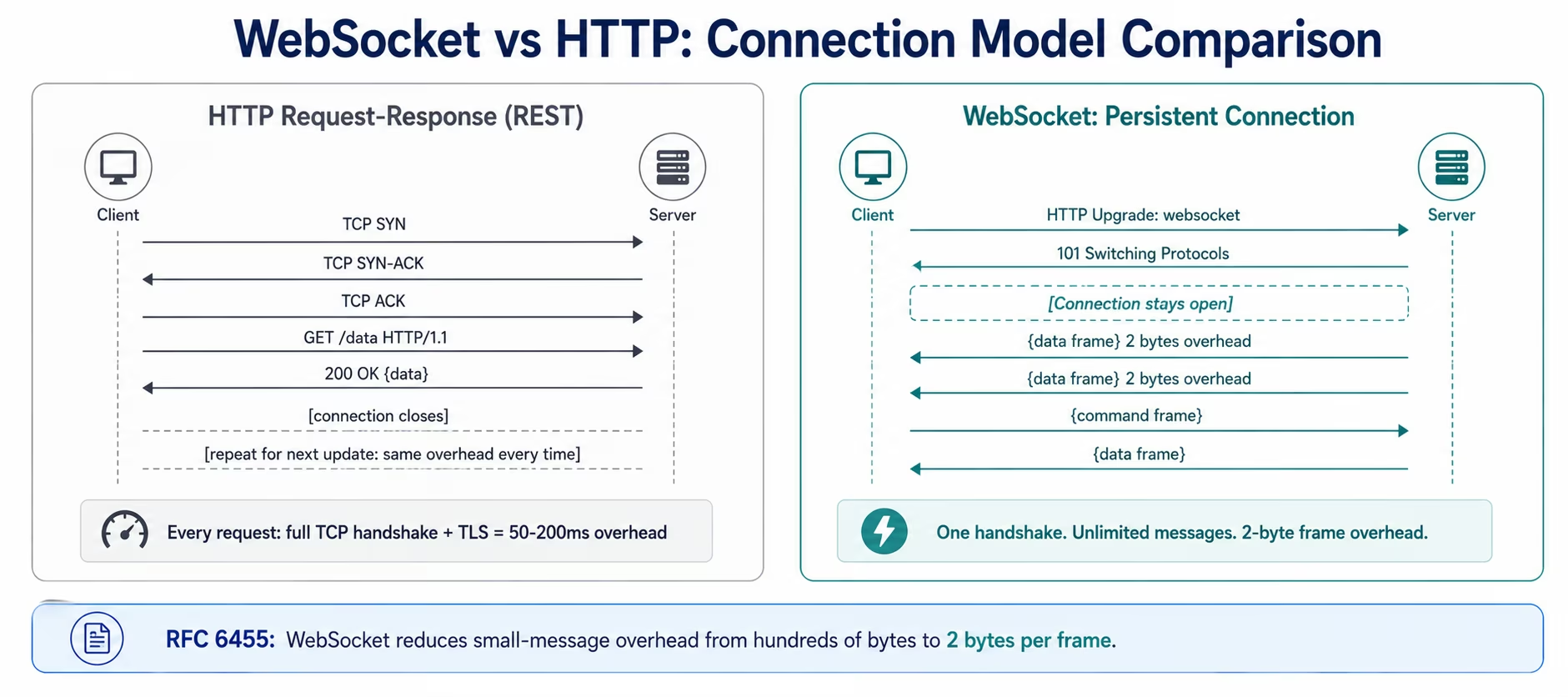
Standard HTTP is stateless and request-response: the client sends a request, the server responds, and the connection closes. Every interaction requires a new TCP handshake (SYN, SYN-ACK, ACK) plus TLS negotiation for HTTPS. For an application that needs data updates every second, this overhead accumulates: a 100ms RTT handshake consumes 10% of each second just in connection setup.
WebSocket solves this through an upgrade handshake. The connection starts as a standard HTTP/1.1 request with two specific headers:
GET /stream HTTP/1.1 Upgrade: websocket Connection: Upgrade Sec-WebSocket-Key: [base64-encoded random key] Sec-WebSocket-Version: 13
The server responds with HTTP 101 Switching Protocols, and from that point the connection is no longer HTTP. It becomes a persistent, bidirectional byte stream over TCP. Both client and server can send messages at any time without a new handshake. The connection stays open until either side sends a close frame.
According to Wikipedia’s WebSocket specification, the protocol reduces the data overhead for small frequent messages from several hundred bytes per HTTP request to just 2 bytes per WebSocket frame.
For enterprise integration, this makes WebSocket the right protocol for any data stream where:
- Data arrives continuously (market prices, sensor readings, event logs)
- Delivery latency below 100 milliseconds matters
- The server needs to push data to the client without waiting for a request
- Bidirectional communication is required (both sides send data to each other
WebSocket vs REST vs Webhook: When to Use Each
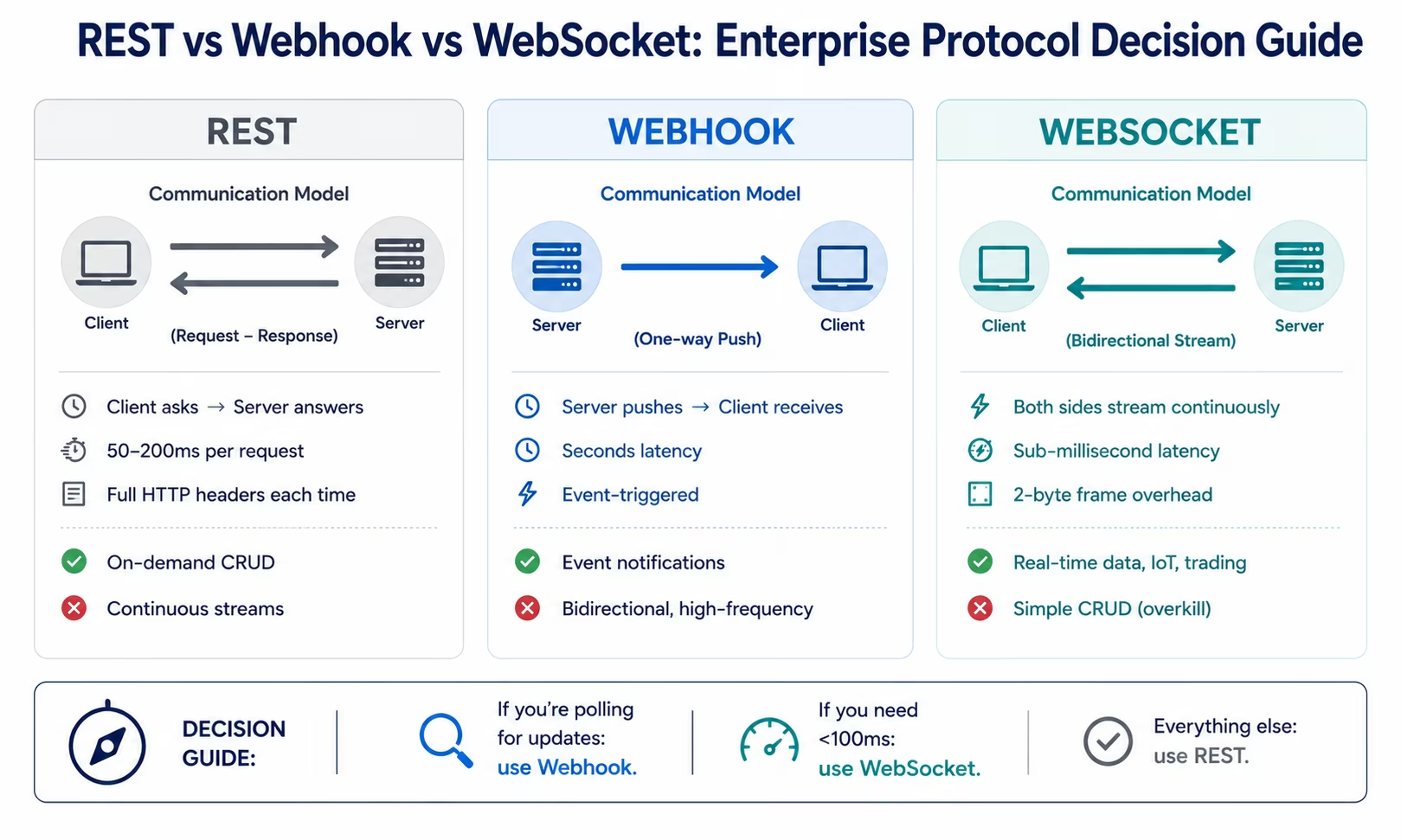
The three dominant integration protocols serve different communication patterns: and using the wrong one is an architecture mistake that is expensive to correct later. Here is a precise decision framework.
REST API (HTTP Request-Response)
Use REST when: the client initiates data retrieval on demand, the data does not need to be current within seconds, the interaction is transactional (create, read, update, delete), or the integration is between systems where one queries the other periodically.
REST is the correct protocol for: creating a NetSuite purchase order from a Salesforce opportunity, retrieving the current inventory count for a specific SKU, submitting a Stripe payment charge, or querying a CRM for customer records.
REST is the wrong protocol for: streaming live market prices to a trading dashboard, broadcasting inventory level changes to 50 connected retail channels within seconds of a warehouse update, or delivering IoT sensor telemetry to a processing pipeline.
Webhook (HTTP POST: One-Way Push)
Use webhooks when: a source system needs to notify a destination system that an event occurred, the notification is one-way (source pushes, destination receives), and near-real-time delivery (seconds, not milliseconds) is sufficient.
Webhooks are the correct protocol for: Stripe notifying your system that a payment succeeded (payment.succeeded event), Shopify notifying your WMS that a new order was placed, GitHub notifying your CI/CD pipeline that a commit was pushed.
Webhooks are the wrong protocol for: bidirectional communication, sub-second delivery requirements, or high-frequency event streams where thousands of webhook deliveries per minute would overwhelm the receiving endpoint.
WebSocket (Persistent Bidirectional Stream)
Use WebSocket when: data flows continuously from server to client without the client requesting each update, both sides need to send data to each other in real time, or latency below 100 milliseconds is a requirement.
WebSockets are the correct protocol for: streaming live financial market data to a trading system, broadcasting real-time inventory levels to multiple consuming systems simultaneously, receiving IoT sensor telemetry from connected devices, or streaming log and event data from operational systems.
| Criterion | REST | Webhook | WebSocket |
|---|---|---|---|
| Connection model | Request-response | Server push (one-way) | Persistent bidirectional |
| Who initiates | Client always | Server always | Either side |
| Latency | 50-200ms (handshake) | Seconds | Sub-millisecond |
| Overhead per message | Full HTTP headers (200-800 bytes) | Full HTTP POST (200-800 bytes) | 2-byte frame header |
| Best for | On-demand CRUD operations | Event notifications | Continuous data streams |
| Connection persistence | Stateless, no persistence | Stateless, no persistence | Stateful, maintained |
| Horizontal scaling | Trivial (any server) | Trivial (any server) | Requires sticky sessions or pub/sub |
| Enterprise complexity | Low | Low-Medium | Medium-High |
How WebSocket Connections Work: The Full Lifecycle
Understanding the full WebSocket connection lifecycle is essential for building reliable enterprise integrations: each phase has failure modes that require explicit handling.
Phase 1: The Upgrade Handshake
Every WebSocket connection starts as an HTTP/1.1 request. The client sends a GET request with the Upgrade header. The server responds with HTTP 101 Switching Protocols if it supports WebSocket on that endpoint. From this point, the underlying TCP connection is repurposed as a WebSocket channel.
The handshake includes a security mechanism: The client sends a random 16-byte base64-encoded key in the Sec-WebSocket-Key header. The server computes a SHA-1 hash of this key concatenated with a fixed GUID, base64-encodes the result, and returns it in Sec-WebSocket-Accept. This prevents proxies from accidentally upgrading non-WebSocket connections.
Phase 2: Message Framing
WebSocket messages are sent as frames. A frame starts with a 2-byte header containing: the opcode (text, binary, ping, pong, close), fragmentation flags, and the payload length. The client must mask all frames it sends (XOR masking with a 4-byte masking key); the server must not mask frames it sends.
What matters architecturally is message size: Enterprise integration platforms handle frame parsing automatically. WebSocket has no built-in message size limit, but fragmented large messages (above the platform’s receive buffer) must be reassembled from multiple frames. For high-throughput enterprise data pipelines, this fragmentation behaviour affects throughput performance.
Phase 3: Heartbeats (Ping/Pong)
WebSocket connections over enterprise networks often pass through load balancers, reverse proxies, and firewalls that close idle TCP connections. A connection that has not transmitted data for 30-60 seconds may be silently dropped by the network infrastructure.
Heartbeats prevent this: the client or server sends a Ping frame at a configured interval (typically 15-30 seconds). The other side must respond with a Pong frame. If no Pong is received within the timeout window, the connection is treated as dropped and reconnection is initiated.
Phase 4: Reconnection Logic
When the connection is dropped (network failure, server restart, timeout), the client should: Enterprise-grade WebSocket clients implement automatic reconnection.wait for a backoff interval (typically starting at 1 second, doubling with each failed attempt up to a configurable maximum), attempt to re-establish the connection, re-authenticate if the server requires a fresh token on reconnect, and replay any messages that may have been sent during the disconnection window (if the server maintains a replay buffer).
Without automatic reconnection, a WebSocket-based enterprise integration stops receiving data silently, which is worse than a visible failure.
Phase 5: The Close Handshake
A graceful WebSocket close involves a four-step sequence: one side sends a Close frame with a status code, the other side sends a Close frame in response, both sides close the TCP connection. This is the correct close sequence. Abrupt connection termination (TCP RST, network failure) bypasses this and requires the reconnection logic above.
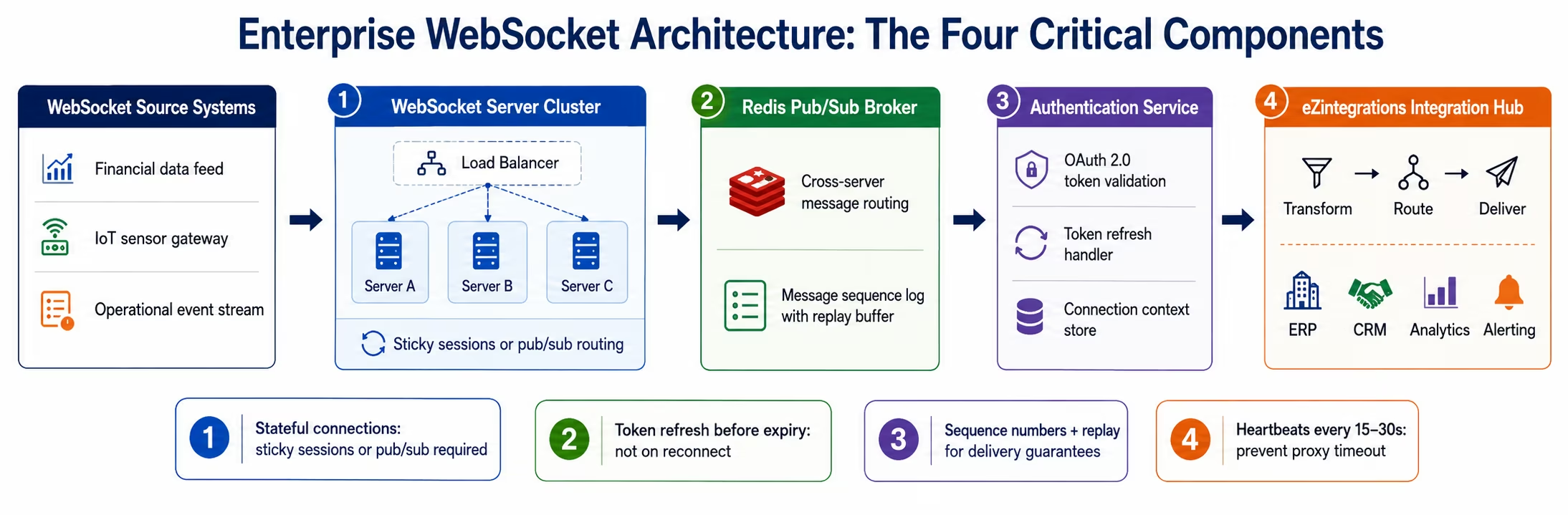
Enterprise WebSocket Architecture: Four Critical Considerations
WebSocket integration introduces architectural complexity that REST and webhook integrations do not. Four considerations determine whether a WebSocket-based enterprise pipeline is reliable at scale.
This shift toward real-time, event-driven architecture aligns with broader enterprise data trends highlighted by McKinsey, where low-latency data pipelines are becoming critical for operational decision-making
1. State Management
WebSocket connections are stateful: the server maintains per-connection state for every connected client. At scale, with hundreds or thousands of concurrent WebSocket connections, this state management becomes a significant server-side resource consideration. Each open connection consumes memory for the connection object, the send and receive buffers, and the authentication context.
For enterprise integration platforms handling WebSocket data, the platform must maintain this state reliably even when it is distributed across multiple server instances. Stateless horizontal scaling (simply adding more servers behind a load balancer) does not work directly with WebSocket, a client connected to server A cannot receive messages from server B without a pub/sub intermediary.
2. Load Balancing
Standard round-robin load balancers route each new request to a different server. For REST, this is fine: each request is independent. For WebSocket, a client needs all messages from a session to route to the same server.
This requires either: sticky sessions (the load balancer routes all traffic from a given client to the same server), or a message broker intermediary (all WebSocket servers publish to a shared message bus, so any server can deliver to any connected client).
Enterprise platforms use the message broker approach for reliability: even if a server instance fails, the message broker ensures message delivery continues through a healthy instance.
3. Authentication Refresh
Standard REST authentication tokens (OAuth 2.0 bearer tokens, JWT) have expiry times of 15 minutes to 1 hour.
For REST, expiry is not a problem: the client gets a new token before the next request. For WebSocket connections that stay open for hours or days, the authentication token embedded in the initial connection will expire while the connection is still active.
Production WebSocket architecture requires: initial authentication on connection establishment, a server-side token expiry check (the server sends a re-authentication request when the token is approaching expiry), client-side token refresh logic (the client obtains a new token and sends it to the server before expiry), and connection termination with a specific close code if re-authentication fails.
4. Message Ordering and Delivery Guarantees
WebSocket over TCP guarantees that messages are delivered in order if the TCP connection remains intact. It does not guarantee delivery if the connection drops and reconnects. Enterprise applications that cannot tolerate message loss must implement: server-side sequence numbers on each message, client-side acknowledgement (the client sends an ACK message confirming the last sequence number received), and server-side replay capability (the server can resend messages starting from any sequence number the client requests on reconnect).
Implementing message replay requires the server to maintain a message log (typically in Redis with a configurable retention window). This is the same architecture used by Apache Kafka for message streaming: a WebSocket-based real-time pipeline and a Kafka-based event streaming pipeline solve similar problems at different scales.
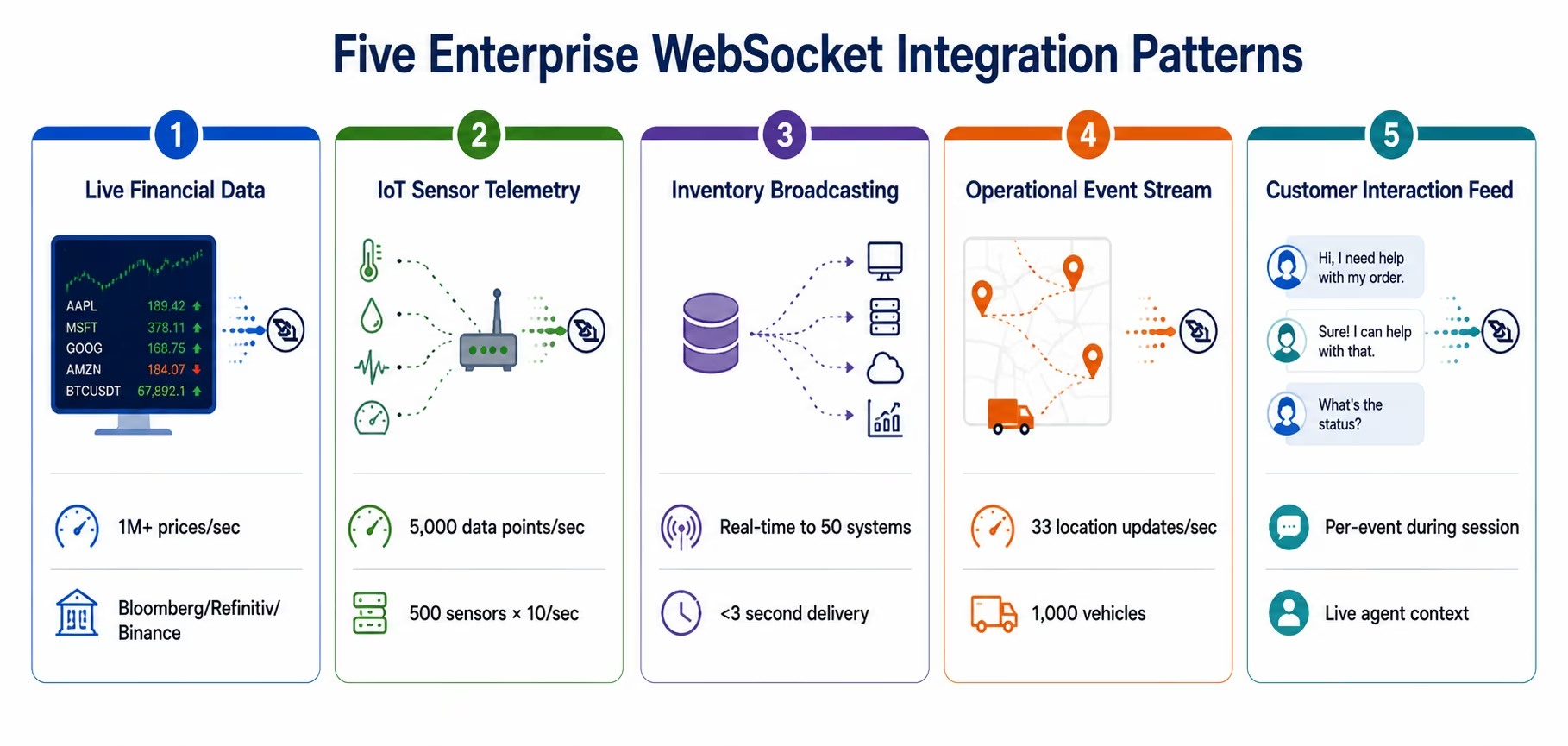
Five Real-Time Enterprise Integration Patterns Using WebSockets
WebSockets are the right protocol for five specific enterprise integration patterns. Each has distinct architectural characteristics.
Pattern 1: Live Financial Data Feeds
Use case: A trading desk needs to receive real-time equity prices, FX rates, or crypto market data from a market data provider (Bloomberg B-PIPE, Refinitiv Elektron, Binance WebSocket API) and route the data to internal systems: risk management engines, algorithmic trading systems, portfolio dashboards, and compliance monitoring: within sub-100ms of the market event.
Why WebSocket: Financial market data is continuous and high-frequency. An equity market generates 1-10 million price updates per second during trading hours. Polling a REST endpoint at 1-second intervals misses 999,999 updates. Webhooks cannot handle this delivery rate. WebSocket is the only appropriate protocol.
Integration pattern: The eZintegrations WebSocket connector subscribes to the market data feed, receives price frames, applies the configured transformation (currency normalisation, instrument identifier mapping, decimal precision adjustment), and delivers the data to the destination systems via the appropriate protocol for each (REST API call to the risk engine, Kafka message to the trading system, REST update to the dashboard data store).
The key consideration: the WebSocket source streams data faster than many destination systems can consume it. The integration layer must buffer and batch appropriately.
Pattern 2: IoT Sensor Telemetry Pipeline
Use case: A manufacturing plant has 500 connected sensors generating temperature, pressure, vibration, and flow rate readings every 100 milliseconds. This telemetry needs to reach: a real-time process monitoring dashboard (sub-second latency), a predictive maintenance algorithm (every reading), and a time-series database for historical analysis (every reading).
Why WebSocket: 500 sensors × 10 readings/second = 5,000 data points per second. A webhook delivery for each reading would mean 5,000 HTTP POST requests per second: a volume that would exhaust most endpoint rate limits. WebSocket’s persistent connection model with 2-byte frame overhead handles this volume efficiently.
Integration pattern: The IoT gateway establishes a WebSocket connection to eZintegrations. Each sensor reading arrives as a WebSocket message containing the sensor ID, timestamp, metric type, and value. eZintegrations fans the data out to three destinations simultaneously: a REST API call to the dashboard data service (batched at 100ms intervals), a direct database write to the time-series store, and a filtered stream to the predictive maintenance algorithm (only readings outside normal operating ranges).
Pattern 3: Real-Time Inventory Broadcasting
Use case: A retailer’s central inventory management system needs to broadcast stock level changes to 50 connected downstream systems within 2-3 seconds of any warehouse movement: eCommerce platforms (Shopify, Amazon, Walmart), point-of-sale systems, demand planning tools, and dropship fulfilment partners.
Why WebSocket: The inventory change needs to reach 50 systems within 3 seconds. Triggering 50 webhook deliveries per inventory event is feasible but creates concurrency management complexity. A WebSocket pub/sub pattern where all 50 downstream systems maintain open connections and receive broadcast messages is architecturally cleaner for this fan-out pattern.
Integration pattern: eZintegrations maintains WebSocket connections from the inventory source (the WMS) and to all consuming systems. When the WMS sends an inventory update frame, eZintegrations transforms the data to each destination’s expected format and broadcasts simultaneously. Consuming systems that were disconnected at the time of the update receive the missed updates via the replay buffer on reconnect.
Pattern 4: Operational Event Streaming
Use case: A logistics company’s operational systems: track-and-trace, driver dispatch, warehouse management: generate continuous event streams (vehicle location updates every 30 seconds, warehouse door open/close events, exception alerts) that need to feed a real-time operations dashboard, a customer notification service, and a compliance event log.
Why WebSocket: Location updates every 30 seconds for a fleet of 1,000 vehicles = 33 updates per second. This is within webhook delivery capacity, but the operations dashboard needs sub-5-second latency for map accuracy. WebSocket’s persistent connection eliminates the HTTP handshake from every update cycle.
Integration pattern: The eZintegrations WebSocket connector receives the operational event stream, classifies events by type and priority (LLM Classification for unstructured exception events), and routes: all events to the compliance log (database write), location events to the dashboard (real-time REST update), and exception events to the notification service (immediate REST POST to trigger customer notification).
Pattern 5: Live Customer Interaction Feeds
Use case: A customer experience platform needs to feed live chat, customer behavioural events (page views, product interactions, cart changes), and support ticket updates to a real-time agent assistance tool: giving customer service agents current context about what the customer is doing on the website during the support interaction.
Why WebSocket: Customer behavioural events are continuous during an active session. Polling for updates introduces visible lag in the agent interface. WebSocket delivers each event as it occurs, keeping the agent’s view of customer behaviour current.
Integration pattern: The front-end web application maintains a WebSocket connection to eZintegrations’ WebSocket endpoint. Customer events are forwarded in real time to: the agent assistance tool (for live context), the CRM (for session event logging), and the personalisation engine (for real-time recommendation adjustment).
[VIDEO PLACEHOLDER: WebSocket integration demo | “eZintegrations WebSocket Integration: IoT Telemetry Pipeline and Real-Time Inventory Broadcasting Demo” | Embed after Pattern 5 | Show: configuring a WebSocket connection to an IoT gateway in eZintegrations, setting up a real-time data transformation pipeline, and broadcasting inventory updates to multiple downstream systems simultaneously. Duration: 8-10 minutes.]WebSocket Authentication and Security for Enterprise
WebSocket connections that carry enterprise data require the same security controls as any other production integration: but the stateful, long-lived nature of WebSocket connections introduces specific security considerations.
Initial authentication:
WebSocket connections upgrade from HTTP, so the initial authentication can use any HTTP authentication mechanism. The two standard approaches for enterprise:
Bearer token in the upgrade request: include the OAuth 2.0 bearer token as a query parameter (wss://api.example.com/stream?token=...) or in a custom HTTP header during the upgrade handshake. Query parameter tokens appear in server access logs and are therefore less secure: use custom headers or initial message authentication where possible.
Initial message authentication: establish the WebSocket connection unauthenticated, then immediately send a JSON authentication message as the first WebSocket frame. The server validates the credentials and either confirms the authenticated session or closes the connection with a 4001 (Unauthorized) close code.
TLS (WSS):
All enterprise WebSocket connections must use the secure WebSocket protocol (wss://), which is WebSocket over TLS. Unencrypted WebSocket (ws://) is not acceptable for enterprise data pipelines. WSS provides the same TLS protection as HTTPS for the entire data stream.
Token refresh:
As described in the architecture section, tokens embedded in long-lived WebSocket connections expire. The server-initiated re-authentication pattern works as follows: the server sends a JSON message at a configured time before token expiry ({"type": "auth_required", "expires_in": 120}), the client obtains a fresh token from the auth server, and the client sends the new token in a WebSocket message ({"type": "auth_refresh", "token": "..."}). If the client does not refresh before expiry, the server sends a Close frame with code 4001.
Rate limiting:
WebSocket connections can generate very high message rates. Production enterprise WebSocket endpoints must enforce per-connection rate limits at the application layer: WebSocket has no built-in rate limiting. eZintegrations’ WebSocket connector applies configurable message rate throttling to prevent source systems from overwhelming downstream processing capacity.
SOC 2 and compliance:
All WebSocket traffic processed through eZintegrations is covered by eZintegrations’ SOC 2 Type II certification. TLS encryption is enforced on all WSS connections. Connection authentication events and messages processed are logged in the immutable audit trail that satisfies enterprise compliance requirements.
Scaling WebSocket Connections in Enterprise Environments
Horizontal scaling of WebSocket servers requires different patterns than scaling REST API servers. Here is the architecture that works at enterprise scale.
The sticky session approach:
Configure your load balancer to route all traffic from a given source IP to the same WebSocket server instance. This works well for environments with a moderate number of long-lived connections (up to a few thousand). The limitation: if a server instance goes down, all connections routed to it drop and must reconnect. This creates a reconnnection storm if multiple clients reconnect simultaneously.
The pub/sub message broker approach:
Every WebSocket server publishes received messages to a shared message broker (Redis Pub/Sub, Apache Kafka, or AWS SNS/SQS). Every WebSocket server subscribes to the topics relevant to its connected clients. When a message arrives for client A, whichever server holds client A’s connection delivers the message: regardless of which server received the original message.
This architecture is horizontally scalable without sticky sessions. Server failures result in client reconnections distributing across healthy servers without a coordination bottleneck. eZintegrations uses this architecture for its WebSocket connector infrastructure: your WebSocket pipeline is not dependent on a single server instance.
Connection pooling and multiplexing:
For enterprise systems that maintain many simultaneous WebSocket connections to the same source (multiple feeds from the same financial data provider, multiple IoT device types from the same gateway), connection pooling reduces the total number of TCP connections. A single WebSocket connection can carry multiple logical data streams using subprotocols or message routing fields: reducing the TCP connection count at the operating system level.
How eZintegrations Handles WebSocket Integration
eZintegrations supports WebSocket as a first-class native protocol alongside REST, GraphQL, Webhooks, Database connections, Message Queue (Kafka, RabbitMQ), and File (S3, SFTP): within the same workflow builder interface and with the same transformation, routing, and monitoring capabilities.
WebSocket connector capabilities in eZintegrations:
As a WebSocket client (subscribing to a WebSocket server): eZintegrations establishes and maintains a WebSocket connection to your specified WSS endpoint. It handles the upgrade handshake, connection lifecycle, heartbeats, automatic reconnection with configurable backoff, and authentication refresh. Received messages trigger the configured integration workflow.
As a WebSocket server (accepting incoming WebSocket connections): eZintegrations can expose a WebSocket endpoint that your source systems connect to. Incoming messages from connected clients trigger the configured workflow, enabling enterprise systems to push real-time data to eZintegrations for processing and onward routing.
Transformation within the WebSocket pipeline: messages received via WebSocket pass through eZintegrations’ standard transformation layer: field mapping, JSON/XML parsing, business logic, data enrichment, LLM Classification (for unstructured message content), and Data Analysis (for statistical anomaly detection on continuous data streams).
Multi-destination fan-out: a single WebSocket data stream can feed multiple destination systems simultaneously: a REST API call to the ERP, a database write to the time-series store, and a filtered push to an alerting system: all from one incoming WebSocket connection.
Monitoring and observability: every WebSocket message processed generates an execution record in the eZintegrations monitoring dashboard: message volume, processing latency, error rate, and connection uptime. Alerting fires on connection drop (with automatic reconnection also initiated), processing errors above a configurable threshold, and message volume deviations.
Automation Hub templates: the Automation Hub includes WebSocket integration templates for common real-time data source patterns: financial market data feeds, IoT telemetry pipelines, and operational event streams. Templates include pre-configured connection parameters, authentication patterns, and transformation logic for the most common WebSocket source formats.
Explore real-time WebSocket integration templates in the Automation Hub.
Book a free demo WebSocket integration and bring your specific real-time data pipeline use case.
Frequently Asked Questions
1. What is WebSocket integration and when should enterprises use it?
WebSocket integration creates a persistent bidirectional TCP connection for real-time data streaming. Enterprises should use WebSocket when data arrives continuously such as financial market feeds, IoT sensor data, or operational events, when latency below 100 milliseconds is required, or when servers must push updates to clients without polling. For standard CRUD operations and event notifications, REST APIs and webhooks are typically simpler and sufficient.
2. What is the difference between WebSocket and webhook for enterprise integration?
Webhooks are one-way HTTP POST notifications triggered by specific events, while WebSockets provide persistent bidirectional communication channels. Webhooks send a single request and close the connection, making them ideal for event-driven updates. WebSockets maintain an open connection for continuous high-frequency or real-time bidirectional data exchange.
3. How does WebSocket authentication work for enterprise security?
WebSocket authentication typically occurs during the initial HTTP upgrade handshake or via an initial authentication message. Enterprise best practices include using OAuth 2.0 bearer tokens in the Authorization header, enforcing TLS with WSS protocol, implementing token expiry checks with re-authentication before expiration, and closing connections with appropriate status codes on authentication failure. All WebSocket traffic in enterprise environments should be encrypted and monitored for compliance.
4. Can WebSocket handle enterprise data volumes like IoT telemetry?
Yes, WebSocket is highly efficient for high-frequency data streams due to its minimal frame overhead compared to HTTP. For example, a system with hundreds of IoT sensors sending frequent updates can stream data through a single persistent connection. The main consideration is downstream processing capacity, which can be managed through throttling, batching, and scalable processing pipelines.
5. How does eZintegrations support WebSocket as an enterprise integration protocol?
eZintegrations supports WebSocket as both a client and server, enabling subscription to real-time feeds and handling incoming connections. It manages connection lifecycle, automatic reconnection, authentication refresh, heartbeats, and message fan-out within a unified no-code workflow builder alongside REST, GraphQL, and webhook integrations. It also provides monitoring, latency tracking, and uptime alerting, with secure connectivity options such as IPSec Tunnel for on-premises systems.
6. What happens to a WebSocket integration when the connection drops?
Enterprise-grade WebSocket integrations implement automatic reconnection with exponential backoff. When a connection drops, the system detects it via heartbeat timeouts and attempts reconnection starting with short delays that increase progressively. Advanced setups can request message replay from the server after reconnection to ensure no data is lost during temporary network interruptions.
Conclusion: WebSocket Is the Right Protocol for the Enterprise Use Cases Where It Is the Right Protocol
The nuanced truth about WebSocket in enterprise integration: it is the correct protocol for a specific set of use cases and an unnecessarily complex choice for everything else.
Use WebSocket when your integration requires continuous data streaming, sub-100ms delivery latency, server-initiated data push without polling, or bidirectional real-time communication. Financial market data, IoT telemetry, real-time inventory broadcasting, operational event streaming, and live customer interaction feeds all fit this profile.
Use REST and webhooks for everything else. They are simpler to scale, simpler to debug, and sufficient for the majority of enterprise integration patterns.
When your architecture does call for WebSocket, the implementation must address the four enterprise-critical considerations: stateful connection management, load balancing architecture, authentication token refresh on long-lived connections, and message delivery guarantees through sequence numbers and replay.
eZintegrations handles all of this natively: WebSocket as a first-class protocol alongside REST, GraphQL, Webhooks, and Database connections. Your team configures the pipeline; the platform manages connection lifecycle, authentication refresh, reconnection logic, and multi-destination fan-out.
Book a free Demo WebSocket integration demo and bring your specific real-time data use case. We will show you the connection configuration, the transformation pipeline, and the monitoring architecture for your environment.
Explore WebSocket integration templates in the Automation Hub for IoT telemetry, financial data feeds, and real-time inventory pipeline patterns.