How to Analyze Procurement Spend Using AI and Identify Savings Opportunities
$120.00
| Workflow Name: | AI Spend Analysis and Category Recommendations |
|---|---|
| AI Model Type: | NLP spend classification with UNSPSC taxonomy mapping (transformer-based text classification for spend category assignment) combined with statistical pattern detection for supplier fragmentation; maverick spend; and consolidation opportunity identification |
| Model Provider: | Goldfinch AI of eZintegrations (Document Intelligence for NLP spend line classification and UNSPSC category mapping + Data Analysis for supplier fragmentation scoring; maverick spend detection; and savings opportunity quantification + Data Analytics with Charts/Graphs/Dashboards for spend cube generation; procurement dashboard; and category manager reporting) |
| Goldfinch AI Tool(s) Used: | Document Intelligence: Classifies each AP transaction line using NLP against the UNSPSC (United Nations Standard Products and Services Code) taxonomy – mapping free-text supplier descriptions, invoice line item text, and GL account codes to standardized spend categories and subcategories; resolves supplier name variants (normalizes “IBM Corp,” “IBM Corporation,” “International Business Machines” to a single canonical supplier entity) for accurate spend aggregation; Data Analysis: Executes the spend pattern analysis model on the classified transaction dataset – identifies supplier fragmentation per category (number of active suppliers vs. benchmark for that category and spend volume), detects maverick spend (purchases outside contracted suppliers for a category), quantifies the consolidation opportunity per category (estimated savings from reducing supplier count to benchmark), and scores each category for procurement action priority (Consolidate/Renegotiate/RFP/Monitor) |
| Task Type: | Classification + Anomaly Detection + Recommendation (NLP spend classification feeds fragmentation and maverick spend detection; pattern analysis produces category savings recommendations) |
| Input Type: | AP transaction data from SAP FI or Oracle AP – extracted via JDBC or OData API; fields: transaction date; supplier name; invoice number; line item description; GL account; cost center; amount; purchasing organization; contract reference (if present); PO vs. non-PO flag; typically 12 to 24 months of historical transaction data for initial spend cube; ongoing incremental monthly or quarterly refresh |
| Output Format: | Classified spend cube in Snowflake – every AP transaction line assigned a UNSPSC category; subcategory; and normalized supplier name. Procurement Dashboard in Goldfinch AI Data Analytics – spend by category; supplier fragmentation score; maverick spend rate; consolidation opportunity value; and action recommendation (Consolidate/Renegotiate/RFP/Monitor) per category. Category Manager alert reports delivered via SMTP with category-specific findings. Spend analysis findings available as structured export to S2P (Source-to-Pay) platforms or procurement tools. |
| Who Uses It: | Category Manager; Chief Procurement Officer (CPO); Procurement Analyst |
| On-Premise Supported: | Yes – eZintegrations connects to on-premises SAP FI; Oracle EBS; Oracle AP; MSSQL procurement databases; and legacy ERP systems via IPSec Tunnel. eZintegrations is a browser-based; cloud-hosted platform and does not require any on-premises software installation. |
| Industry: | Manufacturing; Healthcare; Government; Financial Services; Retail |
| Outcome: | 5 to 15% identified savings opportunity on analyzed spend (Hackett Group procurement benchmark); spend classification accuracy 94%+ at UNSPSC level 3; typical spend analysis cycle from 3 to 6 months (manual consultant-led) to under 2 weeks (AI-automated); 100% of AP transaction volume analyzed vs. 20 to 30% sampled in typical manual spend analysis |
| Tags: | AI spend analysis workflow; spend analytics AI; UNSPSC spend classification; procurement spend analysis automation; SAP AP spend analysis; Oracle AP AI analytics; Goldfinch AI procurement; maverick spend detection AI; supplier consolidation AI; category management AI; spend cube automation; procurement savings identification AI |
| AI Credits Required: | Yes – three Goldfinch AI tools invoked per spend analysis run: Document Intelligence (NLP spend classification and supplier normalization per transaction batch); Data Analysis (fragmentation scoring; maverick spend detection; savings opportunity quantification); and Data Analytics with Charts/Graphs/Dashboards (spend cube generation; Procurement Dashboard build; category alert reports) |
Table of Contents
| AI Solution: | The AI Spend Analysis and Category Recommendations workflow from eZintegrations extracts 12 to 24 months of AP transaction data from SAP FI or Oracle AP via JDBC or OData API and processes it through a three-step AI pipeline. Goldfinch AI Document Intelligence classifies every transaction line against the UNSPSC taxonomy using NLP and normalizes supplier names to canonical entities. Goldfinch AI Data Analysis identifies supplier fragmentation per category; detects maverick spend; and quantifies the consolidation savings opportunity per category. Goldfinch AI Data Analytics builds the spend cube in Snowflake and generates the Procurement Dashboard with category action recommendations. Category Managers are alerted with category-specific findings within 2 weeks of data extraction. |
|---|---|
| Validation (HITL): | All spend classification results and category recommendations are reviewed by the Procurement Analyst and Category Manager before any procurement actions are initiated – the AI workflow produces a decision-support output; not autonomous procurement actions. The Goldfinch AI Procurement Dashboard includes a Classification Confidence Review queue – transaction lines classified with Document Intelligence confidence below 0.72 are flagged in a separate review list for Procurement Analyst manual reclassification before they are included in the spend cube. Category action recommendations (Consolidate/Renegotiate/RFP/Monitor) require Category Manager review and approval before any supplier engagement or sourcing action is triggered. The CPO reviews the top 10 savings opportunities ranked by value before the Category Manager outreach list is finalized. |
| Accuracy Metric: | UNSPSC spend classification accuracy: 94%+ at UNSPSC level 3 (commodity level) on standard AP transaction line descriptions; GL codes; and supplier names. Supplier name normalization accuracy: 97%+ (correctly resolving name variants to a single canonical supplier entity). Maverick spend detection precision: 89%+ (correctly identifying purchases outside contracted suppliers where a contract is present in the system). |
| Time Savings: | Spend analysis cycle from 3 to 6 months (manual or consulting-led) to under 2 weeks (AI-automated extraction; classification; and dashboard build). 100% of AP transaction volume classified vs. 20 to 30% sampled in typical manual spend analysis. Category Manager category strategy preparation time from 4 to 8 weeks (manual data gathering and analysis) to under 3 days (reviewing AI-generated category findings and recommendations). |
| Cost Impact: | Hackett Group benchmark: AI-automated spend analysis reveals 5 to 15% savings opportunity on analyzed spend. McKinsey: advanced procurement analytics delivers 3 to 8% cost reduction on covered categories within 12 months. At $50M addressable spend; a 5 to 15% savings identification = $2.5M to $7.5M in identified savings opportunity. Actual realized savings vary by procurement team execution – the AI workflow identifies and prioritizes; the Category Manager acts. Eliminating consulting-led spend analysis fees: $150,000 to $500,000 per engagement replaced by a recurring AI-automated quarterly refresh. |
Description
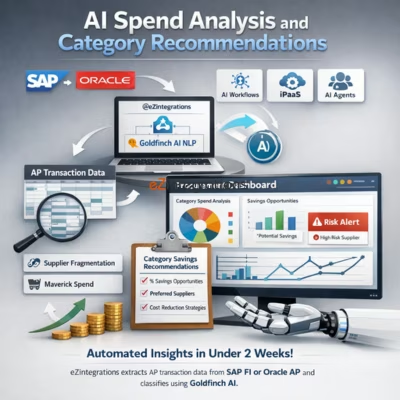
The AI spend analysis workflow from eZintegrations extracts AP transaction data from SAP FI or Oracle AP, classifies every transaction line against the UNSPSC taxonomy using Goldfinch AI NLP, detects supplier fragmentation and maverick spend, and delivers an actionable Procurement Dashboard with category savings recommendations — in under 2 weeks rather than months. eZintegrations is an enterprise automation platform covering iPaaS, AI Workflows, AI Agents, and Goldfinch AI agentic automation.
What Is an AI Spend Analysis Workflow?
An AI spend analysis workflow applies natural language processing to AP transaction data to automatically classify every purchase line item into standardized spend categories (UNSPSC taxonomy), normalize supplier names to canonical entities, and then apply statistical pattern analysis to identify supplier fragmentation, maverick spend, and consolidation savings opportunities. The result is a current, complete, and structured view of organizational spending — the spend cube — that traditionally requires months of manual analyst work or expensive consulting engagements to produce.
How Does an AI Spend Analysis Workflow Automatically Classify AP Transactions and Identify Procurement Savings Opportunities?
When the AI spend analysis workflow runs, eZintegrations extracts 12 to 24 months of AP transaction data from SAP FI or Oracle AP via JDBC. Goldfinch AI Document Intelligence processes every transaction line — classifying supplier descriptions, invoice line text, and GL codes against the UNSPSC taxonomy and normalizing supplier name variants. Goldfinch AI Data Analysis scores each category for supplier fragmentation (too many suppliers for the spend volume), maverick spend rate (purchases outside contracted suppliers), and consolidation opportunity (estimated savings from rationalizing the supplier base to benchmark). Goldfinch AI Data Analytics builds the spend cube in Snowflake and generates the Procurement Dashboard with ranked category recommendations. Category Managers are alerted with their category-specific findings.
The Hackett Group benchmarks typical spend analysis at revealing 5 to 15% savings opportunity. This AI spend analysis workflow makes that analysis available in 2 weeks instead of 6 months.
Watch Demo
| Video Title: | AI Spend Analysis Workflow |
|---|---|
| Duration: | 4 to 6 minutes |
Outcome & Benefits
| Accuracy: | UNSPSC classification accuracy 94%+ at level 3 (commodity level); supplier name normalization 97%+; maverick spend detection precision 89%+ |
|---|---|
| Touchless Rate: | 100% of AP transaction volume classified (vs. 20 to 30% sampled in manual spend analysis); classification confidence below 0.72 flagged for Procurement Analyst review queue before inclusion in spend cube; category recommendations require Category Manager review before any supplier engagement |
| Time Saved: | Spend analysis cycle from 3 to 6 months to under 2 weeks; category strategy preparation from 4 to 8 weeks to under 3 days; consulting engagement replaced by recurring quarterly AI refresh |
| Cost Saved: | 5 to 15% savings opportunity identified on analyzed spend (Hackett Group); $2.5M to $7.5M at $50M addressable spend; McKinsey 3 to 8% cost reduction on covered categories within 12 months; $150,000 to $500,000 consulting engagement cost replaced by AI automation |
Performance Metrics
| Metric | Before (Manual/Batch) | After (Real-Time Sync) | Improvement |
|---|---|---|---|
| Spend Analysis Cycle | 3 to 6 months | Under 2 weeks | 85%+ faster |
| Transaction Coverage | 20 to 30% sample | 100% of AP volume | Full coverage |
| Category Strategy Prep | 4 to 8 weeks per category | Under 3 days (AI findings) | 90%+ faster |
| Savings Identified | Incomplete (partial data) | 5 to 15% of addressable spend | $2.5M to $7.5M at $50M spend |
Functional Details
| Business Tasks: | Full AP transaction data extraction from SAP FI or Oracle AP (12 to 24 months); NLP spend line classification against UNSPSC taxonomy (levels 1 to 4); supplier name normalization and entity resolution; spend cube generation in Snowflake; supplier fragmentation analysis per category; maverick spend detection and rate calculation; consolidation savings opportunity quantification per category; category action recommendation scoring (Consolidate/Renegotiate/RFP/Monitor); Procurement Dashboard build in Goldfinch AI Data Analytics; Category Manager alert report generation and SMTP delivery; classification confidence review queue for Procurement Analyst; quarterly refresh on incremental AP transaction data; monthly spend trend monitoring for Category Managers |
|---|---|
| KPI Improved: | Spend under management (%); addressable spend identified; supplier fragmentation rate per category; maverick spend rate; consolidation savings opportunity identified ($); category strategy coverage (% of spend with active strategy); savings realized vs. identified ratio; procurement cycle time for category strategy development; vendor master deduplication rate |
| Scheduling: | Initial spend analysis run: 12 to 24-month historical AP transaction extraction and full classification (one-time setup; typically under 2 weeks end-to-end); quarterly refresh: incremental AP transaction data extracted and classified; spend cube updated; category recommendations refreshed; on-demand re-analysis available when a major category strategy refresh is needed; monthly spend trend dashboard update for ongoing category monitoring; Category Manager alert reports delivered weekly for active categories with new transaction activity |
| Downstream Use: | Spend cube tables written to Snowflake for Procurement Analytics BI access; S2P platform integration; and sourcing wave planning; Goldfinch AI Data Analytics Procurement Dashboard available to Category Managers; CPO; and Procurement Analysts via shared link; category action recommendations exported as structured data for S2P platforms (Jaggaer; Coupa; Ivalua) via REST API or file export; Category Manager alert reports delivered via SMTP with category findings; fragmentation score; maverick spend rate; and recommended action; Classification Confidence Review queue in Goldfinch AI dashboard for Procurement Analyst reclassification workflow |
Technical Details
| Model Name/Version: | Goldfinch AI Document Intelligence (https://ezintegrations.ai/agentic-ai-platform/) with underlying fine-tuned transformer model (domain-adapted BERT https://arxiv.org/abs/1810.04805 trained on procurement spend classification corpora) via Azure OpenAI (https://learn.microsoft.com/en-us/azure/ai-services/openai/) for UNSPSC taxonomy classification and supplier name normalization; UNSPSC taxonomy reference (https://www.unspsc.org/) used as the classification target schema (configurable to ETIM; eClass; or custom taxonomy if required); Goldfinch AI Data Analysis for supplier fragmentation scoring using statistical concentration metrics (Herfindahl-Hirschman Index per category) and savings opportunity quantification using category benchmark comparators; Goldfinch AI Data Analytics with Charts/Graphs/Dashboards for spend cube visualization and Procurement Dashboard generation |
|---|---|
| Hosting Type: | Cloud-hosted on Oracle OCI via eZintegrations; AP transaction data extracted from SAP FI (https://help.sap.com/docs/SAP_S4HANA_ON-PREMISE) via OData API or JDBC; or Oracle AP (https://docs.oracle.com/en/applications/financials/ap/) via JDBC; Goldfinch AI Document Intelligence and Data Analysis execute in customer-isolated tenant; Snowflake (https://docs.snowflake.com/) for spend cube storage; category analytics; and quarterly refresh data; on-premises SAP FI; Oracle EBS; and AP databases connect via IPSec Tunnel |
| Prompt Strategy: | Document Intelligence uses a structured UNSPSC mapping prompt per transaction line batch: “Classify the following AP transaction line items against the UNSPSC taxonomy. For each line; return: UNSPSC segment code and name; UNSPSC family code and name; UNSPSC class code and name (level 3); confidence score (0-1.0); and normalized canonical supplier name. Input fields: supplier name; invoice line description; GL account code. If multiple UNSPSC classifications are plausible; return the top classification and note the alternative. Flag ambiguous lines (confidence below 0.72) for review.” Data Analysis fragmentation and savings scoring: deterministic statistical models – not LLM-based. Data Analytics dashboard: structured visualization template – no open-ended generation. |
| Guardrails: | Document Intelligence classification confidence below 0.72: transaction line flagged in Classification Confidence Review queue for Procurement Analyst manual reclassification before inclusion in spend cube – prevents misclassified lines from distorting category analysis. Category action recommendations (Consolidate/Renegotiate/RFP/Monitor) are decision-support outputs only – no automated supplier engagement or sourcing actions triggered without Category Manager review. Supplier fragmentation score: calculated against category-level benchmark supplier counts – flags categories with supplier count more than 2x the benchmark as fragmented (not a hard cutoff; presented as a recommendation signal). Spend data confidentiality: all AP transaction data processed in customer-isolated tenant – no cross-tenant spend data sharing or benchmark data contribution without explicit opt-in. |
| Latency: | Under 2 weeks from ERP data extraction to completed spend cube; Procurement Dashboard; and Category Manager alert reports for a typical initial analysis of 1 to 2 million transaction lines; under 48 hours for quarterly incremental refresh on 3 to 6 months of new transactions; Procurement Dashboard available to Category Managers in real time once the analysis run completes |
| Data Governance: | AP transaction data (supplier names; amounts; invoice data; cost center) processed in customer-isolated eZintegrations tenant – not shared cross-tenant. Spend cube and classified transaction data written to customer’s Snowflake instance under their data residency policy. No AP transaction data transmitted to external benchmark databases or third-party analytics providers – benchmarks used for fragmentation scoring are industry-average references; not derived from other customers’ data. Full audit trail per analysis run: extraction timestamp; transaction count; classification run; confidence score distribution; review queue items; analyst reclassification actions; and dashboard publication timestamp |
| Throughput: | Up to 5 million AP transaction lines classified per analysis run at standard configuration; scales to 50 million+ lines at enterprise tier; supports large-scale initial spend cube builds for organizations with multi-year ERP transaction histories |
Connectivity and Deployment
| Supported Protocols: | JDBC (SAP FI and Oracle AP data extraction); OData v2/v4 (SAP FI API); Oracle REST API (Oracle AP); HTTPS; OAuth 2.0; SMTP (Category Manager alert reports and CPO summary); REST API (Snowflake write; S2P platform export); IPSec Tunnel (on-premises SAP FI; Oracle EBS; Oracle AP; and procurement database connectivity) |
|---|---|
| Security & Compliance: | HIPAA-eligible configuration available (healthcare procurement with clinically-sensitive supply chain data); GDPR-compliant data handling (supplier and vendor PII in AP data processed under data minimization principles; personal data in expense transaction lines masked); SOC Type II certified. TLS 1.3 encryption in transit; AES-256 at rest. AP transaction data processed in isolated tenant – no cross-tenant spend data sharing. RBAC enforced on spend cube access; category recommendation visibility; and dashboard sharing. Spend data subject to corporate procurement confidentiality requirements – dashboard access role-gated per business unit. |
| Tenancy Model: | Both single-tenant and multi-tenant deployments are available. Single-tenant is recommended for government; defense; and highly regulated industries where AP transaction data is subject to strict data residency and confidentiality requirements. Multi-tenant is the default shared-cloud deployment. Both support on-premises ERP connectivity via IPSec Tunnel. |
| On-Premise Supported: | Yes – eZintegrations connects to on-premises SAP FI; Oracle EBS; Oracle AP; MSSQL procurement databases; and legacy ERP systems via IPSec Tunnel. eZintegrations is a browser-based; cloud-hosted platform and does not require any on-premises software installation. |
FAQ
1. What is the AI Spend Analysis and Category Recommendations workflow?
The AI spend analysis workflow by eZintegrations extracts AP transaction data from SAP FI or Oracle AP, classifies every transaction line against the UNSPSC taxonomy using Goldfinch AI Document Intelligence NLP, identifies supplier fragmentation and maverick spend via Goldfinch AI Data Analysis, and generates a spend cube in Snowflake with an interactive Procurement Dashboard and category savings recommendations via Goldfinch AI Data Analytics. The workflow completes in under 2 weeks for a 12 to 24-month historical spend dataset, achieving 94%+ classification accuracy and revealing 5 to 15% savings opportunity on analyzed spend (Hackett Group benchmark).
2. What AI model types does the AI spend analysis workflow use?
This workflow uses three Goldfinch AI tools: Document Intelligence (fine-tuned BERT-based transformer via Azure OpenAI) for UNSPSC NLP spend classification and supplier name normalization, Data Analysis for statistical fragmentation scoring (Herfindahl-Hirschman Index per category), maverick spend detection, and savings opportunity quantification, and Data Analytics with Charts/Graphs/Dashboards for spend cube generation, interactive dashboard build, and category alert reports. The combination achieves 94%+ UNSPSC classification accuracy at level 3 and 97%+ supplier name normalization accuracy.
3. What input data does the AI spend analysis workflow require?
This workflow requires 12 to 24 months of AP transaction data extracted from SAP FI or Oracle AP — fields: transaction date, supplier name, invoice number, line item description, GL account, cost center, amount, purchasing organization, contract reference (if present), and PO vs. non-PO flag. Data is extracted via JDBC or OData API. On-premises SAP FI and Oracle EBS connect via IPSec Tunnel. A configured UNSPSC taxonomy mapping file is included with the workflow (or customized to ETIM, eClass, or client taxonomy on request).
4. What is the output format of the AI spend analysis workflow?
The workflow produces a classified spend cube in Snowflake — every AP transaction line assigned a UNSPSC category, subcategory, and normalized supplier name. The Goldfinch AI Procurement Dashboard shows spend by category, supplier fragmentation score, maverick spend rate, consolidation opportunity value, and action recommendation (Consolidate/Renegotiate/RFP/Monitor) per category. Category Manager alert reports are delivered via SMTP. Spend data is available for export to S2P platforms (Jaggaer, Coupa, Ivalua) and BI tools.
5. Who uses the AI spend analysis workflow?
Category Managers receive category-specific alert reports and use the Procurement Dashboard to review fragmentation, maverick spend, and savings opportunities for their assigned categories — accelerating category strategy development from weeks to days. Procurement Analysts manage the Classification Confidence Review queue (reclassifying flagged lines) and use the spend cube for sourcing wave planning. The CPO reviews the top 10 savings opportunities ranked by value and uses the dashboard for spend portfolio oversight and board reporting.
6. What are the key benefits of the AI spend analysis workflow?
Key benefits include 94%+ UNSPSC classification accuracy, spend analysis cycle from 3 to 6 months to under 2 weeks, 100% AP transaction coverage (vs. 20 to 30% sample in manual analysis), 5 to 15% savings opportunity identified on analyzed spend (Hackett Group), $2.5M to $7.5M identified savings at $50M addressable spend, McKinsey 3 to 8% cost reduction within 12 months for advanced procurement analytics, and replacement of $150,000 to $500,000 consulting engagement fees with a recurring quarterly AI refresh.
7. What systems does the AI spend analysis workflow integrate with?
This workflow extracts AP transaction data from SAP S/4HANA FI or Oracle AP via JDBC or OData API, writes the spend cube to Snowflake, delivers Procurement Dashboard and reports via Goldfinch AI Data Analytics and SMTP, and exports category recommendations to S2P platforms (Jaggaer, Coupa, Ivalua) via REST API or structured file. On-premises SAP FI, Oracle EBS, and legacy AP systems connect via IPSec Tunnel.
8. How often does the AI spend analysis workflow run?
The initial spend analysis run processes 12 to 24 months of historical AP transaction data and completes in under 2 weeks. Quarterly incremental refreshes process 3 to 6 months of new transactions and update the spend cube and dashboard within 48 hours. On-demand re-analysis is available when a major category strategy refresh is needed. Monthly spend trend dashboard updates provide ongoing category monitoring between full refresh cycles.
AI Credits
| LLM Steps Count: | 3 (Document Intelligence classification batch per transaction set + Data Analysis statistical pattern analysis + Data Analytics dashboard and report generation – per quarterly or on-demand run) |
|---|---|
| Credit Consumption Model: | Per transaction line batch for Document Intelligence (token-based; scales with transaction volume and line description length); per analysis run for Data Analysis (scales with category count); per dashboard build and report for Data Analytics |
| Estimated Credits per Run: | Small spend portfolio (under 100,000 transaction lines; initial analysis): ~5,000 to 12,000 credits total per run Medium spend portfolio (100,000 to 500,000 lines): ~12,000 to 50,000 credits per run Large spend portfolio (500,000 to 2,000,000 lines): ~50,000 to 150,000 credits per initial run Quarterly incremental refresh (3 to 6 months of new transactions): ~20 to 40% of initial run credits at same portfolio size |
| Monthly Credit Estimate (at Typical Volume): | Quarterly cadence; medium portfolio: ~3,000 to 12,500 credits per month (amortized) Quarterly cadence; large portfolio: ~12,500 to 37,500 credits per month (amortized) Note: Spend analysis runs quarterly or on-demand – not daily or real-time – making this one of the lower monthly credit consumers in the AI Workflow catalog relative to its business impact |
| Pricing Model: | Static Platform Fee + AI Credits. Platform fee covers unlimited non-LLM steps (ERP JDBC data extraction; Snowflake DW write; SMTP report delivery; S2P platform export API call). AI Credits consumed only by Goldfinch AI Document Intelligence (NLP classification); Data Analysis (pattern analysis); and Data Analytics (dashboard and reporting). |
| Credit Optimization Notes: | Process Document Intelligence classification in large batches of 500 to 1,000 transaction lines per API call rather than line-by-line – reduces API overhead credits by 30 to 50%. For quarterly incremental refreshes; classify only new and modified transaction lines (not the full historical corpus) – typically 10 to 20% of total transaction volume; reducing incremental refresh credits by 80 to 90% vs. full re-run. Cache UNSPSC classifications for recurring transaction patterns (same supplier; same GL code; same line description) – eliminates redundant NLP calls for stable spend patterns and reduces classification credits by 20 to 40% on mature spend portfolios with consistent purchasing patterns |
| Goldfinch AI Tool(s) Consuming Credits: | Document Intelligence: UNSPSC NLP classification and supplier normalization per transaction line batch – credits scale with transaction count and line description token length Data Analysis: supplier fragmentation scoring; maverick spend detection; savings opportunity quantification; and category recommendation scoring – credits per analysis run (scales with category count and transaction volume) Data Analytics with Charts/Graphs/Dashboards: spend cube generation; interactive dashboard build; and Category Manager alert report generation – credits per dashboard build and per report generation event |
| AI Credits Required: | Yes – three Goldfinch AI tools invoked per spend analysis run: Document Intelligence (NLP spend classification and supplier normalization per transaction batch); Data Analysis (fragmentation scoring; maverick spend detection; savings opportunity quantification); and Data Analytics with Charts/Graphs/Dashboards (spend cube generation; Procurement Dashboard build; category alert reports) |
Resources
Case Study
| Problem: | A regional hospital network with 8 facilities operated SAP FI across its central finance function and processed approximately $180M in annual AP spend across 6,200 active suppliers and 14 business units. Procurement operated without a current spend cube – the last structured spend analysis had been completed 26 months prior by an external consulting firm at a cost of $320,000. Category Managers built category strategies using annual report summaries and supplier relationship history rather than current transaction data. Supplier count per clinical supply category ranged from 12 to 38 suppliers – well above industry benchmarks of 3 to 6 per category for comparable volumes. Maverick spend (purchases outside contracted suppliers) was estimated by the CPO at 18 to 22% of total spend – but had never been systematically measured. The CPO’s board-level savings target for the fiscal year was $8.5M – which required identifying and executing on concrete category strategies; not estimates. |
|---|---|
| Solution: | Deployed eZintegrations AI spend analysis workflow in 11 business days. SAP FI connected via OData API for AP transaction extraction (24 months of data; 2.1 million transaction lines across 8 facilities). Goldfinch AI Document Intelligence configured with UNSPSC taxonomy classification prompt fine-tuned on healthcare procurement spend categories (clinical supplies; facilities; IT services; professional services; food service; utilities – 28 configured subcategories). Supplier name normalization applied across 6,200 active suppliers – entity resolution reduced canonical supplier count to 4,840 unique entities (17% deduplication). Goldfinch AI Data Analysis configured with healthcare category benchmark supplier counts for fragmentation scoring. Spend cube written to Snowflake. Goldfinch AI Data Analytics Procurement Dashboard configured with 14 category views for Category Managers plus CPO portfolio summary. Category Manager alert reports configured per category domain. |
| ROI: | Consulting engagement cost replaced: $320,000 (prior engagement fee; now replaced by recurring quarterly AI refresh). Identified savings pipeline value: $14.2M across all flagged categories (Category Manager-reviewed and validated). Savings realization in year 1 (first 3 category strategies executed): $4.8M (clinical disposables consolidation $3.1M + facilities vendor rationalization $1.1M + IT services renegotiation $600K). CPO board savings target met within 9 months of deployment. Total year-1 |
| Industry: | Manufacturing; Healthcare; Government; Financial Services; Retail |
| Outcome: | 5 to 15% identified savings opportunity on analyzed spend (Hackett Group procurement benchmark); spend classification accuracy 94%+ at UNSPSC level 3; typical spend analysis cycle from 3 to 6 months (manual consultant-led) to under 2 weeks (AI-automated); 100% of AP transaction volume analyzed vs. 20 to 30% sampled in typical manual spend analysis |