
How to Automate Employee Onboarding: From Offer Letter to Day-One System Access
April 23, 2026To automate employee onboarding from HRIS to day-one system access, eZintegrations monitors Workday, BambooHR, or SAP SuccessFactors for new hire records with a start date within the next 5-10 business days, then automatically creates the user account in Active Directory or Azure AD (with the correct OU, group memberships, and manager assignment), provisions Slack, Google Workspace or Microsoft 365, adds the employee to payroll (ADP, Gusto, or Paychex), sends equipment and IT setup requests, and delivers a personalised welcome email, all on a configurable pre-boarding schedule. The full provisioning sequence, from HRIS trigger to day-one access, runs without manual IT or HR intervention and typically completes in under 15 minutes per new hire.
TL;DR
- Manual new hire onboarding requires IT, HR, payroll, and facilities to coordinate across email and spreadsheets. Each team waits on the others. The new employee arrives on Day One to a laptop that is not set up and a login that does not work.
- Seven provisioning steps happen every time a new hire is confirmed: Active Directory account creation, email provisioning, Slack/Teams workspace addition, payroll system enrolment, HRIS profile completion, equipment request, and welcome communication.
- eZintegrations monitors the HRIS (Workday, BambooHR, or SAP SuccessFactors) for new hire records and triggers all seven steps automatically on a pre-boarding schedule.
- Level 1 (iPaaS Workflows) handles HRIS polling, Active Directory and Azure AD provisioning, Slack/Teams invitation, payroll enrolment, equipment ticket creation, and welcome email sending. Level 2 (AI Workflows) validates the new hire record before provisioning: completeness check (required fields present), duplicate detection, manager validation, and role-to-permission mapping check. Level 3 (AI Agents) monitors provisioning completion status, alerts IT when steps are incomplete 24 hours before start date, and flags onboarding exceptions. Level 4 (Goldfinch AI) provides the Goldfinch AI Chat UI as a Workflow Node: “Who is starting next week and what is their provisioning status?”, “Which new hires are missing payroll enrolment?”, or “What is the average time from HRIS record to full provisioning completion?”
- Configuration time: 2-4 days. Works with Workday, BambooHR, SAP SuccessFactors, and any HRIS with a REST API.
Why New Hire Onboarding Is Still a Manual Coordination Problem
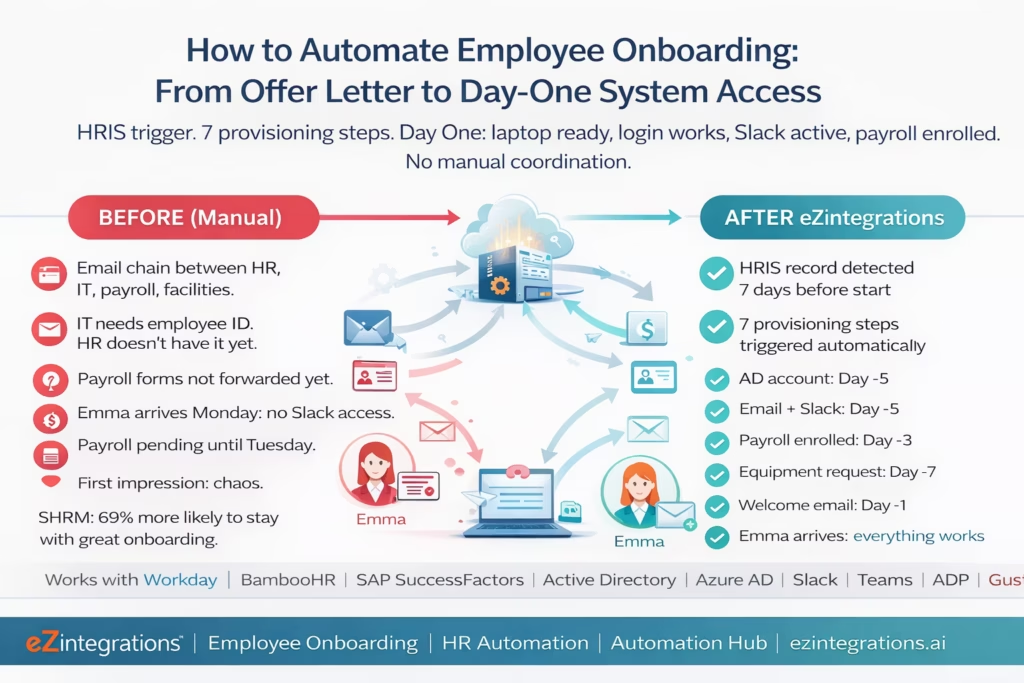
Your new marketing manager, Emma, signed her offer letter three weeks ago. Her start date is Monday. It is Thursday afternoon.
Your HR coordinator has sent an email to IT to create Emma’s laptop and account. IT has not replied. The HR coordinator sends a follow-up. IT replies: “We need her employee ID and department from HR.” HR does not know the employee ID yet because the HRIS profile is not fully set up. The HRIS profile is not set up because the hiring manager has not submitted the final details yet.
Meanwhile, payroll needs to be enrolled. The payroll team is waiting for the signed tax forms, which HR has but has not forwarded yet. Facilities needs to know if Emma needs a badge and a parking space. Nobody has told Facilities yet.
It is Monday morning. Emma arrives. Her laptop is ready (IT worked late Friday). Her Active Directory account was created Saturday. But she cannot log into Slack because the IT admin forgot to add her to the workspace. Her payroll enrolment is pending because the forms were sent on Friday and payroll processes on Tuesdays. She does not know who her onboarding buddy is. Nobody has sent her the welcome email with her first week’s schedule.
By midday on Monday, Emma has spent four hours waiting for access to the tools she needs to do her job. Her first impression of your company: chaos.
Research from SHRM found that 69% of employees are more likely to stay with a company for three years if they experience great onboarding. Poor onboarding creates early-tenure disengagement. And the cost of replacing an employee is 50-200% of their annual salary, depending on seniority.
The onboarding problem is not that your teams do not care. Emma’s hiring manager, HR coordinator, IT admin, and payroll team all care. The problem is that they coordinate by email, with no automated trigger between steps. When one person is busy, the next step waits.
The Seven Provisioning Steps That Every New Hire Triggers
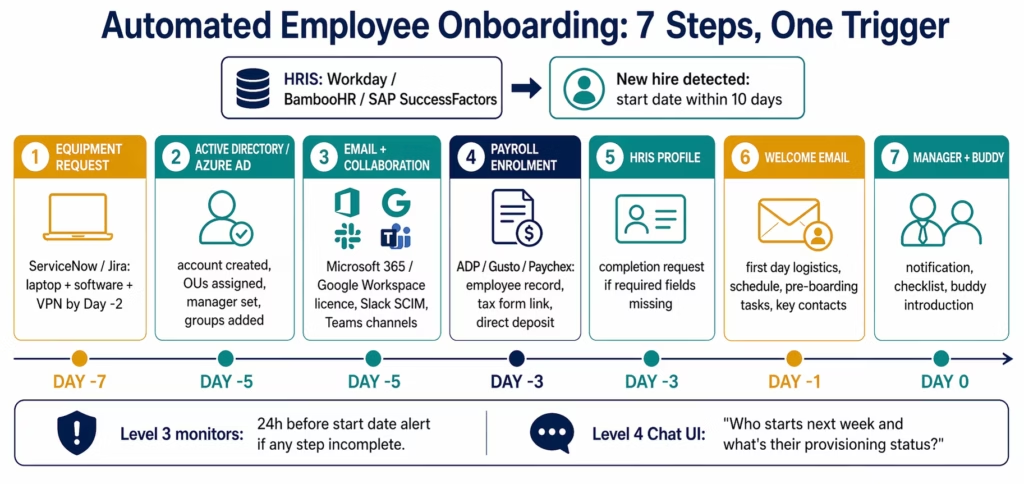
Every new hire confirmation triggers the same seven provisioning steps. None of them are complex. All of them require coordination. Without automation, each step depends on a human remembering to initiate the next one.
Step 1: Active Directory or Azure AD account creation. The foundation for all subsequent access. Without an AD account, nothing else works.
Step 2: Email and collaboration tool provisioning. Google Workspace, Microsoft 365, Slack, or Microsoft Teams. The new hire needs a company email address and workspace access before Day One.
Step 3: Payroll system enrolment. The employee must exist in payroll before their first pay date. Late enrolment means late first paycheck.
Step 4: HRIS profile completion. The HRIS profile may be partially complete when the offer is accepted. Job code, department, cost centre, reporting manager, and pay grade must be confirmed and finalised before other systems can pull data from the HRIS.
Step 5: Equipment and IT setup request. Laptop specifications, peripherals, software licences, and VPN access must be requested early enough for IT to configure and test before the start date.
Step 6: Welcome communication and pre-boarding. The new hire should receive a welcome email with their first week schedule, key contacts, and instructions for what to bring and how to arrive. This creates the first positive experience.
Step 7: Manager notification and buddy assignment. The hiring manager receives a reminder of the start date, a pre-boarding checklist, and the onboarding buddy assignment. The buddy receives an introduction and their responsibilities.
The HRIS Trigger: Detecting New Hire Records
The automation starts with the HRIS. Every HRIS has some way to detect when a new hire record has been created and confirmed.
Workday
Workday exposes a REST API and SOAP-based web services. For new hire detection, the most reliable method is polling the Workday RaaS (Report as a Service) endpoint with a custom report that returns employees with start dates within the next N days:
GET https://{tenant}.workday.com/ccx/service/customreport2/{tenant}/{report_owner}/{report_name}?format=json
    &startDate_gte={today}
    &startDate_lte={today+10days}
Authorization: Basic {base64(user:password)}
Or, for real-time triggering, Workday Business Processes support notifications via email or REST webhook when a hire action reaches “Completed” status. eZintegrations registers as a notification endpoint.
BambooHR
BambooHR provides a webhook system that fires when employee records are created or updated:
POST (registered webhook) when:
  employee.hireDate is populated
  AND employee.status = "Active"
Or, polling the BambooHR REST API:
GET https://api.bamboohr.com/api/gateway.php/{companyDomain}/v1/employees/changed
    ?since={last_check_timestamp}&type=added
Authorization: Basic {base64(api_key:x)}
This returns employees added since the last check timestamp.
SAP SuccessFactors
SAP SuccessFactors exposes OData APIs for employee data:
GET https://{datacenter}.successfactors.com/odata/v2/User
    ?$filter=startDate le datetime'{start_date_cutoff}'
    and status eq 'active'
    and startDate ge datetime'{today}'
Authorization: Bearer {sf_token}
Or, SuccessFactors Intelligent Services sends event notifications when hiring actions complete. eZintegrations subscribes to the HireEmployee event.
What the New Hire Record Contains
Regardless of HRIS, the new hire record provides the fields needed for downstream provisioning:
firstName,lastName: for account name and display nameemail(sometimes a personal email at this stage): for communicationstartDate: for the provisioning scheduledepartmentandcostCenter: for AD OU assignment and group membershipjobTitleandjobCode: for licence assignment and permission templatesmanagerIdormanagerEmail: for manager notification and AD manager fieldlocationandworkAddress: for Slack channel assignment and equipment delivery
Provisioning Step 1: Active Directory and Azure AD Account Creation
The Active Directory or Azure AD account is the identity foundation. Every other provisioning step depends on it.
On-Premises Active Directory
For organisations with on-premises AD, eZintegrations connects via the Microsoft Graph API (for hybrid setups) or via a lightweight agent running in the corporate network. Account creation:
Using Microsoft Graph API (Azure AD / hybrid):
POST https://graph.microsoft.com/v1.0/users
Authorization: Bearer {microsoft_graph_token}
Content-Type: application/json

{
  "accountEnabled": true,
  "displayName": "Emma Johnson",
  "mailNickname": "emma.johnson",
  "userPrincipalName": "emma.johnson@meridianmanufacturing.com",
  "passwordProfile": {
    "password": "{generated_temp_password}",
    "forceChangePasswordNextSignIn": true
  },
  "givenName": "Emma",
  "surname": "Johnson",
  "jobTitle": "Marketing Manager",
  "department": "Marketing",
  "officeLocation": "Austin HQ",
  "usageLocation": "US"
}
After account creation, assign the new user to the correct:
- Organisational Unit (OU):
PATCH /v1.0/users/{userId}with theonPremisesDistinguishedNamefield, or via AD group policy - Security groups:
POST /v1.0/groups/{groupId}/members/$reffor each relevant group (e.g., Marketing-All-Users, VPN-Access, Office365-Licenced) - Manager:
PUT /v1.0/users/{userId}/manager/$refwith the manager’s user ID
PUT https://graph.microsoft.com/v1.0/users/{userId}/manager/$ref
{
  "@odata.id": "https://graph.microsoft.com/v1.0/users/{managerId}"
}
Azure AD Licence Assignment
After account creation, assign the appropriate Microsoft 365 licence:
POST https://graph.microsoft.com/v1.0/users/{userId}/assignLicense
{
  "addLicenses": [{
    "skuId": "{microsoft_365_business_premium_sku_id}",
    "disabledPlans": []
  }],
  "removeLicenses": []
}
The skuId is the product’s GUID in your Microsoft tenant (retrieved via GET /v1.0/subscribedSkus). The licence assignment triggers automatic email provisioning in Microsoft 365.
Permission Templates by Job Role
Level 2 maps the new hire’s jobCode from the HRIS to a permission template: a pre-defined set of AD groups, security roles, and application access rights for each job category. This eliminates the most common IT provisioning error: assigning incorrect access for a role.
Example permission template (Marketing Manager):
{
  "jobCode": "MKT-MGR",
  "adGroups": ["Marketing-All-Users", "Marketing-Managers", "VPN-Access", "CRM-Marketing-Access"],
  "m365Licence": "Microsoft_365_E3",
  "applications": ["Salesforce", "HubSpot", "Adobe Creative Cloud"],
  "slackChannels": ["#general", "#marketing", "#marketing-managers", "#announcements"],
  "sharePointSites": ["Marketing-Resources", "All-Company"]
}
Provisioning Step 2: Email and Collaboration Tool Provisioning
Once the Microsoft 365 or Google Workspace account exists, email is provisioned automatically (via the licence assignment). Additional collaboration tools are provisioned via their respective APIs.
Slack Workspace Provisioning
POST https://slack.com/api/users.admin.invite
Authorization: Bearer {slack_admin_token}
Content-Type: application/json

{
  "email": "emma.johnson@meridianmanufacturing.com",
  "first_name": "Emma",
  "last_name": "Johnson",
  "channels": "C01234ABCDE,C01234FGHIJ"
}
Or, using the Slack SCIM API (recommended for enterprise provisioning):
POST https://api.slack.com/scim/v1/Users
Authorization: Bearer {slack_scim_token}

{
  "schemas": ["urn:scim:schemas:core:1.0", "urn:scim:schemas:extension:enterprise:1.0"],
  "userName": "emma.johnson@meridianmanufacturing.com",
  "name": { "givenName": "Emma", "familyName": "Johnson" },
  "emails": [{ "value": "emma.johnson@meridianmanufacturing.com", "primary": true }],
  "active": true
}
After user creation, add to the correct Slack channels:
POST https://slack.com/api/conversations.invite
{
  "channel": "{channel_id}",
  "users": "{new_user_slack_id}"
}
Channel membership comes from the permission template mapped to the new hire’s job code.
Microsoft Teams Provisioning
For Microsoft Teams (already provisioned via Microsoft 365 licence), add the user to the correct Teams:
POST https://graph.microsoft.com/v1.0/groups/{teamId}/members/$ref
{
  "@odata.id": "https://graph.microsoft.com/v1.0/users/{userId}"
}
Provisioning Step 3: Payroll System Enrolment
The new hire must exist in payroll before their first pay date. Late payroll enrolment means the employee misses their first paycheck, which is both a legal and relationship risk.
ADP Workforce Now
POST https://api.adp.com/hr/v2/workers
Authorization: Bearer {adp_token}

{
  "workers": [{
    "associateOID": "{generated_associate_oid}",
    "person": {
      "legalName": {
        "givenName": "Emma",
        "familyName": "Johnson"
      }
    },
    "workers": [{
      "hireDate": "2026-04-07",
      "positionID": "{position_id}",
      "payrollGroupCode": "BIWEEKLY"
    }]
  }]
}
Gusto
POST https://api.gusto.com/v1/companies/{company_id}/employees
Authorization: Bearer {gusto_token}

{
  "first_name": "Emma",
  "last_name": "Johnson",
  "email": "emma.johnson@meridianmanufacturing.com",
  "date_of_birth": "{dob}",
  "start_date": "2026-04-07"
}
After the initial record is created, the onboarding workflow sends Emma a secure link to complete her tax forms (W-4 in the US, equivalent in other jurisdictions) and bank account details for direct deposit. This replaces the “send forms via email, wait for them to be returned and re-entered” manual process.
Paychex Flex
POST https://api.paychex.com/workers
Authorization: Bearer {paychex_token}

{
  "familyName": "Johnson",
  "givenName": "Emma",
  "emailUri": "emma.johnson@meridianmanufacturing.com",
  "hireDate": "2026-04-07",
  "workerId": "{generated_id}"
}
Provisioning Step 4: HRIS Profile Completion and Role Assignment
The HRIS trigger fires when the hire record is first created, which may be before all profile details are complete. Step 4 validates the HRIS profile completeness and triggers completion requests for any missing fields.
Level 2 checks the HRIS record for required fields:
jobCode(required for permission template mapping)costCenter(required for GL posting of salary)reportingManagerId(required for AD manager field and approval routing)workLocation(required for equipment delivery and office badge)employeeType(full-time, part-time, contractor: affects benefit enrolment)
Missing required fields: a completion request is sent to the hiring manager and HR coordinator with the specific fields missing and a deadline (must be complete before Day -3 from start date). Level 3 monitors completion and escalates if not received.
Provisioning Step 5: Equipment and IT Setup Request
An equipment request is created in the IT service desk (ServiceNow, Jira Service Management, or Freshservice) automatically:
POST https://{instance}.service-now.com/api/now/table/sc_request
Authorization: Basic {servicenow_token}
Content-Type: application/json

{
  "short_description": "New Hire Equipment Request - Emma Johnson - Start Date: April 7, 2026",
  "description": "Please set up laptop and peripherals for new Marketing Manager.\nDepartment: Marketing\nLocation: Austin HQ\nStart date: April 7, 2026\nSoftware required per role template: Adobe Creative Cloud, Salesforce, HubSpot\nVPN access: Yes",
  "assignment_group": "IT_Hardware_Team",
  "priority": "2",
  "due_date": "2026-04-05"
}
The ticket includes: new hire name, department, location, start date, software requirements (from the job code permission template), and the due date (2 business days before start date to allow setup and testing time).
For organisations using Jira Service Management:
POST https://{domain}.atlassian.net/rest/api/3/issue
Authorization: Bearer {jira_token}

{
  "fields": {
    "project": { "key": "IT" },
    "issuetype": { "name": "Equipment Request" },
    "summary": "New Hire: Emma Johnson - Marketing Manager - Start April 7",
    "description": { "type": "doc", "version": 1, "content": [
      { "type": "paragraph", "content": [
        { "type": "text", "text": "New hire onboarding equipment request. Laptop + peripherals. Adobe CC, Salesforce, HubSpot. Due April 5." }
      ]}
    ]},
    "priority": { "name": "High" },
    "duedate": "2026-04-05"
  }
}
Provisioning Step 6: Welcome Communication and Pre-Boarding
Three to five business days before the start date, the new hire receives a personalised welcome email with:
- First day logistics (time, location, parking, who to ask for)
- First week schedule (meetings, training sessions, team introductions)
- Pre-boarding tasks (tax forms, benefits enrolment link, handbook acknowledgment)
- Key contacts (IT helpdesk, HR contact, onboarding buddy)
- Company handbook and benefits overview links
The welcome email is generated from a template with the new hire’s name, start date, manager name, department, and location populated from the HRIS record. It is sent from the HR coordinator’s email address (not a generic no-reply) to create a personal feel while being fully automated.
The day before the start date, a reminder is sent to the new hire with: their work email address, temporary password instructions, and the IT helpdesk number in case of access issues on Day One.
Provisioning Step 7: Manager Notification and Buddy Assignment
The hiring manager receives:
- A start date confirmation 7 days before the start date
- A pre-boarding checklist: “Emma starts Monday. Here is what you need to do: schedule a Day One welcome meeting, introduce Emma to the team, set up her 30-60-90 day plan”
- The onboarding buddy assignment (pulled from a buddy roster maintained in the HRIS or a separate list in eZintegrations)
The onboarding buddy receives:
- An introduction to Emma (name, role, start date)
- Their buddy responsibilities and suggested first-week touchpoints
- A link to the company’s buddy programme guidelines
Before vs After: Manual Onboarding vs Automated
| Onboarding Step | Manual Process | Automated with eZintegrations |
|---|---|---|
| New hire detection | HR coordinator monitors offers manually | HRIS API: new hire detected automatically |
| HRIS profile completeness | Discovered when other teams ask for data | Level 2: completeness check on record creation |
| Active Directory account | IT ticket created by email, 1-5 day delay | Microsoft Graph API: account created Day -5 |
| Group and OU assignment | Manual: IT admin assigns groups one by one | Permission template by job code: auto-assigned |
| Manager field in AD | Often left blank or incorrectly set | Auto-set from HRIS managerId field |
| Email provisioning | Depends on AD account creation (which was delayed) | Licence assignment auto-provisions email Day -5 |
| Slack/Teams addition | IT admin sends invitation manually (or forgets) | SCIM API: invited Day -5 with correct channels |
| Payroll enrolment | HR forwards forms to payroll by email | Payroll API: employee record created Day -3 |
| Tax form collection | Paper or email, manually re-entered | Secure link to self-service completion |
| Equipment request | Email to IT: often late or incomplete | ServiceNow/Jira ticket created Day -7 with full spec |
| Welcome email | HR coordinator writes and sends manually | Template auto-sent Day -1 with personalised content |
| Manager notification | Reminder sent by HR if remembered | Auto-checklist sent 7 days before start |
| Buddy assignment | Manual matching and introduction by HR | Auto-assigned from buddy roster, introductions sent |
| Day One access | Often incomplete: Slack missing, payroll pending | Complete before Day One in 90%+ of cases |
| Provisioning cycle time | 3-7 days (if all steps completed) | 15-30 minutes per hire (automated), 7 days ahead |
| Dropped steps | Common: 30-40% of onboarding has at least one missed step | Near-zero: Level 3 monitors all steps for completion |
| Audit trail | Email threads (incomplete) | Full digital log: every step, timestamp, system confirmation |
Step-by-Step: A New Marketing Manager Through the Full Automated Flow
Here is the complete automated onboarding sequence for Emma Johnson, new Marketing Manager at Meridian Manufacturing. Start date: Monday, April 7, 2026.
Setup: Meridian uses BambooHR for HR, Azure AD for identity, Microsoft 365 for email, Slack for collaboration, ADP Workforce Now for payroll, and ServiceNow for IT requests.
March 27 (10 days before start): BambooHR employee record created. Emma’s record is created in BambooHR with status=Active and hireDate=2026-04-07. eZintegrations detects the new hire via BambooHR webhook at 3:42 PM.
March 27, 3:42 PM: Level 2 validation (6 seconds).
- Required field check: all required fields present (firstName, lastName, hireDate, department, jobCode MKT-MGR, managerId=SPARK, workLocation=AustinHQ).
- Duplicate check: no existing Azure AD account for emma.johnson@meridianmanufacturing.com.
- Manager validation:
SPARK(Sarah Park) found in Azure AD with an active account. - Job code permission template: MKT-MGR found. Groups: Marketing-All-Users, Marketing-Managers, VPN-Access. Licence: Microsoft_365_E3. Slack channels: #general, #marketing, #marketing-managers.
- All validations pass.
March 28 (Day -10): ServiceNow equipment ticket created.
ServiceNow ticket INC-2026-0882:
"New Hire: Emma Johnson - Marketing Manager - Start April 7, 2026
Laptop: MacBook Pro 14" (Marketing template)
Software: Adobe Creative Cloud, Salesforce, HubSpot
Peripherals: External monitor, keyboard, mouse
VPN: Yes
Due: April 4, 2026"
March 31 (Day -7): Azure AD account created.
POST /v1.0/users
→ emma.johnson@meridianmanufacturing.com created
→ Temp password generated and encrypted
→ jobTitle: Marketing Manager
→ department: Marketing
→ usageLocation: US
Group assignments: Marketing-All-Users, Marketing-Managers, VPN-Access added via Graph API. Manager set to Sarah Park’s user ID. Microsoft 365 E3 licence assigned. Email provisioning triggered automatically.
March 31 (Day -7): Slack provisioning. Slack SCIM API creates Emma’s account. Invited to: #general, #marketing, #marketing-managers, #announcements. Slack welcome message sent by bot: “Hi Emma, welcome to Meridian! This channel is where you’ll get company announcements. Your manager Sarah Park will reach out before your start date.”
April 3 (Day -4): ADP payroll enrolment. Emma’s record created in ADP Workforce Now. Direct deposit setup link and W-4 completion link sent to Emma’s personal email (from BambooHR). Personal email at this stage because company email only exists in Azure AD, not yet accessible until Emma logs in on Day One.
April 4 (Day -3): Manager notification. Sarah Park receives an email:
Subject: Emma Johnson starts Monday, April 7 - Action needed

Emma Johnson is starting as Marketing Manager on April 7.

Your pre-onboarding checklist:
✓ AD account: created (emma.johnson@meridianmanufacturing.com)
✓ Equipment: requested (ticket INC-2026-0882, due April 4)
✓ Payroll: enrolled
☐ Schedule a Day One welcome meeting with Emma
☐ Introduce Emma to the team via email or Slack
☐ Share your 30-60-90 day plan

Emma's onboarding buddy: Marcus Chen (marcus.chen@meridianmanufacturing.com)
April 6 (Day -1): Welcome email to Emma’s personal email.
Subject: Welcome to Meridian, Emma! See you Monday!

Hi Emma,

We're excited to have you start Monday April 7.

Day One logistics:
- Arrive at 450 Industrial Blvd, Austin TX 78701 at 9 AM
- Ask for Sarah Park at reception (she'll meet you in the lobby)
- Bring your laptop if you want to connect to Wi-Fi before IT sets up your machine

Your company email: emma.johnson@meridianmanufacturing.com
IT helpdesk: it@meridianmanufacturing.com | +1 512-555-0100

Pre-boarding tasks (please complete before Monday):
✓ Tax forms (W-4): [Complete here - link]
✓ Direct deposit setup: [Complete here - link]
☐ Review employee handbook: [link]
☐ Benefits enrolment: [link] (deadline: April 21)

Your onboarding buddy is Marcus Chen. He'll reach out on Monday morning.

See you Monday!
HR Team, Meridian Manufacturing
April 7: Emma arrives. Azure AD account active. Microsoft 365 email accessible. Slack shows her team channels. ServiceNow equipment ticket closed (IT delivered and tested laptop Friday). ADP payroll: enrolled. Manager: Sarah scheduled a 10 AM welcome meeting.
Emma’s first impression: everything works.
Total automated provisioning time from BambooHR record creation (March 27) to all steps complete (April 6): 16 minutes of actual processing time across 9 days of calendar schedule.
Key Outcomes and Results
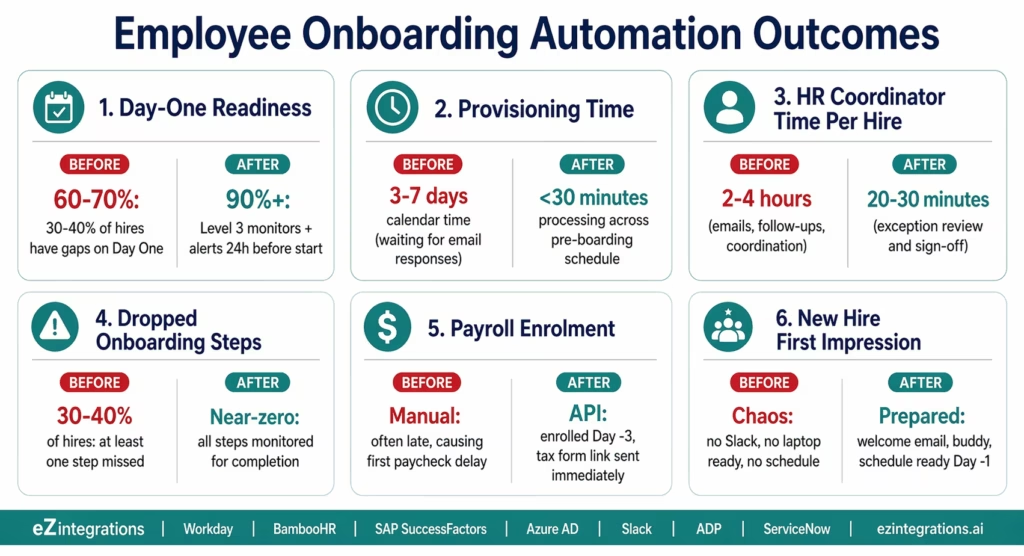
Day-One readiness: manual onboarding leaves 30-40% of new hires with at least one provisioning gap on Day One (missing Slack access, payroll pending, laptop not ready). Automated onboarding achieves near-complete Day One readiness in 90%+ of cases, with Level 3 monitoring flagging incomplete steps 24 hours before the start date.
Provisioning time: manual coordination across IT, HR, and payroll takes 3-7 days of calendar time (with each step waiting for the previous person to respond). Automated provisioning completes all seven steps in under 30 minutes of processing time, distributed across a configurable schedule (Day -7 through Day -1).
Dropped steps: in manual onboarding, the most commonly dropped steps are: payroll enrolment (discovered when the first paycheck is wrong), Slack/Teams invitation (discovered on Day One), and buddy assignment (often forgotten entirely). Automated provisioning eliminates dropped steps because every step is triggered programmatically and monitored for completion.
HR team time: HR coordinators spend an estimated 2-4 hours per new hire on manual onboarding coordination. With automation, HR reviews exceptions and the Level 3 monitoring dashboard rather than coordinating every step. Time saved: 80-90% per hire. For a company onboarding 10 new hires per month: 20-40 hours/month recovered.
Employee experience: SHRM research shows that 69% of employees are more likely to stay with a company for three years if they have a great onboarding experience. A Day One with working systems, a personalised welcome, and a prepared manager is the most direct contribution IT and HR can make to 90-day retention.
How to Get Started
Step 1: Map Your Current Onboarding Checklist
Document every step in your current onboarding process: which systems need an account created, which teams need to be notified, what the employee needs to receive before Day One, and what the hiring manager needs to do. Most organisations discover 10-15 distinct steps. Identify which 7-10 are currently most error-prone or most commonly missed.
Step 2: Build Your Job Code Permission Templates
The job code permission template is the most valuable configuration in the onboarding automation: for each job category in your organisation, define the AD groups, security roles, application licences, Slack channels, and Teams memberships that should be provisioned automatically. Start with your 5-10 most common job categories. Each template takes 15-30 minutes to define. This configuration eliminates the most common IT access provisioning errors.
Step 3: Explore and Import the Onboarding Templates
Go to the Automation Hub and explore the HR automation templates. Import the Employee Onboarding Workflow template for your HRIS (Workday, BambooHR, or SAP SuccessFactors). The template includes: HRIS polling and webhook configuration, Level 2 record completeness validation, Active Directory or Azure AD account creation, Slack and Teams provisioning, payroll system enrolment, IT service desk ticket creation, welcome email sequence, and manager/buddy notification.
Step 4: Configure Credentials, Permission Templates, and Pre-Boarding Schedule
Add API credentials for your HRIS, Azure AD (Microsoft Graph API), Slack (SCIM or admin API), payroll system (ADP, Gusto, or Paychex), and IT service desk (ServiceNow or Jira). Upload your job code permission templates. Configure the pre-boarding schedule (Day -7: equipment request, Day -5: AD account and email, Day -3: payroll, Day -1: welcome email, Day 0: manager checklist). Set the Level 3 monitoring threshold (alert if any step is incomplete 24 hours before start date).
Total configuration time: 2-4 days for a single HRIS, AD, email platform, payroll system, and IT service desk. Add 1 day for each additional HRIS or payroll system.
FAQs
eZintegrations connects to Workday via RaaS (Report as a Service) custom reports or Business Process event notifications, BambooHR via REST API polling (GET /api/v1/employees/changed) or webhooks, and SAP SuccessFactors via OData V4 API (/odata/v2/User) or Intelligent Services events. When a new hire record is detected with a start date within the configured window (typically 7-10 business days), the provisioning workflow triggers automatically. The HRIS record provides the fields needed for all downstream steps: name, job code, department, manager, location, and start date. Level 2 validates record completeness before provisioning begins.
2-4 days for a standard single-HRIS configuration with Azure AD, Slack, one payroll system, and one IT service desk. Key steps: job code permission template creation (3-5 hours for 5-10 role templates), API credential configuration (2-4 hours across all connected systems), template import and workflow configuration (2-4 hours), and pilot testing with 3-5 real new hire records (1-2 days running alongside manual process to validate). Add 1 day per additional HRIS or payroll system.
Yes, For Azure AD and hybrid environments: Microsoft Graph API (POST /v1.0/users) handles account creation, group assignment (POST /v1.0/groups/{id}/members/$ref), manager setting, and licence assignment. For pure on-premises Active Directory: eZintegrations supports LDAP connectivity or an on-premises agent that executes PowerShell commands for AD object creation. For most modern organisations (including hybrid setups), the Microsoft Graph API approach is recommended because it works for both Azure AD and synced on-premises AD via Azure AD Connect.
Level 2 runs a completeness check on every new hire record before provisioning begins. Required fields: first name, last name, start date, department, job code (for permission template mapping), and manager ID. If required fields are missing, provisioning is not started. Instead, a completion request is sent to the hiring manager and HR coordinator listing the specific missing fields and a deadline (the fields must be complete 3 business days before the start date). Level 3 monitors for completion and sends escalation alerts at 48 hours and 24 hours before the deadline if the fields remain empty.
Yes, Permission templates are defined per job code, so different job categories get different access sets automatically. Additionally, conditional workflow branches handle: full-time employees vs contractors (different payroll systems, different benefit enrolment), remote employees vs office employees (different equipment delivery routing, different badge request), international employees (different payroll APIs, different tax form requirements), and executive hires (additional security group assignments, additional approval steps). Each branch is configured in the visual workflow builder without code.1. How does employee onboarding automation work with Workday, BambooHR, and SAP SuccessFactors?
2. How long does it take to set up automated employee onboarding?
3. Does eZintegrations work with both on-premises Active Directory and Azure AD?
4. What happens if a required HRIS field is missing when the new hire record is created?
5. Can the onboarding automation handle different workflows for different employee types?
Emma Deserves a Better First Day
Manual onboarding is not a sign that your HR and IT teams are disorganised. It is a sign that they are coordinating a multi-step process by email, where each step waits for the previous person to reply.
The automated version is not complicated. The HRIS record is detected. Seven steps trigger on a schedule. Emma’s Active Directory account is created before she arrives. Her Slack is active. Her payroll enrolment is done. Her manager has a checklist. She receives a welcome email with everything she needs to know before walking in the door.
Your HR coordinator reviews the monitoring dashboard instead of chasing email chains. Your IT admin closes equipment tickets instead of discovering gaps on Monday morning.
Explore the Employee Onboarding Automation Templates in the Automation Hub. Or visit the Automation Hub directly to import the template for your HRIS and provisioning stack.
For the complementary offboarding workflow (which reverses the same provisioning steps when an employee leaves), the same Automation Hub library includes the Employee Offboarding template. For the related workflow automation context across finance and operations, see the workflow automation guides.

