
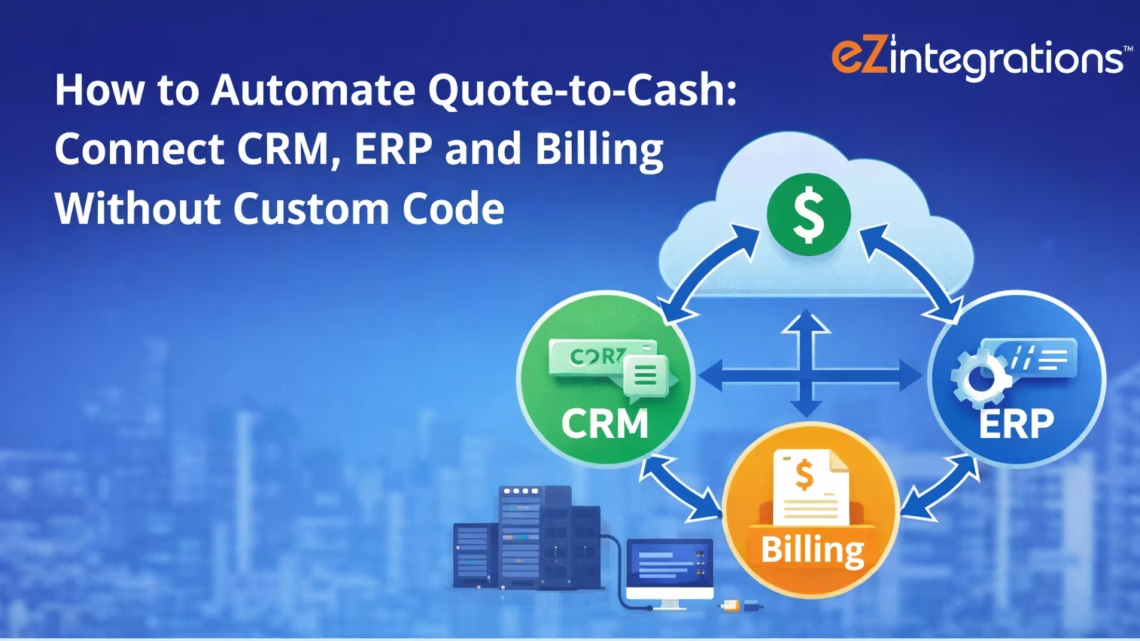
How to Automate Quote-to-Cash: Connect CRM, ERP and Billing Without Custom Code
April 25, 2026To automate quote-to-cash, eZintegrations monitors your CRM (Salesforce, HubSpot, or Microsoft Dynamics 365) for opportunities moved to Closed Won, retrieves the approved quote and line items, validates pricing against the ERP product catalogue and price book, creates a sales order in NetSuite, SAP S/4HANA, or Dynamics 365 ERP, triggers fulfilment or service provisioning, and generates or schedules the customer invoice. The process runs without manual re-entry between CRM and ERP, eliminating the data transcription errors and 1-3 day delays typical of manual quote-to-cash handoffs.
TL;DR
- Manual quote-to-cash requires a sales rep or ops team member to manually transfer approved quote data from the CRM into the ERP as a sales order, then trigger fulfilment, then generate an invoice. Each step is a separate manual action across separate systems.
- The typical manual handoff takes 1-3 days and introduces data transcription errors: wrong product codes, wrong pricing, missing payment terms, incorrect customer addresses.
- eZintegrations automates five stages: CRM Closed Won trigger, quote data retrieval and pricing validation, ERP sales order creation, fulfilment or provisioning trigger, and invoice generation.
- Works with Salesforce CPQ, HubSpot Deals, Dynamics 365 Quotes → NetSuite Sales Orders, SAP S/4HANA Sales Orders (
API_SALES_ORDER_SRV), Dynamics 365 Finance Sales Orders, and billing platforms (Stripe, Chargebee, Zuora). - Level 1 (iPaaS Workflows) handles CRM event detection, quote data extraction, field mapping, ERP order creation, and invoice trigger. Level 2 (AI Workflows) validates pricing against ERP price book, checks credit limits, validates product availability, and flags configuration errors in bundle products. Level 3 (AI Agents) monitors order fulfilment status, flags delayed orders, detects revenue recognition timing issues, and alerts finance when invoice generation fails. Level 4 (Goldfinch AI) provides the Goldfinch AI Chat UI as a Workflow Node: “What deals closed this week and what is their order status?”, “Which sales orders have not been fulfilled?”, or “What is our average time from Closed Won to invoice sent?”
- Configuration time: 3-5 days for a single CRM-to-ERP pair.
Why Quote-to-Cash Breaks at the CRM-ERP Handoff
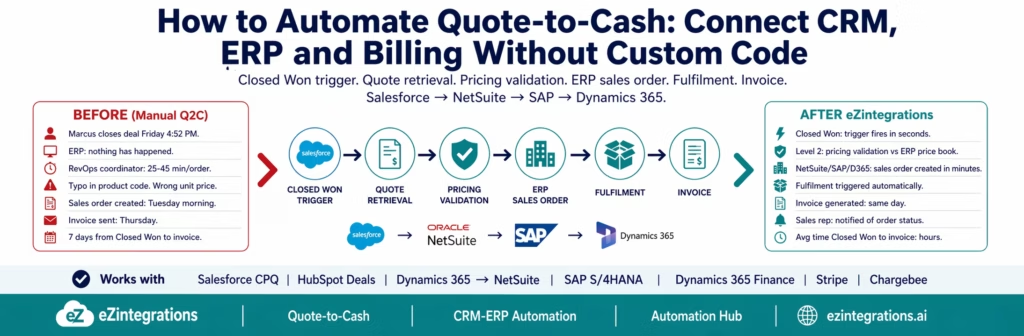
Your sales rep Marcus closes a $47,000 deal on Friday afternoon. He marks the opportunity Closed Won in Salesforce at 4:52 PM, fires off a Slack message to the team, and heads out for the weekend.
Meanwhile, in the ERP, nothing has happened.
The approved quote is in Salesforce. The customer record is in NetSuite (or SAP, or Dynamics). The product catalogue is in the ERP. The pricing is in the ERP. The fulfilment team works from ERP sales orders. The finance team raises invoices from ERP records. But nobody has created the sales order yet.
On Monday morning, the revenue operations coordinator arrives and finds Marcus’s deal in the Closed Won report. She opens NetSuite. She finds the customer record (or creates one if it does not exist). She manually enters the product lines from the Salesforce quote: product codes, quantities, unit prices, discounts, payment terms, shipping address. This takes 25-45 minutes per order. She makes a typo in one product code and enters the wrong unit price on a bundled product line.
The ERP sales order is created Tuesday morning. Fulfilment is triggered Tuesday afternoon. The invoice goes out Thursday. The customer receives the invoice seven days after the deal closed.
The deal was won Friday. The invoice left Thursday. Seven days of revenue cycle time that could be hours.
This is manual quote-to-cash. It is slow, error-prone, and invisible to sales, reflecting broader inefficiencies in order-to-cash processes highlighted in Gartner research. The sales rep who closed the deal on Friday has no idea whether the order was processed correctly or when the customer was invoiced.
The Five Stages of an Automated Quote-to-Cash Process
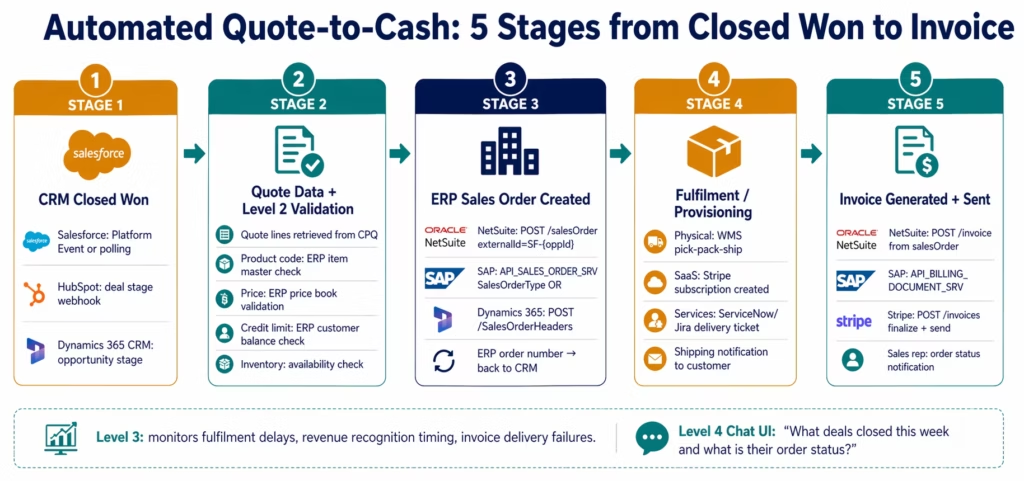
Quote-to-cash automation covers five consecutive stages. Each stage depends on the previous. All five run without manual intervention once the CRM opportunity is marked Closed Won.
Stage 1: CRM Closed Won trigger. The automation starts the moment a CRM opportunity reaches Closed Won status. This is the signal that a deal is real, approved, and ready to process.
Stage 2: Quote data retrieval and pricing validation. The approved quote line items are retrieved from the CRM, each product code is validated against the ERP product catalogue, and each price is validated against the ERP price book to ensure the agreed price matches what the ERP will accept.
Stage 3: ERP sales order creation. Using the validated quote data, a sales order is created in the ERP via REST API, with the correct customer, products, quantities, prices, payment terms, shipping address, and any discount or tax information.
Stage 4: Fulfilment or provisioning trigger. For physical goods: the ERP sales order triggers a warehouse pick-pack-ship workflow. For software or services: the provisioning system (or service desk) receives a fulfilment request.
Stage 5: Invoice generation and delivery. When the order is confirmed or shipped, an invoice is generated (either from the ERP or a billing platform) and delivered to the customer.
Stage 1: CRM Closed Won Trigger
Salesforce: Opportunity Closed Won
Salesforce supports outbound messages and REST webhooks via Platform Events or Outbound Messaging. The cleanest approach for modern integrations is a Salesforce Platform Event or a polling-based webhook:
Salesforce REST API polling (most compatible):
GET https://{instance}.salesforce.com/services/data/v59.0/query
    ?q=SELECT+Id,Name,Amount,StageName,CloseDate,AccountId,
    Pricebook2Id,OwnerId
    FROM+Opportunity
    WHERE+StageName='Closed Won'
    AND+LastModifiedDate>={last_check_timestamp}
Authorization: Bearer {sf_token}
Run this query every 5-10 minutes. Any new Closed Won opportunities since the last check trigger the downstream processing.
Salesforce Platform Event (real-time): Create a Platform Event in Salesforce (Closed_Won_Event__e) triggered by a Process Builder or Flow when StageName changes to “Closed Won”. eZintegrations subscribes to the Platform Event via the Streaming API (/cometd/59.0).
Retrieving the Approved Quote
For Salesforce CPQ, retrieve the associated quote:
GET /services/data/v59.0/query
    ?q=SELECT+Id,SBQQ__Status__c,SBQQ__NetAmount__c,
    SBQQ__PaymentTerms__c,SBQQ__BillingStreet__c,
    SBQQ__BillingCity__c,SBQQ__BillingState__c,
    SBQQ__BillingPostalCode__c,SBQQ__BillingCountry__c
    FROM+SBQQ__Quote__c
    WHERE+SBQQ__Opportunity__c='{opportunity_id}'
    AND+SBQQ__Status__c='Approved'
    ORDER+BY+LastModifiedDate+DESC
    LIMIT+1
Then retrieve the quote line items:
GET /services/data/v59.0/query
    ?q=SELECT+Id,SBQQ__Product__c,SBQQ__ProductName__c,
    SBQQ__Quantity__c,SBQQ__UnitPrice__c,SBQQ__NetPrice__c,
    SBQQ__Discount__c,SBQQ__SubscriptionTerm__c,
    SBQQ__ProductCode__c
    FROM+SBQQ__QuoteLine__c
    WHERE+SBQQ__Quote__c='{quote_id}'
For standard Salesforce Quotes (non-CPQ):
SELECT Id, Status, TotalPrice, ShippingStreet, ShippingCity
FROM Quote WHERE OpportunityId = '{opportunity_id}' AND Status = 'Accepted'

SELECT Id, Product2Id, Product2.ProductCode, Quantity, UnitPrice, Discount
FROM QuoteLineItem WHERE QuoteId = '{quote_id}'
HubSpot: Deal to Closed Won
HubSpot triggers on deal stage change via webhook:
POST (registered webhook) when:
  deal.dealstage changed to 'closedwon'
Or polling:
GET https://api.hubapi.com/crm/v3/objects/deals
    ?properties=dealname,amount,closedate,hubspot_owner_id,
    hs_deal_stage_probability,dealstage
    &filterGroups=[{"filters":[{"propertyName":"dealstage",
    "operator":"EQ","value":"closedwon"},
    {"propertyName":"hs_lastmodifieddate",
    "operator":"GT","value":"{last_check}"}]}]
Stage 2: Quote Data Retrieval and Pricing Validation
Pricing validation is the most important and most commonly skipped step in Q2C automation. Without it, the ERP sales order may be created with a price that differs from what the customer was quoted, which causes invoice disputes, revenue recognition errors, and audit findings.
What Pricing Validation Checks
For each quote line item, Level 2 validates:
1. Product code exists in ERP:
-- NetSuite: verify item exists
SELECT id, itemid, salesprice
FROM item
WHERE itemid = '{product_code_from_quote}'
AND isinactive = false
If the product code from the CRM does not exist in the ERP item master: the order is blocked and flagged for manual review. Common cause: the CRM product catalogue and the ERP item master are not synchronised.
2. Price matches ERP price book: The unit price on the quote is compared against the ERP price for the same product and customer tier:
-- NetSuite: get standard price for product
SELECT itempricelevel.unitprice
FROM itempricelevel
WHERE item = {netsuite_item_id}
AND pricelevel = {customer_price_level}
If the quoted price differs from the standard price: check whether a discount has been approved (CRM discount field). If the discount is within the authorised limit: proceed. If the discount exceeds the authorised limit: flag for approval before ERP order creation.
3. Customer credit check:
-- NetSuite: check credit limit and current balance
SELECT creditlimit, balance
FROM customer
WHERE entityid = '{netsuite_customer_id}'
If current balance + new order amount > credit limit: flag for finance review before order creation.
4. Product availability (for physical goods):
-- NetSuite: check inventory quantity available
SELECT quantityavailable, quantityonorder
FROM item
WHERE itemid = '{product_code}'
AND locationid = '{warehouse_id}'
If quantity available < ordered quantity: flag for fulfilment review.
Stage 3: ERP Sales Order Creation
NetSuite Sales Order
POST https://{accountId}.suitetalk.api.netsuite.com/services/rest/record/v1/salesOrder
Authorization: {TBA headers}
Content-Type: application/json

{
  "entity": { "id": "{netsuite_customer_id}" },
  "tranDate": "{today}",
  "memo": "Auto-created from Salesforce Opp {opportunity_id}",
  "externalId": "SF-{opportunity_id}",
  "salesRep": { "id": "{netsuite_salesrep_id}" },
  "paymentTerms": { "id": "{payment_terms_id}" },
  "shipAddress": "{shipping_address_from_quote}",
  "billAddress": "{billing_address_from_quote}",
  "item": {
    "items": [
      {
        "item": { "id": "{netsuite_item_id}" },
        "quantity": {quantity},
        "price": { "id": "{price_level_id}" },
        "rate": {unit_price},
        "amount": {line_total},
        "description": "{product_description}"
      }
    ]
  }
}
externalId set to SF-{opportunity_id} prevents duplicate sales orders if the API call is retried. NetSuite returns the created sales order internal ID and the formatted SO number (e.g., SO-2026-0441).
After creation, write the ERP order number back to the Salesforce opportunity:
PATCH /services/data/v59.0/sobjects/Opportunity/{opportunity_id}
{ "ERP_Order_Number__c": "SO-2026-0441", "ERP_Order_Status__c": "Created" }
SAP S/4HANA Sales Order
SAP S/4HANA uses API_SALES_ORDER_SRV (OData V4) for sales order creation:
POST https://{sap-instance}/sap/opu/odata/sap/API_SALES_ORDER_SRV/A_SalesOrder
Authorization: Bearer {sap_token}
Content-Type: application/json

{
  "SalesOrderType": "OR",
  "SalesOrganization": "1000",
  "DistributionChannel": "10",
  "OrganizationDivision": "00",
  "SoldToParty": "{sap_customer_number}",
  "PurchaseOrderByCustomer": "{quote_number_from_crm}",
  "RequestedDeliveryDate": "{required_delivery_date}",
  "to_Item": {
    "results": [
      {
        "SalesOrderItem": "10",
        "Material": "{sap_material_number}",
        "OrderQuantity": "{quantity}",
        "TransactionCurrency": "USD",
        "NetAmount": "{line_amount}",
        "to_PricingElement": {
          "results": [
            {
              "ConditionType": "PR00",
              "ConditionAmount": "{unit_price}"
            }
          ]
        }
      }
    ]
  }
}
SalesOrderType: "OR" is the standard SAP sales order type. PurchaseOrderByCustomer stores the CRM quote or opportunity reference for cross-system traceability.
Microsoft Dynamics 365
For Dynamics 365 Finance and Operations (order management):
POST https://{tenant}.dynamics.com/data/SalesOrderHeaders
Authorization: Bearer {d365_token}
Content-Type: application/json

{
  "SalesOrderNumber": "{auto-generated}",
  "CustomerAccountNumber": "{d365_customer_account}",
  "CurrencyCode": "USD",
  "RequestedShipDate": "{ship_date}",
  "SalesOrderLines": [{
    "ItemNumber": "{d365_item_number}",
    "SalesQuantity": {quantity},
    "SalesPrice": {unit_price},
    "LineAmount": {line_total},
    "SiteId": "{site_id}",
    "WarehouseId": "{warehouse_id}"
  }]
}
Stage 4: Fulfilment and Provisioning Trigger
Once the ERP sales order is created, fulfilment is triggered.
For Physical Goods: Warehouse Pick-Pack-Ship
The ERP sales order automatically generates a delivery (NetSuite: itemFulfillment, SAP: DeliveryDocument, Dynamics 365: WHSShipmentTable). For organisations with warehouse management systems (WMS), eZintegrations can also send a fulfilment request to the WMS directly:
POST https://{wms-instance}/api/orders
{
  "order_reference": "SO-2026-0441",
  "ship_to": {
    "name": "{customer_name}",
    "address": "{shipping_address}",
    "city": "{city}",
    "state": "{state}",
    "postal_code": "{zip}",
    "country": "{country}"
  },
  "lines": [{
    "sku": "{product_sku}",
    "quantity": {quantity}
  }]
}
For Software/SaaS: Provisioning Trigger
When the product is a software licence or SaaS subscription, the fulfilment trigger sends a provisioning request:
Sending a Stripe subscription creation:
POST https://api.stripe.com/v1/subscriptions
Authorization: Bearer {stripe_secret_key}

customer={stripe_customer_id}
&items[0][price]={stripe_price_id}
&items[0][quantity]={quantity}
&collection_method=send_invoice
&days_until_due={payment_terms_days}
&metadata[sf_opportunity_id]={opportunity_id}
&metadata[netsuite_order_id]=SO-2026-0441
Sending a Chargebee subscription:
POST https://{site}.chargebee.com/api/v2/subscriptions
Authorization: Basic {chargebee_api_key}

plan_id={chargebee_plan_id}
&quantity={quantity}
&customer_id={chargebee_customer_id}
&billing_cycles={contract_term}
Stage 5: Invoice Generation and Delivery
The invoice is generated when the order is confirmed (for services/software) or when the order is shipped (for physical goods).
NetSuite Invoice from Sales Order
When the NetSuite sales order is fulfilled, convert it to an invoice:
POST /services/rest/record/v1/invoice
{
  "createdFrom": { "id": "{sales_order_id}", "type": "salesOrder" },
  "tranDate": "{today}",
  "memo": "Invoice for {customer_name} - {opportunity_name}"
}
NetSuite creates the invoice as a billable transaction linked to the sales order. The invoice is then emailed to the customer’s billing contact:
POST /services/rest/record/v1/invoice/{invoice_id}/transform
{ "action": "email", "recipient": "{billing_email}" }
SAP S/4HANA Billing Document
SAP triggers billing via the billing due list (API_BILLING_DOCUMENT_SRV):
POST /sap/opu/odata/sap/API_BILLING_DOCUMENT_SRV/CreateBillingDocument
{
  "BillingDocumentDate": "{today}",
  "to_BillingDocumentItem": [{
    "SalesDocument": "{sales_order_id}",
    "SalesDocumentItem": "10"
  }]
}
Stripe Invoice
For SaaS/software products billed via Stripe, the subscription creation in Stage 4 automatically generates and delivers the invoice. If a one-time invoice is needed:
POST https://api.stripe.com/v1/invoices
Authorization: Bearer {stripe_secret_key}

customer={stripe_customer_id}
&collection_method=send_invoice
&days_until_due={payment_terms_days}
&description="{deal_name} - {product_name}"
Then finalise and send:
POST https://api.stripe.com/v1/invoices/{invoice_id}/finalize
POST https://api.stripe.com/v1/invoices/{invoice_id}/send
The CRM-to-ERP Field Mapping Challenge
The most technically complex part of Q2C automation is the field mapping between CRM and ERP. These systems were built by different vendors with different data models, and the same concept (a “product”, a “customer”, a “price”) is represented differently in each.
Customer Record Mapping
The CRM and ERP typically have separate customer records that must be linked. The most reliable approach: store the ERP customer ID as a custom field on the CRM Account record.
In Salesforce: custom field NetSuite_Customer_ID__c on the Account object, populated when the customer record was first created in NetSuite. When the Q2C automation runs: retrieve NetSuite_Customer_ID__c from the Salesforce Account, use it as the entity.id in the NetSuite sales order.
If the custom field is empty (new customer, not yet in ERP): Level 2 creates a new customer record in the ERP first, stores the returned ERP ID back in the CRM custom field, then proceeds with sales order creation.
Product Code Mapping
CRM product codes and ERP item master codes often differ. Maintain a cross-reference table in eZintegrations:
| CRM Product Code | NetSuite Item ID | SAP Material Number | Description |
|---|---|---|---|
| EZINT-L1-ANNUAL | 1001 | MAT-00001 | Level 1 Annual Subscription |
| EZINT-L2-ANNUAL | 1002 | MAT-00002 | Level 2 Annual Subscription |
| EZINT-IMPL-SM | 2001 | SRV-00001 | Implementation (Small) |
Level 2 looks up each CRM product code in this table to get the ERP item ID before order creation. Unknown product codes are flagged as exceptions.
Price and Discount Mapping
CRM stores prices as agreed with the customer (potentially discounted). ERP price books store the standard list price. The Q2C automation must reconcile these:
- If CRM price = ERP list price: no adjustment needed, use the standard price level
- If CRM price < ERP list price (discount): calculate the discount percentage and apply it as a condition in the ERP order line
- If CRM price > ERP list price: flag as anomaly (priced above list is unusual and may indicate a data error)
Before vs After: Manual Quote-to-Cash vs Automated
| Q2C Stage | Manual Process | Automated with eZintegrations |
|---|---|---|
| Closed Won detection | RevOps checks Closed Won report daily | CRM event trigger: detected within 5 minutes |
| Quote retrieval | RevOps opens CRM, finds the quote | API: quote and line items retrieved automatically |
| Customer lookup in ERP | Manual: search ERP for customer record | API: CRM account custom field maps to ERP customer ID |
| New customer creation in ERP | Manual: RevOps or finance creates ERP customer | Level 2: auto-creates ERP customer from CRM data |
| Product code validation | Manual: RevOps looks up product codes in ERP | Level 2: cross-reference table check, unknown codes flagged |
| Pricing validation | Not done: errors caught at invoice stage | Level 2: every line price vs ERP price book |
| Credit check | Not done: discovered at invoicing | Level 2: ERP credit limit check before order |
| ERP sales order entry | 25-45 min manual data entry | API: seconds, same data, no re-entry |
| Transcription errors | Common: product codes, prices, addresses | Near-zero: data flows from CRM, not typed |
| Order number back to CRM | Manual: RevOps copies ERP order number | Auto: ERP response written back to CRM opportunity |
| Sales rep visibility | None: rep has no order status | Auto: Slack notification with order number and status |
| Fulfilment trigger | Manual: RevOps notifies warehouse or provisioning | API: fulfilment request or subscription created |
| Invoice generation | Manual: finance creates invoice from ERP | Auto: invoice created on order confirmation or shipment |
| Invoice delivery | Manual: finance emails customer | Auto: ERP or Stripe sends invoice to billing contact |
| Time from Closed Won to invoice | 3-7 days | Hours (same day for software/services) |
| Revenue cycle visibility | Email threads and manual reports | Dashboard: every deal, order, fulfilment, invoice status |
| Audit trail | Multiple email threads across teams | Full digital log: CRM event to invoice, timestamped |
Step-by-Step: A Software Deal from Salesforce to NetSuite Invoice
Here is the complete automated Q2C flow for a $47,000 annual subscription deal closed by Marcus at Meridian Manufacturing. CRM: Salesforce CPQ. ERP: NetSuite. Billing: NetSuite Invoice.
Setup: Salesforce custom field NetSuite_Customer_ID__c populated on Account. Product cross-reference table configured. Pricing validation enabled (compare CPQ quote price vs NetSuite price level).
March 14, 4:52 PM: Marcus marks opportunity Closed Won. Salesforce Opportunity OPP-2026-0441 (Acme Corp, $47,000 annual subscription) moves to Closed Won. Platform Event Closed_Won_Event__e fires at 4:52 PM.
March 14, 4:52 PM: eZintegrations receives the Platform Event. Opportunity data retrieved: AccountId = ACC-001, Amount = 47000, CloseDate = 2026-03-14.
March 14, 4:52 PM: Level 2 validation (14 seconds).
Quote retrieved: SBQQ__Quote__c for OPP-2026-0441. Quote lines:
- Line 1: eZintegrations Level 2 Platform, 1 seat, $24,000/year (Product Code:
EZINT-L2-ANNUAL) - Line 2: eZintegrations Level 3 Platform, 1 seat, $18,000/year (Product Code:
EZINT-L3-ANNUAL) - Line 3: Implementation Services (Small), 1 unit, $5,000 (Product Code:
EZINT-IMPL-SM)
Validation checks:
EZINT-L2-ANNUAL→ NetSuite Item ID 1002: found. List price: $24,000. Quote price: $24,000. Match.EZINT-L3-ANNUAL→ NetSuite Item ID 1003: found. List price: $20,000. Quote price: $18,000. Discount: 10%. Authorised limit: 15%. Within limit. Proceed.EZINT-IMPL-SM→ NetSuite Item ID 2001: found. List price: $5,000. Quote price: $5,000. Match.- Customer:
NetSuite_Customer_ID__c = 4471(Acme Corp). Credit limit: $100,000. Current balance: $12,500. New order: $47,000. Total: $59,500 < $100,000. Approved. - All validations pass.
March 14, 4:53 PM: NetSuite sales order created.
POST /services/rest/record/v1/salesOrder
{
  "entity": { "id": "4471" },
  "tranDate": "2026-03-14",
  "externalId": "SF-OPP-2026-0441",
  "memo": "Acme Corp Annual Subscription - Salesforce OPP-2026-0441",
  "paymentTerms": { "id": "NET30" },
  "item": { "items": [
    { "item": { "id": "1002" }, "quantity": 1, "rate": 24000.00,
      "description": "eZintegrations Level 2 Platform Annual" },
    { "item": { "id": "1003" }, "quantity": 1, "rate": 18000.00,
      "description": "eZintegrations Level 3 Platform Annual (10% discount)" },
    { "item": { "id": "2001" }, "quantity": 1, "rate": 5000.00,
      "description": "Implementation Services - Small" }
  ]}
}
NetSuite returns: Sales Order ID 8821, formatted as SO-2026-0441. Total: $47,000.
March 14, 4:53 PM: Salesforce opportunity updated.
PATCH /sobjects/Opportunity/OPP-2026-0441
{
  "ERP_Order_Number__c": "SO-2026-0441",
  "ERP_Order_Status__c": "Created",
  "ERP_Order_Date__c": "2026-03-14"
}
March 14, 4:53 PM: Provisioning trigger sent to Stripe. Subscription lines 1 and 2 (SaaS products) trigger Stripe subscription creation for Acme Corp (stripe_customer: cus_AcmeCorp123). Implementation line 3 triggers a ServiceNow implementation ticket.
March 14, 4:54 PM: NetSuite invoice generated. Implementation services are invoiced immediately (service, not subscription). Subscription lines are invoiced on activation.
POST /services/rest/record/v1/invoice
{
  "createdFrom": { "id": "8821", "type": "salesOrder" },
  "tranDate": "2026-03-14",
  "memo": "Acme Corp - Implementation Services"
}
NetSuite invoice INV-2026-0229 created. Amount: $5,000 (implementation only; subscription invoices generated by Stripe on activation).
March 14, 4:54 PM: Marcus Chen notified. Slack: “Deal processed: Acme Corp ($47,000). NetSuite SO-2026-0441 created. Implementation invoice INV-2026-0229 sent. Subscription provisioning initiated via Stripe. Expected activation: March 17.”
Total elapsed time from Closed Won to invoice: 2 minutes 7 seconds. Previous manual process: 3-7 days.
Key Outcomes and Results
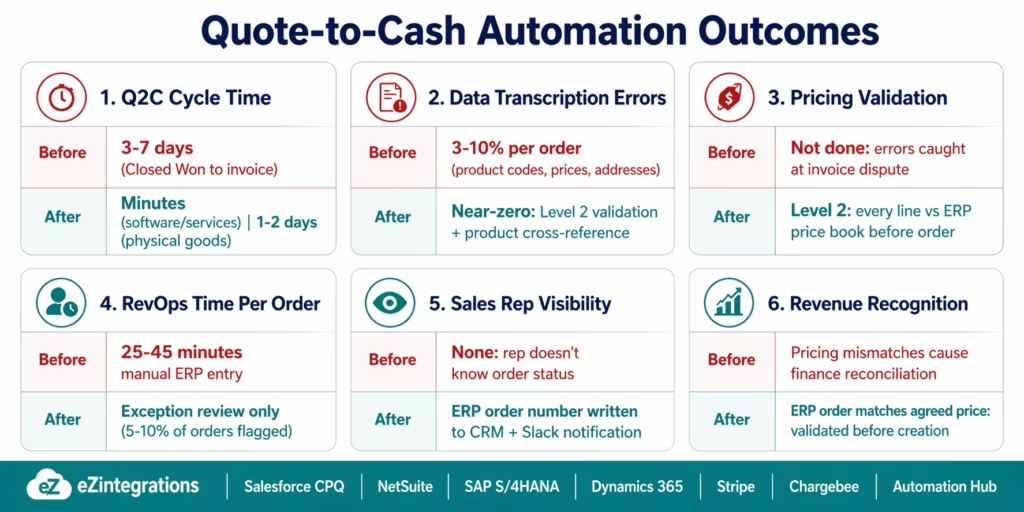
Revenue cycle time: manual Q2C takes 3–7 days from Closed Won to invoice, highlighting inefficiencies in digital revenue operations that modern automation initiatives aim to eliminate, as observed by McKinsey & Company. Automated Q2C with eZintegrations completes the CRM-to-ERP handoff, invoice generation, and provisioning trigger in minutes. For software/SaaS deals: invoice same day. For physical goods: invoice on shipment (typically 1-2 days with standard fulfilment).
Data transcription errors: manual ERP entry of CRM quote data has error rates of 3-10% per order (product code errors, pricing errors, wrong customer addresses, missing payment terms). Level 2 pricing validation and product cross-reference checks eliminate these errors at the source.
Revenue recognition accuracy: mismatched pricing between CRM and ERP creates revenue recognition discrepancies that finance must resolve manually. Level 2 pricing validation ensures the ERP sales order reflects the agreed price before the order is created.
Sales rep visibility: sales reps who close deals manually have no visibility into order processing, fulfilment, or invoice delivery. Automated order creation writes the ERP order number back to the CRM opportunity and notifies the rep by Slack. The rep knows within minutes whether the order was processed correctly.
Revenue operations capacity: At 50 deals per month, manual Q2C processing consumes 20–37 hours of RevOps time, aligning with findings on sales team administrative burden and operational inefficiencies reported in Salesforce’s State of Sales report. Automation reduces this to exception handling for the 5-10% of orders that fail validation (unknown product codes, credit limit flags, pricing anomalies). Time saved: 80-90%.
Customer experience: customers receive invoices faster (same day for services, within shipping window for goods) rather than 3-7 days after the deal closes. Faster invoicing accelerates payment collection and reduces the accounts receivable balance.
How to Get Started
Step 1: Map Your Current Q2C Data Flow
Document the exact path a deal takes from Closed Won to invoice: which CRM fields contain the quote data, which ERP fields the sales order needs, how your customer records are linked between CRM and ERP, and where the product codes differ. Identify your top 3 failure points in the current manual process (most commonly: product code mismatches, pricing discrepancies, and delays in RevOps processing the order).
Step 2: Build Your Product Code Cross-Reference Table and Customer ID Mapping
These two mapping assets are the most important prerequisites for Q2C automation. The product cross-reference table (CRM product code → ERP item ID) enables automatic product validation. The customer ID mapping (CRM Account → ERP Customer ID, stored as a custom field) enables automatic customer lookup. Both can be exported from your existing ERP and imported into eZintegrations as lookup tables. Plan 2-4 hours for this step.
Step 3: Import the Quote-to-Cash Template and Configure Validation Rules
Go to the Automation Hub and search for your CRM-to-ERP combination (e.g., “Salesforce CPQ to NetSuite” or “Dynamics 365 to SAP”). Import the template. Connect your CRM and ERP using OAuth 2.0. Configure the Level 2 validation rules: pricing tolerance (what percentage difference triggers a flag?), credit limit check threshold, and which product codes are exempt from validation (e.g., one-off professional services lines that do not exist in the ERP item master).
Step 4: Run a Pilot with 5 Real Deals
Select 5 recent Closed Won deals and re-run them through the automated flow (in test mode: no actual ERP orders created). Verify: does the product cross-reference table correctly map all product codes? Does the pricing validation match what RevOps would manually verify? Is the customer lookup finding the correct ERP customer? Do the ERP order totals match the CRM quote totals? Allow 1-2 days for pilot validation before going live.
Book a free demo with your CRM type, ERP type, and current Q2C pain points. We will review your specific product catalogue and customer mapping complexity and confirm the configuration approach.
Total configuration time: 3-5 days for a single CRM-ERP pair with pricing validation, product cross-reference, and invoice automation.
FAQs
1. How does eZintegrations automate quote-to-cash from Salesforce to NetSuite or SAP?
eZintegrations monitors Salesforce for opportunities moved to Closed Won (via Platform Event or polling). When detected, the approved CPQ quote and line items are retrieved via Salesforce REST API. Level 2 validates each line: product code against NetSuite item master or SAP material master, price against the ERP price book, customer credit limit, and product availability. If validation passes, the ERP sales order is created via REST API (NetSuite POST /salesOrder, SAP API_SALES_ORDER_SRV). The ERP order number is written back to the Salesforce opportunity. Fulfilment and invoice generation are triggered automatically. The full process completes in minutes without manual re-entry.
2. How long does it take to set up quote-to-cash automation?
3-5 days for a single CRM-ERP pair with pricing validation and invoice automation. Key steps: product cross-reference table (2-4 hours), customer ID mapping (1-2 hours), CRM and ERP API credentials (2-4 hours), template import and validation rule configuration (3-5 hours), and pilot testing with 5 real deals (1-2 days). More complex configurations (multiple CRMs, multiple ERPs, bundle product pricing, or multi-currency orders) add 1-2 days per additional complexity layer.
3. Does eZintegrations work with Salesforce CPQ, HubSpot Deals, and Microsoft Dynamics 365 CRM?
Yes, Salesforce CPQ: SBQQ__Quote__c and SBQQ__QuoteLine__c objects retrieved via SOQL. Standard Salesforce Quotes: Quote and QuoteLineItem objects. HubSpot: deal properties and line items via HubSpot CRM API. Microsoft Dynamics 365 CRM: opportunity and quote retrieval via Dataverse REST API. Each connects to the corresponding ERP (NetSuite, SAP S/4HANA, or Dynamics 365 Finance) using pre-mapped field configurations in the Automation Hub templates.
4. How does pricing validation work between CRM quotes and ERP price books?
Level 2 retrieves the standard price for each product from the ERP (NetSuite price level query, SAP condition type PR00, or Dynamics 365 trade agreement price). The quoted price from the CRM is compared against this standard price. If the quoted price is within the authorised discount percentage (configurable, e.g., up to 15%): the order is created with the discounted price applied as a condition or rate override. If the quoted price exceeds the authorised discount: the order is held and the RevOps team is notified with the specific line, the standard price, the quoted price, and the excess discount percentage. This prevents unapproved discounts from flowing into the ERP without human review.
5. What happens if the CRM customer does not have an ERP customer record?
Level 2 detects the missing ERP customer at the start of the Q2C process (by checking whether the CRM Account's ERP customer ID custom field is populated). If the field is empty: Level 2 creates a new customer record in the ERP from the CRM Account data (company name, billing address, contact, payment terms), stores the returned ERP customer ID in the CRM Account custom field, and proceeds with sales order creation. The new ERP customer creation adds approximately 30 seconds to the process. A notification is sent to the RevOps team to confirm the new customer record was created correctly.
Marcus’s Deal Closed at 4:52 PM. The Invoice Left at 4:54 PM.
Manual quote-to-cash treats the CRM and the ERP as separate worlds, connected only by a person who copies data from one to the other. That person makes mistakes. The process takes days. Revenue recognition is delayed. The sales rep has no idea what happened after the deal closed.
The automated version treats the CRM and ERP as one connected revenue cycle. Closed Won is the trigger. Pricing validation is the check. Sales order creation is the output. Fulfilment and invoice are the completion. The entire sequence runs in minutes, with pricing confirmed, product codes validated, and the order number written back to the CRM so the sales rep can see exactly what happened.
No custom code. No ABAP. No ERP consultant.
Book a free demo with your CRM type (Salesforce, HubSpot, or Dynamics 365), ERP type (NetSuite, SAP, or Dynamics 365 Finance), and your current Q2C pain points. We will review your specific product catalogue complexity and confirm the automation approach.
For the related AP-side of the revenue cycle, see the invoice approval workflow automation guide. For the full library of CRM and ERP integration templates, see the Automation Hub.

