
DHL Supply Chain ERP Integration for Beauty Brands: Automate ASN, Inventory, and 3PL Billing
April 13, 2026To integrate DHL Supply Chain with SAP, Oracle, or NetSuite for a beauty brand, eZintegrations connects via DHL’s published WMS REST API (OAuth 2.0, GET /inventory/detail for inventory, POST /outbound/order for fulfilment orders, push API for shipment events) or via DHL’s legacy SFTP flat file interface (for customers not yet on the REST API). Inbound data flows: DHL inventory levels sync to the ERP every 30-60 minutes with lot and expiry date data, DHL ASN confirmations (goods receipt events) post to the ERP purchase order, and DHL shipment confirmations trigger the ERP goods issue and the Walmart EDI 856 or Amazon SP-API shipment confirmation. Outbound data flows: ERP sales orders and purchase orders become DHL fulfilment and inbound requests. The integration handles both real-time REST API events and scheduled flat file transfers within the same workflow.
TL;DR
- DHL Supply Chain is one of the world’s largest 3PLs, with warehouses across North America, Europe, and APAC. Their WMS REST API (available via the DHL Developer Portal) provides endpoints for inventory, outbound orders, inbound/ASN, and shipment event push notifications. Some DHL Supply Chain facilities still operate on SFTP-based flat file exchanges rather than the REST API.
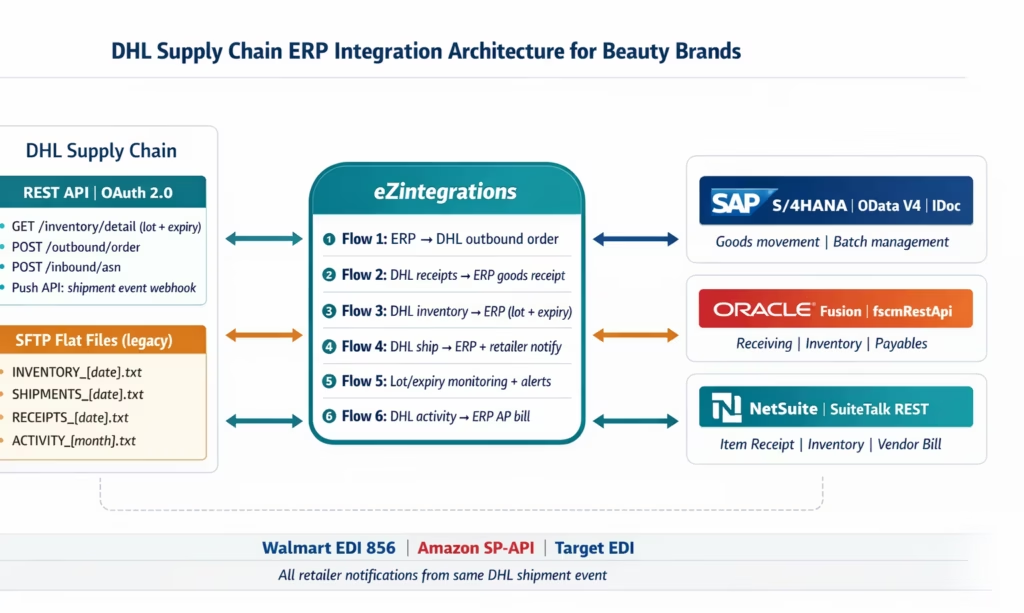
- The six DHL Supply Chain data flows that must connect to your ERP: outbound fulfilment orders (ERP sales order → DHL pick/pack), inbound/ASN confirmation (DHL goods receipt → ERP PO receipt), inventory sync (DHL WMS → ERP available stock), shipment confirmation (DHL carrier scan → ERP goods issue + retailer notification), lot/expiry tracking (DHL lot data → ERP batch records), and 3PL billing reconciliation (DHL activity charges → ERP AP).
- For beauty brands: lot/expiry tracking is the most critical non-standard requirement. Cosmetics have 12-36 month shelf lives. Amazon requires 90 days minimum at FC receipt. Walmart requires minimum remaining shelf life. DHL WMS tracks lot numbers and expiry dates at the pallet and carton level. Your ERP must receive this data.
- ERP targets: SAP S/4HANA (OData V4, IDoc), Oracle Fusion Cloud (fscmRestApi), NetSuite (SuiteTalk REST).
- DHL Supply Chain REST API or SFTP: eZintegrations handles both in the same template.
Why DHL Supply Chain ERP Integration Is Not Plug-and-Play
Your beauty brand has been with DHL Supply Chain for three years. They run your Memphis warehouse: 8,000 pallet positions, climate-controlled zone for temperature-sensitive formulas, Walmart and Target retail fulfilment, Amazon FBA prep, and DTC order fulfilment. 400 beauty SKUs across 12 shade families.
Your SAP S/4HANA (or NetSuite, or Oracle Fusion) is the operational backbone. Every purchase order, every inventory movement, every goods receipt, every financial close runs through it.
But DHL Supply Chain and your ERP have a standing communication problem. Every morning, your 3PL coordinator:
- Downloads DHL’s daily inventory report from the portal and manually enters adjustments in the ERP to reconcile the overnight discrepancy
- Sends DHL an Excel spreadsheet of new Walmart POs that need to be fulfilled today
- Checks email for DHL’s shipment confirmation and manually updates the ERP with tracking numbers
- Tries to reconcile DHL’s monthly invoice (line items: pick fees, storage fees, replenishment handling, returns processing) against what the ERP expects
Each of these manual touchpoints is a potential error. A missed inventory entry means your ERP commits stock to a Walmart order that has already shipped somewhere else. A late shipment confirmation means your Walmart EDI 856 ASN is late, generating an OTIF chargeback. An unreconciled DHL invoice means AP pays the wrong amount or pays twice.
The integration challenge for DHL Supply Chain is compounded by a connectivity reality: DHL’s larger, newer facilities use the WMS REST API. DHL’s older or smaller facilities may still use SFTP flat files. Your brand may have inventory at both types. The integration needs to handle both.
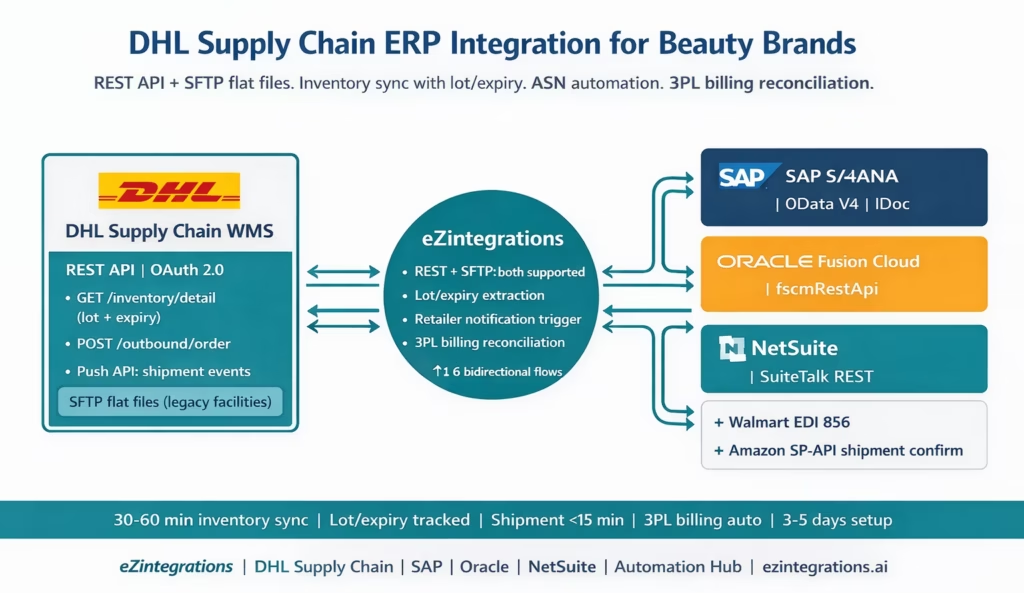
DHL Supply Chain Connectivity: REST API vs SFTP Flat Files
Understanding which connectivity method your DHL Supply Chain facility uses is the first step in designing the integration.
DHL Supply Chain WMS REST API
DHL’s Warehouse Management APIs are available via the DHL Developer Portal. All API endpoints use REST architecture with OAuth 2.0 authentication and JSON over HTTPS.
Authentication: OAuth 2.0 Client Credentials flow (machine-to-machine):
POST https://{dhl-api-gateway}/auth/token
Content-Type: application/x-www-form-urlencoded

grant_type=client_credentials
&client_id={CLIENT_ID}
&client_secret={CLIENT_SECRET}
Response: { "access_token": "...", "expires_in": 3600 }. eZintegrations stores the Client ID and Secret and handles token refresh automatically.
Available REST API endpoints:
Inventory:
GET https://{dhl-instance}/wms/api/v1/inventory/detail
  ?page=1
  &pageSize=100

Authorization: Bearer {access_token}
Returns: per-SKU inventory with itemNumber, availableQuantity, onHoldQuantity, lotNumber, expiryDate, warehouseLocation.
Outbound order (fulfilment request):
POST https://{dhl-instance}/wms/api/v1/outbound/order
Content-Type: application/json

{
  "customerOrderNumber": "{ERP_order_number}",
  "shippingAddress": {
    ...
  },
  "orderLines": [
    {
      "itemNumber": "{DHL_item_code}",
      "quantity": 480
    }
  ],
  "requiredShipDate": "{date}",
  "serviceLevel": "GROUND"
}
Inbound/ASN (advance shipping notice to DHL):
POST https://{dhl-instance}/wms/api/v1/inbound/asn
Content-Type: application/json

{
  "asnNumber": "{ERP_PO_number}",
  "expectedArrivalDate": "{date}",
  "lines": [
    {
      "itemNumber": "{DHL_item_code}",
      "quantity": 1500,
      "lotNumber": "LOT-2025-0882",
      "expiryDate": "2027-08-15"
    }
  ]
}
Push API (shipment event webhook): When DHL ships an order, they POST a shipment event to your registered webhook URL:
{
  "customerOrderNumber": "{ERP_order_number}",
  "shipmentDate": "2026-01-30",
  "trackingNumber": "1Z9W4872...",
  "carrierCode": "UPSF",
  "cartons": [
    {
      "sscc": "00845678901234567891",
      "itemNumber": "{item}",
      "qty": 24
    }
  ]
}
SFTP Flat File Interface
For DHL facilities not yet on the REST API, eZintegrations connects via SFTP. DHL provides a set of structured flat files (typically pipe-delimited or fixed-width) on a scheduled SFTP server:
- Inventory file:
INVENTORY_{date}.txtpolled every 30-60 minutes. Contains item, available qty, lot number, expiry date per row. - Shipment confirmation file:
SHIPMENTS_{date}.txtpolled every 15-30 minutes. Contains order number, tracking, ship date, carton details. - Goods receipt file:
RECEIPTS_{date}.txtpolled when inbound shipments are expected. Contains PO number, received qty, lot number, expiry date. - Activity file:
ACTIVITY_{date}.txtmonthly. Contains warehouse activity charges for billing reconciliation.
eZintegrations processes both formats in the same workflow: if the DHL facility exposes the REST API, the REST connector is used. If the facility uses SFTP, the SFTP connector polls and parses the flat files. The downstream ERP integration is identical regardless of the DHL connectivity method.
Which method does your DHL Supply Chain facility use? Contact your DHL account manager or log into the DHL Developer Portal (developer.dhl.com) to check API availability for your specific facility. Most North American DHL Supply Chain facilities opened or upgraded after 2022 use the REST API. Older facilities may still be on flat files.
The Six Data Flows: DHL Supply Chain to Your ERP
Flow 1: Outbound Fulfilment Orders (ERP to DHL)
When a sales order is created in your ERP (from a Walmart 850 EDI PO, Amazon SP-API order, DTC order, or wholesale order), a fulfilment request must go to DHL Supply Chain so the warehouse can pick, pack, and ship.
ERP to DHL outbound order:
For SAP S/4HANA: the SAP outbound delivery (API_OUTBDLVRY_SRV) is the trigger. When a SAP delivery is created, Level 1 extracts the delivery data and calls the DHL REST API POST /outbound/order or writes the SFTP outbound order file.
For Oracle Fusion Cloud: the Oracle Shipment Request (POST /supplyChainPlanning/objects/salesOrders) triggers the DHL fulfilment request.
For NetSuite: the NetSuite sales order creation triggers the POST /outbound/order call to DHL via the SuiteTalk REST event.
SKU-to-DHL item code mapping: as with all 3PL integrations, the ERP uses your internal SKU code (SAP Material Number, Oracle Item Number, NetSuite item ID), while DHL uses their own internal item codes. A cross-reference mapping is required: ERP SKU → DHL item code, maintained as a reference dataset in eZintegrations.
Flow 2: Inbound ASN Confirmation (DHL to ERP)
eZintegrations orchestrates the full DHL-ERP integration across all four platform levels. Level 1 (iPaaS Workflows) handles all REST API calls, SFTP file polling and parsing, ERP record creation, and retailer notification triggers. Level 2 (AI Workflows) uses Goldfinch AI Document Intelligence to extract and validate data from DHL flat files that have inconsistent formatting or non-standard layouts, and performs the pre-transmission validation of EDI 856 carton totals against ERP fulfilment quantities. Level 3 (AI Agents) monitors lot expiry dates across all DHL facilities, fires near-expiry alerts with channel-specific FEFO allocation recommendations, and detects 3PL billing discrepancies in the DHL activity file. Level 4 (Goldfinch AI) orchestrates the complete 3PL-to-ERP cycle as a Workflow Node and provides the Goldfinch AI Chat UI for ops and finance teams: “What lots at DHL Memphis are approaching the 90-day Amazon FBA threshold?”, “Show me all DHL shipments pending ERP goods issue today”, or “What is this month’s DHL activity billing total by GL account?”
When inbound goods arrive at DHL Supply Chain (from your contract manufacturer, from a production run, or via an inter-warehouse transfer), DHL receives and processes them in their WMS. When the goods receipt is complete, DHL sends an ASN confirmation. This event must post a goods receipt to the ERP.
DHL goods receipt event to ERP:
For SAP: goods receipt posted via API_GOODSMVT_SRV (movement type 101), linked to the SAP purchase order.
For Oracle: goods receipt posted via POST /receiving/deliveries/actions/receive.
For NetSuite: POST /services/rest/record/v1/itemReceipt linked to the purchase order (createdFrom: purchaseOrder).
The goods receipt includes lot number and expiry date data from the DHL WMS (critical for beauty brands, described in Flow 5).
Flow 3: Inventory Sync with Lot and Expiry Data
DHL’s GET /inventory/detail (or SFTP inventory file) returns current inventory per item with lot-level detail. This data updates the ERP’s inventory position for the DHL warehouse location.
For SAP: API_MATERIAL_STOCK_SRV inventory adjustment posted per location. For Oracle: inventory transaction via POST /inventoryTransactions. For NetSuite: POST /inventoryAdjustment per item and location.
Polling frequency: every 30-60 minutes. Additionally, triggered immediately after any DHL shipment or receipt event.
Flow 4: Shipment Confirmation and Retailer Notifications
When DHL ships an order (carrier scan), the shipment event (REST push API or SFTP shipment file) triggers two simultaneous actions:
-
ERP goods issue posting:
- SAP:
API_OUTBDLVRY_SRVPostGoodsIssue(movement type 601) - Oracle: Shipping transaction
PUT /shipments/{id}/actions/ship - NetSuite:
POST /itemFulfillmentwithshipStatus: C
- SAP:
-
Retailer notification (within 15 minutes of DHL carrier scan):
- Walmart: EDI 856 ASN generated and transmitted via AS2
- Amazon FBM: SP-API
POST /orders/v0/orders/{orderId}/shipment - Target, other retailers: retailer-specific EDI or API notification
Both actions fire from the same DHL shipment event. One event, two actions, zero manual steps.
Flow 5: Lot and Expiry Tracking for Cosmetics Compliance
This is the most beauty-specific and most commonly under-implemented flow in DHL-ERP integrations.
DHL Supply Chain’s WMS tracks inventory at the lot level: each production lot has a lot number and, for beauty products, an expiry date. The DHL GET /inventory/detail response includes lotNumber and expiryDate per inventory record.
Why this matters for beauty brands:
- Amazon FBA: requires 90 days minimum remaining shelf life on FC receipt. The FBA replenishment workflow must select lots with 90+ days remaining.
- Walmart: has minimum remaining shelf life requirements per category. Retail DC receiving may reject near-expiry product.
- FEFO allocation: First Expiry, First Out. Customer orders should be allocated the lot closest to expiry (but within acceptable shelf life) to prevent waste.
- Product recall: if a production lot is recalled, you need to know which orders shipped which lot numbers. Without lot tracking in the ERP, a product recall is a manual investigation.
ERP lot record update:
For SAP: batch management records (BAPI_BATCH_CREATE or OData batch API) with manufacturing date (MFD) and expiry date (MHD) fields.
For Oracle: lot number attribute records in Oracle Inventory Management, including EXPIRATION_DATE and ORIGINATION_DATE.
For NetSuite: lotNumber and expirationDate fields on the inventoryItem record, updated via inventory adjustment with lot detail.
Proactive expiry monitoring: Level 3 monitors DHL lot inventory data in the ERP. When any lot crosses a configurable near-expiry threshold (e.g., 120 days before expiry for Amazon FBA, 90 days for Walmart), an alert fires. The alert includes: lot number, SKU, quantity, current DHL location, and recommended action (FBA inbound, FBM allocation, off-channel clearance).
Flow 6: 3PL Activity Billing Reconciliation
DHL Supply Chain charges for warehouse activities: storage (per pallet per day), pick and pack (per unit or per order), inbound handling (per carton received), returns processing (per unit), special projects (FBA prep, kitting). These charges appear on a monthly DHL invoice.
The reconciliation problem: DHL’s invoice line items reference their internal activity codes and order numbers, not your ERP purchase order numbers. Manually matching a DHL invoice line like “Pick-n-Pack: 12,480 units @ 0.48=5,990.40″ to the corresponding SAP or NetSuite cost centre is a monthly manual exercise.
Automated reconciliation: eZintegrations parses the DHL activity file (SFTP ACTIVITY_{month}.txt or DHL invoice API) and maps each activity type to the corresponding ERP GL account and cost centre:
| DHL Activity Code | ERP GL Account | Description |
|---|---|---|
PKP (Pick and Pack) |
695000 | 3PL Fulfilment – Pick/Pack |
STO (Storage) |
696010 | 3PL Warehouse Storage |
INB (Inbound Handling) |
695010 | 3PL Inbound Processing |
RET (Returns Processing) |
695020 | 3PL Returns |
KIT (Kitting or Assembly) |
695030 | 3PL Value Add Services |
FBA (FBA Prep) |
695040 | 3PL FBA Preparation |
For SAP: POST /sap/opu/odata/sap/API_JOURNALENTRY_SRV/A_JournalEntry creates the journal entry per activity type. For Oracle: POST /payables/invoices creates a supplier invoice from DHL. For NetSuite: POST /services/rest/record/v1/vendorBill creates the AP bill from DHL charges.
The AP bill is then matched against the DHL invoice in the AP automation workflow (see the enterprise AP automation guide).
Beauty Brand-Specific DHL Integration Requirements
Multi-Temperature Zone Inventory
Many beauty brands store products in different temperature zones at DHL Supply Chain: standard ambient for packaging and accessories, and climate-controlled for temperature-sensitive formulas (certain serums, sunscreens, lip balms). The DHL WMS tracks inventory by warehouse zone. The ERP integration must map DHL zone codes to the corresponding ERP storage locations or batches, so that temperature-sensitive inventory is not accidentally committed to channels that cannot maintain the cold chain.
Seasonal Kitting and Display-Ready Cases
Beauty brands frequently run seasonal promotions requiring DHL to kit products: assembling holiday gift sets (a lipstick + liner + mirror in a branded box), building display-ready PDQ trays for Walmart endcaps, or creating FBA-ready multi-packs. Kitting at DHL is a value-add service:
- The ERP sends a kitting work order to DHL (via the outbound order API with a special order type flag or a dedicated kitting request endpoint).
- DHL assembles the kits from component items in their WMS.
- The DHL inventory system creates a new item record for the finished kit (with its own GTIN and DHL item code).
- The component items are consumed from DHL inventory.
- The ERP must reflect: reduction in component item inventory, creation of finished kit inventory.
The ERP integration handles this via a production order (SAP PP), work order (Oracle Manufacturing), or assembly item (NetSuite) that closes when DHL confirms the kitting completion.
FBA Prep Workflow at DHL
For beauty brands using DHL Supply Chain as their FBA prep centre:
- ERP creates a transfer order (from DHL to Amazon FC location).
- DHL receives the FBA prep instruction: apply FNSKU labels, poly-bag per category requirements, pack in Amazon-specified master carton quantities.
- DHL generates FBA-ready cartons and ships to the Amazon FC.
- DHL sends shipment confirmation with SSCC-18 labels and tracking.
- eZintegrations creates the SP-API FBA inbound shipment plan and monitors receiving.
- When Amazon confirms FC receipt, ERP goods receipt posts to the Amazon FC virtual plant (AMZFC in SAP, Amazon FC location in NetSuite).
For the complete FBA replenishment workflow, see the FBA inventory replenishment guide.
Returns Processing: Restock vs Quarantine vs Destroy
Beauty returns from DTC and retail channels arrive at DHL Supply Chain for disposition. DHL’s returns processing creates three possible outcomes per returned unit:
- Restock: unit is undamaged, returned to available inventory. ERP inventory increases.
- Quarantine: unit is damaged, expired, or needs quality inspection. ERP inventory holds (not available for sale).
- Destroy: unit cannot be resold. ERP inventory decreases, waste disposal GL entry posted.
The DHL returns file or returns API provides the disposition per unit. eZintegrations maps each disposition to the corresponding ERP inventory movement:
- Restock: ERP inventory increase at the DHL location.
- Quarantine: ERP inventory movement to a quality-hold storage location.
- Destroy: ERP inventory decrease with write-off GL entry.
Before vs After: Manual DHL-ERP vs Automated
| Process Step | Manual DHL-ERP | Automated with eZintegrations |
|---|---|---|
| Fulfilment order to DHL | Excel spreadsheet emailed or uploaded to DHL portal | ERP order creation → POST /outbound/order or SFTP file in seconds |
| SKU-to-DHL item code | Manual lookup or spreadsheet | Reference dataset auto-applied per order |
| Inventory sync | Daily portal download and manual ERP entry | REST GET /inventory/detail or SFTP file every 30–60 minutes → ERP |
| Lot and expiry data in ERP | Often missing or updated weekly from reports | Extracted per lot from DHL WMS and posted automatically to ERP batch records |
| ASN confirmation (goods receipt) | Email from DHL then manual ERP posting | DHL receipt event → ERP PO receipt (SAP 101 Oracle receive NetSuite itemReceipt) |
| Shipment confirmation to ERP | Tracking email then manual goods issue | DHL push API or SFTP shipment file → ERP goods issue within minutes |
| Walmart EDI 856 ASN | Manual email after goods issue | Auto-triggered from DHL shipment event within 15 minutes with validation |
| Amazon shipment confirmation | Manual portal entry or delayed script | Auto-triggered from DHL shipment event within minutes |
| Near-expiry lot alerting | Not monitored until rejection occurs | Level 3 monitoring triggers alerts at defined expiry thresholds |
| FEFO allocation | Manual lot selection by operations team | Level 3 automatically selects nearest-expiry compliant lot |
| Kitting work order | Email sent to DHL operations | ERP kitting order triggers DHL outbound API with kitting type |
| FBA prep instruction | Manual FNSKU lookup and email | Auto-generated from ERP transfer order with FNSKU per item |
| Returns disposition | Returns report emailed and manually processed | DHL returns event → ERP updates for restock quarantine or destroy |
| 3PL billing reconciliation | Manual invoice processing and GL mapping | Activity file parsed and ERP AP bill auto-created per GL mapping |
| Connectivity type | Manual regardless of facility type | REST API for modern facilities SFTP for legacy same ERP workflow |
Step-by-Step: A Walmart Replenishment Order Through DHL Supply Chain
Here is the complete automated cycle for a Walmart Valentine’s Day replenishment PO fulfilled from Lumière Cosmetics’ DHL Supply Chain Memphis facility.
Setup: Lumière uses SAP S/4HANA. DHL Supply Chain Memphis is on the REST API. DHL item code for Rose Gloss (SAP Material LGLOSS-04): DHL-ITEM-48217. FBA prep also managed by DHL Memphis for Amazon FBA replenishments.
January 22, 9:14 AM: Walmart EDI 850 arrives. eZintegrations receives Walmart PO 4500882411: 480 units Rose Gloss, 360 Berry Gloss, 120 Valentine’s gift sets. SAP sales order SO-2026-WM-4882 created automatically.
January 22, 9:14 AM: DHL outbound order created. Level 1 maps SAP materials to DHL item codes:
- SAP LGLOSS-04 → DHL
DHL-ITEM-48217(Rose Gloss) - SAP LGLOSS-07 → DHL
DHL-ITEM-48224(Berry Gloss) - SAP LGIFTS-VAL → DHL
DHL-ITEM-48291(Valentine’s Gift Set kit)
POST https://{dhl-memphis}/wms/api/v1/outbound/order
Content-Type: application/json

{
  "customerOrderNumber": "SO-2026-WM-4882",
  "shippingAddress": {
    "name": "Walmart DC #6094 Kansas City",
    ...
  },
  "orderLines": [
    {
      "itemNumber": "DHL-ITEM-48217",
      "quantity": 480
    },
    {
      "itemNumber": "DHL-ITEM-48224",
      "quantity": 355
    },
    {
      "itemNumber": "DHL-ITEM-48291",
      "quantity": 120
    }
  ],
  "requiredShipDate": "2026-01-30",
  "serviceLevel": "WALMART_RETAIL"
}
Note: Berry Gloss quantity is 355 (not 360) because the EDI 855 acknowledged 355 based on available DHL inventory (the 5-unit shortage detected in the pre-855 inventory check).
January 22, 9:30 AM: DHL inventory check confirms lots. Level 3 queries GET /inventory/detail for the Valentine’s gift set item:
lotNumber: LGIFTS-VAL-2025-0112,expiryDate: 2027-06-30,availableQuantity: 140- Expiry check: 18 months remaining as of January 2026. Walmart minimum: satisfied.
- FEFO check: this is the only lot, so it is auto-selected.
January 30, 2:14 PM: DHL ships. DHL picks 480 × Rose Gloss, 355 × Berry Gloss, 120 × Valentine’s sets. Carrier (UPS Freight) scans the shipment at the dock. DHL push API fires at 2:17 PM.
January 30, 2:17 PM: SAP goods issue posted. Level 1 receives the DHL push event. Calls API_OUTBDLVRY_SRV PostGoodsIssue for the SAP delivery linked to SO-2026-WM-4882. Movement type 601 posts. SAP Material LGLOSS-04 inventory decremented at Plant 3000 (DHL Memphis location). Material document 4900004281 created.
January 30, 2:17 PM: Walmart EDI 856 ASN triggered. DHL shipment event simultaneously triggers 856 ASN generation. The 856 includes 40 carton records with SSCC-18 labels from DHL’s manifest data. Pre-transmission validation: carton totals match SAP delivery quantities. 856 transmitted at 2:29 PM (12 minutes after DHL push event).
January 30, 2:17 PM: SAP inventory sync. DHL push event triggers an inventory sync query: GET /inventory/detail for all Lumière items at Memphis. Updated available quantities posted to SAP Plant 3000 storage locations. Walmart EDI 846 sent with updated quantities.
February 28: DHL monthly activity invoice. DHL activity file available on SFTP. eZintegrations downloads ACTIVITY_202602.txt:
PKP|SO-2026-WM-4882|955|0.48|458.40
STO|LGLOSS-04|2400|0.0065|15.60
STO|LGLOSS-07|1800|0.0065|11.70
INB|PO-2026-LUM-0441|1500|0.35|525.00
...
Level 1 parses the activity file, maps DHL activity codes to SAP GL accounts, and creates a SAP vendor invoice via API_JOURNALENTRY_SRV. DHL Memphis billed 458.40toGL695000(Pick/Pack),15.60 to GL 696010 (Storage – Rose Gloss), etc. The total DHL invoice is pre-matched against the expected charges in SAP’s AP system for 3-way matching.
Total ops team involvement: reviewing the Berry Gloss 5-unit shortage at January 22 (2 minutes). Everything else automated.
[VIDEO PLACEHOLDER: DHL Supply Chain ERP beauty workflow demo | “DHL Supply Chain to SAP NetSuite Oracle: Automating ASN, Inventory Sync, and 3PL Billing for Beauty Brands” | Embed after step-by-step section | Show: DHL REST API outbound order creation with SKU mapping, GET /inventory/detail with lot/expiry data, DHL push API shipment event received, SAP goods issue posted, Walmart 856 auto-triggered, DHL SFTP activity file parsed and SAP vendor invoice created. Duration: 8-10 minutes.]
Key Outcomes and Results
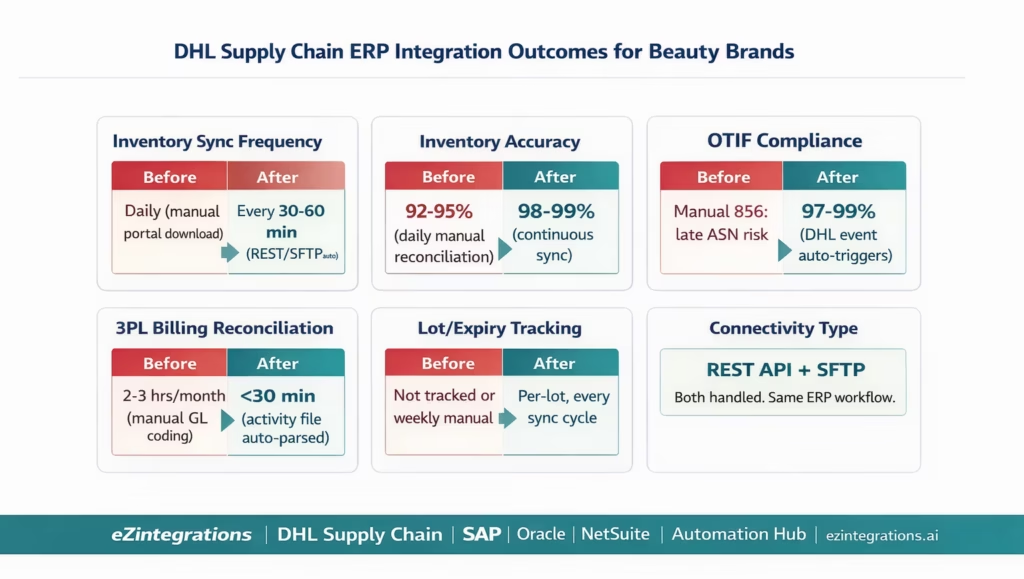
Inventory accuracy: DHL WMS inventory synced to ERP every 30-60 minutes (REST API) or every 15-30 minutes (SFTP file poll). Versus daily or weekly in manual processes. Inventory accuracy from 92-95% (daily manual) to 98-99% (continuous sync).
Retailer ASN compliance: Walmart EDI 856 triggered within 15 minutes of DHL carrier scan. Amazon FBM SP-API confirmation within minutes of DHL shipment event. Both fire from the same DHL push event with zero manual intervention. OTIF compliance: 97-99%.
Lot and expiry tracking: every DHL inventory record includes lot number and expiry date, posted to ERP batch/lot records automatically. Near-expiry alerts prevent Amazon FBA rejection (90-day rule) and Walmart DC rejection (category-specific minimum shelf life). Product recalls become a data query rather than a manual investigation.
3PL billing reconciliation time: from 2-3 hours per monthly DHL invoice (manual GL coding and matching) to under 30 minutes (automated activity parsing and SAP/Oracle/NetSuite AP bill creation). The DHL invoice is pre-coded to the correct GL accounts before the AP team reviews it.
FBA prep automation: FBA prep instructions (FNSKU, poly-bag, FC destination) are auto-sent to DHL when the FBA transfer order is created in the ERP. No email instructions, no FNSKU lookup, no manual FC assignment from Seller Central. DHL confirms FBA prep completion and the ERP goods receipt posts to the Amazon FC virtual plant.
REST and SFTP both handled: whether your DHL Supply Chain facility is on the REST API or still on SFTP flat files, the ERP integration is the same. Both connectivity methods are supported within the same eZintegrations template. When DHL migrates a facility to the REST API, the template switches over without rebuilding the ERP side.
How to Get Started
Step 1: Confirm Your DHL Supply Chain Connectivity Method
Contact your DHL Supply Chain account manager to confirm whether your facility uses the WMS REST API or SFTP flat files. Request your DHL API Client ID and Secret (for REST API) or SFTP credentials and file layout documentation (for flat files). Also request the DHL item code catalog for your SKUs (the DHL internal item codes that correspond to your ERP SKU codes) and the warehouse zone codes used at your facility.
Step 2: Import the DHL Supply Chain ERP Integration Template
Go to the Automation Hub and import the DHL Supply Chain ERP Integration template for your ERP (SAP S/4HANA, Oracle Fusion Cloud, or NetSuite). The template includes: REST API or SFTP connectivity for all six data flows, SKU-to-DHL item code reference dataset, lot/expiry extraction and ERP batch record posting, shipment event to ERP goods issue, retailer notification triggers (Walmart EDI 856, Amazon SP-API), near-expiry lot monitoring, and DHL activity billing reconciliation.
Step 3: Build the SKU-to-DHL-Item Mapping and Lot Rules
Export your ERP item list (SAP Material Numbers, Oracle Item Numbers, or NetSuite item IDs). Cross-reference with the DHL item code catalog from your account manager. For beauty brands with shade variants, ensure every shade variant GTIN/UPC is mapped to its corresponding DHL item code. Configure lot/expiry rules: which channel requires what minimum remaining shelf life (Amazon FBA: 90 days, Walmart: check with your buyer, DTC: configurable). Set near-expiry alert thresholds per channel.
Step 4: Configure ERP Credentials and Location Mapping
Add DHL API credentials (Client ID/Secret) or SFTP credentials to the eZintegrations credential vault. Add ERP credentials (SAP BTP, Oracle OAuth, or NetSuite TBA). Map DHL warehouse zones to ERP storage locations or warehouses. Map DHL activity codes to ERP GL accounts. Configure the ERP plant or subsidiary for the DHL Memphis facility. Set up the push API webhook URL in the DHL Developer Portal (for REST API facilities).
Total configuration time: 3-5 business days per DHL Supply Chain facility, including testing all six data flows.
FAQs
eZintegrations connects to DHL Supply Chain using REST APIs or SFTP flat files and drives six core ERP data flows including outbound order creation inbound ASN processing inventory synchronisation shipment confirmation lot and expiry tracking and billing reconciliation. ERP systems such as SAP Oracle and NetSuite are connected using their standard APIs. The integration ensures real time fulfilment visibility accurate inventory tracking and automated financial reconciliation without custom development.
Setup typically takes three to five business days per DHL facility. This includes connectivity setup SKU mapping lot and expiry configuration ERP credential setup and full workflow testing. Larger product catalogues may extend the timeline by a few additional days due to mapping requirements.
Yes, the platform supports both REST API and SFTP based DHL integrations within the same template. REST APIs provide real time endpoints for inventory orders and shipment events while SFTP uses scheduled file exchanges. The ERP side of the integration remains unchanged regardless of the connectivity method allowing seamless transition when facilities upgrade from SFTP to API.
The integration retrieves lot number and expiry date data from DHL systems and maps it to ERP records such as SAP batch management Oracle lot attributes or NetSuite lot fields. Automated monitoring tracks expiry thresholds and applies FEFO allocation ensuring the correct lot is used for each channel. Channel specific rules such as Amazon 90 day minimum shelf life are enforced automatically.
DHL billing data is received via API or file and each activity line such as pick pack storage or returns is mapped to predefined ERP GL accounts. The system creates journal entries or vendor invoices automatically in SAP Oracle or NetSuite. This enables automated reconciliation and reduces manual effort to exception handling instead of full invoice processing. 1. How does DHL Supply Chain integrate with SAP Oracle or NetSuite using eZintegrations
2. How long does it take to set up DHL Supply Chain ERP integration
3. Does eZintegrations support both DHL REST API and SFTP connectivity
4. How does the integration handle lot tracking and expiry dates for cosmetics
5. How does DHL 3PL billing reconciliation work with the ERP
DHL Speaks Flat Files. Your ERP Speaks APIs. eZintegrations Handles Both.
DHL Supply Chain is an outstanding operational partner for beauty brands. Their WMS capabilities, retail fulfilment expertise (Walmart, Target, Amazon), and climate-controlled storage are exactly what a scaling beauty brand needs. The gap is not operational. It is the data connection between DHL’s WMS and your SAP, Oracle, or NetSuite system.
Whether your DHL facility is on the REST API or on SFTP flat files, the six data flows are the same: outbound fulfilment orders, inbound goods receipt confirmations, inventory sync with lot data, shipment events triggering retailer notifications, lot/expiry monitoring, and activity billing reconciliation. eZintegrations handles all six from a single template, for both connectivity methods, across all three ERP platforms.
Import the DHL Supply Chain ERP Integration Template from the Automation Hub. Or book a free demo with your DHL Supply Chain facility location, ERP type, and SKU count. We will confirm your DHL connectivity method and walk through the item code mapping in the session.
For the broader 3PL integration context, see the 3PL integration guide for beauty brands. For retailer compliance, see the Walmart EDI guide.

