
How Much Does Custom Integration Development Cost in 2026?
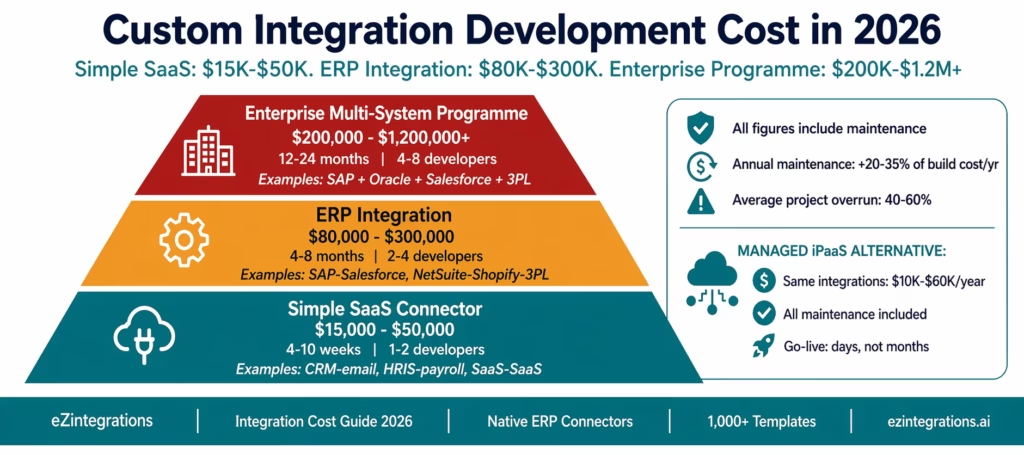
May 13, 2026Custom integration development costs $50,000-$500,000+ per integration project in 2026, depending on system complexity, team rates, and scope. A simple SaaS-to-SaaS connector runs $15,000-$50,000. An ERP integration with SAP or Oracle runs $80,000-$300,000. A multi-system enterprise integration programme runs $200,000-$1,200,000+. Ongoing maintenance adds 20-35% of initial build cost per year. Enterprise iPaaS platforms with native connectors and pre-built templates deliver the same integrations for 70–90% less over a three-year period, consistent with enterprise integration cost benchmarks highlighted in Gartner research.
TL;DR:
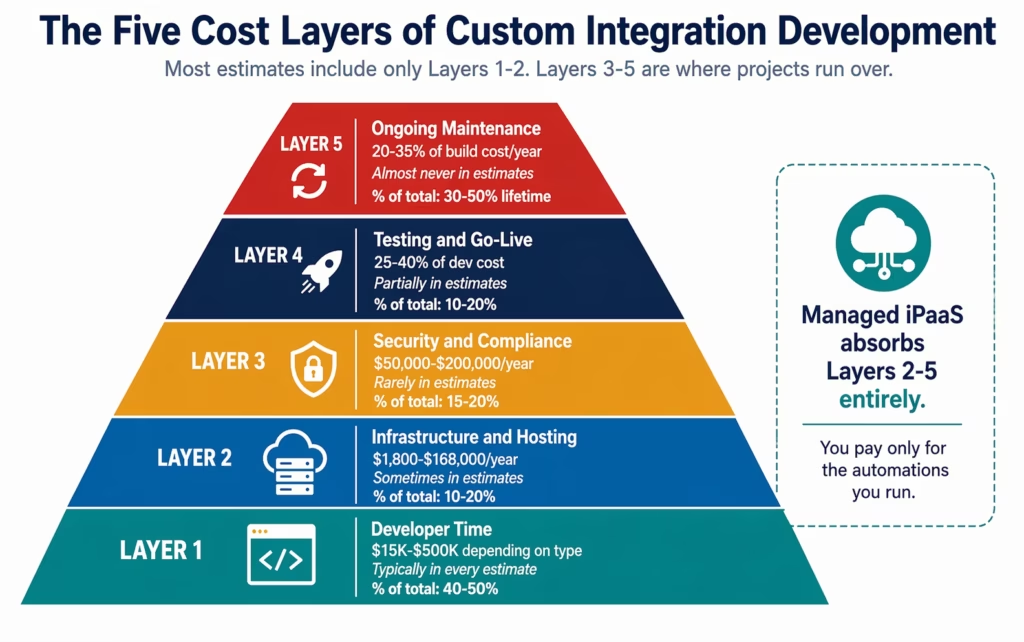
- Custom integration development has five cost layers, and most project estimates include only the first two: developer time and infrastructure. The other three (security and compliance, ongoing maintenance, and hidden escalation triggers) are where the real cost lives.
- Cost ranges in 2026: simple SaaS connector $15,000-$50,000; ERP integration $80,000-$300,000; multi-system enterprise programme $200,000-$1,200,000+. Annual maintenance adds 20-35% of build cost each year.
- The average enterprise integration project runs 40-60% over its initial estimate. The reasons are predictable: ERP authentication complexity, scope creep when business teams discover new requirements during build, and underestimated testing cycles.
- Enterprise iPaaS platforms with native connectors deliver comparable integrations for 70-90% less because the platform absorbs the authentication, infrastructure, security, and maintenance costs that custom builds carry separately. eZintegrations covers all four automation levels: Level 1 (iPaaS Workflows), Level 2 (AI Workflows with Document Intelligence and LLM classification), Level 3 (AI Agents with 9 native enterprise tools), and Level 4 (Goldfinch AI multi-agent with Chat UI and Workflow Node), all in one fully managed platform.
- This guide gives you the full cost breakdown by integration type, a line-by-line estimate framework, the hidden cost triggers to watch for, and a comparison table against managed iPaaS pricing.
Why Integration Development Cost Estimates Are Almost Always Wrong
The integration development cost conversation starts with a simple question: how long will it take to build this connector? A senior developer estimates 3-4 weeks. The project manager adds 20% buffer. The estimate lands at $25,000-$35,000.
The final cost is rarely that number. Industry data on software development projects consistently shows 40–60% overruns are the norm, not the exception, reflecting broader enterprise software development complexity trends observed by McKinsey & Company. For integration projects specifically, the overruns are driven by three predictable factors that the initial estimate misses.
Factor 1: ERP authentication complexity
SAP S/4HANA requires a CSRF token for every write operation. OAuth 2.0 client credentials flow for authentication. Communication Arrangement configuration that controls which APIs are accessible. Most developers who have not worked with SAP before spend 2-4 weeks discovering and solving these requirements, which were not in the original estimate.
NetSuite requires Token-Based Authentication (TBA) with RSA key pair generation, or OAuth 2.0 with scope-specific permission grants. Oracle ERP Cloud requires OAuth assertion flows with JWT token construction. Each of these is non-trivial the first time.
Factor 2: Scope creep during build
Business teams discover requirements during the build that were not in the original specification. The AP manager realises the invoice workflow needs to handle credit memos differently from invoices. The sales team wants the CRM integration to also sync opportunity stage changes, not just closed-won deals. Each addition adds days or weeks.
Factor 3: Testing cycles longer than estimated
Integration testing requires both systems to behave correctly simultaneously. Sandbox environment discrepancies (what works in SAP sandbox does not always replicate in production), data quality issues in the source system, and edge cases in the data mapping all extend testing timelines beyond the initial estimate.
This guide gives you cost estimates with these realities built in, not the optimistic figures most developers quote before they start.
Integration Cost by Type: The 2026 Reference Table
| Integration Type | Build Cost Range | Timeline | Maintenance/Year | 3-Year TCO | iPaaS Alternative |
|---|---|---|---|---|---|
| Simple SaaS-to-SaaS (Zapier-class) | $5,000-$15,000 | 1-3 weeks | $1,500-$5,000 | $8,000-$25,000 | $1,080-$3,600 |
| SaaS-to-SaaS with error handling | $15,000-$50,000 | 3-8 weeks | $5,000-$15,000 | $25,000-$80,000 | $2,160-$7,200 |
| ERP-to-SaaS (NetSuite, Dynamics) | $40,000-$120,000 | 2-5 months | $15,000-$40,000 | $70,000-$200,000 | $2,160-$7,200 |
| SAP S/4HANA integration (single) | $80,000-$200,000 | 4-8 months | $25,000-$60,000 | $130,000-$320,000 | $2,160-$7,200 |
| Oracle ERP Cloud integration | $70,000-$180,000 | 3-7 months | $20,000-$55,000 | $110,000-$290,000 | $2,160-$7,200 |
| Multi-ERP (SAP + NetSuite + CRM) | $200,000-$500,000 | 8-18 months | $60,000-$150,000 | $320,000-$800,000 | $10,800-$25,200 |
| Enterprise programme (10+ systems) | $400,000-$1,200,000 | 12-24 months | $120,000-$350,000 | $640,000-$1,900,000 | $21,600-$64,800 |
Notes: build cost ranges reflect mid-market US-based developer rates ($120-$180/hour loaded). Maintenance figures reflect 2-3 hours/month per integration for API updates, incident response, and monitoring. iPaaS alternative uses eZintegrations pricing at $90/month per automation × 12 months × number of integrations.
The Five Cost Layers Every Integration Project Carries
Most integration project estimates include developer time and sometimes infrastructure. The full cost has five layers. Layers 3-5 are where projects consistently exceed budget.
Layer 1: Developer Time and Rates
The most visible cost and the one most estimates start with.
2026 US market rates for integration development (fully loaded):
| Role | Hourly Rate (Loaded) | Typical Integration Project Involvement |
|---|---|---|
| Integration architect | $160-$220/hr | Design, API evaluation, data model, 20-30% of total hours |
| Senior backend developer | $130-$180/hr | Connector build, transformation logic, 50-60% of total hours |
| QA/testing engineer | $85-$120/hr | Test plan, sandbox testing, UAT, 15-25% of total hours |
| DevOps engineer | $110-$150/hr | Pipeline, infrastructure, monitoring, 10-15% of total hours |
| Project manager | $90-$130/hr | Scope, timeline, stakeholder management, 10-15% of total hours |
Hours by integration type:
A simple SaaS-to-SaaS webhook integration with basic error handling: 80-200 hours total across roles.
An ERP integration with SAP S/4HANA (purchase order creation and goods receipt): 400-900 hours. The SAP OData V4 API research, CSRF token implementation, Communication Arrangement configuration, and data mapping for standard SAP objects alone account for 80-150 hours in most first-time SAP integration projects.
A multi-system integration programme across SAP, NetSuite, Salesforce, and two 3PL partners: 2,000-5,000 hours.
Offshore vs onshore rate impact:
Offshore development rates ($25-$60/hour) appear to reduce cost by 60-70%. In practice, the effective savings are typically 30-45% because: integration projects require tighter communication cycles than product development (daily coordination with ERP teams, frequent requirement clarification), ERP-specific knowledge (SAP S/4HANA, Oracle ERP) is scarcer offshore, and timezone gaps extend the testing-feedback-fix cycle by 24-48 hours per iteration.
Layer 2: Infrastructure and Hosting
Integration connectors need to run somewhere. The infrastructure requirements depend on whether you are building a single connector, a small integration hub, or a full integration platform.
Single connector (webhook listener, scheduled sync):
- Cloud function or lightweight compute instance: $50-$200/month
- Database for sync state and error logging: $50-$150/month
- Monitoring and alerting: $50-$100/month
- Annual: $1,800-$5,400
Small integration hub (5-15 connectors):
- Application server (2 instances for HA): $300-$800/month
- Message queue (SQS, RabbitMQ): $100-$400/month
- Database (PostgreSQL for execution logs): $150-$500/month
- Load balancer, SSL, CDN: $100-$300/month
- Monitoring (Datadog, New Relic): $300-$800/month
- Backup and DR: $100-$300/month
- Annual: $12,600-$37,200
Enterprise integration platform (15+ connectors, high availability):
- Multi-region compute with auto-scaling: $2,000-$6,000/month
- Enterprise message queue with guaranteed delivery: $500-$2,000/month
- Production database with read replicas: $500-$2,000/month
- Monitoring, alerting, log retention: $800-$2,500/month
- Security tools (WAF, secrets manager, vulnerability scanning): $400-$1,500/month
- Annual: $51,600-$168,000
Layer 3: Security, Compliance, and Audit
This layer is consistently underestimated because it falls outside the development team’s typical scope. The business discovers it when legal, compliance, or IT security reviews the project.
Penetration testing: required annually for any integration handling PII, financial data, or protected health information. Cost: $15,000-$50,000 per engagement depending on scope.
SOC 2 Type II audit preparation: if your integration platform handles customer data and customers ask for your SOC 2 report (which enterprise customers always do), you need to certify your custom platform. Cost: $30,000-$100,000 for initial certification with a recognised auditor.
HIPAA compliance implementation: if any of the integrated systems handle protected health information (EHR, benefits, employee health data): HIPAA technical safeguard implementation, risk assessment, and documentation. Cost: $25,000-$80,000 initial implementation, $10,000-$25,000 annual maintenance.
GDPR data processing documentation: mapping data flows, documenting processing purposes, implementing data subject rights workflows. Cost: $10,000-$40,000.
Total annual security and compliance for a production integration platform: $50,000-$200,000
A managed iPaaS like eZintegrations includes HIPAA, GDPR, and SOC 2 Type II certification as part of the platform. The compliance cost is zero for the customer.
Layer 4: Testing, QA, and Go-Live
Testing is the layer developers most consistently underestimate. Integration testing is harder than unit testing because it requires both systems to behave correctly simultaneously, and the two systems are usually owned by different teams with different change management cycles.
Testing phases for a production ERP integration:
Unit testing: individual components in isolation. Well-understood, typically estimated correctly.
Integration testing: does the connector correctly handle all the scenarios the real system produces? SAP returns structured error messages in a format that differs from REST convention. NetSuite SuiteQL returns null differently from empty results. These require discovery during testing, not before.
Sandbox-to-production parity testing: sandbox environments rarely have complete parity with production. SAP sandbox Communication Arrangements are often less restrictive than production. NetSuite sandbox has different data volumes that expose performance issues not visible in sandbox. A typical sandbox-to-production delta discovery and remediation cycle adds 2-4 weeks to an ERP integration project.
User acceptance testing (UAT): business users test with real data patterns they care about. They discover edge cases the developer did not anticipate. UAT cycles for ERP integrations typically run 2-4 weeks.
Performance testing: does the integration handle peak volume? An AP workflow that processes 100 invoices in sandbox but needs to process 2,000 on month-end close may not perform correctly without load testing and optimisation.
Testing cost as a percentage of development cost: 25-40%
For a $100,000 development project: add $25,000-$40,000 for a complete testing programme.
Layer 5: Ongoing Maintenance and Support
The cost that makes custom integration development expensive over time. Every API changes. Every ERP updates. Every security vulnerability needs patching.
What drives ongoing maintenance cost:
API version management: Salesforce releases three major API versions per year. SAP releases quarterly. NetSuite biannually. Each release that modifies an endpoint, changes a required header, or deprecates a method used in your connector requires developer intervention.
Authentication token management: OAuth tokens expire. Service account credentials rotate. SAP Communication Arrangement certificates have validity periods. When any of these expire and your process does not handle renewal automatically, the integration breaks at the worst possible moment.
Incident response: integrations fail for reasons outside the connector code: network partitions, target system maintenance windows, rate limiting, payload size limits hit for the first time at month-end. Each incident requires developer investigation, diagnosis, and fix.
Business requirement changes: the business changes its processes. The ERP chart of accounts changes. A new field becomes mandatory in the CRM. Each business change requires a code change, test, and deployment.
Annual maintenance cost benchmarks:
| Integration Complexity | Annual Maintenance Hours | Annual Maintenance Cost |
|---|---|---|
| Single simple connector | 60-100 hrs/year | $9,000-$18,000 |
| ERP single integration | 150-300 hrs/year | $22,500-$54,000 |
| Multi-ERP integration hub | 400-800 hrs/year | $60,000-$144,000 |
| Enterprise programme | 1,000-2,500 hrs/year | $150,000-$450,000 |
Industry benchmark: ongoing integration maintenance consumes 60-80% of integration developer capacity for teams maintaining 15+ connectors. Two of three integration developers are in maintenance mode at any given time.
The Hidden Cost Triggers: Where Projects Run Over
Beyond the five layers, six specific events consistently push integration projects over budget. Knowing them in advance helps you either budget for them or avoid them by choosing a different approach.
Trigger 1: First-time ERP API work
Developers who have not previously worked with SAP OData V4, Oracle FBDI, or NetSuite SuiteTalk consistently underestimate complexity by 2-3x. SAP’s CSRF token requirement alone (fetch token via GET, extract from response header, include in subsequent POST) is not in the Swagger/OpenAPI documentation for most SAP APIs and must be discovered from SAP community forums or trial and error. Budget an extra 4-6 weeks for first-time ERP API work, or use a platform with pre-built ERP connectors.
Trigger 2: On-premises system connectivity
If any integrated system is on-premises (SAP ECC on-premises, Oracle ERP on-premises, legacy databases), every modern integration approach requires a network bridge: VPN, reverse proxy, or network agent. Setting up and securing this bridge typically adds 2-4 weeks and $10,000-$30,000 to the project, and creates an ongoing infrastructure dependency.
Trigger 3: Data quality issues in source systems
Integration projects expose data quality problems that the business did not know existed: duplicate vendor records in the ERP, missing mandatory fields in CRM records, inconsistent date formats across regions, product codes in the source that do not exist in the target. Cleaning data during an integration project is unplanned work that adds 20-40% to testing timelines.
Trigger 4: Change management on the business side
Integration projects require business process decisions (what happens when the match fails? who approves exceptions? what is the retry policy?). These decisions take time because they require consensus across AP, IT, and the ERP team. Decision delays add weeks to project timelines without adding any code.
Trigger 5: Parallel run period
Most enterprise integrations require a parallel run period: the new automated process runs alongside the old manual process for 2-4 weeks while the team verifies output parity. During the parallel run, both the old and new processes consume resources. This doubles the operational cost for the duration and extends the project timeline.
Trigger 6: Production API rate limits
Sandbox environments typically have relaxed rate limits. Production environments enforce them. An invoice sync that processes 200 records per minute in sandbox may be rate-limited to 50 per minute in production (Salesforce’s default API limit for many operations). Discovering this in production requires both a code change and a renegotiation with the API owner, typically adding 1-2 weeks.
Cost Comparison: Custom Development vs Enterprise iPaaS
| Cost Component | Custom Development | eZintegrations Managed iPaaS |
|---|---|---|
| SAP S/4HANA integration (single) | $80,000-$200,000 build + $25,000-$60,000/year maintenance | $1,080/year ($90/month per automation) |
| NetSuite integration (single) | $40,000-$120,000 build + $15,000-$40,000/year | $1,080/year |
| Oracle ERP integration (single) | $70,000-$180,000 build + $20,000-$55,000/year | $1,080/year |
| Multi-ERP integration (SAP + NetSuite) | $200,000-$500,000 build + $60,000-$150,000/year | $2,160-$5,400/year |
| 10-automation enterprise programme | $400,000-$1,200,000 build + $120,000-$350,000/year | $10,800/year |
| Infrastructure | $12,600-$168,000/year | $0 (fully managed) |
| Security and compliance | $50,000-$200,000/year | $0 (HIPAA, GDPR, SOC 2 Type II included) |
| AI Workflow steps | Separate build programme, $50,000+ | Included at Level 2 ($90/month) |
| AI Agents | Separate build programme, $100,000+ | $120/month per agent automation |
| Template library | None (build from scratch) | 1,000+ ready-to-import |
| On-premises connectivity | VPN/reverse proxy, $10,000-$30,000 setup | IPSec Tunnel, $0 |
| Go-live timeline | 4 months-24 months | 3-10 days per integration |
| Key person risk | High | None |
| 3-year TCO (10 integrations) | $720,000-$2,000,000+ | $32,400-$64,800 |
Worked Example: Nexus Distribution, 700 Employees
Nexus Distribution is a $130M annual revenue wholesale distributor running SAP ECC on-premises, Salesforce, three 3PL partners (different WMS systems), and recently acquired a company on NetSuite.
They needed six integrations: SAP-to-Salesforce (order status), SAP-to-3PL-A (shipment dispatch and confirmation), SAP-to-3PL-B (similar), SAP-to-3PL-C (similar), NetSuite-to-SAP (post-acquisition consolidation), and SAP-to-accounts payable email processing (vendor invoices).
Custom Development Estimate
Their initial developer estimate:
- 6 integrations × 6 weeks average = 36 weeks of developer time
- 2 developers × $150/hour loaded = $3,000/day
- 36 weeks × 5 days = $540,000 in developer time
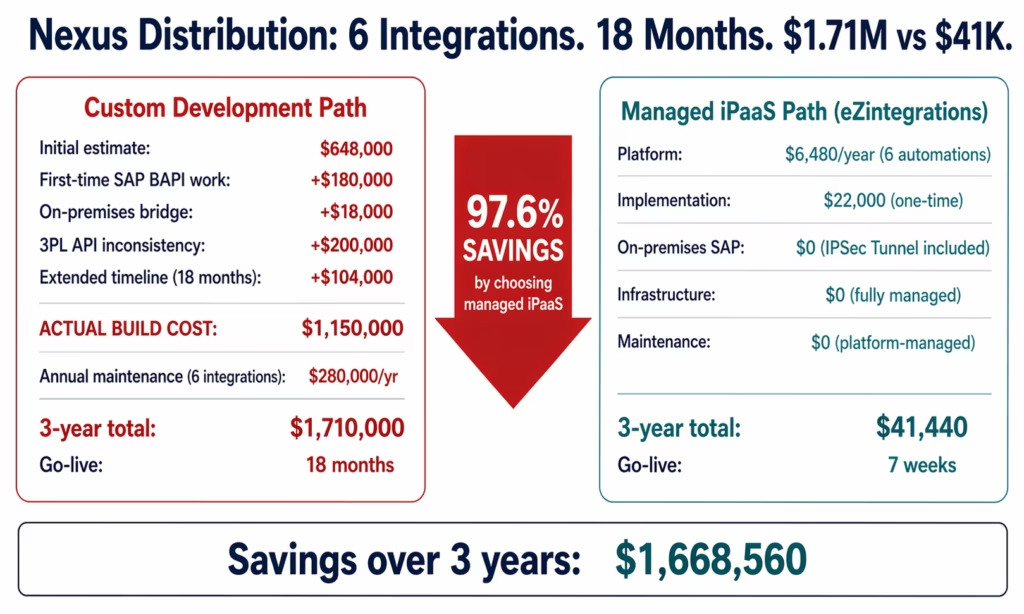
The IT director added 20% buffer: $648,000.
What the Estimate Missed
SAP ECC on-premises connectivity: the SAP system is behind a corporate firewall. They needed to implement a network bridge for the cloud-based integration platform. If building custom: 3 weeks plus $18,000 in security review and configuration. Plus ongoing firewall management.
SAP BAPI and RFC complexity: SAP ECC uses BAPIs and RFCs for many operations, not RESTful APIs. The development team had SAP OData experience but not BAPI/RFC experience. First-time BAPI work added 8 weeks across the three SAP-to-3PL integrations.
3PL API inconsistency: the three 3PL partners had APIs at different maturity levels. 3PL-A had documented REST APIs. 3PL-B had a SOAP API from 2012 with no current documentation (they had to reverse-engineer from the WSDL). 3PL-C had an SFTP-based file exchange with no API. Three completely different integration patterns from the same category of “3PL integration.”
Actual build timeline: 18 months for all six integrations (versus 9-month estimate). Actual build cost: $1,150,000 (versus $648,000 estimate, 77% overrun).
The iPaaS Alternative for Nexus Distribution
eZintegrations with native SAP ECC connectors, Salesforce connector, NetSuite connector, SFTP connector, SOAP connector, and REST connectors:
- 6 automations × $90/month × 12 months = $6,480/year
- Implementation (mix of templates and ERP-specific configuration): $22,000 one-time
- On-premises SAP via IPSec Tunnel: $0 additional (included in platform)
- All 6 integrations live: 7 weeks (versus 18 months)
3-year iPaaS TCO: $41,440 3-year custom build TCO: $1,150,000 build + ($280,000/year × 2 years maintenance) = $1,710,000
3-year savings by choosing iPaaS: $1,668,560 (97.6% savings)
The Cost of the Integration Gap
The cost of custom integration development is not just the development cost. It is also the operational cost of the period between when the integration is needed and when it goes live.
For Nexus Distribution, the six integrations were needed because the business was running manual processes: Salesforce reps manually updating order status from SAP, warehouse team manually emailing dispatch instructions to 3PL partners, AP team manually processing vendor invoices from email.
During the 18 months of custom development, those manual processes continued. The monthly manual process cost:
| Manual Process | Hours/Month | Cost/Month |
|---|---|---|
| Salesforce order status updates | 48 hrs | $3,360 |
| 3PL dispatch emails | 65 hrs | $4,225 |
| Invoice email processing | 120 hrs | $5,040 |
| NetSuite-SAP reconciliation | 90 hrs | $6,300 |
| Total | 323 hrs | $18,925 |
18 months of manual processes during custom build: $18,925 × 18 = $340,650
Add this to the build cost: $1,150,000 + $340,650 = $1,490,650 total year-one cost.
The iPaaS path avoids 16 months of that manual cost (2 months of implementation versus 18 months of custom build): $18,925 × 16 = $302,800 in avoidable manual process cost.
Before vs After: Custom Development vs Managed iPaaS
| Dimension | Custom Development | eZintegrations Managed iPaaS |
|---|---|---|
| Initial cost (6 integrations) | $200,000-$1,200,000 | $22,000 implementation + $6,480/year |
| Annual maintenance | $60,000-$280,000/year | $0 (platform-managed) |
| Infrastructure cost | $12,600-$168,000/year | $0 (fully managed) |
| Security/compliance cost | $50,000-$200,000/year | $0 (included) |
| Go-live timeline | 4-18 months | 3-10 days per integration |
| Manual process cost during build | $15,000-$40,000/month | Minimal (2-4 week implementation) |
| API update management | Developer sprint per update | Automatic (platform handles) |
| On-premises connectivity | $10,000-$30,000 setup + ongoing | IPSec Tunnel, $0 |
| First-time ERP complexity risk | High (2-3x underestimate) | Eliminated (native connectors) |
| Adding AI Workflow steps | Separate build, $50,000+ | Native Level 2 steps, $0 incremental |
| 3-year TCO (6 integrations, mid-market) | $800,000-$2,000,000+ | $41,000-$65,000
Consistent with Total Economic Impact analyses of integration platforms published by Forrester. |
| Savings over 3 years | N/A | $760,000-$1,935,000 (90-97%) |
Objection: “Our Integration Is Too Complex for an Off-the-Shelf Platform”
This objection is worth examining case by case, because it is sometimes correct.
Managed iPaaS platforms handle the vast majority of enterprise integration requirements: REST, GraphQL, WebSocket, webhooks, SOAP, SFTP/FTP, EDI, database connections, message queues. eZintegrations has native connectors for SAP S/4HANA and ECC (OData V4, BAPIs), Oracle ERP Cloud (REST, FBDI, OTBI), NetSuite (SuiteTalk REST, SuiteQL), Dynamics 365 (Finance, SCM, Sales), JDE (Orchestrator API, BSSV), and 5,000+ SaaS applications. On-premises systems connect via IPSec Tunnel.
The “too complex for off-the-shelf” situation is genuinely true for: fully proprietary APIs with no documentation and no standard protocols; sub-100ms latency requirements for real-time financial trading; integration with hardware systems using non-IP protocols; or deeply custom ERP configurations where standard API paths have been modified by a partner implementation.
In practice, fewer than 5% of enterprise integration requirements fall into these categories. The remaining 95% are handled by managed platforms with native connectors.
Before assuming your integration is in the 5%, ask: does the target system have a documented REST, SOAP, GraphQL, or database API? If yes, a managed platform with native connectors is almost certainly the correct technical and financial choice.
Objection: “We Already Have Developers, So Building Is Free”
Developer time is not free. It has an opportunity cost.
Every hour a developer spends building and maintaining an integration connector is an hour not spent on your product. For a SaaS company, this is the opportunity cost of feature development. For a manufacturer or distributor, this is the IT capacity that cannot be allocated to digital transformation initiatives.
At a fully loaded $150/hour rate, 500 hours of integration development per year (conservative for a 10-connector estate) equals $75,000 in diverted engineering capacity. That is the opportunity cost, not including the explicit salary expense.
Additionally, sunk cost logic (“we already have the developers, so building is free”) does not apply to ongoing decisions. The decision to build a second, third, or tenth integration should be evaluated on its own merits, not on the basis of existing headcount. Each new integration built custom adds to the maintenance backlog that existing developers carry.
Objection: “The iPaaS Vendor Might Raise Prices or Shut Down”
Vendor risk is a legitimate business consideration. The practical management:
eZintegrations uses standard, industry-documented APIs for all connectors: SAP OData V4, NetSuite SuiteTalk REST, Oracle REST APIs, Salesforce REST API. The integration logic you configure on the platform is replicable on any other iPaaS platform that supports the same APIs.
The migration risk from an iPaaS platform is weeks, not months, because the connector architecture is based on industry standards rather than bespoke code. Compare this to the migration risk from a custom integration platform, where the code is proprietary, poorly documented, and understood by one or two developers.
Additionally, the pricing risk of an iPaaS platform (potential price increase) is far smaller in absolute terms than the maintenance cost risk of a custom build (one key developer departure could trigger $75,000-$200,000 in remediation costs).
The vendor lock-in risk of a managed iPaaS is lower than the key person lock-in risk of a custom build.
Objection: “We Need Full Control Over Our Integration Logic”
Managed iPaaS platforms provide full visibility and control over integration logic: workflow steps, data transformation rules, routing conditions, error handling, retry logic, and audit logs. The difference from custom code is in where that logic is expressed: in a visual workflow editor rather than in code.
For most integration requirements, visual workflow configuration provides the same control as code with less risk (changes do not require deployment, visual logic is readable by non-developers, and rollback is immediate).
For edge cases where code-level control is required: eZintegrations supports custom code steps within workflows via JavaScript functions, allowing developers to write custom transformation logic for scenarios the visual builder cannot handle. The custom code runs within the managed platform, inheriting its infrastructure, security, monitoring, and compliance posture.
Full control does not require full custom build. It requires a platform flexible enough to handle your specific requirements. Evaluating that flexibility with a specific use case before assuming custom build is necessary is the correct sequence.
What to Include in Your Integration Cost Business Case
A business case for integration investment needs five components to hold up under finance review, following structured enterprise technology cost evaluation frameworks outlined by Deloitte:
1. The integration requirements list. What systems need to connect? What data needs to flow? What are the triggering events and destination actions? A specific list is more fundable than “we need to integrate our systems.” List each integration by source, destination, data type, and frequency.
2. The custom development cost estimate using all five layers. Do not let a developer’s time estimate stand as the project budget. Apply the five-layer framework: developer time, infrastructure, security and compliance, testing and QA, and annual maintenance. Apply the 40-60% overrun buffer. Show the 3-year TCO, not just the build cost.
3. The managed iPaaS alternative cost. Take your integration list, count the automations, multiply by $90/month, add implementation time (2-4 hours per standard workflow, 1-2 days per ERP-connected workflow). Show the 3-year iPaaS TCO. The difference is your budget justification.
4. The integration gap cost. How long will custom development take? What are the manual process costs during that period? If custom build takes 12 months and the team spends $15,000/month on manual processes, that is $180,000 in avoidable costs that strengthen the iPaaS case.
5. The risk comparison. Custom build: key person risk, API maintenance burden, compliance self-certification, no AI Workflow capability without additional build. Managed iPaaS: vendor risk (mitigated by standard API architecture), no key person risk, compliance included, AI Workflows native.
How to Get Started
Step 1: List Your Integration Requirements
Document each integration you need: source system, destination system, data type, frequency, and approximate transaction volume. This list is the input to both the custom development estimate and the iPaaS alternative cost calculation.
Step 2: Run the Integration Cost Calculator
Use the reference table in this guide to estimate custom development cost for each integration in your list. Apply the five-layer framework and the 40-60% overrun buffer. Calculate your 3-year custom development TCO.
Then use the interactive ROI calculator to generate the managed iPaaS alternative cost for the same integration list.
Step 3: Compare and Calculate Payback
Take your 3-year custom development TCO and subtract the 3-year iPaaS TCO. That is your 3-year financial justification for the managed platform. Divide the iPaaS year-1 cost (implementation plus first-year licence) by the monthly manual process savings to get your payback period.
Step 4: Book an Integration Assessment
Book a free demo. Bring your integration requirements list. The eZintegrations team will map each integration to the closest Automation Hub template, confirm which require ERP-specific connector configuration, estimate go-live timelines, and produce a side-by-side cost comparison against your custom development estimate.
FAQs
Frame the business case around three numbers: the 3-year custom development TCO (using the five-layer framework including maintenance), the 3-year iPaaS TCO (licence plus implementation), and the integration gap cost (manual process expenses during the custom build period). For a typical 6-10 integration enterprise project, the 3-year custom TCO runs $500,000-$2,000,000. The 3-year iPaaS TCO runs $30,000-$80,000. The difference is the business case. The internal dev team's capacity is then available for product work, not integration maintenance.
The payback period depends primarily on the manual process costs during the integration gap. For a team with $15,000-$25,000/month in manual process costs, an iPaaS platform with $25,000-$40,000 year-1 cost (licence plus implementation) reaches payback in 1-3 months from go-live. If you are comparing against a planned custom build (rather than an existing one), the payback is the avoided build cost: typically immediate in year one.
In 2026, a realistic cost for a single enterprise ERP integration (SAP, Oracle, or NetSuite to a major SaaS platform) runs $80,000-$200,000 in initial development plus $25,000-$60,000 per year in maintenance. A multi-system integration programme covering 10+ systems runs $400,000-$1,200,000 in build cost plus $120,000-$350,000 per year in maintenance. These figures include all five cost layers. Initial developer-time-only estimates typically represent 40-50% of the true project cost.
For a single, very simple integration between two systems with stable APIs, low transaction volume, and no compliance requirements: a one-time custom build can be cheaper in the first year. The crossover point depends on maintenance cost: if the integration requires no maintenance (stable API, no business rule changes, no security updates), the custom build cost does not compound. In practice, this situation is rare because APIs change, business processes change, and compliance requirements change. For any integration expected to remain in production for more than 2 years, iPaaS is typically cheaper over the lifetime.
First-time SAP integration projects consistently take longer than estimated. A single SAP S/4HANA integration with proper error handling, CSRF token management, Communication Arrangement configuration, and parallel run testing typically runs 4-8 months. SAP ECC on-premises integration (BAPI/RFC-based) adds on-premises connectivity setup and runs 5-10 months. Teams with prior SAP integration experience reduce these timelines by 30-50%. An eZintegrations Automation Hub template for SAP integration goes live in 3-10 days using native OData V4 and BAPI connectors. 1. How do I justify iPaaS to my CFO when we have an internal dev team?
2. What is the typical ROI timeline for switching from custom development to iPaaS?
3. How much does enterprise integration development cost on average?
4. Is custom integration development ever cheaper than iPaaS?
5. How long does custom integration development take for SAP?
The Integration Cost Conversation Has to Start With the Full Picture
Most integration projects are evaluated on the developer time estimate alone. The five-layer framework in this guide shows that developer time is 40-50% of the true project cost. The other 50-60% lives in infrastructure, security, testing, and maintenance, and most of it recurs annually.
When you run the full 3-year TCO comparison: $800,000-$2,000,000 for custom development versus $30,000-$65,000 for managed iPaaS with native ERP connectors, the financial case is not subtle.
The build vs buy decision framework goes deeper on when custom development is the right answer (fewer situations than most IT teams expect). The ROI calculator generates your specific 3-year comparison in 10 minutes.
Book a free demo. Bring your integration requirements list and your custom development estimate. The eZintegrations team will show you which Automation Hub templates match your requirements and what the side-by-side cost comparison looks like.

