
iPaaS vs ESB: Which Integration Approach Wins for Modern Enterprise?
May 12, 2026iPaaS vs ESB. For modern enterprise integration in 2026, iPaaS wins over ESB in almost every new deployment scenario. ESBs were designed for on-premises, hub-and-spoke integration between a fixed set of enterprise systems. iPaaS is designed for cloud-native, multi-directional integration across SaaS, ERP, databases, webhooks, and AI workflows. If you are running an existing ESB (MuleSoft ESB, IBM MQ, TIBCO, Oracle Service Bus, Apache ServiceMix), the question is not whether to modernise but when and how. New integration programmes should not start with ESB in 2026.
TL;DR
- ESBs (Enterprise Service Buses) were the right answer for enterprise integration from roughly 2000-2015. They solved the point-to-point integration spaghetti problem by introducing a central bus, message routing, and protocol mediation for on-premises enterprise systems.
- iPaaS (Integration Platform as a Service) replaced ESB as the right architectural choice for most enterprises as cloud adoption accelerated. iPaaS handles SaaS connectivity, webhook-driven real-time integration, API management, and: in modern AI-native platforms: Level 2 AI Workflows, Level 3 AI Agents, and Level 4 multi-agent orchestration.
- ESBs are not dead, but they are strategically limited in 2026: they require specialist middleware developers, run on infrastructure your team manages, do not natively connect to SaaS APIs, and have no AI automation capability.
- For IT leaders deciding between ESB modernisation and iPaaS adoption, this comparison gives the specific architectural differences, use case fit, total cost comparison, and migration path.
- Recommendation: iPaaS for all new enterprise integration programmes. ESB retirement and migration for existing on-premises deployments on a 2-4 year horizon.
Summary Comparison Table
| Dimension | iPaaS | ESB |
|---|---|---|
| Architecture | Cloud-native, managed service | On-premises middleware (or self-managed cloud) |
| Deployment model | SaaS: vendor-managed infrastructure | Customer-managed server infrastructure |
| Primary design era | 2015-present | 2000-2015 |
| Integration pattern | API-first, event-driven, multi-directional | Hub-and-spoke, message-based, on-premises |
| SaaS connectivity | Native: thousands of SaaS connectors | Not native: custom adapters required |
| Cloud systems | First-class: AWS, Azure, GCP, SaaS | Requires additional adapters |
| On-premises systems | Via IPSec Tunnel or agent | Native: designed for on-premises |
| AI automation | Native Level 2-4 (modern platforms) | Not available |
| Webhook handling | Native: real-time event processing | Not native: polling workarounds |
| Implementation speed | Days to weeks (templates) | Months (custom development) |
| Staffing requirement | IT generalists and ops teams | Specialist middleware developers (Java, WSDL, SOAP) |
| Infrastructure maintenance | None: vendor managed | Full: servers, patches, HA configuration |
| Scaling model | Elastic: cloud auto-scale | Manual: hardware procurement |
| Pricing model | Per-automation or subscription | Licence + infrastructure + staffing |
| Protocol support | REST, GraphQL, WebSocket, Webhooks, SOAP | SOAP, JMS, MQ, HTTP, some REST |
| Typical TCO (3 years, mid-enterprise) | $100K-$500K | $500K-$3M+ |
| AI readiness | Native on modern platforms | None |
| Vendor examples | eZintegrations, MuleSoft, Boomi, Workato | IBM MQ, TIBCO, Oracle Service Bus, MuleSoft ESB |
Introduction
The Enterprise Service Bus was the right answer for enterprise integration when it emerged in the early 2000s. Before ESBs, enterprises dealt with point-to-point integration spaghetti: SAP connected directly to Oracle via a custom script, Oracle connected to the mainframe via a different custom script, and the mainframe connected to a third system via something that one developer wrote in 2003 and nobody fully understands anymore. When any system changed its API, every point-to-point connection broke.
The ESB solved this by introducing a central message bus. Systems talked to the bus; the bus routed messages, handled protocol translation, and managed the connections. Middleware vendors: IBM, TIBCO, Oracle, BEA Systems: built substantial businesses on this architectural pattern.
Then cloud happened.
The ESB architecture assumed that enterprise systems were on-premises, that integration patterns were stable, and that the primary challenge was routing messages between known systems over known protocols (SOAP, JMS, MQ). Cloud adoption introduced thousands of SaaS applications with REST APIs, webhook-based event delivery, and update cycles measured in weeks rather than years, aligning with Martin Fowler principles of microservices and integration architecture. The ESB’s strength: central control over a fixed set of on-premises systems: became its limitation.
iPaaS emerged to fill the gap: cloud-native integration that could connect SaaS applications alongside on-premises ERP, handle webhook events in real time, scale elastically without infrastructure procurement, and deploy new integrations in days using pre-built templates.
In 2026, the iPaaS vs ESB question is mostly answered for new deployments, as reflected in Gartner iPaaS Magic Quadrant research. The question that actually matters for most IT leaders is: what do we do with the ESB we already have?
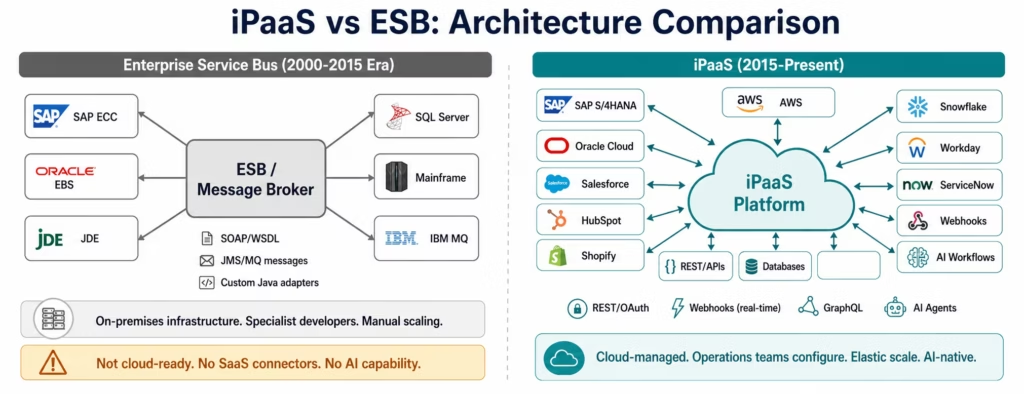
How ESBs Work: The Hub-and-Spoke Architecture
An Enterprise Service Bus creates a central integration layer between enterprise systems. Instead of System A connecting directly to System B (point-to-point), both systems connect to the ESB.The ESB handles core architectural responsibilities, as described in MuleSoft ESB architecture overview:
Message routing: when System A sends a message to the ESB, the ESB determines which system or systems should receive it, based on routing rules
Protocol mediation: System A speaks SOAP; System B expects JMS; the ESB translates between them
Message transformation: the ESB converts message formats: mapping fields from System A’s data model to System B’s expected structure
Orchestration: the ESB can execute sequences of service calls, applying business logic between steps
Guaranteed delivery: message queues ensure that messages are not lost if a destination system is temporarily unavailable
This architecture works well when: all your systems are on-premises, you have a small, known set of integration patterns, your systems use SOAP/WSDL or message queue protocols, and you have specialist middleware developers to configure and maintain the bus.
The ESB implementation typically involves: a middleware server (IBM WebSphere MQ, TIBCO Enterprise Message Service, Oracle Service Bus, or Apache ServiceMix), Java-based adapter development for each connected system, WSDL definitions for service interfaces, and XSL transformations for message mapping. The result is a powerful but complex system that requires specialist skills to operate.
How iPaaS Works: Cloud-Native, API-First Integration
An Integration Platform as a Service provides the same core integration capabilities as an ESB: routing, transformation, orchestration, guaranteed delivery: but from a cloud-native managed service rather than on-premises middleware.
The architectural differences are structural:
REST-first vs SOAP-first: iPaaS platforms are built around REST APIs, OAuth 2.0 authentication, and JSON payloads: the protocols that modern SaaS applications use. SOAP and WSDL are supported for legacy systems but are not the primary interface.
Event-driven vs polling: iPaaS handles webhooks natively. When Shopify fires an order.created event, an eZintegrations workflow receives it in under 500 milliseconds. An ESB typically polls the source system on a schedule because it was not designed for webhook event delivery.
Managed infrastructure vs customer-managed: the iPaaS vendor manages the servers, patching, high availability, scaling, and disaster recovery. Your team configures integration logic; the platform handles the infrastructure.
Template-based deployment vs custom development: modern iPaaS platforms include pre-built connector templates for thousands of applications. Connecting Salesforce to SAP using an Automation Hub template takes days. Building the equivalent SAP adapter for an ESB in Java takes weeks.
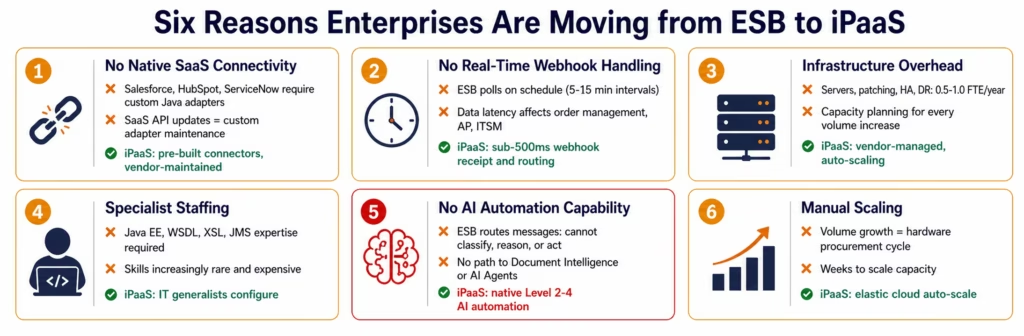
AI-native vs AI-absent: modern iPaaS platforms (like eZintegrations) include native AI workflow steps, autonomous AI agents, and multi-agent orchestration as first-class platform capabilities. ESBs were designed before enterprise AI automation existed as a concept.
The Six ESB Limitations That Drive Modernisation
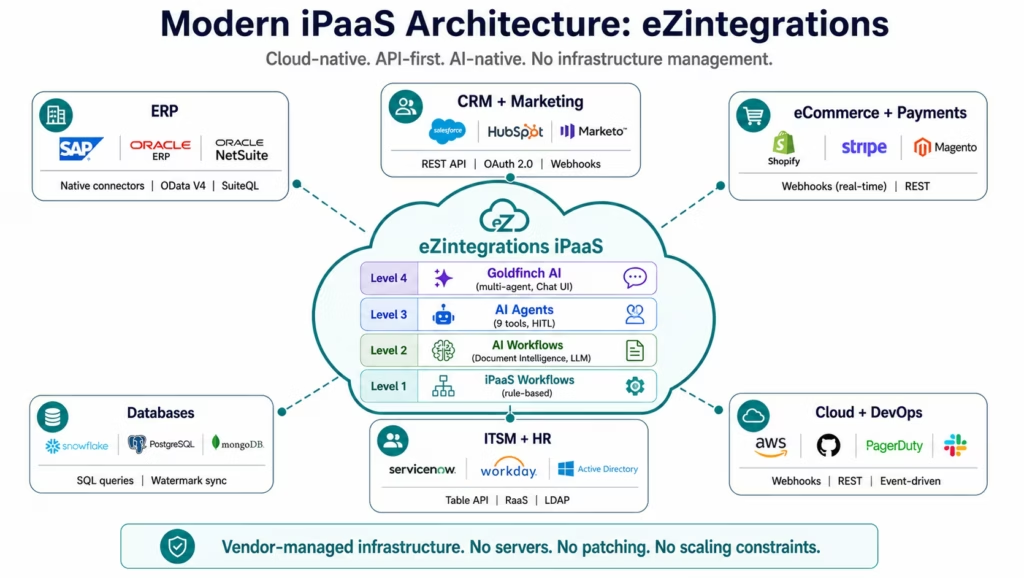
Most enterprises that have an ESB are not running it because they love it. They are running it because it works, and migration risk is real. But six structural limitations make ESB modernisation inevitable for most organisations:
Limitation 1: No Native SaaS Connectivity
ESBs were built before SaaS applications existed at scale. The ESB adapter model assumes that you write a Java adapter for each system: a project that takes weeks. Modern SaaS applications (Salesforce, HubSpot, ServiceNow, Workday, Shopify) release API updates every few weeks. Maintaining ESB adapters for a SaaS estate that changes this fast requires constant development investment.
iPaaS platforms include pre-built, maintained connectors for thousands of SaaS applications. When Salesforce releases API v60, the iPaaS vendor updates the connector. Your team does not touch the adapter.
Limitation 2: No Real-Time Webhook Event Handling
Modern SaaS applications communicate via webhooks: they push events to your endpoint the moment something happens. A Shopify order, a Stripe payment, a Salesforce opportunity close: all fire webhooks within milliseconds.
ESBs poll. They check the source system on a schedule (every 5 minutes, every 15 minutes, every hour). The polling interval determines your data freshness. A 15-minute polling interval means your downstream systems are always up to 15 minutes behind your source of truth. For order management, incident response, or AP automation, this latency creates operational problems.
iPaaS handles webhooks natively: the endpoint receives the event, verifies the HMAC signature, parses the payload, and routes to downstream systems in under 500 milliseconds.
Limitation 3: Infrastructure Overhead
An ESB runs on servers your team manages: provisioning, patching, capacity planning, high availability configuration, disaster recovery, monitoring. For a typical IBM WebSphere MQ or TIBCO deployment, the infrastructure management effort is 0.5-1.0 FTE per year: not running integrations, just keeping the middleware running.
iPaaS vendors manage all of this. Your team configures integration logic on a platform that is always available, always patched, and auto-scaling. The infrastructure team’s ESB management capacity is freed for higher-value work.
Limitation 4: Specialist Staffing Dependency
ESB configuration requires middleware specialists: developers proficient in Java EE, WSDL, XSL transformations, JMS message patterns, and the specific ESB vendor’s configuration tooling. These skills are increasingly rare, increasingly expensive, and create key-person risk when the ESB specialist leaves.
iPaaS platforms are designed for IT generalists, operations managers, and technically proficient business analysts. Visual workflow builders, template libraries, and plain-language execution logs mean that the person who configured the integration does not need to be the only person who can maintain it.
Limitation 5: No AI Automation Capability
This is the limitation that matters most in 2026. ESBs route messages. They do not classify documents, reason across data sources, operate as autonomous agents, or orchestrate multi-agent workflows. An ESB that receives an invoice PDF can deliver it to a destination. It cannot extract the vendor, invoice number, line items, and amounts from the PDF, compare them to the SAP PO, identify the discrepancy type, and route a packaged exception recommendation to the AP manager.
AI automation is the fastest-growing enterprise automation investment in 2026. ESBs have no path to this capability. iPaaS platforms with native AI capability (like eZintegrations’ Level 2-4 automation stack) provide this as a first-class platform feature.
Limitation 6: Scaling Requires Infrastructure Investment
When integration volumes grow: more orders, more invoices, more employee events: an ESB scales by adding hardware. Capacity planning, procurement cycles, installation, and configuration make ESB scaling a multi-week project. iPaaS platforms scale elastically: higher volume is handled automatically by the cloud infrastructure.
Where ESBs Still Earn Their Place
Balanced analysis requires acknowledging where ESBs remain appropriate. ESBs are not universally obsolete: they are strategically limited for specific modern use cases.
ESB remains appropriate for:
Pure on-premises legacy system integration: if your integration estate consists entirely of on-premises systems communicating via SOAP, JMS, or MQ: mainframe, legacy ERP, custom Java applications: and none of these systems will be replaced or connected to SaaS anytime soon, the ESB you have may be the right tool to continue running. Migration cost and risk may not be justified.
Regulated environments with strict on-premises data requirements: some regulated industries (government, defence, certain financial services) have data sovereignty requirements that prevent cloud-based integration platforms from processing certain data types. In these environments, an on-premises ESB may remain appropriate where iPaaS cloud processing is prohibited.
High-throughput low-latency message queuing: for internal system communication where sub-millisecond latency and guaranteed delivery of millions of messages per second are requirements (financial trading systems, high-frequency event processing), message queuing systems like IBM MQ retain specific performance advantages over general-purpose iPaaS.
Existing stable deployments with high migration cost: if your ESB is running stable, well-maintained integrations between a fixed set of on-premises systems, and the migration cost exceeds the operational benefit of switching, maintaining the ESB while building new integrations on iPaaS is a reasonable parallel-run strategy.
For all other use cases: especially any integration that involves SaaS applications, webhook events, cloud systems, or AI automation: iPaaS is the appropriate architecture.
AI Automation: The Definitive iPaaS Advantage
The verdict: iPaaS platforms with native AI automation provide a capability that ESBs cannot approach. This single dimension makes ESB-to-iPaaS migration increasingly urgent.
An ESB that receives an invoice does two things: deliver it to the destination and transform the message format if needed. A modern iPaaS with AI automation does much more with the same event:
Level 2 AI Workflow: the invoice arrives via email or webhook. Document Intelligence (a native workflow node in eZintegrations) reads the PDF regardless of vendor template, extracts the vendor name, invoice number, line items, amounts, and payment terms. No external AI API. No data leaving the platform’s compliance boundary.
Level 3 AI Agent: the AP Exception Agent retrieves the matching PO from SAP via API Tool Call, retrieves the GR confirmation via a second API Tool Call, compares the extracted invoice amounts to the PO amounts using Data Analysis, identifies the discrepancy type (price variance, quantity mismatch, duplicate), searches the vendor contract via Knowledge Base Vector Search, and routes a packaged exception recommendation to the AP manager: with confidence score, discrepancy summary, and one-click approve or query action.
Level 4 Goldfinch AI: the CFO asks the Chat UI “which vendor invoices are pending review this week and what is the total exposure?” and receives a live answer from the active workflow queue without accessing a BI tool or requesting a report.
An ESB cannot execute any of these steps. It is not a deficiency to correct: it is a fundamental architectural boundary. ESBs were designed to transport messages. AI automation requires reasoning across data sources, not just transporting messages.
For any enterprise building an AI automation programme in 2026, ESB is not the right integration layer. iPaaS with native AI capability is.
Total Cost of Ownership
The verdict: iPaaS has significantly lower TCO than ESB for most enterprise deployments, consistent with Forrester Total Economic Impact of integration platforms. The TCO advantage grows as SaaS connectivity and AI automation requirements increase.
ESB TCO components that do not exist in iPaaS:
| Cost Component | ESB | iPaaS |
|---|---|---|
| Server infrastructure | $30,000-$200,000+ initial + ongoing | $0: vendor managed |
| Infrastructure maintenance | 0.5-1.0 FTE/year ($60K-$120K/year) | $0: vendor managed |
| High availability configuration | $20,000-$100,000 initial | $0: included |
| Disaster recovery | $20,000-$80,000 initial + ongoing | $0: included |
| Specialist middleware staffing | $120,000-$200,000/year per developer | Not required |
| SaaS adapter development | $20,000-$80,000 per new SaaS system | Pre-built connectors: $0 |
| Version upgrades | $50,000-$200,000 per major version | Automatic: $0 |
| Platform licence | $100,000-$500,000+/year | $90-$150/month per automation |
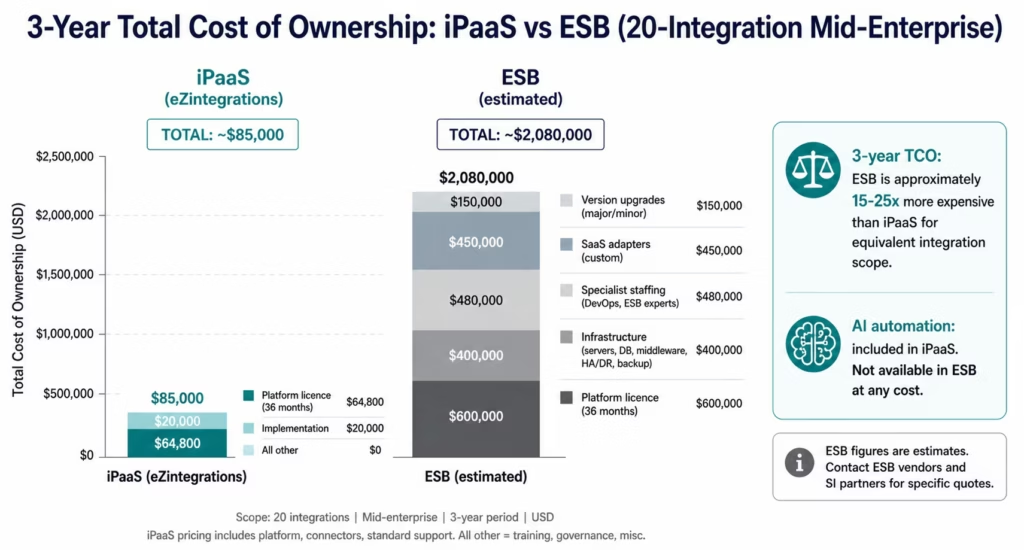
3-year TCO comparison (mid-enterprise, 20 integrations):
| Scenario | iPaaS (eZintegrations) | ESB (estimated) |
|---|---|---|
| Platform licence (3 years) | $64,800 ($90/mo × 20 × 36) | $600,000 |
| Infrastructure (3 years) | $0 | $180,000-$600,000 |
| Specialist staffing (3 years) | $0 (existing IT team) | $360,000-$600,000 |
| SaaS adapter development | $0 (pre-built connectors) | $300,000-$600,000 |
| AI automation capability | Included | Not available (additional cost) |
| 3-year total estimate | $65,000-$130,000 | $1,440,000-$2,400,000+ |
ESB estimates based on IBM, TIBCO, and Oracle ESB community-reported licence and deployment costs. Infrastructure, staffing, and adapter development estimates based on Gartner Peer Insights reviews and publicly available SI project data. Contact ESB vendors and SI partners for specific quotes.
The TCO comparison is most dramatic in three scenarios: when SaaS connectivity is growing (each new SaaS system requires a new ESB adapter), when AI automation is a requirement (ESB cannot provide this at any cost), and when the enterprise is growing its integration estate (ESB infrastructure must scale with procurement cycles).
Migration Path: ESB to iPaaS
For organisations running an ESB that want to understand the migration path, here is the practical approach:
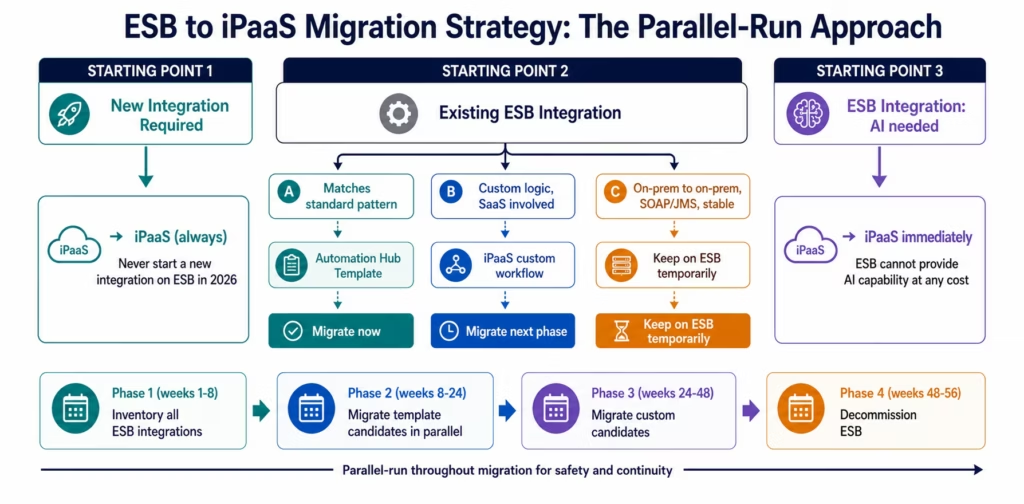
Phase 1: Inventory and Classification (4-8 weeks)
Document every integration running on the ESB. For each integration: source system, destination system, message format, trigger (scheduled or event-based), business criticality (high/medium/low), and estimated monthly transaction volume.
Classify each integration:
- Template candidate: matches a standard integration pattern available in the Automation Hub
- Custom candidate: requires custom workflow configuration but no specialised adapter development
- ESB retain: on-premises-to-on-premises with SOAP/MQ protocols and no SaaS involvement: potentially leave on ESB
Most ESB estates find that 40-70% of integrations are template candidates for a modern iPaaS.
Phase 2: Parallel Deployment (8-16 weeks)
Stand up the iPaaS alongside the ESB. Migrate low-risk, non-critical integrations first using Automation Hub templates. Validate output: confirm the iPaaS workflow produces equivalent results to the ESB integration. Run both in parallel for 2-4 weeks before cutover.
Do not attempt a big-bang migration. Integrations migrate iteratively over the migration programme.
Phase 3: High-Criticality Migration (12-24 weeks)
Migrate high-criticality integrations (ERP-to-CRM, payroll data sync, order management) on extended parallel runs (4-8 weeks) before cutover. These integrations typically require the most testing and stakeholder sign-off.
Phase 4: ESB Decommission (4-8 weeks)
Once all integrations have migrated and validated on the iPaaS for 60-90 days, decommission the ESB infrastructure. This typically includes server deprovisioning, licence termination, and documentation of the completed migration.
Migration timeline:
| Phase | Duration | Key activities |
|---|---|---|
| Inventory and classification | 4-8 weeks | Document all ESB integrations, classify by migration type |
| Low-risk parallel deployment | 8-16 weeks | Migrate template candidates, validate in parallel |
| High-criticality migration | 12-24 weeks | Migrate critical integrations, extended parallel run |
| ESB decommission | 4-8 weeks | Validate all integrations live, decommission ESB |
| Total programme | 28-56 weeks | Aggressive: 7 months. Conservative: 14 months |
Who Should Choose Each Approach
Choose iPaaS if:
- You are starting a new integration programme (any scale, any industry): ESB should not be the starting choice for any new integration project in 2026
- Your integration estate includes SaaS applications (Salesforce, HubSpot, ServiceNow, Workday, Shopify, Stripe, or any cloud application)
- Real-time webhook-based integration is required (order events, payment events, ITSM events)
- AI automation is on your roadmap: document intelligence, AI agents, or multi-agent orchestration
- You want your IT team to configure and maintain integrations without specialist middleware developers
- Elastic scaling without hardware procurement is an operational requirement
- Cloud-native deployment and vendor-managed infrastructure are preferences
Consider retaining ESB if:
- Your integration estate is entirely on-premises with stable, well-maintained SOAP/JMS/MQ integrations and no SaaS or cloud connectivity requirement
- Regulatory data sovereignty requirements prohibit cloud-based data processing for your integration data
- The migration cost and risk for your current ESB exceeds the operational benefit over the next 3-5 years
- Sub-millisecond high-throughput message queuing is your primary use case (consider specialised MQ rather than general iPaaS)
The parallel-run strategy (recommended for most):
Run iPaaS for all new integrations and for ESB integrations as you migrate them. Maintain the ESB for stable on-premises integrations until their natural migration window. This avoids a forced big-bang migration while preventing new technical debt on the ESB.
Detailed Feature Comparison
| Capability | iPaaS | ESB | Winner |
|---|---|---|---|
| SaaS application connectivity | Pre-built connectors, maintained | Custom Java adapters, manual maintenance | iPaaS |
| REST API support | Full: primary protocol | Supported, not primary | iPaaS |
| SOAP/WSDL support | Supported (legacy) | Primary protocol: native | ESB (legacy systems) |
| JMS/MQ protocols | Via connectors | Native | ESB (on-premises messaging) |
| Webhook event handling | Native: sub-500ms | Polling workaround | iPaaS |
| GraphQL | Native (modern iPaaS) | Not supported | iPaaS |
| WebSocket | Native (modern iPaaS) | Not supported | iPaaS |
| Database integration | Native SQL/NoSQL connectors | JDBC adapters (custom) | iPaaS |
| AI workflow automation | Native Level 2-4 (modern platforms) | Not available | iPaaS |
| AI Agents | Yes: 9 native tools (eZintegrations) | Not available | iPaaS |
| Multi-agent orchestration | Yes: Goldfinch AI | Not available | iPaaS |
| Infrastructure management | None: vendor managed | Full: customer managed | iPaaS |
| Scaling | Elastic: cloud auto-scale | Manual: hardware procurement | iPaaS |
| Implementation speed | Days (templates), weeks (custom) | Weeks to months | iPaaS |
| Staffing requirement | IT generalists | Specialist middleware developers | iPaaS |
| Debugging / observability | Operations-accessible logs | Specialist-required | iPaaS |
| On-premises connectivity | Via IPSec Tunnel / agent | Native | ESB (on-premises) |
| High-volume on-premises messaging | Good | Excellent | ESB (specific workload) |
| Data lineage | Basic execution logging | Basic | Tie |
| Message guarantees | Dead letter queue, retry | Message queuing, guaranteed delivery | Tie |
| HIPAA, SOC 2 Type II | All tiers (eZintegrations) | Customer-managed, additional cost | iPaaS |
| GDPR compliance | All tiers | Supported | Tie |
| On-premises via IPSec Tunnel | Yes : no public exposure | N/A (on-premises native) | Tie |
| Total cost of ownership | $65K-$130K (3yr, 20 integrations) | $1.4M-$2.4M+ (3yr, 20 integrations) | iPaaS |
Bottom Line Verdict
The iPaaS vs ESB question had a nuanced answer five years ago. In 2026, for most enterprise integration requirements, the answer is clear: iPaaS.
For new integration programmes: ESB should not be the starting choice. The infrastructure overhead, specialist staffing requirement, lack of SaaS connectivity, and absence of AI automation capability make it the wrong architecture for 2026 requirements regardless of organisation size.
For existing ESB deployments: the question is not whether to modernise but when. The migration path is well-understood (parallel run, template-first, phased cutover) and the cost savings from eliminating ESB infrastructure and staffing typically fund the iPaaS investment within 12-18 months.
For legacy on-premises-only environments: if your integration estate is genuinely on-premises-only (no SaaS, no cloud, no AI requirements) and your ESB is stable, the migration business case is weaker. A parallel strategy: iPaaS for any new integrations, ESB maintenance for stable legacy patterns: is reasonable.
On AI automation: this is the dimension where the ESB case collapses most completely. If your organisation has any AI automation initiative on its roadmap: document intelligence, autonomous exception handling, multi-agent orchestration: ESB is architecturally incapable of participating. iPaaS platforms with native AI capability (eZintegrations Level 2-4) are the only integration architecture that can host AI automation alongside traditional workflow integration.
The ESB was the right answer for its era. iPaaS is the right answer for this one.
Frequently Asked Questions
1. What is the difference between an ESB and an iPaaS?
An ESB (Enterprise Service Bus) is on-premises middleware that routes messages between enterprise systems using hub-and-spoke architecture. It was designed for on-premises systems using SOAP, JMS, and MQ protocols. An iPaaS (Integration Platform as a Service) is a cloud-managed integration platform that connects cloud and on-premises systems using REST APIs, webhooks, and event-driven patterns. iPaaS includes pre-built connectors for thousands of SaaS applications, elastic scaling, vendor-managed infrastructure, and on modern platforms like eZintegrations native AI workflow automation and AI agent capability.
2. Is ESB still relevant in 2026?
ESBs remain relevant for narrow use cases: pure on-premises legacy system integration with SOAP/JMS/MQ protocols, regulated environments with data sovereignty requirements that prohibit cloud processing, and high-throughput sub-millisecond message queuing for specific financial or industrial use cases. For the majority of enterprise integration requirements especially any integration involving SaaS applications, cloud systems, webhooks, or AI automation iPaaS is the appropriate architecture. New integration programmes should not start with ESB.
3. How do I migrate from ESB to iPaaS?
The recommended approach is a four-phase parallel-run migration: inventory all ESB integrations and classify them as template candidates, custom candidates, or ESB-retain; migrate template candidates first using Automation Hub pre-built templates in parallel with the ESB, validating for 2-4 weeks before cutover; migrate custom candidates over 12-24 weeks with extended parallel runs for high-criticality integrations; decommission the ESB after 60-90 days of full iPaaS operation. Total programme duration: 7-14 months depending on estate complexity. Most enterprises find that 40-70% of ESB integrations match Automation Hub template patterns and can migrate quickly.
4. Which is cheaper: ESB or iPaaS?
iPaaS is significantly cheaper for most enterprise deployments. ESB TCO includes: platform licence ($100K-$500K+/year), server infrastructure ($30K-$200K+ initial), infrastructure maintenance (0.5-1.0 FTE/year), specialist middleware staffing ($120K-$200K/year), and SaaS adapter development ($20K-$80K per new SaaS system). iPaaS TCO includes primarily the platform licence ($90-$150/month per automation on eZintegrations) and implementation using pre-built templates. For a 20-integration mid-enterprise programme, 3-year ESB TCO is approximately $1.4M-$2.4M versus $65K-$130K for iPaaS. The cost difference grows with SaaS connectivity requirements.
5. Can iPaaS replace an ESB for SOAP and legacy system integration?
Yes, Modern iPaaS platforms support SOAP and WSDL as connectivity protocols for legacy systems. eZintegrations connects to legacy on-premises ERP and custom systems via IPSec Tunnel (no public internet exposure required) with SOAP and REST adapter support. The main difference: ESBs were optimised for SOAP/JMS/MQ as primary protocols, while iPaaS treats them as supported legacy protocols alongside REST, webhooks, GraphQL, and database connectors. For integrations that are exclusively on-premises SOAP/JMS, the ESB's native support is marginally more efficient. For any integration that also involves SaaS or cloud systems, iPaaS is the practical choice.
6. Does eZintegrations support both iPaaS and AI agent capabilities in one platform?
Yes, eZintegrations covers all four automation levels: Level 1 (iPaaS Workflows: rule-based integration equivalent to traditional ESB or iPaaS functionality), Level 2 (AI Workflows: Document Intelligence, LLM classification, semantic matching as native workflow nodes), Level 3 (AI Agents: 9 native enterprise tools, autonomous reasoning, human-in-the-loop gates, confidence thresholds), and Level 4 (Goldfinch AI: multi-agent coordinator-worker orchestration with Chat UI and Workflow Node). This means your integration platform and your AI automation platform are the same platform, with the same governance, the same compliance certifications, and the same operational monitoring.
Conclusion
The iPaaS vs ESB debate was genuinely contested a decade ago. In 2026, for most enterprise integration use cases, it is not. iPaaS is faster to deploy, cheaper to operate, accessible to non-specialist teams, cloud-native, and: on modern platforms: AI-native.
The ESB’s remaining strongholds are specific: pure on-premises legacy messaging, regulated data sovereignty environments, and high-frequency financial message queuing. Outside these specific use cases, iPaaS is the right architecture.
For organisations currently running an ESB, the migration path is well-understood. The business case is compelling: eliminating ESB infrastructure and staffing typically funds the iPaaS investment within 12-18 months, before counting the AI automation capability that ESB cannot provide at any cost.
Book a free demo with eZintegrations and bring your current ESB inventory. We will assess your integrations against the Automation Hub template library, produce a migration effort estimate, and demonstrate the AI automation capabilities that become available once you move to an AI-native iPaaS.
Browse the Automation Hub to see which of your ESB integration patterns have production-ready iPaaS templates.
For a structured framework for evaluating iPaaS platforms as part of your ESB modernisation, the how to choose an enterprise iPaaS guide covers the 12 evaluation criteria that matter most.

