
How to Build an Integration Architecture That Grows With You: From Startup to Scale
June 11, 2026To build integration architecture that scales from startup to enterprise: in the pre-product phase, connect only what you must and do it manually or with simple automation. At Series A (10-30 employees), adopt a managed integration platform with native connectors for your core stack (CRM, payments, HRIS, data warehouse) so your engineering team is not maintaining connector code. At Series B-C (50-200+ employees), add AI Workflow automation for high-exception processes and implement an integration governance model. The single most important decision: never build custom integration connectors for systems that have commercial connectors available. That decision costs 10-20x more to undo than to avoid.
TL;DR
- Every startup makes integration decisions in the first 18 months that become either foundations or liabilities by Series C. The decisions are invisible at the time: a Zapier workflow here, a custom webhook there, a Python script that one engineer wrote and nobody else understands.
- The companies that scale System integration well make one structural decision early: they separate integration logic from product code and put it on a dedicated layer. Everything else follows from that.
- This guide walks through four stages: pre-seed/pre-product (what to avoid), Series A/early traction (the foundation to build), Series B/growth (the automation layer to add), and Series C/scale (the enterprise-grade architecture). Each stage has specific decisions, specific mistakes, and specific tools.
- eZintegrations covers all four automation levels relevant to growing companies: Level 1 (iPaaS Workflows), Level 2 (AI Workflows), Level 3 (AI Agents with 9 native tools), and Level 4 (Goldfinch AI with Chat UI and Workflow Node). The pricing model (per-automation, no platform fee, no connector fee) is designed for companies growing from 5 to 500 employees without repricing shocks.
- This guide is for: startup CTOs, VP Engineering, technical co-founders, and engineering leads at companies between $1M and $50M ARR.
Before You Start: The Startup Integration Trap
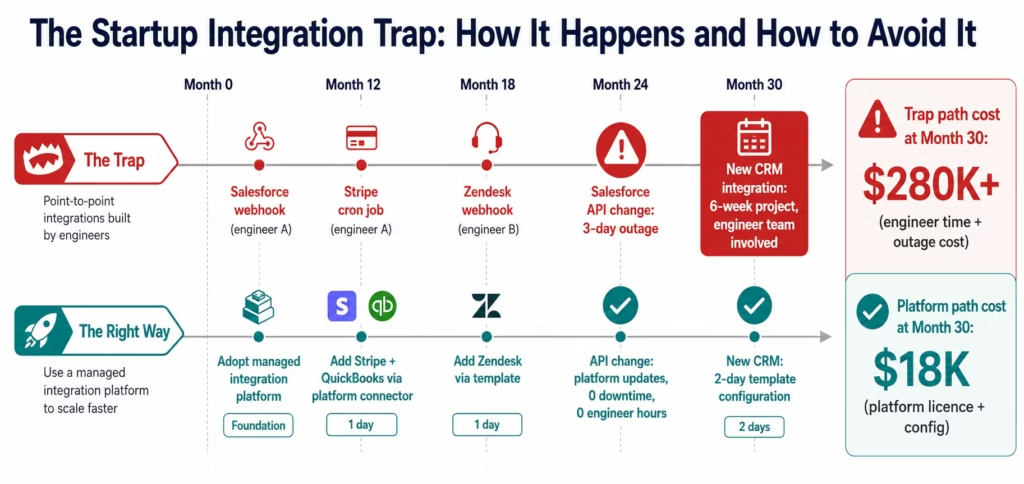
Every startup falls into the same integration trap. It looks like this:
Month 6: the sales team needs Salesforce connected to HubSpot. One engineer writes a webhook. It takes two days. It works.
Month 12: the finance team needs Stripe connected to QuickBooks. Same engineer adds a cron job. It works.
Month 18: customer success needs Salesforce connected to Zendesk. New engineer writes another webhook. It works, mostly.
Month 24: the webhook from month 6 breaks when Salesforce changes its API version. The engineer who wrote it left 8 months ago. Nobody knows how it works. The fix takes 3 days. Meanwhile, customer data is out of sync.
Month 30: the CTO wants to add a new CRM tool. To do it, they need to understand 6 different integration points, 4 of which are undocumented, and touch code in 3 different services. The work is estimated at 6 weeks.
This is the startup integration trap. No single decision was wrong. The aggregate is a ball of technical debt that costs more to unwind than to prevent.
This guide shows you how to prevent it.
Template Shortcut: Integration Architecture Starter Kit
Before building from scratch, check what is already available for your stack.
Open the Automation Hub and search for your core systems.
Series A Starter Kit templates (most common startup stack):
- Salesforce CRM to HubSpot sync (bidirectional contact and deal data)
- Stripe payments to QuickBooks/Xero (revenue recognition)
- HubSpot to Slack (deal notifications, pipeline alerts)
- Workday/BambooHR to Google Workspace (employee provisioning)
- Segment/Amplitude to Salesforce (product usage to CRM enrichment)
- Zendesk to Salesforce (customer support to CRM)
- PagerDuty to Slack (incident alerting)
B2B SaaS additional templates:
- Salesforce to NetSuite (quote-to-cash)
- HubSpot to Salesforce (marketing-to-sales handoff)
- Stripe to NetSuite (revenue to ERP)
- Outreach/Salesloft to Salesforce (sales engagement sync)
If your core integrations are on this list: import the templates, configure credentials, and go live in 1-3 days each. The manual path below applies to integrations not covered by existing templates.
The Four Stages of Startup Integration Architecture
The integration architecture decisions that matter change at each funding stage. Here is the map:
| Cost Component | Custom Development Approach | eZintegrations |
|---|---|---|
| Initial build cost (10 integrations) | $800,000-$2,000,000 | Included in platform |
| Time to first integration live | 14-26 weeks | 3-10 days |
| Annual maintenance cost | $200,000-$500,000/year (40% team capacity) | $0 (vendor-maintained connectors) |
| Per-transaction EDI/carrier fees | $20,000-$200,000+/year | $0 (included in automation pricing) |
| Platform licence | $0 (custom = internal cost) | $90-$150/month per automation |
| 10 automations, 3-year total | $1,800,000-$3,500,000 | $54,000-$90,000 |
Stage 1 (Pre-Seed/Pre-Product): The One Rule That Saves You
The rule: do not build custom integration code for systems that have commercial connectors.
That is it. One rule. Everything else at this stage is execution on a product that may not be right yet. Do not add integration technical debt on top of product uncertainty.
What “commercial connectors” means in practice:
Salesforce, HubSpot, Stripe, QuickBooks, Xero, Slack, Zendesk, Intercom, Workday, BambooHR, Segment, Amplitude, Mixpanel, Shopify, AWS services, Google Workspace, Microsoft 365: every one of these has a commercial connector available in managed integration platforms.
If you are tempted to write a Python script to sync Salesforce to HubSpot, stop. That script will: break when either platform updates their API, require maintenance by engineers who are supposed to be building your product, be undocumented when the person who wrote it leaves, and take 3-5x longer to replace at Series A than it would have taken to use a template at pre-seed.
What you can do at pre-seed without guilt, consistent with Paul Graham thinking on doing things that do not scale:
Zapier or Make for simple SaaS-to-SaaS automation (up to about 20-30 zaps/scenarios). Google Sheets as a temporary data store with manual exports. Manual processes that a human can run in 30 minutes per day. These are fine: they are intentionally temporary, they are visible, and they do not create code debt.
What to document:
Every manual process and every automation you set up at this stage should be documented in a single place (Notion, Confluence, a Google Doc). The documentation does not need to be exhaustive: process name, what it does, who owns it, what breaks it. This document becomes the input for your Series A integration audit.
Stage 2 (Series A/Early Traction): Building the Integration Foundation
This is the critical stage. You have enough product-market fit to know what you are building. You are adding headcount. Your data flows matter now because decisions are being made from them.
Step 1: Audit Your Current Integration Spaghetti
What you will do: inventory every integration, automation, and manual process that exists in your company.
- Pull the list of all active Zapier/Make automations from your admin accounts.
- Ask every engineer to list any webhooks, cron jobs, or sync scripts they have written or maintained.
- Pull your SaaS application list and identify every pair of tools where data moves between them (manually or automatically).
- For each integration, document: source system, destination system, data type, trigger (webhook/schedule/manual), owner, last confirmed working date.
You will find things you did not know existed. This is expected and not a problem: the audit is how you find them before they become incidents.
Output: an integration inventory spreadsheet. Every row is one data flow.
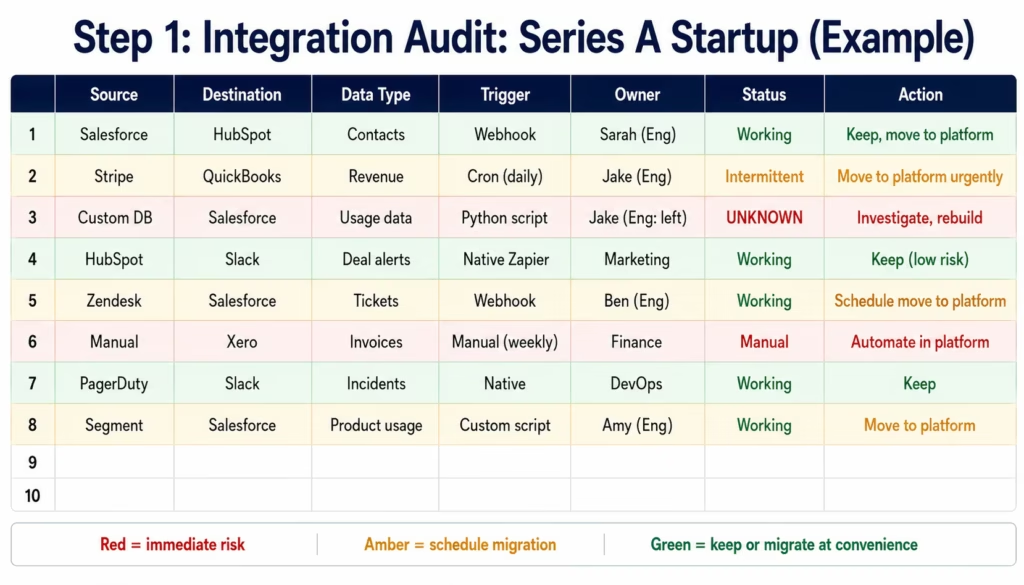
Pro tip: the integrations owned by engineers who have left the company are your highest-risk items. They are the ones that will break and nobody will know how to fix. Prioritise these for immediate migration to a managed platform.
Step 2: Choose Your Integration Layer Strategy
What you will do: decide where your integration logic lives.
There are three architectural options for a Series A startup:
Option A: In-product (wrong). Integration logic lives inside your product codebase. Your Salesforce sync is a module in your main application. This is the fastest to build initially and the most expensive to maintain. Every product deployment might break an integration. Every integration change requires a product deployment. Integration becomes a product responsibility.
Option B: Dedicated internal service (wrong for most startups), despite the broader appeal of Martin Fowler microservices and integration architecture patterns at enterprise scale. A separate microservice or data pipeline (Kafka, custom event bus, Python ETL jobs) that your engineering team builds and maintains. This is the right architecture for companies at $100M+ ARR with dedicated data/platform teams. At Series A, it diverts 1-2 engineers from product indefinitely. Those engineers spend 60-80% of their time maintaining connectors that Salesforce, HubSpot, and Stripe keep changing.
Option C: Managed integration platform (right). Integration logic lives outside your product code, in a managed platform with native connectors for your SaaS stack. Your product code fires events (webhooks, API calls) to the platform. The platform handles the routing, transformation, error handling, and delivery. When Salesforce changes its API, the platform team updates the connector. Not yours.
For Series A startups: Option C is almost always correct. The total engineering cost of Option B is 5-10x higher than the platform licence cost of Option C over a 3-year period. The build vs buy analysis is in the build vs buy integration guide.
The exception: if you are building a product that is itself an integration platform (you are a SaaS company where integration is your product’s core value), then Option B may be appropriate. For everyone else: Option C.
Step 3: Map Your Core Data Flows
What you will do: define the canonical data flows your business runs on and document them before implementing them in the integration platform.
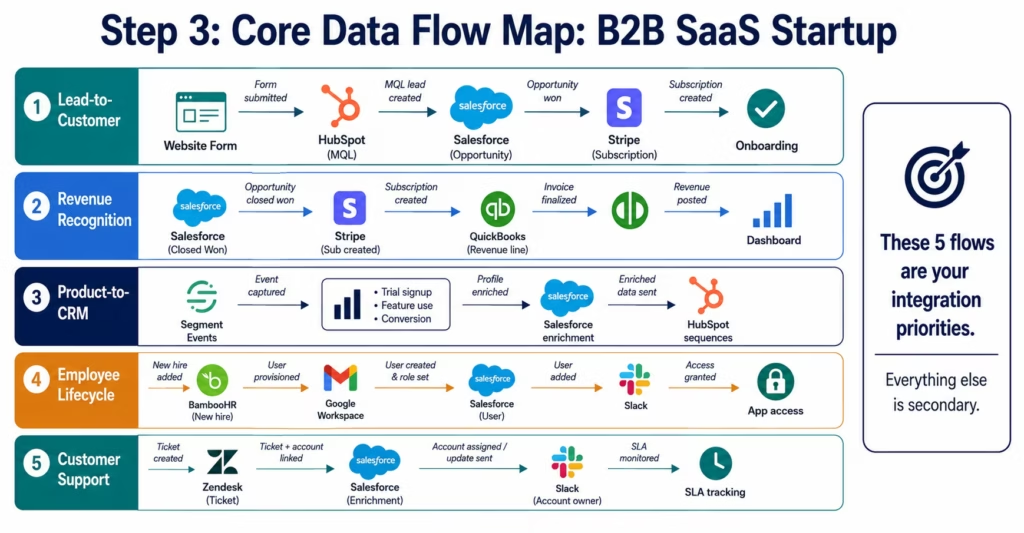
For a B2B SaaS startup, the core data flows are typically:
Lead-to-customer flow: Website form → HubSpot/Marketo → Salesforce → billing system → onboarding system
Revenue recognition flow: Salesforce opportunity closed → Stripe subscription created → QuickBooks/Xero revenue line → reporting dashboard
Product-to-CRM flow: Segment/Amplitude events (trial signup, feature usage, conversion milestone) → Salesforce contact enrichment → HubSpot email triggers
Employee lifecycle flow: Workday/BambooHR new hire → Google Workspace provisioning → Salesforce user creation → Slack workspace invite → application-specific access
Customer support flow: Zendesk ticket created → Salesforce contact enriched with ticket data → Slack notification to account owner → SLA tracking
Map each flow with: the systems involved, the trigger event, the data fields that move, and the failure condition (what happens when a step fails). This map is the input for Step 4.
Step 4: Implement the Critical Integrations First
What you will do: implement the highest-impact integrations in priority order, starting with the ones that break most frequently or carry the highest business risk.
Priority 1: Revenue-critical integrations (implement first)
Any integration in the path of revenue recognition or customer onboarding. If Stripe does not sync to QuickBooks, your revenue reporting is wrong. If the onboarding automation breaks, customers wait. These are business-critical.
In eZintegrations:
- Log in to
app.ezintegrations.aiand click New Workflow. - Search the Automation Hub for your specific integration (for example: “Stripe to QuickBooks revenue”). Import the template.
- Configure credentials for both systems (Stripe API key, QuickBooks OAuth).
- Set the trigger: webhook from Stripe on successful payment events.
- Map the fields (the template pre-maps standard fields; adjust for your QuickBooks chart of accounts).
- Run a test with a real payment event from Stripe’s test mode.
- Activate.
Priority 2: Data integrity integrations (implement second)
CRM-to-CRM syncs, product usage to CRM, support to CRM. These keep your data consistent across systems. When they break, decisions are made on stale data.
Priority 3: Operational efficiency integrations (implement third)
Employee provisioning, reporting pipelines, notification automations. These are important but not immediately business-critical.
Implementation pace: aim for 2-3 integrations per week at the beginning. Each integration using an Automation Hub template takes 1-2 days to configure, test, and activate. After the first 5-6 integrations, you will move faster because the patterns repeat.
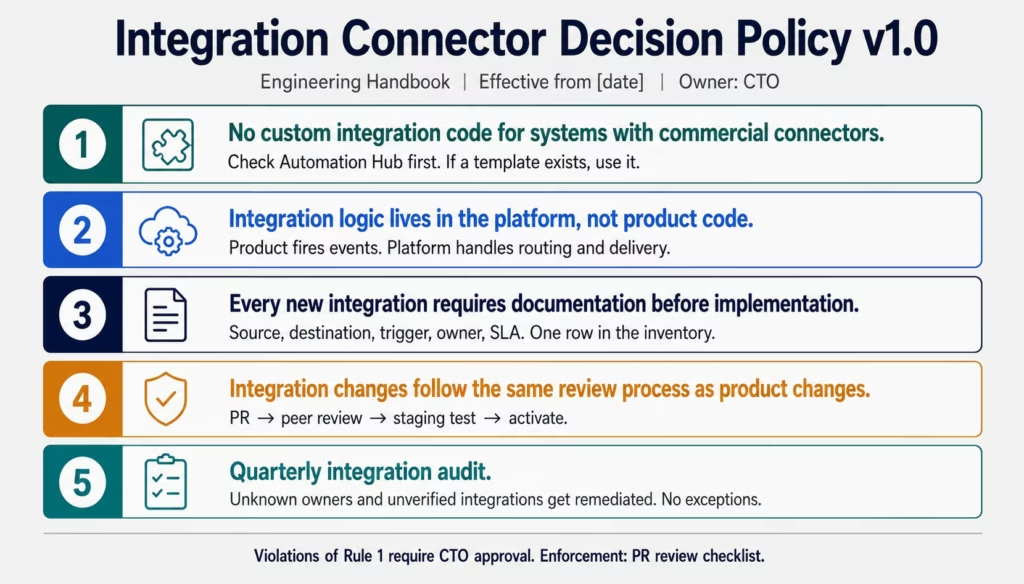
Step 5: Establish a Connector Decision Policy
What you will do: write a one-page policy that defines how your team makes integration decisions going forward. This prevents the trap from recurring.
The Connector Decision Policy (template):
eZintegrations Connector Decision Policy: [Company Name]
Rule 1: No custom integration code for systems with commercial connectors. If a commercial connector exists for a system in our integration platform (eZintegrations Automation Hub), we use it. We do not write custom API clients for these systems.
Rule 2: All integration logic lives in the integration platform, not in product code. Product code fires events (webhooks, API calls) to the integration platform. The platform handles routing, transformation, and delivery. Integration is not a product engineering responsibility.
Rule 3: Every new integration requires documentation before implementation. Source system, destination system, data type, trigger, owner, failure handling, and SLA. One row in the integration inventory before any implementation begins.
Rule 4: Integration changes follow the same review process as product changes. A pull request, a peer review, a staging environment test. Not cowboy deployments.
Rule 5: Quarterly integration audit. Every quarter, review the integration inventory. Flag anything with an unknown owner. Flag anything that has not been verified working in 90 days. Assign remediation ownership.
Post this policy in your engineering handbook. Enforce it in pull request reviews.
Stage 3 (Series B/Growth): Adding the Automation Layer
At Series B, you have a working integration foundation. Your core data flows run reliably. Your team is growing. New problems emerge: the exception queue in your finance team, the manual vendor onboarding process, the customer support ticket routing that requires 20 minutes of analyst time per case.
These are AI automation opportunities.
Step 6: Identify Your High-Exception Processes
What you will do: survey each operational team to find the processes with the highest manual exception handling burden.
For each process, collect:
- Monthly transaction volume
- Current exception rate (what percentage require manual review?)
- Average time to resolve each exception
- The role handling exceptions (analyst, manager?)
The AI automation opportunity score:
Exception rate × volume × (time per exception in hours) × (hourly cost) = monthly manual exception cost.
Any process with a monthly manual exception cost above $3,000 is a candidate for AI Workflow automation.
Common high-exception processes at Series B startups:
- Invoice processing (exception rate: 12-20%)
- Customer contract review (exception rate: entirely manual)
- Vendor onboarding and screening (exception rate: entirely manual)
- Support ticket classification and routing (exception rate: 20-35%)
- Expense report policy compliance (exception rate: 18-28%)
Step 7: Add AI Workflow Steps to Exception-Heavy Flows
What you will do: upgrade your highest-exception Level 1 workflows with Level 2 AI steps.
For the invoice processing workflow:
- Open the existing invoice processing workflow in eZintegrations.
- Click Add Step between the invoice receipt trigger and the ERP write step.
- Select Document Intelligence from the AI step library.
- Configure: document type (invoice), confidence threshold (0.85), field mapping (vendor, invoice number, line items, amounts, PO reference).
- Add a Condition node after the Document Intelligence step: if extraction confidence is below 0.85, route to a human review queue; if above 0.85, continue to the ERP write.
- Add a Data Analysis step after extraction: compare invoice amounts to expected values, flag variance above threshold.
- Test with 10 real invoices from your exception queue. Verify the extraction accuracy.
Expected result: exception rate drops from 15-20% to 3-5%. Your finance analyst spends 8 minutes reviewing an AI-packaged exception instead of 35 minutes researching a raw one.
Step 8: Implement Integration Observability
What you will do: set up monitoring so you know when integrations fail before your users or your finance team tells you.
Integration observability at the startup stage has three components:
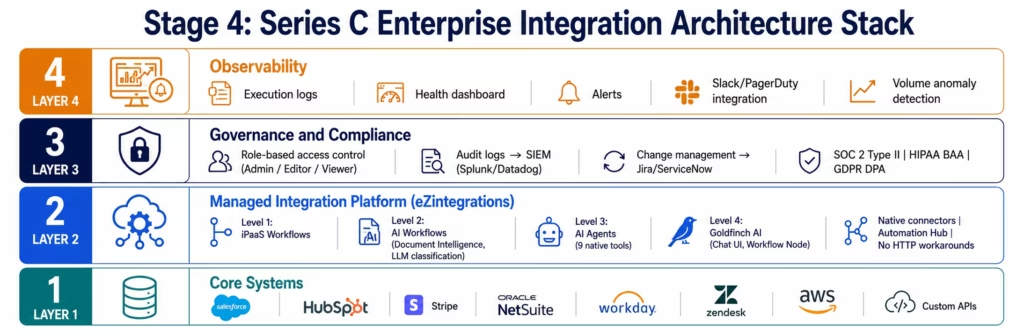
Execution logging: every workflow execution logged with status (success/failure), duration, records processed, and any error messages. eZintegrations provides native execution logs in the workflow dashboard. Configure log retention to match your compliance requirements (minimum 90 days for operational purposes, 7 years if logs contain financial transaction data).
Alerting: set up alerts for: workflow failure (immediate Slack or PagerDuty alert), workflow execution time above threshold (for example: alert if the Stripe-to-QuickBooks sync takes more than 5 minutes when it normally takes 90 seconds), volume anomaly (alert if invoice processing volume drops below 50% of the 30-day average, which may indicate incoming invoices are not being received).
Health dashboard: a simple dashboard showing: all active workflows with last execution status and time, any failures in the last 24 hours, and the number of records processed per workflow per day. This dashboard takes 30 minutes to set up and prevents the discovery of integration failures from your CFO’s revenue report discrepancy.
Stage 4 (Series C/Scale): Enterprise-Grade Integration Architecture
At Series C, you have enterprise customers. Enterprise customers bring enterprise requirements: SOC 2 Type II certification, HIPAA or GDPR compliance documentation, vendor risk assessments, and requests for integration architecture documentation.
Step 9: Add Governance and Access Controls
What you will do: implement role-based access controls, audit trails, and integration change management processes.
Role-based access: in eZintegrations, configure role-based access at the workspace level:
- Admin: can create, modify, activate, and deactivate any workflow. Reserved for IT lead and CTO.
- Editor: can create and modify workflows in their function area. Finance team can edit finance workflows; operations can edit operations workflows.
- Viewer: can see workflow status and execution logs but cannot modify. For business stakeholders who need visibility.
Audit trails: configure audit log forwarding to your SIEM (Splunk, Datadog, AWS CloudWatch). Every workflow creation, modification, activation, and execution is logged with the acting user, timestamp, and change details. This satisfies SOC 2 Type II CC6 (logical access controls) and CC7 (system monitoring) criteria.
Change management: integrate your integration platform changes with your change management process (Jira, ServiceNow). A workflow modification in production is a change that should follow the same review and approval process as a product deployment.
Step 10: Implement Multi-Region and Compliance Requirements
What you will do: address data residency, privacy, and multi-region requirements for enterprise customers.
GDPR: confirm your integration platform processes EU personal data under appropriate legal mechanisms (SCCs for cross-border transfers). eZintegrations operates under GDPR compliance including Standard Contractual Clauses. Review your data processing agreements (DPAs) with the platform vendor.
HIPAA: if any integrated workflows handle protected health information (employee health records, patient data for health-tech companies), confirm you have a signed Business Associate Agreement (BAA) with the platform vendor. eZintegrations provides HIPAA compliance with BAA available for enterprise accounts.
SOC 2 Type II: your platform vendor’s SOC 2 Type II report is a required exhibit in your own SOC 2 audit. Request the audit report (under NDA if required) and confirm the scope covers the integration platform application layer.
Multi-region: if you have EU customers, US customers, and APAC customers with different data residency requirements, confirm your platform’s data residency options. Confirm where workflow execution logs are stored, what the retention period is, and whether sensitive payload data can be excluded from logs.
The Integration Technical Debt Calculator
Use this framework to estimate the cost of your current integration technical debt, and the cost of preventing it.
Calculate your current technical debt cost:
| Debt Component | How to Measure | Estimated Annual Cost |
|---|---|---|
| Custom connector maintenance | Hours/year maintaining custom connectors × engineer hourly rate | |
| Integration incidents | Incidents/year × average hours to resolve × engineer rate | |
| Undocumented integrations | Risk-weighted cost (0 if documented, $5K-$20K per undocumented integration) | |
| Key person risk | (Integrations owned by fewer than 2 people) × avg replacement cost / tenure | |
| Delayed new integrations | New integration requests delayed × monthly revenue impact of delay | |
| Total annual debt service |
Calculate the debt prevention cost:
Managed integration platform: $[automations × $90/month × 12 months] Implementation time: $[automations × 1.5 days × engineer daily rate]
Debt ratio: annual debt service ÷ annual platform cost = your integration debt multiplier. For most Series A startups, this ratio is 5-15x. You are paying 5-15 times the cost of the solution to maintain the problem.
Before vs After: Integration Spaghetti vs Clean Architecture
| Dimension | Integration Spaghetti (Custom Code) | Clean Architecture (Managed Platform) |
|---|---|---|
| Integration logic location | Scattered across product codebase | Dedicated managed integration layer |
| API update response | 1-3 day engineer fix per update | Automatic (platform team manages) |
| New integration time | 2-8 weeks custom build | 1-2 days using Automation Hub template |
| Undocumented integrations | Common (knowledge leaves with engineers) | None (platform is the documentation) |
| Integration incident frequency | 2-4/month (fragile custom connectors) | Managed (auto-retry, error handling) |
| Key person risk | High (one engineer owns multiple connectors) | None (platform-managed, any operator can maintain) |
| Series C compliance (SOC 2, HIPAA, GDPR) | Self-certify (expensive and slow) | Platform certifications included |
| AI Workflow capability | Separate build required ($50K+) | Level 2 native at same tier |
| Engineering team focus | 20-30% on integration maintenance | 95%+ on product |
| Annual cost at Series B (10 integrations) | $150K-$300K (engineering + incidents) | $10,800 (platform licence) |
Test Your Integration Architecture
Before declaring your integration architecture production-ready at any stage, run these checks:
Failure test: manually trigger a failure in one integration (disable a credential, disconnect a system). Does your alerting fire? How quickly? Who gets notified? Does the workflow retry?
Recovery test: re-enable the credential. Does the workflow recover automatically? Are any records that failed during the outage re-processed or lost?
Volume test: trigger a higher-than-normal volume of events (if your invoice workflow processes 100/day, test with 300 in an hour). Does it handle the volume? Does it rate-limit correctly? Does it produce correct output?
Access control test: log in as a Viewer role user and attempt to modify a workflow. You should be blocked. Log in as an Editor in Finance and attempt to modify an Operations workflow. You should be blocked (at Series C governance level).
Documentation test: ask a new engineer (someone who did not set up the integrations) to read the integration inventory and describe what the top 5 workflows do. If they cannot, your documentation is insufficient.
Troubleshooting Common Startup Integration Problems
Problem 1: “Our integrations work most of the time but break unpredictably”
Cause: webhook-based integrations without retry logic. If the destination system is temporarily unavailable when the webhook fires, the event is lost.
Fix: use a managed platform with built-in retry logic and dead letter queues. In eZintegrations, enable Automatic Retry on any webhook-triggered workflow (3 attempts with exponential backoff). Events that fail all retries go to the dead letter queue for manual review, not into the void.
Problem 2: “We don’t know which integrations are working”
Cause: no integration observability. The only time you discover an integration is broken is when a business team reports a data discrepancy.
Fix: implement the three-component observability setup from Step 8. At minimum: configure Slack alerts for any workflow that fails more than once in a 24-hour period. This takes 20 minutes to set up and prevents the “nobody knew the sync was broken for 3 weeks” incident.
Problem 3: “Adding a new integration breaks something existing”
Cause: integration logic is in product code. Changing the Salesforce connection in the product codebase has unintended side effects on other parts of the product.
Fix: the structural fix is moving to Option C (managed integration platform) from Step 2. The immediate fix is adding integration tests that cover the data flows your product code touches, and running them on every deployment.
Problem 4: “We’re being asked for SOC 2 compliance and don’t know if our integrations are covered”
Cause: integration technical debt creates audit exposure. Undocumented integrations, unknown data flows, and uncontrolled access to production systems all surface as findings in a SOC 2 audit.
Fix: run the integration audit from Step 1 immediately. Every integration must be documented (source, destination, data type, owner, access controls). Your integration platform’s SOC 2 Type II report covers the platform infrastructure. The audit scope document from the platform vendor is a required exhibit in your own SOC 2 submission.
FAQs
The initial setup depends on the number of integrations and whether Automation Hub templates exist for your stack. For a typical Series A startup with 8-12 integrations across Salesforce, HubSpot, Stripe, QuickBooks, Zendesk, and Slack, using Automation Hub templates, deployment typically takes 2-3 weeks to import, configure, test, and activate all integrations. Each template generally takes 1-2 days from import to production activation.
No for the management layer. A technically fluent operator who can configure a Zapier automation, manage API credentials, and read a JSON response can configure and maintain eZintegrations workflows. The initial architecture decisions, especially selecting the integration layer strategy, benefit from engineering input, but day-to-day configuration, monitoring, and maintenance do not require developer coding skills.
eZintegrations uses industry-standard APIs for all connectors including Salesforce REST, Stripe API, QuickBooks OAuth, and HubSpot REST. Your workflow logic is built on these standard APIs rather than proprietary protocols. If you ever need to migrate to another platform, the connector credentials transfer directly and the workflow logic can be rebuilt on any platform supporting the same APIs. Your integration architecture knowledge and business logic are not locked into a proprietary format.
There are three primary situations where custom integration code is appropriate: when your product itself is an integration platform and integration is your core value proposition rather than operational plumbing; when you operate a proprietary internal system with no standard API and control both sides of the integration; or when you have extremely specific performance requirements such as sub-10ms latency between internal microservices that a managed platform cannot satisfy. For most other integration requirements, a managed integration platform is faster to deploy, less expensive to maintain, and reduces operational risk tied to engineering team turnover.
A managed integration platform significantly simplifies system migrations because integrations are documented and inventoried as discrete workflows. Each workflow contains a source connector and a destination connector. During a CRM or ERP migration, teams replace the affected connector rather than rewriting the entire integration logic. The recommended migration process is: inventory all workflows touching the old system, configure the new connector, validate each workflow in a staging environment, and cut over incrementally workflow by workflow rather than attempting a full simultaneous migration.1. How long does it take to set up a startup integration architecture?
2. Do I need coding skills to build and manage this integration architecture?
3. What happens if my integration platform's pricing changes or they shut down?
4. When should a startup build custom integration code instead of using a platform?
5. How do I handle integration architecture during a major system migration like changing CRMs or ERPs?
The Decision You Make at Series A Defines Your Series C
Integration architecture is not glamorous engineering. It is invisible when it works and catastrophically visible when it breaks. The teams that get it right early do one thing: they treat integration as infrastructure, not as a feature.
That means a dedicated integration layer (not product code). It means a managed platform with native connectors (not custom webhooks). It means a connector decision policy that the whole engineering team follows. It means an integration inventory that is a living document, reviewed every quarter.
None of this is expensive at Series A. The eZintegrations platform costs $90/month per standard enterprise automation, with no platform fee and no connector fee. Eight integrations: $720/month. For a company spending $200K/month in engineering salaries, that is a rounding error.
The cost of getting it wrong: 3-5 engineers spending 20-30% of their time on integration maintenance by Series C. $150,000-$300,000/year in engineering capacity diverted from product. A 6-week “we need to rebuild our entire integration layer before we can add the new ERP” project that halts product velocity for a quarter.
Build the foundation now. The architecture you put in place at Series A is what you are scaling at Series C.
Book a free demo. Bring your current integration inventory (even a rough one) and your growth roadmap. The eZintegrations team will assess your current architecture, identify the highest-risk debt items, map your core data flows to Automation Hub templates, and produce a prioritised migration plan.

