
AI Agents for Healthcare: Autonomous Clinical & Revenue Cycle Workflows
May 9, 2026AI agents for healthcare enterprise are autonomous, multi-step AI workflows that handle complex clinical and revenue cycle exception processes end-to-end: retrieving EHR data, reading clinical documents, querying payer systems, applying clinical criteria, and routing pre-assembled recommendations to human reviewers for final approval. eZintegrations deploys HIPAA-compliant healthcare AI agents with 9 native enterprise tools, configurable confidence thresholds, and human-in-the-loop gates, without sending PHI to external AI providers.
TL;DR
- Healthcare AI agents are not chatbots, but systems aligned with Intelligent agent architecture. They are autonomous multi-step reasoning systems that receive a goal, use enterprise tools to investigate, and produce a structured recommendation for human review: all within seconds or minutes instead of the 30-60 minutes a human would spend on the same task.
- The highest-value healthcare AI agent use cases operate at the intersection of unstructured data, multi-system lookups, and clinical judgment, requiring HealthIT.gov interoperability and AI-ready infrastructure: prior authorisation exception handling, claims denial investigation and appeal preparation, care gap identification, care coordination between providers, credentialing exception management, and patient safety event review.
- eZintegrations deploys Level 3 AI Agents with 9 native enterprise tools: all running within HIPAA-compliant infrastructure with no PHI sent to external AI providers. Confidence thresholds and human-in-the-loop gates are configurable per use case, ensuring clinical oversight is maintained where required.
- Level 4 Goldfinch AI extends this to multi-agent coordination: a coordinator agent decomposes complex clinical or operational goals into parallel workstreams, dispatches specialist worker agents, and synthesises the results for executive review via Chat UI.
- Deployment timeline: 10-15 days per AI agent workflow using Automation Hub templates, including knowledge base configuration, EHR connection validation, and confidence threshold calibration.
What Healthcare AI Agents Actually Do (and Don’t Do)
There is a meaningful difference between what “AI agent” means in a marketing context and what it means in a deployed healthcare enterprise context, as reflected in Gartner perspectives on AI agents in healthcare enterprise. Getting this distinction right determines whether your AI agent programme delivers clinical value or becomes a pilot that quietly fails.
What healthcare AI agents actually do:
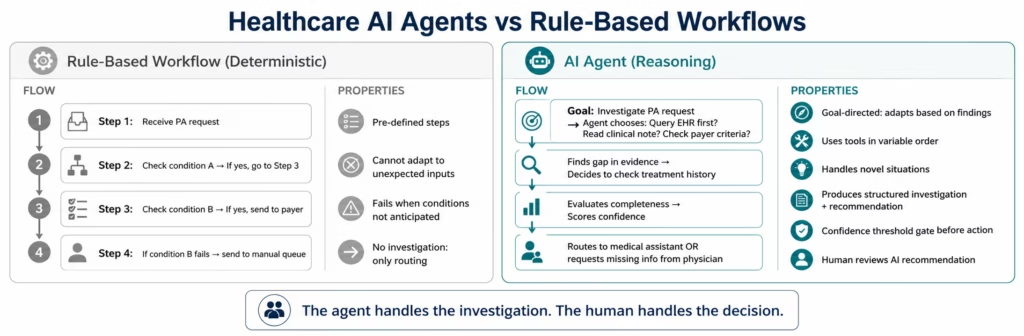
An AI agent in eZintegrations receives a specific goal (not a general instruction). That goal might be: “investigate this prior authorisation request and determine whether the clinical evidence meets payer criteria” or “research this denied claim and prepare an appeal package.” The agent then:
- Decides which tools to use and in what order based on what it finds
- Calls those tools: querying the EHR via FHIR API, reading clinical documents with Document Intelligence, searching the payer criteria knowledge base, comparing data with Data Analysis
- Evaluates what it finds and decides what to do next: this is the “reasoning” that distinguishes an agent from a workflow
- Produces a structured output: a recommendation, a packaged set of evidence, a risk flag, a decision memo
- Routes the output to the appropriate human reviewer with its confidence score and the evidence trail that produced its recommendation
- The human makes the final decision: the agent does the investigation
What healthcare AI agents do not do:
- Make autonomous clinical decisions without human review (the HITL gate prevents this)
- Replace the clinical judgment of physicians, pharmacists, or nurses
- Operate on PHI by sending it to external AI providers (native inference means it stays in the HIPAA boundary)
- Work from a script (unlike rule-based workflows, agents adapt their investigation based on what they find)
The productivity transformation is in the time between “task arrives” and “human has everything needed to make a decision”, consistent with McKinsey & Company insights on healthcare AI automation opportunity. That gap is where agents operate. In prior authorisation, that gap is currently 45 minutes of a medical assistant’s time, reflecting findings from American Medical Association on prior authorisation burden. With an agent, it is under 3 minutes. The physician still authorises the care. The agent handles the research.
Before vs After: The AI Agent Transformation in Healthcare
| Process | Before AI Agents | After AI Agents |
|---|---|---|
| Prior auth complex exception | Medical assistant: 45-60 min across 3-5 systems, waits for physician clarification | PA Agent: investigates in under 3 min, routes complete packet or targeted clarification request |
| Denied claim research | Billing specialist: 52 min per denial, codes cross-referenced manually | Denial Agent: retrieves encounter, reads denial, searches appeal patterns, drafts appeal in under 5 min |
| Care gap identification | Quality team runs monthly reports, gaps addressed with 30-60 day lag | Care Gap Agent: identifies gaps at point of encounter, routes to care team before patient leaves |
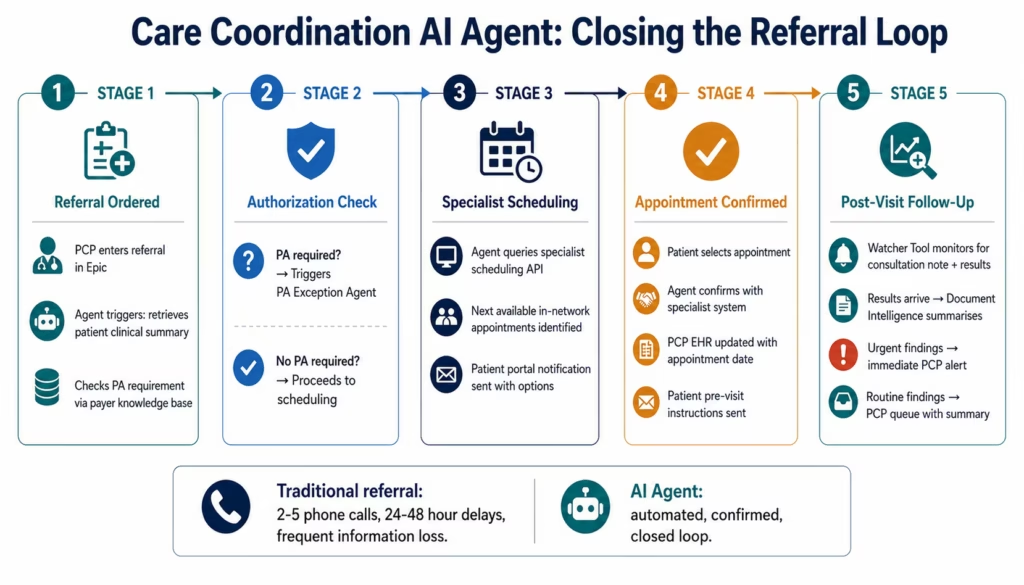
| Referral coordination | 2-5 phone calls, 24-48 hour lag, information lost in fax | Care Coordination Agent: retrieves clinical summary, routes to specialist, confirms appointment, updates EHR |
| Patient safety event triage | Risk manager reviews all events manually, prioritisation subjective | Patient Safety Agent: reads event report, classifies severity, retrieves contributing factor data, routes by risk level |
| Credentialing exception | Credentialing officer manually checks each element, primary source verification manual | Credentialing Agent: triggers at 90 days, runs primary source verification automatically, routes exceptions |
| Medication reconciliation discrepancy | Pharmacist reviews all discharge medication lists manually | Reconciliation Agent: compares admission and discharge lists, flags discrepancies by severity, routes to pharmacist |
| Insurance verification complex case | Registration staff calls payer, waits on hold, documents manually | Verification Agent: queries payer eligibility API, checks secondary coverage, identifies coordination of benefits |
| Payer policy change impact | No monitoring: team discovers changes reactively from denials | Policy Monitoring Agent: monitors payer policy updates, identifies impacted claim types, alerts billing team |
| Contract fee schedule variance | AP team manually compares invoices to contracted rates, quarterly | Contract Compliance Agent: compares every invoice to contracted fee schedule, flags variances in real time |
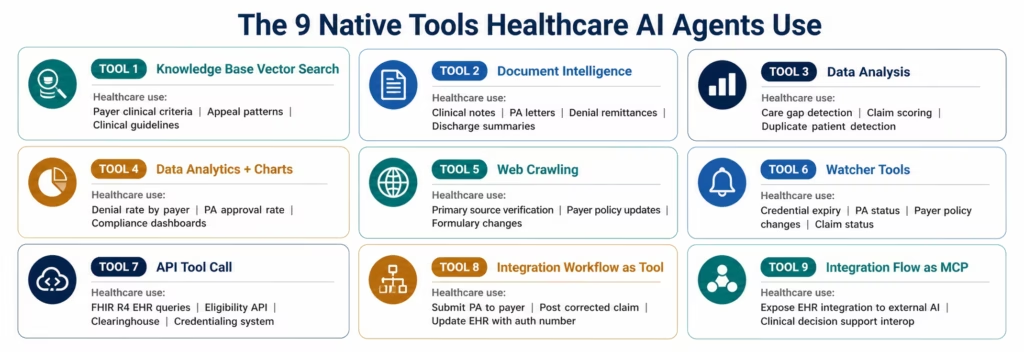
The 9 Native Tools Every Healthcare AI Agent Uses
eZintegrations’ Level 3 AI Agents are not general-purpose AI. They are goal-directed agents with access to 9 native enterprise tools: each directly applicable to healthcare workflows.
Understanding what each tool does makes it clear why the agent architecture produces better results than both rule-based workflows and single AI steps:
1. Knowledge Base Vector Search Searches your configured knowledge bases using semantic similarity. In healthcare: the payer clinical criteria knowledge base (what evidence does Aetna require for a lumbar MRI?), the appeals knowledge base (what arguments have succeeded for this CARC code with this payer?), the clinical guidelines knowledge base (USPSTF recommendations, disease management protocols), and the credentialing requirements library (what does California require for medical licence renewal?).
2. Document Intelligence Reads unstructured documents and extracts structured data. In healthcare: clinical notes, prior authorisation letters, denial remittance advice, discharge summaries, operative reports, insurance certificates, referral letters, payer policy updates. Reads across formats: PDF, dictated text, structured HL7 documents, and scanned documents.
3. Data Analysis Performs structured data operations on retrieved datasets. In healthcare: comparing a patient’s diagnosis history against payer approval criteria, identifying care gaps by comparing encounter history against quality measure requirements, scoring claim completeness against payer requirements, detecting duplicate patient records by comparing demographic fields.
4. Data Analytics with Charts/Graphs/Dashboards Generates visual summaries from data analysis results. In healthcare: claims denial rate by payer and denial code, prior authorisation approval rate by service line, care gap closure rate by care team, credentialing compliance rate by department.
5. Web Crawling Retrieves and reads content from web-based sources. In healthcare: primary source verification for practitioner credentials (state medical board licence status lookup, ABMS certification verification, DEA registration check), payer policy updates from payer portals, drug formulary changes from payer websites.
6. Watcher Tools Monitors systems and triggers actions when specified conditions are met. In healthcare: credential expiry date monitoring (triggers at 90/60/30 days), payer policy update monitoring (triggers when payer portal content changes), prior authorisation status monitoring (triggers when PA status changes from pending to approved or denied), claim status monitoring (triggers on ERA/835 remittance receipt).
7. API Tool Call Calls configured API connectors to retrieve or write data. In healthcare: the FHIR R4 API call that retrieves a patient’s encounter history, diagnosis codes, and medication record from Epic; the payer eligibility API that verifies active coverage; the clearinghouse API that checks claim status; the credentialing system API that retrieves practitioner credential records.
8. Integration Workflow as Tool Runs a configured Level 1 workflow as an agent tool. In healthcare: the agent triggers the “send PA packet to payer portal” workflow, the “post corrected claim to billing system” workflow, or the “update EHR with authorisation number” workflow as part of its investigation and action sequence.
9. Integration Flow as MCP Exposes integration capabilities to external AI systems and tools via the Model Context Protocol. In healthcare: allows your organisation’s custom AI tools or external clinical decision support systems to call eZintegrations’ healthcare integration capabilities as part of their own reasoning.
Healthcare AI Agent 1: Prior Authorisation Exception Agent
The Prior Authorisation Exception Agent handles the hardest cases in the PA queue: requests where the standard documentation is incomplete, where the clinical evidence requires interpretation, or where the payer’s criteria are complex enough to require judgment about which evidence elements are most relevant.
Standard prior authorisations with complete, straightforward clinical evidence can be handled by Level 2 AI Workflows (document extraction + routing). The PA Exception Agent handles everything else.
Agent goal: “Investigate this prior authorisation request and determine whether the available clinical evidence meets the payer’s criteria for the requested procedure. Identify what evidence is present, what is missing, and what the appropriate next action is.”
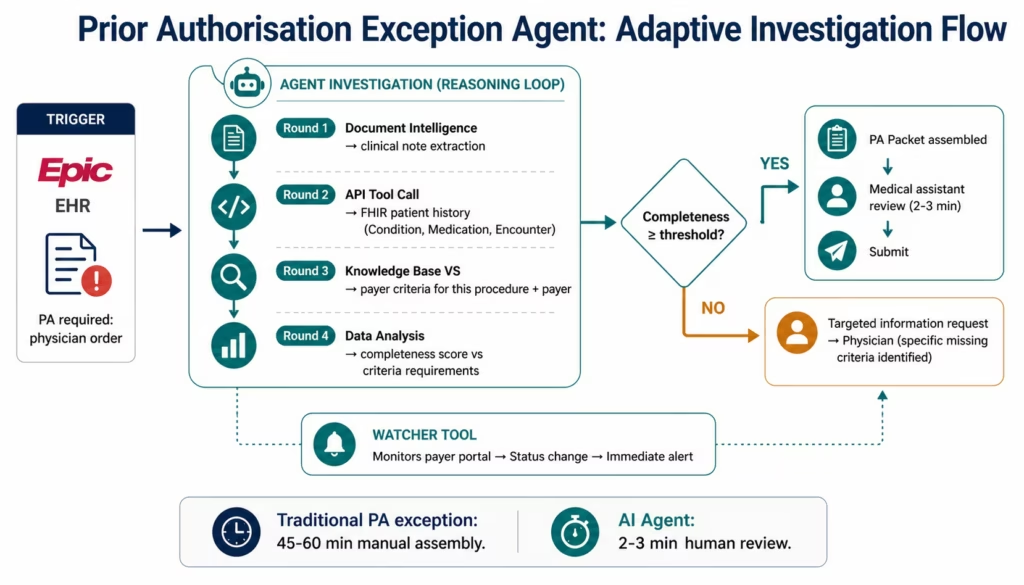
Agent investigation sequence (adaptive: agent decides order based on what it finds):
The agent starts by calling Document Intelligence on the physician’s clinical note and any attached documentation. It extracts the clinical indication, the diagnosis codes, any documented conservative treatment, and the physician’s stated rationale.
It then calls API Tool Call to the Epic FHIR API, retrieving the patient’s Condition resource (diagnosis history), MedicationRequest resource (current medications), and the relevant Encounter resources (past visits and procedures): the longitudinal clinical picture the payer evaluates.
It calls Knowledge Base Vector Search against the payer criteria knowledge base, retrieving the specific criteria for the requested procedure with this payer. It now knows exactly what evidence is required.
Data Analysis compares the retrieved clinical evidence against the payer’s criteria requirements, identifying: which criteria are met with what level of supporting evidence, which criteria are unmet or have insufficient documentation, and the overall completeness score.
Two divergent paths based on the analysis:
If completeness exceeds the confidence threshold: the agent calls Integration Workflow as Tool to package the clinical evidence against the criteria in the payer’s required format, and routes the complete PA packet to the medical assistant’s review queue. The medical assistant reviews in 2-3 minutes and submits.
If completeness falls below the threshold: the agent drafts a targeted information request: not a generic “we need more documentation” but a specific request identifying: the payer criteria that are unmet, the specific clinical information needed to meet each criterion, and the relevant clinical context from the patient’s record. This routes to the ordering physician for targeted response, not a general query.
The Watcher Tool layer: once the PA is submitted, the Watcher Tool monitors the payer’s portal for status changes. When the status changes from pending to approved, denied, or “additional information required,” the agent fires immediately with the appropriate follow-on action: rather than requiring daily manual portal checks.
Results: PA exception handling time reduced from 45-60 minutes per case to 2-3 minutes of physician or medical assistant review time. Exception cases that previously waited hours for a medical assistant to assemble are handled within minutes of arriving.
Healthcare AI Agent 2: Claims Denial Investigation Agent
Claims denial management in US healthcare is a $19 billion annual problem. Healthcare organisations collectively spend that much in administrative costs managing denials: costs that fall predominantly on hospital and physician practice billing teams.
The Claims Denial Investigation Agent addresses the economics directly: by reducing the per-denial research time from 52 minutes to under 5 minutes, it makes the economics of appealing low-dollar denials viable and enables a single billing specialist to handle 6-8x more denials per day.
Agent goal: “Investigate this denied claim, determine the denial type and the optimal appeal strategy, and prepare a complete appeal package for billing specialist review.”
Agent investigation sequence:
The agent reads the 835 remittance advice or payer denial notice using Document Intelligence, extracting: the CARC (Claim Adjustment Reason Code), the RARC (Remittance Advice Remark Code), the claim number, the date of service, the denial reason in plain language, and any additional information the payer has requested.
It calls API Tool Call to retrieve the original encounter from the EHR: the primary and secondary diagnosis codes, the procedure codes, the place of service, the rendering and attending provider NPIs, the service date, the admission and discharge dates for inpatient claims, and the clinical documentation linked to the encounter.
It calls Knowledge Base Vector Search against two knowledge bases simultaneously: the appeals knowledge base (what arguments have succeeded for this CARC code with this specific payer, in what clinical contexts) and the coding guidelines knowledge base (are there applicable coding rules that address this denial reason?).
Data Analysis categorises the denial:
- Coding error: the claim was submitted with an incorrect or unsupported code. Action: correct and resubmit without appeal.
- Clinical necessity denial: the payer questions whether the service was medically necessary. Action: appeal with clinical evidence.
- Timely filing: the claim was submitted outside the payer’s filing window. Action: evaluate whether appeal is viable; if not, write off.
- Eligibility denial: the payer claims the patient was not covered. Action: verify eligibility at date of service; if covered, appeal with proof.
- Duplicate claim: the payer processed a duplicate. Action: identify the original claim and confirm payment status.
- Authorisation required: the service required prior authorisation that was not obtained. Action: determine if retrospective authorisation is possible.
Based on the category, the agent selects the appropriate appeal strategy from the knowledge base, reviews the clinical documentation for specific supporting evidence, and drafts the appeal structure: the opening argument, the supporting evidence list, the applicable regulatory or coding references, and the resubmission or appeal submission pathway.
The billing specialist receives: a one-page denial summary with category, recommended action, the pre-built appeal structure, and the supporting evidence package. Review time: 3-5 minutes. The specialist adjusts tone, adds any personal knowledge, and submits.
Healthcare AI Agent 3: Care Gap Identification Agent
Quality measures and value-based care contracts require healthcare organisations to close care gaps: overdue mammograms, HbA1c tests not performed for diabetic patients, colon cancer screenings not up to date, flu vaccinations not administered. The challenge is identifying gaps at the point of care, when there is still an opportunity to close them during the current encounter.
The traditional model: the quality team runs monthly or quarterly reports from the population health management system, generates lists of patients with open gaps, sends lists to care teams, and follows up. By the time the report runs and the list reaches the care team, many patients have already come and gone.
The Care Gap Identification Agent:
The agent is triggered when a patient checks in for any appointment. It queries the patient’s record via API Tool Call (retrieving the patient’s demographics, active diagnoses, encounter history, and existing quality measure data), searches the quality measure requirements knowledge base via Knowledge Base Vector Search (what gaps are clinically relevant for this patient based on age, sex, and diagnosis?), performs Data Analysis to identify which measures are overdue and by how long, and routes a targeted care gap summary to the care team before the patient enters the exam room.
The care team receives: a list of open care gaps relevant to this patient, the time since the last applicable screening or test, and a suggested workflow for addressing each gap during this encounter (order an HbA1c, schedule a mammogram, administer a flu shot).
For gaps that cannot be closed during the current encounter (patient needs to schedule a separate colonoscopy), the agent triggers a follow-up workflow that places a care management outreach task in the care coordinator’s queue.
The impact: care gap closure rates improve because gaps are identified at the point of care rather than after the patient has left. Quality measure performance improves. In value-based care contracts, quality bonuses are protected.
Healthcare AI Agent 4: Care Coordination Agent
Referrals are a seam in patient care. The primary care physician identifies the need for specialty care and sends a referral. What happens next is often opaque: does the specialist have the patient’s clinical background? Did the patient schedule the appointment? Did the results of the specialty visit make it back to the PCP?
The Care Coordination Agent handles the referral process end-to-end.
When a referral order is entered in the EHR:
The agent retrieves the patient’s clinical summary via API Tool Call: the relevant diagnosis history, current medications, recent labs, and the PCP’s referral rationale. It packages this into the specialist’s required referral format using Document Intelligence to read any attached notes.
It checks insurance authorisation requirements via Knowledge Base Vector Search: does this specialty referral require PA from this payer? If yes, it initiates the PA Agent. If no, it proceeds.
It contacts the specialist’s scheduling system (via API Tool Call or Integration Workflow as Tool) to identify next available appointments within the payer’s network, and sends an appointment availability summary to the patient via the patient portal.
When the patient schedules: the agent confirms the appointment, sends a pre-appointment preparation summary to the patient (what to bring, what to expect), and updates the PCP’s EHR with the confirmed appointment date and specialist.
After the specialist visit: the agent monitors for the consultation note and test results via Watcher Tools. When results arrive, it routes them to the PCP with a summary generated by Document Intelligence, and flags any urgent findings that require immediate PCP attention.
The referral loop closes automatically. Neither the PCP nor the specialist’s office needs to make follow-up phone calls to confirm the referral was received and acted upon.
Healthcare AI Agent 5: Patient Safety Event Review Agent
Patient safety events: falls, medication errors, pressure injuries, near-misses, and adverse events: require rapid triage, investigation, and response. The risk management team typically receives event reports via a reporting system, prioritises them based on severity (often subjectively), and assigns investigators. High-severity events trigger root cause analysis; lower-severity events may receive less thorough review due to volume.
AI agents change the triage calculus by processing every event with the same thoroughness, every time.
When a patient safety event report is submitted:
Document Intelligence reads the event report, extracting: the event type, the date and time, the patient involved, the care setting, the staff involved, the sequence of events as described, and any immediate actions taken.
API Tool Call retrieves the patient’s relevant clinical history: their current medication list (for medication events), their fall risk assessment score (for fall events), their skin integrity assessment (for pressure injury events), and their recent vital signs and condition changes.
Knowledge Base Vector Search retrieves: the relevant safety protocols for this event type, any prior similar events involving the same unit or the same contributing factors, and the regulatory reporting requirements for this event type and severity.
Data Analysis classifies the event severity (using the NCC MERP scale for medication events, or your organisation’s severity scoring rubric for other event types), identifies contributing factors from the event description and patient history, and flags whether mandatory external reporting is required (state reporting, The Joint Commission, CMS Quality Reporting).
The agent routes:
- Serious safety events (Severity E-I on NCC MERP, or your equivalent): immediate alert to the risk manager with a pre-packaged investigation brief: the event summary, the contributing factors identified, the relevant protocols, and the mandatory reporting requirements.
- Near-misses and lower-severity events: to the safety coordinator’s queue with the structured event summary, reducing review time while ensuring consistent documentation.
- Events with mandatory reporting requirements: simultaneous alert to the compliance team with the reporting deadline and the pre-formatted report template.
The safety team still conducts root cause analysis. The agent ensures they do it with a complete information picture, within the right timeline, and never miss a mandatory reporting deadline.
Level 4: Goldfinch AI for Healthcare Multi-Agent Orchestration
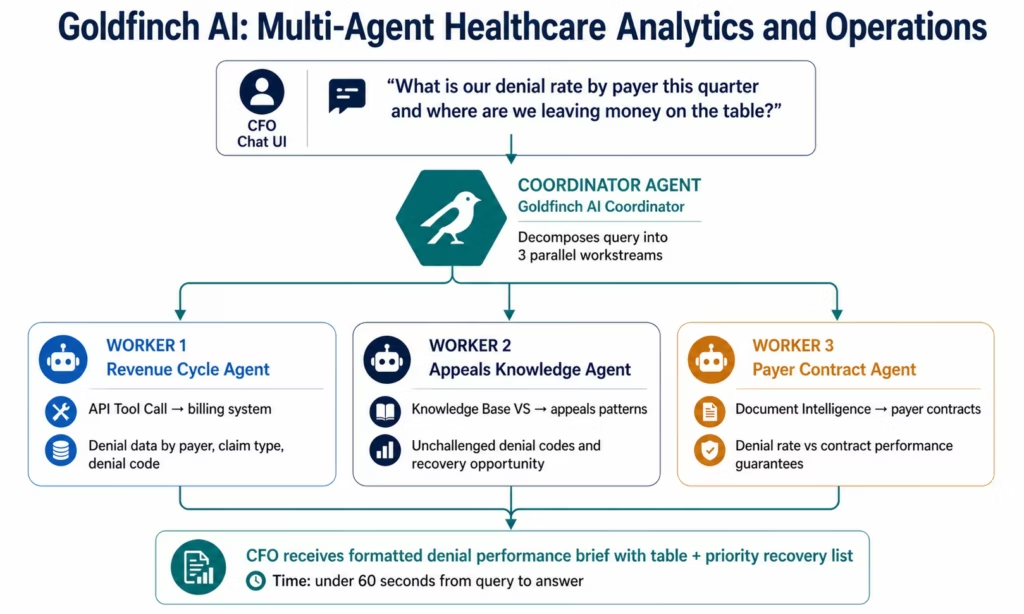
Individual AI agents handle individual exception types. Goldfinch AI multi-agent orchestration handles complex healthcare questions that require multiple agents working in parallel.
Healthcare Goldfinch AI use cases:
CFO query: revenue cycle performance The CFO opens the Chat UI and asks: “What is our claims denial rate by payer this quarter, which denial codes are most frequent, and where are we leaving money on the table by not appealing?”
Goldfinch AI’s coordinator dispatches three parallel worker agents: one queries the billing system for denial data via API Tool Call, one searches the appeals knowledge base for unchallenged denial patterns, and one retrieves payer contract terms to identify whether denial rates violate payer performance guarantees. Results are synthesised into a formatted CFO brief with a table, a denial code breakdown, and a prioritised list of recovery opportunities.
CMO query: quality performance The CMO asks: “Which care gaps are most prevalent across our diabetic patient population this quarter, and which care teams have the lowest closure rates?”
Goldfinch AI queries the population health data via the Workflow Node, segments by condition and care team, runs Data Analytics, and returns a performance breakdown with actionable recommendations: in the Chat UI, in under 60 seconds.
COO query: operational exception overview The COO asks: “Give me a summary of our outstanding prior authorisation exceptions, credentialing exceptions, and open patient safety events requiring escalation this week.”
Goldfinch AI runs three parallel queries: one per domain: and synthesises the results into a single operational brief with priority ranking and recommended actions.
HIPAA Compliance for Healthcare AI Agents
Every healthcare AI agent deployment raises the same compliance question: where does the PHI go when the agent processes it?
This question has a critical architectural answer in eZintegrations: PHI never leaves the platform.
Native inference: the compliance architecture that matters:
eZintegrations’ AI agent reasoning, Document Intelligence, LLM classification, and semantic matching all run as native inference within eZintegrations’ infrastructure. When the Claims Denial Agent reads a denial letter and retrieves an encounter from the EHR, that clinical data is processed within eZintegrations’ servers: the same servers covered by your signed HIPAA Business Associate Agreement, SOC 2 Type II certification, and immutable audit logging.
This is fundamentally different from AI agent platforms that work by sending your clinical data to OpenAI’s API, Anthropic’s API, or any other external AI provider as part of agent reasoning. Those external calls take PHI outside your HIPAA compliance boundary, into a third-party environment with its own data handling policies. Each external AI call is a potential regulatory exposure.
The HITL gate as clinical governance:
Every eZintegrations AI Agent workflow includes configurable human-in-the-loop gates. For healthcare use cases, these serve two purposes:
First, clinical governance: no AI agent autonomously submits a prior authorisation request, posts a corrected claim, or updates an EHR record without a human reviewer approving the action. The agent prepares and packages; the human approves and submits. The physician still authorises the care. The billing specialist still submits the appeal.
Second, confidence-based routing: cases where the agent’s confidence score falls below the configured threshold are automatically routed to human review rather than the standard workflow. A PA request with ambiguous clinical evidence routes to the medical assistant’s complex queue, not the standard submission queue. The agent escalates uncertainty rather than acting through it.
The audit trail for AI decisions:
Every agent action generates an immutable audit log entry: which documents were read, which API calls were made, which knowledge base queries were executed, what data was retrieved, what the agent’s confidence score was, who the human reviewer was, and what action was taken. This creates a defensible record for any payer audit, compliance review, or clinical quality investigation.
Minimum necessary principle in agent tool calls:
Each API Tool Call in an agent workflow is configured with the minimum FHIR scope required for that specific task. The Prior Auth Agent retrieves the Condition, Encounter, and MedicationRequest resources: not the patient’s full record. The minimum necessary standard from HIPAA § 164.502(b) is enforced at the tool configuration level.
Key Outcomes and Results
Healthcare organisations deploying AI agents for clinical and revenue cycle workflows report measurable improvements within 60-90 days:
Prior Authorisation:
- Exception handling time: 45-60 minutes → 2-3 minutes per case
- PA completion throughput: same staff handles 10-15x more exception cases
- Physician time on PA documentation: reduced 40-60% (targeted information requests vs general queries)
- PA-related care delays: reduced for cases with sufficient clinical evidence on file
Claims Denial Management:
- Per-denial research time: 52 minutes → 3-5 minutes
- Daily denial capacity per specialist: 8 → 40-50 (for appeal-viable denials)
- Appeal rate for low-dollar denials: economically viable for claims above $150-200
- First-pass appeal success rate: 15-25% improvement through pattern application
- Denial write-off rate: reduced as more denials become economically viable to pursue
Care Quality:
- Care gap identification rate: from monthly batch to real-time at point of care
- Care gap closure rate: 20-40% improvement when gaps identified before patient leaves
- Referral completion rate: tracked and confirmed vs lost in fax-and-phone process
- Patient safety event triage time: from 24-48 hours to under 30 minutes
Revenue Cycle:
- Underpayment identification: contract compliance agent flags variances in real time
- Payer policy monitoring: proactive alerts vs reactive discovery from denials
- Claims submission quality: pre-submission scoring catches issues before denial
How to Get Started
Step 1: Choose your highest-ROI AI agent use case
Calculate the time your team spends per case on research and assembly for each exception type. Multiply by monthly case volume to get monthly staff hours. The exception process with the highest hours-per-month is your starting AI agent. For most healthcare organisations, prior authorisation or claims denial management is the first deployment.
Step 2: Build your knowledge base
AI agents are only as good as the knowledge they can search. Before deploying the PA Exception Agent, configure the payer criteria knowledge base: load the clinical criteria documents for your top 10 payers and procedure types. Before deploying the Claims Denial Agent, load your successful appeal arguments categorised by CARC code and payer. The Automation Hub templates include a knowledge base structure; you populate it with your organisation’s specific content.
Step 3: Import the AI agent template from the Automation Hub
Visit the Automation Hub and import the healthcare AI agent template for your target use case. Configure your EHR connection (FHIR R4 with SMART on FHIR OAuth 2.0 for Epic, Cerner, or Athenahealth), your payer or clearinghouse connection, and your credentialing system if applicable.
Step 4: Calibrate confidence thresholds
Run the agent against a representative sample of real cases from the past month. Compare agent outputs against actual outcomes for those cases. Set the confidence threshold at the level where the agent’s recommendations align with what an experienced staff member would recommend. Cases below the threshold route to human review; cases above proceed to the standard human review queue.
Step 5: Activate with dual monitoring
Run the AI agent alongside the existing manual process for the first two weeks. Compare agent outputs against manual outputs for the same cases. Measure extraction accuracy, appeal strategy alignment, and the rate at which agents are being overridden. Adjust knowledge base content or confidence thresholds based on this validation before full activation.
Import a healthcare AI agent template and have your first agent live within two weeks.
FAQs
Healthcare AI agents are goal-directed autonomous systems that receive a specific task (investigate this PA request, research this denied claim, identify care gaps for this patient) and use a set of enterprise tools to complete it: reading clinical documents with Document Intelligence, querying the EHR via FHIR API, searching payer criteria knowledge bases, analysing data, and monitoring systems for status changes. The agent adapts its investigation based on what it finds: unlike rule-based workflows that follow predetermined steps. The output is always a structured recommendation or package that a human reviewer approves before any action is taken. PHI is processed within eZintegrations' HIPAA-compliant native AI infrastructure, not sent to external AI providers.
Standard AI agent templates from the Automation Hub go live in 10-15 days from template import to production activation. This includes: configuring the EHR FHIR R4 connection (2-3 days), building the knowledge base with payer criteria or appeal pattern content (3-5 days), running confidence threshold calibration against sample cases (2-3 days), and validating agent outputs against manual benchmarks (2-3 days). A full healthcare AI agent programme (prior auth + claims denial + credentialing + care gap) typically deploys across 8-14 weeks.
Yes, eZintegrations' AI agents use the API Tool Call tool to retrieve specific FHIR R4 resources from Epic, Cerner, and Athenahealth using SMART on FHIR OAuth 2.0. The agent retrieves only the FHIR resources needed for the specific task, applying the minimum necessary principle at the tool configuration level. For HL7 v2 clinical data sources (lab information systems, older clinical systems), the HL7 v2 connector feeds data into agent processing steps. All EHR data retrieved by agent tool calls is processed within eZintegrations' HIPAA-compliant native inference environment.
Yes, eZintegrations' AI agent reasoning, Document Intelligence, and all AI inference run natively within eZintegrations' HIPAA-compliant infrastructure. PHI processed by agent tool calls: clinical notes, encounter records, denial letters, patient demographics: is never sent to external AI providers (OpenAI, Anthropic, or others). A signed HIPAA BAA is provided for all healthcare customers. Every agent action generates an immutable audit log. Human-in-the-loop gates ensure no agent autonomously acts on PHI without human reviewer approval. SOC 2 Type II certification provides third-party assurance of security controls.
AI Workflows (Level 2) are enhanced integration pipelines with AI steps embedded: Document Intelligence reads a clinical document and extracts structured fields, LLM classification categorises a document type and routing destination, semantic matching identifies duplicate patient records. The workflow follows a predetermined sequence with AI nodes at specific steps. AI Agents (Level 3) are goal-directed systems that decide their own investigation sequence based on what they find. An agent investigating a PA exception decides whether to read the clinical note first or query the EHR first and adapts its investigation as it discovers what evidence is present or absent. Workflows are better for high-volume, consistent inputs; agents are better for complex exception cases that require adaptive investigation.
No, by design. Every eZintegrations healthcare AI agent workflow includes a mandatory human-in-the-loop gate before any submission action. The agent prepares the prior authorisation packet or the appeal structure; the medical assistant or billing specialist reviews and submits. For cases where the agent's confidence falls below the configured threshold, the case routes to a human review queue rather than proceeding. This design reflects both HIPAA's minimum necessary principle and the clinical governance requirement that clinical decisions involve clinical oversight. The agent handles the research; the human handles the judgment. 1. How do AI agents work in healthcare enterprise settings?
2. How long does it take to set up a healthcare AI agent?
3. Does eZintegrations work with Epic, Cerner, and other EHR systems for AI agents?
4. Are healthcare AI agents HIPAA compliant in eZintegrations?
5. What is the difference between AI workflows and AI agents in healthcare?
6. Can AI agents autonomously submit prior authorisations or post claims without human review?
Conclusion: From Exception Queues to Intelligent Operations
Healthcare’s administrative exception economy runs on the same structural inefficiency: human experts spending most of their time on information gathering and assembly tasks that AI can complete in minutes, leaving them less capacity for the judgment, oversight, and relationship work that requires human expertise.
AI agents for healthcare do not change what decisions need to be made. They change what it costs, in staff time and decision quality, to make those decisions well. The medical assistant who was spending 45 minutes assembling a PA packet is now spending 3 minutes reviewing an AI-prepared packet and applying her clinical knowledge to the edge cases. The billing specialist who was handling 8 denials per day now handles 40, with more consistent application of successful appeal strategies. The risk manager receives a complete investigation brief on every patient safety event within minutes, not the next morning.
The physician still authorises the care. The billing specialist still submits the appeal. The risk manager still initiates the root cause analysis. The agents make them faster, better-informed, and more consistent.
eZintegrations deploys these agents with the architecture healthcare requires: HIPAA-compliant native AI inference, configurable human-in-the-loop gates, confidence-based escalation, immutable audit trails, and native FHIR R4 and HL7 v2 connectivity to your existing clinical systems.
Book a free demo and bring your highest-volume exception process. We will show you what an AI agent investigation looks like for your specific use case, demonstrate the HIPAA compliance architecture, and map a deployment path that has your first healthcare AI agent live within two weeks.
Import a healthcare AI agent template and start today.

