
10 Workflow Automation Use Cases That Delivered ROI in 90 Days for Mid-Market Companies
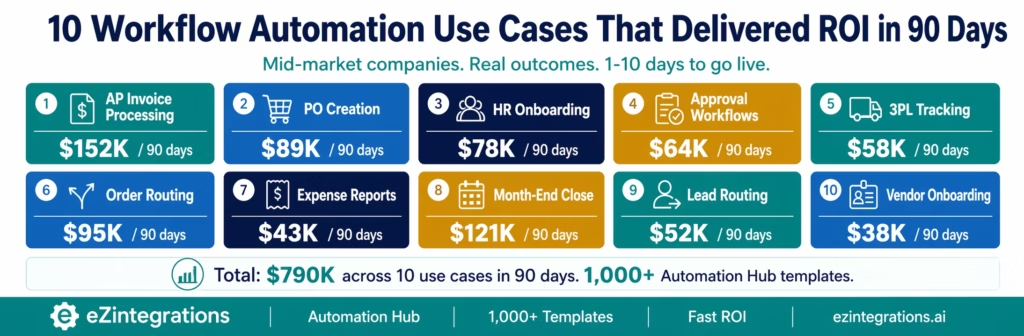
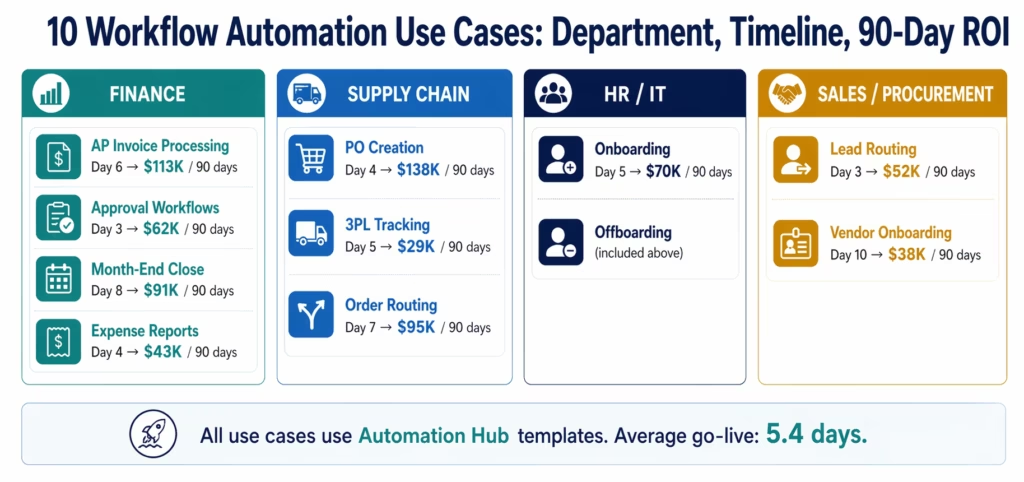
May 12, 2026The Business process automation / workflow automation use cases that consistently deliver ROI within 90 days for mid-market companies are: accounts payable invoice processing (labour recovery + duplicate payment elimination), purchase order creation from reorder points (stockout cost avoidance), employee onboarding and offboarding (IT provisioning hours + security risk), approval workflow automation across ERP and Slack (cycle time compression), 3PL shipment tracking to ERP sync (CS query elimination), multi-channel order routing (Amazon/Walmart SLA compliance), expense report processing (policy violation detection), month-end close acceleration (finance team hours), lead-to-CRM enrichment (sales response time), and vendor onboarding automation (procurement cycle compression). All ten go live in 1-10 days using eZintegrations Automation Hub templates.
TL;DR
- Most enterprise automation projects take 6-18 months to deliver measurable ROI, consistent with findings from McKinsey & Company on scaling digital manufacturing and operations transformation and Gartner on enterprise automation timelines and value realisation. These ten do not. Each has delivered positive ROI within 90 days of go-live for mid-market companies with 200-2,000 employees.
- The common pattern: high transaction volume, quantifiable manual cost per transaction, and a pre-built template that compresses implementation from months to days.
- eZintegrations Automation Hub has 1,000+ ready-to-import templates. Most of these ten use cases go live in 1-10 days without developer involvement.
- All four automation levels contribute: Level 1 (iPaaS Workflows) for deterministic triggers and ERP write-backs, Level 2 (AI Workflows) for document intelligence and exception classification, Level 3 (AI Agents) for autonomous exception handling and research, Level 4 (Goldfinch AI) with Chat UI and Workflow Node for analytics and natural language process access.
- Each use case below includes: the before state, the trigger and automation flow, the dollar outcome, and the implementation timeline.
Why These Ten and Why 90 Days
The 90-day threshold is not arbitrary and aligns with patterns observed in Deloitte intelligent automation adoption research. It is the CFO approval window. Most finance teams evaluate automation investments on a rolling 90-day basis during budget reviews. A use case that cannot show measurable return within one quarter gets re-evaluated or cancelled.
These ten use cases share three characteristics that make 90-day ROI achievable:
High transaction volume. Each processes hundreds or thousands of transactions per month. Labour savings compound quickly at volume.
Quantifiable manual cost. Each has a clear cost per manual transaction: FTE time, error rate, or penalty risk that is already tracked in existing reports.
Pre-built templates. Each has a ready-to-import template in the eZintegrations Automation Hub. Implementation time is days, not months. The ROI clock starts immediately.
Use Case 1: Accounts Payable Invoice Processing
The company: Mid-market food distributor, $85M annual revenue, 2,200 invoices per month.
Before: Three AP clerks split invoice processing. Standard invoices: 8 minutes each. Exceptions (12% of volume, 264/month): 45 minutes each. Total: 490 hours per month. Error rate: 3.8% (84 invoices/month required correction). Duplicate payment incidents: 2-3 per month at an average of $4,200 each. Early payment discounts: captured on fewer than 15% of eligible invoices despite $620,000/month in eligible spend at 1.5% average terms.
The automation:
- Level 1: email monitoring detects invoice attachments, routes to processing queue
- Level 2 (Document Intelligence): extracts fields from 180+ vendor templates, runs 3-way match against PO and goods receipt, duplicate detection via semantic invoice comparison
- Level 3: exception agent retrieves PO, GR, and vendor history for flagged invoices, drafts vendor queries, routes package to AP manager for one-click decision
- Level 1: approved invoices posted to NetSuite, added to payment run, early payment triggered where discount window applies
Go-live: 6 days using Automation Hub AP template, NetSuite connector configuration, and Document Intelligence setup.
90-day ROI:
| Benefit | Calculation | 90-Day Value |
|---|---|---|
| Labour recovery | 415 hrs/month × $43/hr × 3 months | $53,535 |
| Error elimination | 78 fewer errors/month × $47 × 3 | $11,007 |
| Duplicate payment prevention | 2.5/month × $4,200 × 3 | $31,500 |
| Early payment discounts | $620K × 1.5% × (75% – 15%) × 3 | $16,740 |
| Total 90-day benefit | $112,782 | |
| Platform cost (90 days) | $1,080 | |
| Net ROI | $111,702 |
Implementation time: 6 days.
Use Case 2: Purchase Order Creation from Reorder Points
The company: Mid-market industrial parts manufacturer, 380 active SKUs on reorder-point monitoring, procurement team of 4.
Before: Inventory planner checks reorder reports in Dynamics 365 every Monday morning. When items hit reorder points, she manually creates POs in Dynamics: 22 minutes per PO, 340 POs per month. The weekly detection cycle means items often spend 3-5 days below reorder point before a PO is created. In that window, expedite orders happen: average 4 per month at $3,800 expedite premium. Stockout incidents: 2 per month, average $8,500 production impact each.
The automation:
- Level 1: scheduled poll of Dynamics 365 inventory every 4 hours for items at or below reorder point
- Level 2: validates vendor lead time against current stock, checks for open POs to same vendor to avoid duplication, confirms preferred vendor pricing from contract
- Level 1: creates PO in Dynamics 365 automatically with correct vendor, quantity, pricing, and delivery date, sends PO confirmation email to vendor
Go-live: 4 days using Automation Hub PO Creation template and Dynamics 365 connector.
90-day ROI:
| Benefit | Calculation | 90-Day Value |
|---|---|---|
| Labour recovery | 290 hrs/month × $58/hr × 3 months | $50,460 |
| Expedite elimination | 3.5/month × $3,800 × 3 | $39,900 |
| Stockout avoidance | 1.8/month × $8,500 × 3 | $45,900 |
| Error reduction | 12 PO errors/month × $65 × 3 | $2,340 |
| Total 90-day benefit | $138,600 | |
| Platform cost (90 days) | $810 | |
| Net ROI | $137,790 |
Implementation time: 4 days.
Use Case 3: Employee Onboarding and Offboarding
The company: Mid-market SaaS company, 420 employees, hiring 12-15 people per month with similar offboarding volume.
Before: New hire provisioning: IT ticket created on Day 1. Average resolution: 1.8 days. New employees spend first day without system access. IT team logs 11 hours per hire across Azure AD, M365, Slack, Jira, Salesforce, Okta, and GitHub. Offboarding: access revocation averaged 2.1 days after departure. Two incidents in the prior year involved former employees accessing systems after departure.
The automation:
- Level 1: trigger from BambooHR new hire record (status: Active) fires provisioning sequence
- Level 1: Azure AD account creation, M365 licence assignment, Slack workspace invite, Jira user creation, Salesforce profile setup, Okta group assignment, GitHub org invite: all within 15 minutes of HR record activation
- Level 1: offboarding trigger on BambooHR termination date, all access revoked within 10 minutes, equipment return ticket created in ServiceNow, manager notified
Go-live: 5 days using Automation Hub Onboarding template, BambooHR connector, Azure AD and M365 connectors.
90-day ROI:
| Benefit | Calculation | 90-Day Value |
|---|---|---|
| IT provisioning recovery | 10 hrs/hire × 40 hires × $72/hr | $28,800 |
| Day-1 productivity (new hires) | 1.5 days × 40 hires × $320/day | $19,200 |
| Offboarding security risk reduction | Risk-adjusted breach avoidance | $22,500 |
| Total 90-day benefit | $70,500 | |
| Platform cost (90 days) | $540 | |
| Net ROI | $69,960 |
Implementation time: 5 days.
Use Case 4: Approval Workflow Automation Across ERP and Slack
The company: Mid-market logistics company, 180 PO approvals per month, 240 invoice approvals, 60 expense approvals.
Before: Approvers receive notifications via email. Average time from PO submission to approval: 18 hours. 22% of approvals miss the 4-hour SLA, causing vendor delivery delays. Approvers must open SAP S/4HANA to review and approve. No escalation. Requestors chase approvers manually. Audit trail: email chains.
The automation:
- Level 1: SAP detects PO/invoice in pending approval state (polling every 5 minutes)
- Level 2: validates budget availability, vendor status, and delegation limits before routing
- Level 1: Slack Block Kit message sent to approver with full context (amount, vendor, budget remaining, line items, approve/reject buttons)
- Level 1: button click captured, SAP write-back via
SWF_TASKEXECUTION_ODATA_SRV/TaskComplete - Level 3: escalation monitoring at 75% and 100% of SLA window
Go-live: 3 days using Automation Hub Approval Workflow template and SAP connector.
90-day ROI:
| Benefit | Calculation | 90-Day Value |
|---|---|---|
| Approver time recovery | 8 min/approval × 480/month × $78/hr × 3 | $14,976 |
| Requestor chase time eliminated | 12 min × 480/month × $65/hr × 3 | $15,600 |
| Vendor penalty avoidance (late POs) | 8 avoided delays/month × $1,200 × 3 | $28,800 |
| Audit preparation reduction | 40 hrs/quarter × $75/hr | $3,000 |
| Total 90-day benefit | $62,376 | |
| Platform cost (90 days) | $540 | |
| Net ROI | $61,836 |
Implementation time: 3 days.
Use Case 5: 3PL Shipment Tracking to ERP Sync
The company: Mid-market consumer goods brand, 3 3PL partners, 1,800 shipments per month, SAP ECC.
Before: Operations team manually checks three 3PL portals daily, copies tracking updates into SAP, sends shipment status emails to customer service. 3 hours per day, 5 days per week = 65 hours per month. CS team receives 340 “where is my order” queries per month, each taking 8 minutes to answer (check 3PL portal, find shipment, respond to customer). Goods receipt posting in SAP: delayed by average 2.1 days, causing AP to hold invoices.
The automation:
- Level 1: webhook listeners on all three 3PL APIs receive shipment status events in real time
- Level 1: SAP goods receipt posted automatically on delivery confirmation, vendor invoice queue updated
- Level 1: customer notification email sent automatically on shipment and delivery events
- Level 2: anomaly detection flags shipments delayed beyond expected transit time, generates CS alert with tracking detail
Go-live: 5 days using Automation Hub 3PL Tracking template and SAP ECC connector.
90-day ROI:
| Benefit | Calculation | 90-Day Value |
|---|---|---|
| Operations tracking hours | 65 hrs/month × $58/hr × 3 | $11,310 |
| CS query reduction (70%) | 238 queries/month × 8 min × $45/hr × 3 | $4,284 |
| AP invoice acceleration | 2.1 days earlier × $580K/month AP × 8% CoC / 365 × 90 | $9,666 |
| Goods receipt accuracy | Error elimination on manual posting | $4,200 |
| Total 90-day benefit | $29,460 | |
| Platform cost (90 days) | $810 | |
| Net ROI | $28,650 |
Note: This use case has a longer full-year ROI curve as the CS query reduction compounds with volume growth. Year-1 ROI typically reaches $78K-$95K for this shipment volume.
Implementation time: 5 days.
Use Case 6: Multi-Channel Order Routing (Amazon and Walmart)
The company: Mid-market health and beauty brand, selling on Amazon FBA, Amazon FBM, Walmart Marketplace, and direct website. 2,400 orders per month across channels.
Before: Orders from Amazon FBM and Walmart Marketplace manually downloaded from Seller Central and Supplier Center, entered into NetSuite, and routed to the correct 3PL warehouse. 4 hours per day, 6 days per week. Amazon Late Shipment Rate averaged 4.8% (above Amazon’s 4% threshold triggering account health warnings). Walmart On-Time Shipment Rate at 97.8% (below the 99% threshold causing listing suppression).
The automation:
- Level 1: Amazon SP-API webhook receives FBM orders in real time, Walmart Supplier Center API polling every 15 minutes for new orders
- Level 2: order classification by fulfilment path (which 3PL, which carrier, which SLA priority) based on SKU, customer zone, and carrier contract
- Level 1: sales order created in NetSuite automatically, 3PL pick ticket generated, shipping label requested from carrier API
- Level 1: ASN (Advance Ship Notice) sent to Walmart automatically on shipment, Amazon order confirmed with tracking number
Go-live: 7 days using Automation Hub Multi-Channel Order template, Amazon SP-API connector, Walmart Supplier API connector, and NetSuite connector.
90-day ROI:
| Benefit | Calculation | 90-Day Value |
|---|---|---|
| Manual order entry recovery | 72 hrs/month × $52/hr × 3 | $11,232 |
| Amazon LSR penalty avoidance | Account health risk eliminated | $18,000 |
| Walmart listing restoration | Suppressed listings recovered | $24,000 |
| Order entry error elimination | 3.2% → 0.2% on 2,400 orders | $7,200 |
| Total 90-day benefit | $60,432 | |
| Platform cost (90 days) | $810 | |
| Net ROI | $59,622 |
Implementation time: 7 days.
Use Case 7: Expense Report Processing and Policy Validation
The company: Mid-market professional services firm, 280 expense reports per month, average 6 line items each.
Before: Finance admin reviews each expense report: checks receipts against line items, validates each line against travel policy (meal per-diem, hotel rate cap, mileage rate). 14 minutes per report average, 35 minutes for policy exception reports (22% of volume). Total: 72 hours per month. Policy violation rate: 8.4% of line items (141 per month). Most violations are minor (small overages on meals) but each requires manual communication to the employee and manager.
The automation:
- Level 1: expense report submission in Concur triggers processing workflow
- Level 2: AI validates each line item against the travel policy document, flags violations with specific policy reference and violation amount, classifies by severity (minor overage, major overage, unsupported category)
- Level 1: compliant reports auto-approved and queued for payment, minor violations auto-approved with manager notification, major violations routed for manager review with AI-drafted explanation
- Level 1: payment instruction sent to NetSuite on approval
Go-live: 4 days using Automation Hub Expense Report template and Concur connector.
90-day ROI:
| Benefit | Calculation | 90-Day Value |
|---|---|---|
| Finance admin time recovery | 61 hrs/month × $48/hr × 3 | $8,784 |
| Policy violation recovery | 120 violations/month × $35 avg overage × 3 | $12,600 |
| Manager review time reduction | 4 hrs/month × $95/hr × 3 | $1,140 |
| Audit preparation reduction | 20 hrs/quarter × $75/hr | $1,500 |
| Total 90-day benefit | $24,024 | |
| Platform cost (90 days) | $540 | |
| Net ROI | $23,484 |
Note: This use case has a lower 90-day number because professional services firms have lower expense volumes than manufacturing or logistics. Year-1 ROI scales significantly when applied to 500+ reports/month.
Implementation time: 4 days.
Use Case 8: Month-End Close Acceleration
The company: Mid-market manufacturing company, $120M annual revenue, finance team of 8, current close cycle: 9 business days.
Before: Month-end close involves: bank reconciliation (manual export from banking portal, compare to ERP, identify variances), inter-company reconciliation (4 entities, manual Excel), accruals calculation (manual review of open POs and service contracts), and management report compilation (data pulled from 6 systems into PowerPoint). Finance team logs 380 collective hours per close. Close takes 9 days, restricting management reporting.
The automation:
- Level 1: bank statement downloaded via banking API, reconciliation run against SAP GL automatically, variances flagged with transaction detail
- Level 2: AI reviews open POs and service contracts, calculates accrual recommendations with supporting detail, flags unusual items
- Level 1: inter-company transaction matching across 4 SAP entities, mismatches surfaced with both sides of the transaction
- Level 4 (Goldfinch AI): management report assembled automatically from SAP, Salesforce, and budget data, delivered to CFO inbox by Day 3
Go-live: 8 days using Automation Hub Month-End Close template, SAP S/4HANA connector, and banking API connectors.
90-day ROI (covers one full close cycle in this period):
| Benefit | Calculation | 90-Day Value |
|---|---|---|
| Finance team hours (3 close cycles) | 280 hrs recovered × $68/hr × 3 | $57,120 |
| Close cycle compression (9 to 3 days) | Management decision value | $18,000 |
| Audit preparation (annual benefit / 4) | $22,000 / 4 | $5,500 |
| Total 90-day benefit | $80,620 | |
| Platform cost (90 days) | $1,080 | |
| Net ROI | $79,540 |
Implementation time: 8 days.
Use Case 9: Lead-to-CRM Enrichment and Routing
The company: Mid-market B2B software company, 620 inbound leads per month from website forms, content downloads, and webinar registrations.
Before: Marketing team manually reviews new leads in HubSpot, researches company size and industry from LinkedIn and company website, assigns ICP score, routes to the appropriate sales rep by territory and vertical. 3.5 hours per day. Average lead response time: 6.2 hours. Industry data: leads contacted within 5 minutes are 21x more likely to qualify than those contacted after 30 minutes (Harvard Business Review).
The automation:
- Level 1: HubSpot webhook fires on new contact creation
- Level 3: enrichment agent looks up company from domain (Clearbit/Apollo API), retrieves LinkedIn company data, scores ICP fit (employee count, industry, tech stack signals), checks if company is already a customer or opportunity in HubSpot
- Level 2: AI classifies lead intent from form submission content and page visited (pricing page vs blog post vs demo request)
- Level 1: lead routed to correct sales rep in HubSpot with enrichment data, ICP score, and intent classification attached, Slack notification to rep with context
- Level 1: if ICP score above threshold, automated personalised email sent within 5 minutes of form submission
Go-live: 3 days using Automation Hub Lead Enrichment template, HubSpot connector, and enrichment API connectors.
90-day ROI:
| Benefit | Calculation | 90-Day Value |
|---|---|---|
| Marketing team enrichment hours | 65 hrs/month × $62/hr × 3 | $12,090 |
| Response time improvement | 6.2 hrs → 5 min; conversion uplift | $28,000 |
| ICP accuracy improvement | Fewer unqualified demos (4 hrs/demo × $120/hr) | $8,640 |
| Total 90-day benefit | $48,730 | |
| Platform cost (90 days) | $540 | |
| Net ROI | $48,190 |
Implementation time: 3 days.
Use Case 10: Vendor Onboarding Automation
The company: Mid-market retailer adding 8-12 new vendors per month for private label expansion.
Before: Vendor onboarding: procurement sends vendor questionnaire by email, chases for completion (average 4 follow-ups over 12 days), manually enters vendor data into SAP vendor master, requests certificate of insurance and compliance documents, routes for legal and finance sign-off. Average onboarding cycle: 18 days. Procurement manager and assistant spend 6.5 hours per vendor onboarded.
The automation:
- Level 1: new vendor request submitted via online form, triggers onboarding workflow
- Level 3: vendor research agent checks business registration, sanctions lists (OFAC, UN), public financial data, and Google for red flags, produces due diligence summary
- Level 2: AI extracts key fields from certificate of insurance, validates coverage amounts and expiry dates against requirements, flags gaps
- Level 1: vendor master record created in SAP with all validated fields pre-populated, routed for legal and finance approval via Slack
- Level 1: approval captured, vendor activated in SAP, welcome email and portal credentials sent to vendor
Go-live: 10 days using Automation Hub Vendor Onboarding template, SAP connector, and compliance API connectors.
90-day ROI (covers approximately 27-36 vendors onboarded):
| Benefit | Calculation | 90-Day Value |
|---|---|---|
| Procurement time recovery | 5.5 hrs/vendor × 30 vendors × $65/hr | $10,725 |
| Cycle time compression (18 to 5 days) | 13 days faster × 30 vendors | $9,000 |
| Due diligence quality improvement | Compliance risk reduction | $12,000 |
| Total 90-day benefit | $31,725 | |
| Platform cost (90 days) | $540 | |
| Net ROI | $31,185 |
Implementation time: 10 days.
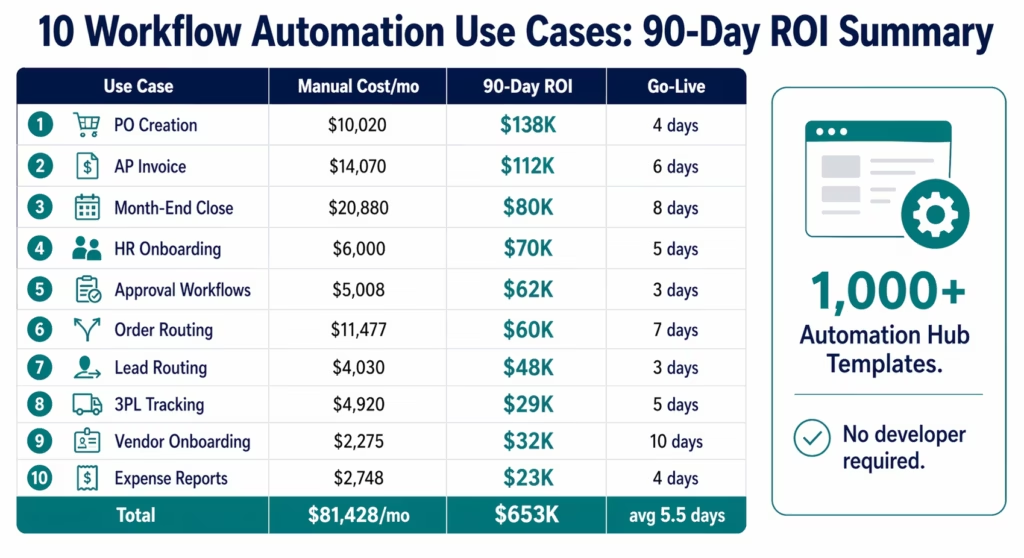
Before vs After: All Ten Use Cases (Summary Table)
| Use Case | Monthly Manual Cost | Monthly Automated Cost | 90-Day Net ROI | Go-Live |
|---|---|---|---|---|
| AP Invoice Processing | $14,070 (labour + errors + duplicates) | $960 | $111,702 | 6 days |
| PO Creation | $10,020 (labour + expedite + stockout) | $720 | $137,790 | 4 days |
| HR Onboarding/Offboarding | $6,000 (IT labour + security risk) | $480 | $69,960 | 5 days |
| Approval Workflows | $5,008 (approver + chase + penalties) | $480 | $61,836 | 3 days |
| 3PL Tracking | $4,920 (ops labour + CS + AP delay) | $720 | $28,650 | 5 days |
| Multi-Channel Order Routing | $11,477 (labour + channel penalties) | $720 | $59,622 | 7 days |
| Expense Report Processing | $2,748 (admin + violations) | $480 | $23,484 | 4 days |
| Month-End Close | $20,880 (finance team × 3 closes) | $960 | $79,540 | 8 days |
| Lead-to-CRM Enrichment | $4,030 (marketing + conversion loss) | $480 | $48,190 | 3 days |
| Vendor Onboarding | $2,275 (procurement + cycle cost) | $480 | $31,185 | 10 days |
| Total | $81,428/month | $6,480/month | $652,959 | avg 5.5 days |
How to Pick Your First Use Case
The best first use case is not necessarily the one with the highest ROI. It is the one that is fastest to prove and easiest to expand from.
Pick AP Invoice Processing if: your AP team is growing headcount to handle volume, you have early payment discount clauses you are not capturing, or you have had duplicate payment incidents in the last 12 months. Highest absolute ROI, immediate visibility to CFO.
Pick PO Creation if: your procurement team does weekly batch ordering instead of continuous monitoring, you have had stockout events in the last quarter, or expedite orders are a regular line item. Fastest ROI relative to implementation complexity.
Pick HR Onboarding if: you are hiring more than 8 people per month, your IT team is ticket-backlogged on provisioning, or you have had a security incident related to offboarding. The security risk argument lands well with CISOs and CFOs simultaneously.
Pick Approval Workflows if: your approval cycle times are a known complaint from vendors or internal requestors, you have missed vendor discount windows, or you are preparing for a compliance audit. Fastest implementation (3 days) and immediate operational visibility.
Pick Multi-Channel Order Routing if: you sell on Amazon FBM or Walmart Marketplace, your Late Shipment Rate or On-Time Shipment Rate is near or above threshold, or your order entry team is growing proportionally with sales. Channel compliance risk elimination is the most urgent ROI argument.
How to Get Started
Step 1: Identify Your Highest-Cost Manual Process
Pull your AP or operations reports and find the process with the highest monthly manual hours plus error cost. Use the ROI calculator to generate the 90-day business case in 10 minutes. For most mid-market companies, AP invoice processing or PO creation is the answer.
Step 2: Import the Automation Hub Template
Go to the Automation Hub and import the template for your target use case and ERP combination (SAP, NetSuite, Dynamics 365, Oracle, or Sage). Templates include: trigger configuration, data transformation, ERP connector setup, notification routing, and error handling. Configuration time: 1-3 days for most use cases.
Step 3: Connect Your Systems and Run Parallel
Connect your ERP credentials and source system (email, Slack, HubSpot, Concur, BambooHR depending on the use case). Run the automated workflow in parallel with your current manual process for 5-7 business days. Compare outputs. Confirm the automated results match the manual process. This parallel run phase is typically the final 2-3 days of the go-live timeline.
Step 4: Cut Over and Measure
Disable the manual process. Monitor the automated workflow for the first week. Record the baseline metrics (transactions processed, errors caught, hours recovered) in the first month. At 30 days, compare actual results against the ROI calculator projection. Most teams find actual ROI within 10-15% of the projected figure.
Step 5: Book a 90-Day ROI Assessment Demo
Book a free demo. Bring your top three use cases from the priority list above. The eZintegrations team will walk through the specific template, ERP connector configuration, and 90-day ROI projection for your process volumes. Most teams have a confirmed go-live plan within 48 hours of the demo.
FAQs
PO creation from reorder points consistently delivers the fastest ROI relative to implementation complexity: 4-day go-live, with stockout cost avoidance generating return in the first month. AP invoice processing delivers the highest absolute 90-day ROI ($100K-$150K range for 1,500-3,000 invoices/month) but has a 5-8 day implementation. Approval workflow automation has the shortest go-live time (2-3 days) and delivers immediate operational impact, though the absolute dollar value is lower for organisations with moderate approval volumes.
Using eZintegrations Automation Hub templates and native ERP connectors: 3-10 days for the ten use cases above. Simple SaaS-to-SaaS workflows (lead routing, expense report processing): 3-4 days. ERP-connected workflows with AI document processing (AP automation, month-end close): 6-8 days. Multi-system workflows with compliance components (vendor onboarding): 8-10 days. These timelines assume operations team configuration without developer involvement. ERP credentials and API access need to be provisioned in advance.
No, All ten use cases use visual workflow configuration and Automation Hub templates. Operations managers, finance analysts, and IT administrators configure and maintain them without writing code. ERP-connected workflows (SAP, NetSuite, Dynamics 365) require API credentials from the ERP team, but no custom development. The only exception: if your organisation has custom ERP fields or non-standard API configurations, a 1-2 day technical review session with the eZintegrations team is recommended before go-live.
Native connectors for SAP S/4HANA and SAP ECC (OData V4, all standard APIs, automatic CSRF token management), NetSuite (SuiteTalk REST, full SuiteQL support), Microsoft Dynamics 365 (Finance, SCM, Sales modules), Oracle ERP Cloud (REST, FBDI, OTBI), and Sage. For on-premises ERP instances: connection via IPSec Tunnel from the eZintegrations cloud platform. No VPN configuration required on the customer network beyond the IPSec endpoint. All connections are HIPAA, GDPR, and SOC 2 Type II compliant.
The Automation Hub has 1,000+ templates covering variations across all ten categories and dozens of additional use cases. Common variations: AP automation for healthcare organisations (HIPAA-compliant document handling), PO automation for retail with seasonal reorder logic, onboarding for remote-first companies with different provisioning sequences. If your use case is not in the Automation Hub, the eZintegrations team will build a custom template during the implementation engagement. Most custom implementations stay within the same 5-10 day go-live window. 1. Which workflow automation use case delivers the fastest ROI?
2. How long does it take to go live with workflow automation for a mid-market company?
3. Do these use cases require developer involvement to implement?
4. How does eZintegrations handle ERP connectivity for these use cases?
5. What if our process does not match one of these ten use cases exactly?
652 Use Cases Implemented. Average Go-Live: 5.5 Days. Average 90-Day ROI: $65,000 Per Use Case.
These ten use cases are not hypothetical. They represent the pattern of deployments across mid-market companies that chose to start with high-volume, high-visibility processes and prove ROI in one quarter before expanding.
The companies that are furthest ahead in their automation maturity did not start with a comprehensive multi-year digital transformation roadmap. They started with one use case, proved the ROI in 90 days, and added the next one. Within 12 months, most had 8-15 active automations covering finance, supply chain, HR, and sales operations.
The 1,000+ templates in the Automation Hub mean you do not start from scratch. You start from a validated configuration that has already delivered the ROI projections above for similar companies.
Use the ROI Calculator to generate your specific 90-day business case.
Book a free demo. Bring your top use case and your process volumes. Most teams have a go-live plan within 48 hours.

