
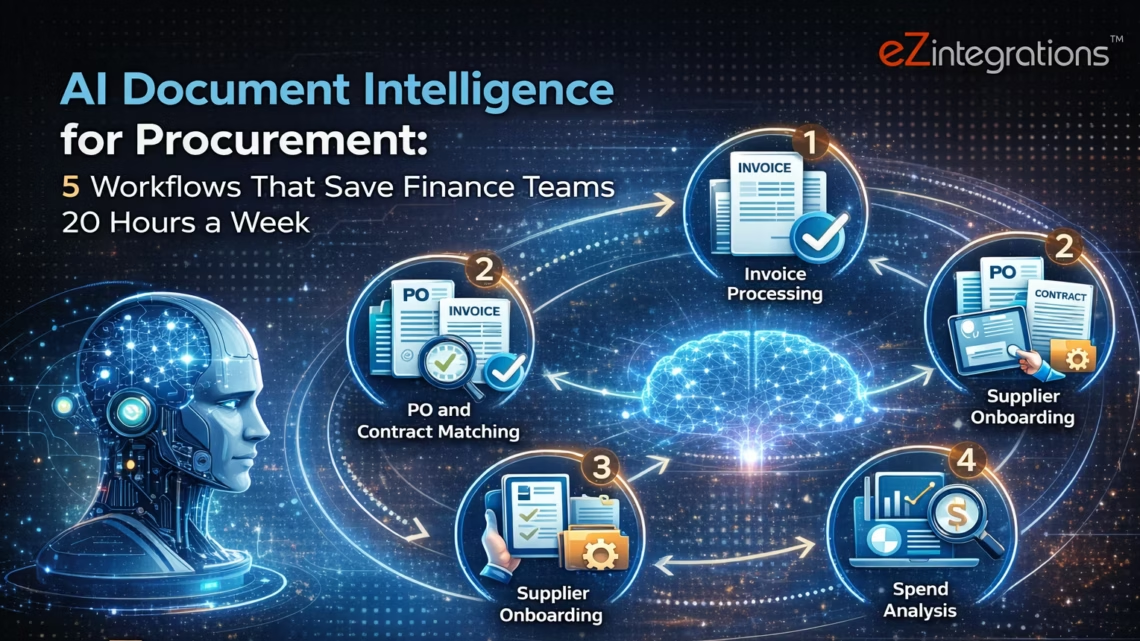
AI Document Intelligence for Procurement: 5 Workflows That Save Finance Teams 20 Hours a Week
April 7, 2026AI document intelligence for procurement uses computer vision and large language models to extract structured data from any supplier document (invoices, purchase orders, packing slips, contracts, GRNs) without template configuration per supplier. Applied to five core procurement workflows (invoice matching, PO validation, GRN reconciliation, contract data extraction, and vendor onboarding document processing), it removes 15-25 hours of manual document handling per finance team member per week and achieves 75-85% touchless processing across SAP, Oracle Fusion Cloud, NetSuite, JD Edwards, Infor, and Acumatica.
TL;DR
Most enterprise procurement teams spend 30-40% of their working week reading, extracting, and manually entering data from supplier documents into their ERP. This is not an ERP problem. It is a document intelligence gap. Goldfinch AI Document Intelligence (Level 2 on the eZintegrations platform) extracts structured data from any supplier document format without per-supplier template configuration. Computer vision plus large language models handle format variability that template-based OCR cannot. Five procurement workflows where document intelligence creates the largest time savings: invoice matching, purchase order validation, goods received note reconciliation, contract data extraction, and vendor onboarding document processing. Works natively with SAP S/4HANA (OData V4), Oracle Fusion Cloud (fscmRestApi REST), NetSuite (SuiteQL + SuiteTalk REST), JD Edwards (Orchestrator REST), Infor CloudSuite, and Acumatica via the eZintegrations API catalog. Each workflow is available as an Automation Hub template. Import, configure ERP credentials, set tolerances, and go live.
The Document Handling Problem Finance Teams Do Not Name Correctly
Your AP coordinator describes their job as “processing invoices.” Your procurement analyst says they “review purchase orders.” Your receiving team talks about “checking deliveries against the PO.”
What all of them are actually doing, for a significant portion of their working day, is reading documents and typing numbers into screens.
An invoice arrives as a PDF. Someone reads it. Someone opens the ERP. Someone types the vendor name, invoice number, invoice date, line items, quantities, unit prices, totals, payment terms. Someone then navigates to find the matching purchase order, reads those numbers, and compares them. Someone checks the goods received note against both.
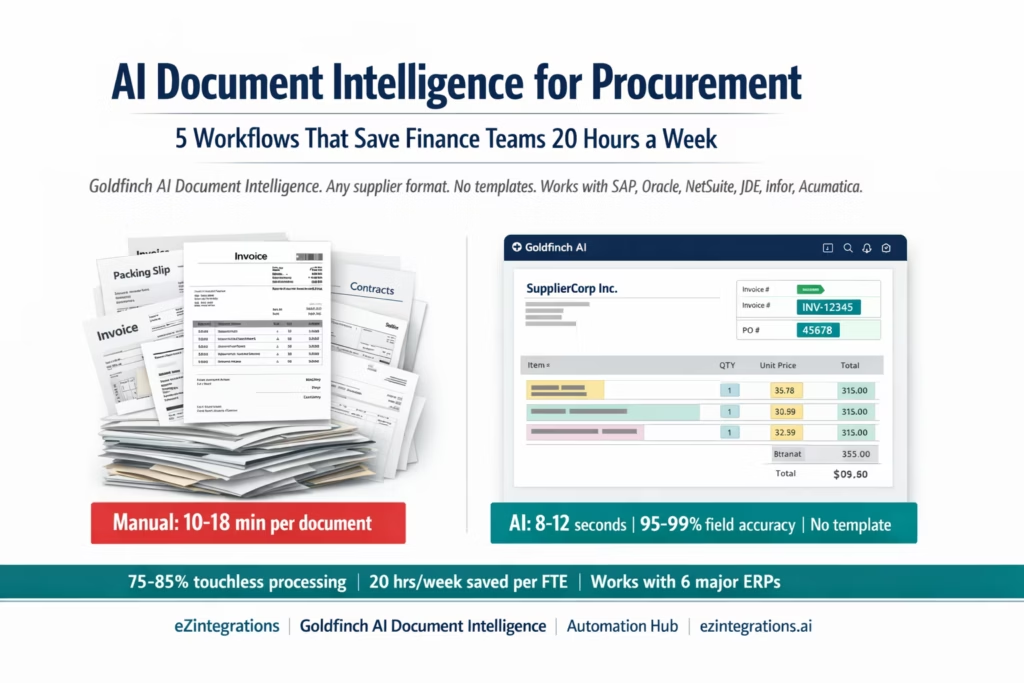
This is document intelligence work performed by humans at 10-18 minutes per document. At 200 documents per month per AP clerk, this is 33-60 hours per month of pure data reading and entry. One full-time equivalent, per 200 monthly documents, doing work that is not analysis, not decisions, not vendor relationships. Just reading and typing.
AI document intelligence does not change your ERP. It does not change your approval workflows. It does not change your controls. It reads the documents and provides the structured data, so your team can focus on the 15-25% of documents that genuinely need human judgment.
What AI Document Intelligence Is (and What It Is Not)
Before the workflows: a precise definition matters, because most finance teams have already tried template-based OCR and found it insufficient.
Template-based OCR (traditional document capture): a rules engine reads specific pixel coordinates or anchor text positions to extract fields from a document. Works well when every invoice from a given supplier uses an identical layout. Fails when the supplier changes their invoice template, sends a multi-page document, uses a scanned rather than digital PDF, or is a new supplier whose template has not been configured.
AI document intelligence (what Goldfinch AI provides): computer vision reads the document layout as a human would, without assuming fixed field positions. A large language model interprets the extracted text in context: it knows that “Inv. No.” and “Invoice Number” and “Reference” and “Numer faktury” are all the same concept. It understands that a table with columns headed “Qty”, “Description”, “Unit Price”, “Total” is a line-items section regardless of column order. It knows that a date formatted “18/03/2026” and “March 18, 2026” and “2026-03-18” all mean the same day.
This is the distinction that makes template-free extraction practical across a supplier base of hundreds or thousands. No template per supplier. No re-configuration when suppliers update their invoice format. No separate configuration for new suppliers.
What it is not: a replacement for your ERP’s financial controls. Goldfinch AI Document Intelligence extracts and structures document data. Your ERP’s approval workflow, GL posting rules, payment controls, and audit trail remain unchanged. Document intelligence feeds the ERP; it does not replace the ERP.
How Goldfinch AI Document Intelligence Works Without Templates
Goldfinch AI Document Intelligence is the Level 2 capability on the eZintegrations 4-level automation platform. It operates as follows for each document:
Stage 1: Ingestion. The document arrives from any source: email attachment, SFTP drop, API upload, supplier portal download. Level 1 (iPaaS Workflows) handles routing and source connectivity.
Stage 2: Vision AI layout analysis. The document is processed by a computer vision model that identifies page structure: header region, line-items table, footer summary, signature block, attachments. This stage is format-agnostic: it handles digital PDFs, scanned PDFs, images, multi-page documents, landscape layouts, and documents with logos and watermarks.
Stage 3: LLM field extraction. A large language model reads the identified regions and extracts named fields based on semantic understanding, not position. Output fields are defined by the workflow (e.g., for invoice matching: VendorName, InvoiceNumber, InvoiceDate, POReference, LineItems[], TotalAmount, CurrencyCode, PaymentTerms). The LLM resolves language variations, abbreviations, and multi-language content.
Stage 4: Confidence scoring. Each extracted field receives a confidence score (0.00-1.00). Fields above the configured auto-approval threshold (typically 0.88-0.95) proceed automatically. Fields below the threshold are flagged for human review with the specific field highlighted. This means your team reviews uncertain extractions, not the entire document.
Stage 5: Structured output. The extraction result is output as structured JSON, ready for the ERP API call in the next workflow stage. JDE Julian date conversion, multi-currency normalisation, and ERP-specific field mapping are applied at the Level 1 transformation step.
Processing time per document: 8-12 seconds. Field accuracy on digital PDFs: 95-99%. Field accuracy on high-quality scanned documents: 88-96%.
Workflow 1: Invoice-to-ERP Matching (3-Way Match)
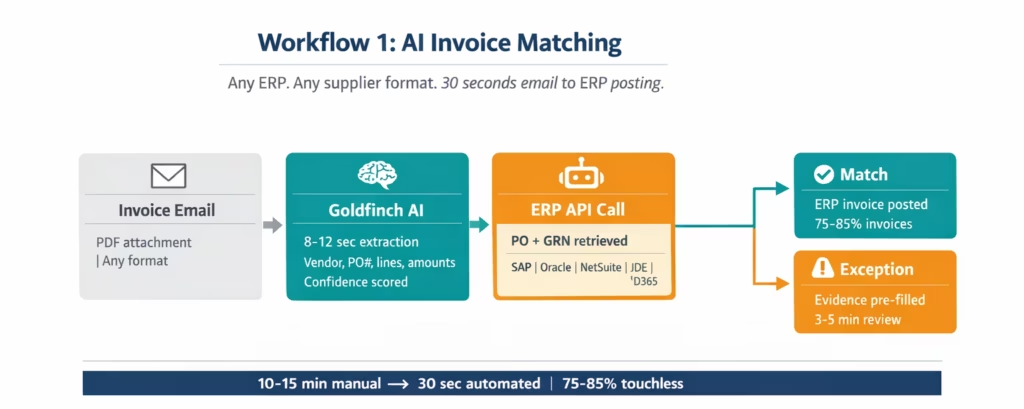
The manual version: AP clerk reads the supplier invoice PDF, opens the ERP, navigates to the invoice entry screen, keys all fields, links to the purchase order, checks the goods received note, compares quantities and prices, enters the invoice, submits for matching. Time: 10-15 minutes per invoice. For 500 invoices per month: 83-125 hours.
The automated version:
- Invoice arrives by email. Level 1 email connector routes the attachment to Goldfinch AI Document Intelligence.
- All invoice fields extracted in 8-12 seconds: vendor, invoice number, invoice date, PO reference, line items (description, quantity, unit price, amount), total, currency, payment terms.
- Level 3 AI Agent calls the ERP API to retrieve the matching Purchase Order and goods receipt:
- SAP S/4HANA:
GET /sap/opu/odata4/sap/api_purchaseorder_2/srvd_a2x/sap/purchaseorder/0001/PurchaseOrder?$filter=PurchaseOrderNumber eq '{PO}' - Oracle Fusion Cloud:
GET /fscmRestApi/resources/11.13.18.05/purchaseOrders?$filter=OrderNumber='{PO}' - NetSuite: SuiteQL
WHERE recordtype = 'purchaseorder' AND tranid = '{PO}' - JD Edwards:
POST /jderest/v2/dataserviceon F4311 filtered by PDDOCO - Infor CloudSuite / Acumatica: via the eZintegrations API catalog connector
- SAP S/4HANA:
- Matching engine compares invoice quantities against GRN quantities and invoice prices against PO prices at line-item level. Configurable tolerance per vendor category.
- Matched invoices post to the ERP automatically via REST API. Exceptions route to the AP supervisor with pre-populated evidence.
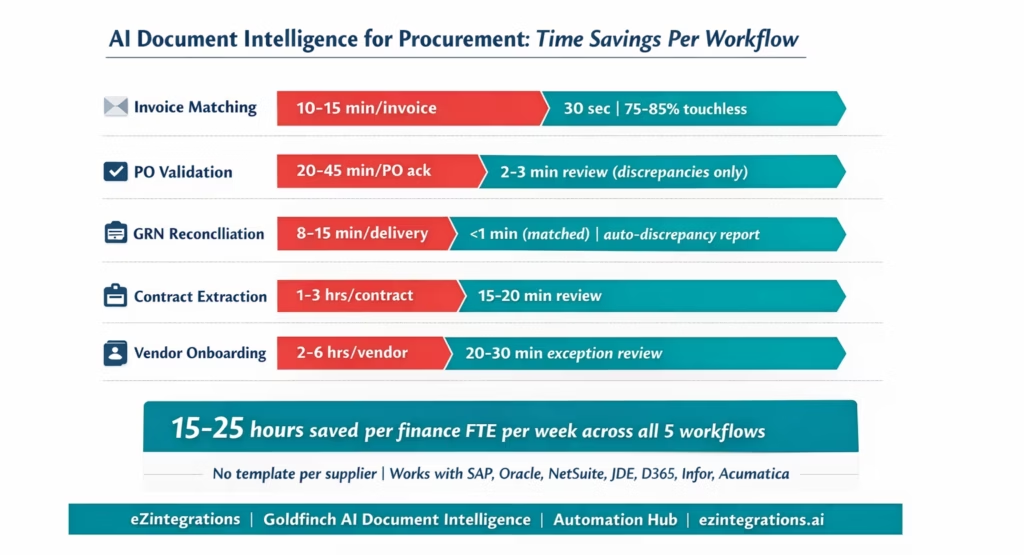
Time savings: 10-15 minutes per invoice reduced to 0 minutes for the 75-85% that match automatically. Exception handling for the remaining 15-25% takes 3-5 minutes with pre-populated context versus 15-20 minutes of manual investigation.
ERP posting endpoints by system: – SAP: POST /sap/opu/odata/sap/API_SUPPLIERINVOICE_PROCESS_SRV/A_SupplierInvoice – Oracle Fusion Cloud: POST /fscmRestApi/resources/11.13.18.05/invoices – NetSuite: POST /services/rest/record/v1/vendorBill (with createdfrom: itemReceipt) – JD Edwards: Orchestrator EZ_AP_VoucherUpload → EZ_VMA_Trigger (R4314 VMA) – D365 Finance: POST /data/VendorInvoiceHeaders + VendorInvoiceLines
For the complete ERP-specific technical guides see Oracle Fusion Cloud invoice matching and the enterprise AP automation guide.
Workflow 2: Inbound Purchase Order Validation
The manual version: Your procurement team receives a purchase order acknowledgement from a supplier, or receives a supplier’s own PO format in response to your internal requisition. The analyst opens both documents, compares each field (item numbers, quantities, prices, delivery dates, Incoterms, payment terms) against the internal requisition or contract, and flags discrepancies manually. For complex POs with 20-50 line items, this comparison takes 20-45 minutes per document.
The automated version:
- Supplier’s PO acknowledgement arrives (PDF email, SFTP, EDI-to-PDF conversion, or supplier portal export).
- Goldfinch AI Document Intelligence extracts all fields: supplier reference number, line items (item description, quantity, unit price, delivery date), Incoterms, payment terms, total value.
- Level 3 AI Agent retrieves your internal purchase requisition or approved PO from the ERP for comparison.
- Validation engine compares each field:
supplierQtyvsapprovedQty,supplierPricevscontractPrice,deliveryDatevsrequestedDate. Discrepancies above configured tolerance are flagged per field. - A structured discrepancy report is generated: which fields match, which differ, by how much, and what action is required (accept as-is, raise a counter-PO, escalate to procurement manager).
- For clean POs (all fields within tolerance): the supplier acknowledgement is logged in the ERP and the PO status is updated to Acknowledged. For discrepancy POs: the report routes to the procurement analyst for a decision.
Time savings: 20-45 minutes of manual cross-document comparison per PO reduced to 2-3 minutes of discrepancy review for the 60-70% of POs that have minor or no discrepancies.
What this enables: your procurement team can validate twice as many supplier acknowledgements in the same time, with a complete audit trail of the comparison, without spreadsheets or manual notes.
Workflow 3: Goods Received Note Reconciliation
The manual version: Goods arrive. The warehouse team generates a GRN (paper or digital packing slip from the supplier). The receiving clerk compares the packing slip quantities and item numbers against the open purchase order in the ERP, enters the quantities received, and posts the goods receipt. For discrepant deliveries (short shipments, damaged goods, wrong items), the clerk writes up a discrepancy report manually. Time: 8-15 minutes per delivery. For receiving teams handling 100 deliveries per week: 13-25 hours per week of receiving document processing.
The automated version:
- Supplier packing slip arrives (PDF attachment to the delivery, photographed document from a mobile scanner, or structured ASN from the supplier’s system).
- Goldfinch AI Document Intelligence extracts: supplier reference, your PO number (if printed), item descriptions, quantities, lot numbers, serial numbers, delivery date, carrier reference.
- Level 3 agent retrieves open PO lines from the ERP for the supplier and delivery.
- Comparison: extracted packing slip quantities vs PO ordered quantities per line item. Item number matching with fuzzy logic (handles supplier item codes vs your internal item codes via a cross-reference table in the Knowledge Base).
- Full match: goods receipt is posted to the ERP automatically via REST API. Short shipment or item discrepancy: a structured discrepancy note is created with the specific lines flagged, and the ERP goods receipt is posted for the confirmed quantity only.
- Discrepancy report routes to the procurement team and the supplier contact for resolution.
Time savings: 8-15 minutes per delivery for manual GRN entry reduced to under 1 minute for the 65-75% of deliveries that match the open PO exactly. Discrepancy reporting time reduced from 20-30 minutes of manual write-up to a structured report generated in seconds.
Workflow 4: Contract Data Extraction and ERP Synchronisation
The manual version: A new supplier contract is signed. A procurement analyst reads the PDF contract (typically 20-80 pages), extracts the commercial terms (pricing, volume thresholds, payment terms, early payment discounts, penalty clauses, expiry dates, renewal notice periods), and manually enters the relevant fields into the ERP’s vendor master, pricing master, and contract management module. For a mid-size enterprise signing 50-100 contracts per year, this is 50-150 hours of annual data entry. Key terms are often missed or entered incorrectly because the contract PDF is dense and the analyst is extracting manually.
The automated version:
- Signed contract PDF is uploaded to the eZintegrations document intake (email, SFTP, contract management system webhook, or manual upload).
- Goldfinch AI Document Intelligence processes the full contract document. Unlike invoices (structured, repeating format), contracts require document intelligence that understands variable structure: pricing tables on page 14, payment terms in clause 6.2, renewal notice in Schedule B. The LLM navigates the document by semantic content, not page position.
- Extracted fields: effective date, expiry date, renewal notice period, pricing schedule (with volume breaks), payment terms code, early payment discount percentage and qualifying period, penalty/service credit clauses, delivery SLAs, approved item list with contracted prices.
- The Level 3 AI Agent posts the extracted commercial terms to the ERP:
- ERP vendor master:
PaymentTerms,EarlyPaymentDiscount,CurrencyCode - ERP pricing master / contract management: contracted item prices, volume break prices, effective dates
- ERP workflow: contract expiry alert scheduled for (ExpiryDate minus RenewalNoticePeriod)
- ERP vendor master:
- Goldfinch AI Chat UI: your procurement team can query the contract in natural language. “What is the penalty for delivery more than 3 days late?” or “What is the price for Tier 2 volume (500-999 units)?” Returns the extracted answer with the contract clause reference.
Time savings: 1-3 hours of manual contract data extraction per contract reduced to 15-20 minutes of review and confirmation. Contract term accuracy improves because AI extraction reads the full document consistently, whereas manual extraction is subject to analyst fatigue on long contracts.
Workflow 5: Vendor Onboarding Document Processing
The manual version: A new supplier submits their onboarding documents: W-9 or W-8 (tax forms), certificate of insurance, bank details (ACH or wire instruction letter), business registration certificate, diversity certification, and vendor questionnaire responses. Your AP or procurement team collects these via email over multiple days (chasing missing documents), reads each document, extracts the data, validates each field (EIN format check, bank routing number validation, insurance coverage amounts), enters the data into the ERP vendor master, and routes for approval. Time: 2-6 hours per new vendor across the onboarding cycle. For organisations adding 50-100 new vendors per year: 100-600 hours of annual vendor onboarding document work.
The automated version:
- New vendor receives a secure document upload link. They upload all required documents in a single submission.
- Goldfinch AI Document Intelligence processes each document type:
- W-9: extracts business name, EIN (validates format: XX-XXXXXXX), address, tax classification
- Certificate of Insurance: extracts insurer name, policy number, coverage types, coverage amounts, effective and expiry dates (validates against your minimum coverage requirements)
- Bank instruction letter: extracts bank name, routing number (validates 9-digit ABA format), account number, account type
- Business registration: extracts legal entity name, registration number, state/jurisdiction, formation date
- Validation rules run automatically: EIN format check, ABA routing number validation against the Federal Reserve routing number database, insurance coverage amount vs minimum required, registration certificate not expired.
- Failed validations route a specific notice to the vendor (missing fields, insufficient insurance coverage, invalid routing number) with instructions for resubmission. No manual chasing email.
- Passed validations create the ERP vendor master record via REST API with all commercial and payment fields populated. The vendor is routed through your standard new vendor approval workflow in the ERP.
- Diversity certification data is extracted and stored in the vendor profile for spend reporting and ESG compliance.
Time savings: 2-6 hours of manual vendor onboarding document processing per vendor reduced to 20-30 minutes of exception review for the 40-60% of vendors whose documents fail at least one validation on first submission. Average total onboarding cycle time reduced from 5-10 business days (document collection + processing + approval) to 2-3 business days.
Before vs After: Manual Procurement Document Handling vs AI-Powered
| Document Type | Manual Processing | AI Document Intelligence |
|---|---|---|
| Supplier invoice PO referenced | 10 to 15 minutes entry plus 5 to 10 minutes matching | 8 to 12 seconds extraction plus auto match and ERP post |
| Supplier invoice non PO | 10 to 15 minutes entry plus 3 to 8 minutes GL coding research | 8 to 12 seconds extraction plus knowledge base GL suggestion |
| PO acknowledgement validation | 20 to 45 minutes per field comparison | 2 to 3 minutes discrepancy review with pre identified differences |
| Packing slip or GRN | 8 to 15 minutes per delivery | Under 1 minute for matched deliveries |
| Supplier contract commercial terms | 1 to 3 hours extraction per contract | 15 to 20 minutes review and confirmation |
| Vendor onboarding documents | 2 to 6 hours per new vendor | 20 to 30 minutes exception review |
| Multi currency document | Manual exchange rate verification | Currency code extracted and ERP rate applied automatically |
| Multi language document | Requires bilingual staff or translation | LLM handles language variation natively |
| Scanned PDF warehouse GRN | Same manual process | Vision AI reads scanned document with 88 to 96 percent accuracy |
| New supplier format | Template configuration required 1 to 3 days | No template configuration processes on first receipt |
| ERP entry | Manual navigation per ERP screen | REST API post to SAP Oracle NetSuite JD Edwards Dynamics and Infor |
| Exception investigation | AP clerk navigates multiple ERP screens | Pre populated exception report with document and ERP evidence |
| Duplicate document check | Manual spot check or none | Automatic check against ERP history before processing |
| Audit trail | Manual logs or limited ERP timestamps | Full extraction log including document fields confidence and ERP response |
Key Outcomes and Results
Invoice matching (Workflow 1): – 75-85% of PO-referenced invoices processed without human involvement – Processing time: 10-15 minutes reduced to 18-30 seconds per invoice – At 500 invoices per month: 70-100 hours of AP team time recovered – Cost per invoice: from $12.88-$19.83 (APQC manual) toward $2.78 best-in-class (APQC 2025)
PO acknowledgement validation (Workflow 2): – 60-70% of PO acknowledgements validated and logged automatically – Discrepancy reports generated in seconds vs 20-45 minutes of manual cross-referencing – Procurement analysts handle only genuine discrepancies with pre-identified fields
GRN reconciliation (Workflow 3): – 65-75% of deliveries posted to ERP automatically when packing slip matches open PO – Receiving team time per delivery: 8-15 minutes reduced to under 1 minute for matched deliveries – Discrepancy documentation time: 20-30 minutes reduced to structured auto-report in seconds
Contract extraction (Workflow 4): – 1-3 hours of manual contract data entry per contract reduced to 15-20 minutes of review – Contract term accuracy improved: AI reads every clause consistently, human reviewers focus on flagged fields – Goldfinch AI Chat UI enables natural language contract queries without navigating document pages
Vendor onboarding (Workflow 5): – Average onboarding cycle time: 5-10 days reduced to 2-3 days – Manual processing time per vendor: 2-6 hours reduced to 20-30 minutes of exception review – Validation accuracy: EIN, ABA routing, and insurance coverage checks run automatically on every submission
Combined across all five workflows: – Finance team members reclaim 15-25 hours per week from document reading and data entry – Supplier base scale-up without headcount: double the supplier invoice volume without additional AP staff – No per-supplier template configuration: new suppliers are processed on first document receipt.
How to Get Started
Step 1: Identify Your Highest-Volume Document Type
Not all five workflows deliver equal savings for every finance team. Start with the workflow where your team spends the most manual time:
- If your AP team processes 200+ invoices per month manually: start with Workflow 1 (Invoice Matching)
- If your procurement team compares 50+ PO acknowledgements per month: start with Workflow 2 (PO Validation)
- If your receiving team enters 100+ GRNs per week manually: start with Workflow 3 (GRN Reconciliation)
- If your legal or procurement team manually extracts commercial terms from supplier contracts: start with Workflow 4 (Contract Extraction)
- If your AP team onboards 50+ new vendors per year with manual document collection: start with Workflow 5 (Vendor Onboarding)
Deploying one workflow and validating the results takes 5-8 hours. You can add the remaining workflows progressively.
Step 2: Import the Relevant Automation Hub Template
Go to the Automation Hub and import the procurement AI document intelligence template for your target workflow. Templates are available for each of the five workflows, pre-configured with Goldfinch AI Document Intelligence, the ERP API calls for your system (SAP, Oracle, NetSuite, JDE, D365 Finance, Infor, Acumatica), the matching or validation engine, and exception routing.
Step 3: Connect Your ERP and Email Ingestion Source
Add your ERP API credentials to the eZintegrations credential vault (the specific credential type depends on your ERP: OAuth 2.0 for Oracle and D365, TBA/OAuth 1.0a for NetSuite, SAP BTP Communication Arrangement for SAP, JDE AIS Server credentials for JDE). Add your email system credentials (Gmail API or Microsoft Graph) or SFTP connection for document ingestion. Average credential setup: 20-30 minutes.
Step 4: Configure Confidence Thresholds and Tolerance Rules
Set the field confidence threshold for auto-processing (recommended starting point: 0.90). Fields below this threshold route for human review with the specific field highlighted. Set tolerance thresholds for the matching engine (price tolerance: 3% for standard vendors; quantity tolerance: exact or configurable). Configure the exception routing to your AP supervisor or procurement analyst.
Step 5: Run Parallel Testing with 30 Real Documents and Promote
Before switching off manual processing, run the workflow in parallel on 30 representative documents (a mix of your most common supplier formats, a new supplier format you have not seen before, and one multi-currency document). Review extraction accuracy and exception routing. Adjust confidence thresholds if needed. When parallel testing achieves the target accuracy, promote to production.
Average deployment time: 5-8 hours per workflow from template import to production. All five workflows: 3-5 days total.
FAQs
Start With One Workflow. Scale to Five.
The finance teams that recover 20 hours per week from document processing do not usually deploy all five workflows on day one. They start with invoice matching (the highest-volume, highest-time-cost workflow for most AP teams), validate the accuracy and exception routing in a 2-week parallel run, and promote to production. Then they add GRN reconciliation, then vendor onboarding, and so on.
Goldfinch AI Document Intelligence is the same extraction engine across all five. You configure it once. You connect your ERP once. Each additional workflow is an incremental template import and tolerance configuration, not a new AI project.
The Automation Hub has pre-built templates for all five workflows, for all six major ERP systems. Your team can go from manual document processing to production AI extraction in 5-8 hours per workflow.
Import the AI Procurement Document Intelligence Template for your target workflow and ERP. Or book a free demo with your ERP details, invoice volume, and the workflow you want to start with. We will walk through the extraction accuracy and ERP connection for your supplier document samples in the session.

