
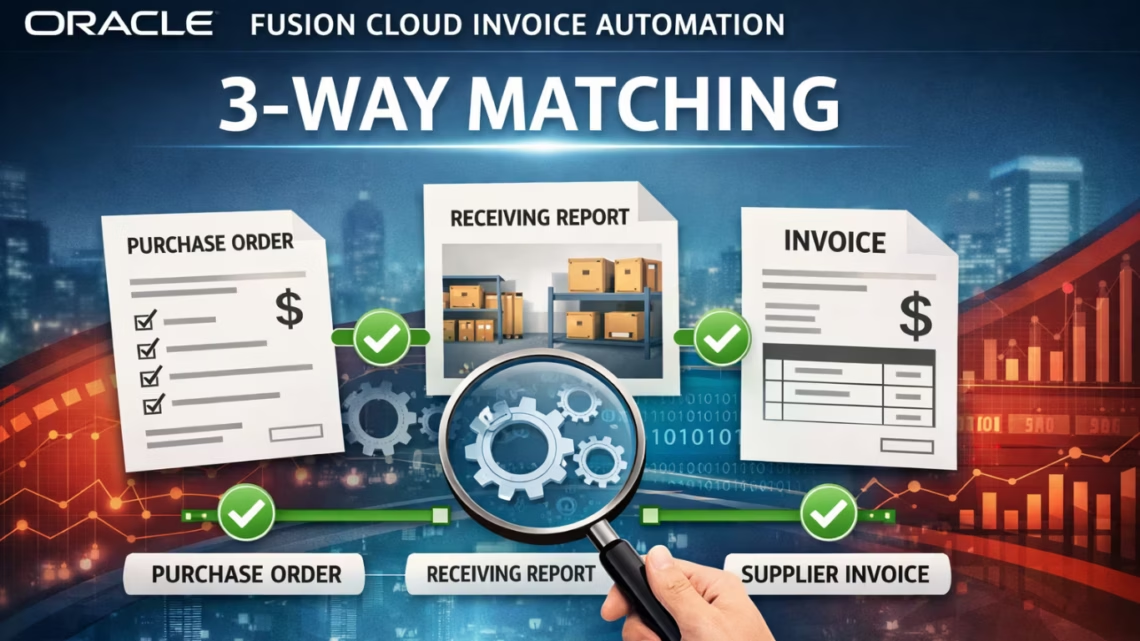
Oracle Fusion Cloud Invoice Automation: 3-Way Matching Without Custom Development
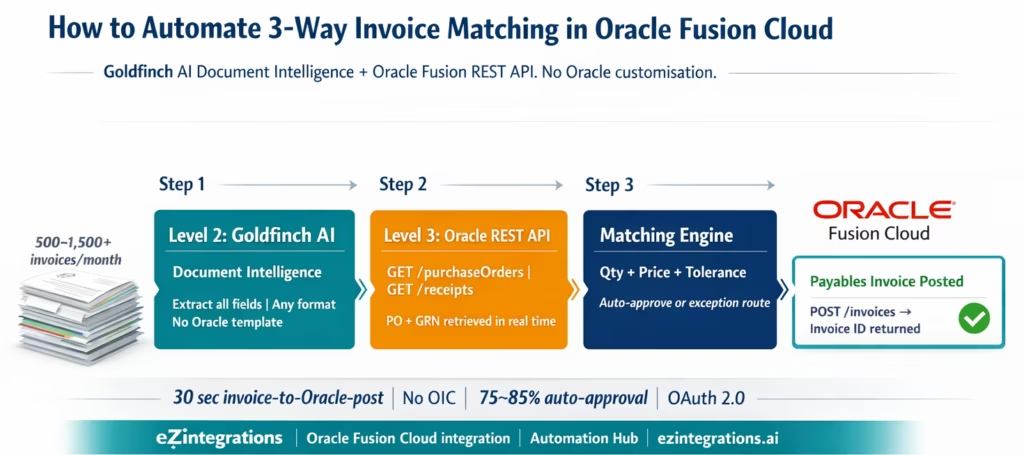
April 7, 2026To automate 3-way invoice matching in Oracle Fusion Cloud without custom development, eZintegrations uses Goldfinch AI Document Intelligence to extract invoice data from any PDF format, calls the Oracle Fusion Cloud REST API (GET /fscmRestApi/resources/11.13.18.05/purchaseOrders for PO data and GET /fscmRestApi/resources/11.13.18.05/purchaseOrders/{id}/child/receipts for GRN data), runs a configurable line-item matching engine with tolerance thresholds, and posts approved invoices to Oracle Payables via POST /fscmRestApi/resources/11.13.18.05/invoices. The entire cycle runs without Oracle customisation, without Oracle Integration Cloud, and processes a standard invoice from PDF extraction to Oracle Payables posting in under 30 seconds.
TL;DR
Oracle Fusion Cloud has a capable AP module: Payables invoices, PO matching, holds and approvals, payment processing. What it does not have: AI-powered PDF extraction from any supplier format, automated pre-matching before the invoice enters the system, and configurable exception routing with pre-populated context. eZintegrations fills this gap using Goldfinch AI Document Intelligence (Level 2) for invoice extraction, Level 3 AI Agents calling Oracle Fusion REST APIs for PO and receipt data, and Oracle Payables REST API posting for approved invoices. Oracle Fusion Cloud REST API base: https://{instance}.oraclecloud.com/fscmRestApi/resources/11.13.18.05/. PO endpoint: purchaseOrders. Receipts endpoint: purchaseOrders/{id}/child/receipts. Invoice creation: invoices (POST). No Oracle Integration Cloud licence required. No Oracle customisation. No custom development. Go live from the Automation Hub Oracle Fusion AP Invoice Processing template in 6-8 hours.
The Oracle Fusion Cloud AP Gap Nobody Talks About
Your Oracle Fusion Cloud Payables module is well-built. Invoice entry, PO matching, holds management, approval workflows, payment scheduling: your Oracle implementation covers all of it.
The problem is not Oracle Fusion Cloud. The problem is the gap between when a supplier invoice arrives and when it reaches Oracle Fusion Cloud’s Payables module.
That gap is 8-15 minutes of manual work per invoice. Your AP clerk opens their email. They find an invoice attachment. They open it, read the header data, note the Oracle PO number, navigate to Oracle Fusion Cloud’s Create Invoice screen, key all the fields, save the draft, navigate to the Payables Manage Invoices page to check the match hold status, then move to the next invoice.
At 1,500 invoices per month, this is 200-375 hours of manual data entry and navigation before Oracle Fusion Cloud’s matching engine even gets to verify anything.
eZintegrations automates everything before and around that Oracle entry step.
What Oracle Fusion Cloud Provides for Invoice Matching
Oracle Fusion Cloud Payables provides capable invoice verification once invoices are in the system. Understanding what it does and where it stops is the foundation for designing the automation layer.
What Oracle Fusion Cloud Payables provides natively:
Manage Invoices app: The primary interface for AP teams to enter, review, and manage supplier invoices. Supports invoice entry, PO number matching, invoice approval workflow, holds management, and payment scheduling.
Automatic Three-Way Matching: When a Payables invoice is entered with a PO number, Oracle Fusion Cloud automatically compares the invoice against the purchase order lines (from Oracle Procurement Cloud) and the receipt transactions (from Oracle Receiving). Oracle applies tolerance rules configured in Manage Payables Options. Invoices outside tolerance receive a hold, visible in the Manage Holds and Releases page.
Invoice Approval Workflow: Oracle Fusion Cloud’s BPM-based approval workflow routes invoices above configured thresholds to the appropriate approver. Approved invoices are cleared for payment.
Oracle Payables REST API: Oracle provides a REST API for external systems to create, retrieve, and update Payables invoices programmatically. Base endpoint: /fscmRestApi/resources/11.13.18.05/invoices. This is the API that eZintegrations uses to post approved invoices to Oracle Payables.
Where Oracle Fusion Cloud Payables stops:
Oracle Fusion Cloud assumes invoices enter the system as structured data: manually entered by an AP clerk in the Manage Invoices app, imported via the Payables Invoice Import spreadsheet or REST API, or received as structured e-invoices via Oracle Supplier Portal or EDI. What Oracle does not provide: AI-powered extraction from unstructured PDF email attachments, automated pre-matching before invoice entry, intelligent exception routing with pre-populated context, or natural language oversight of the AP pipeline.
The Three Manual Bottlenecks That Remain
Even with Oracle Fusion Cloud Payables fully deployed, three manual bottlenecks remain in most enterprise AP workflows.
Bottleneck 1: Unstructured invoice extraction. The majority of supplier invoices arrive as PDF email attachments. Only suppliers using the Oracle Supplier Portal or EDI-capable systems submit structured invoices that bypass manual keying. In practice, this means your AP team manually keys 60-80% of invoice data into Oracle Fusion Cloud’s Create Invoice screen. At 10-15 minutes per invoice, this is the single largest time cost in the Oracle AP workflow.
Bottleneck 2: Hold investigation across multiple Oracle screens. When Oracle Fusion Cloud places an invoice on hold (quantity mismatch, price tolerance exceeded, missing receipt), the AP clerk must navigate to the Manage Holds and Releases page to see the hold reason, then to Manage Invoices to review the invoice, then to the PO Inquiry screen to review the PO, and then to the Receipt Inquiry screen to check the GRN. Each hold requires navigating 3-5 Oracle screens and manually correlating data across all of them. There is no single pre-populated exception summary.
Bottleneck 3: Receipt (GRN) timing mismatches. Oracle Fusion Cloud places invoices on a Quantity Ordered/Amount Ordered match hold when no receipt exists for the referenced PO. The AP clerk must monitor the hold queue, check periodically whether the receipt has been posted in Oracle Receiving, and manually clear the hold when the receipt appears. This is a purely administrative task with no intelligence: your AP team is doing what a Watcher could do automatically.
How eZintegrations Automates Oracle Fusion Invoice Matching
eZintegrations adds the extraction and pre-matching layer that Oracle Fusion Cloud is missing, while using Oracle Fusion Cloud REST APIs for all data access and posting.
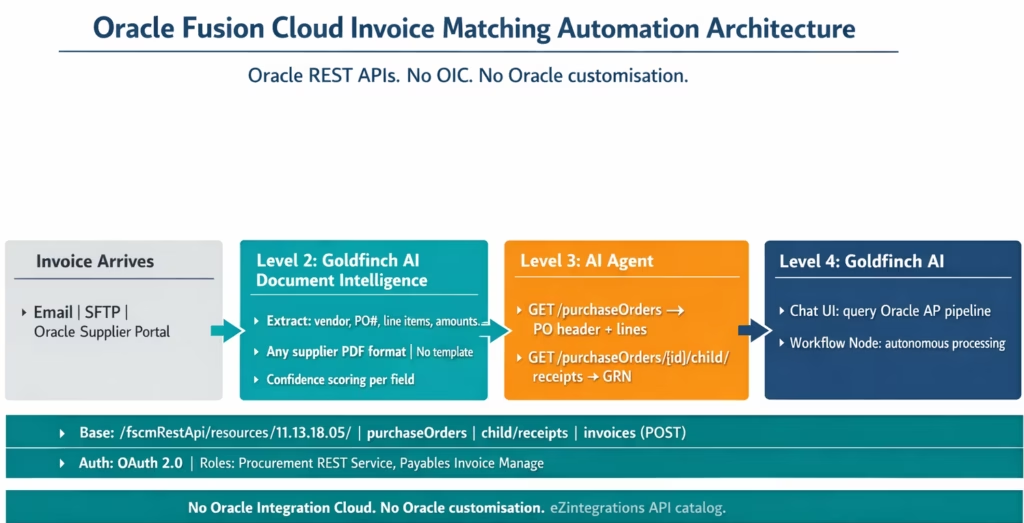
Level 1 (iPaaS Workflows): Receives invoice email attachments, routes files from SFTP or Oracle Supplier Portal, calls Oracle Fusion Cloud REST APIs for PO and receipt data, and posts approved invoices to Oracle Payables via REST API. Level 1 is the connectivity layer.
Level 2 (AI Workflows, Goldfinch AI Document Intelligence): Extracts all invoice fields from any PDF format without Oracle-specific templates. Handles the full range of your supplier formats: digital PDFs, scanned invoices, multi-page documents, multi-language invoices, invoices with and without explicit PO references. Outputs structured JSON ready for Oracle REST API calls.
Level 3 (AI Agents, Oracle REST API calls): The matching agent calls Oracle Fusion Cloud REST APIs to retrieve PO and receipt data. Compares extracted invoice data against Oracle PO lines and receipt transactions at line-item level with configurable tolerance thresholds per vendor category. Auto-approves matched invoices. Routes exceptions to the AP supervisor with Oracle PO data, receipt data, and variance detail pre-populated.
Level 4 (Goldfinch AI): Orchestrates the workflow as a Workflow Node (autonomous end-to-end processing) and as Chat UI (AP manager queries the Oracle AP pipeline status in natural language without navigating Oracle screens).
The Oracle Fusion REST API Layer: Endpoints Used
This section gives the exact Oracle Fusion Cloud REST API calls that eZintegrations makes for 3-way matching. Your Oracle Cloud administrator can verify these against your instance configuration.
Base URL and Authentication
All Oracle Fusion Cloud REST API calls use:
Base URL        : https://{your-instance}.oraclecloud.com/fscmRestApi/resources/11.13.18.05/

Authentication  : OAuth 2.0 Bearer Token (recommended)
                  or Basic Auth

Content-Type    : application/vnd.oracle.adf.resourceitem+json
For OAuth 2.0: configure an Oracle IDCS (Identity Cloud Service) application with the integration user’s credentials. The access token obtained from the IDCS token endpoint is used as the Bearer token on all subsequent API calls. This token is refreshed automatically by the eZintegrations credential vault.
Required Oracle user roles/privileges: – Procurement REST Service (subrole of Procurement Integration Specialist) – Payables Invoice Inquiry (for GET on invoices) – Manage Payables Invoice (data security policy for invoice creation POST)
Purchase Order Retrieval
Base URL: https://{your-instance}.oraclecloud.com/fscmRestApi/resources/11.13.18.05/

Authentication: OAuth 2.0 Bearer Token (recommended)
                or Basic Auth

Content-Type: application/vnd.oracle.adf.resourceitem+json
This returns the PO header with expanded line items: ItemDescription, Quantity, UnitPrice, LineAmount, ItemNumber, UnitOfMeasure, LineType. The fields parameter limits the response to fields needed for matching, reducing payload size.
For pagination: limit and offset parameters. Default limit is typically 25 records; increase to 100 for batch processing.
Receipt (GRN) Retrieval
Oracle Fusion Cloud stores goods receipts as child resources of the purchase order. The receipt endpoint navigates from the PO to its receipts:
GET https://{instance}.oraclecloud.com/fscmRestApi/resources/11.13.18.05/purchaseOrders/{PurchaseOrderId}/child/receipts
  ?onlyData=true
This returns all receipt transactions against the PO, with QuantityReceived, ItemDescription, ReceiptDate, ReceiptNumber, and TransactionType. Filtering for TransactionType = RECEIVE gives only the standard receive transactions (excluding corrections and returns).
For cases where the PO number (not the internal Oracle PurchaseOrderId) is the reference, the two-step approach: 1. GET purchaseOrders?q=OrderNumber='{PO_NUMBER}'&fields=PurchaseOrderId to retrieve the internal ID 2. GET purchaseOrders/{PurchaseOrderId}/child/receipts to retrieve receipts
Invoice Posting to Oracle Payables
Approved invoices are posted to Oracle Payables via:
POST https://{instance}.oraclecloud.com/fscmRestApi/resources/11.13.18.05/invoices

Content-Type: application/vnd.oracle.adf.resourceitem+json
Authorization: Bearer {access_token}

{
  "InvoiceNumber": "INV-2026-04721",
  "InvoiceDate": "2026-03-18",
  "BusinessUnit": "US1 Business Unit",
  "Supplier": "Hartland Building Materials",
  "SupplierSite": "HARTLAND-HQ",
  "InvoiceCurrencyCode": "USD",
  "InvoiceAmount": 37565.00,
  "PaymentTerms": "NET30",
  "PurchaseOrderNumber": "PO-2026-2089",
  "lines": [
    {
      "LineNumber": 1,
      "LineType": "Item",
      "LineAmount": 4250.00,
      "Quantity": 100,
      "UnitPrice": 42.50,
      "POLineNumber": 1
    }
  ]
}
Oracle Fusion Cloud’s automatic 3-way matching runs on the posted invoice: it compares the PurchaseOrderNumber and line details against the Oracle PO and receipt records. Oracle returns the InvoiceId and InvoiceStatus on success. If Oracle’s LIV tolerance is exceeded, a hold is applied: eZintegrations catches this in the response and routes to the exception flow rather than proceeding.
Invoice Hold Check
After posting, eZintegrations verifies the Oracle invoice hold status:
GET https://{instance}.oraclecloud.com/fscmRestApi/resources/11.13.18.05/invoices/{InvoiceId}/child/holds
If holds are present: the exception routing flow is triggered with the hold reason (Oracle provides a structured hold reason code and description) appended to the exception report.
Before vs After: Manual Oracle Fusion AP vs Automated
| Process Step | Manual Oracle Fusion AP | Automated with eZintegrations |
|---|---|---|
| Invoice receipt | AP clerk monitors email inbox | Level 1 email connector receives all PDF attachments automatically |
| Oracle data entry | AP clerk keys all fields in Manage Invoices app | Level 2 Goldfinch AI extracts all fields, no Oracle screen navigation |
| PO lookup | AP clerk navigates PO Inquiry in Oracle | Level 3 agent: GET /purchaseOrders returns PO in 1–2 sec |
| Receipt check | AP clerk navigates Receipt Inquiry in Oracle | Level 3 agent: GET /purchaseOrders/{id}/child/receipts returns GRN |
| Pre-match tolerance | Not performed before Oracle entry | Configurable matching engine applies before Oracle posting |
| Oracle hold investigation | AP clerk navigates 3–5 Oracle screens per hold | Exception report: extracted invoice + Oracle PO + receipt + hold reason |
| Receipt timing mismatch | AP clerk monitors hold queue, manual follow-up | Watcher monitors Oracle receipts endpoint, auto-resumes on GRN creation |
| Oracle invoice posting | AP clerk saves invoice in Manage Invoices | POST /invoices via REST API, InvoiceId returned |
| Hold release | AP clerk manually releases hold after GRN confirmed | Watcher detects GRN, matching resumes, hold pre-resolved before Oracle entry |
| AP manager visibility | Oracle reports, manual navigation | Goldfinch AI Chat UI: natural language query of Oracle AP pipeline |
| Oracle customisation | Some teams build custom Oracle integrations | Zero Oracle customisation required |
| Oracle Integration Cloud | Required if using OIC for this workflow | Not required: eZintegrations connects directly to Oracle REST APIs |
Step-by-Step: From Email Invoice to Oracle Payables Posting
Here is the complete automated Oracle Fusion Cloud 3-way matching cycle for a standard invoice.
Step 1: Invoice email arrives. Level 1 routes to extraction. Supplier sends a PDF invoice to the AP email inbox at 9:03 AM. The eZintegrations email connector (Gmail API or Microsoft Graph) detects the attachment, classifies it as an invoice, and passes it to the Level 2 Document Intelligence queue. Time: 2-3 seconds.
Step 2: Goldfinch AI Document Intelligence extracts all fields.
Supplier              : "Hartland Building Materials Ltd"
InvoiceNumber         : "INV-2026-04721"
InvoiceDate           : "2026-03-18"
PurchaseOrderNumber   : "PO-2026-2089"
12 line items with descriptions, quantities, unit prices, and line totals. InvoiceAmount: 37565.00. Currency: USD. PaymentTerms: NET30. All fields above 0.93 confidence. No fields flagged for review. Time: 8 seconds.
Step 3: Level 3 agent calls Oracle purchaseOrders REST API.
GET /fscmRestApi/resources/11.13.18.05/purchaseOrders
  ?q=OrderNumber='PO-2026-2089'
  &expand=lines
  &onlyData=true
Response: PO header (Supplier: Hartland Building Materials, BusinessUnit: US1, Currency: USD, OrderDate: 2026-03-05), 12 PO lines with agreed quantities and unit prices. PurchaseOrderId: 300000190847291 returned for receipt lookup. Time: 1-2 seconds.
Step 4: Level 3 agent retrieves receipts from Oracle.
GET /fscmRestApi/resources/11.13.18.05/purchaseOrders/300000190847291/child/receipts
  ?onlyData=true
Response: Receipt RCV-2026-08431, received on March 15, 12 line items, all quantities matching PO quantities, TransactionType: RECEIVE. No damage or shortage noted. Time: 1-2 seconds.
Step 5: Matching engine comparison. Line-item comparison: 12 line items: invoice quantity vs receipt quantity (all match exactly) . Invoice unit prices vs Oracle PO unit prices (all within 1.8% of PO price, within configured 3% tolerance) . Invoice total ($37,565.00) vs PO total ($37,800.00): variance -$235.00, 0.62%, within tolerance . Duplicate check: INV-2026-04721 from Hartland Building Materials not in invoice history for this fiscal year . Match result: approved within tolerance. Time: under 1 second.
Step 6: POST approved invoice to Oracle Payables.
GET /fscmRestApi/resources/11.13.18.05/purchaseOrders
  ?q=OrderNumber='PO-2026-2089'
  &expand=lines
  &onlyData=true
Oracle response: InvoiceId: 300000210984621, InvoiceStatus: Validated. Oracle’s automatic 3-way matching confirms the match (same result as our pre-check). Invoice is now in Oracle Payables, approved, and scheduled for payment on April 17 per Net 30 terms. Time: 2-3 seconds.
Step 7: Hold check confirms clean posting.
GET /fscmRestApi/resources/11.13.18.05/invoices/300000210984621/child/holds
Response: no holds. Audit record created: all fields extracted, Oracle API calls logged, match comparison results, Oracle InvoiceId returned.
Total elapsed time: 17-22 seconds from email arrival to Oracle Payables posting. Human involvement: zero.
Receipt timing mismatch scenario: A different invoice references PO-2026-2091. The Level 3 agent calls the receipts endpoint and receives an empty response: no receipt transactions exist yet. The matching engine holds the invoice. A Watcher is activated, polling Oracle’s receipts endpoint for PO-2026-2091 at a configurable interval (every 30-60 minutes). When the warehouse team posts the receipt in Oracle Receiving the next morning, the next Watcher poll detects the new receipt records. The matching workflow resumes automatically. Time from receipt posting to Oracle Payables invoice post: under 1 hour (next Watcher cycle). No AP clerk involved.
Key Outcomes and Results
Enterprise Oracle Fusion Cloud AP teams deploying eZintegrations for 3-way matching automation achieve the following:
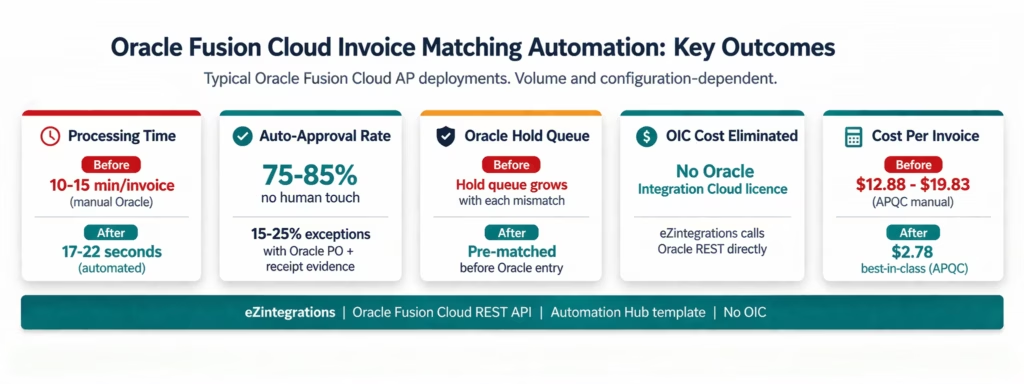
Processing time: 17-22 seconds from invoice PDF arrival to Oracle Payables posting for auto-matched invoices. Compared to 10-15 minutes of manual Oracle screen navigation per invoice. At 1,500 invoices per month, this recovers 200-375 hours of AP team time per month.
Auto-approval rate: 75-85% of invoices processed without any AP team involvement. The 15-25% of exceptions are routed with Oracle PO data, receipt data, and variance detail pre-populated, reducing investigation time from 15-20 minutes to 3-5 minutes.
Oracle hold management: Invoices that would generate Oracle AP holds (due to matching tolerance violations) are caught at the pre-match step and routed as exceptions before they enter Oracle. This reduces the Oracle holds queue, making the Manage Holds and Releases screen manageable for the exceptions that genuinely require it.
Receipt timing mismatch handling: For the 15-25% of invoices where receipts have not been posted in Oracle Receiving at the time of invoice arrival, Watcher-based automatic match resumption eliminates the manual hold queue monitoring task, typically saving 3-6 minutes per invoice per hold cycle.
No Oracle Integration Cloud: Organisations evaluating Oracle Integration Cloud (OIC) for this AP automation use case can achieve the same API connectivity using eZintegrations at a fraction of the OIC licensing and implementation cost. Oracle OIC Enterprise edition costs approximately $30.97 per day at idle. eZintegrations pricing starts at $5/month per automation. For the full Oracle OIC cost comparison, see the Oracle integration platform guide.
Cost per invoice: Best-in-class automated AP teams achieve $2.78 per invoice versus $12.88-$19.83 for manual processing (APQC 2025). For an Oracle Fusion Cloud team processing 2,000 invoices per month, annual cost savings reach $243,360-$408,120.
How to Get Started
Step 1: Configure Oracle Fusion Cloud User and API Access
Create a dedicated Oracle integration user in Oracle Fusion Cloud. Assign the required roles: – Procurement REST Service (grants access to purchaseOrders and receipts endpoints) . Manage Payables Invoice (data security policy for POST /invoices) . Payables Invoice Inquiry (for GET on invoices and holds)
For OAuth 2.0: create an Oracle IDCS Confidential Application for the integration user. Obtain the Client ID and Client Secret. The OAuth 2.0 token endpoint follows the pattern:
Token URL:
https://idcs-{tenant}.identity.oraclecloud.com/oauth2/v1/token

Scope:
https://{instance}.oraclecloud.com:443/fscmRestApi/resources/11.13.18.05/.default
Oracle setup time: approximately 30-45 minutes with Oracle Cloud administrator access.
Step 2: Import the Oracle Fusion AP Invoice Processing Template
Go to the Automation Hub and import the Oracle Fusion AP Invoice Processing template. It includes Goldfinch AI Document Intelligence, the Oracle Fusion REST API calls (purchaseOrders GET, receipts GET, invoices POST, holds GET), the matching engine, the Watcher for receipt timing mismatches, and the exception routing flow pre-configured.
Step 3: Add Oracle Credentials and Email Ingestion
Add your Oracle IDCS OAuth 2.0 Client ID and Secret (or Oracle user Basic Auth credentials) to the eZintegrations credential vault. Add your Oracle instance hostname (e.g. company-instance.oraclecloud.com). Add email system credentials (Gmail API or Microsoft Graph) for invoice attachment ingestion. Average setup: 20-30 minutes total.
Step 4: Configure Matching Tolerances and Exception Routing
Set price variance tolerance per vendor category (e.g. 3% for standard suppliers, 1% for high-value goods). Set quantity variance tolerance. Configure the AP supervisor for exception routing. Set the Oracle Business Unit and Supplier Site defaults for invoice posting. Configure the Watcher interval for receipt timing mismatch handling (30-60 minutes recommended).
Step 5: Dev Test with Real Oracle Fusion Cloud Data and Promote
In the Dev environment, test against your actual Oracle Fusion Cloud instance using representative sample invoices and real Oracle PO numbers. Confirm that the purchaseOrders API call returns correct PO data for your test POs. Confirm the receipts call returns GRN data. Confirm the POST /invoices creates a valid Oracle Payables invoice with the correct status. Run a timing mismatch test. Promote to production when validated.
Total configuration time: 6-8 hours from template import to Oracle Fusion Cloud production go-live.
FAQ
1. How does 3 way matching automation work with Oracle Fusion Cloud in eZintegrations
eZintegrations adds an AI driven extraction and pre matching layer before invoices enter Oracle Payables. Goldfinch AI Document Intelligence extracts invoice data from PDFs without templates while AI agents retrieve purchase order and receipt data using Oracle Fusion Cloud REST APIs. A matching engine compares invoice PO and GRN at line item level and matched invoices are posted to Oracle Payables while exceptions triggered by holds are routed for review.
2. How long does it take to set up automated invoice matching with Oracle Fusion Cloud
Setup typically takes 6 to 8 hours including Oracle user and role setup OAuth configuration credential vault setup email ingestion tolerance configuration and testing with live Oracle data. No Oracle customisation or additional middleware is required.
3. Does eZintegrations require Oracle Integration Cloud to connect to Oracle Fusion Cloud
No. eZintegrations connects directly to Oracle Fusion Cloud REST APIs using OAuth or Basic Authentication without requiring Oracle Integration Cloud eliminating additional licensing cost and dependency on specialised middleware.
4. What Oracle Fusion Cloud roles are required for invoice matching automation
Three standard roles are required including Procurement REST Service for purchase order and receipt access Manage Payables Invoice data security policy for invoice creation and Payables Invoice Inquiry for invoice and hold status checks. These are assigned through the Oracle Security Console without custom role creation.
5. What happens if a receipt is not posted when the invoice arrives
If no receipt is found the invoice is placed in a pending queue within eZintegrations instead of being sent to Oracle. A Watcher monitors the receipts API and when the receipt is posted the workflow resumes automatically processing the invoice through matching and posting without manual intervention eliminating timing mismatch issues.
Automate Oracle Fusion Cloud AP Without Oracle Integration Cloud
Oracle Fusion Cloud Payables handles invoice verification, holds, approvals, and payments with enterprise-grade capability. The manual work that remains is in the steps before and around Oracle: extracting PDF invoices, keying them into Oracle, navigating to check PO and receipt data, and manually tracking timing mismatch holds.
eZintegrations automates all of that using Oracle Fusion Cloud’s own published REST APIs. Goldfinch AI Document Intelligence extracts invoices from any format. Level 3 AI Agents retrieve PO and receipt data from Oracle. The matching engine pre-validates before Oracle entry. Approved invoices POST directly to Oracle Payables. Timing mismatches are handled by Watchers. Your AP team handles the 15-25% of genuine exceptions, not the 75-85% of routine invoices.
No Oracle Integration Cloud. No Oracle customisation. No custom development. The Oracle Fusion AP Invoice Processing template in the Automation Hub covers the complete workflow.
Import the Oracle Fusion AP Invoice Processing Template from the Automation Hub and go live in 6-8 hours. Or book a free demo with your Oracle Fusion Cloud instance details and invoice volume. We will walk through the exact REST API configuration for your environment in the session.
For the complete 3-way matching context, see What Is 3-Way Matching in Accounts Payable and the enterprise AP automation guide.

