
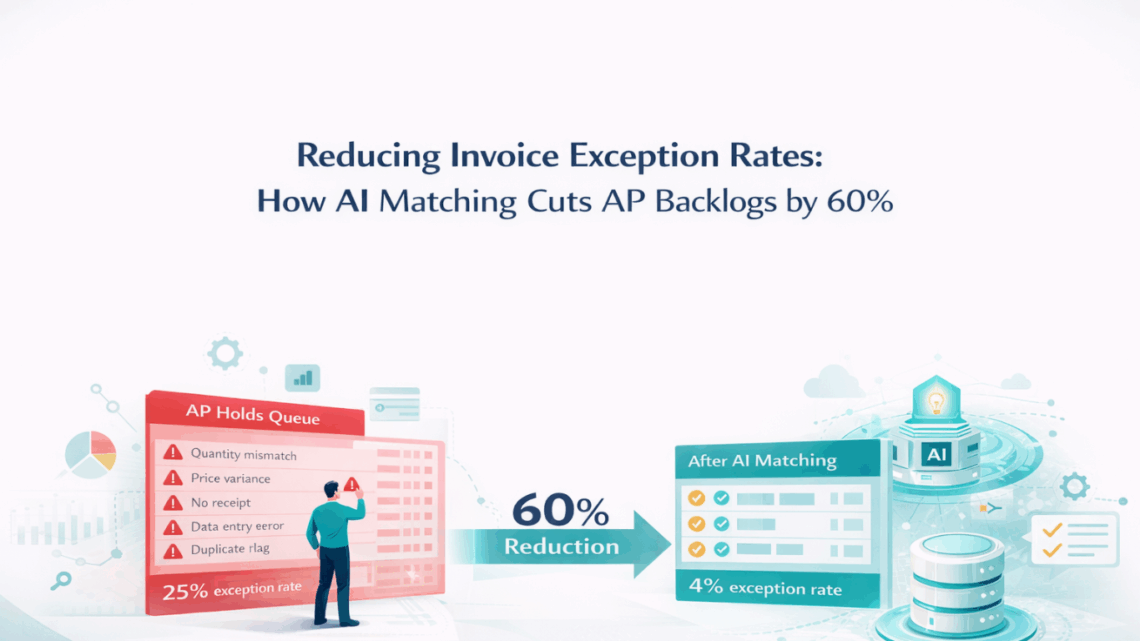
Reducing Invoice Exception Rates: How AI Matching Cuts AP Backlogs by 60%
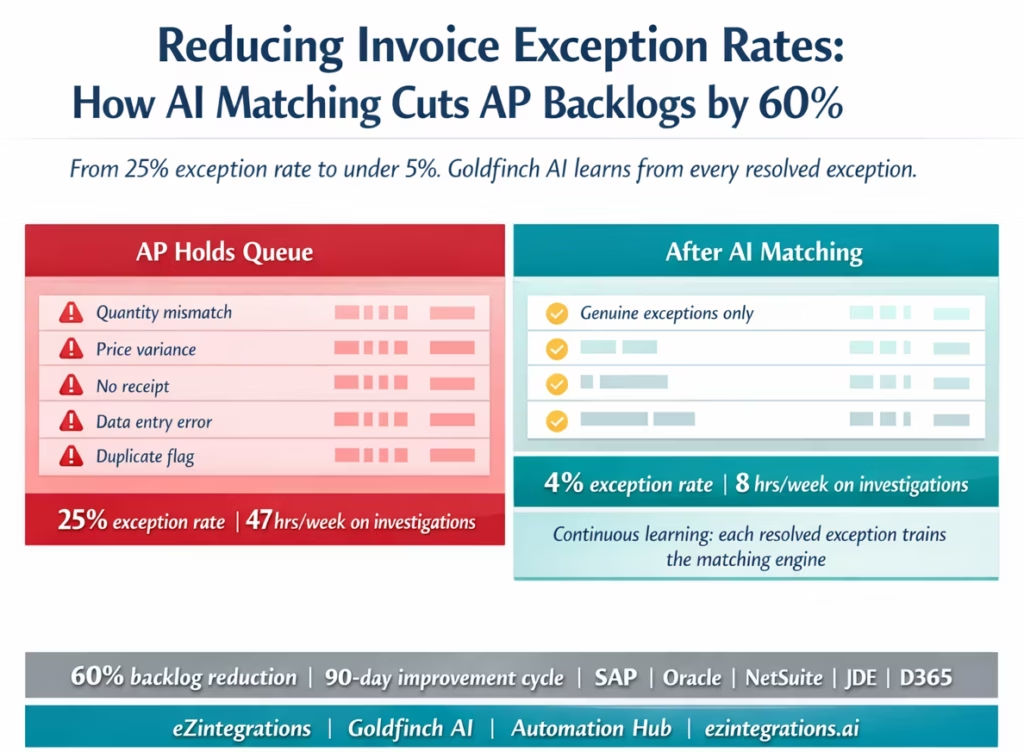
April 16, 2026AI invoice matching reduces AP exception rates from a typical 20-30% to under 5% by addressing the root causes of exceptions rather than just routing them: Goldfinch AI of eZintegrations extracts invoice data with 95-99% field accuracy, pre-matches against ERP purchase order and receipt data before entry, applies configurable tolerance rules per vendor category, and learns from each resolved exception to improve matching accuracy over time. Finance teams that deploy AI matching typically see AP backlog reduction of 50-65% within 90 days, with ongoing improvement as the system accumulates resolution history.
TL;DR
- The average AP team processes invoices at a 20–30% exception rate, consistent with APQC benchmark data on invoice processing performance. Meaning 1 in 4 invoices triggers a hold, a discrepancy flag, or a manual investigation before it can be paid. Each exception costs 15-20 minutes of AP team time beyond standard processing.
- Exception rate is not primarily a matching problem. It is a root cause problem: data entry errors, tolerance settings that do not match real supplier variance patterns, receipt timing mismatches, and price discrepancies that repeat month after month from the same suppliers.
- Goldfinch AI of eZintegrations reduces exception rates in two ways: pre-matching accuracy (catching data errors before they create exceptions) and continuous learning (the system learns from resolved exceptions to prevent the same exceptions recurring). This operates across the 4-level platform: Level 1 (iPaaS Workflows) handles ERP connectivity and document routing; Level 2 (Goldfinch AI Document Intelligence) extracts invoice data at 95-99% accuracy; Level 3 AI Agents query ERP PO and receipt data, run the matching engine, and route exceptions; and Level 4 (Goldfinch AI) orchestrates the full workflow as a Workflow Node and surfaces pattern recommendations via Chat UI.
- Teams that deploy AI invoice matching see exception rates fall from 20-30% to 5-10% within 60-90 days, and AP backlog reduction of 50-65%.
- Works with SAP S/4HANA, Oracle Fusion Cloud, NetSuite, JD Edwards, Dynamics 365 Finance, Infor, and Acumatica.
The AP Exception Backlog That Every Finance Director Knows
Your AP manager pulls up the holds queue on a Monday morning. There are 47 invoices waiting. Some have been there since last Wednesday. Three of them are from your largest supplier, same discrepancy they raised last month and the month before. Two more are timing mismatches: the invoices arrived before the warehouse posted the goods receipt. Eleven are from the same batch that your AP clerk entered on Friday afternoon, and the quantities are off by one unit each because of a data entry error nobody caught until the match failed.
This is not a processing failure. Your team processed those invoices. The failure is that 47 invoices are now in a queue that requires individual investigation, supplier contact, receiving follow-up, or tolerance reconfiguration before any of them can be paid.
Suppliers start calling. Your finance director asks why the payables aging report shows 60 invoices past due. Your AP team is investigating holds instead of processing new invoices. The backlog compounds.
The invoice exception rate is the single most actionable metric in accounts payable, and a primary focus area in Gartner research on AP automation and intelligent invoice processing. Most teams track it. Fewer teams have a systematic plan for reducing it. This post covers what drives high exception rates and how AI matching brings them down.
What an Invoice Exception Actually Costs
Before the root causes: the cost of an exception is larger than most AP teams calculate, a pattern also observed in McKinsey & Company research on automation in finance operations.
Direct cost per exception:
- Investigation time: 15-20 minutes for the AP clerk to identify the discrepancy, locate the relevant documents, and determine the resolution path
- Resolution time: varies by exception type. Data entry corrections: 5 minutes. Supplier contact for price discrepancy: 30-90 minutes (including the email exchange and waiting for the supplier’s response). Receipt timing follow-up with the warehouse: 20-45 minutes. Tolerance reconfiguration: 30-60 minutes with an IT or ERP administrator
Indirect costs:
- Payment delays: invoices in exception status cannot be paid. Late payment to suppliers damages relationships and can cost early payment discounts (typically 1-2% of invoice value for Net-10 or 2/10 Net-30 terms). On a 500,000annualspendsupplierwith21,370 in lost discount per delayed payment cycle.
- AP team capacity: an AP team running at 25% exception rate spends roughly 25% of their investigation time on exceptions rather than processing new invoices. At 2 AP FTEs processing 1,000 invoices per month, 250 invoices per month create an exception queue requiring 62-83 hours of investigation time. That is equivalent to more than one full FTE’s week devoted entirely to exception management.
- Supplier relationship friction: suppliers who receive late payments or who need to respond to frequent discrepancy inquiries eventually escalate. Escalations consume finance manager and procurement director time.
The real target: drive exception rates from 20-30% to 5-10%. At 1,000 invoices per month, moving from 25% exceptions to 5% exceptions reduces investigation time by 30-40 hours per month and frees that capacity for value-added work.
The Six Root Causes of High Exception Rates
Exception rates are high for specific, identifiable reasons, with ERP-specific patterns (such as JD Edwards voucher matching exceptions) widely documented in Oracle community resources.
Understanding root causes is the prerequisite for reduction.
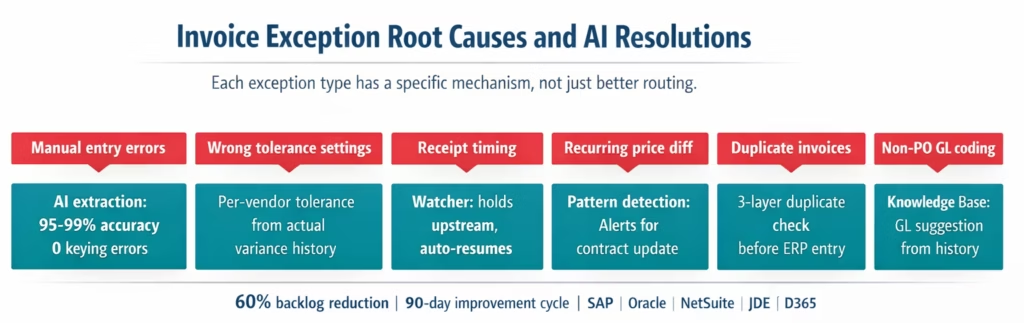
Root cause 1: Data entry errors from manual invoice keying. When AP clerks manually enter invoice data, transcription errors are unavoidable. A unit price of $42.50 entered as $42.05. A quantity of 100 entered as 10. An invoice date entered with the wrong month, causing the payment terms to calculate incorrectly. These errors create artificial exceptions: the underlying invoice and PO may agree perfectly, but the keyed data does not. According to APQC benchmarks, manual data entry contributes to 15-25% of invoice exceptions in organisations without automated extraction.
Root cause 2: Tolerance settings that do not reflect actual supplier behaviour. Most ERP systems ship with default tolerance settings (e.g. 0% price variance, exact quantity match). Many AP teams apply these defaults without analysing their actual supplier variance patterns. The result: suppliers who consistently invoice within 1-2% of the PO price (due to freight charges, minor rounding, currency fluctuation, or legitimate price adjustments) generate exceptions every month. These are not genuine discrepancies; they are tolerance misconfigurations.
Root cause 3: Receipt timing mismatches. Invoices that arrive before the goods received note is posted in the ERP create automatic exceptions or holds. This is one of the most common and most preventable exception types. The invoice and PO may be a perfect match; the exception exists because the receipt has not been posted yet.
Root cause 4: Supplier price discrepancies that repeat. Some suppliers consistently invoice at a price that differs from the PO price: a contracted price increase that has not been updated in the ERP, a freight surcharge that appears on every invoice, a fuel levy, or a currency adjustment. These generate an exception every month from the same supplier. Each exception is investigated, approved as a one-time exception, and the cycle repeats next month.
Root cause 5: Duplicate invoice submissions. Suppliers occasionally resubmit invoices that have already been paid or are already in the AP pipeline (sometimes deliberately, sometimes as a system error on their side). Without systematic duplicate detection, these create confusion and investigation time, and occasionally result in double payment.
Root cause 6: Non-PO invoice GL coding uncertainty. Service invoices, subscriptions, and expense invoices that arrive without a PO reference require manual G/L account assignment. When the correct G/L account is ambiguous (a utility invoice that could be coded to several cost centres, for example), AP clerks create exceptions by routing to their manager for coding guidance. This is a judgment exception rather than a data exception.
How AI Matching Addresses Each Root Cause
Goldfinch AI of eZintegrations addresses each root cause with a specific mechanism, rather than simply routing exceptions faster.
Root cause 1 addressed: Goldfinch AI Document Intelligence replaces manual keying. AI extraction using computer vision and LLM achieves 95-99% field accuracy on digital PDFs. Transcription errors from manual entry are eliminated for the 75-85% of invoices that process automatically. For the remaining invoices that are flagged for review, the extraction confidence score identifies the specific field that is uncertain: the AP clerk reviews that field rather than re-keying the entire invoice. The direct reduction: data-entry-driven exceptions fall to near zero.
Root cause 2 addressed: Per-vendor-category tolerance configuration. Rather than applying a single global tolerance, eZintegrations allows tolerance rules to be set per vendor category or per individual vendor. The matching engine analyses your exception history (from the first 30-60 days of deployment) and identifies the actual variance patterns for each vendor: which suppliers consistently invoice at a 1.5% premium, which use rounding to 2 decimal places that creates minor discrepancies, which apply freight surcharges. Tolerance settings are adjusted per vendor based on actual data, not defaults.
Root cause 3 addressed: Watcher-based receipt timing management. When an invoice arrives before the goods receipt is in the ERP, the invoice is held in the eZintegrations queue rather than creating an ERP exception. A Watcher polls the ERP receiving endpoint at configurable intervals. When the receipt is posted, the Watcher resumes the match automatically. The invoice never enters the ERP exception queue because it was held upstream until all three documents were available.
Root cause 4 addressed: Recurring price discrepancy detection and contract update alerts. When the same price discrepancy appears from the same supplier for 2 or more consecutive months, the Level 3 AI Agent flags it as a recurring pattern rather than a one-time exception. The AP supervisor receives a structured alert: “Supplier XYZ has invoiced $44.00 per unit against the PO price of $42.50 for 3 consecutive months. Recommended action: update the ERP purchasing contract price or issue a formal price acknowledgement.” This converts a recurring monthly investigation into a single contract update action.
Root cause 5 addressed: Systematic duplicate detection before ERP entry. Before any invoice is posted to the ERP, the AI Agent checks for duplicates: same invoice number and vendor in the ERP AP ledger or pending queue, same amount and vendor within a rolling 90-day window (catches invoices submitted under different invoice numbers), and same PO number with the same line item quantities (catches invoices for goods already billed). Duplicates route to the AP supervisor as a potential duplicate rather than entering the processing queue.
Root cause 6 addressed: Knowledge Base GL coding for non-PO invoices. The Goldfinch AI Knowledge Base stores the G/L coding history for each vendor (or vendor category). When a non-PO invoice arrives, the Knowledge Base suggests the G/L account and cost centre based on historical coding. High-confidence suggestions (above the configured threshold) create the GL-coded invoice for single-click approval. Low-confidence suggestions route with the suggested coding pre-populated, reducing the AP supervisor’s decision from a research task to a confirmation.
How Goldfinch AI Learns from Resolved Exceptions
The continuous learning mechanism is what separates ongoing exception rate reduction from a one-time accuracy improvement.
The learning cycle works as follows:
Step 1: Exception is created and routed. The matching engine identifies a discrepancy: invoice unit price $44.00, PO price $42.50, 3.8% variance, outside the 3% configured tolerance for this vendor. The exception is routed to the AP supervisor with the invoice, PO data, and variance pre-populated.
Step 2: AP supervisor resolves the exception. The supervisor reviews and approves the exception: the $44.00 price is correct because the supplier applied a raw material surcharge that was verbally agreed but not updated in the PO. The exception is resolved with an approval note: “Approved: raw material surcharge per verbal agreement with supplier. Action required: update contract price.”
Step 3: The resolution is captured in the Goldfinch AI Knowledge Base. The resolved exception is stored: vendor XYZ, price variance type, approved amount, approval note, resolution action. This creates a training record for the matching engine.
Step 4: Pattern recognition across resolved exceptions. After 2-3 months of operation, the Knowledge Base contains resolution history across all exception types and vendors. The pattern recognition layer identifies: – Vendor XYZ: consistently approved for up to 5% price variance over 4 months. Recommended action: update vendor tolerance to 5%. – Supplier ABC: duplicate submissions detected in months 2, 4, and 6. Recommended action: flag all ABC submissions for enhanced duplicate check. – Non-PO invoices from vendor category IT Services: 92% historically coded to G/L 63100. Confidence threshold for auto-coding this category: raise from 0.88 to 0.94.
Step 5: Tolerance and threshold recommendations are presented. The Goldfinch AI Chat UI surfaces these recommendations to the AP manager or finance director: “Based on 90 days of resolution history, adjusting these 4 vendor tolerance settings would eliminate 34 recurring exceptions per month.” The finance director reviews and approves the changes. The matching engine updates.
Step 6: Exception rate falls further. With tolerance settings calibrated to actual supplier behaviour, recurring exceptions from those suppliers stop generating. The exception rate falls from 8% to 4%. The next 90-day cycle finds the next set of calibration opportunities.
This is the mechanism that drives exception rates below 5% over time. Static matching systems maintain a fixed false-positive rate indefinitely. A learning system reduces it continuously until genuine exceptions (actual discrepancies that require investigation) are the only ones that remain.
Before vs After: High Exception Rate vs AI-Managed AP
| Metric | Before: Manual AP (25% Exception Rate) | After: AI Matching (Under 5% Exception Rate) |
|---|---|---|
| Exception rate | 20–30% of invoices | 3–6% of invoices |
| Exception investigation time | 15–20 min per exception | 3–5 min per exception (pre-populated evidence) |
| Monthly investigation hours (1,000 invoices) | 62–83 hours | 6–10 hours |
| Receipt timing exceptions | Fills the holds queue automatically | Held upstream by Watcher, never enters exception queue |
| Data entry exception rate | 15–25% of exceptions caused by keying errors | Near zero: AI extraction replaces manual keying |
| Recurring supplier discrepancies | Investigated and approved monthly | Detected as patterns, resolved via tolerance update |
| Duplicate invoice detection | Manual spot check or none | Systematic 3-layer check before ERP entry |
| Non-PO GL coding exceptions | Routed to supervisor for coding research | Knowledge Base suggests coding, single-click approval |
| Tolerance settings | Global defaults, not calibrated to supplier behaviour | Per-vendor tolerance from actual resolution history |
| Exception learning | None: same exceptions recur monthly | Continuous: resolved exceptions train tolerance updates |
| AP backlog after 90 days | Baseline + growth | 50–65% reduction |
| Supplier payment delays from exceptions | Regular | Rare: only genuine discrepancies delay payment |
| Early payment discount capture | Inconsistent: exceptions delay payment past discount window | Improved: fewer exceptions means fewer missed discount windows |
Step-by-Step: The Exception Reduction Workflow
Here is how a high-exception AP environment transforms over a 90-day deployment cycle.
JDE, D365, or other). Run the baseline measurement: the AI Agent queries your ERP’s invoice history for the past 60 days, classifies exceptions by type (data entry, tolerance, timing, duplicate, GL coding, genuine discrepancy), and generates the exception root cause report. This tells you exactly which root cause is generating the most exceptions before you change any settings.
Days 1-7: Baseline measurement and template deployment. Import the Automation Hub AP Exception Management template. Connect your ERP (SAP, Oracle, NetSuite, JDE, D365, or other). Run the baseline measurement: the AI Agent queries your ERP’s invoice history for the past 60 days, classifies exceptions by type (data entry, tolerance, timing, duplicate, GL coding, genuine discrepancy), and generates the exception root cause report. This tells you exactly which root cause is generating the most exceptions before you change any settings.
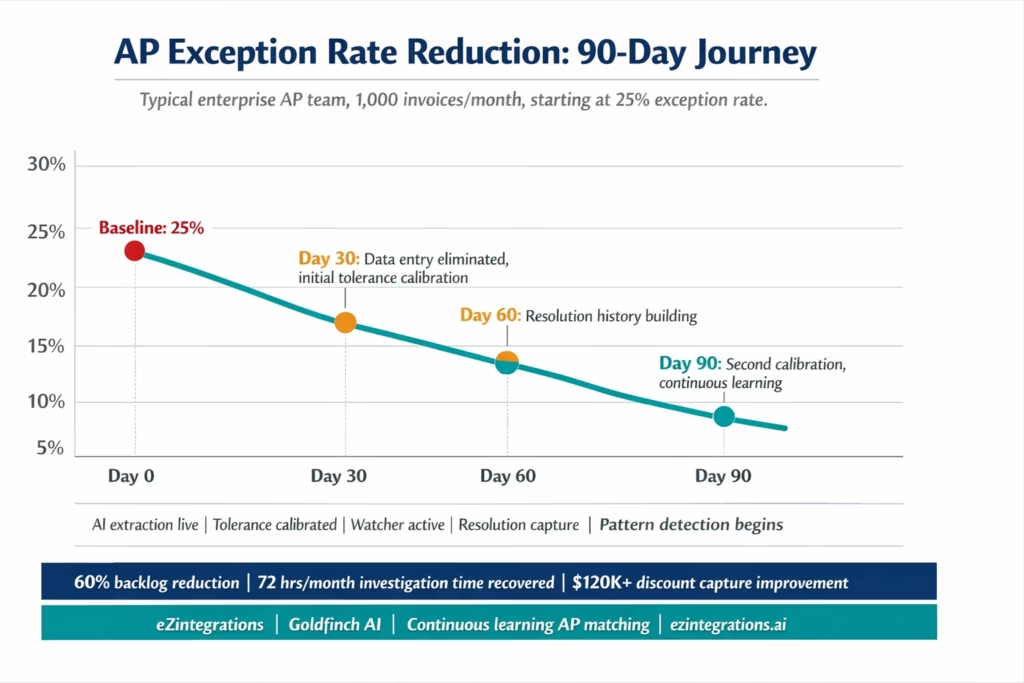
Days 8-14: Initial tolerance calibration. Based on the baseline report, set per-vendor tolerance thresholds for your top 20 suppliers by invoice volume (these typically account for 60-80% of total exception volume). For suppliers whose historical variance is consistently under 2%, set the tolerance to 2.5%. For suppliers whose historical variance includes legitimate freight surcharges of 3-5%, set accordingly. This single calibration step typically eliminates 30-40% of recurring exceptions.
Days 15-30: AI extraction goes live for new invoices. Goldfinch AI Document Intelligence begins processing new incoming invoices. Data-entry-driven exceptions fall immediately: you are no longer keying data, so keying errors no longer create exceptions. The Watcher begins managing receipt timing mismatches: invoices that arrive before the goods receipt are held upstream and processed when the receipt appears. Duplicate detection runs on every incoming invoice before ERP entry.
Days 31-60: Resolution capture builds the Knowledge Base. Exceptions that do occur route to the AP supervisor with pre-populated evidence. Each resolution is captured in the Goldfinch AI Knowledge Base. By the end of day 60, the Knowledge Base has 60 days of resolution history per exception type.
Days 61-90: Pattern recognition and second calibration. The pattern recognition layer surfaces tolerance and threshold recommendations based on 60 days of resolution data. The AP manager reviews and approves: “Update 6 vendor tolerance settings based on resolution history. Raise auto-coding confidence for IT Services category. Flag supplier ABC for enhanced duplicate detection.” After the second calibration, exception rates typically reach their steady-state reduction: 3-7% of invoices, versus the original 20-30%.
Ongoing: Quarterly review cycle. Each quarter, the Goldfinch AI Chat UI generates the exception rate report: exception types, volumes, resolution patterns, and tolerance recommendations. The AP manager reviews and approves updates. The exception rate continues to decrease as the Knowledge Base accumulates more resolution history and the tolerance settings become more accurately calibrated.
Key Outcomes and Results
Exception rate reduction: Typical starting exception rate for manual AP environments: 20-30% – Typical exception rate after 30 days of AI matching deployment: 10-15% (data entry errors eliminated, initial tolerance calibration applied) . Typical exception rate after 90 days: 4-8% (pattern learning and second calibration applied) .Target steady-state exception rate: 3-6% (genuine discrepancies only)
Investigation time reduction: – Manual exception investigation: 15-20 minutes per exception (navigating ERP screens, locating documents, contacting suppliers) . AI-matched exception investigation: 3-5 minutes (pre-populated invoice, PO, receipt, and variance detail; action recommendation pre-generated). At 1,000 invoices per month: moving from 250 exceptions (25%) to 50 exceptions (5%) saves 56-72 hours of monthly investigation time
AP backlog reduction: Teams deploying AI matching typically report 50-65% reduction in the AP holds queue within 90 days . Timing mismatch holds: eliminated (Watcher handles these before they enter the queue) – Data entry holds: eliminated (AI extraction replaces manual keying) . Recurring tolerance holds: eliminated after per-vendor calibration . Remaining holds: genuine discrepancies requiring supplier contact or purchasing team resolution
Duplicate payment prevention: Systematic 3-layer duplicate detection (invoice number + vendor, amount + vendor within 90 days, PO + quantities) catches duplicate submissions that manual AP processes miss . Average enterprise AP team processes 1-3 duplicate invoices per month without systematic detection; each caught duplicate saves the invoice value in potential double-payment
Early payment discount capture improvement: Exceptions delay payment past the early payment discount window (typically 10 days for 2/10 Net-30 terms) . Reducing exceptions by 80% means 80% fewer invoices miss the discount window . For an AP team capturing $200,000 in annual early payment discounts at the current exception rate: a 15 percentage point exception reduction (from 25% to 10%) recovers approximately $120,000 in additional captured discounts annually
Supplier relationship improvement: Fewer discrepancy inquiries sent to suppliers .Fewer payment delays due to exception holds .Suppliers self-report improved relationship quality when AP exception contact frequency drops by 60-80%
How to Get Started
Step 1: Run Your Exception Rate Baseline
Before making any changes, know your starting point. The eZintegrations AP Exception Management template includes a baseline analysis module: connect your ERP, and the AI Agent queries your invoice history for the past 60 days and classifies exceptions by root cause type. This generates your exception rate baseline report showing exactly which root cause is responsible for what percentage of your current exceptions.
This report alone is valuable. Most finance teams that run it discover that 40-60% of their exceptions come from just two root causes: data entry errors and tolerance misconfiguration. These are the most straightforward to eliminate.
Step 2: Import the AP Exception Management Template
Go to the Automation Hub and import the AP Exception Management template. This template includes Goldfinch AI Document Intelligence for invoice extraction, the ERP API connectors for your system, the pre-matching engine with per-vendor tolerance configuration, the Watcher for receipt timing management, the 3-layer duplicate detection, the non-PO GL coding Knowledge Base, the exception routing workflow with pre-populated evidence, the resolution capture system, and the pattern recognition and tolerance recommendation engine.
Step 3: Apply the Initial Tolerance Calibration
Using the baseline report from Step 1, configure per-vendor tolerance thresholds for your top suppliers by invoice volume. Your ERP consultant or AP manager can complete this configuration using the baseline data: set each supplier’s price tolerance to 1 percentage point above their historical average variance. This single step typically reduces exceptions by 30-40% before the AI extraction is even live.
Step 4: Go Live on New Invoices and Begin Resolution Capture
Enable AI extraction for incoming invoices. From this point: data entry exceptions stop, timing mismatch exceptions stop entering the ERP queue, and duplicates are caught before entry. Exceptions that do occur route with pre-populated evidence and a resolution recommendation. Every resolution is captured in the Knowledge Base.
Run in this mode for 60-90 days. The Knowledge Base accumulates resolution history.
Step 5: Apply the Second Calibration and Set the Quarterly Review Cadence
After 60-90 days, review the Goldfinch AI pattern recognition recommendations: which vendor tolerance settings should be updated based on resolution history, which vendor categories have enough GL coding history for higher auto-coding confidence, which suppliers should be flagged for enhanced duplicate detection. Apply the approved recommendations. Set a quarterly review cadence for ongoing calibration.
Expected timeline: exception rate below 10% by day 30. Below 6% by day 90. Ongoing reduction with quarterly calibration.
FAQs
1. How does AI matching reduce invoice exception rates in eZintegrations
Goldfinch AI reduces exception rates by addressing root causes rather than just routing exceptions. It eliminates manual data entry errors through high accuracy AI extraction calibrates tolerance thresholds per vendor based on real variance patterns prevents timing mismatch exceptions by holding invoices until goods receipts are available detects duplicates before ERP entry and provides GL coding suggestions for non PO invoices. It also continuously learns from resolved exceptions to improve tolerance and reduce recurring issues.
2. How long does it take to see exception rate reduction
Initial reduction is visible within 30 days with typical exception rates dropping from 20 to 30 percent down to 10 to 15 percent. By 90 days with ongoing calibration and learning teams typically reach 4 to 8 percent exception rates. Full deployment and first calibration takes 5 to 8 hours.
3. Does eZintegrations work with SAP Oracle NetSuite JDE and other ERPs for exception management
Yes, eZintegrations integrates with SAP S 4HANA Oracle Fusion NetSuite JD Edwards Dynamics 365 Infor CloudSuite and Acumatica using native APIs. It retrieves PO and receipt data posts invoices tracks exceptions and feeds resolution data back into the knowledge base for continuous improvement.
4. What is the difference between routing exceptions faster and reducing exception rates
Routing exceptions faster improves resolution time but does not reduce the number of exceptions. Reducing exception rates focuses on eliminating root causes such as data entry errors tolerance mismatches and timing issues. eZintegrations does both by improving routing efficiency and systematically reducing recurring exception types.
5. How does Goldfinch AI learn from resolved exceptions
Each resolved exception is captured with details such as type vendor variance and action taken. Over time the system analyses patterns to identify calibration opportunities vendor issues and recurring coding patterns. These insights are presented to AP managers for approval and once approved are applied to update tolerance settings and improve automation accuracy.
Stop Managing Your Exception Backlog. Start Eliminating It.
A 25% exception rate is not a processing problem. It is a root cause problem. Data entry errors that create false exceptions. Tolerance settings that flag legitimate variance. Receipts that have not been posted yet. Suppliers who invoice at a consistently different price than the PO. Duplicates that slip through. Non-PO invoices that need GL coding research.
Goldfinch AI of eZintegrations addresses each root cause with a specific mechanism, not just better routing. And because the system learns from each resolved exception, the false-positive rate decreases continuously rather than holding steady.
Finance teams that deploy AI matching report 50-65% AP backlog reduction within 90 days, exception rates falling from 20-30% to under 5%, and 50-70 hours of monthly investigation time recovered. The ongoing quarterly calibration means the improvement does not plateau.
Import the AP Exception Management Template from the Automation Hub and run your exception rate baseline in the first session. Or book a free demo with your ERP details and current exception rate. We will walk through the root cause analysis for your invoice history and show the realistic reduction trajectory for your volume and supplier mix.
For the broader AP automation context, see the enterprise AP automation guide. For the AI document intelligence foundation, see AI document intelligence for procurement.

