How to Detect Churn Risk and Alert CRM Automatically
$120.00
| Workflow Name: |
Customer Churn Prediction to CRM Alert |
|---|---|
| AI Model Type: |
Gradient boosting classification model (XGBoost/LightGBM) with multi-signal feature engineering for binary churn probability scoring |
| Model Provider: |
Goldfinch AI of eZintegrations (Data Analysis tool for ML churn model execution + Knowledge Base Vector Search for recommendation generation); Snowflake as the feature store and training data source |
| Goldfinch AI Tool(s) Used: |
Data Analysis: Executes the XGBoost/LightGBM churn classification model on multi-signal customer feature vectors (product usage, support interactions, billing history, NPS score, engagement depth); produces a churn probability score (0 to 1.0) and a ranked list of contributing risk factors per account; Knowledge Base Vector Search: Retrieves the recommended intervention playbook for each risk factor combination — matching the account’s top risk drivers against a vector database of successful past intervention patterns to generate a prioritized action plan for the CSM |
| Task Type: |
Scoring + Recommendation (churn probability score per account + prioritized intervention recommendation) |
| Input Type: |
Multi-signal customer data per account: product/platform usage metrics (logins; feature adoption; active users; session frequency); support ticket history (volume; CSAT; severity; unresolved tickets); billing data (payment history; contract renewal date; ARR; expansion/contraction); NPS score and verbatim; sales and engagement activity from CRM (last outreach date; last QBR date; executive sponsor engagement) |
| Output Format: |
Per-account churn risk record in Salesforce CRM – churn probability score (0 to 1.0); risk tier (Low/Medium/High/Critical); top 3 contributing risk factors with their feature values; recommended intervention action plan (next best action; suggested talking points; urgency timeline); CSM assignment; and alert timestamp. Aggregate churn risk dashboard in Goldfinch AI Data Analytics showing portfolio risk distribution; risk trend by cohort; and predicted revenue at risk. |
| Who Uses It: |
Customer Success Manager (CSM), Account Executive, VP of Customer Success |
| On-Premise Supported: |
Yes – eZintegrations connects to on-premises CRM; data warehouse; and billing systems via IPSec Tunnel. eZintegrations is a browser-based; cloud-hosted platform and does not require any on-premises software installation. |
| Industry: |
B2B SaaS / Project Management Software |
| Outcome: |
After 6 months: churn rate reduced from 18% to 11.4% (36.7% reduction). Annual churn from $3.6M to $2.3M. NRR improved from 94% to 108% (from combined churn reduction and expansion identification in at-risk accounts where intervention led to upsell conversation). CSM health review time from 3.5 hours per week to 40 minutes per week. 84% of High/Critical accounts received CSM outreach within 48 hours of alert creation. Average response rate to proactive outreach: 67% (vs. 31% for reactive outreach after cancellation signals). |
| Tags: |
AI churn prediction workflow, customer churn prediction AI, ML churn scoring, Salesforce churn alert, customer success AI, churn risk scoring, XGBoost churn model, Goldfinch AI customer success, churn prevention automation, NRR improvement AI, SaaS churn prediction, customer health score AI |
| AI Credits Required: |
Yes – two Goldfinch AI tools invoked per scoring run: Data Analysis (ML churn model execution) and Knowledge Base Vector Search (intervention recommendation retrieval for High and Critical accounts only) |
Table of Contents
| Problem Before: |
Customer Success teams in SaaS; telecom; and financial services react to churn after it has already happened. By the time a customer stops logging in; downgrades; or submits a cancellation request; the CSM has missed the intervention window. Bain and Company research shows that retaining 5% more customers increases profits by 25 to 95%. Yet most CS teams rely on manual health check reviews; lagging NPS scores; or basic usage dashboards that show what happened – not what is about to happen. At 200 to 1,000+ customer accounts per CSM; reviewing every account weekly for risk signals is impossible. High-value accounts go dark undetected until the renewal conversation. |
|---|---|
| AI Solution: |
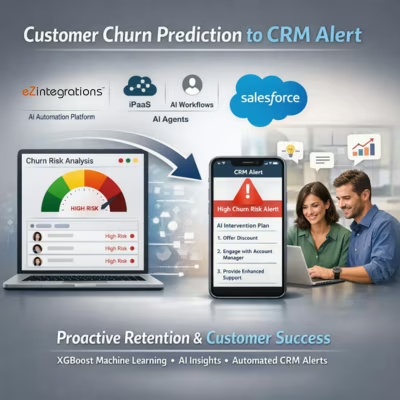
The Customer Churn Prediction to CRM Alert workflow from eZintegrations pulls multi-signal customer data from Salesforce CRM; Snowflake data warehouse; and NPS platform into a feature vector per account. Goldfinch AI Data Analysis executes a trained XGBoost/LightGBM classification model that scores each account’s churn probability (0 to 1.0) based on product usage depth; support ticket patterns; billing signals; NPS trend; and CRM engagement data. High-risk accounts (above 0.70 threshold) trigger the creation of a Salesforce alert record with the risk score; top 3 contributing factors; and a prioritized intervention plan generated by Goldfinch AI Knowledge Base Vector Search. |
| Validation (HITL): |
Accounts scoring High risk (0.70 to 0.84) trigger a Salesforce alert assigned to the CSM – the CSM reviews the risk factors and recommended action plan and decides whether to initiate outreach; escalate to the Account Executive; or request executive sponsor intervention. Accounts scoring Critical (0.85 and above) trigger immediate escalation to the VP of Customer Success in addition to the CSM assignment – requiring acknowledgment within 24 hours. Accounts scoring below 0.70 (Low/Medium risk) are updated in the customer health dashboard but do not generate an active alert requiring CSM action. |
| Accuracy Metric: |
88%+ accuracy in identifying accounts that churn within 90 days (measured as precision-recall balance on the positive churn class – optimized to minimize false negatives; i.e. missed at-risk accounts). Model AUC-ROC: 0.91 on held-out validation set. False positive rate (Low-risk accounts incorrectly flagged as High-risk): under 9%; reducing unnecessary CSM interruptions. |
| Time Savings: |
CSM weekly health review time reduced from 3 to 5 hours per CSM (manual account review) to under 45 minutes (reviewing only flagged alerts with pre-populated risk context). VP of Customer Success portfolio risk visibility from weekly manual compilation to real-time Goldfinch AI Data Analytics dashboard. |
| Cost Impact: |
Organizations retaining 5% more customers from AI-driven proactive intervention realize 25 to 95% profit improvement (Bain research). At a $10M ARR base with 15% annual churn; a 5% improvement in churn rate = $500,000 retained ARR in year 1. Typical deployment results: 25 to 35% improvement in NRR (net revenue retention) from combined churn reduction and expansion identification. |
Description
The AI churn prediction workflow from eZintegrations scores every customer account daily using a trained XGBoost ML model and pushes high-risk alerts directly to Salesforce CRM with AI-generated intervention plans — shifting Customer Success teams from reactive churn response to proactive retention. eZintegrations is an enterprise automation platform covering iPaaS, AI Workflows, AI Agents, and Goldfinch AI agentic automation.
What Is an AI Churn Prediction Workflow?
An AI churn prediction workflow applies machine learning classification to multi-signal customer behavioral data to produce a probability score indicating how likely each account is to churn within a defined window (typically 30, 60, or 90 days). Unlike lagging indicators such as monthly NPS or manual health reviews, ML churn models continuously process usage patterns, support interactions, billing signals, and engagement data to detect deterioration before the customer actively signals intent to cancel.
How Does an AI Churn Prediction Workflow Score Customer Accounts and Push Alerts to CRM for Proactive Intervention?
When the daily scoring run executes, the eZintegrations AI churn prediction workflow pulls feature data from Salesforce, Snowflake, and the NPS platform. Goldfinch AI Data Analysis runs the XGBoost/LightGBM ensemble and produces a churn probability score (0 to 1.0) per account. Accounts scoring above 0.70 trigger Salesforce alert record creation with the risk score, top 3 contributing risk factors, and a recommended intervention plan retrieved by Goldfinch AI Knowledge Base Vector Search from the playbook of past successful interventions. The CSM receives the alert in their Salesforce queue with everything they need to act — score, context, and recommended next step.
Bain and Company research shows retaining 5% more customers can increase profits by 25 to 95%. This AI churn prediction workflow makes that retention proactive, not reactive.
Watch Demo
| Video Title: |
AI Churn Prediction Workflow Demo: Multi-Signal ML Scoring to Salesforce CRM Alert and CSM Intervention Plan |
|---|---|
| Duration: |
4 to 6 minutes |
Outcome & Benefits
| Accuracy: |
88%+ accuracy in identifying churn within 90 days; AUC-ROC 0.91; false positive rate under 9% |
|---|---|
| Touchless Rate: |
Accounts scoring below 0.70 (Low/Medium risk) updated in health dashboard automatically without CSM alert – typically 65 to 75% of the portfolio on any given day |
| Time Saved: |
CSM weekly health review time from 3 to 5 hours to under 45 minutes; VP CS portfolio risk visibility from weekly compilation to real-time dashboard |
| Cost Saved: |
$500,000+ retained ARR at $10M ARR base with 5% churn rate improvement; 25 to 35% NRR improvement from combined churn reduction and expansion identification (Bain research basis) |
Performance Metrics
| Metric | Before (Manual/Batch) | After (Real-Time Sync) | Improvement |
|---|---|---|---|
| Churn Detection Lead Time | After cancellation request | 30 to 90 days before churn | Proactive |
| CSM Health Review Time | 3 to 5 hours/week | Under 45 min/week (alerts only) | 80%+ reduction |
| At-Risk Account Coverage | Variable (capacity-limited) | 100% of portfolio scored daily | Full coverage |
| Churn Prediction Accuracy | N/A (reactive only) | 88%+ (AUC-ROC 0.91) | New capability |
Functional Details
| Business Tasks: |
Daily multi-signal churn probability scoring per customer account; risk tier assignment (Low/Medium/High/Critical); Salesforce alert record creation with risk score; contributing factors; and recommended intervention plan; CSM and AE assignment routing based on account tier and risk level; Critical escalation to VP Customer Success with acknowledgment requirement; portfolio risk dashboard in Goldfinch AI Data Analytics; outcome logging per intervention for model retraining; weekly churn risk cohort analysis for CS leadership |
|---|---|
| KPI Improved: |
Net Revenue Retention (NRR); Gross Revenue Retention (GRR); churn rate; at-risk account coverage rate; CSM proactive outreach rate; time-to-intervention per at-risk account; average contract value retained per cohort; expansion revenue from accounts where churn risk was addressed |
| Scheduling: |
Daily batch scoring run (configurable – default 7:00 AM; before CSM daily standup); real-time scoring trigger available for high-velocity signals (e.g. support ticket CSAT below 2; consecutive login failure over 7 days; or payment failure) via eZintegrations event-triggered mode; model retraining quarterly using Salesforce outcome data (churned/retained/expanded per account post-alert) |
| Downstream Use: |
Churn risk scores written to Salesforce CRM Health Score field and custom Churn Risk object; alert tasks assigned to CSMs in Salesforce Task queue with recommended action plan; portfolio risk dashboard in Goldfinch AI Data Analytics shared with VP Customer Success and CRO; churn probability scores and feature values written to Snowflake for BI; cohort analysis; and model retraining; weekly at-risk account list exported to Customer Success platform (Gainsight or Totango) for playbook execution where configured |
Technical Details
| Model Name/Version: |
XGBoost v2.0 (https://xgboost.readthedocs.io/) as primary model; LightGBM v4.0 (https://lightgbm.readthedocs.io/) as ensemble complement for class imbalance handling (churn events are typically 5 to 20% of the population; requiring class-weighted training); executed via Goldfinch AI Data Analysis within eZintegrations; model trained on 24 months of historical account data per customer; feature set: 40 to 60 engineered signals across usage; support; billing; NPS; and CRM engagement dimensions |
|---|---|
| Hosting Type: |
Cloud-hosted on Oracle OCI via eZintegrations; Goldfinch AI Data Analysis executes ML inference in customer-isolated tenant; Snowflake (https://docs.snowflake.com/) for feature store; training data; and score history; Salesforce CRM (https://developer.salesforce.com/docs/atlas.en-us.api_rest.meta/api_rest/) for alert creation and CSM task assignment; Knowledge Base vector database hosted in customer-isolated Goldfinch AI environment (Weaviate or Pinecone as underlying vector store) |
| Prompt Strategy: |
Data Analysis: N/A – XGBoost/LightGBM are deterministic gradient boosting models; not LLM-based. Goldfinch AI Knowledge Base Vector Search: structured retrieval prompt – “Given the following churn risk factors for this account: ; retrieve the 3 most relevant successful intervention patterns from the playbook and return them ranked by historical retention outcome; with recommended talking points and urgency classification.” Intervention playbook is a curated knowledge base loaded and maintained by the VP Customer Success team – no IT involvement required for playbook updates. |
| Guardrails: |
Churn probability below 0.70: account updated in health dashboard only — no CSM alert generated. Churn probability 0.70 to 0.84 (High): Salesforce alert created, CSM assigned. Churn probability 0.85 and above (Critical): Salesforce alert created, CSM assigned, VP Customer Success escalation triggered, 24-hour acknowledgment required. Confidence interval on the churn score: if the model uncertainty (estimated via bootstrap confidence interval) exceeds 0.15 (indicating sparse feature data), the account is flagged as “Low Data Confidence” in the alert and the CSM is advised to verify data completeness before acting on the score. Maximum score staleness: alert suppressed if the account’s feature data has not been refreshed within 48 hours (indicating a data pipeline issue rather than an actual low-risk state). |
| Latency: |
Under 30 minutes for full portfolio daily scoring at 10,000 accounts; under 2 hours for 50,000 accounts; real-time event-triggered scoring for high-velocity signals in under 5 minutes per account |
| Data Governance: |
Customer account data (usage; billing; support; NPS) pulled from Snowflake and Salesforce into a feature store within the customer’s isolated eZintegrations tenant environment – not shared cross-tenant. Churn probability scores and feature values written back to Snowflake and Salesforce per customer data residency policy. Personal data (customer name; email; contact info) used for CRM alert routing only and not included in ML model features – model is trained on behavioral and interaction signals only. PII processed under GDPR Article 28 DPA where applicable. Full audit trail per scoring run (timestamp; account count; score distribution; alert count; Critical escalation count; data freshness status). |
| Throughput: |
Up to 50,000 customer accounts scored per daily batch at standard configuration; scales to 500,000+ accounts at enterprise tier with parallel Goldfinch AI Data Analysis threads Latency: Under 30 minutes for full portfolio daily scoring at 10,000 accounts; under 2 hours for 50,000 accounts; real-time event-triggered scoring for high-velocity signals in under 5 minutes per account |
Connectivity and Deployment
| Supported Protocols: |
REST API; OData v2/v4; JDBC (Snowflake feature store); HTTPS; OAuth 2.0; API Key (NPS platform APIs – Medallia; Qualtrics; Delighted); SMTP (CSM alert notification email); IPSec Tunnel (on-premises CRM and data warehouse connectivity); Weaviate or Pinecone vector database API (intervention playbook retrieval) |
|---|---|
| Security & Compliance: |
HIPAA-eligible configuration available (healthcare and financial services customer data); GDPR-compliant data handling with Article 28 DPA – ML model trained on behavioral signals only; PII used only for routing and not as model features; SOC Type II certified. TLS 1.3 encryption in transit; AES-256 at rest. Customer behavioral data processed in isolated tenant environment – no cross-tenant model sharing or data sharing. RBAC enforced on scoring run configuration; risk threshold settings; playbook updates; and audit log access. |
| Tenancy Model: |
Both single-tenant and multi-tenant deployments are available. Single-tenant is recommended for organizations with large account portfolios (50,000+ accounts); strict data residency requirements; or regulated industry data (financial services; healthcare). Multi-tenant is the default shared-cloud deployment. Both support on-premises connectivity via IPSec Tunnel. |
| On-Premise Supported: |
Yes – eZintegrations connects to on-premises CRM; data warehouse; and billing systems via IPSec Tunnel. eZintegrations is a browser-based; cloud-hosted platform and does not require any on-premises software installation. |
FAQ
1. What is the Customer Churn Prediction to CRM Alert AI workflow?
The AI churn prediction workflow by eZintegrations uses a trained XGBoost/LightGBM ensemble model, executed through Goldfinch AI Data Analysis, to score every customer account daily for churn probability (0 to 1.0) based on product usage, support interaction, billing, NPS, and CRM engagement signals. High-risk accounts (above 0.70) trigger Salesforce alert records with the risk score, top contributing factors, and an AI-generated intervention plan from Goldfinch AI Knowledge Base Vector Search — assigned to the CSM for proactive outreach before the account signals intent to cancel.
2. What AI model types does the churn prediction workflow use?
This workflow uses a XGBoost/LightGBM gradient boosting ensemble, executed via Goldfinch AI Data Analysis, trained on 24 months of historical account behavioral data across usage, support, billing, NPS, and CRM engagement features. XGBoost handles the primary churn classification task; LightGBM provides class-imbalance correction (churn events are typically 5 to 20% of the portfolio). The model achieves 88%+ accuracy and AUC-ROC 0.91 on held-out validation data.
3. What input data does the AI churn prediction workflow require?
This workflow requires multi-signal customer account data: product/platform usage metrics (logins, feature adoption, active users, session frequency), support ticket history (volume, CSAT, severity, unresolved tickets), billing data (payment history, contract renewal date, ARR, expansion/contraction), NPS score and trend, and CRM engagement data (last outreach date, last QBR, executive sponsor engagement). Data is pulled from Salesforce CRM, Snowflake data warehouse, and the configured NPS platform (Medallia, Qualtrics, or Delighted).
4. What is the output format of the AI churn prediction workflow?
The workflow produces a per-account churn risk record written to Salesforce CRM — churn probability score (0 to 1.0), risk tier (Low/Medium/High/Critical), top 3 contributing risk factors with their feature values, recommended intervention action plan with talking points and urgency classification, CSM assignment, and alert timestamp. An aggregate portfolio risk dashboard is generated in Goldfinch AI Data Analytics showing risk distribution, revenue at risk, and cohort trend. All scores and features are written to Snowflake for BI access and quarterly model retraining.
5. Who uses the AI churn prediction workflow?
Customer Success Managers (CSMs) in SaaS, telecom, and financial services use the Salesforce alert queue as their daily prioritized outreach list. Account Executives receive escalation alerts for Critical accounts where a commercial conversation may be needed. VP of Customer Success uses the Goldfinch AI portfolio risk dashboard to monitor NRR trajectory, identify at-risk cohorts, and allocate CSM capacity. The workflow removes the need for CSMs to manually review every account for risk signals.
6. What are the key benefits of the AI churn prediction workflow?
Key benefits include 88%+ churn prediction accuracy (AUC-ROC 0.91), proactive detection 30 to 90 days before churn vs. reactive response after cancellation, 80%+ reduction in CSM health review time (3 to 5 hours per week to under 45 minutes), 25 to 35% NRR improvement, and $500,000+ in retained ARR at a $10M ARR base with 5% churn rate improvement (Bain research: retaining 5% more customers increases profits 25 to 95%). The AI-generated intervention plan removes the guesswork from CSM outreach.
7. What systems does the AI churn prediction workflow integrate with?
This workflow pulls data from Salesforce CRM, Snowflake data warehouse, and NPS platforms (Medallia, Qualtrics, or Delighted). Churn risk alerts and health scores are written back to Salesforce. The intervention playbook is stored in Goldfinch AI Knowledge Base Vector Search. Portfolio dashboards are generated in Goldfinch AI Data Analytics. On-premises CRM and DW deployments connect via IPSec Tunnel.
8. How often does the AI churn prediction workflow run?
The workflow runs on a daily batch schedule (default 7:00 AM, before CSM daily standup) and can be triggered in real time for high-velocity signals (CSAT below 2, consecutive login failures over 7 days, payment failure) for high-value account segments. Model retraining runs quarterly using Salesforce outcome data (churned/retained/expanded per account post-alert), ensuring the model accuracy remains above the 85% target as customer behavior patterns evolve.
AI Credits
| LLM Steps Count: |
2 (Data Analysis ML inference per account batch + Knowledge Base Vector Search per High/Critical alert) |
|---|---|
| Credit Consumption Model: |
Per account batch for Data Analysis (credits scale with account count; not per-account); per retrieval call for Knowledge Base Vector Search (one call per High/Critical account per run) |
| Estimated Credits per Run: |
Small portfolio (under 500 accounts): ~40 to 80 credits per daily run (scoring credits + retrieval for ~15% High/Critical accounts) Medium portfolio (500 to 5,000 accounts): ~200 to 600 credits per daily run Large portfolio (5,000 to 50,000 accounts): ~800 to 4,000 credits per daily run |
| Monthly Credit Estimate (at Typical Volume): |
Small portfolio (500 accounts): ~1,200 to 2,500 credits per month (30 daily runs) Medium portfolio (2,000 accounts): ~6,000 to 18,000 credits per month Large portfolio (20,000 accounts): ~24,000 to 80,000 credits per month (varies with % of High/Critical accounts) |
| Pricing Model: |
Static Platform Fee + AI Credits. Platform fee covers unlimited non-LLM integration steps (Snowflake feature pull, Salesforce data read, NPS API fetch, alert record creation, task assignment, SMTP notification, dashboard refresh). AI Credits consumed only by Goldfinch AI Data Analysis (ML inference) and Knowledge Base Vector Search (playbook retrieval). |
| AI Credits Required: |
Yes – two Goldfinch AI tools invoked per scoring run: Data Analysis (ML churn model execution) and Knowledge Base Vector Search (intervention recommendation retrieval for High and Critical accounts only) |
| Goldfinch AI Tool(s) Consuming Credits: |
Data Analysis: executes XGBoost/LightGBM ensemble on account feature vectors; generates churn probability score and risk factor rankings — credits scale with account count per batch run; Knowledge Base Vector Search: retrieves relevant intervention playbook recommendations for High and Critical accounts only (accounts below 0.70 threshold do not trigger a retrieval call) — credits scale with number of High/Critical accounts per run |
| Credit Optimization Notes: |
Apply Knowledge Base Vector Search retrieval only to High and Critical accounts (above 0.70 threshold) — not to the full portfolio. This limits retrieval calls to 15 to 25% of the account population on a typical day, reducing Knowledge Base credit consumption by 75 to 85%. Run daily scoring for the full portfolio but limit real-time event-triggered scoring to a defined set of high-value accounts (e.g. top 20% by ARR) to manage credit consumption from intra-day scoring events. Cache intervention recommendations for accounts where the risk factor combination has not changed since the last scoring run — avoids redundant retrieval calls for stable-risk accounts. Conduct model retraining quarterly rather than monthly — retraining is a one-time high-credit event and quarterly cadence maintains accuracy within acceptable drift bounds. |
Resources
| Blog: |
AI Workflow Automation: How to Build Intelligent Enterprise Pipelines in 2026 |
|---|---|
| Goldfinch AI Overview: |
Agentic AI Platform — Goldfinch AI by eZintegrations |
| Platform Overview: |
eZintegrations Platform – Enterprise iPaaS, AI Workflows & Agentic AI |
| Demo: |
Book a Demo |
Case Study
| Problem: |
The Customer Success team managed 1,400 accounts across three CSM tiers. Churn rate was 18% annually. CSMs relied on manual health check reviews conducted monthly using a spreadsheet combining Salesforce activity data; product usage exports; and NPS survey results. At 350+ accounts per CSM; monthly reviews were incomplete – CSMs typically reviewed only 60 to 70% of their book in any given month. Annual churn cost: $3.6M in lost ARR. Post-churn analysis showed that 74% of churned accounts had shown at least two detectable risk signals in the 90 days prior to cancellation – signals the CS team had not systematically tracked. |
|---|---|
| Solution: |
Deployed eZintegrations AI churn prediction workflow in 9 business days. Salesforce CRM and Snowflake as data sources. Feature set engineered from 52 signals across product usage (login frequency; feature adoption depth; active user trend); support (open tickets; CSAT trend; escalation count); billing (payment history; seat contraction); NPS (score trend; verbatim sentiment); and CRM activity (last CSM touch; QBR date; executive sponsor engagement). Goldfinch AI Data Analysis trained on 24 months of historical data with 1,400 accounts; 250+ churn events. Goldfinch AI Knowledge Base Vector Search loaded with 85 intervention playbook entries by the VP CS team. Risk thresholds set: 0.70 (High alert); 0.85 (Critical escalation). Daily scoring configured at 7:00 AM. Salesforce Churn Risk object created for alert records. |
| ROI: |
ARR retained from churn reduction: $1.3M in year 1. NRR expansion from intervention-to-upsell conversions: $480,000 in incremental ARR. CSM labor cost savings (time reallocation): $94,000 annually. Total year-1 ROI: $1.87M on a 9-business-day deployment. Payback period: under 3 weeks. |
| Industry: |
B2B SaaS / Project Management Software |
| Outcome: |
After 6 months: churn rate reduced from 18% to 11.4% (36.7% reduction). Annual churn from $3.6M to $2.3M. NRR improved from 94% to 108% (from combined churn reduction and expansion identification in at-risk accounts where intervention led to upsell conversation). CSM health review time from 3.5 hours per week to 40 minutes per week. 84% of High/Critical accounts received CSM outreach within 48 hours of alert creation. Average response rate to proactive outreach: 67% (vs. 31% for reactive outreach after cancellation signals). |