
eZintegrations vs Zapier: Enterprise Automation vs Consumer-Grade Tool
April 27, 2026Zapier is a consumer-grade automation tool that works well for simple SaaS-to-SaaS Zaps at individual and small team scale. eZintegrations is an enterprise automation platform with native Level 2 AI Workflows, Level 3 AI Agents, Level 4 Goldfinch AI multi-agent, ERP connectivity (SAP, Oracle, NetSuite), enterprise governance, compliance certifications, and no task volume caps. If your organisation has outgrown Zapier’s task limits, hit its ERP connectivity ceiling, or needs AI agents rather than simple trigger-action Zaps, eZintegrations is built for where you are going.
TL;DR
- Zapier is the right tool for simple, personal, or small-team automation, as reflected in G2 Zapier vs eZintegrations reviews, connecting Gmail to Slack, adding Typeform responses to a spreadsheet, and sending notifications when Calendly bookings happen. Within its design intent, it works well.
- The problem is that enterprises often start with Zapier for convenience and scale into it beyond its design limits. Task limits, broken Zap recovery, lack of ERP connectivity, absence of enterprise governance, and zero AI agent capability eventually make Zapier the wrong tool for the job.
- eZintegrations handles enterprise automation at all four levels: Level 1 (iPaaS Workflows), Level 2 (AI Workflows with Document Intelligence and LLM classification), Level 3 (AI Agents with 9 native enterprise tools), and Level 4 (Goldfinch AI multi-agent with Chat UI and Workflow Node).
- If you are an enterprise that started with Zapier and is hitting its ceiling, this comparison gives you the specific data points to make the transition case.
- Verdict: Zapier for simple personal and small-team SaaS automation. eZintegrations for enterprise automation that needs to scale, stay compliant, connect to ERP systems, and grow into AI agents.
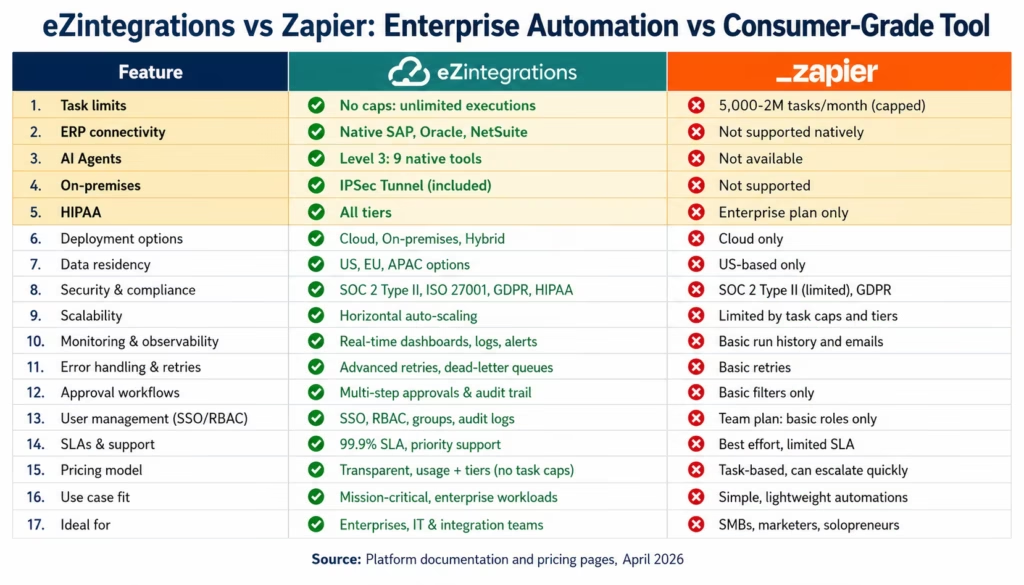
Summary Comparison Table (eZintegrations vs Zapier)
| Feature | eZintegrations | Zapier |
|---|---|---|
| Designed for | Enterprise automation + AI agents | Individual and small-team SaaS automation |
| Pricing model | Per-automation ($90-$150/mo per workflow) | Per-task (capped by plan tier) |
| Task / volume limits | No task caps: unlimited executions per workflow | Capped (5,000-2M tasks/month by tier) |
| Native AI Workflows (Level 2) | Yes: Document Intelligence, LLM classification | Basic AI actions via external integrations |
| AI Agents (Level 3) | Yes: 9 native tools, HITL, confidence thresholds | No native agent capability |
| Multi-agent orchestration (Level 4) | Yes: Goldfinch AI, Chat UI, Workflow Node | Not available |
| ERP connectivity (SAP, Oracle, NetSuite) | Native connectors: OData V4, SuiteQL, OAuth | Not supported natively |
| On-premises systems | IPSec Tunnel (included) | Not supported |
| Webhook handling | HMAC verification, fan-out, dead letter queue | Basic webhooks, no signature verification |
| Error handling | Dead letter queue, retry with backoff, row-level logging | Basic error notifications |
| Governance and access control | Role-based access, audit logs, all tiers | Limited: team folders only |
| HIPAA, SOC 2 Type II, GDPR | All tiers | Zapier for Enterprise only |
| Multi-step complex logic | Full: branches, loops, conditions, sub-workflows | Multi-step Zaps (limited branching) |
| Database connectivity | Native SQL, NoSQL, cloud DW | Basic integrations, no native DB connector |
| GraphQL support | Native | Via HTTP action only |
| Implementation with templates | 1,000+ production-ready Automation Hub templates | 6,000+ community Zap templates |
| Target user | IT teams, operations, developers, AI teams | Individual users, marketing, operations |
Introduction
Zapier is genuinely excellent at what it was built for: helping individuals and small teams connect SaaS apps without code. If you need a Zap that sends a Slack message when a Google Form is submitted, Zapier is the fastest path to that outcome.
The problem is the gap between what Zapier was built for and what enterprises try to use it for.
A startup that starts with Zapier at 10 employees often arrives at Series B or C with 200 Zaps that no one fully understands, task limits that fire every month, broken Zaps discovered days after they stopped working, no audit trail, no governance, and no path to the ERP connectivity or AI automation that the growing enterprise now requires.
This comparison is for the IT director, CTO, or operations leader who is evaluating Zapier against a proper enterprise automation platform, aligned with Gartner enterprise iPaaS research, or who knows the organisation has outgrown Zapier and needs to understand the specific differences before making the transition case to the CFO
The Zapier Ceiling: Where Consumer-Grade Breaks Down
Zapier’s design is fundamentally optimised for simplicity, consistent with Zapier description of enterprise automation. A Zap has a trigger and one or more actions. The configuration is intentionally minimal. The user interface prioritises accessibility over power.
That simplicity is the product’s strength and its ceiling. Enterprise automation does not look like “when this happens, do that.” Enterprise automation looks like:
- When an invoice arrives via email, extract the data using AI document intelligence, compare it to the purchase order in SAP, identify the discrepancy type, route a structured recommendation to the AP manager with confidence scoring, and write back to SAP when approved
- When a new employee is confirmed in Workday, simultaneously create an Active Directory account, a ServiceNow onboarding task, and a Salesforce user record, with the Salesforce record writing back the user ID to Workday
- When a quality deviation is created in Veeva Quality, place the affected batch on hold in SAP, create a CAPA task in ServiceNow, and notify the quality manager in Teams
None of these fit Zapier’s trigger-action model. Zapier has added multi-step Zaps, paths, and filters: but these are incremental additions to a fundamentally simple architecture, not a redesign for enterprise complexity.
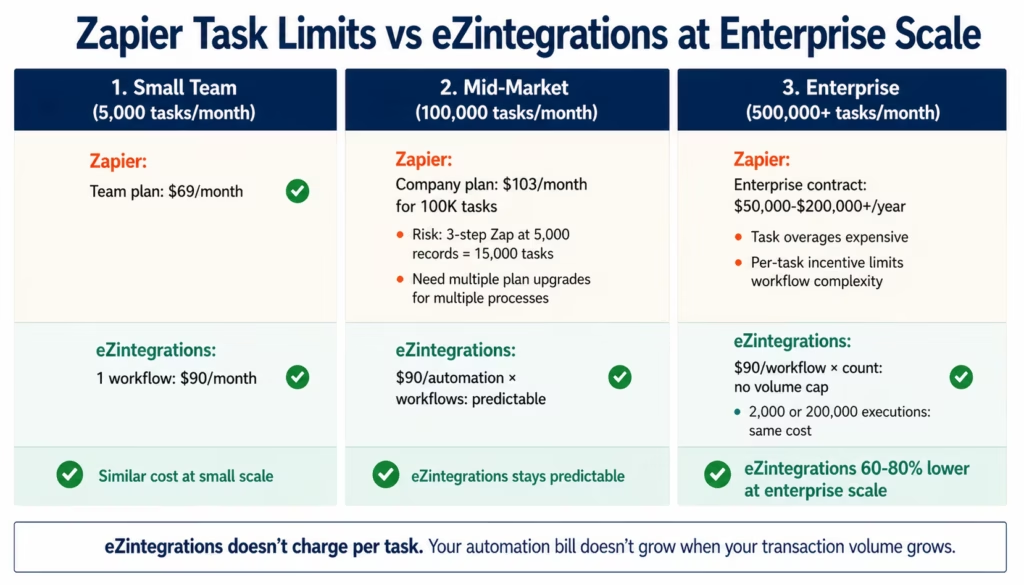
The specific ceilings enterprises hit with Zapier:
Task limits: every Zapier plan caps total monthly task executions. An enterprise processing 5,000 invoices per month with several automation touches per invoice exhausts task limits quickly.
ERP connectivity: Zapier does not natively connect to SAP, Oracle ERP, NetSuite, or any major enterprise ERP system. Third-party apps and HTTP actions can bridge this partially, but they require significant maintenance and have no native authentication management.
Error handling: when a Zapier Zap fails, you get an error email. There is no dead letter queue, no automatic retry with exponential backoff, no row-level error logging with the failing record’s data, and no one-click reprocessing.
Governance: Zapier has team folders and basic permissions. It does not have enterprise role-based access control, change management, or audit logs that satisfy compliance requirements.
On-premises systems: Zapier is cloud-only. Connecting to on-premises ERP (SAP ECC, Oracle EBS, JDE) is not supported.
Task Limits: The Volume Problem at Scale
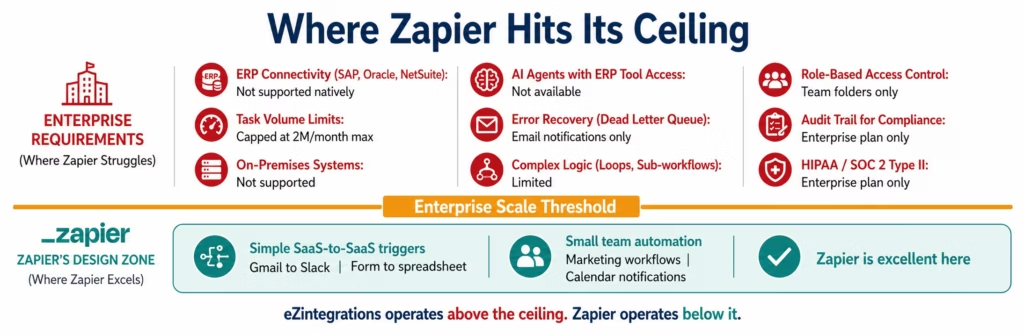
The verdict: Zapier caps task executions by plan. eZintegrations has no task caps.
Zapier’s pricing is built around task counts. A task is one action step in a Zap execution. A three-step Zap (trigger + two actions) uses three tasks per execution. Process 10,000 records per month through that Zap and you consume 30,000 tasks.
Zapier’s plans (see Zapier pricing tiers):
| Plan | Monthly Task Limit | Price |
|---|---|---|
| Starter | 750 tasks | $19.99/month |
| Professional | 2,000 tasks | $49/month |
| Team | 50,000 tasks | $69/month (minimum) |
| Company | 100,000 tasks | $103/month |
| Enterprise | Up to 2M tasks | Contact for pricing |
For a small team running light automation, these limits are adequate. For an enterprise processing thousands of invoices, orders, and employee records per month, task limits become the dominant operational concern. Hitting the task limit mid-month stops all Zap automations from running until the limit resets or the account is upgraded.
The enterprise arithmetic, consistent with Forrester Total Economic Impact of integration platforms, shows that an AP process handling 2,000 invoices per month with 6 steps per invoice (receive, extract, validate, compare, route, notify) uses 12,000 tasks per month for that single workflow.
Add order management, employee provisioning, CRM sync, and reporting automations, and you are well into Zapier Enterprise territory: a contract that typically costs $50,000-$200,000+/year depending on task volume.
eZintegrations charges $90/month per automation workflow. A workflow that processes 2,000 invoices per month with 6 steps costs $90/month regardless of whether it processes 2,000 or 20,000 invoices. There are no task caps, no step counts, no monthly execution limits.
The per-task model’s hidden problem: it penalises complexity. Zapier’s incentive structure rewards fewer steps per Zap. More steps per Zap = more tasks consumed = higher cost. This actively discourages building the multi-step, multi-branch workflows that enterprise processes require.
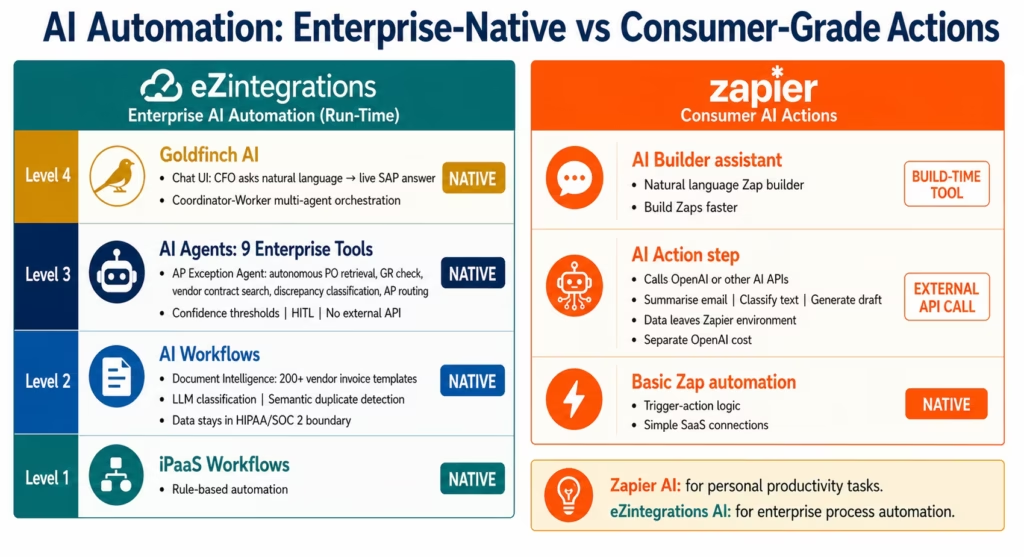
AI Automation: Zaps vs Agents
The verdict: Zapier offers AI-enhanced Zaps for simple actions. eZintegrations provides native Level 2, 3, and 4 AI that handles enterprise-scale autonomous automation.
What Zapier offers for AI:
Zapier has added AI capabilities including an AI Action step that can call OpenAI or other AI models from within a Zap, and Zapier AI which helps users build Zaps using natural language. These are genuine additions to the platform.
The limitation: Zapier’s AI features are designed for simple, individual-use AI tasks: summarise this email, classify this text, generate a reply draft. They are not designed for enterprise-grade autonomous process automation.
Specifically, Zapier’s AI does not provide:
- Document Intelligence that extracts structured fields from invoice PDFs across 200+ vendor templates
- AI Agents that autonomously retrieve ERP context, reason across multiple data sources, and route structured recommendations with confidence scoring
- Human-in-the-loop gates with configurable confidence thresholds
- Multi-agent orchestration for complex enterprise processes
- Natural language access to live ERP data via a Chat UI
When a Zapier AI step calls OpenAI, your document data leaves Zapier’s environment, you pay separately for the API, and each call adds latency. There is no native enterprise AI architecture.
What eZintegrations provides:
Level 2 AI Workflows: Document Intelligence is a native workflow node. It reads invoice PDFs from any vendor template (not just pre-mapped ones), extracts structured fields, validates against your ERP data, and routes exceptions with confidence scores. No external API call. No data leaving eZintegrations’ HIPAA/SOC 2 boundary.
Level 3 AI Agents: 9 native enterprise tools in one agent. The AP Exception Agent retrieves the PO from SAP via API Tool Call, checks the GR via a second API Tool Call, searches the vendor contract via Knowledge Base Vector Search, compares amounts via Data Analysis, and routes a packaged recommendation to the AP manager: autonomously, in under 2 minutes, with configurable confidence threshold and human-in-the-loop gate.
Level 4 Goldfinch AI: coordinator-worker multi-agent orchestration. The Chat UI gives business users natural language access to enterprise processes. The Workflow Node embeds coordinator intelligence inside Level 1 automation. Your CFO asks “which vendors are we missing early payment discounts on this month?” and gets the answer from live SAP data without a BI request.
The comparison is not just feature depth. It is architectural fit. Zapier’s AI is personal-productivity AI. eZintegrations’ AI is enterprise-process AI.
ERP and Enterprise System Connectivity
The verdict: Zapier does not connect to enterprise ERP systems. eZintegrations connects to SAP, Oracle, NetSuite, Infor, EPICOR, and 1,000+ enterprise systems natively.
This is the most fundamental difference for any enterprise evaluation. Zapier connects to SaaS applications. Enterprise automation connects to both SaaS applications and the ERP systems that run enterprise operations.
What Zapier supports: Gmail, Slack, Salesforce (CRM), HubSpot, Stripe, QuickBooks Online, Google Sheets, Jira, Asana, Trello, Mailchimp, Shopify, and thousands of other SaaS applications. These are the right connectors for consumer and SMB automation.
What Zapier does not support: SAP S/4HANA, SAP ECC, Oracle ERP Cloud, Oracle E-Business Suite, NetSuite (native integration with SuiteQL and TBA), Infor CloudSuite, EPICOR, Microsoft Dynamics 365 (ERP functionality), JDE, and any on-premises enterprise system. Zapier has a generic HTTP action that can theoretically call any REST API, but using it to connect to SAP requires you to manage CSRF token handling, authentication configuration, error parsing, and ongoing maintenance yourself.
What eZintegrations supports: the full Zapier SaaS application list, plus every major enterprise ERP system with native connectors that handle authentication complexity automatically. SAP OData V4 with automatic CSRF token management. NetSuite SuiteQL with Token-Based Authentication. Oracle REST with OAuth assertion flow. Infor CloudSuite and EPICOR REST APIs. Microsoft Dynamics 365 Finance and Operations.
If your enterprise runs SAP, Oracle, or NetSuite, Zapier is simply not the right tool. The connectivity gap is not a configuration problem: it is a fundamental design scope difference.
Error Handling: When Things Go Wrong
The verdict: Zapier sends an error email. eZintegrations has a dead letter queue, automatic retry with backoff, row-level error logging, and one-click reprocessing.
Error handling is where the consumer-grade versus enterprise-grade distinction is most operationally visible. Every integration fails eventually: destination systems have maintenance windows, APIs change, authentication expires, records violate validation rules. The difference is what happens when a failure occurs.
Zapier’s error handling:
- You receive an error notification email when a Zap fails
- The Zap stops processing until you review and re-enable it
- Zapier’s recent “auto-replay” feature allows some failed Zaps to replay, but it is limited
- No dead letter queue for failed records
- No row-level logging (which specific record failed and why)
- No automatic retry with exponential backoff
- No fan-out failure routing (send failures to a Slack channel, a database, and an IT ticket simultaneously)
eZintegrations’ error handling:
- Automatic retry: 3 attempts with exponential backoff (configurable)
- Dead letter queue: failed records held for review with full record data and error message
- Row-level logging: which specific record failed, what the input data was, what the destination system returned
- One-click reprocessing: correct the issue and reprocess the failed record without re-running the full workflow
- Fan-out error routing: failures simultaneously create a Slack alert, a ServiceNow ticket, and a database log entry
- HITL escalation for AI agent workflows: low-confidence cases routed to human reviewer automatically
The operational impact of this difference: in a Zapier environment, a broken Zap may process partial data for days before someone notices the error emails. In an eZintegrations environment, failed records are caught, logged, and queued for recovery: no data is silently lost.
This is not a feature gap that can be bridged with Zapier configuration. It reflects a fundamental architecture difference between a consumer notification model and an enterprise reliability model.
Governance, Compliance, and Audit Trails
The verdict: eZintegrations includes enterprise governance and compliance certifications at all tiers. Zapier’s compliance features are restricted to the Zapier for Enterprise plan.
| Feature | eZintegrations | Zapier |
|---|---|---|
| SOC 2 Type II | All tiers | Enterprise only |
| HIPAA BAA | Available | Enterprise only |
| GDPR compliance | All tiers | All tiers |
| Role-based access control | Full RBAC: Admin, Editor, Viewer | Team folders (limited) |
| Audit logs | Full: all workflow changes logged | Enterprise only |
| SSO / SAML | All tiers | Enterprise only |
| Change management integration | Yes (Jira, ServiceNow) | No |
| Workflow version history | Yes | Limited |
| Approvals for workflow changes | Yes | No |
| On-premises connectivity | IPSec Tunnel | Not supported |
For enterprises in healthcare (HIPAA), financial services (SOC 2), life sciences (21 CFR Part 11), or any regulated sector, Zapier’s compliance restrictions create a fundamental procurement problem. Zapier for Enterprise provides HIPAA and SOC 2 compliance, but its cost ($50,000-$200,000+/year) significantly changes the pricing comparison with eZintegrations.
The governance gap has a more practical dimension: Zapier Zaps are owned by individual user accounts. When the person who built a Zap leaves the organisation, the Zap may break without notice and the remaining team does not have visibility into what it did. eZintegrations’ workflow ownership, change logs, and documentation are organisational assets, not individual assets.
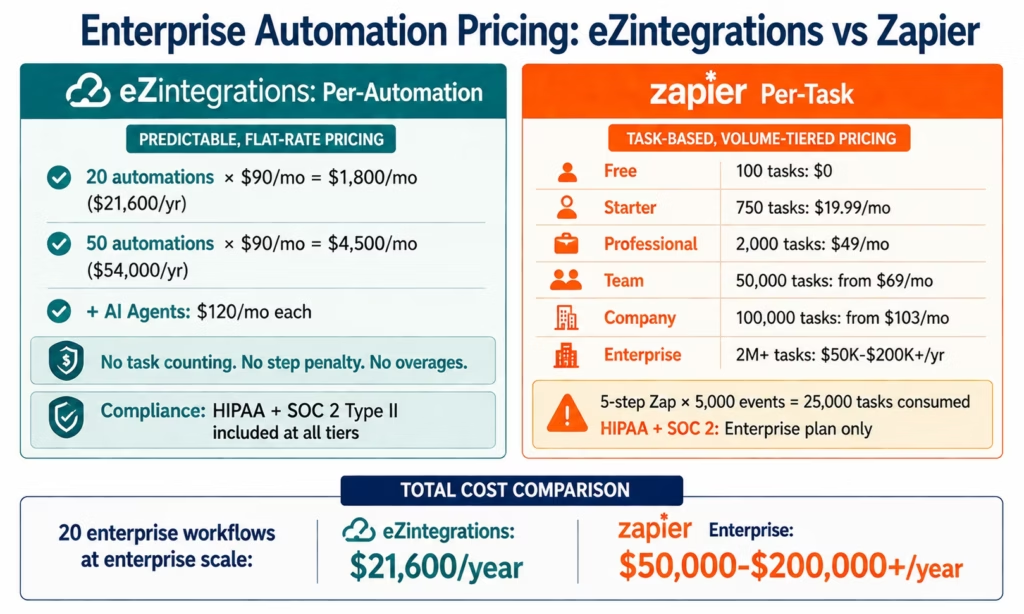
Pricing: Per-Task vs Per-Automation
The verdict: eZintegrations’ per-automation pricing is significantly more cost-effective for enterprise-scale automation. Zapier’s per-task pricing is designed for individual and SMB use.
Zapier pricing (as of April 2026):
| Plan | Monthly Tasks | Monthly Price |
|---|---|---|
| Free | 100 tasks | $0 |
| Starter | 750 tasks | $19.99 |
| Professional | 2,000 tasks | $49 |
| Team | 50,000 tasks | from $69 |
| Company | 100,000 tasks | from $103 |
| Enterprise | Custom (up to 2M+) | Contact: typically $50K-$200K+/year |
eZintegrations pricing:
- Level 1 and Level 2 automations: $90/month per automation
- Level 3 AI Agent automations: $120/month per automation
- Level 4 Goldfinch AI automations: $150/month per automation
- No task caps. No task overages. No task counting.
The enterprise cost comparison:
An enterprise with 20 core automation workflows processing 5,000 tasks each per month (100,000 total monthly tasks) would be on Zapier’s Company plan at minimum: approximately $1,200+/year for task limits alone, and likely more with additional seats and features. With Zapier for Enterprise for compliance: $50,000-$200,000+/year.
On eZintegrations: 20 automations at $90/month = $1,800/month = $21,600/year. Regardless of whether each automation processes 5,000 or 50,000 executions per month.
The complexity penalty: Zapier’s task-based pricing creates a disincentive for building multi-step workflows. A 5-step automation uses 5x the tasks of a 1-step automation for the same number of source events. eZintegrations’ per-automation pricing has no step penalty: a 20-step workflow costs the same as a 2-step workflow.
Who Should Choose Each Platform
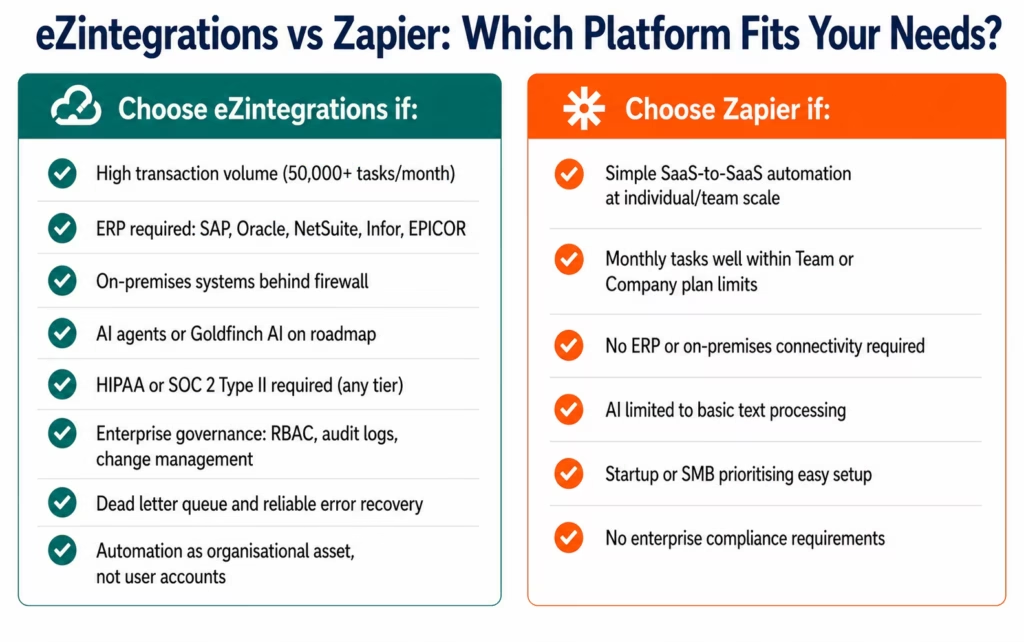
Choose eZintegrations if:
- Your organisation processes high transaction volumes that would hit Zapier task limits (over 50,000 tasks per month across all workflows)
- You need to connect to enterprise ERP systems: SAP (any), Oracle ERP, NetSuite, Infor, EPICOR, or Microsoft Dynamics 365
- You need to connect to on-premises systems behind a corporate firewall
- AI automation is on your roadmap: Level 2 document intelligence, Level 3 AI agents, or Level 4 multi-agent orchestration
- You need enterprise governance: RBAC, full audit logs, workflow version history, change management integration
- HIPAA, SOC 2 Type II, or other compliance certifications are required without an enterprise contract
- You need reliable error handling with a dead letter queue, automatic retry, and row-level logging
- Your automation estate needs to be managed as an organisational asset, not individual user accounts
Choose Zapier if:
- Your automation needs are simple SaaS-to-SaaS Zaps at individual or small team scale
- Your monthly task volume stays comfortably within the Team or Company plan limits
- ERP connectivity is not required: your systems are all SaaS
- AI automation is limited to simple text processing or email summarisation
- You are a startup or SMB that values Zapier’s ease of use and large template community
- Compliance requirements are minimal or not applicable to your automation workflows
Detailed Feature Comparison
| Capability | eZintegrations | Zapier | Winner |
|---|---|---|---|
| Task / execution limits | Unlimited: no caps | 750-2M tasks/month (plan-based) | eZintegrations |
| ERP connectivity | Native SAP, Oracle, NetSuite, Infor, EPICOR | Not supported natively | eZintegrations |
| On-premises systems | IPSec Tunnel (included) | Not supported | eZintegrations |
| Level 2: AI Workflow steps | Native: Document Intelligence, LLM | External API calls (OpenAI) | eZintegrations |
| Level 3: AI Agents | 9 native tools, autonomous, HITL | Not available | eZintegrations |
| Level 4: Multi-agent (Goldfinch AI) | Chat UI + Workflow Node | Not available | eZintegrations |
| Dead letter queue | Yes: failed records queued | No | eZintegrations |
| Automatic retry with backoff | Yes: configurable | Limited (auto-replay) | eZintegrations |
| Row-level error logging | Yes: specific record + error data | No | eZintegrations |
| GraphQL support | Native | HTTP action only | eZintegrations |
| WebSocket | Native | Not supported | eZintegrations |
| Database connectivity | Native SQL, NoSQL, cloud DW | Basic integrations | eZintegrations |
| Webhook HMAC verification | Full: Shopify, Stripe, GitHub | Basic | eZintegrations |
| Role-based access control | Full RBAC: Admin/Editor/Viewer | Team folders only | eZintegrations |
| Audit logs | All tiers | Enterprise only | eZintegrations |
| HIPAA BAA | Available | Enterprise only | eZintegrations |
| SOC 2 Type II | All tiers | Enterprise only | eZintegrations |
| Step complexity (branches, loops) | Full: branches, loops, sub-workflows | Multi-step paths (limited) | eZintegrations |
| Template library | 1,000+ production-ready | 6,000+ community templates | Zapier (volume) |
| Ease of setup | Fast (templates) | Very fast (Zap builder) | Zapier (simplicity) |
| SaaS app breadth | 1,000+ in catalog | 6,000+ native apps | Zapier (breadth) |
| Pricing for small team | $90/automation/month | $19-$69/month | Zapier (SMB) |
Bottom Line Verdict
Zapier is a consumer-grade automation tool that is excellent within its intended scope. It is not built for enterprise automation at scale. That is not a criticism: it is a design choice.
The organisations that struggle with this comparison are the ones that started with Zapier because it was easy and fast, and are now evaluating whether to continue scaling it or move to an enterprise platform.
Here is the framework for that decision:
Stay on Zapier if: your automation estate stays within the Team or Company plan task limits, your systems are all SaaS, and ERP connectivity and AI agents are not requirements.
Move to eZintegrations if: you have hit or are approaching Zapier’s task limits, you need SAP, Oracle, or NetSuite connectivity, you need reliable error handling that is not based on error emails, you need enterprise governance and compliance certifications, or AI automation (document intelligence, AI agents, multi-agent orchestration) is on your roadmap.
On pricing: for small automation volumes, Zapier is cheaper. For enterprise-scale automation with compliance requirements, eZintegrations is typically 60-80% less expensive than Zapier for Enterprise: while providing significantly more capability.
The honest assessment of Zapier’s AI: Zapier has made genuine AI additions to the platform. They are good for individual-use AI tasks. They are not enterprise AI agents, and the comparison to eZintegrations’ Level 3 autonomous agents and Level 4 Goldfinch AI multi-agent orchestration is not close.
If you are at the ceiling and evaluating the move, the integration architecture guide for growing companies explains exactly what the transition looks like from consumer-grade tools to enterprise iPaaS.
FAQs
Yes, definitively. Zapier is designed for individual and small-team SaaS automation. eZintegrations is designed for enterprise automation at scale. The specific differences: eZintegrations has no task caps (Zapier caps at 2M tasks/month on its highest commercial plan), native ERP connectivity (SAP, Oracle, NetSuite: Zapier does not support these), enterprise error handling with a dead letter queue and automatic retry (Zapier sends error emails), Level 3 AI Agents (Zapier has no equivalent), and compliance certifications (HIPAA, SOC 2 Type II) at all tiers (Zapier restricts these to enterprise contracts). For personal and SMB SaaS automation, Zapier is adequate. For enterprise automation, eZintegrations is the appropriate tool.
Zapier's AI capabilities include an AI Action step that calls external AI APIs (OpenAI, Anthropic), and a Zap builder assistant. These are useful for simple individual-use AI tasks: summarising emails, classifying text, generating drafts. They are not enterprise AI agents. Zapier has no native equivalent to eZintegrations' Level 3 AI Agents (autonomous multi-step agents with 9 built-in enterprise tools, confidence thresholds, reflection loops, and HITL gates) or Level 4 Goldfinch AI multi-agent orchestration with Chat UI. The architectural gap is fundamental: Zapier's AI is for personal productivity; eZintegrations' AI is for enterprise process automation.
Six primary limitations: task caps: every plan has a monthly task limit that enterprise volumes quickly exhaust; no ERP connectivity: SAP, Oracle, NetSuite, and on-premises systems are not supported natively; weak error handling: error emails rather than dead letter queues, automatic retry, or row-level logging; minimal governance: team folders rather than full RBAC, audit logs require Enterprise plan; no enterprise AI agents: Zapier's AI is for simple tasks, not autonomous enterprise process handling; compliance restrictions: HIPAA and SOC 2 Type II require the Zapier for Enterprise plan, which typically costs $50,000-$200,000+/year.
Zapier charges per task (execution step). At enterprise scale, Zapier for Enterprise with HIPAA and SOC 2 Type II costs $50,000-$200,000+/year depending on task volume. eZintegrations charges $90/month per standard automation workflow with no task caps. A 20-automation enterprise deployment on eZintegrations: $21,600/year, regardless of execution volume. Additionally, Zapier's per-task model penalises complexity: a 5-step workflow uses 5x the task budget of a 1-step workflow for the same trigger volume. eZintegrations' per-automation pricing has no step penalty.
Yes. eZintegrations has native Salesforce REST and HubSpot REST connectors with full bidirectional sync, custom object handling, workflow triggers on record events, and field-level transformation. The Automation Hub contains templates for the most common Salesforce and HubSpot integration patterns. Beyond Zapier's capability: eZintegrations adds Level 2 AI Workflow steps for lead scoring and data enrichment, Level 3 AI Agents for CRM exception handling (researching and routing unmatched leads autonomously), and ERP connectivity alongside CRM (so your Salesforce-to-SAP integration runs in the same platform as your Salesforce-to-HubSpot sync).
For standard SaaS-to-SaaS automation pairs that Zapier handles well (Salesforce to Slack, Stripe to QuickBooks, HubSpot to Google Sheets), Automation Hub templates cover most patterns and deploy in 2-5 days each. Complex enterprise automations (Salesforce-to-SAP, Workday-to-Active Directory) that Zapier cannot handle have templates that go live in 5-10 days. The migration process typically takes 4-8 weeks for a full Zapier-to-eZintegrations transition depending on the number and complexity of existing Zaps. eZintegrations offers a Zapier migration assessment during the demo: your Zap inventory is reviewed, Automation Hub template coverage is mapped, and a migration timeline is produced.1. Is eZintegrations better than Zapier for enterprise automation?
2. How does Zapier compare to eZintegrations for AI agent workflows?
3. What are Zapier's main limitations for enterprise use?
4. How does Zapier's pricing compare to eZintegrations at enterprise scale?
5. Can eZintegrations replace Zapier for Salesforce and HubSpot automation?
6. How long does it take to migrate from Zapier to eZintegrations?
Conclusion
Zapier is not a bad tool. It is the wrong tool at enterprise scale.
If you started with Zapier because it was easy, it probably served you well when your team was small and your automation needs were simple. The question now is whether you are staying within its design envelope or whether you have grown past it.
The signals that you have outgrown Zapier: task limits firing mid-month, ERP connectivity gaps requiring workarounds, broken Zaps discovered days after failure, compliance requirements that push you to Zapier for Enterprise pricing, and AI agent capabilities on your roadmap that Zapier cannot deliver.
eZintegrations is built for the next stage: enterprise automation at scale with native AI workflow capability, ERP connectivity, enterprise governance, predictable per-automation pricing, and a platform that can grow from Level 1 iPaaS to Level 4 Goldfinch AI multi-agent orchestration as your requirements evolve.
Book a free demo and bring your Zapier inventory. We will show you the Automation Hub template coverage for your Zaps, demonstrate the Level 3 AI Agent capability for your highest-exception process, and produce a cost comparison that accounts for both platform pricing and the compliance requirements you are managing.
Browse the Automation Hub to see the 1,000+ templates and find the production-ready equivalents for your most critical Zaps.
If you are experiencing the Zapier ceiling right now: task limits, error emails, ERP gaps: you may find your situation described in 5 signs your integration platform is holding you back.

