
How to Build an Enterprise Automation Business Case That Gets CXO Approval
May 13, 2026A compelling enterprise automation business case has seven components: the current state cost (manual process hours times FTE rate), the disconnection cost audit (six categories of hidden cost from system fragmentation), the automation requirements list (specific workflows, AI steps, and data flows), the platform investment cost (licence plus implementation), the ROI calculation (payback period, year-one ROI, three-year net benefit), the risk comparison (build vs buy, vendor risk), and the strategic upside (AI workflow and AI agent capability unlocked by integrated data). Most enterprise teams that run the full calculation find payback within 1-4 months and a three-year ROI of 1,500-3,000%.
TL;DR:
- Getting CXO approval for an iPaaS investment fails for one of four reasons, despite growing enterprise investment in integration platforms highlighted in Gartner research: the numbers are too vague (“we’ll save time”), the wrong stakeholders are addressed (IT presents to IT, not to CFO/COO), the comparison is incomplete (platform cost without build alternative), or the business case presents the platform as a cost rather than an investment with a measurable return.
- This guide gives you the complete seven-component business case structure for enterprise automation investment (workflow automation, AI workflows, and AI agents), the data you need to collect before writing it, objection-handling language for every stakeholder, and the financial model template that CFOs recognise and approve.
- All four eZintegrations automation levels play a role in the business case: Level 1 (iPaaS Workflows) eliminates manual data re-entry, Level 2 (AI Workflows) eliminates the exception queue, Level 3 (AI Agents) delivers autonomous exception resolution, and Level 4 (Goldfinch AI with Chat UI and Workflow Node) provides natural language enterprise analytics.
- Use the ROI calculator to generate the specific financial inputs before building the written case.
Why Most iPaaS Business Cases Fail to Get Approved
Four patterns explain why most integration platform investment requests do not make it past the first review.
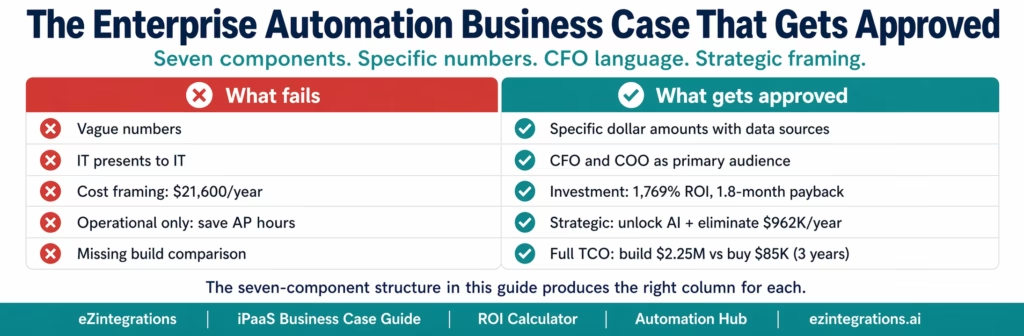
Pattern 1: The numbers are qualitative, not quantitative.
“We’ll save significant time on manual processes” does not pass a CFO review. “$284,928 per year in AP team hours at $42/hour for 1,200 invoices per month with 38% manual exception rate” does. The difference between approval and rejection is almost always the specificity of the numbers, not the quality of the idea.
Pattern 2: The wrong person is presenting to the wrong audience.
IT presents to the IT steering committee. The IT steering committee presents to the CFO. By the time the business case reaches the person with budget authority, it has been summarised, simplified, and stripped of the financial detail that makes it fundable. The business case needs to be written for the CFO and COO, not for IT.
Pattern 3: The comparison is a cost, not an investment.
“The automation platform costs $21,600/year” is a cost. $21,600 eliminates $284,928 in annual manual process expense, returning $263,328 per year and paying back in 1.8 months,” reflecting broader enterprise expectations for measurable ROI from digital investments observed by McKinsey & Company. Every successful technology investment proposal frames the platform cost as the denominator of an ROI calculation, not as the headline number.
Pattern 4: The case addresses only the operational problem, not the strategic opportunity.
CXOs approve operational efficiency investments. They prioritise strategic capability investments. A business case that says “this will reduce AP team hours” competes with every other cost-reduction initiative in the budget. A business case that says “this eliminates $962K in annual disconnection cost, deploys AI Workflows and AI Agents across finance, supply chain, and HR, and delivers Level 4 Goldfinch AI analytics for the C-suite” competes in a different conversation.
Before You Write: The Data You Must Collect First
A business case is only as strong as its underlying data. Before writing a single word, collect these inputs. Most of them are available from existing systems.
From Finance/AP:
- Monthly invoice volume and current exception rate (from AP system or ERP)
- Exception resolution time per exception (from AP team manager)
- Early payment discount terms and current capture rate (from AP reports)
- Monthly DSO and recent DSO trend
From Operations:
- Manual data transfer time estimates by process (30-minute conversation with each operations manager)
- Expedite order frequency and cost (from procurement)
- Inventory write-off or overstock events in the last 12 months (from ERP)
- Order fulfilment SLA compliance rate
From HR/IT:
- Average time from HRIS termination to system access revocation
- New hire volume per month and IT provisioning hours per hire
- IT integration incident log for the last 12 months (count, resolution time)
- Shadow IT inventory: Zapier accounts, Power Automate flows, manual CSV workflows
From Finance (strategic):
- Annual revenue and growth rate (for DSO impact calculation)
- Cost of capital rate (for early payment discount calculations)
- Current ERP and CRM licence costs (for platform cost context)
From the systems team:
- List of all applications requiring integration (source, destination, data type)
- On-premises vs cloud for each system
- Existing point-to-point integrations (for maintenance cost reference)
With this data collected, the seven components write themselves. Without it, the business case rests on estimates a CFO will dismiss.
The Seven-Component Business Case Structure
Every enterprise technology investment that successfully reaches approval has these seven components. The order matters: start with the cost of the problem before the cost of the solution.
Component 1: Executive Summary
The CFO will read this first and may read only this. It must stand alone.
The executive summary template:
[Company Name] Enterprise Automation Investment Proposal
Problem: [Company] operates [N] core business systems with fragmented, manual data flows. Manual data transfer processes cost $[X]/year across [N] departments. The three largest cost concentrations: [top 3 with dollar amounts].
Investment: [Platform] enterprise automation platform at $[licence]/year. One-time implementation: $[X]. Year-1 total: $[X].
Return: Annual operational savings: $[X]. Payback: [X] months. Three-year net benefit: $[X]. Year-1 ROI: [X]%.
Strategic benefit: Integration creates the data infrastructure for AI workflow automation. Without it, Level 2 AI Workflows, Level 3 AI Agents, and Level 4 Goldfinch AI multi-agent analytics cannot deploy, regardless of which AI platform is chosen.
Recommendation: Approve. All integrations go live within [X] weeks. ROI measurable in the first billing cycle.
Keep this to one page. Every number links to a specific calculation in the body document.
Component 2: Current State Cost Analysis
The anchor of the business case. The CFO does not need to be convinced integration is good. They need to see the current state cost in language they already understand.
Use the six-category framework from the hidden cost of disconnected systems guide with your actual numbers:
| Cost Category | Annual Cost | Data Source |
|---|---|---|
| Manual data re-entry | $[X] | Payroll hours by department |
| Decision errors from bad data | $[X] | Inventory write-offs, audit findings |
| Missed revenue | $[X] | DSO analysis, lead latency |
| Compliance exposure | $[X] | IT security findings, access gaps |
| Employee productivity loss | $[X] | Manager survey, FTE cost |
| IT firefighting and shadow IT | $[X] | Incident log, resolution hours |
| Total current state cost | $[X] |
Lead with the total. The CFO’s eye goes to the bottom line first.
Component 3: The Integration Requirements List
The most technically credible section. It converts “we need to integrate our systems” into a specific scope with a specific cost.
| Integration | Source | Destination | Data Type | Trigger | Template Available |
|---|---|---|---|---|---|
| AP Invoice Processing | Email/vendor | SAP S/4HANA | Invoice | Email attachment | Yes |
| Order Sync | Salesforce | SAP S/4HANA | Sales order | Closed-won | Yes |
| Inventory Update | SAP ECC | Shopify | Stock level | Inventory change | Yes |
| Employee Provisioning | Workday | Azure AD + Salesforce | User record | New hire | Yes |
| 3PL Shipment Tracking | 3PL API | SAP + Shopify | Tracking event | Shipment | Yes |
Count the rows. Multiply by $90/month for Level 1 and Level 2 automations, $120/month for Level 3 agent automations. That is the annual platform cost for Component 4.
Component 4: Platform Investment Cost
Present the full cost. Separate one-time from recurring.
| Cost Item | Year 1 | Year 2 | Year 3 | Notes |
|---|---|---|---|---|
| Platform licence | $[N x $90 x 12] | Same | Same | Per-automation, no connector fee |
| Implementation (internal time) | $[X] | $0 | $0 | One-time configuration |
| Training | $[X] | $0 | $0 | Typically 4-8 hours total |
| Level 3 agent automations | $[N x $120 x 12] | Same | Same | Exception handling only |
| Total | $[X] | $[X] | $[X] |
What not to include: infrastructure ($0, fully managed), security/compliance ($0, HIPAA/GDPR/SOC 2 Type II included), maintenance ($0, platform-managed).
CFO framing: this is OpEx, not CapEx. Per-automation SaaS pricing fits within existing operational budget authority for most initial deployments. No large capital outlay required.
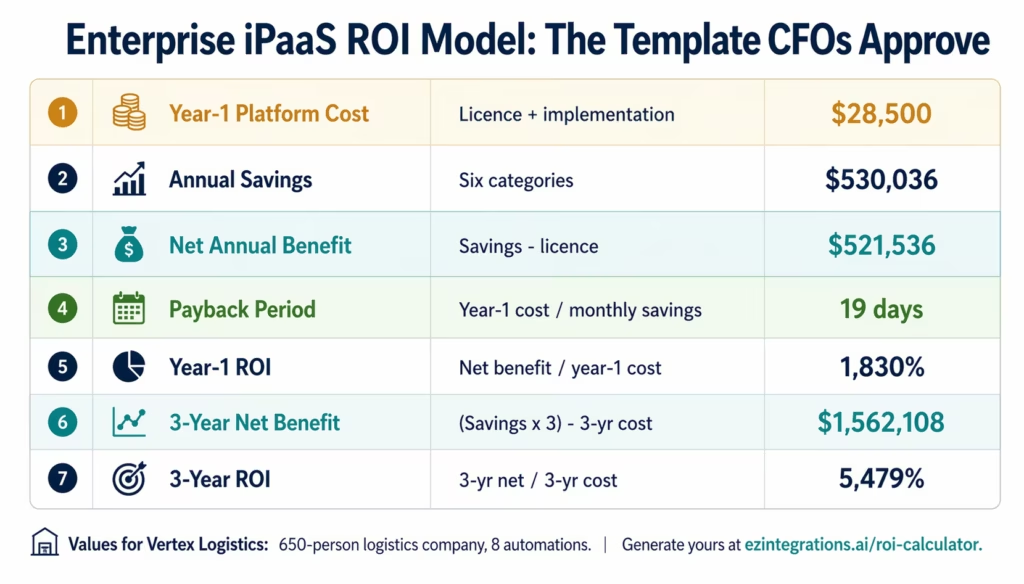
Component 5: The ROI Model
The heart of the business case. Use financial investment analysis structure.
| Metric | Calculation | Value |
|---|---|---|
| Year-1 platform cost | Licence + implementation | $[X] |
| Annual operational savings | Six-category total | $[X] |
| Net annual benefit | Savings minus annual licence | $[X] |
| Payback period | Year-1 cost / (annual savings / 12) | [X] months |
| Year-1 ROI | Net benefit / year-1 cost x 100 | [X]% |
| 3-year net benefit | (Savings x 3) minus 3-year total cost | $[X] |
| 3-year ROI | 3-yr net / 3-yr cost x 100 | [X]% |
Benchmark ranges from mid-market deployments: payback 1-4 months (most common: 6-8 weeks), year-1 ROI 1,000-3,000%, 3-year net benefit $800K-$3M for a 10-20 automation deployment consistent with Total Economic Impact analyses of integration platforms published by Forrester.
How to present this to a CFO: do not lead with the ROI percentage. CFOs are skeptical of very high ROI numbers. Lead with the payback period and the monthly savings number. “The platform pays for itself in 6 weeks and saves $32,000 per month after that” is more persuasive than “Year-1 ROI is 2,400%.” The ROI number is supporting evidence, not the opener.
Component 6: Risk and Alternatives Analysis
The component most business cases skip and most CFOs want. Show it explicitly.
| Option | Year-1 Cost | 3-Year Cost | Go-Live | Key Risks |
|---|---|---|---|---|
| Do nothing | $530K (growing) | $1.76M+ | N/A | Compounding cost, AI exclusion |
| Build custom | $400K-$1.2M | $1.6M-$2.25M | 12-24 months | Key person risk, compliance, maintenance |
| Buy iPaaS (recommended) | $28,500 | $47,460 | 4-8 weeks | Vendor risk (mitigated, see below) |
Addressing vendor risk directly:
eZintegrations uses standard industry APIs for all connectors: SAP OData V4, NetSuite SuiteTalk REST, Oracle REST, Salesforce REST. The integration logic is portable to any other platform supporting the same APIs. Migration risk is weeks, not months. This compares favourably to key person risk in a custom build, where one developer’s departure costs $75,000-$200,000 in remediation.
Risk comparison table:
| Risk | Custom Build | eZintegrations iPaaS |
|---|---|---|
| Key person risk | High (1-2 devs own everything) | None (platform-managed) |
| API maintenance | Manual (every API update) | Automatic (platform handles) |
| Compliance certification | Self-certify (SOC 2, HIPAA) | Included (HIPAA, GDPR, SOC 2 Type II) |
| On-premises connectivity | VPN/reverse proxy setup | IPSec Tunnel, $0 |
| Cost escalation | High (maintenance compounds) | Low (per-automation pricing) |
| Go-live delay risk | High (12-24 month typical) | Low (3-10 days per automation) |
Component 7: Strategic Upside and AI Readiness
This component elevates the business case from operational efficiency to strategic investment, aligning with enterprise technology investment frameworks outlined by Deloitte.
The AI readiness argument:
Every executive team is evaluating AI automation. The primary barrier to deploying AI workflow automation is data: AI Workflows require real-time, structured data flowing between systems. An AI step that validates an invoice against a PO cannot function if the invoice and PO are in disconnected systems.
Integration is not just about today’s manual process cost. It is the prerequisite for tomorrow’s AI capability.
What becomes possible after integration:
Level 2 (AI Workflows): Document Intelligence handles invoice extraction across 200+ vendor templates. Exception rates drop from 15-20% to 1-3%. AP team reviews AI-packaged recommendations, not raw documents.
Level 3 (AI Agents): Autonomous exception resolution. An AP exception agent retrieves the PO, goods receipt, and vendor history, drafts a vendor query, and routes a structured recommendation for one-click approval. Human review time: 8 minutes versus 38 minutes.
Level 4 (Goldfinch AI with Chat UI and Workflow Node): The CFO asks “which vendors are we missing early payment discounts on this month?” and gets the answer in seconds from live ERP data, without BI team involvement.
The three-year roadmap framing:
Year 1: integration goes live, $521K net benefit (Vertex Logistics profile). Year 2: Level 2 AI Workflows added, additional $180K+ from exception queue elimination. Year 3: Goldfinch AI Chat UI gives CFO and COO real-time operational visibility.
Present this as a three-year roadmap, not just a year-one cost-saving exercise. The board invests in roadmaps, not in line-item cost reductions.
Worked Example: Vertex Logistics, 650 Employees
Vertex Logistics is a $110M annual revenue third-party logistics provider running SAP S/4HANA, Salesforce, three customer WMS platforms, Workday, and NetSuite (from a recent acquisition).
Data collected:
- Monthly invoice volume: 1,800, exception rate 16%
- Order entry: 6 min/order, 600 orders/month, $52/hour
- 3PL dispatch: 3.5 hrs/day manual, $58/hour
- HR provisioning: 15 hires/month, 85 min/hire, $72/hour
- IT integration incidents: 4/month, 11 hrs each, $105/hour
Current state cost:
| Category | Monthly | Annual |
|---|---|---|
| Invoice exception handling | $15,840 | $190,080 |
| Invoice manual data entry | $9,240 | $110,880 |
| Order entry | $3,120 | $37,440 |
| 3PL dispatch manual | $7,395 | $88,740 |
| HR provisioning | $1,530 | $18,360 |
| IT incidents | $4,620 | $55,440 |
| DSO impact ($110M revenue, 4 extra days) | $2,425 | $29,096 |
| Total | $44,170 | $530,036 |
Integration requirements: 8 automations (AP invoice processing, order sync Salesforce-SAP, 3 WMS dispatch workflows, Workday-SAP provisioning, NetSuite-SAP consolidation, Salesforce-SAP order status).
Platform investment:
- Level 1 and Level 2 automations: 7 x $90 x 12 = $7,560/year
- Level 3 AP exception agent: 1 x $120 x 12 = $1,440/year
- Implementation: $19,500 (one-time)
- Year-1 total: $28,500
ROI model:
| Metric | Value |
|---|---|
| Year-1 platform cost | $28,500 |
| Annual operational savings | $530,036 |
| Net annual benefit | $521,536 |
| Payback period | 19 days |
| Year-1 ROI | 1,830% |
| 3-year net benefit | $1,562,108 |
Strategic upside (year 2): Level 3 AI Agent exception handling eliminates the $190,080 invoice exception queue. Incremental AI year-2 net benefit: $170,000+. The AI capability is already on the platform; year-2 deployment requires only configuration of the exception agent, not a new investment.
Tailoring the Business Case for Each Stakeholder
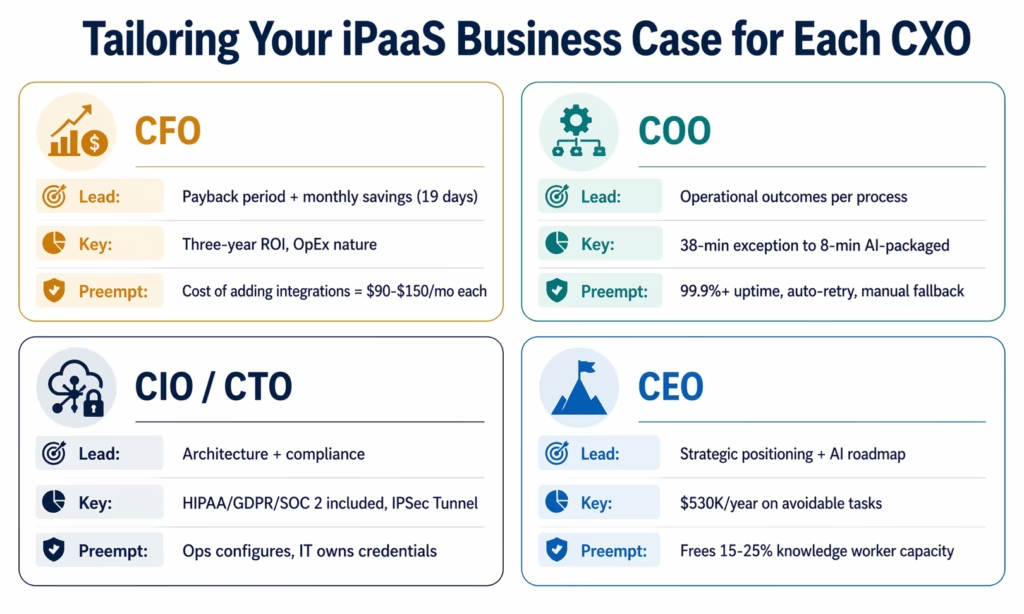
Write one document. Prepare four presentation versions.
For the CFO:
Lead with payback period and monthly savings. Show the OpEx nature of SaaS pricing. Include the three-year TCO comparison against the build alternative. Answer preemptively: “What happens to cost if we need more integrations?” Each additional automation is $90-$150/month: incremental, not exponential.
For the COO:
Lead with operational outcomes. Show before/after for three highest-impact processes: order-to-ERP from 24 hours to real-time, invoice exception from 38 minutes to 8 minutes with AI package, new employee access from 2 days to 15 minutes. Answer preemptively: “What if it breaks?” The platform runs with 99.9%+ uptime SLA, automatic retry, and error notification. The manual process fallback exists throughout.
For the CIO/CTO:
Lead with architecture and compliance. Native connectors (not HTTP workarounds), IPSec Tunnel for on-premises ERP, HIPAA/GDPR/SOC 2 Type II certification, role-based access control, full audit logs. Include the build vs buy TCO showing the seven-component custom development cost. Answer preemptively: “Who manages this after deployment?” Operations managers configure and monitor. IT owns credential management. No developer required for standard workflow maintenance.
For the CEO:
Lead with three strategic messages: we spend $530,000/year on avoidable data movement tasks; integration is the prerequisite for AI automation that competitors with integrated systems can already deploy; delaying this decision is a decision to spend $44,000 more per month on avoidable cost while widening the technology gap. Answer preemptively: “Is this a distraction from core business?” No: it returns the 15-25% of knowledge worker time currently spent on data tasks to revenue-generating work.
The Cost of Inaction: What Delay Costs Per Month
For the business case to create urgency rather than a “we’ll review next quarter” response, the cost of delay must be explicit.
For Vertex Logistics: $44,170/month in disconnection cost.
| Decision Timeline | Additional Months of Disconnection | Cost of Delay |
|---|---|---|
| Approve this month | 0 | $0 |
| Approve next month | 1 | $44,170 |
| Approve next quarter | 3 | $132,510 |
| Approve next budget cycle (6 months) | 6 | $265,020 |
| Approve in 12 months | 12 | $530,036 |
Include this table in every business case. A 6-month delay costs $265,020 to avoid spending $28,500. Framed this way, delay is not caution. It is a decision to spend nine times the investment cost to defer the investment.
Before vs After: Without vs With Approved Business Case
| Dimension | Without Approved Business Case | With Approved and Deployed iPaaS |
|---|---|---|
| AP exception rate | 16%, 38 min/exception manual | 2%, 8 min/exception AI-packaged |
| Order entry | 6 min/order, 600/month manual | Real-time, zero manual entry |
| Employee provisioning | 2-3 days, 85 min IT time | 15 minutes, automated |
| 3PL dispatch | 3.5 hrs/day manual | Automated on ERP order confirmation |
| IT integration incidents | 4/month, $4,620 | Managed, auto-retry, monitored |
| DSO impact | 4 extra days, $29,096/year | Near-zero latency, discount capture |
| AI readiness | Blocked (no integrated data layer) | Level 2, 3, 4 all deployable |
| CFO real-time analytics | BI request, 3-day wait | Goldfinch AI Chat UI, instant |
| Annual operational cost | $530,036 | $9,000 (residual edge cases) |
| Annual platform cost | $0 | $9,000 |
| Net annual benefit | $0 | $521,036 |
Objection: “Show Me Proof It Works for Our Industry”
Prepare three responses to this objection:
Response 1: Function-based proof, not industry-based.
The AP invoice processing workflow works the same whether you are in logistics, manufacturing, or healthcare. The ROI drivers (exception rate, resolution time, FTE cost) vary by company, not by industry. Request proof for companies of similar size and process volume, not the same vertical.
Response 2: Automation Hub depth.
The 1,000+ templates in the eZintegrations Automation Hub represent production deployments across industries. Templates for SAP-to-Salesforce order sync, 3PL dispatch automation, Workday provisioning, and AP invoice processing with Document Intelligence exist because they have been deployed and validated in production environments, not because they were designed speculatively.
Response 3: Propose a proof-of-concept.
The strongest answer to “show me proof” is a 2-week POC on your highest-priority use case with your actual invoice volume. A POC showing exception rate reduction with real data outweighs any reference case. Propose the POC as the next step.
Objection: “Can’t We Just Hire Someone to Do This Manually”
Address this at two levels.
At the operational level:
A new AP clerk at $42,000/year fully loaded handles 200 exceptions/month. The iPaaS automation that eliminates those 200 exceptions costs $9,000/year. The platform is 78% less expensive. And when transaction volume doubles (at twice the revenue), the manual headcount doubles while the iPaaS pricing stays flat.
At the strategic level:
A new AP clerk cannot perform Document Intelligence extraction across 180 vendor invoice templates, execute semantic duplicate detection on 1,800 invoices/month, or access real-time ERP data to autonomously research exceptions. The headcount alternative delivers a slower, more error-prone process at a higher cost that scales linearly with volume. Integration delivers a faster, more accurate process that enables AI workflow automation in year 2.
Objection: “What If We Change ERPs in 18 Months”
Quantify the cost of waiting. If the ERP consolidation starts in 18 months and runs 24 months (a conservative timeline for mid-market ERP projects): disconnection lasts 3.5 years. At $44,170/month: $1,854,540 in avoidable cost during the deferral period. The iPaaS investment across that period: approximately $46,500. The Automation Hub templates are modular: non-ERP integrations (Salesforce, Workday, 3PL, eCommerce) remain valid after ERP change. ERP-specific connector reconfiguration after consolidation typically takes 2-4 weeks, not a new implementation.
Objection: “The IT Team Says We Should Build It”
Include a one-page build vs buy TCO comparison. The key numbers:
- Custom build year-1 for 8 integrations: $400,000-$700,000 developer time alone
- Ongoing maintenance: $120,000-$200,000/year (60-80% of integration dev capacity)
- Security/compliance: $50,000-$200,000/year (self-certification)
- Key person risk: $75,000-$200,000 per departure event
- Go-live: 12-24 months versus 4-8 weeks
- 3-year build TCO: $1.6M-$2.25M versus $47,460 for managed iPaaS
The full analysis is in the build vs buy decision framework. Building is correct only if the integration requirements are so unique that no commercial connector exists. For SAP, Salesforce, Workday, NetSuite, and standard 3PL APIs, no such uniqueness applies.
What to Include in Your Presentation Deck
Seven slides for the approval meeting:
Slide 1: The problem (one number). “We spend $530,000/year on manual data movement between systems that could talk automatically.”
Slide 2: The six-category breakdown. Cost table from Component 2. Three minutes maximum. Have backup data ready.
Slide 3: Integration requirements. The table from Component 3. Shows scope specificity.
Slide 4: The investment. Year-1 cost. Annual recurring. OpEx framing.
Slide 5: The ROI model. Seven-row table from Component 5. Lead with payback period.
Slide 6: Alternatives comparison. Do nothing / build / buy. Three-year TCO for each.
Slide 7: The three-year roadmap. Year 1: integration, $521K net benefit. Year 2: AI Workflows, $180K+ additional. Year 3: Goldfinch AI Chat UI for CFO analytics. This is the AI investment story.
How to Get Started
Step 1: Collect Your Data
Use the data collection checklist above. Pull 90 days of AP exception data, operations hours estimates from manager conversations, and IT incident logs. Allow 1-2 weeks for this phase.
Step 2: Run the ROI Calculator
Take your data to the interactive ROI calculator. Input transaction volumes, FTE costs, and exception rates. The calculator generates the financial inputs for Components 2 and 5.
Step 3: Build the Seven-Component Document
Write for the CFO first. Adapt to four presentation versions for each stakeholder. Keep the executive summary to one page.
Step 4: Book an Integration Assessment
Book a free demo before your internal presentation. The eZintegrations team will review your integration requirements list, confirm Automation Hub template availability, provide go-live timelines, and generate a reference-quality cost comparison to include as an appendix.
FAQs
Frame the investment in three numbers in this order: monthly disconnection cost (current manual process expense), payback period (year-1 investment divided by monthly savings, typically 2-8 weeks), and three-year net benefit. CFOs approve investments with payback under one quarter and positive year-one ROI. Both conditions are met in the first billing cycle for most mid-market iPaaS deployments. Do not lead with the platform cost. Lead with the problem cost.
Payback runs 2-8 weeks from go-live for most mid-market deployments. Platform cost represents 5-10% of annual savings generated. Year-one ROI runs 1,000-3,000%. Three-year ROI, compounding as AI workflow automation is layered on top, typically exceeds 5,000%. The ROI calculator generates your specific numbers in 10 minutes.
The six-category disconnection cost framework yields $560,000-$2,450,000 annually for mid-market companies. The Vertex Logistics worked example shows $530,036/year: AP exception handling $190,080, invoice manual entry $110,880, order entry $37,440, 3PL dispatch $88,740, HR provisioning $18,360, IT incidents $55,440, DSO impact $29,096. Platform cost after year-one implementation: $9,000/year.
Both, simultaneously if possible. Build the document for the CFO and validate technical scope with IT, then present to both together. The most common failure is IT-first presentation leading to an internal build vs buy debate that never reaches the CFO. The build vs buy analysis belongs inside the business case, not as a prerequisite before it is written.
Data collection: 1-3 weeks. Document writing: 2-5 days with this guide's structure. Approval timeline: same budget cycle if the investment fits within existing OpEx authority (which per-automation SaaS pricing typically does for initial deployments). Start data collection before the budget window opens so the document is ready when it does. 1. How do I justify iPaaS to my CFO?
2. What is the typical ROI timeline for an enterprise iPaaS investment?
3. How much does enterprise integration automation actually save?
4. Should I present the automation business case to IT first or go directly to the CFO?
5. How long does it take to build and get approval for an iPaaS business case?
The Business Case Is the Project
Getting CXO approval for an iPaaS investment requires: specific numbers (not estimates), the right audience (CFO and COO, not just IT), investment framing (ROI and payback, not platform cost), and strategic context (AI readiness, not just operational efficiency).
The seven-component structure produces all four. The data collection checklist gives you the inputs. The ROI calculator generates the numbers. The stakeholder tailoring guide gives you the right message for each audience.
For Vertex Logistics: $28,500 year-1 investment against $530,036 in annual savings. Payback in 19 days. Three-year net benefit: $1,562,108.
Run the numbers for your organisation at ezintegrations-roi-calculator.
Book a free demo to get the validated integration requirements list, go-live timeline, and reference cost comparison that make the business case defensible.

