
How to Automate Order Fulfilment When You Sell on Amazon, Walmart and Your Own Website
May 5, 2026To automate multi-channel order fulfilment across Amazon, Walmart, and your own website (Shopify, WooCommerce, or Magento), eZintegrations connects to all three channel APIs, centralises incoming orders into a single routing engine, applies rules to determine which warehouse, 3PL, or FBA centre should fulfil each order (based on inventory availability, shipping zone, SLA, or order value), sends the fulfilment request to the correct location via API or EDI, and pushes tracking confirmation and inventory updates back to each sales channel. The full routing cycle runs automatically within seconds of order placement, without a manual order management system or middleware platform.
TL;DR:
- Multi-channel eCommerce sellers face the same daily problem of managing Order fulfillment across multiple platforms: orders arrive on three different platforms, each with different data formats, different fulfilment SLAs, and different tracking requirements. Someone has to route each order to the right fulfilment location manually.
- The manual process: log into Amazon Seller Central, export orders, log into Walmart Seller Center, export orders, check Shopify, batch all orders into a spreadsheet, decide which warehouse or 3PL handles each, send fulfilment requests, update tracking manually per channel.
- eZintegrations connects to all three channel APIs simultaneously, centralises orders, applies routing rules, sends fulfilment requests to 3PLs or warehouses, and pushes tracking back to each channel.
- Level 1 (iPaaS Workflows) handles order polling from all channels, order normalisation, routing rule evaluation, 3PL/warehouse API call, and tracking push-back per channel. Level 2 (AI Workflows) validates each order: inventory availability check across warehouses, fraud signal detection, address validation, SLA feasibility check (can this order meet its promised delivery date from the available fulfilment options?). Level 3 (AI Agents) monitors fulfilment performance: flags orders approaching SLA breach, detects channel-specific fulfilment patterns (e.g., one warehouse consistently failing Walmart on-time delivery), generates daily operations summaries, and sends proactive out-of-stock alerts. Level 4 (Goldfinch AI) provides the Goldfinch AI Chat UI as a Workflow Node: “How many unfulfilled orders do we have right now across all channels?”, “What is our on-time fulfilment rate by channel this week?”, or “Which SKUs are below safety stock at the Austin warehouse?”
- Works with Amazon SP-API, Walmart Marketplace API, Shopify Admin API, WooCommerce REST API, Magento API, and any 3PL or warehouse REST API.
- Configuration time: 3-5 days for three channels and one or two fulfilment locations.
The Multi-Channel Fulfilment Problem: Three Channels, One Overwhelmed Operations Team
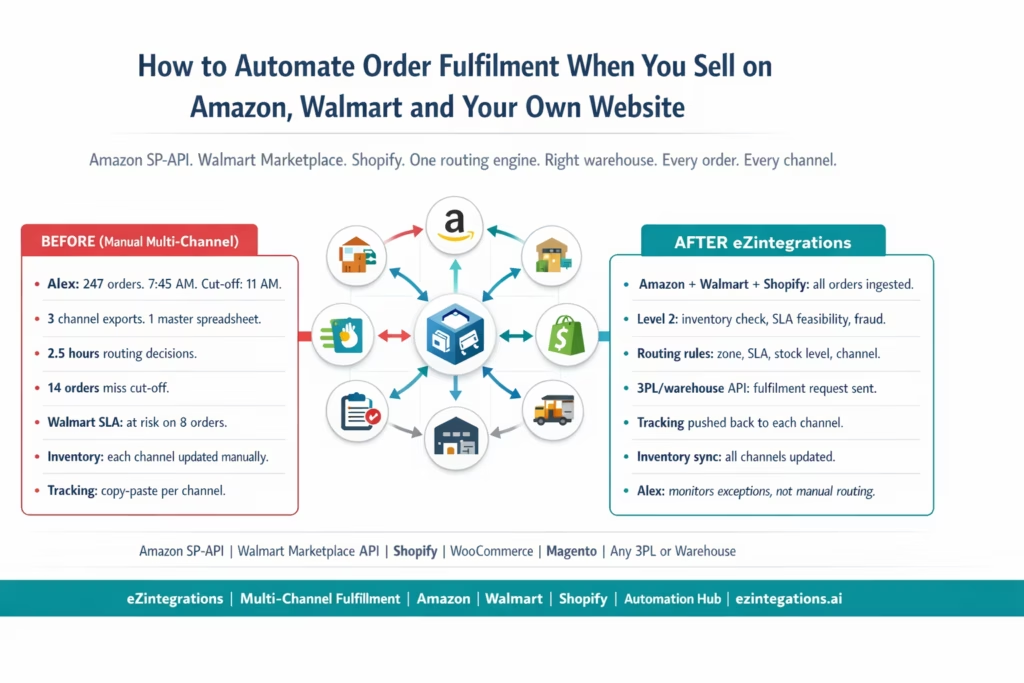
It is Monday morning at 7:45 AM. Your operations manager Alex has 247 new orders to process before the shipping cut-off at 11 AM. This scale of order volume is increasingly common as eCommerce growth and multi-channel selling accelerate globally (Statista).
83 came in via Amazon. They have different formats, item condition notes, and FBA eligibility rules. 61 came in via Walmart. Walmart’s on-time delivery requirement is strict: a single late shipment on a confirmed order can trigger a Walmart seller score penalty. 103 came in on your Shopify store over the weekend. Each order has different shipping addresses, different SKU codes than Amazon uses, and different packaging requirements.
Alex opens Amazon Seller Central and exports the orders to a CSV. She opens Walmart Seller Center and downloads another CSV. She opens Shopify and exports a third. She combines all three into a master spreadsheet. Now she has to decide: which orders go to the East Coast warehouse? Which go to the Austin 3PL? Which should use FBA for Amazon orders? Which Walmart orders are at risk of missing the SLA if they ship from Austin?
This takes 2.5 hours before a single order is actually sent to a warehouse. The shipping cut-off is at 11 AM. It is now 10:15 AM. 14 orders are going to miss the cut-off.
Why Manual Order Routing Breaks at Scale
Manual multi-channel fulfilment fails for three reasons, reflecting broader challenges in omnichannel fulfilment operations highlighted by Gartner that compound as order volume grows.
Reason 1: Different data formats per channel. Amazon uses ASINs. Walmart uses WalmartItemIDs. Shopify uses your internal SKUs. Your warehouse uses a different internal part number. Mapping between these four identifier systems manually is error-prone and slow. A single mapping error sends the wrong product to the customer.
Reason 2: Different SLA requirements per channel. Amazon FBA orders must ship the same day (for Prime-eligible items). Walmart confirmed delivery orders carry financial penalties for late shipment. Your Shopify store may offer 2-day or standard shipping options. Manual routing does not automatically evaluate whether a specific fulfilment location can meet the channel’s SLA given the current time, carrier cut-off, and transit time to the customer’s address.
Reason 3: Inventory is always stale. When you have two warehouses and three channels, the inventory count in each channel is only accurate at the moment it was last synced. Every order that ships from a warehouse without a real-time inventory update to all channels creates the risk of overselling: a customer orders a product on Walmart that sold out via Amazon 10 minutes ago but the Walmart listing still shows stock.
The Four Components of Automated Multi-Channel Fulfilment
The automation has four interconnected components, aligning with broader shifts toward automated retail operations and fulfilment optimisation in modern commerce systems (Mckinsey):
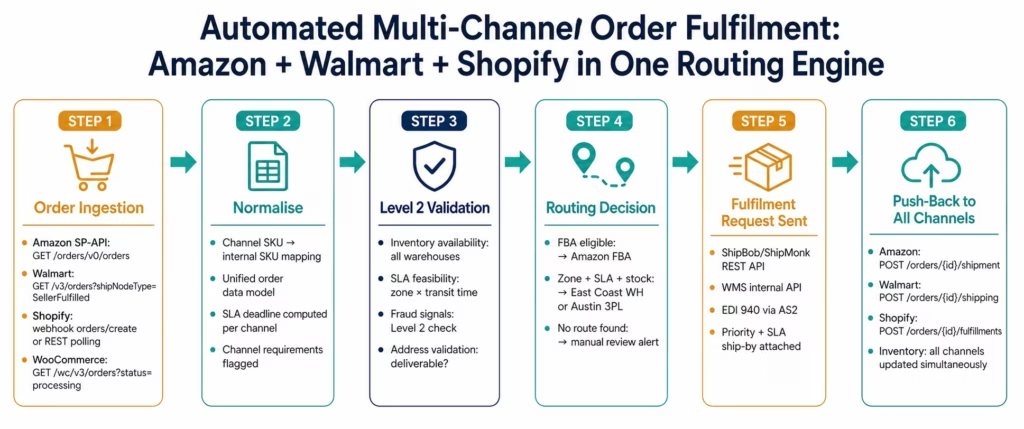
1. Order ingestion: eZintegrations polls or receives webhooks from all sales channels simultaneously. New orders from Amazon, Walmart, and Shopify are ingested and normalised into a single order data model.
2. Routing logic: each order is evaluated against routing rules to determine which fulfilment location (warehouse A, warehouse B, or 3PL) should handle it. Rules consider: SKU-to-warehouse assignment, shipping zone (customer zip code), SLA requirement, current inventory availability, order value, and special handling requirements.
3. Fulfilment request: the routing decision produces a fulfilment request sent to the selected warehouse or 3PL via their API (REST, EDI, or SFTP). The warehouse receives pick-pack-ship instructions.
4. Status push-back: when the warehouse or 3PL provides a tracking number, eZintegrations pushes it back to the originating channel (Amazon, Walmart, or Shopify) via their respective order confirmation APIs. Inventory levels are decremented across all channels simultaneously.
Connecting to Amazon: SP-API Order Ingestion
Amazon’s Selling Partner API (SP-API) replaced the older MWS system and provides comprehensive order management endpoints.
Authentication: Amazon SP-API uses OAuth 2.0 LWA (Login with Amazon):
POST https://api.amazon.com/auth/o2/token
Content-Type: application/x-www-form-urlencoded

grant_type=refresh_token
&refresh_token={seller_refresh_token}
&client_id={lwa_app_client_id}
&client_secret={lwa_app_client_secret}
Retrieving new orders:
GET https://sellingpartnerapi-na.amazon.com/orders/v0/orders
    ?MarketplaceIds=ATVPDKIKX0DER
    &CreatedAfter={last_check_timestamp}
    &OrderStatuses=Unshipped,PartiallyShipped
    &FulfillmentChannels=MFN
Authorization: Bearer {sp_api_token}
x-amz-access-token: {sp_api_token}
FulfillmentChannels=MFN returns only Merchant Fulfilled Network orders (those your team ships). FBA orders are fulfilled by Amazon directly.
Retrieving order items:
GET https://sellingpartnerapi-na.amazon.com/orders/v0/orders/{orderId}/orderItems
Authorization: Bearer {sp_api_token}
Key fields per order item:
ASIN: Amazon Standard Identification NumberSellerSKU: your SKU as listed on AmazonQuantityOrdered: units orderedItemPrice.Amount: item priceShippingPrice.Amount: shipping paid by customer
Confirming shipment back to Amazon:
POST https://sellingpartnerapi-na.amazon.com/orders/v0/orders/{orderId}/shipment
{
  "marketplaceId": "ATVPDKIKX0DER",
  "orderItems": [{
    "orderItemId": "{order_item_id}",
    "quantity": {qty},
    "itemLevelFields": [{
      "key": "CarrierCode",
      "value": "UPS"
    }, {
      "key": "TrackingNumber",
      "value": "{tracking_number}"
    }, {
      "key": "ShipDate",
      "value": "2026-03-14T14:00:00Z"
    }]
  }]
}
Amazon requires the shipment confirmation within the handling time window. Late confirmations negatively affect the seller’s Late Shipment Rate metric, which can trigger account review.
Connecting to Walmart: Marketplace API Order Ingestion
Walmart Marketplace API provides order management for Walmart.com and Walmart Canada sellers.
Authentication: Walmart uses a signature-based authentication (HMAC-SHA256) similar to Amazon’s earlier MWS:
GET https://marketplace.walmartapis.com/v3/orders
    ?createdStartDate={last_check_iso}&shipNodeType=SellerFulfilled
    &orderType=REGULAR
Authorization: {walmart_signature_header}
WM_CONSUMER.CHANNEL.TYPE: SELLER
WM_CONSUMER.ID: {walmart_consumer_id}
WM_SEC.TIMESTAMP: {timestamp}
WM_SEC.AUTH_SIGNATURE: {computed_signature}
Walmart order response structure:
{
  "list": {
    "elements": {
      "order": [{
        "purchaseOrderId": "P123456789",
        "customerOrderId": "C987654321",
        "orderDate": "2026-03-14T09:00:00.000Z",
        "shippingInfo": {
          "phone": "5125550100",
          "estimatedDeliveryDate": "2026-03-16T23:00:00.000Z",
          "estimatedShipDate": "2026-03-14T23:00:00.000Z",
          "methodCode": "VALUE"
        },
        "orderLines": {
          "orderLine": [{
            "lineNumber": "1",
            "item": {
              "productName": "Blue Widget",
              "sku": "WIDGET-BLUE-L"
            },
            "orderLineQuantity": { "amount": "2" },
            "statusDate": "2026-03-14T09:01:00.000Z",
            "orderLineStatuses": {
              "orderLineStatus": [{ "status": "Created", "statusQuantity": { "amount": "2" }}]
            }
          }]
        }
      }]
    }
  }
}
Walmart SLA critical fields:
estimatedShipDate: the date by which Walmart expects the item to ship. Missing this date affects the seller’s On-Time Shipment Rate.estimatedDeliveryDate: the date Walmart showed the customer on the product page. Missing this triggers customer service contacts and negative feedback.
Acknowledging and shipping Walmart orders:
POST https://marketplace.walmartapis.com/v3/orders/{purchaseOrderId}/acknowledge
POST https://marketplace.walmartapis.com/v3/orders/{purchaseOrderId}/shipping
{
  "orderShipment": {
    "orderLines": {
      "orderLine": [{
        "lineNumber": "1",
        "orderLineStatuses": {
          "orderLineStatus": [{
            "status": "Shipped",
            "statusQuantity": { "unitOfMeasurement": "EACH", "amount": "2" },
            "trackingInfo": {
              "shipDateTime": "2026-03-14T14:00:00.000Z",
              "carrierName": { "otherCarrier": null, "carrier": "UPS" },
              "methodCode": "VALUE",
              "trackingNumber": "{tracking_number}",
              "trackingURL": "https://www.ups.com/track?trackingNumber={tracking_number}"
            }
          }]
        }
      }]
    }
  }
}
Connecting to Shopify and DTC Channels
Shopify webhook for new orders:
POST {your_eZintegrations_webhook_url}
X-Shopify-Topic: orders/create
X-Shopify-Shop-Domain: {shop}.myshopify.com
Or polling:
GET https://{shop}.myshopify.com/admin/api/2024-01/orders.json
    ?status=open&fulfillment_status=unfulfilled&created_at_min={last_check}
Authorization: Bearer {shopify_access_token}
Confirming Shopify fulfilment:
POST https://{shop}.myshopify.com/admin/api/2024-01/
    orders/{order_id}/fulfillments.json
{
  "fulfillment": {
    "location_id": {location_id},
    "tracking_number": "{tracking_number}",
    "tracking_company": "UPS",
    "notify_customer": true
  }
}
notify_customer: true triggers Shopify’s built-in shipping notification email to the customer. No separate customer email integration needed for DTC Shopify orders.
WooCommerce order handling:
GET https://{domain}/wp-json/wc/v3/orders?status=processing&after={last_check}
Authorization: Basic {base64(consumer_key:consumer_secret)}

PUT https://{domain}/wp-json/wc/v3/orders/{order_id}
{
  "status": "completed",
  "transaction_id": "{tracking_number}"
}
Order Normalisation: One Data Model for All Channels
Orders from Amazon, Walmart, and Shopify have different data structures. Before routing, eZintegrations normalises each order into a single internal format:
{
  "order_id": "NORM-2026-03-14-00441",
  "channel": "AMAZON",
  "channel_order_id": "114-6541234-8765432",
  "order_date": "2026-03-14T09:14:00Z",
  "sla_ship_by": "2026-03-14T23:59:00Z",
  "sla_deliver_by": "2026-03-16T23:59:00Z",
  "customer": {
    "name": "Emma Thompson",
    "email": "emma@acmecorp.com",
    "phone": "+15125550100"
  },
  "ship_to": {
    "address1": "1234 Commerce St",
    "city": "Austin",
    "state": "TX",
    "postal_code": "78701",
    "country": "US"
  },
  "lines": [{
    "internal_sku": "WIDGET-BLUE-L",
    "channel_sku": "B08XYZ1234",
    "channel_item_id": "ASIN-B08XYZ1234",
    "qty": 2,
    "unit_price": 24.99,
    "weight_lbs": 0.5,
    "dimensions": { "l": 6, "w": 4, "h": 2 }
  }],
  "shipping_method": "2-day",
  "order_value": 49.98,
  "channel_requirements": {
    "late_ship_penalty": true,
    "requires_tracking_within_hours": 24,
    "tracking_format": "standard"
  }
}
The internal_sku field is the key normalisation step: the channel SKU (Amazon ASIN, Walmart ItemID, or Shopify variant ID) is mapped to your internal SKU using a cross-reference table. This mapping is configured once and applied to every order from every channel.
Fulfilment Routing Rules: Which Warehouse Gets This Order?
The routing engine evaluates each normalised order against a set of rules to select the best fulfilment location.
Rule Set Example
ROUTING RULES (evaluated in priority order):

RULE 1: Amazon FBA eligibility
IF order.channel = "AMAZON" AND order.lines[].internal_sku IN fba_eligible_skus
    AND inventory.fba_qty[sku] >= order.qty
THEN route_to = "FBA"
(FBA orders are not sent to your warehouse: Amazon fulfils directly)

RULE 2: SLA risk assessment
FOR each candidate warehouse:
    transit_days = shipping_zone_matrix[warehouse][customer_zip]
    earliest_ship = now + warehouse_processing_hours
    projected_arrival = earliest_ship + transit_days
    IF projected_arrival > order.sla_deliver_by:
        disqualify this warehouse

RULE 3: Inventory availability
FOR each remaining candidate warehouse:
    available_qty = inventory[warehouse][sku] - pending_orders[warehouse][sku]
    IF available_qty < order.qty:
        disqualify this warehouse

RULE 4: Zone optimisation
IF qualified_warehouses.count > 1:
    shipping_cost = estimate_shipping_cost(warehouse, customer_zip, weight)
    select warehouse with lowest shipping_cost

RULE 5: Default fallback
IF no warehouse qualifies:
    ALERT: "Unable to auto-route order {id}: no warehouse meets SLA or has stock"
    route_to = "MANUAL_REVIEW"
Shipping Zone Matrix
A pre-configured matrix maps each warehouse to shipping zones by customer zip code prefix:
| Customer Zip Prefix | East Coast Warehouse | Austin 3PL |
|---|---|---|
| 0-2 (Northeast) | Zone 1 (1 day) | Zone 5 (4 days) |
| 3-4 (Southeast) | Zone 2 (2 days) | Zone 4 (3 days) |
| 7-8 (Southwest/TX) | Zone 5 (4 days) | Zone 1 (1 day) |
| 9 (Pacific) | Zone 5 (4 days) | Zone 3 (2 days) |
For a Walmart 2-day delivery order shipped to Austin TX, the Austin 3PL has a Zone 1 transit time (1 day). SLA: ship by today, deliver within 2 days. Austin 3PL qualifies. East Coast warehouse does not.
Sending Fulfilment Requests to 3PLs and Warehouses
Once the routing decision is made, eZintegrations sends a fulfilment request to the selected location.
3PL REST API Fulfilment Request
For 3PLs with REST APIs (ShipBob, ShipMonk, Flexport Logistics, Kenco):
POST https://api.shipbob.com/1.0/order
Authorization: Bearer {shipbob_token}
Content-Type: application/json

{
  "reference_id": "NORM-2026-03-14-00441",
  "shipping_method": "Standard",
  "recipient": {
    "name": "Emma Thompson",
    "address": {
      "address1": "1234 Commerce St",
      "city": "Austin",
      "state": "TX",
      "zip": "78701",
      "country": "US"
    },
    "email": "emma@acmecorp.com",
    "phone_number": "+15125550100"
  },
  "products": [{
    "id": {shipbob_product_id},
    "quantity": 2
  }],
  "tags": [
    { "name": "channel", "value": "AMAZON" },
    { "name": "sla_ship_by", "value": "2026-03-14T23:59:00Z" }
  ]
}
Warehouse Management System (WMS) API
For in-house warehouses with WMS systems:
POST https://{wms-instance}/api/v2/orders
Authorization: Bearer {wms_token}

{
  "external_order_id": "NORM-2026-03-14-00441",
  "customer_order_ref": "114-6541234-8765432",
  "priority": "STANDARD",
  "ship_by_date": "2026-03-14T23:59:00Z",
  "ship_to": { "name": "Emma Thompson", "address": "1234 Commerce St", "city": "Austin", "state": "TX", "zip": "78701" },
  "lines": [{ "sku": "WIDGET-BLUE-L", "qty": 2 }],
  "carrier_service": "UPS_GROUND"
}
EDI 940 (Warehouse Shipping Order)
For EDI-connected warehouses:
ST*940*0001~
W05*N*NORM-2026-03-14-00441**STANDARD~
LX*1~
W01*2*EA*WIDGET-BLUE-L~
W76*2*0*LB~
SE*5*0001~
The EDI 940 transmits the warehouse shipping order. The warehouse responds with an EDI 945 (Warehouse Shipping Advice) containing the tracking number.
Pushing Tracking Back to Each Channel
When the 3PL or warehouse confirms the shipment, eZintegrations receives the tracking number and pushes it to the originating channel.
This is the final step that closes the loop for both the channel (Amazon, Walmart) and the customer.
Amazon shipment confirmation (covered in the Amazon section above): must be done within the handling time window. Late confirmation affects the seller’s Late Shipment Rate.
Walmart shipment update (covered in the Walmart section above): must be done before the estimatedShipDate. Walmart checks On-Time Shipment Rate weekly.
Shopify fulfilment confirmation (covered in the Shopify section): sets notify_customer: true to trigger Shopify’s shipping email.
Inventory decrement across all channels: When an order is fulfilled from a warehouse, the inventory count for that SKU at that warehouse decreases. eZintegrations updates all channels simultaneously:
# Amazon: update FBA/FBM inventory via Feeds API
PUT /feeds/2021-06-30/feeds (inventory update feed)

# Walmart: update item inventory
PUT /v3/inventory?sku={sku}
{ "sku": "WIDGET-BLUE-L", "quantity": { "amount": "{new_qty}", "unit": "EACH" } }

# Shopify: update inventory level
POST /admin/api/2024-01/inventory_levels/set.json
{ "location_id": {location_id}, "inventory_item_id": {item_id}, "available": {new_qty} }
Before vs After: Manual Multi-Channel Fulfilment vs Automated
| Fulfilment Step | Manual Multi-Channel Process | Automated with eZintegrations |
|---|---|---|
| Order detection | Log into each channel, export CSV | Webhook or polling: new orders ingested within 5 minutes |
| Order collection time | 30-60 minutes for 3-channel export | Under 5 minutes (automated, runs continuously) |
| Channel SKU to internal SKU | Manual: check spreadsheet mapping | Automated: cross-reference table applied per line |
| Order normalisation | Manual: merge 3 CSVs into 1 spreadsheet | Automated: single normalised order model |
| Inventory availability check | Manual: check warehouse stock list | Level 2: real-time ERP or WMS inventory query |
| SLA feasibility check | Manual: Alex recalls transit times | Routing rules: zone matrix × transit time vs SLA deadline |
| Routing decision | Manual: Alex decides per order | Rules engine: optimal warehouse per order per rule set |
| Fulfilment request to warehouse | Manual: email or portal entry | API: REST, EDI 940, or SFTP to WMS |
| Amazon shipment confirmation | Manual: upload tracking CSV to Seller Central | API: POST /orders/{id}/shipment immediately on tracking receipt |
| Walmart shipment update | Manual: Seller Center upload | API: POST /orders/{id}/shipping immediately |
| Shopify fulfilment | Manual: mark fulfilled in Shopify | API: POST fulfillments immediately |
| Inventory sync | Manual: update each channel separately | Automated: all channels decremented simultaneously |
| Late shipment rate | High: manual delays miss cut-offs | Near-zero: SLA check in routing rules before assignment |
| Oversell risk | High: inventory updates lag by hours | Near-zero: real-time inventory decrement |
| After-hours orders | Processed next morning | 24/7: new orders routed and requested within 5 minutes |
| Ops team time on routing | 2.5-4 hrs/day (for 200-250 order volume) | Exception review: 20-30 min/day |
| Channel compliance metrics | Variable: Late Shipment Rate, ODR at risk | Improved: SLA routing + real-time confirmations |
Step-by-Step: Three Orders Placed on Three Channels at Once
Here is the complete automated flow for three simultaneous orders placed on Saturday morning while Alex is away from the desk.
Setup: Meridian Commerce uses Amazon (MFN, not FBA), Walmart Marketplace, and Shopify. Two fulfilment locations: East Coast Warehouse (Raleigh, NC) and Austin 3PL (Kenco, Austin TX). SKU cross-reference table configured. Routing rules: zone matrix, SLA feasibility, inventory availability.
Order 1: Amazon order placed Saturday 9:14 AM (Austin TX customer, 2-day shipping)
Amazon Order: 114-6541234-8765432. SKU: B08XYZ1234 (2 units, WIDGET-BLUE-L). Ship by: today. Deliver by: March 16.
9:20 AM: eZintegrations Amazon poll detects order. Normalised. Internal SKU: WIDGET-BLUE-L. Ship-by: 11:59 PM today. Deliver-by: March 16.
9:20 AM: Level 2 routing evaluation.
- East Coast Warehouse: Zone 5 to Austin TX (4 days). Projected arrival: March 18. SLA fail.
- Austin 3PL (Kenco): Zone 1 to Austin TX (1 day). Projected arrival: March 15. SLA pass.
- Kenco inventory for WIDGET-BLUE-L: 47 units available. Order qty: 2. Pass.
- Route to: Austin 3PL (Kenco).
9:20 AM: Kenco fulfilment request sent.
POST https://api.kenco.com/orders
{
  "order_id": "NORM-2026-03-14-00441",
  "ship_by": "2026-03-14T23:59:00Z",
  "lines": [{ "sku": "WIDGET-BLUE-L", "qty": 2 }],
  "ship_to": { "address1": "1234 Commerce St", "city": "Austin", "state": "TX", "zip": "78701" },
  "carrier_service": "UPS_GROUND"
}
Order 2: Walmart order placed Saturday 9:22 AM (New York, NY customer, VALUE shipping)
Walmart Order: P987654321. ItemID: WIDGET-BLUE-L-WM (1 unit). Estimated ship date: today. Estimated delivery: March 17.
9:25 AM: eZintegrations Walmart poll detects order. Normalised. Internal SKU: WIDGET-BLUE-L. Ship-by: today. Deliver-by: March 17.
9:25 AM: Level 2 routing evaluation.
- East Coast Warehouse: Zone 1 to New York (1 day). Projected arrival: March 15. SLA pass.
- Austin 3PL: Zone 5 to New York (4 days). Projected arrival: March 18. SLA fail.
- East Coast Warehouse inventory: 83 units. Order qty: 1. Pass.
- Route to: East Coast Warehouse.
9:25 AM: East Coast WMS fulfilment request sent. Order acknowledged at warehouse. Pick-pack-ship initiated for next shipping cut-off.
Order 3: Shopify order placed Saturday 9:31 AM (Seattle, WA customer, standard shipping)
Shopify Order: #4471. Variant ID: shopify-variant-78921 (1 unit). No specific ship-by SLA.
9:35 AM: eZintegrations Shopify webhook detects order. Normalised. Internal SKU: WIDGET-BLUE-L. No SLA deadline beyond “as soon as possible.”
9:35 AM: Level 2 routing evaluation.
- Austin 3PL: Zone 3 to Seattle (2 days). Stock: 45 units remaining (after Order 1 reserved). Pass.
- East Coast Warehouse: Zone 4 to Seattle (3 days). Stock: 82 units remaining (after Order 2 reserved). Pass.
- Zone optimisation: Austin 3PL has Zone 3 (lower cost to Pacific Northwest). Route to: Austin 3PL.
All three orders routed and fulfilment requests sent in 21 minutes from the earliest order placement, with no manual intervention.
Saturday afternoon: Kenco ships Orders 1 and 3. East Coast Warehouse ships Order 2.
Tracking received → push-back within 2 minutes:
- Amazon:
POST /orders/114-6541234-8765432/shipmentwith tracking number - Walmart:
POST /orders/P987654321/shippingwith tracking number - Shopify:
POST /orders/4471/fulfillmentswith tracking number,notify_customer: true
Inventory decremented on all three channels simultaneously:
- WIDGET-BLUE-L reduced by 3 units on Amazon, Walmart, and Shopify listings.
Previous manual process: Alex processes these orders Monday morning. The Amazon 2-day order to Austin (Order 1) ships Monday, arriving Tuesday. But Amazon’s SLA expected delivery was Sunday. Late Shipment Rate affected.
Key Outcomes and Results
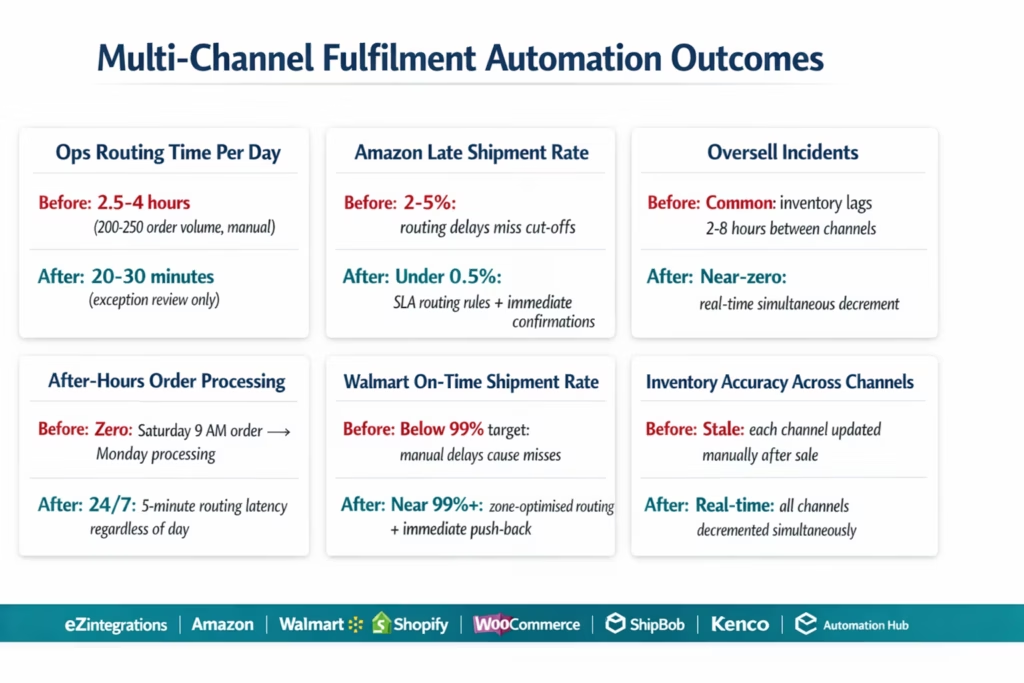
Ops team time on order routing: manual multi-channel routing takes 2.5-4 hours per day for a 200-250 daily order volume. Automated routing reduces this to 20-30 minutes of exception review per day. For a company with 2 ops staff, this recovers 4-8 hours of capacity per day.
Late shipment rate: manual routing on Amazon typically results in 2-5% late shipment rates (missed due to routing delays or cut-off misses). Walmart’s On-Time Shipment Rate metric is similarly impacted. Automated routing with SLA feasibility checks before assignment reduces late shipment rates to under 0.5% (limited to genuine carrier or warehouse exceptions, not process delays).
Oversell rate: manual inventory sync (updating each channel after each sale) typically lags by 2-8 hours. During this window, overselling occurs when the same unit is sold on multiple channels. Real-time inventory decrement across all channels simultaneously reduces overselling to near-zero.
After-hours order processing: manual routing processes only during business hours. A Saturday order placed at 9 AM may not be picked up until Monday, causing Amazon 2-day SLA failures and customer satisfaction issues. Automated routing processes orders 24/7 with the same 5-minute latency regardless of day or time.
Channel compliance: Amazon’s Late Shipment Rate threshold is 4% (above this risks account health review). Walmart’s On-Time Shipment Rate target is 99%. Automated routing that guarantees SLA-feasibility before assignment, combined with immediate tracking confirmation push-back, keeps both metrics in compliance range.
How to Get Started
Step 1: Audit Your Current Channel and Fulfilment Setup
Document: which channels do you sell on (Amazon, Walmart, Shopify, WooCommerce, others)? Which fulfilment locations do you use (own warehouses, 3PLs, FBA)? What is the SKU mapping between each channel’s identifier and your internal SKU? What SLA does each channel require? What is your current late shipment rate per channel? This 2-4 hour audit defines your routing architecture.
Step 2: Build Your SKU Cross-Reference Table and Routing Zone Matrix
The SKU cross-reference table (channel identifier → internal SKU) and the routing zone matrix (warehouse × customer zip → transit days) are the two data assets that make routing automation work correctly. Export your current SKU mappings from each channel’s seller portal. Build the zone matrix from your carrier’s transit time charts or from historical shipment data. This typically takes 2-4 hours for 3 channels and 2 warehouses.
Step 3: Import the Multi-Channel Fulfilment Template
Go to the Automation Hub and import the Multi-Channel Order Fulfilment template. The template includes: Amazon SP-API order ingestion, Walmart Marketplace API order ingestion, Shopify webhook order receipt, order normalisation engine, routing rules with zone matrix and SLA feasibility, 3PL or WMS fulfilment request, tracking push-back to all channels, and inventory sync across channels.
Step 4: Configure Channels, Routing Rules, and Fulfilment Credentials
Connect your Amazon Seller account (SP-API LWA credentials), Walmart seller account (Consumer ID and secret), and Shopify store (private app token). Add your 3PL or WMS API credentials. Configure the SKU cross-reference table. Upload the zone matrix. Define routing rules in the visual condition builder (SLA thresholds, inventory minimums, channel-specific rules). Test with 10 real orders across all channels.
Book a free demo with your channel list, fulfilment location types, and current daily order volume. We will map the routing architecture for your specific setup.
Total configuration time: 3-5 days for 3 channels and 2 fulfilment locations.
FAQs
1. How does eZintegrations automate multi-channel order fulfilment across Amazon, Walmart, and Shopify?
eZintegrations polls or receives webhooks from Amazon (SP-API), Walmart (Marketplace API), and Shopify (Admin API or webhook) for new orders. Each order is normalised into a unified data model using your SKU cross-reference table. Level 2 checks inventory availability and SLA feasibility (can any warehouse meet the channel's delivery deadline given zone transit times?). The routing engine applies your configured rules to select the optimal warehouse or 3PL. A fulfilment request is sent to the selected location via REST API, EDI 940, or SFTP. When tracking is received from the warehouse, eZintegrations pushes the confirmation back to the originating channel (Amazon shipment confirmation, Walmart order shipping, Shopify fulfilment) and decrements inventory across all channels simultaneously.
2. How long does multi-channel fulfilment automation take to set up?
3-5 days for 3 channels and 2 fulfilment locations. Key steps: channel API credentials (1-2 hours per channel), SKU cross-reference table (2-4 hours), routing zone matrix (2-4 hours), template import and routing rule configuration (3-5 hours), warehouse or 3PL API connection (2-4 hours), and test validation with 10 orders across all channels (1-2 days). More complex configurations (5+ channels, 3+ fulfilment locations, or special handling rules) add 1-2 days per complexity layer.
3. Does eZintegrations work with Amazon SP-API, Walmart Marketplace API, and Shopify?
Yes. Amazon: SP-API with LWA (Login with Amazon) OAuth 2.0, orders endpoint (GET /orders/v0/orders), and shipment confirmation (POST /orders/v0/orders/{orderId}/shipment). Walmart: Marketplace API with signature authentication, orders endpoint (GET /v3/orders), order acknowledgment, and shipping update (POST /v3/orders/{purchaseOrderId}/shipping). Shopify: Admin API with private app OAuth, orders webhook and REST polling, and fulfilment API (POST /orders/{id}/fulfillments). WooCommerce, Magento 2, BigCommerce, and other eCommerce platforms are also supported. Pre-built templates for Amazon, Walmart, and Shopify are available in the Automation Hub.
4. How does the SLA routing rule work to prevent late shipments?
For each candidate warehouse or 3PL, the routing engine calculates the projected delivery date: today + warehouse_processing_hours + transit_days(warehouse)(customer_zip). This projected date is compared against the channel's required delivery date (estimatedDeliveryDate for Walmart, promise_date for Amazon). Only warehouses where the projected delivery is on or before the required date are considered eligible. If multiple eligible warehouses exist, zone optimisation selects the one with the lowest estimated shipping cost. If no warehouse can meet the SLA, the order is routed to a manual review queue with an alert to the ops team.
5. How does inventory sync work across all channels when an order ships?
When a warehouse or 3PL confirms a shipment (providing a tracking number), eZintegrations simultaneously decrements the inventory count for the fulfilled SKU across all connected channels: Amazon Feeds API (inventory update), Walmart Inventory API (PUT /v3/inventory?sku={sku}), and Shopify Inventory Levels API (POST /inventory_levels/set.json). The same decrement logic runs in real time when an order is first routed (reserving the inventory to prevent a second order from routing to the same units), and then finalised when the shipment is confirmed. This real-time inventory reservation prevents the overselling that occurs when channels are updated manually hours after the sale.
Alex Processed Three Channels in 21 Minutes. While She Was Asleep.
Manual multi-channel order routing fails for the same reason every time: it requires a person to be at a desk, looking at multiple portals, making routing decisions with incomplete information, within a tight cut-off window.
The automated version works while Alex sleeps. The Saturday 9 AM Amazon order to Austin is in Kenco’s queue by 9:20 AM. The Walmart order to New York is with the East Coast warehouse by 9:25 AM. The Shopify order to Seattle is in Kenco’s queue by 9:35 AM. All three channels receive tracking confirmation by Saturday afternoon. Amazon’s Late Shipment Rate is unaffected. Walmart’s On-Time Shipment Rate is unaffected. The inventory counts on all three channels reflect the actual stock.
Alex spends 20 minutes Monday morning reviewing the 3 orders that were in the exception queue (one failed address validation, two had insufficient stock at both warehouses).
Book a free demo with your channel list, fulfilment locations, and daily order volume. We will walk through the routing architecture for your specific setup.
For the related 3PL shipment tracking automation that handles the tracking push-back and ERP updates after fulfilment, see the 3PL shipment status automation guide.

