
How to Automate Purchase Order Creation When Stock Hits Reorder Level in Your ERP
May 6, 2026To automate purchase order creation when stock hits reorder level, eZintegrations runs a scheduled inventory check against your ERP (SAP S/4HANA, NetSuite, Microsoft Dynamics 365, or JD Edwards), identifies items where current stock on hand has fallen at or below the configured reorder point for each item, retrieves the preferred supplier and contract price from the supplier master, creates a purchase order in the ERP via REST API, optionally routes it for approval based on order value, and sends the PO to the supplier via email or EDI. The full cycle from reorder trigger to supplier PO runs automatically without any manual intervention from the purchasing team.
TL;DR
- Stockouts cause $1 trillion in missed global sales annually, based on widely cited inventory management benchmarks and analysis from Gartner on supply chain performance. The most preventable stockouts are the ones caused not by demand surprises but by a purchasing team that did not place the reorder in time.
- Manual reorder processes require someone to notice that stock is low, check the supplier lead time, calculate the order quantity, raise a purchase requisition or PO, get it approved, and send it to the supplier. Every step is a delay. Every delay risks a stockout.
- eZintegrations monitors your ERP inventory levels on a configurable schedule, identifies items at or below reorder point, calculates the order quantity, retrieves the preferred supplier, creates the purchase order via ERP REST API, and notifies the supplier.
- Works with SAP S/4HANA, NetSuite, Microsoft Dynamics 365, and JD Edwards (JDE).
- Level 1 (iPaaS Workflows) handles ERP inventory queries, reorder point comparisons, supplier lookup, PO creation API calls, and supplier notification. Level 2 (AI Workflows) validates the order quantity against current demand trends (adjusting for seasonality and sales velocity changes), checks supplier lead time against the current stock run-out date, flags items where the standard reorder quantity may be insufficient, and detects items where the supplier is on a procurement hold. Level 3 (AI Agents) monitors purchase order fulfilment status, alerts the procurement team when a supplier acknowledgment is overdue, detects patterns of repeated stockouts on specific items (suggesting the reorder point needs recalibration), and generates weekly inventory health reports. Level 4 (Goldfinch AI) provides the Goldfinch AI Chat UI as a Workflow Node: “Which items are below reorder point right now?”, “Which POs are overdue for supplier acknowledgment?”, or “Which items have triggered reorders more than twice in the last 90 days?”
- Configuration time: 2-4 days per ERP.
Why Stockouts Still Happen When Your ERP Has Reorder Points Configured
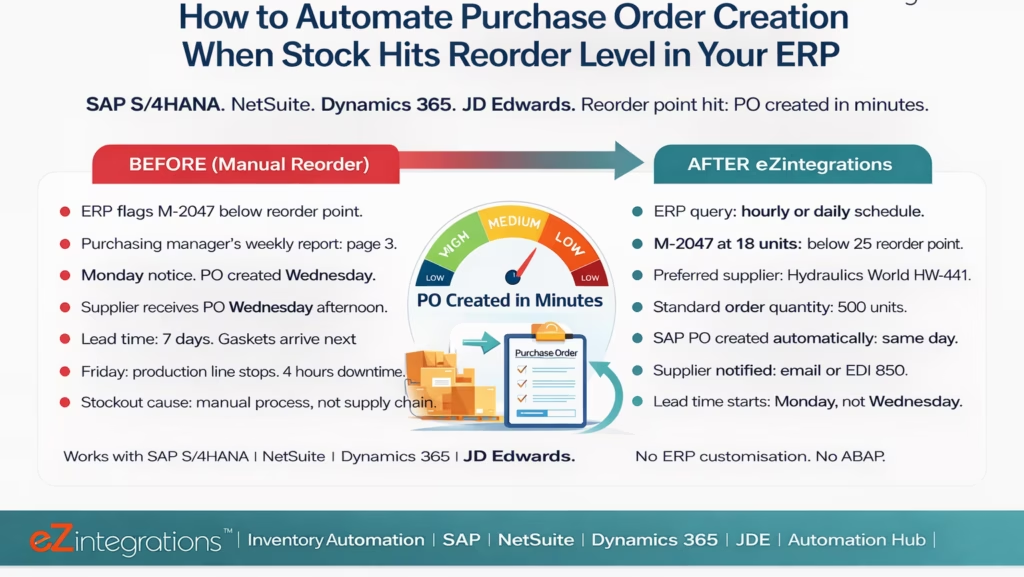
Your ERP has reorder points configured for every item in your inventory. You set them up three years ago. So why did you run out of hydraulic pump gaskets last Tuesday?
Your ERP shows the gasket (Part No. M-2047) is at 18 units. The reorder point is 25 units. You are below reorder point. But nobody noticed. The ERP did not send anyone an email. The purchasing manager’s report shows the item flagged in yellow, but she has 340 items in her report this week and M-2047 is on page 3 of a spreadsheet export she gets every Monday.
By the time she sees it is Tuesday, M-2047 has already dropped from 18 to 11 units due to weekend production runs. She opens SAP to create the PO. She looks up the preferred supplier (Hydraulics World, vendor number HW-441). She checks the last PO price ($4.20/unit) and the standard order quantity (500 units). She creates the PO manually: vendor, material, quantity, delivery date, plant. The PO is created Wednesday morning. The supplier receives it Wednesday afternoon. Their standard lead time is 7 business days. The gaskets arrive the following Wednesday.
In the meantime, your production line runs out of M-2047 on Friday morning. Four hours of production downtime.
The reorder point was set correctly. The automation was not. The ERP flagged the item. Nobody acted on the flag automatically.
This is the most preventable stockout: not a demand surprise, not a supply chain disruption, but a manual process that was too slow to execute on information the ERP already had.
The Reorder Point Formula and Why Manual Execution Breaks It
The reorder point formula (ROP) is straightforward:
Reorder Point (ROP) = (Average Daily Demand × Lead Time Days) + Safety Stock
Where:
- Average Daily Demand = average units consumed per day over the last N months
- Lead Time Days = the number of days from placing the PO to receiving the stock
- Safety Stock = buffer for demand variability and supplier lead time variability
For Part M-2047 (hydraulic pump gaskets):
- Average daily demand: 7 units/day (based on 6-month rolling average)
- Supplier lead time: 7 business days
- Safety stock: 25 units (based on 1.5× daily demand × lead time variability factor)
- Reorder Point: (7 × 7) + 25 = 74 units
Wait: the reorder point in the ERP was configured as 25 units, not 74. That is the configuration error. But even if the reorder point were correctly set at 74 units, the manual execution would still fail: the ERP would flag it correctly, the purchasing manager would still see it on page 3 of Monday’s report, and the PO would still be created 2 days later.
The formula is only as good as the execution speed. Automated execution closes the gap between “ERP detects the reorder point breach” and “PO is sent to the supplier” from days to minutes.
How Automated Reorder PO Creation Works
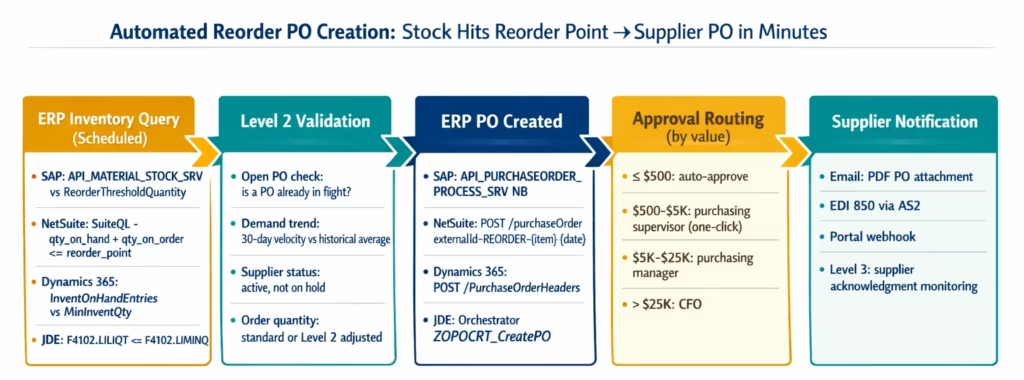
The automation has five components:
1. Inventory monitoring schedule: eZintegrations queries the ERP inventory on a configurable schedule (hourly, twice daily, or daily at a specific time). Each run compares current stock levels against configured reorder points for all items.
2. Reorder identification: items where quantity_on_hand + quantity_on_order < reorder_point are identified as reorder candidates. The check includes open purchase orders to avoid double-ordering: if a PO already exists for an item (not yet received), the item is not flagged again.
3. Order quantity calculation: the standard order quantity (or economic order quantity) is retrieved from the item master or supplier contract. Level 2 can adjust this for demand trends.
4. Supplier and price lookup: for each reorder item, the preferred supplier is retrieved from the item master or supplier catalogue. The contract price (or last purchase price) is retrieved for PO line creation.
5. PO creation and notification: the purchase order is created in the ERP via REST API and the supplier is notified via email, EDI 850, or portal webhook.
Inventory Monitoring: Querying Stock Levels Across ERPs
SAP S/4HANA Inventory Query
GET /sap/opu/odata/sap/API_MATERIAL_STOCK_SRV/A_MatlStkInAcctMod?$filter=Material eq '{material_number}' and Plant eq '{plant_code}'&$select=Material,Plant,StorageLocation,MatlWrhsStkQtyInMatlBaseUnit,MatlStkInTransferQty
Authorization: Bearer {sap_token}
Or using the Material document API for a bulk query of all materials below reorder point:
GET /sap/opu/odata/sap/API_MATERIAL_STOCK_SRV/A_MatlStkInAcctMod?$filter=Plant eq '1000'&$select=Material,MatlWrhsStkQtyInMatlBaseUnit&$top=1000&$skip={offset}
Then compare each material’s MatlWrhsStkQtyInMatlBaseUnit against the reorder point from the material master:
GET /sap/opu/odata/sap/API_PRODUCT_SRV/A_ProductPlant?$filter=Product eq '{material_number}' and Plant eq '{plant_code}'&$select=Product,Plant,ReorderThresholdQuantity,PlanningRequiredQuantity,SafetyStockQuantity
Items where stock_qty <= ReorderThresholdQuantity are flagged for automated PO creation.
NetSuite Inventory Query (SuiteQL)
SELECT
  item.itemid AS item_code,
  item.displayname AS description,
  il.quantityonhand AS qty_on_hand,
  il.quantityonorder AS qty_on_order,
  il.reordermultiple AS reorder_multiple,
  item.safetystock AS safety_stock,
  item.reorderpoint AS reorder_point,
  item.preferredvendor AS preferred_vendor_id
FROM
  inventorylocation il
  JOIN item ON item.id = il.item
WHERE
  il.location = {location_id}
  AND item.isinactive = false
  AND (il.quantityonhand + il.quantityonorder) <= item.reorderpoint
ORDER BY
  (il.quantityonhand / NULLIF(item.reorderpoint, 0)) ASC
This query returns all items below reorder point, sorted by the most critically low (lowest ratio of on-hand to reorder point first). Open purchase orders are included via quantityonorder, preventing double-ordering.
Dynamics 365 Inventory Query
GET https://{tenant}.dynamics.com/data/InventTableView?$select=ItemNumber,ProductName,NetWeight,StorageDimensionGroupId&$filter=InventSum/PhysicalInvent le InventItemSetupSupplyType/MinInventQty
Authorization: Bearer {d365_token}
Or, using the D365 Supply Chain Management APIs more specifically:
GET /data/InventOnHandEntries?$filter=dataAreaId eq 'USMF' and InventSiteId eq '{site_id}'&$select=ItemNumber,PhysicalInventory,ReorderPoint,PreferredVendorId,EconomicOrderQuantity
JD Edwards (JDE) Inventory Query
JDE exposes orchestrator APIs and Business Function calls. For inventory level monitoring:
POST https://{jde-instance}/jderest/v2/orchestrator/ZGBQRY_InvBalance
Authorization: Bearer {jde_token}
{
  "mnAnNoSupplie": "{supplier_number}",
  "szBranchPlant": "{branch_plant_code}"
}
Or using the JDE JSON Connector (standard REST):
POST /jderest/v2/dataservice
{
  "token": "{jde_token}",
  "dataServiceRequest": {
    "outputType": "GRID_DATA",
    "returnControlIDs": "F4102.LIITMNO|F4102.LILOTN|F4102.LILIQT|F4102.LIMINQ",
    "query": {
      "condition": [{
        "value": [{ "content": "{branch_plant}", "specialValueId": "LITERAL" }],
        "controlId": "F4102.LIMMCU",
        "operator": "EQUAL"
      }]
    },
    "targetName": "F4102",
    "targetType": "table",
    "maxPageSize": "1000"
  }
}
F4102.LILIQT is the on-hand quantity. F4102.LIMINQ is the minimum (reorder) quantity. Items where LILIQT <= LIMINQ are reorder candidates.
Calculating the Right Order Quantity
The standard order quantity (also called the economic order quantity, or EOQ) is the quantity to order when the reorder point is hit.
Standard approach: retrieve the configured order quantity from the item master:
-- NetSuite
SELECT reordermultiple, preferredstocklevel, safetystock
FROM item WHERE itemid = '{item_code}'

-- SAP: standard lot size from MRP view
SELECT MinimumLotSizeQuantity, MaximumLotSizeQuantity,
  FixedLotSizeQuantity, RoundingValue
FROM A_ProductMRPArea
WHERE Product = '{material_number}' AND MRPArea = '{mrp_area}'
Level 2 adjustment for demand trends: Level 2 checks the recent sales velocity against the historical average:
- If the last 30-day sales rate is more than 20% above the historical average used to set the reorder point: increase the order quantity by the same percentage to account for the demand uplift.
- If the last 30-day sales rate is more than 20% below the historical average: flag the reorder for review (the item may be overstocked if the full standard order quantity is placed).
Open PO quantity check: Before placing the order, check whether open purchase orders for this item already cover the reorder need:
-- NetSuite: check open POs for this item
SELECT SUM(quantityexpected - quantityreceived) AS open_po_qty
FROM purchaseorderline pol
JOIN purchaseorder po ON po.id = pol.order
WHERE pol.item = {item_id}
AND po.status NOT IN ('fullyBilled', 'cancelled')
AND pol.quantityreceived < pol.quantityexpected
If qty_on_hand + open_po_qty > reorder_point: no new PO needed (the open PO will cover the shortfall).
Supplier Lookup and PO Creation
Preferred Supplier Retrieval
For each reorder item, the preferred supplier is retrieved from the item master or the source list:
SAP Source List:
GET /sap/opu/odata/sap/API_PURCHASING_SOURCE_SRV/A_PurchasingSource?$filter=Material eq '{material_number}' and Plant eq '{plant_code}' and ValidityStartDate le datetime'{today}' and ValidityEndDate ge datetime'{today}' and FixedVendor ne ''&$select=Supplier,FixedVendor,PurchingOrganization,PurchasingInfoRecord&$orderby=ValidityStartDate desc&$top=1
Returns the fixed vendor (preferred supplier) for the material and plant combination.
NetSuite Preferred Vendor:
SELECT preferredvendor, lastpurchaseprice, safetystock
FROM item WHERE itemid = '{item_code}'
The preferredvendor field stores the NetSuite vendor ID. The lastpurchaseprice is used as the initial PO unit price.
Contract Price Lookup (SAP Info Record):
GET /sap/opu/odata/sap/API_INFORECORD_PROCESS_SRV/A_PurchasingInfoRecord?$filter=Supplier eq '{supplier_number}' and Material eq '{material_number}' and PurchasingOrganization eq '1000'&$select=NetPriceAmount,PriceUnit,MinimumOrderQuantity,StandardOrderQuantity,DeliveryTimeInDays
The info record returns the contract price (NetPriceAmount), the standard order quantity, and the supplier’s quoted lead time in days.
ERP Purchase Order Creation: SAP, NetSuite, Dynamics 365, and JDE
SAP S/4HANA Purchase Order
POST /sap/opu/odata/sap/API_PURCHASEORDER_PROCESS_SRV/A_PurchaseOrder
Authorization: Bearer {sap_token}
Content-Type: application/json

{
  "CompanyCode": "1000",
  "PurchaseOrderType": "NB",
  "Supplier": "{supplier_number}",
  "PurchasingOrganization": "1000",
  "PurchasingGroup": "001",
  "DocumentCurrency": "USD",
  "to_PurchaseOrderItem": [{
    "PurchaseOrderItem": "00010",
    "Material": "{material_number}",
    "Plant": "1000",
    "OrderQuantity": "{standard_order_quantity}",
    "NetPriceAmount": "{info_record_price}",
    "NetPriceCurrency": "USD",
    "PurchasingInfoRecord": "{info_record_number}",
    "AccountAssignmentCategory": " ",
    "RequirementTracking": "AUTO-REORDER-{item_code}-{date}"
  }]
}
The RequirementTracking field stores a reference that identifies this PO was created by the automated reorder process. SAP returns the created PO number (e.g., 4500882571), which is stored for status tracking.
NetSuite Purchase Order
POST /services/rest/record/v1/purchaseOrder
Authorization: {TBA headers}
Content-Type: application/json

{
  "entity": { "id": "{preferred_vendor_id}" },
  "tranDate": "{today}",
  "memo": "AUTO-REORDER: {item_code} below reorder point {reorder_point} | On-hand: {qty_on_hand}",
  "externalId": "REORDER-{item_code}-{today}",
  "item": {
    "items": [{
      "item": { "id": "{netsuite_item_id}" },
      "quantity": {standard_order_quantity},
      "rate": {last_purchase_price},
      "description": "{item_description}",
      "expectedReceiptDate": "{today + lead_time_days}"
    }]
  }
}
externalId set to REORDER-{item_code}-{date} prevents duplicate POs if the check runs twice before the first PO is acknowledged.
Dynamics 365 Purchase Order
POST https://{tenant}.dynamics.com/data/PurchaseOrderHeaders
Authorization: Bearer {d365_token}
Content-Type: application/json

{
  "VendorAccountNumber": "{d365_vendor_account}",
  "PurchaseOrderName": "AUTO-REORDER-{item_code}",
  "CurrencyCode": "USD",
  "RequestedDeliveryDate": "{today + lead_time_days}",
  "PurchaseOrderLines": [{
    "ItemNumber": "{d365_item_number}",
    "ProcurementProductCategoryName": "{category}",
    "OrderedInventoryStatusId": "Available",
    "PurchaseQuantity": {standard_order_quantity},
    "PurchasePrice": {contract_price},
    "SiteId": "{site_id}",
    "WarehouseId": "{warehouse_id}"
  }]
}
JD Edwards Purchase Order (via Orchestrator)
POST /jderest/v2/orchestrator/ZOPOCRT_CreatePO
Authorization: Bearer {jde_token}
{
  "szSupplierNumber": "{supplier_number}",
  "szBranchPlant": "{branch_plant}",
  "szItemNumber": "{jde_item_number}",
  "mnQuantityOrdered": {standard_order_quantity},
  "mnUnitCost": {contract_price},
  "jdRequestedDate": "{delivery_date}",
  "szLineType": "S",
  "szMemoDescription": "AUTO-REORDER: below minimum quantity"
}
Approval Routing for Auto-Created Reorder POs
Not every auto-created PO should go directly to the supplier without human review. Configure approval routing based on order value:
IF po.total_value <= 500: auto-approve (send to supplier immediately)
IF po.total_value > 500 AND <= 5,000: route to purchasing supervisor
IF po.total_value > 5,000 AND <= 25,000: route to purchasing manager
IF po.total_value > 25,000: route to CFO
IF supplier.status = "new" or "on_hold": always route to purchasing manager
For routine reorders (existing preferred supplier, standard order quantity, contract price within tolerance), 80-90% of auto-created POs will be under the auto-approve threshold or qualify for one-click approval from the purchasing supervisor, rather than requiring a full approval cycle.
The approval notification includes:
- Item code, description, current stock level, reorder point
- Order quantity, unit price, total value
- Supplier name and expected delivery date
- The reason the auto-reorder was triggered (reorder point breach, with specific quantities)
- One-click Approve/Reject action
Supplier Notification: Email, EDI, and Portal
Once the PO is approved (auto or manual), the supplier is notified.
Email with PDF Attachment
The most common method: a formatted PO PDF is generated from the ERP PO data and emailed to the supplier’s procurement contact.
EDI 850 (Purchase Order Transaction)
For suppliers integrated via EDI (common in manufacturing and retail supply chains):
ISA*00*          *00*          *ZZ*MERIDIAN      *ZZ*HWLD441       *260310*0947*U*00401*000000001*0*P*>~
GS*PO*MERIDIAN*HWLD441*20260310*0947*1*X*004010~
ST*850*0001~
BEG*00*SA*PO-2026-0441**20260310~
REF*VN*HW-441~
DTM*002*20260320~
PO1*1*500*EA*4.20*VN*M-2047*BP*GASKET-HYD-PUMP~
CTT*1~
SE*7*0001~
GE*1*1~
IEA*1*000000001~
The EDI 850 is transmitted via AS2 to the supplier’s EDI endpoint. The supplier’s system processes the PO automatically.
Supplier Portal Webhook
For suppliers with a procurement portal, eZintegrations POSTs the PO data to the supplier’s webhook endpoint. The supplier’s system creates the inbound order automatically.
Level 2 Intelligence: Beyond Simple Threshold Monitoring
Simple threshold monitoring (if stock <= reorder point, create PO) works for stable demand patterns. Level 2 (AI Workflows) adds intelligence for the cases where simple rules produce the wrong outcome.
Demand Velocity Check
Level 2 compares the last 30-day demand rate against the 6-month historical average used to set the reorder point:
recent_daily_demand = units_consumed_last_30_days / 30
historical_daily_demand = units_consumed_last_180_days / 180
demand_change_pct = (recent_daily_demand - historical_daily_demand) / historical_daily_demand * 100
If demand_change_pct > +20%: increase the order quantity proportionally and add a flag to the PO noting the elevated demand.
If demand_change_pct < -20%: flag the reorder for review (placing the standard order quantity may result in overstock if demand has declined).
Run-Out Date vs Supplier Lead Time Check
Level 2 calculates the expected stock run-out date and compares it against the supplier’s lead time:
run_out_date = today + (qty_on_hand / recent_daily_demand)
po_arrival_date = today + supplier_lead_time_days
If run_out_date < po_arrival_date: there is a risk of stockout before the PO arrives, even with immediate ordering. Level 2 flags this and suggests: (a) expedite the order from the preferred supplier, or (b) identify an alternative supplier with a shorter lead time. The procurement team receives an urgent alert.
Multi-Location Stock Netting
For organisations with multiple warehouses or plants, a reorder may not be necessary if another location has excess stock:
Level 2 queries all locations for the same item and calculates the inter-plant transfer option:
-- NetSuite: check stock across all locations
SELECT location.name, il.quantityavailable, item.reorderpoint
FROM inventorylocation il
JOIN item ON item.id = il.item
JOIN location ON location.id = il.location
WHERE item.itemid = '{item_code}'
AND il.quantityavailable > 0
ORDER BY il.quantityavailable DESC
If another location has significantly more stock than the reorder level: propose an inter-plant transfer instead of a supplier PO, flagging this option for the procurement team’s decision.
Before vs After: Manual Reorder Process vs Automated
| Process Step | Manual Reorder Process | Automated with eZintegrations |
|---|---|---|
| Reorder detection | Weekly report: purchasing manager checks | Scheduled ERP query: detected hourly or daily |
| Detection delay | 1-5 days (depends on report frequency) | Under 24 hours (typically same shift) |
| Open PO check | Manual: did someone already order this? | Automated: qty_on_hand + open_po_qty vs reorder_point |
| Demand trend awareness | None: fixed reorder point regardless of velocity | Level 2: 30-day velocity vs historical comparison |
| Supplier lookup | Manual: purchasing manager recalls or looks up | Automated: preferred supplier from item master |
| Contract price lookup | Manual: last PO or price list checked | Automated: SAP info record, NetSuite last purchase price |
| PO creation time | 1-3 business days from detection | Minutes from threshold breach |
| Multi-location stock check | Manual: separate query per plant/warehouse | Level 2: automatic netting across all locations |
| Approval routing | Manual email to purchasing manager | Rules-based: by order value, one-click Slack/email |
| Supplier notification | Manual: email or ERP print-and-send | Automated: email PDF, EDI 850, or portal webhook |
| Expedite alert | Discovered after stockout | Level 2: run-out vs lead time calculation, proactive |
| Stockout risk detection | After the fact | Level 2: days before projected stock-out |
| Overstock prevention | None: standard order qty always ordered | Level 2: demand trend check before quantity confirmed |
| Duplicate PO prevention | Manual: purchasing manager checks | externalId in ERP API call (conflict on retry) |
| Supplier acknowledgment | Manual: follow-up by phone/email | Level 3: overdue acknowledgment alert |
| Time from reorder point hit to PO sent | 1-5 business days | Minutes to hours (same day) |
| Weekly/monthly review | Required: catch anything missed | Optional: Level 3 health report supplements automation |
Step-by-Step: A Component Hitting Reorder Point at Meridian Manufacturing
Meridian Manufacturing uses SAP S/4HANA. Material M-2047 (hydraulic pump gaskets). Plant 1000. Preferred supplier: Hydraulics World (SAP vendor HW-441). Standard order quantity: 500 units. Contract price: $4.20/unit. Info record: 5300008811. Lead time: 7 business days. Reorder point: 75 units (correctly configured this time).
Monday, March 10, 6:00 AM: Scheduled inventory check runs. eZintegrations queries SAP API_MATERIAL_STOCK_SRV for all materials in Plant 1000.
M-2047 result: MatlWrhsStkQtyInMatlBaseUnit = 68. Below reorder point 75.
6:00 AM: Open PO check. SAP query for open purchase orders for M-2047 at Plant 1000: none. No outstanding POs. Proceed with reorder.
6:00 AM: Level 2 validation (8 seconds).
- Demand velocity: recent 30-day average = 8.2 units/day vs 6-month historical 7.0 units/day. Demand up 17%: within 20% threshold, no quantity adjustment needed, demand uplift noted.
- Run-out date: 68 units ÷ 8.2 units/day = 8.3 days. Run-out: March 20.
- PO arrival date: March 10 + 7 business days = March 19.
- Margin: 1 day. Alert: “Run-out March 20, expected delivery March 19. Tight margin. Monitor closely.”
- Supplier status: Hydraulics World (HW-441): active, no procurement hold.
- Multi-location check: no other Meridian plants have surplus M-2047.
- Order quantity: 500 (standard, no Level 2 adjustment needed).
6:01 AM: SAP purchase order created.
POST /API_PURCHASEORDER_PROCESS_SRV/A_PurchaseOrder
{
  "CompanyCode": "1000",
  "PurchaseOrderType": "NB",
  "Supplier": "HW-441",
  "PurchasingOrganization": "1000",
  "PurchasingGroup": "001",
  "to_PurchaseOrderItem": [{
    "Material": "M-2047",
    "Plant": "1000",
    "OrderQuantity": "500",
    "NetPriceAmount": "4.20",
    "PurchasingInfoRecord": "5300008811",
    "RequirementTracking": "AUTO-REORDER-M2047-20260310"
  }]
}
SAP returns PO number 4500882571. Total: $2,100.00.
6:01 AM: Approval routing. PO value 2,100isbetween500 and $5,000. Route to purchasing supervisor James Chen.
6:01 AM: James Chen notified via Slack.
Auto-Reorder PO for approval: 4500882571
Material: M-2047 (Hydraulic Pump Gasket)
Plant: 1000 | Current stock: 68 units | Reorder point: 75 units
Order: 500 units × $4.20 = $2,100 | Supplier: Hydraulics World (HW-441)
Expected delivery: March 19 | Note: tight margin (run-out est. March 20)
[APPROVE] [REJECT] [REVIEW IN SAP]
6:15 AM: James Chen approves. One-click approval in Slack.
6:15 AM: Supplier notified. Hydraulics World procurement contact receives email with PO 4500882571 PDF attached: 500 units of M-2047 at $4.20, delivery requested March 19.
Total elapsed time from stock check to supplier notification: 15 minutes. Previous manual process: PO created Wednesday, supplier notified Wednesday afternoon. 2.5 days after the reorder point was breached.
Key Outcomes and Results
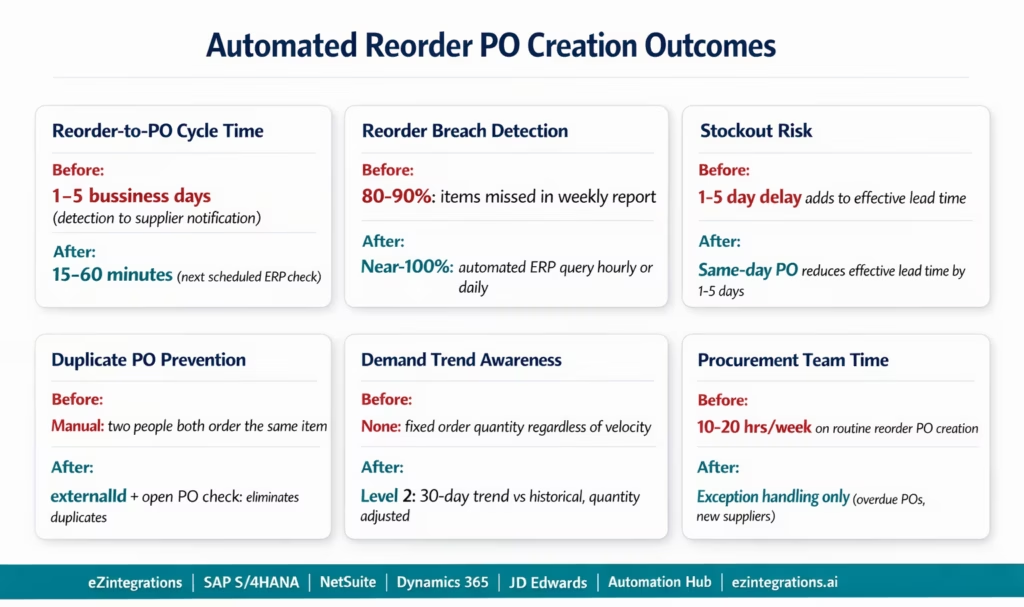
Reorder-to-PO cycle time: manual reorder processes take 1-5 business days from the reorder point breach to the PO being sent to the supplier. Automated reorder processing completes within 15-60 minutes of the scheduled inventory check detecting the breach. Lead time savings: 1-5 days per reorder event.
Stockout prevention: each day of lead time reduction is one fewer day of stock depletion before the PO arrives. For a material with a 7-day supplier lead time, cutting 2 days off the reorder-to-PO cycle is equivalent to increasing the safety stock by 2 × daily demand without physically holding more inventory.
Detection reliability: manual weekly report review detects reorder breaches 80-90% of the time (items are missed due to report volume, report access issues, or absence of the responsible person). Automated hourly or daily ERP queries achieve near-100% detection.
Double-ordering prevention: manual processes frequently result in duplicate POs when two people both notice the same item is low and both create POs independently. The externalId mechanism in the ERP API call prevents duplicate automated POs. The open PO check before each reorder decision prevents ordering when a PO already exists.
Procurement team capacity: the purchasing team’s time shifts from routine reorder PO creation (monitoring reports, looking up suppliers and prices, creating PO entries) to exception handling, supplier relationship management, and strategic sourcing. At 20 reorder events per week (common for a mid-size manufacturer), automation saves 10-20 hours per week of purchasing team time.
Cash flow impact: over-ordering (ordering too much to avoid stockouts) ties up working capital in excess inventory. Level 2 demand velocity checks reduce over-ordering on declining-demand items. Level 2 quantity adjustments ensure the order quantity reflects current demand rather than a fixed historical standard.
How to Get Started
Step 1: Audit Your Reorder Point Configuration
Before automating, verify that your ERP reorder points are correctly configured. The most common issue: reorder points were set years ago and have not been updated as demand patterns or supplier lead times changed. Pull a report of all items where the reorder point is below average daily demand × supplier lead time and update the configuration. This audit takes 2-4 hours for a focused material range and prevents the automation from working correctly on items with stale reorder points.
Step 2: Verify Preferred Supplier and Price Data in the Item Master
For each item in scope, confirm: is a preferred supplier configured in the item master (SAP source list, NetSuite preferred vendor field, or Dynamics 365 vendor trade agreement)? Is a contract or last-purchase price available? Is the standard order quantity configured? Items without preferred supplier data cannot be auto-ordered without additional configuration. Expect 5-15% of items to need supplier data updates.
Step 3: Explore and Import the Reorder PO Automation Template
Go to the Automation Hub and explore the inventory automation templates. Import the Reorder PO Automation template for your ERP (SAP, NetSuite, Dynamics 365, or JDE). The template includes: ERP inventory query on schedule, reorder point comparison logic, open PO check, Level 2 demand velocity and run-out date validation, preferred supplier lookup, ERP PO creation API call, approval routing, and supplier notification.
Step 4: Configure ERP Credentials, Schedule, and Approval Rules
Add ERP API credentials. Set the inventory check schedule (hourly, twice daily, or daily). Configure approval routing rules (order value thresholds, notification channels). Define which material groups or plants are in scope for automated reordering. Run a test using 5-10 real materials currently at or near reorder point to validate the full flow before going live.
Total configuration time: 2-4 days per ERP for a standard reorder automation with approval routing and supplier notification.
FAQs
eZintegrations runs a scheduled inventory query against your ERP (SAP S/4HANA API_MATERIAL_STOCK_SRV, NetSuite SuiteQL against inventorylocation, Dynamics 365 InventOnHandEntries, or JDE via the Orchestrator API). For each item where quantity_on_hand + quantity_on_order <= reorder_point, it checks for existing open POs (to prevent double-ordering), retrieves the preferred supplier and contract price, and creates a purchase order in the ERP via REST API. The PO is routed for approval based on order value and sent to the supplier via email, EDI 850, or portal webhook. Level 2 adds demand trend checks and run-out date vs lead time calculations before confirming the order quantity.
2-4 days per ERP for a standard configuration with approval routing and supplier notification. Key steps: ERP API credentials (2-4 hours), reorder point data audit and updates (2-4 hours), preferred supplier and price data verification (2-4 hours), template import and schedule configuration (2-4 hours), approval routing setup (1-2 hours), supplier notification template (1-2 hours), and test validation with 5-10 real materials (1-2 days).
Yes, SAP S/4HANA: API_MATERIAL_STOCK_SRV for inventory queries, API_PURCHASEORDER_PROCESS_SRV for PO creation (OData V4, no ABAP required), API_PURCHASING_SOURCE_SRV for preferred supplier lookup, and API_INFORECORD_PROCESS_SRV for contract price. NetSuite: SuiteQL for inventory queries, SuiteTalk REST POST /purchaseOrder for PO creation, preferred vendor from item master. Dynamics 365: InventOnHandEntries for inventory, POST /PurchaseOrderHeaders for PO creation. JD Edwards: Orchestrator API for both inventory queries (F4102 table) and PO creation (ZOPOCRT_CreatePO orchestrator or custom JDE Business Function). Pre-mapped field configurations for each ERP are available in the Automation Hub templates.
Two mechanisms work together. First: before creating any PO, eZintegrations queries the ERP for existing open purchase orders for the same item and location (quantity_on_order in NetSuite, open PO query in SAP). If quantity_on_hand + quantity_on_order > reorder_point, no new PO is needed and the automation skips that item. Second: when creating the PO via ERP API, the externalId field (NetSuite) or RequirementTracking field (SAP) is set to a unique value including the item code and date (e.g., REORDER-M2047-20260310). If the API call is retried for any reason, the ERP detects the duplicate reference and returns a conflict error rather than creating a second PO.
Yes, The inventory query is parameterised by plant/warehouse: each location's stock is compared against the reorder point configured for that specific location. In SAP: the A_ProductPlant API returns location-specific MRP data including ReorderThresholdQuantity per plant. In NetSuite: the inventorylocation table stores location-specific quantities and reorder points. The multi-location stock netting (Level 2) also checks whether an inter-plant transfer from an overstock location could serve the reorder need before creating a supplier PO. 1. How does eZintegrations automate purchase order creation when stock hits reorder level?
2. How long does it take to set up automated reorder PO creation?
3. Does eZintegrations work with SAP S/4HANA, NetSuite, Dynamics 365, and JD Edwards?
4. How does the system prevent duplicate purchase orders from being created?
5. Can the automation handle multiple plants or warehouses with different reorder points per location?
M-2047 Was Below Reorder Point at 6:00 AM. The Supplier Had the PO at 6:15 AM.
The gasket stockout happened because the ERP flagged the reorder correctly and the manual process was too slow to act on it. The automation does not change the supplier’s lead time, aligning with McKinsey & Company insights on digital transformation improving supply chain performance. It removes the 1-5 day delay between the ERP detecting the reorder and the supplier receiving the PO.
That gap is the most preventable part of a stockout. And it is entirely within your control.
Explore the Inventory Reorder Automation Templates in the Automation Hub. Or visit the Automation Hub directly to import the Reorder PO Automation template for SAP, NetSuite, Dynamics 365, or JDE.
For the related procurement workflow context (purchase requisitions raised by teams rather than automated reorders), see the purchase requisition to PO workflow automation guide.

