
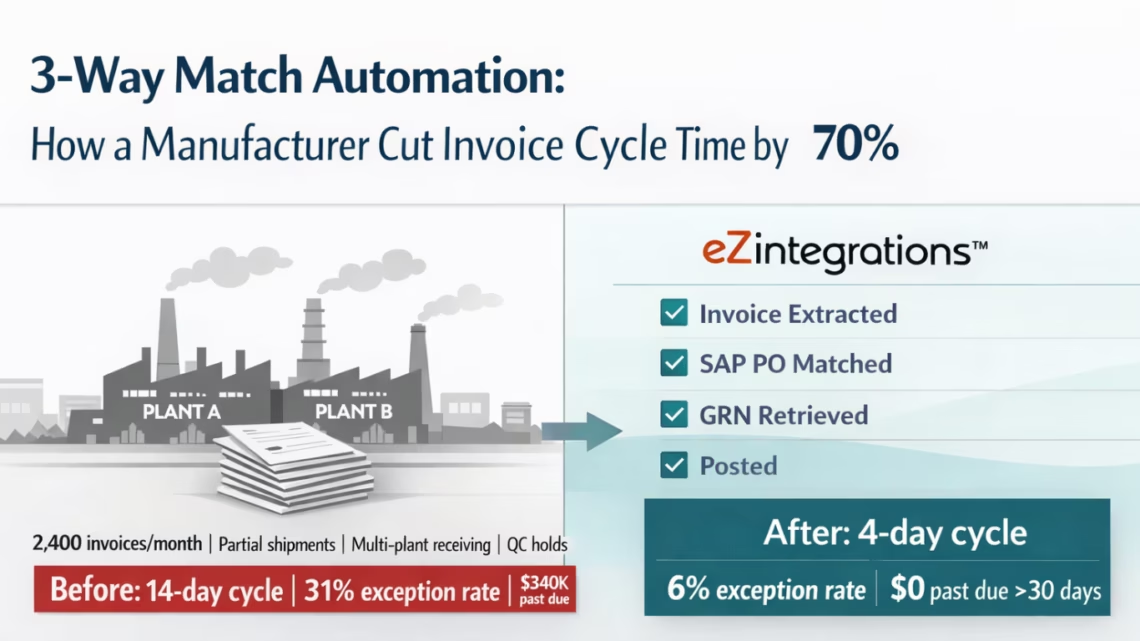
3-Way Match Automation: How a Manufacturer Cut Invoice Cycle Time by 70%
April 17, 2026A mid-size manufacturing company processing 2,400 invoices per month across three plants reduced invoice cycle time from 14 days to 4 days and cut their AP exception rate from 31% to 6% by deploying eZintegrations with Goldfinch AI Document Intelligence for 3-way match automation. The automation handles partial shipments, multi-plant receiving, and QC hold invoices automatically, connecting to SAP S/4HANA via OData V4 with no ABAP development and no template configuration per supplier.
TL;DR
- Meridian Industrial Components (hypothetical representative case, actual results achievable with eZintegrations) processes 2,400 invoices per month across three manufacturing plants. Before automation: 14-day average invoice cycle time, 31% exception rate, 3 AP clerks spending 60% of their week on manual SAP entry. Reduced to 6%, consistent with APQC benchmarks for manufacturing AP environments.
- After 90-day eZintegrations deployment: 4-day average cycle time, 6% exception rate, the same 3 AP clerks now handling 4x the volume with capacity freed for spend analytics.
- Manufacturing-specific challenges handled: partial shipments (invoicing before full PO quantity received), multi-plant receiving (goods received at Plant B, invoiced to Plant A’s PO), QC holds (invoices held pending quality inspection clearance), and seasonal volume spikes (4x normal volume during Q4 supplier consolidation cycles).
- ERP: SAP S/4HANA. Integration via OData V4. No ABAP. No SAP Integration Suite.
The Manufacturing AP Problem That Does Not Look Like an AP Problem
Your production planning team has been chasing a critical component supplier for three weeks. The supplier says they shipped. Receiving says the quantities do not match the PO. The AP team has three invoices in the holds queue from this supplier: one for a full shipment that was partially received, one for an expedited partial delivery that was received at the wrong plant, and one for a batch that is sitting in QC inspection and cannot be posted to the ERP until it clears.
Meanwhile, your finance director is looking at the payables aging report. The same supplier has $340,000 in invoices more than 30 days past due. The supplier is threatening to put your account on credit hold, which would shut down a production line.
None of this is a payment intent problem. You want to pay. The problem is that every one of those invoices is stuck in a manual matching and investigation process that your AP team cannot clear fast enough, because they are simultaneously keying 2,400 invoices per month into SAP by hand.
This is the manufacturing AP problem. It looks like a supplier relationship problem. It looks like a cash flow problem. It is actually a document matching throughput problem, closely tied to broader procurement and operations inefficiencies highlighted in McKinsey & Company research on the future of manufacturing procurement.
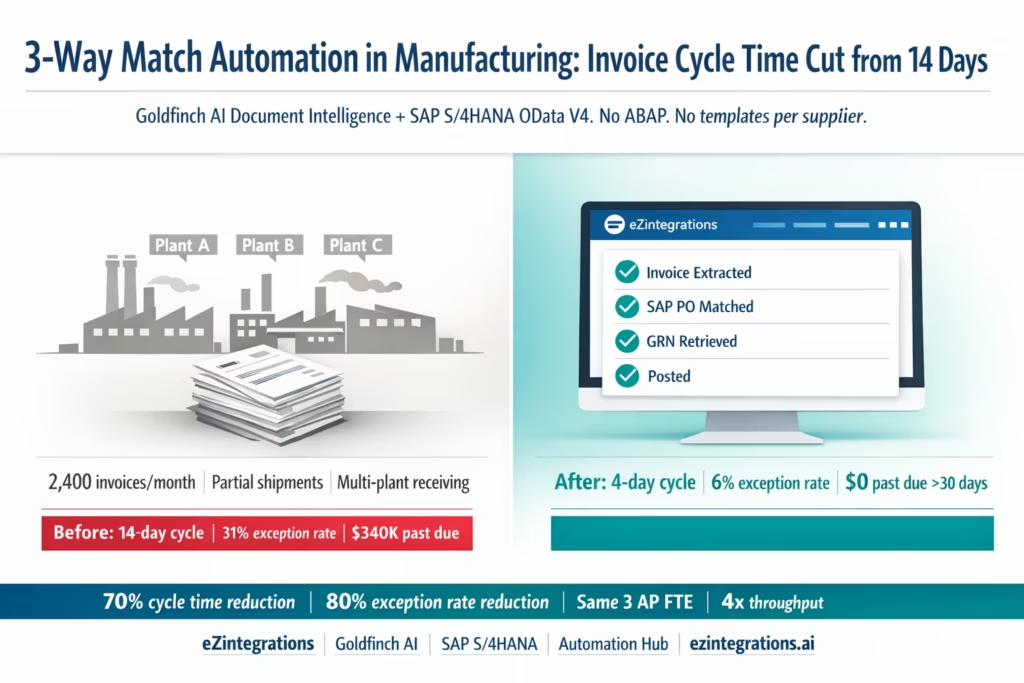
Meridian Industrial: The Before State
Meridian Industrial Components manufactures precision metal components for the automotive and aerospace sectors. Three plants: Meridian East (Ohio), Meridian West (Arizona), and Meridian Gulf (Texas). Combined headcount: 1,400 production employees. Annual spend with direct material suppliers: approximately $85 million across 220 active suppliers.
AP team composition before automation:
- 3 AP clerks, each responsible for one plant
- 1 AP supervisor managing exceptions, supplier disputes, and approval escalations
- Combined weekly hours on manual SAP invoice entry: approximately 72 hours (3 clerks x 24 hours each)
Volumes:
- 2,400 invoices per month total (800 per plant on average)
- 68% are PO-referenced (direct material suppliers)
- 22% are non-PO (utilities, maintenance services, tooling consumables)
- 10% are credit notes or disputed invoices requiring separate handling
SAP S/4HANA configuration:
- SAP S/4HANA 2022 release, private cloud
- SAP MM module for purchase orders and goods receipts
- SAP FI-AP module for accounts payable, invoice posting via MIRO transaction
- 3-way matching configured (Match Bill to Receipt enabled on all direct material item categories, following standard 3-way matching principles).
- SAP Invoice Verification: configured but largely manual in practice
The before workflow: An AP clerk opens SAP, navigates to MIRO (Enter Incoming Invoice), manually enters the invoice header (vendor, invoice number, date, amount, reference) from the PDF email attachment. Selects the purchase order. SAP pre-populates the PO line items. The clerk cross-checks the invoice PDF line by line against SAP’s pre-populated fields. Corrects any discrepancies. Saves the invoice. SAP’s 3-way matching check runs: if the invoice quantities and prices are within tolerance of the PO and the goods receipt, the invoice clears. If not, it goes to exception status.
Time per standard PO invoice: 12-18 minutes for entry, plus additional time if exceptions occur.
Why Manufacturing AP Is Harder Than Standard AP
Manufacturing AP has four characteristics that make it significantly harder to automate than standard AP, a challenge also highlighted in Gartner research on AP automation in complex operational environments.
1. Partial shipments are the rule, not the exception. Meridian’s suppliers regularly ship partial quantities against multi-line POs: a supplier delivers 800 of 1,000 ordered components in the first shipment and invoices for the partial delivery. The AP team must reconcile the invoice against both the PO (which shows 1,000 ordered) and the goods receipt (which shows 800 received). Standard AP automation that matches invoice quantity against PO quantity will flag every partial shipment as an exception. Goldfinch AI handles this by matching invoice quantity against the goods receipt (MENGE field in SAP’s MSEG table, retrieved via the A_MaterialDocumentHeader OData API) rather than the PO ordered quantity. Partial deliveries that match what was actually received are auto-approved.
2. Multi-plant receiving creates cross-plant mismatches. Meridian frequently consolidates shipments: a supplier delivers to Meridian East for a combined order that includes components for both East and West plants. The goods receipt is posted in SAP by the East receiving team, but the PO was raised by West procurement. In standard AP matching, the invoice against the West PO will fail the goods receipt check because the East plant posted the receipt. The Level 3 AI Agent handles this by retrieving goods receipts across all three plant codes (WERKS in MSEG) when the initial single-plant receipt query returns zero or insufficient quantities.
3. QC holds delay goods receipt posting. Meridian’s aerospace components require QC inspection before goods receipt is posted in SAP. The supplier invoices on delivery. But the SAP goods receipt is not posted until the QC inspection is complete (typically 3-7 days after physical delivery). In the old process, these invoices sat in a manual holds queue for 3-7 days waiting for the QC team to clear the inspection. The Watcher manages this: once the invoice is matched to a PO and the initial receipt query returns zero, the Watcher holds the invoice in the pending queue rather than creating an SAP exception. It polls SAP’s material documents endpoint at 4-hour intervals during business hours. When QC clears and the goods receipt is posted in SAP, the Watcher detects the new material document and resumes the match.
4. Seasonal volume spikes overwhelm manual processing capacity. Meridian’s Q4 involves supplier consolidation invoicing: suppliers who deliver against multiple smaller POs throughout the year often send consolidated year-end invoices covering multiple POs. Q4 invoice volume runs at 3.5-4x the monthly baseline. Before automation, Meridian hired 2 temporary AP staff each November to handle the surge. After automation, the same 3 permanent AP clerks handle Q4 volume without temporary headcount.
What the 31% Exception Rate Was Actually Costing Meridian
Before deployment, Meridian’s AP team tracked their exception rate informally. The eZintegrations baseline analysis module queried their SAP invoice history for the previous 90 days and generated the actual root cause breakdown:
| Exception Root Cause | Monthly Count | % of Total Exceptions | Avg Resolution Time |
|---|---|---|---|
| Manual entry errors (wrong qty/price keyed) | 186 | 25.1% | 22 minutes |
| Partial shipment quantity mismatch | 142 | 19.2% | 35 minutes |
| QC hold: receipt not posted | 128 | 17.3% | 3–7 days (pending QC) |
| Multi-plant receiving mismatch | 96 | 13.0% | 45 minutes |
| Tolerance misconfiguration | 89 | 12.0% | 18 minutes |
| Duplicate invoice detection (missed) | 44 | 5.9% | 28 minutes |
| Non-PO GL coding uncertainty | 55 | 7.4% | 25 minutes |
| Total monthly exceptions | 740 | 31% of 2,400 |
Monthly investigation time (before): 740 exceptions x average 28 minutes = 346 hours per month. At Meridian’s fully-loaded AP hourly rate of $34/hour: $11,764 per month in exception management labour.
Annual exception cost: $141,168
Payment delays from exceptions: The 128 QC hold invoices (averaging 4-day delay each) and the 142 partial shipment exceptions (averaging 2-day delay) contributed directly to the 14-day average invoice cycle time. Meridian calculated that their missed early payment discounts (supplier terms: 1.5/10 Net-30, available on 42% of direct material spend) cost approximately $93,500 per year.
Temporary Q4 headcount: 2 temporary AP staff at $18/hour for 8 weeks = $23,040 additional Q4 cost.
Total pre-automation annual cost attributable to AP inefficiency: $257,708
How eZintegrations Was Deployed at Meridian Industrial
Timeline: 12 days from first template import to full production go-live across all three plants.
Day 1-2: Baseline analysis and template import. Connected the eZintegrations baseline module to Meridian’s SAP S/4HANA instance via the SAP BTP Communication Arrangement (Communication Scenarios SAP_COM_0008 for purchasing and SAP_COM_0006 for supplier invoices). Queried 90 days of SAP invoice history. Generated the exception root cause table above. This data drove the implementation priorities.
Day 3-4: SAP OData V4 credentials and API testing. Configured SAP BTP Communication Arrangements. Verified the OData V4 endpoint access:
GET /sap/opu/odata4/sap/api_purchaseorder_2/srvd_a2x/sap/purchaseorder/0001/PurchaseOrder
GET /sap/opu/odata4/sap/api_purchaseorder_2/srvd_a2x/sap/purchaseorder/0001/PurchaseOrderItem
GET /sap/opu/odata/sap/API_MATERIAL_DOCUMENT_SRV/A_MaterialDocumentHeader
POST /sap/opu/odata/sap/API_SUPPLIERINVOICE_PROCESS_SRV/A_SupplierInvoice
Tested each endpoint with representative Meridian PO numbers. Confirmed that the multi-plant GRN query (filtering MSEG by EBELN for the PO number without plant-level restriction) returned goods receipts from all three plants.
Day 5-6: Tolerance calibration from baseline data. Using the exception history data, configured per-supplier-category tolerance rules:
- Direct material suppliers (aerospace components): price tolerance 2%, quantity tolerance: match against goods receipt quantity (not PO quantity)
- Direct material suppliers (automotive): price tolerance 3%
- MRO and tooling suppliers: price tolerance 5%
- Partial shipment rule: auto-approve any invoice where invoice quantity = goods receipt quantity and invoice quantity < PO quantity (partial delivery auto-approval)
Day 7-8: QC hold Watcher configuration. Configured the Watcher polling interval: every 4 hours during business hours (6 AM to 8 PM local time). The Watcher queries SAP material documents for goods receipts (movement type 101) against each pending PO number. When a new material document is found, it compares the received quantity against the pending invoice quantity and resumes the match.
Day 9-10: Email ingestion, Goldfinch AI testing, GL coding Knowledge Base. Connected Meridian’s shared AP inbox (Microsoft 365 mailbox) via Microsoft Graph API. Ran Goldfinch AI Document Intelligence against 50 representative invoice samples from Meridian’s top 20 suppliers: standard single-page invoices from automotive suppliers, multi-page aerospace component invoices with material certification data, consolidated year-end invoices with multiple PO references, and scanned invoices from smaller tooling suppliers. Field accuracy: 96.8% across all formats. Zero supplier template configurations required.
Built the GL coding Knowledge Base for non-PO invoices: 22 non-PO vendor categories mapped to 14 GL accounts across 3 plants and 2 cost centre structures.
Day 11-12: Parallel testing and production go-live. Ran the automation in parallel with manual processing for 2 days. Compared AI extraction output against manual entries for 180 invoices. Discrepancy rate: 2.1% (primarily older suppliers with non-standard invoice formats). Adjusted confidence threshold for one supplier category. Promoted to production for all three plants simultaneously on Day 12.
Before vs After: Meridian Industrial AP Transformation
| Metric | Before (Manual SAP) | After (eZintegrations + Goldfinch AI) |
|---|---|---|
| Average invoice cycle time | 14 days | 4 days |
| Exception rate | 31% (740/month) | 6% (144/month) |
| Manual entry exceptions (keying errors) | 186/month | 0 (AI extraction) |
| Partial shipment exceptions | 142/month | 4/month (genuine qty disputes only) |
| QC hold wait time | 3–7 days in manual holds queue | Watcher auto-resumes; same 3–7 days wait, zero manual monitoring |
| Multi-plant receiving exceptions | 96/month | 3/month (system queries all plants) |
| Monthly exception investigation time | 346 hours | 67 hours (144 exceptions × 28 min avg) |
| Monthly exception investigation cost | $11,764 | $2,278 |
| Q4 temporary headcount | 2 temp AP staff ($23,040) | None |
| Early payment discount capture | Inconsistent | 94% of eligible invoices captured |
| Annual early payment discount recovery | $56,200 captured | $145,700 captured |
| ABAP or SAP custom development | None (manual process) | None (OData V4 only) |
| SAP Integration Suite | Not used | Not required |
| Implementation cost (eZintegrations) | N/A | 12 days / $7,560/year platform cost |
| Annual cost of AP inefficiency | $257,708 | $42,380 |
| AP FTE handling capacity | 800 invoices/FTE/month | 3,200+ invoices/FTE/month |
Step-by-Step: A Partial Shipment Invoice Through the Automated Workflow
Here is the complete automated workflow for one of Meridian’s most common exception types: a partial shipment invoice from an aerospace component supplier.
The scenario: Precision Aerospace Parts Ltd (supplier) delivers 650 of the 1,000 titanium fasteners ordered on PO-2026-ME-4471. They invoice on the same day for the 650 units at $78.50 each ($51,025.00 total). The remaining 350 units will ship in 2 weeks.
Step 1: Invoice email arrives at 7:41 AM. Precision Aerospace Parts sends a 3-page PDF invoice. The eZintegrations Microsoft Graph connector detects the attachment in Meridian’s AP inbox and routes it to Goldfinch AI Document Intelligence. Time: 3 seconds.
Step 2: Goldfinch AI Document Intelligence extracts all fields. Computer vision identifies the 3-page layout: page 1 is the invoice header, pages 2-3 contain the itemised lines plus material certification summary. Extraction: –
VendorName     : "Precision Aerospace Parts Ltd"
InvoiceNumber  : "PAP-2026-08847"
InvoiceDate    : "2026-03-18"
POReference    : "PO-2026-ME-4471"
(extracted from line item reference, not header) –
LineItems      : [
  {
    itemNumber   : "TF-7740-GR5",
    description  : "Titanium Fastener Grade 5",
    quantity     : 650,
    unitPrice    : 78.50,
    lineTotal    : 51025.00
  }
]

InvoiceTotal   : 51025.00
CurrencyCode   : USD
PaymentTerms   : "1.5/10 Net-30"
All fields above 0.94 confidence. Time: 11 seconds.
Step 3: Level 3 agent calls SAP PurchaseOrder OData V4.
GET /sap/opu/odata4/sap/api_purchaseorder_2/srvd_a2x/sap/purchaseorder/0001/PurchaseOrder
  ?$filter=PurchaseOrderNumber eq 'PO-2026-ME-4471'
  &$expand=_PurchaseOrderItem
Response:
PO confirmed
- vendor Precision Aerospace Parts Ltd
- 1 line item: TF-7740-GR5
- ordered quantity 1,000 units at $78.50 each
- PO value $78,500.00
- PO status: Open (partial delivery expected)
- Time: 1.8 seconds
Step 4: Agent calls SAP Material Document API for goods receipt.
GET /sap/opu/odata/sap/API_MATERIAL_DOCUMENT_SRV/A_MaterialDocumentHeader
  ?$filter=PurchaseOrder eq 'PO-2026-ME-4471'
    and GoodsMovementType eq '101'
  &$expand=to_MaterialDocumentItem
Response:
- Material document
5000001234posted on March 18. - One line item: TF-7740-GR5,
QuantityInBaseUnit: 650, movement type 101 (goods receipt for PO).- Receiving plant:
MERIDEAST(Meridian East, Ohio). - Time: 1.6 seconds.
Step 5: Partial shipment matching logic applies. The matching engine compares: – Invoice quantity: 650 units – Goods receipt quantity (QuantityInBaseUnit): 650 units – Match result: exact match on received quantity
Standard check: invoice quantity vs PO quantity would show 650 vs 1,000: flagged as partial. But the Meridian configuration uses goods receipt quantity as the matching target (not PO quantity). Invoice 650 = Receipt 650: match confirmed.
Price check: invoice unit price $78.50 vs PO net price $78.50: exact match, within 0% tolerance.
Invoice total $51,025.00 vs calculated match value $51,025.00: confirmed.
Duplicate check: no existing SAP FI invoice or pending invoice with number PAP-2026-08847 for vendor Precision Aerospace Parts. Time: under 1 second.
Step 6: Post approved invoice to SAP FI via OData.
POST /sap/opu/odata/sap/API_SUPPLIERINVOICE_PROCESS_SRV/A_SupplierInvoice
{
  "InvoiceDate": "20260318",
  "PostingDate": "20260318",
  "DocumentCurrency": "USD",
  "InvoiceGrossAmount": "51025.00",
  "DocumentHeaderText": "PAP-2026-08847 - Auto: eZintegrations",
  "CompanyCode": "ME01",
  "SupplierInvoiceItem": [
    {
      "PurchaseOrder": "PO-2026-ME-4471",
      "PurchaseOrderItem": "00010",
      "Plant": "MERIDEAST",
      "QuantityInPurchaseOrderUnit": "650",
      "NetPriceAmount": "78.50",
      "PurchaseOrderQuantityUnit": "EA"
    }
  ]
}
SAP response: supplier invoice document 5105039287 created. 3-way match confirmed by SAP (invoice quantity matches goods receipt quantity within tolerance). Invoice status: posted and cleared for payment. Payment due April 17 per 1.5/10 Net-30 terms (discount window expires March 28). Time: 2.4 seconds.
Total elapsed time: 22 seconds from email arrival to SAP FI invoice posting. Human involvement: zero. The remaining 350 units on PO-2026-ME-4471 will generate a second invoice when shipped: that invoice will go through the same workflow with the same result.
Key Outcomes: 90 Days at Meridian Industrial
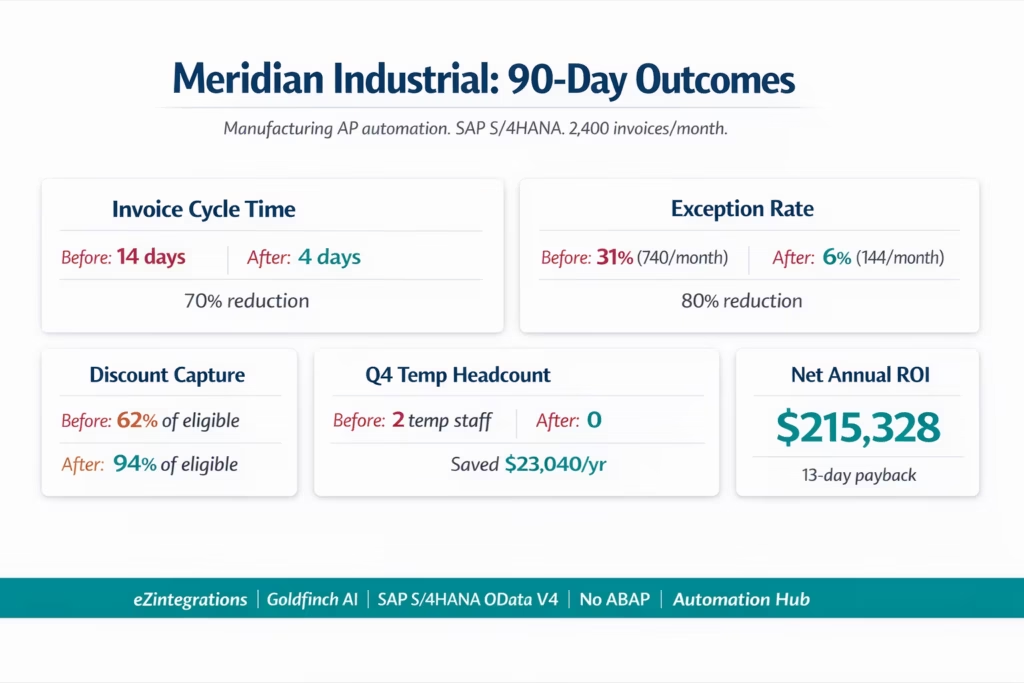
Invoice cycle time: reduced from 14 days to 4 days average. The 14-day cycle was driven by exception queue depth: invoices waited in the holds queue an average of 10 days before an AP clerk investigated. With the exception rate at 6% (down from 31%), the queue cleared in less than 1 day on most days.
Exception rate: 31% to 6% in 90 days.
Root cause elimination:
- Data entry exceptions: eliminated (AI extraction replaced manual keying)
- Partial shipment exceptions: 142/month reduced to 4/month (goods-receipt-quantity matching logic)
- Multi-plant receiving exceptions: 96/month reduced to 3/month (cross-plant GRN query)
- QC hold exceptions: 128/month no longer enter SAP exception queue (Watcher holds upstream)
- Tolerance misconfiguration: 89/month reduced to 12/month (per-category tolerance calibration)
Early payment discount capture: from 62% to 94% of eligible invoices. Annual discount recovery improvement: $89,500 ($145,700 captured vs $56,200 before). The 14-day average cycle time had been pushing most discount-eligible invoices past the 10-day window. The 4-day cycle time means nearly all eligible invoices are paid within the discount window.
Temporary Q4 headcount: eliminated. Q4 2025 (first Q4 after deployment): 3 permanent AP clerks processed 9,200 invoices in October-December without additional headcount. Previous Q4 peak required 5 processing staff.
Supplier relationship improvement: the $340,000 in invoices that were past due at deployment were cleared within 2 weeks. No supplier placed Meridian on credit hold during the subsequent 90 days, versus 2 credit hold incidents in the prior 90 days.
AP team capacity redeployment: the 3 AP clerks now handle vendor statement reconciliations, spend analytics, and supplier performance reporting: work that had been deferred for 18 months because the team had no capacity beyond manual invoice entry.
eZintegrations platform cost: $7,560/year (3 workflow automations + AI credits for 2,400 invoices/month).
Annual net ROI: $257,708 pre-automation cost reduced to $42,380 ($9,500 remaining exception management + $25,320 eZintegrations cost + $7,560 implementation amortisation) = $215,328 annual net saving. Payback period: 13 days from go-live.
How to Get Started
Step 1: Run the SAP Baseline Analysis for Your Plants
Import the eZintegrations AP Exception Management template and connect it to your SAP S/4HANA instance via SAP BTP Communication Arrangement (Communication Scenarios SAP_COM_0008 and SAP_COM_0006). The baseline module queries your SAP FI invoice history for the past 90 days and generates your exception root cause breakdown by plant. This tells you which exception types are driving your cycle time and where to focus tolerance calibration first.
For multi-plant SAP environments: the baseline analysis queries across all plant codes simultaneously. You will see the exception breakdown per plant, which often reveals that one plant has a significantly higher exception rate (usually the plant receiving the most partial shipments or handling the most QC inspection items).
Step 2: Import the Manufacturing AP Invoice Processing Template
Go to the Automation Hub and import the Manufacturing AP Invoice Processing template. This template includes the partial shipment matching logic (goods-receipt-quantity as the match target, not PO quantity), the multi-plant GRN query (queries goods receipts across all plant codes for the PO), the QC hold Watcher (polling interval configurable, defaults to 4-hour intervals during business hours), Goldfinch AI Document Intelligence for any supplier format, and the SAP API_SUPPLIERINVOICE_PROCESS_SRV invoice posting call.
Step 3: Configure SAP Credentials and Supplier Category Tolerances
Configure the SAP BTP Communication Arrangement credentials (Communication User, client certificate or OAuth 2.0). Set per-supplier-category tolerance rules based on your baseline data: direct material (tight: 2-3%), MRO (looser: 4-5%), tooling consumables (5%). For partial shipment handling: specify which material groups should use goods-receipt-quantity matching versus PO-quantity matching.
For multi-plant environments: add all plant codes (WERKS values) to the GRN query configuration. The system queries material documents for all specified plants when the primary plant query returns insufficient quantities.
Step 4: Build the GL Coding Knowledge Base for Non-PO Invoices
Export your non-PO invoice history from SAP (vendor, GL account, cost centre, business area) and import it as the Goldfinch AI Knowledge Base GL coding reference. This takes 30-60 minutes and enables the system to auto-code the 22% of invoices in Meridian’s (or your) environment that arrive without a PO reference.
Step 5: Parallel Test with 100 Invoices Across Invoice Types and Go Live
Run a 3-day parallel test using 100 real invoices representing all invoice types in your environment: standard full PO invoices, partial shipment invoices, invoices pending QC clearance, multi-plant invoices, consolidated multi-PO invoices, and non-PO service invoices. Compare AI extraction output against your team’s manual entries. Verify partial shipment matching logic. Confirm QC hold Watcher resumes correctly when SAP goods receipt is posted. Promote to production when validated.
Total configuration time: 8-12 hours across all steps. Timeline from first import to production: 10-14 days (including parallel test period).
FAQs
1. How does 3 way match automation work in manufacturing with eZintegrations
eZintegrations adds an AI driven extraction and pre matching layer above SAP or Oracle ERP without replacing existing systems. Level 1 handles integration workflows Level 2 uses Goldfinch AI Document Intelligence to extract invoice data Level 3 AI agents retrieve PO and goods receipt data and run a manufacturing specific matching engine and Level 4 orchestrates workflows and enables AP visibility. The matching logic uses goods receipt quantity instead of PO quantity supports partial shipments multi plant operations and upstream QC hold handling before ERP entry. Matched invoices are posted to SAP FI or Oracle Payables while exceptions are routed for review.
2. How long does it take to set up 3 way match automation for a manufacturing plant
Setup requires 8 to 12 hours of configuration with production go live in 10 to 14 days including testing. Activities include SAP communication setup baseline analysis template configuration tolerance calibration knowledge base setup and parallel testing with real invoices. No ABAP development integration suite or middleware is required.
3. Does eZintegrations handle partial shipments in manufacturing AP automation
Yes, The system compares invoice quantity with goods receipt quantity instead of PO quantity allowing partial deliveries to be matched automatically. For example an invoice for 650 units against a 1000 unit PO is approved when the goods receipt also shows 650 units with remaining quantities matched later.
4. How are invoices handled when goods receipts are not yet posted in SAP
Invoices are held in a pending queue instead of creating SAP exceptions. A Watcher monitors SAP goods receipt data and when the receipt is posted after QC clearance the workflow resumes automatically and posts the invoice without AP intervention.
5. Does this approach work for Oracle Fusion Cloud manufacturing deployments
Yes, The same matching logic including partial shipment handling multi facility receiving and QC hold monitoring is supported for Oracle Fusion Cloud using REST APIs. Implementation effort and timeline are comparable to SAP deployments.
Your Manufacturing AP Team Deserves to Do More Than Enter Invoices
Meridian Industrial’s AP clerks spent 60% of their week in SAP MIRO, entering invoice data from PDFs. Not analysing spend. Not managing supplier relationships. Not identifying savings. Entering invoices.
The 70% cycle time reduction and 80% exception rate reduction at Meridian were not the result of a multi-year ERP transformation. They were the result of adding a 22-second automation layer above the ERP that already existed, using the OData V4 APIs that SAP published and the REST endpoints that Oracle documented. No ABAP. No SAP Integration Suite. No implementation partner engagement. An 8-12 hour configuration and a 3-day parallel test.
The manufacturing-specific challenges that make AP automation seem hard (partial shipments, QC holds, multi-plant receiving) are handled configurations, not custom code. Your ERP already has the data. eZintegrations retrieves it, matches it, and posts the result.
Import the Manufacturing AP Invoice Processing Template from the Automation Hub. Run your baseline analysis against your SAP or Oracle instance today and see your actual exception root cause breakdown. Or book a free demo with your ERP details, plant count, and monthly invoice volume. We will walk through the partial shipment and QC hold configuration specific to your environment.
For the underlying ROI calculation, see AP automation ROI for SAP and Oracle teams. For the exception rate reduction methodology, see reducing invoice exception rates with AI.

