
PO Document Intelligence for Pharma: GxP-Compliant Invoice Automation on SAP and Oracle
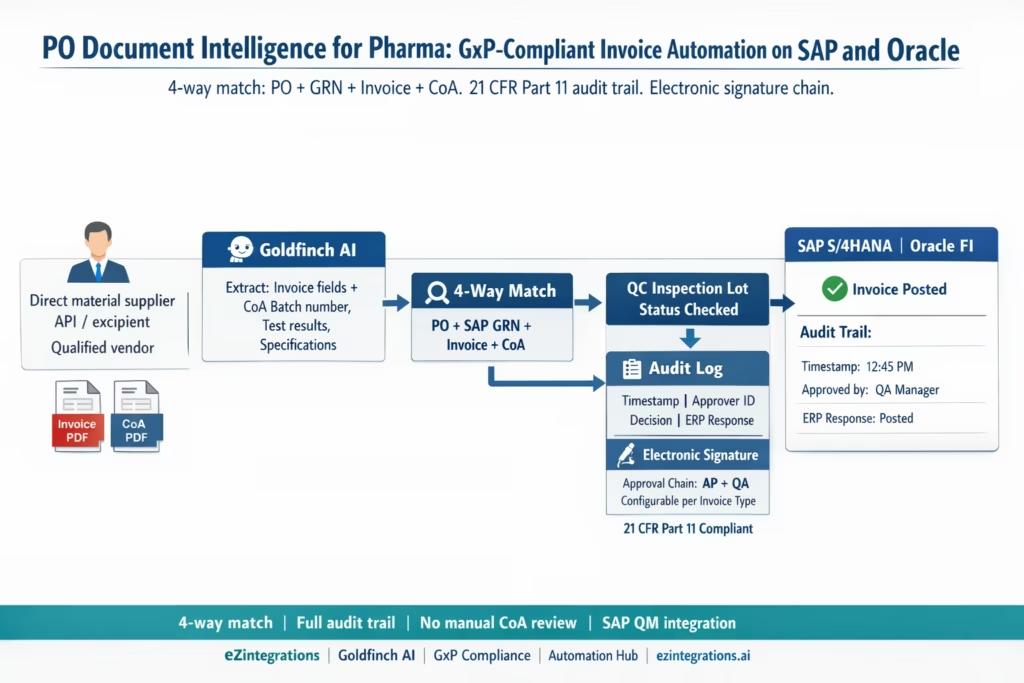
April 18, 2026Pharmaceutical companies can automate GxP-compliant purchase order and invoice processing on SAP S/4HANA and Oracle Fusion Cloud using eZintegrations with Goldfinch AI Document Intelligence, which extracts invoice and Certificate of Analysis (CoA) data from any supplier format, matches against the PO and goods receipt in a 4-way match (PO + GRN + Invoice + CoA), generates a complete immutable audit trail at each step, and routes approvals through a configurable routes approvals through a 21 CFR Part 11-aligned electronic signature chain (electronic records and signatures regulation) before posting to SAP FI or Oracle Payables. The system handles both direct material (API and excipient) suppliers and indirect spend, with QC inspection lot holds managed via Watcher polling without creating ERP exception records.
TL;DR
- Pharmaceutical AP is different from standard AP in one critical dimension: every document, every decision, and every exception must leave an immutable, attributable, time-stamped audit trail. Regulatory inspectors can and do examine AP records.
- Pharma procurement also adds a fourth document to 3-way matching: the Certificate of Analysis (CoA) from the supplier, confirming that the delivered material meets the quality specification. No CoA, no payment. That is the pharma rule.
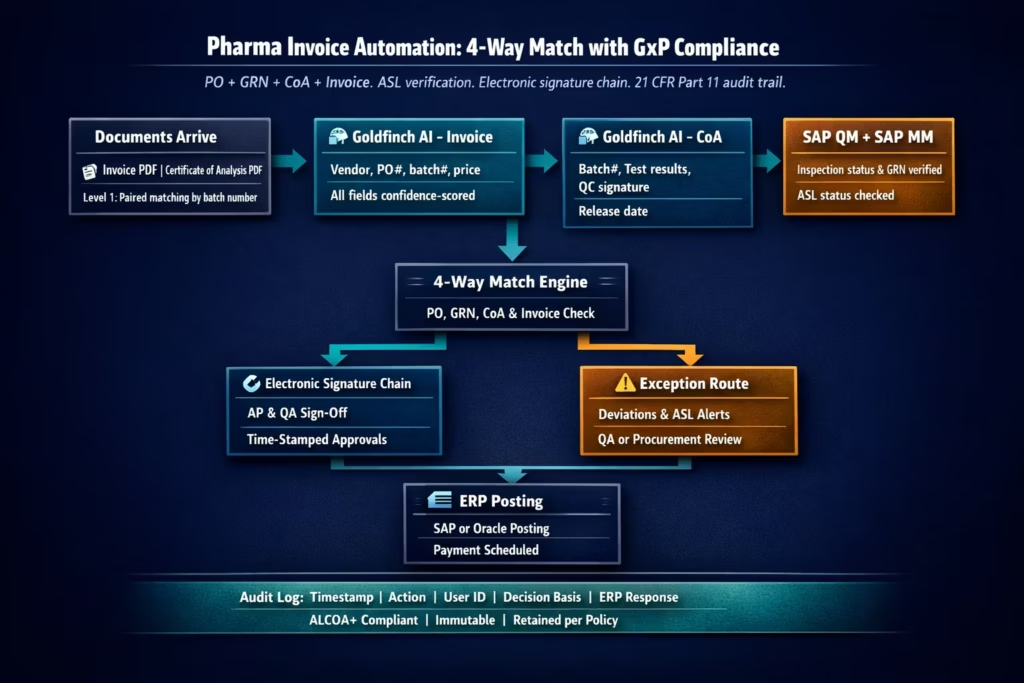
- eZintegrations deploys Goldfinch AI Document Intelligence to extract data from invoices and CoAs, runs a configurable 4-way matching engine (PO + GRN + Invoice + CoA), generates a complete extraction and decision audit log at every step, routes approvals through electronic signature chains aligned with 21 CFR Part 11 requirements, and posts approved invoices to SAP S/4HANA or Oracle Fusion Cloud.
- The eZintegrations audit log captures: document received timestamp, extraction fields and confidence scores, API call made and response received, matching engine decision with parameters, exception routing and approver action (with approver identity and timestamp), and ERP posting confirmation.
- Works with SAP QM inspection lots (integration between SAP MM and SAP QM), Oracle Quality Management, and standalone LIMS or QMS systems via REST API.
- No 21 CFR Part 11 violation risk from the automation itself: Goldfinch AI extraction outputs are recommendations, not autonomous posting decisions. Every auto-approved invoice passes through a configurable confirmation threshold, with the ERP’s own AP approval workflow remaining in place.
Why Pharma AP Automation Is Not the Same as Standard AP Automation
Your AP team processes 800 invoices per month. Fifty of them are for Active Pharmaceutical Ingredient (API) purchases from qualified suppliers. Each API invoice arrives with a Certificate of Analysis confirming the batch meets your specification. Your QA team must review the CoA before the goods receipt is posted in SAP QM. The goods receipt cannot be posted until the inspection lot is cleared. The inspection lot cannot be cleared until QA signs off on the CoA.
Your AP team is waiting. The supplier is waiting. The invoice is sitting.
Meanwhile, your quality system requires that any automated system touching procurement records operates with an audit trail sufficient to satisfy an FDA inspector during a GMP audit. That means: who processed this record, when, what decision was made, on what basis, and can you prove it was not modified after the fact.
This is the compliance tax in pharmaceutical AP. Every efficiency you add must be auditable. Every automation decision must be attributable. Every document must be retained per your records retention policy. And if your company operates in the EU, EU Annex 11 adds supplier qualification documentation to the stack.
Standard AP automation does not address this. It routes invoices and posts them to ERPs. For pharmaceutical AP, that is not enough.
The Four Compliance Requirements That Shape Every Decision
Before the workflow: a precise compliance framework is essential. Here are the four regulatory requirements that directly affect AP automation design in pharmaceutical environments.
1. 21 CFR Part 11 establishes that FDA-regulated companies using electronic records must implement strict controls (see FDA guidance on scope and application). 21 CFR Part 11 establishes that FDA-regulated companies using electronic records (in place of paper records required by “predicate rules” such as 21 CFR Part 211 cGMP) must implement specific controls: system validation, secure computer-generated time-stamped audit trails, access controls, and electronic signatures that are unique to the user and linked to the record. For pharmaceutical AP, the predicate rule is typically the company’s internal GMP procedures for procurement and qualification records. If your AP process uses electronic records for qualifying supplier invoices and CoAs, those electronic records are subject to Part 11 controls.
2. EU GMP Annex 11: Computerised systems in GMP environments. Annex 11 governs computerised systems in EU GMP environments and includes requirements for supplier qualification, risk management of the system itself, change control, and periodic review. For EU-regulated pharma companies (or US companies with EU product distribution), any automated AP system that processes GMP-relevant procurement records must be qualified as a GxP computerised system. The key difference from Part 11: Annex 11 requires formal supplier qualification of the software vendor (eZintegrations from Bizdata qualifies as a software supplier under Annex 11).
3. ALCOA+ data integrity principles. ALCOA+ (Attributable, Legible, Contemporaneous, Original, Accurate, Complete, Consistent, Enduring, Available) provides a framework for evaluating electronic record trustworthiness that FDA and EMA inspectors apply during audits. For AP automation: every extraction decision must be Attributable (to a specific system action, with timestamp), Contemporaneous (recorded at the time of the action), and Enduring (retained per the company’s records retention policy, typically at least the shelf life of the material plus one year for API procurement records).
4. Approved Supplier List (ASL) enforcement. Pharmaceutical GMP regulations require that direct material purchases are made only from qualified (approved) suppliers on the Approved Supplier List. An automated AP system must verify that each invoice originates from a vendor on the ASL before processing payment. Invoices from non-ASL vendors, or from ASL vendors whose qualification status has lapsed (expired GMP certificate, failed audit), must be blocked and routed to QA for review.
The Pharma-Specific Document Chain: PO, GRN, CoA, Invoice
Standard 3-way matching: Purchase Order + Goods Receipt Note + Invoice.
Pharma 4-way matching (PO + GRN + CoA + Invoice) reflects standard practices in life sciences procurement environments (SAP).
The Certificate of Analysis (CoA): The CoA is the supplier’s document certifying that the delivered batch meets the specification agreed in the supply contract or purchase order. For APIs and excipients, the CoA includes: batch number, material name (INN and IUPAC where applicable), physical properties tested (particle size, density, moisture content), chemical properties tested (assay, impurity profile, pH, heavy metals), microbiology results (bioburden, endotoxins for sterile APIs), and the supplier QC officer’s release signature.
Crucially: in GMP procurement, the invoice cannot be approved for payment until the CoA has been reviewed and found to meet specification, AND the QA team has confirmed the CoA is authentic (matching the supplier’s reference standard and format). This is not a formality. Fake or deficient CoAs have been used to pass non-conforming material into pharmaceutical supply chains. FDA inspectors check CoA review records.
The 4-way match in practice: – PO: correct supplier, correct material code, correct quantity, correct price – GRN/SAP Inspection Lot: goods received and inspection lot created in SAP QM – CoA: batch number matches the GRN/inspection lot, test results meet specification – Invoice: quantity and price match PO; batch number on invoice matches CoA and GRN
Payment is blocked until all four documents are verified.
The Manual Compliance Tax in Pharmaceutical AP
At a mid-size pharmaceutical company (hypothetical: Nexora Therapeutics, processing 800 invoices per month, 340 of which are direct material invoices from API and excipient suppliers), the pre-automation AP workflow looks like this:
For each direct material invoice:
- AP clerk receives the invoice PDF by email
- AP clerk navigates to SAP and enters the invoice in MIRO (or Oracle’s Payables interface)
- AP clerk cross-references the invoice against the SAP PO and goods receipt
- AP clerk manually locates the CoA PDF in the shared document drive (a shared network folder organised by supplier and batch number, searchable by filename convention only)
- AP clerk visually verifies the CoA batch number against the SAP inspection lot number
- AP clerk routes the invoice to QA for CoA review (email notification, attachment forwarded)
- QA reviewer opens the CoA and compares test results against the specification in the supplier’s Quality Agreement
- QA reviewer sends approval by email (“CoA reviewed and approved – proceed to payment”)
- AP clerk receives the email, updates the invoice status, removes the manual payment block in SAP
- Invoice is released for payment
Time per direct material invoice: 18-30 minutes of AP clerk time, plus 15-45 minutes of QA reviewer time (if CoA review is straightforward) or up to several days if test results require investigation.
The compliance documentation risk: The manual process above generates an audit trail that is often incomplete: email approvals are not linked to the specific SAP transaction, CoA files are stored in a shared folder without a formal document management system link to the SAP batch, and the QA email approval does not capture the specific test results reviewed or the specification version used. In an FDA inspection, the absence of a clear, linked audit trail for CoA review and payment approval is a potential Part 11 finding.
Exception rate: Nexora’s direct material AP exception rate was 28%. Root causes included missing CoA files (7%), CoA batch number not matching GRN inspection lot (9%), test results outside specification requiring deviation investigation (4%), and standard matching discrepancies (8%).
How eZintegrations Handles GxP-Compliant Invoice Processing
eZintegrations adds the document intelligence and compliance workflow layer above SAP or Oracle, without replacing either system’s existing compliance controls.
Level 1 (iPaaS Workflows): Handles document routing from email, SFTP, supplier portal, or validated document management system. Routes invoices and CoAs as paired documents where the CoA arrives with the invoice. For suppliers who send CoAs separately, the Level 1 workflow holds the invoice in the pending queue until the matching CoA arrives (identified by batch number matching).
Level 2 (Goldfinch AI Document Intelligence): Extracts data from both the invoice PDF and the CoA PDF. From the invoice: vendor, invoice number, date, PO reference, line items (material code, batch number, quantity, unit price). From the CoA: supplier batch number, material name, all test results listed (assay, impurity values, particle size, moisture content, pH, microbiology results), QC release signature name and date, specification reference. Confidence scoring per field.
Level 3 (AI Agents): Retrieves the SAP PO via OData V4, retrieves the SAP QM inspection lot status and results, compares the invoice against PO and GRN, compares the CoA test results against the material specification in the Quality Agreement or SAP batch classification, checks the vendor’s ASL status, and runs the 4-way matching engine.
Level 4 (Goldfinch AI): Orchestrates the full workflow as a Workflow Node and provides Chat UI for QA and AP managers to query the document status, approval chain, and audit log in natural language.
The Audit Trail Architecture
The audit trail is not optional in pharmaceutical AP automation, with requirements around time-stamped logs, traceability, and electronic signatures defined under Part 11. Here is the exact data captured by eZintegrations at each stage of the pharma invoice workflow, and how it satisfies ALCOA+ and 21 CFR Part 11 requirements.
Stage 1: Document receipt.
- UTC timestamp of document receipt
- Source (email address, SFTP path, portal reference)
- Document SHA-256 hash (proves the document was not modified after receipt)
- Pairing record: invoice document ID linked to CoA document ID via batch number match
Stage 2: Goldfinch AI Document Intelligence extraction.
- UTC timestamp of extraction start and completion
- Extraction model version (locked: pharma deployments use a frozen model version, not a continuously updating model, per FDA guidance on AI in regulated contexts)
- Per-field extraction result and confidence score
- Fields below threshold: flagged for human review (field name, extracted value, confidence, threshold)
- No field values are modified by the system: all modifications are made by a human reviewer and recorded as a separate event
Stage 3: ERP data retrieval.
- UTC timestamp of each API call
- API endpoint called and request parameters
- Response status and key response fields (PO status, inspection lot status, ASL status)
- This stage is read-only: no ERP data is modified during the retrieval step
Stage 4: 4-way matching engine decision.
- UTC timestamp
- Match parameters applied: tolerance thresholds by supplier category, specification version used for CoA comparison
- Per-document match result: pass or fail with specific field-level comparison (invoice batch number = CoA batch number = GRN inspection lot batch number: PASS, etc.)
- Match decision: auto-approved (all four documents within tolerance) or exception-routed (with specific failure reason)
Stage 5: Exception routing (where applicable).
- UTC timestamp
- Exception type: ASL lapsed, CoA test result outside specification, price variance, batch number mismatch
- Approver identity (username, role, authorisation level in the access control list)
- Exception resolution action and reason text (entered by the approver)
- Electronic signature confirmation: approver re-authenticates before resolution is recorded
Stage 6: Electronic signature approval.
- UTC timestamp of approval action
- Approver identity (username, display name, role)
- Signature meaning: “Approved for payment after CoA review” or similar configured meaning per 21 CFR Part 11 Section 11.50 (signature manifestations)
- The approval event is linked to the specific invoice document ID, preventing signature reuse or misattribution
Stage 7: ERP posting.
- UTC timestamp
- API endpoint called (SAP A_SupplierInvoice or Oracle invoices POST)
- ERP response: document number, status
- If ERP rejects the posting: error captured and exception re-opened
The complete audit log is:
- Stored immutably (append-only): no record can be deleted or modified, only new records can be added
- Retained per the company’s records retention policy (configurable, default: material shelf life + 1 year for API procurement records, or 6 years for standard AP records in the US)
- Exportable in human-readable and machine-readable formats for inspection review
- Accessible by role: QA has read access to the full audit log; AP has read access to their own approval events; system administrators cannot delete records
The 21 CFR Part 11-Aligned Approval Chain
For pharmaceutical AP automation, the approval chain is not just a workflow. It is a compliance control.
Standard AP invoices (indirect spend, non-GMP materials):
Single approval level: AP supervisor approves invoices above a configured value threshold. Electronic signature captured with timestamp and user identity. No CoA review required.
Direct material invoices (APIs, excipients, primary packaging materials):
Two approval levels:
1. QA reviewer approves the CoA: reviews extracted test results against the specification, confirms the batch is released. Electronic signature with meaning: “CoA reviewed and approved for use. Specification version [X].”
2. AP supervisor approves the invoice: confirms invoice fields match PO and GRN. Electronic signature with meaning: “Invoice approved for payment pending QA CoA release.”
If the QA reviewer has not approved the CoA, the AP supervisor cannot approve the invoice (the approval chain enforces sequence).
High-value or deviation-triggering invoices:
Three approval levels: QA reviewer (CoA), AP supervisor (invoice), Procurement Director (value above threshold or when a quality deviation is associated with the batch).
The electronic signature mechanism:
Per 21 CFR Part 11 Subpart C requirements, each electronic signature is: unique to the user (tied to their user account, not a shared account), verifiable, and securely linked to the specific electronic record it signs. eZintegrations implements this by requiring the approver to re-enter their password at the point of approval (the “at least one non-biometric component” requirement of Part 11 Section 11.200(b)), capturing the username, timestamp, signature meaning, and record ID as an atomic, immutable transaction.
The human-in-the-loop principle:
Per FDA’s January 2025 draft AI guidance and January 2026 FDA-EMA joint guidance on AI in pharma, AI extraction outputs must be treated as recommendations requiring human approval for high-risk decisions. In the eZintegrations pharma configuration, Goldfinch AI Document Intelligence extraction outputs are framed as recommendations: the system proposes a match decision, and the QA reviewer and AP supervisor each confirm the decision with their electronic signature. This preserves the human-in-the-loop requirement for GxP-regulated AI applications.
Before vs After: Manual Pharma AP vs Automated
| Metric | Manual Pharma AP | eZintegrations GxP-Compliant Automation |
|---|---|---|
| Invoice processing time (direct material) | 18–30 min AP + 15–45 min QA | 12 sec AI extraction + 3–5 min QA electronic review |
| CoA batch number verification | Manual visual cross-check | Goldfinch AI extracts CoA batch number, matched against GRN/inspection lot automatically |
| CoA test result verification | QA reviewer reads and compares to specification manually | Extracted test results compared to specification values, deviations flagged |
| ASL verification | Manual check of vendor master or shared spreadsheet | Level 3 agent queries ERP vendor qualification field or ASL database |
| Audit trail completeness | Email approvals, shared folder CoAs, disconnected SAP records | Immutable, time-stamped, ALCOA+ compliant log at every stage |
| 21 CFR Part 11 compliance of AP records | Risk: email approvals, unfiled CoAs, no signature manifestation | Full compliance: electronic signatures with meaning, linked to record, re-authentication required |
| EU Annex 11 compliance | Partial: SAP compliant but external steps not documented | External process steps fully audited and retained |
| SAP QM inspection lot integration | Manual: AP waits for QA email confirmation | Watcher polls SAP QM inspection lot status, auto-resumes when inspection cleared |
| Missing CoA handling | Invoice held manually, AP follows up with supplier | Level 1 holds invoice, automated CoA request notification sent to supplier |
| Exception rate | 28% (direct materials) | 6–9% (specification deviations and genuine price disputes only) |
| FDA inspection readiness | Risk: audit trail gaps in external steps | Ready: full audit log exportable in human-readable format |
| Approved Supplier List enforcement | Manual check, easily missed | Systematic ASL check before any invoice processing |
| Q4 volume handling | Manual backlog | Same team handles volume spikes without backlog |
Step-by-Step: An API Invoice Through the Pharma Compliance Workflow
Here is the complete GxP-compliant automated workflow for an API invoice at Nexora Therapeutics (hypothetical).
The scenario: ChemSource Active Ltd delivers 25 kg of API-7742 (a controlled synthesis intermediate) against PO-2026-NX-3301. They send the invoice and the CoA in a single email.
Step 1: Paired document receipt and pairing. Two PDFs arrive: Invoice CSA-INV-2026-08812 and Certificate of Analysis CSA-COA-2026-L0847. Level 1 receives both, identifies them as a paired set (matching vendor ChemSource Active Ltd and batch number CS2026-L0847 appearing in both documents), and passes them together to Goldfinch AI. Audit log entry: document IDs assigned, SHA-256 hashes recorded, pairing confirmed by batch number. UTC timestamp: 2026-03-18T08:14:22Z. Time: 3 seconds.
Step 2: Invoice extraction. Goldfinch AI extracts from the invoice PDF:
Vendor         : "ChemSource Active Ltd"
InvoiceNumber  : "CSA-INV-2026-08812"
InvoiceDate    : "2026-03-18"
POReference    : "PO-2026-NX-3301"

MaterialCode   : "API-7742"
BatchNumber    : "CS2026-L0847"
Quantity       : 25 kg
UnitPrice      : USD 4,840.00/kg

InvoiceTotal   : USD 121,000.00
PaymentTerms   : Net-30
All fields above 0.93 confidence. Audit log: extraction fields, confidence scores, model version. Time: 11 seconds.
Step 3: CoA extraction. Goldfinch AI extracts from the CoA PDF
SupplierBatchNumber : "CS2026-L0847"
MaterialName        : "API-7742 (INN: Veralixib)"

Assay               : 99.4% (Specification: 98.5 - 101.0%)
TotalImpurities     : 0.18% (Specification: ≤ 0.5%)
ResidualSolvents    : Ethanol 210 ppm (Specification: ≤ 3000 ppm)
Moisture            : 0.31% (Specification: ≤ 0.5%)

Appearance          : White to off-white crystalline powder (Specification: matches)
EndotoxinsLAL       : < 0.5 EU/g (Specification: < 1.0 EU/g)

QCReleaseName       : "Dr. Elena Sousa"
ReleaseDate         : "2026-03-17"
Goldfinch AI extracts from the CoA PDF. All test results extracted with confidence above 0.91. Audit log: full CoA extraction with confidence. Time: 14 seconds.
Step 4: SAP API calls for PO, GRN, and inspection lot. The Level 3 agent calls SAP OData V4:
PO retrieval:
GET /sap/opu/odata4/.../purchaseorder/0001/PurchaseOrder
  ?$filter=PurchaseOrderNumber eq 'PO-2026-NX-3301'
  &$expand=_PurchaseOrderItem
Response: PO confirmed, ChemSource Active Ltd, API-7742, 25 kg at USD 4,840.00/kg. PO status: Open.
GRN and inspection lot:
GET /sap/opu/odata/sap/API_MATERIAL_DOCUMENT_SRV/A_MaterialDocumentHeader
  ?$filter=PurchaseOrder eq 'PO-2026-NX-3301'
    and GoodsMovementType eq '101'
Response: Material document 5000004521, batch CS2026-L0847, quantity 25 kg, inspection lot QI-2026-08347 created. SAP QM inspection lot status: INSP (under inspection, not yet released).
ASL check: vendor ChemSource Active Ltd verified against the ASL database. Status: Qualified, GMP certificate valid until 2027-08-31.
Audit log: all API calls with timestamps, endpoints, and responses. Time: 4 seconds.
Step 5: QC inspection lot status: Watcher activated. Inspection lot QI-2026-08347 is in INSP status (QA inspection in progress). The invoice cannot be matched until the inspection lot is released. A Watcher is activated, polling the SAP QM inspection lot endpoint at 2-hour intervals during business hours. Audit log: Watcher activated, reason “QM inspection lot INSP status”, PO reference, UTC timestamp.
Step 6 (2 days later): QA completes inspection. Watcher resumes workflow. QA completes the inspection and releases the batch in SAP QM. The Watcher poll detects inspection lot QI-2026-08347 status changed to RLSD (released). Watcher resumes the matching workflow. Audit log: Watcher poll result, inspection lot status change, UTC timestamp of detection.
Step 7: 4-way matching engine.
- Invoice batch number
CS2026-L0847= CoA batch numberCS2026-L0847= SAP GRN batch: PASS - Invoice quantity 25 kg = SAP GRN quantity 25 kg: PASS
- Invoice unit price USD 4,840.00 = PO unit price USD 4,840.00: EXACT MATCH
- CoA assay 99.4% within specification 98.5-101.0%: PASS
- CoA impurities 0.18% below limit 0.5%: PASS
- CoA residual solvents 210 ppm below limit 3,000 ppm: PASS
- CoA moisture 0.31% below limit 0.5%: PASS
- CoA endotoxins <0.5 EU/g below limit 1.0 EU/g: PASS
- ASL status: QUALIFIED
- All four documents: MATCH Match result: approved, routed to electronic approval chain.
Step 8: Electronic approval chain. The Goldfinch AI notification system routes the matched invoice and CoA summary to two approvers:
QA reviewer (Dr. David Nara, Senior Quality Analyst): receives a structured review package showing extracted CoA test results alongside specification limits, with all values that passed highlighted in green. Dr. Nara reviews, enters his password to re-authenticate, and signs with meaning: “CoA reviewed and approved. All test results within specification. Batch CS2026-L0847 cleared for payment.” UTC timestamp: 2026-03-20T11:34:17Z. Audit log: user ID, signature meaning, record ID.
AP supervisor (Maria Chen, AP Manager): receives the invoice match summary showing PO, GRN, and invoice alignment, with the QA CoA approval confirmed. Maria reviews, re-authenticates, and signs with meaning: “Invoice approved for payment. CoA released.” UTC timestamp: 2026-03-20T14:22:04Z.
Step 9: SAP FI invoice posting.
POST /sap/opu/odata/sap/API_SUPPLIERINVOICE_PROCESS_SRV/A_SupplierInvoice
{
  "InvoiceDate": "20260318",
  "PostingDate": "20260320",
  "DocumentCurrency": "USD",
  "InvoiceGrossAmount": "121000.00",
  "DocumentHeaderText": "CSA-INV-2026-08812 / Batch CS2026-L0847 / eZintegrations",
  "CompanyCode": "NX01",
  "SupplierInvoiceItem": [{
    "PurchaseOrder": "PO-2026-NX-3301",
    "PurchaseOrderItem": "00010",
    "Plant": "NEXPHARM",
    "QuantityInPurchaseOrderUnit": "25",
    "NetPriceAmount": "4840.00",
    "PurchaseOrderQuantityUnit": "KG"
  }]
}
SAP response: supplier invoice 5105044892, status: posted. Payment scheduled April 17 per Net-30. Audit log: ERP posting timestamp, document number, ERP status.
Total cycle: 2 days (QC inspection wait) + 22 seconds of automated processing. Human time: 8-10 minutes for QA review + 3 minutes for AP approval.
Key Outcomes and Results
For a mid-size pharma company (800 invoices/month, 340 direct material):
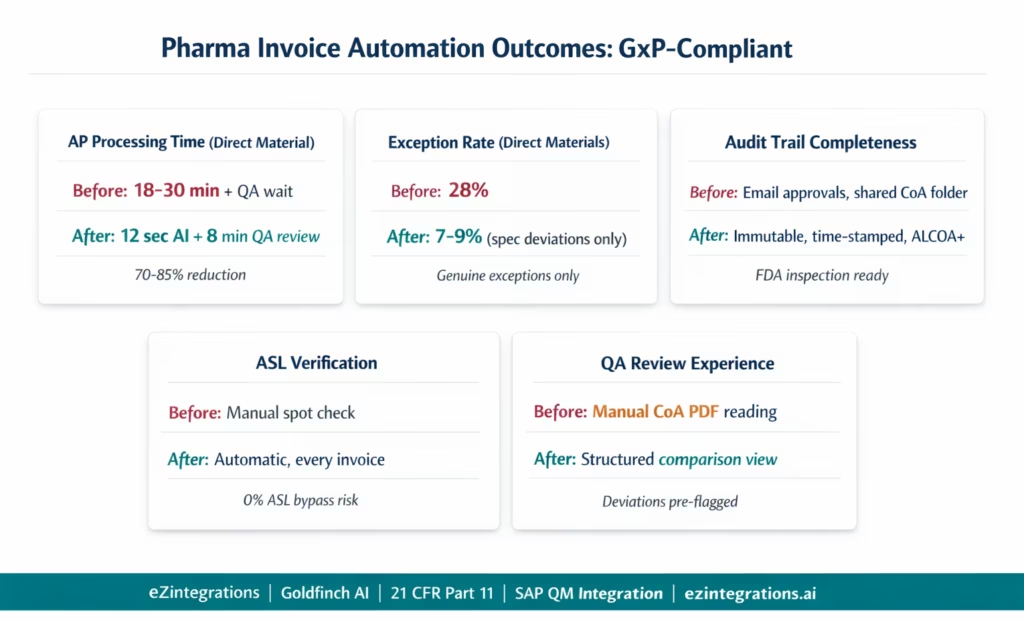
Direct material invoice processing time: from 18-30 minutes (AP) plus 15-45 minutes (QA) per invoice, to 12 seconds (AI extraction) plus 8-10 minutes (QA review of pre-structured CoA comparison) plus 3 minutes (AP approval). Net time reduction: 70-85% for the AP team, 60-70% for QA (structured review instead of manual document comparison).
CoA review quality improvement: structured test result extraction means QA reviewers see all test results side-by-side with specification limits, with deviations flagged in red. Compared to reading an unstructured PDF CoA manually, this reduces CoA review errors and improves the consistency of the review.
Inspection lot Watcher: QC hold invoices (where goods receipt is pending QA inspection lot release in SAP QM) no longer fill the manual AP holds queue. The Watcher resumes the workflow automatically when the inspection lot is released. AP team no longer needs to monitor SAP QM status for pending invoices.
Audit trail completeness: every approval action, extraction decision, API call, and ERP posting is captured with UTC timestamp, user identity, and record linkage. FDA inspection queries that previously required manual reconstruction of email approval chains and shared folder CoA locations are now answered from the immutable audit log in seconds.
Exception rate on direct materials: from 28% to 7-9%. The residual exceptions are primarily specification deviations requiring QA investigation (4%) and genuine price or quantity disputes (3-5%). Data entry errors and missing CoA exceptions are eliminated.
ASL enforcement: automated. No direct material invoice is processed without ASL verification. Previously, ASL checks were manual spot checks subject to human error. Now every invoice is blocked if the vendor’s ASL status is not current.
Regulatory inspection readiness: the audit log is exportable as a structured PDF report or as machine-readable JSON. During a mock FDA inspection, the AP manager can retrieve the complete decision record for any invoice (extraction, match decision, CoA comparison, approval signatures, ERP posting) in under 30 seconds.
How to Get Started
Step 1: Define Your GxP Boundary for AP Automation
Before any implementation, your quality team and IT/validation team need to define the GxP boundary: which invoice types and which workflow steps are within scope for GxP regulation (and therefore require 21 CFR Part 11 controls), and which are out of scope (standard indirect spend invoices not related to GMP materials).
Typically in scope: direct material invoices (API, excipients, primary packaging), qualified supplier document review (CoA), and approval records for GMP material purchases. Out of scope: indirect spend (utilities, IT services, marketing), unless your company has chosen to apply 21 CFR Part 11 controls broadly.
This scoping decision affects the configuration: in-scope invoice types get the full 4-way match, CoA extraction, ASL verification, electronic signature chain, and immutable audit log. Out-of-scope invoice types use the standard 3-way match with conventional AP workflow.
Step 2: Import the Pharma AP Invoice Processing Template
Go to the Automation Hub and import the Pharma AP Invoice Processing template. This template includes Goldfinch AI Document Intelligence for both invoice and CoA extraction, the SAP QM inspection lot integration (or Oracle Quality Management integration), the 4-way matching engine with specification comparison, the ASL verification step, the configurable electronic approval chain with 21 CFR Part 11-aligned signatures, the immutable audit log, and the Watcher for inspection lot holds.
Step 3: Configure GxP Boundary, Supplier Categories, and Approval Chain
Configure which vendor categories trigger the 4-way match (CoA required) vs the standard 3-way match (CoA not required). For each direct material vendor category, upload the material specifications that extracted CoA test results will be compared against: specification name, test parameter, lower limit, upper limit, units. Configure the electronic approval chain: which roles approve which invoice types, in which sequence, with which signature meaning text per 21 CFR Part 11 Section 11.50.
Step 4: Connect SAP S/4HANA or Oracle Fusion Cloud
Configure the SAP BTP Communication Arrangement credentials (SAP_COM_0008 for purchasing, SAP_COM_0006 for supplier invoices, and the SAP QM inspection lot endpoint). For Oracle Fusion Cloud: Azure AD OAuth 2.0 credentials for the fscmRestApi endpoints including the Quality Management module. Confirm that the integration user has appropriate read access for inspection lots and QM results.
Step 5: Complete Computer System Validation (CSV/CSA)
Per FDA’s September 2025 final CSA guidance, the eZintegrations system must be validated (or “assured” under the CSA risk-based approach) before use in GxP-regulated AP processes. For the GxP-scoped invoice processing workflow, prepare: User Requirements Specification (URS), risk assessment (categorise each workflow step by impact on product quality and patient safety), testing protocol (IQ/OQ/PQ or equivalent under CSA), and ongoing change control procedure. eZintegrations provides validation support documentation including the System Description and Security Architecture document to support your IQ phase. Total CSV/CSA effort: typically 3-8 weeks depending on company size and existing quality system infrastructure, in parallel with technical configuration.
Total time from template import to validated GxP production: 6-10 weeks (technical: 2-3 weeks, CSV/CSA: 3-8 weeks concurrent).
FAQs
1. How does eZintegrations handle GxP compliant invoice automation for pharma companies
eZintegrations provides a GxP compliant document intelligence and approval workflow layer on top of SAP S 4HANA or Oracle Fusion Cloud. Goldfinch AI Document Intelligence extracts invoice and Certificate of Analysis data while a 4 way matching engine compares PO goods receipt inspection lot invoice and CoA results. An immutable ALCOA plus compliant audit log records every action and electronic signature workflows enforce re authentication ensuring human in the loop validation for regulated processes.
2. How long does it take to set up pharma compliant invoice automation
Technical configuration takes 2 to 3 weeks including template setup ERP integration specification configuration and testing. Validation through CSV or CSA takes 3 to 8 weeks in parallel. Total timeline to validated production is typically 6 to 10 weeks depending on compliance requirements and validation approach.
3. Does eZintegrations work with SAP QM inspection lots for pharma AP automation
Yes, The system retrieves SAP QM inspection lot status and holds invoices when inspection is pending. Once QA releases the inspection lot the workflow resumes automatically. All inspection lot status changes and events are logged for compliance and audit traceability.
4. What does the 21 CFR Part 11 audit trail look like for an automated invoice
The audit trail includes document receipt timestamp and hash AI extraction outputs with confidence scores ERP API interactions matching decisions Watcher events approval signatures with user identity and timestamps and ERP posting confirmation. The log is immutable retained per policy and accessible for regulatory inspection in both human readable and machine readable formats.
5. What is the difference between 3 way matching and 4 way matching in pharma procurement
3 way matching compares purchase order goods receipt and invoice while 4 way matching adds Certificate of Analysis validation to confirm material quality compliance. In pharma procurement payment approval requires CoA verification and QA sign off ensuring regulatory compliance for direct material purchases.
Compliance Is Not Optional. But It Does Not Have to Be Manual.
Pharmaceutical AP teams carry a compliance burden that standard AP teams do not. Every approval must leave a documented trace. Every CoA must be reviewed and linked to the payment record. Every direct material invoice must come from a qualified supplier. These are not bureaucratic preferences. They are regulatory requirements with inspection consequences.
The manual process meets these requirements, partially, most of the time. The audit trail has gaps. The CoA files are in a shared folder. The email approvals are not linked to the SAP transaction. An FDA inspector who asks for the complete approval record for a specific API batch will take longer to satisfy than the regulation requires.
eZintegrations replaces the manual compliance process with one that is designed to comply from the start: ALCOA+-compliant audit logs, 21 CFR Part 11 electronic signatures, 4-way matching including CoA test result extraction, SAP QM inspection lot integration, ASL verification on every invoice, and a human-in-the-loop approval chain that meets the FDA-EMA joint AI guidance requirements for GxP-regulated AI applications.
The technical configuration is complete in 2-3 weeks. The CSV/CSA validation adds 3-8 weeks. The outcome is a pharmaceutical AP process that is both faster and more compliant than what your team does manually today.
Import the Pharma AP Invoice Processing Template from the Automation Hub. Or book a free demo with your ERP details (SAP S/4HANA or Oracle Fusion Cloud), your direct material invoice volume, and your current CoA review process. We will walk through the 4-way match configuration, the electronic signature chain, and the CSV/CSA scoping for your specific regulatory environment.
For the AI document intelligence foundation, see AI document intelligence for procurement. For the exception rate reduction methodology, see reducing invoice exception rates.

