
Supply Chain Integration: Connect 50+ Systems Without Custom Development
June 10, 2026Enterprise Supply chain management integration connects WMS, TMS, ERP, procurement, carrier, eCommerce, supplier, and analytics systems through pre-built templates: eliminating manual data entry, batch latency, and point-to-point custom development. eZintegrations provides 1,000+ supply chain integration templates covering 50+ major enterprise systems including Manhattan, Blue Yonder, SAP EWM, SAP S/4HANA, Oracle ERP, NetSuite, UPS, FedEx, DHL, Shopify, Salesforce, and Workday: going live in days, not months, with no custom code.
TL;DR
- The average enterprise supply chain runs on 12-20 systems: at least one WMS, one TMS, one ERP, a procurement platform, carrier APIs, an eCommerce platform, supplier portals, a demand planning system, a warehouse automation controller, and several analytics or BI tools. Most of these systems were not designed to talk to each other, and most organisations handle the gaps with manual data entry, batch file transfers, and custom point-to-point integrations that break when either system upgrades.
- eZintegrations connects all of them with pre-built templates from the Automation Hub. No custom development. No middleware to maintain. No 6-month integration projects for standard supply chain connection patterns.
- eZintegrations is SOC 2 Type II certified for enterprise supply chain data security. For pharmaceutical, medical device, or healthcare supply chain organisations where logistics data intersects with patient or product safety information, HIPAA-compliant integration with a signed BAA is available.
- The platform covers all four automation levels: Level 1 (iPaaS workflow automation), Level 2 (AI Workflows for document intelligence and anomaly detection), Level 3 (AI Agents for exception investigation), and Level 4 (Goldfinch AI for multi-agent supply chain intelligence).
- Go-live time for standard supply chain integration templates: 3-10 days. Full enterprise supply chain integration programme: 6-12 weeks.
- CTA: Book a demo and bring your current supply chain integration requirements.
The Enterprise Supply Chain Integration Problem
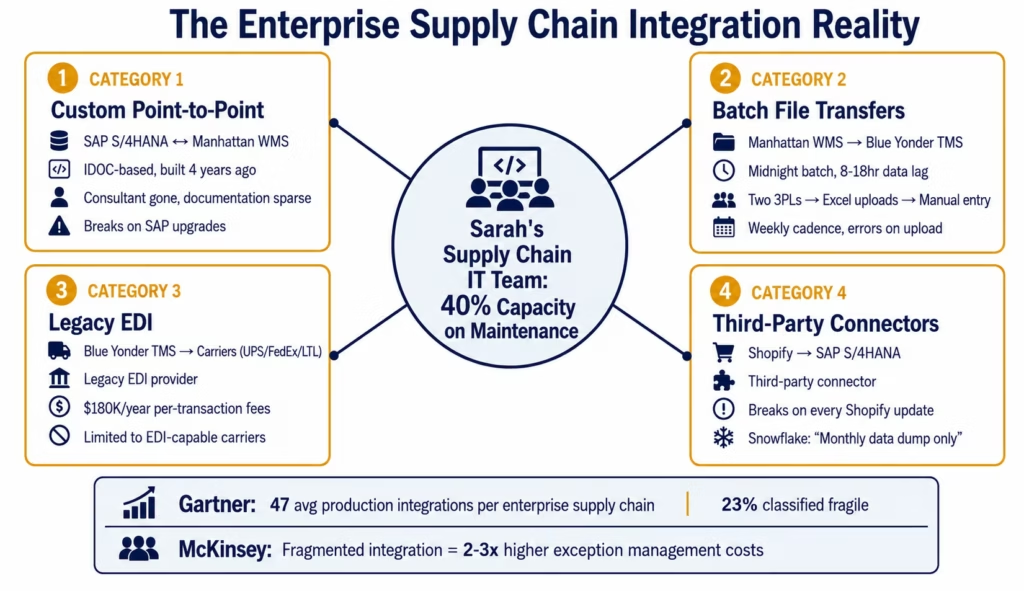
Sarah runs supply chain IT at a mid-size consumer goods manufacturer with $800M in annual revenue. Her technology stack looks like this: SAP S/4HANA for ERP, Manhattan Active WMS for warehouse operations, Blue Yonder TMS for transportation, Ariba for procurement, SAP IBP for demand planning, Salesforce for order management, Shopify for direct-to-consumer, UPS and FedEx for domestic parcel, three LTL carriers for freight, Snowflake for analytics, and two 3PL partners each running their own WMS.
Fourteen systems. Each bought at different times by different stakeholders. Each with its own API, its own data model, its own update cycle.
Her integration landscape looks like this: SAP-to-Manhattan runs on a custom IDOC-based integration built four years ago by a consultant who no longer works with the company. Manhattan-to-Blue-Yonder runs on a batch file transfer that runs at midnight. Blue-Yonder-to-carrier runs through a legacy EDI provider charging per-transaction fees that add up to $180,000 per year. Shopify-to-SAP runs on a third-party connector that breaks every time either system updates. The 3PLs send weekly Excel files that someone on Sarah’s team manually uploads. Snowflake gets a monthly data dump.
This is not unusual. Gartner research shows the average enterprise supply chain organisation has 47 production integrations: with 23% of those classified as “fragile” (likely to break on next system upgrade) and 31% running on batch schedules that create data lag of 4 hours or more. McKinsey estimates that supply chain organisations with fragmented integration landscapes spend 2-3x more on exception management and system maintenance than those with consolidated integration platforms.
Sarah’s team spends 40% of their capacity maintaining existing integrations, leaving 60% for new initiatives. When a business unit asks for a new integration, the estimate comes back as 3-4 months and $80,000-$150,000 in development cost. Most requests get deprioritised.
The integration debt compounds. Every year there are more systems, more connections required, and more legacy integrations to maintain, reflecting broader supply chain technology trends covered by SupplyChainBrain.
The alternative is not building fewer integrations. It is building them differently.
Before vs After: Supply Chain Integration Transformation
| Integration Pattern | Before eZintegrations | After eZintegrations |
|---|---|---|
| Order to WMS | Batch upload or manual entry, 2-8 hour lag | Real-time webhook from eCommerce/ERP, WMS order created in under 60 seconds |
| WMS to ERP inventory | Nightly batch, 8-18 hour inventory lag | Real-time transaction-event sync, inventory updated within 60 seconds of each movement |
| WMS to TMS shipment | Batch file, midnight run, 12-hour lag | Real-time shipment creation in TMS on WMS pick confirmation |
| TMS to carrier | Legacy EDI provider, $180K/yr transaction fees | Direct carrier REST API integration, per-automation pricing |
| Carrier tracking to ERP | Daily polling, 4-8 hour tracking lag | Carrier webhooks, real-time tracking event in ERP and customer portal |
| 3PL to ERP | Weekly Excel files, manual upload | API integration with 3PL WMS, real-time or hourly automated sync |
| ERP to demand planning | Monthly data extract, stale baseline | Daily or real-time ERP-to-planning system sync |
| Procurement to ERP POs | Manual PO entry from Ariba to SAP | Automated PO sync: Ariba approval triggers SAP PO creation |
| eCommerce to ERP | Third-party connector, breaks on updates | Native Shopify webhook integration, maintained by eZintegrations |
| ERP/WMS to Snowflake | Monthly data dump | Nightly incremental sync, data always current for analytics |
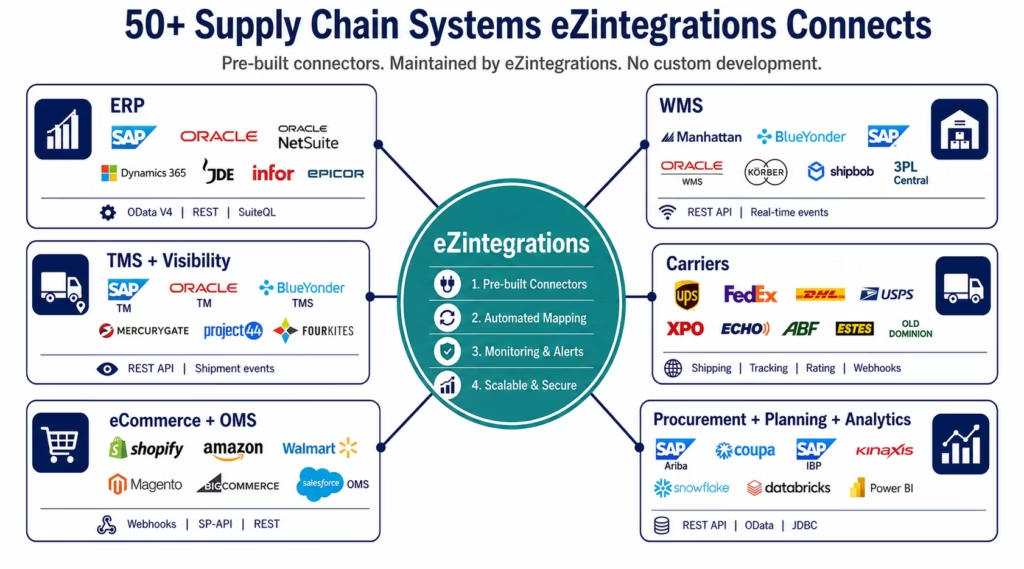
The 50+ Supply Chain Systems eZintegrations Connects
The Automation Hub contains pre-built connectors and integration templates for every major system in an enterprise supply chain. These are maintained by eZintegrations: when a system updates its API, the connector is updated, not your integration.
Enterprise ERP Systems
SAP S/4HANA: native OData V4 integration with automatic CSRF token management for write operations. Covers: sales orders, purchase orders, inventory management (goods movements), accounts payable, goods receipts, stock transfers, and financial postings. SAP BAPI and RFC support for legacy ECC deployments via the SAP connector.
Oracle ERP Cloud: REST API with OAuth assertion grant type. Covers: order management, procurement, inventory, accounts payable, and supply chain financial orchestration.
Oracle JD Edwards: REST API and orchestrator framework integration for JDE EnterpriseOne. Covers: sales orders, purchase orders, inventory, and manufacturing work orders.
NetSuite: SuiteQL for complex queries with Token-Based Authentication (TBA). Covers: sales orders, purchase orders, inventory, fulfillment, and financial transactions.
Microsoft Dynamics 365: REST API with Azure AD OAuth. Covers: supply chain management, finance and operations, commerce, and customer insights.
Infor CloudSuite / LN / M3: REST API integration. Covers: distribution, supply chain, and warehouse management for manufacturing and distribution operations.
EPICOR Kinetic: REST API. Covers: ERP operations for manufacturing, distribution, and retail supply chains.
Warehouse Management Systems
(aligned with supply chain technology research from ARC Advisory Group)
Manhattan Active WMS / Manhattan SCALE: Manhattan REST API. Covers: order management, inventory queries, receiving, putaway, picking, packing, shipping, and returns processing.
Blue Yonder (JDA) WMS: Blue Yonder REST API. Covers: warehouse operations, inventory management, labour management, and slotting.
SAP Extended Warehouse Management (SAP EWM): OData V4 integration. Covers: warehouse order management, inventory management, goods movements, and warehouse monitoring.
Oracle WMS Cloud: REST API. Covers: receiving, putaway, order management, pick and pack, shipping, and returns.
HighJump / Korber: REST API and database connector. Covers: warehouse operations for 3PL and distribution.
3PL Central: REST API. Covers: inventory management, order management, and billing for 3PL operations.
Fishbowl: REST API. Covers: inventory management and warehouse operations for SME distribution.
Shipbob, ShipHero, ShipMonk: REST APIs. Covers: order management, inventory, and fulfilment for eCommerce-focused 3PLs.
Transportation Management Systems
SAP Transportation Management (SAP TM): OData V4 integration. Covers: freight order management, carrier selection, rate management, and freight settlement.
Oracle Transportation Management (OTM): REST API. Covers: order management, shipment planning, carrier management, and freight audit.
Blue Yonder TMS: REST API. Covers: load planning, carrier tendering, shipment tracking, and freight audit.
MercuryGate: REST API. Covers: LTL and FTL shipment management, carrier management, and analytics.
project44: REST API. Covers: multi-modal shipment visibility, carrier performance, and ETA prediction.
FourKites: REST API. Covers: real-time shipment visibility and predictive ETA across carriers.
Transplace / Uber Freight: REST API. Covers: managed transportation, carrier procurement, and freight analytics.
Carrier APIs
UPS: Shipping API (label generation, rate shopping), Tracking API (real-time tracking events), Rating API (rate quotes), Address Validation API, Time in Transit API, and Quantum View webhook subscriptions.
FedEx: Ship API, Track API (webhook and polling), Rate API, Address Validation API, and Delivery Manager API.
DHL: DHL Express API, DHL eCommerce Solutions API, DHL Freight API, and Parcel Europe API. Covers international and domestic parcel, express, and freight.
USPS: Web Tools API. Covers domestic parcel and priority mail rate calculation and tracking.
XPO Logistics: REST API. Covers LTL freight, tracking, and rate quoting.
Echo Global Logistics, Coyote, Transfix, Convoy: REST APIs for freight brokerage and spot market rate access.
Regional LTL carriers (ABF, Estes, R+L, Old Dominion, Saia, NEMF): EDI 204/990/214 via EDI connector or REST APIs where available.
eCommerce and Order Management
Shopify: native webhook integration for all order lifecycle events (created, updated, fulfilled, cancelled), inventory updates, and product synchronisation. OAuth 2.0 authentication maintained automatically.
Amazon Seller Central / Vendor Central: SP-API integration. Covers: order management, inventory, FBA/FBM, and report APIs.
Walmart Marketplace / Walmart DSV: Seller API. Covers: orders, inventory, fulfilment, and returns.
Magento / Adobe Commerce: REST API. Covers: orders, products, customers, and inventory.
BigCommerce: REST API and webhooks. Covers: order management, inventory, and catalogue.
WooCommerce: REST API. Covers: orders, products, and inventory for WordPress-based eCommerce.
Salesforce B2B Commerce / Order Management: REST API. Covers: order lifecycle management and fulfilment coordination.
Procurement and Sourcing
SAP Ariba: REST API. Covers: purchase requisitions, purchase orders, invoices, supplier management, and contract data.
Coupa: REST API. Covers: purchase orders, invoices, supplier information, and contract management.
Oracle Procurement Cloud: REST API. Covers: requisitions, purchase orders, supplier management, and receiving.
Jaggaer: REST API. Covers: source-to-pay, supplier management, and contract lifecycle.
Demand Planning and Analytics
SAP IBP (Integrated Business Planning): OData API. Covers: demand plan data exchange, consensus demand, and supply plan synchronisation.
Kinaxis RapidResponse: REST API. Covers: supply chain planning data, scenario management, and supply chain analytics.
o9 Solutions: REST API. Covers: integrated business planning data flows.
Snowflake: native Snowflake connector with bulk load capability. Covers: supply chain data warehouse and analytics platform.
Databricks: REST API and JDBC. Covers: supply chain analytics and ML pipeline data.
Power BI / Tableau: REST API connectors. Covers: supply chain BI and reporting data feeds.
Step-by-Step: How Supply Chain Integration Works
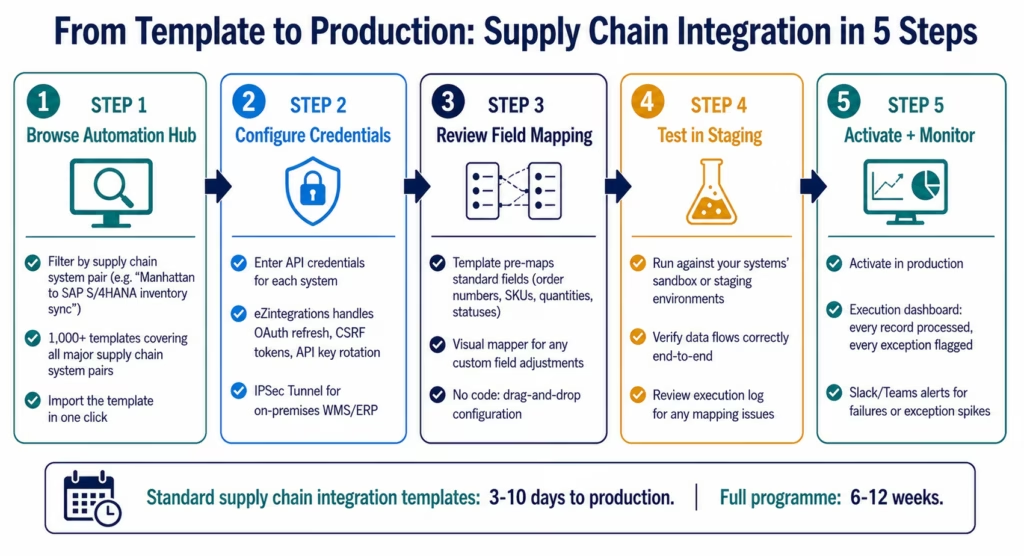
The integration setup process in eZintegrations follows the same pattern regardless of which supply chain systems you are connecting.
Step 1: Browse the Automation Hub
The Automation Hub contains 1,000+ supply chain integration templates organised by system pair and integration pattern. Search for your specific systems: “Manhattan WMS to SAP S/4HANA inventory” returns the inventory sync template. “Shopify to Blue Yonder WMS order routing” returns the order management template. “UPS tracking to Oracle ERP” returns the shipment status template.
Import the template. The template pre-configures: the connection type for each system (REST API, OData V4, webhook listener, EDI connector), the trigger event or schedule, the field mappings for the standard data objects, error handling and retry logic, and the execution log configuration.
Step 2: Configure Credentials
Enter the API credentials for each connected system:
- SAP S/4HANA: OAuth 2.0 client credentials or Basic Auth with automatic CSRF token management for write operations
- Manhattan WMS: API key and base URL for your Manhattan instance
- UPS: UPS Developer Portal client ID and client secret (OAuth 2.0)
- Shopify: private app API key and secret from Shopify admin
For on-premises WMS and ERP deployments, eZintegrations connects via IPSec Tunnel: no port exposure to the public internet required. Your network team configures the IPSec endpoint once; eZintegrations reaches your on-premises systems through the encrypted tunnel.
Step 3: Review Field Mapping
The template pre-maps standard fields. For a Manhattan-to-SAP inventory sync: Manhattan’s itemNumber maps to SAP’s Material, Manhattan’s availableQuantity maps to SAP’s UnrestrictedStock, Manhattan’s warehouseLocation maps to SAP’s StorageLocation. Review the mapping and adjust for any custom fields in your specific system configuration.
No code. Drag-and-drop visual mapper. If a custom field in your SAP requires a transformation (concatenating two fields, converting a unit of measure, applying a business rule), the transformation step is visual configuration, not a Python script.
Step 4: Test in Staging
Most enterprise supply chain systems provide sandbox or staging environments. Run the integration against these environments with real configuration before activating in production. The execution log shows every record processed, every field mapped, and every system response. If a field mapping is wrong, the log identifies exactly which field failed and what value the destination system returned.
For carrier API connections where sandbox environments are not available (some carrier APIs do not have staging modes), eZintegrations supports test mode configuration that validates the API connection without generating live shipments.
Step 5: Activate and Monitor
Activate the integration in production. The execution dashboard shows real-time processing: orders routed per minute, inventory updates per hour, tracking events processed per day. Configure exception alerts: when a workflow fails, when error rates exceed a threshold, or when processing volume drops unexpectedly (which can indicate an upstream system issue).
Core Supply Chain Integration Workflows
Order-to-Fulfilment Automation
The order-to-fulfilment workflow is the backbone of any supply chain integration programme. It connects the order capture layer (eCommerce, order management, or ERP) to the execution layer (WMS, TMS, carriers) in real time.
Standard order-to-fulfilment flow:
- Order created in Shopify, Amazon, Walmart, or Salesforce OMS → webhook fires in under 1 second
- eZintegrations checks inventory availability in the WMS
- WMS order created with routing rules applied (nearest warehouse, lowest freight cost, 3PL preference)
- TMS called for carrier rate shopping and carrier selection
- Carrier API called for label generation and tracking number creation
- Tracking number written back to the order management system and the ERP
- Carrier tracking webhooks route real-time status updates to the ERP and customer portal
- Delivery confirmation closes the order across all systems
Total time from order placed to label in warehouse print queue: under 90 seconds. Previously: batch upload at midnight, label generated next morning.
Inventory Synchronisation Network
For organisations with multiple warehouses, 3PLs, and selling channels, inventory accuracy depends on how quickly inventory movements in one system are reflected in all other systems.
The inventory sync network connects every inventory-impacting system in real time:
- WMS goods receipt → ERP inventory increase
- WMS pick confirmation → ERP inventory reservation
- WMS shipment confirmation → ERP inventory decrease and sales order fulfillment
- WMS return receipt → ERP inventory increase and credit memo trigger
- 3PL inventory adjustment → ERP inventory update (hourly or real-time depending on 3PL API capability)
- Demand planning system reads ERP inventory as the source of truth, always current
For organisations with Snowflake as their analytics layer: the inventory sync network feeds Snowflake with every inventory transaction via an incremental nightly load, replacing the monthly data dump with a daily-current analytics foundation.
Procurement-to-PO Automation
Purchase orders often require the same data to be entered in both the procurement system (Ariba, Coupa) and the ERP (SAP, Oracle). The approved PO in Ariba should appear automatically as a confirmed PO in SAP: not require someone to re-enter it.
Procurement-to-PO flow:
- PO approved in Ariba/Coupa
- eZintegrations receives the approval webhook
- PO created in SAP S/4HANA or Oracle ERP with all line items, quantities, delivery dates, and vendor information
- PO confirmation number written back to Ariba/Coupa
- When PO is received in the WMS, goods receipt posted to ERP automatically
- Three-way match (PO + GR + vendor invoice) triggers AP payment run
This flow eliminates the dual-entry that procurement and AP teams perform manually in most organisations.
Supplier Data Integration
Most organisations receive data from suppliers in inconsistent formats: EDI 856 ASNs from some suppliers, email attachments from others, portal uploads from a third group. eZintegrations standardises this through three integration paths:
EDI suppliers: the EDI connector handles 850 (PO), 856 (ASN), 810 (invoice), and 997 (functional acknowledgment) transactions, transforming them to the ERP’s required format.
API-capable suppliers: the REST connector handles direct supplier API integrations where supplier portals expose REST APIs for order status, shipment notification, and invoice submission.
Document-based suppliers: Level 2 AI Workflows use Document Intelligence to read ASNs, packing lists, and invoices that arrive as PDF or email attachments, extracting structured data for the ERP without manual data entry.
AI Automation Across All Four Levels
Supply chain integration is the foundation. AI automation is what turns connected systems into intelligent systems.
Level 1 (iPaaS Workflows): all the integration patterns described above. Deterministic, reliable, template-based. Orders route automatically. Inventory syncs in real time. Carrier labels generate without human intervention.
Level 2 (AI Workflows): intelligence embedded in the data pipeline. Document Intelligence reads supplier invoices, ASNs, and compliance certificates in variable formats. LLM Classification categorises incoming demand signals and freight invoice variances. Semantic matching identifies the same product across different system naming conventions. These AI nodes run within the existing integration pipeline: no separate AI infrastructure.
Level 3 (AI Agents): autonomous exception investigation. The Shipment Exception Agent investigates a carrier delay, retrieves the customer SLA, calculates the financial impact, and routes a resolution brief before the operations manager sees the exception. The Carrier Claims Agent assembles a complete damage claim package in 5 minutes. See the AI agents for logistics guide for the full agent catalogue.
Level 4 (Goldfinch AI): multi-agent supply chain intelligence. The Supply Chain Resilience Network runs four parallel monitoring agents continuously. The VP of Supply Chain asks the Chat UI “what are our top three supply chain risks this week?” and receives a structured answer from live data in 52 seconds. See the agentic AI for supply chain guide for the full programme architecture.
All four levels run on the same eZintegrations platform. The same connectors, the same monitoring dashboard, the same governance model, the same Automation Hub templates. You do not need to buy a separate AI platform when your supply chain complexity grows beyond basic integration.
Why Custom Development Fails Supply Chain Integration
Custom integration development has been the default approach for enterprise supply chain systems for thirty years. The case against it in 2026 is not that it cannot work: it is that the total cost, the maintenance burden, and the time-to-value are disproportionate to what pre-built templates now provide for standard supply chain connection patterns.
The custom development cost reality:
A typical custom SAP-to-WMS integration project involves: a business analyst engagement to document the requirements (2-4 weeks), a development team building the integration logic in ABAP or Java (6-12 weeks), a testing phase including SAP sandbox testing and WMS staging testing (4-6 weeks), and a deployment and hypercare period (2-4 weeks). Total: 14-26 weeks and $80,000-$250,000 in development cost for a single integration pair.
eZintegrations’ SAP-to-Manhattan inventory sync template goes live in 3-7 days.
The maintenance cost reality:
Custom integrations do not maintain themselves. When SAP releases a new version, the ABAP code may need updating. When Manhattan updates its API version, the custom integration needs testing and potentially rewriting. In Sarah’s organisation, 40% of supply chain IT capacity goes to maintaining existing integrations. That is not capacity building new capabilities: it is capacity keeping existing ones from breaking.
eZintegrations maintains the connectors. When UPS updates its Shipping API from v1 to v2, eZintegrations updates the connector. When Shopify releases a breaking change in its webhook format, eZintegrations updates the template. Your team configures logic: the vendor maintains the connection.
The per-transaction legacy EDI cost reality:
Many supply chain organisations are still using legacy EDI VAN (Value Added Network) providers or EDI translation services that charge per-transaction fees. At 10,000 shipments per month at $0.18 per transaction (a common EDI VAN rate), the carrier communication cost is $1,800 per month: $21,600 per year: for transactions that a direct carrier API integration handles at no per-transaction cost within eZintegrations’ flat per-automation pricing.
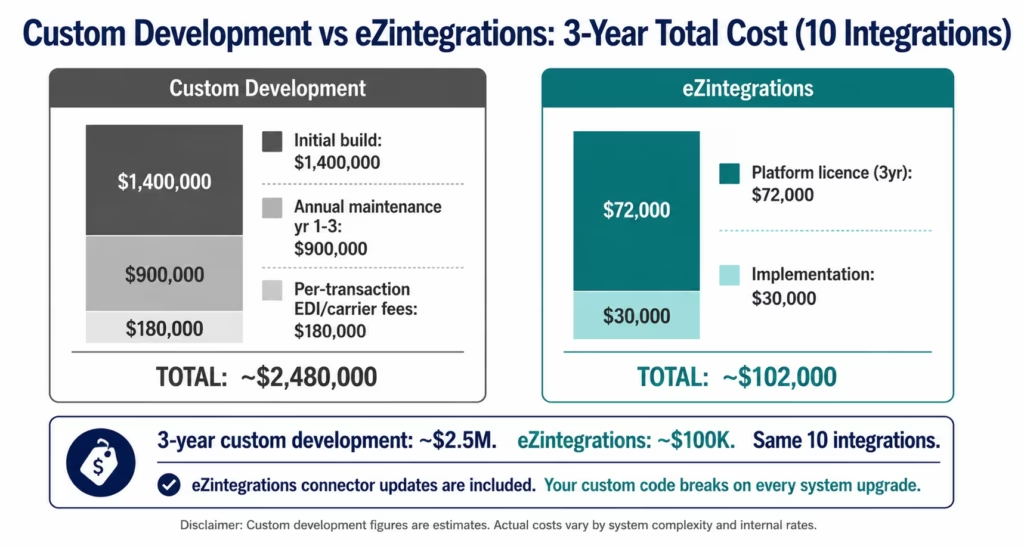
The total cost comparison:
| Cost Component | Custom Development Approach | eZintegrations |
|---|---|---|
| Initial build cost (10 integrations) | $800,000-$2,000,000 | Included in platform |
| Time to first integration live | 14-26 weeks | 3-10 days |
| Annual maintenance cost | $200,000-$500,000/year (40% team capacity) | $0 (vendor-maintained connectors) |
| Per-transaction EDI/carrier fees | $20,000-$200,000+/year | $0 (included in automation pricing) |
| Platform licence | $0 (custom = internal cost) | $90-$150/month per automation |
| 10 automations, 3-year total | $1,800,000-$3,500,000 | $54,000-$90,000 |
Custom development estimates based on publicly available enterprise integration project data and industry benchmarks. Contact eZintegrations for exact pricing for your specific supply chain programme scope.
Key Outcomes and Results
Enterprises that replace custom supply chain integration programmes with eZintegrations templates report measurable improvements across cost, speed, and operational performance:
Implementation Speed:
- Time to first integration live: 14-26 weeks (custom) → 3-10 days (template)
- Full 10-integration programme: 12-24 months (custom) → 6-12 weeks (templates)
- New integration request to production: 3-4 months (custom estimate) → same sprint (template)
Cost:
- 3-year integration TCO (10 integrations): $1.8M-$3.5M (custom) → $54K-$90K (eZintegrations)
- Per-transaction EDI/carrier fees: $20K-$200K/year → $0
- Supply chain IT capacity on maintenance: 40% → 5-10% (vendor-maintained connectors)
- New integration development cost: $80K-$250K per integration → included in platform
Operational:
- Order-to-WMS lag: batch (2-8 hours) → real-time (under 60 seconds)
- Inventory data accuracy: 8-18 hour lag → 60-second transaction sync
- Carrier tracking update frequency: 4-8 hour polling → real-time webhooks
- Morning exception queue: 40-50 items (integration failures + data disagreements) → 5-10 items (70-80% reduction)
Team Capacity:
- Supply chain IT capacity freed from integration maintenance: 30-35% (redirected to new initiatives)
- New integration requests fulfilled per quarter: 1-2 (custom backlog) → 8-15 (template deployment)
How to Get Started
Step 1: Audit your current integration landscape
Map your current supply chain integrations: source system, destination system, integration type (custom code, batch file, legacy EDI, third-party connector), business criticality, and current state (stable, fragile, or broken). The systems running on batch schedules with lag greater than 4 hours and the custom integrations most at risk of breaking on next system upgrade are your first replacement candidates.
Step 2: Match to Automation Hub templates
For each integration pair in your landscape, search the Automation Hub. Most standard supply chain integration patterns (ERP-to-WMS, WMS-to-TMS, carrier API, eCommerce-to-ERP) have a matching template. For legacy EDI flows that need to be maintained: the EDI connector handles standard transaction types (850, 856, 810, 214, 997) while the REST connectors handle modern API counterparts.
Step 3: Prioritise by ROI and fragility
Prioritise integration replacements in this order: integrations that are currently broken or failing frequently, integrations with business-critical data flows that run on batch schedules with unacceptable lag, integrations with high per-transaction costs (legacy EDI VAN), integrations most at risk of breaking on an upcoming system upgrade.
Step 4: Deploy in sprints
Do not plan a big-bang migration. Deploy in 2-3 week sprints: import template, configure credentials, test in staging, activate in parallel with existing integration, validate, then decommission the old integration. Three integrations per sprint is a realistic pace for a lean supply chain IT team.
Step 5: Book a demo
Book a free supply chain integration demo and bring your current integration landscape. We will map your system pairs to Automation Hub templates, identify which legacy integrations are highest priority for replacement, and build a deployment roadmap for your specific supply chain technology stack.
Frequently Asked Questions
eZintegrations uses pre-built connectors for every major supply chain system including SAP, Oracle, Manhattan, Blue Yonder, UPS, FedEx, Shopify, and 50+ others, combined with Automation Hub integration templates that pre-configure field mappings, trigger events, error handling, and execution logging for standard supply chain integration patterns. Teams configure credentials, review field mappings, test in staging, and activate. API authentication, rate limit handling, and endpoint management are handled by the platform. When a system updates its API, eZintegrations updates the connector so integrations continue operating without custom redevelopment.
For standard Automation Hub templates such as WMS-to-ERP inventory sync, order-to-WMS routing, carrier tracking, and eCommerce-to-ERP integration, deployment typically takes 3-10 days from template import to production activation. More complex integrations involving custom data models, advanced business rules, or multi-system orchestration generally take 2-4 weeks. A full enterprise supply chain integration programme covering 10-15 integration pairs across a typical supply chain stack generally takes 6-12 weeks, compared with 12-24 months for equivalent custom development projects.
Yes. eZintegrations provides deep native SAP integration using OData V4 for SAP S/4HANA REST APIs with automatic CSRF token management for write operations such as goods movements, purchase order creation, and sales order updates. SAP ECC is supported through BAPI/RFC connectivity. SAP EWM, SAP TM, and SAP Ariba are also supported directly. Automation Hub templates cover inventory management, procurement automation, transportation management, and finance workflows including three-way match AP automation. For on-premises SAP deployments, eZintegrations connects via IPSec Tunnel without exposing SAP ports to the public internet.
Yes for carriers with REST APIs including UPS, FedEx, DHL, and most modern logistics providers. eZintegrations provides direct carrier REST API connectors for label generation, rate shopping, tracking webhooks, and address validation, eliminating per-transaction EDI VAN fees. For carriers that still require EDI, the eZintegrations EDI connector supports standard transaction types such as 204, 990, 214, and 856 without requiring a separate VAN provider. Organisations migrating from legacy EDI to direct carrier APIs typically reduce per-transaction communication costs from approximately $0.15-$0.25 per transaction to effectively zero.
eZintegrations connects to on-premises systems using IPSec Tunnel: an encrypted tunnel between the eZintegrations cloud and the customer's internal network. No inbound firewall rules are required and no ERP or WMS ports are exposed publicly. The network team configures the IPSec endpoint once, after which eZintegrations can securely access SAP ECC on-premises, Manhattan on-premises, custom WMS platforms, legacy ERP systems, and other internal applications through the tunnel. From the workflow configuration perspective, on-premises integrations operate identically to cloud-to-cloud integrations.
eZintegrations supports all four levels of supply chain automation on one platform. Level 1 iPaaS workflows handle integration processes such as order routing, inventory synchronisation, carrier API integration, and procurement automation. Level 2 AI Workflows provide Document Intelligence for supplier invoices and ASNs, LLM classification for demand anomalies and freight variance classification, and semantic SKU matching across inconsistent system naming conventions. Level 3 AI Agents include Shipment Exception Agents, Carrier Claims Agents, Supplier Risk Agents, and Fulfilment Exception Agents that investigate exceptions autonomously and deliver structured recommendations for human review. Level 4 Goldfinch AI provides the Supply Chain Resilience Network for continuous monitoring and executive Chat UI access for natural language analytics queries answered from live operational data in under 60 seconds. All four automation levels use the same connectors, Automation Hub templates, and governance framework.1. How does eZintegrations connect supply chain systems without custom development?
2. How long does it take to set up enterprise supply chain integration?
3. Does eZintegrations work with SAP S/4HANA for supply chain integration?
4. Can eZintegrations replace legacy EDI VAN providers for carrier integration?
5. How does eZintegrations handle on-premises WMS and ERP systems?
6. What AI automation is available as part of supply chain integration?
Conclusion: Supply Chain Integration Should Not Take Months
Sarah’s 14-system supply chain stack consumed 40% of her team’s capacity just to maintain what already existed. New integration requests took 3-4 months and six figures in development budget. The legacy EDI provider cost $180,000 per year for transactions that a direct API connection would handle for nothing.
The problem was not the complexity of the systems. The problem was the approach: custom development for every connection, legacy EDI for every carrier, batch files for every 3PL. Each approach optimised for solving the immediate connection problem at the cost of creating a long-term maintenance burden.
eZintegrations changes the approach. Pre-built templates for every major supply chain system pair. Vendor-maintained connectors that update when systems update. Direct carrier REST API connections replacing per-transaction EDI fees. Real-time integration replacing batch latency. And when the integration foundation is established, the same platform adds AI Workflows, AI Agents, and Goldfinch AI multi-agent intelligence: without buying a second platform.
Fifty-plus supply chain systems. One platform. Templates that go live in days.
Book a free demo and bring your current integration landscape. We will map your system pairs to Automation Hub templates, identify your highest-priority integration replacements, and build a deployment roadmap that has your first integration live in the first week.
Browse the Automation Hub to find the template for your specific supply chain system pair.

