
AI Agents for Startups: Skip the Technical Debt, Deploy Autonomous Workflows Now
June 10, 2026AI agents for startups are autonomous, multi-step reasoning systems aligned with Intelligent agent principles that handle complex business exception workflows end-to-end: retrieving data from HubSpot, Stripe, Intercom, Mixpanel, and other startup tools, applying business logic, and routing pre-assembled recommendations to the right person for final decision. Unlike rule-based workflows or LLM classification nodes, agents adapt their investigation based on what they find. eZintegrations deploys startup AI agents with 9 native enterprise tools in days, not months: covering account health investigation, sales pipeline exception analysis, support escalation intelligence, revenue anomaly investigation, and growth attribution analysis.
TL;DR
- AI agents are what happens when your startup’s exception handling needs go beyond what a workflow can do. A workflow moves data according to rules. An AI workflow classifies and extracts intelligently. An AI agent receives a goal and figures out how to achieve it: deciding which systems to query, in what order, based on what it finds.
- The typical startup doesn’t need AI agents at seed stage, consistent with McKinsey & Company research on AI agents and startup operations maturity. But by Series A-B, with 200+ accounts, a growing support queue, a sales pipeline with dozens of exceptions, and a revenue number that depends on retention, the investigation work: “why is this account at risk?”, “why did this deal stall?”, “what caused this revenue anomaly?”: starts consuming significant team time.
- That investigation work is what AI agents do. The Revenue Health Agent retrieves usage data from Mixpanel, billing history from Stripe, support history from Intercom, and email engagement from Customer.io: assembles the full account picture: and delivers it to the CSM before they make the call. Not a notification. A pre-researched brief.
- Five startup AI agents in this guide: the Account Health Investigation Agent, the Sales Pipeline Exception Agent, the Support Escalation Intelligence Agent, the Revenue Anomaly Agent, and the Growth Attribution Agent.
- Deploy in 10-14 days per agent using Automation Hub templates. No ML infrastructure. No data science hire. No custom code.
Workflows, AI Workflows, and AI Agents: Which One Do You Need?
These three things sound similar. They are not interchangeable. Using the wrong one is either overkill (agents for simple routing) or underpowered (workflows for complex investigation).
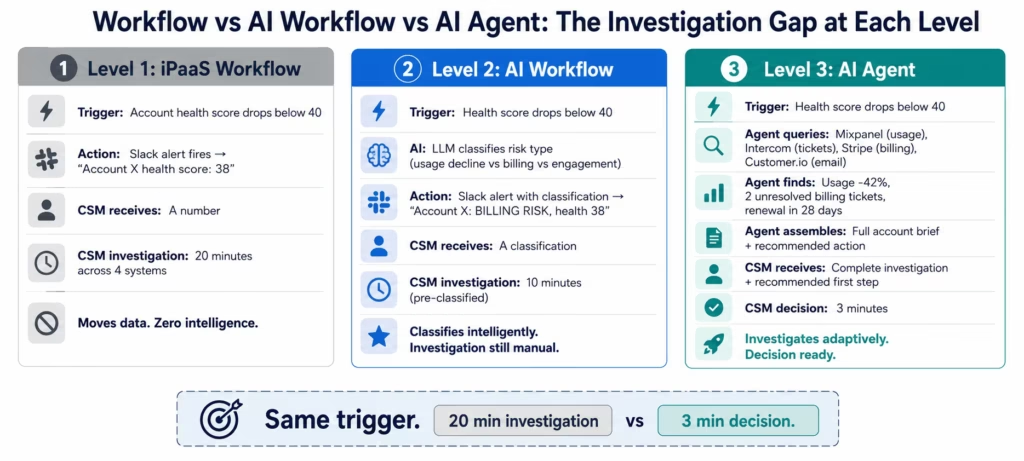
Level 1: iPaaS Workflow: A predetermined sequence of actions triggered by an event. Stripe payment fails → Customer.io dunning email triggered → HubSpot deal flagged “at risk.” Fixed sequence. High volume. Runs thousands of times per day without human attention. The plumbing that keeps your startup’s data flowing. If you have not built this layer yet, start with the integration platform for startups guide.
Level 2: AI Workflow: A workflow with AI nodes embedded. Intercom support ticket arrives → LLM Classification reads the text and categorises type, urgency, and churn signal → routing fires based on AI output. The AI executes specific jobs at specific steps. Still a fixed sequence, but intelligent at those steps. If you have not added this layer yet, the AI workflow startups guide covers the setup.
Level 3: AI Agent: Receives a goal, aligned with Gartner perspectives on AI agent platforms. “Investigate why Account X is at churn risk and prepare a brief for the CSM.” The agent then decides what to look at: it does not follow a predetermined path. It queries Mixpanel first. Finds declining usage. Then decides to check whether the decline correlates with a recent support issue. Queries Intercom. Finds two unresolved billing tickets from last month. Then checks the customer’s email engagement. Then retrieves their renewal date. Then assembles the full brief with a recommended first action.
No human defined that investigation sequence. The agent determined what to look up based on what it found at each step.
The practical startup difference:
AI workflow: health score drops below threshold → Slack alert fires with score and account name. The CSM still investigates for 20 minutes.
AI agent: health score drops below threshold → agent investigates why, retrieves the complete account picture, and delivers a brief with “usage down 42%, two unresolved billing tickets, renewal in 28 days, similar accounts at this stage responded well to an executive outreach.” The CSM reviews in 3 minutes and makes an informed call.
The agent eliminates the 20-minute investigation that precedes every decision.
The Startup Exceptions That Make AI Agents Worth It
Not every startup problem needs an agent. Here is the honest test: if the resolution requires pulling data from three or more systems, exercising judgment about what to look at based on what you find, and assembling a recommendation that a human then acts on: that is an agent job. If the resolution is deterministic (“if X then Y”), it is a workflow.
The startup exceptions that consistently justify agents:
Account churn investigation: “Why is this account at risk?” requires usage data from Mixpanel, billing status from Stripe, support history from Intercom, email engagement from Customer.io, and renewal date from HubSpot. Five systems. Multi-step investigation. Context-dependent: the answer for an account that stopped logging in is different from the answer for an account that is logging in but complaining about billing. An agent handles this in minutes; a human handles it in 20 minutes.
Deal stall investigation: “Why has this sales opportunity not moved in 3 weeks?” requires the deal history from HubSpot, the email thread context from Gong or Outreach, the prospect’s company news (Web Crawling), the competitive landscape context (Knowledge Base), and the rep’s interaction history. Multi-system, context-dependent. An agent assembles this; otherwise the sales manager manually pieces it together before a 1:1.
Support escalation assessment: “Should this ticket be escalated?” requires reading the ticket text, checking the customer’s tier and ARR, reviewing prior ticket history, checking the product’s current status (any active incidents?), and calculating the business impact of the issue. An agent does this on every ticket; a human does it on the ones they happen to notice.
Revenue anomaly root cause: “Why did MRR drop by $8,400 this month?” requires pulling churn events from Stripe, downgrade events, failed payment data, the customer-level breakdown, and correlating against product events from Mixpanel. Multi-source reconciliation that a finance analyst spends 45 minutes on. An agent delivers the breakdown in minutes.
At seed stage with 30 customers, these are manageable manually. At Series B with 500 customers, manual investigation of every exception is a capacity crisis, consistent with Y Combinator guidance on startup scaling and operational leverage. AI agents close the gap.
Before vs After: AI Agents at a Growth-Stage Startup
| Exception Type | Before AI Agents | After AI Agents |
|---|---|---|
| Account churn risk investigation | CSM manually checks Mixpanel, Stripe, Intercom, HubSpot (20-25 min) | Account Health Agent delivers pre-assembled brief (3-min review) |
| Stalled sales deal | Sales manager manually researches at 1:1 prep (20-30 min/deal) | Pipeline Exception Agent delivers deal brief with next-action recommendation (5-min review) |
| Support escalation decision | Manual review by senior CS or support manager (10-15 min/case) | Escalation Intelligence Agent assembles context, calculates impact, recommends (2-min decision) |
| Monthly revenue anomaly | Finance analyst manually reconciles across Stripe, HubSpot, Mixpanel (45-60 min) | Revenue Anomaly Agent retrieves and attributes MRR change (5-min review) |
| Campaign attribution question | Marketing analyst manually traces conversion path (30-60 min/analysis) | Growth Attribution Agent assembles multi-touch attribution (5-min review) |
| High-value trial not converting | SDR manually investigates activity across product and email (15-20 min) | Pipeline Agent retrieves trial activity, engagement, and intent signals (3-min review) |
| Customer asking for discount | AE manually checks account history, usage, and renewal context (10-15 min) | Agent retrieves full account history and strategic context (2-min review) |
| New competitor mention in support ticket | CS team notices if they happen to read the ticket | Support Agent flags competitor mention, retrieves competitive context (Knowledge Base) |
| Reactivation opportunity identification | Periodic manual CRM audit for lapsed customers | Agent monitors continuously for reactivation signals across billing and product data |
| Anomalous refund or dispute | Finance reviews flagged disputes manually (20-30 min each) | Revenue Agent retrieves full transaction history and dispute context (5-min review) |
The 9 Tools Startup AI Agents Use
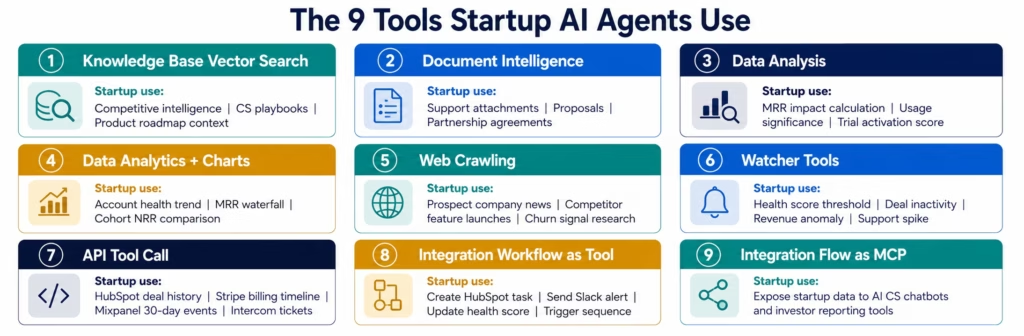
eZintegrations’ Level 3 AI Agents use 9 native enterprise tools. For startups, the most important ones: and how they apply to startup-scale problems:
1. Knowledge Base Vector Search Searches your startup’s knowledge bases. In startup context: your competitive intelligence knowledge base (competitor features, pricing, known weaknesses: the context an AE needs when a deal is stalled on a competitor comparison), your customer success playbook knowledge base (what worked for similar accounts at similar stages), and your product roadmap knowledge base (what features are coming that might address a churning customer’s stated concerns).
2. Document Intelligence Reads unstructured documents. In startup context: support ticket attachments, customer-submitted bug screenshots, sales proposal PDFs, partnership agreements, investor update templates.
3. Data Analysis Performs statistical calculations. In startup context: calculating the MRR impact of a churn event cluster, identifying whether a product usage decline is statistically significant versus seasonal noise, computing a trial account’s activation score across multiple usage dimensions.
4. Data Analytics with Charts/Graphs/Dashboards Generates visual outputs. In startup context: account health trend chart, MRR waterfall by change type, cohort NRR comparison.
5. Web Crawling Retrieves information from the web. In startup context: checking a stalled prospect’s recent news (funding announcement, leadership change, merger), monitoring a churning customer’s LinkedIn for signals, checking whether a competitor has launched a feature that may be driving the lost deal.
6. Watcher Tools Monitors systems for trigger conditions. In startup context: watching for accounts crossing the health score threshold, watching for deals with no activity for X days, watching for revenue anomalies in the Stripe data stream, watching for support ticket volume spikes.
7. API Tool Call Calls your startup’s SaaS tool APIs. In startup context: the HubSpot API call that retrieves a contact’s full deal history and engagement score, the Stripe API call that retrieves a customer’s billing history and subscription timeline, the Mixpanel API call that retrieves the account’s last 30 days of product events, the Intercom API call that retrieves all support tickets for the account.
8. Integration Workflow as Tool Runs a workflow as part of the agent’s investigation. In startup context: the agent triggers the “create HubSpot task for CSM” workflow as its final step, the “send Slack alert to sales director” workflow, or the “update HubSpot contact health score” workflow.
9. Integration Flow as MCP Exposes your startup’s data capabilities to external AI systems. In startup context: allows your AI customer success chatbot or your investor reporting tool to call eZintegrations’ data query capabilities as part of their own reasoning.
Startup AI Agent 1: Account Health Investigation Agent
The Account Health Investigation Agent is the most universally valuable startup AI agent: the one that, once running, makes every CSM at your company more effective immediately.
The problem it solves: at 200+ accounts, it is impossible for your CS team to proactively monitor every account’s health in depth. They have the health score dashboard. They see the red accounts. But understanding why an account is at risk: and what to do about it: requires 20-25 minutes of manual investigation across Mixpanel, Stripe, Intercom, HubSpot, and your email platform.
At 40 red accounts per month, that is 13-17 hours of investigation per month per CSM. Investigation time, not conversation time.
Agent goal: “Account X’s health score has dropped below threshold. Investigate why, assess the urgency, and prepare a complete briefing for the CSM.”
Agent investigation sequence (adaptive: the agent decides based on what it finds):
API Tool Call (Mixpanel/Amplitude): retrieves the account’s last 30 days of product events: daily active users, feature usage breadth, core feature activity, and the trend versus the prior 30 days.
Based on the product data finding: if usage is down significantly, the agent queries deeper: when did the decline start? Did it coincide with a specific date (possible feature removal or product change)? If usage is normal, the agent pivots to billing.
API Tool Call (Stripe): retrieves the billing history: subscription status, last payment date, any failed payments, any downgrades, and the current subscription tier.
API Tool Call (Intercom): retrieves all support tickets from the past 60 days: ticket count, open vs resolved, the most recent ticket text, and whether any tickets contain cancellation language or competitor mentions.
API Tool Call (Customer.io / Klaviyo): retrieves the account’s email engagement: open rates on recent communications, last email activity date, and whether they are on the right customer lifecycle stage.
API Tool Call (HubSpot): retrieves the renewal date, the CS owner, the original deal terms, and any existing HubSpot notes or tasks on the account.
Knowledge Base Vector Search (CS playbook): searches the CS playbook for similar account situations: what approach worked for accounts at this stage showing these specific signals?
The CSM receives a structured account brief:
- What has changed (specific signals that triggered the alert)
- Why it likely changed (the agent’s hypothesis based on the investigation)
- The business context (ARR, renewal date, contract terms)
- Support history context (any unresolved issues?)
- Recommended first action (based on similar account playbook matches)
Decision time: 3 minutes to review the brief and schedule the call. Previously: 20-25 minutes of manual investigation before the CSM even knows what to say on the call.
Startup AI Agent 2: Sales Pipeline Exception Agent
Every sales manager at a growth-stage startup spends significant 1:1 preparation time reviewing pipeline: why is Deal X stalled? What does the rep need to move Deal Y? What is the competitive situation on Deal Z? This investigation is valuable: it leads to good coaching and deal strategy. The investigation itself should not be the bottleneck.
The Sales Pipeline Exception Agent removes the investigation step from pipeline review.
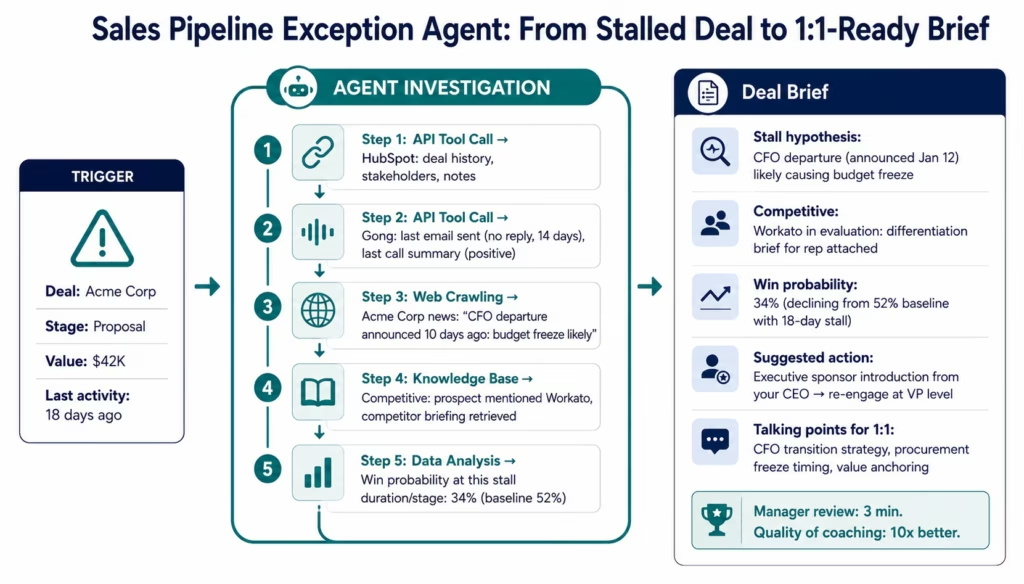
Agent goal: “Deal X has had no activity in 18 days. Investigate the current status, identify potential blockers, and prepare a deal brief for the sales manager’s 1:1 with the rep.”
Agent investigation sequence:
API Tool Call (HubSpot CRM): retrieves the deal record: stage, value, close date, last activity date, stakeholders, and any notes or tasks.
API Tool Call (Gong/Outreach/sales engagement platform): retrieves the communication history: last email sent and reply status, last call summary, and any sentiment signals from recent interactions.
Web Crawling: checks for recent news about the prospect company: funding announcements, leadership changes, mergers, layoffs, or any news that might explain the stall or provide an opening.
Knowledge Base Vector Search (competitive intelligence): if the deal notes mention a competitor, the agent retrieves the relevant competitive positioning from the knowledge base.
Data Analysis: calculates the deal’s current win probability based on the stall duration and stage, comparing against historical win rates for deals at this stage with similar stall patterns.
The sales manager receives a structured deal brief:
- Why the deal may have stalled (hypothesis based on communication analysis and company news)
- Competitive context (if applicable)
- Win probability assessment
- Suggested talking points for the rep coaching conversation
- Recommended next action (re-engage email, executive sponsor introduction, specific objection handling)
The 1:1 conversation shifts from “tell me about Deal X” to “here is what the agent found about Deal X: what’s your take?” The manager is prepared. The rep knows the manager is prepared. The coaching quality improves.
Startup AI Agent 3: Support Escalation Intelligence Agent
Support escalation decisions at startups are inconsistent. Whether a ticket gets escalated depends on who happens to be reading it, how busy they are, and whether they know to look up the customer’s ARR before deciding. Important tickets get missed. Small customers sometimes get senior attention they did not need. Priorities are wrong.
The Support Escalation Intelligence Agent makes escalation decisions consistently, based on the complete picture.
Agent goal: “Review this support ticket and provide a structured escalation recommendation: should this be escalated, to whom, and with what urgency?”
Agent investigation sequence:
Document Intelligence (if attachments exist) reads any error screenshots or attached files the customer included.
API Tool Call (Stripe/HubSpot): retrieves the customer’s subscription tier, ARR, and contract status: is this a $150/month customer or a $48,000/year customer?
API Tool Call (Intercom): retrieves prior ticket history: first ticket or fifth? How long has the issue been going on? Any prior escalations?
API Tool Call (product status / incident system): checks whether there is an active product incident that explains the customer’s issue: is this a unique customer problem or a systemic platform issue?
LLM Classification (built into the agent): re-reads the ticket text with full context for nuanced intent signals: frustration level, cancellation language, competitor mentions, urgency indicators.
Data Analysis: calculates the business impact: ARR at risk, the account’s health score trend, and the revenue concentration (is this account a significant percentage of a particular cohort?).
The escalation recommendation arrives as a structured brief:
- Customer context (tier, ARR, tenure)
- Issue description and prior history
- Business impact assessment
- Escalation recommendation: Yes/No, to whom (Tier 2 support, CS Director, CTO, CEO), and urgency
- Suggested response approach (acknowledge, investigate, executive outreach, incident response)
Support consistency improves. No more important customers slipping through because the person triaging was too busy to look up the account.
Startup AI Agent 4: Revenue Anomaly Agent
Every startup has moments when the revenue number looks wrong. MRR is down by more than expected. Churn rate spiked. Net new revenue is below forecast. The instinct is to pull up Stripe and start manually reconciling: a process that can take 30-60 minutes to arrive at an answer and that often still leaves “why” unanswered.
The Revenue Anomaly Agent handles this reconciliation automatically when an anomaly is detected.
Agent goal: “MRR has declined by $8,400 versus last month. Investigate the root cause and produce a structured reconciliation brief.”
Agent investigation sequence:
API Tool Call (Stripe): retrieves all subscription events for the period: new subscriptions, expansions, contractions, churned subscriptions, and failed payments that resulted in involuntary churn. Calculates MRR change by category: new, expansion, contraction, churn, reactivation.
API Tool Call (HubSpot): for each churned or contracted account, retrieves the CS owner, any notes, the churn reason code (if populated), and the account’s health score history.
API Tool Call (Mixpanel): for the churned accounts, retrieves their last 30 days of product usage: were these accounts showing declining engagement before the churn event? (Confirms whether the churn was predictable versus surprise.)
Data Analysis: attributes the MRR change precisely: “New MRR: +$4,200. Expansion MRR: +$1,800. Contraction MRR: -$3,600 (3 downgrades). Churned MRR: -$10,800 (4 accounts). Reactivation: +$0. Net change: -$8,400.”
Knowledge Base Vector Search: checks whether any of the churned accounts match profiles from prior churn cohorts: is there a pattern in the type of account churning?
The founder or CFO receives a structured revenue reconciliation brief: the exact MRR waterfall, the accounts driving each change, the root cause hypothesis for each churn event (predicted vs surprise, billing vs product vs competitive), and whether the pattern is a systemic risk or isolated events.
What previously took 45-60 minutes of manual reconciliation takes 5 minutes to review.
Startup AI Agent 5: Growth Attribution Agent
Marketing attribution is one of the most debated topics at every growth-stage startup. Which channels are actually driving acquisition? What is the true conversion rate from organic content versus paid? How long is the actual time-from-touch-to-revenue for each channel?
The Growth Attribution Agent assembles the multi-touch attribution picture that most startups approximate with spreadsheets and guesswork.
Agent goal: “For the new customers acquired this month, trace the acquisition path and produce a structured attribution analysis for the growth team.”
Agent investigation sequence:
API Tool Call (Stripe/HubSpot): retrieves the new customer list for the period: company name, deal value, contract date, and the assigned source in HubSpot.
API Tool Call (product analytics / attribution platform): for each new customer, retrieves the marketing touchpoint history: first touch, last touch, and the attribution signals (UTM parameters, referral source, campaign).
API Tool Call (Mixpanel/Amplitude): retrieves the product journey: when did the account first activate? How long was the trial-to-conversion window? What features did they use that correlated with conversion?
Data Analysis: calculates the attribution metrics: time-to-conversion by channel, average deal value by channel, and conversion rate from first touch to paid by campaign type. Identifies which channel is driving the highest-value customers (not just the most customers).
Web Crawling (optional): for accounts that arrived through organic or referral, checks whether there is identifiable content or referral source that explains the arrival timing.
The growth team receives an attribution brief: the revenue-weighted breakdown by channel, the average conversion timeline by channel, the highest-revenue-per-acquisition channel, and the campaigns or content pieces that drove the most valuable new logos. Not a spreadsheet to build: a structured analysis to review.
Level 4: Goldfinch AI for Startup Executive Intelligence
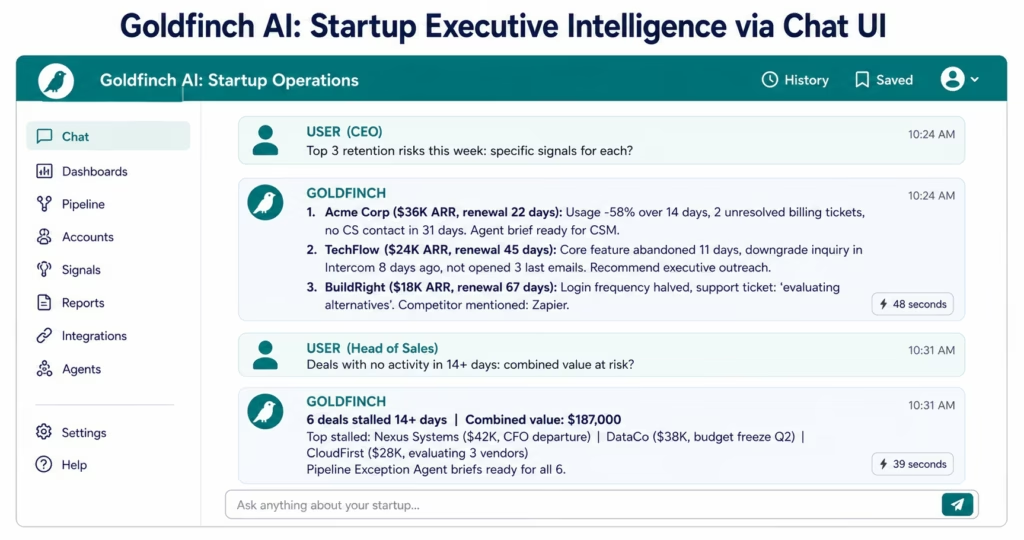
Individual agents handle individual exception types. Goldfinch AI coordinates all of them and gives your leadership team natural language access to live business data.
CEO: Monday morning: “What are our top three retention risks this week and what are the specific signals for each?”
Goldfinch AI queries the Account Health Investigation programme data, retrieves the accounts with the highest composite risk scores, and returns a ranked list with the specific risk signals for each account: in under 60 seconds. No analyst. No report preparation.
Head of Sales: “Which deals in the pipeline have had no activity in more than 14 days and what is the combined value at risk?”
Goldfinch AI queries HubSpot and the Pipeline Exception Agent data, retrieves stalled deals with no activity, calculates the combined pipeline value, and returns a structured sales risk summary: in under 60 seconds.
CFO: “What drove the MRR change this month: break it down by new, expansion, contraction, and churn.”
Goldfinch AI queries the Revenue Anomaly Agent data and the Stripe billing records, calculates the MRR waterfall, and returns the breakdown with account-level detail for the largest changes: in under 60 seconds.
Head of Growth: “Which acquisition channel delivered the highest LTV customers last quarter?”
Goldfinch AI queries the Growth Attribution Agent data and the billing history, calculates LTV by channel, and returns the ranked channel analysis: in under 60 seconds.
The Workflow Node runs automated weekly briefings: the Monday morning account health summary delivered to the CS Director before the team standup; the Friday pipeline exception summary delivered to the Head of Sales before the weekend.
Why Building Custom AI Agents Is the Wrong Move
If you have an engineer who knows LangChain, it is tempting to build your own AI agent infrastructure. Here is the honest assessment of what that actually costs:
What you have to build:
- The orchestration layer: how the agent decides which tools to call, in what order, based on intermediate results
- The tool registry: how the agent knows which API connectors exist and how to call them
- The memory management: how the agent maintains context across multi-step investigations without exceeding context limits
- The retry and error handling: what happens when the Mixpanel API times out mid-investigation
- The human-in-the-loop system: how the agent pauses for human approval when confidence is low
- The audit trail: every agent action logged for debugging and compliance
- The execution monitoring: knowing when an agent is stuck in a loop versus working normally
- The integration connectors: the authenticated API connections to HubSpot, Stripe, Mixpanel, Intercom: each requiring its own maintenance
Engineering time estimate: 8-14 weeks for the initial agent infrastructure. 1-2 weeks per new tool added to the agent’s repertoire. Ongoing: unpredictable maintenance as each connected SaaS tool updates its API.
What you give up: 8-14 weeks of engineering time that your product roadmap had planned for features that differentiate your product.
What eZintegrations provides: the same agent infrastructure, already built and maintained, with pre-configured connectors for HubSpot, Stripe, Mixpanel, Intercom, Gong, Customer.io, and your full startup stack. Configuration, not construction. Deployment in 10-14 days per agent.
The build-vs-buy rule applies here with even more force than it does for workflows, aligning with Sequoia Capital perspectives on build versus buy decisions: building agent infrastructure is genuinely complex engineering. The orchestration, memory management, and error handling are non-trivial. This is not a weekend Hackathon project: it is a major engineering investment. And it is infrastructure that looks the same at every SaaS startup: there is no competitive differentiation in how your company’s AI agent queries HubSpot.
Key Outcomes and Results
Growth-stage startups deploying AI agents across account health, sales pipeline, support, and revenue analytics report measurable results within 30-60 days:
Customer Success:
- Account health investigation time: 20-25 minutes → 3-minute brief review
- CSM proactive outreach coverage: limited by investigation time → all red accounts briefed same day
- Churn surprise rate: accounts cancelling with no prior CS contact → declining as advance investigation covers all at-risk accounts
- CS team capacity: 40-50% of time on investigation → redirected to customer conversations
Sales:
- Deal stall identification: discovered at 1:1 or manually by manager → agent flags at day 1 of inactivity
- Pipeline review preparation time: 20-30 min/deal for manager → 3-minute brief review
- Win rate impact: more coaching time for reps, better-prepared managers
- Competitive intelligence delivery: inconsistent and ad hoc → systematic for every stalled deal with competitive signal
Revenue Operations:
- Monthly MRR reconciliation time: 45-60 minutes → 5-minute brief review
- Revenue anomaly root cause identification: manual multi-system exercise → automated attribution
- Churn pattern identification: periodic analysis → continuous agent monitoring
Support:
- Escalation consistency: dependent on reviewer judgment → systematic based on ARR + history + business impact
- High-value customer ticket identification: sometimes missed → caught on every ticket
- Support escalation decision time: 10-15 minutes → 2-minute structured recommendation review
How to Get Started
Step 1: Choose the exception that costs you the most investigation time per week
Total up the investigation time: how many accounts go on the “at-risk” list each week, multiplied by 20 minutes each. How many stalled deals does the sales manager research before each 1:1? How many revenue questions require a manual Stripe reconciliation each month? The exception with the most accumulated investigation time is your first AI agent.
For most Series A-B startups, the Account Health Investigation Agent is the highest-ROI first deployment: it addresses the most common, most consequential exception (churn risk) and the investment in knowledge base and data connections immediately benefits every subsequent agent you deploy.
Step 2: Load your knowledge bases
The quality of an agent’s recommendations depends on the quality of the knowledge it can search. For the Account Health Investigation Agent: load your CS playbooks into the knowledge base: what approaches work for accounts showing usage decline? What are the proven save strategies for billing-related churn risk? For the Sales Pipeline Exception Agent: load your competitive intelligence: how do you win against your top three competitors? What objections do they raise and how do you address them?
Step 3: Import the startup AI agent template from the Automation Hub
Visit the Automation Hub and filter by Startup AI Agents. Import the template for your target exception type. Configure your HubSpot, Stripe, Mixpanel, Intercom, and Customer.io connections. The Automation Hub templates include the pre-configured tool registry, the investigation sequence logic, and the output formatting for a structured brief.
Step 4: Configure your business context thresholds
The agent needs to know your business context: what ARR threshold makes an account “enterprise-priority” for escalation? How many days of deal inactivity triggers investigation? What health score threshold is a churn risk signal for your specific business? These are configuration settings, not code.
Step 5: Run the parallel test
Deploy the agent alongside your existing process for two weeks. Your CSM continues their normal investigation; the agent independently investigates the same accounts. Compare the agent’s briefs against what the CSM found manually. Assess match rate and any gaps. Adjust knowledge base content or investigation parameters before full activation.
Import a startup AI agent template from the Automation Hub and deploy your first agent within two weeks.
FAQs
A workflow follows a predetermined sequence such as trigger → AI classification → route with fixed steps. An AI agent receives a goal and decides how to achieve it by determining which systems to query, in what order, and based on what it finds. When an account shows a declining health score, a workflow routes a classified alert. An AI agent investigates why by querying Mixpanel for usage, Stripe for billing, Intercom for support tickets, and Customer.io for email engagement, adapting the investigation based on each finding and delivering a complete pre-researched brief. The agent eliminates the 20-minute manual investigation that precedes the CSM's action decision.
Startup AI agent deployments typically go live in 10-14 days from template import to production activation. This includes knowledge base setup in 2-3 days for loading CS playbooks, competitive intelligence, or revenue frameworks, tool connection configuration in 2-3 days for HubSpot, Stripe, Mixpanel, and Intercom API connections, agent threshold calibration in 1-2 days to define trigger conditions and finding thresholds, and parallel-run validation in 3-5 days where the agent runs alongside the manual process and outputs are compared. No code or ML infrastructure is required.
The AI agent investigates and recommends while the human decides and acts. When the Account Health Investigation Agent delivers a brief to the Customer Success Manager, the CSM decides whether to call the customer, what to say, and how to handle the account. When the Sales Pipeline Exception Agent identifies a stalled deal and recommends an executive introduction, the sales manager decides whether to make that introduction. Human-in-the-loop is the architecture. The agent removes the investigation step, not the decision step.
AI agents connect to all major startup stack tools through API Tool Call. Supported systems include HubSpot for deals, contacts, companies, engagements, and health scores; Salesforce; Stripe for subscriptions, payments, customers, and disputes; Intercom for conversations, contacts, events, and segments; Mixpanel and Amplitude for events, user properties, and cohorts; Customer.io and Klaviyo for campaigns and engagement events; Gong and Outreach for call summaries and engagement signals; Linear and Jira for issues and projects; Slack for messaging; and Google Workspace. For systems without a REST API, the eZintegrations database connector supports direct database access.
No, All AI inference runs natively within eZintegrations' infrastructure. The orchestration layer, tool registry, memory management, retry logic, and audit trails are built into the eZintegrations agent platform. You configure the agent's goal, the tools it can access, the trigger thresholds, and the output format through the platform interface. The engineering complexity of agent infrastructure is handled entirely by eZintegrations. The platform is SOC 2 Type II certified and no startup customer data is sent to external AI providers. For startups processing EU customer data, GDPR compliance applies to all customer data processed through eZintegrations AI agents.
The right time to deploy AI agents is when exception investigation time starts consuming meaningful team capacity. Practical benchmarks include a Customer Success team spending more than 2-3 hours per week on manual account health investigation, a sales manager spending more than 30 minutes per one-on-one on deal research, or monthly MRR reconciliation taking more than one hour. Most startups reach these thresholds between 50-100 active accounts across sales pipeline and customer success portfolios. At that stage, AI agents typically generate immediate operational ROI.1. What is an AI agent for startups and how is it different from a workflow?
2. How long does it take to deploy a startup AI agent?
3. Does the AI agent make decisions autonomously or does a human still decide?
4. What startup tools can AI agents connect to?
5. Do I need a data science team or ML infrastructure to run AI agents?
6. When is the right time for a startup to deploy AI agents?
Conclusion: The Investigation Gap Is Killing Your Team’s Leverage
Every CSM who spends 20 minutes investigating an account before making a 3-minute decision is spending 20 minutes on work that an AI agent can do better and faster. Every sales manager who spends 20 minutes researching a stalled deal before a coaching conversation is spending 20 minutes on work an agent handles in seconds. Every founder who spends 45 minutes reconciling a revenue anomaly is spending 45 minutes on investigation that can be automated.
This is the investigation gap: the work that precedes decisions. It is rarely glamorous. It is always necessary. And it scales linearly with company size: unless you replace it with agents.
AI agents at a startup do not replace your CSMs. They make your CSMs more effective per hour. They do not replace your sales managers. They make your sales managers better coaches by showing up to every 1:1 prepared. They do not replace your revenue analysis. They make your financial decisions faster and better-informed.
eZintegrations deploys five startup AI agents: Account Health, Sales Pipeline, Support Escalation, Revenue Anomaly, and Growth Attribution: with 9 native enterprise tools, pre-built connections to your full startup stack, SOC 2 Type II certified infrastructure, and Automation Hub templates that go live in 10-14 days.
Start with the exception that costs your team the most investigation time. Deploy the agent. Then the next one. Build the autonomous operations foundation while it is still affordable to build: before the volume makes every exception a capacity crisis.
Import a startup AI agent template from the Automation Hub and deploy your first agent within two weeks.
Book a free demo and bring your highest-investigation-cost exception. We will show you what an agent investigation looks like for your specific HubSpot, Stripe, and Mixpanel environment.

