How to Sync POs to SAP & Oracle from Coupa or Ariba
$90.00
| Workflow Name: |
PO-to-ERP Auto Sync |
|---|---|
| Purpose: |
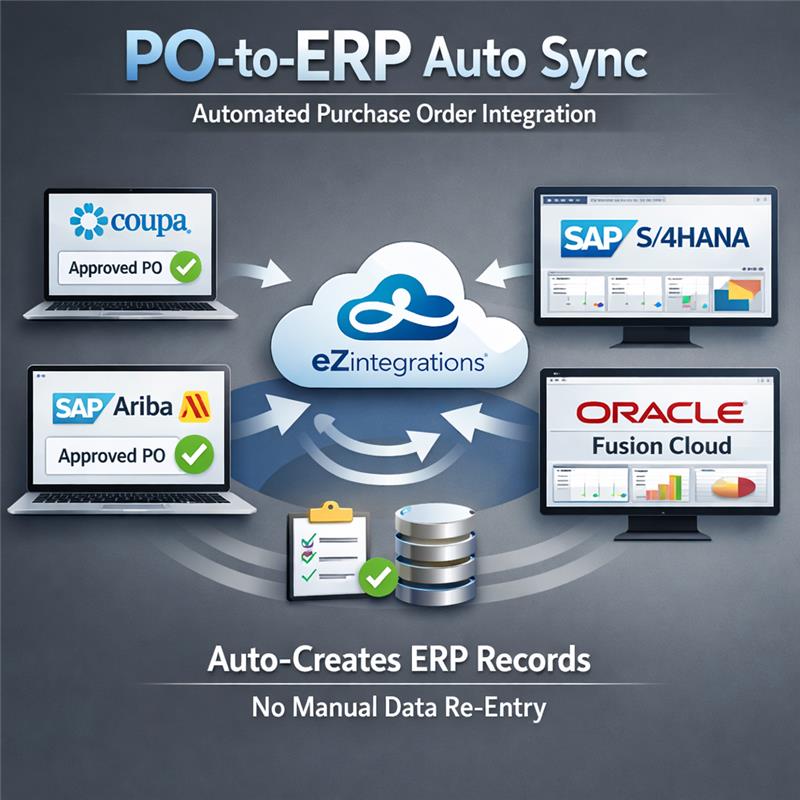
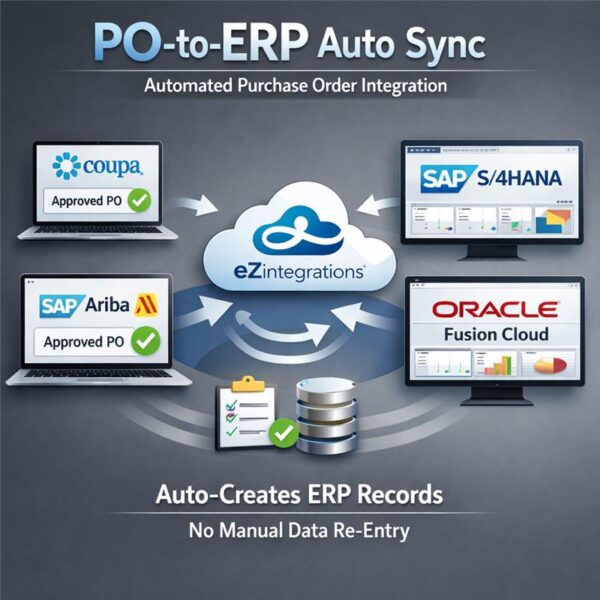
Automatically capture approved purchase orders from Coupa or SAP Ariba and create corresponding ERP records in SAP S/4HANA or Oracle Fusion Cloud without manual data re-entry |
| Benefit: |
Eliminates 2 to 3 FTE hours of daily manual PO entry, reduces data errors by 90%, and processes each PO in under 60 seconds |
| Who Uses It: |
Procurement Manager, AP Specialist, Finance Operations Lead |
| System Type: |
Cloud-to-Cloud Integration, Webhook-Triggered iPaaS Workflow |
| On-Premise Supported: |
Yes — eZintegrations connects to on-premises systems (Oracle EBS, MSSQL, Infor LN, SAP on-prem, and others) via IPSec Tunnel. eZintegrations is a browser-based |
| Industry: |
Consumer Packaged Goods / Manufacturing |
| Outcome: |
380 POs per day now processed automatically with zero manual intervention. Procurement Manager reallocated recovered FTE hours to supplier relationship management and contract compliance. |
| Tags: |
purchase order automation, PO-to-ERP, Coupa integration, Ariba integration, SAP S/4HANA workflow, Oracle Fusion integration, AP automation, procurement automation, procure-to-pay |
| AI Credits Required: |
No — all five workflow steps are standard iPaaS operations (webhook ingestion, data mapping, REST API write, SMTP notification). Covered fully under the Unlimited plan. |
Table of Contents
| Problem Before: |
Procurement teams manually re-enter approved purchase orders from Coupa or SAP Ariba into SAP S/4HANA or Oracle Fusion, consuming 2 to 3 FTE hours daily, generating a 3 to 5% data entry error rate, and creating a PO backlog that delays month-end financial close by 1 to 2 days. According to Ardent Partners, manual PO processing costs organizations $10 to $18 per transaction. |
|---|---|
| Solution Overview: |
The PO-to-ERP Auto Sync workflow from eZintegrations monitors your procurement portal for approved POs via webhook, validates and maps each record to your ERP schema, creates the ERP purchase order via REST API, and sends confirmation back to the portal and your team — fully automated, under 60 seconds end-to-end. |
| Key Features: |
Automated confirmation routing via SMTP and portal callback, Configurable no-code field mapping and validation before ERP write, Exception queue with retry logic and Procurement Manager email alerts, Real-time webhook trigger on PO approval in Coupa or SAP Ariba, REST API and OData-based PO creation in SAP S/4HANA or Oracle Fusion Cloud |
| Business Impact: |
Removes manual PO re-entry entirely, bringing per-transaction cost from $10 to $18 down to under $1 and freeing your AP team for higher-value procurement work. |
| Productivity Gain: |
Teams processing 200+ POs per day reclaim an estimated 500 hours per month previously spent on data entry and error correction. |
| Cost Savings: |
Organizations with 5,000+ POs per month typically realize $40,000 to $60,000 in annual FTE cost reduction after deployment |
Description
PO-to-ERP automation from eZintegrations eliminates the manual re-entry of purchase orders from Coupa or SAP Ariba into SAP S/4HANA or Oracle Fusion. eZintegrations is an enterprise automation platform covering iPaaS, AI Workflows, AI Agents, and Goldfinch AI agentic automation. Your procurement team should not be spending 2 to 3 hours each day copying PO data between systems.
How Does PO-to-ERP Automation Work from Coupa or Ariba into SAP S/4HANA or Oracle Fusion?
When a PO is approved in your procurement portal, a webhook triggers the eZintegrations workflow engine in real time. The workflow validates each field against your ERP schema, maps the data correctly, and creates the ERP purchase order via REST API — typically in under 60 seconds. This is PO-to-ERP automation at its most direct: no file exports, no manual matching, no re-entry.
This workflow runs on the eZintegrations iPaaS layer, covering unlimited executions with no per-transaction fees and no AI Credits consumed. Your team receives a confirmation email and portal callback for every PO processed. Exceptions route to a monitored error queue with retry logic, so no PO is silently dropped.
The result: 85% faster processing per PO, 99%+ data accuracy, and $40,000 to $60,000 in annual savings at 5,000+ POs per month (Ardent Partners benchmark basis). Deploy PO-to-ERP automation in under one business day with no-code configuration.
Watch Demo
| Video Title: |
PO-to-ERP Auto Sync: Live Workflow Demo — Coupa to SAP S/4HANA in Under 60 Seconds |
|---|---|
| Duration: |
3 to 5 minutes |
Outcome & Benefits
| Time Savings: |
85% reduction in per-transaction PO processing time — from 8 to 12 minutes down to under 60 seconds |
|---|---|
| Cost Reduction: |
$40,000 to $60,000 annual FTE savings at 5,000+ POs per month; per-transaction cost reduced from $10 to $18 (Ardent Partners) to under $1 |
| Accuracy: |
99%+ data accuracy vs. 95 to 97% with manual entry; 3 to 5% error rate fully eliminated |
| Productivity: |
500+ FTE hours reclaimed per month at mid-enterprise PO volumes; month-end close delay from PO backlog eliminated |
Performance Metrics
| Metric | Before (Manual) | After (Automated) | Improvement |
|---|---|---|---|
| PO Processing Time | 8 to 12 min per PO | Under 60 sec per PO | 85% faster |
| Daily FTE Hours on PO Entry | 2 to 3 hours/day | 0 hours/day | 100% eliminated |
| Data Entry Error Rate | 3 to 5% per batch | Under 0.5% | 90% reduction |
| Month-End Close Delay from PO Backlog | 1 to 2 days average | 0 days | Fully resolved |
Industry & Function
| Function: |
Procurement, Accounts Payable, Finance Operations |
|---|---|
| System Type: |
Cloud-to-Cloud Integration, Webhook-Triggered iPaaS Workflow |
| Industry: |
Consumer Packaged Goods / Manufacturing |
Functional Details
| Use Case Type: |
System-to-System Integration, Event-Driven Workflow |
|---|---|
| Source Object: |
Approved Purchase Order (PO header + line items) |
| Target Object: |
ERP Purchase Order Record (SAP MM module PO document or Oracle Procurement Cloud PO) |
| Scheduling: |
Real-time event-driven via webhook on PO approval; fallback scheduled polling configurable at 5-minute intervals |
| Primary Users: |
Procurement Manager, AP Specialist, Finance Operations Lead |
| KPI Improved: |
PO processing time, FTE hours per transaction, AP error rate, procure-to-pay cycle time |
| AI/ML Step: |
N/A — standard iPaaS workflow with no AI steps; covered under Unlimited plan |
| Scalability Tier: |
Enterprise — supports 500+ concurrent POs per day; horizontal scaling via eZintegrations workflow engine worker allocation |
Technical Details
| Source Type: |
Cloud SaaS Procurement Portal |
|---|---|
| Source Name: |
Coupa (https://compass.coupa.com/en-us/products/product-documentation/) or SAP Ariba (https://help.sap.com/docs/ariba) |
| API Endpoint URL: |
Coupa: /api/purchase_orders | SAP Ariba: /api/approval-flows/v1/purchaseorders |
| HTTP Method: |
POST (webhook push from portal on PO approval event) |
| Auth Type: |
OAuth 2.0 (Coupa); OAuth 2.0 / SAML 2.0 (SAP Ariba) |
| Rate Limit: |
Coupa: 500 requests/min; SAP Ariba: configurable per tenant agreement |
| Pagination: |
Not applicable for real-time webhook mode; cursor-based pagination for scheduled batch fallback |
| Schema/Objects: |
PO Header (PO number, supplier ID, currency, total amount, approval date); PO Line Items (line number, material code, quantity, unit price, delivery date, cost center) |
| Transformation Ops: |
Date format normalization (ISO 8601), currency code standardization (ISO 4217), supplier ID cross-reference lookup, cost center mapping, required field validation |
| Error Handling: |
Validation failures route to exception queue with full payload retained; retry logic up to 3 attempts with exponential backoff; Procurement Manager alert email on persistent failure after third retry |
| Orchestration Trigger: |
Webhook (primary); scheduled polling at configurable interval (fallback) |
| Batch Size: |
1 record per webhook event (real-time mode); up to 200 records per scheduled batch run |
| Parallelism: |
Up to 50 concurrent workflow threads per tenant configuration |
| Target Type: |
Cloud ERP or On-Premises ERP (connected via IPSec Tunnel) |
| Target Name: |
SAP S/4HANA (https://help.sap.com/docs/SAP_S4HANA_ON-PREMISE) or Oracle Fusion Cloud Procurement (https://docs.oracle.com/en/cloud/saas/procurement/) |
| Target Method: |
REST API POST — SAP S/4HANA: /API_PURCHASEORDER_PROCESS_SRV/A_PurchaseOrder (OData v2); Oracle Fusion: /fscmRestApi/resources/latest/purchaseOrders |
| Ack Handling: |
ERP returns PO document number on successful creation; eZintegrations logs ERP PO number, sends confirmation callback to source portal, and routes SMTP notification to requestor |
| Throughput: |
500+ POs per day at standard configuration; scales to 2,000+ POs/day at enterprise tier |
| Latency: |
Under 60 seconds end-to-end from webhook receipt to ERP confirmation under normal load |
| Logging/Monitoring: |
Full execution log per workflow run (timestamp, payload hash, ERP response code, processing status); real-time monitoring dashboard in eZintegrations console |
Connectivity & Deployment
| Supported Protocols: |
REST API, Webhooks, OData v2/v4, HTTPS, SMTP, OAuth 2.0, SAML 2.0, IPSec Tunnel (for on-premises connectivity) |
|---|---|
| Security & Compliance: |
HIPAA-eligible configuration available, GDPR-compliant data handling, SOC Type II certified. TLS 1.2/1.3 encryption in transit, AES-256 encryption at rest. |
| Tenancy Model: |
Both single-tenant and multi-tenant deployments are available. Single-tenant provides dedicated infrastructure per customer with full data isolation |
| On-Premise Supported: |
Yes — eZintegrations connects to on-premises systems (Oracle EBS, MSSQL, Infor LN, SAP on-prem, and others) via IPSec Tunnel. eZintegrations is a browser-based |
FAQ
1. What is the PO-to-ERP Auto Sync workflow?
The PO-to-ERP Auto Sync workflow by eZintegrations automatically captures approved purchase orders from procurement portals such as Coupa or SAP Ariba and creates the corresponding purchase order records in SAP S/4HANA or Oracle Fusion Cloud without manual data re-entry. The workflow triggers in real time on PO approval via webhook and completes end-to-end processing in under 60 seconds per record.
2. What data does the PO-to-ERP Auto Sync workflow process?
This workflow processes approved PO records including PO header fields (PO number, supplier ID, currency, total amount, approval date) and PO line items (line number, material code, quantity, unit price, delivery date, cost center). All fields are validated against the target ERP schema and a duplicate PO check runs at the transformation layer before any ERP write occurs.
3. How does PO-to-ERP purchase order integration automation improve the procure-to-pay process?
The workflow removes manual PO data entry from your AP process entirely, reducing per-transaction processing time from 8 to 12 minutes down to under 60 seconds. Ardent Partners benchmarks manual PO processing at $10 to $18 per transaction — this workflow brings that cost to under $1 at scale. Month-end close delays caused by PO backlogs are eliminated because every approved PO is written to ERP within 60 seconds of approval.
4. Who typically uses the PO-to-ERP Auto Sync workflow?
This workflow is configured and monitored by Procurement Managers and AP Specialists in manufacturing, retail, CPG, and distribution companies. Finance Operations Leads typically own the workflow in the eZintegrations console, while Procurement Managers receive automated confirmation emails for every PO successfully processed.
5. Can eZintegrations connect to on-premises systems like Oracle EBS, MSSQL, or Infor LN?
Yes. eZintegrations connects to on-premises systems including Oracle EBS, MSSQL, Infor LN, SAP on-prem, and others via IPSec Tunnel — no on-premises software installation is required. eZintegrations is a browser-based, cloud-hosted platform, so your on-premises ERP participates in the workflow securely through the encrypted tunnel without any agent deployed on your servers.
6. What systems does the PO-to-ERP Auto Sync workflow connect?
This workflow connects Coupa or SAP Ariba (source procurement portals) to SAP S/4HANA or Oracle Fusion Cloud Procurement (target ERP systems) via REST API and OData. SMTP handles confirmation notifications to your procurement team. The workflow supports OAuth 2.0 and SAML 2.0 authentication for both source and target systems, and connects to on-premises ERP via IPSec Tunnel where required.
7. What are the key benefits of the PO-to-ERP Auto Sync workflow?
Key benefits include 85% faster PO processing (under 60 seconds vs. 8 to 12 minutes manually), 100% elimination of daily FTE hours spent on manual PO re-entry, a 90% reduction in data entry error rates, and $40,000 to $60,000 in annual FTE savings at mid-enterprise PO volumes. The workflow deploys in under one business day with no-code configuration and no professional services engagement.
8. How does the PO-to-ERP Auto Sync workflow handle exceptions and errors?
When a PO record fails field validation or the ERP API returns an error, eZintegrations routes the full record payload to a monitored exception queue with all error details preserved. The workflow retries automatically up to 3 times using exponential backoff and sends an alert email to the configured Procurement Manager if the failure persists. Every exception is logged with a timestamp, payload hash, and ERP response code — no record is silently dropped.
Resources
Case Study
| Customer Name: |
Mid-market CPG manufacturer (name withheld — reference available on request) |
|---|---|
| Problem: |
The procurement team manually re-entered 350 to 400 purchase orders per day from SAP Ariba into SAP S/4HANA, consuming 2.5 FTE hours daily, generating a 4% error rate on PO line items |
| Solution: |
Deployed the eZintegrations PO-to-ERP Auto Sync workflow in 6 hours using the pre-built Ariba-to-SAP connector. Field mapping configured in the no-code designer. |
| ROI: |
2.5 FTE hours reclaimed daily, $48,000 annual savings, PO error rate reduced from 4% to under 0.3%, month-end close delay eliminated in the first full financial cycle post-deployment. |
| Industry: |
Consumer Packaged Goods / Manufacturing |
| Outcome: |
380 POs per day now processed automatically with zero manual intervention. Procurement Manager reallocated recovered FTE hours to supplier relationship management and contract compliance. |