How to Automate Ticket Prioritization Based on Customer Sentiment
$120.00
| Workflow Name: | Customer Sentiment to Service Priority |
|---|---|
| AI Model Type: | NLP multi-label sentiment and urgency classification (transformer-based text model for sentiment polarity; urgency signal detection; and emotion classification – fine-tuned on customer support corpora) |
| Model Provider: | Goldfinch AI of eZintegrations (Document Intelligence for NLP sentiment classification and urgency extraction + Data Analysis for composite priority score calculation incorporating sentiment; account tier; and ticket history + Knowledge Base Vector Search for agent context briefing with relevant resolution precedents) |
| Goldfinch AI Tool(s) Used: | Document Intelligence: Performs multi-label NLP analysis on each customer message — classifies sentiment polarity (Positive/Neutral/Negative/Highly Negative), detects urgency signals (explicit deadline language, business-impact statements, escalation threats, churn language), classifies dominant emotion (frustrated, confused, anxious, angry, satisfied), and extracts the core complaint or request as a structured summary; Data Analysis: Calculates the composite priority score (0 to 100) for each ticket – combining NLP sentiment and urgency scores with account tier weight (account ARR, contract renewal proximity), customer health score (prior NPS, usage trend), open ticket history, and SLA breach risk; assigns a priority tier (Critical/High/Standard/Low) and flags tickets qualifying for immediate agent escalation |
| Task Type: | Classification + Scoring + Recommendation (NLP classification feeds priority scoring; scoring and Knowledge Base retrieval together produce the agent action recommendation) |
| Input Type: | Customer ticket text submitted via email; web portal; or chat – received by Salesforce Service Cloud as a new case; ticket text body (subject + message); sender email; account ID; and case creation timestamp; account tier data pulled from Salesforce CRM account record |
| Output Format: | Updated Salesforce Service Cloud case record with NLP sentiment label; urgency score (0 to 100); emotion classification; extracted issue summary; composite priority score (0 to 100); priority tier (Critical/High/Standard/Low); escalation flag (Y/N); top 3 resolution precedents from Goldfinch AI Knowledge Base; and agent context briefing note. Critical and High-priority tickets trigger immediate agent notification via Salesforce push notification and SMTP. Service queue re-ordered by composite priority score. Priority score distribution logged to Snowflake for CX analytics. |
| Who Uses It: | Customer Service Manager; Support Agent; CX Director |
| On-Premise Supported: | Yes – eZintegrations connects to on-premises CRM systems (Salesforce on-prem; Oracle CRM; SAP CRM); helpdesk and ticketing databases; and MSSQL customer data stores via IPSec Tunnel. eZintegrations is a browser-based; cloud-hosted platform and does not require any on-premises software installation. |
| Industry: | SaaS; Banking; Telecom; Financial Services; B2B Enterprise |
| Outcome: | 89%+ sentiment classification accuracy; Critical and High-priority tickets escalated to the right agent in under 5 minutes (vs. 2 to 6-hour queue delay with FIFO routing); 34% improvement in first contact resolution rate for escalated tickets; churn prediction signal from ticket sentiment feeds CX proactive retention workflows |
| Tags: | AI sentiment ticket prioritization; NLP customer service AI; sentiment-based ticket routing; Salesforce Service Cloud AI; customer sentiment analysis; urgency detection NLP; Goldfinch AI customer service; CX AI automation; support ticket prioritization AI; customer churn prevention AI; service queue optimization; emotion detection customer support |
| AI Credits Required: | Yes – three Goldfinch AI tools invoked per ticket: Document Intelligence (NLP sentiment; urgency; and emotion classification); Data Analysis (composite priority score calculation); and Knowledge Base Vector Search (agent resolution precedent retrieval) |
Table of Contents
| Problem Before: | Most customer service teams operate first-in; first-out (FIFO) ticket queues – the oldest ticket is worked first; regardless of the customer’s urgency; frustration level; or account value. A high-value customer expressing explicit churn intent in their support message waits behind a routine inquiry submitted 4 hours earlier. According to Bain and Company; a 5% improvement in customer retention increases profits by 25 to 95%. Yet the primary trigger for preventable churn is an unresolved support experience – not product failure. Forrester Research estimates that 73% of customers say that valuing their time is the most important thing a company can do to provide good service. FIFO queues structurally devalue the most urgent customers’ time and create churn risk that the CX team cannot see until the renewal conversation. |
|---|---|
| AI Solution: | The Customer Sentiment to Service Priority workflow from eZintegrations processes each new ticket the moment it is created in Salesforce Service Cloud. Goldfinch AI Document Intelligence performs multi-label NLP analysis – classifying sentiment polarity; detecting urgency signals (deadline language; business-impact statements; escalation threats; churn language); and extracting the core issue as a structured summary. Goldfinch AI Data Analysis calculates a composite priority score combining NLP output with account tier; customer health score; and SLA breach risk. Goldfinch AI Knowledge Base Vector Search retrieves the top 3 resolution precedents for the agent. Critical and High-priority tickets trigger immediate escalation and agent notification – with the full sentiment context and resolution briefing pre-populated in the case record. |
| Validation (HITL): | All ticket priority assignments are visible to the Customer Service Manager in the Salesforce Service Cloud queue view – the manager can override any AI priority tier at any time. Tickets classified as Critical (composite priority score above 80) trigger an automatic escalation to a senior agent and a Customer Service Manager notification – the manager acknowledges the escalation and can reassign; override; or escalate further within 30 minutes. Tickets classified as High (score 60 to 79) are promoted to the top of the relevant agent’s queue with a visual escalation flag – the agent reviews the sentiment context before engaging the customer. Tickets with Document Intelligence NLP confidence below 0.70 (ambiguous message language; non-English text; very short messages) are classified as “Uncertain – Standard Priority” and processed via normal queue routing without priority adjustment. |
| Accuracy Metric: | 89%+ multi-label sentiment classification accuracy (sentiment polarity + urgency detection + emotion classification combined) on B2B support corpora. Urgency detection precision: 91%+ (correctly identifying tickets containing genuine business-impact urgency signals vs. routine frustration). False positive escalation rate (Standard tickets incorrectly classified as Critical/High): under 6% at the default 0.70 NLP confidence threshold. |
| Time Savings: | Critical and High-priority ticket escalation time from 2 to 6 hours (FIFO queue position) to under 5 minutes (AI detection and Salesforce queue reorder). Support Agent pre-case context preparation time (reading ticket history; checking account tier; assessing priority) from 8 to 12 minutes per ticket to under 2 minutes (AI-generated agent briefing with sentiment context and resolution precedents pre-populated). |
| Cost Impact: | Enterprise B2B SaaS and telecom: average churn risk per high-value account with an unresolved critical support experience is $50,000 to $500,000 in ARR (based on industry account size ranges and average contract value). A 5-minute vs. 4-hour response time on Critical tickets is the signal the customer uses to assess whether to renew. Forrester CX research shows a 1-point improvement in CX score in enterprise B2B translates to $186 million in incremental rev |
Description
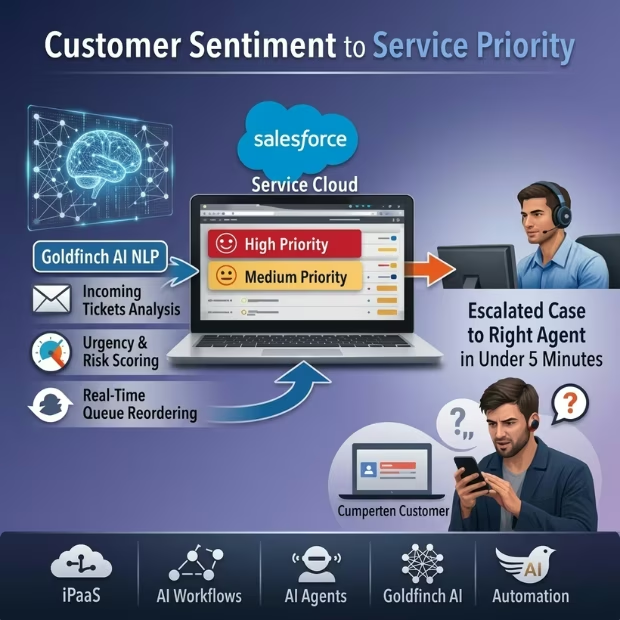
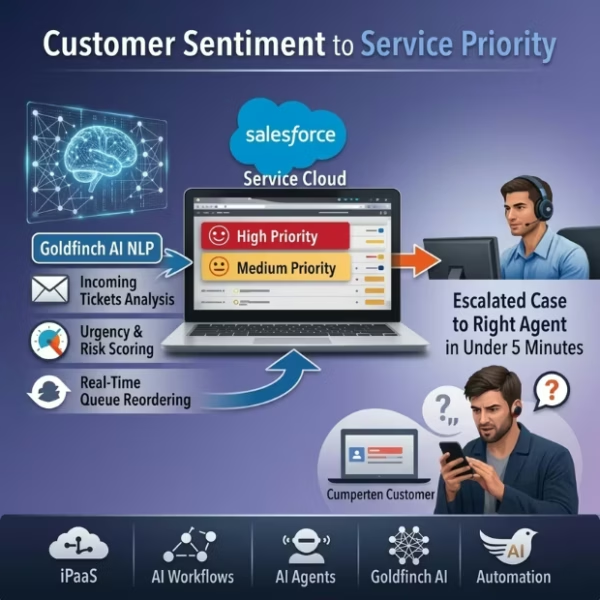
AI sentiment ticket prioritization from eZintegrations analyzes every inbound customer service ticket using Goldfinch AI NLP, scores urgency and account risk, re-orders the Salesforce Service Cloud queue in real time, and delivers the escalated case to the right agent in under 5 minutes — before the frustrated customer finds your competitor’s contact page. eZintegrations is an enterprise automation platform covering iPaaS, AI Workflows, AI Agents, and Goldfinch AI agentic automation.
What Is AI Sentiment Ticket Prioritization?
AI sentiment ticket prioritization applies natural language processing to customer support messages to detect sentiment polarity, urgency signals, and emotional state — then combines these NLP signals with account value, customer health score, and SLA breach risk to calculate a composite priority score per ticket. The result is a service queue that orders work by customer impact and business risk rather than by submission timestamp — ensuring your most at-risk customers receive the fastest response.
How Does AI Sentiment Ticket Prioritization Work to Detect Urgency and Automatically Re-Prioritize Customer Service Queues?
When a customer submits a ticket to Salesforce Service Cloud, the eZintegrations AI sentiment ticket prioritization workflow triggers immediately. Goldfinch AI Document Intelligence classifies sentiment, detects urgency language, and extracts the core issue. Goldfinch AI Data Analysis calculates the composite priority score incorporating the NLP output, account ARR tier, customer NPS and usage health score, and SLA breach risk timeline. Goldfinch AI Knowledge Base Vector Search retrieves the top 3 resolution precedents for the assigned agent. The Salesforce case record is updated with the priority tier, sentiment context, and agent briefing in under 5 minutes. Critical tickets trigger immediate senior agent escalation and Customer Service Manager notification.
Bain and Company research shows a 5% retention improvement increases profits 25 to 95%. AI sentiment ticket prioritization makes the CX team the instrument of that retention, not its obstacle.
Watch Demo
| Video Title: | AI Sentiment Ticket Prioritization |
|---|---|
| Duration: | 3 to 5 minutes |
Outcome & Benefits
| Accuracy: | 89%+ multi-label sentiment classification accuracy; 91%+ urgency detection precision; false positive escalation rate under 6% at 0.70 NLP confidence threshold |
|---|---|
| Touchless Rate: | Critical and High-priority tickets escalated and agent-notified automatically without Customer Service Manager manual review (unless score above 80 triggers manager acknowledgment). Uncertain tickets (below 0.70 NLP confidence) processed via standard queue without priority adjustment. Approximately 80 to 85% of ticket priority assignments applied automatically. |
| Time Saved: | Critical/High ticket escalation from 2 to 6 hours (FIFO position) to under 5 minutes; Support Agent pre-case context prep from 8 to 12 minutes to under 2 minutes (AI-generated briefing pre-populated in case) |
| Cost Saved: | Churn risk reduction per prevented Critical-ticket escalation failure: $50,000 to $500,000 ARR per account (B2B SaaS and telecom range); 34% improvement in first contact resolution rate for escalated tickets reduces repeat contact cost and agent time-per-t |
Performance Metrics
| Metric | Before (Manual/Batch) | After (Real-Time Sync) | Improvement |
|---|---|---|---|
| Critical Ticket Escalation Time | 2 to 6 hours (queue position) | Under 5 minutes | 95%+ faster |
| Agent Pre-Case Context Prep | 8 to 12 minutes per ticket | Under 2 minutes (AI briefing) | 80%+ reduction |
| First Contact Resolution (escalated) | Baseline | 34% improvement | Fewer repeat contacts |
| High-Value Churn Tickets Missed | Variable (FIFO-dependent) | Under 6% false positive rate | Near-zero Critical miss rate |
Functional Details
| Business Tasks: | Real-time NLP sentiment; urgency; and emotion classification per new Salesforce Service Cloud ticket; composite priority score calculation incorporating sentiment; account tier; health score; and SLA risk; Salesforce case record update with priority tier; sentiment label; urgency score; emotion; extracted issue summary; and agent resolution briefing; service queue reorder by composite priority score; Critical ticket senior agent escalation and Customer Service Manager notification; High ticket agent promotion to top of queue with escalation flag; Uncertain ticket standard routing; sentiment score and priority tier logging to Snowflake for CX analytics; weekly sentiment distribution report and escalation rate trend for CX Director |
|---|---|
| KPI Improved: | Critical ticket response time (minutes); first contact resolution rate; customer churn rate (support-related churn); CSAT score per ticket; agent handle time per escalated ticket; SLA breach rate; escalation accuracy rate; repeat contact rate for high-priority issues; high-value account retention rate |
| Scheduling: | Real-time event-triggered per new case creation in Salesforce Service Cloud – each ticket is scored and prioritized within 5 minutes of case creation. Re-scoring available when a customer replies to an existing case with escalating urgency (follow-up message analysis). Weekly sentiment trend report generated for CX Director. Quarterly model retraining using Salesforce case outcome data (CSAT score; case resolution type; churn outcome per account). |
| Downstream Use: | Salesforce Service Cloud case records updated with priority tier; sentiment label; urgency score; and agent briefing note via Salesforce REST API; service queue reordered by composite priority score in Salesforce case list view; agent assignment updated for Critical tickets (senior agent routing); Critical escalation notification via Salesforce push notification and SMTP to Customer Service Manager; sentiment scores and priority tiers logged to Snowflake for CX analytics; churn correlation analysis; and NPS prediction input; weekly sentiment trend dashboard in Goldfinch AI Data Analytics shared with CX Director; High-priority ticket sentiment data feeds AI Churn Prediction Workflow as a signal input (if deployed) |
Technical Details
| Model Name/Version: | Goldfinch AI Document Intelligence (https://ezintegrations.ai/agentic-ai-platform/) with underlying fine-tuned transformer model (BERT-based https://arxiv.org/abs/1810.04805 or DistilBERT https://arxiv.org/abs/1910.01108 for multi-label sentiment classification) executed via Azure OpenAI (https://learn.microsoft.com/en-us/azure/ai-services/openai/) for sentiment polarity; urgency detection; and emotion classification on customer support text; Goldfinch AI Data Analysis for composite priority score calculation using a configurable weighted scoring formula; Goldfinch AI Knowledge Base Vector Search with Weaviate (https://weaviate.io/developers/weaviate) or Pinecone (https://docs.pinecone.io/) as vector store for resolution precedent retrieval |
|---|---|
| Hosting Type: | Cloud-hosted on Oracle OCI via eZintegrations; Goldfinch AI Document Intelligence and Data Analysis execute in customer-isolated tenant; Salesforce Service Cloud (https://developer.salesforce.com/docs/atlas.en-us.api_rest.meta/api_rest/) accessed via REST API for case data read and update; resolution precedent knowledge base loaded and maintained in customer-isolated Goldfinch AI Knowledge Base environment; on-premises CRM and ticketing systems connect via IPSec Tunnel |
| Prompt Strategy: | Document Intelligence uses a structured multi-label classification prompt: “Analyze the following customer support message. Return: Sentiment polarity: Positive; Neutral; Negative; or Highly Negative. Urgency score 0-100: based on presence of deadline language; business-impact statements; explicit escalation threats; or churn language. Dominant emotion: frustrated; confused; anxious; angry; or satisfied. Extracted issue summary: one sentence describing the core complaint or request. Churn signal flag: Yes or No based on explicit language indicating intent to cancel; escalate; or leave.” Data Analysis scoring: deterministic weighted formula – not LLM-based. Knowledge Base retrieval: structured semantic search – not open-ended generation. |
| Guardrails: | NLP confidence below 0.70: ticket classified as Uncertain; assigned Standard priority; processed via normal FIFO queue – no AI priority adjustment applied. Composite priority score above 80 (Critical): automatic senior agent reassignment and Customer Service Manager notification with 30-minute acknowledgment expectation. Score 60 to 79 (High): promoted to top of agent queue with escalation flag – agent reviews before customer engagement. Score below 40 (Low): standard queue position; no escalation flag. Churn signal detected (explicit cancellation/escalation language): automatic flag added to the account record in Salesforce CRM regardless of priority tier – feeds churn prevention workflow. Accounts with fewer than 90 days to contract renewal and Negative/Highly Negative sentiment: automatic CX Director notification in addition to standard priority routing. |
| Latency: | Under 5 minutes from Salesforce case creation to case record updated with priority score; sentiment label; and agent briefing; and queue reordered; under 2 minutes for short-message tickets with high classification confidence; agent notification delivered via Salesforce push notification within 5 minutes of score assignment |
| Data Governance: | Customer message text processed in customer-isolated eZintegrations tenant – not shared cross-tenant. Message text processed via Azure OpenAI inference – no content retained by the model provider beyond the inference call. Customer PII (name; email; account ID) used only for Salesforce case record matching and routing – not included in NLP model features (sentiment scored on message text content only). Full audit trail per ticket: NLP classification label; confidence score; urgency score; emotion label; composite priority score; priority tier; escalation action taken; agent assignment; and Customer Service Manager acknowledgment status. |
| Throughput: | Up to 10,000 tickets processed per day at standard configuration; scales to 100,000+ per day at enterprise tier with parallel Goldfinch AI inference threads; supports high-volume event-triggered surges (product incident response; billing cycle complaint spikes) |
Connectivity and Deployment
| Supported Protocols: | REST API (Salesforce Service Cloud case read and update); Webhooks (Salesforce case creation trigger); HTTPS; OAuth 2.0; SMTP (Customer Service Manager escalation notification); Salesforce Push Notifications (agent escalation alert); IPSec Tunnel (on-premises CRM and ticketing database connectivity); Weaviate or Pinecone vector database API (resolution precedent retrieval) |
|---|---|
| Security & Compliance: | HIPAA-eligible configuration available (healthcare provider support teams with patient-adjacent communications); GDPR-compliant data handling (customer message PII processed under GDPR Article 6 lawful basis for service delivery; data subject access request support for customer communication data); SOC Type II certified. TLS 1.3 encryption in transit; AES-256 at rest. Customer message content processed in isolated tenant via Azure OpenAI – no content retention beyond inference call. RBAC enforced on NLP model configuration; priority threshold settings; escalation routing rules; and Snowflake CX analytics access. |
| Tenancy Model: | Both single-tenant and multi-tenant deployments are available. Single-tenant is recommended for organizations handling regulated customer communications (financial services; healthcare) or where customer message data is subject to strict data residency requirements. Multi-tenant is the default shared-cloud deployment. Both support on-premises CRM connectivity via IPSec Tunnel. |
| On-Premise Supported: | Yes – eZintegrations connects to on-premises CRM systems (Salesforce on-prem; Oracle CRM; SAP CRM); helpdesk and ticketing databases; and MSSQL customer data stores via IPSec Tunnel. eZintegrations is a browser-based; cloud-hosted platform and does not require any on-premises software installation. |
FAQ
1. What is the Customer Sentiment to Service Priority AI workflow?
AI sentiment ticket prioritization by eZintegrations processes each new Salesforce Service Cloud ticket in real time — using Goldfinch AI Document Intelligence to classify sentiment polarity, detect urgency signals (deadline language, churn intent, business-impact statements), and extract the issue summary, then Goldfinch AI Data Analysis to calculate a composite priority score incorporating account tier, customer health score, and SLA breach risk. Critical and High-priority tickets are escalated to the right agent with a resolution briefing pre-populated in under 5 minutes, replacing FIFO queue routing that buries urgent customers behind routine inquiries.
2. What AI model types does the sentiment ticket prioritization workflow use?
This workflow uses three Goldfinch AI tools: Document Intelligence (fine-tuned transformer model, BERT-based, via Azure OpenAI) for multi-label NLP sentiment classification, urgency detection, and emotion classification; Data Analysis for composite priority score calculation using a configurable weighted formula; and Knowledge Base Vector Search (Weaviate or Pinecone vector store) for agent resolution precedent retrieval. The combination achieves 89%+ multi-label classification accuracy and 91%+ urgency detection precision.
3. What input data does the AI sentiment ticket prioritization workflow require?
This workflow requires access to Salesforce Service Cloud for ticket text (subject + message body, sender email, account ID, case creation timestamp) via REST API or webhook, and account tier data from the Salesforce CRM account record (ARR, contract renewal date, NPS score, usage health score where available). A loaded resolution precedent knowledge base in Goldfinch AI Knowledge Base Vector Search (historical resolved tickets with resolution labels) is required for the agent briefing step.
4. What is the output format of the AI sentiment ticket prioritization workflow?
The workflow updates the Salesforce Service Cloud case record with NLP sentiment label, urgency score (0 to 100), emotion classification, extracted issue summary, composite priority score (0 to 100), priority tier (Critical/High/Standard/Low), escalation flag, top 3 resolution precedents, and an agent context briefing note. The service queue is reordered by composite priority score. Critical tickets trigger immediate agent escalation and Customer Service Manager notification. Priority scores are logged to Snowflake for CX analytics.
5. Who uses the AI sentiment ticket prioritization workflow?
Support Agents receive escalation notifications for Critical and High tickets with the AI-generated context briefing pre-populated in the case — they review the sentiment context and resolution precedents before engaging the customer. Customer Service Managers receive Critical escalation alerts requiring 30-minute acknowledgment and use the weekly sentiment distribution report to monitor CX queue health. CX Directors use the Snowflake CX analytics for churn correlation analysis and service quality reporting.
6. What are the key benefits of AI sentiment ticket prioritization?
Key benefits include 89%+ sentiment classification accuracy, Critical ticket escalation time from 2 to 6 hours to under 5 minutes, 80%+ reduction in agent pre-case context prep time (AI-generated briefing), 34% improvement in first contact resolution for escalated tickets, and prevention of high-value account churn from missed critical support escalations ($50,000 to $500,000 ARR per account in B2B SaaS and telecom). The system ensures your most at-risk customers receive the fastest response regardless of queue position.
7. What systems does the AI sentiment ticket prioritization workflow integrate with?
This workflow integrates with Salesforce Service Cloud via REST API and webhooks for ticket ingestion and case update, SMTP and Salesforce push notifications for agent and manager escalation alerts, and Snowflake for CX analytics logging. On-premises CRM and ticketing systems connect via IPSec Tunnel. The resolution precedent knowledge base is maintained in Goldfinch AI Knowledge Base Vector Search.
8. How often does the AI sentiment ticket prioritization workflow run?
The workflow runs in real time — triggered within 5 minutes of each new case created in Salesforce Service Cloud. Re-scoring is available when a customer replies with escalating urgency on an existing case. The weekly sentiment trend report is generated for CX Directors. The NLP model is retrained quarterly using Salesforce case outcome data (CSAT score, resolution type, churn outcome per account).
AI Credits
| LLM Steps Count: | 3 (Document Intelligence NLP classification per ticket + Data Analysis scoring per ticket + Knowledge Base Vector Search retrieval per ticket) |
|---|---|
| Credit Consumption Model: | Per ticket for Document Intelligence (token-based; scales with message length); per ticket for Data Analysis (flat per-ticket); per ticket for Knowledge Base Vector Search (flat per-search; Uncertain tickets skip) |
| Estimated Credits per Run: | Short ticket (under 100 words): ~6 to 10 credits per ticket (Document Intelligence: ~3-5; Data Analysis: ~2; Knowledge Base: ~2) Standard ticket (100 to 400 words): ~10 to 18 credits per ticket Long ticket (400+ words; detailed technical complaint): ~18 to 28 credits per ticket Uncertain ticket (NLP confidence below 0.70 – classification step only): ~3 to 5 credits per ticket |
| Monthly Credit Estimate (at Typical Volume): | 500 tickets per month (small support team): ~4,000 to 9,000 credits per month 3,000 tickets per month (mid-market CX team): ~24,000 to 54,000 credits per month 15,000 tickets per month (enterprise support center): ~120,000 to 270,000 credits per month |
| Pricing Model: | Static Platform Fee + AI Credits. Platform fee covers unlimited non-LLM steps (Salesforce webhook trigger; case record read; case record update; queue reorder; push notification; SMTP escalation; Snowflake logging). AI Credits consumed only by Goldfinch AI Document Intelligence (NLP); Data Analysis (scoring); and Knowledge Base Vector Search (retrieval). |
| Credit Optimization Notes: | Configure a pre-filter to skip full NLP analysis for tickets submitted by known internal test accounts or from email domains identified as vendors; partners; or internal teams – these are not customer service escalation candidates and can be excluded from the scoring pipeline. Apply the Knowledge Base Vector Search retrieval step only for Critical and High-priority tickets (score above 60) – Standard and Low tickets do not benefit meaningfully from resolution precedent retrieval and skipping this step reduces credits by 15 to 25% on typical volume distributions. For high-volume inboxes with predictable message types (e.g. billing inquiry spikes on invoice dates); configure a lightweight keyword pre-screen before full Document Intelligence classification – this can reduce full NLP calls by 20 to 35% on common routine inquiry types. |
| Goldfinch AI Tool(s) Consuming Credits: | Document Intelligence: multi-label NLP classification and issue extraction using LLM inference – credits per ticket (scales with message length/token count) Data Analysis: composite priority score calculation using configurable weighted formula – credits per ticket (flat per-ticket cost; deterministic calculation) Knowledge Base Vector Search: resolution precedent retrieval for agent briefing – credits per ticket (flat per-search cost; Uncertain tickets skip this step) |
| AI Credits Required: | Yes – three Goldfinch AI tools invoked per ticket: Document Intelligence (NLP sentiment; urgency; and emotion classification); Data Analysis (composite priority score calculation); and Knowledge Base Vector Search (agent resolution precedent retrieval) |
Resources
Case Study
| Problem: | The Customer Success and Support team managed approximately 2,200 support tickets per month across a $48M ARR customer base. The ticketing system (Salesforce Service Cloud) operated on a strict FIFO queue – oldest ticket worked first; regardless of customer tier; frustration level; or urgency. A post-churn analysis conducted by the VP of CX revealed that 14 of the 22 accounts lost to churn in the prior year had submitted at least one support ticket rated as highly negative in retrospective sentiment review during the 60 days before their renewal decision. In 11 of those 14 cases; the ticket had waited more than 4 hours in the queue before first agent contact – not because the team was understaffed; but because lower-urgency tickets submitted earlier were being worked first. The CX team had no mechanism to detect urgency or frustration at ticket intake. |
|---|---|
| Solution: | Deployed eZintegrations AI sentiment ticket prioritization in 7 business days. Salesforce Service Cloud connected via REST API and webhook trigger on case creation. Goldfinch AI Document Intelligence configured with support-domain sentiment model fine-tuned on 6 months of historical support tickets (3,800 tickets; manually labeled for sentiment and urgency). Composite priority score formula configured: NLP sentiment weight 40%; urgency score weight 30%; account ARR tier weight 20%; days to renewal weight 10%. Critical threshold set at 80 (immediate senior agent reassignment + Customer Service Manager notification with 30-minute acknowledgment). High threshold: 60 (top of queue promotion + escalation flag). Uncertain NLP confidence threshold: 0.70. Knowledge Base Vector Search loaded with 2,100 resolved ticket precedents. Weekly sentiment trend dashboard configured for CX Director. |
| ROI: | Churn prevention value: 4 to 5 accounts retained at an average ARR of $82,000 = $328,000 to $410,000 in retained ARR. First contact resolution improvement: estimated $94,000 annual reduction in agent re-handle cost (fewer repeat contacts on escalated cases). Agent pre-case context prep time savings: 3.2 FTE hours per day redeployed to proactive outreach. Total year-1 |
| Industry: | SaaS; Banking; Telecom; Financial Services; B2B Enterprise |
| Outcome: | 89%+ sentiment classification accuracy; Critical and High-priority tickets escalated to the right agent in under 5 minutes (vs. 2 to 6-hour queue delay with FIFO routing); 34% improvement in first contact resolution rate for escalated tickets; churn prediction signal from ticket sentiment feeds CX proactive retention workflows |