How to Prevent Stockouts Using AI Inventory Planning
$120.00
| Workflow Name: | ML Smart Inventory Replenishment |
|---|---|
| AI Model Type: | Multi-signal ML demand forecasting with dynamic reorder point and EOQ (Economic Order Quantity) optimization – gradient boosting ensemble with safety stock simulation |
| Model Provider: | Goldfinch AI of eZintegrations (Data Analysis tool for ML reorder point and EOQ calculation + Data Analytics with Charts/Graphs/Dashboards for inventory health reporting + Watcher Tools for continuous stock level monitoring and replenishment trigger) |
| Goldfinch AI Tool(s) Used: | Data Analysis: Executes the ML replenishment model on combined inventory and demand history data – calculates the dynamic reorder point per SKU (incorporating demand variability, lead time variability, and target service level), optimal order quantity (EOQ modified for ML-adjusted demand forecast), and safety stock level; produces purchase requisition parameters for each SKU requiring replenishment; Watcher Tools: Continuously monitors live inventory levels from the WMS against the ML-calculated dynamic reorder points – triggers the purchase requisition creation workflow when on-hand quantity plus on-order quantity falls below the reorder point for any SKU; supports real-time stockout risk alerting for high-velocity SKUs |
| Task Type: | Prediction + Recommendation (ML demand variability prediction feeds dynamic reorder point and EOQ recommendation; continuous replenishment action recommendation per SKU) |
| Input Type: | Live inventory levels from WMS (on-hand quantity; on-order quantity; location; lot/batch) – pulled via REST API from Manhattan Associates or Blue Yonder WMS; demand history from ERP or Snowflake data warehouse (12 to 24 months of sales orders; shipments; and demand signals per SKU); lead time history per supplier per SKU from ERP procurement records; target service level (fill rate %) configured per SKU or product family |
| Output Format: | Per-SKU replenishment recommendation: dynamic reorder point (units); optimal order quantity (EOQ in units); safety stock level (units); days of cover projection; purchase requisition parameters (vendor; quantity; requested delivery date). Purchase requisition created automatically in SAP MM or Oracle INV for SKUs below reorder point. Requisitions above the configured auto-approve threshold are routed to the Buyer for approval. Inventory health dashboard updated in Goldfinch AI Data Analytics. Replenishment metrics logged to Snowflake. |
| Who Uses It: | Inventory Planner; Buyer; Supply Chain Manager |
| On-Premise Supported: | Yes – eZintegrations connects to on-premises WMS (Manhattan Associates; Blue Yonder); SAP MM; Oracle EBS INV; and MSSQL inventory databases via IPSec Tunnel. eZintegrations is a browser-based; cloud-hosted platform and does not require any on-premises software installation. |
| Industry: | Retail; Manufacturing; Distribution; Wholesale |
| Outcome: | 20 to 30% reduction in excess inventory value; 99%+ fill rate maintained; stockout incidents reduced 60 to 75%; Inventory Planner manual replenishment review time reduced 70%; purchase requisition cycle time from 2 to 4 days (manual) to under 4 hours (AI-triggered) |
| Tags: | AI inventory replenishment workflow; ML inventory optimization; dynamic reorder point AI; SAP MM replenishment automation; Oracle inventory AI; Goldfinch AI supply chain; EOQ optimization AI; WMS replenishment integration; inventory planning automation; stockout prevention AI; safety stock optimization; supply chain AI workflow |
| AI Credits Required: | Yes – three Goldfinch AI tools invoked per replenishment cycle: Data Analysis (ML reorder point; EOQ; and safety stock calculation per SKU batch); Watcher Tools (continuous inventory level monitoring and replenishment trigger); and Data Analytics with Charts/Graphs/Dashboards (inventory health dashboard and weekly report generation) |
Table of Contents
| Problem Before: | Fixed reorder point inventory replenishment – setting a static reorder level (e.g. “reorder when stock falls below 500 units”) – fails to account for demand variability; seasonal spikes; and supplier lead time fluctuations. A Gartner study found that organizations using static reorder policies experience 20 to 30% excess inventory from over-purchasing during low-demand periods; while simultaneously experiencing 8 to 15% stockout rates on high-velocity SKUs during demand peaks. Inventory Planners compensate by manually reviewing hundreds to thousands of SKUs per week; manually adjusting reorder points in spreadsheets; and creating purchase requisitions based on experience rather than data. McKinsey research estimates that AI-driven inventory optimization can reduce inventory carrying costs by 20 to 50% while maintaining or improving service levels – but most mid-market organizations lack the data science resources to build and maintain the ML models required. |
|---|---|
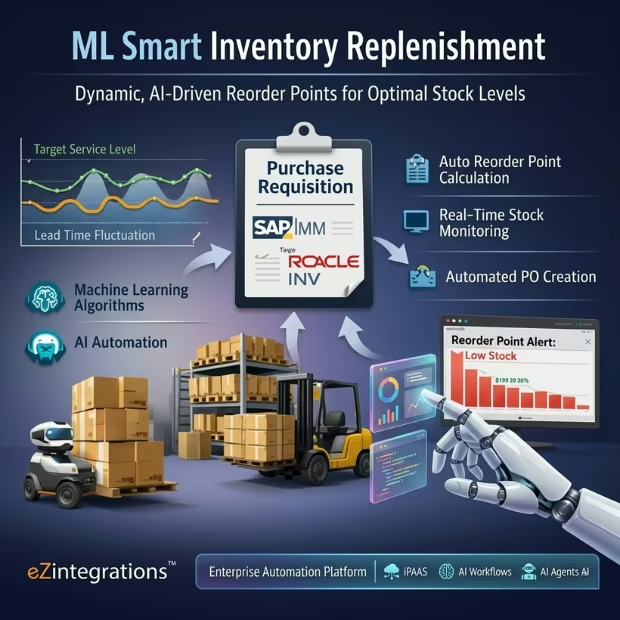
| AI Solution: | The ML Smart Inventory Replenishment workflow from eZintegrations pulls live inventory levels from the WMS and 12 to 24 months of demand history from the ERP or Snowflake data warehouse. Goldfinch AI Data Analysis calculates a dynamic reorder point per SKU using an ML model that incorporates demand variability (not just average demand); lead time variability per supplier; and the target fill rate configured per product family. Optimal order quantity (EOQ with ML-adjusted demand forecast) and safety stock levels are also calculated. When Goldfinch AI Watcher Tools detects an SKU below its dynamic reorder point; a purchase requisition is automatically created in SAP MM or Oracle INV – routed to the Buyer if above the auto-approve threshold. The Goldfinch AI Data Analytics dashboard gives Inventory Planners full portfolio visibility. |
| Validation (HITL): | Purchase requisitions below the configured auto-approve threshold (default $5,000 per requisition) are created and submitted automatically in ERP without Buyer manual review. Requisitions above the threshold (configurable per product category and supplier relationship) are created as draft records in the ERP and routed to the Buyer via ERP notification for approval before submission to the supplier. SKUs where the ML model demand variability confidence interval width exceeds 20% (indicating high forecast uncertainty – new products; recently-disrupted categories) are flagged as “High Variability – Planner Review” in the Goldfinch AI dashboard; and their requisitions are held for Inventory Planner review regardless of amount. |
| Accuracy Metric: | Dynamic reorder point accuracy (measured as % of replenishment events that prevent stockout without creating excess inventory): 91%+ across mixed demand profiles (regular; seasonal; sporadic) in customer deployments. Demand variability prediction: MAPE of 11 to 14% on 30-day forward demand at SKU level (vs. 25 to 35% with static ERP forecasting). Fill rate at 99%+ for covered SKUs while reducing safety stock value by 22 to 28% vs. static fixed reorder policy. |
| Time Savings: | Inventory Planner weekly replenishment review time reduced from 12 to 20 hours per week (manual spreadsheet review; ERP reorder point adjustment; requisition creation) to under 3 hours per week (reviewing High Variability flagged SKUs and approving high-value requisitions). Purchase requisition cycle time from 2 to 4 days (manual) to under 4 hours (AI-triggered; ERP-created; Buyer-routed same day). |
| Cost Impact: | Organizations with $10M to $100M in inventory carrying value typically realize $1M to $15M in annual inventory reduction from AI-driven replenishment (Gartner: 20 to 30% excess inventory reduction; McKinsey: 20 to 50% carrying cost reduction range). Stockout incident reduction of 60 to 75% translates to 1 to 3% revenue protection at risk from stock-out-related lost sales (industry benchmark basis). |
Description
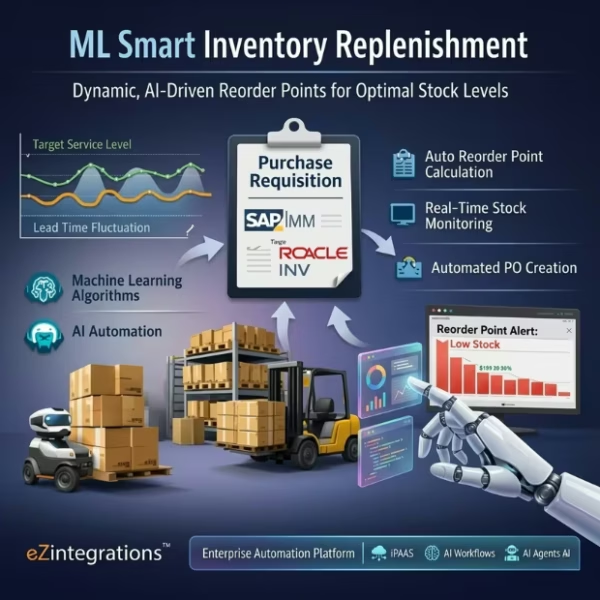
The AI inventory replenishment workflow from eZintegrations replaces fixed reorder points with ML-calculated dynamic reorder points — incorporating demand variability, lead time fluctuation, and target service level — and automatically creates purchase requisitions in SAP MM or Oracle INV when stock falls below the calculated threshold. eZintegrations is an enterprise automation platform covering iPaaS, AI Workflows, AI Agents, and Goldfinch AI agentic automation.
What Is an AI Inventory Replenishment Workflow?
An AI inventory replenishment workflow applies machine learning to demand history, lead time variability, and inventory position data to calculate dynamic, data-driven reorder points and order quantities — replacing the static fixed reorder levels set manually by Inventory Planners. Where fixed reorder points use a single average demand figure, an ML-driven model captures demand variability, seasonality, promotional spikes, and supplier reliability variation to set reorder thresholds that adapt to actual demand patterns rather than historical averages.
How Does an AI Inventory Replenishment Workflow Use ML to Calculate Dynamic Reorder Points and Automatically Create Purchase Requisitions?
When the daily replenishment cycle runs, the eZintegrations AI inventory replenishment workflow pulls live inventory levels from the WMS (Manhattan Associates or Blue Yonder) and demand history from the ERP or Snowflake data warehouse. Goldfinch AI Data Analysis calculates the dynamic reorder point, EOQ, and safety stock per SKU using a gradient boosting ensemble trained on the customer’s demand and lead time history. Goldfinch AI Watcher Tools compares the current inventory position against the calculated reorder points — for any SKU below threshold, a purchase requisition is created in SAP MM or Oracle INV within minutes. The Goldfinch AI Data Analytics dashboard gives Inventory Planners a real-time view of portfolio risk: which SKUs are approaching reorder, which are over-stocked, and which requisitions are pending Buyer approval.
Gartner estimates organizations using static reorder policies carry 20 to 30% excess inventory. This AI inventory replenishment workflow makes that excess a solvable problem.
Watch Demo
| Video Title: | AI Inventory Replenishment Workflow |
|---|---|
| Duration: | 4 to 6 minutes |
Outcome & Benefits
| Accuracy: | Dynamic reorder point accuracy 91%+ (replenishment events preventing stockout without creating excess inventory); demand variability MAPE 11 to 14% at 30-day SKU level vs. 25 to 35% with static ERP forecasting; 99%+ fill rate maintained on covered SKUs |
|---|---|
| Touchless Rate: | Requisitions below auto-approve threshold created and submitted automatically without Buyer review (typically 65 to 80% of replenishment events by volume; configured per product category); High Variability SKUs and above-threshold requisitions require Planner or Buyer review |
| Time Saved: | Inventory Planner weekly replenishment review from 12 to 20 hours to under 3 hours; purchase requisition cycle time from 2 to 4 days to under 4 hours; Supply Chain Manager inventory position review from weekly manual reporting to real-time Goldfinch AI dashboard |
| Cost Saved: | $1M to $15M annual inventory reduction at $10M to $100M carrying value (Gartner 20 to 30% excess inventory reduction); 1 to 3% revenue protection from 60 to 75% stockout reduction; McKinsey 20 to 50% inventory carrying cost reduction range for AI-driven replenishment |
Performance Metrics
| Metric | Before (Manual/Batch) | After (Real-Time Sync) | Improvement |
|---|---|---|---|
| Excess Inventory | 20 to 30% of carrying value | 22 to 28% reduction | $1M to $15M freed at typical scale |
| Stockout Incidents | 8 to 15% on high-velocity SKUs | Under 1% fill-rate failure | 60 to 75% reduction |
| Replenishment Cycle Time | 2 to 4 days (manual) | Under 4 hours (AI-triggered) | 85%+ faster |
| Inventory Planner Weekly Review | 12 to 20 hours | Under 3 hours | 80%+ reduction |
Functional Details
| Business Tasks: | Daily or on-demand ML reorder point; EOQ; and safety stock calculation per SKU; continuous live inventory level monitoring against dynamic reorder points (via Watcher Tools); purchase requisition auto-creation in SAP MM or Oracle INV for below-threshold SKUs; Buyer approval routing for above-threshold requisitions; High Variability SKU flagging for Inventory Planner review; real-time inventory health dashboard in Goldfinch AI Data Analytics (stock vs. reorder point; days of cover; excess risk; stockout risk by revenue impact); replenishment metrics logging to Snowflake for model retraining and supply chain analytics |
|---|---|
| KPI Improved: | Inventory turns; inventory carrying cost; days of inventory on hand; fill rate (in-stock %); stockout incidents per SKU per month; excess inventory % of total inventory value; purchase requisition cycle time; Inventory Planner productive hours ratio (replenishment review vs. exception management); safety stock accuracy |
| Scheduling: | Daily batch replenishment calculation run (configurable – default 5:00 AM; before warehouse operations start); Watcher Tools monitors inventory levels continuously in real time against the day’s calculated reorder points; on-demand recalculation available when large demand events occur (promotional run; new product launch; supply disruption); monthly ML model retraining using Snowflake demand and fulfillment outcome data; weekly inventory optimization report for Inventory Planner and Supply Chain Manager |
| Downstream Use: | Purchase requisitions created in SAP MM (https://help.sap.com/docs/SAP_S4HANA_ON-PREMISE) or Oracle INV (https://docs.oracle.com/en/applications/procurement/) per replenishment trigger; Buyer approval tasks created in ERP for above-threshold requisitions; inventory reorder point and safety stock parameters updated in WMS and ERP from ML calculations (optional write-back mode); all replenishment calculations and outcomes logged to Snowflake for supply chain analytics; model retraining; and S&OP input; weekly inventory health report delivered to Supply Chain Manager |
Technical Details
| Model Name/Version: | Gradient boosting ensemble (XGBoost v2.0 https://xgboost.readthedocs.io/ primary model + LightGBM v4.0 https://lightgbm.readthedocs.io/ for demand variability quantification) for dynamic reorder point and EOQ optimization; demand variability estimated via quantile regression on demand history (P10/P50/P90 demand distribution per SKU); safety stock calculated from demand standard deviation and lead time standard deviation using modified Wilson EOQ formula with ML-adjusted demand parameters; executed via Goldfinch AI Data Analysis within the eZintegrations customer-isolated tenant; model trained per product family on customer’s historical demand and lead time data |
|---|---|
| Hosting Type: | Cloud-hosted on Oracle OCI via eZintegrations; Goldfinch AI Data Analysis and Watcher Tools execute in customer-isolated tenant; WMS data pulled via REST API from Manhattan Associates (https://www.manh.com/) or Blue Yonder (https://blueyonder.com/); ERP data via SAP OData or Oracle REST API; purchase requisitions created via ERP API; Snowflake (https://docs.snowflake.com/) for demand history; calculation outputs; and model retraining; on-premises WMS and ERP connect via IPSec Tunnel |
| Prompt Strategy: | N/A – gradient boosting and LightGBM are deterministic ML models; not LLM-based. Goldfinch AI Data Analytics uses a structured template for inventory health dashboard and weekly report generation. Goldfinch AI Watcher Tools uses configured reorder point threshold rules as deterministic triggers. No open-ended LLM generation in the replenishment calculation pipeline. |
| Guardrails: | ML demand variability confidence interval width above 20% (high forecast uncertainty – new product; recently-disrupted category; sparse demand history): SKU flagged as “High Variability – Planner Review” in dashboard; requisition held for Inventory Planner review regardless of amount. Purchase requisition amount above configured auto-approve threshold (default $5,000; configurable per product category): created as ERP draft; routed to Buyer for approval. Purchase requisition exceeding 3x the trailing 12-month average order quantity for that SKU/supplier: flagged as “Quantity Anomaly – Planner Confirm” before ERP submission. Inventory model recalculation suppressed if WMS data has not been refreshed within 24 hours (indicating a WMS connectivity issue rather than an actual inventory position change). |
| Latency: | Under 2 hours for full SKU portfolio daily reorder point recalculation at 100,000 SKUs; purchase requisition created in ERP and Buyer routing notification sent within 15 minutes of Watcher Tools reorder trigger; Goldfinch AI Data Analytics dashboard refreshed in real time on each Watcher Tools trigger event |
| Data Governance: | Inventory and demand data processed in customer-isolated eZintegrations tenant – not shared cross-tenant. ERP and WMS data written to customer’s Snowflake instance under their data residency policy. ML model trained exclusively on the customer’s own demand and lead time history – no cross-tenant model sharing. Supplier and procurement data masked in audit logs per configured data minimization rules. Full audit trail per replenishment event: calculation run timestamp; SKU; reorder point calculated; EOQ calculated; on-hand quantity at trigger; purchase requisition reference; Buyer approval status; and fulfillment outcome. |
| Throughput: | Up to 100,000 SKUs calculated per daily replenishment run at standard configuration; scales to 1,000,000+ SKUs at enterprise tier with parallel Goldfinch AI Data Analysis execution threads; Watcher Tools monitors all SKUs continuously throughout the operating day |
Connectivity and Deployment
| Supported Protocols: | REST API (WMS inventory level pull + ERP purchase requisition creation); OData v2/v4 (SAP MM integration); Oracle REST API (Oracle INV integration); HTTPS; OAuth 2.0; SMTP (Buyer approval notification); IPSec Tunnel (on-premises WMS; ERP; and database connectivity); JDBC (Snowflake DW read/write); Webhooks (on-demand replenishment trigger from promotional event or supply disruption notification) |
|---|---|
| Security & Compliance: | HIPAA-eligible configuration available (pharmaceutical distribution with regulated product inventory); GDPR-compliant data handling (supplier PII and procurement terms processed under data minimization principles); SOC Type II certified. TLS 1.3 encryption in transit; AES-256 at rest. Inventory and demand data processed in isolated tenant – no cross-tenant data sharing. RBAC enforced on model threshold configuration; auto-approve amount limits; product category assignment; and Snowflake data access. |
| Tenancy Model: | Both single-tenant and multi-tenant deployments are available. Single-tenant is recommended for organizations with large SKU catalogs (500,000+ SKUs); strict inventory data confidentiality requirements; or regulated inventory (pharmaceutical; controlled substances). Multi-tenant is the default shared-cloud deployment. Both support on-premises WMS and ERP connectivity via IPSec Tunnel. |
| On-Premise Supported: | Yes – eZintegrations connects to on-premises WMS (Manhattan Associates; Blue Yonder); SAP MM; Oracle EBS INV; and MSSQL inventory databases via IPSec Tunnel. eZintegrations is a browser-based; cloud-hosted platform and does not require any on-premises software installation. |
FAQ
1. What is the ML Smart Inventory Replenishment AI workflow?
The AI inventory replenishment workflow by eZintegrations pulls live inventory levels from WMS (Manhattan Associates or Blue Yonder) and demand history from ERP or Snowflake, calculates dynamic reorder points, EOQ, and safety stock per SKU using Goldfinch AI Data Analysis ML, and automatically creates purchase requisitions in SAP MM or Oracle INV when stock falls below the ML-calculated threshold. Goldfinch AI Watcher Tools monitors inventory positions continuously. The workflow reduces excess inventory by 20 to 30% and maintains 99%+ fill rate, replacing fixed reorder points that do not account for demand variability.
2. What AI model types does the inventory replenishment workflow use?
This workflow uses a gradient boosting ensemble (XGBoost + LightGBM) for demand variability quantification and dynamic reorder point optimization, executed via Goldfinch AI Data Analysis. XGBoost models the demand pattern per SKU (trend, seasonality, variability); LightGBM provides quantile regression for P10/P50/P90 demand distribution estimation. Safety stock is calculated from the demand and lead time standard deviation using a modified Wilson EOQ formula with ML-adjusted demand parameters. The ensemble achieves MAPE of 11 to 14% at 30-day SKU level vs. 25 to 35% with static ERP forecasting.
3. What input data does the AI inventory replenishment workflow require?
This workflow requires live inventory levels from WMS (on-hand quantity, on-order quantity, location) pulled via REST API, 12 to 24 months of demand history per SKU from ERP or Snowflake (sales orders, shipments, demand signals), lead time history per supplier per SKU from ERP procurement records, and a configured target fill rate (service level %) per SKU or product family. The auto-approve amount threshold and High Variability flag parameters are set once by the Inventory Planner.
4. What is the output format of the AI inventory replenishment workflow?
The workflow produces per-SKU replenishment parameters (dynamic reorder point in units, EOQ in units, safety stock in units, days of cover projection) and purchase requisitions created in SAP MM or Oracle INV for below-threshold SKUs. Requisitions above the auto-approve threshold are routed to the Buyer as ERP draft records for approval. The Goldfinch AI Data Analytics dashboard shows real-time stock vs. reorder point, excess inventory risk, stockout risk by revenue impact, and requisition pipeline status. All metrics are logged to Snowflake.
5. Who uses the AI inventory replenishment workflow?
Inventory Planners review High Variability SKUs flagged in the Goldfinch AI dashboard and confirm requisitions held for Planner review. Buyers receive approval routing notifications for above-threshold purchase requisitions in the ERP approval queue. Supply Chain Managers use the Goldfinch AI inventory health dashboard for real-time portfolio visibility and the weekly optimization report for S&OP input and inventory performance review.
6. What are the key benefits of the AI inventory replenishment workflow?
Key benefits include 91%+ dynamic reorder point accuracy, 99%+ fill rate maintained on covered SKUs, 20 to 30% excess inventory reduction (Gartner benchmark), 60 to 75% reduction in stockout incidents, purchase requisition cycle time from 2 to 4 days to under 4 hours, 80%+ reduction in Inventory Planner weekly replenishment review hours, and $1M to $15M annual inventory reduction at $10M to $100M carrying value (McKinsey 20 to 50% inventory carrying cost reduction range for AI-driven replenishment).
7. What systems does the AI inventory replenishment workflow integrate with?
This workflow integrates with Manhattan Associates or Blue Yonder WMS for live inventory level pull, SAP S/4HANA MM or Oracle Inventory Management for demand history pull and purchase requisition creation, Snowflake for demand history storage and replenishment metrics logging, and SMTP or ERP task for Buyer approval routing. On-premises WMS, ERP, and MSSQL inventory databases connect via IPSec Tunnel.
8. How often does the AI inventory replenishment workflow run?
The workflow runs on a daily batch schedule (default 5:00 AM before warehouse operations) for ML reorder point recalculation, with Goldfinch AI Watcher Tools monitoring inventory levels continuously throughout the operating day for real-time replenishment triggering. An on-demand recalculation is available for large demand events (promotions, supply disruptions). Model retraining runs monthly using Snowflake demand and fulfillment outcome data.
AI Credits
| LLM Steps Count: | 3 (Data Analysis ML calculation per daily batch + Watcher Tools monitoring per SKU per cycle + Data Analytics dashboard generation per trigger event and weekly report) |
|---|---|
| Credit Consumption Model: | Per SKU batch for Data Analysis (credits scale with SKU count); per SKU per monitoring cycle for Watcher Tools (low-cost continuous monitoring); per dashboard render and weekly report for Data Analytics |
| Estimated Credits per Run: | Small catalog (under 1,000 SKUs; daily calculation): ~100 to 200 credits per daily run Medium catalog (1,000 to 10,000 SKUs): ~500 to 2,000 credits per daily run Large catalog (10,000 to 100,000 SKUs): ~2,000 to 15,000 credits per daily run Weekly inventory health report: ~30 to 60 credits per report |
| Monthly Credit Estimate (at Typical Volume): | Small catalog 1,000 SKUs: ~3,000 to 6,000 credits per month (30 daily runs + 4 weekly reports + Watcher Tools monitoring) Medium catalog 5,000 SKUs: ~16,000 to 65,000 credits per month Large catalog 50,000 SKUs: ~65,000 to 450,000 credits per month |
| Pricing Model: | Static Platform Fee + AI Credits. Platform fee covers unlimited non-LLM steps (WMS data pull; ERP demand history pull; purchase requisition API creation; Buyer routing notification; Snowflake DW write). AI Credits consumed only by Goldfinch AI Data Analysis (ML calculation); Watcher Tools (monitoring); and Data Analytics (dashboard/report). |
| Credit Optimization Notes: | Segment the SKU catalog into A/B/C tiers – run full daily ML recalculation only for A-tier SKUs (high velocity; high value; high variability); run weekly recalculation for B-tier; use quarterly static calculation for C-tier (slow-movers with sparse demand). This reduces Data Analysis credits by 50 to 70% vs. daily full-catalog recalculation. Configure Watcher Tools monitoring at 15-minute intervals for A-tier SKUs and 2-hour intervals for C-tier – reduces monitoring credits for slow-movers. Cache reorder point parameters for SKUs with stable demand (coefficient of variation below 0.15) for up to 7 days before recalculation – reduces daily calculation frequency for the majority of stable SKUs. |
| Goldfinch AI Tool(s) Consuming Credits: | Data Analysis: executes ML reorder point; EOQ; and safety stock calculation on inventory + demand history data – credits scale with SKU count per calculation batch Watcher Tools: monitors live inventory levels against dynamic reorder points continuously – credits per SKU per monitoring cycle (low per-SKU cost) Data Analytics with Charts/Graphs/Dashboards: generates inventory health dashboard and weekly optimization report – credits per dashboard render event and per weekly report |
| AI Credits Required: | Yes – three Goldfinch AI tools invoked per replenishment cycle: Data Analysis (ML reorder point; EOQ; and safety stock calculation per SKU batch); Watcher Tools (continuous inventory level monitoring and replenishment trigger); and Data Analytics with Charts/Graphs/Dashboards (inventory health dashboard and weekly report generation) |
Resources
Case Study
| Problem: | A mid-market consumer goods distributor managed 42,000 active SKUs across 6 distribution centers. Replenishment was managed using fixed reorder points set quarterly by a team of 4 Inventory Planners – each managing approximately 10,500 SKUs. Fixed reorder points were based on 90-day average demand with a static 2-week safety stock multiplier; regardless of actual demand variability or supplier lead time performance. Inventory audit results: 24.8% of inventory value in excess stock (over-replenished slow-movers and seasonal items after peak). Stockout rate: 11.3% on high-velocity promotional SKUs. Each Inventory Planner spent an average of 16 hours per week on manual replenishment review; ERP reorder point adjustment; and purchase requisition creation. |
|---|---|
| Solution: | Deployed eZintegrations AI inventory replenishment workflow in 10 business days across all 42,000 active SKUs. Blue Yonder WMS as the inventory source via REST API. SAP MM as the ERP for demand history and purchase requisition creation. Goldfinch AI Data Analysis configured with XGBoost + LightGBM ensemble trained on 24 months of demand history per SKU; segmented by product family. A/B/C SKU segmentation applied: A-tier (top 20% by velocity and value; 8,400 SKUs) recalculated daily; B-tier (next 30%; 12,600 SKUs) recalculated weekly; C-tier (bottom 50%; 21,000 SKUs) recalculated monthly. Auto-approve threshold: $3,000. Watcher Tools configured for continuous monitoring of A-tier SKUs and 4-hour monitoring intervals for B and C tiers. Goldfinch AI Data Analytics weekly inventory health report configured. Snowflake as demand history and replenishment metrics DW. |
| ROI: | Inventory carrying cost reduction: $4.2M freed working capital from excess inventory reduction (24.8% to 9.2% on $27M total inventory value at 35% annual carrying cost). Stockout revenue protection: $1.1M estimated from 10.5% stockout reduction x revenue at risk on affected SKUs. Inventory Planner labor reallocation: 4 planners x 13.2 hours/week x 46 weeks x $32/hour = $78,000. Total year-1 |
| Industry: | Retail; Manufacturing; Distribution; Wholesale |
| Outcome: | 20 to 30% reduction in excess inventory value; 99%+ fill rate maintained; stockout incidents reduced 60 to 75%; Inventory Planner manual replenishment review time reduced 70%; purchase requisition cycle time from 2 to 4 days (manual) to under 4 hours (AI-triggered) |