
How to Automate Month-End Close: Eliminate Manual Journal Entries and Reconciliation
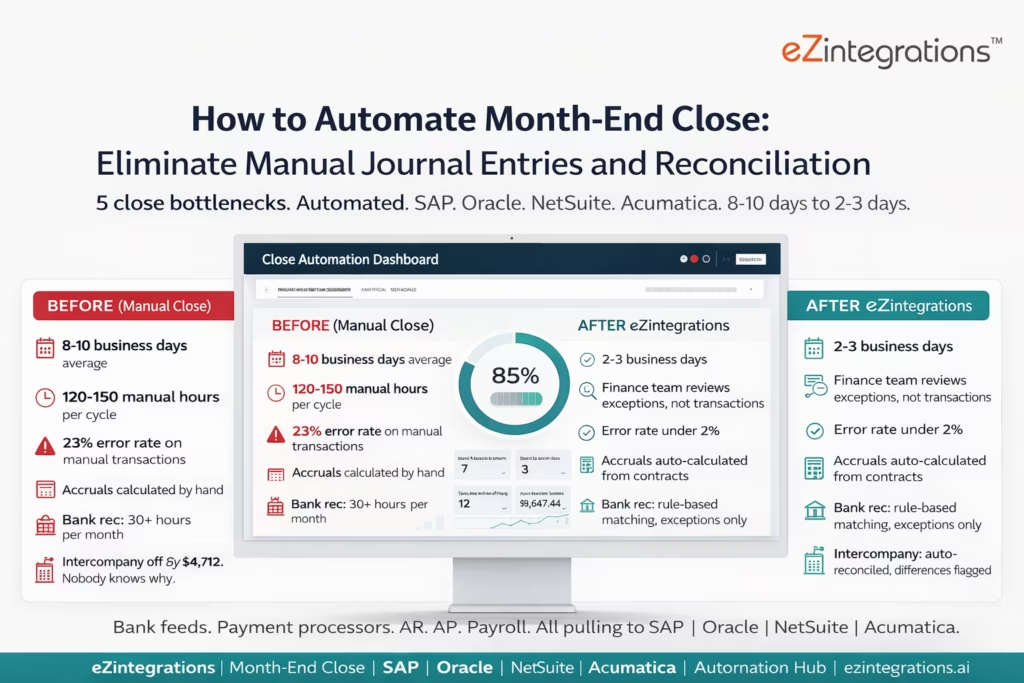
April 21, 2026To automate month-end close, eZintegrations pulls data from bank feeds, payment processors, accounts receivable, accounts payable, and payroll systems on a scheduled basis, runs rule-based transaction matching and reconciliation, generates recurring journal entries (accruals, prepayments, depreciation, intercompany) automatically and posts them to SAP S/4HANA, Oracle Fusion Cloud, NetSuite, or Acumatica via REST API, and routes exceptions to the accounting team for review rather than requiring manual processing of every transaction. The typical result is a reduction from 8-10 business days (manual close) to 2-3 days (automated close), with error rates dropping from up to 23% (manual) to under 2%.
TL;DR
- Manual month-end close takes 8-10 business days and 120-150 manual hours across the finance team. Only 18% of companies close in 3 days or less.
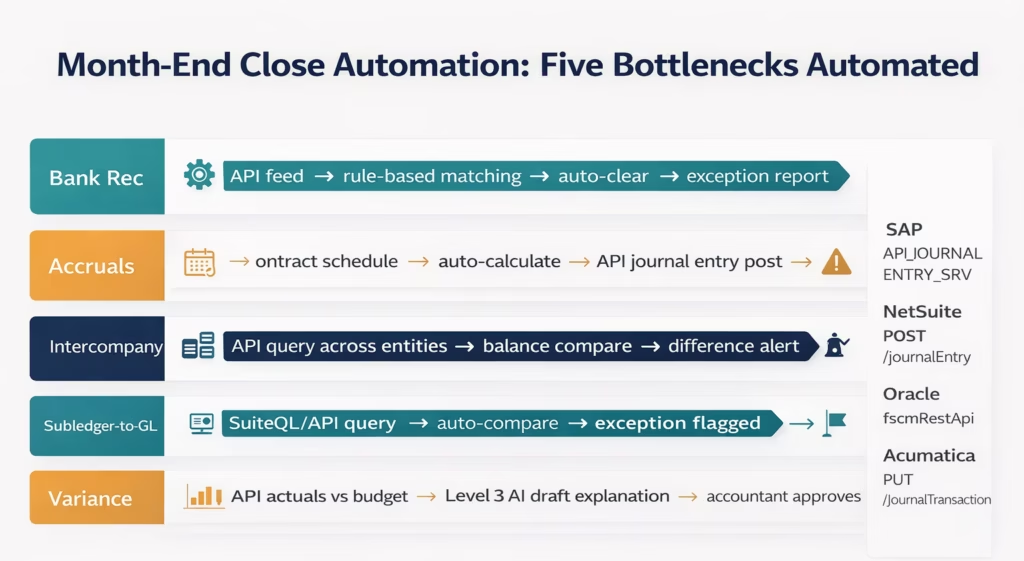
- The five biggest time consumers in manual close: bank and payment processor reconciliation, recurring journal entries (accruals, prepayments, depreciation), intercompany eliminations, subledger-to-GL reconciliation, and variance investigation.
- eZintegrations automates all five: scheduled data pulls from bank feeds and payment processors, rule-based transaction matching and reconciliation, automatic journal entry generation and ERP posting, intercompany balance reconciliation, and variance flagging.
- Works with SAP S/4HANA (
API_JOURNALENTRY_SRV), Oracle Fusion Cloud (fscmRestApi), NetSuite (SuiteTalk RESTPOST /journalEntry), and Acumatica (REST API). - Level 1 (iPaaS Workflows) handles scheduled data pulls, transaction matching, and ERP journal entry posting. Level 2 (AI Workflows) validates each journal entry before posting: duplicate check, balance check (debits = credits), period check, and GL account validation. Level 3 (AI Agents) monitors close progress, flags unreconciled items before the close deadline, and detects variance anomalies. Level 4 (Goldfinch AI) provides the Goldfinch AI Chat UI as a Workflow Node for the close cycle: “What is still open in this month’s close?”, “Which accounts are not reconciled?”, or “What is the intercompany balance difference between Entity A and Entity B?”
- Typical outcome: close time from 8-10 days to 2-3 days. Error rate from up to 23% to under 2% (Nominal).
Why Month-End Close Is Still a Manual Marathon
It is the last day of February. Your senior accountant Sarah has been at her desk since 7 AM. She is on her third export from the payment processor, trying to reconcile 2,847 transactions against the NetSuite AR ledger. The first export had a different date range. The second had a formatting issue. This one looks right, but she is not sure yet.
In the next cubicle, Marcus is building the accruals journal. He has the contracts in one spreadsheet, the prior-month accruals in another, and the invoice schedule in a third. He is calculating what to accrue manually for each of 23 vendor contracts, cross-referencing against what was accrued last month and what invoices have arrived this month.
Down the hall, the intercompany balances between your US and UK entities do not agree. They are off by $4,712. Nobody knows why. Your UK controller is in a different time zone and will not see the question until tomorrow.
Meanwhile, your CFO wants the preliminary numbers by Wednesday.
This is a standard February close for a mid-market company. In a traditional setup, the month-end close process takes between 8 and 10 business days and consumes 120 to 150 manual hours across the finance team. Error rates on manual transactions run as high as 23%. Only 18% of finance teams close in 3 days or less. Half still take longer than 5 business days.
The problem is not the skill of your team. Sarah and Marcus are competent accountants. The problem is that each close task requires someone to manually extract data from one system, manipulate it in a spreadsheet, check it against another system, and then enter the results into the ERP. Every step is a potential error. Every error is a delay.
The Five Close Bottlenecks That Automation Eliminates
Survey responses from finance professionals show a clear order of which activities consume the most time during monthly close: reconciling accounts (banks, credit cards, payment processors) is the top time consumer, followed by journal entry preparation, intercompany reconciliation, subledger-to-GL reconciliation, and variance investigation.
These five tasks share a common structure: they require data from one system, comparison or calculation against another system, and posting to the ERP. Automation handles all three steps, leaving the finance team to review exceptions and make judgment calls.
Bottleneck 1: Bank and Payment Processor Reconciliation
Bank reconciliation is the most common close bottleneck. Cash reconciliation alone takes 30+ hours per month for many finance teams, and if even one source is delayed, it pushes back the entire close.
What manual bank reconciliation looks like:
- Export bank transactions from the bank portal (CSV, OFX, or SWIFT MT940)
- Export GL cash account transactions from the ERP
- Open both files in Excel
- Use VLOOKUP or manual matching to find corresponding transactions
- Identify unmatched items on both sides
- Investigate each unmatched item (outstanding cheques, timing differences, bank fees, errors)
- Post clearing journal entries for matched items
- Prepare the bank reconciliation workbook for sign-off
What automated bank reconciliation looks like: eZintegrations connects to the bank’s data feed (via direct API, SFTP file, or Open Banking API) and the ERP. Transactions are matched automatically using configurable rules:
- Exact match: same amount, same reference, within a configurable date tolerance
- Fuzzy match: similar amount (within a configurable percentage), similar reference
- Rule-based match: bank fee transactions auto-classified by description pattern
For matched items: a clearing journal entry is posted to the ERP automatically. For unmatched items (true exceptions): the finance team receives a daily exception report listing only the unmatched transactions, with the closest match candidates from each side.
The result: companies implementing automated reconciliation systems see a 70% reduction in data entry errors during their month-end close processes. Bank reconciliation that previously consumed 30+ hours is reduced to reviewing the exception report.
Bank API Connectivity
For bank feeds: Most banks support one of:
- Open Banking API (UK banks: FCA-regulated, OAuth 2.0,
GET /accounts/{accountId}/transactions) - SWIFT MT940 or camt.053 (international banks, via SFTP or SWIFT connectivity)
- Bank-specific API (JPMorgan Chase, Bank of America, Citi, HSBC all offer corporate banking APIs)
- FTP/SFTP daily extract files (BAI2 format, most common for US corporate banking)
eZintegrations connects to bank data feeds via any of these methods and normalises the data into a standard transaction format for matching.
For payment processors: Stripe: GET /v1/balance/history, GET /v1/payouts PayPal: GET /v1/reporting/transactions Square: GET /v2/payments, GET /v2/payouts Adyen: Settlement reports via SFTP or Settlement Detail API Braintree: Transaction search API
All payment processor transactions are pulled on a configurable schedule (daily or real-time) and matched against the ERP AR balance.
Bottleneck 2: Recurring Journal Entries (Accruals, Prepayments, Depreciation)
Recurring journal entries are the most predictable part of the close. They happen every month, with the same logic, from the same source data. Yet most finance teams calculate them manually.
Accruals: An accrual is a journal entry that recognises an expense in the period it is incurred, even if the invoice has not arrived. For example: a cloud hosting contract is 12,000/year.Eachmonth,1,000 should be accrued (debit Hosting Expense, credit Accrued Liabilities). If the invoice arrives in the next month and is for $12,000, the accrual is reversed and the invoice is booked against it.
Manual process: Marcus checks the vendor contract list, calculates the monthly accrual amount for each contract, checks which contracts have invoices already in the system (to avoid double-counting), and enters each accrual as a separate journal entry in the ERP.
Automated process: eZintegrations maintains an accrual schedule: vendor, contract amount, monthly accrual amount, GL account debit, GL account credit, and reversal rule (automatic reversal in the following period, or manual). On the last business day of each month:
-
For each active accrual schedule entry:
a. Check the ERP AP ledger: has an invoice for this vendor in this period already been posted?
b. If no invoice: generate the accrual journal entry and post to the ERP.
c. If an invoice exists and covers the full accrual amount: skip (no accrual needed).
d. If an invoice exists for a partial amount: accrue the difference. -
In the following period: generate the reversal journal entry on Day 1 (or when the actual invoice is received).
Prepayment amortisation: For prepaid expenses (insurance premiums, software subscriptions paid annually), the monthly amortisation journal entry is calculated from the prepayment schedule and posted automatically.
Depreciation: Fixed asset depreciation is calculated from the asset master register and posted via the ERP’s depreciation run (SAP AFAB, Oracle Fixed Assets depreciation, NetSuite depreciation schedule). eZintegrations triggers the depreciation run via API and confirms successful posting.
Bottleneck 3: Intercompany Reconciliation and Eliminations
For organisations with multiple legal entities, intercompany reconciliation is often the single longest-running close activity. Entity A records a receivable from Entity B. Entity B records a payable to Entity A. These must agree. They often do not.
Intercompany mismatches are one of the biggest reasons month-end slows down. For enterprises with hundreds of entities, intercompany back-and-forth between regional teams removes days from the close cycle.
The manual process: each entity’s controller downloads their intercompany balances, emails them to the group controller, who manually compares them in a spreadsheet, identifies differences, determines which entity has the error, notifies them, and waits for a correction journal entry.
The automated process:
-
eZintegrations queries the ERP for all intercompany account balances across all entities on a scheduled basis (daily during close month, continuously outside close month).
-
For each intercompany pair (Entity A → Entity B), the receivable balance at Entity A is compared against the payable balance at Entity B.
-
If they agree: no action.
-
If they differ by more than the configured tolerance (e.g., $100): a discrepancy alert fires with the specific account, the Entity A balance, the Entity B balance, the difference, and the last transaction date for each.
-
The responsible controllers for both entities are notified with the specific discrepancy and asked to identify and correct the posting error.
-
When balances agree: the elimination journal entries are generated automatically and posted to the consolidation entity.
Intercompany discrepancy query example (NetSuite multi-subsidiary):
-- Find intercompany balances that don't match
SELECT
  a.subsidiary AS entity_a,
  b.subsidiary AS entity_b,
  a.balance AS entity_a_receivable,
  b.balance AS entity_b_payable,
  a.balance + b.balance AS difference
FROM
  (SELECT subsidiary, SUM(amount) AS balance
   FROM transactionAccountingLine
   WHERE account = {intercompany_receivable_account_id}
   AND period = '{close_period}'
   GROUP BY subsidiary) a
CROSS JOIN
  (SELECT subsidiary, SUM(amount) AS balance
   FROM transactionAccountingLine
   WHERE account = {intercompany_payable_account_id}
   AND period = '{close_period}'
   GROUP BY subsidiary) b
WHERE ABS(a.balance + b.balance) > 100
Bottleneck 4: Subledger-to-GL Reconciliation
The accounts receivable subledger, accounts payable subledger, inventory subledger, and fixed asset register must all agree with the corresponding GL accounts. When they do not agree, the discrepancy must be found and corrected before the period can be closed.
Automated subledger reconciliation:
For each subledger-to-GL pair, eZintegrations runs a daily reconciliation during the close period:
AR subledger to GL (NetSuite):
-- NetSuite: compare AR subledger total to GL AR account
SELECT
  (SELECT SUM(foreignAmountBalance)
   FROM customerSubsidiaryRelationship
   WHERE subsidiary = {subsidiary_id}) AS subledger_total,
  (SELECT SUM(amount)
   FROM transactionAccountingLine
   WHERE account = {ar_gl_account_id}
   AND period = '{close_period}') AS gl_total,
  subledger_total - gl_total AS difference
SAP: AP subledger to FI reconciliation:
GET /sap/opu/odata/sap/API_GL_ACCOUNT_LINE_ITEMS_SRV/GLAccountLineItems
    ?$filter=GLAccount eq '{AP_reconciliation_account}'
    and CompanyCode eq '1000'
    and FiscalYearPeriod eq '{yyyymm}'
Compare against the AP subledger total from API_SUPPLIER_ACCOUNT_BALANCE_SRV.
When differences are detected: the specific transactions that are in the subledger but not in the GL (or vice versa) are identified and listed for the accounting team.
Bottleneck 5: Variance Investigation and Explanation
The final close step for many organisations is variance analysis: comparing actual results to budget or prior period and explaining significant variances. This is often done manually in Excel by pulling GL balances, comparing them to budget, and writing narrative explanations.
Level 2 (AI Workflows) automates the data-pulling and variance calculation step: GL account balances are retrieved from the ERP at period end, compared to the budget (also stored in the ERP or in an integrated planning system), and significant variances (over a configurable threshold, e.g., 10% or $5,000) are flagged.
Level 3 (AI Agents) goes further: for flagged variances, the agent queries the ERP transaction detail for that account and period, identifies the transactions that drove the variance (e.g., a single large invoice, a new cost centre, or a timing difference from a misposted accrual), and generates a draft variance explanation that the accountant reviews and approves rather than writing from scratch.
The accountant’s role shifts from data gathering to judgement: reviewing the AI-generated explanation and confirming or correcting it, rather than pulling the data, calculating the variance, and writing the explanation entirely manually.
The ERP Journal Entry Posting Architecture
The automation that posts journal entries to the ERP is the foundation of month-end close automation. Every accrual, prepayment amortisation, clearing entry, and intercompany elimination ends with an API call to the ERP.
SAP S/4HANA
SAP S/4HANA uses API_JOURNALENTRY_SRV (OData V4) for journal entry posting, the programmatic equivalent of transaction FB50 (G/L document posting):
POST /sap/opu/odata/sap/API_JOURNALENTRY_SRV/A_GLDocument
Authorization: Bearer {sap_token}
Content-Type: application/json

{
  "CompanyCode": "1000",
  "DocumentType": "SA",
  "DocumentDate": "2026-02-28",
  "PostingDate": "2026-02-28",
  "DocumentHeaderText": "Feb Accruals - Cloud hosting",
  "to_GLDocumentItem": [
    {
      "GLAccount": "0000631000",
      "PostingKey": "40",
      "AmountInTransactionCurrency": "1000.00",
      "TransactionCurrency": "USD",
      "CostCenter": "CC-IT-001",
      "AssignmentReference": "ACCR-2026-02-CLOUD"
    },
    {
      "GLAccount": "0000250000",
      "PostingKey": "50",
      "AmountInTransactionCurrency": "1000.00",
      "TransactionCurrency": "USD",
      "AssignmentReference": "ACCR-2026-02-CLOUD"
    }
  ]
}
SAP returns the document number (e.g., 1900012345), which is stored for audit trail purposes.
SAP Communication Arrangement: SAP_COM_0002 (Finance – General Ledger) is required for this API.
Oracle Fusion Cloud
Oracle uses fscmRestApi for journal entry creation:
POST /fscmRestApi/resources/11.13.18.05/journals
Authorization: Bearer {oracle_token}
Content-Type: application/json

{
  "LedgerName": "Meridian US Primary Ledger",
  "Category": "Manual",
  "AccountingDate": "2026-02-28",
  "Description": "Feb Accruals - Cloud hosting",
  "Lines": [
    {
      "DrCr": "DR",
      "EnteredAmount": 1000.00,
      "CurrencyCode": "USD",
      "Account": "631000.CC-IT-001.XXXXXX"
    },
    {
      "DrCr": "CR",
      "EnteredAmount": 1000.00,
      "CurrencyCode": "USD",
      "Account": "250000.XXXXXX.XXXXXX"
    }
  ]
}
NetSuite
NetSuite uses SuiteTalk REST for journal entry posting:
POST /services/rest/record/v1/journalEntry
Authorization: {TBA headers}
Content-Type: application/json

{
  "tranDate": "2026-02-28",
  "subsidiary": { "id": "{subsidiary_id}" },
  "memo": "Feb Accruals - Cloud hosting",
  "externalId": "ACCR-2026-02-CLOUD",
  "lines": {
    "items": [
      {
        "account": { "id": "{expense_account_id}" },
        "debit": 1000.00,
        "memo": "Cloud hosting accrual Feb 2026",
        "department": { "id": "{it_dept_id}" }
      },
      {
        "account": { "id": "{accrued_liab_account_id}" },
        "credit": 1000.00,
        "memo": "Cloud hosting accrual Feb 2026 - reversal due Mar 1"
      }
    ]
  }
}
Setting externalId to a unique reference per entry (e.g., ACCR-2026-02-CLOUD) prevents duplicate posting if the API call is retried.
Acumatica
PUT /entity/Default/23.200.001/JournalTransaction
Authorization: Bearer {acumatica_token}
Content-Type: application/json

{
  "LedgerID": { "value": "ACTUAL" },
  "Date": { "value": "2026-02-28" },
  "Description": { "value": "Feb Accruals - Cloud hosting" },
  "Details": [
    {
      "BranchID": { "value": "MERIDIANUSA" },
      "AccountID": { "value": "631000" },
      "SubID": { "value": "CC-IT-001" },
      "Debit": { "value": 1000.00 },
      "Memo": { "value": "Cloud hosting accrual Feb 2026" }
    },
    {
      "BranchID": { "value": "MERIDIANUSA" },
      "AccountID": { "value": "250000" },
      "Credit": { "value": 1000.00 },
      "Memo": { "value": "Cloud hosting accrual - reversal Mar 1" }
    }
  ]
}
Level 2 Pre-Posting Validation
Before any journal entry is posted to any ERP, Level 2 runs four validation checks:
- Balance check: total debits = total credits. Any imbalanced journal entry is blocked and flagged.
- Period check: the posting date is within the open accounting period. If the period is already closed, the entry is blocked and the finance team is alerted.
- Account check: all GL accounts in the entry exist and are active in the ERP chart of accounts. Inactive or invalid accounts are flagged before posting.
- Duplicate check: the
externalId(or reference) is unique. No duplicate entries posted for the same reference in the same period.
Validation failures are routed to the exception queue rather than blocked indefinitely: the accounting team reviews the exception, corrects the entry, and resubmits.
Before vs After: Manual Close vs Automated Close
| Close Activity | Manual Process | Automated with eZintegrations |
|---|---|---|
| Bank reconciliation | Export CSV, VLOOKUP in Excel, post clearing entries | Bank API feed → rule-based matching → auto-post clearing entries |
| Bank rec time | 30+ hours per month | Exception review: 2-4 hours per month |
| Payment processor reconciliation | Export, compare, investigate manually | API pull → matching → exceptions only |
| Accrual journal entries | Calculate manually from contracts, enter one-by-one | Accrual schedule → auto-calculation → API posting |
| Accrual reversal | Manual: someone must remember to reverse last month | Auto-reversal on Day 1 of next period |
| Prepayment amortisation | Manual: calculate monthly amount from schedule | Amortisation schedule → auto-posting |
| Depreciation journal entries | Manual: trigger in ERP, export report, review | API-triggered depreciation run → confirmation |
| Intercompany reconciliation | Email balance sheets between entities | API query across entities → auto-comparison → difference alerts |
| Intercompany elimination | Manual calculation in consolidation spreadsheet | Auto-generated elimination entries on balance agreement |
| AR subledger to GL | Manual: export both, compare in Excel | SuiteQL/API query → automated comparison → exception list |
| AP subledger to GL | Same | Same |
| Variance analysis data pull | Manual: export GL balances, compare to budget in Excel | API pull → auto-comparison → flagged variances |
| Variance explanation | Entirely manual | Level 3: AI draft explanation from transaction detail |
| ERP journal entry posting | Manual: FB50/JE screen entry | REST API post (SAP API_JOURNALENTRY_SRV, NetSuite, Oracle, Acumatica) |
| Audit trail | Excel files and email threads | Full digital log: every entry, source data, validation result |
| Close cycle time | 8-10 business days | 2-3 business days |
| Manual hours per cycle | 120-150 hours | 20-40 hours (exception review) |
| Error rate | Up to 23% | Under 2% |
Step-by-Step: An Automated February Close at Meridian Manufacturing
Meridian Manufacturing uses NetSuite. Two entities (US and UK). Monthly accrual schedule with 23 vendor contracts. Bank accounts at two banks. Stripe for online payments. Internal intercompany transactions between US and UK entities.
February 28, 6:00 AM: Scheduled close automation runs.
6:00 AM: Bank data pulled. eZintegrations connects to First National Bank SFTP and pulls the February BAI2 file. Connects to HSBC Open Banking API and pulls the UK entity’s bank statement. Connects to Stripe API:
GET /v1/payouts?arrival_date[gte]={feb1}&arrival_date[lte]={feb28}
for all February payouts.
6:05 AM: Transaction matching runs. US bank: 1,847 transactions. 1,741 matched automatically (exact or near-exact match). 106 unmatched. Of the 106: 84 are identified as outstanding cheques (amount matches an open NetSuite AP payment, date tolerance 30 days). 22 are true exceptions forwarded to Sarah’s exception queue.
UK bank: 429 transactions. 403 matched. 26 exceptions forwarded to the UK controller.
Stripe: 312 payout transactions. All 312 matched to NetSuite AR payments. Zero exceptions.
6:15 AM: Clearing journal entries posted.
For each matched US bank transaction, a clearing journal entry is posted to NetSuite:
POST /services/rest/record/v1/journalEntry
{
  "tranDate": "2026-02-28",
  "subsidiary": { "id": "US_SUB" },
  "memo": "Bank rec clearing - Feb 2026 (auto)",
  "externalId": "BANKREC-US-2026-02",
  "lines": { "items": [
    { "account": { "id": "BANK_CLEARING_ACCT" }, "debit": {matched_total} },
    { "account": { "id": "CASH_ACCOUNT_US" }, "credit": {matched_total} }
  ]}
}
1,741 matched transactions cleared. Sarah reviews 22 exceptions instead of 1,847 transactions.
6:30 AM: Accrual journal entries generated.
For each of the 23 vendor contracts in the accrual schedule:
- NetSuite SuiteQL checks: has an AP bill been posted for this vendor in February?
- If no bill: full monthly accrual amount posted.
- If partial bill: difference accrued.
Results:
- 18 contracts: full accrual posted (no invoice received yet)
- 4 contracts: no accrual (invoice already posted and fully covers the period)
- 1 contract: partial accrual (340accrued;invoicecovered660 of the $1,000 monthly amount)
23 accrual journal entries (or skips) processed. 23 NetSuite journal entries posted via API. Zero manual calculation.
6:45 AM: Intercompany balances queried.
SuiteQL runs across both the US and UK subsidiaries:
- US entity intercompany receivable (Account 1600): $47,300
- UK entity intercompany payable (Account 2600): ($47,300)
- Difference: $0.
Agreement. Elimination journal entry generated and posted to the consolidation entity. No back-and-forth with the UK controller required.
7:00 AM: Subledger-to-GL reconciliation.
NetSuite SuiteQL confirms:
- AR subledger total: 284,100=ARGLaccountbalance284,100. Agreement.
- AP subledger total: 156,450=APGLaccountbalance156,450. Agreement.
- Inventory subledger: 892,400.InventoryGLaccount:892,150. Difference: $250. Exception flagged.
Sarah receives an alert: “Inventory subledger-to-GL difference: $250. Last inventory journal entry: Feb 24. Review goods receipt posting for purchase order PO-2026-0317.”
8:30 AM: Variance analysis.
Level 3 queries NetSuite for February actuals vs budget. 47 accounts with variances over 10% or $5,000 are flagged. For the 5 largest variances, Level 3 queries transaction detail:
Largest variance: Office Supplies (GL 631500), actual 8,200vsbudget2,000. Transaction detail: one 6,200transactiononFeb15,vendor”OfficeMaxCorp”,PO−2026−0281.Level3generatesadraftexplanation:”OfficeSuppliesoverbudgetby6,200 (310%) due to a single bulk purchase from OfficeMax Corp (PO-2026-0281) on Feb 15. This was a one-time purchase of printer paper and toner for the annual inventory restock. Not expected to recur.”
Sarah reviews and confirms the explanation. 4 minutes. Previous process: 30-45 minutes.
9:00 AM: Exception review completed. Sarah reviews 22 bank exceptions (not 1,847 transactions), the $250 inventory GL difference, and the 5 variance explanations. Total exception review time: 1.5 hours.
February close status at 9:00 AM on March 1: bank reconciliation complete, accruals posted, intercompany eliminated, subledger reconciliation complete (pending $250 inventory item), variance analysis drafted. Preliminary numbers ready for CFO by 10 AM.
Previous process: CFO numbers by end of day March 7 (at best).
Key Outcomes and Results
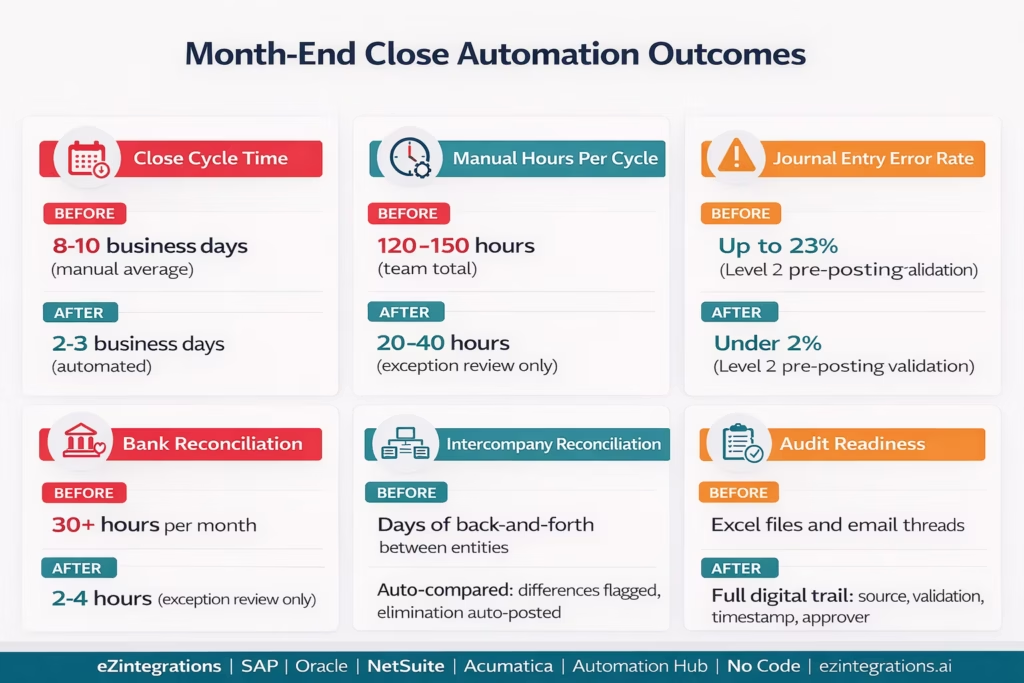
Close cycle time: median manual close is 6 calendar days (APQC 2025). For teams with reconciliation-heavy closes, 8-10 business days. Companies report cutting their close time from 7 days to 2-3 days after implementing month-end close automation tools.
Manual hours per cycle: traditional setup consumes 120-150 manual hours across the finance team per close cycle. Automated close: 20-40 hours (focused on exception review, judgement calls, and sign-off). Reduction: 70-80%.
Error rate: error rates on manual transactions run as high as 23%. Automated reconciliation systems reduce error rates to under 2%, and companies see a 70% reduction in data entry errors. Level 2 validation (balance check, period check, account check, duplicate check) catches errors before they are posted.
Audit readiness: every journal entry posted by eZintegrations includes the source data reference, the validation results, the posting timestamp, and the approver (if required). Audit sampling is reduced because the audit trail documents the logic of every automated entry. Auditors review the rules, not every transaction.
Finance team capacity: automated approvals cut the total month-end close time by an average of 3.5 days, freeing the finance team for analysis, forecasting, and strategic support rather than data entry and reconciliation.
How to Get Started
Step 1: Map Your Current Close Process
Document your close checklist: what tasks are performed each close cycle, who owns each task, what systems are involved, and where the bottlenecks are. Use the five bottleneck categories (bank reconciliation, recurring journal entries, intercompany, subledger-to-GL, variance analysis) as a framework. Estimate the hours spent on each category per close. This 90-minute exercise identifies which automation will deliver the highest immediate impact.
Step 2: Start with Your Highest-Volume Bottleneck
For most organisations, bank reconciliation is the fastest win: it is high-volume, rule-based, and consumes more time than any other close activity. Import the Bank Reconciliation Automation template from the Automation Hub, connect your bank feed (API, SFTP, or BAI2), connect your ERP, and configure the matching rules. Run the first automated reconciliation in parallel with your manual process to validate the match rate before going fully live.
Step 3: Build the Accrual Schedule and Journal Entry Automation
Once bank reconciliation is automated, move to recurring journal entries. Build the accrual schedule (vendor, contract amount, monthly amount, GL debit, GL credit, reversal rule) in eZintegrations. Connect your ERP using the journal entry API. Configure Level 2 pre-posting validation (balance, period, account, duplicate). Run the automated accrual posting for one close cycle in parallel with manual to validate accuracy.
Step 4: Add Intercompany and Subledger Reconciliation
Import the intercompany reconciliation template, connect your ERP entities (or multiple ERPs if you use different ERPs per entity), and configure the account pairs and tolerance thresholds. Then set up subledger-to-GL reconciliation for AR and AP. Both are primarily query-and-compare workflows: the automation runs the queries, compares the results, and routes exceptions to the responsible accountants.
Step 5: Book a Demo for the Full Close Automation Stack
Book a free demo with your current close checklist, your ERP type (SAP, Oracle, NetSuite, or Acumatica), and your bank/payment processor list. We will review your specific close bottlenecks, confirm which automations are applicable, and build a phased implementation plan starting with your highest-impact activity.
Total configuration time: 2-3 weeks for bank reconciliation and recurring journal entry automation. Add 1-2 weeks for intercompany and subledger reconciliation.
FAQs
eZintegrations connects to your bank feeds and payment processors (via API, SFTP, or BAI2), pulls transaction data on a scheduled basis, and runs rule-based transaction matching against your ERP GL balances. Matched transactions have clearing journal entries posted to the ERP automatically. Accruals, prepayments, and depreciation journal entries are generated from configurable schedules and posted via ERP REST API (SAP API_JOURNALENTRY_SRV, NetSuite POST /journalEntry, Oracle fscmRestApi POST /journals, Acumatica PUT /JournalTransaction). Level 2 validates every journal entry before posting (balance check, period check, account check, duplicate check). Unmatched transactions and validation failures are routed to the accounting team's exception queue for review.
2-3 weeks for bank reconciliation and recurring journal entry automation. Add 1-2 weeks for intercompany and subledger reconciliation. The most time-consuming configuration steps are: bank feed connection and mapping (3-5 days depending on bank API availability), accrual schedule data entry and validation (1-2 days), ERP journal entry field mapping (1-2 days), and parallel testing with live close data (1 week running alongside the manual process to validate match rates and journal accuracy before going fully live).
Yes, All four ERPs are supported via published REST APIs: SAP S/4HANA via API_JOURNALENTRY_SRV (OData V4, Communication Arrangement SAP_COM_0002), Oracle Fusion Cloud via fscmRestApi POST /journals, NetSuite via SuiteTalk REST POST /journalEntry (TBA authentication), and Acumatica via REST API PUT /JournalTransaction. Pre-mapped field configurations for each ERP are included in the Automation Hub templates. Level 2 pre-posting validation (balance, period, account, duplicate) runs across all four ERPs before any entry is posted.
eZintegrations connects to your bank's data feed (Open Banking API, SFTP BAI2 file, or SWIFT camt.053), pulls daily transactions, and compares them against your ERP GL cash account transactions. Matching rules are configurable: exact amount and reference match, fuzzy amount match within a percentage tolerance, date tolerance (e.g., outstanding cheques matched within 30 days), and pattern-based rules (bank fee descriptions auto-classified). Matched transactions are cleared automatically via journal entry. Unmatched transactions appear in the daily exception report for the accounting team to review. The exception report includes the closest match candidates from each side to guide investigation.
eZintegrations queries the ERP (or multiple ERPs if different entities use different systems) for all intercompany account balances on a configurable schedule. For each intercompany pair, the receivable balance at Entity A is compared against the payable balance at Entity B. If they differ by more than the tolerance (e.g., $100), a discrepancy alert is sent to the responsible controllers for both entities with the specific account, balance from each entity, and the difference amount. When balances agree, elimination journal entries are generated and posted to the consolidation entity automatically. For NetSuite multi-subsidiary: SuiteQL queries across subsidiaries. For SAP multi-company-code: the API_GL_ACCOUNT_LINE_ITEMS_SRV is queried per company code. 1. How does eZintegrations automate month-end close journal entries?
2. How long does it take to set up month-end close automation?
3. Does eZintegrations work with SAP, Oracle, NetSuite, and Acumatica for journal entry posting?
4. How does the bank reconciliation automation work?
5. How does the intercompany reconciliation automation work for multi-entity organisations?
The Numbers Will Not Balance Themselves
Month-end close is the single most labour-intensive recurring workflow in most finance departments. It consumes 120 to 150 manual hours per cycle. Error rates on manual transactions run as high as 23%. The finance team spends the last week of every month catching up on data entry instead of doing the analytical work that actually moves the business.
The automation is not complicated. Bank transactions are pulled from APIs. Matching rules are applied. Matched entries are cleared. Accruals are calculated from schedules. Journal entries are posted to the ERP. Intercompany balances are compared and eliminations are generated. Subledger-to-GL differences are flagged. Variance anomalies are explained by Level 3.
The finance team reviews exceptions, makes judgement calls, and signs off. That is the right use of their time.
Book a free demo with your current close checklist, ERP type, and bank/payment processor list. We will review your specific close bottlenecks and confirm which automations apply.
For the related procure-to-pay automation context (which feeds month-end AP reconciliation), see the invoice approval workflow automation guide. For the full library of finance automation templates, see the Automation Hub.

