
AI Workflows for ERP Automation: SAP, Oracle and NetSuite Use Cases
June 6, 2026AI workflows for ERP automation connect SAP, Oracle ERP Cloud, and NetSuite to upstream and downstream systems using native AI nodes: Document Intelligence for unstructured inputs, LLM Classification for routing and exceptions, and Data Analysis for anomaly detection. The result: order-to-cash cycles accelerate by 40-60%, AP processing costs drop by 70-80%, and finance teams spend less time on data entry and more time on strategic analysis.
TL;DR
- Enterprise ERP systems (SAP S/4HANA, Oracle ERP Cloud, NetSuite) are powerful: but they sit at the centre of data flows that still require significant manual intervention at the edges: vendor invoices that arrive as PDFs, customer orders in non-standard formats, financial data that must be reconciled across systems, and exception queues that operations teams clear manually every week.
- AI workflows solve the edge cases that traditional integration rules cannot: extracting structured data from unstructured documents, classifying records that don’t match existing routing rules, detecting anomalies in financial data streams, and resolving entity identity across inconsistent naming.
- The five ERP automation use cases with the highest ROI: AP invoice processing (Document Intelligence), order management exception handling (LLM Classification), financial reconciliation (Data Analysis for anomaly detection), vendor master deduplication (Semantic Matching), and multi-ERP data sync with AI-powered transformation.
- eZintegrations connects to SAP S/4HANA via OData V4 with CSRF token management, Oracle ERP Cloud via REST with assertion grant OAuth, and NetSuite via SuiteQL with Token-Based Authentication: plus Document Intelligence, LLM Classification, Data Analysis, and Semantic Matching nodes in the same no-code workflow builder.
- Import an Automation Hub template for your ERP and go live in hours, not months.
The Problem: Why ERP Automation Still Has Too Many Manual Steps
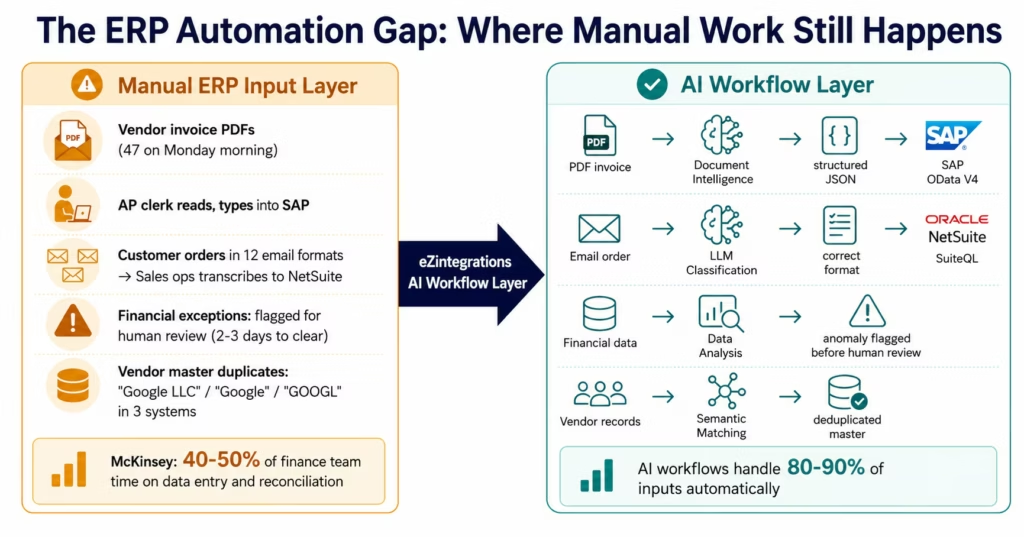
It is 9 AM on a Monday. Your AP team opens the invoice inbox. There are 47 new invoices from the weekend: PDFs, some scanned paper, a few Word documents, three attached inside email bodies rather than as attachments. Your ERP expects structured data in specific fields. None of these invoices are structured. None match the exact field names your SAP or NetSuite requires.
The AP clerk opens each invoice, reads the vendor name, the invoice number, the line items, the total. Types it into the ERP. Cross-references the purchase order. Flags discrepancies. Escalates the ones that don’t match. This takes the morning. At month-end, it takes the week.
This is the enterprise ERP automation gap. The ERP itself is automated: it processes records accurately and at scale. The problem is everything that feeds into it and flows out of it. The vendor invoices that arrive as documents, not data. The customer orders that come through email in twelve different formats. The financial exceptions that require a human to interpret before the ERP can act. The vendor records that exist under three different names across three different systems.
According to McKinsey, finance and operations teams at large enterprises spend 40-50% of their time on data entry, reconciliation, and exception handling: tasks that do not require human judgment but are not automatable with traditional rules because the input is unstructured, ambiguous, or contextually complex. AI workflows change this.
According to Gartner, 60% of finance executives cite “data quality and manual exception handling” as the primary barrier to ERP automation achieving its intended ROI. The ERP is not the bottleneck. The integration layer around it is.
eZintegrations adds AI workflow nodes: Document Intelligence, LLM Classification, Data Analysis, Semantic Matching: to the integration pipelines that feed SAP, Oracle, and NetSuite. The result: the unstructured documents, ambiguous classifications, and data anomalies that currently route to human review queues are handled automatically: with confidence threshold routing that escalates genuine exceptions while processing the clear majority without human involvement.
Before vs After: AI Workflows for ERP
| Process | Before AI Workflows | After AI Workflows | Time Saved |
|---|---|---|---|
| AP invoice processing | Manual data entry from PDF, 15-20 min/invoice | Document Intelligence extracts and posts automatically, human review for edge cases only | 80-90% time reduction |
| Invoice exception handling | 2-3 day exception queue, manual investigation | LLM Classification routes exceptions by type, known patterns resolved automatically | 70-80% reduction |
| Order management exceptions | Sales ops team manually reclassifies non-standard orders | LLM Classification handles non-standard formats, routes to correct ERP queue | 60-75% reduction |
| Financial reconciliation | Month-end: 5-7 day manual reconciliation process | Data Analysis flags anomalies in real time, reconciliation team focuses on genuine discrepancies | 40-60% cycle compression |
| Vendor master deduplication | Quarterly manual deduplication exercise, always incomplete | Semantic Matching resolves entity identity on every record creation | Continuous, eliminates quarterly effort |
| Multi-ERP sync (SAP + Oracle + NetSuite) | IT team maintains custom scripts, breaks on API updates | Managed connectors with AI transformation layer, self-maintaining | 90%+ reduction in maintenance overhead |
| ERP exception queue | 200+ items per week, 3-person team to clear | AI-classified exceptions, 80% auto-resolved, 20% reach human with context assembled | 80% reduction in human queue work |
How eZintegrations Solves ERP Automation Challenges
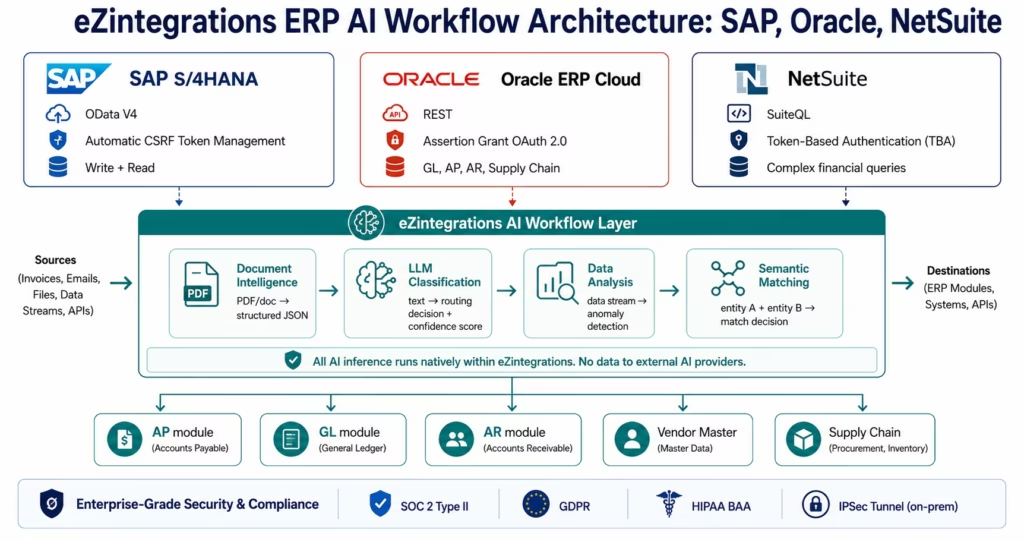
eZintegrations connects to SAP S/4HANA, Oracle ERP Cloud, and NetSuite with enterprise-depth connector depth: not surface-level REST calls, but the full authentication and protocol complexity each system requires.
SAP S/4HANA connector: OData V4 with automatic CSRF token management for write operations (creating purchase orders, posting AP entries, updating vendor master records). The CSRF token lifecycle: fetching the token before each write operation and including it in the request header: is handled automatically by the connector without manual configuration.
Oracle ERP Cloud connector: REST API with assertion grant OAuth 2.0: the authentication model Oracle ERP Cloud uses for server-to-server integration, distinct from standard OAuth 2.0 flows. Supports Oracle’s FBDI (File-Based Data Import) and REST endpoints for both read and write operations across GL, AP, AR, and supply chain modules.
NetSuite connector: SuiteQL (NetSuite’s SQL-like query language for complex financial data queries) with Token-Based Authentication (TBA). SuiteQL enables joins, subqueries, and aggregations across NetSuite’s data model that standard REST calls cannot express: critical for financial reporting and reconciliation workflows.
The AI workflow layer: Document Intelligence, LLM Classification, Data Analysis, and Semantic Matching are added as nodes within the same workflow that connects to SAP, Oracle, or NetSuite. The AI processing runs natively within eZintegrations’ infrastructure: no invoice content, vendor data, or financial records are sent to external AI providers (OpenAI, Anthropic). For enterprises processing sensitive financial data and vendor PII, this native processing architecture is the compliant approach.
Compliance: SOC 2 Type II certified. HIPAA BAA available for healthcare ERP workflows. GDPR compliant for EU data. For on-premises SAP ECC or Oracle instances behind corporate firewalls: eZintegrations connects via IPSec Tunnel without requiring internet-exposed ports.
Use Case 1: AP Invoice Processing with Document Intelligence
The problem in one sentence: vendor invoices arrive as PDFs in 27 different layouts from 120 different vendors, and your AP team enters each one manually into SAP or NetSuite.
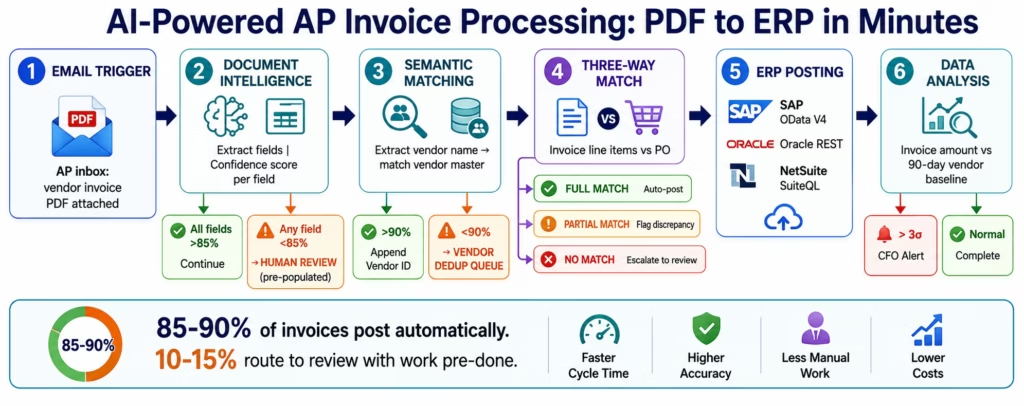
The AI workflow solution: Document Intelligence reads each PDF invoice and extracts the required fields as structured JSON: vendor name, invoice number, invoice date, due date, line items (description, quantity, unit price), tax amount, total payable. The structured data is validated against the purchase order in the ERP and posted as an AP liability entry: automatically, without human data entry for the 85-90% of invoices that pass all validation checks.
The Step-by-Step Workflow
Trigger: new email arrives in the AP inbox (or new file lands in the AP document folder on S3 or SharePoint).
Step 1: Document Intelligence: the PDF attachment passes through the Document Intelligence node. Fields extracted: vendor name, invoice number, invoice date, due date, all line items, tax, and total. Output: structured JSON with per-field confidence scores.
Step 2: Confidence threshold routing:
- Confidence above 85% on all fields: proceed to validation
- Any field below 85% confidence: route to human review queue with extracted values pre-populated
Step 3: Semantic Matching (vendor resolution): the extracted vendor name (“ACME Industrial Supplies, Inc.”) is compared against the vendor master in SAP or NetSuite. Match above 90% confidence: vendor ID appended to the workflow payload. Match below 90%: route to vendor deduplication queue.
Step 4: Three-way match: the workflow calls the ERP API to retrieve the matching purchase order (by PO number from the invoice, or by vendor ID and date range if no PO number). Compares invoice line items against PO line items: quantities, unit prices, total. Outcome: match, partial match, or no match.
Step 5: ERP posting:
- Full match: AP liability entry posted to SAP (via OData V4) or NetSuite (via SuiteQL) automatically
- Partial match: flagged for AP reviewer with discrepancy details highlighted
- No match: routed to AP manager with full invoice context
Step 6: Data Analysis (fraud signal detection): the posted invoice amount is checked against the 90-day rolling distribution of invoice amounts from this vendor. Statistical outliers (amounts more than 3σ from the vendor’s baseline) are flagged for CFO review.
The result: 85-90% of invoices post automatically. 10-15% route to human review with the investigation work already done. Manual time per invoice: near zero for the automated majority, 5-10 minutes of review for the exceptions (versus 15-20 minutes of full manual entry).
Use Case 2: Order Management Exception Handling with LLM Classification
The problem: customer orders arrive through multiple channels in inconsistent formats: email, EDI, web portal, phone (transcribed by sales rep). Orders that don’t match the standard format require sales ops to manually classify, reroute, and re-enter them in the ERP. An order that should take 30 seconds to process takes 20-30 minutes when it doesn’t match the expected pattern.
The AI workflow solution: LLM Classification reads the order input: regardless of format: and classifies it by type (standard order, rush order, sample request, pricing inquiry, return request), customer segment (SMB, mid-market, enterprise), and urgency (standard, priority, critical). Each classification combination routes to the correct ERP queue and triggers the appropriate SLA workflow.
The Step-by-Step Workflow
Trigger: new customer email, web form submission, EDI message, or Salesforce opportunity stage change.
Step 1: LLM Classification: the order content is read by the LLM Classification node. Output: {"order_type": "rush_order", "customer_segment": "enterprise", "urgency": "priority", "confidence": 0.91}.
Step 2: Confidence routing:
- Above 85% confidence: route automatically to the classified queue
- Below 85% confidence: route to sales ops with classification pre-populated as suggestion
Step 3: Format normalisation: the input (email body, PDF, structured EDI, or Salesforce record) is transformed into the ERP’s required format using the appropriate transformation rules for each order type.
Step 4: ERP submission: the normalised order is submitted to SAP (sales order creation), Oracle Order Management Cloud (order intake), or NetSuite (sales order creation via SuiteQL) using the appropriate connector.
Step 5: SLA and routing: the urgency classification triggers the appropriate fulfillment priority, warehouse routing, and customer notification sequence.
The result: orders that currently take 20-30 minutes of manual classification and re-entry post in under 2 minutes. Sales ops time shifts from reclassifying orders to reviewing the 15-20% of edge cases that the AI routes for human judgment.
Use Case 3: Financial Reconciliation with Data Analysis
The problem: month-end financial close requires reconciling transaction data across the ERP, the banking system, and upstream source systems (billing platforms, payment processors). Discrepancies are discovered manually, often only during the close process, and traced through multiple systems by the finance team.
The AI workflow solution: the Data Analysis node monitors financial data streams continuously: not just at month-end: flagging statistical anomalies and discrepancies as they occur rather than accumulating them for the close cycle.
What Data Analysis Monitors in ERP Workflows
GL transaction anomalies: amounts that deviate significantly from the historical distribution for a specific account, transaction type, or cost centre. A GL posting that is 400% above the 90-day average for a specific account triggers an alert for the finance controller: before the error compounds.
AP duplicate payment detection: invoice amounts, vendor IDs, and payment dates are monitored for duplicate payment patterns. The same invoice posted twice within a 30-day window: even by different AP team members: triggers a hold and alert before payment is released.
AR aging anomalies: accounts receivable aging that deviates significantly from a customer’s historical payment pattern triggers a proactive collections alert: before the account reaches the overdue threshold.
Bank reconciliation gaps: the Data Analysis node compares ERP transaction records against bank statement data continuously, flagging unmatched transactions in real time rather than surfacing them at month-end close.
The result: finance teams report 40-60% compression in month-end close cycle time when continuous Data Analysis replaces the manual reconciliation process. Discrepancies that previously took 3-5 days to surface and investigate during close are identified and investigated within hours of occurrence.
Use Case 4: Vendor Master Deduplication with Semantic Matching
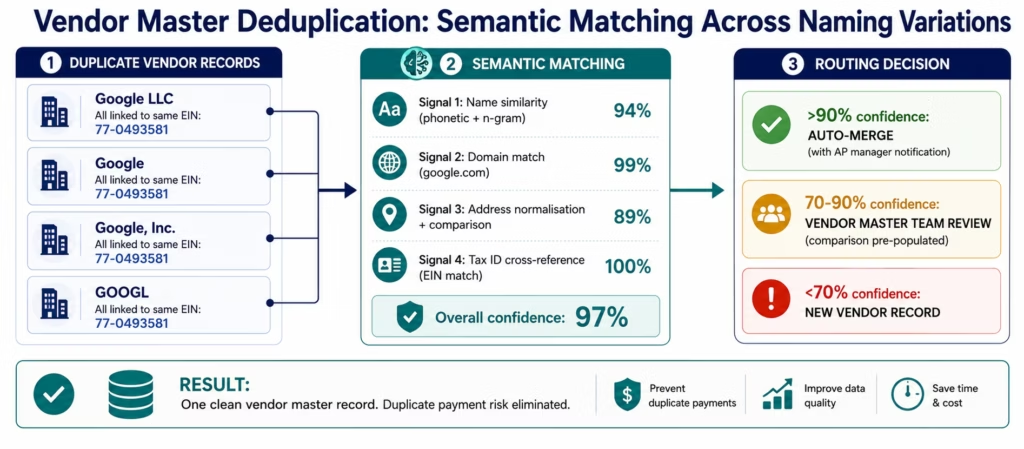
The problem: the vendor master in any enterprise ERP that has been in operation for 5+ years is riddled with duplicates. “Google LLC,” “Google,” “Google, Inc.,” “Google Corp,” and “GOOGL” are all the same company: but in the ERP, they are five different vendor records, each potentially with separate payment runs, separate compliance checks, and separate 1099 reporting. Your accounts payable team processes payments against the wrong entity and your tax team discovers the problem at year-end.
The AI workflow solution: Semantic Matching resolves vendor entity identity across naming variations: comparing company name, tax ID, address, website domain, and phone number across records and returning a confidence score for each potential match. Records above the match threshold are merged; below-threshold pairs route to the vendor master team for review.
The Semantic Matching Workflow for Vendor Deduplication
Trigger: new vendor record creation, periodic vendor master audit, or vendor invoice from an unrecognised vendor name.
Step 1: Extract match signals: vendor name, tax ID (EIN/VAT), website domain, primary address, and phone number extracted from the incoming record.
Step 2: Multi-signal comparison: Semantic Matching compares the incoming record against all existing vendor master records across four signals simultaneously: name similarity (phonetic + n-gram), domain match, address normalisation and comparison, and identifier (tax ID) cross-reference.
Step 3: Confidence-based routing:
- Above 90% confidence: merge with existing vendor record automatically (or flag for AP manager approval for high-value vendors)
- 70-90% confidence: route to vendor master team with comparison pre-populated
- Below 70%: create new vendor record
Step 4: ERP update: vendor master updated in SAP, Oracle, or NetSuite via the appropriate connector.
The result: continuous deduplication eliminates the quarterly manual vendor master cleanup exercise, reduces duplicate payment risk, and improves tax reporting accuracy.
Use Case 5: Multi-ERP Data Sync with AI Transformation
The problem: many enterprises run more than one ERP simultaneously: SAP for manufacturing operations, NetSuite for financial reporting, Oracle for supply chain. Data that lives in SAP (purchase orders, goods receipts, production data) must be reflected in NetSuite (financial commitments, inventory values) and Oracle (demand signals, supplier performance). Three different data models, three different API standards, and transformation logic that must accommodate the differences between them.
The AI workflow solution: eZintegrations maintains bidirectional sync between SAP, Oracle, and NetSuite with AI-enhanced transformation:
LLM Classification identifies records in the source ERP that have been modified in ways requiring transformation logic changes: new product categories, new cost centres, new organisational structures: and applies the appropriate transformation rule or flags for IT review when no rule exists.
Data Analysis monitors the sync pipeline for anomalies: records that should sync but have not (missing sync events), records where the values differ between ERPs beyond expected variance, or sync volumes that deviate significantly from historical patterns (potential data loss or duplication events).
Semantic Matching resolves entity identity across ERP systems: the same supplier in SAP, Oracle, and NetSuite appearing under different IDs and name formats: ensuring that related records are linked correctly rather than creating orphaned references.
The result: IT teams maintaining multi-ERP sync via custom scripts report 85-90% reduction in maintenance overhead when moving to managed connectors with AI transformation. The sync pipelines become self-maintaining for the majority of operational cases and surface only genuine structural changes for IT review.
Key Outcomes and Results
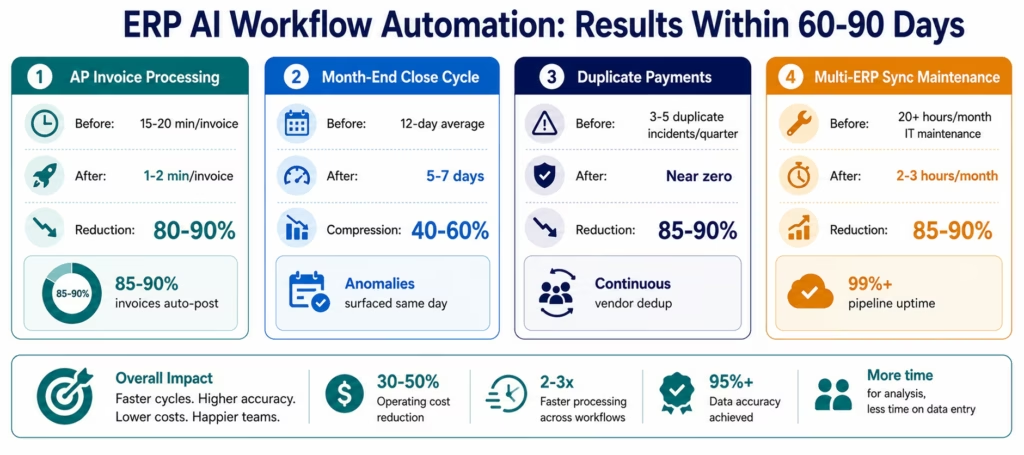
Organisations deploying AI workflows for ERP automation with eZintegrations report the following outcomes within 60-90 days of deployment:
AP Invoice Processing:
- Processing time per invoice: 15-20 minutes (manual) → 1-2 minutes (automated)
- AP team capacity available for strategic work: increases 60-70%
- Invoice processing cost: reduces 70-80% per invoice
- Three-way match accuracy: improves to 97%+ with Document Intelligence + validation rules
Order Management:
- Order exception handling time: 20-30 minutes (manual classification + re-entry) → under 2 minutes
- Order accuracy: improves 15-25% as classification errors from manual handling are eliminated
- Order-to-cash cycle: compresses 40-60%
Financial Reconciliation:
- Month-end close cycle: compresses 40-60% as real-time anomaly detection replaces manual month-end discovery
- Reconciliation discrepancies surfaced within hours of occurrence (versus days at month-end)
- Finance team time on manual reconciliation: reduces 60-70%
Vendor Master:
- Vendor master duplicates: eliminated continuously rather than quarterly
- Duplicate payment incidents: reduce by 85-90%
- Vendor master maintenance overhead: reduces 80-90%
Multi-ERP Sync Maintenance:
- IT maintenance overhead for sync scripts: reduces 85-90%
- Sync pipeline uptime: improves from 94-96% (manual scripts) to 99%+ (managed connectors with AI error handling)
How to Get Started
Moving from manual ERP processes to AI-powered automation does not require a 12-month IT project. The Automation Hub templates for SAP, Oracle, and NetSuite include pre-configured workflows with the connector settings, field mappings, and AI node configurations for the most common ERP automation patterns: ready to deploy in hours.
Step 1: Import the relevant Automation Hub template
Browse the Automation Hub for your ERP:
- SAP S/4HANA AP automation template (Document Intelligence + OData V4 posting)
- NetSuite AP automation template (Document Intelligence + SuiteQL + TBA)
- Oracle ERP Cloud order management template (LLM Classification + REST posting)
- Multi-ERP sync template (SAP + NetSuite bidirectional with Data Analysis monitoring)
Import the template that matches your use case. The template includes pre-configured: trigger (email, file, webhook, or schedule), AI nodes with default field extraction schemas for standard document types, connector settings for the ERP API (endpoint patterns, authentication model, field mapping), and error handling with DLQ and alerting.
Step 2: Configure your ERP connection
Enter your ERP API credentials in the connector configuration:
- SAP: system hostname, client number, service account username and password, or OAuth credentials
- NetSuite: account ID, consumer key/secret, token ID/secret (TBA)
- Oracle ERP Cloud: base URL, client ID, client secret, assertion grant configuration
The connector handles the authentication lifecycle: CSRF tokens (SAP), TBA token refresh (NetSuite), and assertion grant OAuth (Oracle): automatically.
Step 3: Calibrate the AI nodes with sample documents
For Document Intelligence: upload 5-10 sample invoices from your vendor base. The node uses these to calibrate field extraction for your specific document formats. This takes 15-30 minutes.
For LLM Classification: define your classification categories in plain language (the AI reads your description, not a codebook). For order classification: “rush order,” “standard order,” “sample request,” “pricing inquiry,” “return request.” Takes 10-20 minutes.
Step 4: Configure confidence thresholds and routing
Set the confidence threshold for automatic processing (recommended: 85% for Document Intelligence, 80% for LLM Classification on first deployment). Below-threshold records route to a human review queue: email, Slack, or your ticketing system. Adjust thresholds based on your first week’s auto-processing rate.
Step 5: Run in parallel, validate, and go live
Run the AI workflow in parallel with your existing manual process for 1-2 weeks. Compare the AI workflow’s outputs against the manually processed records. When the auto-processing accuracy meets your standard (typically 95%+ within 1-2 weeks), disable the manual process and go fully live.
Import your ERP AI workflow template now: SAP, Oracle, and NetSuite templates are available with pre-configured AI nodes and enterprise connector settings.
FAQs
AI workflow automation connects to SAP, Oracle ERP Cloud, and NetSuite through their native APIs including SAP OData V4 with CSRF token management, Oracle REST APIs with assertion grant OAuth, and NetSuite SuiteQL with Token-Based Authentication. AI nodes are embedded directly inside the integration workflow. Document Intelligence extracts data from unstructured documents such as invoice PDFs and order emails before posting into the ERP. LLM Classification routes ambiguous transactions to the correct queue automatically. Data Analysis monitors ERP transaction streams for anomalies in real time. The AI layer handles the edge cases and exceptions that traditional rule-based integrations cannot process reliably.
For standard use cases using Automation Hub templates, deployment typically takes 2-8 hours from configuration to activation. Templates for AP invoice processing include pre-configured ERP connector settings, Document Intelligence extraction schemas, confidence threshold routing, and error handling logic. The AI calibration process usually involves uploading 5-10 representative invoices and takes approximately 15-30 minutes. Parallel-run validation generally runs for 1-2 weeks before full production activation. More complex multi-ERP workflows or custom routing logic may require an additional 2-4 days of configuration.
Yes, eZintegrations provides enterprise-grade SAP S/4HANA connectivity using OData V4 APIs for both read and write operations. Write operations such as AP posting, purchase order creation, and vendor master updates require CSRF token management, which is handled automatically by the connector. The platform supports both standard SAP services and custom OData services built through SAP API Business Hub. For on-premises SAP ECC environments, connectivity is provided through IPSec Tunnel without requiring public internet exposure of SAP ports.
Yes, Document Intelligence is specifically designed to process invoices across multiple layouts and formats. A structured PDF invoice, a scanned paper invoice with handwritten notes, and an XML-based invoice can all be processed by the same workflow. The extraction model analyses document structure, identifies field locations dynamically, and extracts invoice values regardless of formatting differences. Typical extraction accuracy across standard enterprise invoice sets ranges from 91-97 percent. Low-confidence extractions route to human review with the extracted values already pre-populated for validation rather than manual re-entry.
Yes, NetSuite SuiteQL is supported natively within the connector architecture. SuiteQL enables advanced SQL-style joins, subqueries, and aggregation operations across the NetSuite data model, which are essential for financial reconciliation, reporting, and AP workflows. eZintegrations uses SuiteQL for transaction reconciliation, vendor-level reporting, period summary generation, and purchase order analysis. Token-Based Authentication is fully supported and token lifecycle management is handled automatically by the platform. 1. How does AI workflow automation work with ERP systems like SAP, Oracle, and NetSuite?
2. How long does it take to set up AI workflow automation for SAP or NetSuite?
3. Does eZintegrations work with SAP S/4HANA?
4. Can AI workflows handle multi-format vendor invoices automatically?
5. Does eZintegrations support NetSuite SuiteQL for complex financial queries?
Conclusion: Your ERP Was Automated. The Edges Never Were.
The ERP has been automating core financial and operational processes for decades. What it has never fully automated is the human layer around it: the finance clerk extracting data from vendor invoices, the sales ops team reclassifying orders that arrived in the wrong format, the IT team maintaining the sync scripts between SAP and NetSuite that break every time either system releases an API update, the accounts payable manager clearing the exception queue every Monday morning.
AI workflows are not a replacement for the ERP: they are the intelligence layer that fills the gaps the ERP was never designed to fill. Document Intelligence handles the unstructured document inputs. LLM Classification routes the ambiguous records. Data Analysis surfaces the financial anomalies before they become month-end surprises. Semantic Matching resolves the vendor master duplicates that create compliance risk. Together, they automate the 40-50% of finance and operations time that McKinsey identifies as the remaining manual work in otherwise-automated ERP environments.
The Automation Hub templates for SAP, Oracle, and NetSuite are configured, tested, and ready to deploy. The AI nodes are pre-calibrated for standard enterprise document types. The connector settings handle CSRF tokens, assertion grant OAuth, and SuiteQL authentication automatically.
Import your ERP AI workflow template today: SAP S/4HANA, Oracle ERP Cloud, and NetSuite AP automation, order management, and financial reconciliation templates are available now.
Book a free demo and bring your most complex ERP process. We will show you the AI node configuration for your specific document types and data model.

