
AI Agents for Supply Chain: Autonomous Logistics & Inventory Workflows
June 8, 2026AI agents for Supply chain management connect ERP systems, warehouse management platforms, transportation management systems, supplier portals, and carrier APIs to autonomously investigate and resolve supply chain exceptions: delayed shipments, inventory discrepancies, carrier failures, demand anomalies, and supplier non-conformances: without human triage at each step. Unlike workflow automation (which handles predefined scenarios), supply chain AI agents determine their own investigation path based on what each step reveals, resolving known patterns autonomously and escalating genuinely novel situations with full context pre-assembled.
TL;DR
- Supply chain operations generate more cross-system exception events than almost any other enterprise function: delayed shipments, inventory discrepancies between ERP and WMS, carrier failures, supplier non-delivery alerts, demand spikes that outrun reorder logic, and 3PL data mismatches that require reconciliation across multiple parties.
- Traditional workflow automation handles the predefined scenarios well: orders route to WMS on schedule, inventory updates broadcast to channels. The exceptions: the ones that require investigating four systems to understand why a shipment has not moved in 48 hours: land in a human queue.
- AI agents handle the exception class. They receive a goal (“why has shipment SHP-4421 not moved in 48 hours?”), determine what to investigate, query carrier APIs, TMS tracking data, origin warehouse records, and customs documentation in sequence, identify the root cause, and either initiate the resolution or deliver a structured brief to the logistics manager.
- Five supply chain AI agent use cases with the highest operational ROI: shipment exception investigation agent, inventory discrepancy resolution agent, supplier performance monitoring agent, demand anomaly and reorder agent, and 3PL reconciliation agent.
- eZintegrations Level 3 AI Agents connect to SAP, NetSuite, Oracle, Manhattan WMS, Blue Yonder TMS, FedEx/UPS/DHL carrier APIs, EDI systems, and supplier portals: with 9 native enterprise tools and no custom development required.
The Problem: Supply Chain Exceptions That Never Stop Piling Up
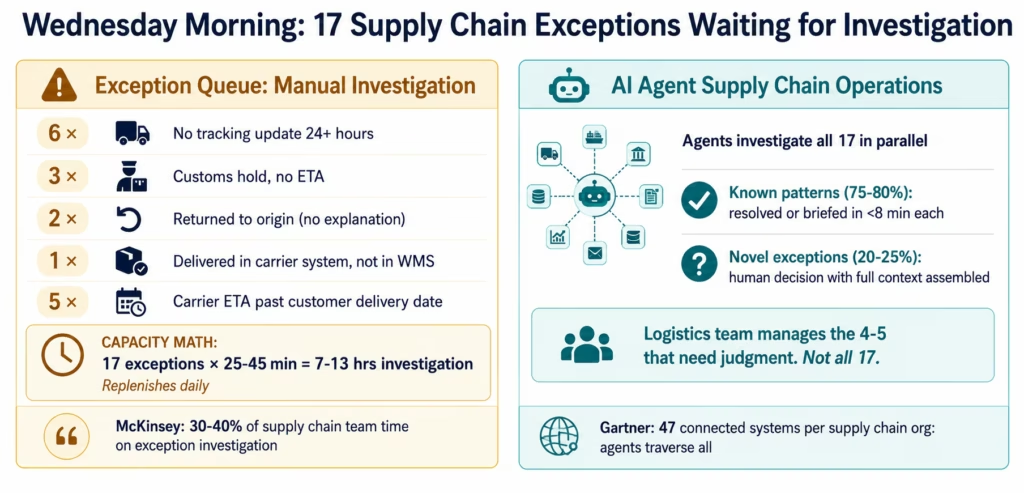
It is Wednesday morning. Your logistics coordinator opens the exception dashboard. Seventeen shipments are flagged. Six have not had a tracking update in more than 24 hours. Three are showing “in customs” with no estimated clearance date. Two have been returned to origin without explanation. One is showing delivered in the carrier system but not receipted in the WMS. Five have a carrier ETA that is now past the customer’s requested delivery date: and the customer has not been notified.
Investigating each of these shipment exceptions follows the same pattern but never exactly the same path: query the carrier API for the latest tracking event, check the TMS for the last known status, look up the origin warehouse to see if the shipment actually departed, check customs documentation for the international shipments, query the ERP for the customer’s SLA status, determine who needs to be notified, and decide what corrective action is available.
Each investigation takes 25-45 minutes. Seventeen exceptions is 8-13 hours of investigation work: for a problem set that will replenish itself tomorrow with a fresh set of exceptions.
The exceptions do not stop because supply chains do not stop. Every day generates new delayed shipments, new inventory mismatches between the ERP and the WMS (the ERP shows 1,200 units on hand; the WMS shows 1,047: 153 units are somewhere, but where?), new supplier delivery deviations, and new demand signals that require reorder decisions faster than the weekly planning cycle accommodates.
According to McKinsey, supply chain operations teams spend 30-40% of their time on exception investigation and resolution: work that is analytical and multi-system but not, in most cases, requiring deep human judgment. It requires the ability to query multiple systems in sequence, synthesise the findings, and determine the correct response based on the pattern identified.
According to Gartner, the median supply chain organisation has 47 connected systems with data relevant to supply chain operations. The exception investigation problem scales directly with the number of connected systems: more systems means more points of failure, more data to reconcile, and more investigation paths to traverse.
AI agents are the structural response to this problem, reflecting broader supply chain AI market trends tracked by IDC. They receive exceptions as goals, determine the investigation path based on what each step reveals, and deliver resolutions or structured briefs: at the speed of API calls, not the speed of a logistics coordinator’s calendar.
Supply Chain AI Agents vs Supply Chain Workflow Automation
Supply chain operations need both workflow automation and AI agents: and the distinction determines which tool handles which class of problem.
Workflow automation (Levels 1 and 2) handles the high-volume, predefined data flows: order from Shopify posts to WMS within 30 seconds via webhook, inventory broadcast from WMS reaches all sales channels within seconds of a warehouse movement, EDI 940 transmits to 3PL automatically when a pick order is created. Level 1 covers deterministic data movement; Level 2 adds AI nodes within pipelines (Document Intelligence for ASNs, Data Analysis for inventory monitoring). These are deterministic, high-volume, predefined. Workflow automation is the right tool.
AI agents (Level 3) handle the exceptions: the shipment that has not moved in 48 hours despite showing “in transit,” the inventory discrepancy where the ERP and WMS disagree on 153 units, the supplier who has delivered three consecutive late shipments with different explanations each time, the demand spike that requires reorder logic across four suppliers with different lead times and minimum order quantities.
The critical difference: the investigation path for each exception depends on what the prior step reveals. A shipment that has not moved in 48 hours might be: stuck at a carrier hub (query carrier API for last scan location and hub status), held at customs (query customs filing status and documentation), never actually picked up from the origin warehouse (query WMS for outbound scan), or showing a tracking data error (carrier system lag, not an actual delay). The investigation branches based on the first finding. No predefined workflow covers all branches.
| Task Type | Right Tool | Why |
|---|---|---|
| Order-to-WMS real-time routing | Workflow (Level 1-2) | Predefined event, same path every time |
| Investigate why SHP-4421 has not moved | AI Agent (Level 3) | Path depends on what each query reveals |
| Inventory broadcast to all channels | Workflow (Level 1-2) | Same update, all channels, triggered by WMS event |
| Resolve 153-unit discrepancy between ERP and WMS | AI Agent (Level 3) | Multi-system investigation required |
| EDI 940 to 3PL on pick order creation | Workflow (Level 1-2) | Predefined trigger, predefined output |
| Supplier delivered late 3x: root cause and action | AI Agent (Level 3) | Multi-system pattern analysis + decision |
| Reorder trigger when safety stock breached | Workflow (Level 1-2) | Predefined rule, predefined action |
| Demand spike across 4 suppliers: optimal reorder | AI Agent (Level 3) | Multi-supplier analysis, lead time comparison |
Workflow automation and AI agents are complementary, consistent with broader Forrester Research analysis of supply chain automation architecture. The workflow layer handles the 80% that is routine. The agent layer handles the 20% that requires investigation: and that 20% represents the majority of where supply chain team capacity goes.
Before vs After: AI Agents for Supply Chain
| Exception Type | Before AI Agents | After AI Agents | Impact |
|---|---|---|---|
| Shipment tracking gap | Logistics coord queries carrier, TMS, WMS manually (25-45 min) | Agent queries all three in sequence, identifies status, stages action | 85-90% investigation time reduction |
| Customs hold investigation | Coord contacts customs broker, requests status (1-2 day turnaround) | Agent queries customs filing API, broker portal, and carrier, assembles clearance brief | Same-day resolution vs next-day at best |
| Inventory ERP vs WMS discrepancy | Warehouse team manually counts and reconciles (2-4 hrs) | Agent cross-references transaction logs, identifies missing movement record, stages correction | 70-80% time reduction |
| Supplier late delivery | Buyer manually contacts supplier, logs delay, reassesses schedule | Agent queries supplier portal, PO history, and inbound ETA, delivers risk brief with alternatives | Proactive: 24-48 hrs earlier |
| 3PL billing discrepancy | Finance team reconciles 3PL invoice against WMS activity log (3-5 hrs) | Agent cross-references 3PL invoice against WMS records, identifies specific discrepancies, stages dispute | 80-90% time reduction |
| Demand spike reorder | Planner calculates reorder quantity across suppliers manually | Agent queries demand signal, supplier lead times, current stock, and MOQs, delivers ranked reorder recommendation | Decision-ready in minutes vs hours |
| Carrier performance audit | Monthly manual compilation of on-time rates, damage claims, cost variances | Agent queries TMS, carrier invoices, and claims data, delivers carrier scorecard | Continuous vs monthly |
| Return shipment exception | CS team tracks return manually, WMS update dependent on warehouse scan | Agent monitors carrier return tracking, coordinates WMS receipt, triggers refund/exchange workflow | Automated return loop |
How eZintegrations AI Agents Connect the Supply Chain Stack
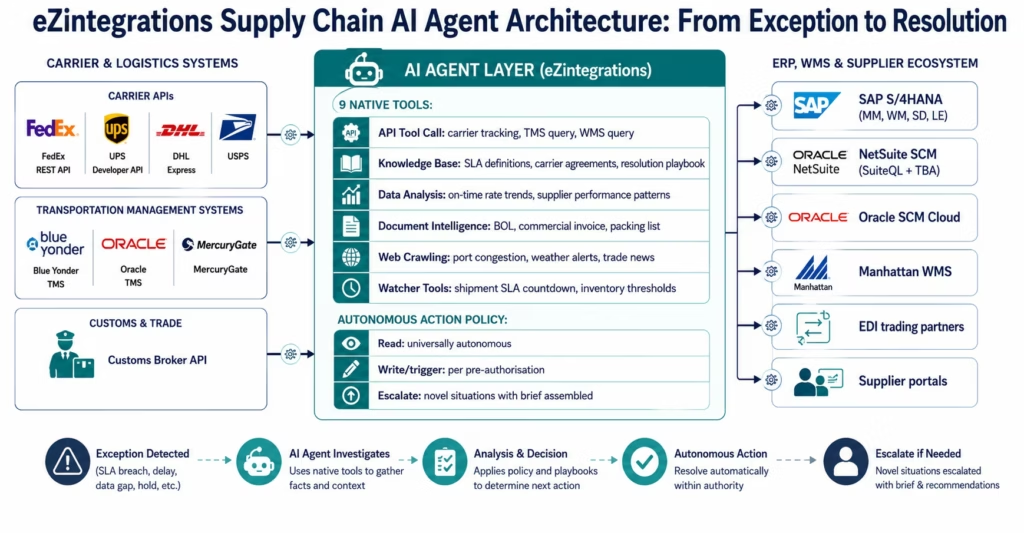
eZintegrations Level 3 AI Agents use 9 native enterprise tools to traverse the supply chain technology stack: connecting carrier APIs, TMS platforms, WMS systems, ERP, supplier portals, and customs systems in a single no-code agent configuration.
The 9 native agent tools for supply chain use cases:
- Knowledge Base Vector Search: semantic search across supplier contracts, carrier service agreements, SLA definitions, customs compliance documents, and supply chain resolution playbooks.
- Document Intelligence: read and extract structured data from supplier invoices, packing lists, commercial invoices, certificates of origin, carrier bills of lading, and 3PL billing statements.
- Data Analysis: statistical anomaly detection on supply chain data streams: carrier on-time rates, supplier delivery performance, inventory velocity, and demand signals.
- Data Analytics with Charts/Graphs/Dashboards: generate supplier performance dashboards, carrier scorecards, and inventory trend visualisations embedded in agent intelligence briefs.
- Web Crawling: retrieve real-time information from carrier portals, port congestion reports, weather event databases, and trade compliance sources that may explain supply chain disruptions.
- Watcher Tools: continuous monitoring of shipment SLA windows, inventory level thresholds, supplier acknowledgement deadlines, and 3PL reconciliation cut-offs with threshold-based alerting.
- API Tool Call: direct REST calls to carrier APIs (FedEx, UPS, DHL, USPS tracking APIs), TMS platforms (Blue Yonder, Oracle TMS, MercuryGate), WMS systems (Manhattan Associates, Oracle WMS), ERP systems (SAP S/4HANA, NetSuite, Oracle SCM), and supplier EDI/portal APIs.
- Integration Workflow as Tool: call any Level 1-2 workflow as a tool within the agent: for example, triggering the existing EDI 940 dispatch workflow as part of the agent’s reorder resolution action.
- Integration Flow as MCP: expose supply chain integration capabilities via Model Context Protocol for consumption by external AI tools and models.
Users extend the tool registry beyond these 9 as self-service: adding custom carrier APIs, custom supplier portal connections, and domain-specific compliance databases.
Supply chain system connectors:
SAP S/4HANA (MM, WM, SD, LE modules): OData V4 with automatic CSRF token management for purchase orders, delivery documents, transfer orders, goods movements, and warehouse management operations.
NetSuite (Supply Chain Management): SuiteQL with Token-Based Authentication for item fulfilment, purchase orders, inventory adjustments, and work orders.
Oracle SCM Cloud: REST API with assertion grant OAuth 2.0 for procurement, inventory, logistics, and manufacturing orchestration.
Manhattan Associates WMS: REST API for inventory queries, task management, outbound processing, and inbound receiving.
Blue Yonder (JDA) TMS: REST API for shipment tracking, carrier performance, and freight audit.
Carrier APIs: FedEx REST API (Ship, Track, Freight), UPS Developer API (Tracking, Rating, Address Validation), DHL Express API (Track, Ship, Quote), USPS Web Tools API.
EDI connectivity: EDI 850 (Purchase Order), EDI 856 (Advance Ship Notice), EDI 940 (Warehouse Shipping Order), EDI 945 (Warehouse Shipping Advice), EDI 997 (Functional Acknowledgement) for trading partner connectivity.
Customs and compliance: Customs Broker API connectivity for import entry filing status, entry summary, and clearance notification.
IPSec Tunnel: for on-premises WMS, ERP, or TMS systems behind corporate firewalls, eZintegrations connects via IPSec Tunnel without requiring internet-exposed ports.
Compliance: SOC 2 Type II certified. GDPR compliant for EU supply chain partner data. HIPAA BAA for healthcare supply chain operations. All agent tool calls process supply chain data natively within eZintegrations: no shipment data, inventory records, or supplier information sent to external AI providers.
Use Case 1: Shipment Exception Investigation Agent
The problem in one sentence: your logistics team spends 30-40% of their day investigating shipment exceptions: querying carrier portals, TMS systems, and customer records one at a time, for exceptions that will be replaced by new ones tomorrow.
The AI agent solution: the Shipment Exception Investigation Agent monitors all active shipments against their SLA windows and investigates every exception autonomously: querying carriers, TMS, WMS, and customs in the investigation sequence the exception type requires.
The Agent Investigation Sequence: 48-Hour Tracking Gap
Agent goal: “Shipment SHP-4421 (order ORD-8847, customer Acme Corp) has had no carrier tracking update for 48 hours. Current status: In Transit. Investigate root cause and recommend action.”
Step 1: Carrier API query: the agent calls the FedEx REST Tracking API for SHP-4421. Result: last scan was at Memphis FedEx hub 51 hours ago. No subsequent scans.
Step 2: Hub status check (Web Crawling): the agent queries the FedEx network status page and available port/hub disruption feeds. Result: Memphis hub experienced a 36-hour processing delay due to a severe weather event two days ago.
Step 3: TMS status check: the agent queries the TMS for the shipment’s routing plan and any carrier-generated delay notifications. Result: FedEx has not issued a formal delay notification to the TMS. ETA has not been updated.
Step 4: Customer SLA assessment: the agent queries the ERP (SAP SD) for the customer order’s committed delivery date and the customer’s SLA tier. Result: committed delivery is tomorrow. Customer is Tier 1 (highest SLA priority). Current expected delivery based on Memphis hub status: 2 days past committed date.
Step 5: Alternative resolution assessment: the agent queries whether the shipment can be expedited from Memphis once it clears the weather delay, or whether a replacement shipment can be dispatched from an alternate location with sufficient inventory.
Step 6: Investigation brief assembly: the agent assembles a structured brief:
- Root cause: Memphis FedEx hub weather delay (confirmed via FedEx network status)
- Customer impact: Tier 1 customer, 2-day SLA breach projected
- Resolution options: (a) wait for clearance: estimated 18-24 hours; (b) dispatch replacement from Chicago DC: inventory available, 1-day transit, would meet SLA; (c) upgrade to FedEx Priority Overnight on clearance
- Recommended action: dispatch replacement from Chicago now, redirect original to Chicago DC on clearance
- Customer notification: draft notification ready for logistics manager review
Agent investigation time: 6 minutes 43 seconds. Previous manual investigation: 25-35 minutes, with a second investigation tomorrow to confirm resolution.
Escalation vs Autonomous Action
For shipments below the pre-configured autonomous action value threshold and with a known resolution pattern (weather delay at a known hub, replacement dispatch from an available location): the agent can initiate the replacement dispatch using the “Integration Workflow as Tool” capability: triggering the existing EDI 940 dispatch workflow for the replacement shipment.
For high-value shipments or novel exception types: the agent delivers the investigation brief to the logistics manager for decision, with the recommended actions staged for one-click execution.
Use Case 2: Inventory Discrepancy Resolution Agent
The problem: your ERP (SAP or NetSuite) shows 1,200 units of SKU-4421 on hand. Your WMS shows 1,047. The 153-unit discrepancy has been on the exception list for three days. Someone needs to trace the discrepancy: were the units shipped without a proper goods issue? Were they received in the WMS but not in the ERP? Are they in a WMS location that is not being reported correctly? Is this a cycle count timing issue?
The AI agent solution: the Inventory Discrepancy Resolution Agent receives the discrepancy as a goal and traces the missing units through the transaction history of both systems: identifying the specific transaction that created the discrepancy and staging the correction.
The Agent Investigation Sequence: 153-Unit Discrepancy
Agent goal: “SKU-4421 shows 1,200 units in SAP, 1,047 units in Manhattan WMS. Discrepancy of 153 units. Identify root cause and stage correction.”
Step 1: ERP transaction history: the agent queries SAP MM for all goods movements for SKU-4421 in the past 30 days: goods receipts, goods issues, transfer orders, inventory adjustments.
Step 2: WMS transaction history: the agent queries Manhattan WMS for all inventory transactions for SKU-4421 in the past 30 days: receiving tasks, outbound picks, adjustments, putaway confirmations.
Step 3: Timeline reconciliation: the agent compares the transaction timelines between SAP and WMS. The agent identifies a goods issue posted in SAP on April 8 (movement type 601: goods issue for delivery) for 153 units that does not have a corresponding WMS outbound task confirmation.
Step 4: Delivery document investigation: the agent queries the SAP delivery document (VL01N) for the goods issue. The delivery was created in SAP and the goods issue posted: but the corresponding pick order was created in WMS, and the WMS shows the pick was cancelled by the system (warehouse system downtime event on April 8 at 3:12 AM).
Step 5: Physical inventory check: the agent queries the WMS for the current physical location of SKU-4421. Storage location A-07-B shows 153 units in a “reserved” status linked to the cancelled pick order.
Step 6: Resolution staging:
- Root cause identified: WMS system downtime caused pick task cancellation. Units are physically in location A-07-B in “reserved” status with no active assignment.
- Proposed correction: cancel the reservation in WMS, move units to standard stock status, and investigate whether the original delivery needs to be re-picked and shipped.
- Agent stages the WMS correction for warehouse manager approval and the SAP reconciliation entry for finance review.
Investigation time: 11 minutes 27 seconds. Previous manual trace time: 2-4 hours, requiring warehouse team to physically investigate locations and IT team to trace system downtime logs.
Use Case 3: Supplier Performance Monitoring Agent
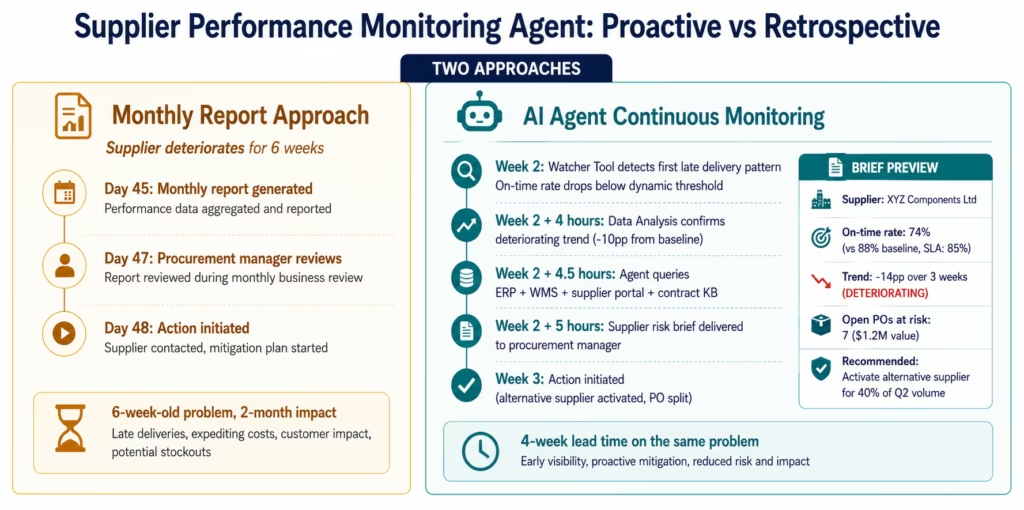
The problem: your procurement team tracks supplier performance: on-time delivery rate, quality pass rate, invoice accuracy: but the tracking is retrospective. The supplier who has been delivering 3-5 days late for the past 6 weeks is still scoring “acceptable” in the monthly report because the monthly average is pulled from a rolling 90-day window. By the time the trend is visible in the report, it has been a problem for two months.
The AI agent solution: the Supplier Performance Monitoring Agent continuously monitors supplier delivery performance across ERP, WMS, and carrier data: detecting deteriorating trends before they become visible in monthly reports and initiating the appropriate response.
What the Agent Monitors and How
On-time delivery monitoring:
The Watcher Tool monitors inbound PO expected delivery dates against confirmed delivery dates in the WMS. For each PO that reaches its expected delivery date without a WMS receiving confirmation:
- The agent queries the carrier or supplier portal for current shipment status
- If the shipment is in transit but late: the agent classifies the delay duration and pattern (first late delivery, recurring, or escalating)
- If the shipment has not shipped: the agent queries the supplier portal for the shipping confirmation status
Trend detection:
The Data Analysis node monitors the rolling delivery performance for each strategic supplier. When a supplier’s on-time delivery rate deteriorates by more than 10 percentage points from the 90-day baseline: even if the absolute rate is still above the SLA minimum: the agent flags it as a deteriorating trend requiring proactive action.
Supplier investigation and brief:
When a deterioration signal fires, the agent:
- Queries the ERP for all open POs with this supplier and their delivery risk status
- Queries the Knowledge Base for the supplier’s contract terms, SLA minimums, and the penalty clauses for repeated non-delivery
- Queries the WMS for the past 90 days of receiving records for this supplier: building the performance dataset
- Queries the supplier portal for any communicated capacity or lead time changes
- Assembles a supplier risk brief: trend chart (Data Analytics), performance vs SLA, open PO at risk, contract remedies available, and recommended action (proactive outreach, purchase order split, alternative supplier activation)
The procurement manager receives a proactive supplier risk brief: not a monthly report that shows a 6-week-old problem.
Use Case 4: Demand Anomaly and Reorder Intelligence Agent
The problem: your demand planning cycle runs weekly. Your reorder triggers fire when safety stock is breached. But demand anomalies: a product going viral on social media, a competitor going out of stock, a seasonal spike arriving two weeks early: happen between planning cycles. By the time the weekly report surfaces the anomaly, you have already missed 5-7 days of sell-through. And when the reorder trigger fires at safety stock breach, the supplier’s lead time may mean you are out of stock for another 10-14 days after the reorder.
The AI agent solution: the Demand Anomaly and Reorder Intelligence Agent monitors sell-through velocity continuously, detects anomalies as they develop, and assembles a multi-supplier reorder recommendation that accounts for lead times, MOQs, current stock positions, and in-transit quantities: delivering the recommendation in time to act before safety stock is breached.
The Agent’s Demand Signal Monitoring
Trigger: Data Analysis detects sell-through velocity for a SKU exceeding 1.5x the 14-day rolling average across any sales channel.
Step 1: Confirm anomaly: the agent queries all connected sales channel data (Shopify, Amazon, Walmart, direct) to confirm the velocity increase is broad (genuine demand signal) vs channel-specific (potential data error or channel-specific promotion).
Step 2: Root cause attribution: the agent queries the Knowledge Base for active promotions, the Web Crawling tool for social media mentions or competitor stock events, and the ERP for any pricing changes or distribution list additions that might explain the velocity increase.
Step 3: Inventory position assessment: the agent queries the ERP and WMS for:
- Current on-hand by location
- In-transit quantities (pending receipts from open POs)
- Allocated inventory (reserved for orders not yet shipped)
- Available-to-promise: on-hand minus allocated minus safety stock
At current velocity, the agent calculates: days of cover remaining on available ATP.
Step 4: Multi-supplier reorder analysis: for each qualified supplier for this SKU:
- Query the ERP for the supplier’s current lead time, minimum order quantity, and pricing tier
- Query the Knowledge Base for the supplier’s current capacity status and any communicated constraints
- Query the supplier portal (if API-accessible) for available-to-promise on their side
- Calculate: if an order is placed today with each supplier, what quantity arrives and when?
Step 5: Reorder recommendation assembly: the agent synthesises the multi-supplier analysis into a ranked reorder recommendation:
- Primary recommendation: quantity from Supplier A (shortest lead time, within current contract) to cover the projected demand gap
- Supplementary recommendation: additional quantity from Supplier B (if Supplier A cannot cover full gap)
- Risk flag: if no supplier can close the gap before projected stockout, the agent flags the risk window and recommends demand-side actions (price increase, allocation, channel prioritisation)
The planner receives this recommendation before the safety stock breach: with enough lead time to act on the supplier with the shortest lead time. The difference between a proactive reorder and a stockout is the detection window: continuous agent monitoring catches the demand signal 5-7 days earlier than weekly planning cycles.
Use Case 5: 3PL Reconciliation and Billing Audit Agent
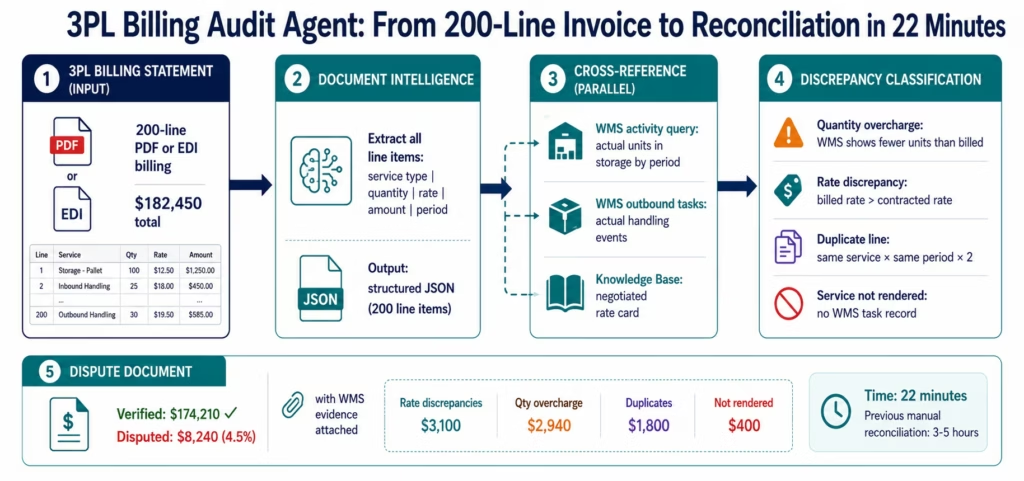
The problem: your 3PL partner bills monthly for storage, handling, and freight charges. The invoice arrives as a 200-line PDF or structured EDI billing statement. Reconciling the billing against your WMS activity log: verifying that every storage charge corresponds to a unit actually in their facility, every pick-and-pack charge corresponds to an actual outbound shipment, and every freight charge corresponds to an actual carrier shipment: takes 3-5 hours of finance and operations team time per billing cycle.
Billing errors in 3PL invoices are common: duplicate line items, charges for inventory that has been returned, units billed in the wrong storage tier, and carrier charges that do not match the negotiated rate card. Without systematic reconciliation, many of these errors go undetected.
The AI agent solution: the 3PL Reconciliation and Billing Audit Agent receives the 3PL billing statement, cross-references every charge line against the WMS activity data and the negotiated rate card, identifies discrepancies, and stages a dispute document for the finance team’s review.
The Agent Reconciliation Sequence
Trigger: 3PL billing statement received (PDF, EDI 820, or structured file from the 3PL portal).
Step 1: Document Intelligence: the billing statement is processed by Document Intelligence, extracting every charge line: service type, quantity, rate, amount, and the reference period. Output: structured JSON with all billing line items.
Step 2: WMS activity cross-reference: for each storage charge line, the agent queries the WMS for the actual daily unit count for the billed period and location tier. For each handling charge, the agent queries the WMS outbound task records for the period.
Step 3: Rate card validation: the agent queries the Knowledge Base for the current 3PL rate card (the negotiated contract rates). For each billing line, the rate applied in the invoice is compared against the contracted rate for that service category.
Step 4: Discrepancy classification: for each line with a discrepancy:
- Quantity discrepancy: WMS shows fewer units than billed → potential overcharge
- Rate discrepancy: billed rate exceeds contracted rate → contract violation
- Duplicate line: the same service for the same period appears twice → billing error
- Service not rendered: a handling charge with no corresponding WMS task record → charge for work not performed
Step 5: Dispute document assembly: the agent assembles a reconciliation report:
- Total invoice amount: $182,450
- Verified charges: $174,210
- Disputed charges: $8,240 (4.5% of invoice)
- Dispute breakdown: 3 rate discrepancies ($3,100), 1 quantity overcharge ($2,940), 2 duplicate lines ($1,800), 1 service not rendered ($400)
- Recommended action: submit dispute for the $8,240 with supporting WMS evidence
The finance team reviews a pre-reconciled report rather than spending 3-5 hours building one from scratch. The agent’s reconciliation takes 22 minutes. The dispute document, with WMS evidence attached, is ready for submission.
Key Outcomes and Results
Supply chain operations teams deploying eZintegrations AI Agents report the following within 60-90 days:
Shipment Exception Management:
- Investigation time per exception: 25-45 minutes (manual) → 6-12 minutes (agent-investigated)
- Exception queue clearance rate: from end-of-day backlog to same-shift clearance for 75-80% of exceptions
- Customer SLA breach notifications: issued within the agent’s investigation window: not after the breach
- Logistics team capacity for strategic work: increases 30-40%
Inventory Management:
- ERP-WMS discrepancy investigation time: 2-4 hours (manual trace) → 10-20 minutes (agent trace)
- Discrepancy resolution: from weekly reconciliation cycles to continuous
- Inventory accuracy: improves as discrepancies are caught within hours of occurrence rather than days later
Supplier Management:
- Supplier performance monitoring: from monthly retrospective to continuous
- Lead time on supplier deterioration detection: improves 4-6 weeks vs monthly report cycle
- Proactive PO reallocation: achievable when supplier risk is detected before impact
Demand Planning:
- Demand anomaly detection: within hours of velocity change vs end-of-week planning cycle
- Stockout incidents from demand spikes: reduce 40-55% with continuous monitoring and proactive reorder recommendations
- Reorder decision time: from hours (manual multi-supplier analysis) to minutes (agent recommendation)
3PL Reconciliation:
- Billing reconciliation time: 3-5 hours (manual) → 22-30 minutes (agent)
- Billing discrepancy detection rate: improves significantly: systematic per-line reconciliation vs sampling
- Recovered billing errors: typically 3-7% of 3PL invoice value per billing cycle
How to Get Started
Supply chain AI agents deploy on the same eZintegrations platform as Level 1-2 workflow automation: using the same carrier, ERP, WMS, and EDI connectors already configured, with agent-specific goal configuration, tool assignment, and autonomous action policy added.
Step 1: Import the supply chain AI agent templates from the Automation Hub
Browse the Automation Hub for supply chain agent templates:
- Shipment Exception Investigation Agent
- Inventory Discrepancy Resolution Agent
- Supplier Performance Monitoring Agent
- Demand Anomaly and Reorder Intelligence Agent
- 3PL Reconciliation and Billing Audit Agent
Each template includes pre-configured goal statement formats, tool assignments, and a starter knowledge base with common exception resolution playbooks.
Step 2: Connect your supply chain systems
If you already use eZintegrations for Level 1-2 supply chain workflows, the agents inherit those connections. For new deployments:
- ERP (SAP OData V4, NetSuite SuiteQL, Oracle REST): authentication and endpoint configuration
- WMS (Manhattan Associates, Oracle WMS, Blue Yonder): REST API credentials
- TMS (Blue Yonder, Oracle TMS, MercuryGate): REST API credentials
- Carrier APIs (FedEx, UPS, DHL): API keys and account credentials
- EDI connections: trading partner IDs and EDI exchange configuration
- 3PL portal: REST API or SFTP credentials
The connectors manage all authentication lifecycle (OAuth, token refresh, rate limits) automatically.
Step 3: Define the autonomous action policy
Configure what each agent can do autonomously:
- Read and query all connected systems: universally autonomous
- Trigger EDI transactions or workflow dispatch (replacement shipment, reorder): configure the value threshold for autonomous execution vs human approval
- Stage WMS corrections or ERP adjustments: for human approval by default; expand to autonomous as accuracy is confirmed
Step 4: Load the resolution playbook knowledge base
The knowledge base is the agent’s reference for resolution paths. Populate it with:
- Carrier exception resolution procedures (weather delay, hub congestion, customs hold)
- Inventory discrepancy root causes and correction procedures
- Supplier escalation criteria and contract remedy procedures
- 3PL dispute procedures and rate card documentation
This takes 3-6 hours and significantly improves agent resolution accuracy and consistency.
Step 5: Run supervised for two weeks, then expand autonomy
All agent proposed actions require human approval for the first two weeks. Observe investigation quality, root cause accuracy, and resolution appropriateness. Expand the pre-authorised autonomous action policy as confidence in agent judgment is established. Most supply chain teams reach 75-80% autonomous exception handling within 30-45 days.
Import your supply chain AI agent templates now: shipment exception, inventory discrepancy, supplier performance, demand anomaly, and 3PL reconciliation templates with pre-configured connectors and resolution playbooks.
FAQs
Supply chain workflow automation handles predefined scenarios with fixed execution paths such as order posting to WMS systems inventory broadcasting across sales channels and EDI 940 transmission to 3PL providers. These workflows execute the same sequence every time. AI agents handle exception-driven tasks where the investigation path changes based on findings. A shipment delay may be caused by a carrier hub issue customs hold warehouse pick failure or tracking data error, each requiring a different investigation sequence. The AI agent dynamically determines the next step based on live findings, resolves known patterns autonomously where permitted, and escalates novel cases with full context already assembled.
Using Automation Hub templates, first supervised deployment typically takes 4-7 business days. Carrier API TMS WMS and ERP connector configuration generally requires 1-2 days. Autonomous action policy configuration and knowledge base loading for carrier agreements resolution playbooks and 3PL contracts takes approximately 3-6 hours. Template configuration and testing typically takes 1 day. Supervised deployment where all AI actions require human approval usually runs for approximately 2 weeks before expansion into autonomous operation over 30-45 days based on measured accuracy and operational confidence.
Yes, eZintegrations connects directly to FedEx REST APIs UPS Developer APIs and DHL Express APIs for real-time shipment tracking rate retrieval and shipment creation. The Shipment Exception Investigation Agent uses API Tool Call to retrieve carrier scan events hub status updates and estimated delivery timelines during its investigation workflow. Carrier authentication token management and API rate limiting are handled automatically by the connector framework. For carriers without modern REST APIs, eZintegrations also supports EDI-based tracking and carrier portal web crawling.
Yes, A single supply chain AI agent can investigate across ERP systems such as SAP NetSuite and Oracle, warehouse management systems such as Manhattan Associates and Oracle WMS, and third-party logistics systems accessed through REST APIs or EDI interfaces. For inventory discrepancy investigations the agent cross-references ERP transaction history warehouse task records and 3PL inventory data simultaneously to identify the originating transaction responsible for the mismatch. The AI agent operates across all authenticated systems available within its configured enterprise tool registry.
The Demand Anomaly and Reorder Intelligence Agent continuously monitors sell-through velocity using Data Analysis models and triggers when demand exceeds thresholds such as 1.5 times the 14-day rolling average. Once triggered the agent retrieves inventory positions including on-hand allocated and in-transit stock, supplier lead times and minimum order quantities from ERP systems, supplier capacity information from knowledge bases or supplier portals, and root cause context from Knowledge Base and Web Crawling tools. The agent then produces ranked reorder recommendations across multiple suppliers while sufficient time remains to avoid safety stock breaches and stockout conditions.1. How do AI agents for supply chain differ from supply chain workflow automation?
2. How long does it take to deploy a supply chain AI agent?
3. Does eZintegrations work with carrier APIs like FedEx UPS and DHL for shipment tracking?
4. Can AI agents handle multi-party supply chain exceptions across ERP WMS and 3PL systems simultaneously?
5. How does the AI agent handle demand anomalies for reorder decisions?
Conclusion: Supply Chain Exceptions Are Not an Operational Fact of Life. They Are an Architecture Problem.
The seventeen shipment exceptions on Wednesday morning are not evidence that logistics is inherently manual: they are evidence that the systems containing the answers (carrier APIs, TMS, WMS, customs portals) are not connected to the intelligence layer capable of querying them in sequence and synthesising the results.
The 153-unit inventory discrepancy that has been sitting for three days is not evidence that inventory management is difficult: it is evidence that no system has been tasked with tracing the specific transaction that created the discrepancy across the SAP and WMS transaction logs simultaneously.
The 3PL billing error that went undetected for three months is not evidence that 3PL partners are unreliable: it is evidence that no system has been systematically cross-referencing every billing line against the WMS activity records and the contracted rate card.
AI agents are the architecture layer that closes these gaps. They receive goals, traverse connected systems in the investigation sequence the goal requires, resolve known patterns autonomously, and escalate novel situations with full context assembled. The exceptions that consumed the logistics coordinator’s morning become 6-minute agent investigations delivered before the team starts work.
eZintegrations Level 3 AI Agents connect to the full supply chain stack: carrier APIs, TMS, WMS, ERP, supplier portals, customs systems, and 3PL billing: with 9 native enterprise tools, a configurable autonomous action policy, and an immutable audit trail. No custom development. No separate agent framework to integrate.
Import your supply chain AI agent templates now: shipment exception, inventory discrepancy, supplier performance, demand anomaly, and 3PL reconciliation agents with pre-configured connectors and resolution playbooks.

