
Real-Time AI Data Pipelines: How Intelligent Workflows Replace Batch Processing
June 7, 2026Real-time AI data pipelines process and act on data within milliseconds to seconds of its creation: replacing nightly or hourly batch jobs with continuous Stream processing architectures that use AI nodes (Document Intelligence, LLM Classification, Data Analysis) to enrich, classify, and route data as it flows. The key architectural components are an event stream (Kafka, AWS Kinesis, Azure Event Hubs), a stream processing layer, and an AI enrichment layer: all connected to destination systems for immediate action.
TL;DR
- Batch processing is appropriate when the latency between data creation and data availability does not affect decisions. Real-time pipelines are necessary when decisions must be made on data that is seconds or minutes old, not hours or days old.
- The shift from batch to real-time is not an all-or-nothing architectural choice. Most enterprise data estates benefit from a hybrid: event-driven real-time for the data domains where latency creates business cost, and batch for the domains where latency is acceptable and batch is operationally simpler.
- AI data pipelines add a third dimension to the real-time vs batch debate: AI enrichment (Document Intelligence, LLM Classification, Data Analysis) can be applied within the streaming pipeline itself: so data arrives at its destination not just faster, but already enriched, classified, and anomaly-checked.
- The “lambda architecture” (separate batch and real-time layers that converge at serving) was the 2015 answer to this problem. The “kappa architecture” (stream processing only, batch views computed by replaying the stream) is the more common 2026 approach for new builds. The practical enterprise question is how to migrate incrementally from batch to real-time without a full rebuild.
- eZintegrations supports both streaming (Kafka, AWS Kinesis, Azure Event Hubs, Google Pub/Sub) and batch data pipelines in the same workflow builder: with AI nodes available in both: making the migration from batch to real-time a configuration change rather than a platform change.
What Batch Processing Is and What It Costs
Batch processing collects data over a time window: an hour, a night, a week: and processes the accumulated records as a single job at the end of the window. The simplest enterprise batch job: extract all transactions created since last night’s run, transform them into the target format, and load them into the data warehouse. This is the classic ETL pattern that has powered enterprise data infrastructure for 30 years.
Batch processing is not fundamentally broken. For many data domains, the latency it introduces: hours between data creation and data availability: is irrelevant to the decisions the data informs. The quarterly financial statements do not need this morning’s transactions; they need last month’s complete and reconciled data. The annual revenue report does not need real-time precision; it needs audit-ready accuracy.
The cost of batch processing is not latency per se. It is latency in contexts where latency creates measurable business cost.
The batch lag problem in concrete terms:
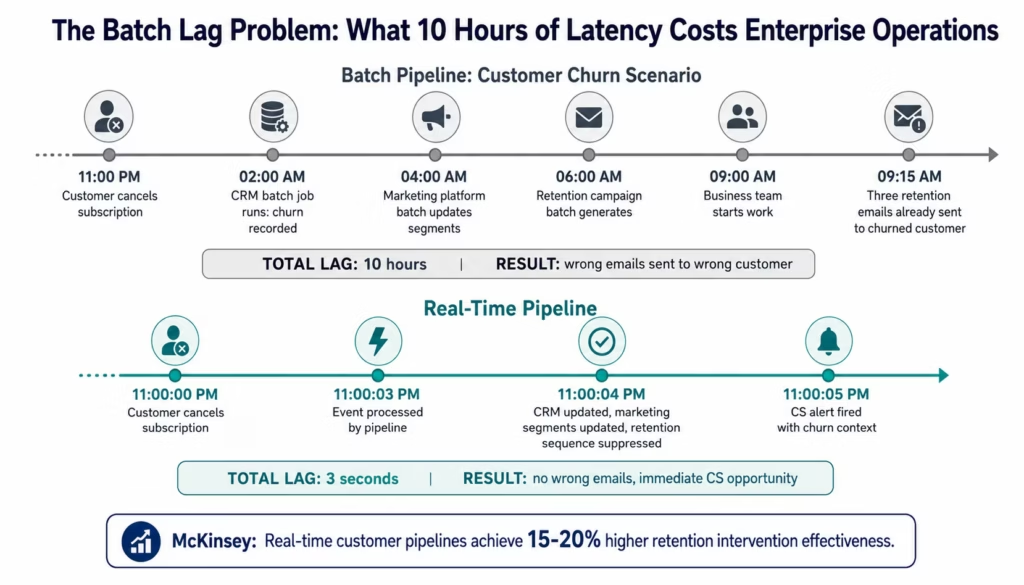
A customer churns at 11 PM. The CRM batch job runs at 2 AM and removes them from active customer lists. The marketing automation batch job runs at 4 AM and updates segments. By the time the marketing team begins work at 9 AM, the churned customer has already received three automated emails with retention offers: offers that are now irrelevant or worse, confusing to a customer who has already cancelled. The total lag from churn event to correct marketing system state: up to 8-10 hours.
The same lag that is inconsequential for financial reporting is consequential for customer lifecycle management: because the marketing action triggered by stale data produces the wrong outcome.
According to McKinsey, enterprises with real-time customer data pipelines (sub-minute latency for customer lifecycle events) achieve 15-20% higher retention intervention effectiveness compared to those relying on daily batch updates. The intervention arrives while the customer is still in the decision window; a batch-delayed intervention arrives after the window has closed.
What “Real-Time” Actually Means in Enterprise Data Pipelines
“Real-time” is used loosely in enterprise data discussions: it can mean milliseconds, seconds, or minutes depending on the context. Precision about the latency requirement is the first step in any real-time pipeline architecture decision.
The Latency Spectrum
Streaming (sub-second, typically 10-500ms): data is processed and acted on within milliseconds of creation, commonly using platforms such as Apache Kafka Streams for stateful event processing.
Used for: financial market data (price updates must reach trading systems before the price changes), fraud detection (transaction must be scored before the payment completes), and operational control systems (manufacturing sensor data driving real-time process adjustments). Technology: Apache Kafka, AWS Kinesis, Apache Flink.
Near-real-time (1-60 seconds): data is processed within seconds of creation. Used for: customer lifecycle event processing (churn signals, activation milestones), inventory level broadcasting (stock levels updated across channels within 30 seconds of warehouse movement), and operational alerting (anomaly detected and alert sent within 60 seconds of the anomalous condition). Technology: Kafka with eZintegrations workflow triggers, webhooks with immediate processing.
Micro-batch (1-15 minutes): data is accumulated in small windows and processed at short intervals. Used for: dashboards that need near-current data but do not require second-level precision, reporting that is described as “real-time” but actually means “within the last 15 minutes,” and use cases where continuous streaming infrastructure adds complexity without adding business value. Technology: Spark Structured Streaming in micro-batch mode, scheduled integration jobs with short intervals.
Batch (hourly to daily): the traditional ETL pattern. Still appropriate for: financial close processing, reporting that requires complete and reconciled data, large-scale data warehouse loads, and analytical workloads that process the full historical dataset.
The Right Question
The right question is not “should we do real-time or batch?” It is “what is the business cost of the current latency for each data domain, and does reducing that latency justify the architectural complexity of streaming?”
For most enterprise data estates, the answer is: a small number of high-value data domains (customer lifecycle events, inventory movements, financial transactions, operational alerts) justify streaming architecture. The majority of data domains (historical analytics, compliance reporting, planning data) do not.
When Batch Is Still the Right Choice
Batch processing remains the correct architecture for a significant portion of enterprise data workflows. An honest guide to real-time pipelines must acknowledge where batch is not just acceptable but preferable.
When data completeness matters more than timeliness: Financial close processes, audit reporting, and compliance submissions require complete, reconciled, reviewed data. Running these in real-time would mean producing interim results that look complete but may change as late-arriving records are processed. The monthly P&L statement must be correct, not just current.
When the downstream system processes data in batches anyway: If the destination data warehouse is loaded by a nightly batch ETL from multiple sources, streaming data in real-time from one source does not improve the downstream analytics experience: the data still sits in a staging table until the warehouse load runs. The bottleneck is not the pipeline latency; it is the load strategy.
When data volume makes continuous processing impractical: A retailer processing 50,000 point-of-sale transactions per hour may find that streaming each transaction individually is more expensive (per-record processing cost, API call overhead) than accumulating them in 15-minute micro-batches and processing 12,500 records at once. The latency difference: 15 minutes versus seconds: is irrelevant for the reporting use case the data feeds.
When operational complexity is not justified by the use case: Streaming infrastructure (Kafka cluster management, consumer group monitoring, offset management, exactly-once delivery configuration) is significantly more operationally complex than a scheduled batch job. If the use case does not require latency below 15 minutes, the operational overhead of a full streaming architecture is often not justified.
The Business Cost of Batch Latency: Five Enterprise Scenarios
These five scenarios represent the enterprise data domains where batch latency creates measurable, quantifiable business cost: the domains where the switch to real-time has a calculable ROI.
Scenario 1: Customer Churn Intervention
A customer engages in behaviour that predicts churn: declining login frequency, feature abandonment, support ticket with cancellation language. The churn signal exists in the product analytics data and the support system. In a batch pipeline, this signal is aggregated in the daily CRM sync and the CS team sees it the next business morning. In a real-time pipeline, the signal is processed within seconds, the CS manager receives an alert within a minute, and the intervention call happens the same day: while the customer is still in the decision window.
The quantifiable cost of batch latency: the difference in intervention success rate between same-day outreach (while the decision is open) and next-day outreach (after the decision may be made). McKinsey data on retention interventions suggests this difference is 15-30% in intervention conversion rate.
Scenario 2: Inventory Stockout Prevention
A product’s daily sell-through velocity triples at 11 AM on a Tuesday because of a viral social media mention. In a batch pipeline, the inventory system’s broadcast to connected channels runs on a nightly schedule. By the time the stockout risk is visible in Wednesday morning’s inventory report, the SKU may already be out of stock: or overcorrected with an emergency reorder that creates overstock. In a real-time pipeline, the velocity anomaly is detected within the same hour (Data Analysis node monitoring sell-through rates), the inventory alert fires to the planning team, and the reorder decision is made while there is still stock to serve demand.
Scenario 3: Financial Transaction Fraud Detection
A fraud pattern emerges across transaction data: card-present transactions in multiple geographies within 2 hours. In a batch pipeline, fraud analytics runs every 4 hours. A fraud ring can execute hundreds of fraudulent transactions before the pattern is visible. In a real-time pipeline, each transaction is scored for fraud risk within the transaction approval window: the fraud pattern triggers an alert after the second suspicious transaction, not after 400.
The Nilson Report estimates that real-time fraud detection reduces fraud losses by 45-60% compared to batch analytics-based detection, driven entirely by the detection latency difference.
Scenario 4: Dynamic Pricing and Competitive Response
An e-commerce retailer needs to respond to competitor price changes within minutes. In a batch pipeline, competitor price monitoring runs hourly or daily. By the time the pricing team sees that a competitor reduced their price on a key SKU by 15%, the competitor has been capturing price-sensitive customers for 8 hours. In a real-time pipeline (Web Crawling node monitoring competitor pages on a configurable schedule), the price change is detected within minutes and a pricing alert is routed to the merchandising team or an automated repricing rule is triggered.
Scenario 5: Clinical Decision Support
In healthcare, a patient’s lab result arrives at 3 PM. The care team’s clinical decision support system runs a batch job at midnight. The abnormal lab result that should have triggered an urgent clinical review does not appear in the care team’s workflow until the next morning: 18 hours after the result was available. In a real-time pipeline (FHIR HL7 lab result event triggers immediate workflow), the abnormal result triggers a care team notification within minutes of the result being available.
The Architecture of a Real-Time AI Data Pipeline
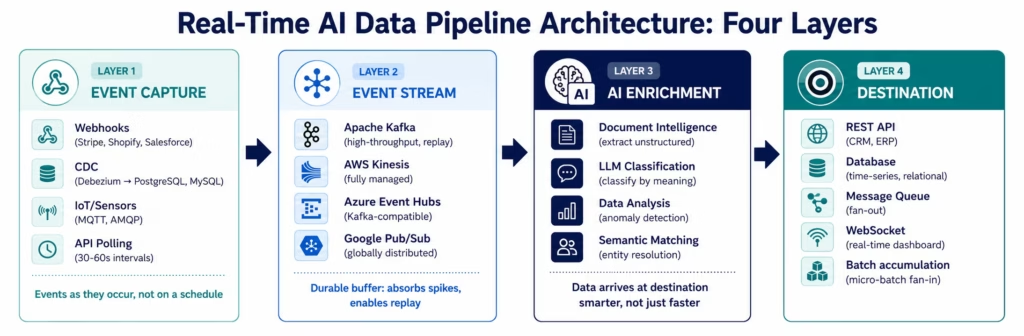
A production real-time AI data pipeline has four layers. Each layer has a specific responsibility and a set of technology choices.
Layer 1: Event Capture
What it does: receives data events from source systems as they occur: not on a schedule.
Technology options:
- Webhooks for SaaS applications that support them (Stripe, Shopify, Salesforce Platform Events, GitHub): the source system pushes the event to the pipeline immediately on occurrence
- Change Data Capture (CDC) for databases (Debezium for PostgreSQL, MySQL, SQL Server): monitors the database transaction log and publishes change events as they are committed
- IoT/sensor protocols (MQTT, AMQP) for device and sensor data
- API polling with short intervals for sources that do not support webhooks: polling every 30-60 seconds is not real-time, but may be the best available option for systems without event support
The key requirement: the event capture layer must deliver events with low latency (typically sub-second from source system commit to pipeline receipt) and with reliability guarantees (no event loss if the pipeline is temporarily unavailable).
Layer 2: Event Stream (The Buffer)
What it does: provides a durable, ordered buffer between event producers and event consumers: absorbing volume spikes, enabling replay, and decoupling processing speed from ingestion rate.
Technology options:
- Apache Kafka: the dominant choice for high-throughput, ordered event streaming with configurable retention and multiple consumer groups. Supports replay (consumer can re-read from any offset within the retention window).
- AWS Kinesis Data Streams: fully managed alternative to Kafka on AWS, simpler to operate. Limited to 24 hours of retention by default (extendable to 365 days).
- Azure Event Hubs: Azure’s fully managed event streaming service, compatible with the Kafka protocol in most configurations.
- Google Pub/Sub: Google’s globally distributed message streaming service. No retention-based replay by default (messages deleted after acknowledgement unless a snapshot is taken).
The key requirement: the event stream must handle peak ingestion rates without backpressure to the source (the source should never slow down because the pipeline cannot keep up), maintain event ordering (at the partition or shard level), and retain events long enough for consumer recovery after an outage.
Layer 3: AI Enrichment Layer
What it does: applies intelligence to each event as it passes through: enriching, classifying, anomaly-checking, or transforming the event before delivery to the destination.
This is where AI data pipelines differ from traditional streaming pipelines. A traditional streaming pipeline applies deterministic transformation rules to each event. An AI data pipeline applies:
- Document Intelligence: if the event contains an unstructured document (an invoice, a clinical note, a support ticket body), Document Intelligence extracts structured fields from the unstructured content while the event is in the stream: the destination receives structured data, not a raw document attachment.
- LLM Classification: classifies the event into routing categories based on content. A support ticket event is classified by urgency, type, and churn signal before it reaches the CS team’s work queue.
- Data Analysis: detects anomalies in the event stream in real time. A transaction amount that is statistically outside the normal distribution for this customer triggers a fraud alert. An inventory movement that exceeds 3σ of the normal daily variance triggers a demand signal alert.
- Semantic Matching: resolves entity identity as events flow through the pipeline. An order event from Shopify that references “Google LLC” is matched to the existing Salesforce account “Google” before the event is delivered to the ERP: no duplicate records created.
The AI enrichment layer is the step that makes the data arriving at its destination more useful than the raw event: not just faster, but smarter.
Layer 4: Destination Delivery
What it does: delivers the enriched event to one or more destination systems in the format and protocol each expects.
Delivery options:
- REST API call to the destination system (CRM update, ERP posting, analytics platform event)
- Database write (time-series database for IoT telemetry, relational database for transactional data)
- Message queue publication (publish to a Kafka topic or SQS queue consumed by downstream services)
- WebSocket push to a real-time dashboard or connected client
- Batch accumulation (fan-in: accumulate streaming events into micro-batches for destinations that process data in batch mode)
AI Enrichment Within the Stream: What It Changes
The most important architectural insight about AI data pipelines is this: AI enrichment is not a post-processing step applied after data arrives. It is applied within the stream: data is enriched as it flows, before it reaches its destination.
This changes what arrives at the destination system. In a traditional real-time pipeline, the destination receives the raw event: a Shopify order event containing order fields as sent by Shopify. In an AI-enriched pipeline, the destination receives the order event plus: the customer’s churn risk score (from Data Analysis on product usage), the order’s fraud risk signal (from Data Analysis on the transaction), the customer’s unified identity (from Semantic Matching against the CRM), and a classification of the customer segment (from LLM Classification on purchase behaviour). The ERP, CRM, and analytics system all receive a richer record than was in the original event.
Three Stream Enrichment Patterns
Pattern 1: Inline enrichment (synchronous)
The AI node processes the event in-stream before forwarding it. Each event passes through the AI enrichment step before delivery. Latency: the AI processing time is added to the pipeline’s end-to-end latency. Appropriate for enrichments where the AI result is required for routing or for the destination system to function correctly.
Example: a support ticket event is classified by LLM Classification (type, urgency, churn signal) before being routed. The routing decision requires the classification: so the classification must happen inline.
Pattern 2: Async enrichment (asynchronous)
The event is forwarded to the destination immediately. The AI enrichment runs in parallel and updates the destination system when complete. The destination receives the raw event in real time and the enriched update within seconds. Latency: near-zero for initial delivery, seconds for enriched update.
Example: an order event is forwarded to the ERP immediately (so fulfilment is not delayed). In parallel, the order event passes through Document Intelligence to extract any attached delivery instructions. The ERP receives the enriched record with extracted instructions within 2-3 seconds of the initial delivery.
Pattern 3: Enrichment-as-filter
The AI node operates as a gate: events that meet the AI-evaluated criteria pass through the pipeline; events that do not are routed to a different destination (a review queue, a different processing path, or a discard queue). The AI enrichment determines whether the event proceeds, is modified, or is handled differently.
Example: an invoice event passes through a fraud signal Data Analysis node. Invoices with normal statistical profiles flow through to AP processing. Invoices with elevated fraud signals route to a human review queue. The AI enrichment is a branching mechanism, not just a data-addition step.
Lambda vs Kappa vs Hybrid: Choosing Your Architecture
The debate between Lambda and Kappa architecture has been ongoing since LinkedIn’s Jay Kreps proposed the Kappa Architecture in 2014. In 2026, the practical enterprise question is less about choosing between them and more about choosing where to start and how to migrate.
Lambda Architecture
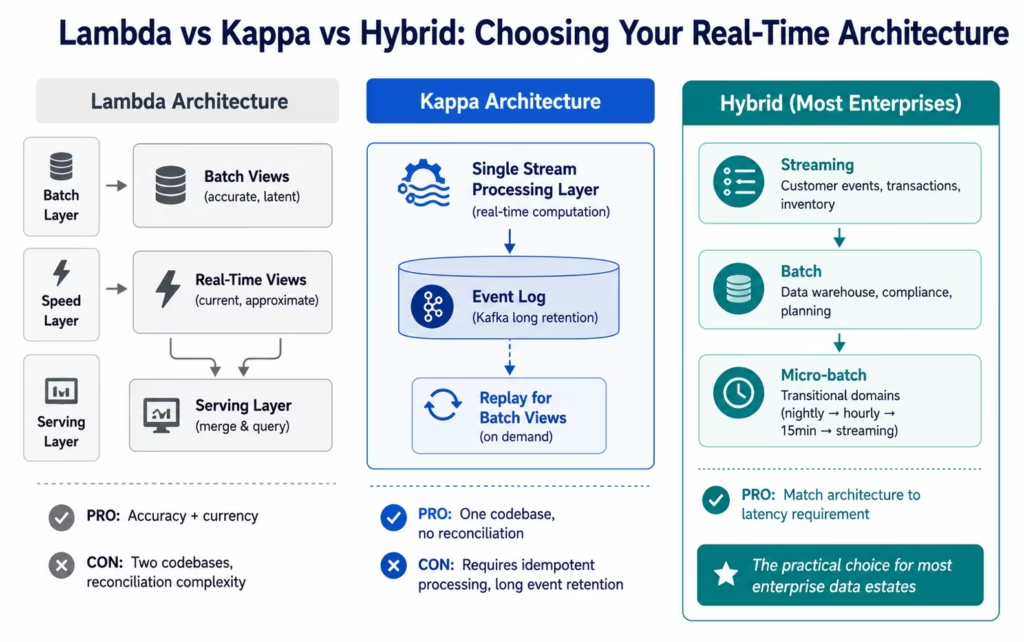
Lambda processes data through two paths: a batch layer (processes the complete historical dataset periodically, produces accurate but latent batch views) and a speed layer (processes the recent event stream, produces approximate but current real-time views). A serving layer merges batch and speed views to answer queries.
Lambda was designed to solve the accuracy-vs-latency trade-off: batch views are accurate but stale, speed views are current but potentially imprecise. By merging them at serving, queries get the best of both.
The operational burden of Lambda is significant: two separate processing systems (batch and streaming) must be maintained, their codebases kept in sync (the same transformation logic implemented twice), and the serving layer must reconcile potentially contradictory results from the two paths.
Kappa Architecture
Kappa eliminates the batch layer. Everything is processed as a stream. Batch views are computed by replaying the event stream (Kafka’s retention makes this practical: replay the full historical event log to rebuild any view from scratch). One codebase, one processing system, no reconciliation between batch and streaming views.
Kappa requires that the event stream retains history long enough for replay to be practical (Kafka’s long-retention capability makes this feasible) and that stream processing is idempotent and exactly-once (so replaying the same event multiple times produces the same result).
For new builds in 2026, Kappa is the dominant choice for use cases where a single streaming architecture can handle both real-time and historical processing requirements.
The Hybrid Pragmatist (Most Enterprises)
Most enterprise data estates are neither pure batch nor pure streaming: they are hybrids, built incrementally over years. The practical architecture for most organisations:
- Streaming for high-value, latency-sensitive data domains (customer lifecycle events, financial transactions, inventory movements, operational alerts)
- Batch for historical, analytical, and compliance data domains (data warehouse loads, regulatory reporting, planning data)
- Micro-batch as the transitional pattern for domains moving from batch to streaming: reduce the batch interval from nightly to hourly to every 15 minutes, validating at each step that the downstream system can handle increased frequency before moving to full streaming
The hybrid approach is not an architectural compromise: it is a pragmatic recognition that different data domains have different latency requirements, and that the operational complexity of full streaming is only justified where the latency requirement justifies it.
The Incremental Migration Path: Batch to Real-Time Without a Rebuild
The most common question from enterprise data teams is not “how do we build a real-time pipeline” but “how do we get from our current batch pipeline to real-time without a full rebuild.” Here is the incremental path.
Step 1: Identify the Highest-Latency-Cost Domain
Before migrating anything, quantify the business cost of current batch latency for each major data domain. Which domain creates the most measurable business impact from its current batch frequency? The customer churn scenario, the inventory stockout risk, the fraud detection window: which one affects revenue most directly?
Start there. The first real-time migration should be the one with the clearest ROI, both because it justifies the investment and because it builds the organisational experience needed for subsequent migrations.
Step 2: Introduce an Event Stream in Parallel
Rather than replacing the batch pipeline, introduce a Kafka topic or AWS Kinesis stream alongside it. The source system continues to generate data for the batch pipeline. It also publishes events to the new event stream. The batch pipeline runs unchanged; the event stream provides the real-time layer.
This parallel-run approach lets you validate the event stream’s completeness and accuracy against the batch output before any dependency switches to the real-time source. Run them in parallel for 2-4 weeks.
Step 3: Migrate the Highest-Impact Consumer to the Event Stream
One downstream consumer switches from reading the batch output to consuming from the event stream. The CS churn alert system, for example, switches from reading the daily CRM sync file to subscribing to the real-time customer lifecycle event stream. Everything else still runs on batch.
Validate that the migrated consumer’s behaviour on the event stream matches expectations. Identify any data quality or completeness gaps between the event stream and the batch output.
Step 4: Add AI Enrichment to the Stream
Once the base event stream is validated, add AI enrichment nodes. The customer lifecycle event stream gains a Data Analysis node that detects churn signals. The order event stream gains a Semantic Matching node that resolves customer identity across CRM and ERP. The invoice event stream gains Document Intelligence for PDF extraction.
This is the point where the real-time pipeline becomes not just faster but smarter than the batch pipeline it is replacing.
Step 5: Decommission the Batch Job for This Domain
When all consumers of the batch pipeline for this domain have migrated to the event stream, decommission the batch job. The domain is now fully real-time.
Then move to the next domain.
How eZintegrations Enables Real-Time AI Data Pipelines
eZintegrations connects the four layers of a real-time AI data pipeline natively: event capture, event stream, AI enrichment, and destination delivery: within the same no-code workflow builder used for traditional batch integrations.
Event capture: eZintegrations receives events from webhooks (Shopify, Stripe, Salesforce, GitHub, and 200+ webhook-capable systems), database CDC feeds (via Debezium or direct database connector), and scheduled polling at configurable intervals (as short as 30 seconds for near-real-time on systems without native webhook support).
Event stream connectivity: eZintegrations is a native consumer and producer for Apache Kafka, AWS Kinesis, Azure Event Hubs, and Google Pub/Sub. As a consumer, incoming stream events trigger eZintegrations workflows. As a producer, workflow outputs publish events to the stream for downstream consumers. Consumer offset management, consumer group configuration, and partition key assignment are all configurable.
AI enrichment in the stream: Document Intelligence, LLM Classification, Data Analysis, and Semantic Matching are all available as workflow nodes within the streaming pipeline. An event arriving from Kafka passes through any combination of AI enrichment nodes before delivery: the enrichment is applied inline, at stream processing time, before the event reaches its destination.
Destination delivery: eZintegrations delivers to REST APIs, databases (PostgreSQL, MySQL, SQL Server, Oracle, Snowflake, BigQuery, Redshift), other Kafka topics, Azure Service Bus, AWS SQS, and WebSocket endpoints: from the same workflow that consumed the original event.
Batch pipeline support for the hybrid: the same eZintegrations platform that handles real-time streaming also handles scheduled batch jobs (nightly ERP syncs, weekly data warehouse loads, monthly compliance reports). The hybrid architecture: streaming for high-value domains, batch for analytical domains: runs in the same platform. No separate tools for batch and streaming.
SOC 2, GDPR, and HIPAA: all stream processing within eZintegrations is covered by SOC 2 Type II certification. For healthcare organisations streaming clinical event data (FHIR patient events, lab results, ADT messages), a signed BAA covers all real-time pipeline processing. For EU customer event streams, GDPR compliance applies throughout the pipeline. No streaming event data is processed by external AI providers: all AI enrichment runs natively within eZintegrations’ compliant infrastructure.
IPSec Tunnel: for enterprises with on-premises event sources (on-premises Kafka, on-premises database CDC), eZintegrations connects via IPSec Tunnel: the same encrypted tunnel used for ERP and database integrations.
FAQs
A real-time AI data pipeline processes and acts on data within seconds of its creation using event streaming technologies such as Kafka AWS Kinesis or Azure Event Hubs as the transport layer and AI nodes such as Document Intelligence LLM Classification and Data Analysis for inline enrichment. Unlike batch pipelines that process accumulated data periodically, real-time pipelines process each event individually as it occurs and deliver enriched actionable data to downstream systems immediately.
Enterprises should replace batch processing with real-time pipelines when batch latency creates measurable business cost. Common domains where real-time processing delivers significant value include customer churn intervention, inventory management, financial fraud detection, dynamic pricing, competitive response, and clinical decision support. For workloads where completeness and historical accuracy are more important than low latency, such as financial reporting compliance processing and analytical reporting, batch processing remains more appropriate.
Streaming processes each event individually as it arrives with sub-second latency. Micro-batch accumulates events over small windows such as 1-15 minutes before processing them together. Batch processing accumulates data over long windows ranging from hours to days and processes it periodically. Most enterprise environments use a hybrid architecture where streaming handles latency-sensitive workloads batch handles analytical and compliance workloads and micro-batch provides a transitional approach between the two.
AI enrichment applies AI nodes inline as each event moves through the streaming pipeline before the event reaches its destination system. For example a support ticket event can pass through LLM Classification so the downstream customer service system receives a classified ticket instead of raw text. An invoice event can pass through Document Intelligence so the ERP receives structured extracted fields automatically. AI processing becomes part of the event flow itself rather than a separate downstream post-processing task.
Lambda architecture processes data through parallel batch and streaming paths and merges the outputs at a serving layer. This approach balances historical accuracy with low-latency visibility but requires maintaining two separate processing codebases. Kappa architecture uses a single streaming pipeline with long-term event retention and replay capability to generate both current and historical views from the same stream. Kappa architecture is more common for new enterprise streaming platforms because it simplifies operational complexity and eliminates reconciliation between batch and streaming outputs.
The recommended migration strategy is incremental and parallel. First identify the business domain where latency has the highest operational cost. Next introduce an event stream in parallel with the existing batch pipeline. Then migrate the highest-value downstream consumers to the stream while batch processing continues running. After validation add AI enrichment nodes to the stream and finally decommission the batch process once all dependent systems have transitioned successfully. This phased approach reduces migration risk and validates completeness accuracy and operational stability at every stage.1. What is a real-time AI data pipeline?
2. When should enterprises replace batch processing with real-time pipelines?
3. What is the difference between streaming micro-batch and batch processing?
4. How does AI enrichment in a streaming pipeline work?
5. What is the difference between Lambda and Kappa architecture for real-time data?
6. How do you migrate from batch to real-time without rebuilding everything?
Conclusion: Real-Time Is Not the Goal. The Right Latency for the Right Domain Is.
The goal of a real-time AI data pipeline is not “real-time” for its own sake. Streaming infrastructure is more complex to build and operate than batch. The only justification for that complexity is the measurable business value created by delivering data faster and smarter.
For the data domains where that value is real: customer lifecycle events that determine whether a retention intervention arrives in time, inventory movements that determine whether a stockout is caught before it happens, financial transactions that determine whether fraud is caught before the customer’s funds are gone: the value is substantial and the architectural investment is clearly justified.
For everything else, batch processing is not a technical failure to be corrected. It is the appropriate tool for data domains where completeness and accuracy matter more than immediacy.
The four-layer real-time AI data pipeline: event capture, event stream, AI enrichment, destination delivery: is the architecture that serves the real-time domains. The AI enrichment layer is what distinguishes a modern real-time pipeline from the streaming ETL of 2015: data does not just arrive faster, it arrives classified, enriched, and anomaly-checked by the time it reaches its destination.
eZintegrations delivers this architecture natively: streaming connectors for Kafka, Kinesis, Event Hubs, and Pub/Sub; AI nodes for inline enrichment; and batch pipeline support in the same platform for the hybrid enterprise. The migration from batch to real-time is a configuration evolution, not a platform rebuild.
Book a free demo and bring your current batch pipeline. We will show you the event capture configuration, the streaming architecture for your highest-value domain, and the AI enrichment nodes that apply to your specific data type.

