
JD Edwards Invoice Automation: Modernising AP Matching Without Replacing JDE
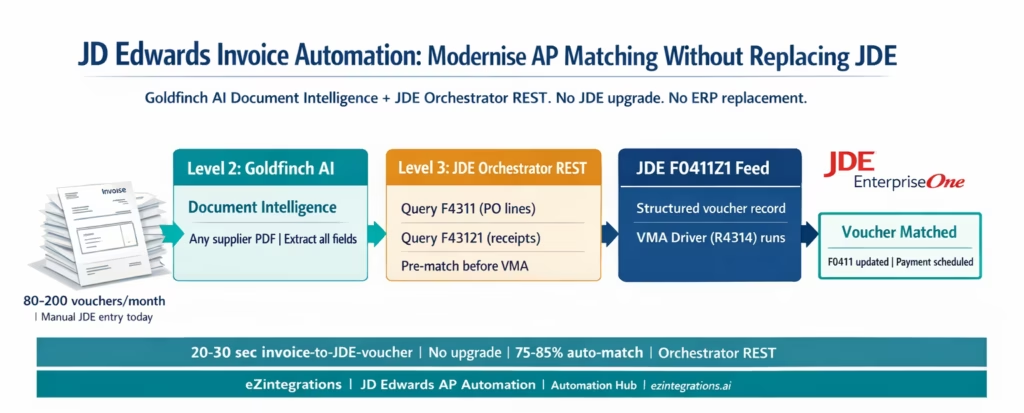
April 7, 2026To modernise JD Edwards EnterpriseOne invoice matching without an ERP upgrade or replacement, eZintegrations uses Goldfinch AI Document Intelligence to extract invoice data from any supplier PDF, queries the JDE AIS Server via Orchestrator REST API to retrieve Purchase Order data from F4311 and Receipt data from F43121, runs a pre-matching engine with configurable tolerance, and feeds matched voucher records into JDE’s F0411Z1 batch upload table via Orchestrator. JDE’s native Voucher Match Automation (VMA) process then processes the pre-populated F0411Z1 records, matching them to F43121 and F4311 automatically. The entire cycle adds AI document intelligence and automated PO/receipt retrieval on top of JDE’s existing VMA without modifying JDE, without a JDE upgrade, and without replacing the ERP.
TL;DR
JD Edwards EnterpriseOne has a native 3-way matching process: Voucher Match Automation (VMA) matches F0411Z1 voucher records against F43121 receipts and F4311 PO lines. What VMA requires: supplier invoice data must already exist in F0411Z1 as structured records. Getting it there is manual. – eZintegrations adds the intelligence layer before VMA: Goldfinch AI Document Intelligence (Level 2) extracts invoices from any PDF format, Level 3 AI Agents query JDE via Orchestrator REST API for PO and receipt data, and the matched voucher record is pushed to F0411Z1 via the JDE AIS Server. – JDE terminology: supplier invoices become Vouchers. Goods receipts are stored in F43121. PO lines are F4311. VMA is the Voucher Match Automation Driver (R4314).
JDE Orchestrator REST base: https://{jde-server}:{port}/jderest/. Authentication: POST /jderest/orchestrator/jde-login. Data queries: POST /jderest/v2/dataservice. Orchestration execution: POST /jderest/orchestrator/{orchestrationName}. No JDE upgrade required. No JDE customisation. No ERP replacement. Works with JDE 9.2 and Orchestrator Tools 9.2+. Go live from the Automation Hub JDE AP Invoice Processing template in 6-8 hours.
Why JDE AP Teams Are Still Processing Invoices Manually in 2026
Your organisation runs JD Edwards EnterpriseOne. It has run JDE for 10, 15, maybe 20 years. The customisations are extensive. The integrations are embedded in operations. The finance team knows JDE well. Nobody is replacing it next year.
But your AP team is still manually entering supplier invoices.
Every morning, 80 to 200 supplier invoices arrive in the shared mailbox. Your AP clerk opens each PDF, reads the header data, identifies the JDE Purchase Order number (when it is visible), navigates to the JDE P0411 Enter Vouchers screen, enters the header: company, supplier, invoice number, invoice date, gross amount, payment terms. Then goes to the detail lines: line by line, item, quantity, unit cost. Then links to the receipt. Then saves.
That is 12-18 minutes per voucher. At 150 vouchers per month: 30-45 hours of manual JDE data entry before JDE’s own VMA matching logic even starts.
eZintegrations does not replace JDE. It adds the layer before JDE that makes VMA work automatically.
What JDE EnterpriseOne Provides for Voucher Matching
JD Edwards EnterpriseOne has built-in 3-way matching logic. Understanding the full stack is important before designing the automation layer.
JDE AP terminology (critical for this post):
In JDE EnterpriseOne, supplier invoices are called Vouchers. The AP Ledger table is F0411. Goods received against a Purchase Order are stored as receipts in the Purchase Order Receiver File (F43121). PO lines are in the Purchase Order Detail File (F4311). PO headers are in F4301.
JDE’s native Voucher Match Automation (VMA):
The Voucher Match Automation process (using the VMA Driver program R4314 and the Voucher Match Workbench P4314) automates 3-way matching when invoice data is already in JDE. The process:
- Reads invoice records from the Voucher Transaction Batch Upload table F0411Z1 (the interface table for batch voucher entry)
- Matches each F0411Z1 record against receipts in F43121 and PO lines in F4311
- In suggest mode: proposes matches for AP clerk review in the P4314WB Workbench
- In final mode: creates completed F0411 vouchers with accounting entries, updating F0911 (Account Ledger)
- Applies tolerance rules configured in P4322 (Tolerance Rules) by function type: quantity tolerance, amount tolerance, and rounding tolerance
The VMA is a capable matching engine. It handles partial receipts, quantity variances, amount variances, and multi-line POs. JDE R26 added support for tolerance checking on foreign currency amounts.
What VMA requires from your AP team before it can run:
Invoice data must be in F0411Z1. Getting invoice data into F0411Z1 from supplier PDF emails is entirely manual in a standard JDE installation. Your AP clerk enters each voucher in the P0411 (Enter Vouchers screen) or enters batch records that load into F0411Z1. Either way, the data entry happens before VMA can touch it.
VMA is powerful. The bottleneck is upstream.
JDE Orchestrator (the REST API layer):
JDE EnterpriseOne Orchestrator (included at no extra cost with JDE 9.2 and Tools release 9.2+) exposes JDE as a REST API via the Application Interface Services (AIS) server. External systems call orchestrations as REST endpoints. Orchestrations can read JDE data, write to JDE tables, trigger JDE batch processes (UBEs), and fire JDE notifications. This is the API layer eZintegrations uses to query PO and receipt data and to feed voucher records into F0411Z1.
The Manual Gap Before Voucher Match Automation
Three specific bottlenecks prevent VMA from running at full automation for most JDE AP teams.
Bottleneck 1: Manual voucher entry into F0411Z1 is the primary time cost. Your AP clerk reads each supplier PDF and enters the data manually into JDE. In a standard JDE installation, this means entering each voucher in the P0411 Enter Vouchers screen or preparing a batch file for F0411Z1 upload, both of which require the AP clerk to read the PDF and structure the data. At 12-18 minutes per voucher, this consumes 30-45 hours per month for a team processing 150 vouchers.
Bottleneck 2: PO number lookup when suppliers do not reference JDE PO numbers. Many suppliers reference their own internal order numbers rather than your JDE Purchase Order number (PDDOCO field in F4311). Your AP clerk must search F4311 manually (using JDE P4310 Work with Purchase Orders) to find the matching JDE PO for the supplier’s reference. This lookup adds 3-6 minutes per voucher for any invoice without a clear JDE PO reference.
Bottleneck 3: Receipt timing mismatches and the VMA Workbench queue. When a supplier invoices before goods are received in JDE Receiving (F43121 record not yet created), VMA cannot create a match. The F0411Z1 record remains unmatched. The AP clerk must monitor the P4314WB Workbench for unmatched records, check periodically whether the receipt has been posted in JDE, and manually clear the suggestion when it appears. This is identical to the timing mismatch pattern in SAP, Oracle, NetSuite, and D365, but in JDE’s case, the Workbench monitoring adds a JDE-specific manual step.
How eZintegrations Adds AI to JDE Without Touching the ERP
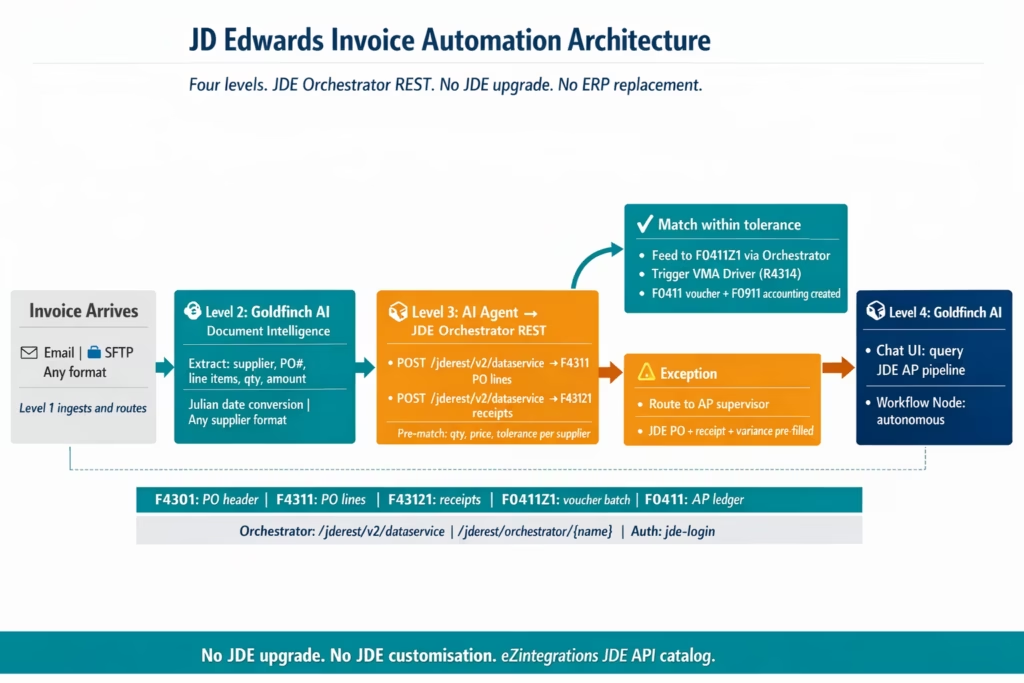
eZintegrations adds the intelligent extraction and pre-matching layer that feeds JDE’s VMA, using JDE Orchestrator REST as the API layer. JDE itself is unchanged.
Level 1 (iPaaS Workflows): Receives invoice email attachments, routes SFTP-based invoice files, calls JDE Orchestrator REST endpoints for PO and receipt data, and feeds matched voucher records into JDE F0411Z1 via Orchestrator. No direct JDE table access, no JDE customisation: all interactions go through published Orchestrator endpoints.
Level 2 (AI Workflows, Goldfinch AI Document Intelligence): Extracts all voucher fields from any supplier PDF format without JDE-specific templates. For each invoice: supplier name (mapped to JDE Supplier Address Book), JDE PO number (PDDOCO where visible), invoice number, invoice date, gross amount, line items (description, quantity, unit cost, UOM), payment terms. Julian date conversion (JDE’s YYYYDDD date format) is handled in the Level 1 data transformation step.
Level 3 (AI Agents, JDE Orchestrator REST): The matching agent calls JDE Orchestrator endpoints to retrieve F4311 PO line data and F43121 receipt data. Compares extracted invoice data against JDE PO unit costs and receipt quantities at line-item level with configurable tolerance. Auto-approves matched records for F0411Z1 submission. Routes exceptions with pre-populated JDE PO and receipt data.
Level 4 (Goldfinch AI): Orchestrates the full workflow as a Workflow Node (autonomous processing) and as Chat UI (AP manager queries the JDE AP pipeline status in natural language without navigating JDE screens).
The JDE Orchestrator REST API Layer: Endpoints and Tables
Here are the exact JDE Orchestrator REST API calls and table references eZintegrations uses for 3-way voucher matching automation.
Authentication
JDE Orchestrator uses session-based authentication. The login call returns a session token used on all subsequent requests:
POST https://{jde-server}:{port}/jderest/orchestrator/jde-login
Content-Type: application/json

{
  "username": "AISUSER",
  "password": "password",
  "deviceName": "eZintegrations-AP",
  "requiredCapabilities": "orchestrator"
}
Response: { "token": "{SESSION_TOKEN}", "userInfo": {...} }. The token is included in the Authorization header as Bearer {SESSION_TOKEN} on all subsequent calls. Sessions should be logged out cleanly with POST /jderest/orchestrator/jde-logout.
For production deployments, use JDE’s OAuth 2.0 support (available from Tools 9.2 Update 2+) for machine-to-machine authentication without shared user credentials.
Purchase Order Data Retrieval (F4311)
eZintegrations queries JDE’s F4311 Purchase Order Detail File via the JDE Data Service endpoint:
POST https://{jde-server}:{port}/jderest/v2/dataservice
Authorization: Bearer {SESSION_TOKEN}
Content-Type: application/json

{
  "targetName": "F4311",
  "targetType": "table",
  "dataServiceType": "FETCH",
  "maxPageSize": "100",
  "query": {
    "autoFind": true,
    "condition": [
      {
        "value": [{
          "content": "PO-2026-2089",
          "specialValueId": "LITERAL"
        }],
        "controlId": "F4311.PDDOCO",
        "operator": "EQUAL"
      }
    ]
  },
  "returnControlIDs": "F4311.PDLNID|F4311.PDNXTR|F4311.PDUOM|F4311.PDQORD|F4311.PDPRRC|F4311.PDMCU|F4311.PDKCO"
}
Key F4311 fields returned: – PDDOCO: Document Number (JDE PO number) – PDLNID: Line Number – PDQORD: Quantity Ordered – PDPRRC: Unit Cost (purchase price) – PDUOM: Unit of Measure – PDMCU: Business Unit (cost centre) – PDKCO: Company (for multi-company environments)
Note: JDE stores dates in Julian format (YYYYDDD). The PDTRDJ (Transaction Julian Date) field is a numeric like 2026077 representing March 18, 2026. eZintegrations handles this conversion automatically in the Level 1 data transformation step.
Receipt Data Retrieval (F43121)
F43121 is the Purchase Order Receiver File. Receipt lines linked to a PO are queried:
POST /jderest/v2/dataservice
Content-Type: application/json

{
  "targetName": "F43121",
  "targetType": "table",
  "dataServiceType": "FETCH",
  "query": {
    "autoFind": true,
    "condition": [
      {
        "value": [{
          "content": "PO-2026-2089",
          "specialValueId": "LITERAL"
        }],
        "controlId": "F43121.PDDOCO",
        "operator": "EQUAL"
      }
    ]
  },
  "returnControlIDs": "F43121.PDLNID|F43121.PDQREC|F43121.PDUOM|F43121.PDDOC|F43121.PDTRDJ"
}
Key F43121 fields: – PDQREC: Quantity Received (the GRN quantity) – PDDOC: Receipt Document Number (JDE receipt reference) – PDLNID: Line Number (links to F4311 line) – PDTRDJ: Receipt Julian Date
If the F43121 query returns no results for the PO, the Watcher is activated (see timing mismatch scenario below).
Voucher Batch Upload via Orchestrator (F0411Z1 Feed)
The matched voucher record is fed to JDE via a custom Orchestrator that writes to the F0411Z1 interface table. This Orchestrator is built in JDE Orchestrator Studio and exposed as a REST endpoint:
POST https://{jde-server}:{port}/jderest/orchestrator/EZ_AP_VoucherUpload
Authorization: Bearer {SESSION_TOKEN}
Content-Type: application/json

{
  "VendorInvoiceNumber": "INV-2026-04721",
  "VendorNumber": "847",
  "InvoiceDate": "2026077",
  "GrossAmount": "37565.00",
  "PaymentTerms": "N030",
  "Company": "00001",
  "BusinessUnit": "110",
  "lines": [
    {
      "LineNumber": "1.000",
      "PurchaseOrderNumber": "PO-2026-2089",
      "ReceiptDocumentNumber": "RC-2026-001182",
      "Quantity": "100",
      "UnitCost": "42.50",
      "LineAmount": "4250.00",
      "UOM": "EA"
    }
  ]
}
The EZ_AP_VoucherUpload orchestration (built once in JDE Orchestrator Studio during implementation) writes each field to F0411Z1 in the correct JDE format. Once F0411Z1 is populated, the VMA Driver (R4314) is triggered:
POST /jderest/orchestrator/EZ_VMA_Trigger
Content-Type: application/json

{
  "ProcessMode": "FINAL",
  "Company": "00001",
  "BatchNumber": "{BATCH_NUMBER}"
}
The EZ_VMA_Trigger orchestration runs the R4314 VMA Driver in final mode for the uploaded batch. JDE’s own matching logic processes F0411Z1 records against F43121 and F4311, creates F0411 vouchers, and posts F0911 accounting entries. The result is the same as if your AP clerk had entered the voucher manually and run VMA: JDE’s audit trail, JDE’s accounting postings, JDE’s AP workflow.
Receipt Timing Mismatch: Watcher-Based F43121 Monitoring
When the F43121 query returns no records for the PO, the invoice is held in the eZintegrations pending queue. A Watcher polls JDE via the dataservice endpoint at configurable intervals:
POST /jderest/v2/dataservice
Content-Type: application/json

{
  "targetName": "F43121",
  "targetType": "table",
  "dataServiceType": "FETCH",
  "query": {
    "condition": [
      {
        "value": [{
          "content": "PO-2026-2089",
          "specialValueId": "LITERAL"
        }],
        "controlId": "F43121.PDDOCO",
        "operator": "EQUAL"
      },
      {
        "value": [{
          "content": "0",
          "specialValueId": "LITERAL"
        }],
        "controlId": "F43121.PDQREC",
        "operator": "GREATER"
      }
    ]
  }
}
When JDE Receiving posts the receipt (creating F43121 records with PDQREC > 0), the Watcher detects the data and resumes the matching workflow. The voucher is fed to F0411Z1 and VMA runs. No AP clerk involvement.
Before vs After: Manual JDE AP vs Automated
| Process Step | Manual JDE AP | Automated with eZintegrations |
|---|---|---|
| Invoice capture | AP clerk monitors email inbox | Level 1 email connector receives all attachments |
| JDE voucher entry | AP clerk reads PDF opens P0411 Enter Vouchers and keys all fields | Level 2 Goldfinch AI extracts all fields no JDE screen navigation |
| JDE PO lookup | AP clerk navigates P4310 Work with Purchase Orders | Level 3 F4311 dataservice query returns PO in 1 to 2 seconds |
| JDE receipt check | AP clerk checks F43121 via P4312 Receipts Inquiry | Level 3 F43121 dataservice query returns receipt quantities |
| Julian date handling | AP clerk knows JDE dates implicitly | Level 1 data transform converts calendar date to YYYYDDD automatically |
| Pre matching | Not performed before JDE entry | Tolerance based line item match before F0411Z1 load |
| F0411Z1 population | AP clerk manual entry or batch file preparation | Orchestrator EZ AP VoucherUpload fills F0411Z1 directly |
| VMA execution | AP runs R4314 manually or on schedule | Orchestrator EZ VMA Trigger fires R4314 after F0411Z1 load |
| P4314WB Workbench | AP clerk monitors for unmatched records | Automated only genuine exceptions appear in Workbench |
| Receipt timing mismatch | AP clerk monitors Workbench and follows up with receiving | Watcher polls F43121 via dataservice and auto resumes on receipt |
| Exception routing | AP clerk navigates JDE screens to investigate | Pre populated with extracted invoice JDE PO and receipt evidence |
| AP manager visibility | JDE reports and watchlists | Goldfinch AI Chat UI with natural language JDE AP pipeline query |
| JDE upgrade required | Not required for current VMA | Not required uses existing Orchestrator 9.2 |
| JDE customisation | None required | None required uses Orchestrator Studio not JDE code |
Step-by-Step: From Email Invoice to JDE Voucher Match
Here is the complete automated cycle for a JDE AP invoice.
Step 1: Invoice email arrives. Level 1 routes to extraction. Supplier sends a 3-page PDF at 7:52 AM. eZintegrations email connector detects the attachment and passes it to Level 2. Time: 2-3 seconds.
Step 2: Goldfinch AI Document Intelligence extracts all fields. Extracted: supplier: "Hartland Building Materials", vendorNumber: "847" (matched from the vendor master mapping), invoiceNumber: "INV-2026-04721", invoiceDate: "2026-03-18" (converted to JDE Julian: 2026077), poReference: "PO-2026-2089", 12 line items with descriptions, quantities, unit costs. grossAmount: 37565.00. paymentTerms: N030 (JDE payment terms code). All fields above 0.91 confidence. Time: 8-10 seconds.
Step 3: Level 3 agent queries JDE F4311 via Orchestrator dataservice.
POST /jderest/v2/dataservice
Content-Type: application/json

{
  "targetName": "F4311",
  "targetType": "table",
  "dataServiceType": "FETCH",
  "query": {
    "condition": [
      {
        "controlId": "F4311.PDDOCO",
        "operator": "EQUAL",
        "value": [{
          "content": "PO-2026-2089",
          "specialValueId": "LITERAL"
        }]
      }
    ]
  }
}
Response: 12 PO lines returned, with PDQORD (ordered quantities) and PDPRRC (agreed unit costs) per line. JDE PO status: Open. Time: 1-2 seconds.
Step 4: Level 3 agent queries JDE F43121 for receipts.
POST /jderest/v2/dataservice
Content-Type: application/json

{
  "targetName": "F43121",
  "targetType": "table",
  "dataServiceType": "FETCH",
  "query": {
    "condition": [
      {
        "controlId": "F43121.PDDOCO",
        "operator": "EQUAL",
        "value": [{
          "content": "PO-2026-2089",
          "specialValueId": "LITERAL"
        }]
      }
    ]
  }
}
Response: Receipt document RC-2026-001182, Julian date 2026074 (March 15, 2026). All 12 lines received. PDQREC quantities match PDQORD on all lines. Time: 1-2 seconds.
Step 5: Pre-matching engine comparison. 12 invoice lines vs F43121 PDQREC: all match exactly. Invoice unit costs vs F4311 PDPRRC: all within 1.4% of PO price (within 3% configured tolerance). Invoice gross $37,565.00 vs PO value $37,800.00: -0.62%, within tolerance. Duplicate check: no F0411Z1 or F0411 record with invoice number INV-2026-04721 for vendor 847. Match result: approved for VMA submission. Time: under 1 second.
Step 6: Feed matched voucher to JDE F0411Z1 via Orchestrator.
POST /jderest/orchestrator/EZ_AP_VoucherUpload
Content-Type: application/json

{
  "VendorInvoiceNumber": "INV-2026-04721",
  "VendorNumber": "847",
  "InvoiceDate": "2026077",
  "GrossAmount": "37565.00",
  "PaymentTerms": "N030",
  "Company": "00001",
  "lines": [
    {
      "LineNumber": "1.000",
      "PurchaseOrderNumber": "PO-2026-2089",
      "ReceiptDocumentNumber": "RC-2026-001182",
      "Quantity": "100",
      "UnitCost": "42.50",
      "LineAmount": "4250.00",
      "UOM": "EA"
    },
    {
      "LineNumber": "2.000",
      "PurchaseOrderNumber": "PO-2026-2089",
      "ReceiptDocumentNumber": "RC-2026-001183",
      "Quantity": "200",
      "UnitCost": "42.50",
      "LineAmount": "8500.00",
      "UOM": "EA"
    }
    // ...additional lines follow the same structure
  ]
}
F0411Z1 record created. ProcessType: 1 (ready for VMA). JDE batch number returned. Time: 2-3 seconds.
Step 7: Trigger JDE VMA Driver (R4314) via Orchestrator.
POST /jderest/orchestrator/EZ_VMA_Trigger
Content-Type: application/json

{
  "ProcessMode": "FINAL",
  "Company": "00001",
  "BatchNumber": "2026084"
}
JDE VMA runs: matches F0411Z1 record against F43121 receipt and F4311 PO lines. All lines within tolerance. F0411 voucher created (DocumentNumber returned). F0911 accounting entries posted. Invoice now lives in JDE’s AP Ledger with full JDE audit trail, ready for payment on April 17 per N030 terms.
Total elapsed time: 18-28 seconds from email arrival to JDE F0411 voucher. Human involvement: zero. JDE VMA ran on the matched record. AP clerk sees a clean Workbench.
Receipt timing mismatch scenario: A different invoice references PO-2026-2091. The F43121 query returns empty. The Watcher activates, polling F43121 for PO-2026-2091 every 30-60 minutes. Two days later, the warehouse team receives the goods in JDE. The next Watcher poll finds PDQREC > 0 for all lines. The matching workflow resumes: F0411Z1 populated, VMA triggered, F0411 voucher created. No AP clerk involvement.
Key Outcomes and Results
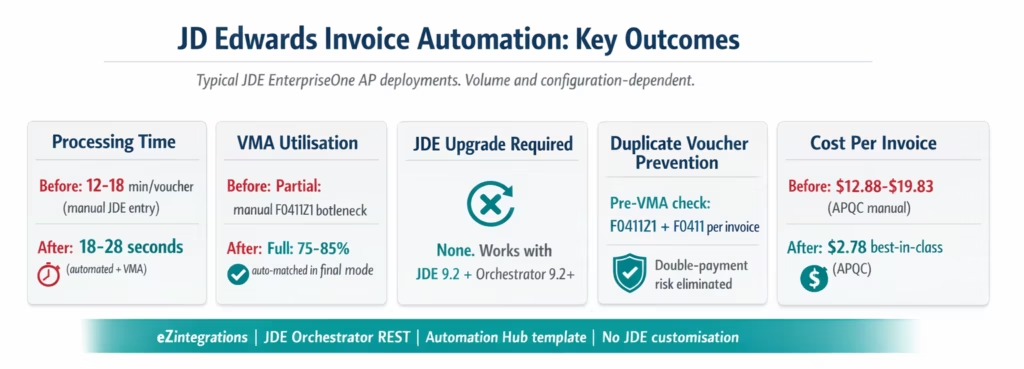
Processing time: 18-28 seconds from invoice PDF arrival to JDE F0411 voucher for auto-matched invoices. Compared to 12-18 minutes of manual JDE voucher entry per invoice. At 150 vouchers per month: 27-40 hours of AP team time recovered per month.
VMA utilisation: JDE’s native VMA was built to automate 3-way matching but requires structured F0411Z1 input to run. Most JDE teams use VMA only partially because manual data entry is the bottleneck. eZintegrations makes VMA run at full capacity: 75-85% of invoices flow through VMA automatically in final mode.
P4314WB Workbench clarity: The VMA Workbench becomes what it was designed to be: a list of genuine exceptions. Your AP team handles the 15-25% of invoices that have real discrepancies, not the 75-85% that match cleanly.
No JDE upgrade: eZintegrations works with JDE EnterpriseOne 9.2 and Orchestrator Tools 9.2+. This is the current installed base for most JDE customers. No migration to JDE cloud, no upgrade project, no additional Oracle licensing.
Julian date handling: Julian date conversion (calendar to YYYYDDD and back) is built into the Level 1 data transformation. AP teams that previously maintained Julian date conversion scripts or relied on JDE BSFN calls for date handling no longer need to manage this for the invoice ingestion workflow.
Duplicate voucher prevention: The pre-VMA duplicate check queries both F0411Z1 (pending) and F0411 (posted) for the invoice number and vendor combination before any F0411Z1 record is created. This prevents double-payment risk, the most common financial control concern for JDE AP automation.
Cost per invoice: Best-in-class automated AP teams achieve $2.78 per invoice versus $12.88-$19.83 for manual processing (APQC 2025). For a JDE team processing 200 vouchers per month, annual savings: $243,360-$408,120.
How to Get Started
Step 1: Verify JDE Orchestrator is Active on Your AIS Server
Confirm that JDE Orchestrator is active on your AIS Server. Log in to the Orchestrator Studio (typically at https://{jde-server}:{port}/OrchestratorStudio) and verify you can create and test orchestrations. Orchestrator is included with JDE 9.2 and Tools release 9.2+ at no additional cost. If Orchestrator has not been activated, your JDE CNC team can enable it in Server Manager.
Step 2: Build the Two JDE Orchestrations in Orchestrator Studio
Create two orchestrations in the JDE Orchestrator Studio:
EZ_AP_VoucherUpload: A “write” orchestration that receives a JSON payload from eZintegrations and writes the structured voucher record to F0411Z1. Uses Orchestrator’s Form Service Request to populate the F0411Z1 fields. This takes 2-4 hours of Orchestrator Studio work for a JDE functional analyst or CNC who understands the F0411Z1 field structure.
EZ_VMA_Trigger: An orchestration that runs the R4314 VMA Driver as a Report step in Orchestrator. Accepts the batch number and processing mode as inputs. This is a 30-45 minute build for anyone familiar with JDE Report Orchestrations.
Both orchestrations are documented in the eZintegrations JDE implementation guide included with the Automation Hub template.
Step 3: Import the JDE AP Invoice Processing Template
Go to the Automation Hub and import the JDE AP Invoice Processing template. It includes Goldfinch AI Document Intelligence, the JDE Orchestrator REST authentication flow, the F4311 and F43121 dataservice query calls, the pre-matching engine with configurable tolerance, the EZ_AP_VoucherUpload and EZ_VMA_Trigger Orchestrator calls, the duplicate check logic, and the Watcher for receipt timing mismatches.
Step 4: Add JDE Credentials and Email Ingestion
Add your JDE AIS Server URL, JDE username and password (or OAuth 2.0 credentials for Tools 9.2 Update 2+), and JDE company code to the eZintegrations credential vault. Add your email system credentials for invoice PDF ingestion. Add your vendor master mapping file (JDE vendor address book numbers to supplier names for the Goldfinch AI extraction output mapping). Average setup: 20-30 minutes.
Step 5: Configure Tolerance Rules and Test with Real JDE POs
Set price and quantity tolerance thresholds per vendor category (matching your JDE P4322 tolerance rule settings). Configure the AP supervisor for exception routing. In the Dev environment, test with representative invoice samples using real JDE PO numbers (PO-2026-XXXX). Confirm the F4311 and F43121 dataservice queries return correct JDE data. Confirm the EZ_AP_VoucherUpload orchestration creates a valid F0411Z1 record. Confirm VMA runs and creates a matched F0411 voucher. Test the Watcher timing mismatch scenario.
Total configuration time: 6-8 hours for eZintegrations setup plus 2-5 hours for the two JDE Orchestrator Studio builds. Total: 8-13 hours to production go-live.
FAQs
Add AI to JDE Without Replacing It
JD Edwards EnterpriseOne works. The customisations are stable, the integrations run, the finance team knows the screens. You are not replacing JDE next year.
What you can do is add the extraction and pre-matching intelligence layer that VMA was always waiting for. eZintegrations connects to JDE via Orchestrator REST, no upgrade required. Goldfinch AI Document Intelligence reads supplier invoices in any format. The pre-matching engine validates before F0411Z1 is populated. The Watcher handles receipt timing mismatches. VMA runs in final mode at full capacity. Your P4314WB Workbench shows only genuine exceptions.
No JDE upgrade. No JDE customisation. No ERP replacement. Two Orchestrator Studio builds and a template import from the Automation Hub.
Import the JDE AP Invoice Processing Template from the Automation Hub and go live in 8-13 hours. Or book a free demo with your JDE version details and invoice volume. We will walk through the Orchestrator REST configuration and the EZ_AP_VoucherUpload build for your JDE environment.

