
What Is Accounts Payable Automation? The Enterprise Finance Team’s Complete Guide
March 27, 2026Accounts payable automation is the use of technology to eliminate or reduce manual work across the AP cycle: invoice capture and data extraction, PO and GRN matching, approval routing, ERP posting, and payment scheduling. For enterprise finance teams, full AP automation using AI document intelligence, configurable matching engines, and ERP-connected workflows reduces cost per invoice from $12.88 (manual average) to under $3.00, cuts processing time from 14-17 days to under 4 days, and reduces manual invoice touch rate from 100% to 8-25% (exceptions only). In eZintegrations, AP automation runs across the 4-level platform: Level 1 iPaaS for ERP connectivity, Level 2 AI Workflows (Goldfinch AI Document Intelligence) for invoice extraction, Level 3 AI Agents for matching and decision logic, and Level 4 Goldfinch AI for orchestration and AP manager oversight.
TL;DR
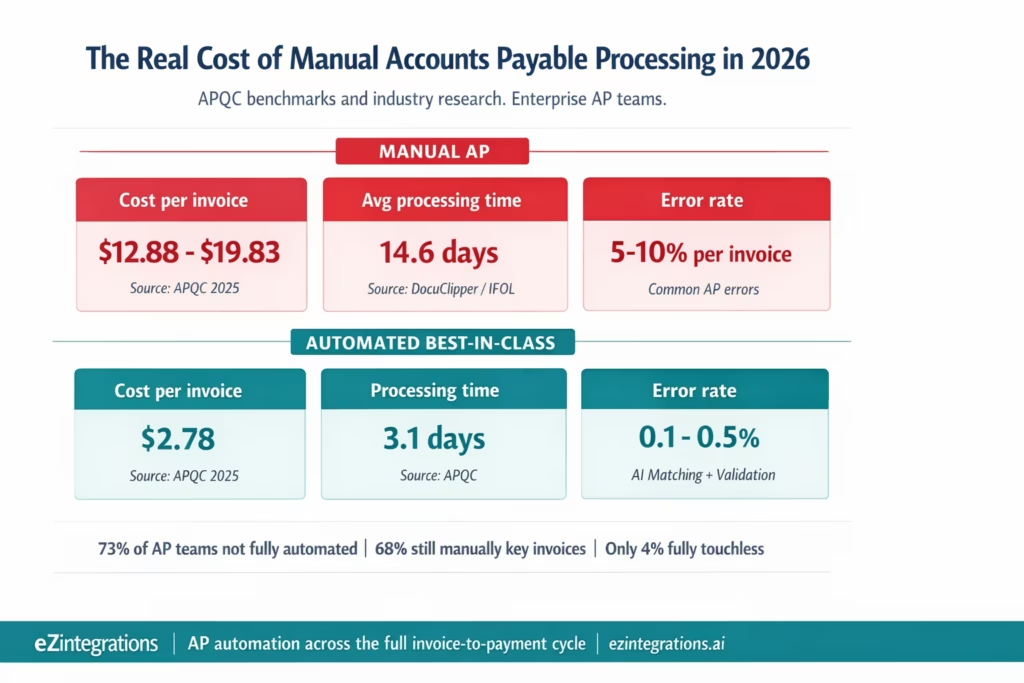
AP automation covers the full invoice-to-payment cycle: capture, extraction, matching, approval, ERP posting, and payment scheduling. 73% of AP teams are not fully automated. 68% still manually key invoices into their ERP. Only 4% have achieved fully touchless AP processing. The cost gap is significant: $12.88-$19.83 per invoice manually versus $2.78 per invoice at best-in-class automated (APQC 2025). Processing time: 14.6 days manual average versus 3.1 days automated best-in-class. eZintegrations automates the full AP cycle across the 4-level platform: Level 1 (iPaaS), Level 2 (AI Workflows, Goldfinch AI Document Intelligence), Level 3 (AI Agents, matching logic), Level 4 (Goldfinch AI orchestration). This guide explains every component of enterprise AP automation, what to automate first, and how to connect your existing ERP without replacing it.
What Is Accounts Payable Automation?
Accounts payable automation is the use of software and AI to reduce or eliminate manual work at each step of the AP cycle, from the moment a supplier invoice arrives to the moment payment is released.
In a manual AP process, your team receives invoices, reads them, keys the data into the ERP, looks up the matching purchase order, checks the goods received note, applies approval routing rules, sends for sign-off, posts the approved invoice, and schedules payment. Every step has a human in it. Every step is a potential delay.
AP automation replaces those manual steps with software: AI extracts invoice data, APIs retrieve PO and GRN from the ERP, a matching engine applies the business rules, approved invoices are posted automatically, and exceptions are routed to the right person with pre-populated context rather than a raw document and a blank screen.
The goal is not to remove AP staff. It is to redirect their time from data entry and document chasing to exception resolution, supplier relationship management, and working capital optimisation. The routine work is automated. The judgement work stays with people.
Why this matters now: The Gartner APIA market is projected to reach $1.75 billion by 2026, up from $925 million in 2021, a compound annual growth rate of 14%. Yet adoption remains surprisingly low. According to a 2025 survey, 73% of AP teams are still not fully automated. Only 4% have achieved fully touchless processing from invoice to payment. The gap between what is available and what is deployed is enormous.
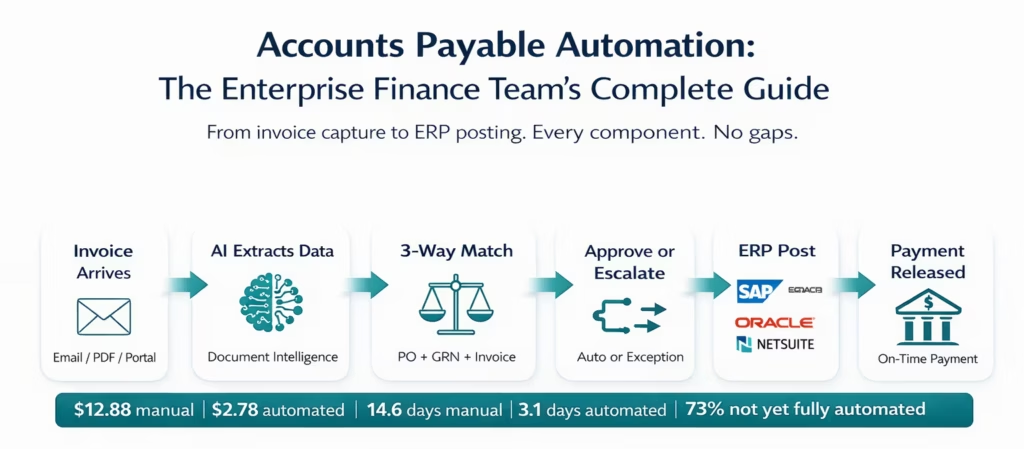
The Seven Steps of the AP Cycle (And Which Ones Still Require Human Work)
Understanding what to automate starts with mapping the full AP cycle. Every enterprise AP function performs these seven steps for every invoice.
Step 1: Invoice Receipt and Capture Invoices arrive from multiple channels: email attachments, supplier portals, EDI transmissions, SFTP file drops, paper mail, and direct API submissions from procurement platforms. The first manual step is identifying incoming invoices across all these channels and routing them to the AP system.
Automation potential: High. Email connectors, SFTP watchers, and portal API integrations capture invoices automatically from all channels and route them to the processing queue without manual intervention.
Step 2: Invoice Data Extraction Once captured, the invoice must be read and its data entered into the AP system: vendor name, invoice number, date, PO reference, line items, amounts, taxes, payment terms. In manual processing, an AP clerk opens the PDF and keys each field.
Automation potential: Very high. AI document intelligence (Goldfinch AI at Level 2) extracts all fields from any supplier format without vendor-specific templates. 95-99%+ accuracy on digital invoices. 8-15% exception rate (fields requiring human review), down from 100% manual handling.
Step 3: Invoice Validation and Duplicate Detection Before matching, the invoice must be validated: is this a duplicate? Is the vendor on the approved vendor list? Does the invoice reference a valid PO? Are the payment terms within contracted terms?
Automation potential: Very high. Automated duplicate check (invoice number + vendor + amount), vendor master lookup, PO existence verification, and payment terms validation all run against the ERP in real time via API.
Step 4: 2-Way, 3-Way, or 4-Way Matching The invoice is compared against the purchase order and, for physical goods, the goods received note (GRN). For quality-critical procurement in regulated industries, an inspection report is the fourth document. This is the core AP control that prevents paying for unordered, undelivered, or non-conforming goods.
Automation potential: High. Configurable matching engine compares all documents at line-item level with tolerance thresholds per vendor category. 75-85% auto-approval rate for 3-way matching. Matched invoices auto-posted; exceptions routed with evidence.
For a complete technical guide to matching methods, see 2-Way vs 3-Way vs 4-Way Invoice Matching.
Step 5: Approval Routing and Workflow Invoices that do not auto-approve (either because no matching is required, or because they fall outside auto-approval tolerance) require human sign-off. Approval routing rules determine who signs off based on invoice amount, vendor category, cost centre, or business unit.
Automation potential: Medium-high. Approval routing logic is configurable and automated: invoices above $50,000 go to the finance controller, invoices below $10,000 can be self-approved by department heads, recurring service invoices from approved vendors follow a fast-track path. The workflow handles routing; humans provide the approval.
Step 6: ERP Posting and Payment Scheduling Approved invoices must be posted to the ERP AP module, creating a vendor liability record and scheduling payment according to the payment terms. In manual processing, an AP clerk posts each approved invoice and sets the payment due date.
Automation potential: Very high. Approved invoices are posted automatically to the ERP via API: SAP FI, Oracle Payables, NetSuite AP, Microsoft Dynamics 365, or any ERP with a payment posting endpoint. Payment scheduling is set from the extracted payment terms.
Step 7: Payment Release and Reconciliation On the payment due date (or earlier for early payment discount capture), payment is released via the configured payment method. After payment, the AP record is reconciled against the bank statement.
Automation potential: Medium. Payment release is automated in many enterprise AP setups. Bank reconciliation automation is covered separately from invoice processing.
Where Manual AP Breaks Down: The Real Cost of Not Automating
Your AP team is not slow because they are not working. They are slow because the process requires too many manual handoffs, too many systems, and too many documents that do not speak to each other automatically.
Here is what the data shows.
The volume problem: 60% of teams process more than 1,000 invoices per month. 23% process more than 10,000 monthly. An AP clerk processing manually handles approximately 5 invoices per hour. At 10,000 invoices per month, that requires 2,000 clerk-hours. That is more than one full-time employee doing nothing but keying invoices.
The cost problem: Manual invoice processing costs between $12.88 and $19.83 per invoice depending on company size and process complexity, according to APQC benchmarks. At 10,000 invoices per month, that is $128,800 to $198,300 per month in processing costs alone. Best-in-class automated processing: $2.78 per invoice. The same volume costs $27,800. The annual difference is $1.2 to $2 million.
The error problem: Manual invoice processing produces error rates of 5-10% across all invoices. Common errors: duplicate payments, incorrect GL coding, wrong vendor amounts, missed early payment discounts. Industry benchmarks estimate that 39% of invoices contain some form of error or discrepancy at arrival. Each error requires investigation and correction, adding time and cost beyond the initial processing.
The time problem: The average manual AP team processes invoices in 14.6 days from receipt to payment posting. Best-in-class automated teams achieve 3.1 days. For suppliers offering 2% early payment discounts (2/10 Net 30 terms), the difference between a 3-day and a 14-day cycle is the difference between capturing and forgoing the discount. For a company spending $50 million per year with suppliers on 2/10 terms, that discount represents $1 million in annual savings.
The exception backlog: Manual processes create an exception backlog that grows faster than the AP team can clear it. An invoice that does not match the PO goes into a hold queue. The AP clerk emails the purchasing manager. The purchasing manager does not respond for three days. The invoice ages. The supplier chases for payment. The AP team spends time on supplier relationship management rather than processing.
The visibility problem: Finance leadership cannot see the real-time state of the AP liability. How many invoices are in the queue? How many are matched and awaiting approval? How many are on hold pending GRN? What is the total unposted AP liability? In manual processes, this information lives in inboxes, spreadsheets, and ERP records that require manual aggregation.
The Components of Enterprise AP Automation
A fully automated enterprise AP function has six technology components working together. Missing any one of them creates a gap where manual work re-enters the process.
1. Invoice Capture and Ingestion
Covers all channels: email (Gmail, Outlook), supplier portals (Ariba, Coupa, SAP Business Network), SFTP file drop, EDI (X12 810 invoice transaction), and API submission from procurement platforms. The ingestion layer identifies incoming invoices, classifies them (invoice vs credit note vs statement), and routes them to the extraction step.
eZintegrations Level 1 (iPaaS Workflows) handles ingestion: email connectors, SFTP watchers, API endpoint listeners, and EDI parsers all route documents to the Level 2 processing queue automatically.
2. AI-Powered Invoice Data Extraction
Converts unstructured invoice PDFs and images into structured data without vendor-specific templates. Covers all invoice formats across your supplier base, including multi-language invoices, scanned paper invoices, and complex multi-page documents with 40+ line items.
eZintegrations Level 2 (AI Workflows): Goldfinch AI Document Intelligence extracts header fields and line items with per-field confidence scoring. High-confidence fields: auto-accepted. Low-confidence fields: flagged for AP clerk review. No template maintenance. First invoice from any new supplier processed correctly.
For a complete technical explanation, see What Is AI Document Intelligence for Invoices.
3. Invoice Validation and Matching Engine
Validates each invoice against the ERP: duplicate check, vendor master verification, PO existence check, GRN availability check (for 3-way matching), and line-item price and quantity comparison with configurable tolerance thresholds. Assigns the correct matching mode (2-way, 3-way, or 4-way) per vendor category.
eZintegrations Level 3 (AI Agents): the matching agent retrieves PO and GRN data via API Tool Call, applies configurable matching rules, and makes the approve or escalate decision autonomously.
4. Approval Workflow and Exception Management
Routes matched invoices below auto-approval tolerance to the configured approver. Routes unmatched invoices (exceptions) to the AP supervisor with pre-populated evidence: extracted invoice data, PO comparison, GRN data, and the specific field that triggered the exception. Escalation SLAs configured per exception type.
eZintegrations Level 3 (AI Agents) + Level 4 (Goldfinch AI Chat UI): the agent routes exceptions; the Goldfinch AI Chat UI gives the AP manager a natural language interface to query the exception queue, investigate specific invoices, and manage approvals without navigating ERP screens.
5. ERP Integration and Auto-Posting
Posts approved invoices directly to the ERP AP module via API. Creates the vendor liability record, applies GL coding, and schedules payment per the extracted payment terms. This is the step that most AP automation tools handle poorly: surface-level integrations push a flat file to the ERP; deep integrations write directly to the correct GL accounts and update PO status within the ERP’s native transaction framework.
eZintegrations Level 1 (iPaaS Workflows) + Level 3 (AI Agents, Integration Workflow as Tool): posts approved invoices to SAP FI (via AP posting API), Oracle Payables (via REST), NetSuite AP (via SuiteTalk REST), Microsoft Dynamics 365 Finance (via Dataverse API), or any ERP in the API catalog.
6. Reporting and Analytics
Real-time visibility into the AP pipeline: invoices in queue, invoices matched and awaiting approval, invoices on hold (pending GRN, pending inspection, pending supplier response), total unposted AP liability, and payment run schedule. KPI tracking: cost per invoice, cycle time, exception rate, auto-approval rate, and early payment discount capture.
Goldfinch AI Level 4 (Chat UI): the AP manager or CFO queries the system directly. “What is our total unposted AP liability this week?” “How many invoices are on hold pending GRN?” “What is our average processing time this month vs last month?” The agent retrieves and summarises the data from the AP system in real time.
Before vs After: Manual AP vs Automated AP
| AP Process Step | Manual Process | Automated with eZintegrations |
|---|---|---|
| Invoice capture | AP clerk monitors email and portal inboxes | Level 1 connectors monitor all channels route invoices automatically |
| Data extraction | AP clerk reads PDF keys all fields into ERP | Level 2 Goldfinch AI Document Intelligence any format no template |
| Duplicate check | Manual spot check or none | Algorithmic invoice number vendor and amount checked on every invoice |
| Vendor validation | Manual vendor master lookup | API call to ERP vendor master on every invoice |
| PO matching | Manual ERP navigation | Level 3 AI Agent retrieves PO and GRN via API and compares at line item level |
| Matching mode | Same rules for all invoices | Automatic per vendor category two way three way or four way |
| Approval routing | Email to approver untracked | Configurable routing by amount vendor category and cost centre |
| Exception investigation | AP clerk reads multiple documents manually | Pre populated exception report with extracted data comparison and variance |
| ERP posting | AP clerk posts each approved invoice | Auto post via ERP API across SAP Oracle NetSuite and D365 |
| Timing mismatch no GRN | Invoice held manual follow up | Watcher monitors ERP and resumes automatically on GRN creation |
| AP manager visibility | Manual ERP report generation | Goldfinch AI Chat UI with natural language queries |
| Cost per invoice | 12.88 to 19.83 dollars APQC | 2.78 dollars best in class APQC |
| Processing time | 14.6 days average | 3.1 days best in class |
| Manual touch rate | 100 percent of invoices | 8 to 25 percent exceptions only |
How eZintegrations Automates the Full AP Cycle
eZintegrations does not provide a standalone AP automation product. It provides the platform that connects your existing ERP to AI document intelligence, matching logic, and approval workflows, without replacing any system you already have.
Your ERP stays as your system of record. SAP, Oracle Fusion Cloud, NetSuite, Microsoft Dynamics 365, JD Edwards, Infor, or Acumatica: eZintegrations connects to all of them through the API catalog. No ERP replacement. No ERP customisation. No ABAP development.
The AP automation capability comes from eZintegrations’ 4-level architecture, each level handling a different type of AP work.
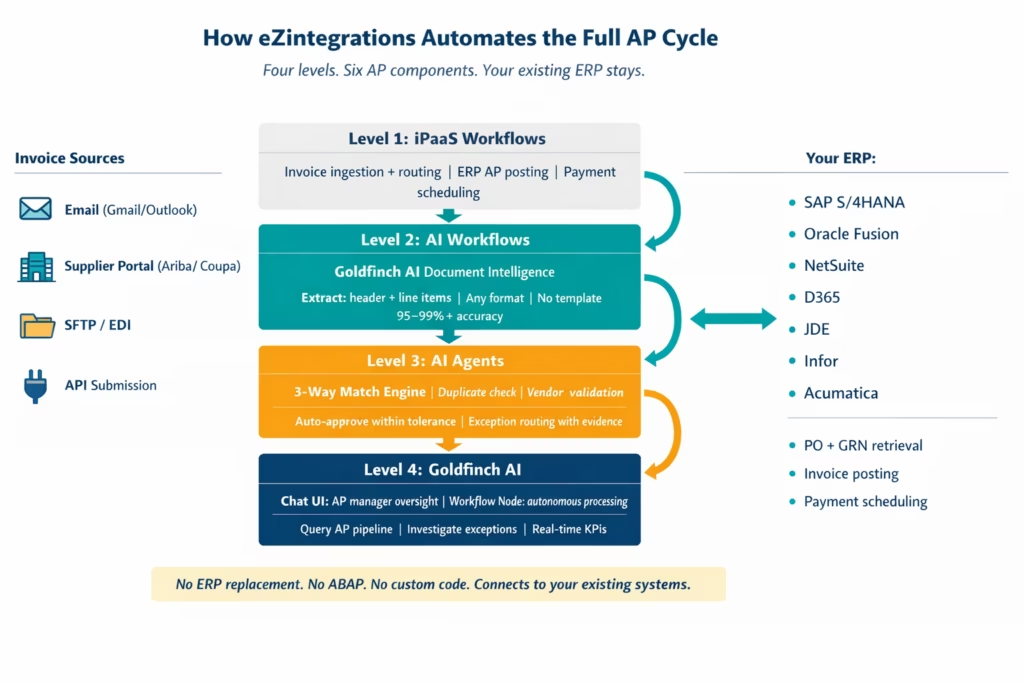
The 4-Level Architecture for Enterprise AP
eZintegrations’ 4-level architecture applies to AP automation as follows. Each level handles the work that the level above cannot.
Level 1: iPaaS Workflows (Structured Connectivity) Handles all structured data movement: receiving invoice files from email and portals, posting approved invoices to the ERP via API, scheduling payment runs, and routing documents between systems. Level 1 is the connectivity fabric. It does not process document content; it moves structured data and triggers the levels above when a new invoice document arrives.
Level 2: AI Workflows (Unstructured Data Intelligence) Goldfinch AI Document Intelligence operates here. An invoice PDF is unstructured data. The ERP cannot consume it directly. Level 2 converts the unstructured invoice into structured JSON fields that Level 1 can route and Level 3 can act on. Document extraction, invoice classification (invoice vs credit note vs statement), language handling, and confidence scoring all happen at Level 2.
Level 3: AI Agents (Autonomous Decision-Making) The matching engine and decision logic run here. Level 3 AI Agents use 9 native tools: API Tool Call retrieves PO and GRN from the ERP, Watcher Tools handle timing mismatches, Integration Workflow as Tool triggers the ERP posting when matching succeeds. The matching agent makes the approve or escalate decision autonomously without human initiation per invoice.
Level 4: Goldfinch AI (Agentic Orchestration) Goldfinch AI coordinates the full AP workflow at the orchestration layer. It deploys in two modes:
As a Workflow Node (embedded in the integration workflow): the AI orchestrates the full cycle from ingestion to ERP posting. Autonomous. No human touch per invoice. Handles volume.
As a Chat UI (interactive interface for AP management): your AP manager, finance controller, or CFO queries the system directly in natural language. “How many invoices are awaiting approval right now?” “What are the top five vendors by unmatched invoice value this week?” “Show me all invoices on hold for more than 5 days.” The agent retrieves and synthesises answers from the AP pipeline data.
Step-by-Step: A Complete Automated AP Workflow
Here is how a typical enterprise invoice moves through the full automated AP cycle in eZintegrations.
9:02 AM: Invoice arrives from vendor. A construction materials supplier sends a PDF invoice via email. Subject line: “Invoice INV-2026-04721 – March Delivery.” The eZintegrations email connector detects the attachment, identifies it as an invoice (Level 1 routing), and passes it to Level 2 processing.
9:02 AM: Level 2 extracts all fields. Goldfinch AI Document Intelligence processes the PDF. Vendor: “Hartland Building Materials Ltd.” Invoice number: “INV-2026-04721.” Date: “March 18, 2026.” PO reference: “PO-2026-2089.” 14 line items: materials, quantities, unit prices, totals. Subtotal: $34,150.00. Tax: $3,415.00. Total: $37,565.00. Payment terms: Net 30. All fields extracted with confidence above 0.92. No fields flagged for review. Time: 8 seconds.
9:02 AM: Level 3 AI Agent validates and matches. The agent checks: is INV-2026-04721 from Hartland Building Materials already in the system? No duplicate found. Vendor code HBM-024 is in the approved vendor master. PO-2026-2089 exists, status Open, approved value $34,500.00. API Tool Call retrieves GRN-2026-1847: all 14 line items received on March 15, quantities matching PO quantities. Matching engine compares invoice against PO and GRN at line-item level. All 14 line items: quantities match GRN, prices match PO (invoice total $34,150.00 vs PO approved $34,500.00, variance -$350.00, within the configured 2% tolerance). Duplicate check: pass. Vendor check: pass. Match result: approved within tolerance. Time: 3 seconds.
9:02 AM: Approved invoice auto-posted to ERP. Integration Workflow as Tool calls the SAP FI AP posting API. Invoice created in SAP: vendor account HBM-024, document date March 18, posting date March 18, baseline payment date April 17 (Net 30), GL coding applied from PO cost centre. SAP invoice document number 1900000847 returned. Audit record created: extraction fields, match comparison, ERP document reference. Total elapsed time from email arrival to ERP posting: 14 seconds. Human involvement: zero.
Simultaneously: Exception from a different invoice. A different invoice from a flooring contractor shows a quantity mismatch: 200 units billed, GRN confirms 175 units received (partial delivery). The Level 3 agent holds the invoice. The AP supervisor receives a Slack notification: “Invoice INV-2026-04718 from FloorCo Ltd: quantity mismatch on line item 3. Invoice: 200 units. GRN: 175 units received. Suggested action: approve for 175 units and request credit note for 25 units.” The supervisor reviews, confirms, and the partial approval is posted to the ERP. Total AP supervisor time: 3 minutes on the exception, not on the routine invoice.
During the day: AP Manager queries Goldfinch AI Chat UI. “What is our total unposted AP liability as of today?” Goldfinch AI retrieves all matched invoices awaiting payment run and all invoices in exception queue, calculates total, and responds: “$2.4M matched and scheduled for payment, $180K in exception queue pending resolution.” The AP manager has a real-time view without running an ERP report.
Key Outcomes and Results
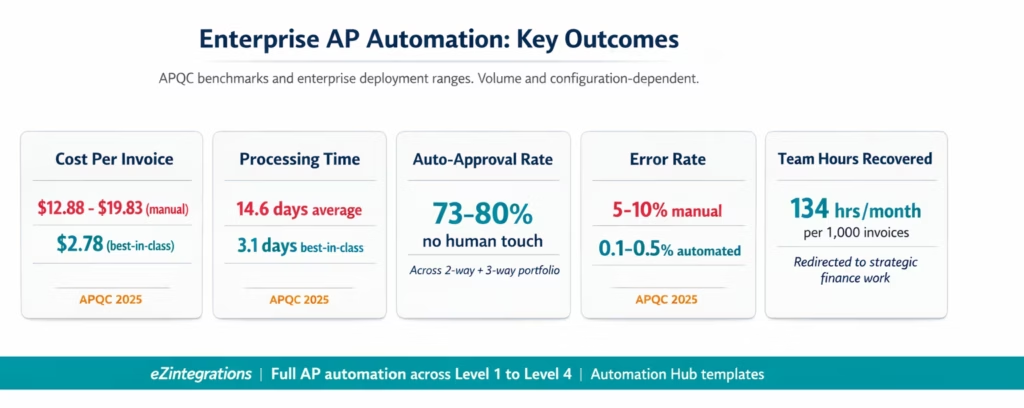
Enterprise AP teams deploying full AP automation through eZintegrations achieve the following outcomes. Ranges reflect typical enterprise deployments. Your results depend on invoice volume, ERP system, vendor mix, and configuration specifics.
Cost per invoice: Best-in-class automated teams achieve $2.78 per invoice versus $12.88-$19.83 for manual processing (APQC 2025). For an enterprise processing 3,000 invoices per month, the annual saving is $360,000-$612,000.
Processing time: Best-in-class automated: 3.1 days from invoice receipt to payment posting. Manual average: 14.6 days. For suppliers on 2/10 Net 30 terms, the 11-day reduction enables early payment discount capture that manual cycle times forgo entirely.
Auto-approval rate: 75-85% for 3-way matching invoices. 80-90% for 2-way service invoices. Combined across a mixed portfolio: 73-80% of invoices processed without any human touch on the matching and approval steps.
Error rate: Automated AP reduces invoice processing errors from 5-10% (manual) to 0.1-0.5%. Duplicate payment elimination is particularly significant: APQC estimates that 3-way matching reduces payment errors by 60-70%.
Team capacity: An AP team of 5 clerks processing 1,000 invoices per month manually spends approximately 167 hours on data entry and matching. With 80% automation, the same team handles 1,000 invoices with approximately 33 hours of exception resolution work. The remaining 134 hours per month are redirected to supplier relationship management, working capital optimisation, and strategic finance support.
Month-end close acceleration: AP automation eliminates the invoice backlog that typically delays month-end close by 2-5 days. All invoices are matched and either posted or in a defined exception queue before close begins.
Supplier satisfaction: On-time payment rates improve, supplier payment queries decrease, and early payment discount relationships become feasible for more of the supplier base.
How to Get Started
Step 1: Map Your Current AP Cycle and Identify the Highest-Volume Manual Step
Before importing any template, document where your team spends the most time: is it invoice data entry? PO matching? Exception investigation? Approval chasing? The highest-volume manual step is your starting point. For most enterprise AP teams, this is invoice data extraction and 3-way matching.
Step 2: Import the AP Invoice Processing Template from the Automation Hub
Go to the Automation Hub and import the AP Invoice Processing template. It includes Goldfinch AI Document Intelligence for extraction, the 3-way matching engine, exception routing, and ERP posting pre-configured. Import in one click.
Step 3: Connect Your ERP and Invoice Ingestion Channels
Add your ERP credentials to the eZintegrations credential vault: SAP (OData V4 or BAPI), Oracle Fusion Cloud (OAuth 2.0), NetSuite (TBA or SuiteQL), or any ERP in the API catalog. Add your email system credentials for invoice attachment ingestion. Average connection setup: 15-20 minutes per system.
Step 4: Configure Matching Rules, Tolerances, and Approval Routing
Set price and quantity tolerances per matching mode and vendor category. Configure the approval routing rules (amount thresholds, approver assignments). Set exception escalation SLAs. Configure the Goldfinch AI Chat UI access for your AP manager.
Step 5: Dev Test Across Your Invoice Types and Promote to Production
Test with representative samples: standard digital invoice, scanned invoice, multi-language invoice, complex multi-line invoice, invoice with a deliberate mismatch. Validate extraction accuracy, matching decisions, and exception routing. Promote to production when validated.
Total time from template import to production: 6-10 hours for the full AP automation configuration including ERP connection, matching rules, and Dev testing.
FAQs
Automate Your Full AP Cycle Without Replacing Your ERP
The accounts payable automation opportunity for enterprise finance teams is clear in the data: $12.88 per invoice versus $2.78. 14.6 days versus 3.1 days. 73% of AP teams not yet fully automated. The technology to close this gap is available and deployable in days.
eZintegrations provides the full AP automation stack across the 4-level platform: Level 1 for ERP connectivity and invoice ingestion, Level 2 for AI-powered invoice extraction from any format, Level 3 for autonomous matching decisions, and Level 4 Goldfinch AI for oversight and orchestration. All of it connects to your existing SAP, Oracle, NetSuite, Dynamics 365, or other ERP without replacement or customisation.
The AP Invoice Processing template in the Automation Hub is the starting point. Import in one click, configure for your ERP and supplier mix, and go live in 6-10 hours.
For the specific technical details on each AP automation component, explore the companion guides in this series:
- What Is 3-Way Matching in Accounts Payable?: the complete guide to invoice matching controls
- 2-Way vs 3-Way vs 4-Way Invoice Matching: how to choose the right matching method per vendor category
- What Is AI Document Intelligence for Invoices?: how invoice extraction works without templates
Book a free demo and bring your invoice volume, ERP system, and current AP process details. We will map the automation configuration and identify the highest-impact starting point for your AP team in the session.

