
2-Way vs 3-Way vs 4-Way Invoice Matching: Which Does Your Finance Team Actually Need?
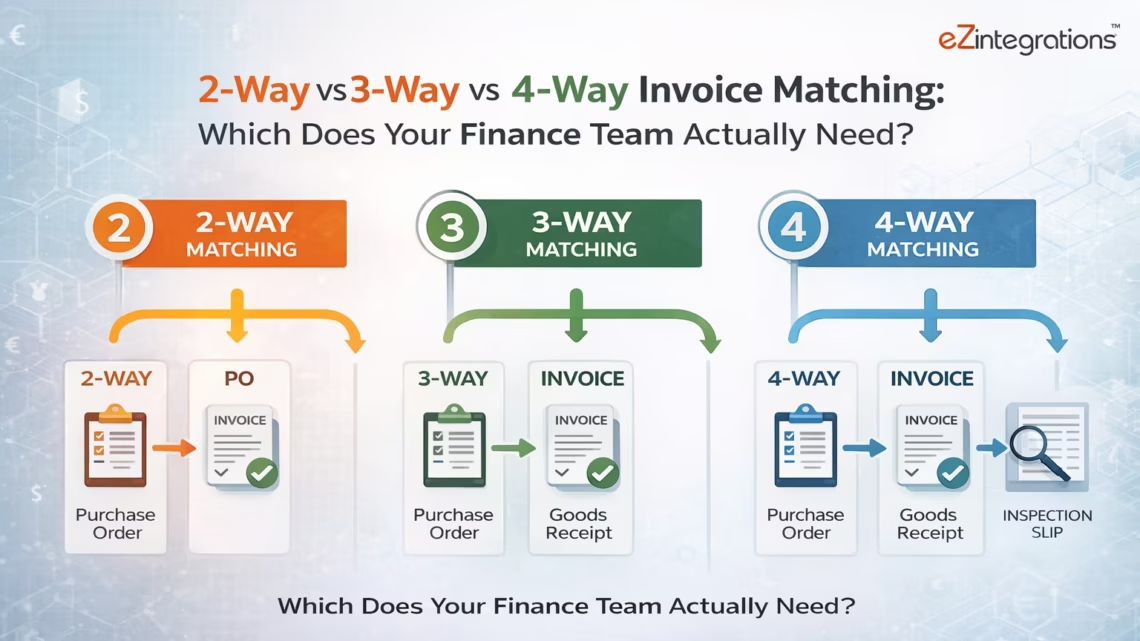
March 27, 20262-way matching compares only the purchase order and supplier invoice, making it fast but less secure. 3-way matching adds the goods received note (GRN) to confirm delivery before payment, and is the standard for physical goods procurement. 4-way matching adds a quality inspection report, required in regulated industries like pharmaceuticals and food manufacturing. eZintegrations automates all three methods using Goldfinch AI Document Intelligence, with configurable matching rules per vendor category, Goldfinch AI (Level 4) deploys in two ways: as Chat UI for ad-hoc exception investigation and AP manager oversight, and as a Workflow Node embedded in integration workflows for fully autonomous, high-volume invoice processing using Level 3 AI Agents.
TL;DR
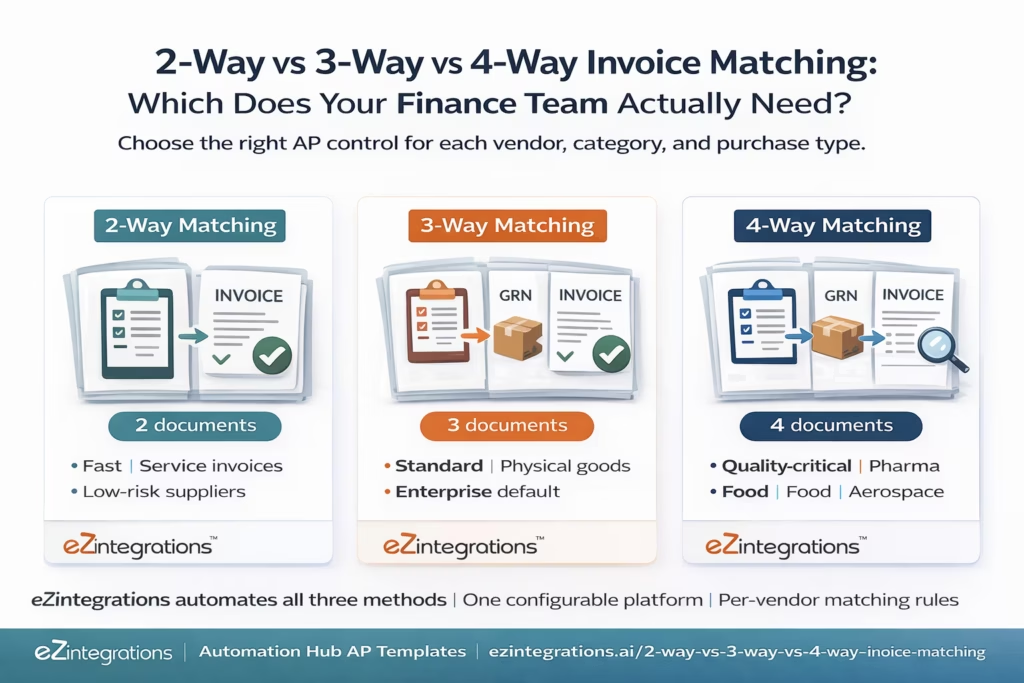
2-way matching: PO + Invoice only. Fast, less secure. Right for service invoices and trusted low-risk suppliers. 3-way matching: PO + GRN + Invoice. The enterprise standard for physical goods. Confirms delivery before payment. 4-way matching: PO + GRN + Invoice + Inspection Report. Required in regulated industries where product quality must be verified before payment is approved. Most enterprise AP functions run 3-way as the default, apply 2-way as an exception for specific vendor categories, and use 4-way for quality-critical procurement lines. eZintegrations automates all three matching modes from the same platform: Goldfinch AI Document Intelligence extracts invoice and inspection report data, API Tool Call retrieves PO and GRN from your ERP, and the configurable matching engine applies the right rule set per vendor, per category, per invoice type.
eZintegrations’ 4-level automation architecture matters here: Level 1 is iPaaS workflow automation, Level 2 is AI Workflows (Document Intelligence, invoice extraction), Level 3 is AI Agents (autonomous decisions at workflow steps, 9 native tools), and Level 4 is Goldfinch AI, the Agentic AI layer that orchestrates multi-agent workflows. Goldfinch AI deploys in two ways: as a Chat UI (interactive, ad-hoc) and as a Workflow Node (embedded inside integration workflows for fully autonomous processing). Both deployment modes are available for invoice matching.
The Matching Method Decision Your Finance Team Keeps Getting Wrong
It is Tuesday morning. Your AP supervisor is staring at 47 invoices in the exception queue. Some were flagged because the quantity on the invoice does not match the GRN. Some have no GRN at all because they are service invoices from recurring consultants. Three are from your pharmaceutical supplier and they require an inspection sign-off that no one has uploaded yet. One more is a hardware vendor who always sends a single lump sum instead of line items.
Your team is applying the same matching rules to all of them. That is the problem.
Not every invoice needs the same level of verification. Applying 3-way matching to a monthly SaaS subscription invoice wastes your AP clerk’s time. Applying only 2-way matching to a pharmaceutical component shipment is a compliance risk. Getting the matching method right, per vendor, per category, per purchase type, is the decision your finance team needs to make once. Then automate.
This guide gives you that decision. And then shows you how eZintegrations runs all three matching methods from a single configurable platform.
What Each Document Does in Invoice Matching
Before comparing the three methods, it helps to understand what each document actually contains and why it matters for payment approval.
The Purchase Order (PO): Your commitment. Issued by your procurement team, the PO authorises the purchase and defines what was agreed with the supplier: vendor, items, quantities, unit prices, total value, delivery date, and cost centre. The PO is a legal contract. Matching against it verifies that the supplier is billing you for what you agreed to pay.
The Goods Received Note (GRN): Your confirmation. Created by your receiving team when delivery arrives, the GRN records what was actually received: items, quantities, delivery date, condition. The GRN is the difference between paying for what you ordered and paying for what you actually got. Without it, you can pay for goods that have not arrived, arrived damaged, or arrived short.
The Supplier Invoice: The vendor’s payment request. Contains invoice number, PO reference, line items, quantities, prices, taxes, total due, payment terms. The invoice is what the supplier claims you owe. Matching verifies that claim against your records.
The Inspection Report: Your quality gate. Used in 4-way matching, created by a quality assurance team after physical inspection of the received goods. Records whether the delivered items met the quality specifications set out in the PO. The inspection report is the difference between confirming receipt and confirming acceptable receipt. A pharmaceutical batch can be received (GRN confirmed) but fail quality tests. Without an inspection report gate, you may pay for a batch you will ultimately reject.
2-Way Matching: When Speed Outweighs Additional Controls
2-way matching compares two documents: the purchase order and the supplier invoice. That is it. No GRN check. No confirmation that goods were received before payment is released.
What it checks: – Does the invoice vendor match the PO vendor? – Does the invoice reference a valid open PO? – Do invoice quantities match PO quantities? – Do invoice unit prices match PO agreed prices (within tolerance)? – Does the invoice total match the PO value (within tolerance)?
What it does not check: – Whether the goods or services were actually delivered – Whether a partial delivery occurred – Whether goods arrived in acceptable condition
When 2-way matching is appropriate:
Service-based purchases where no physical delivery occurs and there is no GRN to produce. A monthly software licence renewal, a consulting retainer, a cloud infrastructure invoice: these do not have a receiving event. You cannot produce a GRN for a Salesforce subscription. 2-way matching is the correct control because the third document (GRN) does not exist for this purchase type.
Trusted high-volume recurring suppliers with a clean invoice and delivery track record. If a supplier has delivered accurately on 200 consecutive invoices and their invoice format is consistent and machine-readable, some organisations apply 2-way matching for efficiency and escalate only on price or quantity deviations above a threshold.
Low-value transactions below a configurable floor. Many organisations set a threshold (e.g. invoices below $500) where 2-way matching applies regardless of purchase type, because the financial risk of a matching error is lower than the cost of the AP time to perform 3-way matching.
The risk you are accepting with 2-way matching:
You can approve and pay an invoice for goods not yet delivered, goods partially delivered, or goods that arrived damaged. For physical goods procurement from a new or lower-trust supplier, this is a meaningful financial risk. 2-way matching is a deliberate trade-off: speed over maximum control.
3-Way Matching: The Enterprise Standard and Why
3-way matching adds the goods received note to the comparison. Before payment is approved, all three documents must align: what you ordered (PO), what you received (GRN), and what you are being billed for (Invoice).
What it checks (all 2-way checks, plus): – Do invoice quantities match the quantity confirmed received in the GRN? – Is there a GRN for this PO before payment is approved? – Was the GRN created within the expected delivery window? – For partial deliveries: is the invoice adjusted to reflect only the quantity received?
Why it is the enterprise default:
Physical goods procurement creates delivery risk. Partial deliveries, damaged goods, short shipments, and freight timing delays mean there is frequently a difference between what was ordered (PO) and what arrived (GRN). Paying before verifying receipt is paying blind.
3-way matching closes that gap. It ensures that your organisation pays for goods that are confirmed received, at the agreed price, in the quantities that actually arrived.
It also deters fraud. An invoice submitted for goods not yet shipped cannot be matched against a GRN that does not exist. 3-way matching is a structural fraud control: no GRN, no payment.
The common challenge with 3-way matching at volume:
Timing mismatches. The invoice arrives before the GRN is created. Your AP team must hold the invoice, track down the receiving team, wait for the GRN to be posted in the ERP, and then resume the match. At 1,000 invoices per month, even a 20% timing mismatch rate creates 200 held invoices requiring follow-up every month.
Automated 3-way matching solves this with a Watcher that monitors the ERP for GRN creation on each held invoice PO and resumes the match automatically when the GRN posts.
4-Way Matching: When Quality Verification Is Non-Negotiable
4-way matching adds a fourth document to the comparison: the inspection or quality verification report. Before payment is approved, all four documents must confirm the transaction was valid: what was ordered (PO), what was received (GRN), what was delivered at acceptable quality (Inspection Report), and what is being billed (Invoice).
What it checks (all 3-way checks, plus): – Has an inspection or quality acceptance report been generated for this delivery? – Did the inspection confirm the goods meet the quality specifications in the PO? – If some units failed inspection, does the invoice reflect only the accepted quantity? – Is the inspection report linked to the specific GRN and PO for this shipment?
Which industries use 4-way matching:
Pharmaceuticals and life sciences: each batch of raw materials, APIs (active pharmaceutical ingredients), or finished goods must have a certificate of analysis (CoA) and quality release before payment is approved. Paying for a batch before quality release creates regulatory risk under GMP (Good Manufacturing Practice) requirements.
Food and beverage manufacturing: incoming ingredients require quality inspection (temperature compliance, contamination testing, shelf life verification) before acceptance. Payment tied to quality acceptance protects against paying for rejected batches.
Aerospace and defence: components must pass dimensional inspection and material certification checks before acceptance. Regulatory frameworks (AS9100, NADCAP) require documented quality gates at goods acceptance.
Medical devices: incoming components (metal, plastics, electronics) require inspection reports and certificates of conformance before being accepted into the production BOM.
Contract manufacturing: manufacturers producing to customer specifications often require customer quality sign-off before the contract manufacturer can approve supplier payment for input materials.
The 4-way matching challenge:
The inspection report is the most variable document of the four. It may be a scanned paper form, a PDF from a quality management system (QMS), an ERP-generated quality inspection record, or a certificate from a third-party lab. Extracting structured data from inspection reports, correlating them to the right GRN and PO, and building them into the payment approval workflow requires document intelligence capable of handling format variability.
This is where Goldfinch AI Document Intelligence, with its AI-based extraction that does not require document-specific templates, becomes the enabling technology for 4-way matching at scale.
Side-by-Side Comparison: 2-Way vs 3-Way vs 4-Way
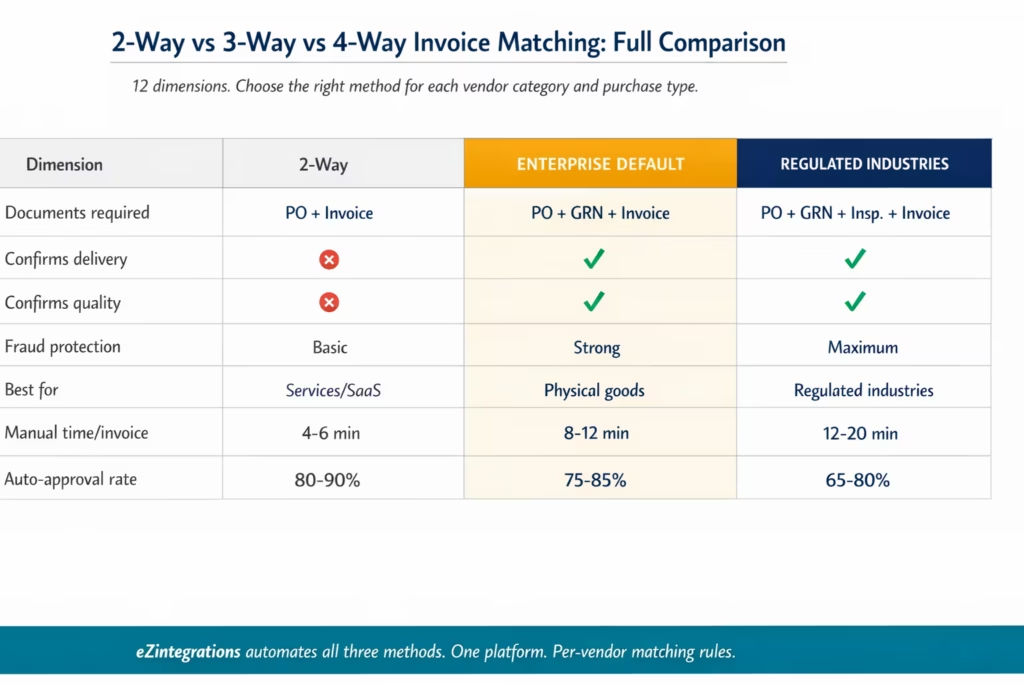
| Dimension | 2 Way Match | 3 Way Match | 4 Way Match |
|---|---|---|---|
| Documents required | PO and Invoice | PO GRN and Invoice | PO GRN Inspection Report and Invoice |
| Confirms ordering terms | Yes | Yes | Yes |
| Confirms delivery | No | Yes | Yes |
| Confirms quality acceptance | No | No | Yes |
| Fraud protection level | Basic | Strong | Maximum |
| Processing speed manual | Fastest | Moderate | Slowest |
| Error or overpayment risk | Higher | Lower | Lowest |
| Suitable for service invoices | Yes | Limited | No |
| Suitable for physical goods | Limited | Yes | Yes |
| Suitable for regulated goods | No | Partial | Yes |
| Who creates the fourth document | Not applicable | Not applicable | Quality assurance team or QMS system |
| Typical industries | SaaS services recurring billing | Manufacturing retail distribution | Pharma food aerospace medical |
| AP analyst time manual | 4 to 6 minutes per invoice | 8 to 12 minutes per invoice | 12 to 20 minutes per invoice |
| Automation auto approval rate | 80 to 90 percent | 75 to 85 percent | 65 to 80 percent depending on inspection |
Which Matching Method Should Your Organisation Use?
The answer is not one method for all invoices. Every mature enterprise AP function applies different matching rules to different purchase categories. Here is a practical decision framework.
Use 2-way matching when: – The invoice is for services with no physical delivery (software licences, consulting, subscriptions, cloud infrastructure) – The supplier is a recurring vendor with a long track record of accurate invoicing and delivery – The invoice value is below your organisation’s low-value threshold (commonly $250-$1,000) – You are processing invoices from internal cost centres or intercompany transactions where a GRN is not generated
Use 3-way matching when: – The invoice covers physical goods with a corresponding delivery event – The supplier is new, medium-trust, or operating in a category where partial deliveries are common – The invoice value is above your low-value threshold – Your ERP generates GRNs as part of the goods receipt workflow (SAP MIGO, Oracle Receiving, NetSuite item receipts) – You need a fraud control that prevents payment for undelivered goods
Use 4-way matching when: – Your industry requires quality verification at goods acceptance as part of regulatory compliance (pharma, food, aerospace, medical devices) – Your quality management system (QMS) or ERP generates inspection records or certificates of analysis at goods receipt – Your contracts with suppliers specify acceptance testing or quality sign-off as a condition of payment – You are procuring components or raw materials for regulated production where a batch rejection after payment would be costly
Mixed-mode matching by vendor category (recommended):
Most enterprise AP functions that have designed their matching rules deliberately operate like this:
| Purchase category | Matching method |
|---|---|
| SaaS and software licences | 2 way |
| Professional services consulting | 2 way |
| Recurring low value MRO | 2 way |
| Physical goods standard suppliers | 3 way |
| New suppliers any physical goods | 3 way |
| High value capital goods | 3 way |
| Pharmaceutical raw materials | 4 way |
| Food and beverage ingredients | 4 way |
| Aerospace and defence components | 4 way |
| Medical device components | 4 way |
In eZintegrations, this mixed-mode logic is configured per vendor category in the matching engine: the platform applies 2-way, 3-way, or 4-way rules automatically based on the vendor’s category tag in the ERP vendor master.
How eZintegrations Automates All Three Methods
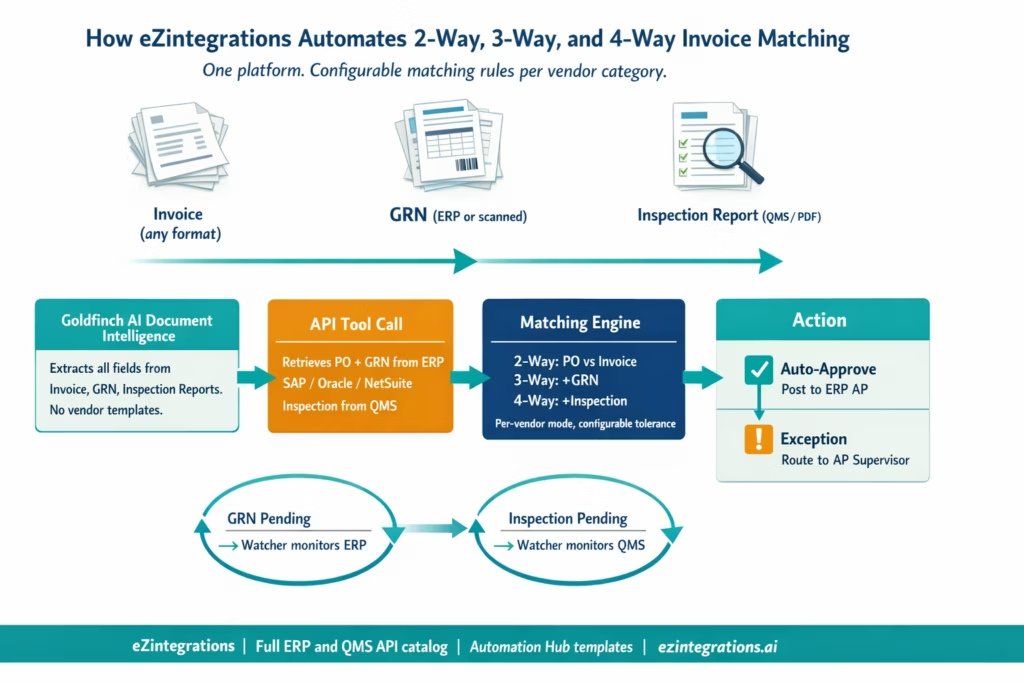
eZintegrations runs 2-way, 3-way, and 4-way matching from a single platform using the eZintegrations API catalog, Goldfinch AI Document Intelligence, and the Automation Hub template library. The same core components handle all three matching types. The difference is configuration.
Goldfinch AI Document Intelligence extracts structured data from all four documents across all matching methods: – Invoice PDFs in any format (no vendor-specific template required) – GRN documents from ERP systems (via API extraction) or scanned paper GRNs (via Document Intelligence) – Inspection reports and certificates of analysis from any format: QMS-generated PDFs, third-party lab certificates, scanned paper inspection forms. AI extraction handles format variability without template configuration per report type.
API Tool Call retrieves the matching documents from your systems in real time: – PO data from ERP procurement API (SAP OData V4 A_PurchaseOrder, Oracle Fusion Procurement REST, NetSuite SuiteQL on transaction table with recordtype = 'purchaseorder') – GRN data from ERP goods receipt API (SAP OData V4 A_MaterialDocumentHeader, Oracle Fusion Receiving REST, NetSuite SuiteQL on itemreceipt) – Inspection records from your QMS API (SAP QM inspection lots via A_InspectionLot OData V4, Veeva Vault Quality REST, MasterControl QMS API, or any QMS with a REST interface)
Configurable Matching Engine applies the right rule set per invoice type: – 2-way mode: PO vs Invoice comparison only (quantity, price, vendor, total within tolerance) – 3-way mode: adds GRN comparison (quantity received vs quantity invoiced) – 4-way mode: adds inspection report comparison (quality status = Accepted, accepted quantity matches GRN received quantity and invoice billed quantity) – Mixed-mode: vendor category tag from ERP vendor master determines which mode applies to each incoming invoice automatically
Integration Workflow as Tool posts auto-approved invoices to the ERP AP module and updates the payment queue. For 4-way matching, the workflow also updates the QMS record to indicate the payment was released against a specific inspection lot.
Watcher Tools handle the timing dependencies unique to each matching method: – For 3-way: monitor ERP for GRN creation when invoice arrives before delivery – For 4-way: monitor QMS for inspection report completion when invoice and GRN exist but inspection sign-off is pending
Goldfinch AI: Chat UI vs Workflow Node Deployment for Invoice Matching
Understanding eZintegrations’ 4-level automation architecture helps clarify how the platform handles invoice matching end to end.
Level 1 (iPaaS Workflows) handles structured data movement: routing invoice files, triggering on email arrival, connecting to ERP APIs. Level 2 (AI Workflows) handles unstructured data: Goldfinch AI Document Intelligence extracts invoice fields from PDFs without vendor-specific templates. Level 3 (AI Agents) handles autonomous decision-making at workflow steps: the matching engine agent compares PO, GRN, and inspection report data, applies tolerance rules, and decides approve or escalate. Level 4 (Goldfinch AI) is the Agentic AI orchestration layer, available in two deployment modes for your AP team.
Goldfinch AI Deployed as Chat UI (Ad-hoc and Exception-Driven)
Goldfinch AI Chat UI is an interactive agentic AI interface where your AP manager or controller can have a direct conversation with the agent about specific invoices, matching exceptions, or AP decisions.
In Chat UI mode, your AP manager types: “Show me all invoices that failed 3-way matching this week and tell me the primary reason for each failure.” Goldfinch AI searches the exception queue, retrieves the matching records, and responds with a structured summary: 12 quantity mismatches, 7 timing mismatches (GRN pending), 4 price variances, and 2 potential duplicates. The manager can then drill into any specific invoice directly from the chat: “On the Acme Industrial invoice from March 14, what was the GRN quantity versus the invoice quantity?” Goldfinch AI retrieves the data and answers.
This deployment mode is designed for: exception investigation, on-demand matching status queries, supplier dispute preparation, audit-ready evidence retrieval, and AP manager oversight without navigating ERP screens.
Goldfinch AI Deployed as Workflow Node (Fully Autonomous, Embedded in Integration Workflows)
When deployed as a Workflow Node, Goldfinch AI operates as a fully autonomous agent embedded inside the eZintegrations integration workflow. No human initiation is required per invoice. The Level 3 AI Agents within the workflow handle individual matching decisions (compare PO vs GRN vs invoice, apply tolerance rules, trigger approve or escalate). Goldfinch AI at Level 4 orchestrates the overall process, coordinates across agents, and synthesises the outcome. Humans are involved only when the agent determines escalation is necessary.
For invoice matching deployed as Workflow Node: – The workflow fires when a new invoice arrives (email attachment or supplier portal upload) – The agent extracts the invoice using Document Intelligence, retrieves PO and GRN via API Tool Call, applies the matching rules, makes the approve or escalate decision, posts approved invoices to the ERP, routes exceptions with pre-populated evidence, and logs the full audit record – No AP clerk initiates any step – Human involvement occurs only when the agent’s confidence is below the configurable threshold or when the exception requires supplier contact or management approval – At 1,000 invoices per month with an 80% auto-approval rate, your AP team touches 200 invoices rather than 1,000
Which deployment for which situation:
| Situation | Goldfinch AI Deployment |
|---|---|
| High volume routine invoice processing | Workflow Node embedded autonomous |
| Exception investigation and resolution | Chat UI |
| Audit preparation and evidence retrieval | Chat UI |
| Month end exception queue review | Chat UI |
| Supplier dispute investigation | Chat UI |
| Real time payment queue management | Workflow Node plus Chat UI for escalations |
| Finance controller oversight queries | Chat UI |
Most enterprise AP functions use both: Goldfinch AI as Workflow Node handles the volume, and Goldfinch AI Chat UI gives the AP manager and controller a direct line to query the system, investigate exceptions, and oversee the process without navigating ERP reports.
Step-by-Step: Automated Invoice Matching Across All Three Methods
Here is how a single invoice processing day looks when eZintegrations handles all three matching types simultaneously.
8:00 AM: Invoice batch arrives
30 invoices land overnight: 18 from physical goods suppliers, 8 SaaS and service invoices, and 4 from your pharmaceutical raw material supplier.
8:01 AM: Matching engine assigns the mode per invoice
The matching engine reads the vendor master in the ERP for each invoice’s vendor code and assigns the matching mode: the 18 physical goods invoices go to 3-way mode, the 8 service invoices go to 2-way mode, and the 4 pharmaceutical invoices go to 4-way mode.
8:02 AM: Goldfinch AI Document Intelligence extracts all 30 invoices
Invoice fields extracted from all 30 PDFs in parallel. Vendor, invoice number, PO reference, line items, quantities, prices, totals. For the 4 pharmaceutical invoices, the corresponding certificates of analysis (CoA PDFs) attached to the invoice emails are also extracted: batch number, test results, acceptance status.
8:03 AM: API Tool Calls retrieve PO, GRN, and QMS records
For each invoice, the relevant ERP records are retrieved simultaneously: – 2-way invoices: PO data only – 3-way invoices: PO + GRN (14 of 18 have a GRN; 4 do not because delivery has not been received yet) – 4-way invoices: PO + GRN + QMS inspection lot records from the SAP QM module
8:04 AM: Matching runs across all three modes
2-way (8 invoices): 7 match within tolerance and are approved. 1 has a price variance of 12% above PO rate: exception flagged, routed to AP supervisor.
3-way (18 invoices): 11 have all documents and match. Auto-approved. 4 are held pending GRN: Watcher monitors the ERP for GRN creation on those 4 POs. 2 have quantity mismatches (invoice quantity higher than GRN quantity): exception routed with comparison evidence.
4-way (4 pharmaceutical invoices): 3 have CoA attached, QMS records show Quality Accepted, quantities align. Auto-approved. 1 has a CoA showing a test failure on one of three parameters: invoice held, QA manager notified with the specific failing test result and the batch number, payment blocked pending retest or credit note.
8:05 AM: Auto-posting and escalation routing complete
21 invoices auto-posted to ERP AP queue. 9 invoices routed to AP supervisor or QA manager with pre-populated exception reports. Total elapsed time: 4-5 minutes. Human review required for 9 invoices, not 30.
During the day: AP Manager uses Goldfinch AI UI Chat
“What’s the status of the pharmaceutical exception from this morning?” Goldfinch AI responds: “Batch 2026-PAR-041 failed pH specification on CoA test 3. Invoice INV-2026-1847 from BioChemSource is on hold. QA manager was notified at 08:05. No response yet. Escalation SLA expires in 6 hours.”
Key Outcomes and Results
Enterprise AP teams automating all three matching methods with eZintegrations achieve the following outcomes. Ranges reflect typical enterprise deployments based on invoice volume, ERP system, and configuration specifics.
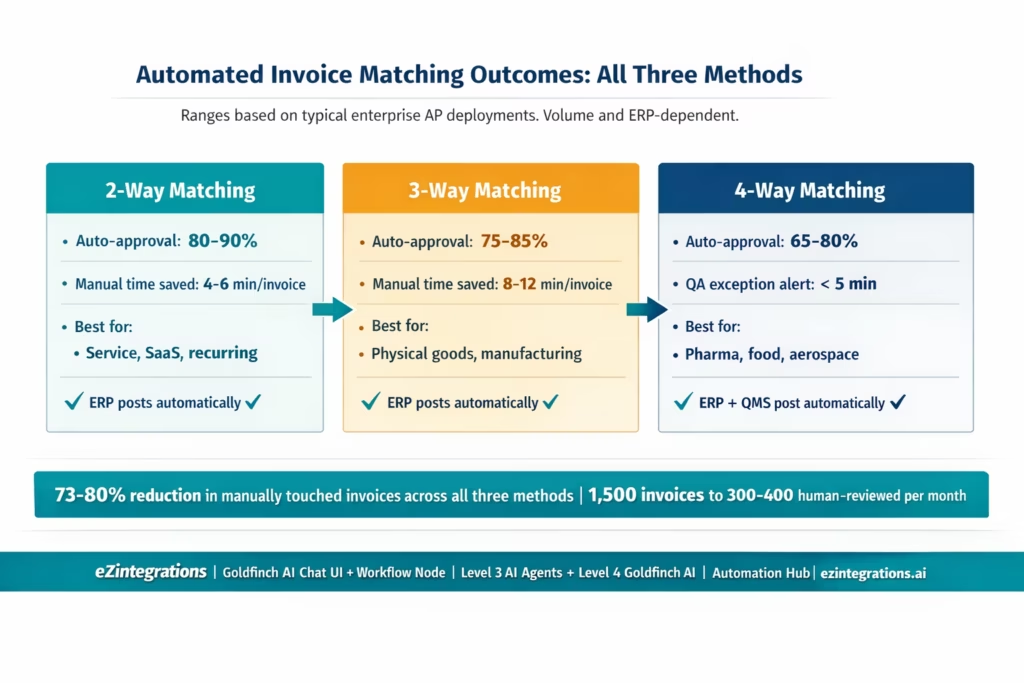
Auto-approval rates by matching method: – 2-way: 80-90% of service and recurring invoices auto-approved – 3-way: 75-85% of physical goods invoices auto-approved – 4-way: 65-80% of inspection-dependent invoices auto-approved (dependent on QMS timing)
Overall AP workload reduction: For a team processing 1,500 invoices per month across a mixed matching portfolio (60% 3-way, 25% 2-way, 15% 4-way), automation reduces the human-touched invoice count from 1,500 to approximately 300-400, a 73-80% reduction in manual handling.
Processing time: – Auto-matched invoices: 30-90 seconds end-to-end, from ingestion to ERP posting (all three methods) – Exception invoices: pre-populated exception reports reduce investigation time from 15-30 minutes to 3-8 minutes per exception – 4-way matching exception handling: QA manager receives structured exception with CoA extract, failing test parameters, and batch reference, reducing investigation time from 45-90 minutes to 10-20 minutes
Compliance and audit benefits for 4-way matching organisations: Every payment is linked to a QMS inspection lot with quality acceptance status. Regulatory auditors reviewing AP records find a complete, structured record per invoice: PO, GRN, inspection lot reference, CoA extract, matching decision, and payment posting. Manual 4-way matching typically produces fragmented records across ERP, QMS, email, and paper. Automated matching produces a single structured audit record per invoice.
Watcher Tools timing mismatch handling: For organisations where 15-25% of 3-way invoices arrive before the GRN exists, Watcher-based automatic match resumption eliminates the manual follow-up task that would otherwise consume 3-6 minutes per invoice per hold cycle.
Before vs After: Manual vs Automated Invoice Matching Across All Three Methods
| Dimension | Manual All Methods | Automated with eZintegrations |
|---|---|---|
| Method assignment per invoice | AP clerk judgement inconsistent | Automatic by vendor category from ERP vendor master |
| 2 way service invoice processing | 4 to 6 minutes per invoice manual PO lookup | 30 seconds auto matched ERP posted audit logged |
| 3 way goods receipt matching | 8 to 12 minutes per invoice three system lookups | 60 seconds auto matched or Watcher monitors for GRN |
| 4 way inspection report handling | QA emailed waiting manual match | CoA extracted by Document Intelligence QMS queried auto matched on acceptance |
| Timing mismatch no GRN yet | Invoice held manual follow up per invoice | Watcher auto resumes when GRN posts |
| Exception investigation | AP manager reads three documents manually | Pre populated exception report with extracted data comparison and variance highlighted |
| Audit trail | Email threads spreadsheet notes manual | Structured record per invoice documents retrieved fields compared decision logged |
| Pharmaceutical batch hold | QA email chain payment risk if missed | Payment auto blocked on CoA failure QA notified with test detail within minutes |
| Cross method visibility | Separate queues no unified view | Goldfinch AI Chat UI unified query across all methods |
How to Get Started
Step 1: Decide Your Matching Mode Configuration
Before importing a template, map your vendor categories to matching methods. Your ERP vendor master likely already has vendor category tags. Define which categories use 2-way, 3-way, or 4-way. This configuration lives in the eZintegrations matching engine, not in your ERP, so it does not require ERP development. Typical mapping session: 1-2 hours with your AP manager and procurement lead.
Step 2: Import the AP Invoice Processing Template from the Automation Hub
The Automation Hub AP Invoice Processing template includes the 2-way and 3-way matching engine pre-configured. For 4-way matching, extend the template by adding the QMS API connection and inspection report extraction step. Import in one click.
Step 3: Connect Your ERP and (for 4-Way) Your QMS
Add ERP credentials to the eZintegrations credential vault: SAP, Oracle Fusion Cloud, or NetSuite. For 4-way matching, add your QMS API credentials (SAP QM, Veeva Vault, MasterControl, TrackWise, or any QMS with REST access). Credential setup: 15-20 minutes per system.
Step 4: Configure Tolerance Thresholds and Exception Routing
Set price and quantity tolerances per matching mode. Configure the AP supervisor routing for 2-way and 3-way exceptions. Configure the QA manager routing for 4-way inspection failures. Set SLA escalation windows (e.g. 48-hour unresolved exception escalates to finance controller).
Step 5: Enable Goldfinch AI Chat UI for Your AP Manager
Goldfinch AI Chat UI gives your AP manager and controller a natural language interface to the matching system. Enable access, point it at the invoice matching data, and your AP manager can query the system directly without ERP navigation. Configuration: 30-60 minutes.
Total time from template import to production: 5-8 hours for 3-way baseline. Add 2-3 hours for 4-way QMS extension.
FAQs
Use the Right Matching Method for Every Invoice
Getting invoice matching right is not about picking one method and applying it everywhere. It is about applying the right control to each purchase type: 2-way where speed and trust justify it, 3-way where delivery confirmation protects you, and 4-way where quality acceptance is a regulatory or contractual requirement.
The manual challenge is that applying three different matching rules to 1,000+ invoices per month consistently, without errors, and with a complete audit trail per invoice, is beyond what a spreadsheet-and-email workflow can sustain. The automated solution is a configurable matching engine that reads the vendor master, assigns the right method, and processes each invoice through the correct document comparison automatically.
eZintegrations provides that engine, with Goldfinch AI Document Intelligence (Level 2) for extraction, Level 3 AI Agents for autonomous matching decisions, API Tool Call for ERP and QMS data retrieval, and Goldfinch AI (Level 4) in two deployment modes: as a Workflow Node for autonomous volume processing and as Chat UI for AP manager oversight, exception investigation, and on-demand matching queries.
Explore the AP Invoice Processing templates in the Automation Hub and start with the 3-way matching baseline. Add 2-way exceptions and 4-way QMS extension as your configuration expands. Or book a free demo to see the matching engine configuration for all three methods with your specific ERP and vendor categories.

